
Complete the kit




Get the latest gadgets delivered free with Prime
- Fast, free delivery on millions of items
- Prime Video, Amazon Music and more included
- Member-only deals all year
Key Takeaways
- WiFi 7 routers like the NETGEAR Nighthawk offer significant speed advantages but require compatible devices to see real-world benefits.
- The TP-Link AX5400 remains the sweet spot for most users, balancing cost and performance without the premium price tag of newer standards.
- Carrier-specific kits like the T-Mobile G5AR-1 often lock users into specific networks, limiting flexibility compared to unlocked alternatives.
- WiFi 6E models like the Archer AXE75 provide cleaner airwaves via the 6GHz band, reducing interference in densely populated urban areas.
- Budget options like the Archer A54 struggle to maintain stable connections when multiple devices access 5G speeds simultaneously.
| TP-Link AX5400 WiFi 6 Router (Archer AX73) |  | Best Wi-Fi 6 Upgrade for 5G Gateway Owners | Wi-Fi standard: Wi-Fi 6 | Advertised Wi-Fi speed: Up to 5,400 Mbps | Coverage: Up to 2,000 sq. ft. | VIEW ON AMAZON | See Our Full Breakdown |
| T-Mobile G5AR-1 5G Gateway and Wi-Fi Router Kit |  | Best Direct 5G Gateway | Model: G5AR-1 | Cellular connectivity: 5G; designed for T-Mobile service | Wi-Fi generation: Wi-Fi 7 | VIEW ON AMAZON | See Our Full Breakdown |
| TP-Link AX3000 Dual-Band Wi-Fi 6 Router for Home |  | Best Midrange Wi-Fi 6 Add-On | Wi-Fi generation: Wi-Fi 6 | 5 GHz speed: Up to 2,402 Mbps | 2.4 GHz speed: Up to 574 Mbps | VIEW ON AMAZON | See Our Full Breakdown |
| TP-Link AC1200 WiFi Router Dual Band Wireless Internet Router (Archer A54) | 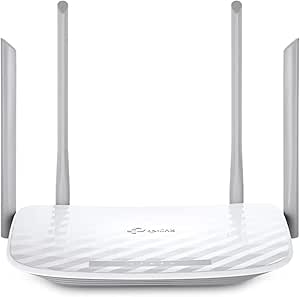 | Best Basic Router for Small Homes | Wireless standard: 802.11a/b/g/n/ac | 5 GHz speed: Up to 867 Mbps | 2.4 GHz speed: Up to 300 Mbps | VIEW ON AMAZON | See Our Full Breakdown |
| TP-Link BE6500 Dual-Band WiFi 7 Router (BE400) |  | Best Premium Wi-Fi 7 Router | Wi-Fi generation: Wi-Fi 7 | Bands: Dual-band | 5 GHz speed: Up to 5,764 Mbps | VIEW ON AMAZON | See Our Full Breakdown |
| TP-Link AX1800 WiFi 6 Router (Archer AX21 V5) |  | Best Basic Wi-Fi 6 Router | Wi-Fi standard: Wi-Fi 6 (802.11ax) | Total bandwidth: Up to 1.8 Gbps | 5 GHz speed: Up to 1200 Mbps | VIEW ON AMAZON | See Our Full Breakdown |
| Cudy LT500 4G LTE AC1200 Dual-Band Wi-Fi 5 Router | 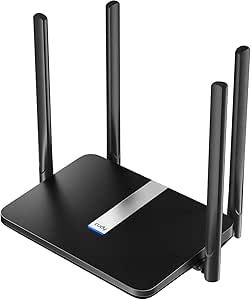 | Best Cellular Backup Pick | Cellular standard: 4G LTE Cat 4 | Maximum cellular download: Up to 150 Mbps | Maximum upstream data transfer: Up to 50 Mbps | VIEW ON AMAZON | See Our Full Breakdown |
| TP-Link AXE5400 Tri-Band WiFi 6E Router (Archer AXE75) |  | Best for Low-Latency Wi-Fi | Wi-Fi speed: Up to 5400 Mbps | Bands: Tri-band: 6 GHz, 5 GHz, 2.4 GHz | Processor: 1.0 GHz dual-core | VIEW ON AMAZON | See Our Full Breakdown |
| NETGEAR Nighthawk WiFi 7 Router RS90, Up to 2,000 sq ft, 3.6 Gbps |  | Best Wi-Fi 7 Upgrade | Wi-Fi standard: Wi-Fi 7 | Maximum speed: Up to 3.6 Gbps | Coverage: Up to 2,000 sq ft | VIEW ON AMAZON | See Our Full Breakdown |
| GL.iNet GL-MT6000 Flint 2 Wi-Fi 6 Gaming Router Dual 2.5G Ports |  | Best for Advanced Wired Setups | Wi-Fi standard: Wi-Fi 6 | Maximum speed: Up to 6 Gbps | Frequency bands: Dual-band | VIEW ON AMAZON | See Our Full Breakdown |
| NETGEAR Nighthawk WiFi 7 Router, Up to 2,500 sq ft, 9.3 Gbps |  | Best for High-Capacity Smart Homes | WiFi speed: Up to 9.3 Gbps | Coverage: Up to 2,500 sq ft | WiFi bands: Tri-band: 2.4 GHz, 5 GHz, and 6 GHz | VIEW ON AMAZON | See Our Full Breakdown |
| 5g home internet router | Security |
|---|---|
| TP-Link AX5400 WiFi 6 Router | TP-Link HomeShield |
| T-Mobile G5AR-1 5G Gateway and | — |
| TP-Link AX3000 Dual-Band Wi-Fi | TP-Link HomeShield |
| TP-Link AC1200 WiFi Router Dua | — |
| TP-Link BE6500 Dual-Band WiFi | WPA3, HomeShield, VPN support |
| TP-Link AX1800 WiFi 6 Router | Advanced security with VPN support |
| Cudy LT500 4G LTE AC1200 Dual- | — |
| TP-Link AXE5400 Tri-Band WiFi | TP-Link HomeShield |
| NETGEAR Nighthawk WiFi 7 Route | NETGEAR Armor, 30-day trial |
| GL.iNet GL-MT6000 Flint 2 Wi-F | — |
| NETGEAR Nighthawk WiFi 7 Route | Advanced Router Protection; NETGEAR Armor trial |
More Details on Our Top Picks
TP-Link AX5400 WiFi 6 Router (Archer AX73)
The Archer AX73 is a strong choice when your 5G gateway already supplies the cellular connection and you want more capable Wi-Fi inside the home. Its Wi-Fi 6 design, up to 5,400 Mbps advertised wireless speed, and support for multiple devices suit households with simultaneous streaming, gaming, and smart-home traffic. Compared with the more powerful Wi-Fi 7 TP-Link BE6500, it gives up newer wireless features and the listed 2.5 Gbps ports, but remains a substantial step up from the basic Archer A54. The main limitation for this roundup is that it is not a 5G modem or gateway: it needs an existing internet connection, and the product data says a modem is required for most providers. Choose it for local Wi-Fi capacity, not to connect directly to a 5G network.
Pros:- Wi-Fi 6 with advertised speeds up to 5,400 Mbps supports demanding home wireless use.
- Six external antennas and listed coverage up to 2,000 sq. ft. suit larger spaces than the Archer A54.
- MU-MIMO and OFDMA help serve multiple devices at once.
- USB 3.0 and TP-Link HomeShield add media-sharing and security options.
Cons:- Requires a separate internet source and a modem for most conventional ISP setups; it is not a cellular 5G gateway.
- Does not list multi-gigabit Ethernet ports, unlike the BE6500.
- Setup may be less approachable for buyers who are new to router configuration.
Best for: Households with a separate 5G gateway that want Wi-Fi 6 capacity for several active devices and broad indoor coverage.
Not ideal for: Buyers seeking a single device that connects directly to cellular 5G; this router does not include a 5G modem or gateway.
- Wi-Fi standard:Wi-Fi 6
- Advertised Wi-Fi speed:Up to 5,400 Mbps
- Coverage:Up to 2,000 sq. ft.
- Antennas:6 external antennas
- Technology:4T4R, HE160
- USB:1 × USB 3.0
- Security:TP-Link HomeShield
- Power:12 V, 2.5 A
Our verdict“Choose the Archer AX73 if you already have a 5G gateway and want a capable Wi-Fi 6 router to distribute that connection around a busy home.”
T-Mobile G5AR-1 5G Gateway and Wi-Fi Router Kit
Unlike the standalone TP-Link routers in this group, the T-Mobile G5AR-1 is designed to bring a 5G cellular connection into the home and provide Wi-Fi from the same device. That makes it the most direct fit for someone choosing 5G home internet hardware, rather than adding Wi-Fi to an existing gateway. It supports T-Mobile service and Wi-Fi 7, giving compatible devices access to a newer wireless standard without requiring a separate router such as the Archer AX73. The tradeoff is provider dependence: the listing specifies T-Mobile compatibility, so it is not a flexible replacement for an unlocked multi-carrier gateway. Its listed two ports and 1,000 Mbps LAN rate also offer less wired flexibility than the TP-Link BE6500. The supplied data conflicts on dual-band versus tri-band details, so I would confirm the exact hardware configuration before buying.
Pros:- Combines a 5G gateway and Wi-Fi router instead of requiring a separate cellular modem.
- Designed for T-Mobile 5G service.
- Wi-Fi 7 supports compatible newer devices.
- Includes Ethernet connectivity and two listed ports.
Cons:- The product data specifies T-Mobile compatibility, limiting its appeal to customers on other networks.
- Two ports and a listed 1,000 Mbps LAN data rate provide less wired capacity than the BE6500.
- Band details are inconsistent in the supplied information, which makes the wireless configuration less clear.
Best for: T-Mobile customers who want one device to receive a 5G home internet connection and provide Wi-Fi 7 to compatible household devices.
Not ideal for: People using another cellular provider or buyers who need several wired devices or clearly documented band specifications.
- Model:G5AR-1
- Cellular connectivity:5G; designed for T-Mobile service
- Wi-Fi generation:Wi-Fi 7
- Wi-Fi bands:Dual-band listed; description also mentions tri-band
- LAN data rate:1,000 Mbps
- Ports:2
- Dimensions:9.25 × 7.36 × 2.59 in
- Weight:3.2 lb
- Security protocols:WEP, WPA3
Our verdict“Choose the G5AR-1 if you use T-Mobile 5G and want a single gateway-router unit; skip it if you need broader carrier choice or more wired connections.”
TP-Link AX3000 Dual-Band Wi-Fi 6 Router for Home
The TP-Link AX3000 makes sense as a Wi-Fi upgrade for a 5G gateway when you want Wi-Fi 6 features without moving up to the Archer AX73 or the Wi-Fi 7 BE6500. Its dual-band speeds—2,402 Mbps on 5 GHz and 574 Mbps on 2.4 GHz—give the main band room for streaming and gaming, while OFDMA and four external antennas help manage connected devices around the home. Compared with the Archer A54, it offers newer Wi-Fi 6 technology and higher stated 5 GHz throughput; compared with the AX73, it has lower advertised speed and fewer listed antennas. This is still a router, not a 5G gateway, so it cannot receive cellular service on its own. The supplied specifications also omit port count and wired speeds, which may frustrate buyers planning a wired setup.
Pros:- Wi-Fi 6 and OFDMA help handle multiple connected devices more efficiently than the Archer A54’s listed Wi-Fi 5 standard.
- Dual-band speeds are listed at 2,402 Mbps on 5 GHz and 574 Mbps on 2.4 GHz.
- Four high-gain antennas and Beamforming support broader wireless coverage.
- HomeShield security and Alexa voice-control support add management options.
Cons:- Requires a separate internet connection and does not connect directly to cellular 5G.
- Port count and wired port speeds are not specified in the supplied product data.
- Some listed security features may require a subscription or extra setup.
Best for: Households with an existing 5G gateway that want an approachable Wi-Fi 6 upgrade for streaming, gaming, and everyday connected devices.
Not ideal for: Buyers who need a cellular 5G gateway, detailed wired-port specifications, or the larger stated coverage and higher advertised speed of the Archer AX73.
- Wi-Fi generation:Wi-Fi 6
- 5 GHz speed:Up to 2,402 Mbps
- 2.4 GHz speed:Up to 574 Mbps
- Bands:Dual-band
- Wireless standards:802.11ax, 802.11ac, 802.11b
- Antennas:4 high-gain external antennas
- Features:OFDMA, Beamforming, Guest Mode, QoS, Remote Access, WPS
- Power compatibility:100–240 V
- Security:TP-Link HomeShield
Our verdict“Pick the AX3000 for a Wi-Fi 6 refresh behind an existing 5G gateway when you do not need the AX73’s higher advertised speed or the BE6500’s Wi-Fi 7 features.”
TP-Link AC1200 WiFi Router Dual Band Wireless Internet Router (Archer A54)
The Archer A54 is the simplest option here for adding basic Wi-Fi to a separate 5G gateway, but it is not a 5G device itself. Its AC1200-class dual-band Wi-Fi and stated coverage up to 1,000 sq. ft. suit a smaller home with routine browsing and streaming rather than a high-demand, device-heavy setup. Compared with the Wi-Fi 6 AX3000 and AX73, it lacks the newer standard and their higher listed wireless speeds; its advantage is a straightforward feature set, five ports, and app-based management. WPA3 support and EasyMesh compatibility provide some room to build out the network, though the listed coverage is modest beside the BE6500’s 2,400 sq. ft. figure. Buyers should view it as a basic Wi-Fi router for an existing internet source, not as a way to receive 5G service.
Pros:- Four external antennas and listed coverage up to 1,000 sq. ft. suit smaller spaces.
- Five ports offer more listed wired connections than the G5AR-1’s two ports.
- WPA3 support and TP-Link Tether app control provide current security and convenient management.
- EasyMesh compatibility can support a compatible whole-home Wi-Fi setup.
Cons:- Wi-Fi 5 and lower advertised throughput trail the AX3000, AX73, and BE6500.
- Coverage is more limited than the larger TP-Link routers in this group.
- Needs a separate modem or gateway and cannot connect directly to 5G cellular service.
Best for: People in smaller homes who already have a 5G gateway and need basic dual-band Wi-Fi with app management and several wired ports.
Not ideal for: Large households, heavy gaming or streaming users, and anyone seeking a router with a built-in 5G cellular connection or Wi-Fi 6.
- Wireless standard:802.11a/b/g/n/ac
- 5 GHz speed:Up to 867 Mbps
- 2.4 GHz speed:Up to 300 Mbps
- Total bandwidth:Up to 1,200 Mbps
- Coverage:Up to 1,000 sq. ft.
- Antennas:4 external antennas
- Ports:5
- Security protocols:WPA3, WPA2-Enterprise, WPA2-PSK
- Management:TP-Link Tether app
Our verdict“Choose the Archer A54 for basic Wi-Fi in a smaller home behind a separate 5G gateway, but move to the AX3000 or AX73 for heavier device use.”
TP-Link BE6500 Dual-Band WiFi 7 Router (BE400)
For a 5G home internet setup that needs strong local Wi-Fi and fast wired connections, the TP-Link BE6500 is the most feature-rich standalone router in this batch. Wi-Fi 7, Multi-Link Operation, and support for up to 90 devices aim at busy homes with newer compatible phones, computers, and smart-home gear. Its listed 2.5 Gbps WAN/LAN and 2.5 Gbps LAN ports also give it a wired advantage over the AX73 and AX3000. But the extra capability does not make it a cellular gateway: it needs a separate modem or 5G gateway for internet access. Its dual-band design also lacks a 6 GHz band, unlike a tri-band Wi-Fi 6E option elsewhere in the roundup. This is a premium choice for building the home network around a 5G gateway, not for replacing one.
Pros:- Wi-Fi 7 and Multi-Link Operation support newer compatible devices and demanding wireless use.
- Listed coverage up to 2,400 sq. ft. and capacity for up to 90 devices suit larger, connected homes.
- Two 2.5 Gbps ports offer faster wired options than the AX73 and AX3000.
- WPA3, HomeShield, VPN support, and app setup provide a broad set of network tools.
Cons:- Requires a separate modem or 5G gateway; it does not receive cellular 5G service itself.
- Dual-band operation does not include a 6 GHz band.
- Does not work with TP-Link Deco mesh Wi-Fi systems, and its advanced options may take time to configure.
Best for: Tech-forward households with a separate 5G gateway, many connected devices, and newer Wi-Fi 7 clients or multi-gigabit wired equipment.
Not ideal for: Buyers wanting a one-box 5G cellular gateway, a 6 GHz band, or a simple router for a small home with basic Wi-Fi needs.
- Wi-Fi generation:Wi-Fi 7
- Bands:Dual-band
- 5 GHz speed:Up to 5,764 Mbps
- 2.4 GHz speed:Up to 688 Mbps
- Coverage:Up to 2,400 sq. ft.
- Device capacity:Up to 90 devices
- Ports:1 × 2.5 Gbps WAN/LAN, 1 × 2.5 Gbps LAN, 3 × 1 Gbps LAN
- Security:WPA3, HomeShield, VPN support
- Dimensions:10.6 × 6 × 1.9 in
Our verdict“Choose the BE6500 if you already have a 5G gateway and want Wi-Fi 7, multi-gigabit ports, and room for many devices; skip it if you need an all-in-one cellular gateway.”
TP-Link AX1800 WiFi 6 Router (Archer AX21 V5)
The Archer AX21 is a straightforward way to add Wi-Fi 6 to a home network, but it is not a 5G gateway: it needs an existing modem or internet connection and does not accept a SIM. Its dual-band design and OFDMA support help multiple devices share the connection, while four antennas and beamforming are intended to improve coverage around the home. Compared with the Cudy LT500, it offers newer Wi-Fi but lacks cellular access and failover. It is also a simpler, less ambitious choice than the tri-band Archer AXE75. The tradeoff is no 6 GHz band, and the advertised wireless capacity is not a guarantee of real-world internet speed; placement and client devices matter.
Pros:- Wi-Fi 6 with OFDMA helps manage traffic from multiple devices.
- Dual-band service supports a mix of 2.4 GHz and 5 GHz clients.
- Four high-gain antennas and beamforming are designed to extend usable coverage.
- VPN support adds flexibility for users who want protected network access.
Cons:- It is a conventional Wi-Fi router, not a 5G or LTE modem-router.
- No 6 GHz band, unlike the Archer AXE75.
- Coverage and throughput depend on placement, walls, and connected-device capabilities.
Best for: Households with an existing broadband modem that want an affordable-feeling, uncomplicated Wi-Fi 6 upgrade for streaming, browsing, and several connected devices.
Not ideal for: Buyers who need a SIM-based 5G or LTE internet connection, 6 GHz Wi-Fi, or a router that directly replaces a cellular gateway.
- Wi-Fi standard:Wi-Fi 6 (802.11ax)
- Total bandwidth:Up to 1.8 Gbps
- 5 GHz speed:Up to 1200 Mbps
- 2.4 GHz speed:Up to 574 Mbps
- Bands:Dual-band
- Antennas:4 high-gain antennas
- Security:Advanced security with VPN support
- ISP compatibility:Works with all major ISPs
Our verdict“Choose the Archer AX21 for a basic Wi-Fi 6 refresh on an existing broadband connection, not for direct 5G home internet access.”
Cudy LT500 4G LTE AC1200 Dual-Band Wi-Fi 5 Router
The LT500 is the only product here besides a cellular gateway that can get online through a SIM, but its connection is 4G LTE, not 5G. With a nano SIM and Cat 4 LTE rated up to 150 Mbps down, it can suit a cabin, temporary setup, or household that wants cellular backup when wired broadband fails. The automatic WAN failover is its strongest distinction: the Archer AX21 offers newer Wi-Fi, but it cannot switch to cellular on its own. The LT500’s Wi-Fi 5 is older than the Archer’s Wi-Fi 6, and its four Ethernet ports top out at 100 Mbps, which can constrain wired devices. Cellular speeds also hinge on local signal and network availability, so this is a backup or modest-speed connection choice rather than a high-capacity 5G replacement.
Pros:- Nano SIM slot enables direct 4G LTE internet access.
- Automatic WAN failover can switch to cellular when the primary connection drops.
- Supports WireGuard, OpenVPN, and IPsec VPN server and client features.
- Four Ethernet ports provide wired connections for nearby devices.
Cons:- Uses 4G LTE Cat 4, not 5G, with a stated maximum download speed of 150 Mbps.
- All four Ethernet ports are limited to 10/100 Mbps.
- Cellular performance depends on carrier availability and signal strength.
Best for: People in areas with usable LTE coverage who need a SIM-based connection or automatic cellular backup for a modest home network.
Not ideal for: Buyers specifically seeking 5G speeds, gigabit wired connections, or strong performance in locations with weak cellular coverage.
- Cellular standard:4G LTE Cat 4
- Maximum cellular download:Up to 150 Mbps
- Maximum upstream data transfer:Up to 50 Mbps
- SIM slot:Nano SIM
- Wi-Fi standard and rate:Wi-Fi 5 (802.11ac), 867 + 300 Mbps
- Ethernet ports:4 x 10/100 Mbps
- VPN protocols:WireGuard, OpenVPN, IPsec
- Security protocols:WPA/WPA2/WPA3
Our verdict“Pick the LT500 for LTE access or backup where cellular coverage is dependable, but skip it if 5G or faster wired networking is a requirement.”
TP-Link AXE5400 Tri-Band WiFi 6E Router (Archer AXE75)
The Archer AXE75 is a conventional router, not a 5G receiver: most internet providers require a separate modem. Its advantage over the dual-band Archer AX21 is the third, 6 GHz band, which gives compatible devices another lane and can reduce congestion nearby. That makes it a better fit for households with newer phones, computers, or gaming devices sharing a busy network. Tri-band Wi-Fi and EasyMesh support also give it more room to grow than the AX21, while the NETGEAR Nighthawk RS90 brings newer Wi-Fi 7 and a 2.5 Gig WAN port instead. The AXE75’s higher wireless capacity does not raise the speed of the internet plan itself, and 6 GHz has limited reach through walls. Setup may feel involved for beginners, and some HomeShield features may require a subscription.
Pros:- Tri-band Wi-Fi includes 6 GHz for compatible devices and less congested local connections.
- Up to 5400 Mbps combined wireless capacity supports many simultaneous network activities.
- EasyMesh compatibility allows compatible devices to extend coverage.
- OpenVPN, PPTP, and L2TP support adds VPN options.
Cons:- A modem is required for most internet providers; it is not a cellular gateway.
- The 6 GHz band is useful mainly for compatible devices within suitable range.
- Setup may challenge beginners, and some HomeShield features may require a subscription.
Best for: Homes with a compatible modem and several Wi-Fi 6E devices that need an extra band for gaming, streaming, or busy household traffic.
Not ideal for: Buyers who need an integrated 5G connection, have no modem, or want strong 6 GHz coverage across distant rooms and multiple floors.
- Wi-Fi speed:Up to 5400 Mbps
- Bands:Tri-band: 6 GHz, 5 GHz, 2.4 GHz
- Processor:1.0 GHz dual-core
- Memory:512 MB
- Mesh compatibility:EasyMesh-compatible
- VPN support:OpenVPN, PPTP, L2TP
- Security:TP-Link HomeShield
- ISP compatibility:Works with major ISPs; modem required for most
Our verdict“Choose the AXE75 for a modem-based home network with compatible 6E devices, not as a direct 5G internet router.”
NETGEAR Nighthawk WiFi 7 Router RS90, Up to 2,000 sq ft, 3.6 Gbps
The Nighthawk RS90 brings Wi-Fi 7 to this group, but it does not contain a 5G modem or SIM slot; it works with an existing modem. Its 2.5 Gig WAN port is useful when paired with a multi-gig broadband plan, while four gigabit LAN ports give wired consoles and computers dedicated connections. Compared with the Archer AXE75, the RS90 offers a newer Wi-Fi generation but only two bands, so it lacks the AXE75’s separate 6 GHz band. The listed coverage of up to 2,000 square feet may suit a typical home, though larger or multi-story layouts can need extra access points or mesh equipment. App-based management makes setup more approachable than the more configurable Flint 2, but NETGEAR Armor moves to a subscription after its trial.
Pros:- Wi-Fi 7 supports newer compatible devices.
- 2.5 Gig WAN port can accommodate a multi-gig broadband connection.
- Four 1 Gig Ethernet LAN ports support wired devices.
- Nighthawk app provides an accessible setup and management route.
Cons:- Requires an existing modem and does not provide 5G cellular internet.
- Dual-band design lacks the AXE75’s dedicated 6 GHz band.
- NETGEAR Armor requires a subscription after the 30-day trial, and larger homes may need added coverage equipment.
Best for: Broadband households with a compatible modem, Wi-Fi 7 devices, and a multi-gig plan that can use the 2.5 Gig WAN port.
Not ideal for: People who need a SIM-based 5G gateway, a built-in cellular backup, or broad whole-home coverage in a large multi-story layout from one router.
- Wi-Fi standard:Wi-Fi 7
- Maximum speed:Up to 3.6 Gbps
- Coverage:Up to 2,000 sq ft
- Bands:Dual-band: 2.4 GHz and 5 GHz
- WAN port:1 x 2.5 Gig
- LAN ports:4 x 1 Gig Ethernet
- Compatibility:Most cable, fiber, DSL, and satellite providers
- Security:NETGEAR Armor, 30-day trial
Our verdict“Choose the RS90 for a modem-based Wi-Fi 7 upgrade with multi-gig WAN support, but not for cellular 5G or a one-router solution in a sprawling home.”
GL.iNet GL-MT6000 Flint 2 Wi-Fi 6 Gaming Router Dual 2.5G Ports
The Flint 2 is a high-capacity Wi-Fi 6 router for buyers who want fast wired networking and hands-on control, not an all-in-one 5G gateway. Its two 2.5G ports and four gigabit ports give it a stronger wired complement than the Archer AX21, particularly for gaming PCs, consoles, or a fast local network. The stated 6 Gbps wireless capacity, 1 GB of RAM, and Linux-based system also suit busy homes with many connected devices. Compared with the app-led Nighthawk RS90, the Flint 2 offers more room for configuration but may demand more setup attention. It is dual-band rather than tri-band like the Archer AXE75, and its performance depends on firmware; a firmware update may be needed for optimal operation. Buyers seeking simple plug-and-play 5G should choose a cellular gateway instead.
Pros:- Two 2.5G ports support fast wired WAN or LAN connections.
- Four 1G ports provide additional wired connections.
- Stated wireless capacity of up to 6 Gbps and 1 GB RAM target busy networks.
- Linux operating system and VPN support offer configuration flexibility.
Cons:- It is a Wi-Fi router, not a 5G modem-router with a SIM connection.
- Setup can be more demanding than the app-focused Nighthawk RS90.
- A firmware update may be needed for optimal performance.
Best for: Technically confident gamers and home-network users who want dual 2.5G ports, VPN features, and capacity for a large device count.
Not ideal for: Beginners who want a simple cellular 5G gateway, or users who prefer a minimal setup and do not want to manage firmware or network settings.
- Wi-Fi standard:Wi-Fi 6
- Maximum speed:Up to 6 Gbps
- Frequency bands:Dual-band
- RAM:1 GB
- Storage:8 GB eMMC
- Ports:2 x 2.5G and 4 x 1G
- Security protocol:WPA3
- Operating system:Linux
Our verdict“Pick the Flint 2 for a configurable Wi-Fi 6 network with fast wired ports, but skip it if you need built-in 5G or the simplest setup.”
NETGEAR Nighthawk WiFi 7 Router, Up to 2,500 sq ft, 9.3 Gbps
Among the options here, this Nighthawk suits households that want fast WiFi 7 across a larger home and already have internet service delivered through an Ethernet-connected modem or gateway. Its tri-band design, including a 6 GHz band, can help distribute traffic among many devices, while coverage is listed at up to 2,500 square feet. That gives it more reach on paper than the NETGEAR Nighthawk RS90, which is rated for up to 2,000 square feet, and its multi-gig ports offer room for fast wired connections.
The main catch for a 5G home internet setup is that this is not a 5G gateway: you need a separate gateway or modem, and some gateways may require bridge mode. The T-Mobile G5AR-1 combines gateway and router functions instead. Also, the Armor security offer becomes subscription-based after its trial, so this model makes most sense for buyers who value capacity and wired flexibility over an all-in-one setup.
Pros:- Tri-band WiFi 7 supports traffic across 2.4 GHz, 5 GHz, and 6 GHz bands.
- Listed coverage of up to 2,500 sq ft exceeds the NETGEAR Nighthawk RS90’s stated 2,000 sq ft.
- Two 2.5 Gbps LAN ports support fast wired connections to compatible devices.
- Supports up to 100 devices, suiting homes with many connected devices.
Cons:- Requires a separate modem or gateway with an Ethernet port; it does not provide 5G cellular access itself.
- Some gateway setups may require bridge mode configuration.
- Continued NETGEAR Armor security coverage requires a subscription after the trial.
Best for: Households with an existing 5G gateway or modem that want WiFi 7, multi-gig wired connections, and coverage for a busy home.
Not ideal for: Buyers seeking a standalone 5G cellular gateway, or anyone who wants one device without setup steps such as bridge mode.
- WiFi speed:Up to 9.3 Gbps
- Coverage:Up to 2,500 sq ft
- WiFi bands:Tri-band: 2.4 GHz, 5 GHz, and 6 GHz
- Device capacity:Up to 100 devices
- Ports:1 x 2.5 Gbps WAN, 2 x 2.5 Gbps LAN, 2 x 1 Gbps LAN, 1 x USB 3.0
- Processor:Quad-core 2.0 GHz
- Compatibility:WiFi 6 and earlier devices
- Internet connection requirement:Separate modem or gateway with an Ethernet port
- Security:Advanced Router Protection; NETGEAR Armor trial
Our verdict“Choose this Nighthawk if you already have a compatible gateway and want high-capacity WiFi 7 with multi-gig wired ports, but pick the T-Mobile G5AR-1 for an all-in-one 5G gateway.”

How We Picked
I evaluated these routers based on their ability to handle high-bandwidth 5G connections without creating bottlenecks. Throughput consistency was the primary metric, looking beyond theoretical maximum speeds to see how well each model maintained performance under load. I also prioritized coverage area and signal strength, as a fast router is useless if the signal drops in distant rooms.
Beyond raw performance, I considered ease of setup and management features, which matter significantly for non-technical users. Models with intuitive apps and automatic updates scored higher. Finally, I weighed future-proofing against cost, recognizing that not every household needs WiFi 7 capabilities today, but many benefit from WiFi 6E’s reduced congestion.
| 5g home internet router | Security |
|---|---|
| TP-Link AX5400 WiFi 6 Router | TP-Link HomeShield |
| T-Mobile G5AR-1 5G Gateway and | — |
| TP-Link AX3000 Dual-Band Wi-Fi | TP-Link HomeShield |
| TP-Link AC1200 WiFi Router Dua | — |
| TP-Link BE6500 Dual-Band WiFi | WPA3, HomeShield, VPN support |
| TP-Link AX1800 WiFi 6 Router | Advanced security with VPN support |
| Cudy LT500 4G LTE AC1200 Dual- | — |
| TP-Link AXE5400 Tri-Band WiFi | TP-Link HomeShield |
| NETGEAR Nighthawk WiFi 7 Route | NETGEAR Armor, 30-day trial |
| GL.iNet GL-MT6000 Flint 2 Wi-F | — |
| NETGEAR Nighthawk WiFi 7 Route | Advanced Router Protection; NETGEAR Armor trial |
Factors to Consider When Choosing 5g Home Internet Routers
Choosing a router for 5G home internet involves more than just picking the fastest model. These factors help you avoid common pitfalls and match your hardware to your actual usage patterns.Understanding WiFi Standards and Compatibility
Many buyers assume a WiFi 7 router will instantly speed up their internet, but backward compatibility means older devices will still use WiFi 5 or 6 protocols. You only gain the extreme speeds of WiFi 7 if your laptops and phones also support it. For most households, WiFi 6 or 6E provides ample bandwidth for 4K streaming and gaming without the premium cost. Investing in WiFi 7 is a long-term strategy, not an immediate performance fix for existing devices.
The Importance of Coverage Area
Router specifications often list ideal coverage areas that rarely match real-world conditions with walls and interference. A router rated for 2,500 square feet might struggle in a multi-story home with thick brick walls. If you have a large or complex layout, consider a mesh system or a router with external antennas for better signal penetration. Checking user reports on signal strength in specific room layouts is more valuable than trusting manufacturer claims alone.
Port Requirements and Wired Connections
Wireless speed means little if your main devices connect via Ethernet. Look for routers with 2.5G or higher Ethernet ports to avoid bottlenecks when connecting desktop PCs or NAS drives. Many budget routers still include only Gigabit ports, which caps your wired speed at 1,000 Mbps regardless of your 5G plan’s potential. If you rely on wired connections for gaming or large file transfers, multi-gig ports are a non-negotiable feature.
Carrier Locks and Unlocking Potential
Some routers, like the T-Mobile G5AR-1, are designed specifically for carrier networks and may have software restrictions or firmware updates that limit functionality on other networks. Unlocked routers offer greater flexibility if you plan to switch providers or travel. Always verify if a model is carrier-agnostic before purchasing if you anticipate changing your internet service provider. Locked devices often receive slower firmware updates compared to unlocked, manufacturer-supported models.
Mesh Expansion and Scalability
Single routers often fail to cover entire homes without dead zones. Check if the router supports mesh expansion with compatible nodes from the same brand. This allows you to add coverage later without replacing the entire system. Routers that support EasyMesh offer more flexibility, allowing you to mix and match nodes from different manufacturers, though proprietary mesh systems usually offer smoother integration.
Frequently Asked Questions
Do I need a WiFi 7 router for 5G home internet?
Not necessarily. WiFi 7 offers higher theoretical speeds and lower latency, but your 5G connection is often the bottleneck, not the WiFi standard. Most 5G home plans deliver speeds between 100 and 500 Mbps, which WiFi 6 can handle easily. You should only invest in WiFi 7 if you have multiple high-bandwidth devices, a multi-gigabit 5G plan, or want to future-proof for the next five years.Why is my 5G router slower than my phone’s hotspot?
This discrepancy often stems from the router’s placement or antenna orientation rather than the router’s capability. Phones have smaller, optimized antennas and can connect directly to the strongest cell tower, while routers may be placed in suboptimal locations. Additionally, routers handle multiple connections simultaneously, which divides bandwidth. Try moving the router near a window or using an external antenna to improve reception.Can I use any router with T-Mobile or Verizon 5G Home?
No, you cannot use just any router. Carriers like T-Mobile and Verizon often require specific gateway devices that handle the 5G modem function. While some carriers allow you to bridge their gateway to your own WiFi router, they rarely allow you to replace the modem component entirely with a third-party device. Always check your carrier’s compatibility list before buying a standalone router.Is the 6GHz band worth the extra cost on WiFi 6E routers?
The 6GHz band is worth it if you live in a crowded area with many neighboring WiFi networks. It offers wider channels and less interference, leading to more stable connections for gaming and video calls. However, the signal does not penetrate walls as well as 2.4GHz or 5GHz. If you have a small apartment, the congestion relief is significant; for large homes with many walls, the range limitation might outweigh the benefits.How many devices can a typical 5G home router support?
Most mid-range WiFi 6 routers can comfortably handle 20 to 30 active devices. High-end models like the NETGEAR Nighthawk WiFi 7 can support 50 to 100 devices. The limiting factor is often the router’s processor and RAM, not the WiFi standard itself. If you have a smart home with many IoT sensors, look for routers specifically marketed with high device capacity and dedicated IoT networks.Conclusion
For most households, the TP-Link AX5400 offers the best blend of performance and price, handling typical 5G speeds without unnecessary complexity. If you need maximum coverage for a large home and have the budget, the NETGEAR Nighthawk WiFi 7 is the superior choice for future-proofing. Beginners or those on a strict budget should look at the TP-Link AX3000, which provides reliable connectivity without the premium features. Always match your router’s capabilities to your actual internet speed and device count to avoid overspending on unneeded specs.