
For most new builds, I’d start with the CORSAIR RM1000x: its 1000W capacity, fully modular design, and ATX 3.1 and PCIe 5.1 support make it a flexible fit for demanding systems. The CORSAIR RM850x is a more measured choice for many high-performance PCs, while the ASUS ROG Strix 1200W Platinum is the premium pick for buyers who want more headroom and platinum efficiency. The main tradeoffs are wattage, efficiency, noise features, and whether a newer native GPU power connector is worth prioritizing over a simpler, lower-wattage unit. This roundup compares those choices alongside budget-focused options from Thermaltake and modular alternatives from MSI and Rosewill. Read on for the full breakdown and a guide to matching a power supply to your components.

Get the latest gadgets delivered free with Prime
- Fast, free delivery on millions of items
- Prime Video, Amazon Music and more included
- Member-only deals all year
Complete the kit



Key Takeaways
- The CORSAIR RM1000x leads for broad compatibility: it pairs 1000W capacity and fully modular cabling with ATX 3.1 and PCIe 5.1 support.
- 850W is a strong middle ground in this lineup: the CORSAIR RM850x and RM850e, and MSI MAG A850GL, suit buyers who want less capacity than the 1000W models without dropping to entry-level units.
- The ASUS ROG Strix 1200W Platinum is the premium outlier: its 1200W rating and 80 Plus Platinum certification target high-demand builds, but many systems won’t need that much capacity.
- Budget models trade newer standards and efficiency tiers for basic capacity: the Thermaltake Smart 500W, 600W, and 700W are simpler picks than the ATX 3.1 models.
- Modularity varies as much as wattage: fully modular options dominate the higher-spec group, while the Rosewill VSB 650W is semi-modular and may leave less flexibility for a tidy cable plan.






| atx power supplie | Form factor | Warranty | Efficiency certification | Cooling |
|---|---|---|---|---|
| CORSAIR RM1000x ATX 3.1 PCIe 5 | ATX | 10 years | — | One 140mm FDB fan |
| Thermaltake Smart 500W 80+ Whi | ATX12V / EPS12V | 5 years | 80 PLUS White | One 120mm fan |
| CORSAIR RM850x ATX 3.1 PCIe 5. | ATX | — | — | One 140mm fan |
| Thermaltake SMART 600W ATX Pow | ATX12V / EPS12V | 5 years | 80 PLUS | One 120mm fan, 1800 RPM ±10% |
| Rosewill VSB 650W 80 PLUS Bron | ATX | — | 80 PLUS Bronze | One 120mm ICB fan |
| be quiet! Pure Power 13 M 1000 | — | — | 80 Plus Gold | Semi-passive 120mm fan |
| ASUS ROG Strix 1200W Platinum | — | 10 years | 80 Plus Platinum | — |
| Rosewill VMG 750W 80 PLUS Gold | — | 5 years | 80 PLUS Gold | — |
| MSI MAG A850GL PCIE5 850W Full | ATX | 10-year limited | 80 PLUS Gold | Air cooling, two 12cm fans |
| 1000W Fully Modular Power Supp | — | — | 80 PLUS Gold | — |
| Corsair RM850e 850W Fully Modu | ATX | 7 years | — | — |
| MSI MAG A750GL PCIE5 750W Full | ATX | 10-year limited manufacturer warranty | 80 PLUS Gold | — |
| Thermaltake Smart 700W 80 Plus | ATX | 5 years | — | 120mm fan |
More Details on Our Top Picks
CORSAIR RM1000x ATX 3.1 PCIe 5.1 Ready Fully Modular 1000W Power Supply
The CORSAIR RM1000x pairs 1000W capacity with current ATX 3.1 and PCIe 5.1 support, making it a strong fit for a powerful gaming PC with a modern graphics card. Its native 12V-2×6 connection avoids a separate GPU adapter, while fully modular, flexible cables simplify routing in a large tower. Cybenetics Gold efficiency, a 140mm FDB fan, and Japanese 105°C-rated capacitors are aimed at efficient, quieter operation. Compared with the CORSAIR RM850x, it offers more power headroom for demanding components, but that extra capacity is unnecessary for many midrange systems. It also costs cable-routing space and build complexity compared with the simpler Thermaltake units: this is an ATX-sized supply, not a compact-build solution. Choose it for headroom and modern GPU connectivity, not merely because 1000W sounds future-proof.
Pros:- 1000W output offers headroom for demanding CPU and GPU combinations
- Native 12V-2×6 connector supports compatible modern graphics cards without an adapter
- Fully modular, flexible embossed cables help with routing and cable management
- Cybenetics Gold efficiency and a 140mm FDB fan target cooler, quieter operation
Cons:- 1000W capacity is excessive for many mainstream gaming and office builds
- ATX form factor may not fit compact cases designed for smaller power supplies
Best for: Builders pairing a high-power graphics card with a demanding CPU who want a fully modular, ATX 3.1 supply and room for component upgrades.
Not ideal for: Midrange or budget PC builders whose components draw far less power, or compact-case builders who need a smaller PSU format.
- Output wattage:1000W
- Form factor:ATX
- Modularity:Fully modular
- Standards:ATX 3.1; PCIe 5.1 ready
- GPU connector:Native 12V-2×6
- Efficiency:Cybenetics Gold; up to 91% stated
- Cooling:One 140mm FDB fan
- Capacitors:Japanese electrolytic, rated to 105°C
- Warranty:10 years
Our verdict“I’d choose the RM1000x for a high-draw, modern GPU build that benefits from 1000W headroom, and skip it for a mainstream system that the RM850x can serve.”
Thermaltake Smart 500W 80+ White Certified PSU
The Thermaltake Smart 500W is a straightforward choice for a basic PC that uses modest components and does not need a current-generation GPU power connection. Its 500W continuous output, single +12V rail, active PFC, and listed over-power, over-voltage, and short-circuit protections cover the fundamentals. Two PCIe 6+2-pin connectors can serve compatible older graphics cards, but this model predates the ATX 3.1 and native 12V-2×6 support found on the CORSAIR RM850x. It is also non-modular, so unused leads remain inside the case and can make cable management harder. Compared with the Thermaltake SMART 600W, it offers less output headroom; that is acceptable for a low-demand system, but leaves little room for a GPU upgrade. I’d treat it as a basic, legacy-platform option rather than a foundation for a new high-performance build.
Pros:- 500W continuous output suits modest component loads
- Two PCIe 6+2-pin connectors support compatible older graphics cards
- Active PFC and a single +12V rail are specified
- Lists over-power, over-voltage, and short-circuit protections
Cons:- Non-modular cables leave unused leads in the case and complicate cable routing
- No ATX 3.1 or native 12V-2×6 GPU connector is specified
- 500W capacity offers limited headroom for graphics card upgrades
Best for: Owners of office PCs or modest older gaming systems with a compatible ATX case and no plan to install a high-draw, next-generation graphics card.
Not ideal for: New GPU-focused builds, upgrade-minded gamers, and builders who want modular cabling or ATX 3.1-era GPU support.
- Output wattage:500W continuous
- Form factor:ATX12V / EPS12V
- Modularity:Non-modular
- Efficiency certification:80 PLUS White
- PCIe connectors:2 × 6+2-pin
- Cooling:One 120mm fan
- Input voltage:100–240V
- Protections:Over-power, over-voltage, short circuit
- Warranty:5 years
Our verdict“I’d use this for a modest system that needs a basic 500W ATX supply, but choose a newer model such as the CORSAIR RM850x for a modern GPU build.”
CORSAIR RM850x ATX 3.1 PCIe 5.1 Fully Modular Power Supply 850W
The CORSAIR RM850x offers a practical middle ground for a modern performance PC: its 850W output gives demanding components more room than the 650W Rosewill VSB, without moving up to the RM1000x’s larger capacity. ATX 3.1 compliance, PCIe 5.1 support, and a native 12V-2×6 connector make it suited to compatible current graphics cards. Fully modular cabling helps keep unused leads out of the case, and Cybenetics Gold efficiency plus a 140mm fan are intended to keep operation efficient and quiet. The tradeoff is that 850W may still be short of the desired headroom for some especially power-hungry configurations; the RM1000x is the safer match if the build calls for more capacity. This is an ATX unit, so small-form-factor case shoppers should check fit rather than assume it will work.
Pros:- 850W output balances headroom and capacity for many performance builds
- ATX 3.1 and PCIe 5.1 support with a native 12V-2×6 connector
- Fully modular cabling makes unused wires easier to omit
- Cybenetics Gold efficiency and a 140mm fan are aimed at efficient, quiet operation
Cons:- Less capacity headroom than the 1000W CORSAIR RM1000x
- ATX form factor may not suit compact cases
- The supplied product information does not specify detailed cable lengths or connector counts
Best for: Builders assembling a high-performance gaming or workstation PC with a modern GPU who want 850W, current GPU cabling, and fully modular installation.
Not ideal for: Buyers planning a particularly power-hungry setup that calls for 1000W, or compact-case builders who need a smaller PSU form factor.
- Output wattage:850W
- Form factor:ATX
- Modularity:Fully modular
- Standards:ATX 3.1; PCIe 5.1
- GPU connector:Native 12V-2×6
- Efficiency:Cybenetics Gold
- Cooling:One 140mm fan
- Input voltage:100–240V
- Weight:3.9 lb
Our verdict“I’d pick the RM850x for a modern high-end PC that needs current GPU support but not the RM1000x’s full 1000W capacity.”
Thermaltake SMART 600W ATX Power Supply
With 600W continuous output, the Thermaltake SMART 600W gives older midrange builds a little more capacity than the Smart 500W, while keeping a conventional ATX layout and a simple feature set. Its two PCIe 6+2-pin connectors suit graphics cards that use those plugs, and active PFC, 80 PLUS certification, and three listed protections cover basic power-supply needs. The comparison with the Rosewill VSB 650W is revealing: the Rosewill adds a native 12V-2×6 cable and ATX 3.0/3.1 positioning, whereas this Thermaltake is a more traditional design. The available information also describes semi-modular cabling, but does not clarify exactly which leads are detachable, so check the cable arrangement before buying. Its 120mm fan is listed at 1800 RPM ±10%, and it lacks the modern GPU connection that makes newer supplies easier to match with current cards.
Pros:- 600W continuous output provides more capacity than the Thermaltake Smart 500W
- Two PCIe 6+2-pin connectors support compatible graphics cards
- Active PFC and 80 PLUS certification are specified
- Lists over-power, over-voltage, and short-circuit protection
Cons:- No native 12V-2×6 connector or ATX 3.1 support is specified
- 120mm fan is listed at 1800 RPM ±10%, which may not suit noise-sensitive builds
- Modularity details are unclear in the supplied product information
Best for: Owners refreshing an older desktop or midrange gaming PC that uses conventional PCIe power plugs and needs more capacity than a 500W supply.
Not ideal for: Builders buying a new graphics card with a 12V-2×6 connection, or anyone seeking a clearly documented fully modular, ATX 3.1 supply.
- Maximum output:600W
- Form factor:ATX12V / EPS12V
- Efficiency certification:80 PLUS
- Efficiency:82–86% at 20–100% load
- PCIe connectors:2 × 6+2-pin
- Cooling:One 120mm fan, 1800 RPM ±10%
- Input voltage:100–240V
- Protections:Over-power, over-voltage, short circuit
- Warranty:5 years
Our verdict“I’d consider the SMART 600W for an older midrange PC using conventional GPU plugs, but choose the Rosewill VSB for native 12V-2×6 support.”
Rosewill VSB 650W 80 PLUS Bronze Semi-Modular ATX Power Supply
The Rosewill VSB 650W stands apart from the older Thermaltake SMART options by pairing midrange capacity with a native PCIe 5.1 12V-2×6 cable rated for 450W output. That direct connection is a useful match for compatible modern graphics cards, while ATX 3.0 and 3.1 support gives it a more current profile than the Thermaltake Smart 500W or SMART 600W. Its semi-modular design allows some cable selection, though permanently attached leads still take up space and can complicate a tidy build compared with the fully modular CORSAIR RM850x. At 650W, it is not aimed at the highest-draw GPU and CPU combinations; the RM850x offers more capacity for those systems. The Bronze certification and 120mm fan position this as a practical midrange option rather than a premium efficiency or quiet-operation choice.
Pros:- Native PCIe 5.1 12V-2×6 cable provides a direct connection for compatible GPUs
- 650W capacity exceeds the Thermaltake SMART 600W
- ATX 3.0 and 3.1 support is specified
- Six listed protections cover over-current, over-power, over-temperature, over-voltage, short-circuit, and under-current events
Cons:- 650W may not provide enough headroom for high-draw CPU and GPU combinations
- Semi-modular design leaves some cables permanently attached
- 80 PLUS Bronze certification is below the Gold-rated CORSAIR options
Best for: Mainstream gaming PC builders seeking a 650W ATX supply with native 12V-2×6 GPU cabling and some flexibility in cable management.
Not ideal for: Users pairing a high-power GPU with a demanding CPU, or builders who want fully modular cables and more than 650W of capacity.
- Output wattage:650W
- Form factor:ATX
- Modularity:Semi-modular
- Efficiency certification:80 PLUS Bronze
- Standards:ATX 3.0 and ATX 3.1
- GPU connector:PCIe 5.1 12V-2×6, 450W cable output
- Cooling:One 120mm ICB fan
- Input voltage:110–240V
- Protections:OCP, OPP, OTP, OVP, SCP, UCP
Our verdict“I’d choose the VSB for a mainstream 650W build that needs native 12V-2×6 cabling, and move to the CORSAIR RM850x for more power headroom and fully modular wiring.”
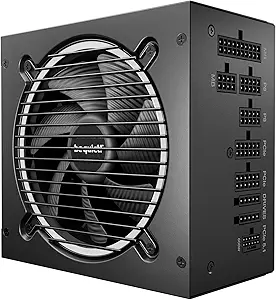
be quiet! Pure Power 13 M 1000W Power Supply, 80 Plus Gold, ATX 3.1, PCIe 5.1 Support, Semi-Passive Fan
I’d pick the Pure Power 13 M for a high-end gaming PC where quiet operation matters as much as capacity. Its semi-passive 120mm fan can stay off under light loads, while 1000W and a single 12V rail suit systems with demanding components. ATX 3.1 and PCIe 5.1 support also make it a current-standard choice for compatible graphics cards. Compared with the MSI MAG A850GL PCIE5, this be quiet! unit offers 150W more headroom and a more explicitly quiet-focused cooling design, but the MSI is a better fit for builds that need less capacity. The tradeoff is straightforward: 1000W may be unnecessary for a basic or midrange PC, and its premium positioning can be hard to justify if those extra watts and quieter operation will go unused.
Pros:- 1000W output provides headroom for demanding components
- Semi-passive 120mm fan supports quiet operation at light loads
- ATX 3.1 and PCIe 5.1 support suit compatible current-generation hardware
- Modular cables simplify cable routing
Cons:- 1000W capacity can be excessive for mainstream systems
- Premium positioning may not make sense if quiet operation and extra headroom are not priorities
Best for: Builders pairing a power-hungry graphics card with a high-end CPU who want 1000W capacity and fan-off operation during light use.
Not ideal for: Basic and midrange PC builders who do not need 1000W or semi-passive cooling and would rather choose a lower-capacity supply.
- Wattage:1000W
- Efficiency certification:80 Plus Gold
- Form factor standard:ATX 3.1
- GPU support:PCIe 5.1
- Cooling:Semi-passive 120mm fan
- Power rails:Single 12V rail
- Topology:LLC
Our verdict“Choose this be quiet! model for a high-power gaming build where semi-passive cooling matters more than minimizing capacity.”
ASUS ROG Strix 1200W Platinum (Fully Modular Power Supply, 80 Plus Platinum Certified, ATX 3.1, GaN MOSFET, GPU-First Intelligent Voltage Stabilizer, 10-Year Warranty)
The ASUS ROG Strix 1200W Platinum is the specialist choice here: it combines the lineup’s highest stated capacity with 80 Plus Platinum certification and ATX 3.1 support. Its GaN MOSFET design, GPU-first voltage sensing, and large heatsinks are aimed at efficient, cooler operation and stable graphics-card power delivery. The be quiet! Pure Power 13 M is a more restrained 1000W alternative with semi-passive cooling; ASUS makes more sense when a system needs the additional 200W and its premium features, rather than simply a quiet power supply. Dual ball fan bearings and 0dB technology add to the cooling approach, but this model is a poor match for ordinary builds that cannot use its capacity. The listed feature set also gives less detail about included cables and physical dimensions than several alternatives.
Pros:- 1200W output offers the greatest stated capacity among these five picks
- 80 Plus Platinum certification
- GaN MOSFET and GPU-first voltage sensing are designed around efficiency and graphics-card power delivery
- 10-year warranty and dual ball fan bearings
Cons:- Capacity and premium feature set are excessive for many standard PC builds
- Product details provided do not specify dimensions or cable configuration
- Listed features do not identify a native GPU cable type
Best for: Enthusiasts building a high-draw PC who want 1200W capacity, Platinum certification, and a 10-year warranty.
Not ideal for: Mainstream gaming or office PC builders whose components do not call for 1200W and who would not benefit from the premium-focused design.
- Wattage:1200W
- Efficiency certification:80 Plus Platinum
- Form factor standard:ATX 3.1
- Power switching:GaN MOSFET
- Voltage feature:GPU-First Intelligent Voltage Stabilizer
- Fan features:Dual ball bearings and 0dB technology
- Warranty:10 years
Our verdict“Choose the ROG Strix when your build genuinely needs 1200W and its Platinum-rated, GPU-focused design justifies a premium-tier supply.”
Rosewill VMG 750W 80 PLUS Gold Fully Modular ATX Power Supply
The Rosewill VMG 750W stands out for combining a short 140mm chassis with fully modular cables and a native PCIe 5.1 12V-2×6 connector rated for up to 600W. That makes it a useful fit when case clearance is tight but the graphics card still calls for a modern high-power connection. Compared with the MSI MAG A850GL PCIE5, Rosewill is shorter and offers the same broad ATX 3.1/PCIe 5.1 compatibility, while MSI provides 100W more capacity and a 10-year warranty rather than Rosewill’s five. The limit is its 750W output: it suits carefully matched gaming systems, not builds that need substantial extra power headroom. Although the chassis is compact for an ATX supply, it remains an ATX unit, so it will not fit every small-form-factor case.
Pros:- 140mm length can help with PSU clearance in compatible cases
- Fully modular cabling reduces unused wires in the chassis
- Includes a PCIe 5.1 12V-2×6 cable rated for up to 600W
- Lists six protection features and Japanese electrolytic capacitors
Cons:- 750W capacity leaves less headroom than the 850W MSI MAG A850GL
- Five-year warranty is shorter than the MSI model’s listed 10-year warranty
- ATX form factor still rules out cases that require a smaller PSU standard
Best for: Builders with limited PSU clearance who want a short ATX supply, modular cabling, and a native 12V-2×6 GPU connection.
Not ideal for: Owners of high-draw systems that need more than 750W, or small-form-factor builders whose cases require a non-ATX supply.
- Model:VMG750
- Wattage:750W
- Efficiency certification:80 PLUS Gold
- Compatibility:ATX 3.0 and ATX 3.1
- Modularity:Fully modular
- GPU connector:PCIe 5.1 12V-2×6, rated up to 600W
- Dimensions:140 × 150 × 86 mm
- Warranty:5 years
Our verdict“Pick the VMG when a short ATX chassis and native 12V-2×6 cable matter more than the extra capacity and longer warranty of the MSI alternative.”
MSI MAG A850GL PCIE5 850W Fully Modular ATX Power Supply
I’d place the MSI MAG A850GL PCIE5 in the middle of this group for builders who want modern GPU support without stepping up to 1000W or more. Its 850W output, 80 PLUS Gold certification, ATX 3.1 support, and native dual-color 12V-2×6 cable make for a practical feature set, while full modularity helps keep unused leads out of the case. Against the Rosewill VMG 750W, MSI adds 100W of capacity and a longer listed warranty; Rosewill, however, has a specified 140mm chassis that may be easier to fit in a tight PSU bay. The MSI is still an ATX unit, so small-form-factor cases may not accept it. Its cooling is listed as air-cooled with two 12cm fans, rather than a semi-passive design like the be quiet! option, which may matter to buyers prioritizing fan-off operation.
Pros:- 850W capacity sits between the 750W Rosewill and higher-wattage options
- ATX 3.1 and PCIe 5.1 support
- Native dual-color 12V-2×6 cable
- Fully modular design and 10-year limited warranty
Cons:- ATX form factor may not fit compact cases designed for smaller supplies
- Two-fan air cooling is not a fan-off or semi-passive setup
- Provides less capacity than the 1000W be quiet! and 1200W ASUS options
Best for: Gaming PC builders seeking an 850W ATX supply with a native 12V-2×6 cable and a long listed warranty.
Not ideal for: Small-form-factor builders or buyers who specifically want semi-passive cooling and have no use for an actively cooled design.
- Wattage:850W
- Form factor:ATX
- Efficiency certification:80 PLUS Gold
- Standards:ATX 3.1 and PCIe 5.1
- Modularity:Fully modular
- GPU cable:Native dual-color 12V-2×6
- Cooling:Air cooling, two 12cm fans
- Warranty:10-year limited
Our verdict“Choose the MSI for a balanced 850W build with current GPU cabling and a 10-year limited warranty, provided your case accepts an ATX unit.”
1000W Fully Modular Power Supply, 80+ Gold PSU, ATX 3.1 & PCIe 5.1 Ready, Native Dual-Color 12V-2×6 Cable, RGB Low-Noise Smart Fan, 105°C-Rated Capacitors, Black
This 1000W modular supply is the style-led option in this group: it pairs ATX 3.1 and PCIe 5.1 support with a native dual-color 12V-2×6 cable, an ARGB 140mm fan, and included cable-management accessories. The yellow detail on the GPU connector is intended to make incomplete seating easier to spot, while the supplied tester can help a builder check the unit before connecting it to the motherboard. Compared with the be quiet! Pure Power 13 M 1000W, this model adds lighting and a 140mm fan, but the be quiet! has a clearly specified semi-passive cooling design and single 12V rail. The tradeoff is that the supplied description gives less established product-line detail, and its RGB and included tools may be less valuable than verified cooling behavior or a simpler, restrained build.
Pros:- 1000W output with ATX 3.1 and PCIe 5.1 support
- Native dual-color 12V-2×6 cable has a yellow connector detail for checking seating
- 140mm RGB fan includes a silent mode
- Includes a PSU tester, cable comb, and cable ties
Cons:- RGB lighting adds little value for buyers who prefer an unlit build
- Cooling details are less specific than the be quiet! model’s stated semi-passive design
- The product data does not specify a form factor beyond dimensions and ATX compatibility
Best for: DIY builders who want a 1000W ATX 3.1 supply with ARGB lighting, a visible GPU-cable seating cue, and basic setup accessories.
Not ideal for: Buyers prioritizing a documented semi-passive cooling design or a restrained, no-lighting build over visual features and included tools.
- Wattage:1000W
- Efficiency certification:80 PLUS Gold
- Standards:ATX 3.1 and PCIe 5.1
- Modularity:Fully modular
- GPU cable:Native dual-color 12V-2×6
- Fan:140mm low-noise fan with silent mode
- Lighting:ARGB
- Capacitors:Japanese electrolytic, rated to 105°C
- Dimensions:150 × 150 × 86 mm
Our verdict“Choose this model if you want a 1000W supply with ARGB, a native 12V-2×6 cable, and useful setup accessories rather than a quiet-first design.”
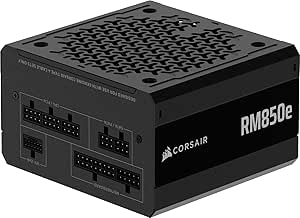
Corsair RM850e 850W Fully Modular ATX 3.1 Power Supply
I’d put the Corsair RM850e near the top for a mainstream gaming PC that needs current GPU support without stepping up to 1,000W. Its native 600W 12V-2×6 cable and ATX 3.1 and PCIe 5.1 compliance simplify connections for newer graphics cards, while full modularity avoids unused leads crowding the case. The 120mm fan has a tuned curve intended to limit noise, and the 140mm length should suit most modern cases.
Compared with the CORSAIR RM1000x, this model gives up 150W of capacity, so it’s a better match for a single-GPU system than a high-draw build with room for future upgrades. Its Cybenetics Gold efficiency and 105°C-rated capacitors are solid features, but the listed seven-year warranty is shorter than the MSI MAG A750GL’s ten years. I’d skip it if your component plans call for more than 850W.
Pros:- Native 600W 12V-2×6 cable supports newer graphics cards without relying on an adapter.
- Fully modular cabling lets builders connect only the leads their system needs.
- ATX 3.1 and PCIe 5.1 compliance suits current-generation components.
- 140mm casing and a fan tuned for low noise make it a practical fit for many builds.
Cons:- 850W may leave too little headroom for especially power-hungry systems.
- The listed seven-year warranty is shorter than the MSI MAG A750GL’s ten-year term.
Best for: Builders pairing a current high-end graphics card with a mainstream CPU who want a fully modular 850W ATX 3.1 supply and a native modern GPU cable.
Not ideal for: Buyers planning a power-hungry GPU setup or substantial upgrades that may exceed 850W, or those prioritizing a longer listed warranty.
- Output wattage:850W
- Form factor:ATX
- Design:Fully modular
- Efficiency:Cybenetics Gold
- Standards:ATX 3.1, PCIe 5.1
- GPU cable:Native 600W 12V-2×6
- Fan:120mm rifle-bearing
- Dimensions:5.91 x 5.51 x 3.35 inches
- Warranty:7 years
Our verdict“Choose the RM850e for a modern single-GPU build that needs native 12V-2×6 support and modular cables, but look at a higher-wattage model if upgrade headroom matters more.”
MSI MAG A750GL PCIE5 750W Fully Modular ATX Power Supply
The MSI MAG A750GL PCIE5 is a sensible fit when a system needs modern GPU cabling but not the extra capacity of an 850W unit. Its 750W output, fully modular layout, and native dual-color 12V-2×6 cable make it easier to build around a supported graphics card while keeping unused cables out of the way. The dual-color connector can also make it easier to check that the plug is seated, a useful detail for builders who want a clear visual cue.
Compared with the Corsair RM850e, MSI offers 100W less capacity but lists a 10-year limited warranty, three years longer than Corsair’s. It carries 80 PLUS Gold certification and supports ATX 3.1 and PCIe 5.1, though the supplied data gives less detail on acoustics and capacitor rating than the RM850e. I’d choose it for a midrange build, not a system whose GPU or upgrade plans push toward higher wattage.
Pros:- Fully modular design reduces unused cable clutter.
- Native dual-color 12V-2×6 cable supports newer GPU connections and provides a visible seating cue.
- ATX 3.1 and PCIe 5.1 compatibility suit current components.
- Listed 10-year limited warranty is longer than the RM850e’s seven-year term.
Cons:- 750W provides less capacity headroom than the Corsair RM850e’s 850W.
- The supplied product data does not specify a noise profile or capacitor temperature rating.
- Input voltage is listed as 230–240V AC, so check compatibility with the intended power setup.
Best for: Midrange gaming PC builders who want a modular ATX 3.1 supply, a native 12V-2×6 GPU cable, and a long listed warranty without targeting 850W.
Not ideal for: Owners of high-draw graphics cards or builders planning upgrades that could need more than 750W; also less suited to buyers who want detailed noise or component specifications before choosing.
- Wattage:750W
- Form factor:ATX
- Design:Fully modular
- Efficiency certification:80 PLUS Gold
- Compatibility:ATX 3.1, PCIe 5.1
- GPU cable:Native dual-color 12V-2×6
- Fan:12cm
- Input voltage:230–240V AC
- Warranty:10-year limited manufacturer warranty
Our verdict“Pick the MSI for a midrange ATX 3.1 system where 750W is sufficient and the long listed warranty matters more than extra capacity.”
Thermaltake Smart 700W 80 Plus White ATX Power Supply
The Thermaltake Smart 700W takes a simpler approach than the Corsair RM850e and MSI MAG A750GL: it supplies 700W through a non-modular ATX design, with two PCIe 6+2-pin connectors rather than a native 12V-2×6 lead. That can suit a basic system using compatible PCIe power connections, particularly when the builder wants a straightforward supply and does not need the newest GPU cable standard. Its 120mm fan, active PFC, and single +12V rail round out a conventional feature set.
The tradeoff is clear beside the fully modular, ATX 3.1 options in this roundup: fixed cables can make routing harder, and 80 Plus certification with efficiency up to 86% is a more modest specification than the Gold-certified MSI and Corsair units. The product data also does not list ATX 3.1 or PCIe 5.1 support, so I would not select it for a build that depends on native 12V-2×6 compatibility.
Pros:- 700W continuous output suits compatible systems that do not require a native 12V-2×6 connection.
- Includes two PCIe 6+2-pin connectors for supported graphics cards.
- 120mm fan provides active airflow.
- Active PFC and a single +12V rail are part of its straightforward ATX design.
Cons:- Non-modular cabling leaves unused leads in the case and can complicate cable routing.
- 80 Plus certification and efficiency up to 86% are less advanced than the Gold-certified options here.
- No ATX 3.1, PCIe 5.1, or native 12V-2×6 support is listed.
Best for: Builders assembling a basic ATX PC with compatible PCIe 6+2-pin hardware who are comfortable routing fixed cables and do not need ATX 3.1 GPU support.
Not ideal for: Owners choosing a newer graphics card that calls for a native 12V-2×6 cable, or compact-case builders who want modular cables for easier routing.
- Output wattage:700W
- Form factor:ATX
- Design:Non-modular
- Efficiency:Up to 86%
- Certification:80 Plus
- Cooling:120mm fan
- PCIe connectors:2 x 6+2-pin
- Input voltage:100–240V AC
- Warranty:5 years
Our verdict“Choose the Thermaltake Smart for a basic compatible build where fixed cables are acceptable, but select the MSI or Corsair for native support for newer GPU power connections.”

How We Picked
I compared the 13 listed ATX power supplies by the factors that change a real build decision: rated wattage, efficiency certification, modularity, and stated support for ATX 3.1 and PCIe 5.1. I gave more weight to models that pair usable capacity with modern GPU cabling and flexible installation, since those features can make a PSU easier to match to a new build and simpler to manage inside the case. Noise-related features, warranty details where supplied, and premium design claims also helped distinguish models with similar capacity.
The ranking favors balanced options over maximum wattage alone. That puts the CORSAIR RM1000x first for its combination of capacity, modularity, efficiency tier, and current standards; the 850W choices follow as practical alternatives for builds that need less headroom. Premium and high-wattage units rank well for specific systems rather than as default picks, while lower-wattage or White-certified models fit simpler budgets but offer fewer of the newer features called out elsewhere in the lineup. Product names and listed specifications are the basis for comparison; I don’t treat unlisted performance claims as proven results.
| atx power supplie | Form factor | Modularity |
|---|---|---|
| CORSAIR RM1000x ATX 3.1 PCIe 5 | ATX | Fully modular |
| Thermaltake Smart 500W 80+ Whi | ATX12V / EPS12V | Non-modular |
| CORSAIR RM850x ATX 3.1 PCIe 5. | ATX | Fully modular |
| Thermaltake SMART 600W ATX Pow | ATX12V / EPS12V | — |
| Rosewill VSB 650W 80 PLUS Bron | ATX | Semi-modular |
| be quiet! Pure Power 13 M 1000 | — | — |
| ASUS ROG Strix 1200W Platinum | — | — |
| Rosewill VMG 750W 80 PLUS Gold | — | Fully modular |
| MSI MAG A850GL PCIE5 850W Full | ATX | Fully modular |
| 1000W Fully Modular Power Supp | — | Fully modular |
| Corsair RM850e 850W Fully Modu | ATX | — |
| MSI MAG A750GL PCIE5 750W Full | ATX | — |
| Thermaltake Smart 700W 80 Plus | ATX | — |
Factors to Consider When Choosing Atx Power Supplies
Choosing an ATX power supply is less about picking the biggest number and more about matching capacity, connectors, and physical fit to the PC you plan to build. I’d settle those requirements before comparing efficiency tiers or cosmetic features.
Match wattage to the whole system
Start with the processor and graphics card, then account for the motherboard, storage, cooling, and any planned upgrades. A 1200W unit can make sense for a high-demand system, but a larger rating does not make a PC run better by itself. Buying far more capacity than your components need can pull attention away from features that matter more to your build, such as connector support or cable layout. At the other extreme, a PSU with too little capacity leaves less room for demanding components and future changes. Check the manufacturers’ guidance for your CPU and GPU, then compare it with the complete system rather than choosing by graphics-card wattage alone.
Check GPU connectors and PSU standards
For a new graphics card, confirm the exact power connector it needs and whether the PSU includes a compatible native cable. ATX 3.1 and PCIe 5.1 support appear on several options here, including the CORSAIR RM1000x, RM850x, and the MSI MAG A-series models. Those labels can make a unit a more direct match for newer GPU builds, but they do not replace checking the cable supplied with the exact product. Older or simpler supplies may still suit a system that uses conventional connectors, so buying a newer standard is not automatically necessary for every upgrade. Avoid assuming that an adapter and a native cable are interchangeable without checking the GPU and PSU documentation.
Choose an efficiency tier for your use
Efficiency certifications help distinguish how a PSU converts incoming power into power for PC components, but they are not a complete measure of reliability or noise. This lineup ranges from 80 Plus White models to Gold and Platinum units, with the ASUS ROG Strix 1200W Platinum at the highest stated tier. A higher certification may suit a system that runs for long periods or a buyer seeking a premium specification, while a basic build may not benefit enough to justify prioritizing it. Compare the certification alongside capacity, connectors, and the exact model’s other stated features. Don’t treat efficiency labels as a substitute for checking the warranty and manufacturer specifications.
Decide how much modular cabling helps
A fully modular PSU lets you connect only the cables your build requires, which can simplify cable routing and leave unused leads out of the case. Semi-modular designs offer some of that flexibility, while fixed-cable models can be a workable fit when the case has space to manage spare cables. Modular cabling is especially useful in compact or windowed builds, but it does not make the PSU itself smaller. Before buying, check that the case supports the PSU’s dimensions and that cable lengths can reach the motherboard and GPU connections. Never reuse modular cables from a different PSU unless the manufacturer confirms compatibility; the PSU-side pinout may differ.
Treat noise features as a preference, not a guarantee
Fan size, semi-passive operation, and low-noise claims may help narrow choices if fan behavior matters to you. The be quiet! Pure Power 13 M lists a semi-passive fan, while the CORSAIR RM1000x is described as low-noise. Those descriptions do not establish how loud a complete PC will be, since case airflow, component heat, and fan curves also affect sound. If quiet operation is a priority, look for specific operating details from the manufacturer rather than relying on a broad label alone. A well-ventilated case can also reduce how hard the PSU fan needs to work.
Check case fit, warranty, and cable needs before ordering
ATX describes a form-factor standard, but it does not mean every PSU has the same length or that every case has equal clearance. Check the case’s PSU limits and allow room for the cables, particularly if the PSU sits behind a drive cage or inside a compact enclosure. Count the connectors your current parts need, then leave room for planned storage, fans, or a GPU change. Warranty terms can help distinguish premium options, but confirm the coverage for the exact model and region rather than assuming it from the product family. These checks can prevent a seemingly suitable unit from creating a fit or cabling problem during assembly.
Frequently Asked Questions
Is an 850W ATX power supply enough for a gaming PC?
It can be, but the graphics card and processor determine whether 850W is a good match. The CORSAIR RM850x, RM850e, and MSI MAG A850GL give this roundup several 850W choices, including models listing ATX 3.1 support. Check the power guidance for your exact GPU and CPU, and account for the rest of the system rather than relying on a generic gaming-PC estimate. If you expect to upgrade to more demanding parts, extra headroom may be useful; if not, a 1000W model may add capacity you never use.
Should I choose an ATX 3.1 PSU for a new graphics card?
An ATX 3.1 model is a sensible starting point when building around a graphics card that calls for a newer power connector or specification. Several picks here, including the CORSAIR RM1000x and MSI MAG A850GL, list ATX 3.1 and PCIe 5.1 support. Still, check the GPU’s exact connector requirements and the cables included with the PSU before ordering. If your current card uses conventional connectors and you don’t expect a near-term upgrade, a compatible older-standard unit may meet your needs.
Is a 1000W power supply better than an 850W model?
Not by default: 1000W is better only when the system’s demands or upgrade plans make the added capacity useful. In this lineup, the CORSAIR RM1000x suits buyers seeking more headroom and modern connector support, while the 850W choices can be a better fit for a system whose components call for less. Compare the PSU recommendation for your graphics card with the full build’s requirements. If both capacity and connectors fit your plans, the smaller rating can be a more practical choice.
Does fully modular cabling make a PSU worth choosing?
Fully modular cabling is useful when you want to install only the leads your build needs, especially in a case with limited room for cable management. It is not a direct measure of electrical quality, and it does not change the PSU’s physical dimensions. The lineup includes fully modular options across several wattage levels, while the Rosewill VSB 650W is semi-modular. Choose the cable layout that suits your case and assembly preferences, then judge the unit on capacity, connectors, and other specifications too.
Are 80 Plus White power supplies suitable for a basic PC?
A White-certified unit may suit a basic system if its wattage, connectors, and form factor match the parts you plan to use. The Thermaltake Smart 500W, Smart 600W, and Smart 700W offer lower-complexity alternatives to the Gold and Platinum models in this roundup. Check the graphics-card maker’s power guidance and verify all required PCIe connectors before choosing one. For a newer or more demanding build, the newer-standard, higher-efficiency options may offer a better match to your upgrade plans.
Conclusion
For the best overall balance of capacity, modular cabling, and current standards, I’d choose the CORSAIR RM1000x. For best value by build fit, I’d look first at an 850W model such as the CORSAIR RM850e or MSI MAG A850GL if its connectors and features meet your needs; the Thermaltake Smart models are simpler alternatives for basic systems. The best premium choice is the ASUS ROG Strix 1200W Platinum for buyers who need its extra capacity and Platinum certification. Beginners building a modern system can start with the CORSAIR RM850x, then confirm that its wattage and supplied cables suit their parts. For specific needs, choose the be quiet! Pure Power 13 M if semi-passive fan operation is a priority, or consider the Rosewill VSB 650W when semi-modular cabling and a modest system fit your plan. Match the final choice to your components and case rather than buying on wattage alone.