

The AULA F75 Pro is my best overall pick among these wireless mechanical keyboards, pairing a compact 75% layout with tri-mode connectivity and hot-swappable switches. The Logitech MX Mechanical suits quieter office typing, while the Redragon K689 PRO offers a larger gasket-style layout for buyers who want more keys. The main tradeoff is between compact desk space and dedicated keys, with wireless flexibility and typing feel varying across models. Some keyboards in this roundup are membrane rather than mechanical, so checking the switch type matters. Read on for a full comparison by layout, use, and buyer priority.

Get the latest gadgets delivered free with Prime
- Fast, free delivery on millions of items
- Prime Video, Amazon Music and more included
- Member-only deals all year
Complete the kit



Key Takeaways
- The AULA F75 Pro leads the mechanical picks for shoppers who want a compact 75% layout, hot-swap flexibility, and multiple connection modes in one board.
- The Logitech MX Mechanical fills a different role: its quiet tactile switches and work-focused design suit shared offices better than gaming-oriented boards.
- Layout changes daily usability more than RGB does. The 75% models save desk space, while the 99-, 100-, 108-, and full-size options preserve more dedicated keys.
- Gasket-style Redragon models target a particular typing feel, but their larger footprints make them less suitable for buyers prioritizing portability.
- Not every product in the list is mechanical. The AULA S99 99-Key is described as a membrane keyboard, so it is a mismatch for shoppers who specifically want mechanical switches.
| AULA F75 Pro 75% Wireless Hot-Swappable Mechanical Keyboard |  | Best Compact All-Rounder | Layout: 75%, 81 keys, QWERTZ | Connectivity: Bluetooth 5.0, 2.4GHz wireless, USB-C | Multi-device support: Up to 5 devices | VIEW LATEST PRICE | See Our Full Breakdown |
| Redragon K671KS Wireless Mechanical Gaming Keyboard |  | Best Customization Starter | Layout: 81-key QWERTY | Connectivity: USB-C, Bluetooth 3.0/5.0, 2.4GHz wireless | Device capacity: Up to 5 devices | VIEW LATEST PRICE | See Our Full Breakdown |
| Redragon K689 PRO Wireless 108-Key Gasket Gaming Keyboard |  | Best for a Quieter Full-Size Setup | Layout: 108-key QWERTY | Connectivity: USB-C, Bluetooth, 2.4GHz wireless | Switches: Redragon custom linear | VIEW LATEST PRICE | See Our Full Breakdown |
| Redragon K556 PRO Wireless RGB Mechanical Gaming Keyboard |  | Best for a Sturdy Full-Size Board | Layout: 104-key QWERTY | Connectivity: USB-C, Bluetooth, 2.4GHz wireless | Switches: Linear Red | VIEW LATEST PRICE | See Our Full Breakdown |
| Kisnt KN85 75% Tri-Mode Wireless Mechanical Keyboard, Hot-Swappable Linear Switches, RGB Backlighting, Retro Beige |  | Best Compact Gasket-Mount Pick | Layout: 75%, 85 keys, QWERTY | Dimensions: 13.68 × 5.51 × 1.77 in | Connectivity: Bluetooth 5.0, 2.4GHz wireless, USB-C | VIEW LATEST PRICE | See Our Full Breakdown |
| AULA S99 Pro V2 Wireless Gaming Keyboard |  | Best Quiet Membrane Option | Layout: 99 keys, 97% compact | Key type: Silent membrane | Connectivity: Bluetooth 5.0, 2.4 GHz wireless, USB wired | VIEW LATEST PRICE | See Our Full Breakdown |
| Redragon K745 PRO Wireless 108-Key Gasket RGB Gaming Keyboard |  | Best for Switch Customization | Layout: 108-key QWERTY, full size | Connectivity: USB-C, Bluetooth, 2.4 GHz | Switch type: Custom linear | VIEW LATEST PRICE | See Our Full Breakdown |
| Logitech MX Mechanical Wireless Illuminated Keyboard, Tactile Quiet, Graphite |  | Best for Quiet Multi-Device Work | Layout: 104-key full-size QWERTY | Switch type: Low-profile Tactile Quiet | Connectivity: Bluetooth Low Energy or Logi Bolt USB receiver | VIEW LATEST PRICE | See Our Full Breakdown |
| AULA F75 75% Wireless Mechanical Keyboard, White and Brown |  | Best Compact Mechanical Pick | Layout: 75%, 81-key QWERTY | Connectivity: Bluetooth 5.0, 2.4 GHz, USB-C | Switch type: Pre-lubricated linear | VIEW LATEST PRICE | See Our Full Breakdown |
| ProtoArc K310 Pro Full-Size Backlit Wireless Mechanical Keyboard |  | Best Full-Size Work and Gaming Balance | Layout: 108-key full-size QWERTY | Switch type: Linear red | Connectivity: Bluetooth and 2.4 GHz USB receiver | VIEW LATEST PRICE | See Our Full Breakdown |
| Redragon K768 PRO Wireless 100-Key Gasket Gaming Keyboard |  | Best for a Large Battery and Gasket Design | Layout: 100-key QWERTY | Connectivity: USB-C, Bluetooth, 2.4 GHz wireless | Battery capacity: 8000 mAh | VIEW LATEST PRICE | See Our Full Breakdown |
| AULA S99 99-Key Wireless RGB Membrane Gaming Keyboard |  | Best Compact Layout for Membrane Buyers | Keyboard type: Membrane | Layout: 96% QWERTY | Number of keys: 99 | VIEW LATEST PRICE | See Our Full Breakdown |
| AULA F99 Tri-Mode Wireless Mechanical Keyboard | 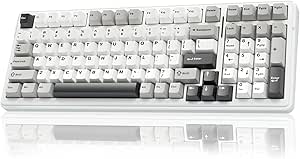 | Best for Switch Customization | Layout: 99-key, 96% compact; listed as AZERTY | Connectivity: Bluetooth 5.0, 2.4 GHz wireless, USB-C | Multi-device support: Up to 5 devices | VIEW LATEST PRICE | See Our Full Breakdown |
| Redragon K710 Wireless Typewriter-Style Mechanical Keyboard, Black | 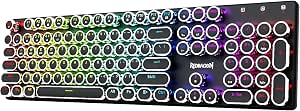 | Best for Retro Style and Clicky Feedback | Layout: 104-key QWERTY | Switch type: Clicky blue mechanical | Connectivity: USB-C wired, Bluetooth 3.0/5.0, 2.4 GHz wireless | VIEW LATEST PRICE | See Our Full Breakdown |
| wireless mechanical keyboard | Layout | Connectivity | Backlighting | Switch type |
|---|---|---|---|---|
| AULA F75 Pro 75% Wireless Hot- | 75%, 81 keys, QWERTZ | Bluetooth 5.0, 2.4GHz wireless, USB-C | RGB, 16.8 million colors | — |
| Redragon K671KS Wireless Mecha | 81-key QWERTY | USB-C, Bluetooth 3.0/5.0, 2.4GHz wireless | RGB with per-key adjustments and presets | — |
| Redragon K689 PRO Wireless 108 | 108-key QWERTY | USB-C, Bluetooth, 2.4GHz wireless | — | — |
| Redragon K556 PRO Wireless RGB | 104-key QWERTY | USB-C, Bluetooth, 2.4GHz wireless | RGB with 20 preset modes | — |
| Kisnt KN85 75% Tri-Mode Wirele | 75%, 85 keys, QWERTY | Bluetooth 5.0, 2.4GHz wireless, USB-C | — | — |
| AULA S99 Pro V2 Wireless Gamin | 99 keys, 97% compact | Bluetooth 5.0, 2.4 GHz wireless, USB wired | RGB, 16.8 million colors, 15 effects | — |
| Redragon K745 PRO Wireless 108 | 108-key QWERTY, full size | USB-C, Bluetooth, 2.4 GHz | — | Custom linear |
| Logitech MX Mechanical Wireles | 104-key full-size QWERTY | Bluetooth Low Energy or Logi Bolt USB receiver | — | Low-profile Tactile Quiet |
| AULA F75 75% Wireless Mechanic | 75%, 81-key QWERTY | Bluetooth 5.0, 2.4 GHz, USB-C | RGB, 16.8 million colors | Pre-lubricated linear |
| ProtoArc K310 Pro Full-Size Ba | 108-key full-size QWERTY | Bluetooth and 2.4 GHz USB receiver | 10 effects with adjustable speed and brightness | Linear red |
| Redragon K768 PRO Wireless 100 | 100-key QWERTY | USB-C, Bluetooth, 2.4 GHz wireless | RGB | Custom linear |
| AULA S99 99-Key Wireless RGB M | 96% QWERTY | Bluetooth 5.0, 2.4 GHz wireless, USB-C wired | RGB | — |
| AULA F99 Tri-Mode Wireless Mec | 99-key, 96% compact; listed as AZERTY | Bluetooth 5.0, 2.4 GHz wireless, USB-C | RGB, 16 effects, 16.8 million colors | Pre-lubed linear |
| Redragon K710 Wireless Typewri | 104-key QWERTY | USB-C wired, Bluetooth 3.0/5.0, 2.4 GHz wireless | Customizable RGB | Clicky blue mechanical |
More Details on Our Top Picks
AULA F75 Pro 75% Wireless Hot-Swappable Mechanical Keyboard
The AULA F75 Pro balances a space-saving 75% layout with the flexibility many wireless setups need: Bluetooth 5.0, 2.4GHz, and USB-C, plus support for up to five devices. Its arrow keys stay in place while the smaller footprint leaves more room for a mouse than the full-size Redragon K556 PRO. The hot-swap sockets accept 3-pin and 5-pin switches, so buyers can change the feel without soldering, and the control knob adds a convenient hardware adjustment. Pre-lubricated linear switches suit smooth, uninterrupted keystrokes, though they lack tactile feedback. The main compromise is the QWERTZ layout, which may feel unfamiliar to QWERTY users; its water-repellent description also does not mean waterproof. Choose it for compact multi-device flexibility, not layout familiarity or spill protection.
Pros:- Bluetooth, 2.4GHz, and USB-C connectivity support up to five devices.
- 75% layout retains arrow keys while taking less desk space than full-size options.
- Hot-swap sockets accept 3-pin and 5-pin switches without soldering.
- Control knob, programmable keys, and RGB lighting add customization.
Cons:- QWERTZ key layout may not suit users accustomed to QWERTY.
- Water-repellent wording does not establish waterproof protection.
- Linear switches offer less tactile feedback than tactile or clicky options.
Best for: Desk-space-conscious users who want a compact wireless keyboard, arrow keys, switch customization, and easy switching among several devices.
Not ideal for: QWERTY typists who want familiar key placement, or users who need a keyboard rated as waterproof.
- Layout:75%, 81 keys, QWERTZ
- Connectivity:Bluetooth 5.0, 2.4GHz wireless, USB-C
- Multi-device support:Up to 5 devices
- Switches:Pre-lubricated linear LEOBOG Reaper
- Hot-swap compatibility:3-pin and 5-pin switches
- Keycaps:Side-printed PBT
- Backlighting:RGB, 16.8 million colors
- Battery:Rechargeable 4000mAh
Our verdict“Pick the F75 Pro if you want a compact, highly configurable wireless keyboard and are comfortable with its QWERTZ layout.”
Redragon K671KS Wireless Mechanical Gaming Keyboard
The Redragon K671KS is a practical entry point for buyers who want wireless flexibility without giving up gaming-focused controls. Its QWERTY 81-key layout keeps arrows in a compact footprint, and it pairs USB-C with Bluetooth and 2.4GHz wireless for up to five devices. Compared with the AULA F75 Pro, this model uses a familiar QWERTY layout and supplies extra switches and keycaps, making early customization more approachable. Its hot-swappable linear switches, programmable macros, per-key RGB adjustments, and metal panel give it a sturdy, configurable feel. The tradeoff is missing battery-life detail, which makes it harder to plan around untethered use. Buyers seeking a softer, quieter typing setup may also prefer the K689 PRO’s gasket mount and three-layer dampening.
Pros:- USB-C, Bluetooth, and 2.4GHz wireless support up to five devices.
- Compact 81-key QWERTY layout keeps arrow keys.
- Hot-swap switches, macros, and per-key RGB settings offer broad customization.
- Metal panel, PBT keycaps, and included spare switches support a durable, mod-friendly setup.
Cons:- Battery-life details are not provided.
- Linear switches may not suit users who want tactile or clicky feedback.
- Lacks the gasket mount and three-layer dampening specified for the Redragon K689 PRO.
Best for: QWERTY users setting up a compact wireless gaming or work keyboard who want switch-swapping accessories and programmable macros.
Not ideal for: Buyers who need clear battery-runtime information or prefer a dampened, gasket-mounted typing feel.
- Layout:81-key QWERTY
- Connectivity:USB-C, Bluetooth 3.0/5.0, 2.4GHz wireless
- Device capacity:Up to 5 devices
- Switches:Linear Cherry MX Red
- Keycaps:Double-injection PBT
- Backlighting:RGB with per-key adjustments and presets
- Panel:Metal
- Included accessories:2 red keycaps, 8 linear switches, keycap puller, USB cable
Our verdict“Choose the K671KS if you want a compact QWERTY wireless keyboard with accessible switch and lighting customization, and can live without stated battery-runtime figures.”
Redragon K689 PRO Wireless 108-Key Gasket Gaming Keyboard
For buyers who want a full-size board but care about a more cushioned, less exposed typing sound, the Redragon K689 PRO stands apart from the compact F75 Pro and K671KS. Its 108-key layout keeps the number pad, while four shortcut keys and macro support add dedicated controls. The gasket mount and three-layer noise dampening are the defining differences: they are designed to soften the typing experience, rather than just add wireless convenience. USB-C, Bluetooth, and 2.4GHz cover desk use and wireless connections, and the sockets accept both 3-pin and 5-pin switches. The larger footprint costs desk space, and the plastic enclosure is less substantial on paper than the K556 PRO’s aluminum plate. Battery life is not specified, and the level of water resistance is unclear.
Pros:- Full 108-key layout includes a number pad.
- Gasket mount and three-layer dampening are designed for a cushioned, quieter typing feel.
- USB-C, Bluetooth, and 2.4GHz wireless provide three connection modes.
- Hot-swap sockets support 3-pin and 5-pin switches, with shortcut keys and macro support.
Cons:- Full-size footprint takes more desk space than the 75% AULA F75 Pro.
- Plastic enclosure is less substantial than the aluminum plate on the Redragon K556 PRO.
- Battery life and the degree of water resistance are not specified.
Best for: Full-size users who need a number pad and want a dampened, customizable keyboard for gaming, work, or mixed use.
Not ideal for: Small-desk users who can work without a number pad, or buyers who need stated battery life and a defined water-resistance rating.
- Layout:108-key QWERTY
- Connectivity:USB-C, Bluetooth, 2.4GHz wireless
- Switches:Redragon custom linear
- Switch compatibility:3-pin and 5-pin
- Mounting:Gasket
- Noise dampening:3-layer
- Keycaps:PBT
- Enclosure:Plastic
Our verdict“Choose the K689 PRO if you need a number pad and favor gasket-mounted, dampened typing over a smaller keyboard footprint.”
Redragon K556 PRO Wireless RGB Mechanical Gaming Keyboard
The Redragon K556 PRO is the full-size pick for buyers who value a solid typing platform and familiar QWERTY layout over saving desk space. Its brushed aluminum plate gives it a different emphasis from the plastic-bodied K689 PRO, whose gasket mount and three-layer dampening target a softer, quieter feel. Here, the appeal is a sturdy base, quiet linear Red switches, and tri-mode connectivity across USB-C, Bluetooth, and 2.4GHz. Hot-swap sockets support compatible 3-pin and 5-pin switches, while software adds RGB modes, macros, and keybindings. At 1,074 g and 17.1 inches wide, it is less suited to frequent relocation than the compact AULA F75 Pro. Linear switches also rule it out for typists who want a pronounced tactile bump or click.
Pros:- Tri-mode USB-C, Bluetooth, and 2.4GHz connectivity.
- Brushed aluminum plate provides a sturdy typing surface.
- Hot-swap sockets accept compatible 3-pin and 5-pin switches.
- RGB presets, macros, and keybindings can be customized through companion software.
Cons:- Full-size dimensions and 1,074 g weight make it less portable than the AULA F75 Pro.
- Quiet linear Red switches may not provide enough tactile feedback for some typists.
- Requires companion software for its listed macro and keybinding customization.
Best for: QWERTY users who want a full-size wireless keyboard with a sturdy aluminum plate, number pad, and switch customization.
Not ideal for: People with limited desk space or users who prefer tactile or clicky switches over linear keystrokes.
- Layout:104-key QWERTY
- Connectivity:USB-C, Bluetooth, 2.4GHz wireless
- Switches:Linear Red
- Hot-swap compatibility:3-pin and 5-pin switches
- Plate:Brushed aluminum
- Backlighting:RGB with 20 preset modes
- Dimensions:17.1 × 4.9 × 1.1 in
- Weight:1074 g
Our verdict“Pick the K556 PRO if you want a substantial full-size QWERTY board, but choose the K689 PRO if dampening matters more than its aluminum plate.”
Kisnt KN85 75% Tri-Mode Wireless Mechanical Keyboard, Hot-Swappable Linear Switches, RGB Backlighting, Retro Beige
The Kisnt KN85 combines a compact 75% layout with a gasket mount, making it the compact choice here for buyers who want a cushioned feel as well as wireless flexibility. Its 85-key QWERTY layout retains function keys and arrows but drops the number pad, unlike the full-size K689 PRO. Bluetooth 5.0, 2.4GHz, and USB-C cover wireless and wired use, and the 4000mAh rechargeable battery can keep the keyboard usable in wired mode while charging. Pre-lubed Bsun linear switches and hot-swap compatibility support later feel changes. The tradeoffs are practical: it is not water resistant, and its companion software works only on Windows and only in wired or 2.4GHz mode. Buyers who rely on software remapping across macOS or Bluetooth should look elsewhere.
Pros:- Compact 85-key layout retains function keys and arrows while saving space.
- Bluetooth 5.0, 2.4GHz, and USB-C support flexible connections.
- Gasket mount and pre-lubed linear switches are designed for a cushioned, smooth feel.
- Hot-swap compatibility, 4000mAh battery, and wired use while charging add flexibility.
Cons:- No number pad, unlike the full-size Redragon K689 PRO.
- Not water resistant.
- Companion software is limited to Windows and wired or 2.4GHz connections.
Best for: Compact-keyboard buyers who want a gasket-mounted typing feel, QWERTY keys, switch customization, and three connection options.
Not ideal for: Number-pad users, spill-prone workspaces, or Mac users who need software remapping while connected over Bluetooth.
- Layout:75%, 85 keys, QWERTY
- Dimensions:13.68 × 5.51 × 1.77 in
- Connectivity:Bluetooth 5.0, 2.4GHz wireless, USB-C
- Battery:Rechargeable 4000mAh
- Switches:Pre-lubed Bsun linear, 45–50gf actuation
- Switch compatibility:3-pin and 5-pin hot-swappable switches
- Mounting:Gasket
- Operating systems:Android, Linux, macOS, Windows
Our verdict“Choose the KN85 if you want a compact QWERTY wireless board with gasket mounting, but skip it if you need a number pad or cross-platform software controls.”
AULA S99 Pro V2 Wireless Gaming Keyboard
The AULA S99 Pro V2 is a 99-key membrane keyboard, not a mechanical one, so I’d place it here for buyers who prioritize quiet typing over mechanical switch feel. Its Bluetooth, 2.4 GHz, and USB connections make it flexible for a desk shared between a computer, phone, or console, while the built-in display puts connection and battery status in view. Compared with the mechanical Logitech MX Mechanical, it gives up tactile switch feedback but should better suit noise-sensitive shared spaces. RGB lighting and adjustable height add customization, though the description gives no battery-life estimate. I’d choose it for versatile, low-noise use rather than gaming or typing where a distinct mechanical response is the main draw.
Pros:- Bluetooth, 2.4 GHz, and wired USB connections offer flexible setup options
- Quiet membrane keys suit shared rooms and noise-sensitive work
- Built-in display shows battery, connection, lighting, and Num Lock status
- Compact 99-key layout includes RGB lighting and two-stage height adjustment
Cons:- Membrane keys lack the mechanical switch feel and feedback offered by the other mechanical picks
- Battery life is not specified
- The compact layout has fewer keys than a conventional full-size board
Best for: People in shared workspaces who want a quiet, full-function layout and switch between a computer and other devices.
Not ideal for: Buyers specifically seeking mechanical switches, or anyone who needs a stated battery-life estimate before choosing a wireless keyboard.
- Layout:99 keys, 97% compact
- Key type:Silent membrane
- Connectivity:Bluetooth 5.0, 2.4 GHz wireless, USB wired
- Multi-device support:Connects to multiple devices
- Backlighting:RGB, 16.8 million colors, 15 effects
- Battery capacity:4000 mAh
- Display:Shows battery, connection mode, lighting, and Num Lock status
- Ergonomics:Two-stage adjustable-height design
Our verdict“Choose the S99 Pro V2 if quiet typing and three connection modes matter more to you than mechanical switches.”
Redragon K745 PRO Wireless 108-Key Gasket RGB Gaming Keyboard
The Redragon K745 PRO is the most switch-customization-focused option in this group: its hot-swappable sockets accept 3-pin or 5-pin switches, so changing the typing feel does not require soldering. A gasket mount and five-layer noise dampening aim for a softer, less sharp sound than a basic board, while tri-mode connectivity covers wireless and wired setups. Compared with the compact AULA F75, the K745 PRO keeps a full-size layout and adds four programmable shortcut keys, but takes up more desk space. Its plastic enclosure is a clear compromise against the ProtoArc K310 Pro’s aluminum top case. I’d shortlist it for tinkerers who want a customizable full-size mechanical keyboard, not buyers seeking a premium-feeling shell.
Pros:- Hot-swappable sockets support compatible 3-pin and 5-pin switches
- Gasket mount and five-layer noise dampening target a cushioned typing sound
- USB-C, Bluetooth, and 2.4 GHz connectivity support wired and wireless use
- Full-size layout includes four programmable shortcut keys and PBT keycaps
Cons:- Plastic enclosure feels less premium than the aluminum-topped ProtoArc K310 Pro
- Full-size footprint takes more desk space than the AULA F75
- One-year warranty is relatively limited
Best for: Full-size keyboard owners who want to swap compatible switches and tune typing feel without soldering.
Not ideal for: Desk-space-conscious buyers or shoppers who prioritize a metal enclosure over hot-swap flexibility.
- Layout:108-key QWERTY, full size
- Connectivity:USB-C, Bluetooth, 2.4 GHz
- Switch type:Custom linear
- Switch compatibility:Hot-swappable 3-pin or 5-pin switches
- Mount and dampening:Gasket mount with five-layer noise dampening
- Keycaps:Translucent PBT
- Enclosure:Plastic
- Weight:0.88 kg
Our verdict“Pick the K745 PRO if you want a full-size wireless mechanical keyboard whose switches you can change yourself.”
Logitech MX Mechanical Wireless Illuminated Keyboard, Tactile Quiet, Graphite
The Logitech MX Mechanical suits a work setup where a familiar full-size layout, restrained noise, and device switching matter more than switch swapping. Its low-profile Tactile Quiet switches provide feedback without the taller, more customizable feel of the Redragon K745 PRO, and it pairs with up to three devices across supported operating systems. Smart backlighting reacts to room light and hand proximity, while the stated battery life reaches 15 days with lighting on or up to 10 months with it off. Compared with the ProtoArc K310 Pro, Logitech offers a clearer battery-life figure and low-profile design; the ProtoArc adds programmable macros and an aluminum top case. Some features rely on desktop software, and FileVault users may encounter a Bluetooth startup-password issue on macOS.
Pros:- Tactile Quiet low-profile switches balance feedback with reduced typing noise
- Pairs with up to three devices using Bluetooth Low Energy or Logi Bolt
- Smart backlighting adjusts to ambient light and hand proximity
- Specified battery life is up to 15 days with lighting or 10 months with lighting off
Cons:- Some features require Logi Options+ on Windows or macOS
- Bluetooth may interfere with macOS startup-password entry when FileVault is enabled
- Not designed for switch customization like the hot-swappable Redragon K745 PRO
Best for: Cross-platform professionals who want quiet tactile typing and regularly switch among up to three devices.
Not ideal for: Mechanical keyboard hobbyists who want hot-swappable switches, or Mac users who depend on Bluetooth for FileVault startup-password entry.
- Layout:104-key full-size QWERTY
- Switch type:Low-profile Tactile Quiet
- Connectivity:Bluetooth Low Energy or Logi Bolt USB receiver
- Multi-device pairing:Up to 3 devices
- Battery:Rechargeable Li-Po, 1500 mAh
- Battery life:Up to 15 days with backlighting; up to 10 months with it off
- Charging:USB-C
- Weight:828 g
- Compatible systems:Windows, macOS, Linux, Chrome OS, iOS, iPadOS, Android
Our verdict“Choose the MX Mechanical for quiet, low-profile typing and multi-device work, rather than switch-level customization.”
AULA F75 75% Wireless Mechanical Keyboard, White and Brown
The AULA F75 keeps the essentials close: its 75% layout retains arrow keys while taking up less space than the full-size Logitech MX Mechanical or Redragon K745 PRO. That makes it a practical fit for compact desks without forcing users to give up dedicated navigation arrows. Bluetooth, 2.4 GHz, and USB-C cover wireless and wired setups, and the hot-swappable linear switches let owners alter the feel later. A multifunction knob handles lighting or media controls without relying entirely on key combinations. Compared with the more customization-oriented K745 PRO, the F75 saves desk room but omits a full-size key set. Its plastic enclosure also lacks the sturdier material claim of the ProtoArc K310 Pro, so I’d favor it for space efficiency and flexibility rather than a premium chassis.
Pros:- 75% layout saves desk space while retaining dedicated arrow keys
- Bluetooth, 2.4 GHz, and USB-C support multiple connection styles
- Hot-swappable sockets accept compatible 3-pin and 5-pin switches
- Multifunction knob and programmable keys provide direct control options
Cons:- Compact layout omits the full-size number pad and other keys
- Plastic enclosure feels less premium than the aluminum-topped ProtoArc K310 Pro
Best for: Desk-space-conscious typists and gamers who want arrow keys, wireless options, and a mechanical board they can customize.
Not ideal for: Buyers who need a full-size number pad or prefer an aluminum enclosure and larger layout.
- Layout:75%, 81-key QWERTY
- Connectivity:Bluetooth 5.0, 2.4 GHz, USB-C
- Switch type:Pre-lubricated linear
- Hot-swappable:Supports 3-pin and 5-pin switches
- Battery capacity:4000 mAh
- Backlighting:RGB, 16.8 million colors
- Additional controls:Programmable keys and multifunction knob
- Enclosure:Plastic
Our verdict“Choose the F75 if you want a compact, hot-swappable mechanical keyboard with arrow keys and tri-mode connectivity.”
ProtoArc K310 Pro Full-Size Backlit Wireless Mechanical Keyboard
The ProtoArc K310 Pro is a strong fit for buyers who want a full-size mechanical layout and a more substantial chassis: its aluminum top case and keyboard plate distinguish it from the plastic-bodied AULA F75 and Redragon K745 PRO. Quiet linear red switches suit steady typing and casual gaming, while Bluetooth and a 2.4 GHz receiver allow pairing with up to three devices. Adjustable backlighting and programmable macros add flexibility, but the macro feature has meaningful limits: it works only over 2.4 GHz, is not detected through a multi-port hub, and Safari is unsupported for customization. Unlike the Logitech MX Mechanical, the ProtoArc emphasizes a metal top and macro controls rather than low-profile tactile switches. I’d pick it for a stable full-size workspace, not hub-dependent macro use.
Pros:- Aluminum top case and keyboard plate provide a more substantial build than plastic-bodied compact options
- Quiet linear red switches suit work and casual gaming
- Bluetooth and 2.4 GHz receiver support up to three devices
- Adjustable backlighting, programmable macros, and USB-C charging add practical flexibility
Cons:- Macro customization works only over a 2.4 GHz USB connection
- Not detected through a multi-port hub
- Safari is not supported for macro customization
Best for: People who want a full-size wireless mechanical keyboard with quiet linear switches, a metal top, and multi-device support.
Not ideal for: Users who rely on a multi-port hub or need to configure macros through Safari or while connected over Bluetooth.
- Layout:108-key full-size QWERTY
- Switch type:Linear red
- Connectivity:Bluetooth and 2.4 GHz USB receiver
- Multi-device support:Up to 3 devices
- Backlighting:10 effects with adjustable speed and brightness
- Customization:Programmable macros and key functions
- Materials:Aluminum top case and keyboard plate
- Charging:USB-C rechargeable
- Standby time:Up to 150 days after 6–8 hours of charging
Our verdict“Choose the K310 Pro if you want a full-size board with a metal top and quiet linear switches, provided its macro limits fit your setup.”
Redragon K768 PRO Wireless 100-Key Gasket Gaming Keyboard
The Redragon K768 PRO suits buyers who want a near-full-size wireless board without giving up a more cushioned mechanical build. Its gasket design and custom linear switches make it a different choice from the clicky, typewriter-style K710: this one favors a smoother, less audibly sharp typing feel. Tri-mode connectivity covers USB-C, Bluetooth, and 2.4 GHz, while the 8000 mAh battery gives it a substantial capacity for wireless use. PBT keycaps and a control knob add practical appeal, and the 100-key layout keeps a number area while taking up less room than a conventional full-size board. The tradeoff is that it is still relatively wide, and detailed lighting or macro changes depend on software. Choose it over the AULA F99 if battery capacity and the knob matter more than hot-swappable switches and support for five devices.
Pros:- USB-C, Bluetooth, and 2.4 GHz connectivity cover wired and wireless setups
- 8000 mAh battery capacity supports extended wireless use
- Gasket construction and custom linear switches offer a smoother typing profile than the clicky K710
- PBT keycaps, RGB lighting, and a multifunction control knob add useful customization
Cons:- The 100-key layout takes more desk space than compact options such as the AULA F75 Pro
- Lighting and macro customization requires software
Best for: Wireless users who want a cushioned linear typing feel, a number area, a control knob, and a high-capacity battery.
Not ideal for: Desk-space-conscious buyers seeking a compact board, or users who want to change switches without replacing the keyboard.
- Layout:100-key QWERTY
- Connectivity:USB-C, Bluetooth, 2.4 GHz wireless
- Battery capacity:8000 mAh
- Switch type:Custom linear
- Keycap material:PBT
- Construction:Gasket design
- Backlighting:RGB
- Compatible devices:PC, laptop, tablet
- Warranty:1 year
Our verdict“Choose the K768 PRO if you want a roomy gasket-style wireless mechanical keyboard with a large battery, and skip it if compactness or hot-swappable switches matter more.”
AULA S99 99-Key Wireless RGB Membrane Gaming Keyboard
The AULA S99 is the outlier in this mechanical-keyboard roundup: its product data identifies it as a membrane keyboard, not a mechanical one. That distinction makes it a poor match for buyers seeking mechanical switches, but a possible fit for someone prioritizing a compact footprint, quiet membrane operation, and a retained number pad. Its 99-key 96% layout and Bluetooth, 2.4 GHz, and USB-C modes echo the flexible setup of the mechanical AULA F99, while the S99 adds macro programming, three shortcut keys, and a dual-mode knob. It also supports a broad range of operating systems and devices. The tradeoffs are clear: the switches are not hot-swappable, and the supplied information is inconsistent about switch type. I would choose the F99 for a confirmed mechanical build and switch customization; the S99 only makes sense if membrane typing is acceptable.
Pros:- 96% layout retains a numeric keypad while using fewer keys than a full-size board
- Bluetooth, 2.4 GHz, and USB-C connectivity support varied setups
- Full-key macro programming, three shortcut keys, and a dual-mode knob provide extra controls
- Compatibility includes Windows, Mac, Android, and iOS
Cons:- It is a membrane keyboard, unlike the mechanical AULA F99
- Switch information is inconsistent, and the switches are not hot-swappable
- Rechargeable battery capacity is not specified in the supplied product data
Best for: Buyers who want a compact keyboard with a number pad, multi-device connectivity, and membrane keys rather than mechanical switches.
Not ideal for: Mechanical-keyboard shoppers, especially those who want hot-swappable switches or a clearly specified mechanical switch type.
- Keyboard type:Membrane
- Layout:96% QWERTY
- Number of keys:99
- Connectivity:Bluetooth 5.0, 2.4 GHz wireless, USB-C wired
- Backlighting:RGB
- Programmable keys:Full-key macros and M1/M2/M3 shortcut keys
- Additional controls:Dual-mode rotary knob
- Compatible operating systems:Windows XP/7/8/10, Mac, Android, iOS
- Warranty:1 year
Our verdict“Pick the S99 only if you prefer membrane keys and want a compact wireless layout with a number pad; choose the AULA F99 for a true mechanical keyboard.”
AULA F99 Tri-Mode Wireless Mechanical Keyboard
The AULA F99 is the strongest fit here for buyers who want to tailor a mechanical keyboard after purchase. Its hot-swappable sockets accept 3-pin and 5-pin switches, so changing the feel does not require soldering; that is a key advantage over the K768 PRO, whose custom linear switches are not listed as swappable. Pre-lubed linear switches, a gasket structure, and five layers of sound-dampening fill point toward a softer, quieter typing character than the clicky Redragon K710. Tri-mode connectivity and support for up to five devices make it useful across a computer, tablet, and phone, while the 96% layout keeps a number area and arrow keys. The main caveats are significant for some buyers: the listed layout is AZERTY, and RGB or music effects require the driver. Confirm the layout before choosing it.
Pros:- Hot-swappable sockets support 3-pin and 5-pin switches without soldering
- Tri-mode connectivity supports up to five devices
- Gasket construction and five layers of sound-dampening fill favor a softer, quieter feel than the K710
- 96% layout retains arrow keys and a number area, with double-shot PBT keycaps
Cons:- The listed layout is AZERTY, which may not suit QWERTY users
- RGB customization and music-rhythm effects require the driver
- Windows 7 or later is the listed operating-system support
Best for: Keyboard enthusiasts who want a compact number-pad layout, hot-swappable switch options, and wireless connections across several devices.
Not ideal for: Buyers who require a QWERTY layout without checking availability, or who want to customize RGB effects without installing software.
- Layout:99-key, 96% compact; listed as AZERTY
- Connectivity:Bluetooth 5.0, 2.4 GHz wireless, USB-C
- Multi-device support:Up to 5 devices
- Switch type:Pre-lubed linear
- Hot-swappable:Supports 3-pin and 5-pin switches
- Battery capacity:8000 mAh
- Keycap material:Double-shot PBT
- Backlighting:RGB, 16 effects, 16.8 million colors
- Operating system:Windows 7 or later
Our verdict“Choose the F99 if switch customization and multi-device support top your list, but verify its AZERTY layout before buying.”
Redragon K710 Wireless Typewriter-Style Mechanical Keyboard, Black
The Redragon K710 takes a more distinctive route than the subdued linear K768 PRO: its round retro-style keycaps and clicky blue switches make the keyboard’s look and sound central to the choice. The 104-key layout provides a full number pad, while a metal panel gives the board a sturdy-sounding spec sheet. USB-C, Bluetooth, and 2.4 GHz connections offer flexibility for desktop and mobile devices, and RGB lighting plus programmable macros add gaming-oriented controls. Compared with the compact AULA F99, the K710 gives up desk space and switch customization in favor of a full-size layout and a more pronounced tactile-audible character. Its biggest drawback is also its defining feature: clicky switches are loud, so shared rooms or quiet offices may not suit it. The 4000 mAh battery is smaller than the K768 PRO’s 8000 mAh capacity.
Pros:- USB-C, Bluetooth, and 2.4 GHz connection options
- 104-key layout includes a full number pad and anti-ghosting support
- Round retro-style keycaps and metal panel create a distinct design
- Customizable RGB lighting and programmable macros add setup flexibility
Cons:- Clicky blue switches produce audible sound that may disturb people nearby
- Full-size 104-key layout takes more desk space than the AULA F99
- 4000 mAh battery capacity is lower than the K768 PRO’s 8000 mAh
Best for: Buyers who want a full-size wireless mechanical keyboard with retro round keycaps and enjoy audible clicky feedback.
Not ideal for: People sharing quiet workspaces, users who prefer linear or quiet switches, and buyers with limited desk space.
- Layout:104-key QWERTY
- Switch type:Clicky blue mechanical
- Connectivity:USB-C wired, Bluetooth 3.0/5.0, 2.4 GHz wireless
- Battery:Rechargeable, 4000 mAh
- Panel:Metal
- Backlighting:Customizable RGB
- Compatible devices:Gaming console, laptop, PC, smartphone, tablet
- Compatible operating system:Windows
Our verdict“Choose the K710 for a full-size retro look and loud clicky feedback, but avoid it for quiet rooms or compact desks.”

How We Picked
I ranked these keyboards around the decisions that matter most when buying wireless: switch type and typing feel, connection options, layout, and how well the feature mix suits work, gaming, or mixed use. I gave more weight to clearly described mechanical designs, useful flexibility such as hot-swappable switches or multiple connection modes, and layouts that offer a practical balance between desk space and access to keys. Build and design details mattered when they changed the likely fit for a buyer, such as a gasket-style construction or a quieter office-oriented switch choice.
The order reflects versatility across common needs, not a claim that one keyboard is best for everyone. The F75 Pro ranks first for its compact layout and adaptable setup; the MX Mechanical earns a distinct place for quieter productivity use, while the larger Redragon models suit buyers who favor more keys or a gasket-style design. I also account for category fit: the S99 99-Key is listed as membrane, so it ranks below actual mechanical options for this search. Where the product names do not specify details such as battery endurance or switch variants, I avoid treating them as confirmed advantages.
| wireless mechanical keyboard | Switch type |
|---|---|
| AULA F75 Pro 75% Wireless Hot- | — |
| Redragon K671KS Wireless Mecha | — |
| Redragon K689 PRO Wireless 108 | — |
| Redragon K556 PRO Wireless RGB | — |
| Kisnt KN85 75% Tri-Mode Wirele | — |
| AULA S99 Pro V2 Wireless Gamin | — |
| Redragon K745 PRO Wireless 108 | Custom linear |
| Logitech MX Mechanical Wireles | Low-profile Tactile Quiet |
| AULA F75 75% Wireless Mechanic | Pre-lubricated linear |
| ProtoArc K310 Pro Full-Size Ba | Linear red |
| Redragon K768 PRO Wireless 100 | Custom linear |
| AULA S99 99-Key Wireless RGB M | — |
| AULA F99 Tri-Mode Wireless Mec | Pre-lubed linear |
| Redragon K710 Wireless Typewri | Clicky blue mechanical |
Factors to Consider When Choosing Wireless Mechanical Keyboards
Before choosing, decide which compromises you can live with: a smaller board may free desk space but remove dedicated keys, while a gaming-focused feature set may be less useful at an office desk. I recommend checking the connection and switch details on the exact version being sold, since similar model names can refer to different layouts or configurations.
Choose a Layout Around Your Daily Shortcuts
A 75% keyboard usually keeps the function row and arrow keys while trimming the number pad, making it a useful middle ground for a crowded desk. A full-size layout is better if your work relies on numeric entry, but it occupies more space and can push a mouse farther away. Listings such as 99-key and 100-key models sit between those extremes, though key counts alone do not show exactly which keys are omitted. Check a layout diagram before buying if you rely on navigation keys, a number pad, or a particular cluster of shortcuts. Compact boards can take time to adjust to if your muscle memory depends on a full-size layout. Choose based on the keys you use every day, not just the smallest footprint that looks appealing.
Confirm the Switch Type and Whether You Can Change It
Mechanical keyboards use individual switches beneath the keys, but their sound and feel depend on the switch type and the keyboard’s construction. A tactile switch has a noticeable bump, while linear switches move without that bump; neither is automatically better for every typist. Hot-swappable sockets let you replace compatible switches without soldering, which can help if your preference changes later. That feature does not mean every switch will fit: check socket compatibility and whether the keyboard accepts the switch style you want. Also verify that the product is actually mechanical, since similar-looking gaming keyboards may use membrane keys. If typing feel is your main reason for buying, give switch details more weight than lighting features.
Match Wireless Modes to Your Devices
Wireless may mean Bluetooth, a dedicated 2.4 GHz receiver, or both, and those options serve different situations. Bluetooth can make switching among compatible devices convenient, while a receiver-based connection may better suit a single computer used for gaming or responsive input. Tri-mode labels are useful only if the specific modes match your devices and your preferred setup. Check how device switching works, whether a receiver is included, and whether wired use remains available if the battery runs down. Buyers moving between a work laptop and a gaming PC should confirm that the keyboard can handle their actual switching routine. Do not assume that every wireless keyboard offers the same connection choices just because the category name is the same.
Account for Sound, Shared Spaces, and Desk Setup
Mechanical switches can be audible, and the case and key construction also shape the sound heard by people nearby. A quieter tactile model may suit an office better than a board positioned for gaming or a more pronounced typing feel, but “quiet” is relative rather than silent. If you work in a shared room, consider whether your colleagues or household will hear repeated typing before choosing by switch feel alone. A compact layout can leave more room to position a mouse, while a larger board may keep familiar keys within easy reach. Lighting also affects practical use: it can help with visibility in low light, but it is not a substitute for a layout that fits your work. Think about the room and desk where the keyboard will live, not only how it looks in a product photo.
Treat Battery and Maintenance Claims as Details to Verify
Wireless convenience depends on how often a board needs charging or battery replacement, but the product names here do not provide enough consistent information to compare endurance across all 14 models. Check the exact listing or manufacturer documentation for battery type, charging method, and any stated runtime before making that a deciding factor. Backlighting can affect power use, so a runtime claim may depend on brightness and lighting settings. Hot-swappable switches can simplify one kind of repair or customization, but they do not make every part of a keyboard easy to service. Keycap compatibility and replacement-switch support are also worth checking if you plan to maintain the board for years. Give priority to verified specifications rather than assuming that wireless features or RGB imply a particular battery life.
Pay for Features You Will Actually Use
A higher-feature keyboard can be worthwhile if it solves a real problem, such as needing several connection modes, a preferred layout, or switches you can replace. Extra lighting, a gasket-style design, and a larger number of keys may appeal to some buyers but add little for someone who mainly types documents. For an office setup, switch noise and easy device use can matter more than gaming-oriented styling. For gaming, confirm that the connection method and layout work for your games rather than relying on a gaming label by itself. Beginners may benefit more from a familiar layout and clear switch information than from customization options they may never use. Make a short list of must-have features, then avoid paying attention to extras that do not change your daily use.
Frequently Asked Questions
Which keyboard in this roundup is the safest choice if I want a compact board for both work and gaming?
I would start with the AULA F75 Pro because its 75% layout keeps a function row and arrow keys while reducing the footprint compared with full-size models. Its hot-swappable design and multiple connection modes also give it more room to adapt as your setup changes. That makes it a stronger mixed-use starting point than a full-size keyboard if desk space matters. If you rely on a number pad, the compact layout will be a meaningful compromise. Check the exact version’s connection details and switch configuration before ordering.
Is the AULA S99 99-Key a mechanical keyboard?
The listed AULA S99 99-Key is described as a wireless RGB membrane gaming keyboard, not a mechanical keyboard. It may still suit someone who wants a compact gaming-style layout, but it does not match a search specifically for mechanical switches. Do not confuse it with the AULA S99 Pro V2, which is listed separately and has a different product name. Product titles can be similar even when the underlying key mechanism differs. Check the switch type in the exact listing if mechanical feel is a requirement.
Should I choose a 75% keyboard or a larger 99-, 100-, or full-size model?
Choose 75% if you value a smaller footprint and can work without a dedicated number pad. A 99- or 100-key layout can preserve more keys in a less expansive format, but the exact arrangement varies, so compare diagrams rather than relying on the number alone. Full-size models are the clearest fit for frequent spreadsheet entry or workflows that use the number pad. Moving from full-size to compact can also mean relearning the position of navigation keys and shortcuts. The right choice is the layout that keeps your most-used keys accessible without crowding your desk.
Are tri-mode wireless keyboards worth choosing over Bluetooth-only models?
Tri-mode is useful when its available connections match how you use your devices, such as switching between a computer and another compatible device. It can also give you more setup options than a Bluetooth-only board. The label alone does not explain how fast or convenient device switching is, whether a receiver is included, or which connection is suited to your use. Check the exact modes and switching method before treating tri-mode as a reason to buy. If you use only one device and do not need multiple connection types, the extra flexibility may not matter much.
Which option makes the most sense for a shared office or a quiet workspace?
The Logitech MX Mechanical is the clearest office-oriented choice in this roundup because it is described with tactile quiet switches and a work-focused illuminated design. That makes it a more natural fit for shared spaces than models presented primarily as gaming keyboards. Quiet switches are not silent, and sound can still depend on typing force and the keyboard’s construction. If noise is a major concern, check whether the specific switch variant is the one you want. The AULA F75 Pro is a more versatile alternative if compactness and connection flexibility matter more than an explicitly quiet typing profile.
Conclusion
My best overall recommendation is the AULA F75 Pro for its compact 75% layout, hot-swap support, and versatile wireless setup. For best value in practical flexibility, I would compare the AULA F75 with the Redragon K671KS and choose based on the exact switch and connection details in the listing; the roundup does not establish a price-based value winner. The Logitech MX Mechanical is my best premium-style pick for buyers focused on quieter office typing, while the Redragon K689 PRO is a better match if you want a larger gasket-style keyboard. Beginners should start with a familiar layout and clear switch information, making the F75 Pro a reasonable first pick if a compact board suits them. For specific needs, choose a larger layout for number-pad work, the MX Mechanical for a shared office, or skip the AULA S99 99-Key if mechanical switches are non-negotiable.