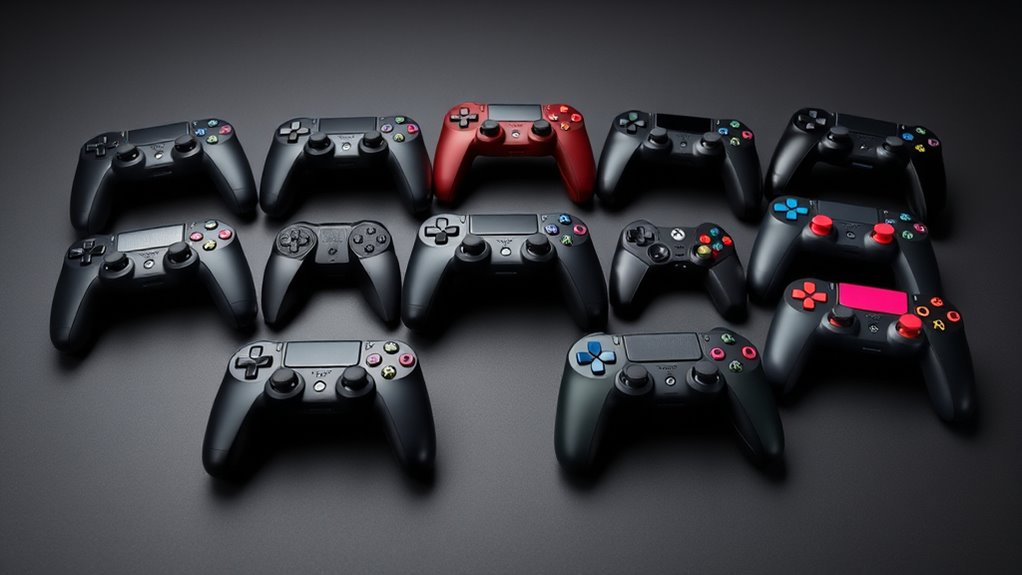

For a Bluetooth game controller that balances broad compatibility and familiar controls, I’d start with the Xbox Wireless Controller; the 8BitDo Ultimate 2C stands out for PC and Android, while the 8BitDo SN30 Pro suits portable retro play. The main tradeoffs are device support, controller shape, and whether features such as Hall Effect sticks or compact size matter more than a familiar layout. Bluetooth support alone does not guarantee that every button or feature works the same way on every platform. I ranked these picks by how clearly they serve different gaming needs and by the practical value of their design choices. Read on for the full breakdown, buying advice, and answers to common compatibility questions.

Get the latest gadgets delivered free with Prime
- Fast, free delivery on millions of items
- Prime Video, Amazon Music and more included
- Member-only deals all year
Complete the kit



Key Takeaways
- The Xbox Wireless Controller is the familiar all-rounder: its standard layout makes it a straightforward fit for many PC and Bluetooth-enabled devices, though buyers should check support for their particular platform.
- The 8BitDo Ultimate 2C is the clearest PC and Android specialist: it focuses on those systems, so it makes more sense for those players than for someone seeking one controller for every device.
- Hall Effect sticks set the abxylute C6 apart on paper: they are a notable feature for buyers prioritizing stick design, but platform support and overall fit still matter.
- The SN30 Pro and Pocket Controller answer different portability needs: the SN30 Pro offers a retro-style layout, while the AceGamer Pocket model emphasizes a compact form.
- The lineup includes repeated and closely related Switch-oriented options: compare exact model features and compatibility rather than assuming similar names mean identical controllers.
| abxylute C6 Wireless PC Controller, Bluetooth Game Controller with Hall Effect Joysticks |  | Best for Long Sessions Across Many Devices | Connectivity: Wired, Bluetooth, Bluetooth dongle | Joystick type: Hall Effect | Polling rate: 1000 Hz | VIEW ON AMAZON | See Our Full Breakdown |
| GameSir Nova Lite 2 Wireless Controller |  | Best for Customizable Controls | Model: Nova Lite 2 (TT0970004-053) | Connectivity: Bluetooth, wired, wireless dongle | Compatible devices: PC, Nintendo Switch, Nintendo Switch 2, Android, iOS | VIEW ON AMAZON | See Our Full Breakdown |
| GameSir Nova Lite Wireless Controller |  | Best Value for Three Connection Options | Connectivity: Bluetooth, 2.4 GHz wireless dongle, USB-C | Compatible devices: Windows 10/11, Nintendo Switch, Android, iOS, Steam Deck | Joystick technology: Hall Effect | VIEW ON AMAZON | See Our Full Breakdown |
| VOYEE Wireless Controller for Nintendo Switch, Switch Lite, OLED, and PC |  | Best for RGB and Motion Features | Compatible devices: Nintendo Switch, Switch Lite, Switch OLED, Android, iOS, PC | Connectivity: Wireless; PC requires a cable | Motion control: 6-axis gyro sensor | VIEW ON AMAZON | See Our Full Breakdown |
| 8BitDo SN30 Pro Bluetooth Controller – G Classic Edition |  | Best Compact Retro Pick | Connectivity: Bluetooth | Controller type: Gamepad | Buttons: 16 | VIEW ON AMAZON | See Our Full Breakdown |
| EasySMX X05Pro Wireless Gaming Controller for PC, Switch, Android/iOS |  | Best for Quiet, Multi-Platform Play | Compatible devices: PC, Nintendo Switch, Android, iOS | Connectivity: USB-C, 2.4 GHz wireless, Bluetooth | Polling rate: 1000 Hz wired or 2.4 GHz; 125 Hz Bluetooth | VIEW ON AMAZON | See Our Full Breakdown |
| 8Bitdo Ultimate 2C Wireless Controller for Windows PC and Android |  | Best for Fast PC and Android Input | Compatibility: Windows PC and Android | Polling rate: 1000 Hz | Joystick type: Hall Effect | VIEW ON AMAZON | See Our Full Breakdown |
| VOYEE Wireless Controller for Nintendo Switch, Switch Lite, OLED, and PC | 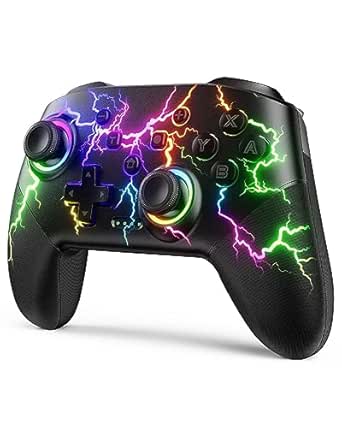 | Best for Switch Motion and Turbo Features | Compatible devices: Nintendo Switch, Switch Lite, Switch OLED, Windows PC | Connectivity: Wireless; PC connection is wired | Motion control: 6-axis gyro | VIEW ON AMAZON | See Our Full Breakdown |
| AceGamer Aurora II Wireless Bluetooth Gaming Controller | 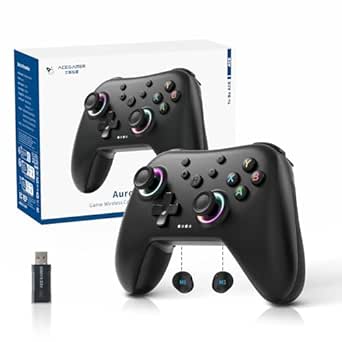 | Best for Dual Wireless Options | Connectivity: 2.4 GHz wireless and Bluetooth | Compatible platforms: Windows 7 and later, Nintendo Switch, Switch 2, iOS, Android, Steam Deck | Joysticks: Hall Effect sensors | VIEW ON AMAZON | See Our Full Breakdown |
| AceGamer Wireless Pocket Controller for Switch, Mobile, PC, and Steam Deck |  | Best Compact Travel Pick | Connectivity: Bluetooth | Compatible devices: Nintendo Switch, Switch 2, Switch Lite, PC, iOS, Android, Steam Deck, tablets, phones | Dimensions: 4.7 × 2.6 × 1.2 inches | VIEW ON AMAZON | See Our Full Breakdown |
| ManbaOne Interactive Screen Wireless Gaming Controller (Black) for PC, Switch, iOS, Android |  | Best for On-Controller Customization | Platform compatibility: PC, Switch, iOS, Android | Connection modes: Wired, Bluetooth, wireless dongle | Display: 2-inch interactive screen | VIEW ON AMAZON | See Our Full Breakdown |
| Xbox Wireless Controller, Shock Blue |  | Best for Xbox and Bluetooth Switching | Color: Shock Blue | Compatible devices: Android, iOS, Windows, Xbox One, Xbox Series S, Xbox Series X | Connectivity: Bluetooth, Xbox Wireless, USB-C | VIEW ON AMAZON | See Our Full Breakdown |
| VOYEE Switch Controllers for Switch, Lite, OLED, and PC with RGB Star LED | 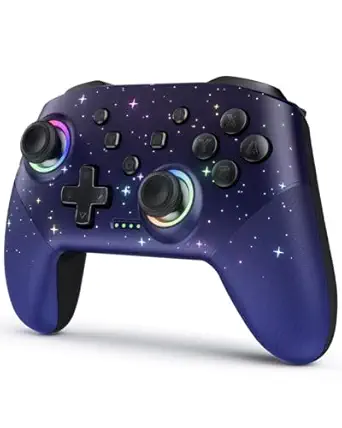 | Best for Switch Players Who Want RGB | Compatibility: Switch, Switch Lite, Switch OLED, Windows PC | Wireless range: 10 meters | RGB lighting: 8 colors, 5 modes | VIEW ON AMAZON | See Our Full Breakdown |
| 8Bitdo Ultimate 2C Wireless Controller for Windows and Android (Green) |  | Best for Responsive Windows and Android Play | Compatible devices: Windows, Android | Connectivity: Wireless, USB | Polling rate: 1000 Hz over 2.4 GHz and wired connections | VIEW ON AMAZON | See Our Full Breakdown |
| Xbox Wireless Gaming Controller, Deep Pink |  | Best Color Choice for Xbox Bluetooth Play | Color: Deep Pink | Compatible devices: Android, iOS, Windows, Xbox Series S, Xbox Series X | Connectivity: Bluetooth, USB-C, Xbox Wireless | VIEW ON AMAZON | See Our Full Breakdown |
| game controllers bluetooth | Connectivity | Compatible devices |
|---|---|---|
| abxylute C6 Wireless PC Contro | Wired, Bluetooth, Bluetooth dongle | — |
| GameSir Nova Lite 2 Wireless C | Bluetooth, wired, wireless dongle | PC, Nintendo Switch, Nintendo Switch 2, Android, iOS |
| GameSir Nova Lite Wireless Con | Bluetooth, 2.4 GHz wireless dongle, USB-C | Windows 10/11, Nintendo Switch, Android, iOS, Steam Deck |
| VOYEE Wireless Controller for | Wireless; PC requires a cable | Nintendo Switch, Switch Lite, Switch OLED, Android, iOS, PC |
| 8BitDo SN30 Pro Bluetooth Cont | Bluetooth | Description lists Switch, Windows, Android, iOS, macOS, Steam Deck, and Raspberry Pi |
| EasySMX X05Pro Wireless Gaming | USB-C, 2.4 GHz wireless, Bluetooth | PC, Nintendo Switch, Android, iOS |
| 8Bitdo Ultimate 2C Wireless Co | — | — |
| VOYEE Wireless Controller for | Wireless; PC connection is wired | Nintendo Switch, Switch Lite, Switch OLED, Windows PC |
| AceGamer Aurora II Wireless Bl | 2.4 GHz wireless and Bluetooth | — |
| AceGamer Wireless Pocket Contr | Bluetooth | Nintendo Switch, Switch 2, Switch Lite, PC, iOS, Android, Steam Deck, tablets, phones |
| ManbaOne Interactive Screen Wi | — | — |
| Xbox Wireless Controller | Bluetooth, Xbox Wireless, USB-C | Android, iOS, Windows, Xbox One, Xbox Series S, Xbox Series X |
| VOYEE Switch Controllers for S | — | — |
| 8Bitdo Ultimate 2C Wireless Co | Wireless, USB | Windows, Android |
| Xbox Wireless Gaming Controlle | Bluetooth, USB-C, Xbox Wireless | Android, iOS, Windows, Xbox Series S, Xbox Series X |
More Details on Our Top Picks
abxylute C6 Wireless PC Controller, Bluetooth Game Controller with Hall Effect Joysticks
The abxylute C6 is a strong fit for players who want one Bluetooth controller to move between PC, Switch, mobile devices, and even supported Tesla models. Its listed 18-hour battery life is longer than the Nova Lite’s stated 10 hours, which can mean fewer charging breaks during extended play. Hall Effect sticks add a durability-focused advantage, while four vibration levels and turbo modes offer some control over feel and repeated inputs. For lower-latency play, the listing points to using the included wireless dongle, so Bluetooth alone may not suit every setup. Its broad compatibility also comes with a caveat: some features depend on the platform, and the Xbox compatibility claim should be checked against the game and connection mode you plan to use. I’d choose it for range and battery life, while players focused on back buttons may prefer the Nova Lite 2.
Pros:- Broad stated compatibility across PC, Switch, mobile, Mac, Steam Deck, and Tesla
- Hall Effect joysticks are designed to resist stick drift
- Up to 18 hours of listed battery life
- Customizable turbo modes and four vibration levels
Cons:- The dongle is recommended for optimal low-latency performance
- Some features depend on platform support
- The broad compatibility list does not mean every feature works on every device
Best for: Players who switch among PC, Switch, and mobile devices and want a longer stated battery life between charges
Not ideal for: Bluetooth-only players who want the lowest possible input delay, since the dongle is recommended for optimal low latency
- Connectivity:Wired, Bluetooth, Bluetooth dongle
- Joystick type:Hall Effect
- Polling rate:1000 Hz
- Battery:600 mAh rechargeable
- Battery life:Up to 18 hours
- Vibration:4 levels
- Gyroscope:Available in Switch games
- Compatibility:Windows 7–11, Xbox, Android 8.0+, iOS 13+, Mac, Switch, Steam Deck, Tesla Model 3 and Y
Our verdict“Choose the abxylute C6 if you want broad device support and longer stated battery life, and can use its dongle when latency matters.”
GameSir Nova Lite 2 Wireless Controller
The GameSir Nova Lite 2 earns its place for players who want more control over button setup than the simpler Nova Lite provides. Its two remappable back buttons can put chosen inputs within reach without shifting grip, and macro recording adds options for supported play styles. Hall Effect sticks and a listed 1000 Hz polling rate round out a feature set aimed at responsive play. Bluetooth, wired, and dongle connections make it adaptable across Switch, PC, Android, and iOS. The tradeoff is that some customization depends on GameSir’s app or PC software, adding setup work, while the product data gives no battery-life figure. Compared with the abxylute C6, the Nova Lite 2 offers more explicit control customization but less certainty about time between charges.
Pros:- Two remappable back buttons with macro recording
- Hall Effect sticks
- Bluetooth, wired, and wireless dongle connection options
- Two-way trigger lock with hair-trigger mode
Cons:- Some customization requires the GameSir app or PC software
- The listing does not specify battery capacity or runtime
Best for: PC and Switch players who want remappable rear buttons, trigger adjustments, and software customization
Not ideal for: Buyers who need a known battery runtime or prefer a controller that works without companion software for customization
- Model:Nova Lite 2 (TT0970004-053)
- Connectivity:Bluetooth, wired, wireless dongle
- Compatible devices:PC, Nintendo Switch, Nintendo Switch 2, Android, iOS
- Polling rate:1000 Hz
- Sticks:Hall Effect
- Back buttons:2 remappable buttons with macro recording
- Triggers:Two-way trigger lock with hair-trigger mode
- Weight:0.24 kg
Our verdict“Pick the Nova Lite 2 if configurable back buttons matter more to you than having a clearly stated battery runtime.”
GameSir Nova Lite Wireless Controller
The GameSir Nova Lite covers the basics that make a Bluetooth controller flexible: it can also connect by 2.4 GHz dongle or USB-C, and its Hall Effect sticks are designed to resist drift. That mix suits someone who wants wireless freedom for Switch or mobile play and a wired fallback at a desk. Its stated up to 10 hours of battery life is shorter than the abxylute C6’s 18-hour claim, so frequent players may charge it more often. Compared with the newer Nova Lite 2, this model’s listed strengths are connection choice and customizable turbo and vibration settings; the Lite 2 adds remappable rear buttons and trigger modes. A two-hour charge time is specified, and the pink finish makes this particular listing more visually distinctive.
Pros:- Bluetooth, 2.4 GHz dongle, and USB-C connection options
- Hall Effect sticks
- Customizable turbo and vibration settings
- Compatible with Switch, Windows 10/11, Android, iOS, and Steam Deck
Cons:- Listed battery life is up to 10 hours, below the abxylute C6’s stated runtime
- Charging takes about two hours
- No back buttons are listed, unlike the Nova Lite 2
Best for: Players seeking a straightforward controller for Switch, PC, or mobile who value Bluetooth plus wired and dongle backups
Not ideal for: Long-session players who want more than 10 hours of stated battery life or rear-button customization
- Connectivity:Bluetooth, 2.4 GHz wireless dongle, USB-C
- Compatible devices:Windows 10/11, Nintendo Switch, Android, iOS, Steam Deck
- Joystick technology:Hall Effect
- Battery capacity:600 mAh
- Battery life:Up to 10 hours
- Charging time:2 hours
- Buttons:16
- Turbo function:20 Hz; customizable buttons
Our verdict“Choose the Nova Lite if you want three connection methods and Hall Effect sticks without needing the Nova Lite 2’s rear controls.”
VOYEE Wireless Controller for Nintendo Switch, Switch Lite, OLED, and PC
The VOYEE S08 is the feature-forward choice for Switch players who want motion controls and a more personalized look. Its six-axis gyro, programmable buttons, adjustable vibration, and three RGB modes give it a broader set of play and appearance options than the retro-focused 8BitDo SN30 Pro. The listed 10–15-hour battery life and 33-foot wireless range suit ordinary room-scale play, though the range is a stated maximum rather than a promise for every setup. There is a sharp platform tradeoff: the listing says PC requires a cable, so this is less versatile for wireless PC use than the Nova Lite, which lists Bluetooth and a dongle. VOYEE also notes that the sticks may need recalibration after extended use, a concern for players prioritizing consistent aiming.
Pros:- Six-axis motion control for supported games
- RGB lighting with eight colors and three modes
- Programmable buttons and three turbo speeds
- Listed 10–15-hour battery life and 33-foot wireless range
Cons:- PC connection requires a cable
- Joystick may need recalibration after extended use
- RGB and extra controls add features that may be unnecessary for players seeking a simple pad
Best for: Switch players who want gyro controls, programmable inputs, adjustable vibration, and RGB lighting
Not ideal for: PC players who want a wireless Bluetooth connection or players who do not want to recalibrate sticks
- Compatible devices:Nintendo Switch, Switch Lite, Switch OLED, Android, iOS, PC
- Connectivity:Wireless; PC requires a cable
- Motion control:6-axis gyro sensor
- Button quantity:22
- Lighting:8 colors, rainbow RGB, 3 modes
- Turbo speeds:5, 12, or 25 shots per second
- Battery life:About 10–15 hours
- Weight:180 g
Our verdict“Pick the VOYEE S08 for Switch-focused play where gyro and lighting matter more than wireless PC support.”
8BitDo SN30 Pro Bluetooth Controller – G Classic Edition
The 8BitDo SN30 Pro brings a classic compact layout together with modern controls: Hall Effect sticks, clickable sticks, rumble, and motion support. Its classic D-pad gives it a clear role beside the larger, more customization-focused GameSir Nova Lite 2, especially for retro games and players who prefer a smaller controller. Bluetooth compatibility spans Switch, Windows, Android, macOS, Steam Deck, and Raspberry Pi in the product description, though the structured compatible-device field lists fewer systems. That discrepancy makes it sensible to confirm support for your exact setup. The main compromise is connection flexibility: this listing offers Bluetooth only, with no wired mode for a direct low-latency fallback. I’d favor it for portable and retro play, while PC players who want connection alternatives should look at the Nova Lite.
Pros:- Classic D-pad layout suited to retro games
- Hall Effect sticks with clickable stick buttons
- Rumble vibration and motion control
- Rechargeable battery with USB-C charging
Cons:- Bluetooth is the only listed connection method
- No wired mode for a direct low-latency fallback
- Compatibility details vary between the product description and structured specs
Best for: Retro-game fans and portable players who want a compact Bluetooth pad with a traditional D-pad
Not ideal for: Players who need wired play or want Bluetooth, dongle, and USB connection choices in one controller
- Connectivity:Bluetooth
- Controller type:Gamepad
- Buttons:16
- Sticks:Hall Effect, clickable
- Additional features:Rumble vibration, motion controls, home and screenshot buttons
- Power:Rechargeable battery; USB-C port
- Compatible devices:Description lists Switch, Windows, Android, iOS, macOS, Steam Deck, and Raspberry Pi
- Dimensions:3.54 x 6.69 x 1.97 inches
Our verdict“Choose the SN30 Pro if a compact retro layout and Bluetooth play matter more than wired or dongle options.”
EasySMX X05Pro Wireless Gaming Controller for PC, Switch, Android/iOS
The EasySMX X05Pro is the most adaptable pick here for someone moving between PC, Switch, and mobile devices. Its Bluetooth support covers those platforms, while 2.4 GHz or USB-C reaches up to 1000 Hz for players who want faster input on a compatible setup. That gives it a useful edge over the Bluetooth-only AceGamer Pocket Controller, though Bluetooth polling drops to 125 Hz. Hall Effect sticks and dual-stage triggers add control options, and the silicone-damped buttons suit late-night sessions. The tradeoff is a busier feature set that may be unnecessary for casual play, plus no Xbox, PlayStation, Luna, or GeForce console support. I’d choose it for broad device coverage and quiet controls, provided I’m willing to use 2.4 GHz or USB-C when responsiveness matters most.
Pros:- Supports PC, Switch, Android, and iOS
- Hall Effect joysticks are designed to resist stick drift
- Silicone-damped buttons reduce button noise
- 2.4 GHz and USB-C modes support up to 1000 Hz polling
Cons:- Bluetooth polling is limited to 125 Hz
- Does not support Xbox, PlayStation, Luna, or GeForce consoles
Best for: Players who switch among PC, Nintendo Switch, and phones and want quiet controls with a 2.4 GHz option
Not ideal for: Xbox or PlayStation owners, and Bluetooth-only players who prioritize the listed 1000 Hz polling rate
- Compatible devices:PC, Nintendo Switch, Android, iOS
- Connectivity:USB-C, 2.4 GHz wireless, Bluetooth
- Polling rate:1000 Hz wired or 2.4 GHz; 125 Hz Bluetooth
- Joystick technology:11-bit Hall Effect
- Triggers:Dual-stage adjustable with 2+2 rumble motors
- Programmable buttons:2 side buttons
- Battery:Rechargeable 1000 mAh
Our verdict“Choose the X05Pro if you want quiet controls and broad platform support, with the option to use 2.4 GHz or USB-C for faster input.”
8Bitdo Ultimate 2C Wireless Controller for Windows PC and Android
For players focused on Windows PC and Android, the 8Bitdo Ultimate 2C keeps its pitch direct: Hall Effect sticks and triggers, a listed 1000 Hz polling rate, and remapping without extra software. That makes it a more focused alternative to the EasySMX X05Pro, which covers Switch and iOS too but specifies a lower polling rate over Bluetooth. The Ultimate 2C’s metal rings are described as wear-resistant, and its remappable R4/L4 bumpers let players tailor controls without installing a configuration tool. Turbo is included for games that benefit from repeated inputs. Its narrow platform range is the main limitation: there’s no Switch or iOS compatibility listed, and the provided data does not clarify its connection modes. I’d shortlist it for PC and Android, but choose another model for a multi-platform setup.
Pros:- Listed 1000 Hz polling rate
- Hall Effect joysticks and triggers
- Button mapping without software
- Remappable R4/L4 bumpers and turbo function
Cons:- Compatibility is limited to Windows PC and Android
- Connection mode details are not provided in the product data
Best for: Windows PC and Android players who want high polling, Hall Effect controls, and button remapping without software
Not ideal for: People who need Switch or iOS support, or who need clearly specified connection options before buying
- Compatibility:Windows PC and Android
- Polling rate:1000 Hz
- Joystick type:Hall Effect
- Trigger type:Hall Effect
- Remappable bumpers:R4/L4
- Button mapping:Custom mapping without software
- Additional feature:Turbo function
Our verdict“Pick the Ultimate 2C for a focused PC or Android setup with fast polling and simple remapping, if its limited platform list fits your devices.”
VOYEE Wireless Controller for Nintendo Switch, Switch Lite, OLED, and PC
The VOYEE S08 is built around Nintendo Switch play: it offers motion control, console wake-up, one-key pairing, adjustable vibration, and RGB lighting. Its 6-axis gyro gives motion-steering and aiming games a feature the 8Bitdo Ultimate 2C does not list, while three turbo speeds add another way to handle repeated inputs. This is the more Switch-oriented choice, but its PC support requires a wired connection, so it does not serve as a Bluetooth PC controller. Battery runtime is listed at 10–15 hours, with charging taking 3–4 hours; that makes planning a charge worthwhile for longer sessions. I’d choose it for Switch players who want motion features and console wake-up, while PC-focused buyers should look at a controller with wireless PC support.
Pros:- Supports Switch, Switch Lite, and Switch OLED
- 6-axis motion control
- One-key pairing and console wake-up
- Three turbo speeds and four vibration levels
Cons:- PC use requires a wired connection
- Charging takes 3–4 hours
Best for: Nintendo Switch players who use motion controls, want console wake-up, and like adjustable turbo and vibration
Not ideal for: PC players who require a wireless connection, or buyers who want a shorter charging window
- Compatible devices:Nintendo Switch, Switch Lite, Switch OLED, Windows PC
- Connectivity:Wireless; PC connection is wired
- Motion control:6-axis gyro
- Battery runtime:10–15 hours
- Charging time:3–4 hours
- Vibration:4 levels
- Turbo speeds:5, 12, or 20 shots per second
- Weight:6.88 ounces
Our verdict“Choose the VOYEE S08 for Switch-focused play with motion control and wake-up support, but skip it if you need wireless PC gaming.”
AceGamer Aurora II Wireless Bluetooth Gaming Controller
The AceGamer Aurora II suits players who want a choice between Bluetooth and 2.4 GHz wireless across PC, Switch, mobile, and Steam Deck. That flexibility sets it apart from the VOYEE S08, whose PC connection is wired, and from the compact AceGamer Pocket Controller, which lists Bluetooth only. Its Hall Effect joysticks and two programmable back buttons add useful control options, while the 1000 mAh battery is a stated capacity rather than a runtime estimate. Pairing over 2.4 GHz involves a specific button sequence, which may make setup less straightforward than the VOYEE’s one-key pairing. Xbox systems are not supported. I’d favor the Aurora II when connection choice and back-button mapping matter more than instant setup or Xbox compatibility.
Pros:- Offers both Bluetooth and 2.4 GHz wireless
- Compatible with PC, Switch, iOS, Android, and Steam Deck
- Hall Effect joysticks
- Two programmable back buttons
Cons:- Not compatible with Xbox systems
- 2.4 GHz pairing requires a specific button sequence
- Battery runtime is not specified
Best for: Players using PC, Switch, mobile, or Steam Deck who want both Bluetooth and 2.4 GHz wireless with programmable back buttons
Not ideal for: Xbox owners and buyers who want simple 2.4 GHz pairing or a stated battery runtime
- Connectivity:2.4 GHz wireless and Bluetooth
- Compatible platforms:Windows 7 and later, Nintendo Switch, Switch 2, iOS, Android, Steam Deck
- Joysticks:Hall Effect sensors
- Programmable buttons:2 back buttons
- Button quantity:12
- Battery capacity:1000 mAh
- Xbox compatibility:Not compatible
Our verdict“Choose the Aurora II if you want two wireless connection options and programmable back buttons across several platforms, and do not need Xbox support.”
AceGamer Wireless Pocket Controller for Switch, Mobile, PC, and Steam Deck
At 3.3 ounces and 4.7 inches long, the AceGamer Pocket Controller is the travel-first option in this group. It connects over Bluetooth and lists compatibility with Switch systems, PC, phones, tablets, and Steam Deck, giving it wider device coverage than the Windows-and-Android-only 8Bitdo Ultimate 2C. Despite its small body, it includes a 6-axis gyro, dual-motor vibration, adjustable turbo, and lift-and-lock joysticks. The size is also the compromise: players with larger hands or who prefer a full-size grip may find it cramped. Its 1000 Hz polling rate is listed, but the product data does not specify battery life or clarify the connection between that figure and Bluetooth operation. I’d pack it for mobile or handheld gaming, not choose it as my default full-size controller.
Pros:- Compact 4.7 × 2.6 × 1.2-inch body weighs 3.3 ounces
- Bluetooth compatibility spans Switch, PC, mobile, and Steam Deck
- Includes a 6-axis gyroscope and dual-motor vibration
- Adjustable turbo and lift-and-lock joysticks
Cons:- Pocket-sized shape may feel too small for extended play
- Battery life is not provided
Best for: Travelers and handheld players who want a lightweight Bluetooth controller for Switch, phones, tablets, or Steam Deck
Not ideal for: Players with larger hands who prefer a full-size grip, or buyers who need a stated battery runtime
- Connectivity:Bluetooth
- Compatible devices:Nintendo Switch, Switch 2, Switch Lite, PC, iOS, Android, Steam Deck, tablets, phones
- Dimensions:4.7 × 2.6 × 1.2 inches
- Weight:3.3 ounces
- Polling rate:1000 Hz
- Motion sensing:6-axis gyroscope
- Vibration:Dual-motor
- Turbo speeds:5 Hz, 12 Hz, or 20 Hz
Our verdict“Take the Pocket Controller for lightweight Bluetooth play on the go, but choose a larger model for a roomier grip or a known battery runtime.”
ManbaOne Interactive Screen Wireless Gaming Controller (Black) for PC, Switch, iOS, Android
The 2-inch interactive screen gives the ManbaOne a distinct advantage for players who want to adjust settings on the controller itself. Its Bluetooth, wired, and wireless dongle connections also offer more setup choices than the Bluetooth-focused 8Bitdo Ultimate 2C, while support for PC, Switch, iOS, and Android makes it useful across several devices. Hall effect joysticks and triggers are designed for precise input, and the charging station keeps the rechargeable controller ready between sessions. The tradeoff is a more involved feature set: some setup may require customer support, and Bluetooth may be less stable than a wired connection. I’d skip it if you need an Xbox or PlayStation controller; neither is listed as compatible.
Pros:- Bluetooth, wired, and wireless dongle connection options
- Interactive screen supports controller customization
- Hall effect joysticks and triggers are designed for precise control
- Works with PC, Switch, iOS, and Android
Cons:- Xbox and PlayStation compatibility is not listed
- Bluetooth may be less stable than wired play
- Some features may require customer support to set up
Best for: Multi-device players who want on-controller settings and several connection options across PC, Switch, iOS, and Android
Not ideal for: Xbox and PlayStation owners, or players who want a simple Bluetooth pad with minimal setup
- Platform compatibility:PC, Switch, iOS, Android
- Connection modes:Wired, Bluetooth, wireless dongle
- Display:2-inch interactive screen
- Battery capacity:1800mAh
- Joystick and trigger technology:Hall effect
- Additional controls:Customizable buttons, macro back keys
- Motion control:6-axis gyroscope
Our verdict“Choose the ManbaOne if you want a customizable multi-platform controller with an onboard screen and can accommodate a more involved setup.”
Xbox Wireless Controller, Shock Blue
For a player moving between an Xbox and Bluetooth-connected devices, this Shock Blue Xbox controller offers a familiar layout and several connection paths: Xbox Wireless, Bluetooth, and USB-C. The sculpted shape, textured grips, and hybrid D-pad make it a practical everyday choice, while the 3.5 mm headset jack keeps wired audio close at hand. Compared with the ManbaOne, it has no built-in screen or charging station, but it covers Xbox consoles and supported iOS, Android, and Windows devices. Its main compromise is power: it uses AA batteries, with battery life listed at up to 40 hours. I’d choose it for broad Xbox-centered use, but the 8Bitdo Ultimate 2C is a better fit if Hall effect controls and a specified high polling rate matter more.
Pros:- Connects through Xbox Wireless, Bluetooth, or USB-C
- Textured grips and sculpted surfaces support comfortable handling
- Hybrid D-pad and customizable controls
- Includes a 3.5 mm headset jack and Share button
Cons:- Uses AA batteries rather than a built-in rechargeable battery
- Windows button mapping requires a separately sold USB-C cable
- Cloud gaming requires a separate Game Pass subscription
Best for: Xbox players who also want Bluetooth pairing with supported Windows, iOS, or Android devices
Not ideal for: Rechargeable-controller shoppers or players seeking Hall effect controls and a specified 1000 Hz polling rate
- Color:Shock Blue
- Compatible devices:Android, iOS, Windows, Xbox One, Xbox Series S, Xbox Series X
- Connectivity:Bluetooth, Xbox Wireless, USB-C
- Controls and features:Hybrid D-pad, textured grips, Share button, customizable controls
- Headset connection:3.5 mm jack
- Power source:AA batteries
- Listed battery life:Up to 40 hours
- Weight:13.6 ounces
Our verdict“Pick this Xbox controller if you want familiar console controls with Bluetooth access to supported devices and accept AA battery power.”
VOYEE Switch Controllers for Switch, Lite, OLED, and PC with RGB Star LED
The VOYEE pairs Switch compatibility with colorful lighting, programmable M1 and M2 buttons, turbo, and motion controls. Those extras give it a more playful, customizable feel than the Xbox Wireless Controller, whose strengths are its Xbox support and more conventional setup. Wireless play has a listed 10-meter range, and the battery is rated for 10–15 hours, so this suits sessions where visual flair and extra button functions matter more than long stretches between charges. PC use has a catch: the product data says it requires a cable connection, which makes it less flexible as a Bluetooth PC pick. Its many modes may also take time to learn. I’d favor the simpler 8Bitdo Ultimate 2C for Windows and Android gaming, but choose VOYEE for Switch-focused play and RGB customization.
Pros:- Compatible with Switch, Switch Lite, Switch OLED, and Windows PC
- RGB lighting offers 8 colors and 5 modes
- M1 and M2 buttons support single or multiple mapping
- Includes 6-axis gyro, vibration, and turbo functions
Cons:- PC compatibility requires a cable connection
- Listed battery life is 10–15 hours
- Multiple programmable features may take time to learn
Best for: Switch owners who want customizable lighting, programmable rear buttons, and motion controls
Not ideal for: PC players who need wireless Bluetooth use, or beginners who prefer fewer features to configure
- Compatibility:Switch, Switch Lite, Switch OLED, Windows PC
- Wireless range:10 meters
- RGB lighting:8 colors, 5 modes
- Battery life:10–15 hours
- Charging:USB Type-C, 3–4 hours
- Motion control:6-axis gyro sensor
- Programmable buttons:M1, M2; single or multiple mapping
- Turbo speeds:5, 12, or 25 shots per second
Our verdict“Choose VOYEE for a feature-rich, colorful Switch controller if wired PC play and a learning curve are acceptable.”
8Bitdo Ultimate 2C Wireless Controller for Windows and Android (Green)
The 8Bitdo Ultimate 2C is the focused pick for Windows and Android players who care about responsive input. Its 1000 Hz polling rate over 2.4 GHz or wired connections is a concrete distinction from the VOYEE, whose listing emphasizes Switch features and gives no polling-rate figure. Hall effect joysticks and triggers, remappable L4/R4 bumpers, and button mapping without software add useful control options without requiring a configuration app. The limitation is platform scope: only Windows and Android are listed, so it is less suitable than the ManbaOne for someone rotating among Switch and mobile platforms. Also, the high polling rate is specified for 2.4 GHz and wired connections, not every wireless mode. I’d choose it for a straightforward PC or Android setup, not as an all-purpose Bluetooth controller.
Pros:- Hall effect joysticks and triggers
- 1000 Hz polling rate specified for 2.4 GHz and wired connections
- L4/R4 bumpers can be remapped
- Button mapping does not require software
Cons:- Compatibility is listed only for Windows and Android
- High polling rate is specified only for 2.4 GHz and wired connections
- No battery capacity or battery life is provided in the product data
Best for: Windows and Android players who want Hall effect controls, extra remappable bumpers, and a stated high polling rate
Not ideal for: Switch, iOS, or console owners who need compatibility beyond Windows and Android
- Compatible devices:Windows, Android
- Connectivity:Wireless, USB
- Polling rate:1000 Hz over 2.4 GHz and wired connections
- Joystick and trigger technology:Hall effect
- Buttons:14
- Additional controls:Remappable L4/R4 bumpers, turbo function
- Weight:280 g
- Color:Green
Our verdict“Pick the Ultimate 2C for Windows or Android when responsive controls and simple button mapping matter more than broad device support.”
Xbox Wireless Gaming Controller, Deep Pink
This Deep Pink Xbox controller offers the same core appeal as the Shock Blue model: Bluetooth, Xbox Wireless, and USB-C connectivity, familiar textured grips, and a hybrid D-pad. Its listed compatibility covers Xbox Series S and X plus Android, iOS, and Windows, making it a useful bridge between a console and supported Bluetooth devices. The Share button and headset jack add practical everyday controls. Compared with the 8Bitdo Ultimate 2C, this one is the more natural choice for Xbox owners, while the 8Bitdo lists Hall effect sticks and triggers and a high polling rate for specified connections. The pink finish is the main distinction from the Shock Blue option in this batch; the underlying tradeoffs remain AA batteries and a separate cable for Windows button mapping.
Pros:- Bluetooth, Xbox Wireless, and USB-C connectivity
- Compatible with Xbox Series S and X, Android, iOS, and Windows
- Textured grips and hybrid D-pad
- Share button and 3.5 mm headset jack
Cons:- Requires AA batteries
- Windows button mapping requires a separately sold USB-C cable
- Cloud gaming requires Game Pass and a supported device
Best for: Xbox Series S or X owners who want Bluetooth pairing with supported phones or Windows devices and prefer a Deep Pink finish
Not ideal for: Players who want a rechargeable battery or Hall effect controls and high polling-rate specifications
- Color:Deep Pink
- Compatible devices:Android, iOS, Windows, Xbox Series S, Xbox Series X
- Connectivity:Bluetooth, USB-C, Xbox Wireless
- Controls and features:Hybrid D-pad, textured grips, Share button, customizable button mapping
- Headset connection:3.5 mm jack
- Power source:AA batteries
- Listed battery life:Up to 40 hours
- Weight:13.6 ounces
Our verdict“Choose this model for Xbox-centered Bluetooth play if the Deep Pink color appeals and AA battery power suits your setup.”

How We Picked
I ranked these controllers around the questions that matter when shopping specifically for Bluetooth play: which devices each model supports, how its layout fits its intended games, and whether its standout features solve a real buyer problem. I gave weight to versatility, portability, stick design, and ease of choosing a controller for a particular setup. A controller with broad platform support has an advantage for mixed-device households, while a focused model can rank well when its design better serves PC, Switch, or mobile play.
The order reflects these differences rather than treating every feature as equally useful. The Xbox Wireless Controller leads for its familiar general-purpose role; the Ultimate 2C and SN30 Pro follow as more targeted alternatives. Compact designs, distinctive controls, and Switch-focused models serve narrower needs further down the list. Some products appear more than once under the submitted names, and closely related models may differ; buyers should verify the precise model and supported devices before choosing.
Factors to Consider When Choosing Game Controllers Bluetooth
I’d choose a Bluetooth controller by starting with the device and games I actually plan to use. These broader checks help avoid mismatches that a feature list alone can hide.
Check Platform Support Beyond the Bluetooth Label
Bluetooth describes a wireless connection, not a promise that every device will recognize every controller. Check the manufacturer’s supported operating systems and the specific platform you play on. Some games may offer different button prompts or limited input support even when a controller connects successfully. If you switch between PC, phone, and console, confirm each connection path separately. A model designed for PC and Android may be a better match for that pair than a controller advertised for a different console family. Compatibility details can also vary by model revision, so match the listing to the exact product name.
Match the Layout to Your Games
Button placement changes how quickly a controller feels familiar, especially when moving between systems. A conventional two-stick layout is a safe starting point for many modern games, while a compact retro arrangement can suit older titles and handheld play. Check whether the platform’s on-screen prompts match the symbols on the controller if that matters to you. Extra buttons can help with remapping, but they add little if your games do not support custom inputs. Before buying for a child or a second player, think about hand size and reach as well as the number of controls. The best layout is the one that fits both the games and the player.
Treat Hall Effect Sticks as One Factor
Hall Effect sticks use magnetic sensing, which can appeal to buyers concerned about stick wear. That feature does not by itself tell you how comfortable the controller is, how responsive its inputs feel, or what support is available if something goes wrong. Compare stick design alongside grip shape, trigger feel, and the games you play. For genres that depend on careful aiming, control feel may matter more than the feature name. If longevity is your priority, look for clear product documentation and support terms as well. A controller without this feature can still be the better fit if its shape and platform support suit you more.
Decide How Portable It Needs to Be
A compact controller is easier to pack, but smaller grips may be less comfortable during longer sessions. Consider whether you will carry it in a pocket, a travel case, or a handheld gaming bag. Also check how its dimensions work with your phone mount or other accessories if you plan to play on mobile. A full-size shape may be more comfortable at home, while a portable layout can be the practical choice for commuting or travel. Do not assume every small controller includes a phone holder or works as a direct attachment. Confirm the accessories and connection method separately.
Compare Power and Connection Details
Wireless controllers differ in how they charge, how long they run, and whether they can also connect by cable. Those details affect daily convenience more than a long feature list does. Check battery type, charging port, and whether a cable is included if you want a wired fallback. For shared setups, consider how easily you can pair the controller with another device when switching platforms. A controller that supports several devices may still require you to pair again or change modes. Read the setup instructions before relying on one controller to move between systems during a session.
Pay for Features You Will Use
Extra lighting, screens, or configurable controls can make a controller more engaging, but they can also add complexity. Ask whether you will use the feature often enough to make setup and upkeep worthwhile. A straightforward model can be a better first controller because fewer settings stand between you and playing. For a dedicated PC setup, extra customization may matter more than pocketability or console-style familiarity. Families should also consider whether a feature needs an app or account to configure. The right choice depends on your routine, not on the number of features listed.
Frequently Asked Questions
Will any Bluetooth controller work with my PC and phone?
No. A Bluetooth connection only describes how a device communicates; the operating system and game still need to support the controller’s inputs. Check the exact model’s listed compatibility for both your PC and phone. If you use different operating systems, confirm each one separately rather than relying on a general “wireless” claim. Also check whether the controller needs a specific mode or setup step for each device.
Should I choose the Xbox Wireless Controller or an 8BitDo model?
I’d favor the Xbox controller if I want a familiar general-purpose layout and broad appeal across common gaming setups. The 8BitDo Ultimate 2C is a more focused fit for Windows PC and Android, while the SN30 Pro makes more sense for players drawn to a compact retro-style layout. Think about the devices you use most and whether a conventional shape or a specialized form matters more. Check game compatibility on your target platform before deciding.
Are Hall Effect sticks a reason to choose the abxylute C6?
They are a meaningful point of difference if stick design is high on your list, but they should not be the only deciding factor. Comfort, platform support, and how the controller suits your games also affect the experience. Compare the C6 with familiar-layout options such as the Xbox Wireless Controller and the PC-focused Ultimate 2C. If your primary device is not clearly supported, the stick feature does not solve that mismatch.
Is a compact controller a good choice for long gaming sessions?
It depends on your hands, grip, and how long you play at a time. Compact designs like the SN30 Pro or AceGamer Pocket model can be easier to carry, but a smaller grip may feel cramped during extended sessions. If possible, compare the controller’s dimensions with a full-size model you already find comfortable. For travel, portability may outweigh grip size; for a desk setup, a larger shape may be easier to hold.
Why do several controllers in this roundup appear to have similar names?
Some product entries are repeated or describe closely related versions, including multiple VOYEE and 8BitDo listings. Similar names do not guarantee identical features, included accessories, or supported devices. Check the exact model designation and color variant against the manufacturer’s specifications before ordering. This matters most when two versions have different platform claims or feature sets.
What are the best bluetooth controller?
The picks above highlight Bluetooth game controllers suited to different play styles and devices. To choose the best bluetooth controller for you, consider what you’ll connect it to, how you prefer the controls to feel, and whether you want a compact option for travel or a full-size design for longer sessions. Check that the controller supports your device and the games you play, and compare its button layout, stick placement, and connection setup. The right choice is the one that feels comfortable and works smoothly with your gaming setup.
Conclusion
For a dependable starting point with a familiar layout, I’d choose the Xbox Wireless Controller as the best overall pick, after checking support for your device. The 8BitDo Ultimate 2C is my best value-style recommendation for Windows PC and Android players who want a focused controller, while the ManbaOne Interactive Screen is the premium-leaning choice for buyers drawn to extra interface features. Beginners may find the familiar Xbox layout easiest to approach. For compact retro play, choose the 8BitDo SN30 Pro; for a portability-first option, compare the AceGamer Pocket Controller. If stick design is your priority, consider the abxylute C6 and verify its platform fit first.
Halloween Picks
halloween
As an affiliate, we earn on qualifying purchases.