
A premium mechanical keyboard should match how you work or play, not just add features you may never use. My best overall pick is the Keychron V6 Ultra 8K, which pairs a full-size layout with wireless connectivity and a high polling rate. For competitive gaming, the Razer Huntsman V3 Pro 8KHz focuses on responsive control, while the ASUS ROG Azoth Extreme is a more feature-rich wireless 75% option. The main tradeoffs are layout, switch feel, gaming-specific functions, and whether you want a wired, wireless, or magnetic-switch board. Read on for how all 14 options compare and which one best fits your setup.

Get the latest gadgets delivered free with Prime
- Fast, free delivery on millions of items
- Prime Video, Amazon Music and more included
- Member-only deals all year
Complete the kit



Key Takeaways
- The Keychron V6 Ultra 8K leads as a versatile full-size pick: it suits buyers who want a number pad and wireless flexibility without choosing a gaming-only model.
- Gaming performance and everyday versatility point to different boards: the Razer Huntsman V3 Pro 8KHz prioritizes competitive control, while the Keychron K10 Max and V6 Ultra 8K offer broader everyday use.
- 75% keyboards trade navigation and number-pad space for a smaller footprint: the AULA F75 Pro, Keychron K2 HE, and ASUS ROG Azoth Extreme suit different budgets and priorities within that compact format.
- Magnetic switches are a specialized choice, not an automatic upgrade: the Keychron K2 HE and K10 HE are aimed at buyers who want adjustable actuation and gaming-focused control.
- Premium features vary more than the category label suggests: the Corsair K100 and ASUS ROG models emphasize gaming features, while the CHERRY KC 200 MX and Logitech MX Mechanical favor quieter or work-oriented use.
| Keychron V6 Ultra 8K Full-Size Wireless Mechanical Keyboard |  | Best Overall | Layout: Full-size QWERTY, 104 keys | Connectivity: 2.4 GHz wireless, Bluetooth, USB-C wired | Polling rate: Up to 8000 Hz in 2.4 GHz wireless and wired modes | VIEW ON AMAZON | See Our Full Breakdown |
| ASUS ROG Strix Scope II X Full-Size Wired Mechanical Gaming Keyboard |  | Best for Wired Gaming and Streaming | Layout: Full-size QWERTY, 104 keys | Connectivity: USB 2.0; USB-C to USB-A | Switches: Hot-swappable ROG NX Snow V2 linear | VIEW ON AMAZON | See Our Full Breakdown |
| Corsair K100 RGB Mechanical Gaming Keyboard with Cherry MX Speed Silver Switches | 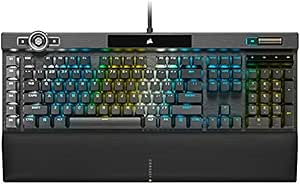 | Best for Fast-Actuation Gaming | Keys: 110 | Connectivity: Wired | Switches: Linear Cherry MX Speed RGB Silver | VIEW ON AMAZON | See Our Full Breakdown |
| AULA F75 Pro Wireless 75% Hot-Swappable Mechanical Keyboard |  | Best Compact Wireless Pick | Layout: 75%, 81 keys, QWERTZ | Connectivity: Bluetooth 5.0, 2.4 GHz wireless, USB-C | Multi-device support: Up to 5 devices | VIEW ON AMAZON | See Our Full Breakdown |
| CHERRY KC 200 MX Wired Mechanical Keyboard with MX2A Silent Red Switches |  | Best for Quiet Office Typing | Layout: American QWERTY, 104 keys | Connectivity: USB-A wired | Switches: CHERRY MX2A Silent Red mechanical | VIEW ON AMAZON | See Our Full Breakdown |
| Keychron K2 HE Wireless Magnetic Mechanical Keyboard, 75% Layout |  | Best Compact Magnetic-Switch Pick | Layout: 75% QWERTY, 84 keys | Switches: Gateron Double-Rail Magnetic linear | Actuation: 0.2–3.8 mm range; 0.1 mm sensitivity | VIEW ON AMAZON | See Our Full Breakdown |
| Keychron K10 Max Wireless Full-Size Mechanical Keyboard |  | Best Full-Size Customization Pick | Layout: 100% full-size, 108 keys | Switches: Pre-lubed linear red; hot-swappable with most 3-pin and 5-pin MX switches | Connectivity: 2.4 GHz wireless, Bluetooth 5.1, wired | VIEW ON AMAZON | See Our Full Breakdown |
| Razer Huntsman V3 Pro 8KHz Esports Gaming Keyboard |  | Best for Competitive Gaming | Layout: 104-key QWERTY | Switch type: Gen-2 linear analog optical | Actuation: 0.1–4.0 mm adjustable | VIEW ON AMAZON | See Our Full Breakdown |
| Keychron K10 HE Full-Size Wireless Hall Effect Keyboard |  | Best Premium Full-Size Magnetic Pick | Layout: Full-size, 104-key QWERTY | Switches: Gateron Double-Rail Nebula linear magnetic | Actuation: 0.2–3.8 mm range; 0.1 mm sensitivity | VIEW ON AMAZON | See Our Full Breakdown |
| RK Royal Kludge S98 Wireless Mechanical Keyboard with Smart Display and Knob |  | Best Feature-Rich 98-Key Alternative | Layout: 98-key QWERTY | Switches: Linear RK switches | Switch compatibility: 3-pin and 5-pin hot-swappable switches | VIEW ON AMAZON | See Our Full Breakdown |
| RK Royal Kludge R98 Pro Wired Mechanical Keyboard |  | Best for a Compact Number Pad | Layout: 98-key QWERTY | Connectivity: USB-C wired | Switches: Pre-lubed linear; hot-swappable 3-pin and 5-pin | VIEW ON AMAZON | See Our Full Breakdown |
| SteelSeries Apex 5 Hybrid Mechanical Gaming Keyboard |  | Best for Clicky Gaming Features | Key count: 104 | Switches: Hybrid Blue, tactile and clicky | Connectivity: USB | VIEW ON AMAZON | See Our Full Breakdown |
| ASUS ROG Azoth Extreme 75% Wireless Mechanical Gaming Keyboard |  | Best Premium Wireless Gaming Build | Layout: 75% QWERTY, 84 keys | Connectivity: 2.4 GHz wireless, Bluetooth, and USB-C wired | Switches: Pre-lubed linear ROG NX Snow; hot-swappable 3-pin | VIEW ON AMAZON | See Our Full Breakdown |
| Logitech MX Mechanical Wireless Illuminated Keyboard, Clicky |  | Best for Multi-Device Work | Layout and key count: Full-size QWERTY, 104 keys | Switches: Low-profile clicky mechanical | Connectivity: Bluetooth Low Energy, Logi Bolt receiver, USB-C charging | VIEW ON AMAZON | See Our Full Breakdown |
| premium mechanical keyboard | Connectivity | Switches | Layout | Backlighting |
|---|---|---|---|---|
| Keychron V6 Ultra 8K Full-Size | 2.4 GHz wireless, Bluetooth, USB-C wired | Linear Silk POM Red; hot-swappable | Full-size QWERTY, 104 keys | RGB |
| ASUS ROG Strix Scope II X Full | USB 2.0; USB-C to USB-A | Hot-swappable ROG NX Snow V2 linear | Full-size QWERTY, 104 keys | RGB |
| Corsair K100 RGB Mechanical Ga | Wired | Linear Cherry MX Speed RGB Silver | — | Per-key RGB with 44-zone three-sided LightEdge |
| AULA F75 Pro Wireless 75% Hot- | Bluetooth 5.0, 2.4 GHz wireless, USB-C | Linear LEOBOG Reaper | 75%, 81 keys, QWERTZ | RGB, 16.8 million colors |
| CHERRY KC 200 MX Wired Mechani | USB-A wired | CHERRY MX2A Silent Red mechanical | American QWERTY, 104 keys | — |
| Keychron K2 HE Wireless Magnet | 2.4 GHz wireless, Bluetooth 5.2, USB-C | Gateron Double-Rail Magnetic linear | 75% QWERTY, 84 keys | — |
| Keychron K10 Max Wireless Full | 2.4 GHz wireless, Bluetooth 5.1, wired | Pre-lubed linear red; hot-swappable with most 3-pin and 5-pin MX switches | 100% full-size, 108 keys | South-facing RGB |
| Razer Huntsman V3 Pro 8KHz Esp | USB-A wired | — | 104-key QWERTY | — |
| Keychron K10 HE Full-Size Wire | Bluetooth 5.2, 2.4 GHz wireless, USB-C wired | Gateron Double-Rail Nebula linear magnetic | Full-size, 104-key QWERTY | Customizable RGB |
| RK Royal Kludge S98 Wireless M | Bluetooth 5.0, 2.4 GHz RF, USB-C | Linear RK switches | 98-key QWERTY | — |
| RK Royal Kludge R98 Pro Wired | USB-C wired | Pre-lubed linear; hot-swappable 3-pin and 5-pin | 98-key QWERTY | RGB with 20+ modes |
| SteelSeries Apex 5 Hybrid Mech | USB | Hybrid Blue, tactile and clicky | — | Per-key RGB |
| ASUS ROG Azoth Extreme 75% Wir | 2.4 GHz wireless, Bluetooth, and USB-C wired | Pre-lubed linear ROG NX Snow; hot-swappable 3-pin | 75% QWERTY, 84 keys | — |
| Logitech MX Mechanical Wireles | Bluetooth Low Energy, Logi Bolt receiver, USB-C charging | Low-profile clicky mechanical | — | — |
More Details on Our Top Picks
Keychron V6 Ultra 8K Full-Size Wireless Mechanical Keyboard
The Keychron V6 Ultra 8K is my strongest all-round pick for buyers who want a premium full-size board without being tied to a cable. Its 2.4 GHz, Bluetooth, and USB-C options cover desktop gaming, work devices, and mobile setups, while the full 104-key layout keeps the number pad close at hand. Hot-swappable linear switches and ZMK/Web Launcher programming leave room to tailor the board later. Compared with the wired ASUS ROG Strix Scope II X, the V6 adds wireless flexibility and a gasket-mounted build, but gives up that model’s included wrist rest and streaming-focused controls. The tradeoff is desk space: its full-size footprint is less suited to compact setups, and the stock linear reds won’t please buyers who want a tactile bump or click.
Pros:- Tri-mode connectivity supports wired use and wireless connections across different devices.
- Hot-swappable switches make later customization accessible without soldering.
- Gasket-mounted construction and programmable controls add flexibility to a full-size layout.
- Stated battery life reaches up to 660 hours with backlighting off.
Cons:- The 104-key layout takes more desk space than a 75% board such as the AULA F75 Pro.
- Included linear red switches lack the tactile feedback some typists prefer.
- The 660-hour figure is specified with backlighting off; RGB use reduces the stated battery life.
Best for: Work-and-gaming users who need a number pad, wireless device switching, and the option to change switches without soldering.
Not ideal for: Desk-space-conscious users or typists who prefer tactile or clicky switches over linear reds.
- Layout:Full-size QWERTY, 104 keys
- Connectivity:2.4 GHz wireless, Bluetooth, USB-C wired
- Polling rate:Up to 8000 Hz in 2.4 GHz wireless and wired modes
- Switches:Linear Silk POM Red; hot-swappable
- Backlighting:RGB
- Keycaps:Double-shot, non-shine-through PBT
- Battery life:Up to 660 hours with backlight off; up to 200 hours at lowest RGB brightness
- Programming:ZMK/Web Launcher
- Mounting:Gasket-mounted
Our verdict“Choose the V6 Ultra 8K if you want a configurable full-size keyboard with wireless options, and skip it if desk space or tactile switches matter more.”
ASUS ROG Strix Scope II X Full-Size Wired Mechanical Gaming Keyboard
The ROG Strix Scope II X suits a fixed gaming station where a cable is no drawback and quick access to controls matters. Its multifunction wheel, programmable keys, and streaming hotkeys put common adjustments within reach, while the included detachable wrist rest supports longer sessions. A hot-swappable switch design and pre-lubed linear switches give it more customization potential than the CHERRY KC 200 MX, which is built around quiet typing and dedicated calculator and volume keys instead. ASUS also includes sound-dampening materials, an aluminum plate, and PBT keycaps, but it remains a full-size wired board with Windows 10 or later listed as its operating system. Buyers seeking wireless use or a smaller footprint should look to the AULA F75 Pro instead.
Pros:- Multifunction control wheel and streaming hotkeys put frequent gaming and media actions nearby.
- Hot-swappable, pre-lubed linear switches allow switch changes without soldering.
- Sound-dampening materials, PBT keycaps, and an aluminum plate support a more substantial build.
- Detachable wrist rest and adjustable typing angles add setup flexibility.
Cons:- USB wired connectivity offers no wireless option.
- Full-size layout occupies more desk space than compact boards.
- The listed operating system support is Windows 10 or later.
Best for: Windows gaming and streaming users who want full-size keys, a wrist rest, and easy access to media or stream controls.
Not ideal for: Wireless-first users, people with limited desk space, and buyers who need a keyboard specified for macOS or Linux.
- Layout:Full-size QWERTY, 104 keys
- Connectivity:USB 2.0; USB-C to USB-A
- Switches:Hot-swappable ROG NX Snow V2 linear
- Keycaps:Double-shot PBT
- Backlighting:RGB
- Plate:Aluminum
- Dimensions:17.2 × 5.1 × 1.5 in
- Operating system:Windows 10 or later
- Included accessories:Detachable wrist rest, keycap and switch puller, themed spacebar keycap, USB cable
Our verdict“Pick the Scope II X for a wired Windows gaming desk where its wheel, hotkeys, and wrist rest are useful rather than excess.”
Corsair K100 RGB Mechanical Gaming Keyboard with Cherry MX Speed Silver Switches
The Corsair K100 RGB is the gaming specialist in this group: its 1.2 mm Cherry MX Speed Silver actuation and 4,000 Hz polling and key scanning are aimed at players who prioritize rapid inputs. Per-key RGB combines with a three-sided 44-zone LightEdge, giving this board a more elaborate lighting setup than the ASUS ROG Strix Scope II X. Its aluminum frame, double-shot PBT keycaps, and programmable iCUE wheel round out a control-heavy wired design. That focus comes with tradeoffs. The short actuation may be less forgiving for everyday typing than the V6 Ultra 8K’s linear setup, and the K100’s broad 110-key footprint is a poor fit for small desks. It also requires a cable, unlike Keychron’s wireless full-size option.
Pros:- Cherry MX Speed Silver switches have a short 1.2 mm actuation distance.
- 4,000 Hz polling and key scanning target fast-response gaming setups.
- Per-key RGB and a 44-zone three-sided LightEdge offer expansive lighting control.
- Aluminum frame and double-shot PBT keycaps provide durable construction.
Cons:- Wired-only connectivity limits flexible placement and multi-device use.
- The 110-key layout and listed dimensions call for substantial desk space.
- Short-actuation switches may feel too sensitive for buyers who prefer more deliberate typing.
Best for: Competitive PC gamers who want short-actuation linear switches, extensive RGB zones, and a programmable control wheel.
Not ideal for: Wireless users, compact-desk owners, or typists who want more deliberate key activation for routine writing.
- Keys:110
- Connectivity:Wired
- Switches:Linear Cherry MX Speed RGB Silver
- Actuation distance:1.2 mm
- Polling and key scanning:4,000 Hz
- Backlighting:Per-key RGB with 44-zone three-sided LightEdge
- Frame:Aluminum
- Keycaps:Double-shot PBT
- Dimensions:10.3 × 19.7 × 3.1 in
Our verdict“Choose the K100 if fast linear inputs and elaborate lighting outrank wireless convenience and a smaller footprint.”
AULA F75 Pro Wireless 75% Hot-Swappable Mechanical Keyboard
The AULA F75 Pro is the space-saving choice here: its 75% layout retains arrow keys while leaving off the number pad, and it supports Bluetooth, 2.4 GHz, and USB-C connections. Up to five-device support makes it more adaptable than the wired CHERRY KC 200 MX, while hot-swap compatibility with both 3-pin and 5-pin switches gives it a clear customization path. The rechargeable 4000 mAh battery, pre-lubricated linear switches, RGB, and multifunction knob make the feature set unusually broad for a compact board. The main catch is its QWERTZ layout, which may be a poor match for buyers accustomed to another key arrangement. Compared with the V6 Ultra 8K, it saves desk space but gives up the full number pad and uses a smaller layout.
Pros:- Bluetooth, 2.4 GHz, and USB-C support different devices and setups.
- Can connect with up to five devices.
- Hot-swappable sockets support both 3-pin and 5-pin switches.
- Compact 75% layout retains arrow keys and includes a multifunction knob.
Cons:- QWERTZ layout may not suit users who type on QWERTY or another familiar arrangement.
- The compact layout omits the number pad included on the V6 Ultra 8K and CHERRY KC 200 MX.
- The supplied product data does not provide a battery-life figure.
Best for: Multi-device users who want a compact wireless keyboard with arrow keys and plan to customize switches.
Not ideal for: Buyers who require a QWERTY layout, a number pad, or a full-size arrangement for data entry.
- Layout:75%, 81 keys, QWERTZ
- Connectivity:Bluetooth 5.0, 2.4 GHz wireless, USB-C
- Multi-device support:Up to 5 devices
- Switches:Linear LEOBOG Reaper
- Hot-swap support:3-pin and 5-pin switches
- Keycaps:Side-printed PBT
- Backlighting:RGB, 16.8 million colors
- Battery:Rechargeable, 4000 mAh
Our verdict“Choose the F75 Pro if you want a compact, multi-device wireless board and are comfortable with its QWERTZ layout.”
CHERRY KC 200 MX Wired Mechanical Keyboard with MX2A Silent Red Switches
The CHERRY KC 200 MX makes a case for premium mechanical typing through restraint rather than gaming extras. Its MX2A Silent Red switches are designed for quiet, linear keystrokes, making this a more office-oriented choice than the short-actuation Corsair K100 RGB. The 104-key QWERTY layout, full N-key rollover, and dedicated calculator and volume keys support everyday productivity without requiring software-driven controls. An aluminum plate adds structure, while the stated durability exceeds 50 million actuations per key. The tradeoff is a deliberately simple, wired feature set: there is no wireless mode, hot-swap support, or RGB listed, and compatibility is specified for Windows. Compared with the wireless Keychron V6 Ultra 8K, the CHERRY is less adaptable but better focused on quiet, straightforward desk use.
Pros:- MX2A Silent Red switches are designed for quieter linear typing.
- Full-size American QWERTY layout includes dedicated calculator and volume keys.
- Aluminum plate and key durability rated above 50 million actuations support long-term desk use.
- Full N-key rollover and anti-ghosting support simultaneous key presses.
Cons:- USB-A wired connectivity provides no wireless option.
- Windows is the only compatible operating system listed.
- No hot-swap capability or RGB backlighting is listed.
Best for: Windows office users who want a full-size mechanical keyboard with quiet linear switches and dedicated calculator and volume keys.
Not ideal for: Wireless users, people who want switch customization or RGB, and buyers who need listed compatibility beyond Windows.
- Layout:American QWERTY, 104 keys
- Connectivity:USB-A wired
- Switches:CHERRY MX2A Silent Red mechanical
- Plate:Aluminum
- Key rollover:Full N-key rollover
- Key durability:More than 50 million actuations per key
- Operating system:Windows
- Dimensions:16.93 × 4.76 × 1.54 in
- Warranty:1 year
Our verdict“Pick the KC 200 MX for quiet, full-size Windows typing, not for wireless flexibility or extensive customization.”
Keychron K2 HE Wireless Magnetic Mechanical Keyboard, 75% Layout
The Keychron K2 HE puts adjustable magnetic switches in a compact 75% layout, making it a stronger fit for gaming-focused desks than the full-size Keychron K10 HE. Its 0.2–3.8 mm actuation range and rapid trigger support let players tune key response, while 2.4 GHz, Bluetooth, and USB-C give it more setup flexibility than the wired Razer Huntsman V3 Pro 8KHz. The metal frame with rosewood siding and double-shot PBT caps also give it a more considered finish than a purely utilitarian gaming board. The tradeoff is specialized switch compatibility: hot-swap support is limited to Gateron Double-Rail Magnetic switches, not standard MX-style options. Its legends are not shine-through, and the board has no water resistance, so it is less suited to dim or spill-prone setups.
Pros:- Adjustable magnetic actuation and rapid trigger support allow fine control over key response.
- Three connection modes include 2.4 GHz wireless, Bluetooth 5.2, and USB-C.
- Metal frame with rosewood siding and double-shot PBT keycaps deliver a distinctive finish.
- Works with macOS, Windows, and Linux.
Cons:- Hot-swap compatibility is limited to Gateron Double-Rail Magnetic switches.
- Non-shine-through legends can be harder to read in low light.
- The keyboard is not water resistant.
Best for: Compact-desk gamers who want adjustable magnetic actuation, wireless options, and a premium-looking 75% keyboard.
Not ideal for: Buyers who want broad standard-MX switch swapping, clear legends in a dark room, or protection against spills.
- Layout:75% QWERTY, 84 keys
- Switches:Gateron Double-Rail Magnetic linear
- Actuation:0.2–3.8 mm range; 0.1 mm sensitivity
- Connectivity:2.4 GHz wireless, Bluetooth 5.2, USB-C
- Polling rate:1000 Hz
- Keycaps and lighting:Double-shot PBT; RGB backlighting
- Frame:Metal with rosewood siding
- Compatibility:Linux, macOS, Windows
Our verdict“Choose the K2 HE if you want compact magnetic-switch gaming features with wireless flexibility and can accept its limited switch compatibility.”
Keychron K10 Max Wireless Full-Size Mechanical Keyboard
The Keychron K10 Max is the practical choice for buyers who want a complete number pad and broad conventional switch customization. Unlike the magnetic-switch Keychron K10 HE, it accepts most 3-pin and 5-pin MX switches, so it offers a wider route to changing the typing feel without soldering. QMK support and Keychron Launcher add key remapping and macros, while 2.4 GHz, Bluetooth, and wired connections suit multi-device desks. PBT keycaps and acoustic foam help give this full-size board a more finished, less hollow feel than bare-bones office models. Its main compromise is footprint: the 108-key layout takes more desk space than the compact Keychron K2 HE. Switch compatibility also covers most, not necessarily all, MX-style options.
Pros:- Full-size 108-key layout includes a number pad and navigation cluster.
- QMK and Keychron Launcher support remapping and macros.
- Hot-swap sockets support most 3-pin and 5-pin MX switches.
- Includes double-shot PBT keycaps and acoustic foam.
Cons:- Full-size layout occupies more desk space than compact alternatives such as the Keychron K2 HE.
- Switch compatibility is described as covering most, rather than every, 3-pin and 5-pin MX switch.
- Polling rate of 1000 Hz applies to wired and 2.4 GHz connections, not Bluetooth.
Best for: Work-and-gaming users who rely on a number pad and want programmable controls plus standard MX-style switch customization.
Not ideal for: Small-desk users or buyers specifically seeking adjustable magnetic actuation and rapid trigger features.
- Layout:100% full-size, 108 keys
- Switches:Pre-lubed linear red; hot-swappable with most 3-pin and 5-pin MX switches
- Connectivity:2.4 GHz wireless, Bluetooth 5.1, wired
- Polling rate:1000 Hz over 2.4 GHz and wired connections
- Configuration:QMK and Keychron Launcher
- Keycaps:Double-shot PBT, OSA profile
- Backlighting:South-facing RGB
- Compatibility:macOS, Windows, Linux
Our verdict“Pick the K10 Max if a number pad, QMK customization, and broad MX-style switch swapping matter more than saving desk space.”
Razer Huntsman V3 Pro 8KHz Esports Gaming Keyboard
The Razer Huntsman V3 Pro 8KHz prioritizes fast, configurable input over wireless convenience. Its Gen-2 analog optical switches offer adjustable actuation from 0.1 to 4.0 mm and Rapid Trigger, while an 8000 Hz polling rate gives competitive players a higher reported polling ceiling than the 1000 Hz wired or 2.4 GHz modes on the Keychron K10 Max. Onboard adjustments, a multifunction dial, and the included magnetic wrist rest keep key controls close at hand. The aluminum plate and double-shot PBT caps reinforce its gaming-focused build. But this is a 104-key wired USB-A board, not an all-purpose wireless choice like the Keychron K10 HE, and its listed operating system support is Windows 10 or later. Its specialized features are harder to justify for routine typing.
Pros:- Adjustable 0.1–4.0 mm actuation and Rapid Trigger support.
- 8000 Hz polling rate suits players seeking frequent input reporting.
- Includes onboard controls, a multifunction dial, and magnetic leatherette wrist rest.
- Double-shot PBT keycaps and switches rated for 100 million keystrokes.
Cons:- Wired USB-A connectivity offers no wireless or Bluetooth option.
- Listed compatibility is limited to Windows 10 or later.
- Its gaming-specific features may be unnecessary for general office typing.
Best for: Windows-based competitive gamers who want adjustable analog optical switches, Rapid Trigger, and a high polling rate.
Not ideal for: Mac or Linux users, wireless-first buyers, and people who mainly need a general-purpose typing keyboard.
- Layout:104-key QWERTY
- Switch type:Gen-2 linear analog optical
- Actuation:0.1–4.0 mm adjustable
- Connectivity:USB-A wired
- Polling rate:8000 Hz
- Switch lifespan:Rated for 100 million keystrokes
- Materials:Aluminum plate; aluminum and plastic enclosure
- Keycaps and lighting:Double-shot PBT; RGB backlighting
- Compatibility:Windows 10 or later
Our verdict“Choose the Huntsman V3 Pro 8KHz for a wired Windows gaming setup where adjustable analog input matters more than wireless flexibility.”
Keychron K10 HE Full-Size Wireless Hall Effect Keyboard
The Keychron K10 HE brings adjustable Hall Effect switches to a full-size wireless layout, pairing a number pad with rapid trigger and fine actuation control. It is a better fit than the compact Keychron K2 HE for buyers who need full-size keys, while its 2.4 GHz, Bluetooth 5.2, and USB-C connections offer more flexibility than the wired Razer Huntsman V3 Pro 8KHz. The aluminum frame with wood sidings and OSA-profile PBT caps give it a more decorative finish than the utilitarian K10 Max, but its magnetic switches serve a different customization path: this is not the same broad MX-style hot-swap setup found on the K10 Max. It also takes up substantial desk space, and configuring it through Keychron Launcher may require clearing browser cookies and cache.
Pros:- Full-size 104-key layout combines a number pad with adjustable magnetic switches.
- Rapid trigger and 0.1 mm sensitivity support fine input tuning.
- Bluetooth 5.2, 2.4 GHz wireless, and USB-C wired connections cover varied setups.
- Aluminum frame with wood sidings and double-shot PBT keycaps.
Cons:- Full-size footprint takes more desk space than the Keychron K2 HE.
- Magnetic hot-swap support does not offer the broad MX-style switch choice of the Keychron K10 Max.
- Launcher setup may require clearing browser cookies and cache.
Best for: Full-size keyboard buyers who want wireless connectivity, magnetic-switch gaming controls, and a more distinctive frame.
Not ideal for: Compact-desk users or people who want wide compatibility with conventional 3-pin and 5-pin MX switches.
- Layout:Full-size, 104-key QWERTY
- Switches:Gateron Double-Rail Nebula linear magnetic
- Actuation:0.2–3.8 mm range; 0.1 mm sensitivity
- Connectivity:Bluetooth 5.2, 2.4 GHz wireless, USB-C wired
- Keycaps:OSA-profile double-shot PBT
- Backlighting:Customizable RGB
- Frame:Aluminum with wood sidings
- Compatibility:macOS, Windows, Linux
Our verdict“Choose the K10 HE if you need a full-size layout and wireless magnetic-switch features, and have room for its larger footprint.”
RK Royal Kludge S98 Wireless Mechanical Keyboard with Smart Display and Knob
The RK Royal Kludge S98 is the lineup’s feature-forward 98-key option: it keeps a number pad while trimming the layout compared with the full-size Keychron K10 HE. Its smart display and multifunction knob add quick access to status and control functions, while multiple sound-dampening layers and a top-mount design are aimed at a more substantial typing feel than a basic wireless board. Bluetooth 5.0, 2.4 GHz, and USB-C cover flexible desk setups, and hot-swap support for 3-pin and 5-pin switches makes experimentation more straightforward than on the magnetic-switch Keychron models. The tradeoff is a less clearly defined premium ecosystem: compatibility is listed for Windows only, and battery capacity and runtime are not specified. Buyers prioritizing magnetic actuation should look to the K10 HE instead.
Pros:- 98-key layout retains a number pad in a more compact format than a full-size board.
- Smart display and multifunction knob provide extra onboard controls.
- Bluetooth, 2.4 GHz, and USB-C connections support varied setups.
- 3-pin and 5-pin hot-swap support and multiple dampening layers aid customization and sound tuning.
Cons:- Listed operating system compatibility is limited to Windows.
- Battery capacity and runtime are not specified.
- Linear RK switches do not provide the adjustable magnetic actuation available on the Keychron K10 HE.
Best for: Windows users who want a compacted full-size layout, a control knob, a display, and conventional hot-swappable switches.
Not ideal for: Mac or Linux users, or buyers who need stated battery runtime or magnetic-switch gaming features.
- Layout:98-key QWERTY
- Switches:Linear RK switches
- Switch compatibility:3-pin and 5-pin hot-swappable switches
- Connectivity:Bluetooth 5.0, 2.4 GHz RF, USB-C
- Keycaps and lighting:Double-shot PBT; RGB backlighting
- Build:Top-mount design with multiple sound-dampening layers
- Battery:Rechargeable; capacity and runtime not specified
- Compatibility:Windows
- Weight:3 pounds
Our verdict“Pick the S98 if you want a 98-key Windows board with a display, knob, and standard hot-swap support rather than magnetic-switch controls.”
RK Royal Kludge R98 Pro Wired Mechanical Keyboard
The R98 Pro suits buyers who want most full-size functionality without giving up as much desk space: its 98-key layout keeps the number pad while bringing the keys closer together. Compared with the full-size Logitech MX Mechanical, it saves some width and offers more switch customization, thanks to hot-swappable 3-pin and 5-pin support. Its gasket mount, five sound-absorbing layers, and pre-lubed linear switches aim for a softer, more muted typing character, while double-shot PBT keycaps are built for regular use. The detachable aluminum volume knob adds convenient control, and RGB, remapping, and macros offer room to personalize the setup. The tradeoff is wired-only USB-C; unlike the wireless Logitech or ASUS ROG Azoth Extreme, it cannot switch between devices without a cable. Driver setup may also take extra effort.
Pros:- 98-key layout retains a number pad in a more compact arrangement than a standard full-size board.
- Hot-swappable sockets support both 3-pin and 5-pin switches.
- Gasket mount and five layers of sound-absorbing foam are intended to soften typing sound and feel.
- Double-shot PBT keycaps, RGB lighting, and a detachable aluminum volume knob add useful customization.
Cons:- USB-C wired connectivity offers no Bluetooth or 2.4 GHz wireless option.
- Remapping, macros, and lighting customization may require driver setup.
Best for: Desk-based typists who use a number pad, want switch-swapping flexibility, and do not need wireless connectivity.
Not ideal for: People who move between workstations or want a wireless keyboard; the R98 Pro works over USB-C only.
- Layout:98-key QWERTY
- Connectivity:USB-C wired
- Switches:Pre-lubed linear; hot-swappable 3-pin and 5-pin
- Keycaps:Double-shot PBT, MDA profile
- Mount and dampening:Gasket mount with five layers of sound-absorbing foam
- Backlighting:RGB with 20+ modes
- Controls:Detachable aluminum volume knob
- Compatibility:Windows and macOS
Our verdict“Choose the R98 Pro if you need a number pad and want a customizable, sound-dampened wired board in a tighter layout.”
SteelSeries Apex 5 Hybrid Mechanical Gaming Keyboard
The Apex 5 is for buyers who want a tactile, audible keystroke and gaming-oriented extras more than a quiet or highly customizable typing build. Its hybrid blue switches, per-key RGB, and OLED display distinguish it from the RK Royal Kludge R98 Pro, which emphasizes hot-swappable switches and sound damping instead. The display can show game information and notifications, while the aluminum frame and magnetic wrist rest make the board feel more like a dedicated desktop gaming station. IP32 water resistance offers some protection against incidental splashes, not a license to expose it to spills. The main compromise is noise: clicky switches can be disruptive in shared rooms. It is also a standard 104-key USB board, so it lacks the wireless flexibility of the ASUS ROG Azoth Extreme, and the listed AZERTY layout may not suit every buyer.
Pros:- Hybrid blue switches provide tactile, clicky feedback.
- OLED display and per-key RGB allow on-board information and lighting customization.
- Aluminum alloy frame and magnetic wrist rest support a desk-focused gaming setup.
- IP32 water resistance provides limited protection against splashes.
Cons:- Clicky switches are likely to be noisy in shared spaces.
- USB connectivity does not offer wireless use.
- The listed AZERTY layout may not match buyers who need another key arrangement.
Best for: Desktop gamers who prefer clicky tactile feedback, want an on-keyboard OLED display, and have room for a full-size board.
Not ideal for: Quiet-office users or buyers who need a particular non-AZERTY layout or wireless connection.
- Key count:104
- Switches:Hybrid Blue, tactile and clicky
- Connectivity:USB
- Backlighting:Per-key RGB
- Display:OLED smart display
- Frame:Aluminum alloy
- Water resistance:IP32
- Included support:Magnetic wrist rest
Our verdict“Pick the Apex 5 if you want a full-size, clicky gaming keyboard with an OLED display and can accommodate its noise and wired connection.”
ASUS ROG Azoth Extreme 75% Wireless Mechanical Gaming Keyboard
The Azoth Extreme takes the premium route with a compact 75% layout, tri-mode connectivity, an aluminum chassis, and a carbon-fiber plate. It has a more materials-focused build than the SteelSeries Apex 5, while adding wireless use and hot-swappable switches that the Apex lacks. Its pre-lubed linear ROG NX Snow switches and PBT keycaps make it a ready-to-use setup with room to change switches later; the color OLED touchscreen provides quick access to information and controls. The tradeoff is that an 84-key layout omits keys found on full-size boards such as the Logitech MX Mechanical, so buyers who rely on a number pad or dedicated navigation keys may prefer a larger option. ASUS lists up to 1,600 hours of battery life only with RGB and OLED off, so feature-heavy use may not match that headline figure.
Pros:- 2.4 GHz, Bluetooth, and USB-C wired modes suit different devices and desk setups.
- Aluminum chassis and carbon-fiber plate set it apart from more conventional gaming-board construction.
- Hot-swappable switches and double-shot PBT keycaps support customization.
- Color OLED touchscreen, wrist rest, and setup accessories are included.
Cons:- The 75% layout has fewer keys than a full-size keyboard and no number pad.
- The up-to-1,600-hour battery figure requires RGB and OLED to be off.
- The premium feature set may be unnecessary for buyers seeking a straightforward typing keyboard.
Best for: Gaming and enthusiast users who want a premium-feeling compact board, multiple connection modes, and switch-swapping capability.
Not ideal for: Buyers who need a number pad, prefer a full-size layout, or expect the maximum listed battery life with the screen and RGB active.
- Layout:75% QWERTY, 84 keys
- Connectivity:2.4 GHz wireless, Bluetooth, and USB-C wired
- Switches:Pre-lubed linear ROG NX Snow; hot-swappable 3-pin
- Keycaps:Double-shot PBT
- Chassis and plate:Aluminum alloy chassis; carbon-fiber plate
- Display:1.47-inch color OLED touchscreen
- Polling rate:Up to 8,000 Hz with ROG Polling Rate Booster
- Listed battery life:Up to 1,600 hours with RGB and OLED off
Our verdict“Choose the Azoth Extreme if you want a compact wireless gaming board with high-end materials and customization, and can work without full-size keys.”
Logitech MX Mechanical Wireless Illuminated Keyboard, Clicky
The MX Mechanical is a practical fit for people who want full-size keys and wireless device switching in a low-profile mechanical keyboard. It pairs with up to three devices and supports a broad range of operating systems, making it more work-oriented than the SteelSeries Apex 5, which is a wired gaming board with a display. Its smart backlighting adjusts to the surroundings, and USB-C charging avoids disposable batteries. The clicky switches keep tactile feedback in the equation, but their sound can be a drawback in quiet offices or shared rooms. Compared with the RK Royal Kludge R98 Pro, the Logitech gives up hot-swappable switches and sound-dampening construction in favor of multi-device convenience and a slimmer profile. Logi Options+ software is needed for some features, so buyers who want a more self-contained setup may prefer a simpler keyboard.
Pros:- Pairs with up to three devices for switching between computers and mobile devices.
- Low-profile clicky mechanical switches provide tactile feedback in a slimmer keyboard format.
- Smart backlighting adjusts to the surrounding light.
- Rechargeable battery supports up to 15 days with backlighting or up to 10 months with it off.
Cons:- Clicky switches produce audible typing noise.
- Some features require Logi Options+ software.
- It does not list hot-swappable switches, limiting switch customization compared with the R98 Pro and Azoth Extreme.
Best for: Office and hybrid-work users who need a full-size layout, clicky low-profile keys, and quick switching among several devices.
Not ideal for: Quiet-workspace users, keyboard modders seeking hot-swappable switches, or anyone who wants a wired-first gaming feature set.
- Layout and key count:Full-size QWERTY, 104 keys
- Switches:Low-profile clicky mechanical
- Connectivity:Bluetooth Low Energy, Logi Bolt receiver, USB-C charging
- Device pairing:Up to 3 devices
- Battery life:Up to 15 days with backlighting; up to 10 months with backlighting off
- Battery:Rechargeable Li-Po, 1500 mAh
- Compatibility:Windows, macOS, Linux, Chrome OS, iOS, iPadOS, and Android
- Color:Graphite
Our verdict“Choose the MX Mechanical if multi-device wireless use and a full-size low-profile layout matter more than switch modification or quiet typing.”

How We Picked
I compared these keyboards through the choices that most affect ownership: typing and gaming use, layout, switch design, wired and wireless options, build and control features, and the amount of adjustment or maintenance a buyer may need. I also weighed whether a feature solves a real need or mainly adds complexity. A premium board should justify its place through a useful combination of feel, functionality, and fit—not a long feature list alone.
The ranking favors all-around usefulness first, then gives dedicated strengths their own place. That puts the Keychron V6 Ultra 8K ahead as a flexible full-size option, while specialized gaming boards rank highly for buyers who value their particular controls. Compact, quiet, and display-equipped models serve narrower needs, and their tradeoffs are part of the comparison. Because “premium” means different things for an office typist and an esports player, the order is a starting point rather than a universal verdict.
| premium mechanical keyboard | Keycaps | Compatibility |
|---|---|---|
| Keychron V6 Ultra 8K Full-Size | Double-shot, non-shine-through PBT | — |
| ASUS ROG Strix Scope II X Full | Double-shot PBT | — |
| Corsair K100 RGB Mechanical Ga | Double-shot PBT | — |
| AULA F75 Pro Wireless 75% Hot- | Side-printed PBT | — |
| CHERRY KC 200 MX Wired Mechani | — | — |
| Keychron K2 HE Wireless Magnet | — | Linux, macOS, Windows |
| Keychron K10 Max Wireless Full | Double-shot PBT, OSA profile | macOS, Windows, Linux |
| Razer Huntsman V3 Pro 8KHz Esp | — | Windows 10 or later |
| Keychron K10 HE Full-Size Wire | OSA-profile double-shot PBT | macOS, Windows, Linux |
| RK Royal Kludge S98 Wireless M | — | Windows |
| RK Royal Kludge R98 Pro Wired | Double-shot PBT, MDA profile | Windows and macOS |
| SteelSeries Apex 5 Hybrid Mech | — | — |
| ASUS ROG Azoth Extreme 75% Wir | Double-shot PBT | — |
| Logitech MX Mechanical Wireles | — | Windows, macOS, Linux, Chrome OS, iOS, iPadOS, and Android |
Factors to Consider When Choosing Premium Mechanical Keyboard
Before choosing a board, decide what you want the premium features to improve. A smaller layout, different switch technology, or extra controls can change the feel and fit of your setup more than a headline spec. These broader checks can help you avoid paying for features that do not match your daily use.
Choose a layout around your daily tasks
A full-size keyboard gives you a number pad and familiar navigation cluster, which can help with spreadsheets, data entry, and shortcuts. A 75% board saves desk space while keeping many navigation keys, but compact layouts may move keys or require function-layer commands. The common mistake is choosing by desk appearance before checking which keys you use repeatedly. If you work with numbers all day, losing the number pad can slow routine tasks. If mouse space or a compact setup matters more, a 75% layout may be a sensible exchange. Check the keyboard’s exact layout and key placement before buying, especially if you rely on a particular key.
Match switch behavior to your room and routine
Switch choice affects sound, force, and how a key responds, so it matters for both typing comfort and shared spaces. Clicky switches give audible feedback that some typists enjoy but can disturb people nearby. Silent linear switches reduce that noise, while speed-oriented or magnetic designs cater to buyers who prioritize quick input and adjustable response. A frequent mistake is assuming a switch marketed for gaming will also be the most pleasant for long writing sessions. Think about where you type, how long you type, and whether you prefer tactile feedback before focusing on gaming claims. If possible, compare switch types in person or use a switch tester, since names alone do not convey the feel.
Pay for wireless only when it improves your setup
Wireless connectivity can clear a desk and make a keyboard easier to move between devices, but it also adds charging and connection choices. Wired models avoid battery upkeep and may be a simpler fit for a fixed gaming station. Wireless boards can use different connection modes, and the best choice depends on your devices and how you work. Do not assume that “wireless” means every mode is included or that switching between devices is effortless. Check supported connections, device compatibility, and how the keyboard charges before making that feature a deciding factor. If the board rarely leaves your desk, a dependable wired connection may be the more practical premium feature.
Treat gaming features as workload-specific tools
High polling rates, rapid actuation, and adjustable input behavior can appeal to competitive players, but they do not automatically improve ordinary typing. Some features matter most in games that reward precise, fast key response; others add little to office work or casual play. A common mistake is choosing the most gaming-focused board without checking whether its switches and layout suit everyday tasks. Consider which games you play and whether you will use the available controls or software settings. If gaming is only one part of your routine, a versatile board may be a better fit than a specialist model. Prioritize the features you can name a use for, rather than the largest spec on the product page.
Check how much customization you actually want
Hot-swappable switches can make it easier to change a board’s feel without replacing the whole keyboard, while programmable controls can tailor shortcuts to a workflow. Those options are useful when you enjoy tuning a setup or expect your preferences to change. They can also mean more decisions, software, and compatibility checks. Before buying, confirm what can be changed and whether replacement parts or settings work with your intended configuration. A buyer who wants a ready-to-use board may prefer a simpler model with switches and controls that already suit the job. Pay for adjustability when you expect to use it, not just because it sounds future-proof.
Think about sound, comfort, and long-session use
A keyboard can have a premium feature set and still be a poor fit if its sound or feel becomes tiring during long sessions. Consider your desk, the people nearby, and whether you prefer a crisp click, a softer sound, or quieter key presses. Wrist comfort also depends on your posture, desk height, and whether the keyboard’s shape works with your setup; a wrist rest cannot fix every ergonomic mismatch. Avoid treating “mechanical” as a guarantee of comfort, since switch force and layout both affect how a board feels over time. If possible, try a similar switch and layout before committing. A quieter or simpler board can be the better premium choice when comfort and shared-space use matter most.
Frequently Asked Questions
Is a magnetic-switch keyboard a good choice for everyday typing?
It can be, but the main draw of magnetic switches is adjustable input behavior rather than a universally better typing feel. If you mostly write, browse, or use office software, a conventional mechanical switch may offer a more direct match to your preferences. Consider whether you will actually tune actuation or use gaming-focused response features. Also check how the board handles the layout and functions you rely on each day. Choose magnetic switches when their adjustability solves a specific need, not simply because the technology is newer.
Should I choose a full-size keyboard or a 75% model?
Choose full-size if you regularly use a number pad or want dedicated navigation keys without layers. A 75% board gives back desk space while retaining more keys than smaller layouts, but it may shift familiar controls or require function combinations. Think through a typical workday and list the keys you use often, especially for spreadsheets, editing, and shortcuts. The compact option is not automatically more ergonomic; mouse placement, desk depth, and your typing posture still matter. If your routine depends on number entry, the full-size layout is the safer fit.
Does a high polling rate matter if I do not play competitive games?
For ordinary typing, browsing, and most casual gaming, a high polling rate is unlikely to be the feature that changes your experience most. Competitive players may value faster reporting as part of a setup tuned for responsive input, but other factors—such as switch feel, layout, and comfort—still shape daily use. Avoid choosing a board on polling rate alone if its switches or connection type do not fit your needs. A versatile model can make more sense for a mixed work-and-play desk. Treat the spec as a specialist advantage rather than a general measure of keyboard quality.
Is wireless a sensible choice for a gaming keyboard?
Wireless can be a good fit when you want a cleaner desk or move the keyboard between devices, but it brings battery and connection management into the setup. A wired board offers a straightforward connection and avoids charging, which some players prefer for a fixed station. Check which wireless modes are supported and whether they suit your computer or other devices. Also weigh the board’s intended use: a model built around portability may prioritize different features from a dedicated esports keyboard. Choose based on how you play and connect, rather than treating either connection type as automatically superior.
When is it worth paying more for a premium keyboard?
Pay more when a specific improvement will affect your regular use, such as a layout you need, switches that suit your environment, or controls you will use every day. Premium gaming functions can make sense for competitive play, while quieter switches or wireless flexibility may matter more for work and shared spaces. Extra screens, knobs, and customization can be useful, but only if they simplify a task or make the keyboard better suited to you. Compare the cost of added complexity against the benefit you expect to get. If the premium features do not address a real need, a simpler board may be the more satisfying choice.
Conclusion
For the broadest mix of layout, connectivity, and everyday usefulness, my best overall recommendation is the Keychron V6 Ultra 8K. Buyers seeking a more accessible compact option should look at the AULA F75 Pro as my best value pick, while the ASUS ROG Azoth Extreme is my best premium choice for those who want a feature-rich wireless 75% board. For beginners who want a straightforward, familiar full-size setup, I’d start with the Keychron K10 Max. Competitive players should compare the Razer Huntsman V3 Pro 8KHz with the magnetic-switch Keychron models; for quieter shared spaces, the CHERRY KC 200 MX is the more fitting direction. The best choice is the one whose layout, switch behavior, and extra features serve your actual routine.