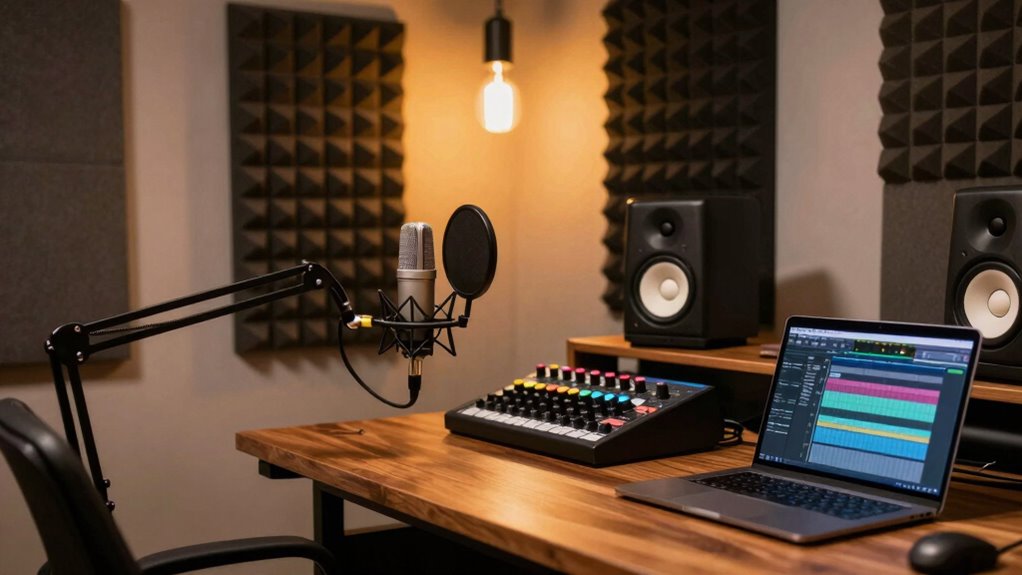
A home podcast studio bundle can bring together microphones, a mixer or audio interface, and the connections you need to start recording. My best overall pick is the PreSonus AudioBox Go Creator Complete Studio Bundle for a more focused recording setup, while the MAONO E2 Gen2B stands out for two-host XLR recording and the Movo 4-Person Bundle for multi-person sessions. The main tradeoff is between a simple, host-ready kit and a more expandable setup that may take extra wiring and configuration. Microphone type, host count, device compatibility, and room acoustics matter as much as the bundle label. Read on for the full breakdown and a guide to choosing a kit that suits your recording plans.

Get the latest gadgets delivered free with Prime
- Fast, free delivery on millions of items
- Prime Video, Amazon Music and more included
- Member-only deals all year
Complete the kit



Key Takeaways
- PreSonus AudioBox Go Creator Complete is the strongest all-around fit for a focused home recording setup, while the AudioBox USB 96 25th Anniversary Package gives buyers a more traditional studio-oriented alternative.
- For two hosts, the MAONO E2 Gen2B and M100 USB/XLR bundle put dual-mic recording at the center; compare their connection needs and included mixer setup before choosing.
- The Movo 4-Person USB Bundle and the 4-Person M100 bundle with dynamic microphones answer different group-recording needs: USB convenience versus a dynamic-mic configuration.
- Phone-first creators have a distinct option in the Movo PodPro, but mobile portability is not the same as a full desktop studio setup.
- Several bundles center on BM-800 or F998-style entry-level configurations. Their included mixer and effects may appeal to first-time experimenters, but buyers should check computer compatibility, monitoring, and upgrade options.
| MAONO E2 Gen2B Podcast Equipment Bundle – Dual XLR Condenser Mic Mixer |  | Best Overall for Two-Person Recording | Microphone inputs: 2 XLR combo inputs | Preamps: 60 dB low-noise | Maximum sample rate: 192 kHz | VIEW ON AMAZON | See Our Full Breakdown |
| M100 Two-Person Podcast Equipment Bundle with USB/XLR Microphones and Audio Mixer |  | Best for Beginners | Microphones: 2 dynamic USB/XLR microphones | Headphones: 2 studio headphones | Audio interface inputs: 4 microphone inputs | VIEW ON AMAZON | See Our Full Breakdown |
| Movo 4-Person USB Podcast Equipment Bundle – 4 Condenser Mics, Hub & Case |  | Best for Four-Person USB Shows | Microphones: 4 UM700 condenser microphones | Connectivity: USB; USB Type-A connector | Channels: 4 | VIEW ON AMAZON | See Our Full Breakdown |
| TENLAMP G10 Creator Audio Mixer Bundle with Microphone |  | Best Compact Creator Bundle | Channels: 2 | Included microphone: Condenser microphone | Connectivity: AUX, Bluetooth, USB | VIEW ON AMAZON | See Our Full Breakdown |
| 4-Person Podcast Equipment Bundle with M100 Audio Mixer and Dynamic Microphones |  | Best for Four-Person Battery-Powered Recording | Microphones: 4 dynamic microphones | Mixer channels: 4 | Microphone inputs: 2 XLR and 2 3.5 mm | VIEW ON AMAZON | See Our Full Breakdown |
| sktome V8S Podcast Equipment Bundle for Two with BM-800 Condenser Microphones |  | Best for Two-Person Streaming | Microphones: 2 condenser microphones | Model: V8S | Connectivity: USB | VIEW ON AMAZON | See Our Full Breakdown |
| GO Podcast Equipment Bundle – F998 Audio Mixer with BM800 Microphone | 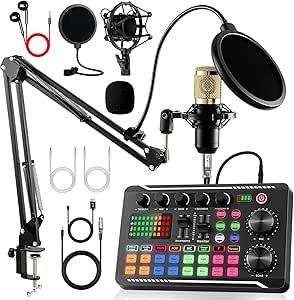 | Best for Simple, Flexible Streaming | Microphone: BM800 studio condenser microphone | Mixer: F998 audio mixer with built-in sound effects | Connectivity: Bluetooth and USB | VIEW ON AMAZON | See Our Full Breakdown |
| Movo PodPro Portable Podcast Equipment Bundle for iPhone/Android Phones |  | Best for Portable Two-Person Recording | Microphones: 2 CastMic XLR dynamic microphones | Interface: MDX-2 dual-channel USB audio interface | Channels: 2 | VIEW ON AMAZON | See Our Full Breakdown |
| BRVOMUSSY Podcast Equipment Bundle for Two with Audio Mixer and Voice Changer |  | Best for Two-Person Voice Effects | Microphones: 2 condenser microphones | Channels: 2 | Microphone pattern: Unidirectional | VIEW ON AMAZON | See Our Full Breakdown |
| Fender Quantum Creator Bundle Home Recording Kit |  | Best for Podcasting Plus Music Recording | Interface: Quantum LT 2 USB-C audio interface | Microphone: M7 condenser microphone | Headphones: HD7 | VIEW ON AMAZON | See Our Full Breakdown |
| SINWE F993 Podcast Equipment Bundle for Two with Audio Mixer and Two Condenser Microphones |  | Best for Two-Person Streaming | Mixer: F993 | Microphones: Two BM-800 condenser microphones | Audio resolution: 24-bit/192 kHz | VIEW ON AMAZON | See Our Full Breakdown |
| SINWE BM-800 Podcast Equipment Bundle with F998 Audio Mixer | 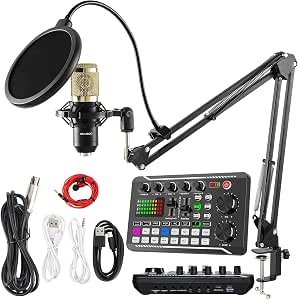 | Best for Effects on a Solo Budget Setup | Microphone: BM-800 cardioid condenser | Audio mixer: F998 | Channels: 4 | VIEW ON AMAZON | See Our Full Breakdown |
| PreSonus AudioBox Go Creator Complete Studio Bundle |  | Best Compact Recording Bundle | Audio interface: 2×2 USB-C | Maximum recording format: 24-bit/96 kHz | Inputs: One TS instrument input and one mic/line combo input | VIEW ON AMAZON | See Our Full Breakdown |
| PreSonus AudioBox USB 96 25th Anniversary Studio Recording Package |  | Best for a Complete Home Recording Desk | Interface: PreSonus AudioBox USB 96 | Channels: 2 | Maximum sample rate: 96 kHz | VIEW ON AMAZON | See Our Full Breakdown |
| home podcast studio bundle | Connectivity | Channels | Microphones |
|---|---|---|---|
| MAONO E2 Gen2B Podcast Equipme | AUX, Bluetooth, USB | 10 | — |
| M100 Two-Person Podcast Equipm | USB, XLR, Bluetooth | — | 2 dynamic USB/XLR microphones |
| Movo 4-Person USB Podcast Equi | USB; USB Type-A connector | 4 | 4 UM700 condenser microphones |
| TENLAMP G10 Creator Audio Mixe | AUX, Bluetooth, USB | 2 | — |
| 4-Person Podcast Equipment Bun | Bluetooth, USB, XLR | — | 4 dynamic microphones |
| sktome V8S Podcast Equipment B | USB | — | 2 condenser microphones |
| GO Podcast Equipment Bundle | Bluetooth and USB | 2 | — |
| Movo PodPro Portable Podcast E | — | 2 | 2 CastMic XLR dynamic microphones |
| BRVOMUSSY Podcast Equipment Bu | Bluetooth and USB | 2 | 2 condenser microphones |
| Fender Quantum Creator Bundle | — | 2 | — |
| SINWE F993 Podcast Equipment B | USB, AUX, 3.5 mm | 3 | Two BM-800 condenser microphones |
| SINWE BM-800 Podcast Equipment | Bluetooth, USB | 4 | — |
| PreSonus AudioBox Go Creator C | — | — | — |
| PreSonus AudioBox USB 96 25th | USB | 2 | — |
More Details on Our Top Picks
MAONO E2 Gen2B Podcast Equipment Bundle – Dual XLR Condenser Mic Mixer
I rank the MAONO E2 Gen2B first for a home podcast setup centered on two speakers who want room to add streaming features. Its dual XLR combo inputs and 60 dB preamps suit two-mic conversations, while loopback and Bluetooth playback make it easier to bring computer or phone audio into a show. Compared with the M100 two-person bundle, this pick emphasizes mixer features and lists a maximum sample rate of 192 kHz, but the M100 includes two microphones and headphones, making it a more immediately complete choice for buyers who need the full recording kit. The MAONO includes an interface, cables, and a manual, though the supplied details do not specify microphones. Its sound effects and voice presets offer creative options, at the cost of a busier learning curve and a comparatively heavy 3.62 kg unit.
Pros:- Two XLR combo inputs with 60 dB low-noise preamps support co-host recording.
- Loopback and Bluetooth playback make it easier to mix in audio from a phone or computer.
- Customizable sound effects and voice presets add options for live shows and streaming.
- Bundle includes an audio interface and cables for a ready-to-connect mixer setup.
Cons:- The listed 3.62 kg weight makes it less convenient to move between recording locations.
- The extensive controls and effects may feel complicated for first-time podcasters.
- The product details do not list microphones or headphones, unlike the M100 two-person bundle.
Best for: Two-host podcasters who already have microphones and want a feature-rich mixer for computer or phone recording and streaming.
Not ideal for: New podcasters who need two microphones and headphones in one package, or anyone prioritizing a light portable setup.
- Microphone inputs:2 XLR combo inputs
- Preamps:60 dB low-noise
- Maximum sample rate:192 kHz
- Connectivity:AUX, Bluetooth, USB
- Audio inputs:Bluetooth, 3.5 mm audio, XLR
- Channels:10
- Battery life:Up to 8 hours
- Dimensions and weight:9.64 × 6.18 × 2.16 in; 3.62 kg
- Compatibility:Android, ChromeOS, Windows, iOS, macOS; OBS supported
Our verdict“Choose the MAONO if your two-person home show needs flexible mixing and streaming controls and you have microphones ready.”
M100 Two-Person Podcast Equipment Bundle with USB/XLR Microphones and Audio Mixer
For a first home podcast, the M100 two-person bundle has a practical advantage over the MAONO E2 Gen2B: it includes two dynamic USB/XLR microphones and two headphones, alongside stands and cables. That means fewer separate purchases before two people can record. Its interface has four microphone inputs, monitoring, mute, loopback, and sound effects, leaving room to expand beyond the included pair. The tradeoff is that the supplied description does not explain how all four inputs work together or give a recording sample rate, so I would not choose it on technical detail alone. The microphones’ RGB lighting and onboard controls are inactive over XLR, which can limit their appeal in an analog setup. It is a more complete starter package than the MAONO, but less clearly specified for buyers planning a carefully built signal chain.
Pros:- Includes two dynamic USB/XLR microphones and two studio headphones.
- Four microphone inputs give the setup potential to accommodate more sources.
- Monitoring, mute, loopback, and sound controls support a straightforward recording workflow.
- Listed compatibility covers computers, tablets, and smartphones across common operating systems.
Cons:- Microphone RGB lighting and onboard controls are inactive when connected by XLR.
- Xbox is not supported.
- The supplied specifications do not state a sample rate or clarify four-microphone recording configurations.
Best for: First-time co-hosts who want two microphones, headphones, stands, and a mixer in a single home recording bundle.
Not ideal for: Podcasters who need confirmed support for Xbox, or who want the microphones’ RGB and onboard controls while using XLR.
- Microphones:2 dynamic USB/XLR microphones
- Headphones:2 studio headphones
- Audio interface inputs:4 microphone inputs
- Battery capacity:4000 mAh
- Sound effects:8 customizable effects
- Voice effects:4 voice-change options
- Connectivity:USB, XLR, Bluetooth
- Included accessories:2 stands, 2 XLR cables, 2 USB cables, 2 audio cables, hoops and rings, manual
- Compatibility:Windows, Mac OS X, Android, computers, tablets, smartphones
Our verdict“Pick the M100 for an accessible two-person starter kit with microphones and headphones included, rather than the MAONO’s mixer-focused package.”
Movo 4-Person USB Podcast Equipment Bundle – 4 Condenser Mics, Hub & Case
The Movo UM700 bundle is the clearest fit here when a home show regularly seats four people: it supplies four condenser microphones, a four-port USB hub, and a hard-shell carrying case. That makes it more purpose-built for multi-host discussions than the M100 two-person bundle, which includes only two microphones. USB plug-and-play support for common Mac and Windows recording apps also keeps setup simpler for creators who do not need an analog mixer. The tradeoff is a narrower upgrade path: the Movo is USB-only, with no XLR or analog inputs listed, so adding conventional studio gear is less straightforward than with the MAONO E2 Gen2B. Headphone monitoring can help catch level problems while recording, but the listed compatibility focuses on laptops and PCs rather than phones. This is a group-recording kit, not a flexible all-purpose studio.
Pros:- Four UM700 condenser microphones support a four-person recording setup.
- Includes a four-port USB hub and hard-shell case for organized transport.
- Built-in headphone monitoring helps speakers or operators check audio while recording.
- Plug-and-play compatibility includes Zoom, OBS, Audacity, and GarageBand on Mac and Windows.
Cons:- USB-only connectivity excludes XLR and analog inputs for adding conventional studio equipment.
- Listed compatible devices are laptops and PCs, not smartphones.
- Requires a USB-C 5V power source and may need an adapter with older computers.
Best for: Four-person podcast teams, classroom groups, or interviewers who record together on a Mac or Windows computer.
Not ideal for: Creators who need XLR microphones, analog gear expansion, or a phone-first recording setup.
- Microphones:4 UM700 condenser microphones
- Connectivity:USB; USB Type-A connector
- Channels:4
- Microphone pattern:Unidirectional
- Monitoring:Built-in headphone monitoring via 3.5 mm jack
- Power:5V USB-C
- Compatible devices:Laptop and PC
- Included case:Hard-shell carrying case
- Warranty:1 year
Our verdict“Choose the Movo for a portable, computer-based four-person show if USB microphones meet your needs.”
TENLAMP G10 Creator Audio Mixer Bundle with Microphone
The TENLAMP G10 takes a simpler, single-microphone approach than the multi-speaker Movo and M100 kits. It pairs a two-channel mixer with a condenser microphone and includes noise reduction, voice effects, and real-time controls for podcasting, streaming, or voice recording. Its AUX, Bluetooth, USB, and OTG/Type-C connections make it a flexible match for a desk shared between a computer and mobile device. The listed dimensions are smaller than a full multi-person rig, though its 4.2-pound weight means compact should not be mistaken for especially light. Unlike the MAONO E2 Gen2B, the G10 does not list dual XLR combo inputs or a detailed preamp specification, so I would favor it for straightforward creator use rather than a two-host studio that needs documented microphone capacity. Warranty and software-update details are also absent from the supplied information.
Pros:- Includes a condenser microphone, two-channel mixer, and accessories.
- Noise reduction and real-time audio controls support basic voice recording and streaming.
- Bluetooth, USB, AUX, and OTG/Type-C connections suit a mixed computer and mobile workflow.
- Voice styles and sound effects add creative options without requiring separate software.
Cons:- Only one microphone is listed, so it is not a ready-made two-person bundle like the M100.
- The supplied details do not specify microphone preamp performance or a sample rate.
- Warranty and software-update support information are not provided.
Best for: Solo creators who want one microphone and a small mixer for podcasting, streaming, singing, or voice work across computer and mobile devices.
Not ideal for: Two-host shows needing specified dual XLR inputs, or buyers who want clear warranty and software-support information.
- Channels:2
- Included microphone:Condenser microphone
- Connectivity:AUX, Bluetooth, USB
- Output connectors:3.5 mm TRS, 6.35 mm TRS, OTG/Type-C
- Audio input:TRS / XLR
- Power source:Battery powered
- Compatibility:Windows, Mac, iOS, Android
- Dimensions:10.9 × 2.28 × 7.67 in
- Weight:4.2 lb
Our verdict“Pick the TENLAMP G10 for a solo creator desk that needs a bundled mic and mobile-friendly mixer, not a multi-host studio.”
4-Person Podcast Equipment Bundle with M100 Audio Mixer and Dynamic Microphones
For a home show with four regular speakers, this M100 four-person bundle supplies four dynamic microphones, desktop stands, monitoring earphones, and a mixer with individual channel volume and mute controls. Those per-channel controls matter more as the group grows: a host can manage one speaker without changing every microphone’s level. Compared with the Movo UM700 kit, this bundle uses dynamic microphones and adds Bluetooth playback and a rechargeable battery, while Movo offers a hard-shell case and a clearly USB-based setup for computers. The M100’s mixer lists dual XLR and dual 3.5 mm inputs, so buyers should check that arrangement against their intended mic connections rather than assume four XLR channels. Battery capacity is provided, but runtime is not. Its bundled monitoring accessories are useful, though the description does not establish how each person monitors independently.
Pros:- Includes four dynamic microphones, desktop stands, earphones, and recording cables.
- Individual channel volume and mute controls help manage a multi-speaker session.
- Rechargeable battery and Bluetooth playback offer more placement flexibility than a strictly computer-powered kit.
- Noise reduction and audio effects add live-production options.
Cons:- Mixer provides only dual XLR and dual 3.5 mm microphone inputs, rather than four XLR inputs.
- The 4000 mAh battery capacity is listed, but recording runtime is not.
- The supplied details do not explain whether all four speakers can monitor independently.
Best for: Four-person home podcast groups who want individual channel controls, dynamic microphones, and the option to record away from an outlet.
Not ideal for: Teams that need four XLR inputs, a stated battery runtime, or a clear plan for separate headphone monitoring at every seat.
- Microphones:4 dynamic microphones
- Mixer channels:4
- Microphone inputs:2 XLR and 2 3.5 mm
- Connectivity:Bluetooth, USB, XLR
- Battery:4000 mAh rechargeable lithium-ion
- Included accessories:Desktop stands, earphones, cables, shock mounts, foam covers, earphone splitters
- Compatible devices:Laptop, PC, smartphone, tablet, voice recorder
- Dimensions:3 × 5 × 6 in
Our verdict“Choose this M100 bundle for a four-person show that values dynamic mics and portable mixer features, provided its mixed input layout fits your microphones.”
sktome V8S Podcast Equipment Bundle for Two with BM-800 Condenser Microphones
The sktome V8S suits a home podcast where two people need microphones and basic recording accessories in one package. Its two BM-800 condenser mics, boom arms, earphones, and shock holders make it more immediately ready for a co-host setup than the single-microphone GO F998 bundle. The V8S sound card adds voice-changing and sound-effect controls, which may appeal to livestreamers who want playful audio without separate equipment. Its USB connection and listed phone, computer, and console compatibility offer flexibility, though the product information gives little detail about setup across those devices. Plan to charge it before recording, and do not expect the feature list alone to answer questions about software or connection steps. I’d choose it for accessible two-person streaming, not for a carefully specified studio chain.
Pros:- Two microphones and matching boom arms support a co-host setup.
- Includes earphones, shock holders, foam covers, and connection cables.
- V8S sound card offers voice-changing and sound-effect controls.
- Unidirectional microphones are suited to focusing on nearby voices.
Cons:- The sound card needs charging before use.
- Setup instructions and device-specific compatibility details are limited.
- The listed channel count is one, which may leave the two-mic signal routing unclear.
Best for: Two-person podcast or gaming-stream setups that want included microphones, monitoring accessories, and built-in sound effects.
Not ideal for: Buyers who need clearly documented device setup, a detailed recording workflow, or a more specified interface for a dependable studio configuration.
- Microphones:2 condenser microphones
- Model:V8S
- Connectivity:USB
- Microphone pattern:Unidirectional
- Signal-to-noise ratio:78 dB
- Listed channels:1
- Connector:3.5 mm jack
- Included accessories:2 boom arms, 2 earphones, 2 shock holders, 2 foam covers, cables, sound board, and USB charging cable
Our verdict“Choose the sktome V8S for a feature-rich two-person stream, but look elsewhere if clearly documented recording connections matter most.”
GO Podcast Equipment Bundle – F998 Audio Mixer with BM800 Microphone
The GO F998 bundle is the straightforward pick here for a solo creator who wants a microphone, mixer effects, and both wired and Bluetooth connection options. Its two-channel mixer gives it a more flexible listed channel count than the sktome V8S, while the included pop filter, shock mount, boom arm, and cables reduce the need to assemble a kit from separate purchases. Built-in echo and noise-reduction controls are aimed at quick streaming adjustments rather than detailed audio production. The rechargeable battery can help with portable use, but it must be charged before recording, and the metal unit is described as relatively heavy and bulky. Unlike the more recording-focused Fender Quantum Creator Bundle, this package emphasizes effects and easy connectivity over a specified high-resolution interface and software setup.
Pros:- Includes a microphone, mixer, boom arm, shock mount, pop filter, and cables.
- Bluetooth and USB provide different connection routes.
- Mixer includes echo, volume, and noise-reduction controls.
- Two listed channels offer more flexibility than the one-channel sktome V8S listing.
Cons:- The metal mixer is described as heavy and bulky.
- The rechargeable battery needs charging before first use.
- The supplied bundle is centered on one microphone rather than a co-host setup.
Best for: Solo streamers and beginner podcasters who want a ready-to-connect mic kit with onboard effects and Bluetooth as an option.
Not ideal for: Creators seeking a compact travel setup, a two-microphone kit, or a clearly specified recording interface for instrument and vocal production.
- Microphone:BM800 studio condenser microphone
- Mixer:F998 audio mixer with built-in sound effects
- Connectivity:Bluetooth and USB
- Connector:3.5 mm jack
- Microphone pattern:Super cardioid
- Channels:2
- Power:Corded electric; 1 included lithium-ion battery
- Included accessories:Pop filter, shock mounts, boom arms, XLR and USB cables
Our verdict“Pick the GO F998 for a solo streaming desk that benefits from onboard effects and flexible connections, not for a compact two-person studio.”
Movo PodPro Portable Podcast Equipment Bundle for iPhone/Android Phones
Unlike the desktop-oriented sktome V8S and GO F998, the Movo PodPro-TH is built around taking a two-microphone recording setup on the road. It pairs two CastMic XLR dynamic microphones with a dual-channel USB interface, headphones, stands, and a travel case; multiple cable options support recording with phones as well as computers. Battery-powered operation makes locations without convenient power more practical, though the listed battery life falls from eight hours to three when phantom power is used. At 5.76 kg, the full kit is portable in the sense that it travels in a case, not that it is especially light. Its listed 16 kHz maximum sample rate also makes it a less fitting choice for buyers prioritizing high-resolution capture. I’d favor it for mobile interviews, not maximum fidelity per channel.
Pros:- Two XLR dynamic microphones and a dual-channel interface support co-host recording.
- Includes headphones, stands, and a travel case.
- USB-A, USB-C, and Lightning cable options support several recording devices.
- Battery-powered interface enables recording without a nearby outlet.
Cons:- The complete kit weighs 5.76 kg, limiting easy carry-on portability.
- The listed maximum sample rate is 16 kHz.
- Battery life drops to three hours when phantom power is used.
Best for: Two-person interviewers and podcasters who record away from a fixed desk and need microphones, monitoring, and an interface in one case.
Not ideal for: Creators who prioritize high-resolution recording, a very lightweight travel kit, or long battery sessions with phantom-powered equipment.
- Microphones:2 CastMic XLR dynamic microphones
- Interface:MDX-2 dual-channel USB audio interface
- Channels:2
- Frequency response:40 Hz–16 kHz
- Maximum sample rate:16 kHz
- Battery life:Up to 8 hours; 3 hours with phantom power
- Weight:5.76 kg
- Compatibility:Android, Windows, iOS, and macOS
Our verdict“Choose the Movo PodPro-TH for a self-contained two-person field kit, but not if low weight or high sample-rate recording is a priority.”
BRVOMUSSY Podcast Equipment Bundle for Two with Audio Mixer and Voice Changer
The BRVOMUSSY two-person bundle is aimed at creators who want voice effects and sound modes as part of a shared recording setup. It includes two condenser microphones, a two-channel mixer, boom arms, and two sets of mic accessories, making it a more complete co-host desk package than the single-mic GO F998 bundle. Bluetooth and USB connections, plus instrument input, give it room for streaming or adding a musical source. The tradeoff is that its published audio specifications leave important questions open: the frequency response is given only as 20 Hz, without an upper limit, so it is hard to judge the stated range. It also needs a charge before use. Compared with the more clearly specified Fender Quantum Creator Bundle, this kit favors onboard effects and a pair of vocal mics over documented recording resolution and a named software package.
Pros:- Two microphones, a two-channel mixer, and matching boom arms suit co-host recording.
- Includes noise reduction, sound effects, and four voice variations.
- Instrument input adds flexibility for music or live-stream setups.
- Bluetooth and USB connections support multiple device types.
Cons:- The listed frequency response is incomplete, specifying only 20 Hz.
- The battery should be fully charged before first use and after extended storage.
- The available specifications do not state a maximum sample rate.
Best for: Co-hosts who want two included microphones, mixer effects, voice variations, and the option to connect an instrument.
Not ideal for: Buyers who need complete frequency-response data, clearly documented recording specifications, or a traditional interface-and-software workflow.
- Microphones:2 condenser microphones
- Channels:2
- Microphone pattern:Unidirectional
- Connectivity:Bluetooth and USB
- Connector type:XLR
- Signal-to-noise ratio:78 dB
- Power:Battery powered
- Included accessories:2 boom arms, 2 shock holders, 2 pop filters, 2 foam covers, XLR and 3.5 mm cables, and an earphone
Our verdict“Pick BRVOMUSSY for a two-person effects-focused setup, but choose a better-documented interface if recording specifications guide your decision.”
Fender Quantum Creator Bundle Home Recording Kit
The Fender Quantum Creator Bundle is the strongest fit for a home studio that needs to record podcasts alongside vocals or instruments. Its Quantum LT 2 interface offers two channels, low-latency monitoring, and a dedicated instrument input, while the included M7 microphone, HD7 headphones, desktop stand, and perpetual Fender Studio Pro license give the setup a clearer recording-workflow focus than the effects-led BRVOMUSSY or GO F998. A listed maximum sample rate of 192 kHz also sets it apart from the portable Movo PodPro-TH, whose stated ceiling is 16 kHz. That extra capability does not make it a two-host kit: only one microphone is included, and two channels limit simultaneous input options. I’d choose Fender for a solo creator who also records instruments, not a co-host pair needing two supplied mics.
Pros:- Includes the interface, M7 microphone, HD7 headphones, XLR cable, and desktop stand.
- Dedicated instrument input supports guitar and bass recording.
- Supports sample rates up to 192 kHz.
- Includes a perpetual Fender Studio Pro license and supports Windows and macOS.
Cons:- Two channels limit the number of simultaneous recording inputs.
- Only one microphone is included, unlike the two-person sktome and BRVOMUSSY kits.
- The supplied description gives no detailed microphone or headphone performance measurements.
Best for: Solo podcasters who also record guitar, bass, or vocals and want an interface, headphones, microphone, and recording software in one home setup.
Not ideal for: Co-hosts who need two included microphones, or creators who require more than two simultaneous recording channels.
- Interface:Quantum LT 2 USB-C audio interface
- Microphone:M7 condenser microphone
- Headphones:HD7
- Channels:2
- Maximum sample rate:192 kHz
- Audio inputs:XLR, USB, and 1/4 inch
- Supported operating systems:Windows and macOS
- Included software:Perpetual Fender Studio Pro license
Our verdict“Choose the Fender Quantum Creator Bundle for a solo podcast-and-music desk, but select a two-mic package for co-host recording.”
SINWE F993 Podcast Equipment Bundle for Two with Audio Mixer and Two Condenser Microphones
For a home podcast with two hosts, the SINWE F993 has a clear advantage over the single-microphone SINWE BM-800/F998 bundle: it includes two microphones and the mounting and pop-filter accessories to set up both positions. Its mixer adds voice presets, sound effects, and level controls, which suit casual livestreams where quick audio changes are part of the format. USB and 3.5 mm connections, plus compatibility with PC, Mac, iOS, and Android, give it more device flexibility than the computer-focused F998 kit. The tradeoff is that this is an effects-oriented starter setup rather than the recording-focused approach of the PreSonus AudioBox Go Creator bundle. Phone users may need an OTG adapter that is not included, and the microphones need charging before use, adding setup steps to a package otherwise described as plug-and-play.
Pros:- Includes two BM-800 microphones with scissor arms, shock mounts, pop filters, and wind screens.
- Voice presets and 10 built-in effects support informal livestream formats.
- USB and 3.5 mm connections work with a range of computers and mobile devices.
- Mixer provides audio controls for recording and streaming.
Cons:- An OTG adapter for phones without a 3.5 mm jack is not included.
- Microphones need charging before use.
- Its effects-led mixer is less suited to a traditional interface-and-software recording workflow than the PreSonus bundles.
Best for: Two-host beginners or livestreamers who want matching microphones, stands, and voice effects in one kit.
Not ideal for: Solo creators seeking a compact recording interface, or phone users who need every adapter included.
- Mixer:F993
- Microphones:Two BM-800 condenser microphones
- Audio resolution:24-bit/192 kHz
- Channels:3
- Connectivity:USB, AUX, 3.5 mm
- Compatible devices:PC, Mac, iOS, Android
- Included effects:10 built-in audio effects and voice presets
- Included accessories:Scissor arms, shock mounts, pop filters, wind screens
Our verdict“Choose the F993 if two people need a ready-to-arrange streaming setup with voice effects, and skip it if you want a more conventional recording interface.”
SINWE BM-800 Podcast Equipment Bundle with F998 Audio Mixer
The SINWE BM-800/F998 is a solo-host kit built around a single cardioid microphone and a mixer with effects, recording modes, and voice changing. Compared with the two-microphone SINWE F993, it gives up a second host position but keeps the setup focused on one speaker and includes practical desktop pieces: earbuds, a mic stand, and four data cables. Bluetooth and USB connectivity add options for linking devices, while Windows and Mac support covers common computer workflows. I would pick it over the F993 only when a second microphone is unnecessary; the F993 is the more natural choice for co-hosts. The F998 bundle is also less turnkey for mobile recording, since phone and tablet adapters are sold separately, and its listed frequency specification is unusual enough that buyers should avoid choosing it on that figure alone.
Pros:- Includes a cardioid microphone, mixer, desktop stand, earbuds, and four data cables.
- F998 mixer offers built-in effects, recording modes, and voice changing.
- USB and Bluetooth connectivity support more than one connection approach.
- Single-mic configuration suits a solo desk setup without extra mic hardware.
Cons:- Only one microphone is included, unlike the two-person SINWE F993 bundle.
- Phone and tablet adapters are sold separately.
- Warranty details are unspecified.
Best for: A solo Windows or Mac host who wants a desktop microphone, mixer effects, earbuds, and cables in one starter kit.
Not ideal for: Two-person shows or mobile-first creators who need phone adapters included.
- Microphone:BM-800 cardioid condenser
- Audio mixer:F998
- Channels:4
- Connectivity:Bluetooth, USB
- Bitrate:24-bit
- Output connector:USB Type B
- Bundle contents:Microphone, mixer, 3-meter earbuds, desktop mic stand, four data cables
- Compatible computers:Windows and Mac
Our verdict“Pick this kit for a solo computer-based show that benefits from mixer effects, but choose the F993 for two hosts or the PreSonus bundles for a recording-interface workflow.”
PreSonus AudioBox Go Creator Complete Studio Bundle
The PreSonus AudioBox Go Creator Complete takes a more recording-centered route than either SINWE mixer bundle: its compact USB-C interface pairs a cardioid M7 microphone with HD7 monitoring headphones and Studio One 6 Artist Edition software. That makes it a stronger fit for someone learning to record and edit a show at a desk, rather than someone prioritizing voice effects or multiple hosted microphones. The interface’s mic/line combo input and instrument input also let a creator add a source such as a guitar, while switchable phantom power supports the condenser mic. Compared with the larger AudioBox USB 96 package, this interface is lighter and smaller, but it still provides only two input channels. The cardioid microphone is a practical single-speaker choice, not a flexible option for recording sources that need other pickup patterns.
Pros:- Includes a USB-C interface, M7 microphone, HD7 headphones, and Studio One 6 Artist Edition.
- Supports recording up to 24-bit/96 kHz.
- Instrument and mic/line inputs accommodate a voice mic plus an instrument source.
- Compact interface weighs 8.16 ounces and has switchable +48V phantom power.
Cons:- Two input channels limit simultaneous multi-microphone recording.
- The included cardioid microphone does not offer alternative pickup patterns.
- Less suited to effects-led livestreams than the SINWE F993 mixer bundle.
Best for: A solo podcaster or musician building a compact Windows or Mac recording station with headphones and editing software included.
Not ideal for: Co-hosts needing several simultaneous microphone inputs or creators who want multiple microphone pickup patterns.
- Audio interface:2×2 USB-C
- Maximum recording format:24-bit/96 kHz
- Inputs:One TS instrument input and one mic/line combo input
- Outputs:Stereo headphone output and two balanced 1/4-inch TRS main outputs
- Phantom power:Switchable +48V
- Microphone:M7 cardioid condenser with windscreen and 10-foot XLR cable
- Headphones:HD7 monitoring headphones, 32-ohm impedance
- Included software:Studio One 6 Artist Edition
- Interface dimensions and weight:3.3 × 4.25 × 1.73 inches; 8.16 ounces
Our verdict“Choose the AudioBox Go Creator for a compact, software-based solo recording setup, not for a multi-host podcast.”
PreSonus AudioBox USB 96 25th Anniversary Studio Recording Package
The PreSonus AudioBox USB 96 package is the most complete recording-desk option in this group: it combines an interface, M7 condenser microphone, stand, HD7 closed-back headphones, cables, and Studio One Artist with the Studio Magic Suite. Compared with the smaller AudioBox Go Creator bundle, it is presented as a broader software package and includes a stand, though its interface still has only two channels. That makes it a sensible fit for a solo host who wants to record, monitor, and edit without piecing together core accessories. It is not the right pick for a growing multi-host show: the two-channel limit restricts simultaneous sources, just as it does on the Go Creator. And unlike the SINWE F993, it does not include two mic positions or a mixer designed around live voice effects.
Pros:- Bundles an interface, M7 microphone with stand, HD7 closed-back headphones, cables, and software.
- Includes Studio One Artist and the Studio Magic Suite.
- AudioBox USB 96 provides two class-A preamps.
- Windows and macOS compatibility supports common home-studio setups.
Cons:- Two input channels limit simultaneous multi-microphone or instrument recording.
- Less tailored to two-host streaming than the SINWE F993, which includes two microphones and voice effects.
- The listed package details do not specify the microphone’s pickup pattern or interface dimensions.
Best for: A solo podcaster setting up a Windows or Mac recording desk who wants an interface, microphone, headphones, cables, and production software together.
Not ideal for: Multi-host shows or creators who need more than two simultaneous input channels and live voice effects.
- Interface:PreSonus AudioBox USB 96
- Channels:2
- Maximum sample rate:96 kHz
- Connectivity:USB
- Microphone:M7 condenser microphone with stand
- Headphones:HD7 closed-back headphones
- Included software:Studio One Artist and Studio Magic Suite
- Operating systems:Windows and macOS
Our verdict“Choose this package for a solo home studio where bundled monitoring and software matter more than extra inputs or live mixer effects.”

How We Picked
I ranked these bundles by how well their included components answer common home podcast needs: recording one or more voices, connecting to a computer or phone, monitoring audio, and getting started without assembling a separate shopping list. I gave more weight to a clearly defined recording path and useful host capacity than to a long list of effects or accessories. I also considered whether the bundle appears geared toward a desktop studio, mobile recording, or a larger group, since those are different use cases rather than interchangeable benefits.
The order reflects practical fit and flexibility, not a claim that every bundle includes the same equipment or performs identically. The PreSonus creator kit leads as a focused studio option; the MAONO and M100 dual-host kits follow for co-hosts; and the Movo group and mobile kits rank higher for their specific recording scenarios. Entry-level mixer bundles remain useful for experimentation but rank lower when buyers need a clearly supported computer workflow or a setup with room to grow. Product names alone do not settle compatibility, so I recommend checking the exact included connections and operating-system support before ordering.
Factors to Consider When Choosing Home Podcast Studio Bundle
Before choosing a bundle, match the equipment to how and where you will record. A kit that works for a two-person desk show may be inconvenient for phone interviews or a four-person roundtable. These broader checks can prevent a bundle from leaving you short of inputs, cables, or a workable monitoring setup.
Choose for the number of people recording at once
Count simultaneous speakers, not the number of people who might appear on the show. A two-person bundle can be a sensible fit for co-hosts, but it may not support a guest joining in person without extra inputs or a different interface. Group kits can reduce the need to add microphones later, yet more channels also mean more cables, desk space, and level-setting. Ask whether each speaker needs an independent microphone and whether the mixer or interface has enough usable inputs for that plan. If most episodes feature one host, a larger bundle can add clutter rather than value.
Match microphone type to your room
Microphone choice affects how much your room and recording habits matter. Condenser microphones can suit controlled, quiet spaces, while dynamic microphones are often a practical choice when several people share a room or background noise is hard to reduce. Neither type fixes echo from bare walls or a loud computer fan, so budget time for placement and basic room treatment. A common mistake is buying for microphone count without checking the pickup pattern or the distance speakers can comfortably maintain. Choose the setup that fits your actual room, not a hoped-for studio.
Check the signal path before buying
Bundles may use USB microphones, XLR microphones with a mixer, or an audio interface connected to a computer. That difference affects setup, expansion, and how separate voices reach your recording software. Confirm that the included device connects to your intended computer or phone, and check whether the bundle supplies the cables and adapters you need. A mixer with effects is not automatically a computer audio interface; verify how it sends sound to the recording device. If you want separate tracks for each host, make sure the routing supports that instead of assuming a combined mix can be split later.
Decide how much control you need
Simple bundles can make a first recording easier, while more adjustable setups give you greater control over gain, monitoring, and future microphones. Extra voice effects can be fun for live segments, but they should not outrank clean, dependable speech recording. Think about whether you want to monitor through headphones while recording and whether every host can hear the mix without delay. New podcasters often buy more controls than they will use, then overlook basic tasks such as setting levels and avoiding clipping. Choose a control layout that fits your workflow and willingness to learn.
Plan for growth without buying excess gear
Consider what may change over the next year: a second host, in-person guests, remote interviews, or a move from phone recording to a computer. An interface with spare inputs can make later expansion easier, but unused capacity has little benefit if your show will remain a solo production. Check whether microphones, stands, headphones, and cables are included; bundle contents vary, and a product name may not tell the whole story. Also look for replacement-cable availability and clear documentation, since small missing parts can slow setup. Pay more for a capability you expect to use, not a feature list you may never touch.
Frequently Asked Questions
Can I record two hosts onto separate tracks with any two-microphone bundle?
No. Two microphones do not guarantee two isolated tracks. Some mixers send a combined stereo or mono mix to the computer, while an audio interface or mixer with multichannel USB routing may provide separate inputs. Check the device’s recording output and the software workflow before choosing. Separate tracks make it easier to adjust each speaker or edit interruptions after recording.
Should I choose a dynamic or condenser microphone bundle for a typical home room?
Think about background noise and room echo first. Dynamic microphones can be a practical match for a shared or untreated room when speakers stay close to the mic, while condenser microphones may suit a quieter, more controlled space. Neither microphone type removes the need for good placement or sensible recording levels. If several people record around one table, compare pickup patterns and how much room noise each mic may capture.
Will a podcast bundle with an audio mixer work directly with my laptop?
Not always: a mixer may control microphone levels and effects without sending audio to a computer over USB. Check whether the included unit functions as a USB audio interface and whether it supports your operating system. Also confirm whether your recording app can select the device and whether it receives separate channels or only a combined mix. These details matter more than the presence of a USB port alone.
Is a phone-focused bundle a good choice if I may move to computer recording later?
It can work if portability is your main priority, but check how the microphones connect and whether the system can be used with your future computer setup. Phone adapters and app support can vary, and a mobile bundle may not offer the input routing or monitoring flexibility of a desktop interface. If you expect to change platforms soon, compare the cost and complexity of adding adapters with choosing a computer-ready kit now. A phone-first setup makes the most sense when recording on the move is a regular part of your workflow.
What should I buy separately before recording my first episode?
Start by checking the bundle’s exact contents rather than assuming it includes every accessory shown in product images. You may still need headphones for monitoring, microphone stands or arms, extra XLR or USB cables, and a compatible adapter for your computer or phone. For a poor-sounding room, soft furnishings and careful mic placement can help more than another piece of audio equipment. Make a short list of what is missing from your recording space, then buy only what supports the way you plan to record.
Conclusion
For most home creators looking for a focused recording setup, I recommend the PreSonus AudioBox Go Creator Complete Studio Bundle as the best overall choice in this lineup. Two-host shows should compare the MAONO E2 Gen2B with the M100 USB/XLR bundle, while the Movo 4-Person USB Bundle is the specific pick for a larger group and the Movo PodPro suits phone-first recording. For a more studio-oriented package, look at the PreSonus AudioBox USB 96 25th Anniversary Package; for beginners focused on a simple two-person mixer setup, compare the SINWE F993 and GO F998 bundles against your computer and monitoring needs. My best-value recommendation is the bundle that already matches your host count and connection path, rather than the one with the most effects or microphones you will not use.
Halloween Picks

10 ft Halloween Inflatable Archway with Built-in LEDs

Panefright Halloween Window Projector – Scary Projector for Spooky Decor

8.5 Foot Halloween Inflatable Haunted House Castle with Skeleton, Ghost & Skulls
As an affiliate, we earn on qualifying purchases.