
For a mix of long-distance HDMI extension and remote computer access, I’d start with the Raritan Dominion KX IV-101 as the best overall pick for dedicated KVM over IP control. The GL.iNet Comet Pro suits buyers who want a compact remote KVM, while the AV Access fiber extender stands apart when a long cable run matters more than a simple setup. These products do different jobs: some send HDMI and USB over a point-to-point cable, while others provide network-based remote access to a computer. Your choice turns on distance, the kind of access you need, and how much setup complexity you can accept. Read on for the full breakdown and a guide to matching the right design to your setup.
Complete the kit



Key Takeaways
- KVM over IP and HDMI extension solve different problems: Raritan and the GL.iNet Comet models focus on remote computer access, while most OREI and AV Access picks extend a local HDMI and USB connection.
- The longest listed reach belongs to the AV Access fiber extender: its 550 m range makes it the distance pick, though fiber adds cable and installation planning.
- Network features shape the GL.iNet models: the Comet 5G RedCap adds Wi-Fi 6 and a touchscreen, while PoE and standard Comet variants fit other connection preferences.
- Point-to-point extenders are not interchangeable with network KVMs: choose among the OREI and AV Access HDMI models based on cable run and video requirements, not the word “IP” alone.
- The Raritan is the dedicated single-port KVM-over-IP choice: buyers who need broader multi-computer control should check port count and management needs before choosing any one-port device.
| OREI 4K HDMI over Ethernet Extender with USB KVM, 230 ft |  | Best for 4K at 60 Hz over a Long Cable | Maximum resolution: 4K at 60 Hz | Maximum transmission distance: 230 ft (70 m) | Supported cable: Cat6/7 | VIEW ON AMAZON | See Our Full Breakdown |
| GL.iNet Comet 5G RedCap GL-RM10RC Remote KVM with 4K HDMI Touchscreen and Wi-Fi 6 |  | Best for Resilient Remote Recovery | Connectivity: 5G RedCap, Wi-Fi 6, Gigabit Ethernet | Display: 3.69-inch touchscreen | Storage: 64GB eMMC | VIEW ON AMAZON | See Our Full Breakdown |
| GL.iNet Comet GL-RM1 Remote KVM |  | Best Compact Remote KVM | Resolution: 3840 × 2160 at 30 Hz | Hardware interfaces: Ethernet, HDMI, USB 2.0, USB Type-C | Encoding: H.264 hardware encoding | VIEW ON AMAZON | See Our Full Breakdown |
| GL.iNet Comet PoE Remote KVM (GL-RM1PE) |  | Best for PoE Server Installations | Connectivity: Ethernet, HDMI | Compatible devices: Computer, server | Maximum supported devices: 1 | VIEW ON AMAZON | See Our Full Breakdown |
| AV Access 4K HDMI USB KVM Extender over Cat5e/6/6a/7 Ethernet, up to 390 ft |  | Best for Long Multi-Receiver Runs | Maximum extension distance: 390 ft (120 m) | Video support: 4K at 30 Hz; 1080p at 120 Hz | Audio support: 7.1-channel | VIEW ON AMAZON | See Our Full Breakdown |
| OREI EX-500-KVM HDMI over IP Extender with USB KVM, 4K at 60Hz |  | Best for 4K at 60Hz over Cat6 | Video resolution: Up to 4K at 60Hz, 4:4:4 | Transmission distance: Up to 400 feet (120 meters) | Cable type: Shielded Cat6 | VIEW ON AMAZON | See Our Full Breakdown |
| AV Access 4K HDMI Fiber KVM Extender over IP, 550 m |  | Best for long-distance fiber runs | Video resolution: 4K | Transmission range: Up to 550 m (1,800 ft) | Included optical modules: 2 × 850 nm multimode SFP modules, supporting up to 500 m | VIEW ON AMAZON | See Our Full Breakdown |
| GL.iNet GL-RM10 Comet Pro Remote KVM | 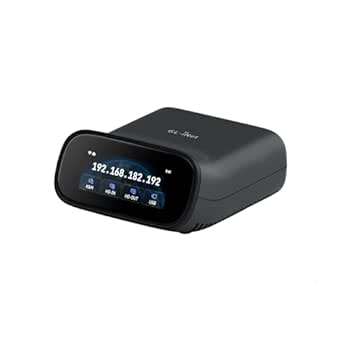 | Best for remote computer recovery | Model: GL-RM10 | Connectivity: Dual-band Wi-Fi 6 and Ethernet | Video passthrough: 4K at 30 fps | VIEW ON AMAZON | See Our Full Breakdown |
| AV Access 4K HDMI & USB KVM Extender Over Cat6/6A/7 Up to 230ft, HDR10 |  | Best for straightforward local AV installs | Maximum distance: 230 ft | Video resolution: 4K at 30Hz (4:4:4) | HDMI version: HDMI 1.4 | VIEW ON AMAZON | See Our Full Breakdown |
| Raritan Dominion KX IV-101 1-Port 4K KVM-over-IP Switch |  | Best for rack-based single-server access | Model: KX IV-101 | Ports: 1 | Video resolution: 4K | VIEW ON AMAZON | See Our Full Breakdown |
More Details on Our Top Picks
OREI 4K HDMI over Ethernet Extender with USB KVM, 230 ft
For a fixed setup that needs 4K at 60 Hz and keyboard-and-mouse control across a room or building, this OREI extender brings both over Cat6/7 for runs up to 230 feet. That higher refresh rate gives it an advantage over the GL.iNet Comet GL-RM1 and AV Access 390 ft extender, which top out at 30 Hz in 4K. HDR format support, HDCP 2.2, EDID pass-through, and an HDMI loop-out add flexibility when matching displays and source equipment. The tradeoff is that this is a cabled extender, not an internet-accessible remote management device like the Comet models. It also depends on a suitable Cat6/7 run, and the included North American power plug may need an adapter abroad.
Pros:- Carries 4K video at 60 Hz over runs up to 230 feet.
- Extends USB keyboard and mouse control alongside video.
- Supports HDR formats and HDCP 2.2.
- HDMI loop-out and 3.5 mm audio output support flexible installations.
Cons:- Requires a high-quality Cat6/7 cable for the intended distance.
- The North American power plug may require an adapter in other regions.
Best for: Home theater and control-room buyers who need 4K at 60 Hz with remote USB keyboard and mouse control over a wired run up to 230 feet.
Not ideal for: IT teams seeking remote BIOS access over the internet, or international buyers who need a power supply ready for local outlets.
- Maximum resolution:4K at 60 Hz
- Maximum transmission distance:230 ft (70 m)
- Supported cable:Cat6/7
- HDMI standard:HDMI 2.0b
- HDCP:2.2
- Supported HDR:HDR, HDR10, HDR10+, Dolby Vision, HLG
- Audio output:3.5 mm stereo
- Dimensions:3.4 × 3 × 0.75 in
Our verdict“Choose this OREI when 4K at 60 Hz over a dedicated cable matters more than internet-based remote management.”
GL.iNet Comet 5G RedCap GL-RM10RC Remote KVM with 4K HDMI Touchscreen and Wi-Fi 6
The Comet 5G RedCap is aimed at administrators who need a machine reachable when its normal network path fails. 5G RedCap, Wi-Fi 6, Gigabit Ethernet, and multi-WAN failover give it more connection options than the cable-focused OREI EX-230PRO-KVM or AV Access 390 ft extender. Its 3.69-inch touchscreen also offers a local management interface, while browser access and BIOS-level control support recovery without relying on the host operating system. The stated 4K remote access is a fit for desktop visibility, but the supplied data does not specify a refresh rate, so buyers comparing it with the OREI’s explicit 4K at 60 Hz should verify their display needs. This is a technical management tool with a more involved setup, and no portable power option is listed.
Pros:- Offers 5G RedCap, Wi-Fi 6, and Gigabit Ethernet connectivity.
- Multi-WAN failover can preserve access when a primary connection is unavailable.
- Supports BIOS-level control for operating system recovery and device management.
- Built-in touchscreen and 64GB eMMC storage support local management and deployment tasks.
Cons:- Remote KVM setup and network management may be demanding for nontechnical users.
- The listed 4K specification does not state a refresh rate.
- No battery or portable power option is specified.
Best for: IT administrators managing remote servers or workstations who need alternate network paths and BIOS-level recovery access.
Not ideal for: Home theater users seeking a simple wired 4K at 60 Hz extender, or buyers who want a setup that requires little network configuration.
- Connectivity:5G RedCap, Wi-Fi 6, Gigabit Ethernet
- Display:3.69-inch touchscreen
- Storage:64GB eMMC
- Video output:4K HDMI
- Remote access:Browser-based, Tailscale, ZeroTier
- Failover:Multi-WAN
- Remote management:BIOS-level control
Our verdict“Pick the GL-RM10RC for remote IT recovery across multiple network paths, and confirm its 4K refresh behavior before buying for display-critical work.”
GL.iNet Comet GL-RM1 Remote KVM
The GL-RM1 suits buyers who need to reach a computer’s desktop or BIOS remotely without installing software on the host. Its compact 85 g enclosure combines Ethernet, HDMI, USB, and USB-C, with H.264 hardware encoding to handle remote viewing and file transfer. Compared with the GL.iNet Comet PoE GL-RM1PE, the listed GL-RM1 data includes remote audio and the same 4K-at-30-Hz ceiling, while the PoE model adds power over Ethernet and built-in storage. Neither matches the OREI EX-230PRO-KVM’s 4K at 60 Hz for smooth local display extension. The 30 Hz limit makes the GL-RM1 more suitable for administration than motion-heavy viewing, and the product data says PD adapters cannot be used.
Pros:- Provides remote BIOS access without host-side software.
- Hardware H.264 encoding supports remote viewing.
- Includes remote audio and file transfer.
- Compact 85 g design with Ethernet, HDMI, USB 2.0, and USB-C interfaces.
Cons:- 4K output is limited to 30 Hz.
- PD adapters cannot be used.
- Plastic enclosure offers less durable construction than the AV Access extender’s metal housing.
Best for: Technicians and small-team administrators who want compact remote BIOS and desktop access without installing software on the managed computer.
Not ideal for: Users extending a display for smooth 4K video or anyone whose setup depends on a PD adapter.
- Resolution:3840 × 2160 at 30 Hz
- Hardware interfaces:Ethernet, HDMI, USB 2.0, USB Type-C
- Encoding:H.264 hardware encoding
- Data transfer rate:1000 megabits per second
- Weight:85 g
- Dimensions:3.15 × 2.36 × 0.68 in
- Enclosure material:Plastic
- Warranty:2 years
Our verdict“Choose the GL-RM1 for compact remote administration, while choosing the OREI extender if 4K at 60 Hz is the priority.”
GL.iNet Comet PoE Remote KVM (GL-RM1PE)
For a server or workstation already wired for Power over Ethernet, the GL-RM1PE can simplify placement by taking power and network connectivity through Ethernet, with USB-C available as another power option. Remote BIOS reinstall support makes it a management device rather than a conventional HDMI extender, separating it from the OREI EX-230PRO-KVM and AV Access 390 ft model. Its 32GB eMMC storage provides room for local data, while the 4K stream is capped at 30 FPS. Compared with the GL.iNet Comet GL-RM1, the PoE version’s defining advantage is its power flexibility and stated 328-foot maximum range; its main limitation is that it supports one device. It makes the most sense for a single managed host with suitable network infrastructure.
Pros:- Can be powered by PoE or USB Type-C.
- Supports remote BIOS reinstall.
- Includes 32GB of eMMC storage.
- Specified maximum range of 328 feet suits longer network runs.
Cons:- Supports only one computer or server.
- 4K streaming is limited to 30 FPS.
- PoE power requires compatible network equipment.
Best for: Server administrators with PoE network infrastructure who need remote BIOS reinstall and access to one computer or server.
Not ideal for: Buyers who need to manage multiple hosts or extend a 4K display at 60 Hz.
- Connectivity:Ethernet, HDMI
- Compatible devices:Computer, server
- Maximum supported devices:1
- Power supply:PoE or USB Type-C
- Built-in storage:32GB eMMC
- Video:4K at 30 FPS
- Maximum range:328 feet
- Weight:85 g
Our verdict“Choose the GL-RM1PE for single-host remote recovery where PoE simplifies installation and 30 FPS is sufficient.”
AV Access 4K HDMI USB KVM Extender over Cat5e/6/6a/7 Ethernet, up to 390 ft
The AV Access extender is the distance pick for buyers who need video, audio, and USB control across a 390-foot cable run. Its receiver has three USB 2.0 ports, and the system supports up to 16 extender sets on the same network, making it more adaptable to multi-station installations than the single-host GL.iNet Comet PoE GL-RM1PE. It also supports 7.1-channel audio and works with Windows, macOS, and Linux. The tradeoff is resolution cadence: 4K tops out at 30 Hz, while 1080p supports 120 Hz. For a 4K display that benefits from smoother motion, the OREI EX-230PRO-KVM reaches 60 Hz but has a shorter stated range. This AV Access model is a wired extender, not a remote BIOS management device.
Pros:- Supports extension distances up to 390 feet.
- Receiver provides three USB 2.0 ports.
- Supports up to 16 extender sets on the same network.
- Carries 7.1-channel audio and supports Windows, macOS, and Linux.
Cons:- 4K is limited to 30 Hz.
- Requires compatible Ethernet cabling or network infrastructure.
- USB 2.0 ports are limited to 480 Mbps.
Best for: Installers extending 4K video, audio, and USB to distant stations who may need several extender sets on an existing Ethernet network.
Not ideal for: Buyers who require 4K at 60 Hz or remote BIOS access over an internet connection.
- Maximum extension distance:390 ft (120 m)
- Video support:4K at 30 Hz; 1080p at 120 Hz
- Audio support:7.1-channel
- Network cable:Cat5e/6/6a/7
- Receiver USB ports:3 USB 2.0 ports (480 Mbps)
- Maximum extender sets:16
- Compatible systems:Windows, macOS, Linux
- Material:Metal
Our verdict“Choose this AV Access model for long wired runs and multi-station flexibility if 4K at 30 Hz meets your needs.”
OREI EX-500-KVM HDMI over IP Extender with USB KVM, 4K at 60Hz
The OREI EX-500-KVM is a strong fit when smooth 4K motion and a long copper-cable run matter more than remote access over the public internet. It carries 4K 4:4:4 at 60Hz up to 400 feet over shielded Cat6, while USB ports let a keyboard and mouse reach the source computer. Compared with the AV Access 4K HDMI & USB KVM Extender, OREI offers a longer stated run and a higher refresh rate; its transmitter’s HDMI loop out also supports a local display. The tradeoff is the cabling and network setup: one-to-many use needs a separate 1G switch, and the product calls for high-quality shielded Cat6. Its USB 1.1 connection suits basic input devices, not faster peripherals.
Pros:- Supports 4K 4:4:4 video at 60Hz
- Extends signals up to 400 feet over shielded Cat6
- Supports point-to-point and one-to-many configurations
- Transmitter HDMI loop out enables local monitoring
Cons:- One-to-many setups require a separate 1G network switch
- Requires high-quality shielded Cat6 cable
- USB 1.1 is limited to basic keyboard-and-mouse use
Best for: AV installers who need 4K at 60Hz and keyboard-and-mouse control across a long shielded Cat6 run.
Not ideal for: Buyers who need internet-based remote BIOS access, faster USB peripherals, or a setup without shielded cabling and a separate switch for multiple receivers.
- Video resolution:Up to 4K at 60Hz, 4:4:4
- Transmission distance:Up to 400 feet (120 meters)
- Cable type:Shielded Cat6
- HDCP:2.2
- USB:2 USB 1.1 ports
- Configurations:Point-to-point or one-to-many with a 1G network switch
- Additional features:Transmitter HDMI loop out; one-way IR from receiver to transmitter
Our verdict“Choose the OREI EX-500-KVM for long Cat6 runs that need 4K at 60Hz, and skip it if you need broader remote-management features or faster USB.”
AV Access 4K HDMI Fiber KVM Extender over IP, 550 m
For links where copper cabling is impractical or electrical interference is a concern, the AV Access 4KIP500F-KVM makes fiber the defining advantage. It sends 4K video up to 550 meters and provides three USB 2.0 ports at the receiver for remote control. The included multimode SFP modules are specified for up to 500 meters, so reaching the full stated distance requires different modules. Compared with the OREI EX-500-KVM, this model is built for much longer runs and fiber’s resistance to electromagnetic interference, while OREI supports 4K at 60Hz and this listing specifies 4K without a refresh rate. Multiple pairs can share a Gigabit Ethernet switch, but matrix switching is not supported; buyers needing flexible routing between sources and screens should look elsewhere. Fiber ports may also complicate multi-pair installations.
Pros:- Supports 4K video transmission over long fiber runs
- Fiber link resists electromagnetic interference and provides optical isolation
- Receiver includes three USB 2.0 ports for remote PC control
- Supports up to 16 transmitter and receiver pairs through a Gigabit switch
Cons:- Does not support matrix switching
- Included multimode modules are specified for up to 500 meters, below the stated 550-meter maximum
- Multiple sets may require a switch with fiber ports
Best for: IT and AV teams connecting a computer to a remote workstation over a long or electrically noisy fiber route.
Not ideal for: Installers who need matrix switching, a simple copper-only setup, or guaranteed 550-meter reach with the included optical modules.
- Video resolution:4K
- Transmission range:Up to 550 m (1,800 ft)
- Included optical modules:2 × 850 nm multimode SFP modules, supporting up to 500 m
- USB:3 × USB 2.0 ports
- Network:Standard Gigabit Ethernet
- Maximum pairs:16 transmitter and receiver pairs
- Material:Metal
Our verdict“Pick this AV Access extender when fiber distance and interference resistance matter most, provided its lack of matrix switching fits your installation.”
GL.iNet GL-RM10 Comet Pro Remote KVM
The GL.iNet Comet Pro is the choice here for managing a computer remotely, including BIOS access and recovery, rather than extending a local KVM connection over a long cable. Browser and app access, built-in Tailscale, and self-hosted deployment give it a different job from the AV Access fiber extender, which focuses on long-distance video and USB transport through an IP network. The Comet Pro also has dual-band Wi-Fi 6, Ethernet, two-way audio, and a 2.22-inch touchscreen, giving administrators several ways to connect and check the device. Its main video limitation is 4K passthrough at 30 fps, so the OREI EX-500-KVM is the better match for 4K at 60Hz. Optional ATX Board and Fingerbot extensions add to the setup for buyers who need those functions.
Pros:- Supports remote BIOS access and system recovery
- Offers browser-based and app access with built-in Tailscale
- Includes dual-band Wi-Fi 6 and Ethernet connectivity
- Adds two-way audio and a touchscreen for device interaction
Cons:- 4K video passthrough is limited to 30 fps
- ATX Board and Fingerbot extensions are sold separately
Best for: Administrators and home-lab owners who need browser or app access for remote BIOS troubleshooting and computer recovery.
Not ideal for: AV users who need 4K at 60Hz or a dedicated long-distance KVM extender over Cat6 or fiber.
- Model:GL-RM10
- Connectivity:Dual-band Wi-Fi 6 and Ethernet
- Video passthrough:4K at 30 fps
- Audio:Two-way audio
- Display:2.22-inch touchscreen
- Storage:32GB eMMC
- Supported systems:Windows, macOS, Linux, iOS, Android
Our verdict“Choose the Comet Pro for remote administration and recovery, but choose a dedicated extender if 4K at 60Hz is your main requirement.”
AV Access 4K HDMI & USB KVM Extender Over Cat6/6A/7 Up to 230ft, HDR10
The AV Access Cat6/6A/7 extender suits a fixed installation where plug-and-play setup, local monitoring, and broad audio format support matter more than long reach or high refresh rates. It carries 4K at 30Hz up to 230 feet and extends keyboard-and-mouse control over USB 1.1. Compared with the OREI EX-500-KVM, it has a shorter maximum distance and lower refresh rate, but its listed support for Cat6, Cat6A, or Cat7 gives installers cable choices, and bi-directional power over cable can simplify power placement. HDMI loop out and EDID management help when a local display is part of the setup. The tradeoffs are a 30Hz ceiling and basic USB support; the AV Access fiber model is a better fit for much longer runs.
Pros:- Extends HDMI and keyboard-and-mouse control up to 230 feet
- Supports 4K at 30Hz with 4:4:4 video
- Bi-directional power over cable can simplify installation
- Includes HDMI loop out and EDID management
Cons:- 4K video is limited to 30Hz
- USB extension is limited to USB 1.1 keyboard-and-mouse use
- Requires Cat6, Cat6A, or Cat7 cabling for the stated performance
Best for: AV installers building a straightforward point-to-point system with a nearby control location and multichannel audio needs.
Not ideal for: Buyers who need 4K at 60Hz, longer than 230 feet of reach, or USB support beyond keyboard and mouse.
- Maximum distance:230 ft
- Video resolution:4K at 30Hz (4:4:4)
- HDMI version:HDMI 1.4
- Audio support:PCM 7.1, Dolby TrueHD, Dolby Atmos, DTS-HD Master Audio, DTS:X
- USB extension:Keyboard and mouse (USB 1.1)
- Power:Bi-directional Power over Cable (PoC)
- Compatibility:Windows, macOS, Linux
- Additional features:HDMI loop out and EDID management
Our verdict“Choose this AV Access model for a simple local AV link with loop-out and audio support, and skip it if higher refresh or longer reach is needed.”
Raritan Dominion KX IV-101 1-Port 4K KVM-over-IP Switch
The Raritan Dominion KX IV-101 is the most purpose-built option here for rack-based, networked access to one computer. Its BIOS-level access lets administrators work with a server before the operating system loads, and support for up to eight users helps a team share that connection. Compared with the GL.iNet Comet Pro, it is a rack-mount Ethernet device focused on a single server rather than a compact remote-management unit with Wi-Fi and a touchscreen. The tradeoff is right in the port count: this is a one-port switch, so a larger fleet needs additional hardware. The product data lists 4K resolution but does not state a refresh rate or transmission distance, which makes it harder to compare against extenders such as the OREI EX-500-KVM for specific video-link requirements.
Pros:- Provides remote KVM-over-IP access
- Supports BIOS-level control
- Allows access for up to eight users
- Compact rack-mount design
Cons:- Single-port design limits access to one computer
- Product data does not specify a 4K refresh rate or transmission distance
Best for: IT administrators who need networked BIOS-level control of one rack-mounted server and shared access for a small team.
Not ideal for: Teams managing several computers from one device or buyers who need a stated 4K refresh rate and long-distance link specification.
- Model:KX IV-101
- Ports:1
- Video resolution:4K
- Maximum users:8
- Connectivity:Ethernet
- Mounting:Rack mount
- Dimensions:5.7 × 5.5 × 1.2 inches
- Warranty:2 years
Our verdict“Choose the KX IV-101 for shared rack access to one server, and look to multi-port options if your team needs to manage several machines.”

How We Picked
I ranked these options by how directly they serve a 4K KVM-over-IP task, then weighed the practical details that change the buying decision: stated video capability, access method, connection type, distance, and setup demands. A dedicated network KVM earns a different place from an HDMI-over-cable extender because it enables a different kind of remote control. I also looked at useful distinctions such as PoE, Wi-Fi, touchscreen access, HDR10, and fiber reach, while treating those as advantages only when they suit a buyer’s setup.
The order reflects fit and versatility, not a claim that one design is best for every installation. The Raritan leads for purpose-built KVM-over-IP control; the GL.iNet models follow for compact remote access with varied connectivity. AV Access and OREI extenders rank by their cable-based use cases, with the fiber model favored for long runs and shorter Cat cable models for simpler distances. Every pick has a tradeoff, so buyers should confirm the exact resolution and refresh rate, network requirements, included cables, and compatibility for their intended setup.
Factors to Consider When Choosing 4k Kvm Over Ip
Before choosing a device, decide what “over IP” needs to mean in your setup. A remote KVM can give you network access to a computer, while an HDMI and USB extender can carry a local console connection across a cable run. The right choice depends on how you connect, how far the signal must travel, and what control you need at the far end.
Decide Between Network Access and a Cable Extender
Start by mapping where the computer and monitor will sit, then identify where you want to control them from. A network KVM is meant for remote access through a network connection; an HDMI and USB extender carries those signals across a direct cable link. A product description may use “IP” while still describing a point-to-point extender, so check whether the device connects to your LAN or requires a dedicated transmitter-to-receiver path. Confusing the two can leave you with the right video connection but the wrong kind of remote control. For access from another room or off site, verify the remote-access method and its network requirements. For a fixed console run, focus on the extender’s cable type and supported distance.
Match 4K Resolution to Refresh Rate and Video Features
“4K” alone does not tell you whether a device meets your display needs. Check the supported refresh rate at 4K, along with any HDR format you depend on, and compare those details with the source and monitor. A stated 4K-at-60Hz capability is more useful for fluid desktop work than a resolution label without a matching refresh-rate specification. HDR10 support may matter for a media or visual-review setup, but it does not replace checking resolution and refresh-rate limits. Look for the full signal path, since adapters, cable length, or other equipment can affect what the setup delivers. Choose based on the weakest link in your intended chain.
Plan the Cable Run Before Buying
Measure the actual route, including turns, equipment racks, and any distance between the computer and display. The listed maximum reach is a ceiling under the maker’s stated conditions, not a guarantee for every building or cable. Cat cable extenders are convenient for many installations, while fiber can serve much longer runs but brings different cable handling and termination needs. Avoid buying to the exact distance limit if the route is difficult or the cable quality is uncertain. Check which cable categories are supported and whether the required cable is included. A short test run before permanent installation can reveal compatibility or signal problems early.
Check Network, Power, and Security Requirements
For a network KVM, find out whether it needs wired Ethernet, Wi-Fi, PoE, or a separate power adapter. PoE can simplify a tidy installation when the network switch supports the required standard, but it is not useful if the switch cannot supply it. Wi-Fi can help when running Ethernet is difficult, though signal quality and network configuration become part of the setup. Remote access also raises practical questions: who can log in, how credentials are managed, and whether access should be limited to a private network or secured remote connection. Ask the same questions of any device that can control a computer remotely. A clear power and access plan avoids surprises after mounting.
Choose Controls That Fit the Way You Work
Think about whether you need a local touchscreen, browser access, or a simple remote console. Extra controls can make recovery and troubleshooting easier, but they may add setup steps or features you will not use. A compact device can suit a single workstation, while a rack or infrastructure environment may call for more formal management features. Also check whether USB support covers the keyboard, mouse, storage, or specialty peripherals your workflow depends on. Do not assume every USB KVM connection passes every device type. Match the control interface to the people who will maintain the system, not only the person who installs it.
Know When a Premium Design Pays Off
Paying more in complexity or installation effort can make sense when downtime, long distance, or remote recovery carries a real cost. Fiber reach may justify its planning needs in a large facility, while a dedicated KVM-over-IP unit can suit an environment where remote console access is a core requirement. For a nearby display and one computer, a simpler cable extender may better fit the job. Count the full setup: compatible cable, network hardware, power, mounting, and any adapters. Also consider who will troubleshoot it if the link fails. The most capable device is useful only when its extra capabilities solve a problem you actually have.
Frequently Asked Questions
Will an HDMI-over-Cat extender let me control a computer over my network?
Not necessarily. Many HDMI and USB extenders send signals across a direct cable link between transmitter and receiver, rather than making the computer available through a LAN. Check the product’s connection diagram and whether it supports network switching or remote access. If you need control from another location over a network, look for a dedicated remote KVM design. The distinction matters more than the “over IP” wording in a listing.
Is a 4K label enough to confirm smooth 4K desktop use?
No; confirm the refresh rate supported at 4K and any HDR format you need. A device may support 4K at a lower refresh rate than your monitor or workflow expects. Check the full chain, including source output, extender or KVM, cable, and display. USB behavior can also affect whether keyboard and mouse control remains practical. Match every component to the same target mode before buying.
Should I choose fiber or Cat cable for a long run?
Choose based on the route length, the installation environment, and the cable work you can support. The AV Access fiber model lists a 550 m reach, which makes it the standout for unusually long runs in this roundup. Cat cable models can be a simpler fit for shorter links, but their stated maximums depend on compatible cable and installation conditions. Check whether the cable is included, how it must be terminated, and what happens if the path has bends or interference. Leave headroom instead of planning exactly to the advertised limit.
Does PoE remove the need for a power supply?
Only when the specific device supports PoE and your network switch or injector supplies a compatible standard. Confirm the required PoE type and power budget before relying on it. A PoE setup may reduce cables near the remote KVM, but it still depends on the network infrastructure and configuration. If your switch lacks the needed support, plan for the device’s alternate power method. This is a practical setup choice, not a reason by itself to pick one model.
Which type should I choose for emergency access to a headless server?
A dedicated remote KVM such as the Raritan or a GL.iNet Comet model is the closer match because this use case calls for access to the computer over a network. A point-to-point HDMI extender is aimed at carrying a local display and USB connection across a cable run. Compare the remote KVMs by their network and power options, management needs, and the number of computers you must control. The Raritan is a single-port option, so it may not suit multi-server environments on its own. Verify that the chosen unit supports the access and recovery tasks your server setup requires.
Conclusion
For dedicated single-computer KVM over IP, I’d choose the Raritan Dominion KX IV-101 as the best overall fit. The GL.iNet Comet GL-RM1 is a straightforward value-oriented remote KVM option, while the Comet 5G RedCap suits buyers who want Wi-Fi 6 and an integrated touchscreen. For a buyer new to remote KVM, the standard Comet is the simpler starting point among the listed network models. Pick the AV Access fiber extender for a very long cable route, or an OREI or Cat cable AV Access extender for a shorter HDMI and USB link. The best choice depends first on whether you need network access or signal extension, then on distance, video mode, and installation constraints.