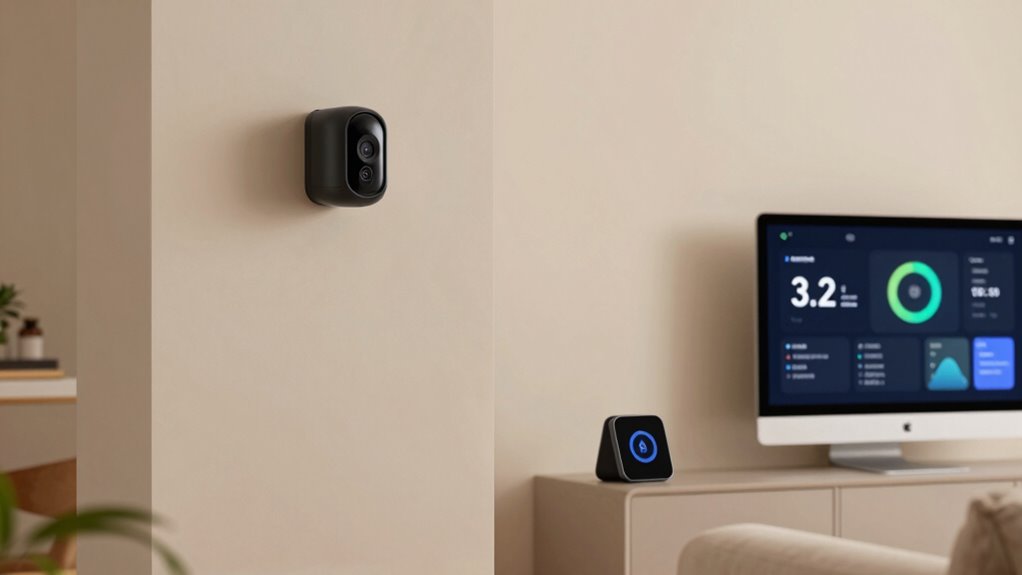

Choosing the right home monitoring systems for aging parents requires balancing safety with dignity. My top pick is the CallToU Wi-Fi Caregiver Pager because it offers a simple, wearable call button that avoids the invasive nature of cameras while providing instant alerts. For those needing active video verification, the KEENLUK Indoor Security Camera stands out for its two-way screen, allowing face-to-face check-ins without a smartphone. The main tradeoff in this category is between passive sensors, which respect privacy but may miss non-physical emergencies, and active monitoring, which offers more data but can feel intrusive. Continue reading to see how these thirteen options compare on ease of setup, reliability, and caregiver accessibility.

Get the latest gadgets delivered free with Prime
- Fast, free delivery on millions of items
- Prime Video, Amazon Music and more included
- Member-only deals all year
Complete the kit



Key Takeaways
- Simple push-button systems offer the highest reliability for users with limited tech literacy, whereas app-dependent systems introduce potential connectivity failures.
- Two-way audio and video capabilities are critical for verifying emergencies, as silent alarms often lead to unnecessary false positives or missed crises.
- Waterproof and wearable components significantly increase the likelihood of use during high-risk activities like bathing, where many falls occur.
- Passive motion sensors are effective for detecting inactivity patterns but fail to identify medical events like strokes or heart attacks without user interaction.
- Battery life and charging convenience are major differentiators; devices requiring frequent charging are often abandoned by elderly users after the initial novelty fades.
| CallToU Wi-Fi Caregiver Pager with Call Button, Watch Button, and Receiver |  | Best for Shared Family Alerts | Included components: 1 call button, 1 watch button, 1 receiver | Wireless signaling: 433 MHz | Stated wireless range: Up to 328 ft (100 m) | VIEW ON AMAZON | See Our Full Breakdown |
| MOBI Connect Emergency Alert System Bundle with Wireless Caregiver Monitor |  | Best for Camera-Based Remote Check-Ins | Video resolution: 1280 × 720 (720p) | Frame rate: 30 fps | Camera viewing angle: 110 degrees | VIEW ON AMAZON | See Our Full Breakdown |
| EverNary Wireless Caregiver Pager with 2 Receivers and 3 Motion Sensors |  | Best for Room-to-Room Movement Alerts | Included items: 2 plug-in receivers and 3 motion sensors | Motion detection range: 16.4 feet | Transmission range: Up to 500 feet (150 meters) in open areas | VIEW ON AMAZON | See Our Full Breakdown |
| PILSAMAS WiFi Caregiver Pager Wireless Call Button with App Alert |  | Best for Multiple Call Points Without an App Fee | Included call buttons: 2 wall-mounted buttons and 1 wristband button | Wi-Fi compatibility: 2.4 GHz only | Stated maximum range: Up to 230 feet through walls | VIEW ON AMAZON | See Our Full Breakdown |
| Wi-Fi Caregiver Pager System with Waterproof Call Button, Watch Button, and Receiver |  | Best for Bathroom Call-Button Placement | Included components: 1 waterproof call button, 1 watch button, 1 receiver | Wi-Fi compatibility: 2.4 GHz only | Stated range: Up to 656 feet (200 meters) | VIEW ON AMAZON | See Our Full Breakdown |
| CallToU WT42 Wireless Two-Way Intercom for Home and Elderly Monitoring |  | Best for Wi-Fi-Free Room-to-Room Check-Ins | Model: WT42 | Units: 2 | Wireless range: Up to 3,300 feet | VIEW ON AMAZON | See Our Full Breakdown |
| CallToU Caregiver Pager and Wireless Intercom System with 2 Receivers, 2 Call Buttons, and 2 Two-Way Radios | 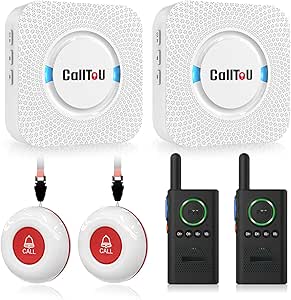 | Best Complete Local Alert-and-Voice Kit | Included components: 2 receivers, 2 call buttons, 2 two-way radios | Maximum range: Up to 500 feet outdoors; recommended under 300 feet indoors | Ringtones: 55 | VIEW ON AMAZON | See Our Full Breakdown |
| CallToU Caregiver Pager with 2 Call Buttons |  | Best Simple Two-Location Call Button | Model: CC01WH 2-1 US | Included: 1 receiver and 2 call buttons | Open-area range: 500+ feet | VIEW ON AMAZON | See Our Full Breakdown |
| FullHouse Wireless Caregiver Pager with Emergency Call Button and Wristband |  | Best Wearable Button for a Longer Open-Air Link | Open-air range: Up to 1,000 feet | Range through walls: Up to 500 feet | Melodies: 52 | VIEW ON AMAZON | See Our Full Breakdown |
| KEENLUK Indoor Security Camera with 4.3-Inch Screen and Two-Way Video Calling |  | Best for Visual Check-Ins | Screen size: 4.3 inches | Resolution: 1080p | Lens viewing angle: 350 degrees | VIEW ON AMAZON | See Our Full Breakdown |
| Nomo Medical Alert System with Fall Detection for Seniors |  | Best for Active Seniors | Included components: Smart Hub, two Satellite range extenders, wearable Tags | Connectivity: Wi-Fi; no landline required | Communication: Two-way voice through the Hub | VIEW ON AMAZON | See Our Full Breakdown |
| Mercury Alert AI Senior Fall Monitor with Passive Monitoring and Caregiver Alerts |  | Best for Wearable Resistance | Brand: Mercury Alert AI | Model: MERCURY-ALERT-1 | Sensor technology: AI-powered passive infrared and motion sensing with machine learning analytics | VIEW ON AMAZON | See Our Full Breakdown |
| Elderly Monitor with Camera, Two-Way Audio, Medication Reminder, and Temperature Alarm |  | Best for Offline Privacy | Connectivity: Wireless 2.4 GHz FHSS | Video resolution: 720p | Camera movement: 355° pan, 90° tilt | VIEW ON AMAZON | See Our Full Breakdown |
More Details on Our Top Picks
CallToU Wi-Fi Caregiver Pager with Call Button, Watch Button, and Receiver
The CallToU pairs a simple local receiver alarm with app notifications, giving nearby caregivers an audible and flashing cue while family members can receive alerts remotely. Its call button and wearable watch button offer two ways for a parent to ask for help, and the app can share alerts with family. Compared with the PILSAMAS WiFi Caregiver Pager, this has fewer call points in the box, but includes a dedicated receiver and offers more ringtone choices. The tradeoff is that remote phone or text alerts require a subscription, and the system only connects to 2.4 GHz Wi-Fi. I’d choose it for households that want a basic, shared alert setup rather than camera-based monitoring or continuous professional coverage.
Pros:- Combines a loud, flashing receiver alert with app notifications.
- Includes both a call button and a wearable watch button.
- Family members can share app alerts.
- Twenty ringtones and five volume levels allow adjustment for the home.
Cons:- Phone and text alerts require a subscription.
- Connects only to 2.4 GHz Wi-Fi.
- The included set has one receiver, so it may not alert caregivers in multiple rooms.
Best for: Families who want a receiver at home plus app alerts shared among relatives, with both a bedside call button and wearable button.
Not ideal for: Households whose Wi-Fi is 5 GHz-only or families who require phone or text alerts without a subscription.
- Included components:1 call button, 1 watch button, 1 receiver
- Wireless signaling:433 MHz
- Stated wireless range:Up to 328 ft (100 m)
- Wi-Fi compatibility:2.4 GHz only
- Receiver ringtones:20
- Receiver volume levels:5
- Power:Battery powered; 2 AAA batteries included
- Receiver dimensions:2.3 × 0.5 × 2.36 in
Our verdict“Choose the CallToU if you want shared app alerts alongside a straightforward in-home receiver and two ways for a parent to call for help.”
MOBI Connect Emergency Alert System Bundle with Wireless Caregiver Monitor
The MOBI bundle goes beyond a call button: its camera, motion alerts, and two-way audio let caregivers check a room and speak with a loved one remotely. Night vision reaches up to 40 feet, while the 110-degree view can help cover a shared living area without relying on an alert button for every check-in. That makes it a different kind of choice from the EverNary Wireless Caregiver Pager, which detects movement with separate sensors but does not provide video. MOBI can also expand to additional cameras and smart devices, though remote viewing depends on the MOBI Smart app. Professional monitoring is optional, not included as a continuous service by default. I’d favor it when seeing and talking matter more than a simple local alert, but skip it if a camera is unwelcome or a standalone emergency response service is the priority.
Pros:- Camera supports remote viewing and two-way communication.
- Motion alerts can prompt a check-in without requiring the parent to press a button.
- Night vision is specified up to 40 feet.
- System can expand with additional cameras and smart devices.
Cons:- Remote access requires the MOBI Smart app.
- Professional monitoring is optional rather than standard.
- A camera-based system may not suit parents who value privacy or do not want a camera in the monitored room.
Best for: Families who want to check a parent’s room remotely, use two-way audio, and receive motion alerts through a smartphone app.
Not ideal for: People who prefer monitoring without a camera, or families seeking included 24/7 professional monitoring rather than an optional service.
- Video resolution:1280 × 720 (720p)
- Frame rate:30 fps
- Camera viewing angle:110 degrees
- Night vision range:Up to 40 feet
- Connectivity:Wireless
- Remote access:MOBI Smart app; smartphone compatible
- Sensor:Motion sensor
- Expandability:Up to 100 additional cameras and smart devices
Our verdict“Pick MOBI when remote visual check-ins and conversation are more useful to your family than the EverNary’s sensor-only movement alerts.”
EverNary Wireless Caregiver Pager with 2 Receivers and 3 Motion Sensors
EverNary is designed to alert a caregiver when movement is detected, rather than waiting for a parent to press a button. Its three motion sensors and two plug-in receivers can cover several locations and make an alert audible in more than one part of the home. The stated 500-foot transmission range applies to open areas; the sensors themselves detect motion within 16.4 feet, so placement matters. Compared with the MOBI Connect Emergency Alert System, EverNary skips camera viewing and two-way conversation in favor of a simpler sensor-and-receiver arrangement. That can suit families who want movement cues without putting a camera in a room, but it cannot show what caused an alert or let a caregiver speak through the system. It also needs six AAA batteries unless powered by USB.
Pros:- Includes three motion sensors and two plug-in receivers.
- Sensors can pair with multiple receivers for broader alert coverage.
- Visual alerts, 58 ringtone options, and five volume levels allow customization.
- Open-area transmission range is specified up to 500 feet.
Cons:- Motion detection reaches only 16.4 feet, making sensor placement important.
- Requires six AAA batteries unless powered by USB.
- Unlike the MOBI camera system, it cannot show caregivers what triggered an alert.
Best for: Caregivers who want movement-triggered alerts across several rooms and audible receivers in multiple locations.
Not ideal for: Families who need video verification, two-way conversation, or alerts triggered directly by a parent pressing a call button.
- Included items:2 plug-in receivers and 3 motion sensors
- Motion detection range:16.4 feet
- Transmission range:Up to 500 feet (150 meters) in open areas
- Detection angle:110 degrees
- Ringtones:58
- Volume levels:5; 0–110 dB
- Power:Battery powered or USB cable; 6 AAA batteries required
- Maximum pairing:Up to 20 transmitters per receiver and 20 receivers per transmitter
Our verdict“Choose EverNary for multi-room movement alerts without cameras, but choose MOBI if you need to see and speak with your parent remotely.”
PILSAMAS WiFi Caregiver Pager Wireless Call Button with App Alert
PILSAMAS is a strong fit when a parent needs call buttons in more than one spot: the set includes two wall-mounted buttons and a wearable wristband button. Its app provides instant alerts, battery and signal status, and adjustable tones and volume; core app use has no monthly fee. That makes it more flexible than the single-call-button arrangement in the CallToU pager, and its stated 230-foot range through walls suits homes where the receiver or caregiver is not nearby. The important distinction is that no-fee app alerts do not mean every remote alert method is free: SMS, phone, or email alerts require an additional subscription. It also depends on 2.4 GHz Wi-Fi. I’d pick it for families who want several ways to summon help and app visibility into device status, not for those who need an all-in-one camera monitor.
Pros:- Includes two wall buttons and a wearable wristband panic button.
- Core app functionality has no monthly subscription fee.
- App provides battery and signal status alongside alerts.
- Stated indoor range is up to 230 feet through walls.
Cons:- Requires a 2.4 GHz Wi-Fi network.
- SMS, phone, and email alerts require an additional subscription.
- Unlike the MOBI Connect bundle, it does not provide camera viewing or two-way video monitoring.
Best for: Families who want call buttons in multiple locations plus a wearable option, and prefer app alerts without a recurring fee for core functionality.
Not ideal for: Households with only 5 GHz Wi-Fi or caregivers who need SMS, phone, or email alerts without paying for an added subscription.
- Included call buttons:2 wall-mounted buttons and 1 wristband button
- Wi-Fi compatibility:2.4 GHz only
- Stated maximum range:Up to 230 feet through walls
- Audible alert:95 dB
- Control methods:App, remote, and touch
- Mounting:Wall mount
- Power:Battery powered; one 12-volt battery included
- Dimensions:3.1 × 0.8 × 3.1 in
Our verdict“Choose PILSAMAS if multiple call points and no-fee app alerts matter more than camera monitoring or subscription-based phone and text notifications.”
Wi-Fi Caregiver Pager System with Waterproof Call Button, Watch Button, and Receiver
The main reason I’d choose this system over the CallToU Wi-Fi Caregiver Pager is its waterproof call button, which makes it better suited to placement near a sink or in another area where splashes are a concern. It also includes a watch button, a receiver with a loud flashing alarm, and app notifications that can be shared with family. Its stated range of up to 656 feet is longer than CallToU’s listed 328 feet, though real performance depends on the home and signal path. Core app alerts do not carry a monthly fee, but SMS and phone-call alerts require a subscription. Wi-Fi is limited to 2.4 GHz. This is a focused alert system, not a camera or movement-monitoring setup, so it works best when a parent can press a button to request help.
Pros:- Waterproof call button suits placement where splashes may occur.
- Includes both a call button and watch button.
- Receiver combines a loud alarm with flashing alerts.
- App notifications can be shared with family, with no monthly fee for app alerts.
Cons:- SMS and phone-call notifications require a subscription.
- Works only with 2.4 GHz Wi-Fi.
- Unlike the EverNary system, it does not provide motion-triggered alerts.
Best for: Families who want a wearable alert button and a water-resistant call button that can be mounted or carried near a bathroom or sink.
Not ideal for: Caregivers who need movement detection, camera check-ins, or phone and SMS alerts without an added subscription.
- Included components:1 waterproof call button, 1 watch button, 1 receiver
- Wi-Fi compatibility:2.4 GHz only
- Stated range:Up to 656 feet (200 meters)
- Receiver alerts:Flashing alarm and loud alarm
- Receiver volume levels:4
- Receiver ringtones:Customizable
- Call button protection:Waterproof
- Mounting options:Screw mount, adhesive patch, or lanyard
Our verdict“Choose this pager over the CallToU model when waterproof call-button placement and a longer stated range matter more than avoiding a subscription for phone alerts.”
CallToU WT42 Wireless Two-Way Intercom for Home and Elderly Monitoring
I’d choose the WT42 when the main need is speaking between rooms without relying on a router, phone app, or subscription. Its VOX hands-free mode can make brief check-ins easier for someone who may not want to hold a call button, while push-to-talk offers a more deliberate alternative. The stated range reaches up to 3,300 feet, but walls and other conditions can reduce it, so I wouldn’t treat that figure as a guaranteed indoor distance.
Compared with the CallToU Caregiver Pager and Wireless Intercom System with 2 Receivers, the WT42 is a simpler two-unit intercom rather than a set combining call buttons, receivers, and radios. That makes it a fit for direct conversation, but not a replacement for a dedicated help-alert button. Its compatibility is listed for CallToU intercom devices on the same channel, which can limit expansion.
Pros:- Works without Wi-Fi, cellular service, or a subscription
- VOX hands-free audio supports quick check-ins without pressing a button
- Two units provide direct room-to-room communication
- Type-C charging, water resistance, and a keypad lock add practical flexibility
Cons:- The stated range and up to 36-hour standby time can vary with surroundings and use
- The two-unit intercom does not include separate caregiver call buttons
- Compatibility is limited to listed CallToU intercom devices on the same channel
Best for: Families who want direct, app-free voice check-ins between two rooms or nearby areas and can keep the units charged.
Not ideal for: Households that need a wearable emergency button, remote mobile alerts, or a system that can be expanded freely across different intercom brands.
- Model:WT42
- Units:2
- Wireless range:Up to 3,300 feet
- Channels:16
- Connectivity:UHF
- Battery capacity:1000mAh
- Charging:Type-C
- Standby time:Up to 36 hours
- Features:VOX voice activation, audio monitoring, keypad lock, water-resistant design
Our verdict“Choose the WT42 for simple, Wi-Fi-free voice contact between two locations, not for a full caregiver alert system.”
CallToU Caregiver Pager and Wireless Intercom System with 2 Receivers, 2 Call Buttons, and 2 Two-Way Radios
This CallToU kit brings together two call buttons, two plug-in receivers, and two two-way radios, so a household gets both a way to request help and a way to talk. That combination makes it more flexible than the CallToU Caregiver Pager with 2 Call Buttons, which has a receiver and buttons but no included two-way radios. The buttons can be worn or mounted, giving an older adult a choice of how to summon someone.
The tradeoff is that this is a local alert setup, not remote monitoring through a phone: the receivers need outlets, and the stated 500-foot range is for open areas, with indoor obstacles cutting it down. Five volume levels up to 110 dB and 55 ringtone choices help tailor alerts, though a loud receiver may not suit every shared living space. I’d favor it when both call alerts and direct voice communication matter more than app access.
Pros:- Combines two call buttons, two receivers, and two two-way radios
- Call buttons can be worn with a neck strap or mounted
- Five volume levels reach up to 110 dB, with 55 ringtone options
- Call buttons and receivers are listed as waterproof and dustproof
Cons:- Receivers require electrical outlets
- Indoor range can be reduced by walls and other obstacles
- Does not provide app-based remote alerts
Best for: Families who want call buttons in more than one location plus radios for direct communication, without depending on Wi-Fi or a phone app.
Not ideal for: Caregivers who need mobile notifications when away from home, or households without convenient outlets for the receivers.
- Included components:2 receivers, 2 call buttons, 2 two-way radios
- Maximum range:Up to 500 feet outdoors; recommended under 300 feet indoors
- Ringtones:55
- Volume levels:5
- Maximum volume:110 dB
- Power source:Battery powered
- Mounting:Wall mount or door mount
- Water and dust resistance:Call buttons and receivers are waterproof and dustproof
Our verdict“Pick this kit if you want both local help buttons and room-to-room radio communication in one system.”
CallToU Caregiver Pager with 2 Call Buttons
For a household that needs a straightforward way to request assistance from two spots, this set keeps the setup simple: two call buttons pair with one plug-in receiver. A button can be worn as a pendant or mounted where help is most likely to be needed, such as beside a bed or in a living area. Compared with the CallToU Caregiver Pager and Wireless Intercom System with 2 Receivers, this option gives up the radios and second receiver in favor of a more basic alert arrangement.
The receiver offers 55 ringtone choices and five volume levels up to 110 dB, but the alert stays local rather than notifying a caregiver’s phone away from home. Its 500-plus-foot range applies to open areas, so I’d place the receiver with the actual walls and rooms in mind rather than relying on the maximum figure. The plug-in receiver also limits where the alert can be heard.
Pros:- Includes two call buttons for separate rooms or activities
- Buttons can be worn as pendants or mounted
- Offers 55 ringtone options and five volume levels up to 110 dB
- Waterproof and dustproof components support varied placement
Cons:- Only one receiver is included, limiting where alerts can be heard
- The receiver must be plugged into an electrical outlet
- The stated range is for open areas and can fall indoors
Best for: Families who need two wearable or mounted call buttons and one audible receiver for a compact home setup.
Not ideal for: Households needing multiple receiver locations, two-way voice contact, or alerts delivered to caregivers outside the home.
- Model:CC01WH 2-1 US
- Included:1 receiver and 2 call buttons
- Open-area range:500+ feet
- Ringtones:55
- Volume:5 levels, up to 110 dB
- Receiver power:Plug-in
- Call button batteries:2 included 12V alkaline batteries
- Water and dust resistance:Yes
- Mounting:Wall mount
Our verdict“Choose this set for a no-frills local alert system with two call points and one receiver.”
FullHouse Wireless Caregiver Pager with Emergency Call Button and Wristband
The FullHouse pager is a focused option for someone who needs a wearable or placeable emergency button and a receiver that can alert a caregiver at home. Its stated open-air range reaches 1,000 feet, with up to 500 feet through walls, giving it a longer listed reach than the CallToU Caregiver Pager with 2 Call Buttons. The receiver offers both audible alerts and a silent LED flash, which can help when sound is unwelcome or another person is resting.
This is still a button-and-receiver alert system, not a camera or a remote phone notification service. The call button is only splash-proof, so it should be removed before bathing or showering; that gap matters for anyone at elevated risk in the bathroom. Five volume settings span silent to 110 dB, but actual wireless range depends on the home’s layout.
Pros:- Button can be worn or placed within reach
- Lists up to 1,000 feet of open-air range and up to 500 feet through walls
- Audible alerts and silent LED flashing provide two notification modes
- No monthly fee is listed
Cons:- The button is splash-proof, not suitable for immersion, and should be removed for bathing
- Range decreases through walls and may vary by home layout
- Provides no camera monitoring or mobile caregiver notifications
Best for: Families seeking a wearable emergency call button with a silent visual alert option and a receiver for home use.
Not ideal for: People who need a water-safe call button during bathing, or caregivers who need alerts on a phone while away.
- Open-air range:Up to 1,000 feet
- Range through walls:Up to 500 feet
- Melodies:52
- Volume:5 levels, from 0 dB to 110 dB
- Alert types:Audible and silent LED flash
- Call button water resistance:Splash-proof; do not immerse
- Batteries:2 C batteries included
- Item weight:8.1 ounces
Our verdict“Choose FullHouse for a wearable local alert with a visual-only option, provided the button can be removed for bathing.”
KEENLUK Indoor Security Camera with 4.3-Inch Screen and Two-Way Video Calling
Unlike the pager-based options in this group, the KEENLUK camera supports two-way video calling, so a caregiver can see and speak with a parent rather than only receive a button alert. Its one-button call feature is aimed at simple use, while motion detection, night vision, and mobile notifications add visibility when nobody is actively calling. The 350-degree lens viewing angle can cover more of a room than a fixed narrow view, though it does not replace a wearable emergency button.
Compared with the CallToU WT42 Wireless Two-Way Intercom, this camera adds video and phone notifications but depends on 2.4 GHz Wi-Fi. It also supports local SD card storage, but the card is not included. I’d choose it for caregivers who want visual check-ins and can set up Wi-Fi; I’d skip it when internet-independent communication or a dedicated help button is the priority.
Pros:- Two-way video calling and audio allow visual as well as voice check-ins
- One-button calling is designed for straightforward use
- Motion detection, night vision, and mobile notifications add monitoring tools
- Supports local SD card storage
Cons:- Requires 2.4 GHz Wi-Fi
- SD card for local storage is not included
- A fixed indoor camera does not provide a wearable emergency call button
Best for: Caregivers who want indoor video check-ins, mobile motion notifications, and a simple one-button calling option over 2.4 GHz Wi-Fi.
Not ideal for: Households without reliable 2.4 GHz Wi-Fi, or families seeking a wearable emergency alert that works independently of a camera.
- Screen size:4.3 inches
- Resolution:1080p
- Lens viewing angle:350 degrees
- Connectivity:Wireless, 2.4 GHz Wi-Fi
- Storage:Local SD card; card not included
- Features:Two-way video calling, two-way audio, motion detection, night vision, mobile notifications
- Usage:Indoor
- Dimensions:4.72 x 4.72 x 7.08 inches
- Weight:0.62 kg
Our verdict“Choose KEENLUK when visual check-ins matter more than an internet-free alert button.”
Nomo Medical Alert System with Fall Detection for Seniors
This system stands out for its comprehensive coverage via wearable tags, making it ideal for seniors who move around the house freely. Unlike the Mercury Alert AI, which relies on fixed wall sensors, Nomo’s portable tags allow fall detection to travel with the user, offering protection in the bathroom or garden. The plug-and-play setup removes technical barriers, while the two-way voice communication ensures immediate caregiver connection during emergencies. However, the monthly subscription requirement after the trial period adds ongoing costs, a drawback for budget-conscious families. Compared to simpler pagers like the CallToU Wi-Fi Caregiver Pager, Nomo offers more sophisticated monitoring but requires consistent wearable compliance from the parent.
Pros:- Wearable tags provide fall detection wherever the senior goes
- Two-way voice communication enables immediate caregiver interaction
- Wi-Fi connectivity eliminates the need for a landline
- Plug-and-play setup simplifies installation for non-technical users
Cons:- Requires a paid monthly subscription after the 30-day trial
- Relies on the senior consistently wearing the tags for protection
Best for: Active seniors who move throughout the home and need reliable fall detection without relying on fixed cameras or sensors.
Not ideal for: Families seeking a one-time purchase solution, as the mandatory monthly subscription creates long-term financial commitment.
- Included components:Smart Hub, two Satellite range extenders, wearable Tags
- Connectivity:Wi-Fi; no landline required
- Communication:Two-way voice through the Hub
- Fall detection:Detects unusual movement patterns and fall events
- Emergency monitoring:30-day trial; monthly subscription applies afterward
- Setup:Plug-and-play
Our verdict“Choose the Nomo system if your parent is mobile and you prioritize portable fall detection over fixed-room monitoring.”
Mercury Alert AI Senior Fall Monitor with Passive Monitoring and Caregiver Alerts
This wall-mounted unit solves the common problem of seniors forgetting or refusing to wear devices. By using AI-powered passive infrared and motion sensing, it detects falls, wandering, and sleep patterns without any wearable component. This is a significant advantage over the Nomo Medical Alert System, which depends on the user keeping tags on their body. The adhesive mounting allows for easy, non-invasive installation, while alerts via call, text, and app keep caregivers informed remotely. The tradeoff is its 30-foot range and need for a subscription service. It monitors specific rooms rather than the whole home, so you may need multiple units for comprehensive coverage, unlike the MOBI Connect bundle which often includes multiple sensors in one kit.
Pros:- No wearable devices required, eliminating user compliance issues
- Detects complex behaviors like wandering and sleep disturbances
- Adhesive installation avoids drilling into walls
- Integrates with Ring cameras for expanded security options
Cons:- Requires a mandatory subscription service
- Limited 30-foot range necessitates multiple units for larger spaces
Best for: Seniors who refuse to wear jewelry or pendants, or those with cognitive decline who may forget to use wearable devices.
Not ideal for: Large homes or multi-room monitoring needs, as the 30-foot range requires multiple units for full coverage.
- Brand:Mercury Alert AI
- Model:MERCURY-ALERT-1
- Sensor technology:AI-powered passive infrared and motion sensing with machine learning analytics
- Mounting type:Wall mount
- Maximum range:30 feet
- Power source:AC power / corded electric
- Subscription:Required
Our verdict“The Mercury Alert AI is the superior choice if your parent resists wearing devices and you prefer passive, room-based monitoring.”
Elderly Monitor with Camera, Two-Way Audio, Medication Reminder, and Temperature Alarm
This system appeals to families wary of cloud-based data and Wi-Fi vulnerabilities. It operates on a dedicated 2.4 GHz FHSS frequency, meaning it works entirely without Wi-Fi or an app, offering a secure, closed-loop connection. The built-in medication reminders and temperature alarms add health monitoring layers that simple pagers like the CallToU Caregiver Pager lack. The camera’s 355° pan and 4x zoom provide detailed visual checks, while the 1000-foot transmission range covers large properties. However, the indoor-only design limits its utility for garden monitoring, and the corded power requirement means it cannot be moved freely. It is best for those who value privacy over smart-home integration.
Pros:- Operates independently of Wi-Fi and smartphone apps for enhanced privacy
- Includes medication reminders and temperature alarms for health tracking
- Long 1000-foot transmission range covers large indoor areas
- Camera features pan, tilt, and zoom for comprehensive room views
Cons:- No smartphone app or remote internet access for viewing
- Corded power and indoor-only design limit placement flexibility
Best for: Privacy-focused caregivers who want a secure, offline video and audio system without relying on internet connectivity or apps.
Not ideal for: Users needing outdoor monitoring or remote app access, as the system is strictly indoor and lacks smartphone integration.
- Connectivity:Wireless 2.4 GHz FHSS
- Video resolution:720p
- Camera movement:355° pan, 90° tilt
- Transmission distance:Up to 1000 ft
- Special features:Two-way audio, infrared night vision, medication reminder, temperature alarm
- Power source:Corded electric
- Indoor/outdoor use:Indoor
Our verdict“Select this monitor if you prioritize data privacy and offline reliability over modern app-based connectivity.”

How We Picked
I evaluated these products by prioritizing ease of deployment for remote caregivers and simplicity of use for the aging parent. The primary criterion was whether the system works reliably without requiring the parent to interact with a smartphone or complex interface. I also weighed the response mechanism, distinguishing between systems that merely alert a caregiver and those that facilitate immediate two-way communication. Build quality and component durability, particularly water resistance for bathroom use, were also key factors in ranking the devices.
Factors to Consider When Choosing Home Monitoring Systems For Aging Parents
Selecting a monitoring system is less about technical specifications and more about matching the technology to your parent’s physical and cognitive capabilities. Here are the core factors that should drive your decision.Privacy vs. Verification
Cameras provide undeniable proof of an emergency, but many seniors resist being filmed in their own homes. If your parent values privacy, opt for audio-only intercoms or simple pagers like the CallToU models. These systems respect personal space while still allowing you to hear distress signals. Conversely, if your parent has dementia or is prone to falls where they cannot speak, video verification becomes necessary to distinguish between a nap and a medical crisis. The decision hinges on whether the need for visual confirmation outweighs the comfort of being unobserved.
Connectivity and Setup Complexity
Wi-Fi dependent systems offer richer features but require a stable internet connection and a smartphone app for setup. If your parent lives in an area with spotty Wi-Fi or lacks digital literacy, cellular-based or radio-frequency systems are more reliable. These standalone units often use SIM cards or dedicated hubs, reducing the points of failure. Avoid systems that require the senior to connect to a home network; this burden should fall entirely on the caregiver during installation. A system that fails to connect is a safety hazard, not just an inconvenience.
Ease of Wear and Charging
The best emergency button is the one that is actually worn. Bulky pendants or watches can be uncomfortable or easily forgotten. Look for lightweight, waterproof pendants or discreet wristbands that feel like jewelry rather than medical devices. Charging frequency matters too; devices that need weekly charging are often left on the nightstand until they die. Prioritize systems with long battery life or easy-to-use magnetic chargers that encourage consistent usage. If the device is annoying to use, it will not be used.
Alert Reliability and Redundancy
A single point of failure can be dangerous. Does the system alert only one phone, or can it notify multiple family members? Some systems rely on a central hub that, if unplugged or reset by a grandchild, stops working entirely. Redundant alert paths, such as simultaneous SMS and app notifications, provide a safety net. Additionally, consider if the system has a backup battery for power outages. During storms or grid failures, your monitoring system must remain operational to handle fall-related emergencies.
Integration with Daily Routines
Monitoring should not disrupt daily life. Systems that require the user to press a button every few hours to prove they are okay can cause anxiety and caregiver fatigue. Passive monitoring, such as motion sensors or bed occupancy detectors, works in the background without demanding user action. However, passive systems cannot detect internal medical issues. For early-stage independence, passive systems work well. For advanced frailty, active call buttons are non-negotiable. Match the level of intrusion to the current level of risk your parent faces.
Frequently Asked Questions
Do home monitoring systems work without internet?
It depends on the specific technology used. Wi-Fi based pagers require an active internet connection to send alerts to your smartphone. If the internet goes down, the alerts fail. In contrast, cellular-based systems use SIM cards to send SMS or voice calls directly to your phone, bypassing home Wi-Fi entirely. Radio-frequency pagers work within a limited range inside the house and do not need the internet for the initial alert, though they may need it for remote notifications. For rural areas or unstable connections, cellular options are far more dependable.
Are fall detection features accurate enough to rely on?
Fall detection technology has improved but still generates false positives, such as when a person sits down quickly or drops their device. While AI-driven monitors are getting better at distinguishing real falls, they are rarely perfect. Most experts recommend using fall detection as a supplementary feature rather than the sole safety mechanism. A manual call button, like those on the Nomo Medical Alert System, remains the most reliable way to summon help. Relying solely on automated detection can lead to delayed responses if the algorithm misses a soft fall.
How do I handle privacy concerns with video monitoring?
Many seniors feel surveilled by cameras, which can strain family relationships. To mitigate this, choose systems with privacy shutters or cameras that only activate upon an alert. Audio-only intercoms offer a middle ground, allowing you to hear a situation without visual intrusion. Some devices, like the KEENLUK camera, feature two-way screens that encourage social connection rather than surveillance. Always discuss the installation with your parent and agree on camera placement, avoiding bedrooms and bathrooms unless absolutely necessary for medical reasons.
Can these systems be used by people with dementia?
Yes, but the technology must be extremely simple. People with dementia may forget how to operate complex apps or may accidentally disable devices. Large, distinct buttons with tactile feedback are essential. Systems that require no daily interaction, such as passive motion sensors or door sensors, are often better suited for cognitive decline. Avoid devices that require charging or pairing via Bluetooth, as these steps are easily forgotten. The goal is to create a safety net that works even if the user does not remember it exists.
What is the difference between a caregiver pager and a medical alert system?
A caregiver pager typically alerts a family member or hired aide directly via a receiver or app, allowing for immediate personal contact. A medical alert system often connects to a professional monitoring center that dispatches emergency services. Pagers are cheaper and offer faster, more personal responses from known caregivers. Medical alert systems provide professional triage and ambulance dispatch but may have longer response times. For aging parents who live with family or have nearby neighbors, a pager is often sufficient and less costly.
Conclusion
Choosing the right home monitoring system for aging parents ultimately depends on your parent’s specific needs and your family’s response capabilities. The CallToU Wi-Fi Caregiver Pager is the best overall choice for its balance of simplicity and reliability, making it ideal for those who need a straightforward call button without complex setup. For families who need visual verification, the KEENLUK Indoor Security Camera offers the best premium experience with its two-way screen, though it requires a willingness to accept video monitoring. If you are looking for the best value, the EverNary Wireless Caregiver Pager provides solid basic functionality at a lower cost, perfect for beginners who want to test monitoring without a high upfront investment. For those with high fall risk, the Nomo Medical Alert System is the best specialized pick due to its dedicated fall detection features. Review your parent’s daily routine and privacy boundaries before making your final decision.