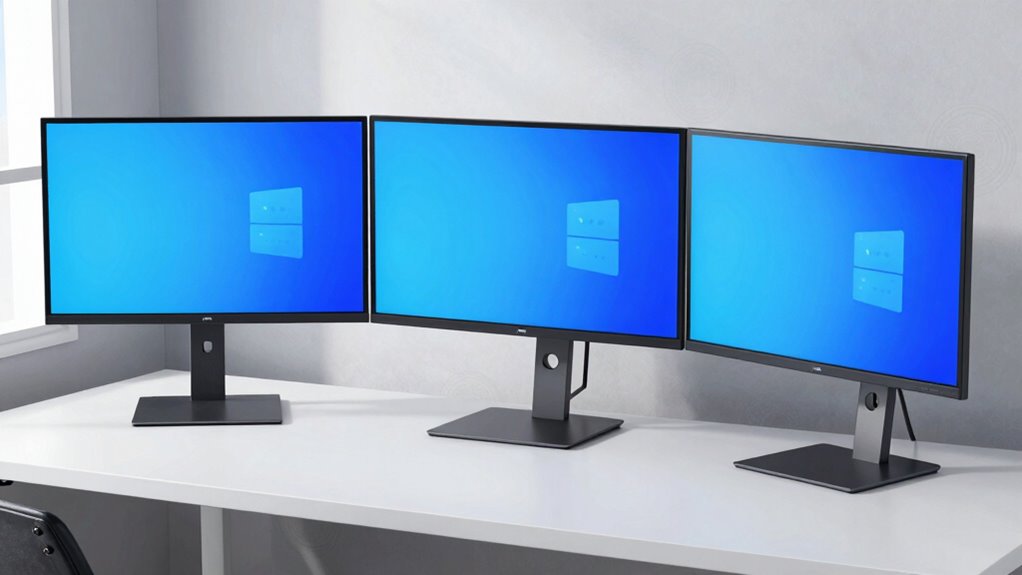

Looking for a reliable triple monitor arm? The best options balance stability, adjustability, and build quality. The WALI Triple Monitor Mount stands out as the overall best thanks to its solid performance and affordability. For those needing extra height and flexibility, the MountPro Triple Mount offers full motion features, while the VIVO Triple Pneumatic Mount provides heavy-duty stability for larger screens. Every product here involves tradeoffs between price, adjustability, and compatibility, so keep reading for detailed insights and help narrowing down your choice.
Complete the kit



Key Takeaways
- The top picks excel in balancing adjustability with stability, crucial for ergonomic setups.
- VESA compatibility is a must-have feature for universal monitor support, especially for larger screens.
- Heavy-duty gas spring arms tend to offer better smooth movement but come at a higher cost.
- Size and weight capacity vary significantly; ensure your monitors fall within supported ranges.
- Price differences often reflect build quality, adjustability features, and included accessories.
| WALI Triple Monitor Mount for 13-32 inch Screens, Up to 17.6 lbs per Arm, Adjustable Desk Mount with Swivel, Tilt, Rotation, Black |  | Best Overall for Versatile Ergonomics | Monitor Size Compatibility: 13-32 inches | Max Load Capacity: 17.6 lbs per arm | VESA Pattern: 75x75mm and 100x100mm | VIEW ON AMAZON | See Our Full Breakdown |
| VIVO Triple Pneumatic Monitor Mount for 3 Screens up to 32 inches, Fully Adjustable, Heavy Duty Desk Stand with C-Clamp Grommet |  | Best for Heavy-Duty Support and Smooth Adjustment | Supported Screen Size: 17-32 inches | Max Weight per Monitor: 17.6 lbs | VESA Compatibility: 75x75mm, 100x100mm | VIEW ON AMAZON | See Our Full Breakdown |
| HUANUO Triple Monitor Mount for 13-32 Inch Monitors, Supports 22 lbs per Arm, VESA 75×75/100x100mm, Adjustable Tilt Swivel Rotation, Cable Management, Larger Base |  | Best for Stability and Cable Management | Supported Screen Size: 13-32 inches | Maximum Support Weight: 22 lbs per arm | VESA Compatibility: 75x75mm, 100x100mm | VIEW ON AMAZON | See Our Full Breakdown |
| MOUNTUP Triple Monitor Stand Mount for 27-inch Screens, White |  | Best for Compact, Space-Saving Setups | Compatibility: Screens up to 27 inches | Weight Capacity: 4.4-19.8 lbs per arm | Mounting Options: C-clamp and grommet | VIEW ON AMAZON | See Our Full Breakdown |
| Mount-It! Triple Monitor Mount with Gas Spring Arms, VESA Compatibility, USB Ports, Black |  | Best for Ergonomic Flexibility and Connectivity | Mounting Type: Clamp and Grommet | Movement Type: Articulating, Height Adjustable | Maximum Tilt Angle: 90 Degrees | VIEW ON AMAZON | See Our Full Breakdown |
| VIVO Triple Ultrawide Monitor Desk Mount – Heavy Duty Clamp for Up to 49-inch Screens |  | Best Heavy-Duty Support for Ultrawide Monitors | Monitor Compatibility: Up to 49 inches and 38 inches screens | Weight Capacity: 5.5 lbs to 44 lbs per arm | Material: Cast aluminum | VIEW ON AMAZON | See Our Full Breakdown |
| Mount Pro Triple Monitor Mount for 13-32 inch Screens, Adjustable Desk Mount with Tilt, Swivel, Rotation, VESA Compatible | 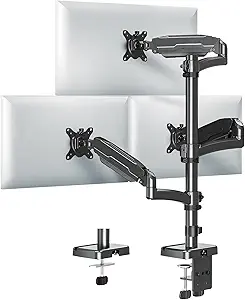 | Best Versatile Motion for Medium-Sized Monitors | Supported Screen Size: 13-32 inches | Maximum Weight per Arm: 19.8 lbs | VESA Compatibility: 75x75mm, 100x100mm | VIEW ON AMAZON | See Our Full Breakdown |
| Triple Monitor Desk Mount for 13-32 inch Screens, Holds Up to 19.8 lbs Each, VESA Compatible |  | Best Fully Adjustable for Ergonomic Comfort | Monitor Size Support: 13-32 inches | Weight Capacity: 19.8 lbs per monitor | VESA Compatibility: 75x75mm, 100x100mm | VIEW ON AMAZON | See Our Full Breakdown |
| WALI Triple Monitor Mount for 13-27 inch Screens, Holds up to 22 lbs, with Tilt, Swivel, Rotation, VESA 75/100mm, Black |  | Best Budget-Friendly for Compact Monitors | Compatibility: 13-27 inches | Maximum Weight: 22 lbs | VESA Compatibility: 75x75mm, 100x100mm | VIEW ON AMAZON | See Our Full Breakdown |
| Triple Monitor Mount for up to 49 inches, Fully Adjustable Heavy Duty 3 Monitor Arm with Gas Spring, Desk Mount with C-Clamp & Grommet Base, Supports 44 lbs, Black |  | Best Heavy-Duty Ultrawide Support | Monitor Size Support: Up to 49 inches (center), 35 inches (side arms) | Weight Capacity: 44 lbs (center), 26.4 lbs (side arms) | VESA Compatibility: 75x75mm and 100x100mm | VIEW ON AMAZON | See Our Full Breakdown |
| MountUp Triple Monitor Mount for 17-32 inch Screens, Full Motion Desk Stand, Holds 4.4-19.8 lbs per Monitor, Clamp & Grommet Mount, Black |  | Best Value for Versatile Mid-Size Monitors | Screen Size Range: 17-32 inches | Max Weight per Monitor: 19.8 lbs | VESA Compatibility: 75x75mm, 100x100mm | VIEW ON AMAZON | See Our Full Breakdown |
| HUANUO Triple Monitor Mount for 13-27 inch Screens, Adjustable Desk Mount with Arms, VESA Compatible |  | Best for Compact, Ergonomic Setups | Monitor Size Range: 13-27 inches | Max Load per Arm: 19.8 lbs | VESA Compatibility: 75x75mm, 100x100mm | VIEW ON AMAZON | See Our Full Breakdown |
| MOUNTUP Triple Monitor Stand Mount – Fits 3 Monitors Up to 27 inch, Heavy Duty, Black |  | Best Heavy-Gauge Steel Stability | Compatibility: Monitors up to 27 inches | Max Weight per Arm: 19.8 lbs | Material: Heavy-gauge steel | VIEW ON AMAZON | See Our Full Breakdown |
| HUANUO Triple Monitor Mount for 17 to 32 inch Screens with Swivel, Tilt, Rotation, Clamp & Grommet Kit |  | Best Space-Saving, Flexible Mount | Maximum Monitor Size: 32 inches | VESA Compatibility: 75x75mm, 100x100mm | Weight Range: 4.4 lbs to 17.6 lbs | VIEW ON AMAZON | See Our Full Breakdown |
| triple monitor arm | Swivel | Rotation | VESA Compatibility | Material |
|---|---|---|---|---|
| WALI Triple Monitor Mount for | +90°/-90° | 360° | — | — |
| VIVO Triple Pneumatic Monitor | — | — | 75x75mm, 100x100mm | Steel and Aluminum |
| HUANUO Triple Monitor Mount fo | — | — | 75x75mm, 100x100mm | Metal |
| MOUNTUP Triple Monitor Stand M | — | — | — | Heavy-gauge steel |
| Mount-It! Triple Monitor Mount | — | — | — | — |
| VIVO Triple Ultrawide Monitor | 180° | 360° | — | Cast aluminum |
| Mount Pro Triple Monitor Mount | 180° | 360° | 75x75mm, 100x100mm | — |
| Triple Monitor Desk Mount for | ±15° (top), ±90° (side) | 360° | 75x75mm, 100x100mm | — |
| WALI Triple Monitor Mount for | 180° | 360° | 75x75mm, 100x100mm | — |
| Triple Monitor Mount for up to | ±90° | 360° | 75x75mm and 100x100mm | Cast aluminum |
| MountUp Triple Monitor Mount f | — | — | 75x75mm, 100x100mm | Heavy-gauge steel |
| HUANUO Triple Monitor Mount fo | ±90° | 360° | 75x75mm, 100x100mm | — |
| MOUNTUP Triple Monitor Stand M | ±90° | 360° | — | Heavy-gauge steel |
| HUANUO Triple Monitor Mount fo | ±90° | 360° | 75x75mm, 100x100mm | — |
More Details on Our Top Picks
WALI Triple Monitor Mount for 13-32 inch Screens, Up to 17.6 lbs per Arm, Adjustable Desk Mount with Swivel, Tilt, Rotation, Black
This WALI mount excels for users seeking a well-rounded solution capable of supporting a wide range of monitor sizes with full motion flexibility. Compared with the Mount-It! model, it offers comparable adjustability but is generally more straightforward to install, making it a strong choice for those new to multi-monitor setups. Its full swivel, tilt, and rotation capabilities ensure ergonomic comfort, while the sturdy clamp provides reliable stability on most wooden desks. However, its maximum weight capacity of 17.6 lbs per arm could limit heavier monitors, and it’s less suitable for desks with crossbeams or very thick surfaces. Overall, this option stands out for its balance of functionality, ease of use, and compatibility.
Pros:- Supports a wide range of monitor sizes (13-32 inches)
- Full motion adjustments including swivel, tilt, and rotation
- Easy to install with a sturdy C-clamp
Cons:- Limited to monitors weighing up to 17.6 lbs per arm
- Designed mainly for wooden desks without crossbeams
Best for: Professionals or gamers who want a flexible, all-around triple monitor setup on standard desks
Not ideal for: Users with very heavy monitors or desks with thick or complex surfaces, as it might not support their weight or mounting constraints
- Monitor Size Compatibility:13-32 inches
- Max Load Capacity:17.6 lbs per arm
- VESA Pattern:75x75mm and 100x100mm
- Extension:27.2 inches
- Height Adjustment:17.2 inches
- Swivel:+90°/-90°
- Tilt:+45°/-45°
- Rotation:360°
- Mounting Method:C-clamp
Our verdict“Ideal for users who need versatile, ergonomic support with straightforward installation on standard desks.”
VIVO Triple Pneumatic Monitor Mount for 3 Screens up to 32 inches, Fully Adjustable, Heavy Duty Desk Stand with C-Clamp Grommet
The VIVO mount stands out for its pneumatic arms, offering smooth, effortless adjustments that are ideal for users who frequently change viewing angles. Compared with the MountUp model, its pneumatic system provides a more premium feel, especially for those needing precise, frequent repositioning. Its robust steel and aluminum build ensures stability for monitors up to 17.6 lbs each, though the clamp mounting system may not fit all desk types, particularly very thick or non-standard surfaces. The setup is straightforward, but the limited maximum monitor weight and size (up to 32 inches) can be a barrier for heavier or larger screens. This mount is best suited for professionals who prioritize ease of movement and durability over maximum size support.
Pros:- Pneumatic arms enable effortless, precise adjustments
- Heavy-duty steel and aluminum construction ensures durability
- Supports up to 32 inches and 17.6 lbs per monitor
Cons:- Clamp mounting may not suit all desk types or thicknesses
- Limited to monitors up to 32 inches and 17.6 lbs
Best for: Office workers or content creators who need quick, smooth monitor adjustments and support for mid-sized screens
Not ideal for: Users with very heavy or ultrawide monitors, or desks that cannot accommodate the clamp thickness of up to 3.25 inches
- Supported Screen Size:17-32 inches
- Max Weight per Monitor:17.6 lbs
- VESA Compatibility:75x75mm, 100x100mm
- Mounting Method:C-Clamp
- Material:Steel and Aluminum
- Maximum Mounting Thickness:3.25 inches
Our verdict“Best for users who prioritize smooth, effortless adjustments and durable construction for mid-sized monitors.”
HUANUO Triple Monitor Mount for 13-32 Inch Monitors, Supports 22 lbs per Arm, VESA 75×75/100x100mm, Adjustable Tilt Swivel Rotation, Cable Management, Larger Base
This HUANUO mount offers a larger base and excellent cable management, making it a solid choice for users seeking enhanced stability and a tidy workspace. Compared with the MOUNTUP model, its bigger base provides extra support, especially for heavier monitors up to 22 lbs, but it may take up more desk space, which could be a concern for small setups. Its full adjustability with tilt, swivel, and rotation makes it versatile for various ergonomic preferences. However, it’s not recommended for marble or glass desks, and assembly might require some screws to be removed during height adjustments. Overall, this mount is ideal for users prioritizing stability and cable organization over compactness.
Pros:- Larger base enhances stability on larger desks
- Supports monitors up to 22 lbs with full adjustability
- Effective cable management keeps workspace tidy
Cons:- Takes up more space, not ideal for small desks
- Assembly may be more complex due to larger components
Best for: Professionals with larger desks and heavier monitors needing maximum stability and cable tidy-up
Not ideal for: Small desk environments or users with ultra-lightweight monitors, as the larger base may be cumbersome
- Supported Screen Size:13-32 inches
- Maximum Support Weight:22 lbs per arm
- VESA Compatibility:75x75mm, 100x100mm
- Mounting Options:C-clamp, Grommet
- Material:Metal
- Larger Base:Yes
Our verdict“Best for users who need maximum stability and cable organization for heavier, larger monitors.”
MOUNTUP Triple Monitor Stand Mount for 27-inch Screens, White
The MOUNTUP stand is tailored for users working within limited space, supporting three 17-27 inch monitors with a focus on full adjustability and stability. Its design supports monitors weighing up to 19.8 lbs, and the height-adjustable center screen offers tailored ergonomics. Compared with the HUANUO model, its smaller footprint makes it more suitable for compact desks, but it can feel bulky if space is tight. The quick assembly process is a plus, yet it limits support to 27 inches, making it less suitable for larger monitors. It’s a strong pick for those prioritizing space efficiency without sacrificing full monitor control.
Pros:- Supports three monitors up to 27 inches with full adjustment
- Helps maximize desk space and reduce clutter
- Quick setup with less than 20 minutes assembly
Cons:- Limited to monitors up to 27 inches
- May be too large for very small desks
Best for: Home office users or students with limited desk space needing multiple adjustable monitors
Not ideal for: Those with larger monitors over 27 inches or requiring ultra-heavy-duty mounts, as it has size and weight limits
- Compatibility:Screens up to 27 inches
- Weight Capacity:4.4-19.8 lbs per arm
- Mounting Options:C-clamp and grommet
- Adjustments:Tilt ±35°, swivel ±90°, 360° rotation
- Material:Heavy-gauge steel
- Assembly Time:Less than 20 minutes
Our verdict“Best for space-conscious users who want a flexible, easy-to-assemble triple monitor setup for mid-sized screens.”
Mount-It! Triple Monitor Mount with Gas Spring Arms, VESA Compatibility, USB Ports, Black
This Mount-It! model excels for those who value independent, precise adjustments, thanks to its gas spring arms that facilitate effortless repositioning. It offers built-in USB-A and USB-C ports, adding convenience for connecting peripherals or charging devices. Compared with the HUANUO model, its articulating arms provide more nuanced control, but installation can be more complex, especially for users unfamiliar with mounting hardware. It supports monitors up to 32 inches and 17.6 lbs, but is primarily designed for typical 16:9 screens, which could limit versatility for ultrawide displays. This mount suits professionals and gamers who want flexible, ergonomic control along with integrated device connectivity.
Pros:- Independent, precise adjustments with gas spring arms
- Built-in USB-A and USB-C ports for connectivity
- Supports monitors up to 32 inches and 17.6 lbs
Cons:- Installation can be more complicated
- Designed mainly for standard 16:9 monitors
Best for: Office professionals or gamers needing highly adjustable monitors with integrated USB ports for accessories
Not ideal for: Users with ultrawide or very heavy monitors, or those preferring simpler, less feature-rich mounts
- Mounting Type:Clamp and Grommet
- Movement Type:Articulating, Height Adjustable
- Maximum Tilt Angle:90 Degrees
- Compatible Devices:Monitor
- Enclosure Material:Metal
- Color:Black
Our verdict“Ideal for users seeking maximum ergonomic flexibility combined with built-in device connectivity options.”
VIVO Triple Ultrawide Monitor Desk Mount – Heavy Duty Clamp for Up to 49-inch Screens
This model stands out for its ability to support three ultrawide monitors, including a massive 49-inch screen, making it ideal for users with expansive setups. Compared with the MountPro or WALI mounts, it offers superior stability thanks to its cast aluminum construction and pneumatic height adjustment, which allows for effortless repositioning. The tradeoff is that its weight and complex assembly process may require a sturdier desk and patience during setup. Its extensive tilt, swivel, and rotation range ensure ergonomic flexibility, especially for intensive multitasking environments. While the heavy-duty build offers unmatched durability, it’s less suited for lighter or smaller setups where a less bulky mount would suffice.
Pros:- Supports three ultrawide monitors up to 49 inches
- Heavy-duty cast aluminum construction for durability
- Pneumatic height adjustment for easy repositioning
- 360° rotation and extensive tilt for ergonomic flexibility
Cons:- Heavy build requiring a sturdy desk
- Complex assembly process can be time-consuming
Best for: Professionals or content creators with ultrawide monitors who need maximum stability and adjustability.
Not ideal for: Casual users with standard-sized monitors or limited desk space, as the mount’s weight and size may be overkill.
- Monitor Compatibility:Up to 49 inches and 38 inches screens
- Weight Capacity:5.5 lbs to 44 lbs per arm
- Material:Cast aluminum
- Clamp Compatibility:Desktops up to 2 inches thick
- Tilt Range:+55° to -25°
- Swivel:180°
- Rotation:360°
Our verdict“This mount is best suited for users with large, ultrawide monitors who prioritize stability and full motion flexibility, accepting a more involved setup.”
Mount Pro Triple Monitor Mount for 13-32 inch Screens, Adjustable Desk Mount with Tilt, Swivel, Rotation, VESA Compatible
This pick makes the most sense for those who need flexible positioning with a broad range of motion, supporting monitors from 13 to 32 inches. Unlike the WALI or HUANUO mounts, it offers a maximum height of 36.3 inches and a 28-inch pole, giving more room for ergonomic adjustments. Its full motion capabilities—tilt, swivel, and rotation—are comparable to the WALI and HUANUO, but with a slightly more refined installation process thanks to its dual mounting options. The limitation is its weight capacity of 19.8 lbs per arm, which excludes very heavy or professional-grade monitors. This mount excels for users who want a combination of full motion and multi-size support without requiring the robustness of a large, heavy-duty mount.
Pros:- Supports a wide range of screen sizes (13-32 inches)
- Full motion adjustments including tilt, swivel, and rotation
- Two mounting options for versatile installation
- Moderate height with a 28-inch pole for ergonomic positioning
Cons:- Limited weight capacity of 19.8 lbs per arm
- Not suitable for very large or heavy monitors
Best for: Office workers or home users with multiple medium-sized monitors seeking flexible ergonomic positioning.
Not ideal for: Heavy professional monitors exceeding 20 lbs or ultra-wide screens, as it lacks the capacity for very large displays.
- Supported Screen Size:13-32 inches
- Maximum Weight per Arm:19.8 lbs
- VESA Compatibility:75x75mm, 100x100mm
- Tilt Range:+90° to -90°
- Swivel:180°
- Rotation:360°
- Maximum Height:36.3 inches
- Mounting Options:C-Clamp, Grommet
Our verdict“Ideal for users needing flexible, multi-size monitor support with full motion, but not for heavier or ultrawide screens.”
Triple Monitor Desk Mount for 13-32 inch Screens, Holds Up to 19.8 lbs Each, VESA Compatible
This mount offers full adjustability with 360° rotation, 180° swivel, and tilt, providing a highly customizable setup. Compared with the MountPro, this model emphasizes straightforward assembly and sturdy metal construction, making it suitable for users who prioritize stability and ease of use. Its maximum weight of 19.8 lbs per arm aligns with most standard monitors but limits compatibility with very heavy or professional-grade displays. Its cable management system keeps workspaces tidy, making it a practical choice for busy desks. The main tradeoff is that its size and adjustment range require enough desk space and may be complex for first-time users to install properly.
Pros:- Full motion flexibility (rotation, tilt, swivel)
- Supports multiple monitor sizes and VESA patterns
- Includes cable management for organized setups
- Sturdy metal construction ensures stability
Cons:- Installation may be challenging for beginners
- Limited to monitors up to 19.8 lbs
Best for: Ergonomics-focused professionals or home office users seeking full motion and tidy workspace features.
Not ideal for: Owners of heavy or ultra-wide monitors over 32 inches, due to weight and size restrictions.
- Monitor Size Support:13-32 inches
- Weight Capacity:19.8 lbs per monitor
- VESA Compatibility:75x75mm, 100x100mm
- Tilt:±15° (top), ±90° (side)
- Swivel:±15° (top), ±90° (side)
- Rotation:360°
Our verdict“A solid choice for users needing full motion with a focus on cable management and ergonomic adjustments, but not for very heavy or large monitors.”
WALI Triple Monitor Mount for 13-27 inch Screens, Holds up to 22 lbs, with Tilt, Swivel, Rotation, VESA 75/100mm, Black
This mount is tailored for users with smaller monitors, supporting screens up to 27 inches, with a maximum weight of 22 lbs per arm. Unlike the larger VIVO or MountPro options, it emphasizes affordability and simplicity, making it ideal for budget-conscious setups. Its full motion features—tilt, swivel, and rotation—are comparable to more expensive models, but the limited size and weight capacity restrict its use with larger or heavier displays. The absence of integrated cable management is a minor drawback, especially given its price point. This mount suits users with standard office monitors or lighter displays who want a reliable, space-saving solution without extra bells and whistles.
Pros:- Supports monitors up to 27 inches and 22 lbs
- Full motion adjustments for ergonomic positioning
- Simple, cost-effective design
- VESA compatibility for versatile mounting
Cons:- Limited to smaller monitors, not suitable for ultrawides
- No built-in cable management features
Best for: Home users with smaller monitors or those on a tight budget needing reliable motion support.
Not ideal for: Users with larger, heavier, or ultrawide monitors, as it cannot accommodate their size or weight.
- Compatibility:13-27 inches
- Maximum Weight:22 lbs
- VESA Compatibility:75x75mm, 100x100mm
- Tilt Range:90°
- Swivel:180°
- Rotation:360°
Our verdict“Perfect for budget-conscious users with small monitors seeking full motion and reliable support, but not for larger displays.”
Triple Monitor Mount for up to 49 inches, Fully Adjustable Heavy Duty 3 Monitor Arm with Gas Spring, Desk Mount with C-Clamp & Grommet Base, Supports 44 lbs, Black
This mount stands out for supporting ultrawide monitors up to 49 inches, making it ideal for professionals using expansive screens. Its cast aluminum construction provides superior stability compared to lighter options like the MountUp model, which is better suited to smaller setups. The fully adjustable features—including tilt, swivel, and 360° rotation—ensure ergonomic positioning, but the installation can be complex, especially for users unfamiliar with heavy-duty mounts. Its high weight capacity of 44 lbs supports large monitors, though this could be overkill for lighter screens, adding unnecessary cost and weight. Compared with other high-capacity mounts, its robust build offers excellent stability but might be less flexible for smaller desks or lighter monitors.
Pros:- Supports large ultrawide monitors up to 49 inches
- Full adjustability including tilt, swivel, and rotation
- Durable cast aluminum construction ensures stability
- Includes cable management for a tidy workspace
Cons:- Installation may be complex for some users
- Heavy monitors might require additional support or reinforcement
Best for: Buyers with ultrawide or large monitors needing maximum stability and full adjustability.
Not ideal for: Users with smaller desks or lighter monitors who prefer simpler, more lightweight mounts.
- Monitor Size Support:Up to 49 inches (center), 35 inches (side arms)
- Weight Capacity:44 lbs (center), 26.4 lbs (side arms)
- VESA Compatibility:75x75mm and 100x100mm
- Tilt:±35°
- Swivel:±90°
- Rotation:360°
- Installation:C-clamp for desk thickness 0.4” to 1.8”
- Material:Cast aluminum
Our verdict“This mount is best suited for users with large, heavy monitors seeking maximum stability and ergonomic flexibility.”
MountUp Triple Monitor Mount for 17-32 inch Screens, Full Motion Desk Stand, Holds 4.4-19.8 lbs per Monitor, Clamp & Grommet Mount, Black
Compared with premium options like the HUANUO mount, the MountUp offers a balanced mix of affordability and full motion flexibility for monitors between 17 and 32 inches. It’s especially appealing for users who want ergonomic adjustability without the cost of aerospace-grade materials. While its steel construction is sturdy, it might feel heavier and bulkier than lighter mounts, and the grommet mounting can be tricky on some desks, especially those with minimal thickness. For lighter monitors, this mount provides ample support, but heavier setups might require reinforced installation. Overall, it excels for those seeking a reliable, adjustable mount on a budget, though it may require some effort during setup on certain desk types.
Pros:- Supports multiple monitors up to 32 inches with full motion
- Supports weights up to 19.8 lbs per monitor
- Space-saving design reduces desktop clutter
- Easy to install with clear instructions
Cons:- Grommet mount can be challenging on thin desks
- Heavy-duty construction may be overkill for lighter monitors
Best for: Budget-conscious users with 17-32 inch monitors seeking full motion flexibility and space-saving design.
Not ideal for: Users with larger monitors over 32 inches or heavier than 19.8 lbs, as it may lack enough support and stability.
- Screen Size Range:17-32 inches
- Max Weight per Monitor:19.8 lbs
- VESA Compatibility:75x75mm, 100x100mm
- Mounting Options:Clamp, Grommet
- Material:Heavy-gauge steel
- Desk Thickness:0.39”-3.15” (clamp), 0.39”-1.97” (grommet)
Our verdict“This mount offers excellent value for users with mid-sized monitors wanting full articulation and clutter reduction.”
HUANUO Triple Monitor Mount for 13-27 inch Screens, Adjustable Desk Mount with Arms, VESA Compatible
The HUANUO mount excels for users with smaller monitors, supporting up to 27 inches and offering extensive ergonomic adjustments like tilt, swivel, rotation, and a 12.2-inch height range. Its aerospace-grade aluminum ensures a lighter yet sturdy design, making it more manageable than steel-based competitors like the MountUp. While this model provides excellent flexibility, its limited monitor size support makes it less suitable for users with larger screens or ultrawide monitors. The high-quality materials come with a weight premium, and the installation requires a desk capable of supporting its weight and dimensions. Compared to mounts with limited motion, this one emphasizes ergonomic comfort, but its size restrictions limit versatility for larger setups.
Pros:- Supports full motion for ergonomic positioning
- Lightweight yet sturdy aerospace-grade aluminum
- Helps improve workspace organization
- Adjustable height and full rotation
Cons:- Limited to monitors up to 27 inches
- Requires a sturdy desk for proper installation
Best for: Users with 13-27 inch monitors seeking full motion ergonomics in a lightweight, durable mount.
Not ideal for: Owners of larger monitors over 27 inches or those needing support for ultrawide screens.
- Monitor Size Range:13-27 inches
- Max Load per Arm:19.8 lbs
- VESA Compatibility:75x75mm, 100x100mm
- Rotation:360°
- Swivel:±90°
- Tilt:±45°
- Height Adjustment:12.2 inches
Our verdict“This mount is ideal for users with smaller monitors prioritizing ergonomic flexibility and lightweight design.”
MOUNTUP Triple Monitor Stand Mount – Fits 3 Monitors Up to 27 inch, Heavy Duty, Black
The MOUNTUP stand offers a straightforward, robust solution for supporting three monitors up to 27 inches each, with a focus on maximum stability thanks to its heavy-gauge steel construction. Its full articulation—tilt, swivel, and rotation—compared to lighter mounts like the HUANUO model, provides reliable ergonomic adjustments for demanding setups. While the assembly process is simple and quick, the design demands some desk space for mounting, and the maximum monitor size limit may restrict larger displays. For users prioritizing sturdy support and full motion at a competitive price, this mount strikes a good balance, but it’s less suitable for those with larger or heavier monitors.
Pros:- Supports three monitors up to 27 inches
- Heavy-gauge steel ensures maximum stability
- Full articulation for ergonomic positioning
- Easy assembly with clear instructions
Cons:- Limited to monitors up to 27 inches
- Requires some desk space for mounting
Best for: Users with 27-inch monitors seeking a heavy-duty, stable mount with full articulation.
Not ideal for: Owners of ultrawide monitors or monitors larger than 27 inches, due to size and weight limitations.
- Compatibility:Monitors up to 27 inches
- Max Weight per Arm:19.8 lbs
- Material:Heavy-gauge steel
- Mounting Options:C-clamp and grommet
- Tilt:±35°
- Swivel:±90°
- Rotation:360°
Our verdict“This mount is ideal for heavy-duty support of standard-sized monitors with a focus on stability and full motion.”
HUANUO Triple Monitor Mount for 17 to 32 inch Screens with Swivel, Tilt, Rotation, Clamp & Grommet Kit
The HUANUO mount supports a wide range of monitors from 17 to 32 inches, with versatile adjustments including tilt, swivel, and rotation, and offers two installation options—clamp and grommet—for flexible setup. Its support for up to 17.6 lbs per arm makes it suitable for most mid-sized monitors, and the full motion adjustments help optimize ergonomic comfort. It compares favorably to mounts like the MountUp in terms of flexibility, but its size limit excludes larger displays. Installation may be more complex for some users, especially on desks with minimal thickness. It excels for space-conscious setups but isn’t suitable for heavier or larger monitors beyond 32 inches.
Pros:- Supports monitors from 17 to 32 inches
- Full motion flexibility including tilt, swivel, and rotation
- Two installation options for versatility
- Helps maximize workspace organization
Cons:- Limited to monitors up to 32 inches
- Complex installation on some desk types
Best for: Users with 17-32 inch monitors seeking flexible, space-efficient mounting options with ergonomic adjustability.
Not ideal for: Those with larger monitors over 32 inches or requiring support for ultrawide screens.
- Maximum Monitor Size:32 inches
- VESA Compatibility:75x75mm, 100x100mm
- Weight Range:4.4 lbs to 17.6 lbs
- Desk Thickness:0.39-3.15 inches (clamp), 0.39-2.36 inches (grommet)
- Tilt:±45°
- Swivel:±90°
- Rotation:360°
Our verdict“This mount suits users needing flexible support for mid-sized monitors and space-efficient organization.”

How We Picked
Each product was evaluated based on build quality, maximum weight capacity, range of motion, ease of installation, and compatibility with various monitor sizes. We prioritized models that offered a good balance between durability and versatility, ensuring they could support a wide range of monitor weights and sizes comfortably. Additionally, stability during full extension and ease of adjustment played key roles in ranking these options, as these factors directly impact user experience and ergonomic setup. Our selections aim to serve different budgets and needs, from basic mounts to premium full-motion arms.| triple monitor arm | Material |
|---|---|
| WALI Triple Monitor Mount for | — |
| VIVO Triple Pneumatic Monitor | Steel and Aluminum |
| HUANUO Triple Monitor Mount fo | Metal |
| MOUNTUP Triple Monitor Stand M | Heavy-gauge steel |
| Mount-It! Triple Monitor Mount | — |
| VIVO Triple Ultrawide Monitor | Cast aluminum |
| Mount Pro Triple Monitor Mount | — |
| Triple Monitor Desk Mount for | — |
| WALI Triple Monitor Mount for | — |
| Triple Monitor Mount for up to | Cast aluminum |
| MountUp Triple Monitor Mount f | Heavy-gauge steel |
| HUANUO Triple Monitor Mount fo | — |
| MOUNTUP Triple Monitor Stand M | Heavy-gauge steel |
| HUANUO Triple Monitor Mount fo | — |
Factors to Consider When Choosing Triple Monitor Arm
Choosing the right triple monitor arm involves several considerations beyond just compatibility. Think about your workspace, monitor sizes, and how much adjustability you need. A good mount should improve your posture, reduce clutter, and allow flexible viewing angles without sacrificing stability. Avoid overly cheap options that wobble or lack smooth movement, as these can cause frustration and even damage your monitors over time. Here are key factors to consider when making your decision:Monitor Size and Weight Capacity
Ensure the arm supports your specific monitor sizes and weights. Most mounts specify a maximum weight per arm, so check your monitors’ weights carefully. Overloading a mount can lead to instability or damage, especially with larger or heavier screens. Opt for higher weight capacities if you plan to upgrade or use heavier models in the future.
Adjustability and Range of Motion
Look for mounts that offer tilt, swivel, rotation, and height adjustment. The more flexible the arm, the better you can fine-tune your viewing angle for comfort and ergonomics. However, more complex adjustment mechanisms may add to cost and installation complexity, so balance your need for flexibility with ease of use.
Mounting Options and Compatibility
Most triple monitor arms support C-clamp or grommet mounting; verify which is compatible with your desk. Grommet mounts provide a cleaner look but require access to a hole in your desk, while C-clamps are more versatile and easier to install. Also, confirm VESA compatibility—most models support 75x75mm or 100x100mm patterns, but some larger monitors may need special adapters.
Build Quality and Stability
Durable materials like steel and quality plastics ensure stability during full extension and movement. Cheaper mounts may wobble or sag over time, especially with larger monitors. Consider models with gas springs or reinforced arms if you need maximum stability for long hours or intensive use.
Additional Features and Accessories
Some mounts come with integrated cable management, USB ports, or quick-release mechanisms. These features can enhance workspace organization and convenience but often come at a premium. Decide which extras are worth your investment based on your workspace needs.
Frequently Asked Questions
Can I use a triple monitor arm with different monitor sizes?
Yes, most triple monitor arms support a range of monitor sizes, usually from 13 to 32 inches. However, it’s essential to check each monitor’s weight and VESA compatibility to ensure they can be mounted securely. When using different sizes, a stable and adjustable arm is key to maintaining balance and preventing wobble, especially if one monitor is significantly larger or heavier than the others.
Will a triple monitor arm fit on my desk?
Most triple monitor arms are designed to fit standard desks with suitable mounting options like C-clamp or grommet bases. Measure your desk thickness and available space to confirm compatibility. If your desk is very thick or has unusual surfaces, you might need an adjustable clamp or grommet kit, or consider a wall-mounted solution for more flexibility.
How much weight can a typical triple monitor arm support?
Weight capacities vary widely, from around 13 pounds per arm to over 44 pounds in heavy-duty models. Make sure your monitors’ combined weight stays within the specified limits to avoid sagging or instability. Overloading an arm can cause damage over time, so investing in a model with a higher capacity than your current monitors can provide extra peace of mind.
Are gas spring arms better than mechanical arms?
Gas spring arms generally offer smoother, easier adjustments and hold their position better over time. They are often more expensive but provide more precise control and less effort when repositioning monitors. Mechanical arms may be more affordable but can be stiffer or less stable during frequent adjustments, so consider your comfort and usage frequency when choosing.
What should I consider if I want to upgrade to larger monitors?
Check the maximum size and weight supported by the arm; larger monitors often weigh more and require sturdier mounts. Also, ensure the VESA compatibility and that the arm’s range of motion can accommodate wider screens without hitting the desk or other objects. Investing in a high-capacity, full-motion mount can future-proof your setup for bigger or heavier displays.
Conclusion
For general office use or ergonomic setups, the WALI Triple Monitor Mount offers excellent value with reliable performance. Professionals seeking maximum flexibility will find the MountPro Triple Mount ideal, thanks to its full motion capabilities. For those with larger, heavier displays, the Triple Mount with Gas Spring Arms provides unmatched stability and smooth movement. Beginners or budget-conscious users should look at simpler, more affordable models, while power users or gamers might prefer premium options with extensive adjustability. Your choice should align with your workspace, monitor size, and how often you plan to adjust your setup.