For an apartment-friendly projector setup, I’d start with the HAPPRUN 4K Decoding Projector with Official Google TV as the best overall balance of built-in streaming and straightforward everyday use. The Aurzen Roku TV D1R stands out if you want a familiar Roku interface, while the XuanPad RD-711 adds auto focus and native 1080p for a more hands-off setup. The main tradeoffs are room size and throw distance, how much light control you have, and whether you prefer built-in apps or a compact budget model. A projector can save space, but a short throw distance does not automatically mean a brighter or quieter viewing experience. Read on for the full breakdown and a guide to choosing a setup that fits your room and routine.

Get the latest gadgets delivered free with Prime
- Fast, free delivery on millions of items
- Prime Video, Amazon Music and more included
- Member-only deals all year
Complete the kit



Key Takeaways
- Built-in streaming changes the setup equation: The HAPPRUN Google TV model and Aurzen Roku picks can reduce extra boxes and cables, a meaningful advantage in small living rooms.
- Native resolution matters more than decoding claims: The HAPPRUN H1, Dxyiitoo, and XuanPad specify native 1080p, while 4K decoding means accepting a 4K signal rather than projecting at native 4K resolution.
- Auto focus and electric focus serve different needs: XuanPad’s auto focus favors quick adjustments, while the YGSKK’s electric focus offers powered manual adjustment without the same promise of automatic correction.
- Portability is not the same as apartment fit: Rotating and mini models are easy to reposition, but buyers still need to check throw distance, placement stability, and where sound will come from.
- The product list has limited verified information on brightness and noise: Since those details can determine how well a projector works in a shared, lit apartment, check the manufacturer’s specifications before choosing.
| YGSKK Mini Projector with Wi-Fi 6, Bluetooth 5.3, Built-In Streaming Apps, and Electric Focus |  | Best for Flexible Placement | Resolution: Native 1080p; 4K compatible | Brightness: Up to 300 ANSI lumens | Projection size: 50–200 inches | VIEW ON AMAZON | See Our Full Breakdown |
| HAPPRUN 4K Decoding Projector with Official Google TV |  | Best Overall for Apartment Movie Nights | Resolution: Native 1080p; supports 4K decoding | Brightness: 1500 ANSI lumens | Operating system: Officially licensed Google TV | VIEW ON AMAZON | See Our Full Breakdown |
| HAPPRUN 2500 ANSI Outdoor Projector with Google TV and 4K Decoding |  | Best for Bright, Multi-Use Rooms | Native resolution: 1920 × 1080 | Maximum supported resolution: 3840 × 2160 pixels | Brightness: 2500 ANSI lumens | VIEW ON AMAZON | See Our Full Breakdown |
| HAPPRUN H1 Native 1080p Portable Bluetooth Projector |  | Best Simple HDMI Setup | Native resolution: 1920 × 1080 | Display type: LCD | Brightness: 300 ANSI lumens | VIEW ON AMAZON | See Our Full Breakdown |
| Aurzen Roku TV D1R Portable Smart Projector |  | Best for Roku Households | Native resolution: 1920 × 1080 | Display type: LCD | Image size: 40–200 inches | VIEW ON AMAZON | See Our Full Breakdown |
| Portable Smart Mini Projector with Wi-Fi 6, Bluetooth, Android 11, and 180° Rotation |  | Best for Flexible Placement | Brand / model: Thunrlge HY300 Pro | Native resolution: 1280 × 720 | Image size: 40–130 inches | VIEW ON AMAZON | See Our Full Breakdown |
| Dxyiitoo Native 1080p Projector with Wi-Fi and Bluetooth | 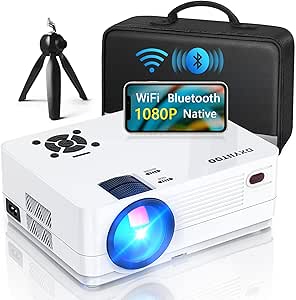 | Best for Native 1080p Detail | Native resolution: 1920 × 1080 | Display type: LCD | Image size: 27–300 inches | VIEW ON AMAZON | See Our Full Breakdown |
| Aurzen Roku TV E1R Portable Mini Projector |  | Best for Simple Streaming | Native / maximum display resolution: 1280 × 720 | Display type: LCD | Listed brightness: 160 lm | VIEW ON AMAZON | See Our Full Breakdown |
| TMY V08 Portable Projector with 80-Inch Screen |  | Best Starter Screen Bundle | Native resolution: 1280 × 720 | Maximum supported display resolution: 1920 × 1080 | Included screen: 80-inch foldable screen | VIEW ON AMAZON | See Our Full Breakdown |
| Philoent Mini Projector with Wi-Fi 6, Bluetooth 5.4, and Built-In Apps |  | Best Compact Short-Throw Pick | Native resolution: 1280 × 720 | Maximum display resolution: 1920 × 1080 | Brightness: 200 ANSI lumens | VIEW ON AMAZON | See Our Full Breakdown |
| ZDK Portable 1080p Smart Projector with Android 14, Wi-Fi 6, and Bluetooth |  | Best for Flexible Placement | Native resolution: 1920 × 1080 | Brightness: 240 ANSI lumens | Operating system: Android 14 | VIEW ON AMAZON | See Our Full Breakdown |
| XuanPad RD-711 Smart Projector with VIDAA OS, 1080p Native Resolution, 4K Decoding, Auto Focus, and Dolby Audio |  | Best Built-In Audio | Native resolution: Full HD 1080p | 4K support: 4K decoding | Operating system: VIDAA | VIEW ON AMAZON | See Our Full Breakdown |
| Portable Mini Projector with 4K Compatibility and Short Throw |  | Best for Tight Throw Distances | Native resolution: 1080p | 4K compatibility: Supports 4K input | Minimum throw distance: 2.5 feet | VIEW ON AMAZON | See Our Full Breakdown |
| apartment friendly projector setup | Native resolution | Connectivity |
|---|---|---|
| YGSKK Mini Projector with Wi-F | — | — |
| HAPPRUN 4K Decoding Projector | — | — |
| HAPPRUN 2500 ANSI Outdoor Proj | 1920 × 1080 | — |
| HAPPRUN H1 Native 1080p Portab | 1920 × 1080 | HDMI, USB, 3.5 mm jack, Bluetooth, IR |
| Aurzen Roku TV D1R Portable Sm | 1920 × 1080 | Wi-Fi, Bluetooth 5.2, HDMI, USB, audio |
| Portable Smart Mini Projector | 1280 × 720 | Wi-Fi 6, Bluetooth, HDMI, USB |
| Dxyiitoo Native 1080p Projecto | 1920 × 1080 | HDMI, USB, VGA, AV, 3.5 mm audio, Lightning |
| Aurzen Roku TV E1R Portable Mi | — | Wi-Fi 2.4/5 GHz, Bluetooth 5.2, HDMI, USB |
| TMY V08 Portable Projector wit | 1280 × 720 | 3.5 mm jack, Bluetooth, HDMI, USB |
| Philoent Mini Projector with W | 1280 × 720 | Wi-Fi 6, Bluetooth 5.4, HDMI, USB |
| ZDK Portable 1080p Smart Proje | 1920 × 1080 | Dual-band Wi-Fi 6, Bluetooth, HDMI |
| XuanPad RD-711 Smart Projector | Full HD 1080p | — |
| Portable Mini Projector with 4 | 1080p | HDMI, USB, 3.5 mm AUX |
More Details on Our Top Picks
YGSKK Mini Projector with Wi-Fi 6, Bluetooth 5.3, Built-In Streaming Apps, and Electric Focus
For an apartment where the projector may move between a side table, shelf, or bedroom wall, the YGSKK’s 210° rotating base and electric focus make placement less fussy. Its built-in streaming apps and speakers also avoid adding a separate streaming stick and speaker setup. Native 1080p is a sensible match for everyday shows and movies, while 4K compatibility does not mean the projector displays native 4K.
The tradeoff is its 300 ANSI-lumen brightness: it suits a dim room, not daytime viewing with open curtains. Compared with the brighter HAPPRUN 4K Decoding Projector with Official Google TV, this YGSKK is easier to angle and more modest in brightness. Its phone connections have limits, too: Bluetooth is for audio devices, and Android mirroring requires an additional program.
Pros:- Native 1080p resolution for Full HD viewing
- Built-in streaming apps and speakers reduce extra equipment
- Electric focus and 210° rotation help with flexible placement
- Wi-Fi 6 supports wireless connectivity and phone screen mirroring
Cons:- 300 ANSI lumens is better suited to darkened rooms than bright apartment spaces
- Bluetooth does not support smartphone connections
- Android mirroring requires an additional program
Best for: Apartment renters who want a compact projector they can angle toward different walls and use without a separate streaming stick.
Not ideal for: Viewers who watch with daylight in the room or need straightforward Android phone mirroring and Bluetooth phone audio.
- Resolution:Native 1080p; 4K compatible
- Brightness:Up to 300 ANSI lumens
- Projection size:50–200 inches
- Wireless connectivity:Wi-Fi 6; 2.4 GHz and 5 GHz
- Bluetooth:Bluetooth 5.3; supports Bluetooth audio devices
- Focus and rotation:Electric focus; 210° rotating base
- Ports:HDMI, USB, 3.5 mm audio
- Built-in features:Streaming apps, speakers, media player, digital keystone correction
Our verdict“Choose the YGSKK if flexible angles and built-in streaming matter more than bright-room performance or simple Android mirroring.”
HAPPRUN 4K Decoding Projector with Official Google TV
The HAPPRUN pairs official Google TV with 1500 ANSI lumens, making it the most balanced pick here for an apartment living room that is not always fully dark. Built-in apps and voice control can replace a separate streaming device, while autofocus and auto keystone correction help when the projector needs to be moved or set up on a temporary surface. Its stated 40–300-inch range offers flexibility, though a very large image still depends on available distance and room darkness.
Unlike the 300-lumen YGSKK and HAPPRUN H1, this model has more brightness headroom for ordinary indoor viewing. The compromise is that it remains native 1080p; 4K is decoded rather than displayed at native 4K resolution. Its larger stated image range may also be less useful in a compact room than a moderate, well-positioned screen.
Pros:- Official Google TV includes built-in streaming apps and voice control
- 1500 ANSI lumens offers more brightness than the 300-lumen models in this batch
- Autofocus and auto keystone correction simplify temporary placement
- Wi-Fi 6 screen mirroring and Bluetooth audio add connection options
Cons:- Native resolution is 1080p, not 4K
- Its 40–300-inch range may exceed what a small room can practically accommodate
- The product information does not specify its weight or dimensions for shelf planning
Best for: Apartment households seeking built-in streaming, easier setup, and more brightness for movie nights in a room that cannot be fully darkened.
Not ideal for: Buyers who need native 4K resolution or want the smallest possible projector for a tight shelf or bedside setup.
- Resolution:Native 1080p; supports 4K decoding
- Brightness:1500 ANSI lumens
- Operating system:Officially licensed Google TV
- Audio:Dolby Audio with dual Hi-Fi speakers
- Screen size:40–300 inches
- Wireless connectivity:Wi-Fi 6, Bluetooth 5.2
- Setup features:3-second autofocus and auto keystone correction
- Ports:HDMI, USB, 3.5 mm audio jack
Our verdict“Pick this HAPPRUN for the strongest mix of built-in streaming, setup assistance, and brightness among these apartment-oriented options.”
HAPPRUN 2500 ANSI Outdoor Projector with Google TV and 4K Decoding
At 2500 ANSI lumens, this HAPPRUN is the brightness-focused choice for an apartment room that doubles as a living space, where blackout conditions are not always practical. Built-in Google TV keeps streaming simple, and the adjustable stand with auto focus and image-alignment tools gives it more placement flexibility than a basic tabletop projector. That combination also makes it suitable for occasional use outside the apartment, if the setting and power access allow.
Compared with the 1500-lumen HAPPRUN Google TV model, this one offers more stated brightness and HDR10+ enhancement, but both are native 1080p rather than native 4K. Its 4.72-foot minimum throw distance may still be awkward in a very small room, and ceiling projection requires manual focus and keystone adjustment. I would skip it if close-range placement is the main priority.
Pros:- 2500 ANSI lumens provides the highest stated brightness in this batch
- Built-in Google TV provides access to streaming apps
- Auto focus, obstacle avoidance, and screen alignment support easier setup
- Adjustable stand and multiple mounting options suit varied placement
Cons:- Native resolution is 1920 × 1080; 4K is supported through decoding
- Minimum throw distance of 4.72 feet may constrain compact-room placement
- Ceiling projection requires manual focus and keystone adjustment
Best for: Apartment dwellers with a brighter living room who also want one projector for occasional indoor and outdoor viewing.
Not ideal for: People with a very short wall-to-projector distance or renters who need consistently automatic correction for ceiling-mounted use.
- Native resolution:1920 × 1080
- Maximum supported resolution:3840 × 2160 pixels
- Brightness:2500 ANSI lumens
- Display type:LCD
- Maximum image size:300 inches
- Throw distance:4.72–28.4 feet
- Contrast ratio:20,000:1
- Features:Google TV, HDR10+, auto focus, auto obstacle avoidance, auto screen alignment, digital keystone correction
Our verdict“Choose this HAPPRUN when brightness and flexible use matter more than short-throw placement or native 4K.”
HAPPRUN H1 Native 1080p Portable Bluetooth Projector
The HAPPRUN H1 is a straightforward fit for a renter who already has a laptop, console, or streaming device and wants a native 1080p image without relying on built-in smart software. HDMI and Bluetooth audio give it useful basics, while its desktop, tripod, and ceiling-mount options let it move between rooms. Compared with the YGSKK, it gives up built-in streaming and electric focus, but makes a clear choice for a more traditional external-device setup.
Apartment buyers should plan around its 300 ANSI-lumen brightness: it is best for evening viewing with the room dimmed. The HAPPRUN Google TV models are brighter and include streaming, but cost the H1 its main advantage in simplicity. A streaming stick or phone-to-HDMI adapter is sold separately, and Bluetooth handles audio only, not video casting. Its 40-inch minimum image size may also be too large for some tight placements.
Pros:- Native 1920 × 1080 resolution
- Portable design supports desktop, tripod, and ceiling mounting
- HDMI, USB, 3.5 mm audio, and Bluetooth audio support multiple connections
- Built-in stereo speakers allow basic viewing without a separate sound system
Cons:- 300 ANSI lumens is limiting outside a darkened room
- Streaming stick and phone-to-HDMI adapter are sold separately
- Bluetooth supports audio only, not video casting
Best for: Renters with an HDMI source who want native Full HD and the option to move a basic projector between tabletop, tripod, and ceiling setups.
Not ideal for: Buyers who want built-in streaming, easy wireless video casting, or a bright image in a lit room.
- Native resolution:1920 × 1080
- Display type:LCD
- Brightness:300 ANSI lumens
- Image size:40–200 inches
- Throw distance:1.2–7 meters
- Contrast ratio:10,000:1
- Connectivity:HDMI, USB, 3.5 mm jack, Bluetooth, IR
- Mounting options:Desktop, tripod, or ceiling mount
Our verdict“Choose the H1 if you already own an HDMI source and want native 1080p without paying for projector-based streaming features.”
Aurzen Roku TV D1R Portable Smart Projector
The Aurzen D1R makes sense for apartment viewers who already organize their streaming around Roku and want Roku built into the projector rather than added as a separate device. Its native 1080p resolution, auto focus, and automatic keystone correction help with a tabletop or foldable-stand setup, while the 40–200-inch image range covers modest bedroom walls as well as a larger living-room surface. Dual 5W speakers keep a simple setup possible without extra audio equipment.
Compared with the HAPPRUN Google TV projector, the D1R is a more specifically Roku-centered choice, but the HAPPRUN offers much higher stated brightness. The D1R’s brightness is not supplied in the product data, so I would not assume it suits a bright room. Activation also requires a Roku account and internet access, and its cooling fan is audible during use—more noticeable in a small, quiet apartment than in a larger space.
Pros:- Built-in Roku provides access to streaming apps and free channels
- Native 1920 × 1080 resolution
- Auto focus and automatic keystone correction support flexible tabletop placement
- Dual 5W speakers and dual-band Wi-Fi are built in
Cons:- Activation requires a Roku account and an internet connection
- Cooling fan produces audible noise during use
- Brightness is not specified in the supplied product data
Best for: Roku users who want a portable 1080p projector with familiar built-in streaming and automatic image setup.
Not ideal for: Viewers who avoid account-based activation, need a quiet projector for a small bedroom, or want a stated high-brightness specification.
- Native resolution:1920 × 1080
- Display type:LCD
- Image size:40–200 inches
- Throw distance:3.71–18.58 feet
- Connectivity:Wi-Fi, Bluetooth 5.2, HDMI, USB, audio
- Wi-Fi bands:2.4 GHz and 5 GHz
- Speakers:Dual 5W
- Weight:2.1 kg
Our verdict“Choose the D1R if built-in Roku and simple portable setup outweigh fan noise and the lack of a stated brightness figure.”
Portable Smart Mini Projector with Wi-Fi 6, Bluetooth, Android 11, and 180° Rotation
For a small apartment where the viewing wall, bedside setup, or ceiling position may change, this 180° rotating projector is easier to place than a fixed-angle model. Automatic keystone correction helps square the picture after repositioning, while built-in Android 11 and Netflix reduce the need to make room for a separate streaming device. Its 40-inch minimum image size suits a compact wall better than the TMY V08’s 80-inch included screen, though the Dxyiitoo offers native 1080p if sharper detail matters more than flexible positioning. The key compromise is resolution: this model is natively 1280 × 720, not 4K, and its advertised image range tops out at 130 inches. I’d choose it for convenient placement and streaming, not for fine text or a large, detail-critical picture.
Pros:- 180° rotation offers more placement options in rooms with limited furniture space.
- Automatic keystone correction helps compensate when the projector cannot sit square to the wall.
- Built-in Android 11 and Netflix reduce the need for an extra streaming box.
- Wi-Fi 6, Bluetooth, HDMI, and USB support several ways to connect.
Cons:- Native resolution is 1280 × 720, so it offers less detail than the Dxyiitoo’s native 1080p.
- Maximum image size is 130 inches, smaller than the large-screen claims of some alternatives.
- The product title’s 4K wording should not be mistaken for native 4K resolution.
Best for: Apartment renters who want to move the projector between a bedside table, wall, or ceiling-facing position and prefer built-in streaming.
Not ideal for: Buyers who prioritize native 1080p detail, need an image larger than 130 inches, or expect 4K-level sharpness.
- Brand / model:Thunrlge HY300 Pro
- Native resolution:1280 × 720
- Image size:40–130 inches
- Throw distance:0.5–3 m
- Operating system:Android 11
- Connectivity:Wi-Fi 6, Bluetooth, HDMI, USB
- Rotation / correction:180° rotation; automatic keystone correction
- Contrast ratio:1500:1
Our verdict“Choose this model if adaptable placement and built-in streaming matter more than native 1080p resolution.”
Dxyiitoo Native 1080p Projector with Wi-Fi and Bluetooth
The Dxyiitoo makes the most sense for apartment viewers who want native 1080p for films, subtitles, and game visuals, rather than relying on a lower-resolution projector that accepts higher-resolution input. Compared with the Thunrlge HY300 Pro and Philoent mini, both listed at native 1280 × 720, it offers more pixel detail, and its 27-inch minimum image gives it a small-picture option for tighter rooms. AirPlay and screen mirroring add convenience, while HDMI, USB, VGA, AV, and audio connections make it less dependent on wireless casting. The tradeoff is its broader, more traditional setup: the listed maximum throw distance is 5.5 meters, and the claimed 20,000-lumen brightness is not verified in the provided product information. I would not treat that brightness figure as a guarantee of strong performance in a bright room.
Pros:- Native 1920 × 1080 resolution provides more detail than the 720p-native Thunrlge and Philoent models.
- Minimum image size of 27 inches can suit a narrow wall or close viewing position.
- AirPlay, screen mirroring, Bluetooth 5.2, and several wired inputs support varied devices.
- Ceiling, tripod, table, and wall mounting options offer flexibility for different apartment layouts.
Cons:- The listed 20,000-lumen brightness is not independently verified in the supplied product information.
- Maximum throw distance of 5.5 meters can be awkward in a small room where placement options are limited.
- Its extensive port selection may be more than a buyer needs if the main goal is a minimal streaming setup.
Best for: Apartment movie and gaming viewers who value native 1080p detail, multiple wired inputs, and the option to project a smaller image.
Not ideal for: People who need a highly compact, short-throw setup or want brightness claims they can rely on for daytime viewing.
- Native resolution:1920 × 1080
- Display type:LCD
- Image size:27–300 inches
- Throw distance:0.95–5.5 m
- Connectivity:HDMI, USB, VGA, AV, 3.5 mm audio, Lightning
- Wireless features:AirPlay, screen mirroring, Bluetooth 5.2
- Mounting options:Ceiling, tripod, table, or wall
- Listed contrast ratio:10000:1
Our verdict“Pick the Dxyiitoo when native 1080p and broad device compatibility matter more than compact, short-throw placement.”
Aurzen Roku TV E1R Portable Mini Projector
The E1R suits renters who want the streaming interface built into the projector and do not want a separate stick taking up an HDMI port. Roku TV, Wi-Fi, Apple AirPlay, and two-way Bluetooth make it a more straightforward media hub than the TMY V08, which leans on connected devices and may need a phone adapter. Its rotating stand, automatic vertical keystone correction, and manual focus wheel also help with casual placement on a table or shelf. That convenience comes with a clear limit: native resolution is 1280 × 720, matching the Thunrlge and Philoent rather than the Dxyiitoo’s native 1080p. The listed brightness is 160 lumens, so I would reserve it for a dim room and a moderate image size, not treat its 120-inch maximum as the best everyday apartment target. Roku activation requires an account and internet connection.
Pros:- Built-in Roku TV provides streaming apps without requiring a separate streaming stick.
- 180° rotating stand and automatic vertical keystone correction help accommodate awkward shelf or table positions.
- Apple AirPlay and two-way Bluetooth offer convenient wireless connections.
- Portable strap and included dust-cleaning kit support carrying and basic upkeep.
Cons:- Native and maximum display resolution are both 1280 × 720, below the Dxyiitoo’s native 1080p.
- Listed brightness is 160 lumens, making a darkened room the safer fit.
- Roku account and internet access are required for activation.
Best for: Renters who mainly stream over Wi-Fi and want a compact projector with a familiar built-in TV interface and flexible stand.
Not ideal for: Viewers seeking native 1080p detail, strong performance in ambient light, or a projector that works without a Roku account and internet during activation.
- Native / maximum display resolution:1280 × 720
- Display type:LCD
- Listed brightness:160 lm
- Image size:20–120 inches
- Maximum throw distance:9.6 ft
- Throw ratio:1.12:1
- Connectivity:Wi-Fi 2.4/5 GHz, Bluetooth 5.2, HDMI, USB
- Included features:Roku TV, speaker, portable strap, dust-cleaning kit
Our verdict“Choose the E1R for easy Roku streaming and flexible positioning in a dim apartment room, not for high resolution or bright-room viewing.”
TMY V08 Portable Projector with 80-Inch Screen
The TMY V08 stands out for one apartment-friendly reason: it arrives with an 80-inch foldable screen, giving first-time projector owners a defined viewing surface without needing to find a blank wall. That bundle makes it a more self-contained starter option than the Dxyiitoo, which offers native 1080p but does not list an included screen. The V08’s table or tripod mounting and 32-inch minimum image size can work in a modest room, while Bluetooth audio and HDMI or USB connections cover basic playback. Its main compromise is image detail: 1280 × 720 is native resolution, while 1920 × 1080 is only the maximum supported display resolution. Phone and tablet connections may require adapters that are not included, and screen mirroring can fail with some protected streaming apps. I’d pick it for a simple, screen-included setup rather than sharper picture quality.
Pros:- Included 80-inch foldable screen provides a ready-made viewing surface.
- Table or tripod mounting suits flexible apartment layouts.
- Bluetooth audio, built-in speaker, HDMI, USB, and a 3.5 mm jack support common setups.
- Image size starts at 32 inches, so it can be used below its maximum screen size.
Cons:- Native resolution is 1280 × 720; 1920 × 1080 is supported input/display resolution, not native resolution.
- Phone or tablet adapters are required and are not included.
- Screen mirroring may not work with some protected streaming apps.
Best for: First-time projector buyers in apartments who want an included screen and mostly plan to connect a laptop, console, or other wired source.
Not ideal for: Viewers who want native 1080p, rely on phone mirroring for protected streaming apps, or need a complete phone connection kit in the box.
- Native resolution:1280 × 720
- Maximum supported display resolution:1920 × 1080
- Included screen:80-inch foldable screen
- Image size:32–220 inches
- Projection distance:1.5–6 m
- Connectivity:3.5 mm jack, Bluetooth, HDMI, USB
- Aspect ratio:16:9
- Mounting type:Table or tripod
Our verdict“Choose the TMY V08 if an included screen simplifies your first apartment setup and native 1080p is not a priority.”
Philoent Mini Projector with Wi-Fi 6, Bluetooth 5.4, and Built-In Apps
At 0.85 lb and with a 0.8:1 throw ratio, the Philoent is aimed at apartment dwellers who cannot spare much shelf depth or want to store the projector between viewing sessions. Autofocus and automatic vertical keystone correction cut down on setup adjustments, while built-in apps, Wi-Fi 6, and Bluetooth 5.4 make it less reliant on extra boxes and cables than the TMY V08. Its listed 200 ANSI lumens and maximum image size of 86 inches point toward a small, darkened-room setup rather than a large wall-filling picture. Like the Thunrlge HY300 Pro, its native resolution is 1280 × 720 despite support for higher-resolution content; the Dxyiitoo is the clearer choice for native 1080p. The short-throw design and 180° rotation are useful in tight layouts, but they do not overcome the modest brightness or resolution.
Pros:- 0.8:1 throw ratio suits rooms where the projector cannot sit far from the wall.
- Autofocus and automatic vertical keystone correction reduce manual setup work.
- At 0.85 lb with up to 180° rotation, it is easy to reposition or store.
- Built-in apps, Wi-Fi 6, Bluetooth 5.4, HDMI, and USB provide flexible playback options.
Cons:- Native resolution is 1280 × 720, unlike the Dxyiitoo’s native 1920 × 1080.
- Listed brightness is 200 ANSI lumens, so it is better suited to a darkened room.
- Maximum image size is 86 inches, smaller than the TMY V08’s listed range.
Best for: Renters with shallow shelves or limited throw distance who want a lightweight projector with autofocus and built-in streaming apps.
Not ideal for: Buyers who need native 1080p, a bright image with room lights on, or a picture larger than 86 inches.
- Native resolution:1280 × 720
- Maximum display resolution:1920 × 1080
- Brightness:200 ANSI lumens
- Throw ratio:0.8:1
- Maximum image size:86 inches
- Connectivity:Wi-Fi 6, Bluetooth 5.4, HDMI, USB
- Weight:0.85 lb (387 g)
- Warranty:2 years
Our verdict“Pick the Philoent for a lightweight, short-throw apartment setup where easy focus matters more than brightness or native 1080p.”
ZDK Portable 1080p Smart Projector with Android 14, Wi-Fi 6, and Bluetooth
The 270° adjustable stand gives this ZDK an advantage in apartments where the only usable surface may be a shelf, side table, or spot near the bed. Android 14 apps and AirPlay or Miracast casting can also reduce the need for a separate streaming box. Automatic vertical keystone and electronic focus make repositioning less of a chore than with the Portable Mini Projector with 4K Compatibility and Short Throw, which also offers a rotating stand but lacks built-in apps.
The main constraint is its 240 ANSI-lumen brightness: it is best for dim rooms, not daytime viewing or bright shared spaces. The 3.3–6.6-foot throw range suits compact rooms, but a very large image at short distance may not fit every apartment layout. I’d pick it for flexible, after-dark viewing, not for a bright living room.
Pros:- Android 14 apps allow streaming without a separate media player
- AirPlay and Miracast support wireless casting from iOS and Android devices
- 270° adjustable stand helps accommodate limited or unusual placement options
- Automatic vertical keystone and electronic focus simplify setup after moving it
Cons:- Low brightness limits it to dim rooms and after-sunset outdoor viewing
- Automatic keystone correction is vertical only, so some angled placements may still need adjustment
Best for: Apartment renters who want built-in streaming and need to aim a projector from a shelf, bedside table, or other awkward position in a dim room
Not ideal for: Viewers who watch during daylight or need a large, bright image; its 240 ANSI lumens are better suited to controlled lighting
- Native resolution:1920 × 1080
- Brightness:240 ANSI lumens
- Operating system:Android 14
- Connectivity:Dual-band Wi-Fi 6, Bluetooth, HDMI
- Screen mirroring:AirPlay and Miracast
- Throw distance:3.3–6.6 feet
- Maximum image size:240 inches
- Stand adjustment:270°
Our verdict“Choose the ZDK if flexible positioning and built-in streaming matter more than bright-room performance.”
XuanPad RD-711 Smart Projector with VIDAA OS, 1080p Native Resolution, 4K Decoding, Auto Focus, and Dolby Audio
For an apartment setup where adding a soundbar would take up scarce shelf space, the XuanPad RD-711 stands out for its 42W speakers with Dolby Audio. It also pairs VIDAA streaming apps and live TV with AirPlay 2 and Miracast, giving it more built-in viewing options than the ZDK’s Android-based setup as described here. ToF autofocus and automatic keystone correction can cut down on fiddling when the projector is repositioned.
Its native resolution is 1080p; 4K decoding does not make the projected image 4K. The automatic adjustments work best within a 0°–30° angle, so it is less forgiving of sharply tilted placement than the XuanPad’s 360° rotating stand might suggest. I’d rank it for renters who want a self-contained movie setup, but not for buyers expecting true 4K or unrestricted automatic correction.
Pros:- 42W Dolby Audio speakers reduce the need for extra audio equipment
- VIDAA includes streaming apps and live TV features
- ToF autofocus adjusts focus in real time
- AirPlay 2 and Miracast offer wireless casting from compatible devices
Cons:- Native resolution is 1080p, despite 4K decoding support
- Automatic adjustments work best within the stated 0°–30° angle
- A 360° rotating stand does not remove the stated limits on automatic correction
Best for: Apartment viewers who want streaming, live TV, and substantial built-in sound without making room for a separate audio system
Not ideal for: Buyers seeking native 4K projection or planning to use steeply angled placement where automatic correction may be less effective
- Native resolution:Full HD 1080p
- 4K support:4K decoding
- Operating system:VIDAA
- Focus:ToF autofocus with real-time adjustment
- Keystone correction:Automatic and 4-point manual correction
- Audio:42W speakers with Dolby Audio
- Wireless casting:AirPlay 2 and Miracast
- Stand:360° rotating
Our verdict“Pick the RD-711 if you want a room-friendly all-in-one setup with strong onboard audio and can accept 1080p projection.”
Portable Mini Projector with 4K Compatibility and Short Throw
When a small apartment leaves little room between projector and wall, this model’s 2.5-foot minimum throw distance is its clearest advantage. Its electric focus and keystone correction, plus a 270° rotating stand, offer practical flexibility for a shelf, coffee table, or ceiling-facing setup. Compared with the ZDK, it gives up built-in apps and wireless casting convenience but supports a wider stated throw range, reaching 16.5 feet.
It accepts 4K input, but its native resolution remains 1080p, so it should not be chosen for true 4K projection. The built-in speaker may suit casual viewing, yet there is no Bluetooth for a wireless audio connection. iOS mirroring requires a wired USB connection, making this less convenient than the XuanPad RD-711 for cable-free streaming. It makes most sense for buyers already using an HDMI streaming stick or console.
Pros:- Minimum throw distance of 2.5 feet suits compact rooms
- 270° rotating stand supports varied projection angles, including ceiling viewing
- Electric focus and keystone correction simplify image adjustment
- HDMI, USB, and AUX connections support several external devices
Cons:- No built-in apps, so streaming requires an external source
- No Bluetooth for wireless audio connections
- iOS mirroring requires a wired USB connection
Best for: Apartment renters with little throw distance who already own an HDMI streaming device and want flexible positioning
Not ideal for: Viewers who want built-in streaming apps, Bluetooth audio, or easy wireless iOS mirroring
- Native resolution:1080p
- 4K compatibility:Supports 4K input
- Minimum throw distance:2.5 feet
- Maximum throw distance:16.5 feet
- Maximum image size:200 inches
- Connectivity:HDMI, USB, 3.5 mm AUX
- Stand rotation:270°
- Focus and keystone:Electric focus and electric keystone correction
Our verdict“Choose this model for a cramped viewing space if its short throw matters more to you than built-in apps and wireless convenience.”

How We Picked
I ranked these models around the practical constraints of apartment viewing: limited shelf or table space, shared rooms, changing screen positions, and a need to keep cables and extra devices under control. I gave more weight to clearly stated native resolution, built-in streaming options, focus convenience, and portable form factors than to broad compatibility claims alone. A model with 4K decoding is not treated as a native 4K projector, and I did not assume that a compact body guarantees a short throw, quiet fan, or bright image.
The top spots go to options that appear to simplify everyday use without requiring a complex setup, while more specialized picks rank lower when their listed features solve a narrower problem or leave key room-fit details unclear. I also weighed flexibility against potential compromises: rotating designs can help with placement, included screens can reduce initial setup work, and native 1080p gives a clearer resolution claim than decoding language. Buyers should verify throw distance, brightness, sound level, and app support for the exact model before purchase, since those details are not specified consistently across this lineup.
Factors to Consider When Choosing Apartment Friendly Projector Setup
Apartment fit depends less on how many features appear on the box and more on whether the projector works with your room, viewing habits, and storage limits. I’d settle the placement and streaming questions before comparing secondary conveniences.
Measure the Wall, Screen, and Throw Distance Together
Measure the distance available from the planned projector position to the wall, then check the manufacturer’s throw chart for the screen size you want. A projector labeled portable or short throw may still need more space than a studio layout can spare; the name alone is not a placement guarantee. Also account for furniture, walkways, and whether people will pass through the beam. A smaller image at a comfortable distance can be a better apartment choice than moving the projector onto an unstable surface. If you cannot mount anything, make sure your chosen shelf or table leaves room for ventilation and does not block the lens.
Treat Brightness as a Room-Matching Decision
Projector brightness determines how much ambient light the image can tolerate, so judge it against your actual viewing times rather than a dark-room ideal. If you watch during daylight or keep lamps on, check for a clearly stated brightness measurement and compare it with guidance from the manufacturer. Do not assume that “outdoor” in a product name means it will perform well in a bright apartment; outdoor use often still calls for darkness. Blackout curtains can help, but they add a room change and may not suit a shared living space. When brightness information is missing or difficult to compare, treat that uncertainty as a reason to verify details before buying.
Choose Native Resolution Before Chasing 4K Labels
Native resolution describes the pixels the projector can display, while 4K decoding describes the signal it can accept and process. Those claims are not interchangeable, so prioritize a clearly stated native resolution if sharp text, subtitles, or detailed images matter to you. Native 1080p models in this roundup make that point more directly than products described mainly by 4K compatibility or decoding. On a modest apartment screen, viewing distance also affects how much extra detail you can perceive. Match resolution to screen size and seating distance instead of paying attention to a compatibility label in isolation.
Decide Whether Built-In Streaming Is Worth the Tradeoff
Built-in Google TV, Roku TV, VIDAA, or Android can cut down on connected devices and cables, which helps when the projector shares a small room with other electronics. But an operating system only helps if it supports the services you use and continues to receive the functions you expect. Check app availability, account requirements, and whether the projector can connect to your preferred external streaming device. A simple projector with an HDMI input may offer more flexibility if you already own a streaming stick. The right choice depends on whether you value a tidier setup or the freedom to replace the streaming source separately.
Plan for Sound, Fan Noise, and Shared Walls
Audio and cooling noise can matter as much as image quality when a projector runs in a bedroom or shared living area. Bluetooth support can make it easier to use headphones or a compatible speaker, but check whether the connection suits your preferred listening setup and whether any delay could affect dialogue. Built-in speakers reduce equipment, though they may not deliver the sound you want at a distance. Fan noise is rarely clear from feature names, so look for a stated noise figure or dependable manufacturer information. In a building with shared walls, low-volume late-night viewing may make headphones a more useful feature than extra image resolution.
Favor Stable Placement and Easy Storage Over Spec Lists
A compact unit is useful only if it can sit securely at the right angle and be stored without repeated fiddling. Rotating designs can help aim an image at an unusual wall or ceiling, but the support still needs to hold the projector steady and leave airflow clear. Auto focus can reduce setup steps when you move the unit, while manual or electric focus may be sufficient if it stays in one place. Think about where the projector, power cable, and screen will live between viewing sessions. A simple, stable arrangement often works better than a feature-rich model that must be repositioned and readjusted every time.
Frequently Asked Questions
Can I use a projector in an apartment without drilling holes?
Yes. A table, shelf, or sturdy stand can work if it holds the projector level and gives it a clear line to the screen or wall. Measure the throw distance before choosing a model, since a flexible stand cannot make an unsuitable room layout work. Keep the unit’s vents clear and route the power cable away from walkways. If moving the projector between uses sounds inconvenient, prioritize convenient focus adjustment and a placement spot you can leave set up.
Is 4K decoding the same as native 4K projection?
No. 4K decoding means a projector can accept or process a 4K source, but it does not mean its display resolution is native 4K. Check the native resolution in the technical specifications before comparing image detail. Several options in this roundup explicitly list native 1080p, which is a clearer resolution claim than a general 4K compatibility label. For a typical apartment screen, also consider seating distance, since that affects how much fine detail you can see.
Should I choose a projector with built-in Google TV or Roku TV?
Built-in streaming is a good fit if you want fewer devices and cables in a small room, provided the operating system supports the services you watch. Check app availability for the exact model rather than assuming every service is included. A separate streaming stick can be easier to replace or update, and it may suit buyers who already use a particular platform. Compare the convenience of an integrated system against the flexibility of an HDMI-connected device before deciding.
Will a mini projector work well with the lights on?
That depends on the projector’s verified brightness and how much light reaches the screen, not just its size or product name. Ambient light washes out projected images, so even a capable model may look better with curtains drawn or lamps dimmed. Check the manufacturer’s brightness specification and look for guidance tied to screen size and viewing conditions. If you need a clear image during the day, do not rely on a compact form factor or an “outdoor” label as proof of performance.
Is an included screen worth choosing over projecting onto a wall?
An included screen can save you from buying or sourcing a separate surface, and it may be useful if your walls are textured or strongly colored. It also adds another object to store, which can be inconvenient in a small apartment. A smooth, neutral wall may be enough for casual viewing, but wall color and texture can affect the image. Before choosing a bundle, check the screen’s size, setup method, and storage needs, then compare those details with the wall you already have.
Conclusion
For the best overall, I’d choose the HAPPRUN 4K Decoding Projector with Official Google TV if built-in streaming is the main way to simplify a shared-room setup. The best value direction is a straightforward portable model such as the TMY V08 if its included screen suits your space and you are comfortable verifying its core specifications. For a more hands-off setup, the XuanPad RD-711 is my best for beginners pick on paper, thanks to its listed auto focus and smart operating system; check app support and room-fit details first. Buyers who prefer Roku should compare the Aurzen D1R and E1R, while those who need flexible aiming can look at the rotating mini projector. I would treat the best premium choice as the model that provides verified brightness, throw distance, and noise information for your room—not the one with the most impressive-sounding resolution label.
Fall Picks
fall essentials
As an affiliate, we earn on qualifying purchases.