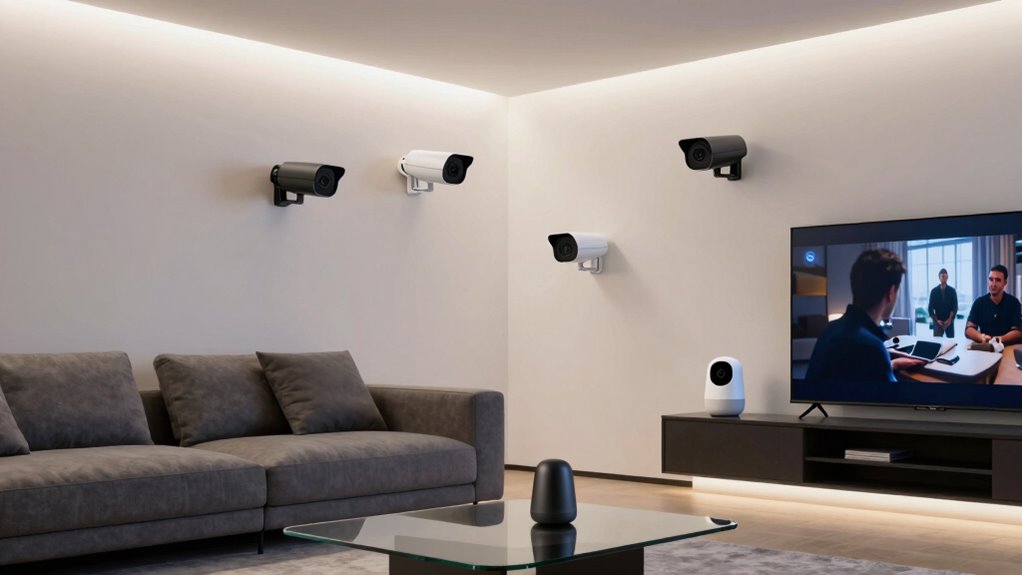

Google Home compatible cameras range from simple indoor models to battery and solar-powered outdoor options, and the best choice depends on where you need coverage and how you want to manage it. I’d put the Google Nest Cam Indoor (Wired, 3rd Gen) first for a straightforward Google Home setup, while the TP-Link Tapo C211 stands out for multi-camera indoor coverage and the Google Nest Cam Outdoor or Indoor Battery for flexible placement. The main tradeoffs are Google integration versus camera versatility, and fixed power versus easier installation. Read on for how the nine options compare and which setup fits your home.

Get the latest gadgets delivered free with Prime
- Fast, free delivery on millions of items
- Prime Video, Amazon Music and more included
- Member-only deals all year
Complete the kit



Key Takeaways
- Google Nest Cam Indoor (Wired, 3rd Gen) is the strongest fit for buyers prioritizing a Google-centered indoor setup; the battery Nest Cam suits locations where a power outlet is inconvenient.
- TP-Link Tapo C211 and C210 both offer two-camera pan-and-tilt indoor coverage, while the C211’s higher resolution is the clearer differentiator between these close alternatives.
- Tapo C100 four-packs favor spreading basic indoor coverage across several rooms, but lack the 2K resolution and pan-and-tilt movement of the C210 and C211.
- Outdoor placement changes the shortlist: the Tapo SolarCam C402 adds solar power, the battery Nest Cam offers placement flexibility, and the wired Arlo pack suits buyers seeking two 2K pan-tilt-zoom cameras.
- The Google Nest Indoor Camera (2nd Gen) remains an indoor 1080p HDR option, but buyers should compare it directly with the newer wired Nest Cam before choosing between Google-branded models.
| TP-Link Tapo C100 1080p Indoor Security Camera, 4-Pack |  | Best Value for Multi-Room Google Home Coverage | Video resolution: 1080p | Field of view: 117 degrees | Night vision: Up to 40 ft | VIEW ON AMAZON | See Our Full Breakdown |
| Google Nest Indoor Security Camera (2nd Gen, Wired, 1080p HDR), Snow |  | Best for Native Google Home Integration | Generation: 2nd | Video: 1080p HDR at 30 fps | Connectivity: 2.4 GHz and 5 GHz Wi-Fi; Bluetooth | VIEW ON AMAZON | See Our Full Breakdown |
| TP-Link Tapo C211 2K Pan/Tilt Indoor Security Camera, 2-Pack | 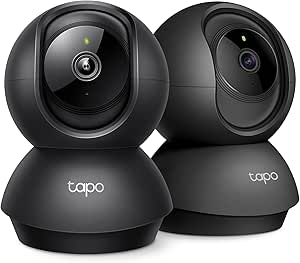 | Best for Monitoring a Wide Indoor Area | Model and pack size: Tapo C211; 2 cameras | Video resolution: 2K | Pan and tilt: 360° horizontal; 114° vertical | VIEW ON AMAZON | See Our Full Breakdown |
| Wyze Duo Cam Pan Indoor/Outdoor 2K Pan/Tilt Security Camera |  | Best Dual-View Pick for Indoor and Outdoor Coverage | Camera setup: One pan/tilt camera and one fixed-view camera | Resolution: 2K | Pan and tilt: 360° pan; 180° tilt | VIEW ON AMAZON | See Our Full Breakdown |
| TP-Link Tapo SolarCam C402 Kit 1080p Security Camera |  | Best Wire-Free Pick for Google Assistant | Resolution: 1080p | Power: Built-in battery and solar panel | Battery life: Up to 180 days on a charge during cloudy days | VIEW ON AMAZON | See Our Full Breakdown |
| Google Nest Cam Indoor (Wired, 3rd Gen), Snow | 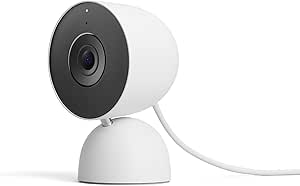 | Best for Google Home Intelligence | Model: GA09973-US | Use: Indoor | Video resolution: 2K HDR (2000) | VIEW ON AMAZON | See Our Full Breakdown |
| Google Nest Cam Outdoor or Indoor Battery Security Camera |  | Best for Flexible Indoor-Outdoor Placement | Power source: Battery | Video resolution: 1080p HDR | Frame rate: 30 fps | VIEW ON AMAZON | See Our Full Breakdown |
| TP-Link Tapo C210 2K Pan/Tilt Indoor Security Camera, 2-Pack |  | Best Value for Multi-Room Coverage | Pack size: 2 cameras | Resolution: 2K (1296p) | Pan range: 360° horizontal | VIEW ON AMAZON | See Our Full Breakdown |
| Arlo Essential Outdoor Pan-Tilt-Zoom Security Camera, 2K, Wired, 2-Camera Pack |  | Best for Active Outdoor Coverage | Camera count: 2 | Resolution: 2K | Pan: 360° | VIEW ON AMAZON | See Our Full Breakdown |
| google home compatible camera | Connectivity | Night vision |
|---|---|---|
| TP-Link Tapo C100 1080p Indoor | 2.4 GHz Wi-Fi | Up to 40 ft |
| Google Nest Indoor Security Ca | 2.4 GHz and 5 GHz Wi-Fi; Bluetooth | — |
| TP-Link Tapo C211 2K Pan/Tilt | 2.4 GHz Wi-Fi | Yes |
| Wyze Duo Cam Pan Indoor/Outdoo | — | — |
| TP-Link Tapo SolarCam C402 Kit | — | Full-color, up to 30 ft |
| Google Nest Cam Indoor | Wired, Wi-Fi | Color |
| Google Nest Cam Outdoor or Ind | Wi-Fi, Bluetooth | — |
| TP-Link Tapo C210 2K Pan/Tilt | 2.4 GHz Wi-Fi | — |
| Arlo Essential Outdoor Pan-Til | Dual-band Wi-Fi | Color |
More Details on Our Top Picks
TP-Link Tapo C100 1080p Indoor Security Camera, 4-Pack
For buyers who want to add several indoor viewpoints to a Google Home setup, the four-camera pack makes the C100 a practical coverage pick. It works with Google Assistant, while person and baby-cry detection can make alerts more useful than motion notices alone. Compared with the two-camera Tapo C211, the C100 gives you more cameras in the box, but trades away 2K detail and pan-and-tilt coverage: each camera has a fixed 117-degree view. Local microSD recording can avoid a cloud subscription, though cards are sold separately, and the cameras need constant power. I’d choose this set for multiple rooms rather than spaces where flexible placement or a moving view matters.
Pros:- Four cameras provide fixed views across multiple rooms
- Google Assistant compatibility fits Google Home routines and displays
- Person and baby-cry detection adds context to motion alerts
- Supports local microSD recording up to 512 GB
Cons:- Constant power limits placement flexibility
- MicroSD cards are sold separately, and cloud storage is optional paid service
- Fixed 117-degree view lacks the C211’s pan-and-tilt coverage
Best for: Google Home households that want fixed-view cameras in several indoor rooms and are comfortable placing each near a power outlet.
Not ideal for: Buyers who need battery-powered placement, outdoor monitoring, or pan-and-tilt coverage; the C100 is wired and indoor-only.
- Video resolution:1080p
- Field of view:117 degrees
- Night vision:Up to 40 ft
- Connectivity:2.4 GHz Wi-Fi
- Audio:Two-way audio with built-in siren
- Local storage:microSD card up to 512 GB; card sold separately
- Power and use:Constant power via DC adapter; indoor use
- Pack size:4 cameras
Our verdict“Choose the C100 four-pack for affordable, fixed-view Google Home coverage across several indoor rooms, not for flexible or outdoor placement.”
Google Nest Indoor Security Camera (2nd Gen, Wired, 1080p HDR), Snow
If Google Home is the center of your setup, the Nest Indoor Camera (2nd Gen) is the most direct fit in this group: alerts and camera access run through the Google Home app, without relying on a third-party camera ecosystem. Its 1080p HDR video and person, animal, and vehicle detection offer more refined event context than the Tapo C100’s person and baby-cry detection. It also keeps local event storage during Wi-Fi outages and includes up to three hours of event history. Compared with the Tapo C211, however, it has a fixed view rather than remote pan-and-tilt, and its wired power restricts placement. Some features need a Nest Aware subscription, so this is best for Google-first buyers who value integration over flexible coverage or subscription-free features.
Pros:- Direct Google Home app integration and Google Assistant compatibility
- 1080p HDR video with night vision
- Distinguishes people, animals, and vehicles for more specific alerts
- Includes up to three hours of event history and local event storage during Wi-Fi outages
Cons:- Corded power limits where the camera can be placed
- Some features require a separately sold Nest Aware subscription
- Requires a Google Account and Google Home app
Best for: Google Home users who want camera alerts and event history in Google’s app, plus detection for people, animals, and vehicles.
Not ideal for: Buyers who want a pan-and-tilt view, battery-powered placement, or access to every camera feature without a Nest Aware subscription.
- Generation:2nd
- Video:1080p HDR at 30 fps
- Connectivity:2.4 GHz and 5 GHz Wi-Fi; Bluetooth
- Video history:Up to 3 hours of free event history
- Detection:People, animals, and vehicles
- Power:Corded electric
- Mounting and use:Wall or table; indoor
- Compatibility:Google Home app; Google Assistant and Amazon Alexa compatible displays
Our verdict“Pick this Nest camera when native Google Home app integration matters more than pan-and-tilt coverage or subscription-free access to all features.”
TP-Link Tapo C211 2K Pan/Tilt Indoor Security Camera, 2-Pack
The Tapo C211 two-pack suits Google Home users who need cameras to cover more than one fixed angle. Each unit’s 360-degree pan and 114-degree tilt can follow activity across a room, while 2K resolution provides more image detail than the 1080p Tapo C100. Google Assistant compatibility keeps it in the smart-home mix, and free baby-cry detection gives it a useful role in nurseries. Compared with the Google Nest Indoor Camera (2nd Gen), the C211 offers remote camera movement and local microSD storage, but it connects only to 2.4 GHz Wi-Fi and is less directly centered on the Google Home app. You’ll also need to supply microSD cards; cloud storage is optional. This is the stronger pick for coverage flexibility, not for buyers seeking a fully Google-native camera experience.
Pros:- 2K video offers more detail than the 1080p Tapo C100
- Pan-and-tilt movement covers a broad indoor area
- Free baby-cry detection and two-way audio support room monitoring
- Local microSD storage and Google Assistant compatibility
Cons:- Connects only to 2.4 GHz Wi-Fi
- MicroSD cards are not included
- Optional cloud storage and some features require a subscription
Best for: Google Assistant households monitoring babies, pets, or activity across larger indoor rooms that benefit from remote camera movement.
Not ideal for: Buyers who need outdoor use, 5 GHz Wi-Fi, or a camera experience centered on the Google Home app rather than third-party integration.
- Model and pack size:Tapo C211; 2 cameras
- Video resolution:2K
- Pan and tilt:360° horizontal; 114° vertical
- Connectivity:2.4 GHz Wi-Fi
- Detection:Motion, person, and baby-cry detection
- Night vision:Yes
- Storage:microSD up to 512 GB; card not included; optional cloud storage
- Compatibility and use:Google Assistant, Alexa, RTSP/ONVIF; indoor
Our verdict“Choose the C211 two-pack for Google Assistant-compatible indoor monitoring where 2K detail and remote pan-and-tilt matter more than native Google Home integration.”
Wyze Duo Cam Pan Indoor/Outdoor 2K Pan/Tilt Security Camera
The Wyze Duo Cam Pan stands apart from the indoor Tapo and Nest options by pairing a moving camera with a separate fixed-view camera, while its IP65 weather resistance supports outdoor mounting too. That combination can keep a broad area in view while the pan-and-tilt unit tracks movement. Google Assistant compatibility gives it a place in a Google Home setup, though it is not as Google-centered as the Nest Indoor Camera (2nd Gen). The Wyze also adds color night vision, spotlights, and a 98 dB siren, making it better equipped for exterior deterrence than the indoor-only Tapo C211. The tradeoffs are its 2.4 GHz-only Wi-Fi and a separate microSD card for continuous local recording. Descriptive AI alerts require Cam Unlimited Pro, so buyers should not expect every alert feature without that service.
Pros:- Combines a pan-and-tilt camera with a separate fixed-view camera
- IP65 weather resistance supports indoor and outdoor mounting
- Color night vision, spotlights, and a 98 dB siren add outdoor utility
- Supports 24/7 local microSD recording without a subscription
Cons:- Does not support 5 GHz Wi-Fi
- microSD card is sold separately
- Descriptive AI alerts require Cam Unlimited Pro
Best for: Google Assistant users who want two camera views, outdoor weather resistance, and local continuous recording from one system.
Not ideal for: Households with only 5 GHz Wi-Fi or buyers who require descriptive AI alerts without a Cam Unlimited Pro subscription.
- Camera setup:One pan/tilt camera and one fixed-view camera
- Resolution:2K
- Pan and tilt:360° pan; 180° tilt
- Weather resistance:IP65
- Wi-Fi:2.4 GHz; no 5 GHz support
- Local recording:24/7 microSD recording up to 512 GB; card sold separately
- Night vision and audio:Color night vision with WDR; two-way audio
- Compatibility:Google Assistant, Alexa, IFTTT, and Wyze Rules
Our verdict“Choose the Wyze Duo Cam when Google Assistant compatibility, dual views, and weather-resistant coverage matter more than 5 GHz support or subscription-free AI alerts.”
TP-Link Tapo SolarCam C402 Kit 1080p Security Camera
For an exterior location with no convenient outlet, the Tapo SolarCam C402 Kit solves a placement problem the wired Tapo C100 and Google Nest Indoor Camera (2nd Gen) cannot: it pairs a built-in battery with a solar panel. Google Assistant compatibility connects it to a Google Home household, and IP65 weather resistance makes outdoor installation a natural fit. Its 1080p full-color night vision and person and motion detection cover core monitoring needs, while local microSD storage offers an alternative to cloud video storage. Unlike the Wyze Duo Cam, though, it is a single camera without a second fixed view or pan-and-tilt coverage. Solar charging also depends on conditions: the supplied information specifies temperatures above 32°F and direct sunlight for charging. I’d pick it for flexible placement, not for multi-angle coverage or high-resolution video.
Pros:- Built-in battery and solar panel allow wire-free placement
- IP65 weather resistance suits outdoor mounting
- Full-color night vision and person and motion detection
- Supports local microSD storage up to 512 GB
Cons:- Solar charging requires temperatures above 32°F and direct sunlight
- 1080p resolution provides less detail than the 2K Wyze Duo Cam
- Cloud storage requires an optional subscription
Best for: Google Assistant users who need an outdoor camera in a spot without nearby power and can place the solar panel for useful sunlight.
Not ideal for: Buyers who need pan-and-tilt coverage, 2K video, or reliable solar charging in temperatures at or below 32°F.
- Resolution:1080p
- Power:Built-in battery and solar panel
- Battery life:Up to 180 days on a charge during cloudy days
- Solar charging:45 minutes of direct sunlight powers a full day of use
- Weather resistance:IP65
- Night vision:Full-color, up to 30 ft
- Storage:microSD up to 512 GB or optional cloud subscription
- Compatibility:Amazon Alexa and Google Assistant
Our verdict“Choose the C402 Kit for wire-free, weather-resistant Google Assistant monitoring where solar placement is practical and a fixed camera view is enough.”
Google Nest Cam Indoor (Wired, 3rd Gen), Snow
For buyers who want a camera that works closely with Google Home, the Nest Cam Indoor (3rd Gen) stands out for its 2K HDR video and Gemini-enabled alerts, summaries, and video search. That makes it a stronger fit for finding or reviewing events than the 1080p Google Nest Cam Outdoor or Indoor Battery, though some Gemini features require a Google Home Premium subscription. Its color night vision, motion detection, and two-way audio add useful coverage for everyday indoor monitoring. Unlike the battery Nest Cam, this model needs a nearby outlet, so placement is less flexible. The Tapo C210 two-pack offers pan-and-tilt coverage and local microSD recording, but this Nest Cam is the more Google-centered choice for buyers who value connected alerts and search over room-wide camera movement.
Pros:- 2K HDR video provides more detail than the 1080p battery Nest Cam.
- Color night vision supports more informative low-light viewing.
- Gemini-powered alerts, summaries, and video search connect closely with Google Home.
- Encrypted video and two-step verification add account and footage protections.
Cons:- The power cable restricts placement compared with the battery-powered Nest Cam.
- Some Gemini features require a Google Home Premium subscription.
Best for: Google Home households that want detailed indoor video and Gemini-powered event alerts or search.
Not ideal for: Buyers who need a wire-free camera, pan-and-tilt coverage, or Gemini features without a subscription.
- Model:GA09973-US
- Use:Indoor
- Video resolution:2K HDR (2000)
- Connectivity:Wired, Wi-Fi
- Night vision:Color
- Audio:Two-way audio
- Power:Corded electric
- Mount:Tabletop
Our verdict“Choose this Nest Cam if Google Home features and 2K indoor video matter more than cordless placement or pan-and-tilt coverage.”
Google Nest Cam Outdoor or Indoor Battery Security Camera
The battery-powered Nest Cam is the most adaptable Google Home option here: it can move between indoor and outdoor positions without a power outlet, and its weather-resistant design suits changing locations. Its people, animal, and vehicle alerts make notifications more specific than basic motion detection, while event clips can still be stored during brief internet or power outages. Compared with the wired Nest Cam Indoor (3rd Gen), it gives up 2K resolution and Gemini video-search features for placement freedom; video is 1080p HDR. Three hours of event history are included, but longer history and continuous recording call for a subscription. Google Home app use also means it is not compatible with the Nest app, a meaningful limitation for buyers with older Nest setups.
Pros:- Battery power and weather resistance allow indoor or outdoor placement.
- People, animal, and vehicle alerts help distinguish useful events from general motion.
- Outage event storage can preserve clips during brief internet or power interruptions.
- Includes three hours of free event video history.
Cons:- 1080p HDR provides less image detail than the wired 2K Nest Cam Indoor (3rd Gen).
- Longer event history and continuous recording require a separately sold subscription.
- Uses the Google Home app and is not compatible with the Nest app; an indoor stand and weatherproof power cable are sold separately.
Best for: Google Home users who need one weather-resistant camera they can mount indoors or outdoors without running a power cable.
Not ideal for: Buyers who want 2K footage, longer included video history, continuous recording, or Nest app compatibility.
- Power source:Battery
- Video resolution:1080p HDR
- Frame rate:30 fps
- Field of view:130 degrees
- Connectivity:Wi-Fi, Bluetooth
- Video history:3 hours free; up to 60 days with a separately sold subscription
- Operating temperature:-4°F to 104°F (-20°C to 40°C)
- Mount:Wall mount
Our verdict“Pick this model if you want a Google Home camera that can go indoors or outdoors without a wired power connection.”
TP-Link Tapo C210 2K Pan/Tilt Indoor Security Camera, 2-Pack
For covering two rooms on a Google Assistant-connected setup, the Tapo C210 two-pack offers a different kind of value from the single-camera Nest options. Each camera can pan 360 degrees and tilt 114 degrees, so one unit can scan a wider area than a fixed-view camera. Motion, person, sound, and baby-cry detection add flexibility, and local recording to a microSD card gives buyers an alternative to relying only on cloud video history. Google Assistant compatibility is part of its broader Alexa and RTSP/ONVIF support, rather than the deeper Google Home integration offered by the Nest Cam Indoor (3rd Gen). The tradeoff is that it is indoor-only, requires 2.4 GHz Wi-Fi, and the memory card is not included.
Pros:- Two cameras provide coverage for separate rooms.
- Pan and tilt movement can follow activity across a wider area than a fixed-view camera.
- 2K video, person detection, and baby-cry detection support varied indoor monitoring needs.
- Local microSD recording and RTSP/ONVIF support offer alternatives to cloud-only use.
Cons:- Requires 2.4 GHz Wi-Fi.
- The microSD card for local recording is not included.
- Not water resistant, so it is unsuitable for outdoor installation.
Best for: Households that want two indoor cameras with adjustable room coverage, local recording, and Google Assistant compatibility.
Not ideal for: Buyers who need weather-resistant outdoor monitoring or want Google Home features such as Gemini-powered video search.
- Pack size:2 cameras
- Resolution:2K (1296p)
- Pan range:360° horizontal
- Tilt range:114° vertical
- Night vision range:Up to 30 feet
- Detection:Motion, person, sound, and baby crying
- Storage:microSD card up to 512 GB (not included)
- Connectivity:2.4 GHz Wi-Fi
- Compatibility:Google Assistant, Amazon Alexa, RTSP/ONVIF
Our verdict“Choose this two-pack for adjustable, local-recording indoor coverage, but choose a Nest Cam if close Google Home integration is your priority.”
Arlo Essential Outdoor Pan-Tilt-Zoom Security Camera, 2K, Wired, 2-Camera Pack
The Arlo Essential Outdoor Pan-Tilt-Zoom is the strongest fit here for watching broad outdoor areas where activity moves across the frame. Its 360° pan, 180° tilt, and automatic motion tracking can follow movement more actively than the fixed-view Google Nest Cam Outdoor or Indoor Battery. Two-way audio, a spotlight, siren, and color night vision add ways to respond to activity, while wired power avoids battery recharging. It supports Google Home alongside Alexa, SmartThings, and IFTTT, but the supplied information does not describe the same Google-focused alert and search features offered by the Nest Cam Indoor (3rd Gen). The key tradeoff is the service model: premium features require a paid Arlo Secure plan after the one-month trial. It is also listed for U.S. use only and does not work with Arlo SmartHub or Base Stations.
Pros:- Two cameras provide coverage across separate outdoor areas.
- 360° pan, 180° tilt, and automatic tracking can follow movement across the view.
- Color night vision, spotlight, siren, and two-way audio support active monitoring.
- Wired power and dual-band Wi-Fi suit fixed installations.
Cons:- Premium features require a paid Arlo Secure plan after the one-month trial.
- Listed for U.S. use only.
- Not compatible with Arlo SmartHub or Base Stations.
Best for: U.S. households seeking two wired outdoor cameras that can track movement across wide areas and connect with Google Home.
Not ideal for: Buyers who want battery-powered placement, broad regional availability, Arlo hub compatibility, or premium features without an ongoing plan.
- Camera count:2
- Resolution:2K
- Pan:360°
- Tilt:180°
- Zoom:12x
- Connectivity:Dual-band Wi-Fi
- Power cable:16 feet
- Night vision:Color
- Smart home compatibility:Google Home, Amazon Alexa, Samsung SmartThings, IFTTT
Our verdict“Choose Arlo for wired, motion-tracking outdoor coverage through Google Home if you accept its subscription requirements and U.S.-only availability.”

How We Picked
I ranked these cameras by how well their Google Home compatibility supports a practical setup, not by resolution alone. I weighed camera placement and power needs, image detail, fixed versus pan-and-tilt coverage, and whether the package supports one room or several. A camera can be a strong fit on paper yet a poor match if its wiring, installation, or coverage style conflicts with the buyer’s home.
The order favors options that combine useful coverage with a clear role for Google Home users. That puts the newer wired Nest Cam first for a focused indoor setup, while flexible multi-camera Tapo packs and outdoor models rank according to the specific needs they serve. Similar products are separated by meaningful differences—such as resolution, power source, and camera movement—rather than treated as interchangeable. I also account for tradeoffs: a multi-pack may cover more rooms but offer less detail, and a battery model can be easier to place but requires attention to recharging.
| google home compatible camera | Night vision |
|---|---|
| TP-Link Tapo C100 1080p Indoor | Up to 40 ft |
| Google Nest Indoor Security Ca | — |
| TP-Link Tapo C211 2K Pan/Tilt | Yes |
| Wyze Duo Cam Pan Indoor/Outdoo | — |
| TP-Link Tapo SolarCam C402 Kit | Full-color, up to 30 ft |
| Google Nest Cam Indoor | Color |
| Google Nest Cam Outdoor or Ind | — |
| TP-Link Tapo C210 2K Pan/Tilt | — |
| Arlo Essential Outdoor Pan-Til | Color |
Factors to Consider When Choosing Google Home Compatible Cameras
Before choosing a camera, I’d start with the job it needs to do, then check whether its power and viewing style suit that location. A compatible camera is only useful if its placement, coverage, and day-to-day upkeep work for your household.
Match the camera to the room or outdoor area
Decide whether you need to watch one doorway, a whole room, or several separate areas. A fixed indoor camera can suit a focused view, while pan-and-tilt models can redirect their view across a larger room. For outdoor coverage, check the specific model’s intended placement and installation requirements rather than assuming every camera in a lineup works in the same conditions. A common mistake is choosing based on the number of cameras in a pack before mapping where each unit will go. I’d sketch the coverage points first, then compare the camera’s view and movement with the gaps you need to fill.
Choose power based on access, not just convenience
Wired cameras avoid routine battery charging, but their placement is limited by access to power and a practical cable route. Battery models can go in locations that lack an outlet, though battery upkeep becomes part of ownership. Solar-assisted options may reduce charging demands where the panel can receive suitable light, but the mounting location still needs to work for both the camera and its power source. Don’t assume a battery or solar setup means installation is effortless; mounting position and access for maintenance matter. If the camera will be difficult to reach, favor a power plan that minimizes visits to it.
Treat resolution and camera movement as separate choices
Higher resolution can preserve more image detail, while pan-and-tilt movement can help one camera cover more of a room. Neither automatically solves the other problem: a detailed fixed view still leaves areas outside its frame, and a moving camera may not provide the detail you want at a distance. For a small room or a camera aimed at a single entrance, fixed coverage may be enough. For a broad interior space, movement can reduce blind spots. I’d prioritize the feature that addresses your actual coverage gap instead of paying attention to a single headline specification.
Check what Google Home needs to do for you
“Compatible” can mean different things to different buyers: viewing a camera in a Google-centered setup, managing multiple devices, or using a screen as part of the routine. Confirm the exact camera’s current Google Home support and the functions available for its model before buying. A Google-branded camera may be the simpler choice for someone building around Google services, while a Tapo or Arlo option may appeal more when its camera features better match the job. Don’t assume that compatibility makes every feature identical across brands. List the actions you expect to use and verify those, rather than relying on the compatibility label alone.
Plan for the number of cameras you will maintain
A multi-camera pack can make sense when several rooms need coverage at once, but it also means more devices to place, connect, and manage. Compare the package count with your actual coverage plan; spare units are less useful than a camera with the right view for a high-priority location. Several simpler fixed cameras can cover separate rooms, while fewer pan-and-tilt cameras may serve larger areas. Think about who will manage access and routine checks across the household, too. The right number is the smallest setup that covers the places you care about without creating avoidable maintenance.
Compare like with like before choosing a Nest model
The roundup includes three distinct Nest options: two wired indoor models and a battery model intended for indoor or outdoor use. Comparing them as if they were one camera can obscure the real decision: power source, placement, and generation all differ. The newer wired Nest Cam is the lead indoor pick here, while the 2nd Gen model remains a separate 1080p HDR option and the battery version favors flexible positioning. Check the exact generation and product name in the listing, then compare the features that matter to your location. This helps prevent a familiar brand name from standing in for a careful model match.
Frequently Asked Questions
Which camera in this roundup makes the most sense for a Google-centered home?
I’d start with the Google Nest Cam Indoor (Wired, 3rd Gen) if you want a dedicated indoor camera in a Google-centered setup. The battery Nest Cam is a better match when the location lacks convenient power, while the 2nd Gen wired model is a distinct alternative rather than the same camera under a different name. Buyers comparing Tapo or Arlo should verify the exact Google Home functions available for each model. The best fit depends on whether you value a direct brand match, broader placement options, or a particular coverage style.
Should I buy one pan-and-tilt camera or several fixed cameras?
Choose based on whether your priority is covering one broad space or watching several separate points at once. A pan-and-tilt camera can redirect its view around a room, but it cannot provide a simultaneous fixed view of every direction. Multiple fixed cameras can keep separate areas covered, though each adds another device to set up and manage. The Tapo C100 pack favors several straightforward indoor locations, while the C210 and C211 packs combine two cameras with pan-and-tilt coverage. Map your blind spots before deciding which approach fits.
Is a battery camera a better outdoor choice than a wired camera?
Battery power is appealing when an outlet or cable route would limit where you can mount a camera. A wired model avoids relying on battery charging, which can be preferable for a location that is easy to power but inconvenient to revisit. The battery Nest Cam prioritizes placement flexibility, while the wired Arlo pack offers two cameras with pan-tilt-zoom coverage. The Tapo SolarCam C402 adds a solar-power option, but the panel’s position and access to light still matter. Choose the power source around the mounting site, not a general assumption that one type is always easier.
When is the higher-resolution Tapo C211 a better choice than the C210?
The C211 is the stronger match when you want the higher listed resolution in a two-camera pan-and-tilt indoor pack. The C210 may suit buyers whose main need is moving coverage across rooms and who do not need the C211’s resolution advantage. Both are more feature-focused indoor choices than the fixed-view C100 four-pack, which emphasizes covering more locations. Compare the exact model specifications and package contents before buying, since similar names can make the differences easy to miss. Let your need for detail decide between the two rather than assuming their shared movement feature makes them identical.
What should I verify before choosing a camera because it is Google Home compatible?
Check the exact model’s current Google Home support and confirm that it covers the actions you expect to use. Look at whether your preferred setup depends on a wired connection, a battery, or solar assistance, then confirm the camera’s intended placement. Also verify package quantity and whether the view is fixed or can pan and tilt; these factors can matter more day to day than the compatibility label. If you are comparing different brands, check their model-specific support rather than assuming all features work in the same way. This avoids buying a compatible camera that does not match your preferred routine or installation.
Conclusion
For most buyers seeking a straightforward indoor option for a Google-centered setup, I’d choose the Google Nest Cam Indoor (Wired, 3rd Gen) as the best overall. The TP-Link Tapo C100 four-pack is my value-oriented pick for spreading basic indoor coverage across multiple rooms, while the Google Nest Cam Indoor (2nd Gen) is a reasonable alternative for someone specifically comparing wired 1080p HDR Nest coverage. Beginners who want a clear indoor starting point should look first at the newer wired Nest Cam; buyers who need broader room coverage should compare the Tapo C211 and C210. For flexible placement, choose the battery Nest Cam; for solar-assisted outdoor installation, consider the Tapo SolarCam C402; and for a two-camera wired outdoor setup with pan-tilt-zoom, the Arlo Essential Outdoor Pan-Tilt-Zoom is the specialist pick. The right camera is the one whose Google Home support, power plan, and coverage style match the place you need to watch.
Halloween Picks
halloween
As an affiliate, we earn on qualifying purchases.