Finding the best Mac dictation software depends on whether you want live speech-to-text, hands-free control of recorded audio, or a program built around a different computer platform. In this group, AI VoiceWriter is the closest fit for current Mac users: it lists macOS 13 or later support, works across desktop apps, and adds proofreading and formatting tools. Express Scribe Professional with the Infinity USB foot pedal is a better match for transcribing recordings than for dictating new text, while Dragon NaturallySpeaking Home 11 is a legacy Windows-only option, not a practical Mac pick.

Get the latest gadgets delivered free with Prime
- Fast, free delivery on millions of items
- Prime Video, Amazon Music and more included
- Member-only deals all year
That distinction shapes my ranking. I put Mac compatibility and usefulness for spoken text first, then weigh workflow fit and limitations. VoiceWriter has the clearest case for Mac dictation, but its AI writing features cover fewer languages than its dictation feature. Express Scribe brings tactile playback control, not Mac speech recognition, and Dragon’s platform restriction keeps it outside the running for most Mac buyers. The right choice comes down to whether you need to speak into apps or control audio transcription.
Complete the kit



Key Takeaways
- AI VoiceWriter is the only listed option that explicitly supports macOS 13 or later and live dictation across desktop applications.
- VoiceWriter separates dictation language support from AI assistance support: it lists 33 dictation languages, but AI tools in nine.
- Express Scribe is transcription playback software; its foot pedal controls audio rather than turning your speech into text.
- Dragon NaturallySpeaking Home 11 is listed for Windows, so Mac buyers should not treat it as a compatible recommendation.
- Choose by workflow first: live dictation points to VoiceWriter, recorded-audio transcription points to Express Scribe, and neither workflow makes Dragon a Mac-native choice.
| AI VoiceWriter Dictation and AI Writing Assistant with USB Dongle and Mobile App |  | Best Overall for Mac Dictation | Supported desktop systems: Windows 10 or later; macOS 13 or later | Dictation languages: 33 listed | AI assistance languages: Chinese, English, Japanese, Korean, French, German, Spanish, Italian, Swedish | VIEW LATEST PRICE | See Our Full Breakdown |
| Express Scribe Professional Transcription Software with Infinity USB Foot Pedal |  | Best for Controlling Recorded Audio | Software: Express Scribe Professional | Included pedal: Infinity IN-USB-3 USB transcription foot pedal | Connectivity: USB 3.0 | VIEW LATEST PRICE | See Our Full Breakdown |
| Dragon NaturallySpeaking Home 11 Speech Recognition Software | 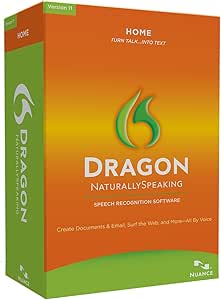 | Best Legacy Windows Voice-Control Option | Version: NaturallySpeaking Home 11 | Platform: Windows | Input method: Speech recognition and voice commands | VIEW LATEST PRICE | See Our Full Breakdown |
| Mac dictation software | Warranty |
|---|---|
| AI VoiceWriter Dictation and A | 1 year |
| Express Scribe Professional Tr | 1 year |
| Dragon NaturallySpeaking Home | — |
More Details on Our Top Picks
AI VoiceWriter Dictation and AI Writing Assistant with USB Dongle and Mobile App
AI VoiceWriter is the most direct answer to a Mac user searching for dictation software in this lineup. Its listed support for macOS 13 and later, paired with real-time speech-to-text, puts it ahead of Express Scribe, which is built around playback control, and Dragon Home 11, whose listed platform is Windows. It also aims to work across applications such as Word, Google Docs, PowerPoint, and Teams, making it suited to people who want to speak drafts, messages, or notes where they already work.
The practical differentiator is that VoiceWriter combines dictation with a set of AI writing tools. Proofreading, rephrasing, and formatting can help turn a spoken first draft into more usable text without switching to a separate writing assistant. That broader toolkit may appeal to office users, students, and people who dictate rough wording before editing. The USB dongle and companion mobile app make it a hardware-linked system rather than a purely software-based Mac feature; buyers should check the current setup requirements and application behavior for their own devices.
Language support needs a closer read than the headline figure suggests. The product lists 33 languages for dictation, while AI assistance is listed for nine: Chinese, English, Japanese, Korean, French, German, Spanish, Italian, and Swedish. If you mainly need speech recognition in one of the wider set of languages, that may be enough. If you expect proofreading or rephrasing in every dictation language, the narrower AI list is a meaningful limitation. The stated recording time is also less than one hour, so I would not choose it as a long-session recorder without clarifying how that limit applies to the intended workflow.
Compared with Express Scribe, VoiceWriter suits creating text from live speech, not operating playback during transcription. Compared with Dragon, it is the only option here with explicit modern Mac support, although the supplied product details do not establish that its speech recognition will suit every accent, room, or app configuration. I would choose it for a Mac-first workflow that values cross-app dictation and editing assistance, while skipping it if you need long-form recording storage or AI writing tools in a language outside its listed nine.
Pros:- Explicitly supports macOS 13 and later for desktop dictation.
- Dictates in 33 listed languages and works across multiple desktop applications.
- Adds proofreading, rephrasing, and formatting features to spoken drafts.
- The product description states lifetime software updates with no subscription.
Cons:- AI assistance is listed for only nine languages, fewer than the dictation language count.
- Digital recording time is listed as less than one hour.
- Its hardware-linked setup may be less convenient than a software-only dictation workflow.
Best for: Mac users on macOS 13 or later who want live dictation across common desktop apps and value built-in proofreading, rephrasing, and formatting.
Not ideal for: Buyers who need AI assistance in all 33 dictation languages, long recording sessions, or a solution that does not depend on a USB dongle and companion hardware.
- Supported desktop systems:Windows 10 or later; macOS 13 or later
- Dictation languages:33 listed
- AI assistance languages:Chinese, English, Japanese, Korean, French, German, Spanish, Italian, Swedish
- Desktop app use:Includes Word, Google Docs, PowerPoint, and Teams among supported examples
- Hardware interface:USB dongle
- Mobile support:iOS 15 or later; Android 9.0 or later
- Recording time:Listed as less than one hour
- Warranty:1 year
Our verdict“I rank VoiceWriter first because it is the only option here with explicit current Mac support and a live-dictation workflow, though its language and recording limits deserve a close check.”
Express Scribe Professional Transcription Software with Infinity USB Foot Pedal
Express Scribe solves a neighboring problem to Mac dictation: it helps a typist work through recorded audio rather than recognizing a user’s live speech and entering text. The included Infinity IN-USB-3 pedal lets a transcriber control playback with their feet, while the software adds variable-speed playback, multichannel control, video playback, and file management. For interviewers, researchers, or transcriptionists who already have recordings and want hands-free playback control, this bundle has a clearer role than either VoiceWriter or Dragon.
That role distinction matters for the Mac-specific search. The supplied details name a personal computer as the compatible device but do not specify macOS compatibility. I would not assume the software or pedal will work with a particular Mac setup from that description alone; confirm operating-system support before buying. This puts Express Scribe behind VoiceWriter for a buyer seeking Mac dictation, even though its dedicated pedal may be more useful than VoiceWriter’s dongle for someone whose main task is repeatedly pausing, rewinding, and slowing recordings.
The professional license is described as having no subscription requirement, which may suit a fixed transcription workflow better than a recurring-service model. Supported formats include MP3, WAV, and WMA, and variable-speed playback can help a typist match the pace of speech without changing the task into live voice recognition. It is not a substitute for speech-to-text: the pedal controls playback, and the product description does not say that it converts the recording into a transcript automatically.
Compared with VoiceWriter, Express Scribe is a more specialized tool for existing audio and a weaker fit for creating text by speaking directly into apps. Compared with Dragon, it comes with a physical accessory tailored to transcription, but neither product is as clearly positioned for current Mac dictation as VoiceWriter. The listing also contains inconsistent weight information and says license and download details are inside the box. I would choose it only after confirming Mac compatibility and download access, and only if playback control is the bottleneck in the work.
Pros:- Includes an Infinity USB foot pedal for hands-free playback control.
- Variable-speed playback and multichannel control support detailed transcription work.
- Supports MP3, WAV, and WMA files, plus video playback.
- Includes a professional license described as requiring no subscription.
Cons:- The supplied compatibility information does not explicitly name macOS.
- It controls recorded audio playback rather than providing live speech-to-text dictation.
- The listing has inconsistent weight information and places license and download details inside the box.
Best for: Transcriptionists and researchers who need foot-controlled playback for existing audio or video and have confirmed that the software supports their computer setup.
Not ideal for: Mac buyers seeking live speech-to-text, automatic transcription, or a product with clearly stated macOS compatibility in the supplied details.
- Software:Express Scribe Professional
- Included pedal:Infinity IN-USB-3 USB transcription foot pedal
- Connectivity:USB 3.0
- Supported formats:MP3, WAV, WMA
- Playback features:Variable speed, multichannel control, and video playback
- Compatible device listed:Personal computer; operating system not specified in supplied details
- License:Professional user license; no subscription required
- Warranty:1 year
Our verdict“I recommend Express Scribe for pedal-controlled transcription after platform checks, not as a direct replacement for Mac dictation software.”
Dragon NaturallySpeaking Home 11 Speech Recognition Software
Dragon NaturallySpeaking Home 11 is not a Mac recommendation based on the supplied platform information. It is listed for Windows and describes speech recognition for dictating text and controlling compatible applications. That may make it relevant to someone comparing older Windows voice-control software, but the Mac limitation is decisive for this roundup. I rank it last because a capable voice workflow on another operating system does not meet a Mac buyer’s main requirement.
Its intended use is broader than Express Scribe’s. Dragon is designed for creating documents, email, and web searches by voice, while Express Scribe is for controlling playback of recordings during transcription. The included headset, on-screen tutorials, and desktop sidebar tips suggest a package aimed at someone learning voice commands rather than operating a pedal-based transcription setup. VoiceWriter is the more relevant comparison for Mac users because it explicitly lists macOS support and offers real-time speech-to-text in desktop applications.
The product description claims speech can appear up to three times faster than typing and accuracy can reach up to 99%. Those are vendor-stated claims, not guarantees for an individual speaker, microphone, or environment. They also do not overcome the platform mismatch. The version number identifies this as Home 11, so buyers should verify compatibility with the exact Windows system and applications they plan to use rather than assuming support for current software.
I would consider Dragon only if the computer in question is a compatible Windows PC and the buyer specifically wants voice commands alongside dictation. For a Mac owner, the main comparison is simple: VoiceWriter has the stated Mac support; Dragon does not. Express Scribe has a different use entirely, focused on recording playback. Skip Dragon for a Mac setup unless you are researching a separate Windows machine and have confirmed that this older version fits its software environment.
Pros:- Designed for dictating text and controlling compatible applications by voice.
- Supports document creation, email, and web searches according to the product description.
- Includes a headset, tutorials, and voice-command guidance.
- Offers a different workflow from Express Scribe’s foot-pedal playback controls.
Cons:- The listed platform is Windows, not macOS.
- Version 11 may require careful compatibility checks against the intended Windows setup.
- Speed and accuracy figures are product-description claims, not guaranteed outcomes.
Best for: A buyer researching voice dictation and application commands for a compatible Windows PC who is willing to verify support for the specific system and software.
Not ideal for: Mac owners, buyers who need stated current macOS compatibility, or anyone treating the advertised speed and accuracy claims as guaranteed results.
- Version:NaturallySpeaking Home 11
- Platform:Windows
- Input method:Speech recognition and voice commands
- Included accessory:Headset
- Intended tasks:Document creation, email, and web searches
- Claimed dictation speed:Up to three times faster than typing, according to the product description
- Claimed accuracy:Up to 99%, according to the product description
Our verdict“I include Dragon as a useful contrast for Windows voice control, but its stated Windows-only platform keeps it out of contention for Mac dictation.”

How We Picked
I ranked these products by how directly they answer a Mac buyer’s request for dictation software. The first test is platform fit: a product needs stated Mac support to qualify as a sensible choice for a Mac setup. Next, I looked at whether it recognizes speech as a user speaks, whether it can place text into everyday applications, and whether its functions solve a distinct workflow that a Mac buyer might actually have.
That method separates dictation from transcription playback. VoiceWriter describes real-time speech-to-text for macOS 13 and later, along with tools for proofreading, rephrasing, and formatting. Express Scribe’s supplied pedal and software are aimed at controlling playback of audio or video recordings. Those are useful features for transcribing existing material, but they do not make it a live Mac dictation app. Dragon NaturallySpeaking Home 11 offers voice recognition and commands, yet the supplied details identify Windows as its platform. I include it as a comparison, not as a Mac-ready recommendation.
I also considered how each product handles language support, hardware, and ongoing access. VoiceWriter’s stated 33 dictation languages are a wider language set than its nine AI-assistance languages, a distinction that can affect multilingual work. Express Scribe includes a dedicated USB foot pedal and a professional license without a subscription, which favors repeat transcription sessions. Dragon includes a headset and learning aids, but its claims about speed and accuracy come from the product description and do not resolve the Mac compatibility issue. I do not assume unlisted features or treat vendor performance claims as independently verified.
My ranking reflects those differences rather than pretending all three do the same job. VoiceWriter ranks first for Mac dictation because it has the clearest stated compatibility and live speech-to-text purpose. Express Scribe ranks second for adjacent transcription work, with the explicit warning that buyers should confirm platform compatibility for their specific computer before purchase because the supplied details do not name macOS. Dragon ranks third because its Windows platform makes it a poor fit for the stated Mac-focused search. This list is most useful when read as a workflow comparison, not as three interchangeable Mac apps.
Factors to Consider When Choosing Best Mac Dictation Software
Before choosing among these three, I would identify whether the job is live dictation or transcription of existing recordings. The products use different methods and should not be judged as interchangeable. Then I would verify Mac compatibility, language needs, app workflow, and any included hardware requirements.
Start with the kind of speech-to-text work you do
If you want to speak and see words appear in documents, messages, or other desktop apps, VoiceWriter is the clearest match in this group. Its description explicitly calls out real-time dictation and lists macOS 13 or later. Express Scribe serves a different task: it gives a typist playback controls for recordings. A foot pedal can help someone pause, replay, or adjust the speed of audio while typing, but it is not a speech-recognition engine. Dragon offers voice input and application commands, yet the listed Windows platform rules it out for Mac use.
I would make this distinction before comparing accessories or language counts. A transcriber working from interviews may value playback speed and pedal control more than live dictation. Someone drafting reports by speaking has little reason to prioritize a transcription pedal. Matching the tool to the source of the speech is the fastest way to avoid buying a product that performs a related but different job.
Treat platform support as a requirement, not a bonus
For Mac buyers, product descriptions should name a compatible macOS version or otherwise provide clear platform guidance. VoiceWriter lists macOS 13 and later. Express Scribe’s supplied details say personal computer but do not name macOS, so I would check current vendor documentation and the exact download before relying on it. Dragon Home 11 is listed for Windows, making it unsuitable as a Mac choice on the information available here.
Hardware can add another compatibility layer. VoiceWriter uses a USB dongle, while Express Scribe includes a USB foot pedal. Check the ports and setup expectations for the Mac you plan to use, along with whether required drivers or software are available for its operating system. A product’s broad computer wording is not the same as explicit compatibility with your particular Mac.
Compare language support by feature
VoiceWriter lists 33 dictation languages, a useful range for multilingual speakers or teams. Its AI assistance is listed for nine languages, however, so proofreading and rephrasing may not be available in every language used for dictation. I would check the specific language pair that matters to my work rather than relying on a single language count.
The other two products do not provide comparable language details in the supplied descriptions. That absence is not proof that a feature is unavailable, but it means buyers should confirm support before purchasing if transcription involves multiple languages, accents, or mixed-language audio. When language coverage is a core need, look for explicit recognition and editing support for the exact language—not just a general claim about speech recognition.
Decide whether AI editing or playback control saves more effort
VoiceWriter’s proofreading, rephrasing, and formatting tools are intended to help refine spoken text after dictation. Those functions suit people who dictate a rough draft and want assistance cleaning it up. They are separate from recognition itself, so I would judge them as workflow extras rather than assuming they improve every transcription result. The narrower list of AI-assistance languages also matters.
Express Scribe takes the physical-control route. The pedal can keep hands available for typing while the user operates recorded audio, and variable-speed playback lets the typist adjust pace. This is a more focused benefit for long transcription sessions than an AI rewrite feature. Dragon’s voice commands have a different advantage on a compatible Windows machine, but they do not change its lack of stated Mac support.
Check recording limits, licensing, and package details
VoiceWriter’s supplied information lists digital recording time as less than one hour. Buyers who plan to record lengthy sessions should ask what that specification means for their intended use and whether the workflow depends on saved recordings at all. The product description also says lifetime software updates are included with no subscription, which may appeal to someone who prefers a one-time software arrangement.
Express Scribe includes a professional license described as subscription-free, but its listing says license and download information are provided inside the box. I would confirm how installation and access work before counting on a same-day setup. Its weight details are inconsistent in the supplied listing, another reason to verify package information if portability matters. Dragon includes a headset and learning materials, but buyers should verify that Home 11 is compatible with their specific Windows environment. Across all three, package contents and version support can affect the real workflow as much as headline features.
Frequently Asked Questions
Which option in this roundup is the best fit for Mac dictation?
AI VoiceWriter is the clearest fit because its listed desktop support includes macOS 13 or later and its description specifies real-time speech-to-text across desktop apps. It also offers proofreading, rephrasing, and formatting. Before choosing it, check that your macOS version, USB setup, and required AI-assistance language are supported.
Is Express Scribe a Mac dictation app?
The supplied description presents Express Scribe as transcription software for controlling recorded audio, with playback features and a USB foot pedal. It does not explicitly name macOS support, and it does not describe live speech-to-text dictation. A Mac buyer should confirm operating-system compatibility with the vendor and choose it only if the main need is playback control for existing recordings.
Can Dragon NaturallySpeaking Home 11 run on a Mac?
The provided product information lists Dragon NaturallySpeaking Home 11 for Windows, not macOS. I would not buy it for a Mac setup without separate, authoritative compatibility confirmation. It may be relevant for a compatible Windows PC, where its described purpose is voice dictation and control of compatible applications.
Does VoiceWriter offer AI assistance in all 33 dictation languages?
No. The supplied details list 33 languages for dictation but name nine languages for AI assistance: Chinese, English, Japanese, Korean, French, German, Spanish, Italian, and Swedish. If proofreading, rephrasing, or formatting in a particular language is important, check that language against the AI-assistance list rather than the broader dictation count.
Which product should I choose for transcribing recorded interviews?
Express Scribe is the most directly suited to that task because it includes a foot pedal and playback controls for recorded audio, including variable speed. It is not described as automatic speech-to-text, and its supplied details do not confirm macOS compatibility. Verify that point first; choose VoiceWriter instead if you want live dictation into apps rather than pedal-controlled playback while you type.
Conclusion
For Mac users who want to dictate new text, I recommend AI VoiceWriter first: it is the only product here with explicit macOS 13-or-later support and a clear live-dictation purpose. Choose it if its listed language support and USB-based setup match your needs, and check the narrower AI-assistance language list if editing tools matter.
For transcriptionists working from recordings, Express Scribe makes more sense because the foot pedal and variable-speed playback target that workflow. Confirm Mac support and installation details before buying, since the supplied listing does not name macOS. For Windows users researching voice commands, Dragon Home 11 may merit a separate compatibility check, but I would skip it for a Mac. The best choice depends less on which product claims the broadest capabilities than on whether you need to speak live, type along with a recording, or control a Windows desktop.
Halloween Picks

8.5 Foot Halloween Inflatable Haunted House Castle with Skeleton, Ghost & Skulls

15-Foot Halloween Pumpkin Inflatable with LED Lights and Air Blower

Gemmy 6-Foot Leatherface Animatronic Halloween Decoration
As an affiliate, we earn on qualifying purchases.