

Wireless gaming mice offer the freedom of movement combined with high performance, making them ideal for serious gamers. The best options deliver low latency, durable build quality, and customizable features, but tradeoffs often exist between weight, battery life, and responsiveness. The Logitech G703 Lightspeed stands out as the overall best choice thanks to its balance of performance and comfort, while the Razer Viper V3 HyperSpeed impresses with its lightweight design, perfect for fast-paced shooters. The main challenge is choosing between longer battery life and lighter weight, as optimizing one often compromises the other. Continue reading for a detailed breakdown of these options to find the best fit for your gaming style.

Get the latest gadgets delivered free with Prime
- Fast, free delivery on millions of items
- Prime Video, Amazon Music and more included
- Member-only deals all year
Complete the kit



Key Takeaways
- The top-performing mice balance low latency with long battery life, which remains a core challenge in wireless design.
- Lightweight models like the Razer Viper V3 tend to favor FPS gamers, while heavier, feature-rich mice suit MMO players better.
- Remappable buttons and customizable DPI are common features, but their presence varies based on target user type and price point.
- Build quality and ergonomic design significantly impact comfort during long gaming sessions, especially for right-handed users.
- Price ranges are wide; investing in a premium mouse often results in better durability and more advanced features, but mid-tier options can still perform well.
| Redragon M656 Wireless Optical Gaming Mouse 4000 DPI Remapping Keys |  | Best Value for Versatile Wireless Gaming | DPI: 4000 | Wireless: Yes | Connectivity: 2.4GHz nano receiver | VIEW LATEST PRICE | See Our Full Breakdown |
| Logitech G703 Lightspeed Wireless Gaming Mouse – Black |  | Best for Extended Play and Precision | Sensor: HERO 25K | Max DPI: 25,600 | IPS: 400+ | VIEW LATEST PRICE | See Our Full Breakdown |
| Redragon M913 Wireless RGB MMO Gaming Mouse 16000 DPI Remapping Keys |  | Best for MMO and Customization Enthusiasts | Connectivity: Wireless and Wired | DPI: 1000/2000/4000/8000/16000 | Battery Life: 45 hours (backlit ON), 80 hours (eco mode) | VIEW LATEST PRICE | See Our Full Breakdown |
| Razer Viper V3 HyperSpeed Wireless PC Gaming Mouse, 82g, Black |  | Best for Competitive Gaming and Lightweight Design | Weight: 82g | Sensor: Focus Pro 30K | Battery Life: Up to 280 hours | VIEW LATEST PRICE | See Our Full Breakdown |
| INPHIC A9 V2 Explorer Wireless Gaming Mouse, 12800 DPI Silent Mouse |  | Best for Quiet Gaming and Multi-Device Use | DPI: 12800 | Connection Types: Bluetooth, 2.4G wireless, USB-C wired | Battery: High-capacity rechargeable | VIEW LATEST PRICE | See Our Full Breakdown |
| Razer Naga V2 HyperSpeed Wireless MMO Gaming Mouse |  | Best Overall for MMO Enthusiasts | Number of Buttons: 19 | Battery Life: Up to 400 hours (Bluetooth), 250 hours (Wireless) | Wireless Technology: Razer HyperSpeed (2.4 GHz), Bluetooth | VIEW LATEST PRICE | See Our Full Breakdown |
| Razer Orochi V2 Wireless Gaming Mouse, 950 Hr Battery, Black |  | Best for Portability and Long Battery Life | Connectivity Technology: Bluetooth | Additional Features: 18K DPI Optical Sensor, Lightweight, Mechanical Switches, Up to 950hrs Battery Life | Button Quantity: 8 | VIEW LATEST PRICE | See Our Full Breakdown |
| Redragon M612 Wireless RGB Optical Gaming Mouse 8000 DPI Remapping Keys |  | Best for Customization and Ergonomics | DPI Levels: 500/1000/2000/3000/8000 | Connectivity: Bluetooth, 2.4GHz wireless | Programmable Buttons: 9 | VIEW LATEST PRICE | See Our Full Breakdown |
| Logitech G502 Lightspeed Wireless Gaming Mouse – Black | 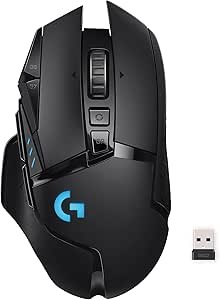 | Best for Precision and Customization | Wireless Technology: Lightspeed | Sensor: HERO 25K | DPI: 100 – 25,600 | VIEW LATEST PRICE | See Our Full Breakdown |
| Redragon M810 PRO Wireless RGB Gaming Mouse 10000 DPI with Remapping Keys |  | Best for Mid-Range Performance and Long Battery Life | DPI: 10000 | Buttons: 8 programmable | Polling Rate: 1000Hz | VIEW LATEST PRICE | See Our Full Breakdown |
| G57 Wireless Gaming Mouse, 8000 DPI, Black |  | Best Versatile Connectivity for Multi-Device Users | DPI: 800-8000 | Connectivity: 2.4G wireless, Bluetooth, wired | Battery: Rechargeable, USB-C charging | VIEW LATEST PRICE | See Our Full Breakdown |
| Logitech G305 Lightspeed Wireless Gaming Mouse – Black |  | Best Ultra-Fast Wireless for Competitive Gaming | Sensor: HERO optical | DPI: 12,000 | Wireless Technology: Lightspeed | VIEW LATEST PRICE | See Our Full Breakdown |
| Razer Basilisk V3 X HyperSpeed Wireless Gaming Mouse, Black |  | Best Fully Customizable for Serious Gamers | Connectivity: HyperSpeed Wireless, Bluetooth | Battery Life: Up to 285 hours (HyperSpeed) | Sensor: Razer 5G Advanced 18K Optical | VIEW LATEST PRICE | See Our Full Breakdown |
| wireless gaming mice | Sensor | DPI | Battery Life |
|---|---|---|---|
| Redragon M656 Wireless Optical | Pixart PAW3104 | 4000 | — |
| Logitech G703 Lightspeed Wirel | HERO 25K | — | up to 35 hours |
| Redragon M913 Wireless RGB MMO | Pixart 3335 | 1000/2000/4000/8000/16000 | 45 hours (backlit ON), 80 hours (eco mode) |
| Razer Viper V3 HyperSpeed Wire | Focus Pro 30K | — | Up to 280 hours |
| INPHIC A9 V2 Explorer Wireless | — | 12800 | — |
| Razer Naga V2 HyperSpeed Wirel | Focus Pro 30K optical sensor | — | Up to 400 hours (Bluetooth), 250 hours (Wireless) |
| Razer Orochi V2 Wireless Gamin | — | — | — |
| Redragon M612 Wireless RGB Opt | — | — | — |
| Logitech G502 Lightspeed Wirel | HERO 25K | 100 – 25,600 | — |
| Redragon M810 PRO Wireless RGB | PAW3325 Optical Pixart | 10000 | Up to 45 hours |
| G57 Wireless Gaming Mouse | — | 800-8000 | — |
| Logitech G305 Lightspeed Wirel | HERO optical | 12,000 | up to 9 months |
| Razer Basilisk V3 X HyperSpeed | Razer 5G Advanced 18K Optical | — | Up to 285 hours (HyperSpeed) |
More Details on Our Top Picks
Redragon M656 Wireless Optical Gaming Mouse 4000 DPI Remapping Keys
The Redragon M656 stands out for offering a solid balance of performance and affordability, especially with its 4000 DPI optical sensor that ensures precise tracking comparable to higher-end models like the Logitech G703. Its customizable macro buttons add versatility for both gaming and work tasks, making it a flexible choice for users who want more than just gaming capability. Compared to the Redragon M913, it has fewer buttons and a lower DPI ceiling, but its straightforward design keeps costs down. The main tradeoff is the lack of a built-in rechargeable battery—battery replacement is necessary—and the backlight isn’t always active, which could be a drawback for aesthetic enthusiasts. This mouse makes the most sense for budget-conscious gamers who want reliable wireless performance without extra frills.
Pros:- High-precision 4000 DPI optical sensor for accurate tracking
- Customizable macro buttons for gaming and productivity
- Wireless design eliminates cable clutter
Cons:- Battery not included, requiring separate purchase
- Backlight on scroll wheel not always active
Best for: Budget-conscious gamers seeking reliable wireless performance with macro customization
Not ideal for: Power users who need high DPI or extensive button remapping for complex MMO gameplay
- DPI:4000
- Wireless:Yes
- Connectivity:2.4GHz nano receiver
- Number of Programmable Buttons:7
- Polling Rate:500Hz
- Backlight:Red LED
- Sensor:Pixart PAW3104
- Battery:Not included
- Sleep Mode:Yes
Our verdict“This mouse suits gamers on a budget who want dependable wireless performance with basic customization.”
Logitech G703 Lightspeed Wireless Gaming Mouse – Black
The Logitech G703 Lightspeed is tailored for gamers who prioritize long-lasting battery life and top-tier responsiveness. Its HERO 25K sensor provides a DPI range up to 25,600 and offers smooth, precise tracking that surpasses most competitors like the Redragon M913 in sensitivity. The long battery life of up to 35 hours ensures uninterrupted play, and support for wireless charging via the optional POWERPLAY kit adds convenience—though this accessory is sold separately, which may be a barrier for some. The ergonomic design with rubber grips enhances comfort during long sessions, making it ideal for serious gamers. However, the higher price point and the need for separate wireless charging hardware may deter casual users or those on a tighter budget.
Pros:- High-precision HERO 25K sensor with customizable DPI
- Long battery life of up to 35 hours
- Wireless charging support with POWERPLAY system
Cons:- Wireless charging system sold separately
- Relatively high price for some users
Best for: Gamers who need high accuracy, long battery life, and are willing to invest in premium wireless tech
Not ideal for: Casual players or budget shoppers who are not interested in extra accessories like wireless charging pads
- Sensor:HERO 25K
- Max DPI:25,600
- IPS:400+
- Weight:95 g
- Battery Life:up to 35 hours
- Lighting:LIGHTSYNC RGB
- Buttons:6 programmable
- Wireless Charging:Supported with POWERPLAY
Our verdict“This mouse is best for dedicated gamers seeking precision and extended play without cable clutter, provided they are comfortable with the price and extra accessories.”
Redragon M913 Wireless RGB MMO Gaming Mouse 16000 DPI Remapping Keys
The Redragon M913 offers a flexible setup with dual wired and wireless modes, making it stand out among MMO mice like the G502 Lightspeed for its versatility. Its 16,000 DPI sensor provides high accuracy, and with 12 customizable side buttons, it supports complex macro setups ideal for MMO players or esports enthusiasts. The long battery life of up to 45 hours with backlit on—extending to 80 hours in eco mode—means it can handle prolonged gaming sessions without frequent charging. However, the software setup for full customization can be complex, and the sheer number of buttons might be overwhelming for casual users. This pick suits those who need extensive remapping and prefer both wired and wireless configurations.
Pros:- Dual wireless and wired connectivity options
- High-precision 16000 DPI sensor with low latency
- 16 customizable side buttons and RGB lighting
Cons:- Complex software setup may be required for full customization
- Some users might find the number of buttons overwhelming
Best for: MMO players or heavy multitaskers who want maximum customization and flexible connectivity
Not ideal for: Casual gamers or users unfamiliar with complex software, due to the setup complexity
- Connectivity:Wireless and Wired
- DPI:1000/2000/4000/8000/16000
- Battery Life:45 hours (backlit ON), 80 hours (eco mode)
- Number of Buttons:16
- Lighting:16.8 million colors
- Sensor:Pixart 3335
Our verdict“This mouse is ideal for MMO players and power users who need extensive remapping and flexible connectivity options, despite a steeper learning curve.”
Razer Viper V3 HyperSpeed Wireless PC Gaming Mouse, 82g, Black
The Razer Viper V3 HyperSpeed is designed for esports and competitive players who need speed and agility. Its ultra-lightweight 82g frame makes quick movements effortless, while the Focus Pro 30K sensor ensures pinpoint accuracy. The low-latency HyperSpeed wireless connection rivals wired performance, and with a battery life of up to 280 hours, it minimizes downtime during long gaming marathons. Mechanical Gen-2 switches with a 60-million click lifespan add durability, but it requires an AA battery, which might need frequent replacements if not using rechargeable ones. This model is best suited for right-handed users seeking a lightweight, high-performance mouse, but left-handed gamers will find it incompatible.
Pros:- Lightweight design at 82g for fast, agile movements
- High-precision Focus Pro 30K sensor
- Long battery life of up to 280 hours
Cons:- Requires AA battery, which may need frequent replacement
- Limited to right-handed users
Best for: Competitive gamers who prioritize speed, precision, and lightweight design
Not ideal for: Left-handed gamers or those preferring rechargeable batteries over AA power sources
- Weight:82g
- Sensor:Focus Pro 30K
- Battery Life:Up to 280 hours
- Wireless Technology:HyperSpeed wireless
- Switches:Mechanical Gen-2, 60 million clicks
- DPI Stages:5 customizable stages
Our verdict“This mouse is perfect for esports players who need a lightweight, highly precise device with long-lasting wireless performance.”
INPHIC A9 V2 Explorer Wireless Gaming Mouse, 12800 DPI Silent Mouse
The INPHIC A9 V2 Explorer caters to gamers and professionals who prioritize quiet operation without sacrificing accuracy. Its 12800 DPI optical sensor delivers precise control, comparable to higher-priced silent mice like the Redragon M913, but with added versatility through multiple connection options—Bluetooth, 2.4G wireless, and wired USB-C. The silent click technology reduces noise significantly, making it suitable for shared spaces or late-night gaming. While it lacks RGB lighting and advanced programmable buttons, this simplicity benefits users who want a straightforward, noise-free experience. The need to download drivers for full customization on Windows can be a minor inconvenience, but overall, it offers a solid balance of quiet use and high DPI accuracy.
Pros:- High-precision 12800 DPI sensor for accurate control
- Multiple connection options for versatility
- Silent click technology reduces noise during use
Cons:- Requires driver download for advanced customization on Windows
- No mention of RGB lighting or additional programmable buttons
Best for: Quiet gamers or professionals who need a versatile, multi-device mouse with silent operation
Not ideal for: Users who want extensive RGB lighting or lots of programmable buttons for complex macros
- DPI:12800
- Connection Types:Bluetooth, 2.4G wireless, USB-C wired
- Battery:High-capacity rechargeable
- Compatibility:Windows, macOS, Android, iOS
- Silent Click:Yes
- Weight:102g
Our verdict“This mouse makes the most sense for users who need quiet operation across multiple devices without sacrificing high DPI accuracy.”
Razer Naga V2 HyperSpeed Wireless MMO Gaming Mouse
The Razer Naga V2 HyperSpeed stands out for its extensive 19 programmable buttons, making it ideal for MMO players who need quick macro access. Its high-precision Focus Pro 30K optical sensor ensures accurate tracking across various surfaces, surpassing many standard mice. The dual wireless options—HyperSpeed and Bluetooth—provide versatility, but the complex setup and higher price point can be hurdles for casual gamers. Its bulkier design might not suit users with smaller hands, yet for those who prioritize customization and long battery life, this mouse delivers reliably. Compared to the Logitech G502, it offers more buttons but at a higher cost and with a potentially less comfortable grip for some.
Pros:- Long battery life up to 400 hours on Bluetooth and 250 hours on HyperSpeed wireless
- High-precision Focus Pro 30K sensor for accuracy
- 19 programmable buttons for macros and customization
- Dual wireless connectivity for flexibility
Cons:- Relatively high price compared to standard gaming mice
- Complex setup requiring software configuration
- Bulkier shape may not suit all hand sizes
Best for: MMO players who need extensive macro control and long sessions without recharging
Not ideal for: Casual gamers or users with smaller hands who prefer a more streamlined, lightweight mouse
- Number of Buttons:19
- Battery Life:Up to 400 hours (Bluetooth), 250 hours (Wireless)
- Wireless Technology:Razer HyperSpeed (2.4 GHz), Bluetooth
- Sensor:Focus Pro 30K optical sensor
- Switches:Mechanical Switches Gen 2 with gold-plated contacts
- Color:Black
Our verdict“This mouse is best suited for MMO players seeking extensive customization and battery longevity, willing to handle its size and complexity.”
Razer Orochi V2 Wireless Gaming Mouse, 950 Hr Battery, Black
The Razer Orochi V2 excels for gamers on the go, offering an ultra-lightweight design and an astonishing up to 950 hours of Bluetooth battery life, far surpassing most competitors like the Redragon M810 PRO. Its 18K DPI optical sensor provides precise control for both gaming and work, while its dual wireless modes ensure seamless connectivity. The requirement of an AA or AAA battery adds some weight and ongoing cost, and its compact form may compromise comfort during extended sessions for larger hands. Compared with the Logitech G502, the Orochi V2 sacrifices some advanced customization for portability. This makes it a solid choice for travelers or those with limited desk space who still demand high performance.
Pros:- Incredible battery life—up to 950 hours Bluetooth use
- Ultra-lightweight and portable design
- High-precision 18K DPI optical sensor
- Dual wireless modes for versatility
Cons:- Requires one AA or AAA battery, which may add weight
- Limited compatibility to PC and macOS
- No wired connection option
Best for: Travelers and mobile gamers needing long-lasting wireless performance
Not ideal for: Gamers seeking extensive customization or larger grip comfort for prolonged play
- Connectivity Technology:Bluetooth
- Additional Features:18K DPI Optical Sensor, Lightweight, Mechanical Switches, Up to 950hrs Battery Life
- Button Quantity:8
- Hand Orientation:Right
- Compatible Devices:PC
- Battery Average Life:425 hours
Our verdict“Ideal for gamers who prioritize portability and longevity over extensive customization or wired connectivity.”
Redragon M612 Wireless RGB Optical Gaming Mouse 8000 DPI Remapping Keys
The Redragon M612 provides a compelling balance of performance and personalization, with 8000 DPI adjustable levels and nine programmable buttons, making it suitable for gamers who want control and customization without complexity. Its ergonomic, claw-grip design reduces fatigue during long sessions, and the RGB lighting adds style. However, it relies on software for full remapping, which could be a hurdle for users seeking immediate plug-and-play functionality. Compared to the Redragon M810 PRO, it offers fewer DPI levels but emphasizes ergonomic comfort and a streamlined design, making it better for users who value comfort alongside control. It’s an excellent choice for mid-level gamers who want flexibility without sacrificing comfort.
Pros:- High DPI levels up to 8000 for precise control
- Multiple connectivity modes including Bluetooth and 2.4GHz
- Ergonomic design reduces fatigue
- Programmable keys and RGB lighting for enhanced gaming experience
Cons:- Requires software for full remapping and customization
- Setup may be complex for new users
Best for: Gamers who want customizable controls and ergonomic comfort in a wireless mouse
Not ideal for: Casual users or those who prefer a simpler, non-programmable mouse
- DPI Levels:500/1000/2000/3000/8000
- Connectivity:Bluetooth, 2.4GHz wireless
- Programmable Buttons:9
- Backlit Modes:7
- Design:Ergonomic, streamlined claw-grip
- Additional Features:Remapping keys, macro buttons
Our verdict“This mouse caters to gamers seeking a customizable, comfortable wireless option with flexible connectivity.”
Logitech G502 Lightspeed Wireless Gaming Mouse – Black
The Logitech G502 Lightspeed is a versatile choice for gamers demanding high accuracy and extensive button controls. Its HERO 25K sensor offers a DPI range from 100 to 25,600, providing precision for any game type, surpassing most other mice like the Redragon M810 PRO. The 11 customizable buttons and the ability to support Logitech’s PowerPlay wireless charging system make it suitable for long gaming marathons. However, the PowerPlay system is sold separately, and the premium price may be a barrier for budget-conscious players. Compared to the Razer Naga V2, it offers fewer buttons but a more refined ergonomic design and broader compatibility, making it a dependable all-rounder for serious gamers.
Pros:- High-precision HERO 25K sensor with customizable DPI
- Low-latency Lightspeed wireless technology
- 11 programmable buttons for gaming customization
- Supports PowerPlay wireless charging
Cons:- PowerPlay system sold separately, increasing overall cost
- Premium price point may be prohibitive
- USB receiver can sometimes be misplaced
Best for: Gamers who want precision, extensive customization, and a wireless charging option
Not ideal for: Budget buyers or casual players not needing high-level sensor accuracy
- Wireless Technology:Lightspeed
- Sensor:HERO 25K
- DPI:100 – 25,600
- Buttons:11 customizable
- Charging System:PowerPlay (sold separately)
Our verdict“This mouse suits serious gamers seeking high accuracy, extensive customization, and wireless charging convenience, with a premium price tag.”
Redragon M810 PRO Wireless RGB Gaming Mouse 10000 DPI with Remapping Keys
The Redragon M810 PRO offers a solid mix of performance and customization, with a 10,000 DPI sensor suitable for most gaming needs. Its wireless connectivity and 45-hour battery life make it a practical choice for extended play sessions. The RGB lighting and six programmable buttons add flair and control, but the need for software to fully customize might delay setup for some users. Compared to the M612, it emphasizes higher DPI and longer battery life, making it better for players who prefer precision without sacrificing endurance. Its slightly heavier weight could be a concern for gamers who favor ultra-light mice, but overall, it balances affordability with features well suited to mid-level gamers.
Pros:- High-precision 10,000 DPI sensor
- Wireless connectivity with low latency
- RGB customizable lighting
- Up to 45 hours of battery life
Cons:- Requires software for full customization
- Some may find the weight slightly heavy
- Limited to PC compatibility
Best for: Gamers looking for a reliable wireless mouse with good DPI and long battery life
Not ideal for: Players who want immediate plug-and-play setup or minimal weight
- DPI:10000
- Buttons:8 programmable
- Polling Rate:1000Hz
- Battery Life:Up to 45 hours
- Sensor:PAW3325 Optical Pixart
Our verdict“This mouse offers a balanced mix of performance and endurance for mid-tier gamers who value reliability and customization.”
G57 Wireless Gaming Mouse, 8000 DPI, Black
The G57 Wireless Gaming Mouse stands out for its tri-mode connectivity—2.4G, Bluetooth, and wired—making it a flexible choice for gamers and professionals who switch between devices. Compared to the Logitech G305, which focuses solely on wireless performance, the G57 offers broader compatibility but introduces added complexity, especially for those unfamiliar with multi-mode setups. Its adjustable DPI up to 8000 allows for precise control, but without dedicated software, customizing profiles can be less straightforward. The rechargeable battery with smart power-saving features extends usage, though it lacks bundled accessories, which could be a drawback for new users. This pick is ideal for users who need a mouse for multiple platforms and connection types, rather than those seeking a plug-and-play gaming-only device.
Pros:- Tri-mode connectivity offers maximum flexibility
- Adjustable DPI up to 8000 for precision tasks
- Cross-platform compatibility broadens usage options
- Rechargeable battery with smart power saving
Cons:- Lacks dedicated software for advanced customization
- Potentially complex setup for non-technical users
Best for: Power users needing seamless switching across multiple operating systems and devices
Not ideal for: Casual gamers or those preferring a simple, single-connection gaming mouse
- DPI:800-8000
- Connectivity:2.4G wireless, Bluetooth, wired
- Battery:Rechargeable, USB-C charging
- Compatibility:Windows XP/7/8/10, macOS 10.5+
- Polling Rate:1000Hz
Our verdict“This mouse is best suited for multi-device users who value versatility over simplicity.”
Logitech G305 Lightspeed Wireless Gaming Mouse – Black
The Logitech G305 Lightspeed excels with its high-precision HERO sensor, providing up to 12,000 DPI, which surpasses the basic 8000 DPI of the G57. Its ultra-fast 1 ms report rate ensures rapid response times, making it a top pick for competitive gamers prioritizing speed. The lightweight design at just 3.4 oz enhances maneuverability, but it relies on a single AA battery, which might require frequent replacement for heavy users—a notable tradeoff for portability. Compared to the Razer Basilisk V3 X, which offers extensive customization, the G305 emphasizes simplicity and efficiency, but lacks programmable buttons. It’s best suited for gamers who want a reliable, portable mouse with long battery life and high accuracy, rather than those seeking extensive control options.
Pros:- High-precision HERO sensor with 12,000 DPI
- Ultra-fast 1 ms wireless response
- Long battery life up to 9 months
- Lightweight and highly portable
Cons:- Requires frequent battery replacements if used intensively
- Limited to right-handed users
Best for: Gamers who prioritize speed, portability, and long-lasting battery life
Not ideal for: Users needing extensive customization or ergonomic features for larger hands
- Sensor:HERO optical
- DPI:12,000
- Wireless Technology:Lightspeed
- Battery Life:up to 9 months
- Weight:3.4 oz
- Connectivity:Wireless
Our verdict“This mouse is ideal for competitive gamers seeking speed and portability over extensive controls.”
Razer Basilisk V3 X HyperSpeed Wireless Gaming Mouse, Black
The Razer Basilisk V3 X caters to gamers who want a highly customizable experience, with 9 programmable controls and Razer Chroma RGB lighting that enhances immersion. Its high-precision 18K optical sensor ensures accurate tracking, outperforming the 12,000 DPI of the G305 and matching the needs of serious gamers. The dual-mode connectivity—HyperSpeed Wireless and Bluetooth—offers flexibility, but the mouse’s slightly less ergonomic design may not suit larger hands comfortably. While the long battery life—up to 285 hours on HyperSpeed—appeals for extended sessions, the focus on gaming features makes it less versatile for non-gaming tasks. This mouse makes the most sense for gamers who want extensive control and RGB customization in a long-lasting wireless package.
Pros:- Nine programmable controls for tailored gameplay
- High-precision 18K optical sensor for accuracy
- Long battery life, up to 285 hours on HyperSpeed
- Dynamic RGB lighting for immersive aesthetics
Cons:- Less ergonomic for bigger hands
- Primarily focused on gaming features, less versatile for everyday tasks
Best for: Competitive gamers and those who value extensive customization and RGB lighting
Not ideal for: Casual users or those with larger hands seeking a more ergonomic design
- Connectivity:HyperSpeed Wireless, Bluetooth
- Battery Life:Up to 285 hours (HyperSpeed)
- Sensor:Razer 5G Advanced 18K Optical
- Switches:Razer Mechanical Mouse Switches Gen-2
- Lighting:Razer Chroma RGB, 16.8 million colors
- Controls:9 customizable buttons
Our verdict“This mouse is perfect for dedicated gamers who want maximum control, RGB flair, and long-lasting performance.”
How We Picked
These wireless gaming mice were evaluated based on performance, latency, battery life, build quality, and ergonomic comfort. We prioritized models that offer quick response times essential for competitive gaming, while also considering ease of use and customization options. Durability and value for money were also key factors, ensuring that each pick provides a good balance of features relative to its price. The ranking reflects a combination of user feedback, technical specs, and overall versatility, aiming to guide gamers of different skill levels and preferences.Factors to Consider When Choosing Wireless Gaming Mice
Choosing the right wireless gaming mouse involves more than just looking at DPI or price. It’s important to consider how the mouse feels in your hand, how long the battery lasts during extended sessions, and whether it offers features that match your gaming style. Understanding these factors can help you avoid common pitfalls like sacrificing responsiveness for battery life or buying a mouse that’s too heavy for quick movements. The following sections highlight key considerations to help you make an informed decision.
Performance and Latency
For competitive gaming, low latency and fast response times are non-negotiable. Wireless mice have historically faced criticism for lag, but modern options like the Logitech G703 and Razer Viper V3 have minimized this gap significantly. A mouse with a high polling rate (1000Hz or more) ensures that your inputs register swiftly, giving you a real edge in fast-paced games. Avoid models that compromise responsiveness for additional features if your primary focus is competitive play.
Battery Life and Charging
Battery life varies widely among wireless gaming mice, from a few hours to several weeks on a single charge. Gamers who play for long sessions should prioritize models with extended battery life or quick-charging capabilities. Some mice include rechargeable batteries, while others use replaceable ones. Be aware that frequent charging can disrupt gameplay, so choosing a mouse with a long-lasting battery or fast-charging can prevent interruptions during critical moments.
Ergonomics and Comfort
An ergonomic design tailored to your hand size and grip style (palm, claw, fingertip) can reduce fatigue and improve accuracy. Heavier mice tend to feel more stable, but may tire your hand faster during extended play. Conversely, ultra-lightweight mice excel in quick flicks but may feel less precise for some users. Testing different shapes and weights, if possible, can help you find a model that feels natural and reduces strain over time.
Customization and Features
Remappable buttons, adjustable DPI, and customizable RGB lighting are common features that enhance gaming flexibility. However, more advanced customization often comes with a steeper learning curve or higher price. Consider what features matter most for your genre—FPS players might prioritize quick DPI switches, while MMO gamers benefit from multiple programmable buttons. Be cautious of models that overpromise on features but lack solid build quality or responsiveness.
Price and Value
While premium mice offer advanced features and superior durability, mid-tier options can deliver excellent performance at a more accessible price point. It’s worth investing more if you’re a competitive gamer seeking top responsiveness and durability. However, casual players or newcomers can find capable models at lower prices that still meet basic performance needs. Balance your budget with your performance expectations to avoid overspending on unnecessary features.
Frequently Asked Questions
Will a wireless mouse have more lag than a wired one?
Modern wireless gaming mice have significantly reduced latency, often matching or coming very close to wired mice. High-quality models with advanced wireless technology, such as Logitech Lightspeed or Razer HyperSpeed, deliver response times suitable for competitive gaming. While there might still be a slight difference, it’s generally negligible for most players, especially when using models designed specifically for gaming.
How important is battery life in choosing a wireless gaming mouse?
Battery life is a key factor for uninterrupted gaming sessions, particularly for marathon gameplay or tournaments. Mice with longer battery life reduce the need for frequent charging, which can be disruptive. Some models also support quick-charging, providing a few hours of use with just a few minutes of charging. Consider your typical gaming duration and choose a mouse that matches your needs to avoid interruptions or performance drops.
Should I prioritize lightweight or heavier mice for gaming?
This depends on your play style and comfort preference. Lightweight mice, like the Razer Viper V3, excel in fast flicks and quick movements, ideal for FPS games. Heavier mice tend to feel more stable and precise, which benefits MMO or strategy players. Testing different weights can help you find the right balance between speed and control, enhancing your overall gaming experience.
Are RGB lighting and customization features worth paying extra for?
Customization features like RGB lighting and programmable buttons can enhance your gaming setup visually and functionally. However, they often come at a higher cost and may add unnecessary complexity if you prefer simplicity. If aesthetics or personalized controls matter to you, investing in a feature-rich model makes sense. Otherwise, simpler or more affordable mice can still deliver great performance without extra frills.
Can I use a wireless gaming mouse for office work?
Absolutely. Many wireless gaming mice are versatile enough for everyday tasks, offering comfort, precision, and a clean look without cables. Features like adjustable DPI and customizable buttons can even boost productivity. Just ensure the mouse has a comfortable ergonomic design and good battery life to support both gaming and work sessions effectively.
Conclusion
For gamers seeking the best overall experience, the Logitech G703 Lightspeed offers a balanced combination of responsiveness, build quality, and comfort. Budget-conscious players or newcomers should consider mid-tier options like the Redragon M656 or G305 Lightspeed, which provide solid performance at lower prices. Serious MMO players will find the Razer Naga V2 or Redragon M913 more suitable for their extensive button layouts. Those prioritizing ultra-lightweight design for FPS games will prefer the Razer Viper V3. Ultimately, your choice depends on your specific gaming style, ergonomic needs, and budget.
As an affiliate, we earn on qualifying purchases.Fall Picks
fall essentials