The best Logitech computer peripherals depend on whether you value a coordinated keyboard-and-mouse set, a specialist mouse, or premium controls for a busy desk. I rank the MX Keys S Combo as the best overall choice for its polished typing and mouse pairing, while the MK270 stands out as a straightforward everyday combo and the MX Master 4 as a feature-rich premium mouse. The main tradeoffs are comfort versus compactness, simple plug-and-play use versus multi-device controls, and a matched set versus choosing each device separately. This roundup compares all 15 options by fit, usability, versatility, and limitations. Read on for the full breakdown and a guide to choosing the right Logitech setup for your needs.

Get the latest gadgets delivered free with Prime
- Fast, free delivery on millions of items
- Prime Video, Amazon Music and more included
- Member-only deals all year
Complete the kit



Key Takeaways
- The MX Keys S Combo is the strongest all-around desk setup: It pairs a premium typing experience with a capable mouse, making it a more balanced general-work choice than buying around a specialist mouse alone.
- The MK270 prioritizes uncomplicated everyday use: Its keyboard-and-mouse pairing makes it a practical starting point, while the MK540 and MK650 offer more comfort-oriented features for buyers who spend longer at a desk.
- Logitech’s premium mice solve different problems: The MX Master 4 is aimed at feature-rich control, the MX Master 3S at a refined productivity mouse, and the Lift at a vertical grip—not interchangeable upgrades.
- Multi-device support matters most when switching is frequent: The M720 and MX models suit people moving between computers, but buyers with one fixed workstation may get little from that extra flexibility.
- Combo convenience comes with less room to customize: Sets such as the MK335, MK550, MK850, and Signature MK650 simplify matching devices, while standalone mice let buyers choose ergonomics or gaming performance independently.
| Logitech MK335 Full Size Quiet Wireless Keyboard Mouse Combo – Black/Silver |  | Best Quiet Keyboard-and-Mouse Combo | Connectivity: 2.4 GHz wireless via USB receiver | Keyboard layout: QWERTY | Keyboard hotkeys: 11 | VIEW LATEST PRICE | See Our Full Breakdown |
| Logitech M185 Compact Ambidextrous Wireless Mouse, Swift Grey |  | Best Basic Compact Mouse | Connectivity: 2.4 GHz wireless via USB nano receiver | Tracking: Optical | Maximum sensitivity: 1000 DPI | VIEW LATEST PRICE | See Our Full Breakdown |
| Logitech G305 LIGHTSPEED Wireless Gaming Mouse, Black |  | Best for Wireless Gaming | Connectivity: USB wireless receiver | Sensor: HERO optical | Sensitivity: 200–12,000 DPI | VIEW LATEST PRICE | See Our Full Breakdown |
| Logitech MX Keys Combo for Business Keyboard and Mouse – Graphite |  | Best Premium Business Combo | Connectivity: Bluetooth and Logi Bolt USB receiver | Keyboard layout: QWERTY, 104 keys | Mouse sensor: Darkfield 8000 DPI optical | VIEW LATEST PRICE | See Our Full Breakdown |
| Logitech M720 Triathlon Full-Size Multi-Device Wireless Mouse | 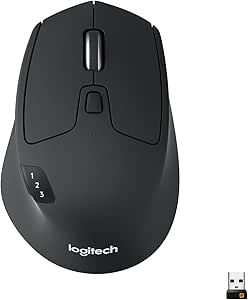 | Best for Multi-Computer Work | Connectivity: Bluetooth or USB receiver | Wireless range: 5 meters | Buttons: 6 customizable | VIEW LATEST PRICE | See Our Full Breakdown |
| Logitech MK270 Full-Size Wireless Keyboard and Mouse Combo, Black |  | Best Value Pick | Connectivity: 2.4 GHz wireless | Wireless range: Up to 33 ft (10 m) | Receiver: USB-A nano receiver | VIEW LATEST PRICE | See Our Full Breakdown |
| Logitech MX Master 3S Bluetooth Wireless Mouse, Graphite |  | Best for Quiet, Precise Work | Connectivity: Bluetooth | Sensor: Darkfield high-precision optical | Maximum sensitivity: 8,000 DPI | VIEW LATEST PRICE | See Our Full Breakdown |
| Logitech MX Master 4 Ergonomic Wireless Mouse with Haptic Feedback, Graphite |  | Best Premium Mouse | Connectivity: Bluetooth and radio frequency via included USB-C dongle | Sensor: Optical, up to 8,000 DPI | Buttons: 7 | VIEW LATEST PRICE | See Our Full Breakdown |
| Logitech MX Keys S Combo Wireless Keyboard and Mouse, Graphite |  | Best Premium Keyboard-and-Mouse Set | Connectivity: Bluetooth Low Energy or included Logi Bolt USB receiver | Multi-device pairing: Up to 3 devices | Keyboard: Backlit, laptop-like keys | VIEW LATEST PRICE | See Our Full Breakdown |
| Logitech MK550 Wireless Wave Keyboard and Mouse Combo |  | Best for Ergonomic Typing | Connectivity: 2.4 GHz wireless via USB receiver | Keyboard layout: QWERTY, 104 keys | Keyboard features: Wave design, integrated palm rest, adjustable height | VIEW LATEST PRICE | See Our Full Breakdown |
| Logitech MK850 Performance Wireless Keyboard and Mouse Combo |  | Best for Multi-Device Comfort | Connectivity: USB receiver or Bluetooth Low Energy | Wireless range: Up to 10 m (30 ft) | Keyboard layout: QWERTY, full-size | VIEW LATEST PRICE | See Our Full Breakdown |
| Logitech Lift Vertical Ergonomic Wireless Mouse – Graphite |  | Best Ergonomic Mouse | Dimensions: 108 x 70 x 71 mm | Weight: 125 g | Tracking: Adjustable up to 4000 DPI | VIEW LATEST PRICE | See Our Full Breakdown |
| Logitech MK540 Advanced Wireless Keyboard and Mouse Combo |  | Best Value Combo for Shared Desks | Connectivity: USB wireless receiver | Wireless range: Up to 33 ft | Keyboard: 104-key QWERTY; 7.62 x 18 x 0.94 in; 28.4 oz | VIEW LATEST PRICE | See Our Full Breakdown |
| Logitech M510 Full-Size Wireless Mouse |  | Best for Extra Navigation Controls | Connectivity: 2.4 GHz wireless via USB Unifying receiver | Movement detection: Optical | Buttons: 7 | VIEW LATEST PRICE | See Our Full Breakdown |
| Logitech Signature MK650 Combo for Business Keyboard and Mouse, Graphite |  | Best Cross-Platform Business Combo | Connectivity: Logi Bolt USB receiver or Bluetooth Low Energy | Keyboard layout: QWERTY, 118 keys | Keyboard features: Integrated palm rest | VIEW LATEST PRICE | See Our Full Breakdown |
| Logitech computer peripheral | Connectivity | Compatibility |
|---|---|---|
| Logitech MK335 Full Size Quiet | 2.4 GHz wireless via USB receiver | — |
| Logitech M185 Compact Ambidext | 2.4 GHz wireless via USB nano receiver | Windows, Mac, Chrome OS, Linux |
| Logitech G305 LIGHTSPEED Wirel | USB wireless receiver | PC and Mac |
| Logitech MX Keys Combo for Bus | Bluetooth and Logi Bolt USB receiver | Windows, macOS, ChromeOS, Linux |
| Logitech M720 Triathlon Full-S | Bluetooth or USB receiver | — |
| Logitech MK270 Full-Size Wirel | 2.4 GHz wireless | Laptop and PC; Windows |
| Logitech MX Master 3S Bluetoot | Bluetooth | Windows, macOS, Linux, Chrome OS, iPadOS, Android |
| Logitech MX Master 4 Ergonomic | Bluetooth and radio frequency via included USB-C dongle | — |
| Logitech MX Keys S Combo Wirel | Bluetooth Low Energy or included Logi Bolt USB receiver | Windows, macOS, Linux |
| Logitech MK550 Wireless Wave K | 2.4 GHz wireless via USB receiver | Windows XP, Vista, 7, 8, 10 |
| Logitech MK850 Performance Wir | USB receiver or Bluetooth Low Energy | Windows 10 or later, Chrome OS, Linux kernel 2.6 or later |
| Logitech Lift Vertical Ergonom | — | Windows, macOS, iPadOS, Chrome OS, and Linux |
| Logitech MK540 Advanced Wirele | USB wireless receiver | Windows 7 or later and Chrome OS |
| Logitech M510 Full-Size Wirele | 2.4 GHz wireless via USB Unifying receiver | Windows, macOS, Linux, and Chrome OS |
| Logitech Signature MK650 Combo | Logi Bolt USB receiver or Bluetooth Low Energy | Chrome OS, Linux, macOS, Windows, iPadOS, and Android |
More Details on Our Top Picks
Logitech MK335 Full Size Quiet Wireless Keyboard Mouse Combo – Black/Silver
The MK335 is the straightforward pick for someone who wants a full-size keyboard and mouse in one wireless set, with quieter typing and handy multimedia controls. Its low-profile, whisper-quiet keys and 11 hotkeys suit shared rooms where loud typing or reaching for media controls is unwelcome. Compared with the compact M185, this set gives you a complete keyboard as well as a mouse; unlike the premium MX Keys Combo for Business, it keeps the feature set simple and skips smart backlighting and rechargeable power. That simplicity has tradeoffs: the keyboard is not backlit, and the listed OS support is Windows-focused. Choose it for a quiet, familiar desktop setup, not for cross-platform flexibility or work in dim rooms.
Pros:- Quiet, low-profile keys make typing less intrusive in shared spaces.
- 11 hotkeys provide quick access to multimedia controls.
- Long stated battery life: up to 24 months for the keyboard and 12 months for the mouse.
- Ambidextrous mouse stores its nano receiver when not in use.
Cons:- Keyboard has no backlighting for dim workspaces.
- Listed operating system compatibility is limited to Windows 10, 11, or later.
- Uses included AAA batteries rather than a rechargeable setup.
Best for: Windows users who want a full-size, quieter keyboard and basic wireless mouse for a shared home or office workspace.
Not ideal for: Mac or Linux users and anyone who types in low light and needs keyboard backlighting.
- Connectivity:2.4 GHz wireless via USB receiver
- Keyboard layout:QWERTY
- Keyboard hotkeys:11
- Mouse tracking:Optical
- Hand orientation:Ambidextrous
- Keyboard battery life:Up to 24 months
- Mouse battery life:Up to 12 months
- Operating system compatibility:Windows 10, 11, or later
Our verdict“Choose the MK335 for a quiet, full-size Windows desktop set; skip it if you need backlighting or broader OS support.”
Logitech M185 Compact Ambidextrous Wireless Mouse, Swift Grey
The M185 earns its place as a no-frills mouse for laptops and everyday desktop work: its compact ambidextrous shape is easy to pack and works for either hand, while the nano receiver makes setup simple on computers with a USB-A port. Unlike the larger, right-handed M720 Triathlon, it does not offer device switching, customizable buttons, or fast scrolling; its appeal is a smaller, simpler tool for one computer. Its optical tracking reaches 1000 DPI, which fits routine navigation but offers fewer speed and control options than the gaming-focused G305. The receiver also occupies a USB port, so it is a poor match for devices with no available USB-A connection. For basic cross-platform use, though, its compatibility is broader than the Windows-focused MK335 set.
Pros:- Compact, ambidextrous shape suits either hand and travels easily.
- Plug-and-play setup uses a small USB nano receiver.
- Works with Windows, Mac, Chrome OS, and Linux.
- Includes an AA battery and has a stated battery life of up to 12 months.
Cons:- Requires an available USB port for its receiver.
- 1000 DPI optical tracking and basic controls limit speed customization.
- Battery life can vary with use and computing conditions.
Best for: Laptop users who want an inexpensive-to-maintain, compact wireless mouse for everyday work across Windows, Mac, Chrome OS, or Linux.
Not ideal for: People who need Bluetooth, multi-computer switching, programmable controls, or a mouse that works without a USB receiver.
- Connectivity:2.4 GHz wireless via USB nano receiver
- Tracking:Optical
- Maximum sensitivity:1000 DPI
- Hand orientation:Ambidextrous
- Battery:1 AA battery, included
- Stated battery life:Up to 12 months
- Wireless range:Up to 33 ft / 10 m
- Compatibility:Windows, Mac, Chrome OS, Linux
Our verdict“Pick the M185 for simple, portable pointing on a computer with USB-A; choose the M720 if you need multi-device controls.”
Logitech G305 LIGHTSPEED Wireless Gaming Mouse, Black
The G305 is the performance pick here for players who want gaming-grade response without a cable: its 1 ms LIGHTSPEED connection and HERO sensor adjustable up to 12,000 DPI give fast movement and sensitivity options that the everyday M185 does not provide. Six programmable buttons also make it more adaptable for game commands than the simpler M185 or the office-oriented M720 Triathlon. At 3.4 oz, it stays relatively light, and the receiver stores inside the mouse for transport. The tradeoff is a more gaming-focused design: it runs on a replaceable AA battery rather than rechargeable power, and the supplied data lists a 1.0-meter wireless range. It is a stronger fit for gaming than for buyers seeking a multi-device productivity mouse or a complete keyboard-and-mouse set.
Pros:- 1 ms LIGHTSPEED wireless report rate is suited to responsive gameplay.
- HERO optical sensor supports sensitivity settings from 200 to 12,000 DPI.
- Six programmable buttons offer more control options than the M185.
- Receiver stores inside the mouse, and one AA battery is stated to last up to 250 hours.
Cons:- Uses a replaceable AA battery rather than a rechargeable battery.
- Listed wireless range is 1.0 meter.
- Gaming features are unnecessary for users who only need basic office pointing.
Best for: PC or Mac gamers who want a lightweight wireless mouse with quick response, adjustable sensitivity, and programmable buttons.
Not ideal for: Buyers who prefer rechargeable power, need to control several computers, or want a longer documented wireless range.
- Connectivity:USB wireless receiver
- Sensor:HERO optical
- Sensitivity:200–12,000 DPI
- Report rate:1 ms
- Buttons:6 programmable
- Weight:3.4 oz (99 g)
- Battery:1 AA battery, included; up to 250 hours
- Compatibility:PC and Mac
Our verdict“Choose the G305 for responsive wireless gaming and programmable controls, not for multi-device office work or rechargeable convenience.”
Logitech MX Keys Combo for Business Keyboard and Mouse – Graphite
The MX Keys Combo for Business is the most capable complete desk setup in this group for people who need refined typing, precise pointing, and business-focused connectivity. The keyboard’s smart backlighting helps in changing light, while the MX Master 3S adds quiet clicks, MagSpeed scrolling, and an 8000 DPI Darkfield sensor that can track on glass. That makes it a step up in control and flexibility from the simpler MK335 bundle, and more comprehensive as a desk set than buying the MX Master 3S mouse alone. Logi Bolt encryption and broad OS support suit managed, mixed-platform workplaces. The compromise is complexity: full customization calls for Logi Options+, and this rechargeable premium combo offers more features than users who only need basic typing and navigation will use.
Pros:- Smart keyboard backlighting adapts to changing workspace light.
- MX Master 3S combines quiet clicks, MagSpeed scrolling, and an 8000 DPI sensor that works on glass.
- Logi Bolt provides encrypted wireless connections.
- Supports Windows, macOS, ChromeOS, and Linux.
Cons:- Advanced customization depends on Logi Options+ software.
- Its feature-rich design is more than basic home or office users may need.
- Rechargeable devices require periodic charging.
Best for: Office professionals and IT-managed teams who need a backlit keyboard, advanced mouse controls, encrypted wireless connectivity, and support across major operating systems.
Not ideal for: Buyers seeking a simple, low-cost keyboard-and-mouse set or users who do not want to install Logi Options+ for deeper customization.
- Connectivity:Bluetooth and Logi Bolt USB receiver
- Keyboard layout:QWERTY, 104 keys
- Mouse sensor:Darkfield 8000 DPI optical
- Mouse features:Quiet Click, MagSpeed scrolling, works on glass
- Keyboard features:Backlit keys, Smart Illumination, wrist pad included
- Power source:Rechargeable lithium polymer
- Compatibility:Windows, macOS, ChromeOS, Linux
- Warranty:2-year limited hardware warranty
Our verdict“Choose this combo for a fully featured, cross-platform business desk; the MK335 is a simpler fit for basic Windows use.”
Logitech M720 Triathlon Full-Size Multi-Device Wireless Mouse
The M720 Triathlon is the productivity choice for people moving between several computers: it can pair with up to three devices over Bluetooth or its USB receiver, avoiding the receiver-dependent simplicity of the M185 and the single-computer focus of the G305. Its sculpted rubber grip, six customizable buttons, and hyper-fast scrolling are better suited to long documents and repeated office tasks than basic pointing. The stated battery life of up to 24 months from one AA battery also reduces the need for frequent battery changes. Its limits are clear: the shape is designed for right-handed use, and full software support is not available for Linux. Its 1000 dpi sensor is practical for everyday work, but it does not match the G305’s high-sensitivity gaming control.
Pros:- Switches between up to three computers.
- Bluetooth and USB receiver connectivity offer flexible pairing.
- Hyper-fast scrolling with instant stop helps move through long documents.
- Six customizable buttons and a sculpted rubber grip support frequent work tasks.
Cons:- Right-handed shape is not suited to left-handed use.
- Full software support is not available for Linux.
- 1000 dpi maximum sensitivity is less suited to high-precision gaming than the G305.
Best for: Right-handed professionals who regularly switch among a work computer, personal computer, and tablet or other compatible device.
Not ideal for: Left-handed users, Linux users who depend on full software customization, and gamers who want high-DPI tracking.
- Connectivity:Bluetooth or USB receiver
- Wireless range:5 meters
- Buttons:6 customizable
- Hand orientation:Right-handed
- Maximum sensitivity:1000 dpi
- Battery:1 AA battery, included
- Stated battery life:Up to 24 months
- Compatible operating systems:Windows, macOS, Chrome OS, Linux, iPadOS, Android
Our verdict“Choose the M720 if you are right-handed and work across several devices; the M185 is simpler for one computer, while the G305 suits gaming.”
Logitech MK270 Full-Size Wireless Keyboard and Mouse Combo, Black
The MK270 is the practical choice for a basic Logitech desktop setup: its full-size keyboard, number pad, and compact mouse cover everyday work without adding advanced controls to learn. The USB-A receiver gives it a wireless range of up to 33 feet, while the spill-resistant design offers some reassurance around drinks. Compared with the more comfort-focused MK550, this combo takes up less space and skips the wave layout and palm rest. Its eight multimedia hotkeys are useful, but they do not match the MK550’s programmable shortcuts. The tradeoff is a simpler, battery-powered setup, and the compact mouse may feel small during long sessions. Choose it for straightforward typing and navigation, not an ergonomic upgrade.
Pros:- Full-size 104-key layout includes a number pad
- Eight multimedia hotkeys provide quick access to common controls
- Spill-resistant keyboard design suits everyday desk use
- Ambidextrous mouse works for left- and right-handed users
Cons:- Keyboard and mouse rely on replaceable batteries
- Compact mouse may feel small for extended use
- USB-A receiver occupies a port and may need an adapter on some devices
Best for: Home and office users who want a simple full-size wireless keyboard with a number pad and an ambidextrous mouse
Not ideal for: People who need an ergonomic palm rest, extensive programmable shortcuts, or a full-size mouse
- Connectivity:2.4 GHz wireless
- Wireless range:Up to 33 ft (10 m)
- Receiver:USB-A nano receiver
- Keyboard:QWERTY, 104 keys, full-size with number pad
- Keyboard features:Eight multimedia hotkeys; spill-resistant design
- Battery life:Up to 36 months for keyboard; up to 12 months for mouse
- Mouse:Compact, ambidextrous wireless mouse
- Compatibility:Laptop and PC; Windows
Our verdict“Choose the MK270 for an uncomplicated full-size wireless setup; pick the MK550 instead if its wave-shaped keyboard and palm rest better suit your typing habits.”
Logitech MX Master 3S Bluetooth Wireless Mouse, Graphite
The MX Master 3S suits people who want a feature-rich mouse for focused desk work, especially across several computers. Its 8,000 DPI sensor tracks on glass, and the MagSpeed wheel makes it easier to move through long documents quickly while retaining fine control. Quiet clicks also make it a better fit for shared workspaces than a basic option such as the mouse in the MK270. The 3S supports up to three devices and works across a broad mix of operating systems, but it is shaped specifically for right-handed use. Compared with the MX Master 4, it lacks the newer model’s customizable haptic feedback and included USB-C dongle. This version also arrives without a charging cable or USB receiver, so check your existing accessories before choosing it.
Pros:- 8,000 DPI sensor tracks on many surfaces, including glass
- MagSpeed wheel supports fast scrolling and fine control
- Pairs with up to three devices
- Quiet clicks and rechargeable battery rated for up to 70 days
Cons:- Right-handed ergonomic shape does not suit left-handed users
- USB receiver and charging cable are not included
- At 141 g, it is heavier than a compact everyday mouse
Best for: Right-handed professionals who switch among multiple computers and want precise scrolling, quiet clicks, and glass-surface tracking
Not ideal for: Left-handed users, buyers who need an included receiver or charging cable, and anyone seeking a symmetrical travel mouse
- Connectivity:Bluetooth
- Sensor:Darkfield high-precision optical
- Maximum sensitivity:8,000 DPI
- Buttons:7
- Battery:Rechargeable 500 mAh Li-Po
- Claimed battery life:Up to 70 days
- Device capacity:Up to 3 devices
- Weight:141 g (4.97 oz)
- Compatibility:Windows, macOS, Linux, Chrome OS, iPadOS, Android
Our verdict“Pick the MX Master 3S for quiet, precise multi-device work, but choose the MX Master 4 if you want haptic feedback and an included USB-C dongle.”
Logitech MX Master 4 Ergonomic Wireless Mouse with Haptic Feedback, Graphite
The MX Master 4 is the premium standalone pick for right-handed users who want more than precise pointer control. Its customizable haptic feedback and app-specific shortcuts add a layer of interaction that the MX Master 3S does not offer, while the MagSpeed wheel and glass-capable 8,000 DPI sensor cover fast browsing and detailed work. Unlike that 3S listing, this model includes a USB-C dongle alongside Bluetooth, giving buyers another connection option. Quiet clicks and a stated battery life of up to 70 days suit busy shared desks. The tradeoff is that its advanced shortcuts depend on the Logi Options+ app, and the right-handed shape excludes left-handed users. It also comes without a charging cable, so its convenience depends partly on what cables you already own.
Pros:- Customizable haptic feedback and app-specific shortcuts
- MagSpeed wheel combines fast scrolling with precise control
- 8,000 DPI sensor tracks on glass
- Includes USB-C dongle and supports Bluetooth
Cons:- Right-handed design rules it out for left-handed users
- Advanced customization requires the Logi Options+ app
- Charging cable is not included
Best for: Right-handed power users who want customizable shortcuts, haptic feedback, and flexible wireless connections for desktop work
Not ideal for: Left-handed buyers, users who prefer a simple mouse without companion software, or anyone who needs a charging cable in the box
- Connectivity:Bluetooth and radio frequency via included USB-C dongle
- Sensor:Optical, up to 8,000 DPI
- Buttons:7
- Hand orientation:Right-handed
- Battery life:Up to 70 days
- Charging:Rechargeable; one minute of charging provides up to three hours of use
- Compatible operating systems:Windows, macOS, Linux, Chrome OS, iPadOS, Android
- Materials:Plastic enclosure; includes recycled plastic and recycled cobalt in the battery
Our verdict“Choose the MX Master 4 for Logitech’s haptic feedback and shortcut customization, while the MX Master 3S is a better fit if those additions are not worth the extra complexity.”
Logitech MX Keys S Combo Wireless Keyboard and Mouse, Graphite
The MX Keys S Combo is the most complete desk set here for people who want a refined typing experience and a capable mouse in one package. The keyboard’s laptop-like keys and adaptive backlighting suit dim work areas, while the paired mouse brings an 8K DPI sensor, glass tracking, and a MagSpeed wheel. Both devices can pair with up to three computers, a useful advantage over the single-computer setup of the MK270. The tradeoff is a more involved feature set: some functions require Logi Options+ software, and the listing does not specify battery life or the keyboard’s exact layout details. Compared with buying an MX mouse alone, this combo adds a matching backlit keyboard, but it is less suited to buyers who only need a mouse or want a basic, low-maintenance set.
Pros:- Laptop-like keys provide a quiet, familiar typing style
- Adaptive backlighting helps when working in dim rooms
- Mouse combines an 8K DPI sensor with MagSpeed scrolling
- Keyboard and mouse pair with up to three devices
Cons:- Some features require the Logi Options+ app
- The product data does not specify battery life
- The paired feature set may be unnecessary for buyers who need only a keyboard or mouse
Best for: Multi-device desk workers who want a backlit laptop-style keyboard paired with precise, glass-capable mouse tracking
Not ideal for: Buyers seeking a simple single-device setup, a clearly specified battery-life claim, or only a standalone mouse
- Connectivity:Bluetooth Low Energy or included Logi Bolt USB receiver
- Multi-device pairing:Up to 3 devices
- Keyboard:Backlit, laptop-like keys
- Mouse sensor:8K DPI
- Mouse tracking:Works on glass
- Mouse scroll wheel:MagSpeed
- Compatibility:Windows, macOS, Linux
- Recycled plastic content:MX Keys S: 26%; MX Master 3S: 27%
Our verdict“Choose the MX Keys S Combo for a coordinated, backlit multi-device workspace; choose the MK270 if you want a simpler keyboard-and-mouse setup.”
Logitech MK550 Wireless Wave Keyboard and Mouse Combo
The MK550 is the comfort-led combo in this group, built around a wave-shaped keyboard, integrated palm rest, and adjustable height. Those design choices make it a stronger candidate for long typing sessions than the flatter MK270, whose compact mouse and straightforward keyboard favor basic everyday use. The MK550 also has 18 programmable shortcut keys, giving frequent tasks more direct access than the MK270’s eight multimedia hotkeys. Its stated battery life—up to three years for the keyboard and two for the mouse—reduces how often you need to replace batteries. There are tradeoffs: the full-size setup weighs 1.5 pounds, requires a USB receiver, and the listed compatibility stops at Windows 10. Buyers using newer systems should verify support before choosing it.
Pros:- Wave-shaped keyboard includes an integrated palm rest
- Adjustable keyboard height supports different desk preferences
- 18 programmable shortcut keys offer more customization than the MK270
- Stated battery life reaches up to three years for the keyboard and two for the mouse
Cons:- Listed operating system compatibility ends at Windows 10
- USB receiver requires an available port
- Full-size 1.5-pound set takes more desk space than a basic combo
Best for: Windows users who spend long stretches typing and want a wave-shaped keyboard, integrated palm rest, and programmable shortcuts
Not ideal for: People using systems beyond the listed Windows compatibility, users without an available USB port, or buyers with limited desk space
- Connectivity:2.4 GHz wireless via USB receiver
- Keyboard layout:QWERTY, 104 keys
- Keyboard features:Wave design, integrated palm rest, adjustable height
- Shortcut keys:18 programmable
- Mouse sensor:Laser
- Battery life:Up to 3 years for keyboard; up to 2 years for mouse
- Batteries:3 AA batteries included
- Compatibility:Windows XP, Vista, 7, 8, 10
- Security:128-bit AES encryption
Our verdict“Choose the MK550 if its wave layout and palm rest suit your typing needs, but check compatibility first and favor the MK270 for a simpler, smaller setup.”
Logitech MK850 Performance Wireless Keyboard and Mouse Combo
The MK850 is the strongest fit here for someone who wants one comfortable full-size set to share across a computer and other compatible devices. Its cushioned palm rest and adjustable tilt give it a more comfort-focused keyboard setup than the MK540, while its USB receiver and Bluetooth options make it more flexible to connect than that receiver-only combo. The keyboard can switch between compatible devices, and the mouse supports pairing with up to three, which helps reduce desk clutter for people who work across screens.
The tradeoff is a right-handed mouse, so it is a weaker shared-desk choice than the MK540’s ambidextrous mouse. It also takes more space than compact peripherals, and battery life depends on use and computing conditions. Choose it for comfort and device switching, not for a compact setup.
Pros:- Full-size keyboard has a cushioned palm rest and adjustable tilt legs.
- Keyboard switches between compatible devices, and the mouse pairs with up to three.
- Connects through Bluetooth Low Energy or the included USB receiver.
- Long stated battery life: up to three years for the keyboard and two years for the mouse.
Cons:- The mouse is designed for right-handed use.
- Full-size keyboard and contoured mouse take more desk space than compact options.
- Actual battery life varies with usage and computing conditions.
Best for: People who type for long stretches and regularly switch between a compatible computer, tablet, or phone.
Not ideal for: Left-handed users, people sharing a mouse across handedness, or buyers who want a compact keyboard and mouse.
- Connectivity:USB receiver or Bluetooth Low Energy
- Wireless range:Up to 10 m (30 ft)
- Keyboard layout:QWERTY, full-size
- Keyboard features:Cushioned palm rest and adjustable tilt legs
- Mouse features:Right-handed optical mouse with hyper-fast scroll wheel
- Multi-device support:Keyboard switches between compatible devices; mouse pairs with up to three devices
- Battery life:Keyboard up to 3 years; mouse up to 2 years
- Compatibility:Windows 10 or later, Chrome OS, Linux kernel 2.6 or later
Our verdict“Choose the MK850 if comfort and switching among compatible devices matter more than a compact footprint or an ambidextrous mouse.”
Logitech Lift Vertical Ergonomic Wireless Mouse – Graphite
The Lift is the clearest choice in this group for buyers seeking a different hand position rather than another conventional mouse. Its 57-degree vertical angle is designed to encourage a more natural wrist posture, setting it apart from the standard-shaped mouse included with the MK850 and MK540. The quiet clicks and SmartWheel suit focused office work, while Bluetooth and Logi Bolt give it more connection flexibility than the receiver-only M510.
Its ergonomic shape is also its main limitation: this version is made for small to medium right hands, so larger hands or left-handed users should skip it. Full button customization requires Logi Options+ software, and the vertical form may not suit buyers who prefer a familiar mouse shape. With adjustable 4000 DPI tracking and up to two years from one AA battery, it favors comfort and control over universal fit.
Pros:- 57-degree vertical design is intended to promote a more natural wrist and forearm position.
- Whisper-quiet clicks and SmartWheel scrolling suit quiet workspaces.
- Bluetooth Low Energy and Logi Bolt USB connectivity.
- Up to 24 months of battery life from one AA battery.
Cons:- Right-handed design and small-to-medium sizing limit fit.
- Full customization and advanced features require Logi Options+ software.
Best for: Right-handed office workers with small to medium hands who want a vertical mouse and use more than one operating system.
Not ideal for: Left-handed users, people with larger hands, or buyers who prefer a conventional mouse shape and do not want customization software.
- Dimensions:108 x 70 x 71 mm
- Weight:125 g
- Tracking:Adjustable up to 4000 DPI
- Hand orientation:Right
- Angle:57 degrees
- Buttons:6
- Connectivity and range:Bluetooth Low Energy or Logi Bolt USB; up to 10 m
- Battery:1 AA battery; up to 24 months
- Compatibility:Windows, macOS, iPadOS, Chrome OS, and Linux
Our verdict“Pick the Lift if a vertical shape and quiet operation suit your hand and work style better than the conventional mice in the MK850 or M510.”
Logitech MK540 Advanced Wireless Keyboard and Mouse Combo
The MK540 makes the most sense for buyers who want a familiar full-size keyboard and mouse without needing multi-device switching. Its 104-key layout, palm rest, adjustable tilt, and spill-resistant keyboard cover everyday office needs, while its ambidextrous mouse is easier to share than the right-handed mouse in the MK850. The long stated battery life also means less frequent battery replacement: up to 36 months for the keyboard and 18 months for the mouse.
Compared with the MK850, the MK540 gives up Bluetooth and multi-device support; it connects through a USB receiver only. That makes it a less adaptable option for someone moving between a laptop, tablet, and phone, but a straightforward choice for a fixed Windows or Chrome OS desk. Its separate AAA and AA batteries are another small practical wrinkle.
Pros:- Full-size 104-key keyboard includes a palm rest and adjustable tilt.
- Ambidextrous mouse suits shared workstations.
- Spill-resistant keyboard includes convenient hotkeys.
- Long stated battery life: up to 36 months for the keyboard and 18 months for the mouse.
Cons:- USB receiver is the only listed connection method.
- Keyboard and mouse use different battery types.
- Compatibility is narrower than the MK850 and MK650 combos.
Best for: Windows or Chrome OS users who need a full-size home or office combo that can be shared by right- and left-handed users.
Not ideal for: People who want Bluetooth, multi-device switching, or broad compatibility beyond Windows and Chrome OS.
- Connectivity:USB wireless receiver
- Wireless range:Up to 33 ft
- Keyboard:104-key QWERTY; 7.62 x 18 x 0.94 in; 28.4 oz
- Keyboard features:Palm rest, adjustable tilt, spill resistance, and hotkeys
- Mouse:Ambidextrous optical mouse with 3 buttons; 2.43 x 1.54 x 0.45 in; 2.59 oz
- Keyboard battery:2 AAA batteries; up to 36 months
- Mouse battery:1 AA battery; up to 18 months
- Compatibility:Windows 7 or later and Chrome OS
Our verdict“Choose the MK540 for a comfortable, shareable full-size setup if a USB receiver and Windows or Chrome OS compatibility meet your needs.”
Logitech M510 Full-Size Wireless Mouse
The M510 is a practical standalone upgrade for someone who wants more navigation controls without moving to a premium mouse. Its seven buttons include back and forward controls, horizontal scrolling, and zoom, giving it more shortcuts than the three-button mouse in the MK540 combo. The contoured shape and soft rubber grips also make it more suited to sustained use than a compact travel mouse, and its Unifying receiver can stay plugged into a laptop.
Compared with the Lift, the M510 keeps a conventional shape, but it does not offer a vertical hand position or Bluetooth: it connects through a 2.4 GHz USB receiver. The right-handed design limits shared use, and the listed 1000 DPI sensitivity is modest for buyers who want finer cursor control. Side scrolling and zoom also require Logitech software, so its extra buttons are most useful to people willing to configure them.
Pros:- Seven buttons include back and forward controls, horizontal scrolling, and zoom.
- Contoured body and soft rubber grips support a full-size hand fit.
- Compact Unifying receiver is suitable for leaving in a laptop USB port.
- Up to two years of battery life with an on/off switch and smart sleep mode.
Cons:- Right-handed design is not suited to left-handed users.
- Uses a USB receiver rather than Bluetooth.
- Side scrolling and zoom require Logitech software; sensor does not work on glass or mirrors.
Best for: Right-handed laptop and desktop users who want a comfortable full-size mouse with extra navigation shortcuts.
Not ideal for: Left-handed users, people who need Bluetooth or high-sensitivity tracking, or anyone who regularly works on glass surfaces.
- Connectivity:2.4 GHz wireless via USB Unifying receiver
- Movement detection:Optical
- Buttons:7
- Hand orientation:Right
- Maximum sensitivity:1000 DPI
- Wireless range:10 meters
- Battery:2 AA batteries included; up to 2 years
- Compatibility:Windows, macOS, Linux, and Chrome OS
Our verdict“Choose the M510 for extra navigation controls and a conventional full-size shape, but pick the Lift for a vertical design or Bluetooth connectivity.”
Logitech Signature MK650 Combo for Business Keyboard and Mouse, Graphite
The Signature MK650 is the most adaptable full-size combo here for a mixed-device workplace. It pairs a keyboard with an integrated palm rest and a contoured mouse with Logi Bolt or Bluetooth Low Energy, making it easier to accommodate different connection preferences than the receiver-only MK540. Compatibility spans Windows, macOS, Chrome OS, Linux, iPadOS, and Android, which makes it a stronger fit than the MK850 for a desk that includes mobile devices and varied operating systems.
Its SmartWheel, customizable buttons, and SilentTouch clicks add useful controls, though those benefits may matter less to buyers who want a basic keyboard-and-mouse set. Unlike the Lift, the MK650 does not change the mouse’s conventional shape to promote a vertical hand position. Both devices rely on AA batteries, and its business-focused features may be more than needed for a simple single-computer setup.
Pros:- Connects through Logi Bolt USB receiver or Bluetooth Low Energy.
- Broad compatibility includes desktop and mobile operating systems.
- Keyboard has an integrated palm rest; mouse has a contoured shape and SmartWheel.
- Long stated battery life: up to 36 months for the keyboard and 24 months for the mouse.
Cons:- Both devices require AA batteries.
- Conventional mouse shape may not suit buyers seeking the Lift’s vertical positioning.
- Its cross-platform and customization features may be unnecessary for a single-device setup.
Best for: People in mixed-device homes or offices who want a full-size keyboard and mouse that connect across desktop and mobile operating systems.
Not ideal for: Buyers seeking a vertical ergonomic mouse, a rechargeable setup, or a simple receiver-only combo for one Windows computer.
- Connectivity:Logi Bolt USB receiver or Bluetooth Low Energy
- Keyboard layout:QWERTY, 118 keys
- Keyboard features:Integrated palm rest
- Mouse features:Contoured shape, SmartWheel, customizable buttons, and SilentTouch
- Keyboard battery:2 AA batteries; up to 36 months
- Mouse battery:1 AA battery; up to 24 months
- Compatibility:Chrome OS, Linux, macOS, Windows, iPadOS, and Android
- Color:Graphite
Our verdict“Choose the MK650 for a full-size work combo that needs broad platform compatibility and both receiver and Bluetooth connections.”

How We Picked
I compared the 15 products by how well each serves a distinct Logitech peripheral need: everyday typing, multi-device work, ergonomic comfort, gaming, compact portability, or a coordinated desktop set. The ranking favors practical performance, ease of setup, comfort for the intended use, build and control features, and versatility. I also weighed whether a product’s particular strengths justify its limitations for the people most likely to choose it.
The MX Keys S Combo leads as the most balanced work setup, with the MX Master models and Lift ranked for more specific mouse needs rather than as universal winners. Among combos, I separated simple, accessible options from sets with added comfort or productivity features; among standalone mice, I considered whether specialization meaningfully improves the fit. A higher position reflects broader usefulness, not a claim that every buyer needs the most feature-rich device.
Factors to Consider When Choosing Best Logitech Computer Peripherals
Before choosing a Logitech peripheral, decide how it will fit your desk and routine—not just which feature list looks longest. These factors help distinguish a useful upgrade from controls you may rarely use.
Choose a combo only if both devices fit
A keyboard-and-mouse set is convenient when you want a coordinated setup and do not have strong preferences about either device. The tradeoff is that one part of the bundle may suit you better than the other, leaving you with a mouse that feels wrong or a keyboard that lacks a preferred layout. Before choosing a set, think about which device shapes your comfort most: for many office workers, typing posture and key feel matter every day. If you already own a good keyboard, a standalone mouse such as the M720 or M510 may be a better match than replacing both. A combo makes more sense when you are starting fresh or replacing a complete workstation.
Match mouse shape to your hand and grip
Mouse comfort depends on how your hand rests, how you grip, and how far you move the pointer—not simply on whether a model is labeled ergonomic. A vertical mouse such as the Lift changes wrist and forearm positioning, but its shape is a more personal adjustment than a conventional design. Full-size options can suit a stationary desk, while the M185’s compact body is easier to carry and may feel cramped during long work sessions. Buyers often focus on button count and overlook whether their fingers can reach the controls naturally. If possible, compare the shape and hand orientation before committing, especially if you have a specific comfort need.
Pay for multi-device controls only if you switch often
Multi-device controls are useful when one keyboard or mouse must serve a work computer, personal computer, or other compatible device. The M720 and MX-focused options make more sense for that routine than a basic single-computer setup. If you use only one machine, switching controls add complexity without changing your daily workflow. Check which devices and connection methods your setup supports before buying; compatibility and switching behavior can matter more than the number of available connections. A simple wireless combo may be the better fit for a fixed desk, while frequent device switching can justify a more flexible model.
Prioritize keyboard comfort over bundled extras
Keyboard layout, key feel, wrist position, and the space available on your desk affect daily use more than a long list of secondary features. Wave-style designs such as the MK550 have a different hand position from the more conventional layouts in many other combos, so shape preference should lead the decision. A wrist rest can support a more relaxed setup, but it does not correct a desk that is too high or a chair that leaves your shoulders tense. Compact or full-size layouts also change how much desk space remains for mouse movement. Avoid choosing a set just because it includes extra controls if its core typing layout feels like a poor match.
Separate gaming needs from office productivity
A gaming mouse and a productivity mouse may both be wireless, but they prioritize different tasks. The G305 LIGHTSPEED is the specialist choice in this lineup for gaming, whereas the MX Master family focuses on desktop control and work-oriented features. If you play games occasionally but spend most of the day working, decide which activity deserves the better fit rather than assuming one mouse serves both equally well. Consider how much precision, button access, and movement freedom your games require, then compare that with the comfort and controls you want for work. Buyers who do both regularly may prefer keeping separate mice rather than compromising on either use.
Treat premium features as workflow tools, not status upgrades
Premium models make the most sense when their added controls or design features remove friction from tasks you perform often. A feature-rich mouse can help with repeated navigation or device switching, but it may not improve basic browsing enough to justify choosing it over a simpler option. Likewise, a premium keyboard combo is most useful when typing is central to your work and the paired mouse also fits your hand. Identify the specific task you want to improve before moving up the lineup. If you cannot name a repeated problem the extra features would solve, a simpler Logitech combo or mouse may be the more sensible choice.
Frequently Asked Questions
Should I buy the MX Keys S Combo or choose a keyboard and mouse separately?
The combo is a sensible choice if you want a coordinated work setup and both included devices suit your habits. Buying separately gives you more control over mouse shape, keyboard layout, and how much you spend on features you will actually use. For example, someone who wants vertical comfort may prefer pairing a separate keyboard with the Lift rather than accepting a standard bundled mouse. Start with the device that matters most to your daily comfort, then decide whether the matched set offers a useful benefit. The MX Keys S Combo is the more convenient all-in-one path; separate purchases allow a more tailored fit.
Is the MK270 enough for a full-time home office?
The MK270 can suit a home office if you want a straightforward wireless keyboard-and-mouse set and do not need advanced controls. For long typing days, comfort and key feel may matter more than having a matched pair, so compare its basic approach with the more comfort-focused MK540, MK550, or MK650. A mouse that feels too small or a keyboard layout that does not suit your work can become a daily annoyance even when setup is simple. Think about your typical hours at the desk and whether you need multi-device switching. If the set meets those needs without unwanted complexity, it can be a practical choice.
Which Logitech mouse in this roundup makes the most sense for wrist comfort?
The Lift is the clearest choice here for someone specifically seeking a vertical mouse shape, but that does not make it a universal comfort fix. A vertical grip changes how your hand rests, and some people need time to decide whether it feels natural for their work. If you prefer a conventional mouse posture, the MX Master models or M720 may be a better fit, depending on the controls and workflow you want. Desk height, chair position, and how you move your arm also affect comfort. Choose based on the posture and shape you can use comfortably, not the ergonomic label alone.
Which option should I choose if I switch between two computers?
Start with the M720 or a suitable MX model, since multi-device controls are a defining reason to choose those options over a basic single-computer mouse. Confirm that the model supports the devices and connection setup you plan to use, then consider whether you need the same flexibility from your keyboard. A keyboard-and-mouse combo may be less convenient if only one included device can serve your switching routine. If you switch only occasionally, a simpler setup may be enough; frequent switching makes dedicated controls more valuable. The best choice depends on how often you move between machines and whether you want one or both peripherals to follow.
Is the G305 a good choice if I need one mouse for work and gaming?
The G305 is the gaming-focused pick in this roundup, so it makes the most sense when gaming performance takes priority. For office-heavy use, compare it with the M720 or MX Master models, which focus more on productivity controls and desktop workflows. A single mouse can handle both activities, but its shape, control layout, and intended use may favor one over the other. Consider how many hours you spend gaming versus working and which task causes more frustration with your current mouse. If both are equally important, separate devices can provide a better fit than asking one specialist mouse to do everything.
Conclusion
For most people building a work-focused desk, I recommend the MX Keys S Combo as the best overall because it pairs a refined keyboard with a capable mouse. The MK270 is my best value-style everyday pick for buyers who want a simple, complete set, while the MX Master 4 is the best premium choice for users who will make use of its added mouse controls. Beginners who want an uncomplicated start should look at the MK270; people seeking a more comfort-oriented combo can compare the MK540 and MK650. For specific needs, choose the Lift for a vertical grip, the G305 for gaming, or the M720 for multi-device flexibility. Pick the option that addresses your daily use first, then pay for extra features only when they match a real part of your routine.