
For a balanced mix of portability, everyday speed, and polished design, I’d make the Apple MacBook Air 13-inch with M5 the best overall pick in this AI laptop roundup. The Acer Aspire 14 AI with Core Ultra 7 stands out for buyers who want a compact Windows touchscreen, while the Acer Nitro V 16S AI is the specialist choice for gaming and graphics-heavy work. The main tradeoffs are platform, screen size, memory and storage, and whether you need dedicated graphics or simply want efficient on-device AI features. A larger laptop may offer more room to work, but can be harder to carry; a thin model is easier to take along, yet may have less upgrade flexibility. Continue reading for the full breakdown and guidance on choosing among the best AI laptops.

Get the latest gadgets delivered free with Prime
- Fast, free delivery on millions of items
- Prime Video, Amazon Music and more included
- Member-only deals all year
Complete the kit



Key Takeaways
The MacBook Air 13-inch M5 is my best overall pick for buyers who favor a compact, capable everyday laptop and are comfortable with macOS; the 15-inch version prioritizes a larger display over easier portability.
Intel Core Ultra 7 models with 32GB RAM offer a useful combination for Windows multitasking, while Core Ultra 5 and Snapdragon X configurations may suit lighter workloads and buyers who value portability or battery efficiency.
Screen size shapes this lineup as much as processor choice. The 14-inch Acer models are easier to carry, while several HP and NIMO options use 16- or 17.3-inch screens for more workspace.
The Acer Nitro V 16S AI is in a different performance class for graphics. Its RTX 5060 makes it the dedicated gaming and GPU-work pick, but it is less suited to buyers seeking a light, quiet everyday laptop.
Memory and storage vary widely even among AI-branded laptops. A 256GB SSD may fill quickly with large files, while 32GB RAM can give heavier multitasking more headroom than the 16GB configurations in this list.
| Apple MacBook Air 13-inch with M5 chip, 16GB memory, 512GB SSD, and 12MP Center Stage camera |  | Best for Portable AI Work | Chip: Apple M5 | Display: 13.6-inch Liquid Retina | Memory: 16GB unified memory | VIEW LATEST PRICE | See Our Full Breakdown |
| HP Pavilion 17.3-inch Laptop with Intel Core Ultra 5, 16GB RAM, and 512GB SSD |  | Best for Big-Screen Basics | Processor: Intel Core Ultra 5 225U, up to 4.8GHz | AI acceleration: Intel AI Boost NPU, up to 12 TOPS | Memory: 16GB DDR5 | VIEW LATEST PRICE | See Our Full Breakdown |
| HP OmniBook 7 17.3-inch FHD Touchscreen Laptop, Intel Core Ultra 7 258V, 32GB RAM, Up to 2TB SSD, Intel Arc 140V Graphics, Windows 11 Pro |  | Best for a Large Touchscreen and Multitasking | Processor: Intel Core Ultra 7 258V | Display: 17.3-inch FHD IPS touchscreen, 400 nits | Memory: 32GB LPDDR5 | VIEW LATEST PRICE | See Our Full Breakdown |
| HP OmniBook 16 AI Laptop, AMD Ryzen AI 7 445, 32GB RAM, 1TB SSD, 16-inch 2K Touchscreen |  | Best Overall Windows AI Pick | Processor: AMD Ryzen AI 7 445, 6 cores, up to 4.6GHz | NPU performance: 50 TOPS | Display: 16-inch 1920 × 1200 IPS touchscreen | VIEW LATEST PRICE | See Our Full Breakdown |
| HP 15.6-Inch Touchscreen Laptop with Intel Core Ultra 7 155H, 16GB DDR5 RAM, and 512GB SSD |  | Best for Touchscreen Everyday Performance | Processor: Intel Core Ultra 7 155H, 16 cores, up to 4.8GHz | Display: 15.6-inch FHD IPS touchscreen, 1920 × 1080, 60Hz | Memory: 16GB DDR5 SODIMM, 4800MHz; maximum listed capacity 16GB | VIEW LATEST PRICE | See Our Full Breakdown |
| HP OmniBook 3 14-inch Next Gen AI PC, 2K OLED Display, Snapdragon X X1-26-100, 16 GB RAM, 256 GB SSD, Windows 11 Home, Nouvelle Silver |  | Best Compact AI Laptop | Display: 14-inch OLED, 1920 x 1200, 300 nits | Processor: Snapdragon X X1-26-100, 8 cores, up to 2.97 GHz | Memory: 16GB LPDDR5x-8448 | VIEW LATEST PRICE | See Our Full Breakdown |
| HP 17.3-inch Laptop with Intel Core Ultra 5, 32GB RAM, and 1TB SSD |  | Best for Big-Screen Multitasking | Display: 17.3-inch HD+ antiglare, 1600 x 900, 250 nits | Processor: Intel Core Ultra 5 225U, 12 cores, 14 threads, up to 4.8 GHz | AI acceleration: Intel AI Boost NPU, 12 TOPS | VIEW LATEST PRICE | See Our Full Breakdown |
| Apple MacBook Air 15-inch Laptop with M5 Chip, 16GB Memory, 512GB SSD, Midnight |  | Best Premium macOS AI Laptop | Display: 15.3-inch Liquid Retina | Processor: Apple M5 chip | Memory: 16GB unified memory | VIEW LATEST PRICE | See Our Full Breakdown |
| HP Pro Business Copilot AI Laptop PC, 17.3-inch Touchscreen, Intel Ultra 7 255U, 32GB DDR5, 1TB SSD, Wi-Fi 6, Webcam, Backlit Keyboard, Fingerprint Reader, Bundle with PCO Laptop Cooler |  | Best for Windows Pro Workflows | Display: 17.3-inch LCD touchscreen, 1600 x 900 | Processor: Intel Ultra 7 255U, 12 cores, 14 threads, up to 5.2 GHz | Memory: 32GB DDR5 | VIEW LATEST PRICE | See Our Full Breakdown |
| NIMO 17.3-Inch Laptop with AMD Ryzen AI 9 HX 370, 32GB DDR5 RAM, and 1TB SSD |  | Best for Upgradeable AI Performance | Display: 17.3-inch, 16:9; resolution not specified | Processor: AMD Ryzen AI 9 HX 370, 12 cores and 24 threads | Graphics: AMD Radeon 890M integrated graphics | VIEW LATEST PRICE | See Our Full Breakdown |
| Acer Aspire 14 AI Laptop, 14-inch Touchscreen, Intel Core Ultra 7 258V, 32GB RAM, 1TB SSD | 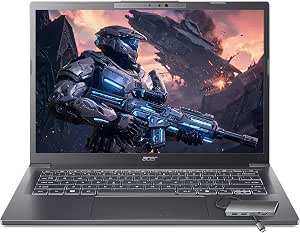 | Best for Memory-Heavy Mobile Work | Processor: Intel Core Ultra 7 258V, 8-core, up to 4.8GHz | NPU: Intel AI Boost, 47 TOPS | Graphics: Integrated Intel Arc 140V | VIEW LATEST PRICE | See Our Full Breakdown |
| Acer Nitro V 16S AI Gaming Laptop, Ryzen 7 260, RTX 5060, 16-inch WUXGA 180Hz Display, 32GB DDR5, 1TB SSD |  | Best for GPU-Heavy AI and Gaming | Processor: AMD Ryzen 7 260 | Graphics: NVIDIA GeForce RTX 5060 Laptop GPU | GPU AI performance: 572 AI TOPS | VIEW LATEST PRICE | See Our Full Breakdown |
| Acer Aspire 14 AI Copilot+ PC, 14-inch WUXGA Touchscreen, Intel Core Ultra 5 226V, 16GB LPDDR5X, 1TB SSD |  | Best for Everyday Copilot+ Use | Processor: Intel Core Ultra 5 226V | NPU performance: Up to 40 TOPS | Graphics: Integrated Intel Arc 130V | VIEW LATEST PRICE | See Our Full Breakdown |
| NIMO N158 15.6-Inch FHD Laptop, AMD Ryzen 7 8745HS, 32GB DDR5 RAM, 1TB SSD |  | Best for Upgrade-Friendly AI Work | Processor: AMD Ryzen 7 8745HS, 8 cores and 16 threads, up to 4.9GHz | Graphics: Integrated AMD Radeon 780M | Display: 15.6-inch Full HD, 1920 x 1080, anti-glare | VIEW LATEST PRICE | See Our Full Breakdown |
| HP OmniBook 5 16-inch AI Laptop, Snapdragon X, 16 GB RAM, 512 GB SSD, 2K OLED Display, Windows 11 Home |  | Best for Screen Quality and Battery Runtime | Processor: Snapdragon X X1-26-100, 8 cores, up to 2.97GHz | Graphics: Integrated Qualcomm Adreno GPU | Display: 16-inch OLED, 1920 x 1200, 300 nits | VIEW LATEST PRICE | See Our Full Breakdown |
| AI laptop | Display | Memory | Storage | Processor |
|---|---|---|---|---|
| Apple MacBook Air 13-inch with | 13.6-inch Liquid Retina | 16GB unified memory | 512GB SSD | — |
| HP Pavilion 17.3-inch Laptop w | 17.3-inch HD+ (1600 × 900), anti-glare, 250 nits | 16GB DDR5 | 512GB PCIe NVMe M.2 SSD | Intel Core Ultra 5 225U, up to 4.8GHz |
| HP OmniBook 7 17.3-inch FHD To | 17.3-inch FHD IPS touchscreen, 400 nits | 32GB LPDDR5 | 1TB SSD listed; 512GB, 1TB, or 2TB options described | Intel Core Ultra 7 258V |
| HP OmniBook 16 AI Laptop | 16-inch 1920 × 1200 IPS touchscreen | 32GB DDR5 | 1TB PCIe NVMe SSD | AMD Ryzen AI 7 445, 6 cores, up to 4.6GHz |
| HP 15.6-Inch Touchscreen Lapto | 15.6-inch FHD IPS touchscreen, 1920 × 1080, 60Hz | 16GB DDR5 SODIMM, 4800MHz; maximum listed capacity 16GB | 512GB PCIe M.2 SSD | Intel Core Ultra 7 155H, 16 cores, up to 4.8GHz |
| HP OmniBook 3 14-inch Next Gen | 14-inch OLED, 1920 x 1200, 300 nits | 16GB LPDDR5x-8448 | 256GB PCIe Gen4 NVMe M.2 SSD | Snapdragon X X1-26-100, 8 cores, up to 2.97 GHz |
| HP 17.3-inch Laptop with Intel | 17.3-inch HD+ antiglare, 1600 x 900, 250 nits | 32GB DDR5 | 1TB PCIe NVMe M.2 SSD | Intel Core Ultra 5 225U, 12 cores, 14 threads, up to 4.8 GHz |
| Apple MacBook Air 15-inch Lapt | 15.3-inch Liquid Retina | 16GB unified memory | 512GB SSD | Apple M5 chip |
| HP Pro Business Copilot AI Lap | 17.3-inch LCD touchscreen, 1600 x 900 | 32GB DDR5 | 1TB SSD | Intel Ultra 7 255U, 12 cores, 14 threads, up to 5.2 GHz |
| NIMO 17.3-Inch Laptop with AMD | 17.3-inch, 16:9; resolution not specified | 32GB DDR5-5600; upgradeable to 64GB via two SO-DIMM slots | 1TB SSD; two M.2 2280 PCIe 4.0 x4 slots | AMD Ryzen AI 9 HX 370, 12 cores and 24 threads |
| Acer Aspire 14 AI Laptop | 14-inch IPS WUXGA touchscreen, 1920 x 1200, 60Hz | 32GB LPDDR5X | 1TB PCIe NVMe SSD | Intel Core Ultra 7 258V, 8-core, up to 4.8GHz |
| Acer Nitro V 16S AI Gaming Lap | 16-inch WUXGA IPS, 1920 x 1200 | 32GB DDR5 5600MHz; stated maximum 32GB | 1TB PCIe Gen 4 SSD; 2 M.2 slots, 1 available | AMD Ryzen 7 260 |
| Acer Aspire 14 AI Copilot+ PC | 14-inch WUXGA IPS LED touchscreen, 1920 x 1200, 60Hz | 16GB LPDDR5X | 1TB Gen 4 SSD | Intel Core Ultra 5 226V |
| NIMO N158 15.6-Inch FHD Laptop | 15.6-inch Full HD, 1920 x 1080, anti-glare | 32GB DDR5 5600MHz, expandable to 64GB | 1TB PCIe 4.0 NVMe SSD, expandable to 4TB | AMD Ryzen 7 8745HS, 8 cores and 16 threads, up to 4.9GHz |
| HP OmniBook 5 16-inch AI Lapto | 16-inch OLED, 1920 x 1200, 300 nits | 16GB LPDDR5x-8448 | 512GB PCIe Gen 4 NVMe M.2 SSD | Snapdragon X X1-26-100, 8 cores, up to 2.97GHz |
More Details on Our Top Picks
Apple MacBook Air 13-inch with M5 chip, 16GB memory, 512GB SSD, and 12MP Center Stage camera
For buyers who want AI features in a laptop they can carry every day, the 13-inch MacBook Air pairs Apple’s M5 chip with a light 2.71-pound design and up to 18 hours of battery life. Its 16GB unified memory and 512GB SSD suit everyday productivity and supported on-device tasks, while the bright Liquid Retina display and Center Stage camera make it a polished choice for calls and travel. Compared with the larger HP OmniBook 16 AI, this Air is easier to pack and has a longer stated runtime, but offers less memory and a smaller screen. It also has only two Thunderbolt 4 ports, so users with several wired accessories may need a hub. This is a portability-led pick, not a workstation replacement.
Pros:- Light 2.71-pound design is well suited to commuting and travel
- Up to 18 hours of stated battery life supports long days away from an outlet
- M5 chip and 16GB unified memory provide a capable foundation for everyday AI-enabled tasks
- 12MP Center Stage camera and Wi-Fi 7 add useful video-call and wireless features
Cons:- 16GB memory is less than the 32GB offered by the HP OmniBook 16 AI and 17.3-inch HP OmniBook 7
- Two Thunderbolt 4 ports limit direct connections to wired accessories
- The 13.6-inch display gives less workspace than the larger HP laptops in this batch
Best for: Students, frequent travelers, and mobile professionals who prioritize long battery life, a light carry, and everyday AI-assisted work.
Not ideal for: People who need a large screen, 32GB of memory, or several built-in ports for intensive multitasking and peripherals.
- Chip:Apple M5
- Display:13.6-inch Liquid Retina
- Memory:16GB unified memory
- Storage:512GB SSD
- Camera:12MP Center Stage
- Battery life:Up to 18 hours
- Wireless:Wi-Fi 7, Bluetooth 6
- Weight:2.71 pounds
- Ports:Two Thunderbolt 4 ports, MagSafe charging port, headphone jack
Our verdict“Choose the MacBook Air if low carry weight and long battery life matter more than a large screen or 32GB memory.”
HP Pavilion 17.3-inch Laptop with Intel Core Ultra 5, 16GB RAM, and 512GB SSD
The HP Pavilion 17.3-inch makes the most sense for buyers who want a roomy desktop-replacement screen and familiar Windows features without stepping up to a higher-spec AI laptop. Its Core Ultra 5 225U includes an Intel AI Boost NPU rated up to 12 TOPS, but that is a more modest AI hardware proposition than the 50 TOPS NPU in the HP OmniBook 16 AI. The Pavilion’s 16GB DDR5 memory and 512GB SSD cover ordinary school, office, and web workloads; its numeric keypad, webcam shutter, and mix of USB-A, USB-C, and HDMI are practical extras. The main compromise is the 1600 × 900 display: it is larger than the screens on the other HP picks here, but less sharp and only 250 nits bright. I’d skip it for display-sensitive work.
Pros:- 17.3-inch anti-glare screen provides a broad workspace
- Core Ultra 5 processor includes an AI Boost NPU
- 16GB DDR5 memory and 512GB SSD suit everyday multitasking
- Webcam privacy shutter and USB-A, USB-C, and HDMI connections add practical convenience
Cons:- 1600 × 900 resolution is less detailed than the FHD and 1920 × 1200 screens on other HP picks
- 250-nit brightness may be limiting in bright rooms
- NPU performance is listed at up to 12 TOPS, below the 50 TOPS in the HP OmniBook 16 AI
Best for: Home-office users and students who want a large screen, numeric keypad, privacy shutter, and basic AI acceleration for everyday Windows tasks.
Not ideal for: Buyers who need a sharp, bright display for detailed work or want stronger NPU capability for demanding local AI features.
- Processor:Intel Core Ultra 5 225U, up to 4.8GHz
- AI acceleration:Intel AI Boost NPU, up to 12 TOPS
- Memory:16GB DDR5
- Storage:512GB PCIe NVMe M.2 SSD
- Display:17.3-inch HD+ (1600 × 900), anti-glare, 250 nits
- Graphics:Integrated Intel Graphics
- Camera:720p HD with temporal noise reduction and privacy shutter
- Wireless:Wi-Fi 6, Bluetooth 5.4
- Ports:2× USB-A, USB-C with Power Delivery and DisplayPort 1.4, HDMI 1.4b, combo audio jack
Our verdict“Pick the Pavilion for a large, practical Windows screen on everyday workloads, but not for demanding AI tasks or high-resolution viewing.”
HP OmniBook 7 17.3-inch FHD Touchscreen Laptop, Intel Core Ultra 7 258V, 32GB RAM, Up to 2TB SSD, Intel Arc 140V Graphics, Windows 11 Pro
The HP OmniBook 7 combines a substantial 17.3-inch FHD touchscreen with 32GB of memory, Windows 11 Pro, and an Intel Core Ultra 7 258V, making it better suited to heavier multitasking than the 16GB HP Pavilion. Its 400-nit panel is also a clear step up from the Pavilion’s 250-nit, 1600 × 900 screen, giving this model a more useful balance of workspace and visibility. Intel Arc 140V graphics offer more capability than basic integrated graphics, though shared memory means they are not a substitute for dedicated graphics in demanding creative or gaming work. I’d weigh the seller details carefully: the laptop is described as resealed for an SSD upgrade, and the listed capacity conflicts with several configuration options. Compared with the HP OmniBook 16 AI, it offers a bigger screen but weighs 5.2 pounds.
Pros:- 17.3-inch FHD IPS touchscreen offers more workspace than the HP OmniBook 16 AI
- 32GB LPDDR5 memory supports heavier multitasking than the 16GB HP Pavilion
- 400-nit brightness is higher than the Pavilion’s listed 250 nits
- Thunderbolt 4, HDMI 2.1, and a 5MP IR webcam support flexible desk and sign-in setups
Cons:- The laptop is described as resealed for an SSD upgrade, rather than untouched from the manufacturer
- Storage is listed as 1TB while the description also names 512GB, 1TB, and 2TB options
- At 5.2 pounds, it is less convenient to carry than the 2.71-pound MacBook Air
Best for: Windows Pro users who need a large, bright touchscreen, 32GB memory, and room for substantial multitasking at a desk.
Not ideal for: Buyers who need a light travel laptop, a dedicated GPU, or certainty about the exact SSD capacity and manufacturer condition.
- Processor:Intel Core Ultra 7 258V
- Display:17.3-inch FHD IPS touchscreen, 400 nits
- Memory:32GB LPDDR5
- Storage:1TB SSD listed; 512GB, 1TB, or 2TB options described
- Graphics:Intel Arc 140V integrated graphics with shared memory
- Operating system:Windows 11 Pro 64-bit
- Webcam:5MP IR
- Wireless:Wi-Fi 6E, Bluetooth 5.3
- Weight:5.2 pounds
Our verdict“Choose the OmniBook 7 for a bright, expansive touchscreen and 32GB memory, provided its resealed condition and exact SSD configuration suit you.”
HP OmniBook 16 AI Laptop, AMD Ryzen AI 7 445, 32GB RAM, 1TB SSD, 16-inch 2K Touchscreen
Among these five, the HP OmniBook 16 AI is my strongest all-round Windows choice because its 50 TOPS NPU, 32GB of DDR5 memory, and 1TB SSD make a more balanced package for AI-enabled workflows and sustained multitasking than the 12 TOPS NPU in the HP Pavilion. Its 16-inch, 1920 × 1200 touchscreen gives more vertical room than a standard FHD panel, while the 1080p IR camera with a manual privacy shutter suits frequent video calls. Compared with the 17.3-inch HP OmniBook 7, this model is more compact on paper and avoids that product’s resealed-upgrade and inconsistent SSD listing concerns; the OmniBook 7, however, has a larger 400-nit screen. The Radeon 840M is integrated graphics, not a dedicated GPU, and the 16-inch chassis is still less portable than the MacBook Air.
Pros:- 50 TOPS NPU provides stronger stated AI acceleration than the Pavilion’s 12 TOPS
- 32GB DDR5 memory and 1TB SSD offer useful capacity for multitasking and files
- 16-inch 1920 × 1200 touchscreen gives more vertical workspace than a standard FHD display
- 1080p IR camera with manual privacy shutter and HDMI 2.1 support work well for office setups
Cons:- 16-inch size is less convenient to carry than the MacBook Air
- Radeon 840M is integrated graphics, not a dedicated GPU
- Wireless connectivity is Wi-Fi 6 rather than the Wi-Fi 7 listed for the MacBook Air
Best for: Windows professionals and students who want a strong NPU, 32GB memory, a roomy touchscreen, and built-in privacy features for AI-assisted work.
Not ideal for: Frequent travelers prioritizing a very light laptop, or creators and gamers who need dedicated graphics for GPU-heavy work.
- Processor:AMD Ryzen AI 7 445, 6 cores, up to 4.6GHz
- NPU performance:50 TOPS
- Display:16-inch 1920 × 1200 IPS touchscreen
- Memory:32GB DDR5
- Storage:1TB PCIe NVMe SSD
- Graphics:AMD Radeon 840M
- Camera:1080p FHD IR with manual privacy shutter
- Operating system:Windows 11 Pro
- Wireless:Wi-Fi 6, Bluetooth 5.4
Our verdict“Choose the OmniBook 16 AI for a well-rounded Windows laptop with strong listed NPU performance, 32GB memory, and a useful touchscreen.”
HP 15.6-Inch Touchscreen Laptop with Intel Core Ultra 7 155H, 16GB DDR5 RAM, and 512GB SSD
The HP 15.6-inch touchscreen is a middle-ground Windows option: it pairs an Intel Core Ultra 7 155H with integrated Arc graphics, a Full HD touch display, and Thunderbolt 4, without the 32GB memory and 1TB storage found in the HP OmniBook 16 AI. That makes it more appropriate for general productivity, browsing, and light creative tasks than for memory-heavy AI workflows. The touchscreen and backlit numeric-keypad keyboard give it a flexible home or study setup, while HDMI and Thunderbolt 4 make external displays straightforward. Its 16GB memory is listed as the maximum, limiting headroom for future workloads; the 5.4-pound weight also makes it less travel-friendly than the MacBook Air. The product description gives no specific battery runtime, so buyers who need predictable all-day unplugged use should favor a model with a stated figure.
Pros:- Core Ultra 7 155H and integrated Intel Arc graphics provide a stronger general-purpose platform than the HP Pavilion’s Core Ultra 5
- 15.6-inch FHD IPS touchscreen supports touch-based navigation and everyday work
- Thunderbolt 4 with DisplayPort 2.1 and HDMI supports external displays
- Backlit keyboard includes a numeric keypad
Cons:- Maximum listed memory is 16GB, below the 32GB in both HP OmniBook models
- 512GB SSD offers less listed storage than the OmniBook 16 AI’s 1TB
- At 5.4 pounds, it is heavier than the MacBook Air, and no specific battery runtime is provided
Best for: Home users and students who want a Windows touchscreen, a capable Core Ultra processor, and straightforward external-display connections.
Not ideal for: AI power users who need 32GB memory or frequent travelers who need a light laptop with a stated long battery runtime.
- Processor:Intel Core Ultra 7 155H, 16 cores, up to 4.8GHz
- Display:15.6-inch FHD IPS touchscreen, 1920 × 1080, 60Hz
- Memory:16GB DDR5 SODIMM, 4800MHz; maximum listed capacity 16GB
- Storage:512GB PCIe M.2 SSD
- Graphics:Integrated Intel Arc Graphics
- Operating system:Windows 11 Home
- Ports:USB-C, USB-A, HDMI, Thunderbolt 4 with DisplayPort 2.1
- Keyboard:Backlit keyboard with numeric keypad
- Weight:5.4 pounds
Our verdict“Pick this HP for a responsive touchscreen Windows laptop with strong connectivity, but choose an OmniBook for more memory and AI headroom.”
HP OmniBook 3 14-inch Next Gen AI PC, 2K OLED Display, Snapdragon X X1-26-100, 16 GB RAM, 256 GB SSD, Windows 11 Home, Nouvelle Silver
The HP OmniBook 3 is a compact choice for buyers who want Copilot+ PC features and an OLED screen without moving to a larger laptop. Its 14-inch, 1920 x 1200 panel has a wide color range, making photos and video look richer than on the HP 17.3-inch Core Ultra 5, whose display prioritizes workspace over image detail. The Snapdragon X chip and 16GB of memory suit everyday productivity, while HP advertises up to 41 hours and 45 minutes of battery life; actual runtime will depend on how you use it. The main compromise is the 256GB SSD, which can fill quickly with media and work files. Memory is onboard, so buyers cannot upgrade it later. I’d choose this for portability and screen quality, not for large local projects.
Pros:- 14-inch OLED display with 1920 x 1200 resolution and 100% DCI-P3 color
- Snapdragon X processor and 16GB LPDDR5x memory for everyday multitasking
- 1080p FHD IR camera supports clearer calls and Windows sign-in
- Includes HDMI 2.1, two USB-C ports, and two USB-A ports
Cons:- 256GB SSD leaves limited room for large applications and media collections
- Onboard memory cannot be upgraded
- The advertised battery figure is a manufacturer claim, not a guarantee of real-world runtime
Best for: Students and mobile professionals who want a compact Copilot+ laptop with an OLED screen for documents, video, and everyday AI-assisted tasks.
Not ideal for: Buyers who keep large creative libraries or need upgradeable memory; the 256GB SSD is restrictive and the 16GB memory is onboard.
- Display:14-inch OLED, 1920 x 1200, 300 nits
- Processor:Snapdragon X X1-26-100, 8 cores, up to 2.97 GHz
- Memory:16GB LPDDR5x-8448
- Storage:256GB PCIe Gen4 NVMe M.2 SSD
- Graphics:Integrated Qualcomm Adreno GPU
- Operating system:Windows 11 Home
- Camera and wireless:1080p FHD IR camera; Qualcomm Wi-Fi 6E
- Ports:2 USB-A, 2 USB-C, HDMI 2.1, headphone/microphone combo
- Weight:3.1 pounds
Our verdict“Choose the OmniBook 3 if you want a portable Copilot+ PC with a vivid OLED screen and can work within 256GB of storage.”
HP 17.3-inch Laptop with Intel Core Ultra 5, 32GB RAM, and 1TB SSD
This HP puts screen area and roomy memory ahead of display sharpness. Its 17.3-inch panel gives spreadsheets, reference documents, and side-by-side windows plenty of space, while 32GB of RAM and a 1TB SSD leave more headroom for multitasking and files than the HP OmniBook 3. The Core Ultra 5 225U includes an Intel AI Boost NPU, but its listed 12 TOPS is a more modest AI specification than buyers seeking demanding on-device AI workloads may want. The tradeoff is especially clear on screen: 1600 x 900 resolution and 250-nit brightness are less crisp and potentially less comfortable in bright rooms than higher-resolution alternatives. I’d rank this as a practical desk-side machine, not a premium display pick. It also includes an expansion hub, useful for adding ports without buying one separately.
Pros:- 32GB DDR5 memory supports heavier multitasking than the 16GB HP OmniBook 3
- 1TB NVMe SSD provides generous local file capacity
- 17.3-inch screen offers room for documents and side-by-side windows
- Included hub adds USB-A, USB-C, card-reader, and Ethernet connections
Cons:- 1600 x 900 resolution is lower than Full HD and less detailed for text and images
- 250-nit brightness may be limiting in bright rooms
- The 12-TOPS NPU is modest for buyers prioritizing demanding on-device AI workloads
Best for: Home-office users and students who keep several applications open, store substantial files locally, and prefer a large screen for desk-based work.
Not ideal for: Frequent travelers and buyers who prioritize a sharp, bright display or higher-capacity AI processing; its size, HD+ panel, and 12-TOPS NPU are limiting.
- Display:17.3-inch HD+ antiglare, 1600 x 900, 250 nits
- Processor:Intel Core Ultra 5 225U, 12 cores, 14 threads, up to 4.8 GHz
- AI acceleration:Intel AI Boost NPU, 12 TOPS
- Memory:32GB DDR5
- Storage:1TB PCIe NVMe M.2 SSD
- Graphics:Integrated Intel Graphics
- Wireless:Wi-Fi 6 and Bluetooth 5.4
- Camera:720p HD camera with privacy shutter and temporal noise reduction
- Operating system:Windows 11 Home
Our verdict“Pick this HP for a large work surface, ample memory, and storage, but look elsewhere if display quality or portable AI capability leads your list.”
Apple MacBook Air 15-inch Laptop with M5 Chip, 16GB Memory, 512GB SSD, Midnight
The 15-inch MacBook Air suits buyers who want a large, high-resolution screen in a laptop that remains relatively light. Its M5 chip brings Apple Intelligence features to macOS, while the 15.3-inch Liquid Retina display, six-speaker system, and 12MP Center Stage camera make it a stronger fit for video calls and media than the lower-resolution HP 17.3-inch Core Ultra 5. It also supports up to two external displays, useful for a home-office setup. The platform difference matters: this is the natural choice for people already using Apple services, but Windows users should compare app compatibility before switching. At 16GB unified memory and 512GB storage, it offers less capacity than the 32GB/1TB HP options here. Two Thunderbolt 4 ports also mean peripherals may call for a hub.
Pros:- 15.3-inch Liquid Retina display supports one billion colors
- M5 chip supports Apple Intelligence features
- 12MP Center Stage camera and six-speaker audio system suit calls and media
- Supports up to two external displays and offers Wi-Fi 7
Cons:- Two Thunderbolt 4 ports may require a hub for multiple peripherals
- 16GB unified memory and 512GB SSD offer less capacity than the 32GB/1TB HP and NIMO options
- Some features depend on compatible Apple devices or services
Best for: Mac users, students, and mobile professionals who want a large Retina display, Apple Intelligence features, and a lightweight laptop for everyday work.
Not ideal for: Windows-dependent workplaces, buyers who need plentiful built-in ports, or people who want 32GB memory and 1TB storage without relying on external drives.
- Display:15.3-inch Liquid Retina
- Processor:Apple M5 chip
- Memory:16GB unified memory
- Storage:512GB SSD
- Camera:12MP Center Stage
- Wireless:Wi-Fi 7 and Bluetooth 6
- Battery life:Up to 18 hours
- Ports:Two Thunderbolt 4 ports, MagSafe charging port, headphone jack
- Weight:3.32 pounds
Our verdict“Choose the MacBook Air if you want a refined macOS AI laptop with a large display and already rely on Apple apps or services.”
HP Pro Business Copilot AI Laptop PC, 17.3-inch Touchscreen, Intel Ultra 7 255U, 32GB DDR5, 1TB SSD, Wi-Fi 6, Webcam, Backlit Keyboard, Fingerprint Reader, Bundle with PCO Laptop Cooler
The HP Pro Business Copilot AI Laptop is the Windows-focused large-screen pick for buyers who need Windows 11 Pro and want touch input for office tasks. Its Core Ultra 7 255U, 32GB of DDR5, and 1TB SSD give it more memory and storage than the HP OmniBook 3, while the 17.3-inch touchscreen makes direct interaction with documents and presentations convenient. The bundle includes a laptop cooler, and a fingerprint reader supports quick sign-in. That business-ready setup comes with practical compromises: the screen is only 1600 x 900, and the listed port selection is leaner than the NIMO’s. At 4.62 pounds, it is also better suited to a desk than frequent commuting. Buyers should note that the product information describes a non-backlit keyboard, despite the title mentioning a backlit keyboard.
Pros:- Windows 11 Pro suits business workflows that need Pro edition features
- 32GB DDR5 memory and 1TB SSD support multitasking and local file storage
- 17.3-inch touchscreen offers direct interaction with documents
- Fingerprint reader and included laptop cooler add useful work-focused extras
Cons:- 1600 x 900 screen resolution is below Full HD
- At 4.62 pounds, it is less convenient to carry regularly
- Product details conflict on keyboard backlighting, and the listed port selection is limited
Best for: Small-business users who need Windows 11 Pro, touchscreen navigation, fingerprint sign-in, and a large screen for mostly desk-based work.
Not ideal for: Frequent travelers, buyers who need a high-resolution display or a backlit keyboard, and users who connect many peripherals without a dock.
- Display:17.3-inch LCD touchscreen, 1600 x 900
- Processor:Intel Ultra 7 255U, 12 cores, 14 threads, up to 5.2 GHz
- Memory:32GB DDR5
- Storage:1TB SSD
- Graphics:Intel Integrated Graphics
- Operating system:Windows 11 Pro
- Ports:1 USB-C 10Gbps, 2 USB-A 5Gbps, HDMI 1.4b, headphone/mic combo, AC smart pin
- Weight:4.62 pounds
- Bundle:Includes PCO Laptop Cooler
Our verdict“Choose this HP for Windows 11 Pro, touchscreen use, and a generous memory-and-storage configuration at a desk, but verify the keyboard details before ordering.”
NIMO 17.3-Inch Laptop with AMD Ryzen AI 9 HX 370, 32GB DDR5 RAM, and 1TB SSD
The NIMO stands apart from the other large-screen laptops here by pairing an AMD Ryzen AI 9 HX 370 with unusually flexible upgrade options. Its 12-core, 24-thread processor and Radeon 890M integrated graphics make it the performance-oriented choice among these 17.3-inch models, while two memory slots allow expansion to 64GB and two M.2 slots provide room for additional SSD storage. That gives it a longer upgrade path than the HP 17.3-inch Core Ultra 5, whose listing specifies 32GB and 1TB without the same expansion details. There are caveats: the supplied information does not state the display resolution, so I would not pick it on screen sharpness alone, and its 58Wh battery may need charging during extended sessions. Integrated graphics also remain a limit for demanding gaming or rendering.
Pros:- Ryzen AI 9 HX 370 combines 12 cores and 24 threads
- Two SO-DIMM slots support memory expansion up to 64GB
- Two M.2 PCIe 4.0 x4 slots allow storage expansion
- USB4, HDMI, three USB-A ports, and an SD card reader provide versatile connectivity
Cons:- 17.3-inch form factor is less convenient to carry
- 58Wh battery may require charging during extended use
- Integrated Radeon graphics are not a replacement for a dedicated GPU, and display resolution is not specified
Best for: Power users who want a large laptop with a high-core-count AMD AI processor, upgradeable memory and storage, and a broad selection of ports.
Not ideal for: Frequent travelers, buyers who need verified long battery life or a specified high-resolution display, and users whose graphics work requires a dedicated GPU.
- Display:17.3-inch, 16:9; resolution not specified
- Processor:AMD Ryzen AI 9 HX 370, 12 cores and 24 threads
- Graphics:AMD Radeon 890M integrated graphics
- Memory:32GB DDR5-5600; upgradeable to 64GB via two SO-DIMM slots
- Storage:1TB SSD; two M.2 2280 PCIe 4.0 x4 slots
- Battery:58Wh lithium-polymer
- Charging:100W PD adapter; USB4 and USB-C ports support PD charging
- Ports:USB4, USB-C, HDMI, 3 USB-A, SD card reader, 3.5mm combo audio jack
- Security:Fingerprint reader
Our verdict“Choose the NIMO if you want a powerful, upgradeable AI laptop for a desk, but skip it if portability, long unplugged sessions, or confirmed screen resolution matters most.”
Acer Aspire 14 AI Laptop, 14-inch Touchscreen, Intel Core Ultra 7 258V, 32GB RAM, 1TB SSD
The Acer Aspire 14 AI is the stronger compact choice for buyers who keep many work apps open or handle larger files: 32GB of memory and a 1TB SSD give it more headroom than the 16GB Acer Aspire 14 AI Copilot+ PC. Its Core Ultra 7 258V also pairs with a 47-TOPS NPU, making it a capable fit for supported local AI features as well as everyday productivity. At 3.09 pounds, it remains practical to carry, and the touchscreen plus included USB hub make a mobile setup easier to connect. The tradeoffs are a 720p webcam and a 60Hz screen, both less appealing for frequent video calls or fluid motion. Its integrated graphics also make it a weaker pick than the Acer Nitro V 16S AI for GPU-heavy creative work and gaming.
Pros:- 32GB LPDDR5X memory supports heavier multitasking than the 16GB Acer Aspire 14 AI Copilot+ PC.
- 1TB NVMe storage leaves room for project files and applications.
- 47-TOPS NPU supports compatible on-device AI workloads.
- Lightweight touchscreen design includes an 8-in-1 USB hub.
Cons:- 720p webcam offers less detail than the 1080p cameras on some alternatives.
- 60Hz display is less fluid than the Acer Nitro V 16S AI’s 180Hz panel.
- Integrated graphics are not suited to demanding GPU workloads like the Nitro V’s RTX 5060.
Best for: Mobile professionals who want a compact touchscreen laptop with 32GB of memory, substantial storage, and support for local AI features.
Not ideal for: Frequent video-call users who want a sharper webcam, or gamers and GPU-focused creators who need discrete graphics and a faster display.
- Processor:Intel Core Ultra 7 258V, 8-core, up to 4.8GHz
- NPU:Intel AI Boost, 47 TOPS
- Graphics:Integrated Intel Arc 140V
- Memory:32GB LPDDR5X
- Storage:1TB PCIe NVMe SSD
- Display:14-inch IPS WUXGA touchscreen, 1920 x 1200, 60Hz
- Weight:3.09 lbs
- Ports:2 USB 4 Gen 2 Type-C, 2 USB 3.2, HDMI 1.4, audio port
Our verdict“Choose this Aspire if you want a portable 14-inch AI laptop with more memory and storage than its Core Ultra 5 sibling, and can accept a basic webcam and integrated graphics.”
Acer Nitro V 16S AI Gaming Laptop, Ryzen 7 260, RTX 5060, 16-inch WUXGA 180Hz Display, 32GB DDR5, 1TB SSD
For buyers whose AI work overlaps with gaming, 3D tools, or GPU-accelerated creation, the Acer Nitro V 16S AI is the clear performance-focused option here. Its RTX 5060 Laptop GPU is rated at 572 AI TOPS, giving supported GPU workloads far more graphics acceleration than the integrated Intel Arc in either Acer Aspire 14 AI. The 180Hz display also makes fast games look smoother, while 100% sRGB coverage is useful for color-conscious work. The costs are practical rather than subtle: this is a 16-inch machine, and the provided data does not give a weight or battery-life figure for judging portability. Its 32GB memory is already the stated maximum, so it offers less upgrade headroom than the expandable NIMO N158. Choose it for graphics throughput, not future memory expansion.
Pros:- RTX 5060 provides discrete graphics and a stated 572 AI TOPS for GPU-supported tasks.
- 180Hz display delivers smoother motion than the 60Hz screens on the Acer Aspire 14 AI models.
- 100% sRGB coverage suits color-sensitive gaming and creative work.
- 32GB DDR5 memory and a 1TB Gen 4 SSD provide a capable starting configuration.
Cons:- Memory is already at the stated 32GB maximum.
- Its 16-inch format is less convenient to carry than the 14-inch Acer Aspire models.
- The listed specs do not provide battery-life or weight figures for assessing mobile use.
Best for: Gamers and creators who want discrete graphics for supported AI acceleration, ray tracing, and demanding visual workloads.
Not ideal for: Travel-heavy buyers seeking a compact laptop, or users who want to expand memory beyond 32GB later.
- Processor:AMD Ryzen 7 260
- Graphics:NVIDIA GeForce RTX 5060 Laptop GPU
- GPU AI performance:572 AI TOPS
- Display:16-inch WUXGA IPS, 1920 x 1200
- Refresh rate:180Hz
- Color coverage:100% sRGB
- Memory:32GB DDR5 5600MHz; stated maximum 32GB
- Storage:1TB PCIe Gen 4 SSD; 2 M.2 slots, 1 available
Our verdict“Pick the Nitro V 16S AI if discrete GPU power and a high-refresh screen matter more than compact size or memory upgrades.”
Acer Aspire 14 AI Copilot+ PC, 14-inch WUXGA Touchscreen, Intel Core Ultra 5 226V, 16GB LPDDR5X, 1TB SSD
This Aspire is the more approachable compact pick for buyers who want a Copilot+ PC for everyday productivity, video calls, and light creative tasks. Its 40-TOPS NPU supports features such as Cocreator and Live Captions, while the 1080p IR webcam is a meaningful upgrade over the 720p camera on the Core Ultra 7 Acer Aspire 14 AI. The aluminum chassis, 180-degree hinge, and three-pound weight suit desk-to-desk use, and its 1TB SSD matches the storage in that higher-memory sibling. The compromise is 16GB of memory and integrated Arc 130V graphics, which leave less room for heavy multitasking and demanding GPU work than the Aspire Ultra 7 or Acer Nitro V 16S AI. Treat the claimed 22-hour battery life as a test-condition figure, not a guarantee for every workload.
Pros:- 40-TOPS NPU supports compatible Copilot+ and on-device AI features.
- 1080p FHD IR webcam offers a clearer video-call setup than the 720p camera on the Aspire Ultra 7 model.
- Aluminum chassis, 180-degree hinge, and three-pound weight suit mobile work.
- 1TB Gen 4 SSD provides more storage than the 512GB HP OmniBook 5.
Cons:- 16GB memory is half the capacity of the Acer Aspire 14 AI with Core Ultra 7.
- Integrated Arc 130V graphics are less suited to demanding GPU work than the Nitro V’s RTX 5060.
- The up-to-22-hour battery claim is based on specified video playback conditions.
Best for: Students and office users who want a portable touchscreen Copilot+ laptop with a sharper webcam and ample file storage.
Not ideal for: Power users who routinely run memory-intensive apps, or creators and gamers who need discrete graphics.
- Processor:Intel Core Ultra 5 226V
- NPU performance:Up to 40 TOPS
- Graphics:Integrated Intel Arc 130V
- Memory:16GB LPDDR5X
- Storage:1TB Gen 4 SSD
- Display:14-inch WUXGA IPS LED touchscreen, 1920 x 1200, 60Hz
- Webcam:1080p FHD IR
- Weight:3 pounds
- Battery:65Wh; rated up to 22 hours under specified video playback test conditions
Our verdict“Choose this model for portable Copilot+ features and a better webcam, but step up to the Core Ultra 7 Aspire if you need 32GB of memory.”
NIMO N158 15.6-Inch FHD Laptop, AMD Ryzen 7 8745HS, 32GB DDR5 RAM, 1TB SSD
The NIMO N158 earns its place as the upgrade-minded alternative: its 32GB of DDR5 memory can expand to 64GB, and its SSD capacity can grow beyond the included 1TB. That flexibility distinguishes it from the Acer Nitro V 16S AI, whose stated memory ceiling is already 32GB, and gives long-term owners more room to adapt their setup. The Ryzen 7 8745HS and integrated Radeon 780M suit general productivity and moderate graphics tasks, but this is not a substitute for the Nitro’s discrete RTX 5060 when AI work depends on substantial GPU acceleration. A broad port selection, including USB4, HDMI 2.1, and a Micro SD reader, can reduce adapter needs. Its 15.6-inch FHD display is functional, but the supplied specs do not claim the color coverage or high refresh rate of the Nitro.
Pros:- Memory is expandable from 32GB to 64GB, unlike the Nitro V’s stated 32GB ceiling.
- 1TB PCIe 4.0 SSD can be expanded up to 4TB.
- USB4, HDMI 2.1, three USB-A ports, and a Micro SD reader offer flexible connections.
- 75Wh battery, backlit keyboard, and touchpad fingerprint reader add practical everyday features.
Cons:- Integrated Radeon 780M graphics lack the discrete GPU acceleration of the Acer Nitro V 16S AI.
- FHD resolution and no stated high refresh rate or color coverage make the screen less compelling for visual work.
- The provided specs do not include an NPU performance rating.
Best for: Budget-conscious power users who want generous memory and storage now, with the option to upgrade both as their workload grows.
Not ideal for: AI developers or gamers who need a discrete GPU, or display-focused creators who require documented wide color coverage and a high refresh rate.
- Processor:AMD Ryzen 7 8745HS, 8 cores and 16 threads, up to 4.9GHz
- Graphics:Integrated AMD Radeon 780M
- Display:15.6-inch Full HD, 1920 x 1080, anti-glare
- Memory:32GB DDR5 5600MHz, expandable to 64GB
- Storage:1TB PCIe 4.0 NVMe SSD, expandable to 4TB
- Battery:75Wh lithium-polymer
- Wireless:Wi-Fi 6E and Bluetooth 5.2
- Ports:USB4, USB-C 3.2 Gen 2, HDMI 2.1, 3 USB-A, Micro SD reader, 3.5mm audio jack
Our verdict“Choose the NIMO N158 if upgrade options and a wide selection of ports matter more than discrete graphics or a higher-spec display.”
HP OmniBook 5 16-inch AI Laptop, Snapdragon X, 16 GB RAM, 512 GB SSD, 2K OLED Display, Windows 11 Home
The HP OmniBook 5 is the best fit here for buyers who prioritize a rich display and long stated runtime over maximum storage or graphics power. Its 16-inch OLED panel offers the contrast advantage that the IPS screens on the Acer Aspire 14 models and NIMO N158 do not, while the Snapdragon X configuration lists up to 34 hours and 45 minutes of battery life under its stated conditions. That makes it a compelling choice for viewing, writing, and travel-focused productivity. The 16GB of onboard memory cannot be expanded, and its 512GB SSD is smaller than the 1TB drives in the Acer and NIMO options. Integrated Adreno graphics also put it behind the Acer Nitro V 16S AI for GPU-heavy work. The 3.5-pound weight is reasonable for a 16-inch laptop, but not especially light.
Pros:- 16-inch OLED display offers stronger contrast than the IPS panels on the Acer Aspire and NIMO models.
- Battery life is rated up to 34 hours and 45 minutes under stated conditions.
- 1080p FHD IR camera includes a privacy shutter.
- Fast charging is rated to reach 50% in approximately 30 minutes.
Cons:- 16GB of onboard memory cannot be upgraded.
- 512GB SSD is smaller than the 1TB drives in the Acer Aspire and NIMO N158.
- Integrated Adreno graphics are less suited to GPU-heavy work than the Acer Nitro V’s RTX 5060.
Best for: Frequent travelers and media-focused users who value an OLED screen, long stated battery runtime, and a built-in privacy-shutter camera.
Not ideal for: People who need expandable memory, more than 512GB of included storage, or discrete graphics for gaming and GPU-intensive AI tasks.
- Processor:Snapdragon X X1-26-100, 8 cores, up to 2.97GHz
- Graphics:Integrated Qualcomm Adreno GPU
- Display:16-inch OLED, 1920 x 1200, 300 nits
- Memory:16GB LPDDR5x-8448
- Storage:512GB PCIe Gen 4 NVMe M.2 SSD
- Battery life:Rated up to 34 hours and 45 minutes
- Camera:1080p FHD IR camera with privacy shutter
- Weight:3.5 pounds
- Ports:2 USB-C, 1 USB-A, 1 headphone/microphone combo
Our verdict“Pick the OmniBook 5 if OLED contrast and long stated runtime matter most, and you can work within its fixed 16GB memory and 512GB storage.”

How We Picked
I compared these 15 laptops by how well their hardware and design fit the tasks buyers actually bring to an AI-capable computer: office work, video calls, multitasking, creative applications, local AI features, and gaming. I weighed processor class, memory, storage, screen size and type, graphics capability, portability, and the operating system. AI branding alone did not earn a higher place; practical capability and fit mattered more.
The ranking favors versatile options that make sense for a broad range of everyday buyers, then places more specialized laptops according to their strengths. That puts a compact all-rounder ahead of large-screen models for general use, while dedicated graphics earn the gaming laptop a distinct role rather than making it the default recommendation. I also account for tradeoffs: buyers should not assume every advertised AI feature runs locally, that every configuration has the same memory or storage, or that a larger screen is automatically better for their routine.
Factors to Consider When Choosing Best AI Laptops
I’d choose an AI laptop by starting with the work it needs to do, then checking whether the configuration supports that work over time. These factors can help prevent paying for capability you will not use—or choosing a thin, attractive model that runs out of memory or storage too soon.
Match the AI hardware to your actual software
An AI label can refer to different things: a processor with an NPU, software features that call on cloud services, or a system designed to run some workloads locally. Those are not interchangeable. Before buying, check which AI tools you plan to use and whether they require a particular operating system, processor family, or amount of memory. A strong NPU may help supported tasks run efficiently, but it does not replace a capable CPU or GPU for every application. If your work mostly involves documents, meetings, and web apps, prioritize general responsiveness and battery life over AI specifications you may not use. For local image generation, large models, or GPU-heavy creation, check application requirements carefully rather than relying on the laptop’s AI branding.
Choose memory and storage for the life of the laptop
Memory is often fixed in thin laptops, so a configuration that feels adequate today may limit heavy multitasking later. Consider how many browser tabs, communication apps, and creative tools you keep open at once; 32GB gives demanding workloads more headroom than 16GB, while lighter everyday use may not need it. Storage capacity is a separate decision: the 256GB option in this roundup is more restrictive for people who keep photos, videos, or project files locally. Cloud storage can help, but it does not remove download limits, offline needs, or the inconvenience of managing space. Check whether the laptop allows upgrades before treating a smaller configuration as a temporary compromise. I’d put money toward memory or storage before a bundled accessory if the base configuration is already a constraint.
Balance screen size against portability
A 17.3-inch screen can make side-by-side documents and spreadsheets easier to manage, but the larger chassis takes up more desk and bag space. Fourteen-inch models are better suited to frequent travel, though a compact display can feel cramped during long sessions without an external monitor. A 16-inch model often lands between those extremes, but the best fit depends on how often you move between locations. Touchscreens add convenient direct interaction, yet they do not improve every workflow and can be unnecessary if you mainly type and use a mouse. OLED can provide a more vivid viewing experience, while resolution and panel size affect how comfortable text and detailed work feel. Think about your usual workspace and carrying routine, not just the display specification.
Treat battery life and performance as a workload tradeoff
Efficient processors can suit travel and everyday tasks, but battery results vary with brightness, video calls, background apps, and the workload being run. A powerful gaming laptop with dedicated graphics is built for heavier visual work, not the same carry-and-charge routine as a thin laptop. Look for battery information from testing with workloads similar to yours, rather than relying only on manufacturer estimates. Also check whether the laptop’s performance changes when it is unplugged; some demanding tasks may run best while connected to power. If you travel often, weight, charger size, and available ports matter alongside battery claims. If your laptop mostly stays at a desk, a larger or more powerful system may be a better trade than maximizing mobility.
Pick an operating system before comparing processors
Moving between macOS and Windows affects application compatibility, file workflows, accessories, and how the laptop fits with devices you already own. Buyers tied to specific business tools, games, or specialist software should check that those applications run properly on the exact processor and operating system under consideration. Windows models in this roundup span Intel, AMD, and Snapdragon platforms, so Windows alone does not guarantee identical compatibility or performance. MacBook Air models make the most sense for someone already comfortable with Apple’s software and ecosystem. If you share files or work with a team, confirm that required apps, peripherals, and collaboration tools behave as expected before choosing a platform. This check can matter more than a small difference between processor names.
Pay extra for a capability you will use regularly
A higher-tier processor or dedicated graphics can be worthwhile when it shortens regular creative, technical, or gaming workloads. It is less compelling when the laptop will mainly handle email, streaming, and documents. A touchscreen, OLED panel, extra memory, and larger SSD each solve different problems, so avoid treating them as a single premium package. Compare the full configuration: a strong processor paired with limited storage may be a poor fit for a large media library, while ample RAM matters less if your applications are lightweight. Also check warranty terms, repair options, port selection, and keyboard layout, since those affect daily ownership after the initial purchase. Spend on the limitation you are most likely to notice, not the spec with the biggest number.
Frequently Asked Questions
Do I need a dedicated graphics card in an AI laptop?
Most people who use office software, video calls, and common AI features do not need dedicated graphics. Integrated graphics are a sensible fit for general work and can help keep a laptop lighter and simpler to carry. A dedicated GPU becomes more relevant for modern games, 3D work, and applications that specifically benefit from GPU acceleration. Check the requirements for the software you use, because an AI processor or NPU does not automatically replace a graphics card. In this roundup, the Acer Nitro V 16S AI is the clearest fit when dedicated graphics are a priority.
Should I choose 16GB or 32GB of memory?
For everyday browsing, documents, streaming, and video meetings, 16GB can be sufficient for many buyers. I’d favor 32GB if you routinely run several demanding applications, edit large creative projects, or want more room for future workloads. Memory may not be upgradeable in thin laptops, so the configuration you buy could be the one you keep. Consider your real multitasking habits rather than assuming that an AI label requires the largest memory option. If you are unsure, checking the requirements of your main applications is more useful than choosing by processor branding alone.
Is a Snapdragon-based laptop a safe choice for Windows software?
It can be a good choice, but compatibility deserves a check before purchase. Many common Windows apps are available, yet specialist programs, older utilities, or device drivers may behave differently on an ARM-based system than on an Intel or AMD laptop. Confirm that the exact applications and peripherals you depend on are supported on the Snapdragon configuration. Also check how the software handles any emulation layer if a native version is unavailable. If compatibility is central to work or study, choosing a platform already validated by your organization may reduce uncertainty.
Is a 256GB SSD enough for an AI laptop?
It can work if most files live in cloud storage and you mainly use lightweight applications. Local AI models, games, video projects, and large photo libraries can use storage quickly, leaving less room for updates and new files. A small drive may also mean more frequent file management or reliance on external storage. Think about what needs to be available offline, especially if you travel or work without reliable internet. If you expect to keep sizable projects on the laptop, choosing more internal storage from the start is the easier option.
Should I buy a gaming laptop if I want to run AI workloads locally?
A gaming laptop with a dedicated GPU may suit local workloads that can use that GPU, but the software’s hardware requirements should guide the decision. Some AI tasks benefit more from an NPU or CPU, and others may rely on cloud services rather than local hardware. Gaming models are also typically a less convenient fit for people who prioritize low weight, quiet operation, or long unplugged sessions. Check application support, graphics memory needs, and the laptop’s cooling design before choosing one for local AI work. If gaming or GPU-heavy creation is not part of your routine, a thinner general-purpose model may be a better match.
Conclusion
For the broadest mix of everyday capability and portability, I’d choose the Apple MacBook Air 13-inch with M5 as the best overall option, provided macOS fits your workflow. My best value direction is a configuration with enough memory and storage for the tasks you actually do, rather than paying for a larger screen or premium feature you will rarely use; the Acer Aspire 14 AI Copilot+ PC is a reasonable starting point for buyers seeking a compact Windows laptop. For a best premium choice, the HP OmniBook 7 17.3-inch pairs 32GB RAM with a large touchscreen for buyers who want a roomy Windows workspace, while the 15-inch MacBook Air suits those who want a larger Apple display. Beginners who need a straightforward daily computer should compare the 13-inch MacBook Air with the more compact Acer Aspire models and choose by operating system and software compatibility. For specific needs, pick the Acer Nitro V 16S AI for gaming and GPU work, the HP OmniBook 3 14-inch for a compact OLED Windows option, or a 17.3-inch HP or NIMO model when screen space matters more than easy carrying. Match the laptop to your routine first, then choose the AI and performance features that support it.