This checklist is for people looking to make everyday tasks simpler with tech, from conversations and note-taking to presentations and keeping track of belongings. It covers a mix of dedicated gadgets and one pick whose listed name suggests a different kind of device, so check the product details before buying.

Get the latest gadgets delivered free with Prime
- Fast, free delivery on millions of items
- Prime Video, Amazon Music and more included
- Member-only deals all year
The sections follow the six requested slots: translation earbuds, voice recording, portable projection, e-ink writing, USB-C hubs, and item tracking. Each one highlights what the category can help with, what to check for, and how the named pick fits the slot based on its product name.
Use the checklist to start with the routine you want to improve, then confirm compatibility and fit against your own devices and space. Treat product names as a starting point, and verify specific features, included accessories, and supported connections in the listing before you decide.
Smart Translation Earbuds
Translation earbuds can be useful when you want hands-free support during a conversation or while moving through a new setting. This slot has no named product pick, so use it to define what you need before comparing models: which languages matter, whether translation happens on the earbuds or through a companion device, and whether the experience suits one-on-one conversation or listening to spoken content.
A common buying mistake is assuming every product marketed for translation supports the same languages, works offline, or translates in real time. Check the exact language list and how the feature is activated. Also confirm what phone, app, and internet connection are required. If the earbuds are intended for regular listening too, consider their fit, control layout, and whether you can wear them comfortably for the length of a typical conversation.
Fit affects both comfort and how well earbuds stay in place. Check the available ear tip sizes and return terms, and consider whether you need a design that stays secure while walking. For shared conversations, look for clear guidance on who wears or uses each device and how turns are handled. Compare the setup steps with your routine before choosing.
What to look for:
- The languages and dialects explicitly supported
- Whether translation requires a phone, app, or internet connection
- How conversation mode works and who wears the earbuds
- Ear tip sizes and comfort for extended use
- Controls and setup steps you can manage easily
Digital Voice Recorders
The Plaud Note Pro AI Voice Recorder Combo is the listed pick for recording speech and supporting note-taking workflows. A recorder can be handy when you need to capture a meeting, interview, lecture, or personal reminder without relying on handwritten notes throughout. Before buying, check the listing to understand what “AI” features are included and whether they require an account, app, or ongoing connection.
One common mistake is treating recording, transcription, and summarization as interchangeable features. Verify which tasks the device performs, which languages it handles, and whether recordings can be exported in a format you use. Check storage capacity, battery details, microphone pickup guidance, and any limits on recording duration. If you plan to record other people, make sure your use follows applicable consent rules and workplace or school policies.
Think about how you will carry and operate the recorder. Confirm the combo contents, dimensions, charging method, and compatibility with your phone or computer. For interviews or group settings, look for guidance on microphone placement and supported accessories. A device that is easy to start, label, and retrieve recordings from is more likely to fit a busy routine than one whose workflow adds extra steps.
What to look for:
- What is included in the combo and how it charges
- Which AI functions are available and their requirements
- Supported languages, export formats, and transcription workflow
- Storage capacity, battery details, and recording limits
- Microphone placement guidance for your usual setting
Plaud Note Pro AI Voice Recorder Combo

This ultra-slim AI voice recorder combo features four microphones to capture in-person conversations and phone calls from up to 5 meters away. It includes two Plaud Note Pro devices, a free starter plan with 300 transcription minutes per month, and integrates with tools like Slack and Notion to turn recordings into structured summaries and emails.
Pros:
- Ultra-slim and lightweight design (2.99 mm, 30 g) makes it highly portable
- Comprehensive AI features including transcription, summarization, and integration with productivity tools like Slack and Notion
- Includes two devices and a free starter plan with 300 transcription minutes per month
- Strong privacy and security compliance (SOC 2, HIPAA, GDPR)
Cons:
- Advanced transcription features require upgrading to paid Pro or Unlimited plans for heavy usage
- Requires smartphone or computer connectivity for full functionality and app control
Best for: People who want a dedicated recorder for spoken notes
Not ideal for: Anyone needing features the listing does not confirm
Bottom line: Check the recording, transcription, export, and setup details before making this your daily recorder.
Portable Projectors
The listed pick is Portable Smart Projector with Google TV, 4K Support, Dolby, WiFi, Blue. Its name points to projection with Google TV, 4K support, Dolby, and Wi-Fi, but it does not specify the exact model or all supported formats. A portable projector may suit flexible viewing at home or away, provided its setup and connections work for the room and content you have in mind.
A frequent buying mistake is reading “4K support” as a guarantee of native 4K resolution, or assuming a smart TV platform includes every service you use. Verify the resolution, supported input formats, available apps, and any account or network requirements. Check the product listing for brightness information, audio details, and the throw distance needed to create an image of your preferred size. Room lighting and wall or screen placement can affect the viewing experience.
Portability also depends on more than the word “portable.” Confirm the projector’s size, power requirements, included cables, and whether it has a built-in battery or needs an outlet. Make sure its available inputs work with your laptop, streaming device, or game console. Before choosing, measure the space where you expect to use it and compare that with the manufacturer’s placement guidance.
What to look for:
- Exact model and native resolution versus supported input
- Brightness details and recommended room conditions
- Google TV apps, account needs, and Wi-Fi requirements
- Throw distance and image size for your available space
- Power source, dimensions, ports, and included accessories
Portable Smart Projector with Google TV, 4K Support, Dolby, WiFi, Bluetooth, HDR

This compact smart projector features Android 14.0 with access to over 10,000 apps, native 1080P resolution with 4K decoding, HDR10 support, and AI auto-setup for focus and keystone correction. It offers versatile connectivity options, a built-in rotatable stand, and is suitable for indoor and outdoor entertainment in small spaces.
Pros:
- High-quality 4K decoding with HDR10 for vibrant visuals
- AI auto-setup ensures quick, perfect image alignment
- Compact, lightweight design for portability and outdoor use
- Versatile connectivity including WiFi 6, Bluetooth 5.3, HDMI, and USB
Cons:
- Image quality may soften at larger distances
- Requires proper placement for optimal clarity
- Limited internal storage for apps and media
Best for: People seeking a projector for more than one viewing space
Not ideal for: Buyers who need confirmed specifications absent from the listing
Bottom line: Verify resolution, brightness, placement, and power needs for your intended room.
E-Ink Writing Tablets
The listed pick is reMarkable Paper Pro with Marker Plus and Black Leather Book Folio 11. Its name identifies a writing tablet bundle with a Marker Plus and a black leather book folio. For a routine centered on handwriting, annotations, or keeping notes together, check the product details to confirm the bundle contents and how the tablet fits your preferred way of working.
A common mistake is expecting a writing tablet to behave like a general-purpose tablet or to support every document workflow. Verify the supported file types, how documents move on and off the device, and whether syncing or other services require an account or connection. Check whether the included marker needs charging or replacement parts, and review the folio’s fit for the exact device version. The product name includes “11,” but confirm what that number refers to before comparing dimensions.
Writing comfort depends on the device size, the way you hold or prop it, and whether the included folio suits your use. Consider where you will take notes and whether you need to write while standing, at a desk, or on your lap. Look for details on handwriting tools, organization, search, and export so your notes remain easy to find and share. Confirm the bundle’s exact contents before checkout.
What to look for:
- Exact tablet model and what “11” identifies
- Marker Plus inclusion, charging, and replacement details
- Folio compatibility, fit, and included contents
- Supported document types, syncing, and export options
- Writing tools and note organization features
reMarkable Paper Pro with Marker Plus and Black Leather Book Folio 11.8” Color E

The reMarkable Paper Pro is an ultra-slim, portable digital notebook featuring an 11.8-inch color E Ink display with adjustable reading light, offering a paper-like writing and reading experience. It supports note organization, PDF annotation, handwriting conversion, and comfortable reading indoors and outdoors.
Pros:
- Large color display for writing, sketching, and reading
- Paper-like writing experience with responsive pen control
- Low-glare screen suitable for outdoor reading
- Includes protective leather folio and multiple pen tips
Cons:
- Limited to digital note-taking, no traditional paper option
- Potentially high price for specialized device
- Battery life may vary with heavy use
Best for: People who want a writing tablet with a named marker and folio
Not ideal for: Shoppers who need unconfirmed app or file compatibility
Bottom line: Confirm the exact model, bundle contents, and document workflow before choosing.
USB-C Hubs
The listed pick is Dell 34 Monitor S3425DW, WQHD VA, 120Hz, FreeSync Premium, Eye Comfort. Its name describes a Dell monitor; it does not identify a USB-C hub. That mismatch matters because a monitor and a hub serve different roles. If your goal is to expand a laptop’s ports, confirm the actual product category and model before treating this as a hub recommendation.
A common shopping mistake is assuming that a display connection also provides the USB-C data, charging, or peripheral connections needed for a hub. Check the product listing for its ports and their functions, including whether any USB-C port supports data, video, or power delivery. Compare those details with your laptop’s ports and the devices you need to attach, such as storage, a keyboard, or an external display. Connector shape alone does not establish compatibility.
If you are considering this monitor for a separate display need, review its dimensions and resolution, and confirm that its ports match your computer and intended setup. If you need a hub, search for a dedicated hub listing and check host connection, port selection, power passthrough, and display support. Match the device to the task before purchasing.
What to look for:
- Confirm that the item is a USB-C hub before purchase
- Host connection type and laptop compatibility
- Each port’s data, video, and power functions
- Power delivery support and any required adapter
- Display outputs and supported resolutions for your setup
Dell 34 Monitor S3425DW, WQHD VA, 120Hz, FreeSync Premium, Eye Comfort
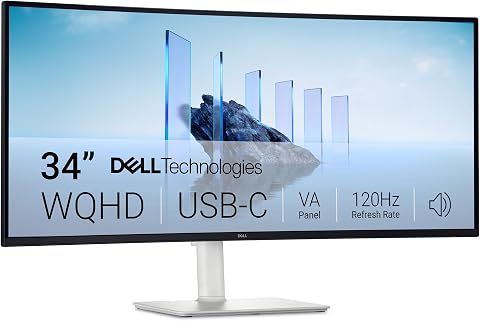
The Dell S3425DW is a 34-inch curved monitor featuring a WQHD resolution of 3440×1440, a 120Hz refresh rate, and AMD FreeSync Premium for smooth visuals. It offers vivid colors with 99% sRGB and 95% DCI-P3 coverage, along with eye comfort technology and easy USB-C connectivity for a seamless experience.
Pros:
- Vivid and true-to-life colors with high color coverage
- Smooth visuals with 120Hz refresh rate and FreeSync Premium
- Eye comfort features reduce blue light emissions
- Convenient USB-C connectivity with power delivery
Cons:
- Large size may not fit smaller desks
- Limited stand adjustability details
- No built-in speakers mentioned
Best for: People who need to verify whether this listing fits the hub slot
Not ideal for: Anyone expecting a confirmed USB-C hub from this product name
Bottom line: The listed name identifies a monitor, so verify the category and ports before buying for hub use.
Bluetooth Item Trackers
The listed pick is Life360 Tile Essentials Bluetooth Trackers, 4-Pack. Its name identifies a four-pack of Bluetooth trackers, which may help you keep tabs on multiple everyday items. Before choosing, verify which tracker shapes are included and how each one attaches to the belongings you want to track, since a pack may not suit every item equally.
A common mistake is assuming a Bluetooth tracker works like a continuously connected GPS device. Check the product details for how location updates happen, what phone and app are needed, and whether the tracking network depends on nearby devices. Review the supported operating systems and any account requirements. Also confirm how the app handles alerts, sharing, and privacy settings so the features suit your household or personal routine.
Fit and placement are practical concerns. Check each tracker’s dimensions, attachment method, and battery details, then match them to your keys, bag, or other intended items. Make sure the pack contents include the accessories you need; the name alone does not identify every shape or attachment. If you want to share item locations with others, verify the app’s sharing process and permissions before setup.
What to look for:
- Which tracker styles and accessories the four-pack contains
- Attachment method and dimensions for each item
- Supported phones, operating systems, and app requirements
- How location updates and alerts work
- Battery details, sharing controls, and privacy settings
Life360 Tile Essentials Bluetooth Trackers, 4-Pack
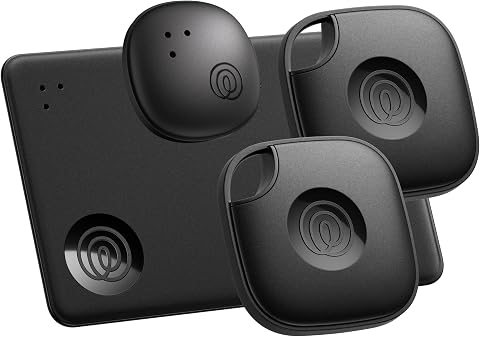
This four-piece Tile pack helps locate keys, wallets, remotes, and other belongings through the Life360 app. Ring a Tile or view its last location, use a Tile to ring a silenced phone, or send an SOS alert to your Life360 Circle.
Pros:
- Includes multiple tracker styles for different belongings
- Can ring a phone even when it is silenced
- Supports location viewing and SOS alerts through Life360
- Compatible with iOS and Android
Cons:
- Bluetooth range is limited to 350 feet
- Some features depend on the Life360 app
Best for: People who want a multi-tracker pack for everyday belongings
Not ideal for: Anyone needing a confirmed tracking method or attachment style
Bottom line: Check pack contents, phone compatibility, and update behavior for the items you plan to track.
Buy in the order that solves the most pressing routine problem: first identify the task, then check whether your existing phone or computer already supports it, and next choose the dedicated device that fits. Confirm compatibility, required apps or accounts, accessories, and the space or carrying method involved before adding a gadget to your list.
You can use this checklist one slot at a time and keep your shortlist focused on the features you will use. Verify the product listing against your own devices and habits, and you will be better prepared to choose gadgets that fit naturally into daily life.