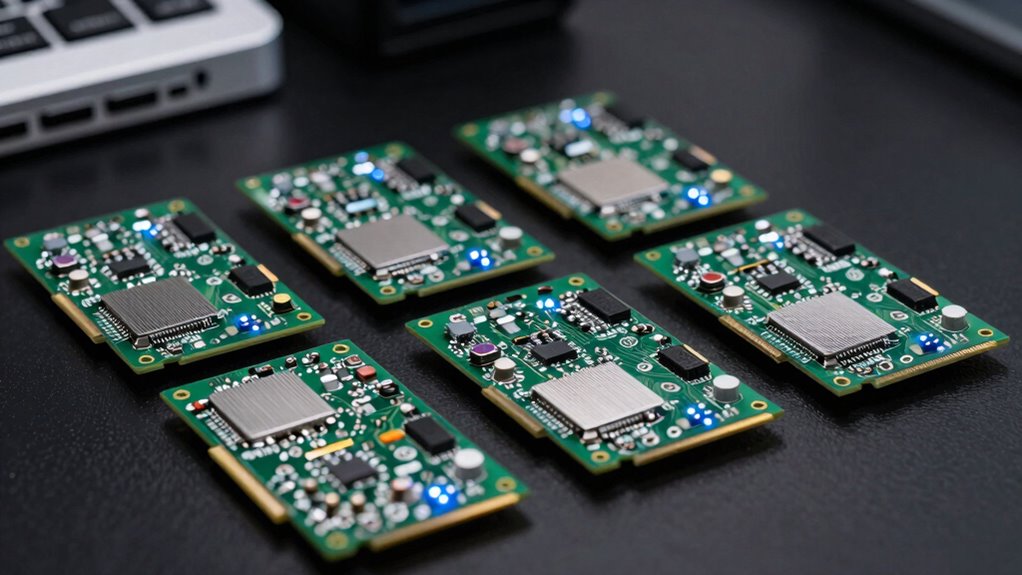

Choosing a PCIe Wi-Fi 6E card for VR demands balancing high-speed connectivity, low latency, and reliable signal stability. The OKN WiFi 6E AX5400 stands out as the best overall due to its robust tri-band support and advanced features. For those prioritizing affordability, the TP-Link AXE5400 PCIe Card offers impressive performance at a lower price. Meanwhile, the GIGABYTE WiFi 6E GC-WBAX210 provides a straightforward upgrade path for existing systems. The main tradeoffs involve balancing maximum speed, compatibility, and ease of installation—this guide helps clarify which features matter most for VR use. Keep reading for a detailed comparison of these options to find your ideal fit.

Get the latest gadgets delivered free with Prime
- Fast, free delivery on millions of items
- Prime Video, Amazon Music and more included
- Member-only deals all year
Complete the kit



Key Takeaways
- Tri-band support is essential for reducing interference and maintaining stable VR connections, especially in crowded Wi-Fi environments.
- The inclusion of features like MU-MIMO and OFDMA significantly improves simultaneous device performance, critical for VR setups with multiple peripherals.
- A well-designed heatsink and magnetic antennas enhance signal stability and durability, making some cards better suited for long gaming sessions.
- Compatibility with the latest Windows versions and Bluetooth 5.3 can streamline setup and improve peripheral connectivity, reducing latency.
- Price varies widely, but investing in a slightly higher-end card often yields better long-term performance and future-proofing for VR applications.
| OKN WiFi 6E AX5400 PCIe WiFi Card for Desktop PC (Intel AX210) Bluetooth 5.3, WPA3, 802.11AXE Tri Band Wireless Adapter with MU-MIMO, OFDMA, Ultra-Low Latency, Supports Windows 11, 10 (64bit) |  | Best Overall for High-Speed VR Connectivity | WiFi Standard: 802.11ax, WiFi 6E | Max Speed: 5400 Mbps | Bands: 2.4GHz, 5GHz, 6GHz | VIEW ON AMAZON | See Our Full Breakdown |
| TP-Link WiFi 6E Tri Band Intel AX210 AXE5400 PCIe WiFi Card for Desktop PC |  | Best Value for High-Speed VR at a Competitive Price | Wi-Fi Standard: Wi-Fi 6E | Speed: up to 2.4 Gbps | Bands: Tri-band (6GHz, 5GHz, 2.4GHz) | VIEW ON AMAZON | See Our Full Breakdown |
| GIGABYTE WiFi 6E GC-WBAX210 PCIe Expansion Card |  | Best for Custom High-Performance VR Setups | Module: Intel AX210 | Bands: 2.4GHz, 5GHz, 6GHz | Max Speed: 2400 Mbps | VIEW ON AMAZON | See Our Full Breakdown |
| WAVLINK AXE5400 PCIe WiFi 6E WiFi Card with Magnetic Antennas, Bluetooth 5.3, AX210 Chip, MU-MIMO, WPA3, OFDMA, Low-Profile Bracket, Heat Sink |  | Best for High-End VR with Enhanced Signal Coverage | Wireless Standards: WiFi 6E, Bluetooth 5.3 | Speed: up to 2400 Mbps on each band | Antennas: Magnetic dual 5dBi antennas | VIEW ON AMAZON | See Our Full Breakdown |
| WiFi 6E AX210 PCIe WiFi Wireless Network Card with Bluetooth 5.3, Tri-Band, WPA3, Supports OFDMA & MU-MIMO, Windows 10/11 |  | Best for Versatile Compatibility and Future-Proof VR Setup | Chipset: Intel AX210 | WiFi Bands: Tri-band (2.4GHz, 5GHz, 6GHz) | Max Speed: up to 2400 Mbps | VIEW ON AMAZON | See Our Full Breakdown |
| TP-Link WiFi 6E Intel AX210 AXE5400 PCIe WiFi Card for PC – Magnetic Base | 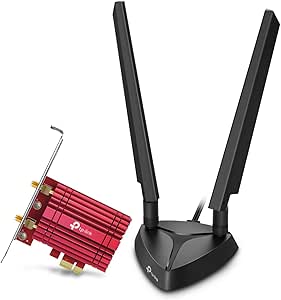 | Best for Versatile Signal Reception with Magnetic Antennas | Wi-Fi Standard: WiFi 6E | Max Speed: 2402 Mbps (6 GHz), 2402 Mbps (5 GHz), 574 Mbps (2.4 GHz) | Bluetooth: 5.3 | VIEW ON AMAZON | See Our Full Breakdown |
| WiFi 6E PCIe Card with Intel AX210 Chip, Tri-Band 5400Mbps |  | Best for High-Speed Tri-Band VR Streaming and Gaming | WiFi Standard: WiFi 6E | Speed: 5400 Mbps | Bands: Tri-Band (6GHz/5GHz/2.4GHz) | VIEW ON AMAZON | See Our Full Breakdown |
| TP-Link WiFi 6 PCIe WiFi Card for Desktop PC – AX3000 Dual Band Network Card |  | Best for Reliable Dual-Band VR Connectivity and Security | Wireless Standard: Wi-Fi 6 (802.11ax) | Max Speed: 2.4 Gbps | Frequency Bands: 2.4 GHz and 5 GHz | VIEW ON AMAZON | See Our Full Breakdown |
| WiFi 6 PCIe Card – Intel AX200, 3000Mbps Dual Band, Bluetooth 5.2 |  | Best for Broad Compatibility with Established WiFi 6 Performance | Chipset: Intel AX200 | Wireless Speed: 3000 Mbps | Bands: Dual (2.4 GHz, 5 GHz) | VIEW ON AMAZON | See Our Full Breakdown |
| Ubit WiFi Card 6E 5400Mbps for Intel PCIe WiFi Card with Bluetooth 5.3 |  | Best for Cutting-Edge VR with Ultra-High Speed and Low Latency | WiFi Speed: 5400 Mbps | WiFi Bands: 6 GHz, 5 GHz, 2.4 GHz | Bluetooth: 5.3 | VIEW ON AMAZON | See Our Full Breakdown |
| pcie wi fi 6e card for vr | Compatibility | Bluetooth | Max Speed | Bands |
|---|---|---|---|---|
| OKN WiFi 6E AX5400 PCIe WiFi C | Windows 10/11 64-bit | — | 5400 Mbps | 2.4GHz, 5GHz, 6GHz |
| TP-Link WiFi 6E Tri Band Intel | Windows 11 | 5.3 | — | Tri-band (6GHz, 5GHz, 2.4GHz) |
| GIGABYTE WiFi 6E GC-WBAX210 PC | — | — | 2400 Mbps | 2.4GHz, 5GHz, 6GHz |
| WAVLINK AXE5400 PCIe WiFi 6E W | Windows 10/11, Linux, PCIe | — | — | — |
| WiFi 6E AX210 PCIe WiFi Wirele | Windows 10/11 | 5.3 | up to 2400 Mbps | — |
| TP-Link WiFi 6E Intel AX210 AX | Requires Windows 11, Bluetooth USB cable | 5.3 | 2402 Mbps (6 GHz), 2402 Mbps (5 GHz), 574 Mbps (2.4 GHz) | — |
| WiFi 6E PCIe Card with Intel A | Windows 10/11 | 5.3 | — | Tri-Band (6GHz/5GHz/2.4GHz) |
| TP-Link WiFi 6 PCIe WiFi Card | — | — | 2.4 Gbps | — |
| WiFi 6 PCIe Card | Windows 10/11, PCIe x1/x4/x8/x16 | 5.2 | — | Dual (2.4 GHz, 5 GHz) |
| Ubit WiFi Card 6E 5400Mbps for | Windows 10/11, PCIe | 5.3 | — | — |
More Details on Our Top Picks
OKN WiFi 6E AX5400 PCIe WiFi Card for Desktop PC (Intel AX210) Bluetooth 5.3, WPA3, 802.11AXE Tri Band Wireless Adapter with MU-MIMO, OFDMA, Ultra-Low Latency, Supports Windows 11, 10 (64bit)
This option stands out for combining ultra-fast WiFi 6E speeds with Bluetooth 5.3, making it ideal for demanding VR setups that need both high bandwidth and device versatility. Compared with the WAVLINK AXE5400, it supports higher theoretical speeds up to 5400 Mbps, but this comes with a tradeoff: installation is less straightforward, especially for users unfamiliar with manual driver setups. Its external antennas provide better coverage than many internal antenna models, which can be a real advantage in large or complex VR environments. However, the requirement for Windows 10/11 and some manual driver downloads can be a barrier for less technical users. This pick is perfect for gamers or VR enthusiasts who want maximum performance and are comfortable with setup complexities.
Pros:- Supports WiFi 6E with speeds up to 5400 Mbps for seamless VR streaming
- Includes Bluetooth 5.3 for connecting peripherals and controllers
- External antennas improve signal stability and coverage
- Low latency features ideal for gaming and VR
Cons:- Requires Windows 10 or 11, limiting older OS compatibility
- Driver installation involves manual steps, which can be complex
Best for: Power users and gamers who prioritize peak wireless performance for VR and are willing to handle a more involved installation.
Not ideal for: Casual users or those seeking a plug-and-play solution without manual driver management.
- WiFi Standard:802.11ax, WiFi 6E
- Max Speed:5400 Mbps
- Bands:2.4GHz, 5GHz, 6GHz
- Bluetooth Version:5.3
- Antennas:Two 5dBi external antennas
- Compatibility:Windows 10/11 64-bit
Our verdict“This card is best suited for experienced users demanding maximum VR bandwidth and coverage, accepting a more technical installation process.”
TP-Link WiFi 6E Tri Band Intel AX210 AXE5400 PCIe WiFi Card for Desktop PC
Compared with the OKN AX5400, this TP-Link card offers slightly lower top speeds—up to 2.4 Gbps—but at a more affordable price point, making it attractive for budget-conscious users aiming for solid VR performance. Its high-gain antennas extend coverage significantly, reducing dead zones in larger rooms, which is beneficial for immersive VR experiences. However, it requires Windows 11 to unlock the 6GHz band, and Bluetooth functionality relies on a USB connector, adding potential cable clutter. For those who mainly need reliable VR streaming without the highest possible speeds, this model offers a balanced mix of performance and value. It’s an excellent choice for gamers who want fast, stable connections without paying a premium.
Pros:- Supports WiFi 6E with speeds up to 2.4 Gbps for VR streaming
- High-gain antennas provide extended coverage
- Bluetooth 5.3 for fast peripheral pairing
- Affordable for its feature set
Cons:- Requires Windows 11 to access 6GHz Wi-Fi
- Bluetooth needs a USB connection, adding cable management
Best for: Budget-conscious gamers and VR users seeking reliable performance in a straightforward package.
Not ideal for: Users needing Windows 10 compatibility or expecting plug-and-play Bluetooth without additional cables.
- Wi-Fi Standard:Wi-Fi 6E
- Speed:up to 2.4 Gbps
- Bands:Tri-band (6GHz, 5GHz, 2.4GHz)
- Bluetooth:5.3
- Security:WPA3
- Compatibility:Windows 11
Our verdict“Ideal for budget-minded VR enthusiasts who want reliable, high-speed wireless connectivity without complex setup demands.”
GIGABYTE WiFi 6E GC-WBAX210 PCIe Expansion Card
This card makes sense for users with existing compatible motherboards who want a dedicated 6E connection with maximum spectrum access. Its support for tri-band WiFi up to 2400 Mbps is reliable, though it offers lower speeds than the other options, reflecting a focus on dedicated spectrum rather than raw throughput. The GIGABYTE card emphasizes stability and compatibility in high-performance systems, especially those that can utilize PCIe slots effectively. However, it requires an available PCIe slot and may be less suitable for users with compact or pre-built systems lacking upgrade flexibility. Compared to the WAVLINK model with heat sinks, this one is more straightforward but less feature-rich in terms of accessories. It’s best for users who prioritize stability over maximum speed.
Pros:- Supports tri-band WiFi, including 6GHz spectrum
- Provides reliable wireless speeds up to 2400 Mbps
- Designed for stability with high compatibility
Cons:- Requires PCIe slot availability; not suitable for compact builds
- Lower maximum speed compared to other high-end cards
Best for: Enthusiasts with custom builds or upgrading existing systems for stable VR streaming.
Not ideal for: Pre-built systems with limited PCIe slots or users seeking plug-and-play simplicity.
- Module:Intel AX210
- Bands:2.4GHz, 5GHz, 6GHz
- Max Speed:2400 Mbps
- Standards:IEEE 802.11.acR2plusax
- Interface:PCIe
Our verdict“Best for users who want a dependable, stable WiFi 6E connection in custom or upgradeable PC setups, accepting moderate speeds.”
WAVLINK AXE5400 PCIe WiFi 6E WiFi Card with Magnetic Antennas, Bluetooth 5.3, AX210 Chip, MU-MIMO, WPA3, OFDMA, Low-Profile Bracket, Heat Sink
This model excels in delivering tri-band speeds up to 2400 Mbps on all bands, making it well-suited for immersive VR applications. Its magnetic dual antennas with heat sink help sustain strong signals, even in challenging environments, outperforming more basic cards like the TP-Link in coverage and thermal management. The inclusion of Bluetooth 5.3 and MU-MIMO adds to its versatility, but the slightly lower maximum speeds compared to OKN’s 5400 Mbps may be a limitation for users demanding absolute top speeds. The hardware’s compatibility with various OSs and PCIe slots makes it flexible, yet the absence of external antennas might restrict extended range unless additional antennas are purchased separately. It’s an excellent choice for those seeking a robust, high-performance VR network card with enhanced coverage.
Pros:- Strong tri-band speeds up to 2400 Mbps on all bands
- Magnetic antennas improve signal stability and coverage
- Includes heat sink for thermal performance
- Bluetooth 5.3 and MU-MIMO enhance device connectivity
Cons:- No external antennas included, limiting range unless upgraded
- Maximum speeds are slightly below 5400 Mbps options
Best for: High-end VR setups demanding stable, comprehensive coverage and thermal management.
Not ideal for: Users with limited PCIe slots or those seeking the fastest possible speeds without extra features.
- Wireless Standards:WiFi 6E, Bluetooth 5.3
- Speed:up to 2400 Mbps on each band
- Antennas:Magnetic dual 5dBi antennas
- Heat Sink:Yes
- Compatibility:Windows 10/11, Linux, PCIe
Our verdict“Ideal for high-performance VR systems needing reliable coverage and thermal stability, accepting slightly lower top speeds.”
WiFi 6E AX210 PCIe WiFi Wireless Network Card with Bluetooth 5.3, Tri-Band, WPA3, Supports OFDMA & MU-MIMO, Windows 10/11
This card offers a balanced mix of high-speed tri-band WiFi 6E and Bluetooth 5.3, making it suitable for users who want a reliable, future-proof VR network connection. Unlike the OKN card, it emphasizes compatibility with both Windows 10 and 11, providing a broader user base. Its speeds of up to 2400 Mbps on 5GHz/6GHz are adequate for most VR applications, but it lacks the raw speed of the OKN model, which could matter for very high-bandwidth VR streams. Its support for WPA3 security and MU-MIMO makes it a solid choice for secure and efficient multi-device environments. The main caveat is that driver installation requires downloading from Intel’s site, which might be less straightforward for some users. This is best for those seeking broad OS support and good performance without the highest speed demands.
Pros:- Supports tri-band WiFi 6E with speeds up to 2400 Mbps
- Compatible with both Windows 10 and 11
- Includes Bluetooth 5.3 for broad device support
- Supports WPA3, MU-MIMO for security and efficiency
Cons:- Requires manual driver download from Intel’s website
- Maximum speeds are lower than some premium options
Best for: Users seeking a reliable, versatile WiFi 6E card compatible with Windows 10/11, prioritizing security and stability.
Not ideal for: Users who need the absolute highest speeds or simpler, plug-and-play setups.
- Chipset:Intel AX210
- WiFi Bands:Tri-band (2.4GHz, 5GHz, 6GHz)
- Max Speed:up to 2400 Mbps
- Bluetooth:5.3
- Security:WPA3
- Compatibility:Windows 10/11
Our verdict“Best suited for users who want compatibility and security with decent VR bandwidth, accepting moderate speeds and manual setup.”
TP-Link WiFi 6E Intel AX210 AXE5400 PCIe WiFi Card for PC – Magnetic Base
This TP-Link model excels in broadening wireless bandwidth with support for the new 6 GHz band, making it ideal for VR setups that demand high speeds and low latency. Compared with the WiFi 6 PCIe Card – Intel AX200, it offers faster speeds on the 6 GHz band and dual antennas with a magnetic base, which significantly improves signal reception in challenging environments. However, it requires Windows 11 and Bluetooth setup via USB cable, which could be cumbersome for less technical users. The included standard and low-profile brackets add versatility for different PC forms. Its main tradeoff is the need for a compatible OS and additional setup steps for Bluetooth, which might deter casual users. Overall, this pick makes sense for gamers or VR enthusiasts who want the latest wireless technology but are comfortable with more complex installation.
Pros:- Supports the new 6 GHz band for faster, less congested wireless connections
- Dual antennas with magnetic base improve signal stability and placement options
- Includes standard and low-profile brackets for flexible installation
- Bluetooth 5.3 support for faster device pairing
Cons:- Requires Windows 11 for full functionality, limiting compatibility
- Bluetooth setup needs a USB cable, adding complexity
- Installation may be intimidating for users unfamiliar with PC upgrades
Best for: Power users and gamers seeking high-speed VR experiences with flexible antenna placement
Not ideal for: Casual users or those on Windows 10 who prefer plug-and-play simplicity
- Wi-Fi Standard:WiFi 6E
- Max Speed:2402 Mbps (6 GHz), 2402 Mbps (5 GHz), 574 Mbps (2.4 GHz)
- Bluetooth:5.3
- Security:WPA3
- Antenna:Dual, magnetic base
- Compatibility:Requires Windows 11, Bluetooth USB cable
- Form Factor:PCIe
- Bracket Types:Standard and low-profile
Our verdict“Ideal for tech-savvy VR users who want enhanced wireless performance and flexible antenna options.”
WiFi 6E PCIe Card with Intel AX210 Chip, Tri-Band 5400Mbps
This card stands out for its impressive 5400 Mbps tri-band support, making it well-suited for demanding VR applications requiring stable, multi-device connections. Compared with the TP-Link WiFi 6E AX210, it offers a higher maximum speed and wider compatibility for Windows 10 and 11, but it does not feature the magnetic antennas or included Bluetooth USB cable of the TP-Link. The easy installation process is a plus, especially for desktop builders who want reliable connectivity without fuss. Its main tradeoff is the reliance on a compatible WiFi 6E router and the need for Windows 11 to access the full 6 GHz spectrum, limiting future-proofing for some users. This card makes the most sense for gamers and streamers who prioritize raw speed and multi-band stability for VR sessions.
Pros:- High-speed tri-band support delivers maximum bandwidth for VR and gaming
- Easy to install in Windows desktops with included Bluetooth USB cable
- Reliable performance with Intel AX210 chipset
- Supports WPA3 security for network protection
Cons:- Requires a WiFi 6E compatible router and Windows 11 for full 6 GHz access
- Higher price point compared to dual-band options
- Limited to Windows 10/11, not compatible with older OS
Best for: Enthusiasts seeking maximum wireless speed and reliable VR streaming on Windows 10/11
Not ideal for: Casual users or those with older routers not supporting 6 GHz bands
- WiFi Standard:WiFi 6E
- Speed:5400 Mbps
- Bands:Tri-Band (6GHz/5GHz/2.4GHz)
- Bluetooth:5.3
- Chipset:Intel AX210
- Compatibility:Windows 10/11
Our verdict“Best suited for users who want blazing-fast VR connectivity with minimal setup complexity on modern Windows systems.”
TP-Link WiFi 6 PCIe WiFi Card for Desktop PC – AX3000 Dual Band Network Card
This TP-Link model offers solid WiFi 6 support with speeds up to 2.4 Gbps, making it a dependable choice for VR setups that don’t necessarily need the ultra-fast 6 GHz band. Compared with the Ubit WiFi Card 6E, it lacks tri-band support but provides broad compatibility and high-gain antennas for extended range. Its Bluetooth 5.2 ensures quick device pairing, though the need to connect a USB cable for Bluetooth can be inconvenient. The dual-band focus simplifies setup and keeps costs lower than 6E options, but it doesn’t tap into the least congested 6 GHz spectrum, which could impact latency-sensitive VR applications. This card is a good pick for users prioritizing stable, secure WiFi with straightforward installation over cutting-edge speed.
Pros:- Strong WiFi 6 support up to 2.4 Gbps for smooth VR streaming
- High-gain antennas improve range and signal stability
- Supports WPA3 security for safer networks
- Includes Bluetooth 5.2 for quick device pairing
Cons:- Bluetooth requires a USB cable connection, adding setup steps
- Limited to dual-band WiFi, missing out on the 6 GHz band
- Requires PCIe slot installation and some manual configuration
Best for: VR users seeking dependable dual-band WiFi with security features and easy setup
Not ideal for: Power users wanting the latest 6 GHz support or ultra-high speeds
- Wireless Standard:Wi-Fi 6 (802.11ax)
- Max Speed:2.4 Gbps
- Frequency Bands:2.4 GHz and 5 GHz
- Bluetooth Version:5.2
- Security Protocol:WPA3
- Antenna:High-gain, dual antennas
- Form Factor:PCIe
Our verdict“Best for users who want reliable dual-band WiFi and straightforward security features for VR gaming.”
WiFi 6 PCIe Card – Intel AX200, 3000Mbps Dual Band, Bluetooth 5.2
This Intel AX200-based card provides solid dual-band WiFi 6 performance up to 3000 Mbps, making it suitable for VR applications that prioritize compatibility and reliable speeds. Compared to the Ubit WiFi Card 6E, it lacks the 6 GHz band but offers compatibility with a wider range of systems and older Windows versions. Its detachable high-gain antennas improve coverage, yet installing and connecting the Bluetooth components can be less convenient, requiring manual cable connections. The absence of the newest WiFi 6E support limits future-proofing, but for users with existing infrastructure, it offers dependable performance at a more accessible price point. This makes it a practical choice for those who want proven technology without the need for cutting-edge features.
Pros:- Reliable dual-band WiFi 6 performance up to 3000 Mbps
- Detachable high-gain antennas enhance coverage
- Compatible with a wide range of PCs and Windows versions
- Supports Bluetooth 5.2 for versatile device connections
Cons:- Bluetooth connection requires manual cable attachment
- No support for the 6 GHz band, limiting speed potential
- Installation can be more complex for inexperienced users
Best for: VR users with existing WiFi infrastructure who value proven reliability and broad compatibility
Not ideal for: Users seeking the fastest possible speeds or future-proofing with 6 GHz support
- Chipset:Intel AX200
- Wireless Speed:3000 Mbps
- Bands:Dual (2.4 GHz, 5 GHz)
- Bluetooth:5.2
- Compatibility:Windows 10/11, PCIe x1/x4/x8/x16
- Antenna:Detachable, high-gain
Our verdict“Best for users prioritizing broad compatibility and dependable dual-band WiFi for VR without needing the latest 6 GHz features.”
Ubit WiFi Card 6E 5400Mbps for Intel PCIe WiFi Card with Bluetooth 5.3
This Ubit model delivers maximum 5400 Mbps across all three bands, making it a prime candidate for VR systems that need the lowest latency and highest throughput. It supports WiFi 6E with Bluetooth 5.3, incorporating advanced MU-MIMO and OFDMA technology for stable, low-latency connections. Compared to the TP-Link AX3000, it emphasizes maximum speed and the latest wireless tech, but driver setup might require manual installation, which could challenge less experienced users. Its compatibility with Windows 10/11 and standard PCIe slots broadens its appeal, though the limited included accessories and the need for updated drivers are tradeoffs. This card suits power users who want the best possible VR experience at the cost of easier setup process.
Pros:- Exceptional 5400 Mbps tri-band WiFi 6E support for demanding VR setups
- Bluetooth 5.3 for rapid device pairing and broader range
- Supports MU-MIMO and OFDMA for efficient, low-latency connections
- Compatible with standard PCIe slots and Windows 10/11
Cons:- Driver installation may require manual setup, complicating the process
- Limited accessories included, needing additional setup time
- Requires Windows 11 or Windows 10 with recent updates for full 6 GHz support
Best for: Tech enthusiasts and competitive VR gamers demanding maximum bandwidth and lowest latency
Not ideal for: Casual users or those with older hardware who value simplicity over raw performance
- WiFi Speed:5400 Mbps
- WiFi Bands:6 GHz, 5 GHz, 2.4 GHz
- Bluetooth:5.3
- Technology:MU-MIMO, OFDMA
- Compatibility:Windows 10/11, PCIe
- Form Factor:PCIe
Our verdict“Ideal for users who prioritize maximum wireless speed and low latency for immersive VR experiences at the expense of setup simplicity.”

How We Picked
These products were evaluated based on their Wi-Fi performance, especially in terms of speed, latency, and stability—key factors for a seamless VR experience. Compatibility with current systems and ease of installation also played a role, as VR setups benefit from straightforward upgrades. Build quality and cooling solutions were considered to ensure reliability during extended use. Cost was factored in, but not at the expense of essential features that impact VR performance. The ranking reflects a balance between value, performance, and user-friendliness, aiming to guide various buyer needs from casual to enthusiast setups.Factors to Consider When Choosing Pcie Wi Fi 6e Card For Vr
When selecting a PCIe Wi-Fi 6E card for VR, understanding key features and broader considerations can help you avoid common pitfalls. Beyond raw speed, factors like stability, compatibility, and ease of installation influence your experience. Making the right choice involves weighing performance against your specific setup and future needs. Here are the main factors to consider:Performance and Speed
VR applications demand high data throughput and minimal latency. Look for cards supporting tri-band Wi-Fi (2.4 GHz, 5 GHz, and 6 GHz) for maximum flexibility and reduced interference. Features like MU-MIMO and OFDMA improve multi-device performance, preventing lag during immersive VR sessions. However, remember that actual speeds depend on your router and network environment, so a high-end card won’t help if your network hardware is outdated or congested.
Compatibility and System Integration
Ensure the card is compatible with your motherboard and operating system—Windows 10/11 support is standard, but double-check the specifications. Some cards include Bluetooth 5.3, which can be beneficial for VR controllers and peripherals. Ease of installation matters, especially if you’re not comfortable with hardware upgrades. Consider cards with straightforward mounting and driver support to avoid setup frustrations, especially for less experienced users.
Build Quality and Cooling
VR use often involves prolonged gaming or development sessions, making thermal management important. Cards with heatsinks or heat spreaders help prevent throttling caused by overheating. Magnetic antennas can improve signal quality and ease positioning, which is vital for maintaining a stable VR experience. Skimping on build quality might lead to signal drops or hardware failure over time, so investing in durable components often pays off.
Price and Future-Proofing
While premium cards offer cutting-edge features, they come at a higher cost. For most VR needs, a mid-range card provides excellent value—balancing speed, stability, and affordability. Think about your future plans: if you plan to upgrade your network or expand your VR setup, investing in a slightly more capable card now can extend its relevance. Conversely, casual users might find a budget option sufficient, but should remain aware of potential limitations in speed or stability.
Additional Features and Peripherals
Some PCIe Wi-Fi cards include features like Bluetooth 5.3, which can simplify connecting controllers or audio devices. Antenna design—magnetic or fixed—affects signal directionality and strength, impacting VR performance. Also, check for driver support and software updates from manufacturers, as ongoing support can enhance device reliability and security. These extras can improve overall VR experience but should be weighed against cost and complexity.
Frequently Asked Questions
Will a PCIe Wi-Fi 6E card significantly improve my VR experience?
Yes, a PCIe Wi-Fi 6E card can reduce latency and increase bandwidth, making VR streaming smoother and more responsive. The tri-band support helps avoid congestion, which is common in crowded Wi-Fi environments, thus minimizing lag and disconnections. If your current Wi-Fi setup is outdated or unreliable, upgrading to a Wi-Fi 6E card will likely deliver a noticeable improvement in your VR sessions, especially for high-fidelity experiences or multiplayer interactions.
Do I need a high-end Wi-Fi 6E card for casual VR gaming?
For casual VR gaming, a mid-range Wi-Fi 6E card often provides sufficient performance, especially if paired with a decent router. You won’t necessarily need the latest flagship model unless you experience frequent lag or disconnections. However, investing in a reliable card with good coverage and stability can still make a difference, especially if your room has multiple Wi-Fi devices or interference sources. Balance your budget with your actual usage to avoid overspending on features you won’t fully utilize.
Can I upgrade my existing PCIe slot easily for VR use?
Most modern PCIe Wi-Fi 6E cards are designed for straightforward installation, with standard sizes and mounting options. Upgrading typically involves removing the previous card and installing the new one into an available PCIe slot, followed by driver setup. Compatibility issues are rare but can occur if your motherboard has limited space or if BIOS settings need updating. Ensuring your system is compatible beforehand can prevent headaches during installation.
Is Bluetooth 5.3 necessary for VR, and do these cards include it?
Bluetooth 5.3 can be beneficial for connecting controllers, headphones, or other peripherals used in VR setups, offering improved range and stability over previous versions. Many Wi-Fi 6E cards include integrated Bluetooth, simplifying your setup. If you rely heavily on wireless peripherals, choosing a card with Bluetooth 5.3 support makes sense. However, if your peripherals use other connection types, this feature might be less critical.
How important is antenna design for VR performance?
Antenna design directly impacts signal strength and stability, which are critical in VR to prevent lag and disconnections. Magnetic antennas are often more versatile, allowing you to position them for optimal reception, whereas fixed antennas may limit flexibility. Better antenna placement and quality can improve overall connection reliability, especially in environments with Wi-Fi interference. Investing in a card with high-quality, adjustable antennas can yield noticeable improvements in VR streaming quality.
Conclusion
For most VR enthusiasts, the OKN WiFi 6E AX5400 offers a compelling blend of speed, stability, and features, making it the best overall choice. Budget-conscious users should consider the TP-Link AXE5400 PCIe Card for reliable performance without overspending. Those seeking a straightforward upgrade with solid reliability might prefer the GIGABYTE WiFi 6E GC-WBAX210. If you prioritize premium build quality and future-proofing, investing in a high-end model from reputable brands will pay off. Ultimately, your choice should align with your specific VR setup, network environment, and budget considerations.
Halloween Picks

Star Wars Yoda and R2-D2 Inflatable Halloween Decor, 6 ft with LEDs, Indoor/Outdoor

Thuodo 8 FT Tall Halloween Inflatable Three-Headed Dragon with Built-in LEDs

15-Foot Halloween Pumpkin Inflatable with LED Lights and Air Blower
As an affiliate, we earn on qualifying purchases.