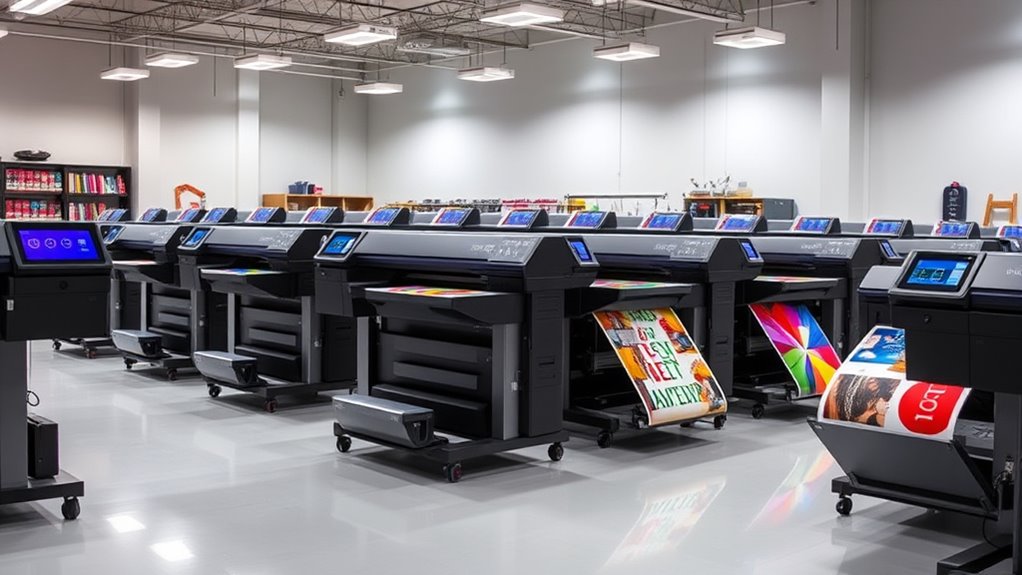

Searching for the best wide format printer in 2026? The HP DesignJet T630 stands out as the overall top pick thanks to its reliable performance and ease of use. For those seeking versatility, the Epson EcoTank ET-15000 offers impressive print quality and cost efficiency, while the Canon imagePROGRAF TC-21 excels in producing vibrant posters with its dedicated roll and sheet feeders. However, buyers face tradeoffs between speed, print quality, and upfront costs. Continue reading for a detailed breakdown of these options and help narrowing down your choice.

Get the latest gadgets delivered free with Prime
- Fast, free delivery on millions of items
- Prime Video, Amazon Music and more included
- Member-only deals all year
Complete the kit



Key Takeaways
- The top printers balance print quality, speed, and cost; the HP DesignJet T630 leads overall performance.
- EcoTank models like the Epson ET-15000 deliver lower running costs, ideal for high-volume printing.
- Print size capacity varies; larger formats often come with higher price tags and bulkier designs.
- Ease of use and setup differ significantly; beginner-friendly models prioritize straightforward operation.
- Premium options provide higher reliability and color accuracy, but at a premium price.
| HP DesignJet T630 Large Format 36-inch Plotter Printer with Auto Sheet Feeder, Media Bin & Stand |  | Best Overall for Small Offices and Technical Printing | Media Sizes: Up to 36-inch wide media rolls, 13×19 inches sheets | Media Handling: Sheet feed, roll feed, automatic sheet/roll switch, media bin, horizontal cutter | Connectivity: Gigabit Ethernet, Wi-Fi 802.11 b/g/n, Hi-Speed USB 2.0, Wi-Fi Direct | VIEW ON AMAZON | See Our Full Breakdown |
| HP OfficeJet Pro 9720 Wide-Format Wireless All-in-One Color Inkjet Printer |  | Best for Versatile Office Use with Wide-Format Capability | Print Speed (Black): up to 22 ppm | Print Speed (Color): up to 18 ppm | Maximum Print Size: 11 x 17 inches | VIEW ON AMAZON | See Our Full Breakdown |
| Epson EcoTank ET-15000 Wireless Color All-in-One Supertank Printer with Scanner, Copier, Fax, Ethernet, and Printing up to 13 x 19 Inches |  | Best for Cost-Conscious Large-Format Printing with Eco-Friendly Focus | Printer Type: All-in-One Inkjet | Connectivity: Wi-Fi, LAN, USB | Print Resolution: 4800 x 2400 dpi | VIEW ON AMAZON | See Our Full Breakdown |
| Canon imagePROGRAF TC-21 24″ Large Format Printer, Poster & Plotter, Automatic Roll & Sheet Feeder, Includes 280ml Ink, White |  | Best for High-Quality Color Posters and Professional Prints | Printer Type: Inkjet | Maximum Media Size: 24 inches | Print Resolution: 1200 x 1200 dpi | VIEW ON AMAZON | See Our Full Breakdown |
| Epson WorkForce Pro WF-7310 Wireless Wide-Format Printer | 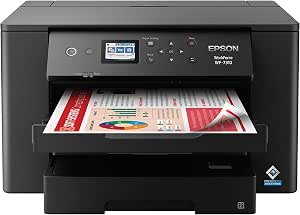 | Best for High-Volume Office Printing with Sharp Results | Print Size: up to 13″ x 19″ | Auto 2-Sided Printing: Yes | Paper Capacity: 500 sheets | VIEW ON AMAZON | See Our Full Breakdown |
| Epson WorkForce Pro WF-7310 Wireless All-in-One Wide-Format Inkjet Printer |  | Best for High-Volume Office Use | Print Speed: 25 black/12 color ISO ppm | Maximum Print Size: 13″ x 19″ | Borderless Printing: Yes up to 11″ x 17″ | VIEW ON AMAZON | See Our Full Breakdown |
| Epson WorkForce Pro WF-7820 Wireless All-in-One Wide-Format Inkjet Printer |  | Best for Versatile Office Functionality | Print Speed (Black/Color): 25/12 ISO ppm | Maximum Print Size: 13 x 19 inches | Paper Capacity: 250 sheets | VIEW ON AMAZON | See Our Full Breakdown |
| Epson WorkForce Pro WF-7840 Wireless All-in-One Wide-Format Inkjet Printer |  | Best for Professional-Grade Wide-Format Printing | Print Technology: Inkjet | Maximum Print Size: 13″ x 19″ | Connectivity: Wireless, Ethernet, Bluetooth | VIEW ON AMAZON | See Our Full Breakdown |
| Epson Expression Photo HD XP-15000 Wireless Wide-Format Inkjet Printer |  | Best for Photo and Fine Art Printing | Maximum Print Size: 13 x 19 inches | Ink Colors: 6 (Black, Cyan, Magenta, Yellow, Gray, Red) | Media Tray Capacity: 50 sheets rear, 200 sheets front | VIEW ON AMAZON | See Our Full Breakdown |
| Epson Expression Photo XP-980 Wireless All-in-One Wide-Format Printer |  | Best for Creative Hobbyists and Photo Enthusiasts | Maximum Print Size: 11″ x 17″ | Ink System: 6-color Claria Photo HD | Connectivity: Wi-Fi, Wi-Fi Direct | VIEW ON AMAZON | See Our Full Breakdown |
| HP DesignJet T210 Large Format 24-inch Plotter Printer |  | Best Compact Large-Format Plotter for Small Offices | Media Sizes: Up to 24-inch wide media rolls, up to 13×19-inch sheets (with optional feeder) | Media Handling: Sheet feed, roll feed, automatic horizontal cutter | Connectivity: Gigabit Ethernet, Wi-Fi 802.11 b/g/n, Hi-Speed USB 2.0 | VIEW ON AMAZON | See Our Full Breakdown |
| HP OfficeJet Pro 9730 Wide-Format Wireless All-in-One Color Inkjet Printer |  | Best All-in-One for Versatile Office Printing up to 11×17 Inches | Print Speed (Black): up to 22 ppm | Print Speed (Color): up to 18 ppm | Maximum Print Size: 11 x 17 inches | VIEW ON AMAZON | See Our Full Breakdown |
| Epson EcoTank Photo ET-8550 Wireless Wide-Format All-in-One Tank Printer |  | Best Cartridge-Free Photo and Large-Format Document Printer | Print Technology: EcoTank Ink System | Color: Color | Wireless: Yes | VIEW ON AMAZON | See Our Full Breakdown |
| HP DesignJet T210 Large Format 24-Inch Plotter Printer with 2-Year HP Care Pack | | Best Value with Extended Support for Professional Large-Format Printing | Media Size: Up to 24-inch wide media rolls | Media Handling: Sheet feed, roll feed, automatic horizontal cutter | Print Speed: Up to 45 seconds per page on A1/D size | VIEW ON AMAZON | See Our Full Breakdown |
| wide format printer | Connectivity | Maximum Print Size | Print Speed |
|---|---|---|---|
| HP DesignJet T630 Large Format | Gigabit Ethernet, Wi-Fi 802.11 b/g/n, Hi-Speed USB 2.0, Wi-Fi Direct | — | Up to 30 seconds per page on A1/D size |
| HP OfficeJet Pro 9720 Wide-For | Wireless, dual-band Wi-Fi | 11 x 17 inches | — |
| Epson EcoTank ET-15000 Wireles | Wi-Fi, LAN, USB | 13 x 19 inches | 17 ppm black/white, 9 ppm color |
| Canon imagePROGRAF TC-21 24" L | Wi-Fi, Ethernet, USB | — | 15 pages per minute |
| Epson WorkForce Pro WF-7310 Wi | Wi-Fi 5 | — | 25 black / 12 color ISO ppm |
| Epson WorkForce Pro WF-7310 Wi | Wi-Fi 5, Wi-Fi Direct | 13" x 19" | 25 black/12 color ISO ppm |
| Epson WorkForce Pro WF-7820 Wi | Wireless, Wi-Fi Direct, Ethernet, Bluetooth LE | 13 x 19 inches | — |
| Epson WorkForce Pro WF-7840 Wi | Wireless, Ethernet, Bluetooth | 13" x 19" | — |
| Epson Expression Photo HD XP-1 | Wireless | 13 x 19 inches | — |
| Epson Expression Photo XP-980 | Wi-Fi, Wi-Fi Direct | 11" x 17" | — |
| HP DesignJet T210 Large Format | Gigabit Ethernet, Wi-Fi 802.11 b/g/n, Hi-Speed USB 2.0 | — | Up to 45 seconds per page on A1/D size |
| HP OfficeJet Pro 9730 Wide-For | Wireless, dual-band Wi-Fi | 11 x 17 inches | — |
| Epson EcoTank Photo ET-8550 Wi | — | — | — |
| HP DesignJet T210 Large Format | HP/GL-2 support, HP Smart app | — | Up to 45 seconds per page on A1/D size |
More Details on Our Top Picks
HP DesignJet T630 Large Format 36-inch Plotter Printer with Auto Sheet Feeder, Media Bin & Stand
The HP DesignJet T630 stands out for its compact design, making it ideal for small offices where space is at a premium. Its fast print speeds and high-quality color output ensure professional results for technical drawings, posters, and maps. Compared with the Epson EcoTank ET-15000, it offers more precise line accuracy and media versatility, though it comes with a higher initial cost and limited media handling options. The T630’s automatic sheet feeder and media bin streamline workflow, but it’s restricted to large-format printing only, which could be limiting for users needing multifunction capabilities. This model is perfect for architects or engineers who prioritize speed and quality in a small footprint, but not for those seeking an all-in-one device.
Pros:- Compact design fits small office spaces
- Fast printing speeds enhance productivity
- High-quality color and line accuracy
- Versatile media handling options
Cons:- Limited to large-format printing only
- Requires calibration for optimal results
- Higher initial purchase price compared to smaller printers
Best for: Architects and engineers needing reliable, high-quality large-format printing in a compact office setting
Not ideal for: Small businesses or users requiring multifunction devices, such as scanning or copying, due to its specialized focus on large-format printing
- Media Sizes:Up to 36-inch wide media rolls, 13×19 inches sheets
- Media Handling:Sheet feed, roll feed, automatic sheet/roll switch, media bin, horizontal cutter
- Connectivity:Gigabit Ethernet, Wi-Fi 802.11 b/g/n, Hi-Speed USB 2.0, Wi-Fi Direct
- Print Speed:Up to 30 seconds per page on A1/D size
- Onboard Memory:1 GB
- Eco Features:Uses up to 95% less ink for routine maintenance, reduces CO2 emissions by up to 7.3 tons/year
Our verdict“This is the best choice for professionals who need a dedicated, space-efficient large-format plotter with fast output and precise color reproduction.”
HP OfficeJet Pro 9720 Wide-Format Wireless All-in-One Color Inkjet Printer
The HP OfficeJet Pro 9720 offers impressive versatility, combining wide-format printing with scanning, copying, and faxing in a single device. Its wireless connectivity and mobile printing options make it especially suitable for busy office environments, unlike the more specialized Canon imagePROGRAF TC-21, which focuses solely on high-quality printing. While the 9720’s ability to handle up to 11×17 inches broadens its utility, it’s bulkier and consumes more space, which could be problematic for smaller offices. The touchscreen interface simplifies operation, but some users might find the required subscription for continued Instant Ink service inconvenient. This model makes the most sense for offices needing a multifunction printer with decent wide-format capabilities, but not for users who need dedicated high-precision large-format printing only.
Pros:- Wide-format printing up to 11×17 inches
- Wireless, mobile, and network connectivity
- Multi-function capabilities (print, scan, copy, fax)
- Secure printing features
Cons:- Requires ongoing subscription after trial period
- Large footprint may not suit compact offices
- Complex interface could challenge some users
Best for: Small to medium-sized offices that require flexible, all-in-one printing solutions including wide-format documents
Not ideal for: Users focused solely on large-format printing or those with limited space, due to its larger footprint and multifunction design
- Print Speed (Black):up to 22 ppm
- Print Speed (Color):up to 18 ppm
- Maximum Print Size:11 x 17 inches
- Paper Capacity:250 sheets
- Touchscreen:2.7-inch color
- Connectivity:Wireless, dual-band Wi-Fi
Our verdict“Ideal for offices needing an all-in-one device with respectable wide-format printing, balancing versatility and convenience.”
Epson EcoTank ET-15000 Wireless Color All-in-One Supertank Printer with Scanner, Copier, Fax, Ethernet, and Printing up to 13 x 19 Inches
The Epson EcoTank ET-15000 excels for users prioritizing long-term savings and eco-friendliness. Its refillable ink tanks dramatically reduce ongoing ink costs, making it suitable for high-volume printing compared to the ink cartridge models like the HP DesignJet T630. Supporting up to 13×19 inches, it handles larger media, but its initial setup can be complex, especially for those unfamiliar with ink tank refilling. Its bulk and size might challenge tight spaces, and some may find the refill process inconvenient compared to traditional cartridges. This model is well-suited for small businesses or studios seeking economical, large-format printing with minimal waste, but not for those needing quick setup or higher speed on demand.
Pros:- Significant ink cost savings with refillable tanks
- Supports large-format printing up to 13×19 inches
- High-resolution output with versatile connectivity
- Eco-friendly, zero cartridge waste
Cons:- Initial setup may be complex
- Large size requires ample space
- Refill process may be inconvenient for some users
Best for: Small businesses or creative studios seeking affordable, eco-friendly large-format printing with low ongoing ink costs
Not ideal for: Users needing fast, high-speed output or compact devices, due to its large size and setup complexity
- Printer Type:All-in-One Inkjet
- Connectivity:Wi-Fi, LAN, USB
- Print Resolution:4800 x 2400 dpi
- Print Speed:17 ppm black/white, 9 ppm color
- Maximum Print Size:13 x 19 inches
- Duty Cycle:33,000 pages/month
Our verdict“Best suited for cost-conscious users who want eco-friendly, large-format printing with minimal ongoing expenses.”
Canon imagePROGRAF TC-21 24″ Large Format Printer, Poster & Plotter, Automatic Roll & Sheet Feeder, Includes 280ml Ink, White
The Canon imagePROGRAF TC-21 is a reliable choice for vibrant, high-detail color printing on both roll and sheet media. Its 1200 x 1200 dpi resolution surpasses many competitors like the HP DesignJet T630 in color vibrancy and fine detail, making it ideal for posters, photos, and professional displays. Its automatic roll and sheet feeding streamline production, but the heavy, bulky build and lack of scanning or copying limit its flexibility. The higher initial cost reflects its professional-grade output, which may not be justified for casual or low-volume users. This printer makes the most sense for artists, photographers, or print shops focused on high-end color quality, but less suitable for smaller spaces or multifunction needs.
Pros:- High-resolution, vibrant color printing
- Automatic roll and sheet media feeding
- Wireless and wired connectivity options
- Includes substantial ink volume (280ml)
Cons:- Heavy and large, requires ample space
- Limited to print only, no scanning or copying
- Higher purchase price for professional quality
Best for: Photographers, artists, and print shops seeking high-fidelity color output for posters and displays
Not ideal for: Small offices or users needing multifunction capabilities, given its focus on high-quality print only and large footprint
- Printer Type:Inkjet
- Maximum Media Size:24 inches
- Print Resolution:1200 x 1200 dpi
- Print Speed:15 pages per minute
- Connectivity:Wi-Fi, Ethernet, USB
- Included Ink:280 ml (each color)
Our verdict“Ideal for professionals prioritizing superior color fidelity and high-quality poster printing over multifunction features.”
Epson WorkForce Pro WF-7310 Wireless Wide-Format Printer
The Epson WorkForce Pro WF-7310 offers a solid combination of speed, reliability, and wide-format capability, making it a strong choice for high-volume offices. Its 13×19 inch print size and fast speeds—up to 25 ppm black and 12 ppm color—are advantages over smaller, slower models like the HP OfficeJet Pro 9720. Epson’s PrecisionCore technology ensures sharp, durable output, and its 500-sheet paper capacity minimizes reloads during busy periods. However, as a refurbished product, warranty coverage may be limited, and users must rely on genuine Epson inks for optimal performance. Its Wi-Fi 5 connectivity supports mobile printing, but some features may depend on a stable internet connection. This pick is best for offices needing high-volume, reliable wide-format printing, yet not ideal for those seeking brand-new hardware or multifunction features.
Pros:- High-quality wide-format printing up to 13″ x 19″
- Fast speeds for high-volume printing
- Large 500-sheet paper capacity
- Reliable Epson durability with genuine inks
Cons:- Refurbished status may limit warranty
- Requires genuine Epson inks for best results
- Some features depend on internet stability
Best for: High-volume offices requiring fast, reliable large-format printing with consistent quality
Not ideal for: Small teams or casual users who don’t need high capacity or speed, or those preferring brand-new equipment at full warranty
- Print Size:up to 13″ x 19″
- Auto 2-Sided Printing:Yes
- Paper Capacity:500 sheets
- Connectivity:Wi-Fi 5
- Print Speed:25 black / 12 color ISO ppm
Our verdict“Best suited for busy offices that prioritize speed and volume in large-format printing, with a focus on durability and reliability.”
Epson WorkForce Pro WF-7310 Wireless All-in-One Wide-Format Inkjet Printer
The Epson WorkForce Pro WF-7310 stands out for its ability to handle large print jobs efficiently, thanks to its impressive 500-sheet capacity and fast speeds of up to 25 black and 12 color ISO ppm. Compared to the Epson WF-7820, it offers similar print speeds but with a slightly smaller touchscreen and fewer connectivity options. Its ability to produce vivid, borderless prints up to 13″ x 19″ makes it ideal for busy offices needing reliable wide-format output. The main tradeoff involves its reliance on genuine Epson cartridges, which can increase ongoing costs, and its somewhat complex setup process. This model is best suited for high-volume environments where cost per page and durability matter most. However, it’s less ideal for small offices or users who prefer third-party ink compatibility to reduce expenses.
Pros:- 500-sheet paper capacity minimizes reloading
- Fast print speeds support high-volume workflows
- Vivid borderless printing up to 13″ x 19″
Cons:- Requires genuine Epson cartridges, increasing ongoing costs
- Setup may be challenging for less tech-savvy users
Best for: High-volume office environments needing reliable, large-capacity wide-format printing
Not ideal for: Small offices or home users seeking budget-friendly, easily compatible ink options
- Print Speed:25 black/12 color ISO ppm
- Maximum Print Size:13″ x 19″
- Borderless Printing:Yes up to 11″ x 17″
- Paper Capacity:500 sheets
- Connectivity:Wi-Fi 5, Wi-Fi Direct
- Display:2.4″ color display
Our verdict“This printer is best for busy offices prioritizing speed, capacity, and durable output over initial affordability.”
Epson WorkForce Pro WF-7820 Wireless All-in-One Wide-Format Inkjet Printer
The Epson WF-7820 offers a comprehensive set of features for offices that need more than just printing, including scanning, copying, and faxing, all with wide-format support up to 13″ x 19″. It excels in speed and ease of use thanks to its 4.3-inch touchscreen and automatic duplex capabilities, making it well-suited for larger workloads. Compared to the WF-7840, it has a smaller paper capacity but remains highly capable for daily tasks. Its reliance on genuine Epson cartridges ensures consistent quality, but this can make running costs higher. This model makes the most sense for users prioritizing efficiency and multifunctionality in a busy office, though its setup process can require downloading the Epson Smart Panel app, which may deter some users. It’s less suited for those seeking budget options or third-party ink compatibility.
Pros:- Automatic duplex printing and scanning streamline workflows
- Large 250-sheet paper capacity reduces interruptions
- Intuitive 4.3″ color touchscreen simplifies operation
Cons:- Requires genuine Epson cartridges, increasing ongoing costs
- Setup involves downloading the Epson Smart Panel app
Best for: Offices needing an all-in-one wide-format printer with scanning and faxing capabilities
Not ideal for: Small or home offices with tight budgets or users wanting third-party ink options
- Print Speed (Black/Color):25/12 ISO ppm
- Maximum Print Size:13 x 19 inches
- Paper Capacity:250 sheets
- Display:4.3-inch color touchscreen
- Connectivity:Wireless, Wi-Fi Direct, Ethernet, Bluetooth LE
- Automatic Duplex:Yes
Our verdict“Ideal for office environments that require multifunctional wide-format printing with high efficiency and ease of use.”
Epson WorkForce Pro WF-7840 Wireless All-in-One Wide-Format Inkjet Printer
The Epson WF-7840 excels in delivering high-quality wide-format output for professionals needing fast, detailed prints up to 13″ x 19″. It shares many features with the WF-7820 but offers a larger paper capacity of 500 sheets, supporting larger and more frequent print volumes. Its use of PrecisionCore Heat-Free Technology ensures rapid, vibrant printing, but like other Epson models, it requires genuine cartridges, which can be costly over time. The 4.3-inch touchscreen provides easy control, and the multifunctional design supports scanning, copying, and faxing. Its higher initial investment is justified for demanding office use where volume and quality matter, though setup can be complex for less tech-savvy users. It’s less suitable for those preferring budget models or third-party inks.
Pros:- Fast, professional-quality wide-format printing
- Large 500-sheet paper capacity reduces reloads
- Supports a variety of media types and sizes
Cons:- Requires genuine Epson cartridges, raising ongoing expenses
- Setup can be complex for inexperienced users
Best for: Professional offices requiring high-volume, high-quality wide-format printing
Not ideal for: Small teams or budget-conscious users seeking low-cost solutions
- Print Technology:Inkjet
- Maximum Print Size:13″ x 19″
- Connectivity:Wireless, Ethernet, Bluetooth
- Paper Capacity:500 sheets
- Display:4.3″ color touchscreen
- Automatic Duplex:Yes
Our verdict“Best suited for offices needing large-volume, high-quality wide-format output with minimal interruptions.”
Epson Expression Photo HD XP-15000 Wireless Wide-Format Inkjet Printer
The Epson XP-15000 is tailored for photographers and artists seeking professional-quality borderless prints up to 13″ x 19″ in a compact form. Its six-color Claria Photo HD inks produce vibrant, detailed images rivaling professional labs, making it ideal for high-end photo printing. Compared with larger, more commercial models like the WF-7840, it offers a smaller footprint, fitting comfortably on a desktop. Its support for borderless printing and multiple media types adds versatility for creative projects. However, it relies strictly on genuine Epson cartridges, which can be costly, and firmware updates sometimes disable third-party inks, limiting flexibility for budget-conscious users. This printer is best for those prioritizing superb photo quality over volume or speed, but it’s less suitable for bulk document printing or high-volume office use.
Pros:- Vibrant, professional-grade photo quality
- Supports borderless printing up to 13″ x 19″
- Compact design fits on a desktop
Cons:- Requires genuine Epson cartridges, increasing costs
- Firmware updates may disable third-party inks
Best for: Photographers and artists needing high-quality, borderless wide-format prints
Not ideal for: Small offices or users needing high-volume document printing
- Maximum Print Size:13 x 19 inches
- Ink Colors:6 (Black, Cyan, Magenta, Yellow, Gray, Red)
- Media Tray Capacity:50 sheets rear, 200 sheets front
- Connectivity:Wireless
- Dimensions:30% smaller than previous model
Our verdict“Perfect for creative professionals who want gallery-quality prints in a compact, easy-to-use device.”
Epson Expression Photo XP-980 Wireless All-in-One Wide-Format Printer
The Epson XP-980 offers a versatile and compact solution for hobbyists who want to produce vibrant, professional-quality wide-format prints up to 11″ x 17″. Its 6-color Claria Photo HD inks ensure stunning photo reproduction, and its ability to handle a variety of media makes it flexible for creative projects. Compared to the XP-15000, it has a smaller maximum print size but benefits from a more user-friendly interface and easier wireless setup. Its large 4.3-inch touchscreen simplifies operation, and built-in scanning and copying add convenience. On the downside, it requires genuine Epson cartridges, which can be costly, and its larger footprint may not suit very limited spaces. This pick is best for hobbyists and small studios focusing on photo quality, though not ideal for high-volume printing demands.
Pros:- Vibrant, detailed wide-format photo prints
- Easy wireless setup with a large touchscreen
- Supports a variety of media types
Cons:- Requires genuine Epson cartridges, raising ongoing costs
- Larger footprint may limit placement options
Best for: Photo enthusiasts and creative hobbyists seeking high-quality wide-format prints in a compact device
Not ideal for: Small spaces or users seeking low-cost, third-party ink options for high-volume printing
- Maximum Print Size:11″ x 17″
- Ink System:6-color Claria Photo HD
- Connectivity:Wi-Fi, Wi-Fi Direct
- Functions:Print, scan, copy
- Touchscreen:4.3-inch color
Our verdict“Ideal for hobbyists who prioritize stunning photo quality over volume or budget constraints.”
HP DesignJet T210 Large Format 24-inch Plotter Printer
The HP DesignJet T210 stands out for its compact footprint, making it ideal for small offices needing high-quality technical prints without sacrificing space. Compared to the larger HP DesignJet T630, it offers a more streamlined setup, though it’s limited to 24-inch media widths, whereas the T630 supports 36 inches. Its high-speed printing—up to 45 seconds per page—ensures quick turnaround for technical drawings and posters. The easy-to-use HP Click software and mobile app simplify workflow, but setup can be complex for some users. The device’s cost efficiency, with up to 95% less ink for maintenance, helps reduce ongoing expenses. However, the need for an optional sheet feeder and its media size restriction may limit versatility for certain jobs.
Pros:- Compact design fits small office spaces
- High-speed printing up to 45 seconds per page
- Easy to operate via HP Click software and mobile app
- Cost-efficient with low ink consumption
Cons:- Limited to 24-inch media width, restricting larger prints
- Requires optional sheet feeder for some media types
- Setup process may be complex for first-time users
Best for: Small engineering firms or architectural practices in need of space-saving, high-speed plotters.
Not ideal for: Large printing operations requiring wider media or high-volume batch printing, where larger models or higher speeds are preferable.
- Media Sizes:Up to 24-inch wide media rolls, up to 13×19-inch sheets (with optional feeder)
- Media Handling:Sheet feed, roll feed, automatic horizontal cutter
- Connectivity:Gigabit Ethernet, Wi-Fi 802.11 b/g/n, Hi-Speed USB 2.0
- Print Speed:Up to 45 seconds per page on A1/D size
- Memory:500MB
- Supported Ink Cartridges:HP 712 Original Ink cartridges (Black, Cyan, Magenta, Yellow), HP 713 Printhead
- Warranty:One-year limited hardware warranty
Our verdict“This printer is best suited for small offices needing fast, space-efficient large-format printing for technical documents.”
HP OfficeJet Pro 9730 Wide-Format Wireless All-in-One Color Inkjet Printer
The HP OfficeJet Pro 9730 excels as a versatile, all-in-one device capable of printing, scanning, copying, and faxing up to 11×17 inches. It surpasses the Epson EcoTank ET-8550 in multifunctionality, offering a broader range of office tasks in one machine. Its fast color printing—up to 18 ppm—and automatic duplexing streamline workflow in busy environments. The 4.3-inch touchscreen enhances usability, and wireless support allows printing from multiple devices, which is ideal for shared workspaces. Security features like HP Wolf Pro Security add peace of mind for sensitive documents. However, its larger footprint and higher initial cost can be barriers for smaller or budget-conscious offices. Subscription services for ink may also add to long-term expenses.
Pros:- Fast color and black printing speeds
- Supports printing, scanning, copying, and faxing
- Wireless connectivity with mobile app support
- Enhanced security with HP Wolf Pro Security
Cons:- Larger footprint may not fit small offices
- Higher purchase price compared to single-function printers
- Subscription required for ongoing ink costs after trial
Best for: Medium-sized offices needing a reliable, all-in-one wide-format printer with fast throughput and security features.
Not ideal for: Home users or small startups with limited space or budget, as the device is sizable and costlier upfront.
- Print Speed (Black):up to 22 ppm
- Print Speed (Color):up to 18 ppm
- Maximum Print Size:11 x 17 inches
- Automatic Duplex Printing:Yes
- Input Tray Capacity:500 sheets
- Connectivity:Wireless, dual-band Wi-Fi
- Security:HP Wolf Pro Security
- Recycled Content:More than 30% recycled plastic
Our verdict“This all-in-one offers a balanced mix of speed, security, and multifunctionality for dynamic office environments needing up to 11×17 prints.”
Epson EcoTank Photo ET-8550 Wireless Wide-Format All-in-One Tank Printer
The Epson EcoTank Photo ET-8550 makes a compelling case for cost-effective, high-quality photo printing combined with wide-format versatility. Its cartridge-free ink system and high-yield bottles stand out against the ink cartridge replacements required by HP DesignJet T210. This model is ideal for photographers or artists wanting vibrant borderless prints up to 13×19 inches, with minimal waste and low running costs. The setup can be more complex than traditional inkjet printers, and Epson’s reliance on genuine ink bottles means you must avoid third-party alternatives for optimal results. Its initial price is higher, but the long-term savings on ink and media make it worthwhile for dedicated users. It’s less suited for high-volume office document work but excels in creative projects.
Pros:- Cartridge-free system reduces waste and costs
- High-yield ink bottles last up to 2 years
- Vibrant borderless photo printing up to 13×19 inches
- Wireless connectivity for flexible placement
Cons:- Requires genuine Epson ink for best results
- Higher initial investment compared to standard printers
- Setup can be complex for inexperienced users
Best for: Photographers or artists seeking affordable, high-quality large-format photo printing with minimal waste.
Not ideal for: High-volume business environments requiring fast, multi-function document processing, where speed and multifunctionality are prioritized over photo quality.
- Print Technology:EcoTank Ink System
- Color:Color
- Wireless:Yes
- Media Size:Up to 13 x 19 inches
- Media Thickness:Up to 1.3 mm
- Included Ink Duration:Up to 2 years
- Functions:Print, Scan, Copy
Our verdict“This printer is best suited for creative professionals prioritizing high-quality, wide-format photos with economical ink use over high-volume document printing.”
HP DesignJet T210 Large Format 24-Inch Plotter Printer with 2-Year HP Care Pack
The HP DesignJet T210 with 2-Year HP Care Pack reinforces its reputation as a cost-effective, reliable choice for technical large-format printing. The inclusion of a 2-year onsite support package makes it particularly appealing for professionals who want peace of mind alongside consistent performance. Like the standard T210, it offers fast printing—up to 45 seconds per page—and supports media up to 24 inches wide, but the Care Pack reduces downtime risk through extended support. Its easy workflow via HP Click software remains a major advantage, especially compared to more manual setups. However, it retains the same media size restrictions and slower speeds for high-volume jobs, which may limit productivity in very busy settings.
Pros:- Supports media up to 24 inches wide
- Includes 2-year onsite support via HP Care Pack
- Cost-efficient with significant ink savings
- User-friendly with HP Click software and mobile printing
Cons:- Limited to 24-inch media width, not suitable for larger prints
- Print speeds may be slow for large jobs
- Requires optional accessory for sheet feeding
Best for: Architecture, engineering, or construction firms seeking dependable large-format printing with extended support coverage.
Not ideal for: High-volume commercial printing operations that require faster throughput or wider media widths.
- Media Size:Up to 24-inch wide media rolls
- Media Handling:Sheet feed, roll feed, automatic horizontal cutter
- Print Speed:Up to 45 seconds per page on A1/D size
- Memory:500MB
- Included Ink:HP 712 Original Ink cartridges
- Printhead:HP 713 Printhead
- Connectivity:HP/GL-2 support, HP Smart app
Our verdict“This model offers a reliable, supported solution for professionals needing consistent large-format prints up to 24 inches, with added peace of mind from extended support.”

How We Picked
I evaluated each wide format printer based on performance, print quality, usability, build quality, and value for money. Reliability and ease of setup were key, especially for new users or small businesses. We also considered ongoing costs like ink or toner expenses, along with versatility features such as media handling and connectivity options. The ranking reflects a balance between these factors to help a variety of buyers find suitable options—whether they need a professional-grade machine or a budget-friendly model.Factors to Consider When Choosing Wide Format Printer
Choosing the right wide format printer requires understanding several key factors beyond just the specs. Print quality and speed are critical, but so are operational costs and media compatibility. Consider the size of prints you need regularly—larger formats may demand a higher investment. Ease of use impacts daily productivity, especially if you’re new to wide format printing. Finally, think about long-term reliability and service support to ensure your investment pays off over time.Print Quality and Speed
High print resolution and fast throughput are essential for professional presentations or batch printing. However, the fastest models might sacrifice some quality or cost more upfront. Consider your primary use: detailed graphics demand higher resolutions, while general posters can compromise slightly on quality for faster output. Matching the printer’s capabilities with your project needs ensures efficiency and satisfaction.
Operational Costs
Running costs, especially ink or toner expenses, can significantly influence total ownership costs. EcoTank and tank-based models tend to offer lower ongoing costs and are ideal for high-volume environments. Conversely, traditional cartridge-based printers may have higher per-page costs but could be cheaper initially. Factor in these costs alongside your expected print volume to avoid surprises.
Media Compatibility and Handling
Different printers support various media types and sizes, from thick poster papers to fine art substrates. Automatic roll and sheet feeders streamline workflows, but not all models handle the same media widths or thicknesses. Ensuring compatibility with your preferred materials prevents frustration and helps maintain print quality.
Ease of Use and Maintenance
Intuitive interfaces, straightforward setup, and accessible maintenance routines matter, especially for users new to wide format printing. Some models include features like auto-calibration or automated cleaning, reducing downtime. Consider how much time you’re willing to invest in upkeep versus daily productivity needs.
Reliability and Support
Investing in a durable, well-supported machine minimizes downtime and repair costs. Brands with extensive service networks and reliable warranties provide peace of mind. For professional or business use, these factors become even more critical, as delays can impact client deadlines or workflows.
Frequently Asked Questions
What is the ideal print size for a wide format printer?
The ideal print size depends on your typical projects. Most wide format printers handle from 24 inches up to 36 inches wide, which suits posters, banners, and technical drawings. If your work involves larger formats like murals or oversized posters, choosing a model with a 42-inch or wider capacity makes sense. Consider your space and workflow to select a machine that can handle your largest expected print without overspending on unnecessary capabilities.
Are eco-solvent or solvent-based wide format printers better than inkjet models?
Eco-solvent and solvent-based printers excel in outdoor durability and media versatility, making them suitable for signage and banners exposed to weather. Inkjet models typically produce higher-quality images with finer detail, ideal for art reproductions or indoor displays. Your choice depends on whether you prioritize durability and media range or image quality; each type has distinct maintenance and cost implications as well.
How important is connectivity for a wide format printer?
Connectivity options like Wi-Fi, Ethernet, and cloud integration simplify workflows and enable remote printing. For busy offices or multi-user environments, robust network support reduces bottlenecks. However, some models with extensive connectivity might come at a higher price or be more complex to set up. Choose a printer with features that align with your existing infrastructure and future scalability.
What should I consider regarding ink or toner costs?
Ongoing ink or toner expenses can surpass initial purchase prices, especially for high-volume projects. Models with refillable tanks, such as Epson EcoTank series, offer lower per-page costs but may require more frequent refilling. Cartridge-based printers might be cheaper upfront but have higher per-print costs. Calculating your expected print volume and ink consumption helps determine the most economical choice over time.
Is a higher upfront price justified for professional-grade wide format printers?
Higher-priced professional-grade printers typically deliver superior print quality, faster speeds, and greater media versatility. They also tend to be more reliable and easier to maintain, reducing downtime. If your business relies heavily on precise, high-quality outputs or large volumes, investing more initially can pay off through improved productivity and lower long-term costs. For casual or hobbyist use, a more affordable model may suffice.
Conclusion
For small businesses or serious hobbyists, the HP DesignJet T630 offers a reliable all-around solution with balanced features. Those seeking cost-effective, high-volume printing will find the Epson EcoTank ET-15000 and similar models appealing for their low operational costs. Beginners or infrequent users should prioritize models with simple interfaces, like the HP OfficeJet Pro 9720. For professional environments requiring maximum accuracy and durability, the Canon imagePROGRAF TC-21 or higher-end Epson models provide the best performance. Ultimately, your choice should align with your specific printing needs, volume, and budget constraints.
As an affiliate, we earn on qualifying purchases.Halloween Picks

Pumpkin Halloween Fog Machine with 12-Color LED Lights, Bluetooth Speaker, and Remote

8.5 Foot Halloween Inflatable Haunted House Castle with Skeleton, Ghost & Skulls

Vexalify 11-Inch Halloween Pumpkin Fog Machine with 12-Color Lights