For a straightforward pick, I rank the Acer USB-C SD and microSD Card Reader as the best overall choice for readers who mainly need both common card formats in a compact USB-C design. The UGREEN USB-C UHS-II SD and MicroSD Card Reader stands out for buyers whose cards and workflow can benefit from UHS-II support, while the UGREEN 2-in-1 USB-C & USB-A SD Card Reader offers connection flexibility across newer and older devices. The main tradeoffs are card compatibility, transfer capability, and whether extra ports or slots justify a larger adapter. For buyers searching for micro USB-C compatibility, check the connector and any included adapter against the exact device before choosing. Continue for the full comparison, selection criteria, and advice by buyer type.

Get the latest gadgets delivered free with Prime
- Fast, free delivery on millions of items
- Prime Video, Amazon Music and more included
- Member-only deals all year
Complete the kit



Key Takeaways
- The Acer USB-C SD and microSD Card Reader is my lead pick for a simple two-format reader; it focuses on SD and microSD without a hub’s added ports.
- UHS-II support is the clearest performance distinction in this group: the UGREEN UHS-II model is the one to examine when both the card and device support that standard.
- USB-C plus USB-A models solve a compatibility problem, but they add little for someone whose devices all use USB-C.
- Multi-slot readers cover more card types, yet extra slots matter only if they match cards already in your camera or workflow.
- Micro USB-C buyers should verify the physical connector and device support; a USB-C plug alone does not guarantee compatibility with every phone, tablet, or port.
| Acer USB-C SD and microSD Card Reader |  | Best Overall for Two-Card Transfers | Connector: USB-C | Card slots: SD and microSD | Maximum transfer speed: 5 Gbps | VIEW ON AMAZON | See Our Full Breakdown |
| UGREEN 2-in-1 USB-C & USB-A SD Card Reader |  | Best for Mixed USB-C and USB-A Setups | Connectivity: USB 3.0, USB Type-C | Data transfer rate: 5 Gbps | Supported cards: SD, SDHC, SDXC, microSD, microSDXC, microSDHC, MMC, RS-MMC | VIEW ON AMAZON | See Our Full Breakdown |
| Acer Dual-Slot USB-C and USB-A SD Card Reader | 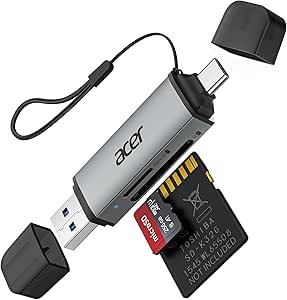 | Best Compact Dual-Connector Pick | Media formats: SD, SDXC, microSD, microSDHC, microSDXC | Connectivity: USB Type-A, USB Type-C | Data transfer rate: Up to 5 Gbps | VIEW ON AMAZON | See Our Full Breakdown |
| SD Card Reader 5-in-1 USB-C & USB Card Adapter with SD/MicroSD/MS Slots and Dual USB-A Ports |  | Best for Extra Ports and Legacy Cards | Card slots: SD, MicroSD, MS | Maximum capacity: 2 TB | Connectors: USB-C, USB-A | VIEW ON AMAZON | See Our Full Breakdown |
| Acer 3-in-1 USB-C SD Card Reader with Dual Card Slots and USB 3.0 |  | Best for USB-C Users Who Need a USB-A Port | Connectivity: USB Type-C | Card formats: SD, microSD, SDHC, SDXC, UHS-I | Data transfer rate: Up to 5 Gbps | VIEW ON AMAZON | See Our Full Breakdown |
| SD Card Reader, 4-in-1 USB-C to SD/TF/CF/MS Card Reader with USB to USB-C Adapter |  | Best for Mixed Card Collections | Connectors: USB-C with detachable USB-to-USB-C adapter | Card formats: SD, SDHC, SDXC, microSD, microSDHC, microSDXC, CF, Memory Stick Pro Duo, RS-MMC | Listed device compatibility: iPhone 16/15 series, iPad Pro, MacBook Pro, Android phones and tablets, Windows PCs | VIEW ON AMAZON | See Our Full Breakdown |
| Anker USB-C SD and MicroSD Card Reader |  | Best Compact Pick | Connector: USB Type-C | Slots: 2: SD and microSD | Supported media: MMC, RS-MMC, SD, SDHC, SDXC, UHS-I, microSD, microSDHC, microSDXC | VIEW ON AMAZON | See Our Full Breakdown |
| UGREEN USB-C UHS-II SD and MicroSD Card Reader |  | Best for UHS-II Transfers | Connector: USB Type-C | Card slots: 2 | Supported media: SD, SDHC, SDXC, microSD, microSDHC, microSDXC, MMC, RS-MMC | VIEW ON AMAZON | See Our Full Breakdown |
| USB C SD Card Reader for iPhone 15-17, iPad, MacBook, Android Devices |  | Best for USB-C iPhone Setups | Connectivity: USB Type-A and USB Type-C | Card slots: 2 | Supported media: microSD, SD, SDHC, SDXC, microSDHC, microSDXC | VIEW ON AMAZON | See Our Full Breakdown |
| USB-C SD and microSD Card Reader with USB 3.0 Port |  | Best for Adding a USB-A Port | Connectivity: USB Type-C | Card slots: 2: SD and microSD | Additional port: USB 3.0 | VIEW ON AMAZON | See Our Full Breakdown |
| YOFEEPOP USB-C SD and MicroSD Card Reader, Dual Slot |  | Best for Trail Camera Transfers | Connector: USB Type-C | Supported media: SD, microSDHC | Slots: 2 | VIEW ON AMAZON | See Our Full Breakdown |
| Oyuiasle USB-C SD and microSD Card Reader |  | Best for Simple Two-Way Transfers | Connector: USB Type-C | Media types: SD card, microSD card, USB devices | Slot count: 3 | VIEW ON AMAZON | See Our Full Breakdown |
| RayCue USB C to Micro SD TF Memory Card Reader 3-in-1 USB C Camera Card Adapter for iPhone, iPad, MacBook, Chromebook, Galaxy S and More |  | Best for Broad Card Compatibility | Connector: USB Type-C | Supported media: SD, SDHC, SDXC, microSD, microSDHC, microSDXC | Slot count: 3 | VIEW ON AMAZON | See Our Full Breakdown |
| USB-C SD and MicroSD Card Reader with Dual Slots |  | Best Compact Built-In Cable Pick | Connector: USB Type-C | Supported media: SDHC, SDXC, microSD, microSDHC, microSDXC | Slot count: 2 | VIEW ON AMAZON | See Our Full Breakdown |
| usbc sd card reader | Dimensions | Connector |
|---|---|---|
| Acer USB-C SD and microSD Card | — | USB-C |
| UGREEN 2-in-1 USB-C & USB-A SD | 2.9 × 0.85 × 0.46 in | — |
| Acer Dual-Slot USB-C and USB-A | 2.8 × 0.7 × 0.4 in | — |
| SD Card Reader 5-in-1 USB-C & | — | — |
| Acer 3-in-1 USB-C SD Card Read | 2.32 × 2.12 × 0.47 in | — |
| SD Card Reader | — | — |
| Anker USB-C SD and MicroSD Car | 1.65 × 0.67 × 0.37 in | USB Type-C |
| UGREEN USB-C UHS-II SD and Mic | — | USB Type-C |
| USB C SD Card Reader for iPhon | — | — |
| USB-C SD and microSD Card Read | 3.5 × 2.5 × 0.65 in | — |
| YOFEEPOP USB-C SD and MicroSD | 3.3 × 1 × 0.3 in | USB Type-C |
| Oyuiasle USB-C SD and microSD | 1.55 × 0.93 × 0.19 in | USB Type-C |
| RayCue USB C to Micro SD TF Me | 2.76 × 0.79 × 0.39 in | USB Type-C |
| USB-C SD and MicroSD Card Read | — | USB Type-C |
More Details on Our Top Picks
Acer USB-C SD and microSD Card Reader
The Acer makes the most sense when your workflow involves moving files between SD and microSD cards, since it can read and write both at once. Its 5 Gbps transfer rate and 15 cm cable make it a capable everyday pick for USB-C laptops and OTG-capable phones. Compared with the UGREEN 2-in-1, it gives up USB-A compatibility, but its aluminum housing and cable offer a compact setup without a protruding adapter body. That focus is useful if you mainly work with newer USB-C devices; it is limiting if you switch among older computers. The reader supports cards up to 2 TB and common SD and microSD formats. Thick phone or tablet cases may obstruct insertion, and Lightning devices are out of scope.
Pros:- Reads and writes SD and microSD cards simultaneously
- Up to 5 Gbps transfer rate
- 15 cm cable and aluminum alloy housing
- Supports cards up to 2 TB
Cons:- USB-C connection only, with no USB-A or Lightning support
- Phones and tablets need OTG support
- Thick device cases may obstruct card insertion
Best for: USB-C laptop and OTG-capable phone owners who regularly transfer files between SD and microSD cards
Not ideal for: People who need one reader for both USB-A computers and Lightning devices
- Connector:USB-C
- Card slots:SD and microSD
- Maximum transfer speed:5 Gbps
- Maximum supported capacity:2 TB
- Cable length:15 cm
- Housing:Aluminum alloy
- Simultaneous transfers:Reads and writes two cards at the same time
- Compatible operating systems:Windows, macOS, Linux, Chrome OS
Our verdict“Choose the Acer for simultaneous SD and microSD transfers on USB-C devices; pick the UGREEN 2-in-1 if USB-A support matters more.”
UGREEN 2-in-1 USB-C & USB-A SD Card Reader
If your cards move between newer and older devices, the UGREEN stands out for its USB-C and USB-A connectors. That flexibility is its clearest advantage over the Acer USB-C SD and microSD Card Reader, which is limited to USB-C. It reads SD and microSD cards simultaneously and supports a broad set of formats, including MMC and RS-MMC, making it a practical shared reader for a household or mixed-device workspace. Its 5 Gbps USB 3.0 connection and driver-free operation keep setup simple. The tradeoff is a short, direct-plug design: it may be less convenient where ports are crowded or difficult to reach. The listing gives dimensions but no cable length, so buyers seeking cable placement flexibility may prefer Acer’s cabled model.
Pros:- USB-C and USB-A interfaces cover mixed device generations
- Reads SD and microSD cards simultaneously
- Supports MMC and RS-MMC in addition to SD and microSD formats
- Driver-free operation with up to 5 Gbps transfer rate
Cons:- Direct-plug form may be awkward around crowded ports
- No cable length is specified
- No maximum supported card capacity is specified
Best for: Photographers or families who transfer cards between USB-C phones and USB-A computers
Not ideal for: Buyers who need a cabled reader to reach ports around crowded desks or cases
- Connectivity:USB 3.0, USB Type-C
- Data transfer rate:5 Gbps
- Supported cards:SD, SDHC, SDXC, microSD, microSDXC, microSDHC, MMC, RS-MMC
- Slot count:2
- Compatibility:Windows, macOS, Android, Chrome OS, Linux, iPhone 15/16/17
- Dimensions:2.9 × 0.85 × 0.46 in
- Weight:37 g
- Warranty:24 months
Our verdict“Pick the UGREEN when compatibility with both USB-C and USB-A devices is your priority.”
Acer Dual-Slot USB-C and USB-A SD Card Reader
The Acer Dual-Slot reader combines USB-C and USB-A in a compact 2.8-inch body, so it suits people who want broad host compatibility without carrying a cable. Like the UGREEN 2-in-1, it can work across both connector types and transfer from SD and microSD cards at up to 5 Gbps. Its heat-resistant aluminum construction and protective covers add practical protection for a bag-bound reader. The compact size also creates a compromise: its direct-plug format can be inconvenient beside bulky ports, and thick device cases may prevent full insertion. It also lacks Lightning support, so Apple phones with that connector need another solution. Compared with the cabled Acer USB-C model, this one trades cable reach for a smaller carry profile and USB-A access.
Pros:- USB-A and USB-C connectivity
- Simultaneous SD and microSD reading and writing
- Compact body with protective covers
- Heat-resistant aluminum construction
Cons:- No Lightning compatibility
- Thick device cases can prevent full insertion
- No maximum card capacity is specified
Best for: Traveling laptop owners who need a small reader for both USB-A and USB-C ports
Not ideal for: Users of Lightning-port devices or phones with cases that cover the port area
- Media formats:SD, SDXC, microSD, microSDHC, microSDXC
- Connectivity:USB Type-A, USB Type-C
- Data transfer rate:Up to 5 Gbps
- Hardware interface:USB 3.0
- Slot count:2
- Compatible operating systems:Android, Chrome OS, Linux, Windows, macOS
- Dimensions:2.8 × 0.7 × 0.4 in
- Materials:Heat-resistant aluminum
Our verdict“Choose this Acer for a compact dual-connector reader, while the cabled Acer USB-C model is a better fit when port reach matters.”
SD Card Reader 5-in-1 USB-C & USB Card Adapter with SD/MicroSD/MS Slots and Dual USB-A Ports
This 5-in-1 adapter is the lineup’s most utility-focused choice: it supports SD, microSD, and MS cards and adds two USB-A ports for connecting other devices. That makes it more adaptable than the Acer USB-C SD and microSD Card Reader for users who still handle Memory Stick media or need extra USB-A connections. It also lists compatibility with iPhone 15/16/17, iPad, MacBook, Android phones, and Windows PCs, provided the host connection is supported. The main tradeoff is uncertainty about speed: unlike the Acer and UGREEN models, this listing gives no transfer-rate specification, so it is harder to judge for large video transfers. Its maximum capacity is 2 TB, but buyers seeking a small, clearly speed-rated card reader may prefer a simpler dual-slot option.
Pros:- Supports SD, microSD, and MS cards
- Two USB-A ports add connection options
- Supports capacity up to 2 TB
- Plug-and-play operation with over-current and short-circuit protection
Cons:- No transfer speed is specified
- Requires a compatible USB-C or USB-A host port
- No carrying case or additional accessories are listed
Best for: Users with SD, microSD, and Memory Stick media who also want USB-A ports in one adapter
Not ideal for: Video creators who need a specified transfer rate or a compact two-slot-only reader
- Card slots:SD, MicroSD, MS
- Maximum capacity:2 TB
- Connectors:USB-C, USB-A
- USB-A ports:2
- Compatibility:iPhone 15/16/17 Pro Max, MacBook Pro/Air, iPad Pro, Android phones, Windows PCs
- Features:OTG support, plug-and-play, no driver needed
- Protection:Over-current and short-circuit protection
Our verdict“Choose this adapter for MS card support and added USB-A ports; choose the Acer or UGREEN if a stated 5 Gbps rate is more useful.”
Acer 3-in-1 USB-C SD Card Reader with Dual Card Slots and USB 3.0
The Acer 3-in-1 suits a USB-C laptop or Android device owner who wants SD and microSD slots plus a USB 3.0 port in one compact reader. That extra port gives it a different job from the Acer USB-C SD and microSD Card Reader, which focuses on card-to-card transfers and has a cabled design. Both list speeds up to 5 Gbps, but this model is limited to USB-C hosts and does not support Lightning or USB-A host connections. It also omits several formats, including UHS-II, XQD, and SDUC, so users with advanced camera media should check their cards before choosing it. The aluminum shell and 15 cm cable make it a tidy desk or travel option, though thick cases may interfere with insertion.
Pros:- Combines SD and microSD slots with a USB 3.0 port
- Up to 5 Gbps transfer rate
- 15 cm cable and aluminum shell
- Plug-and-play support across several operating systems
Cons:- USB-C host connection only, with no USB-A or Lightning support
- Does not support UHS-II, XQD, SDUC, or several other card formats
- Thick cases may interfere with insertion
Best for: USB-C laptop and Android users who want card slots and an extra USB 3.0 connection in one accessory
Not ideal for: Photographers using UHS-II, XQD, SDUC, or other unsupported media, and anyone with a USB-A-only host
- Connectivity:USB Type-C
- Card formats:SD, microSD, SDHC, SDXC, UHS-I
- Data transfer rate:Up to 5 Gbps
- Ports:Dual card slots and USB 3.0 port
- Cable length:15 cm
- Material:Aluminum
- Dimensions:2.32 × 2.12 × 0.47 in
- Compatible operating systems:Android, Chrome OS, Linux, Windows, macOS
Our verdict“Pick this Acer if you need an extra USB 3.0 port alongside SD and microSD access on a USB-C host.”
SD Card Reader, 4-in-1 USB-C to SD/TF/CF/MS Card Reader with USB to USB-C Adapter
Four card formats and two connector options make this the most flexible pick here for someone moving files from older cameras and current USB-C devices. It reads SD, microSD, CompactFlash, and Memory Stick formats, while the detachable adapter adds USB compatibility for computers with that port. Compared with the Anker USB-C SD and MicroSD Card Reader, it handles a wider range of media, though Anker offers a stated 5 Gbps transfer rate and a smaller, lighter body. The broad format list is useful when a household or work kit spans several generations of gear, but the product data gives no numeric speed figure, so I would not choose it for a speed-critical workflow. It also does not support Wi-Fi SD cards, and specialized cards may need separate adapters or may not work.
Pros:- Reads SD, microSD, CompactFlash, and Memory Stick formats
- Detachable adapter supports USB-C and USB connections
- Plug-and-play use without additional drivers
- Listed compatibility includes phones, tablets, and computers
Cons:- No numeric transfer speed is provided
- Does not support Wi-Fi SD cards
- Some specialized cards may require adapters or have limited support
Best for: Photographers and families transferring files from a mix of SD, microSD, CompactFlash, and Memory Stick cards to USB-C or USB-equipped devices
Not ideal for: Buyers focused on fast UHS-II transfers or Wi-Fi SD cards, since those capabilities are not supported or specified
- Connectors:USB-C with detachable USB-to-USB-C adapter
- Card formats:SD, SDHC, SDXC, microSD, microSDHC, microSDXC, CF, Memory Stick Pro Duo, RS-MMC
- Listed device compatibility:iPhone 16/15 series, iPad Pro, MacBook Pro, Android phones and tablets, Windows PCs
- Setup:Plug and play; no additional drivers required
- Supported file types:JPEG, RAW, H.264, MPEG-4
- Wi-Fi SD support:Not supported
Our verdict“Choose this reader if your card drawer includes several formats and you need both USB-C and USB connectivity.”
Anker USB-C SD and MicroSD Card Reader
Small, light, and straightforward, this Anker reader suits someone who wants SD and microSD access without carrying a cable or a multi-format hub. Its 9 g body is notably more pocket-friendly than the UGREEN USB-C UHS-II SD and MicroSD Card Reader, which adds a braided cable and support for faster UHS-II cards. That simplicity also limits its reach: there is no UHS-II support listed, no USB-A adapter, and the product requires a USB-C port. The stated 5 Gbps rate gives a useful reference for compatible connections, but actual transfer speed will depend on the card and host device. A snug fit may also mean removing a phone case before plugging it in, so I would favor it for laptop carry over a phone that stays in a bulky case.
Pros:- Very compact 9 g design
- Separate SD and microSD slots
- Supports a stated data transfer rate of up to 5 Gbps
- 18-month warranty
Cons:- Requires a USB-C port and has no USB-A adapter
- May not fit comfortably with a device case attached
- UHS-II support is not listed
Best for: USB-C laptop owners who want a lightweight reader for routine SD and microSD transfers
Not ideal for: Phone users with bulky cases, or photographers who need UHS-II support, USB-A connectivity, or broader card formats
- Connector:USB Type-C
- Slots:2: SD and microSD
- Supported media:MMC, RS-MMC, SD, SDHC, SDXC, UHS-I, microSD, microSDHC, microSDXC
- Data transfer rate:Up to 5 Gbps
- Dimensions:1.65 × 0.67 × 0.37 in
- Weight:9 g
- Operating systems:Chrome OS, macOS
- Warranty:18 months
Our verdict“Pick the Anker for simple SD and microSD transfers in a compact USB-C form, provided case clearance is not a concern.”
UGREEN USB-C UHS-II SD and MicroSD Card Reader
UHS-II support and a stated maximum of 312 MB/s set this reader apart for people whose cards and host devices can make use of faster transfers. It also has separate SD and microSD slots for working with two cards at once. Compared with the compact Anker USB-C SD and MicroSD Card Reader, UGREEN adds UHS-II support, a braided cable, and a more durable aluminum case, but it is less minimal to carry. The speed claim is a ceiling rather than a guarantee: both the card and connected device affect results. Android users also need a device with OTG support. For routine transfers from basic cards, that extra capability may not change the experience; for compatible camera cards, it can reduce waiting when moving large batches of files.
Pros:- Supports UHS-II and UHS-I SD and microSD cards
- Listed maximum transfer speed of 312 MB/s
- Two slots support simultaneous card access
- Aluminum case and braided cable
Cons:- Actual speed depends on the card and connected device
- Android phones must support OTG
- Cable and casing make it less pocket-minimal than the Anker reader
Best for: Photographers with UHS-II SD or microSD cards who transfer large files to a compatible USB-C computer or tablet
Not ideal for: Casual users with basic cards who want the smallest possible reader, or Android users whose device lacks OTG support
- Connector:USB Type-C
- Card slots:2
- Supported media:SD, SDHC, SDXC, microSD, microSDHC, microSDXC, MMC, RS-MMC
- Card standards:UHS-II and UHS-I
- Maximum transfer speed:Up to 312 MB/s
- Hardware interface:USB 3.0 Type-C
- Materials:Aluminum alloy case and braided cable
- Compatible operating systems:Windows, macOS, Linux, ChromeOS, iPadOS, Android
Our verdict“Choose UGREEN when your UHS-II cards and host device can use its speed potential and you value a cabled, durable build.”
USB C SD Card Reader for iPhone 15-17, iPad, MacBook, Android Devices
Broad device compatibility and a USB-A port make this a flexible add-on for USB-C iPhone, iPad, and Android users who also want to attach a peripheral. It handles SD and microSD cards without an app or driver, while the USB-A connection gives it a use beyond card transfers. By comparison, the Anker USB-C SD and MicroSD Card Reader is smaller and lists a much higher data rate, but it lacks the extra port. This model’s listed 48 Mbps transfer rate is modest, and its product details also mention speeds up to 60 MB/s, so I would treat the figures as inconsistent rather than expect a particular result. It cannot read SD and microSD simultaneously and supports FAT32/exFAT, not NTFS.
Pros:- Listed compatibility spans iPhone, iPad, MacBook, and Android devices
- Includes a USB-A port for connecting peripherals
- Plug-and-play operation without apps or drivers
- Supports SD and microSD card formats
Cons:- Cannot read SD and microSD cards simultaneously
- Product data lists conflicting transfer speed figures
- Supports FAT32 and exFAT, but not NTFS
Best for: USB-C iPhone, iPad, or Android users who want one reader for SD and microSD cards plus a USB-A peripheral
Not ideal for: Buyers moving large video libraries or using NTFS-formatted cards, given the modest and inconsistent speed figures and stated format limits
- Connectivity:USB Type-A and USB Type-C
- Card slots:2
- Supported media:microSD, SD, SDHC, SDXC, microSDHC, microSDXC
- Listed transfer rate:48 Mbps; product data also claims up to 60 MB/s
- Supported operating systems:iOS, Android, Windows, macOS, ChromeOS
- Card access:Cannot read SD and microSD cards simultaneously
- Supported file systems:FAT32 and exFAT; NTFS not supported
- Color:White
Our verdict“Pick this reader if you need a USB-A peripheral port alongside card access for a USB-C mobile device.”
USB-C SD and microSD Card Reader with USB 3.0 Port
A USB 3.0 port alongside SD and microSD slots gives this reader a practical role for USB-C computers and tablets that need another way to connect an accessory. Its product description says both card slots can be accessed simultaneously, a useful distinction from the USB C SD Card Reader for iPhone 15-17, iPad, MacBook, Android Devices, which cannot read both card types at once. The claimed ceiling is 90 MB/s, below the UGREEN reader’s stated 312 MB/s, so I would choose this for mixed everyday connections rather than UHS-II workflows. It needs no extra power and is plug-and-play, but compatibility still depends on the host device’s USB-C capabilities. Its dimensions also make it less pocket-sized than the 9 g Anker reader.
Pros:- Includes SD and microSD slots plus a USB 3.0 port
- Product description supports simultaneous access to two cards
- Plug-and-play use without driver installation
- Requires no additional power
Cons:- Stated maximum transfer speed is up to 90 MB/s
- Compatibility depends on the connected device’s USB-C capabilities
- Larger dimensions make it less pocket-friendly than compact stick-style readers
Best for: USB-C laptop and tablet owners who want SD and microSD access plus a USB 3.0 connection for an accessory
Not ideal for: Photographers seeking UHS-II performance or travelers prioritizing the smallest reader, since its stated speed is lower and its body is larger than the Anker
- Connectivity:USB Type-C
- Card slots:2: SD and microSD
- Additional port:USB 3.0
- Maximum transfer speed:Up to 90 MB/s
- Data transfer rate:5 Gbps
- Maximum supported capacity:Up to 2 TB
- Dimensions:3.5 × 2.5 × 0.65 in
- Power:No additional power required
Our verdict“Choose this model if the extra USB 3.0 port and simultaneous card access matter more than maximum transfer speed or pocket size.”
YOFEEPOP USB-C SD and MicroSD Card Reader, Dual Slot
The YOFEEPOP is a practical match for photographers who move between full-size SD and microSD cards, such as when retrieving trail camera footage. Its two slots support simultaneous card use, which gives it an advantage over the Oyuiasle reader, whose SD and microSD slots cannot be read at the same time. The stated 5 Gbps transfer rate is substantially higher than the modest rates listed for some compact alternatives, though actual results depend on the card and connected device. Plug-and-play setup keeps transfers simple across listed USB-C devices. The tradeoff is limited compatibility detail: the supplied information specifically names iPhone 15, leaving newer iPhone models less clearly covered. It is also a small, lightweight adapter rather than a reader with a built-in cable.
Pros:- Two slots support simultaneous SD and microSD card use
- Listed 5 Gbps transfer rate
- Plug-and-play operation requires no drivers or software
- Lightweight 10 g body works with a range of USB-C devices
Cons:- Compatibility details specifically name iPhone 15, so support for newer models is unclear
- No long-term reliability or real-world transfer performance information is provided
Best for: USB-C users who regularly move trail camera photos or videos from both SD and microSD cards
Not ideal for: Buyers who need clearly documented support for newer iPhone models or prefer a reader with a built-in cable
- Connector:USB Type-C
- Supported media:SD, microSDHC
- Slots:2
- Listed transfer rate:5 Gbps
- Compatible devices:iPhone, iPad, MacBook, laptops, USB-C devices
- Operating systems:iOS, macOS
- Dimensions:3.3 × 1 × 0.3 in
- Weight:10 g
- Warranty:1 year
Our verdict“Choose the YOFEEPOP if you want simultaneous SD and microSD access for trail camera transfers on a compatible USB-C device.”
Oyuiasle USB-C SD and microSD Card Reader
The Oyuiasle suits buyers who value a straightforward connection across phones, tablets, and computers more than fast card offloads. Its built-in USB-C cable avoids the loose-adapter feel of compact readers such as the YOFEEPOP, and it supports two-way transfers without an app, driver, or extra power. The stated transfer rate is only 30 megabits per second, however, so large photo or video libraries may take longer to move than with the RayCue, which lists a much higher rate. Although the product description mentions three slots, SD and microSD cards cannot be read simultaneously; that limits its usefulness for copying between cards. Its broad listed operating-system support makes it a flexible basic choice, provided speed and concurrent card access are not priorities.
Pros:- Built-in USB-C cable connects without a separate adapter
- Supports two-way file transfers
- Works without an app, driver, or extra power
- Lists compatibility with Android, Linux, Mac OS, Unix, and Windows
Cons:- Listed transfer rate is 30 megabits per second
- SD and microSD cards cannot be read simultaneously
Best for: Android and computer users who want a cabled reader for occasional two-way transfers without installing software
Not ideal for: Photographers moving large batches of footage or anyone who needs to read SD and microSD cards at once
- Connector:USB Type-C
- Media types:SD card, microSD card, USB devices
- Slot count:3
- Listed transfer rate:30 megabits per second
- Cable:Built-in USB-C cord
- Operating systems:Android, Linux, Mac OS, Unix, Windows
- Dimensions:1.55 × 0.93 × 0.19 in
- Color:White
Our verdict“Pick the Oyuiasle for occasional, cable-connected transfers across varied systems if its listed speed and single-card-at-a-time access fit your needs.”
RayCue USB C to Micro SD TF Memory Card Reader 3-in-1 USB C Camera Card Adapter for iPhone, iPad, MacBook, Chromebook, Galaxy S and More
RayCue stands out for buyers whose gear spans SD, microSD, and TF cards and who want one USB-C reader for several device types. It lists a 5 Gbps interface and transfer speeds up to 90 MB/s, making it a stronger fit for routine backups than the Oyuiasle, whose listed rate is just 30 megabits per second. The stated slot count of three and support for simultaneous reading and writing add flexibility when handling multiple cards. Its wide device list includes phones, tablets, and computers, though the detailed compatibility specification names Mac OS, so other operating systems are less clearly documented. RayCue is also limited to USB-C ports without an adapter, unlike the UGREEN 2-in-1 USB-C & USB-A SD Card Reader, which includes USB-A connectivity.
Pros:- Supports SD, SDHC, SDXC, microSD, microSDHC, and microSDXC media
- Three slots and stated simultaneous reading and writing
- Lists transfer rates up to 90 MB/s and a 5 Gbps interface
- Plug-and-play use requires no additional software
Cons:- USB-C only, with no included USB-A connection listed
- Detailed operating-system specification lists Mac OS, leaving other systems less clearly documented
- No water or dust resistance is specified
Best for: People who switch among SD, microSD, and TF cards on USB-C phones, tablets, and computers
Not ideal for: Users with USB-A-only computers or buyers who need documented water or dust resistance
- Connector:USB Type-C
- Supported media:SD, SDHC, SDXC, microSD, microSDHC, microSDXC
- Slot count:3
- Listed transfer rate:Up to 90 MB/s; interface listed as 5 Gbps
- Additional features:Plug and play, no apps needed
- Compatible devices:Camera, smartphone, tablet
- Operating system:Mac OS
- Dimensions:2.76 × 0.79 × 0.39 in
Our verdict“Choose RayCue if your USB-C setup uses several card formats and you want broader media support than a basic dual-slot reader offers.”
USB-C SD and MicroSD Card Reader with Dual Slots
This reader is a simple option for users who want a built-in USB-C cable and support for both SD and microSD formats in a compact package. It handles bidirectional photo and video transfers and lists compatibility with macOS, Windows, Linux, and Chrome, giving it broader stated system coverage than the Oyuiasle’s similarly cabled design. Its 25 megabits per second listed transfer rate is the main constraint: the RayCue is better suited to faster card offloads, while this model makes more sense for occasional file access. OTG support is required, so a USB-C port alone may not be enough on every device. The product details do not state whether its two slots can be used simultaneously, which matters for buyers comparing it with the YOFEEPOP.
Pros:- Built-in USB-C cable keeps the connection attached to the reader
- Supports SDHC, SDXC, microSD, microSDHC, and microSDXC
- Bidirectional transfers and plug-and-play setup
- Lists macOS, Windows, Linux, and Chrome compatibility
Cons:- Listed transfer rate is 25 megabits per second
- Requires a compatible USB-C device with OTG support
- Simultaneous use of both slots is not specified
Best for: Travelers and casual users who want a compact cabled reader for occasional transfers on OTG-compatible USB-C devices
Not ideal for: Users moving large video files often, or buyers who need confirmed simultaneous access to both card slots
- Connector:USB Type-C
- Supported media:SDHC, SDXC, microSD, microSDHC, microSDXC
- Slot count:2
- Listed transfer rate:25 megabits per second
- Compatible operating systems:macOS, Windows, Linux, Chrome
- Compatible devices:Cameras and compatible USB-C devices with OTG support
- Additional features:Compact, plug and play, built-in USB-C cable
- Color:White
Our verdict“Pick this compact reader for occasional transfers when you want a built-in cable and your USB-C device supports OTG.”

How We Picked
I compared these readers by the practical fit between their stated card formats, connectors, and likely devices. I gave priority to clear support for SD and microSD, then weighed useful distinctions such as UHS-II support, USB-A compatibility, extra card formats, and added ports. A compact reader with the formats most people need earns a higher place than a larger adapter when its extra hardware serves a narrower audience.
The order reflects those tradeoffs: the Acer USB-C SD and microSD reader leads for its focused everyday role; the UGREEN UHS-II model ranks highly for buyers with compatible high-speed cards; and dual-connector or multi-format adapters follow when their added flexibility is useful. I treat model names and stated features as the basis for comparison, rather than assuming unlisted transfer speeds, compatibility guarantees, or build details. Buyers should check their device, card standard, and connector needs against the product listing before choosing.
| usbc sd card reader | Connector |
|---|---|
| Acer USB-C SD and microSD Card | USB-C |
| UGREEN 2-in-1 USB-C & USB-A SD | — |
| Acer Dual-Slot USB-C and USB-A | — |
| SD Card Reader 5-in-1 USB-C & | — |
| Acer 3-in-1 USB-C SD Card Read | — |
| SD Card Reader | — |
| Anker USB-C SD and MicroSD Car | USB Type-C |
| UGREEN USB-C UHS-II SD and Mic | USB Type-C |
| USB C SD Card Reader for iPhon | — |
| USB-C SD and microSD Card Read | — |
| YOFEEPOP USB-C SD and MicroSD | USB Type-C |
| Oyuiasle USB-C SD and microSD | USB Type-C |
| RayCue USB C to Micro SD TF Me | USB Type-C |
| USB-C SD and MicroSD Card Read | USB Type-C |
Factors to Consider When Choosing Usbc Sd Card Readers
Choosing among USB-C SD card readers starts with matching the reader to the cards and devices already in your workflow. I would check those details before deciding whether extra ports, more formats, or a faster card standard are worth the added size.
Match the reader to the cards you actually own
Start with the markings on your camera cards: SD, microSD, and older formats such as CompactFlash or Memory Stick are not interchangeable. A reader listing several formats may be useful when you move files from multiple cameras, but unused slots add bulk without improving a single-card workflow. Check whether the listing names the specific card type and capacity range you use; a broad label can leave compatibility details unclear. If you use SD and microSD only, a two-slot model can be easier to pack and identify. I would favor confirmed format support over a higher slot count.
Treat UHS-II as a system feature
A UHS-II reader can help transfer files from a compatible UHS-II card, but the card, reader, and host connection all affect the result. A faster reader cannot make a slower card transfer at UHS-II rates, and the USB-C shape by itself says little about transfer speed. If your cards are UHS-I or your transfers are occasional, a simpler reader may be a better fit. Before paying for a higher-speed standard, check the card markings and the reader’s stated interface details. For large shoots, compare the complete chain rather than shopping by connector alone.
Check connector fit across your devices
USB-C readers suit many newer phones, tablets, and computers, but physical fit and operating-system support can vary. If your search is for micro USB-C, inspect the device port carefully: micro-USB and USB-C are different connector shapes, and a USB-C reader may need a compatible adapter for a micro-USB device. Some listings include a USB-A or USB-C adapter, while others rely on a single plug. Confirm what is in the box and whether your device can access files from an external card reader. That quick check can prevent a connector mismatch from making an otherwise suitable reader unusable.
Decide whether extra ports earn their space
Readers with USB-A ports or multiple card formats can reduce the number of adapters you carry. They can also occupy more room and create a wider assembly that may interfere with neighboring ports or phone cases. Consider where you will use the reader: a desk setup can accommodate a larger adapter more easily than a compact travel kit. A USB-C and USB-A design makes sense if you regularly move between older computers and newer devices. If your only goal is importing camera photos, extra ports may be less useful than a small dedicated reader.
Plan for the way you move and manage files
Frequent travel makes cable-free, compact designs appealing, while a fixed workstation can benefit from a reader that stays connected or adds ports. A direct plug-in reader is easy to carry, though the attached card can stick out and take strain if bumped. For field use, think about where you will place the device during transfers and how you will protect the card. Also check how your phone or computer presents imported files; the reader handles the connection, but the host still controls file browsing and storage. This matters especially when you plan to copy video or a large photo library to a phone with limited free space.
Frequently Asked Questions
Will a USB-C SD card reader work with a micro-USB phone?
Not by connector shape alone: USB-C and micro-USB are different ports. A USB-C reader may work through a suitable micro-USB adapter, but the phone must also support USB host access to external storage. Check the phone’s specifications and confirm the adapter supports data transfer rather than charging only. If you want to import camera files directly, verify that your file manager or photo app can browse the card. A reader made for USB-C devices is not automatically compatible with every Android phone.
Should I choose a UHS-II reader if my camera card is UHS-I?
A UHS-II reader does not upgrade a UHS-I card, so it may not change your transfer experience with the card you own today. It can still make sense if you plan to buy UHS-II cards and your computer or phone can take advantage of the connection. Compare the reader’s stated interface with the card standard and host device rather than relying on the USB-C plug. For occasional transfers, compatibility and portability may matter more than the faster standard. If you are not planning a card upgrade, a simpler reader is likely sufficient.
Is a reader with both USB-C and USB-A worth choosing?
It is useful if you move files between devices with different ports, such as a USB-C phone and an older USB-A computer. That flexibility can save you from carrying a separate adapter. If every device you use has USB-C, the second connector may add size without solving a real problem. Check how the connectors are arranged and whether the reader can fit beside other cables or ports. Choose dual-connector convenience when it matches your device mix, rather than as a general upgrade.
Can I use a multi-format reader with a microSD card from an action camera?
Usually the key question is whether the reader explicitly supports microSD, often labeled TF, rather than how many other slots it has. Confirm the exact card format and any capacity or standard limits in the product details. A multi-slot adapter may be helpful if you also handle older camera cards, but extra formats do not guarantee support for every card variant. Check that the card can sit securely in the slot and that your device can read it. For a single action-camera card, a dedicated SD and microSD reader can be simpler to carry.
What should I check before importing photos to an iPhone or iPad?
First confirm that the reader’s connector matches your device, including any adapter needed for a particular generation. Then check that the device and operating system support the card reader and the file types you want to import. The reader’s card format support matters too: a microSD card may require a compatible slot or an SD adapter. Leave enough free storage on the phone or tablet for the files, especially for video. If your workflow depends on a particular camera app or file manager, verify that it can locate external storage.
Conclusion
Best overall: I recommend the Acer USB-C SD and microSD Card Reader for a focused everyday choice covering the two common card formats. Best value: the UGREEN 2-in-1 USB-C & USB-A reader is my pick when one reader needs to connect to both newer and older devices. Best premium: consider the UGREEN USB-C UHS-II reader if your cards and host support UHS-II and faster transfers matter to your workflow. Best for beginners: the Acer dual-slot USB-C and USB-A reader offers a straightforward way to cover common cards and mixed ports. For specific needs, choose a multi-format adapter only when its added slots match cards you own, and confirm micro USB-C device compatibility before ordering.
Halloween Picks
halloween
As an affiliate, we earn on qualifying purchases.