For most streamers, I’d start with the Logitech Blue Yeti: its four pickup patterns and Blue VO!CE controls give it more room to adapt than a basic plug-and-play mic. The HyperX QuadCast 2 is a strong alternative if quick on-mic controls matter, while the FIFINE AmpliGame AM8 suits streamers who want a dynamic USB mic with an XLR upgrade path. The main tradeoffs are condenser sensitivity versus dynamic noise rejection, simple USB setup versus future flexibility, and a complete kit versus room to customize. My ranking weighs those differences for real streaming setups rather than treating every feature as equally useful. Read on for the full breakdown and help matching a mic to your space, voice, and plans.

Get the latest gadgets delivered free with Prime
- Fast, free delivery on millions of items
- Prime Video, Amazon Music and more included
- Member-only deals all year
Complete the kit



Key Takeaways
- The Blue Yeti leads for versatility: four pickup patterns and Blue VO!CE features make it more adaptable to different streaming formats than the simpler USB models.
- Dynamic USB/XLR models suit noisier rooms: the FIFINE AM8 and AM8T offer a closer-talk streaming approach and an XLR path, though they call for more deliberate mic placement than plug-and-play condenser choices.
- Complete kits can save setup guesswork: the amazon.com/dp/B0CCV74CL7?tag=digitechbytes.com-20&ascsubtag=dc-618424″ target=”_blank” rel=”nofollow sponsored noopener”>TONOR TC310+ and FIFINE A6T bundle useful mounting accessories, while a bundle is less valuable if its arm or stand does not fit your desk.
- Physical controls matter during live sessions: mute buttons, gain controls, and headphone monitoring on options such as the ZealSound K66 can simplify adjustments without switching windows.
- RGB is a visual extra, not an audio upgrade: several gaming picks add lighting, but room noise, mic distance, and placement have more bearing on stream sound.
| TONOR TC310+ Gaming Microphone Set with Boom Arm | 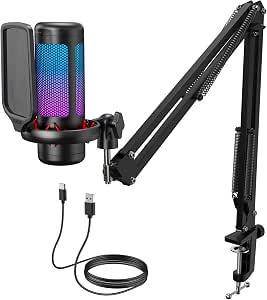 | Best Complete Streaming Kit | Model: TC310+ | Connectivity: USB-A | Polar pattern: Unidirectional | VIEW ON AMAZON | See Our Full Breakdown |
| MRSDY USB Gaming Microphone with RGB Lighting |  | Best for Headphone Monitoring | Connectivity: USB Type-A | Microphone type: Condenser, desktop | Polar pattern: Unidirectional | VIEW ON AMAZON | See Our Full Breakdown |
| Amazon Basics USB Condenser Microphone for PC |  | Best Simple Starter Mic | Connectivity: USB | Pickup pattern: Cardioid (unidirectional) | Diaphragm: 14 mm | VIEW ON AMAZON | See Our Full Breakdown |
| Logitech Blue Yeti USB Microphone with Blue VO!CE, Four Pickup Patterns, and Desktop Stand |  | Best for Flexible Recording | Microphone type: Tri-capsule condenser | Connectivity: USB | Pickup patterns: Cardioid, omnidirectional, bidirectional, stereo | VIEW ON AMAZON | See Our Full Breakdown |
| ZealSound K66 USB Podcast Microphone with Noise Reduction, Gain Control, Mute, and Headphone Monitoring |  | Best for Streaming Across Devices | Type: USB condenser microphone | Pickup pattern: Cardioid | Frequency response: 40 Hz–18 kHz | VIEW ON AMAZON | See Our Full Breakdown |
| CMOCIIY USB Gooseneck Desktop Microphone with Mute Button and LED Lighting |  | Best for Desk Calls and Simple Streaming | Connectivity: USB | Connector: USB Type-A | Pickup pattern: Omnidirectional | VIEW ON AMAZON | See Our Full Breakdown |
| TONOR TC-777 USB Podcast Microphone with Tripod Stand and Pop Filter | 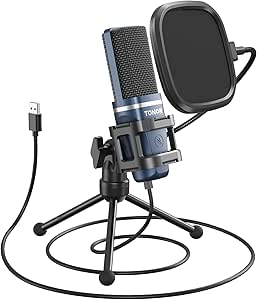 | Best Starter Kit for Voice Isolation | Connectivity: USB 2.0 | Connector: USB Type-A | Polar pattern: Unidirectional cardioid | VIEW ON AMAZON | See Our Full Breakdown |
| USB Gaming Microphone with RGB Lighting, Touch Mute, Pop Filter, and Headphone Monitoring |  | Best for Live Monitoring | Connectivity: USB | Connectors: USB, 3.5 mm jack | Polar pattern: Unidirectional cardioid | VIEW ON AMAZON | See Our Full Breakdown |
| FIFINE AmpliGame A6V USB Gaming Microphone |  | Best for On-Mic Gain Control | Connectivity: USB | Microphone type: Condenser | Polar pattern: Conflicting listing: cardioid in description; bidirectional in specifications | VIEW ON AMAZON | See Our Full Breakdown |
| FIFINE AmpliGame AM8T XLR/USB Gaming Microphone Set – Dynamic PC Mic |  | Best Upgrade Path | Connectivity: USB, XLR | Polar pattern: Unidirectional cardioid | Frequency range: 50 Hz–16 kHz | VIEW ON AMAZON | See Our Full Breakdown |
| FIFINE AmpliGame A6T USB Gaming Microphone Kit |  | Best Complete Starter Kit | Connectivity: USB | Microphone type: Condenser | Polar pattern: Unidirectional cardioid | VIEW ON AMAZON | See Our Full Breakdown |
| FIFINE K669B USB Condenser Microphone |  | Best Simple Desktop Value | Connectivity: USB | Connector: USB Type-A or USB Type-C | Polar pattern: Unidirectional cardioid | VIEW ON AMAZON | See Our Full Breakdown |
| HyperX QuadCast 2 USB Microphone for Gaming, Streaming, and Podcasting |  | Best for Multi-Person and Flexible Setups | Connectivity: Wired USB-C | Recording quality: 24-bit, 96 kHz | Polar patterns: Cardioid, omnidirectional, bidirectional, stereo | VIEW ON AMAZON | See Our Full Breakdown |
| FIFINE AmpliTank K688CT Podcast Microphone Kit | 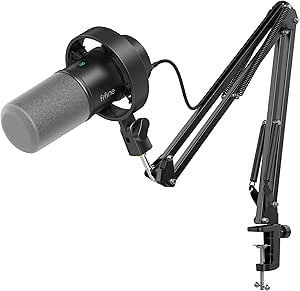 | Best Dynamic Mic for Noisy Rooms | Connectivity: USB and XLR | Microphone type: Dynamic | Polar pattern: Unidirectional cardioid | VIEW ON AMAZON | See Our Full Breakdown |
| FIFINE AmpliGame AM8 USB/XLR Dynamic Microphone |  | Best Flexible Stand-Mount Upgrade | Connectivity: USB and XLR | Microphone type: Dynamic | Polar pattern: Unidirectional cardioid | VIEW ON AMAZON | See Our Full Breakdown |
| usb microphone for streaming | Connectivity | Signal-to-noise ratio | Polar pattern |
|---|---|---|---|
| TONOR TC310+ Gaming Microphone | USB-A | 78 dB | Unidirectional |
| MRSDY USB Gaming Microphone wi | USB Type-A | — | Unidirectional |
| Amazon Basics USB Condenser Mi | USB | — | — |
| Logitech Blue Yeti USB Microph | USB | 100 dB | — |
| ZealSound K66 USB Podcast Micr | — | — | — |
| CMOCIIY USB Gooseneck Desktop | USB | 93 dB | — |
| TONOR TC-777 USB Podcast Micro | USB 2.0 | 80 dB | Unidirectional cardioid |
| USB Gaming Microphone with RGB | USB | 78 dB | Unidirectional cardioid |
| FIFINE AmpliGame A6V USB Gamin | USB | 70 dB | Conflicting listing: cardioid in description; bidirectional in specifications |
| FIFINE AmpliGame AM8T XLR/USB | USB, XLR | 80 dB | Unidirectional cardioid |
| FIFINE AmpliGame A6T USB Gamin | USB | 70 dB | Unidirectional cardioid |
| FIFINE K669B USB Condenser Mic | USB | 78 dB | Unidirectional cardioid |
| HyperX QuadCast 2 USB Micropho | Wired USB-C | 65 dB | — |
| FIFINE AmpliTank K688CT Podcas | USB and XLR | 80 dB | Unidirectional cardioid |
| FIFINE AmpliGame AM8 USB/XLR D | USB and XLR | 80 dB | Unidirectional cardioid |
More Details on Our Top Picks
TONOR TC310+ Gaming Microphone Set with Boom Arm
The TONOR TC310+ is the most ready-to-position option here: its included metal boom arm, shockmount, and pop filter give streamers more flexibility than the desk-stand-focused MRSDY microphone. That setup can keep the mic closer to your mouth while clearing space in front of your keyboard. On-mic tap-to-mute and gain controls are useful during live sessions, and adjustable RGB lets you coordinate the look without making lighting mandatory. The unidirectional pattern is suited to a single streamer, but it offers fewer recording setups than the Blue Yeti’s four patterns. Check your desk before buying: the clamp is specified for surfaces up to 2.36 inches thick, and this kit needs a USB port and a secure Type-C connection for best performance.
Pros:- Includes a metal boom arm, shockmount, and pop filter for a more flexible streaming setup.
- Tap-to-mute and gain adjustment put useful controls within reach during broadcasts.
- RGB modes include brightness adjustment.
- Unidirectional pickup is suited to focusing on one speaker.
Cons:- The desk clamp supports surfaces only up to 2.36 inches thick.
- The unidirectional pattern is less versatile than the Blue Yeti’s four pickup patterns.
- Optimal performance depends on a USB port and a secure Type-C connection.
Best for: PC or console streamers who want a boom arm, shockmount, pop filter, and live controls in one kit.
Not ideal for: Streamers with desks thicker than 2.36 inches or buyers who need multiple pickup patterns for interviews and group recordings.
- Model:TC310+
- Connectivity:USB-A
- Polar pattern:Unidirectional
- Signal-to-noise ratio:78 dB
- Audio sensitivity:10 dB
- Compatible devices:Desktop computers, laptops, Mac OS, PS4, PS5
- Controls and features:One-tap mute, volume control, RGB effect and brightness control, noise cancellation, plug and play
- Included components:Microphone, pop filter, mic stand, shockmount, USB cable, manual
Our verdict“Choose the TC310+ if you want a ready-made boom-arm setup with practical live controls and have a compatible desk.”
MRSDY USB Gaming Microphone with RGB Lighting
The MRSDY stands out for streamers who want real-time headphone monitoring without moving up to the more feature-rich Blue Yeti. Its headphone jack lets you listen to the mic feed while streaming, while quick mute and adjustable gain offer handy control at the desk. USB Type-A setup is straightforward, and the RGB lighting can be turned off if you prefer a less colorful setup. Compared with the TONOR TC310+, this is a simpler desktop package: it includes a stand rather than a boom arm and shockmount, so it takes up desk space and offers less positioning flexibility. The plastic-and-metal enclosure and corded connection keep the design practical rather than especially adaptable. Its unidirectional pickup suits solo gaming, not a range of group recording formats.
Pros:- Headphone jack supports real-time monitoring while streaming.
- Quick mute and adjustable gain provide accessible session controls.
- Plug-and-play USB Type-A connection works with listed PCs, Macs, and consoles.
- RGB lighting can be switched off.
Cons:- The included desktop stand offers less positioning flexibility than the TONOR TC310+ boom arm.
- Plastic-and-metal construction may be less appealing to buyers seeking a more substantial build.
- Unidirectional pickup is limited compared with the Blue Yeti’s four pattern options.
Best for: Solo PC, Mac, or console streamers who want to monitor their microphone feed through headphones and prefer a compact desktop stand.
Not ideal for: Streamers who need a boom arm, shockmount, or several pickup patterns for different recording setups.
- Connectivity:USB Type-A
- Microphone type:Condenser, desktop
- Polar pattern:Unidirectional
- Compatible devices:PC, laptop, PS4, PS5, Mac
- Features:Headphone monitoring, mute, noise reduction, RGB lighting, volume control
- Cable length:2 m (78 in)
- Dimensions:3.54 × 3.54 × 6.3 in
- Included accessories:USB cable, stand, user manual
Our verdict“Pick the MRSDY if headphone monitoring and simple desk controls matter more than a boom arm or multi-pattern recording.”
Amazon Basics USB Condenser Microphone for PC
The Amazon Basics microphone is the straightforward desk option in this group: connect it by USB, position its adjustable stand, and use the one-tap mute when you need to cut the feed. Its cardioid pickup pattern is intended to favor sound in front of the mic, making it a sensible fit for a single streamer rather than a shared table. Unlike the TONOR TC310+, it does not come with a boom arm or a lighting setup, but its standard 5/8-inch thread gives buyers the option to attach it to a compatible stand or tripod later. The tradeoff is a pared-back feature set: there is no listed headphone monitoring, gain control, or multi-pattern pickup. It is also a wired, single-channel USB microphone.
Pros:- Plug-and-play USB connection requires no additional drivers.
- Cardioid pickup is suited to a single speaker facing the microphone.
- One-tap mute is useful during live sessions.
- Adjustable stand and standard 5/8-inch thread allow different mounting arrangements.
Cons:- No listed headphone monitoring or gain adjustment, unlike the MRSDY.
- Single-channel audio and one pickup pattern limit recording flexibility.
- A wired USB connection is required.
Best for: New Windows or Mac streamers who want a simple USB mic with a mute button and the option to mount it on a compatible stand.
Not ideal for: Streamers who want built-in headphone monitoring, gain controls, RGB, or a complete boom-arm kit.
- Connectivity:USB
- Pickup pattern:Cardioid (unidirectional)
- Diaphragm:14 mm
- Mute function:One-tap mute
- Compatibility:Windows 7 or higher; Mac OS 10.10 or higher
- Stand:360° adjustable
- Mount thread:Standard 5/8 inch
- Weight:0.2 kg
Our verdict“Choose this Amazon Basics mic for a basic solo-streaming setup if simple USB operation matters more than monitoring and extra controls.”
Logitech Blue Yeti USB Microphone with Blue VO!CE, Four Pickup Patterns, and Desktop Stand
The Blue Yeti earns its place through four selectable pickup patterns, making it a stronger fit than the single-pattern TONOR TC310+ when one mic needs to cover solo streams, interviews, or shared recordings. Onboard controls for gain, pattern selection, headphone volume, and mute give the streamer direct access to key adjustments. Its Blue VO!CE effects add software-based vocal options, though accessing the full feature set requires installing Logitech G HUB. The metal enclosure and included desktop stand make it a substantial all-in-one choice, and it can also attach to a compatible boom arm or mic stand. The tradeoff is extra setup and software dependence; buyers who only need a basic solo USB mic may find the Amazon Basics model simpler.
Pros:- Four pickup patterns support solo, group, and stereo recording setups.
- Onboard gain, pattern, headphone volume, and mute controls suit live use.
- Metal enclosure and included desktop stand provide a sturdy desk setup.
- Blue VO!CE software offers vocal effects and audio samples.
Cons:- Full Blue VO!CE functionality requires installing Logitech G HUB.
- More pickup-pattern and software options may be unnecessary for a solo streamer seeking basic USB operation.
- The included desktop stand takes up desk space unless the mic is moved to a compatible stand or boom arm.
Best for: Streamers and creators who record solo sessions as well as interviews or group audio and want multiple pickup patterns.
Not ideal for: Buyers who want the simplest plug-in-and-go setup or do not want to install Logitech G HUB for the full software feature set.
- Microphone type:Tri-capsule condenser
- Connectivity:USB
- Pickup patterns:Cardioid, omnidirectional, bidirectional, stereo
- Frequency response:20 Hz–20 kHz
- Signal-to-noise ratio:100 dB
- Channels:2
- Compatibility:PC and Mac
- Included stand:Desktop stand
Our verdict“Choose the Blue Yeti if you need one USB microphone for several streaming and recording formats and are comfortable using its software.”
ZealSound K66 USB Podcast Microphone with Noise Reduction, Gain Control, Mute, and Headphone Monitoring
The ZealSound K66 is the most adaptable pick for streamers who move between a computer, console, and mobile device: its USB-C and Lightning adapters support a broader mix of listed devices than the PC-and-Mac-only Blue Yeti. It also combines zero-latency headphone monitoring with separate mic and monitoring volume controls, plus echo adjustment and mute. That gives it more hands-on tuning than the Amazon Basics mic, which keeps controls to a simpler set. The K66’s cardioid pattern suits one speaker, while its noise reduction mode may help with common background sounds. However, the maker notes that mode can change the natural character of a voice, so it may not suit streamers who prefer an unprocessed vocal sound. Stand and mounting details are not specified.
Pros:- USB-C and Lightning adapters extend compatibility to listed mobile devices and computers.
- Zero-latency headphone monitoring supports real-time listening.
- Separate controls cover microphone volume, monitoring volume, echo, and mute.
- Noise reduction mode provides an option for managing common background sounds.
Cons:- Noise reduction mode may alter the natural vocal tone.
- Included stand or mounting options are not specified.
- Its single cardioid pattern is less flexible than the Blue Yeti’s four patterns.
Best for: Streamers who want to use one microphone with a Windows PC, Mac, PS4, PS5, iPhone, iPad, or USB-C device.
Not ideal for: Buyers who need clearly specified mounting hardware or want noise reduction without any possible change to vocal tone.
- Type:USB condenser microphone
- Pickup pattern:Cardioid
- Frequency response:40 Hz–18 kHz
- Sampling rate:46 kHz
- Sensitivity:–45 dB ±3 dB
- Monitoring:3.5 mm headphone jack, zero latency
- Controls:Microphone volume, monitoring volume, echo, mute
- Connectivity and compatibility:USB with USB-C and Lightning adapters; Windows PC, Mac, PS4, PS5, iPhone, iPad, and USB-C devices
Our verdict“Pick the K66 if device compatibility and hands-on monitoring controls matter more than clearly specified mounting hardware or multi-pattern recording.”
CMOCIIY USB Gooseneck Desktop Microphone with Mute Button and LED Lighting
The CMOCIIY is the simplest fit here for a streamer who wants a microphone that stays on the desk and is easy to reposition. Its 5.7-inch gooseneck brings the mic closer without a boom arm, while the one-touch mute is handy for quick interruptions. Compared with the TONOR TC-777, it trades the TONOR’s cardioid pickup and included pop filter for a more flexible neck and a weighted desktop base. Its omnidirectional pickup can capture voices from around the mic, which may suit shared calls but is less helpful when keyboard noise or room sound needs limiting. The USB-A connection keeps setup straightforward, though the cable restricts placement. Switchable lighting is decorative rather than a streaming control feature.
Pros:- Adjustable gooseneck makes it easy to bring the microphone closer without a separate arm.
- One-touch mute offers a quick way to silence the mic during a stream or call.
- USB-A plug-and-play setup is listed for Windows and Mac.
- Weighted base with non-slip pads helps keep the mic steady on a desk.
Cons:- Omnidirectional pickup is less suited to rejecting keyboard and room noise than the cardioid TONOR TC-777.
- Wired USB connection limits where the microphone can sit.
- LED lighting adds visual flair but does not improve voice pickup.
Best for: Desk-based streamers and callers who want a compact, repositionable mic with a quick mute button and minimal setup.
Not ideal for: Streamers in noisy rooms or those who want to isolate their voice, since the omnidirectional pattern can pick up sound from multiple directions.
- Connectivity:USB
- Connector:USB Type-A
- Pickup pattern:Omnidirectional
- Form factor:Gooseneck
- Gooseneck length:5.7 inches
- Signal-to-noise ratio:93 dB
- Channels:1
- Weight:0.26 kg
Our verdict“Choose the CMOCIIY for a tidy desk setup and flexible positioning, but pick a cardioid model if background noise is your main concern.”
TONOR TC-777 USB Podcast Microphone with Tripod Stand and Pop Filter
The TONOR TC-777 makes a strong starter choice because the essentials for a desk streaming setup come in the box: a foldable tripod, shock mount, and pop filter. Its cardioid pickup favors sound from the front, giving it a practical advantage over the omnidirectional CMOCIIY when a streamer wants less room sound in the mix. Built-in mute and volume controls also keep routine adjustments within reach. The tradeoff is a more basic setup than the FIFINE AmpliGame A6V, which adds gain control and RGB lighting. The TC-777 works with PC, Mac, PS4, and PS5, but not Xbox. Its listed cable lengths are inconsistent, so buyers should not rely on the product details for an exact reach.
Pros:- Cardioid pickup is better suited to focusing on the speaker than the omnidirectional CMOCIIY.
- Tripod, shock mount, and pop filter provide a useful starter desk setup.
- Built-in mute and volume controls allow quick adjustments.
- Listed compatibility includes Windows, Mac, PS4, and PS5.
Cons:- Not compatible with Xbox.
- Product details list conflicting cable lengths.
- Lacks the gain knob and RGB features offered by the FIFINE AmpliGame A6V.
Best for: New PC or PlayStation streamers who want a cardioid USB mic with a stand and basic acoustic accessories included.
Not ideal for: Xbox players, or streamers who need a clearly specified cable length or more elaborate lighting and gain controls.
- Connectivity:USB 2.0
- Connector:USB Type-A
- Polar pattern:Unidirectional cardioid
- Signal-to-noise ratio:80 dB
- Impedance:680 ohms
- Weight:345 g
- Cable length:Listed inconsistently as 70 in (180 cm), 1.5 m, and 1.9 m
- Included accessories:Foldable tripod, mini shock mount, pop filter, power cord, manual
- Compatible devices:PC, laptop, PS4, PS5
Our verdict“Pick the TC-777 for an affordable-in-features starter setup and front-focused pickup, provided you stream on a supported device.”
USB Gaming Microphone with RGB Lighting, Touch Mute, Pop Filter, and Headphone Monitoring
For streamers who want to hear their voice while broadcasting, this model brings together a headphone monitoring jack, touch mute, and a bottom-mounted volume control. Its cardioid pattern makes it a more natural fit for a single speaker than the CMOCIIY’s omnidirectional pickup, and the metal pop filter and shock mount give it a more complete desk package than a bare USB mic. The RGB lights switch off when muted, providing a visible status cue during a stream. Compared with the FIFINE AmpliGame A6V, this microphone highlights monitoring rather than a dedicated gain knob. Its published frequency range tops out at 2,000 Hz, an unusually limited figure for a voice mic, so buyers should verify that specification before choosing it for demanding audio work.
Pros:- Headphone jack supports real-time voice monitoring.
- Cardioid pickup is more focused on the speaker than the CMOCIIY’s omnidirectional pattern.
- Touch mute is paired with an RGB light change for a visible status cue.
- Includes a metal pop filter, shock mount, and weighted base.
Cons:- Published frequency range is limited to 20–2,000 Hz, which may not suit buyers seeking broader documented response.
- Single-channel audio offers no multichannel recording flexibility.
- Requires a wired USB connection.
Best for: PC and PlayStation streamers who want headphone monitoring, a visible mute cue, and included desk accessories.
Not ideal for: Buyers seeking clearly documented wide-band audio performance, or anyone who needs an XLR connection or wireless placement.
- Connectivity:USB
- Connectors:USB, 3.5 mm jack
- Polar pattern:Unidirectional cardioid
- Audio sensitivity:45 dB
- Signal-to-noise ratio:78 dB
- Frequency range:20–2,000 Hz
- Cable length:180 cm
- Compatible devices:Headphones, laptop, PC, PS4, PS4 Pro, PS5
- Features:RGB lighting, touch mute, volume control, headphone monitoring, metal pop filter, shock mount, weighted base
Our verdict“Choose this model if monitoring your voice and seeing mute status matter more than advanced connection options or fully specified audio performance.”
FIFINE AmpliGame A6V USB Gaming Microphone
The AmpliGame A6V suits streamers who want hands-on level adjustment without reaching for software: its gain knob sits alongside a tap-to-mute control. The included shock mount, pop filter, and tripod make it a fuller starter kit than a desktop mic such as the CMOCIIY, while RGB lighting gives it a gaming-oriented look. It connects to PCs, PS4, and PS5, but the product information contains a notable conflict: the description says cardioid, while the specifications say bidirectional. That makes its noise-rejection behavior harder to judge than the clearly listed cardioid pattern on the TONOR TC-777. Cable length is also reported as both 6.5 and 6.6 feet, a small but avoidable documentation mismatch.
Pros:- Gain knob enables direct level adjustment without relying only on software.
- Tap-to-mute gives quick control during live sessions.
- Includes a shock mount, pop filter, tripod stand, and detachable USB cable.
- Listed compatibility covers desktop, laptop, PS4, and PS5.
Cons:- Product details conflict on whether the pickup pattern is cardioid or bidirectional.
- Cable length is listed as both 6.5 and 6.6 feet.
- Single-channel USB audio does not offer multichannel recording.
Best for: PC and PlayStation streamers who want a gain knob, tap-to-mute control, RGB lighting, and a ready-to-use tripod kit.
Not ideal for: Buyers who need confidently documented pickup direction or who want verified compatibility beyond PC, PS4, and PS5.
- Connectivity:USB
- Microphone type:Condenser
- Polar pattern:Conflicting listing: cardioid in description; bidirectional in specifications
- Signal-to-noise ratio:70 dB
- Frequency range:60 Hz–18 kHz
- Sampling rate:192 kHz
- Channels:1
- Controls:Tap-to-mute, gain knob
- Included accessories:Shock mount, pop filter, tripod stand, detachable USB cable
Our verdict“Choose the A6V for convenient gain and mute controls, but favor the TONOR TC-777 if clearly specified cardioid pickup matters more.”
FIFINE AmpliGame AM8T XLR/USB Gaming Microphone Set – Dynamic PC Mic
The AM8T is the most adaptable pick in this group for streamers who may move from a simple computer setup to a mixer or audio interface. USB and XLR connectivity let it serve as a plug-and-play mic now and an XLR mic later, while the included boom arm, mute, gain, and headphone controls make it a more complete desk station than the tripod-based TONOR TC-777. Its cardioid pattern is designed to focus on the speaker, a useful contrast with the CMOCIIY’s omnidirectional pickup. The tradeoffs are practical: the XLR cable is not included, the desk clamp is limited to surfaces up to 2 inches thick, and RGB adjustments use a physical button rather than software. Its larger kit also asks for more desk space than compact desktop options.
Pros:- USB and XLR connections support both direct computer use and audio interface setups.
- Included boom arm brings the microphone closer than the desktop tripods on the TONOR TC-777 and FIFINE A6V.
- Cardioid pickup is suited to a single-streamer voice setup.
- Mute, gain, and headphone controls are built into the kit.
Cons:- XLR cable must be purchased separately.
- Desk clamp only fits desktops up to 2 inches thick.
- RGB colors are changed with a physical button, with no listed software control.
Best for: Streamers who want a complete boom-arm setup today and the option to connect through XLR gear as their audio setup grows.
Not ideal for: Minimal desk setups, buyers with desktops thicker than 2 inches at the clamp point, or anyone expecting an XLR cable in the box.
- Connectivity:USB, XLR
- Polar pattern:Unidirectional cardioid
- Frequency range:50 Hz–16 kHz
- Signal-to-noise ratio:80 dB
- Compatible devices:Computer, mixer, audio interface, Mac OS, Windows
- Weight:2.6 pounds
- Dimensions:12.6 × 4.72 × 1.97 inches
- Controls and features:Controllable RGB, mute function, volume control, headphone jack
- Included equipment:Boom arm and cable; XLR cable not included
Our verdict“Pick the AM8T if you want a boom-arm USB mic that can later join an XLR setup, and skip it if your desk or budget cannot accommodate the full kit.”
FIFINE AmpliGame A6T USB Gaming Microphone Kit
The FIFINE AmpliGame A6T makes a strong first streaming setup because the microphone arrives with an adjustable boom arm, shock mount, and pop filter, so you can position it near your mouth without adding separate mounting gear. Its cardioid pickup is suited to a solo voice at a desk, while touch mute and a reachable volume control simplify live adjustments. Compared with the FIFINE K669B, the A6T takes up less desk surface once its arm is clamped and offers more complete streaming controls; the K669B is the simpler desktop option. The tradeoff is a wired-only connection and a clamp limited to desks up to two inches thick. Its RGB lighting adds gaming style, but buyers focused on a quieter, less conspicuous setup may prefer a plainer mic.
Pros:- Includes an adjustable boom arm, shock mount, and detachable pop filter
- Touch mute and volume control are convenient during a live session
- Cardioid pickup focuses on a single speaker in front of the mic
- Works with Windows, Mac, PS4, and PS5 over USB
Cons:- Requires a wired USB connection
- Desk clamp only supports surfaces up to two inches thick
- Single cardioid pattern is less adaptable than the HyperX QuadCast 2’s four patterns
Best for: New PC or PlayStation streamers who want a boom arm, pop filter, and mute control in one USB kit.
Not ideal for: Streamers with desks thicker than two inches, or anyone who needs a wireless microphone or Xbox compatibility.
- Connectivity:USB
- Microphone type:Condenser
- Polar pattern:Unidirectional cardioid
- Frequency response:60 Hz–18 kHz
- Signal-to-noise ratio:70 dB
- Compatibility:Windows, Mac, PS4, PS5
- Included accessories:Boom arm, shock mount, detachable pop filter, C-clamp, USB-C to USB-A/C cable
- Desk clamp capacity:Up to 2 inches thick
Our verdict“Choose the A6T if you want a ready-to-mount streaming kit with accessible controls and do not need wireless use or multiple pickup patterns.”
FIFINE K669B USB Condenser Microphone
The FIFINE K669B suits streamers who want a straightforward USB microphone without the footprint or extra hardware of a boom-arm kit. Its metal body and built-in level knob give it a more substantial, simpler desktop presence than the RGB-equipped FIFINE AmpliGame A6T, while the cardioid pattern is a sensible fit for one person speaking at a desk. The knob allows quick level changes and can serve as a privacy mute, though app-level automatic gain control may need to be disabled if the mic’s volume fluctuates. Unlike the FIFINE AmpliTank K688CT, it has no XLR path for a later audio-interface setup and includes no boom arm or shock mount. It also does not support Xbox or mobile phones, so its appeal is strongest for computer and PlayStation users seeking uncomplicated setup.
Pros:- Plug-and-play USB setup needs no external power
- Metal enclosure offers a sturdy desktop build
- Built-in knob provides direct level adjustment and privacy control
- Cardioid pickup is suited to solo streaming
Cons:- Not compatible with Xbox consoles or mobile phones
- Some apps may need automatic gain control disabled to prevent volume changes
- No XLR connectivity or included boom arm
Best for: PC, Mac, and PS4/PS5 streamers who prefer a compact desktop mic with a physical level control and no separate power supply.
Not ideal for: Xbox or mobile streamers, and creators who want a boom arm, shock mount, or future XLR connection.
- Connectivity:USB
- Connector:USB Type-A or USB Type-C
- Polar pattern:Unidirectional cardioid
- Frequency range:20 Hz–20 kHz
- Signal-to-noise ratio:78 dB
- Cable length:6.5 ft
- Enclosure material:Metal
- Compatible devices:Laptop, desktop, PC, PS4, PS5
Our verdict“Pick the K669B for uncomplicated computer or PlayStation streaming from a desktop, but choose a kit mic if you need an arm or upgrade path.”
HyperX QuadCast 2 USB Microphone for Gaming, Streaming, and Podcasting
The HyperX QuadCast 2 earns its place for streamers who need more than a single-speaker pickup pattern. Its four options—cardioid, omnidirectional, bidirectional, and stereo—let the same mic handle solo streams, conversations across a desk, or broader sound capture. Onboard gain, playback, and monitoring controls also reduce the need to adjust software mid-session. Compared with the cardioid-only FIFINE AmpliGame A6T, the QuadCast 2 is more adaptable, but it does not arrive with the A6T’s boom-arm kit. It also costs more desk space than a small desktop mic and remains wired USB-C, with listed compatibility centered on computers and PlayStation. The 24-bit/96 kHz recording capability gives creators room for detailed recording, though many solo streamers may not need its extra pattern choices.
Pros:- Four selectable patterns support varied streaming and recording layouts
- Onboard gain, playback, and monitoring controls aid live adjustments
- Tap-to-mute control is quick to reach
- Records at 24-bit/96 kHz and includes a detachable shock mount
Cons:- Wired USB-C connection limits placement flexibility
- No boom arm is listed among the included accessories
- Its multiple patterns may be unnecessary for a solo streamer compared with simpler cardioid options
Best for: Streamers who switch between solo commentary, interviews, and group recordings and want pickup-pattern controls on the microphone.
Not ideal for: Solo streamers who only need cardioid pickup, want an included boom arm, or need support beyond PC, Mac, and PlayStation.
- Connectivity:Wired USB-C
- Recording quality:24-bit, 96 kHz
- Polar patterns:Cardioid, omnidirectional, bidirectional, stereo
- Frequency response:20 Hz–20 kHz
- Signal-to-noise ratio:65 dB
- Compatibility:PC, Mac, PS4, PS5
- Included accessories:Detachable shock mount and desktop stand
- Weight:335 g
Our verdict“Choose the QuadCast 2 when changing between solo and multi-person recording matters more than getting a full boom-arm kit.”
FIFINE AmpliTank K688CT Podcast Microphone Kit
The FIFINE AmpliTank K688CT is the lineup’s most compelling fit for a streamer whose room noise makes a typical condenser setup less appealing. Its dynamic capsule and cardioid pattern focus on nearby speech, while the included windscreen, shock mount, and metal boom arm help create a close-mic position. USB mode supplies tap-to-mute, gain and headphone-volume controls, plus monitoring, making it easier to manage a live broadcast than a basic desktop mic such as the FIFINE K669B. The K688CT also offers XLR for a later interface-based setup, unlike the USB-only K669B. That flexibility has a catch: the onboard controls are unavailable over XLR, and the clamp only fits desks under two inches thick. Its dynamic design is less suited to capturing a broad group around the room.
Pros:- Dynamic cardioid design is suited to close voice capture
- USB and XLR connectivity provide a path from direct computer use to an interface
- USB mode includes mute, gain, headphone volume, and monitoring controls
- Metal boom arm, windscreen, and shock mount are included
Cons:- Onboard controls are unavailable when connected through XLR
- Desk clamp fits desks under two inches thick
- Single cardioid pattern is less flexible for group recording than the HyperX QuadCast 2
Best for: Streamers recording close to the microphone in a room with background noise who want USB now and an XLR option later.
Not ideal for: Creators who need broad room or group pickup, depend on onboard controls in XLR mode, or have desks two inches thick or more.
- Connectivity:USB and XLR
- Microphone type:Dynamic
- Polar pattern:Unidirectional cardioid
- Frequency range:50 Hz–16 kHz
- Maximum SPL:130 dB
- Signal-to-noise ratio:80 dB
- USB-mode controls:Tap-to-mute, gain, headphone volume, monitoring
- Included accessories:Metal boom arm, windscreen, shock mount
Our verdict“Choose the K688CT for close, focused streaming with a supplied arm and the option to move from USB to XLR later.”
FIFINE AmpliGame AM8 USB/XLR Dynamic Microphone
The FIFINE AmpliGame AM8 is a practical choice for streamers who want a dynamic mic that can move from USB streaming to an XLR setup without replacing the microphone. In USB mode, tap-to-mute, gain control, headphone monitoring, and controllable RGB keep common live adjustments close at hand. Its built-in 3/8-inch and 5/8-inch threads also make it easier to attach to common mic stands. Compared with the FIFINE AmpliTank K688CT, the AM8 gives more emphasis to RGB styling and stand compatibility, while the K688CT includes a metal boom arm, windscreen, and shock mount. The AM8’s XLR cable is sold separately, and its lighting and controls stop working in XLR mode. It is intended for close placement, so streamers wanting hands-off room pickup should look elsewhere.
Pros:- USB and XLR connectivity support different streaming setups
- USB mode provides tap-to-mute, gain, volume, and headphone monitoring controls
- Controllable RGB lighting offers a customizable gaming look
- Built-in 3/8-inch and 5/8-inch threads fit common mic stands
Cons:- XLR cable is not included
- RGB lighting and onboard controls are inactive in XLR mode
- Suggested recording distance of 2–6 inches calls for close microphone placement
Best for: Gaming streamers who want a close-positioned dynamic mic with USB controls now and the option to connect through XLR later.
Not ideal for: Buyers who need an included boom arm, plan to use onboard controls over XLR, or prefer to place the mic far from their mouth.
- Connectivity:USB and XLR
- Microphone type:Dynamic
- Polar pattern:Unidirectional cardioid
- Frequency response:50 Hz–16 kHz
- Signal-to-noise ratio:80 dB
- USB-mode features:Tap-to-mute, RGB lighting, headphone monitoring, gain and volume controls
- Stand threads:3/8-inch and 5/8-inch
- Suggested recording distance:2–6 inches
Our verdict“Pick the AM8 if you want a stand-mountable dynamic mic with USB streaming controls and an XLR upgrade path, and can supply your own arm and XLR cable.”

How We Picked
I ranked these microphones for streaming practicality, not feature count alone. The main criteria were voice-capture approach, useful onboard controls, connection and monitoring options, included setup hardware, and flexibility for different desk and room conditions. A mic that makes it easier to manage mute and gain while live earns credit, but flashy lighting does not outweigh useful audio and workflow features.
The order favors models that cover more streaming needs without demanding a complicated setup. The Blue Yeti ranks first for its pickup-pattern range and software controls; the QuadCast 2 and USB/XLR FIFINE models stand out for distinct workflow or upgrade benefits. Simpler budget-style options remain useful when their limits match the buyer’s setup, but they rank below picks with more control or flexibility. Product names and listed features guide these comparisons; I do not assume unlisted performance claims.
| usb microphone for streaming | Polar pattern |
|---|---|
| TONOR TC310+ Gaming Microphone | Unidirectional |
| MRSDY USB Gaming Microphone wi | Unidirectional |
| Amazon Basics USB Condenser Mi | — |
| Logitech Blue Yeti USB Microph | — |
| ZealSound K66 USB Podcast Micr | — |
| CMOCIIY USB Gooseneck Desktop | — |
| TONOR TC-777 USB Podcast Micro | Unidirectional cardioid |
| USB Gaming Microphone with RGB | Unidirectional cardioid |
| FIFINE AmpliGame A6V USB Gamin | Conflicting listing: cardioid in description; bidirectional in specifications |
| FIFINE AmpliGame AM8T XLR/USB | Unidirectional cardioid |
| FIFINE AmpliGame A6T USB Gamin | Unidirectional cardioid |
| FIFINE K669B USB Condenser Mic | Unidirectional cardioid |
| HyperX QuadCast 2 USB Micropho | — |
| FIFINE AmpliTank K688CT Podcas | Unidirectional cardioid |
| FIFINE AmpliGame AM8 USB/XLR D | Unidirectional cardioid |
Factors to Consider When Choosing Usb Microphone For Streaming
Choosing a streaming mic is less about collecting features than matching the mic to your room, speaking habits, and on-camera setup. I’d settle those basics before deciding whether RGB, extra pickup patterns, or an XLR connection will matter day to day.
Match the Mic Type to Your Room
A condenser can suit a treated or quiet room where you want a sensitive desktop mic, but that sensitivity may also pick up keyboard taps, fans, and nearby voices. A dynamic design often makes more sense when you can speak close to the mic and want less room sound in the mix. Neither type fixes poor placement: moving the mic closer and lowering gain can help more than adding a feature you will not use. Think about what the microphone will hear between your words, not just how your voice sounds during a test. If your room is lively, plan for a closer speaking position and headphones to check the result. Choose the mic type around the space you have, rather than assuming software can erase every distraction.
Choose Controls You Can Use While Live
Mute, gain, and headphone-monitoring controls have extra value when a stream is already underway. A physical mute button is easier to find quickly than a software control hidden behind other windows, but check whether its location is reachable once the mic is mounted. Gain controls help with level changes, though frequent adjustments can create inconsistent volume if you do not set a baseline first. Headphone monitoring can reveal hum, clipping, or an overly quiet voice before viewers point it out. Decide which tasks you want to do at the mic and which you are happy to manage in your streaming software. Paying for controls makes sense when they shorten live adjustments, not just because they appear on a feature list.
Check Pickup Patterns Against Your Format
Multiple pickup patterns are most useful when one microphone needs to handle more than solo commentary. A single streamer can usually begin with a pattern aimed at one speaker, while interviews or shared desk recordings may benefit from patterns designed to capture voices from more than one direction. Extra patterns do not automatically make a mic sound better; the wrong choice can capture more room noise and keyboard sound. Consider whether you will record guests, co-hosts, or instruments before paying for that flexibility. If your format is consistently one-person gaming, a simpler mic may be easier to set up and use. The Blue Yeti is the clearest choice in this lineup when changing pickup patterns is part of the plan.
Treat USB and XLR as Different Workflows
USB is the straightforward route for a direct connection to a computer, which suits streamers who want fewer pieces of equipment on the desk. USB/XLR models add a future option to connect through compatible audio equipment, but that path can require additional gear and setup. Buying XLR flexibility only pays off if you expect to use it; otherwise, it can sit unused while adding complexity to the decision. Check the actual connections and controls listed for a model rather than assuming every microphone supports the same features over both routes. Start with the connection you can use today, then ask whether an upgrade path fits a real plan. This distinction helps separate the FIFINE AM8-series options from USB-only picks.
Budget for Mounting and Desk Space
A microphone’s included stand or arm can shape the whole setup, because placement affects both comfort and what the mic picks up. Desktop tripods are simple, but they can take up desk space and sit near keyboard vibration. Boom arms lift the mic closer to your mouth and clear room for a keyboard, though they need a secure mounting point and enough reach. Bundled accessories are only useful if they fit your desk layout and let you keep the mic in a consistent position. Before choosing a kit, measure the available space and check where a clamp or stand can sit without interfering with monitors or controls. A basic mic with a suitable mount can be a better streaming setup than a larger bundle that is awkward to position.
Separate Streaming Needs From Visual Extras
RGB can complement a camera-facing gaming setup, but it does not improve voice clarity or control background noise. Prioritize features that change the work of streaming: reliable mute access, a workable mount, headphone monitoring, or flexibility for guests. Also check how the microphone connects to the device and streaming software you actually use; a USB label alone does not answer every compatibility question. Avoid paying extra for a bundle of features simply because the spec list looks longer. A useful way to decide is to name the one problem you need the mic to solve, then compare models on that point. If the answer is mainly appearance, treat lighting as a preference rather than an audio requirement.
Frequently Asked Questions
Should I choose a condenser or dynamic USB microphone for a noisy streaming room?
I’d lean toward a dynamic model if you can keep it close to your mouth and your room has audible fan, keyboard, or household noise. That choice still depends on technique: speaking too far away may lead you to raise gain and bring more of the room into the recording. A condenser may suit a quieter room or a setup where you need a more flexible desktop mic, but it can make room sound more apparent. Among these picks, the FIFINE AM8 and AM8T are the dynamic options to compare with condenser models such as the Blue Yeti. Fix placement and noise sources where possible before expecting any mic type to solve them alone.
Is a USB/XLR microphone worth choosing if I only stream from a computer now?
It can be worth it if you have a realistic plan to add compatible audio equipment or change your recording setup later. If you expect to use only a direct computer connection, a USB-only mic may deliver a simpler desk and a more straightforward choice. XLR is not a sound-quality guarantee by itself; it changes the connection workflow and may call for extra equipment. The FIFINE AM8 and AM8T provide that dual-connection direction in this lineup. I’d pay for that flexibility when it supports a specific next step, not as insurance against every possible future change.
Do I need multiple pickup patterns for solo game streaming?
Usually not if you consistently speak alone into a mic placed in front of you. Multiple patterns become more useful when you plan to record guests, share a microphone, or capture sound from more than one direction. A pattern that picks up a wider area can also collect more room noise, so extra options do not automatically help a solo setup. The Blue Yeti is the standout here for pattern flexibility, while simpler models may be easier to operate if your format never changes. Choose based on the recordings you actually expect to make.
Is a bundled boom arm better than a desktop stand for streaming?
A boom arm can keep the microphone closer to your mouth while freeing desk space, which is handy when your keyboard and mouse need room. A desktop stand is simpler to place and does not require a clamp, but it may sit near keyboard noise and occupy space in front of you. The better option depends on desk thickness, available mounting points, and whether the arm can reach your preferred speaking position. Bundles such as the TONOR TC310+ and FIFINE A6T are worth comparing by their included setup hardware, not just by the fact that an arm or kit is listed. Check the fit and positioning before treating bundled hardware as a benefit.
What should I prioritize if I stream and record podcasts with the same mic?
Look for a microphone that suits both your usual speaking position and the way you record other people. Pickup-pattern flexibility helps when you need to capture more than one person, while mute, gain, and headphone monitoring controls can support a smoother recording workflow. If you mostly record alone, a mic that stays easy to position may matter more than having several patterns. The Blue Yeti is a flexible option for changing formats, while USB/XLR models such as the FIFINE AM8 can suit someone planning a different audio setup later. Decide whether your priority is changing who the mic captures or changing how it connects.
Conclusion
For the best overall balance of streaming flexibility and direct controls, I recommend the Logitech Blue Yeti. The best premium pick for a streamer prioritizing dedicated on-mic operation is the HyperX QuadCast 2, while the best value direction is a straightforward FIFINE USB model such as the K669B when you want a simpler setup and can work within its more limited feature set. Beginners who want a ready-to-place kit can start by comparing the TONOR TC-777 and TONOR TC310+, with the TC310+ appealing if its boom-arm setup fits their desk. For a specific need, choose the FIFINE AM8 or AM8T for dynamic USB/XLR flexibility, or the ZealSound K66 if accessible mute, gain, and monitoring controls are your priority. Match the mic to your room and mounting space first; that choice will matter more than lighting or a long feature list.
Halloween Picks
halloween
As an affiliate, we earn on qualifying purchases.