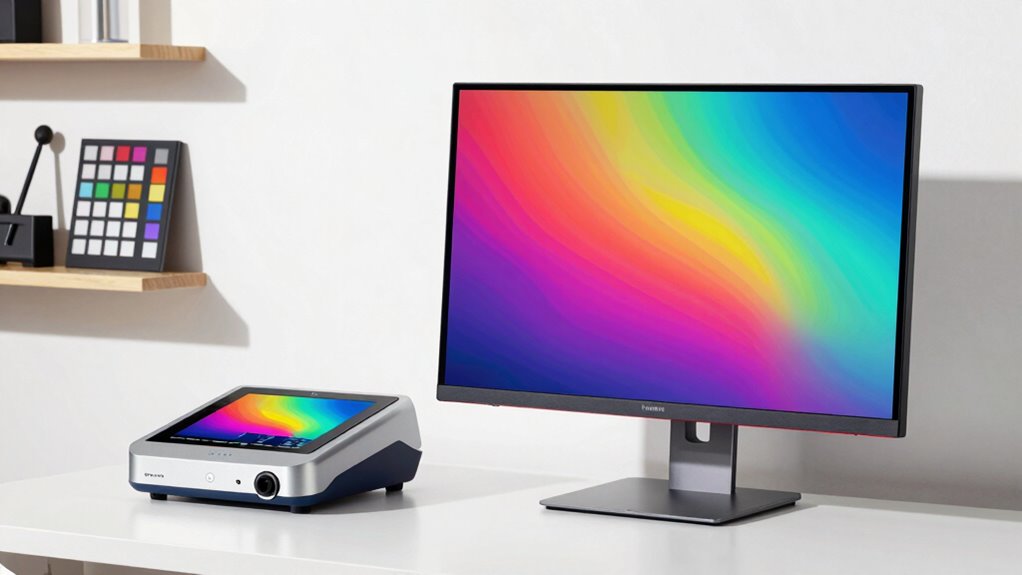
The Calibrite Display Pro HL is my best overall pick among these monitor calibration tools, balancing a capable colorimeter with a practical fit for serious display work. For broader display demands, the Calibrite Display Plus HL is the premium alternative, while the Datacolor Spyder X Pro offers a simpler route for users who want routine calibration without a feature-heavy workflow. The main tradeoffs are how much control and display support you need versus how easy you want setup to be. Bundle buyers may prefer Calibrite’s Photo Kit, while the Display 123 keeps the process more approachable. Read on for the full breakdown of how these eight options differ and who each one suits.

Get the latest gadgets delivered free with Prime
- Fast, free delivery on millions of items
- Prime Video, Amazon Music and more included
- Member-only deals all year
Complete the kit



Key Takeaways
- Display Pro HL is the strongest all-around balance: it sits between the simpler Display 123 and the more specialized Display Plus HL.
- Display Plus HL is the specialist choice: its premium positioning makes most sense when your display needs justify a more capable tool, not just occasional basic correction.
- Spyder X Pro and Spyder X Elite serve different levels of control: the Pro favors a more straightforward workflow, while the Elite is the better fit for users seeking more advanced adjustment options.
- The Photo Kit solves a wider color workflow problem: it pairs display calibration with a camera color target, unlike the standalone monitor-focused tools.
- Older or simpler Spyder options call for closer feature checking: Spyder4Pro and Datacolor Spyder may suit basic needs, but buyers should confirm software and operating-system compatibility before choosing them.
| Calibrite Display Pro HL Monitor Calibration Colorimeter |  | Best Overall | Maximum brightness measurement: 3,000 nits | Compatible display types: LCD, mini-LED, OLED, and compatible projectors | Software: Calibrite PROFILER for Mac and Windows | VIEW ON AMAZON | See Our Full Breakdown |
| Datacolor Spyder4Pro Display Calibration Colorimeter |  | Best for Straightforward Multi-Monitor Setups | Sensor: Full-spectrum seven-color color sensor | Display compatibility: Monitors, laptops, and supported mobile devices | Calibration features: Multiple displays, ambient-light sensing, and ReCAL assistant | VIEW ON AMAZON | See Our Full Breakdown |
| Calibrite Display Plus HL Monitor Calibration Colorimeter |  | Best for High-Brightness Professional Displays | Maximum luminance: 10,000 nits | Compatible displays: LCD, mini-LED, OLED, Apple XDR, and compatible projectors | Software: Calibrite PROFILER for Mac and Windows | VIEW ON AMAZON | See Our Full Breakdown |
| Datacolor Spyder X Elite Monitor Calibration Tool | 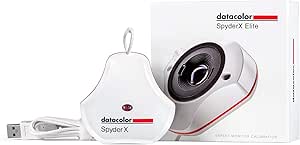 | Best for Expert Display Matching | Compatible devices: Desktop | Mounting type: Ceiling mount | Calibration support: Monitors and projectors | VIEW ON AMAZON | See Our Full Breakdown |
| Calibrite Photo Kit with Display Pro HL and ColorChecker Passport Photo 2 |  | Best for End-to-End Photo Color Workflows | Included: Display Pro HL monitor calibration colorimeter and ColorChecker Passport Photo 2 | Software: Calibrite PROFILER | Display support: Mini-LED, OLED, and Apple XDR | VIEW ON AMAZON | See Our Full Breakdown |
| Datacolor Spyder Monitor Calibrator |  | Best for Newer Display Types | Compatible displays: OLED, mini-LED, and Apple Liquid Retina XDR | Operating system compatibility: Latest Windows and Mac operating systems | Calibration time: About 90 seconds | VIEW ON AMAZON | See Our Full Breakdown |
| Datacolor Spyder X Pro Monitor Calibrator |  | Best for Multi-Monitor Setups | Compatible devices: Desktop and laptop | Calibration targets: 12 predefined targets | Calibration time: About 1–2 minutes | VIEW ON AMAZON | See Our Full Breakdown |
| Calibrite Display 123 Monitor Calibration Colorimeter |  | Best for a Simple Guided Workflow | Connection: USB-C | Display support: Up to 2 displays | Dimensions: 1.5 x 1.5 x 1.4 inches | VIEW ON AMAZON | See Our Full Breakdown |
| monitor calibration tool | Dimensions | Weight |
|---|---|---|
| Calibrite Display Pro HL Monit | 2.13 × 2.6 × 1.5 in | 4.8 oz |
| Datacolor Spyder4Pro Display C | — | — |
| Calibrite Display Plus HL Moni | — | 0.14 kg |
| Datacolor Spyder X Elite Monit | — | — |
| Calibrite Photo Kit with Displ | — | — |
| Datacolor Spyder Monitor Calib | 3 x 3 x 2 inches | 5 ounces |
| Datacolor Spyder X Pro Monitor | 3 × 3 inches | — |
| Calibrite Display 123 Monitor | 1.5 x 1.5 x 1.4 inches | 4.8 ounces |
More Details on Our Top Picks
Calibrite Display Pro HL Monitor Calibration Colorimeter
The Display Pro HL is my strongest all-around pick for photographers and editors who need modern display support without stepping up to the Plus HL. Its 3,000-nit measurement ceiling covers bright LCD, mini-LED, and OLED screens, while Calibrite PROFILER adds profile validation, uniformity checks, and multi-display workflows. Those tools help identify mismatches between monitors rather than merely creating a profile for one screen. Compared with the Display Plus HL, it gives up headroom for displays reaching 10,000 nits, but that higher ceiling is only useful for unusually bright setups. USB-C connection and a USB-A adapter offer practical flexibility; the tradeoff is that calibration depends on a computer and compatible software, and older USB-A-only systems may need the adapter. I’d choose it for capable, flexible calibration without the Plus model’s extreme luminance focus.
Pros:- Measures display brightness up to 3,000 nits across supported modern display types.
- Profile validation and uniformity checks help catch problems beyond basic calibration.
- Supports custom presets and multi-display workflows.
- Includes a USB-A adapter and travel pouch.
Cons:- Requires a compatible Mac or Windows computer and software.
- Does not match the Display Plus HL’s 10,000-nit measurement range.
Best for: Photographers and video editors calibrating current LCD, mini-LED, or OLED monitors who want validation and multi-display tools.
Not ideal for: Owners of displays that require measurement above 3,000 nits, or anyone seeking a standalone calibration device that does not rely on a computer.
- Maximum brightness measurement:3,000 nits
- Compatible display types:LCD, mini-LED, OLED, and compatible projectors
- Software:Calibrite PROFILER for Mac and Windows
- Connectivity:USB-C; USB-A adapter included
- Dimensions:2.13 × 2.6 × 1.5 in
- Weight:4.8 oz
- Mount:Built-in 1/4-inch thread
- Included accessories:USB-A adapter and travel storage pouch
Our verdict“Choose the Display Pro HL for a versatile monitor calibration workflow; choose the Display Plus HL instead if your display needs measurements above 3,000 nits.”
Datacolor Spyder4Pro Display Calibration Colorimeter
The Spyder4Pro suits buyers who want guided monitor calibration and useful diagnostics for a standard desktop setup. Its seven-color sensor supports standard and wide-gamut screens, while ambient-light sensing and the ReCAL assistant help with periodic adjustments as room conditions or displays change. Gamma, white point, accuracy, and gamut graphing provide more diagnostic detail than a basic calibration routine. Compared with the Calibrite Display Pro HL, it lacks the stated support for newer mini-LED and OLED displays and does not offer the same high-brightness measurement range. Its appeal is instead the step-by-step process and monitor analysis tools. TV calibration requires a separate upgrade kit, so this is a less flexible choice for buyers who want one setup to cover both computer monitors and televisions.
Pros:- Seven-color sensor is designed for standard and wide-gamut displays.
- Ambient-light sensing can help account for changes in the viewing environment.
- ReCAL assistance supports periodic recalibration.
- Includes gamma, white-point, accuracy, and gamut analysis tools.
Cons:- TV calibration requires a separately available upgrade kit.
- The supplied information does not specify support for newer mini-LED or OLED displays.
- Lacks a stated high-brightness measurement limit for evaluating very bright displays.
Best for: Home-office users with multiple standard or wide-gamut monitors who want guided calibration, ambient-light sensing, and display diagnostics.
Not ideal for: Owners of high-brightness OLED or mini-LED screens, or buyers who need TV calibration without purchasing a separate upgrade kit.
- Sensor:Full-spectrum seven-color color sensor
- Display compatibility:Monitors, laptops, and supported mobile devices
- Calibration features:Multiple displays, ambient-light sensing, and ReCAL assistant
- Analysis tools:Gamma, white point, calibration accuracy, and gamut graphing
- Recommended gamma:2.2
- Recommended white point:6500K
- Recommended brightness:120
Our verdict“Pick the Spyder4Pro for guided calibration and diagnostics across monitor setups, but favor the Display Pro HL for explicitly supported modern OLED and mini-LED displays.”
Calibrite Display Plus HL Monitor Calibration Colorimeter
For buyers calibrating exceptionally bright mastering or reference displays, the Display Plus HL earns its place through a 10,000-nit luminance range. It supports LCD, mini-LED, OLED, Apple XDR, and compatible projectors, with Calibrite PROFILER providing validation, uniformity checks, and multi-monitor profiling. The software also supports Rec.709, Rec.2020 workflows, and the BT.1886 tone curve, making this a more specialized fit than a general-purpose colorimeter. Compared with the Display Pro HL, the extra measurement headroom is the main reason to choose this model; for displays below 3,000 nits, the Pro HL may cover the need without that added capability. The adjustable weight helps position the sensor, but buyers should note the warranty’s registration deadline and purchase restrictions.
Pros:- Measures luminance up to 10,000 nits for very bright displays.
- Supports LCD, mini-LED, OLED, Apple XDR, and compatible projectors.
- Includes validation, uniformity, and multi-monitor profiling tools.
- Supports Rec.709, Rec.2020 workflows, and the BT.1886 tone curve.
Cons:- Its extra measurement range may be unnecessary for displays that the Display Pro HL can cover.
- Warranty registration is required within 30 days.
- Warranty coverage is limited to authorized U.S. and local-market purchases.
Best for: Video professionals and colorists working with Apple XDR or other very bright displays who need measurement headroom and multi-monitor profiling.
Not ideal for: Photographers using ordinary-brightness monitors who would not benefit from measurements above 3,000 nits, or buyers unwilling to meet the warranty registration and purchase conditions.
- Maximum luminance:10,000 nits
- Compatible displays:LCD, mini-LED, OLED, Apple XDR, and compatible projectors
- Software:Calibrite PROFILER for Mac and Windows
- Connectivity:USB-C; USB-A adapter included
- Display standards:Rec.709, Rec.2020 workflows, and BT.1886 tone curve
- Weight:0.14 kg
- Included components:Colorimeter with adjustable weight, travel storage pouch, and USB-C to USB-A adapter
- Warranty:12 months; registration required within 30 days
Our verdict“Choose the Display Plus HL when your professional display can exceed the Display Pro HL’s 3,000-nit range; otherwise, the Pro HL is the more fitting choice.”
Datacolor Spyder X Elite Monitor Calibration Tool
The Spyder X Elite is aimed at experienced users who want control over monitor and projector calibration, rather than a simple guided routine. Its lens-based color engine, expert calibration options, and tools for matching multiple displays make it a plausible fit for studios where consistent shadow detail and white balance matter across screens. Room-light monitoring and automatic profile changes also address shifts in the viewing environment. Compared with the Spyder4Pro, this model emphasizes expert controls, display matching, and projector support; the Spyder4Pro, by contrast, spells out its ambient-light sensor and analysis measures more directly. The product data lists desktop compatibility and a ceiling-mount specification, so buyers should verify that the listed configuration fits their setup. This pick is less appealing to beginners who would prefer a more explicitly step-by-step process.
Pros:- Lens-based color engine is designed for precise calibration.
- Supports matching multiple displays and projectors.
- Room-light monitoring can account for changing viewing conditions.
- Offers guided and expert calibration options with automatic profile changes.
Cons:- The product is described as primarily intended for expert and professional users.
- The supplied specifications provide limited detail on connectivity and display technology compatibility.
- The listed desktop compatibility and ceiling-mount specification may require clarification for some setups.
Best for: Experienced photographers, designers, and small studios that need expert calibration controls and matching across monitors or projectors.
Not ideal for: First-time calibrators seeking a clearly beginner-focused workflow, or buyers who need detailed compatibility and connection specifications before choosing.
- Compatible devices:Desktop
- Mounting type:Ceiling mount
- Calibration support:Monitors and projectors
- Item weight:290 g
- Color:White
- Calibration controls:Guided and expert options
- Display-matching features:Multiple-display matching and automatic profile changes
- Room-light feature:Room-light monitoring
Our verdict“Choose the Spyder X Elite for expert display matching and projector calibration, but favor the Spyder4Pro if its more clearly described guided diagnostics suit your needs better.”
Calibrite Photo Kit with Display Pro HL and ColorChecker Passport Photo 2
This kit is for photographers who want to align color at both capture and editing, not just calibrate a monitor. The Display Pro HL handles display profiling, while the ColorChecker Passport Photo 2 supports custom camera profiles and white balance for RAW workflows. That combination can help reduce color mismatches before images reach the screen, and Calibrite PROFILER adds customizable display targets and presets. Compared with the standalone Display Pro HL, the kit adds camera-side tools rather than a higher monitor luminance ceiling. That makes it a stronger workflow bundle for photographers, but a poor fit for buyers who only need monitor calibration. The listed display support includes mini-LED, OLED, and Apple XDR; the product data does not specify a brightness measurement limit for the bundled colorimeter, so buyers needing that figure should check before purchase.
Pros:- Combines a Display Pro HL colorimeter with a ColorChecker Passport Photo 2.
- Supports custom camera profiles and white balance for RAW workflows.
- Works with listed mini-LED, OLED, and Apple XDR displays.
- Calibrite PROFILER offers presets and customizable display targets.
Cons:- Camera-profiling tools add little value for buyers who only need monitor calibration.
- The supplied product data does not state the bundled colorimeter’s maximum brightness measurement.
- The kit is tailored to photo color workflows rather than general display calibration alone.
Best for: RAW photographers who want both monitor calibration and custom camera profiling to maintain color consistency from capture through editing.
Not ideal for: Casual users and editors who only need to calibrate a monitor and have no use for camera profiles or white-balance tools.
- Included:Display Pro HL monitor calibration colorimeter and ColorChecker Passport Photo 2
- Software:Calibrite PROFILER
- Display support:Mini-LED, OLED, and Apple XDR
- Product dimensions:7.5 × 2.8 × 7.5 in
- Item weight:13.1 oz
- Model number:CCHL-PP2
- Date first available:November 15, 2024
Our verdict“Pick this kit if your photo workflow needs camera profiles as well as monitor calibration; choose the standalone Display Pro HL if you only need to profile a screen.”
Datacolor Spyder Monitor Calibrator
I’d put this Spyder first for buyers whose screens are newer than the usual laptop or desktop panel. Its stated support for OLED, mini-LED, and Apple Liquid Retina XDR gives it a clearer fit for those displays than the Spyder X Pro, which is described for desktop and laptop screens without naming those panel types. Calibration takes about 90 seconds, and preset or custom settings let you choose between a quick starting point and more control. The ambient light sensor can help match brightness and contrast to the room, though light-driven adjustments may prompt recalibration when your workspace changes. That makes it less set-and-forget than the Calibrite Display 123’s simpler guided workflow. I’d choose it for display compatibility, not if you need a tool with no unusual battery requirement.
Pros:- Names support for OLED, mini-LED, and Apple Liquid Retina XDR displays
- Calibration takes about 90 seconds
- Preset and customizable settings suit quick or adjusted workflows
- Ambient light sensor can help tune brightness and contrast to room lighting
Cons:- Requires one nonstandard battery
- Automatic light-based adjustments may lead to recalibration
- Does not list multi-display support, unlike the Spyder X Pro
Best for: Photographers and video editors using OLED, mini-LED, or Apple Liquid Retina XDR displays who want quick calibration with room-light awareness.
Not ideal for: Buyers who want to avoid a nonstandard battery or who work in changing light and prefer display settings that do not prompt recalibration.
- Compatible displays:OLED, mini-LED, and Apple Liquid Retina XDR
- Operating system compatibility:Latest Windows and Mac operating systems
- Calibration time:About 90 seconds
- Dimensions:3 x 3 x 2 inches
- Weight:5 ounces
- Model number:SP2024
- Battery requirement:1 nonstandard battery
- Manufacturer:Datacolor
Our verdict“Choose this Spyder for fast calibration on newer OLED, mini-LED, or Liquid Retina XDR screens, but skip it if its battery requirement is a deal-breaker.”
Datacolor Spyder X Pro Monitor Calibrator
The Spyder X Pro earns its place for people who need to bring more than one computer display into closer color agreement. Its multi-display support is a practical advantage over the Calibrite Display 123, which is limited to two displays, while the lens-based color engine is intended to improve color accuracy, shadow detail, and white balance. A single-click guided setup and 12 predefined targets keep the process approachable, and before-and-after comparisons give you a way to check the change. Calibration takes about one to two minutes, a little longer than the newer Datacolor Spyder’s stated 90-second process. The tradeoff is a narrower use case: this is for desktop and laptop monitors, not phones, and the supplied information does not name specific support for OLED, mini-LED, or Liquid Retina XDR panels.
Pros:- Supports calibration of multiple desktop and laptop displays
- Lens-based color engine targets color accuracy, shadow detail, and white balance
- Single-click guided setup with 12 predefined targets
- Before-and-after comparison helps review the calibration change
Cons:- Not compatible with phones
- Calibration takes about one to two minutes, longer than the newer Datacolor Spyder’s stated time
- Specific support for OLED, mini-LED, and Liquid Retina XDR displays is not listed
Best for: Photographers and creators who edit across several desktop or laptop displays and want guided calibration with comparison checks.
Not ideal for: People seeking phone calibration or explicit compatibility information for OLED, mini-LED, or Apple Liquid Retina XDR screens.
- Compatible devices:Desktop and laptop
- Calibration targets:12 predefined targets
- Calibration time:About 1–2 minutes
- Screen size:1.75 inches
- Dimensions:3 × 3 inches
- Unit count:1
Our verdict“Pick the Spyder X Pro if you need a guided tool for several computer monitors; choose another option if phone support or named compatibility with newer panel types matters.”
Calibrite Display 123 Monitor Calibration Colorimeter
I’d favor the Display 123 when a straightforward calibration process matters more than extensive controls. Its Easy 1 2 3 workflow guides creators through monitor calibration, while native or photo brightness targets offer a useful choice without the broader preset-and-customizable approach of the newer Datacolor Spyder. It supports up to two displays and includes a before-and-after comparison, making it a sensible fit for a laptop-plus-monitor desk. The limit is clear beside the Spyder X Pro, which supports multiple displays without a stated two-screen ceiling. This Calibrite also requires a USB-C connection, so buyers should check that their setup can connect it. I’d choose it for an uncomplicated, small-screen-count workflow rather than a more expandable calibration setup.
Pros:- Easy 1 2 3 workflow makes calibration approachable
- Supports up to two displays
- Before-and-after comparison helps check results
- Native or photo brightness targets suit different editing needs
Cons:- Limited to two displays, unlike the Spyder X Pro’s multi-display support
- Requires a USB-C connection
- Provides fewer listed setting choices than the newer Datacolor Spyder’s preset and customizable options
Best for: Newer creators with one or two USB-C-equipped displays who want guided calibration and a simple way to compare results.
Not ideal for: Editors calibrating more than two displays or buyers whose computer setup lacks a compatible USB-C connection.
- Connection:USB-C
- Display support:Up to 2 displays
- Dimensions:1.5 x 1.5 x 1.4 inches
- Weight:4.8 ounces
- Model number:CCDIS123
- Brightness targets:Native or Photo
- Software workflow:Easy 1 2 3
Our verdict“Choose the Display 123 for a guided, uncomplicated workflow across one or two USB-C-connected displays, but look elsewhere for a larger multi-monitor setup.”

How We Picked
I ranked these tools by how well they match real calibration needs: the scope of display support, the flexibility of their software workflows, ease of setup, and whether the package adds useful value beyond a basic monitor profile. I also separated tools for routine home use from options aimed at photographers and other color-conscious creators. A calibration device is only useful when its software works with the buyer’s computer and display, so compatibility and maintenance needs matter alongside the hardware.
Display Pro HL ranks first because it offers the clearest balance for a broad group of buyers. Display Plus HL sits higher for specialized display requirements, while the Photo Kit earns a distinct place for camera-to-screen work. The Spyder X models divide by workflow depth, and simpler or older Datacolor choices rank lower when buyers may need to verify software support or accept fewer workflow options. The Display 123 remains a sensible entry point for people who value straightforward use over extensive controls.
Factors to Consider When Choosing Monitor Calibration Tools
Choosing a calibration tool starts with the work your screen supports, not with the longest feature list. I would match the device to the display types, software support, and repeatability your workflow actually needs, then pay for extra flexibility only when it solves a specific problem.
Match the Tool to Your Display and Work
Start by listing the displays you need to calibrate, including any high-brightness or specialist panels, rather than assuming every colorimeter handles every screen the same way. A tool aimed at wider display demands can be wasted on a basic office monitor, while an entry-level option may not suit a demanding editing setup. Check the manufacturer’s current compatibility information for your operating system and display technology before buying. Also consider whether you calibrate one screen or several: repeatable profiles matter more when a workflow moves between displays. The common mistake is choosing by brand alone and discovering later that a key screen or computer is unsupported. Match capability to the equipment you already own and expect to keep using.
Decide How Much Control You Will Use
Calibration software can range from guided steps to more adjustable workflows, and extra controls are useful only if you know what you want to change. Beginners often benefit more from clear prompts and a repeatable routine than from a long list of settings. Experienced editors may value the ability to tailor a profile to their workspace and output needs. Before paying for a more advanced tier, ask whether your editing applications and deliverables call for those adjustments. A frequent misstep is buying the most feature-rich device, then using only its default mode. If you want reliable routine calibration, ease of use can matter more than maximum configurability.
Think Beyond the First Calibration
A monitor profile can drift as a display ages, so calibration is a recurring task rather than a one-time fix. Consider how quickly you can repeat the process and whether the software makes it easy to follow the same routine. If several people share a workstation, simple steps and consistent settings help reduce differences between users. Buyers who work to color-sensitive deadlines should also plan for periodic checks, not just an initial setup. Do not treat a calibration device as a way to repair every screen limitation: it cannot turn an unsuitable panel into a reference display. The practical value comes from maintaining a more consistent screen within the limits of the monitor itself.
Choose a Standalone Device or a Workflow Bundle
A standalone colorimeter focuses on the display, while a bundle such as the Calibrite Photo Kit also addresses camera color. That extra tool matters to photographers who want a more consistent path from capture to editing, but it adds little for buyers who only need to profile a monitor. Think through the full workflow before choosing a package: camera targets, lighting, editing software, and display calibration solve related but different problems. A bundle can reduce the need to source separate tools, yet it is not automatically better value if its extra parts will sit unused. Match the package to the work you do regularly. For screen-only tasks, keep the decision centered on the calibrator and its software.
Check Software Support Before Buying Older Models
Software support can change the useful life of a calibration device, particularly for older models such as the Spyder4Pro. Verify that the current application runs on your operating system and supports the displays you intend to calibrate. Look for clear information about updates and whether the device depends on a legacy installer or discontinued workflow. A familiar model name does not guarantee that its software remains a good fit for a current computer. This check is easy to skip because the sensor itself may appear capable, but unsupported software can make the hardware difficult to use. If you want a longer-term tool, current compatibility should weigh heavily in the decision.
Frequently Asked Questions
Is the Calibrite Display Plus HL worth choosing over the Display Pro HL?
I would choose Display Plus HL only when its broader display-oriented capabilities match the screens or work in your setup. For a general photo and editing workstation, Display Pro HL is the more balanced starting point in this lineup. Paying for a higher-tier device does not automatically improve a display beyond what its panel can produce. Check the display support details and software workflow against your equipment before stepping up. If you cannot name a specific need the Plus HL addresses, the Pro HL is the more sensible fit.
Can I use one calibration tool for both my laptop and external monitor?
Often, one compatible colorimeter can calibrate more than one display, but each screen needs its own profile. Confirm that the software supports both the laptop panel and the external monitor, especially if they use different display technologies. Keep in mind that calibration cannot make two screens identical when their panel capabilities differ. For a mixed setup, consistency in viewing conditions and profile selection matters as much as the sensor. Check whether the software makes it easy to save and apply separate profiles to each display.
Should I buy the Calibrite Photo Kit if I only edit photos on my computer?
If your work begins and ends with images already on your computer, the kit’s camera target may not add much to your routine. Its added value is for photographers who also want to manage color at capture, alongside calibrating the display. A standalone Display Pro HL keeps the purchase focused on screen calibration. Consider how often you shoot and whether you have a repeatable camera-color workflow before choosing the bundle. The extra component is useful when it solves a regular workflow need, not simply because it is included.
Is the Datacolor Spyder4Pro a safe choice for a current computer?
I would verify software and operating-system support before choosing Spyder4Pro, since older calibration tools can depend on software that no longer fits current systems. Check Datacolor’s current support information for your exact operating system and display setup, rather than relying on the model name alone. If compatibility is unclear, a newer Spyder X model may be a lower-risk choice. The older model can still appeal to someone with a compatible system and basic needs, but that fit should be confirmed first. Avoid buying it on the assumption that any colorimeter software will support it.
Do beginners need the Spyder X Elite or a simpler model?
Most beginners should start with a tool whose guided workflow is easy to repeat, rather than paying for advanced controls they may not use. Spyder X Pro or Calibrite Display 123 may be easier to match to straightforward home use, while Spyder X Elite suits buyers who specifically want more adjustment options. The right choice depends on the displays you own and how much control your work demands. If you are learning color management, a clear routine and dependable software support are more useful than a feature list. You can move to a more advanced tool later if your workflow develops a need for it.
Conclusion
For most color-conscious buyers, I recommend the Calibrite Display Pro HL as the best overall because it balances capability and approachable use. The Datacolor Spyder X Pro is my best value-style pick for routine calibration when a simpler workflow matters more than extensive controls. For the best premium option, choose the Calibrite Display Plus HL when your display needs justify its higher-tier role; photographers who also want a camera target should look at the Calibrite Photo Kit. Beginners who want a straightforward starting point can favor the Calibrite Display 123, while users seeking more adjustment options can compare the Spyder X Elite. I would choose Spyder4Pro or Datacolor Spyder only after checking current software and operating-system compatibility. Match the tool to your display, workflow, and willingness to maintain profiles, and the right choice becomes much clearer.
Halloween Picks
halloween
As an affiliate, we earn on qualifying purchases.