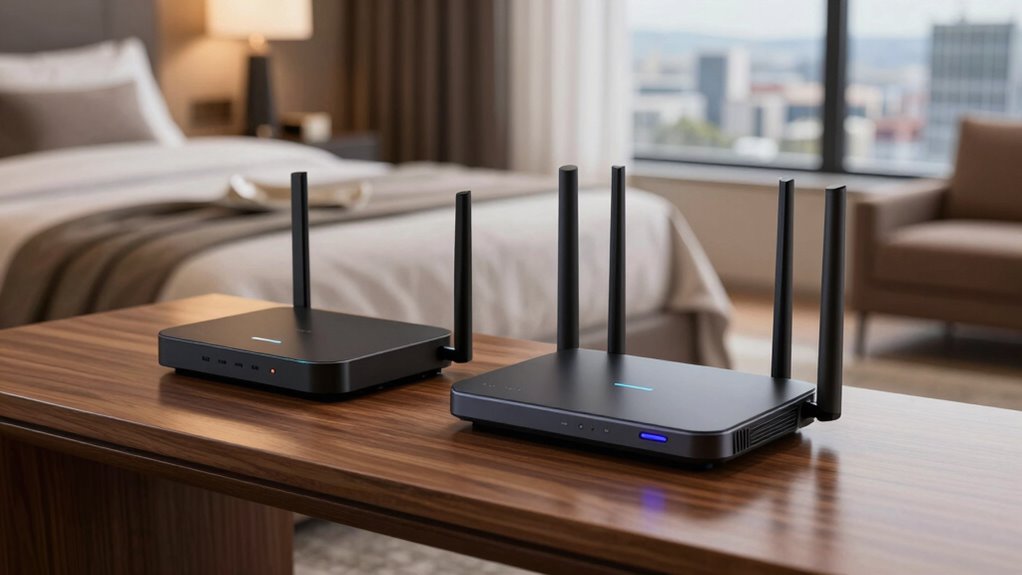

Choosing the right travel router for hotel Wi-Fi can mean the difference between a secure work session and a vulnerable connection. My top overall pick is the GL.iNet Slate AX, which balances robust Wi-Fi 6 performance with user-friendly OpenWrt firmware for advanced security. For those prioritizing future-proofing, the ASUS RT-BE58 Go offers Wi-Fi 7 speeds, though its premium price tag may deter casual travelers. The main tradeoff in this category involves balancing network security against setup complexity; simpler devices often lack the granular control needed to block malicious devices on shared hotel networks. Continue reading to see how these eleven models stack up against each other in real-world scenarios.

Get the latest gadgets delivered free with Prime
- Fast, free delivery on millions of items
- Prime Video, Amazon Music and more included
- Member-only deals all year
Complete the kit



Key Takeaways
- The GL.iNet Slate AX wins for overall balance because its OpenWrt interface simplifies complex security tasks like WireGuard VPN setup without requiring command-line knowledge.
- Wi-Fi 7 routers like the ASUS RT-BE58 Go are currently overkill for most hotel networks, as hotel infrastructure rarely supports the high throughput required to justify the cost.
- The TP-Link Roam 6 stands out for beginners because it uses a plug-and-play interface that avoids the steep learning curve associated with open-source firmware.
- Devices with dedicated VPN servers (like the GL.iNet Slate Plus) are critical for travelers who need to access their home network securely, whereas standard client-mode routers only protect outbound traffic.
- Portability often conflicts with antenna power; the GL.iNet Opal is highly portable but may struggle in large hotel suites compared to larger models with external antennas.
| GL.iNet Slate AX Wi-Fi 6 Travel Router with VPN |  | Best Overall for Power Users | Wi-Fi Generation: Wi-Fi 6 (AX1800) | Max Combined Speed: 1800 Mbps | VPN Support: OpenVPN and WireGuard | VIEW ON AMAZON | See Our Full Breakdown |
| ASUS RT-BE58 Go WiFi 7 Dual-Band Travel Router |  | Best Premium/Next-Gen Performance | Wi-Fi Generation: Wi-Fi 7 (802.11be) | Max Speed: 3.6 Gbps | Mobile Tethering: 4G LTE and 5G | VIEW ON AMAZON | See Our Full Breakdown |
| TP-Link Roam 6 AX1500 Portable Wi-Fi 6 Travel Router (TL-WR1502X) |  | Best for Beginners | Wi-Fi Generation: Wi-Fi 6 (AX1500) | Max Speed: 1201 Mbps (5 GHz) | Ports: 2 Gigabit Ethernet, 1 USB 2.0 | VIEW ON AMAZON | See Our Full Breakdown |
| TP-Link WiFi Travel Router (WiFi 5) | 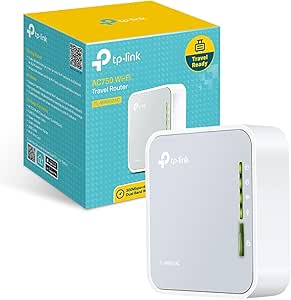 | Best Value Pick | Wi-Fi Generation: Wi-Fi 5 (AC750) | Max Speed: 733 Mbps | Ports: 1 x 10/100Mbps WAN/LAN | VIEW ON AMAZON | See Our Full Breakdown |
| GL.iNet GL-MT3000 Beryl AX Wi-Fi 6 Travel Router | 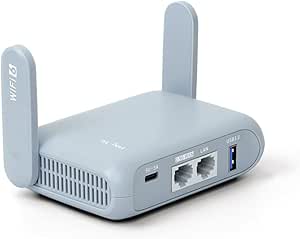 | Best for Wired Speed & USB Utility | Wi-Fi Generation: Wi-Fi 6 (AX3000) | WAN Port: 2.5 Gbps | USB Port: USB 3.0 | VIEW ON AMAZON | See Our Full Breakdown |
| GL.iNet Beryl 7 Dual-Band Wi-Fi 7 Travel Router |  | Best Overall Performance | Wi-Fi Standard: Dual-band Wi-Fi 7 | Wireless Speed: 688 Mbps (2.4 GHz) + 2882 Mbps (5 GHz) | Ethernet Ports: 2 × 2.5G (1 WAN, 1 LAN) | VIEW ON AMAZON | See Our Full Breakdown |
| TP-Link Roam 7 BE3600 Wi-Fi 7 Portable Travel Router |  | Best for Simplicity | Wi-Fi Standard: Wi-Fi 7 | Wi-Fi Bands: Dual-band: 2.4 GHz and 5 GHz | Maximum Wireless Speed: Up to 2882 Mbps on 5 GHz | VIEW ON AMAZON | See Our Full Breakdown |
| GL.iNet Slate 7 Wi-Fi 7 Travel Router |  | Best Premium Feature Set | Wi-Fi Generation: Wi-Fi 7 | Wireless Speed: 688 Mbps (2.4 GHz) + 2882 Mbps (5 GHz) | Ethernet Ports: 2 × 2.5G (1 WAN, 1 LAN) | VIEW ON AMAZON | See Our Full Breakdown |
| GL.iNet GL-A1300 Slate Plus Dual-Band VPN Travel Router |  | Best Value for VPN Users | Wireless Standard: Wi-Fi 5 (802.11ac) | Maximum Data Rate: 1300 Mbps | Processor: IPQ4018 at 717 MHz | VIEW ON AMAZON | See Our Full Breakdown |
| GL.iNet GL-SFT1200 Opal AC1200 Dual-Band Travel Router | 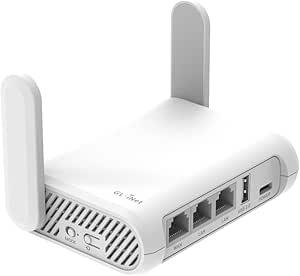 | Best Compact Option | Wi-Fi Standard: Wi-Fi 5 (802.11ac) | Wireless Speed: Up to 1200 Mbps | Ports: 2 Gigabit LAN, 1 Gigabit WAN | VIEW ON AMAZON | See Our Full Breakdown |
| TP-Link Roam 6 AX1500 Portable Wi-Fi 6 Travel Router |  | Best for Privacy-Focused Travelers | Wi-Fi Standard: Wi-Fi 6 | Dual-band Speeds: Up to 1,201 Mbps (5 GHz) and 300 Mbps (2.4 GHz) | Maximum Devices: Up to 60 | VIEW ON AMAZON | See Our Full Breakdown |
| travel routers for hotel wi fi | Wi-Fi Generation | Ports |
|---|---|---|
| GL.iNet Slate AX Wi-Fi 6 Trave | Wi-Fi 6 (AX1800) | 3 Gigabit Ethernet, USB-C |
| ASUS RT-BE58 Go WiFi 7 Dual-Ba | Wi-Fi 7 (802.11be) | 1 Gigabit LAN |
| TP-Link Roam 6 AX1500 Portable | Wi-Fi 6 (AX1500) | 2 Gigabit Ethernet, 1 USB 2.0 |
| TP-Link WiFi Travel Router | Wi-Fi 5 (AC750) | 1 x 10/100Mbps WAN/LAN |
| GL.iNet GL-MT3000 Beryl AX Wi- | Wi-Fi 6 (AX3000) | — |
| GL.iNet Beryl 7 Dual-Band Wi-F | — | — |
| TP-Link Roam 7 BE3600 Wi-Fi 7 | — | — |
| GL.iNet Slate 7 Wi-Fi 7 Travel | Wi-Fi 7 | — |
| GL.iNet GL-A1300 Slate Plus Du | — | — |
| GL.iNet GL-SFT1200 Opal AC1200 | — | 2 Gigabit LAN, 1 Gigabit WAN |
| TP-Link Roam 6 AX1500 Portable | — | 1 Gbps WAN/LAN port and 1 Gbps LAN port |
More Details on Our Top Picks
GL.iNet Slate AX Wi-Fi 6 Travel Router with VPN
This router stands out as the best overall choice for travelers who prioritize speed and security without compromising on portability. It offers Wi-Fi 6 speeds up to 1800 Mbps, which is significantly faster than the older Wi-Fi 5 models like the TP-Link WiFi Travel Router (WiFi 5). The inclusion of both OpenVPN and WireGuard is a major advantage, providing robust encryption for public hotel networks. Compared to the TP-Link Roam 6, this GL.iNet model offers more advanced customization through its OpenWrt-based OS, allowing for deeper control over network settings. However, this flexibility comes with a learning curve; the physical feature switch requires configuration in the admin panel, which might frustrate beginners seeking plug-and-play simplicity.Pros:- Supports Wi-Fi 6 with dual-band speeds up to 1800 Mbps
- Includes both OpenVPN and WireGuard for fast, secure tunneling
- High device capacity supports up to 120 connected devices
- USB file sharing via SAMBA and WebDAV adds utility
Cons:- Requires configuration of the physical switch before full functionality
- OpenWrt interface can be overwhelming for non-technical users
Best for: Tech-savvy travelers and remote workers who need high-speed, secure connections and want the flexibility of OpenWrt firmware.
Not ideal for: Casual users who prefer a simple, set-and-forget device and do not want to configure settings via a web interface.
- Wi-Fi Generation:Wi-Fi 6 (AX1800)
- Max Combined Speed:1800 Mbps
- VPN Support:OpenVPN and WireGuard
- Max WireGuard Speed:550 Mbps
- Ports:3 Gigabit Ethernet, USB-C
- Max Devices:120
- OS:OpenWrt 21.02
Our verdict“The Slate AX is the ideal balance of performance and security for those who want to control their own network.”
ASUS RT-BE58 Go WiFi 7 Dual-Band Travel Router
For those who want the absolute latest technology, the ASUS RT-BE58 Go delivers Wi-Fi 7 speeds up to 3.6 Gbps. This is a significant leap over the GL.iNet Slate AX, making it the best choice for future-proofing your setup. It supports 4G/5G mobile tethering, a feature absent in many competitors like the TP-Link Roam 6, which relies solely on existing Wi-Fi or Ethernet. The USB-C Power Delivery is convenient, allowing you to power it from a high-capacity power bank. However, the single port configuration limits wired connectivity options compared to the multiple ports found on the GL.iNet Beryl AX. Additionally, the benefits of Wi-Fi 7 are only realized if your devices also support this new standard, which is still rare.Pros:- Next-generation Wi-Fi 7 speeds up to 3.6 Gbps
- Supports 4G LTE and 5G mobile tethering
- USB-C Power Delivery for flexible power sources
- AiMesh support for expanding network coverage
Cons:- Only one Ethernet port limits wired connections
- Wi-Fi 7 benefits require compatible client devices
Best for: Early adopters and professionals with Wi-Fi 7 compatible devices who need maximum bandwidth and mobile tethering capabilities.
Not ideal for: Budget-conscious travelers or those with older devices that cannot take advantage of Wi-Fi 7 speeds.
- Wi-Fi Generation:Wi-Fi 7 (802.11be)
- Max Speed:3.6 Gbps
- Mobile Tethering:4G LTE and 5G
- Power:USB-C Power Delivery (18 W)
- Ports:1 Gigabit LAN
- Memory:1 GB DDR4 RAM
- Security:WPA3, VPN features
Our verdict“The ASUS RT-BE58 Go is the premium choice for those demanding cutting-edge speed and mobile connectivity.”
TP-Link Roam 6 AX1500 Portable Wi-Fi 6 Travel Router (TL-WR1502X)
The TP-Link Roam 6 is the most user-friendly option in this lineup, designed for travelers who want Wi-Fi 6 performance without the complexity of OpenWrt. It is significantly smaller than the GL.iNet Slate AX, making it easier to pack. The USB-C power input is a modern convenience, compatible with most smartphone chargers and power banks. While it lacks the advanced VPN customization of the GL.iNet Beryl AX, it offers a straightforward setup for creating a private network from hotel Wi-Fi. The AX1500 speed is sufficient for most streaming and browsing needs, though it falls short of the ASUS RT-BE58 Go’s peak performance. This model is best for those who prioritize simplicity and reliability over advanced features.Pros:- Compact and lightweight design ideal for packing
- Simple setup process with no complex firmware configuration
- USB-C power compatibility with standard mobile chargers
- Versatile modes including Router, Hotspot, and Access Point
Cons:- Does not support OpenWrt or custom firmware
- Lower max speed (AX1500) compared to higher-end models
Best for: First-time travel router buyers and casual travelers who want a simple, compact device for secure hotel Wi-Fi access.
Not ideal for: Power users who need custom firmware, advanced VPN protocols, or high-speed file sharing via USB.
- Wi-Fi Generation:Wi-Fi 6 (AX1500)
- Max Speed:1201 Mbps (5 GHz)
- Ports:2 Gigabit Ethernet, 1 USB 2.0
- Power Input:USB-C (5V/3A PD)
- Modes:Router, Hotspot, AP/RE/Client
- RAM:512 MB
- Dimensions:4.09 x 3.54 x 1.10 inches
Our verdict“The TP-Link Roam 6 is the perfect entry point for travelers seeking secure Wi-Fi without technical headaches.”
TP-Link WiFi Travel Router (WiFi 5)
This is the best value option for travelers who do not need the latest wireless standards. The TP-Link WiFi Travel Router (WiFi 5) offers AC750 speeds, which are adequate for basic browsing and email but noticeably slower than the TP-Link Roam 6 or GL.iNet Slate AX. Its strength lies in its ultra-compact size and the built-in power adapter, which eliminates the need for extra cables or bricks. While it lacks the VPN features and Wi-Fi 6 efficiency of newer models, it is a reliable workhorse for creating a private network from a hotel’s Ethernet port. The 10/100Mbps LAN port is a significant bottleneck compared to the Gigabit ports on other routers, limiting wired speed potential. It is a practical choice for those on a tight budget or with minimal bandwidth requirements.Pros:- Extremely compact and pocket-sized design
- Built-in power adapter saves space and cables
- Simple one-switch mode selection for easy setup
- Affordable entry point for travel networking
Cons:- Limited to Wi-Fi 5 (AC750) speeds
- 10/100Mbps LAN port restricts wired connection speeds
Best for: Budget travelers and students who need a basic, pocket-sized router for light web browsing and email.
Not ideal for: Streamers, gamers, or remote workers who require high bandwidth, fast file transfers, or modern security protocols.
- Wi-Fi Generation:Wi-Fi 5 (AC750)
- Max Speed:733 Mbps
- Ports:1 x 10/100Mbps WAN/LAN
- Power:Micro USB / Built-in Adapter
- Modes:Router, Hotspot, Range Extender, Client
- RAM:64 MB
- Security:WPA2
Our verdict“The TP-Link WiFi 5 router is a dependable, low-cost solution for basic hotel connectivity needs.”
GL.iNet GL-MT3000 Beryl AX Wi-Fi 6 Travel Router
The GL.iNet Beryl AX is the best choice for travelers who need high-speed wired connections and USB utility. Its 2.5G WAN port is a standout feature, offering faster internet intake than the Gigabit ports found on the TP-Link Roam 6 or GL.iNet Slate AX. This makes it ideal for hotels with high-speed fiber connections. The USB 3.0 port is significantly faster than the USB 2.0 ports on most competitors, allowing for quick file access from external drives. While it shares the OpenWrt platform with the Slate AX, the Beryl AX is more compact and focused on hardware performance. However, the VPN speed is lower than the Slate AX, and the physical toggle switch still requires initial setup. It is a powerful tool for those who prioritize raw throughput over maximum device capacity.Pros:- 2.5G WAN port for high-speed internet intake
- USB 3.0 port for fast external storage access
- Compact design with robust Wi-Fi 6 performance
- Supports OpenVPN and WireGuard for secure browsing
Cons:- VPN throughput is lower than the Slate AX
- Requires subscription for full VPN service features
Best for: Photographers, journalists, or business travelers who need fast wired connections and quick access to files on USB drives.
Not ideal for: Users with standard 100Mbps hotel connections who will not benefit from the 2.5G WAN port.
- Wi-Fi Generation:Wi-Fi 6 (AX3000)
- WAN Port:2.5 Gbps
- USB Port:USB 3.0
- Max Wi-Fi Speed:2402 Mbps (5 GHz)
- VPN Speed:300 Mbps (WireGuard)
- OS:OpenWrt 21.02
- RAM:64 MB
Our verdict“The Beryl AX is the top pick for travelers who demand maximum wired speed and fast file sharing.”
GL.iNet Beryl 7 Dual-Band Wi-Fi 7 Travel Router
This model stands out for its 2.5G Ethernet ports and Wi-Fi 7 support, making it the fastest option in this lineup for heavy users. Unlike the TP-Link Roam 7, which locks you into a closed ecosystem, the Beryl 7 runs OpenWrt, allowing for deep customization and plugin installation. The WireGuard implementation is robust, offering near-native speed for encrypted connections. However, this power comes with complexity. The toggle switch requires manual configuration via the admin panel before it functions as intended, which may frustrate users seeking plug-and-play simplicity. It is overkill for casual browsing but essential for those who demand control and speed.
Pros:- Dual 2.5G Ethernet ports eliminate bottlenecks for wired connections
- High-speed WireGuard VPN support up to 1100 Mbps
- OpenWrt firmware allows for extensive plugin and security customization
- Supports up to 120 connected devices
Cons:- Toggle switch requires manual configuration before use
- Overkill for basic hotel browsing needs
Best for: Tech-savvy travelers and digital nomads who need high-speed encrypted connections and firmware customization.
Not ideal for: Casual users who want a simple, set-and-forget device without needing to configure switches or firmware.
- Wi-Fi Standard:Dual-band Wi-Fi 7
- Wireless Speed:688 Mbps (2.4 GHz) + 2882 Mbps (5 GHz)
- Ethernet Ports:2 × 2.5G (1 WAN, 1 LAN)
- USB Port:USB 3.0
- Device Capacity:Up to 120 devices
- Maximum VPN Speed:1100 Mbps (WireGuard)
- Firmware:OpenWrt 21.02
- Security:WPA3, DNS over HTTPS, DNS over TLS
Our verdict“The definitive choice for power users who prioritize speed and customization over simplicity.”
TP-Link Roam 7 BE3600 Wi-Fi 7 Portable Travel Router
If you prefer a straightforward interface over customizable firmware, this router is a strong contender. It creates a private network from public Wi-Fi with minimal setup, contrasting sharply with the GL.iNet Beryl 7, which demands more technical know-how. The USB-C power input is a significant convenience, allowing you to use standard laptop chargers. However, the lack of OpenWrt support means you cannot install ad blockers or advanced security plugins. It also skips the 6 GHz band, limiting future-proofing. This is a polished product for those who want Wi-Fi 7 speeds without the tinkering.
Pros:- USB-C power input simplifies charging with existing laptop adapters
- User-friendly interface for quick setup
- Supports multiple operating modes including Access Point and Extender
- Wi-Fi 7 speeds on dual bands
Cons:- No OpenWrt support limits customization options
- Lacks 6 GHz band support
- Fewer Ethernet ports compared to premium rivals
Best for: Travelers who want modern Wi-Fi 7 speeds and USB-C charging without dealing with complex firmware.
Not ideal for: Users who need OpenWrt plugins, ad-blocking capabilities, or 6 GHz band support.
- Wi-Fi Standard:Wi-Fi 7
- Wi-Fi Bands:Dual-band: 2.4 GHz and 5 GHz
- Maximum Wireless Speed:Up to 2882 Mbps on 5 GHz
- WAN Port:1 × 2.5 Gbps
- LAN Port:1 × 1 Gbps
- Power Input:USB-C; 5V PD power source
- OpenWrt Support:No
- 6 GHz Support:No
Our verdict“An excellent plug-and-play option for users who value convenience over customization.”
GL.iNet Slate 7 Wi-Fi 7 Travel Router
This device introduces a touchscreen for managing network settings, a unique differentiator from the GL.iNet Beryl 7, which relies on a physical toggle. The 2 GB of RAM provides ample headroom for running multiple plugins and services simultaneously. While it shares the Wi-Fi 7 and 2.5G Ethernet specs of the Beryl 7, the Slate 7’s interface offers real-time monitoring without needing a laptop. The tradeoff is the 12 V DC power requirement, which is less convenient than the USB-C power found on the TP-Link Roam 7. It is a premium tool for those who want visual feedback and high-end specs.
Pros:- Integrated touchscreen for easy network management and status checks
- 2 GB RAM supports heavy multitasking and plugin usage
- High-speed Wi-Fi 7 and dual 2.5G Ethernet ports
- OpenWrt 23.05 for up-to-date customization
Cons:- Requires 12 V DC power, less portable than USB-C models
- Touchscreen button needs configuration before use
- Higher price point for advanced features
Best for: Professionals who want visual network monitoring and high memory capacity for advanced plugins.
Not ideal for: Travelers who prioritize compact size and universal USB-C charging compatibility.
- Wi-Fi Generation:Wi-Fi 7
- Wireless Speed:688 Mbps (2.4 GHz) + 2882 Mbps (5 GHz)
- Ethernet Ports:2 × 2.5G (1 WAN, 1 LAN)
- Installed RAM:2 GB
- Maximum VPN Speed:540 Mbps (WireGuard)
- Power:12 V DC
- Operating System:OpenWrt 23.05
- Coverage:Supports up to 120+ devices
Our verdict“A high-end travel router that combines Wi-Fi 7 performance with an intuitive touchscreen interface.”
GL.iNet GL-A1300 Slate Plus Dual-Band VPN Travel Router
For those whose primary concern is secure browsing rather than raw speed, this model offers a compelling balance. It supports OpenVPN and WireGuard clients, similar to the premium GL.iNet Beryl 7, but at a lower performance tier. The 1300 Mbps Wi-Fi 5 speed is sufficient for most hotel bandwidth caps. A key advantage is the USB network storage support, allowing you to access files remotely. However, the OpenVPN speed is significantly limited compared to the Wi-Fi 7 models. This is a practical choice for budget-conscious travelers who still want serious security features.
Pros:- Supports USB network storage for remote file access
- Compact and lightweight for easy packing
- Includes guest Wi-Fi and configurable VPN routing
- OpenWrt firmware for customization
Cons:- OpenVPN speeds are limited to around 28 Mbps
- Wi-Fi 5 standard is outdated compared to newer rivals
- Toggle switch requires pre-configuration
Best for: Budget-conscious travelers who prioritize VPN security and file sharing over maximum wireless throughput.
Not ideal for: Users with high-speed internet plans or those who need to stream 4K video over VPN.
- Wireless Standard:Wi-Fi 5 (802.11ac)
- Maximum Data Rate:1300 Mbps
- Processor:IPQ4018 at 717 MHz
- RAM:256 MB
- Maximum VPN Speed:170 Mbps (WireGuard)
- Dimensions:118 × 84 × 33 mm
- Weight:429 g
- Included Accessories:Power adapter, Ethernet cable, user manual
Our verdict“A cost-effective security hub for travelers who need reliable VPNs and basic file sharing.”
GL.iNet GL-SFT1200 Opal AC1200 Dual-Band Travel Router
Weighing just 145 g, this router is the lightest option here, significantly smaller than the GL.iNet Slate Plus. It fits easily in a pocket or small bag, making it ideal for minimalist packers. Despite its size, it retains three gigabit ports and retractable antennas, offering better connectivity than many ultra-compact competitors. However, the 1200 Mbps Wi-Fi 5 speed is the lowest in this group, and the 128 MB RAM limits multitasking capabilities. It cannot handle the heavy plugin loads that the GL.iNet Beryl 7 can. This is a niche pick for those who prioritize portability above all else.
Pros:- Extremely lightweight at 145 g for pocketability
- Three gigabit Ethernet ports for wired connections
- Retractable antennas protect against damage during travel
- OpenWrt support for basic customization
Cons:- Low RAM (128 MB) restricts advanced features
- Wi-Fi 5 speeds are slower than modern standards
- Physical toggle switch requires setup
Best for: Minimalist travelers who need a tiny, lightweight router for basic secure browsing.
Not ideal for: Users who need high-speed Wi-Fi, extensive plugin support, or large device capacities.
- Wi-Fi Standard:Wi-Fi 5 (802.11ac)
- Wireless Speed:Up to 1200 Mbps
- Ports:2 Gigabit LAN, 1 Gigabit WAN
- Weight:145 g
- RAM:128 MB
- Antennas:2 retractable
- VPN Protocols:OpenVPN, WireGuard
- Voltage:5 V
Our verdict“The go-to choice for travelers who refuse to carry any extra bulk in their luggage.”
TP-Link Roam 6 AX1500 Portable Wi-Fi 6 Travel Router
This router stands out for its native support for WireGuard and OpenVPN, allowing you to secure your connection on public hotel networks without extra configuration steps. Unlike the GL.iNet Slate AX, which also excels at privacy, the TP-Link Roam 6 offers a more familiar interface for those accustomed to consumer networking gear. Its Wi-Fi 6 capability handles multiple devices efficiently, making it ideal for couples or small families sharing a room. However, the lack of OpenWrt support means power users who want to customize firmware extensively will find this model limiting compared to open-source alternatives. The USB-C power input is convenient, but the lack of a built-in battery means you must rely on a wall outlet or power bank, which can be restrictive in crowded hotel lobbies. It balances ease of use with strong security features, though it sacrifices some flexibility for advanced tinkerers.Pros:- Native WireGuard and OpenVPN support for secure browsing
- Wi-Fi 6 standard improves efficiency with multiple connected devices
- USB-C power input offers modern charging compatibility
- Tether app provides intuitive remote management
Cons:- No support for OpenWrt or custom firmware
- Requires an external power source as there is no built-in battery
- Wi-Fi 6 speeds are capped at 1,201 Mbps, lagging behind newer Wi-Fi 7 models
Best for: Travelers who prioritize out-of-the-box VPN security and simple app-based management over firmware customization.
Not ideal for: Tech enthusiasts who want to flash custom firmware like OpenWrt for advanced routing features.
- Wi-Fi Standard:Wi-Fi 6
- Dual-band Speeds:Up to 1,201 Mbps (5 GHz) and 300 Mbps (2.4 GHz)
- Maximum Devices:Up to 60
- Ports:1 Gbps WAN/LAN port and 1 Gbps LAN port
- VPN Protocols:OpenVPN and WireGuard
- Power Input:USB-C, 5V/3A
- Operating Modes:Router, AP, repeater, and client
- Management:Tether app or web interface
- OpenWrt Support:Not supported
Our verdict“Choose this if you want strong, easy-to-configure security on hotel Wi-Fi without needing to manage complex software.”

How We Picked
I evaluated these eleven routers by focusing on three core criteria: security architecture, network compatibility, and usability. Hotel networks are notorious for captive portals and device isolation, so I prioritized devices that handle MAC cloning and browser-based authentication seamlessly. Security was judged by the ease of setting up client-mode VPNs and the availability of firewall rules that protect against local network attacks.
Ranking also considered the ecosystem maturity of the firmware. Routers running OpenWrt or similar open-source systems scored higher for flexibility, but only if the manufacturer provided a polished web interface that made advanced features accessible. Devices that required command-line intervention for basic tasks were ranked lower, as most travelers need reliability over tinkering. I also weighed physical size against range, recognizing that a router that fits in a pocket but fails to cover a studio apartment serves no one.
| travel routers for hotel wi fi | Wi-Fi Generation |
|---|---|
| GL.iNet Slate AX Wi-Fi 6 Trave | Wi-Fi 6 (AX1800) |
| ASUS RT-BE58 Go WiFi 7 Dual-Ba | Wi-Fi 7 (802.11be) |
| TP-Link Roam 6 AX1500 Portable | Wi-Fi 6 (AX1500) |
| TP-Link WiFi Travel Router | Wi-Fi 5 (AC750) |
| GL.iNet GL-MT3000 Beryl AX Wi- | Wi-Fi 6 (AX3000) |
| GL.iNet Beryl 7 Dual-Band Wi-F | — |
| TP-Link Roam 7 BE3600 Wi-Fi 7 | — |
| GL.iNet Slate 7 Wi-Fi 7 Travel | Wi-Fi 7 |
| GL.iNet GL-A1300 Slate Plus Du | — |
| GL.iNet GL-SFT1200 Opal AC1200 | — |
| TP-Link Roam 6 AX1500 Portable | — |
Factors to Consider When Choosing Travel Routers For Hotel Wi Fi
Selecting a travel router requires understanding how hotel networks function differently from home or office environments. The following factors will help you decide which features are necessary and which are marketing fluff.
Understanding Hotel Network Restrictions
Most hotel Wi-Fi networks use captive portals that require you to log in via a web browser, and many implement client isolation, preventing devices from communicating with each other. A good travel router must support MAC address cloning to mimic your primary device, bypassing these restrictions without re-entering credentials on every gadget. Some cheaper routers fail here, forcing you to re-authenticate your phone, laptop, and tablet individually. Look for models that allow you to clone the MAC address of the device that successfully logged into the hotel portal, which streamlines the connection process for all connected devices.
The Importance of Client-Mode VPN Support
While a VPN is essential for privacy, not all travel routers support VPN client mode. This feature allows the router itself to connect to a VPN server, encrypting traffic from all connected devices without requiring software installation on each one. If a router only supports server mode, it can only help you connect back to your home network, not protect your traffic on the hotel Wi-Fi. For most travelers, client-mode support is non-negotiable, as it creates a secure tunnel for all your devices simultaneously, shielding you from snooping on the local network.
Wi-Fi Standards: Wi-Fi 6 vs. Wi-Fi 7
Investing in Wi-Fi 7 for travel is often a poor financial decision in 2027. Most hotels still operate on Wi-Fi 5 (802.11ac) or early Wi-Fi 6 (802.11ax) infrastructure, meaning a Wi-Fi 7 router cannot deliver its maximum speeds. The primary benefit of Wi-Fi 6 in travel routers is efficiency and latency, not just raw bandwidth, which helps with video calls on congested networks. Unless you are connecting to a modern coworking space that already supports Wi-Fi 7, the premium cost of these newer models is better spent on better antenna design or software features.
Firmware Complexity vs. Ease of Use
Routers based on OpenWrt offer unparalleled flexibility, allowing users to install custom packages, ad blockers, and advanced firewall rules. However, this power comes with a steep learning curve. If you are not comfortable with networking concepts, a proprietary firmware with a simplified interface, such as TP-Link’s Tether app, is preferable. The tradeoff is that you lose granular control over the network. Decide if you need to block specific devices from your network or if you just need a simple, secure connection; if it is the latter, avoid complex open-source firmware.
Portability and Power Requirements
Travel routers vary widely in size, from pocket-sized dongles to brick-sized devices with external antennas. Smaller routers are convenient for carry-on bags but often lack the transmit power to cover large hotel suites or penetrate thick walls. Larger models with external antennas provide better range but require more packing space and often a separate power adapter. Check if the router supports USB-C power delivery, as this allows you to power it from a laptop or power bank, reducing the number of cables you need to carry.
Frequently Asked Questions
Do I actually need a travel router if my laptop has a built-in Wi-Fi card?
A laptop’s Wi-Fi card connects to a network, but it does not create a private, secure local network for your other devices. A travel router creates a private subnet, isolating your devices from the hotel network and other guests. This prevents malicious actors on the hotel Wi-Fi from accessing your shared files or cameras. Additionally, it allows you to connect devices without Wi-Fi cards, such as older printers or game consoles, to the internet via Ethernet. Without a router, every device connects directly to the public hotel network, increasing your exposure to local threats.
Can I use a travel router to bypass hotel device limits?
Yes, this is one of the most common reasons people buy travel routers. Many hotels restrict the number of devices you can connect per room, often charging extra for more than two or three devices. By connecting your router to the hotel Wi-Fi, the hotel sees only one device (the router) on its network. You can then connect your phone, laptop, tablet, and smartwatch to your private router network, effectively bypassing the limit. This is a legitimate use case for most hotel terms of service, but always check the specific hotel’s policy to avoid issues.
Is Wi-Fi 7 worth the extra cost for a travel router?
For most travelers in 2027, Wi-Fi 7 is not worth the cost. Hotel infrastructure lags significantly behind consumer technology, meaning most hotel networks do not support the high-speed bands or wide channel widths required for Wi-Fi 7 to shine. You will likely see no speed improvement over a high-quality Wi-Fi 6 router. The extra money is better invested in a router with better software support, VPN compatibility, or build quality. Save the Wi-Fi 7 upgrade for when you update your home network.
Can I use my home router for travel instead of a dedicated travel router?
It is technically possible, but highly impractical. Home routers are typically large, require proprietary power adapters, and lack the travel-specific firmware features found in dedicated travel routers. Most home routers do not have a simple repeater mode or travel router mode that handles hotel captive portals gracefully. You would likely spend more time troubleshooting settings than enjoying your trip. Dedicated travel routers are designed to be compact, USB-powered, and easy to configure for transient networks, making them the superior choice for mobility.
How do I set up a travel router if the hotel requires a web login?
Connect your device to the travel router’s Wi-Fi network. Open a web browser and try to visit any HTTP website; this should trigger the hotel’s captive portal. Log in as you normally would. Once authenticated, the hotel network will recognize the router’s MAC address. If the portal does not appear automatically, check the router’s admin interface for a MAC clone option and copy the MAC address of the device that successfully logged in. Some routers have a dedicated hotel portal detection feature that automates this process.
Conclusion
Selecting the right travel router for hotel Wi-Fi depends on your technical comfort level and security needs. For most users, the GL.iNet Slate AX is the best overall choice because it offers a rare combination of Wi-Fi 6 speed and accessible OpenWrt security features. If you are a beginner who wants a simple, no-fuss experience, the TP-Link Roam 6 is the best value pick, prioritizing ease of use over customization. For the tech enthusiast who demands the latest standards regardless of current hotel infrastructure, the ASUS RT-BE58 Go is the best premium option, though its benefits are largely theoretical in most hotel settings. Those who need to access their home network securely should look at the GL.iNet Slate Plus for its robust VPN server capabilities. Ultimately, prioritize security features and ease of setup over raw speed, as hotel networks are rarely the bottleneck for your productivity.
Fall Picks
fall essentials
As an affiliate, we earn on qualifying purchases.