The best teleprompter for creators overall is the NEEWER X12, whose 14-inch beam-splitter design supports phones, tablets, and cameras for flexible filming setups. The Elgato Prompter stands out for creators who want a built-in display, while the LENSGO TC7S suits phone-first creators who need a foldable, portable rig. The main tradeoff is between a larger, more adaptable reading area and a smaller setup that is easier to carry and position. App controls, device compatibility, and camera mounting also shape how smoothly a prompter fits into your recording routine. Read on for the full breakdown and help matching each option to your setup.

Get the latest gadgets delivered free with Prime
- Fast, free delivery on millions of items
- Prime Video, Amazon Music and more included
- Member-only deals all year
Complete the kit



Key Takeaways
- The NEEWER X12 leads for adaptable camera setups: its 14-inch design accepts tablets, phones, and cameras, making it the broadest fit among the listed rigs.
- The Elgato Prompter takes a different route: its built-in 9-inch display can simplify the screen side of a desk-based workflow, while tying the choice more closely to a computer-connected setup.
- Screen size and portability pull in opposite directions: the 14.5-inch LENSGO TC12P favors a larger reading area, while the foldable LENSGO TC7S is a more travel-friendly phone option.
- Two-phone scripts call for a specialized kit: the PaiPaiGo Dual Phone Teleprompter is purpose-built for dual-phone use rather than broad camera-and-tablet flexibility.
- Mounting and script workflow matter as much as glass size: remote and app control appear across several picks, but buyers still need to match the rig to their camera, device, and recording space.
| LENSGO TC12P 14.5-Inch Smartphone Teleprompter with Bluetooth Remote |  | Best for Flexible Phone-and-Tablet Shooting | Brand and model: LENSGO TC12P | Glass size: 14.5 inches (37 cm) | Compatible device width: Up to 7.3 inches in landscape orientation | VIEW ON AMAZON | See Our Full Breakdown |
| NEEWER Basics X12B 12-Inch Aluminum Alloy Teleprompter for Tablets and DSLR Cameras |  | Best for Tablet-and-DSLR Setups | Brand and model: NEEWER Basics X12B | Screen size: 12 inches | Material: Aluminum alloy | VIEW ON AMAZON | See Our Full Breakdown |
| Glazon 9.3-Inch Teleprompter for Phones and Cameras with App and Bluetooth Remote |  | Best Compact Pick | Screen size: 9.3 inches | Glass: 70/30 beam-splitter glass | Compatibility: Smartphones, tablets, DSLR, and mirrorless cameras | VIEW ON AMAZON | See Our Full Breakdown |
| NEEWER X11 2-in-1 Teleprompter with 11-Inch Beam Splitter Glass and Built-In Monitor |  | Best for Monitor-Based Studio Workflows | Brand and model: NEEWER X11 | Beam-splitter glass: 11 inches; 75% light transmission | Built-in monitor: 9-inch HD LCD, 1024 x 768 resolution | VIEW ON AMAZON | See Our Full Breakdown |
| Desview P13 13-Inch Teleprompter |  | Best for Large-Tablet Prompts | Brand and model: Desview P13 | Screen size: 13 inches | Glass hardness: 7H | VIEW ON AMAZON | See Our Full Breakdown |
| AMBITFUL 7.5-Inch Mini Teleprompter with Desktop Tripod |  | Best Compact Camera-and-Phone Pick | Screen size: 7.5 inches | Weight: 350 g (12.35 oz) | Compatible devices: Smartphones, DSLR cameras, and mirrorless cameras | VIEW ON AMAZON | See Our Full Breakdown |
| NEEWER X14 III Teleprompter with RT113 Remote and App Control |  | Best for Larger Studio Setups | Screen size: 14 inches | Beamsplitter light transmission: 71% | Reading range: Up to 10 feet (3 m) | VIEW ON AMAZON | See Our Full Breakdown |
| LENSGO TC7S Portable 9.7-Inch Foldable Teleprompter for Phones |  | Best for Quick-Pack Mobile Shoots | Screen size: 9.7 inches | Compatible devices: Smartphones and tablets below 8 inches | Compatibility: iOS and Android | VIEW ON AMAZON | See Our Full Breakdown |
| Elgato Prompter Teleprompter with Built-In 9-Inch Display |  | Best for PC Streaming and Multitasking | Display size: 9 inches | Display resolution: FHD | Connectivity: USB | VIEW ON AMAZON | See Our Full Breakdown |
| PaiPaiGo Dual Phone Teleprompter Kit for iPhone and Android | 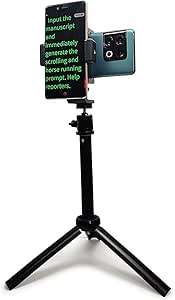 | Best for Two-Phone Recording | Model: PPG-2206-SJZJ | Phone height adjustment: 3–17 inches | Tripod head rotation: 360° | VIEW ON AMAZON | See Our Full Breakdown |
| NEEWER X12 14-Inch Aluminum Alloy Teleprompter for Tablets, Phones, and Cameras |  | Best for Flexible Camera-and-Tablet Setups | Brand and model: NEEWER X12 | Glass size: 14 inches | Material: Aluminum alloy | VIEW ON AMAZON | See Our Full Breakdown |
| teleprompter for creator | Screen size |
|---|---|
| LENSGO TC12P 14.5-Inch Smartph | — |
| NEEWER Basics X12B 12-Inch Alu | 12 inches |
| Glazon 9.3-Inch Teleprompter f | 9.3 inches |
| NEEWER X11 2-in-1 Teleprompter | — |
| Desview P13 13-Inch Teleprompt | 13 inches |
| AMBITFUL 7.5-Inch Mini Telepro | 7.5 inches |
| NEEWER X14 III Teleprompter wi | 14 inches |
| LENSGO TC7S Portable 9.7-Inch | 9.7 inches |
| Elgato Prompter Teleprompter w | — |
| PaiPaiGo Dual Phone Teleprompt | — |
| NEEWER X12 14-Inch Aluminum Al | — |
More Details on Our Top Picks
LENSGO TC12P 14.5-Inch Smartphone Teleprompter with Bluetooth Remote
The LENSGO TC12P is a strong fit for creators who want a larger prompting surface without giving up phone-based shooting. Its 14.5-inch coated glass and light-seal foam help keep script text readable while reducing stray light, and the adjustable holder accommodates both horizontal and vertical recording. Compared with the smaller Glazon 9.3-Inch Teleprompter, the TC12P gives you a broader text area that can make longer scripts easier to follow. The tradeoff is a narrower device fit: the holder supports devices only up to 7.3 inches wide, so larger tablets are out. Script import and scrolling also depend on the TCQI app, rather than a purely hardware-based workflow. I’d choose it for creators who want phone-first versatility, not tablet-size freedom.
Pros:- Supports both horizontal and vertical shooting.
- 14.5-inch coated beam-splitter glass provides a generous script area.
- Bluetooth remote controls playback and scrolling speed.
- Adjustable holder and front panel allow different shooting angles.
Cons:- Device holder is limited to devices up to 7.3 inches wide.
- Script import and scrolling features require the TCQI app.
- Not water resistant.
Best for: Phone-based creators who alternate between vertical social videos and horizontal recordings and want a larger script display.
Not ideal for: Creators who use tablets wider than 7.3 inches or want to control scripts without relying on the TCQI app.
- Brand and model:LENSGO TC12P
- Glass size:14.5 inches (37 cm)
- Compatible device width:Up to 7.3 inches in landscape orientation
- Device compatibility:Smartphones and tablets
- App:TCQI for iOS and Android
- Included accessories:Bluetooth remote, four phone lens adapter rings, bracket, mount, backplate, and two 1/4-inch screws
- Warranty:1 year
- Water resistance:Not water resistant
Our verdict“Choose the TC12P if you want a large, adjustable phone-and-tablet prompting setup, but check your device width before buying.”
NEEWER Basics X12B 12-Inch Aluminum Alloy Teleprompter for Tablets and DSLR Cameras
The NEEWER Basics X12B makes sense for creators who record with a camera and want a straightforward tablet-based prompt. Its liftable platform and 12-inch beam-splitter glass support reading from up to 10 feet away, while the remote and app handle playback, scrolling, page turns, and font size. It folds flat into its carry case, a practical advantage over bulkier monitor-equipped options such as the NEEWER X11. That simpler design comes with clear limits: the X12B is not for phone shooting, and it cannot act as a monitor or show your on-screen self-view. The included remote also needs an AAA battery that is not supplied. I’d pick it for a camera-and-tablet workflow where portability matters more than a built-in display.
Pros:- Folds flat into the included carry case for storage and transport.
- Reads from up to 10 feet away.
- Remote and app control playback, scrolling, page turns, and font size.
- No-assembly design speeds up setup.
Cons:- Not suitable for phone shooting.
- Does not function as a monitor or provide on-screen self-view.
- RT113 remote requires an AAA battery, which is not included.
Best for: Creators using a DSLR or other camera with a tablet prompt who want a fold-flat unit for travel or compact storage.
Not ideal for: Phone-first creators or anyone who wants a built-in monitor, self-view, or an all-in-one prompting display.
- Brand and model:NEEWER Basics X12B
- Screen size:12 inches
- Material:Aluminum alloy
- Glass light transmittance:75%
- Maximum reading distance:10 ft (3 m)
- Controls:RT113 Bluetooth remote and NEEWER Teleprompter App
- App compatibility:iOS 11.0 or later; Android 6.0 or later
- Included accessories:Carry case and RT113 remote; AAA battery not included
- Warranty:1 year
Our verdict“Pick the X12B for a portable tablet-and-camera prompting rig, and skip it if phone recording or monitor features matter to you.”
Glazon 9.3-Inch Teleprompter for Phones and Cameras with App and Bluetooth Remote
The Glazon 9.3-inch teleprompter is the compact choice here for creators who switch between a phone, tablet, DSLR, or mirrorless camera. Its 70/30 beam-splitter glass reflects the script while keeping the camera view clear, and the app lets you adjust font size and scroll speed from a compatible phone or tablet. The included remote works from up to 10 meters, which is useful when recording alone. Compared with the larger LENSGO TC12P, the Glazon takes a smaller-format approach: it is easier to accommodate in a compact setup, but offers less screen area for scripts. The main workflow catch is that it still needs a compatible phone or tablet to manage text; the remote alone does not replace that device. I’d shortlist it for creators who value broad camera compatibility in a small unit.
Pros:- Compatible with smartphones, tablets, DSLR, and mirrorless cameras.
- 70/30 beam-splitter glass keeps the script visible while preserving the camera view.
- App controls font size and scrolling speed.
- Bluetooth remote range reaches up to 10 meters.
Cons:- The 9.3-inch screen offers less script area than the LENSGO TC12P or Desview P13.
- Requires a compatible phone or tablet to manage scripts.
- The supplied data does not specify an included carry case.
Best for: Solo creators who use different phone and camera bodies and want a compact teleprompter with app and remote controls.
Not ideal for: Creators who need a large script display or want to manage prompts without a separate phone or tablet.
- Screen size:9.3 inches
- Glass:70/30 beam-splitter glass
- Compatibility:Smartphones, tablets, DSLR, and mirrorless cameras
- App compatibility:iOS and Android
- Remote range:Up to 10 m
- Setup time:About 2 minutes
- Item weight:1.94 pounds
- Package dimensions:10.79 x 9.13 x 2.76 inches
- Manufacturer:Glazon
Our verdict“Choose the Glazon if a compact footprint and flexible camera compatibility matter more than a wide prompting screen.”
NEEWER X11 2-in-1 Teleprompter with 11-Inch Beam Splitter Glass and Built-In Monitor
The NEEWER X11 is the most self-contained studio option in this group: it pairs 11-inch beam-splitter glass with a built-in 9-inch LCD that can prompt, mirror compatible devices, or serve as a computer display. That removes the need to place a separate prompting tablet on the platform, unlike the NEEWER Basics X12B. Its adjustable mount supports lenses up to 72 mm and focal lengths from 35 to 200 mm, giving camera-based creators useful setup flexibility. The extra display capability brings more connection dependencies, though: phone mirroring requires a compatible device with DP protocol, some HDMI and USB-A setups need a driver, and voice synchronization is not supported. I’d choose the X11 for a desk or studio where monitor functions earn their space, rather than for a minimal mobile kit.
Pros:- Built-in 9-inch LCD supports prompting, compatible-device mirroring, and use as a second display.
- 11-inch multi-coated beam-splitter glass is designed to reduce ghosting.
- Supports lenses up to 72 mm and focal lengths from 35 to 200 mm.
- Adjustable mount and quick-release plate allow flexible positioning.
Cons:- Phone mirroring is limited to compatible devices with DP protocol.
- Some HDMI and USB-A connection setups require a driver.
- Voice synchronization is not supported.
Best for: Camera-based creators building a studio or desk setup who want prompting and a second-display option in one unit.
Not ideal for: Mobile creators seeking a simple, lightweight prompting rig or users whose phones lack DP protocol support for mirroring.
- Brand and model:NEEWER X11
- Beam-splitter glass:11 inches; 75% light transmission
- Built-in monitor:9-inch HD LCD, 1024 x 768 resolution
- Lens thread support:Up to 72 mm
- Supported focal lengths:35–200 mm
- Text readability distance:Up to 2.5 m
- Mount adjustment:10 cm horizontal and 3 cm vertical
- Quick-release plate capacity:2 kg
- Computer compatibility:Windows and macOS
Our verdict“Choose the X11 if you want a built-in monitor to anchor a studio workflow, and skip it if you need a simpler, connection-light teleprompter.”
Desview P13 13-Inch Teleprompter
The Desview P13 stands out for creators who want to use a large tablet as their script source. It supports tablets up to 13 inches, giving scripts more room than the Glazon 9.3-inch or NEEWER X12B 12-inch designs. Its 70/30 beam-splitter glass has a 7H hardness rating, and the supplied sun hood, Bluetooth remote, app, and carry bag support both location and home recording. That generous tablet fit comes with a substantial footprint: at 1.7 kg, it is less appealing for creators who want a very light grab-and-go rig. It also relies on a compatible phone or tablet for prompting and is not water resistant, so outdoor use still calls for care. I’d favor it when screen size matters more than minimizing kit weight.
Pros:- Supports tablets up to 13 inches for a spacious script display.
- Works with tablets, smartphones, cameras, DSLRs, and camcorders.
- Includes a Bluetooth remote, app, sun hood, and Oxford cloth carry bag.
- 7H-hardness glass is designed for added surface durability.
Cons:- At 1.7 kg, it is heavier than the compact Glazon option.
- Requires a compatible phone or tablet for prompting.
- Not water resistant.
Best for: Creators with a large tablet who record with smartphones, DSLRs, mirrorless cameras, or camcorders and want a carry bag for transport.
Not ideal for: Creators prioritizing a lightweight, weather-resistant setup or anyone who does not have a compatible phone or tablet to run prompts.
- Brand and model:Desview P13
- Screen size:13 inches
- Glass hardness:7H
- Visible light transmission:70/30
- Compatible devices:iPad, tablets, cameras, DSLRs, and smartphones
- Item weight:1.7 kg
- Included items:Teleprompter body, Bluetooth remote, and Oxford cloth carrying bag
- Warranty:1 year
- Water resistance:Not water resistant
Our verdict“Pick the P13 if you want a large tablet-based prompt and can accommodate its 1.7 kg body in your recording kit.”
AMBITFUL 7.5-Inch Mini Teleprompter with Desktop Tripod
The AMBITFUL 7.5-Inch Mini suits creators who need a small rig for desk recordings, interviews, or travel rather than a large studio setup. Its coated glass reflects script text while leaving a compatible smartphone, DSLR, or mirrorless camera behind the glass, and the included desktop tripod, adapter rings, Bluetooth remote, and app control make it a ready-to-use kit for supported setups. Compared with the larger NEEWER X14 III, this model is lighter and simpler to pack, but its smaller screen is less accommodating for long reading distances or larger text. It also differs from the phone-only PaiPaiGo kit by supporting compatible cameras. The tradeoff is strict: tablets are not supported, and camera mounting depends on a 1/4-inch tripod thread and a matching ring.
Pros:- Compact 7.5-inch format with a desktop tripod for small recording spaces
- Works with smartphones and compatible DSLR and mirrorless cameras
- Bluetooth remote and app support scrolling and text adjustments
- Includes multiple camera adapter rings and a phone holder
Cons:- Does not support tablets
- Camera mounting requires a 1/4-inch tripod thread and a compatible adapter ring
Best for: Creators recording short-form videos or interviews at a desk who want a compact teleprompter that can work with a phone or a compatible camera.
Not ideal for: Creators who read from a tablet, need a large display for longer camera distances, or use a camera without the required tripod thread and adapter-ring fit.
- Screen size:7.5 inches
- Weight:350 g (12.35 oz)
- Compatible devices:Smartphones, DSLR cameras, and mirrorless cameras
- Camera adapter ring sizes:49, 52, 55, 58, 62, 67, 72, and 77 mm
- Mount:1/4-inch screw
- Control:Bluetooth remote and app
- Included accessories:Desktop tripod, Bluetooth remote, adapter rings, phone clip, and user manual
- Tablet compatibility:Not compatible
Our verdict“Choose the AMBITFUL Mini for a portable desk rig that can handle a phone or compatible camera, but skip it if you need tablet support or a larger reading screen.”
NEEWER X14 III Teleprompter with RT113 Remote and App Control
The NEEWER X14 III is the strongest fit here for creators who read from farther back or want room for larger script text. Its 14-inch beamsplitter and 10-foot reading range suit a more substantial studio or presenter setup than the AMBITFUL 7.5-inch Mini, while the 45-degree tilt and phone-or-tablet support offer more framing flexibility than a phone-only rig. The RT113 remote and app handle scrolling, playback, page turns, and font size, cutting down on interruptions during a take. Its metal frame has multiple mounting points and folds into a carry case, though at 5.2 lb it is far less travel-friendly than the LENSGO TC7S. Buyers must also supply a compatible phone or tablet no wider than 8.7 inches; the X14 III has no built-in display.
Pros:- 14-inch beamsplitter supports a reading distance of up to 10 feet
- Remote and app control scrolling, playback, page turns, and font size
- Metal frame offers tripod and accessory mounts
- Folds into the included carry case
Cons:- At 5.2 lb, it is heavier to transport than the LENSGO TC7S
- Requires a compatible phone or tablet up to 8.7 inches wide
- Not water resistant
Best for: Video educators, presenters, and interview creators who work from a tripod and need a larger reading area with a compatible phone or tablet.
Not ideal for: Highly mobile creators who prioritize a lightweight kit, or anyone whose phone or tablet exceeds the 8.7-inch width limit.
- Screen size:14 inches
- Beamsplitter light transmission:71%
- Reading range:Up to 10 feet (3 m)
- Tilt:45°
- Compatible device width:Up to 8.7 inches (22.1 cm)
- Mount compatibility:Manfrotto 501PL
- Thread sizes:1/4 inch and 3/8 inch
- Maximum load capacity:22 lb (10 kg)
- Item weight:5.2 lb
Our verdict“Pick the X14 III for a more spacious, mountable presenter setup, and choose a smaller foldable model if portability matters more than screen size.”
LENSGO TC7S Portable 9.7-Inch Foldable Teleprompter for Phones
The LENSGO TC7S is built for creators who need a teleprompter that packs down quickly between shoots. Its one-second fold and 9.7-inch beam-splitter make it a more portable option than the larger NEEWER X14 III, while still offering a bigger reading surface than the AMBITFUL Mini. The TCQI app works with iOS and Android, and the Bluetooth remote handles scrolling and playback, so a phone-based creator can keep takes moving without reaching for the screen. Devices can sit vertically or horizontally, and smaller tablets below 8 inches are supported. That limit rules out many larger tablets, and the manufacturer does not recommend image scripts. Compared with the Elgato Prompter, the TC7S is a simpler standalone phone-and-tablet setup, but it does not provide a built-in display for chat or computer windows.
Pros:- Folds in one second for quick packing and storage
- 9.7-inch beam-splitter glass reflects scripts in front of the camera
- Bluetooth remote controls scrolling and playback
- Supports vertical or horizontal phone placement and tablets below 8 inches
Cons:- Tablet compatibility is limited to devices below 8 inches
- Image scripts are not recommended by the manufacturer
Best for: Mobile creators who record with a phone, want a compact foldable rig, and use scripts in supported text formats.
Not ideal for: Creators who rely on a tablet 8 inches or larger, need image-based scripts, or want a built-in computer-connected display.
- Screen size:9.7 inches
- Compatible devices:Smartphones and tablets below 8 inches
- Compatibility:iOS and Android
- App:TCQI
- Remote control:Bluetooth
- Supported script format:.txt
- Device placement:Vertical or horizontal
- Warranty:1 year
Our verdict“Choose the TC7S for quick-moving phone shoots and supported text scripts; opt for the X14 III if you need a larger reading area.”
Elgato Prompter Teleprompter with Built-In 9-Inch Display
The Elgato Prompter is the lineup’s clearest choice for creators who want more than a scrolling script in front of the camera. Its built-in 9-inch FHD display can show scripts, Twitch chat, or video-call windows, so streamers and remote presenters can keep relevant information near the lens without adding a separate phone or tablet. That makes it fundamentally different from the LENSGO TC7S, which reflects content from a device the creator supplies, and the NEEWER X14 III, which is designed around a larger beamsplitter and external phone or tablet. Elgato connects to PC or Mac over USB and works with Camera Hub and Stream Deck. The tradeoff is a computer-centered setup: camera and software configuration are required, and Mac and Android use requires DisplayLink software.
Pros:- Built-in FHD display means no separate phone or tablet screen is needed
- Can display scripts, chat, and video-call windows
- Camera Hub and Stream Deck support suit connected creator workflows
- Supports a range of cameras, including wide lenses
Cons:- Requires a computer and camera setup
- DisplayLink software is required for Mac and Android
- Not water resistant
Best for: PC or Mac creators who stream, host video calls, or record tutorials and want scripts or live information displayed close to the camera.
Not ideal for: Creators seeking a simple phone-based or standalone travel rig, or those who do not want to configure computer and camera software.
- Display size:9 inches
- Display resolution:FHD
- Connectivity:USB
- Weight:0.69 kg
- Dimensions:11.1 × 8.82 × 8.62 inches
- Compatibility:PC, Mac, and Stream Deck
- Special feature:Drag-and-drop monitor display
- Water resistance:Not water resistant
Our verdict“Choose the Elgato if you create at a computer and want scripts or live content beside the lens; choose a foldable glass model for a simpler mobile rig.”
PaiPaiGo Dual Phone Teleprompter Kit for iPhone and Android
The PaiPaiGo Dual Phone Kit has a different job from the glass teleprompters in this roundup: it lets creators use one phone for the script and another for recording. That makes it a practical pick for phone-first videos when a second handset is available, while its portrait and landscape positioning and adjustable height help adapt the framing. Compared with the AMBITFUL Mini, it avoids camera adapter rings and is centered on phones; compared with the LENSGO TC7S, it does not offer a beamsplitter reading surface. Instead, it uses two phone mounts, a rotating platform, and a lightweight tripod that packs into a storage bag. The tradeoff is limited equipment support: tablets and foldable phones are excluded, and the tripod is not intended for heavier camera setups.
Pros:- Dual phone mounts allow separate script and recording phones
- Supports portrait and landscape shooting
- Height adjusts from 3 to 17 inches
- Collapsible design includes a storage bag and quick assembly
Cons:- Not compatible with tablets or foldable phones
- Tripod is not intended for heavy camera setups
Best for: Phone-first creators who have two standard iPhone or Android phones and want one device for the script and one for recording.
Not ideal for: Creators who use a tablet, foldable phone, DSLR, or mirrorless camera, or who need a heavy-duty tripod setup.
- Model:PPG-2206-SJZJ
- Phone height adjustment:3–17 inches
- Tripod head rotation:360°
- Tripod head tilt:Up to 90°
- Weight:280 g (0.61 lb, as stated)
- Included components:Tripod, dual phone clamp, rotation platform, and storage bag
- Compatibility:iPhone and Android phones; not suitable for tablets or foldable phones
Our verdict“Choose the PaiPaiGo if your workflow uses two standard phones; pick the LENSGO TC7S if you want a beamsplitter-style script display instead.”
NEEWER X12 14-Inch Aluminum Alloy Teleprompter for Tablets, Phones, and Cameras
The NEEWER X12 suits creators who want a roomy tablet prompt with a camera-based recording setup. Its 14-inch beam-splitter glass reflects text readable from up to 10 feet away, giving you more freedom to frame a standing presentation than a compact phone-focused option such as the AMBITFUL 7.5-Inch Mini Teleprompter. The included remote and app support let you adjust scrolling and pages without reaching for the prompt device, while the folding aluminum build and carrying case make transport more manageable.
That flexibility comes with fit limits: the tablet must be within the stated size range, the 12-inch iPad Pro is excluded, and camera lenses need a focal length above 28 mm. That makes the X12 a weaker match for wide-angle filming than a setup designed around different camera needs. I’d choose it for a creator who values a larger prompt surface and accepts checking camera and tablet compatibility before buying.
Pros:- 14-inch glass supports a larger reflected prompt than compact models such as the AMBITFUL 7.5-Inch Mini Teleprompter.
- Text is specified as readable from up to 10 feet away, supporting presentations with more distance between the speaker and camera.
- Includes an RT-110 remote and app control for managing scrolling and pages without touching the device.
- Folding aluminum-alloy body and included carrying case make storage and transport easier.
Cons:- Does not support the 12-inch iPad Pro, narrowing tablet choice for some creators.
- Requires a camera lens longer than 28 mm, so wide-angle and shorter-focal-length setups are incompatible.
- Supported devices must fit within 9.84 × 8.68 inches, which may exclude larger tablets.
Best for: Video creators using a compatible tablet or phone with a camera lens longer than 28 mm who want a large prompt surface and a foldable kit for studio or location recording.
Not ideal for: Creators using an iPad Pro 12-inch, a wide-angle lens, or a camera whose lens is 28 mm or shorter; the X12’s compatibility limits may rule out their existing setup.
- Brand and model:NEEWER X12
- Glass size:14 inches
- Material:Aluminum alloy
- Glass light transmittance:75%
- Maximum readable distance:10 ft (3 m)
- Supported device size:Up to 9.84 × 8.68 in (25 × 22 cm)
- Minimum camera lens focal length:More than 28 mm
- App compatibility:iOS 11.0 or later; Android 6.0 or later
- Included accessories and warranty:RT-110 remote control, phone holder, carrying case; 1-year warranty
Our verdict“Choose the NEEWER X12 if you want a large, portable tablet-and-camera teleprompter and your devices meet its size and lens requirements.”

How We Picked
I ranked these teleprompters around the jobs creators actually need them to do: keep scripts readable near the lens, work with the right recording device, and fit the way each person films. I weighed beam-splitter size, phone and tablet support, camera compatibility, portability, control options, and whether a model relies on a separate device or includes a display. I also considered how much setup flexibility a creator gets versus the space and mounting demands of a larger rig.
The NEEWER X12 ranks first because its stated support for tablets, phones, and cameras makes it the most adaptable starting point across common creator setups. The remaining order reflects more specific strengths: built-in display convenience, larger reading surfaces, portability, compact desk use, and specialized dual-phone workflows. A higher rank does not mean every creator should choose that product; a phone-only creator may get a better fit from a smaller, foldable model than from a larger camera rig. I judged the options by their stated features and intended use, not by claims of hands-on testing.
Factors to Consider When Choosing Teleprompter For Creators
Before choosing, match the prompter to the way you record—not just the size of its glass. The right fit depends on what displays your script, what captures your video, how close the text sits to the lens, and whether you record at a desk or in changing locations.
Match the prompter to your recording device
Start with the device that will record, then check whether the prompter supports that camera or phone and how it attaches. A rig made for a tablet and DSLR can be awkward excess for a single-phone creator, while a phone-only model may not serve a mirrorless camera setup. Compatibility includes more than whether a device fits: check camera-lens clearance, phone orientation, mounting points, and whether your device case must come off. Avoid buying based only on a listing’s broad device range if your specific combination is unusual. If you plan to change cameras later, wider mounting support can justify choosing a more adaptable model.
Choose reading size for your scripts and framing
A larger beam splitter can make text easier to read from farther back, which helps when a camera is positioned across a desk or room. It also adds bulk and can take up more space around the lens. A compact screen may be a better match for close-up filming, short scripts, and a small desk, though text size and line length need careful adjustment. The mistake is choosing the biggest glass available without checking your camera distance and shooting space. Think about where the prompter will sit and how large the text must appear at that distance.
Decide whether you want to supply the display
Many prompters rely on a phone or tablet to show the script, while an option with a built-in display reduces the need to dedicate one of those devices. That convenience can simplify a fixed workstation, but it may bring a more specific computer or connection workflow. Using your own device can be more flexible if you already have a suitable phone or tablet, yet it means keeping that device charged and available during recording. Check how the script reaches the display and whether the app or connection fits your preferred writing process. Avoid paying for an integrated screen if a spare phone already handles your recording routine well.
Account for setup time and how often you move
A creator who records at one desk may prefer a larger rig that can stay assembled; someone filming in different rooms may value a foldable form more. Before choosing, look at how the unit mounts, where its parts need to be stored, and whether you will have to rebuild the camera position between shoots. Portable designs can save packing space but may involve a smaller reading area or a more limited device fit. If you record often, setup friction can matter more than a modest difference in screen size. Match portability to your actual filming pattern rather than treating it as a bonus feature.
Check remote and app control against your workflow
Remote and app controls can let you adjust script pace without reaching toward the camera, helping preserve a steady recording position. Their value depends on how you rehearse: a creator reading a prepared monologue may want simple scrolling control, while someone recording loosely may barely use it. Confirm which device runs the app, what the remote controls, and whether the script format works with your existing process. Do not assume that a bundled remote automatically means an easier workflow; compatibility and comfortable control placement matter too. If you already use a reliable teleprompter app, verify that the hardware supports your preferred setup before buying.
Plan for the lens, lighting, and your space
Teleprompter glass sits between the display and camera, so the physical layout must suit the lens and the way you light your face. A larger hood or frame can crowd a small desk or affect how nearby lights are placed. Check whether the camera can sit in the intended position and whether the prompter’s mounting arrangement suits your tripod or support. Creators using a long lens, a small room, or a very close camera position should pay particular attention to clearance and framing. A good fit is one that lets you read naturally without forcing an uncomfortable camera angle or a cramped lighting arrangement.
Frequently Asked Questions
Can I use a teleprompter with my existing camera and phone?
Often, but check both parts of the setup: the prompter must support the camera mounting arrangement, and the phone must fit the script holder in the correct orientation. A listing that mentions cameras and phones may still have size or clearance limits for your exact gear. Check your camera body, lens, phone dimensions, and whether you record vertically or horizontally before choosing. If you expect to switch between a phone and a camera, a model with broader stated device support gives you more room to adapt. A dedicated phone prompter can be simpler if you never record with a separate camera.
Is a larger beam splitter better for reading naturally?
Not automatically. A larger surface can provide more room for text and suit a camera farther from the speaker, but it also takes up more space and may be cumbersome on a compact desk. Reading comfort depends on viewing distance, font size, line length, and how the prompt sits beside the lens. For close-up videos, a smaller prompter may work well if the text is adjusted to remain readable. Choose based on your usual camera distance and filming space, not screen size alone.
Should I choose a built-in display or use my tablet?
A built-in display can make sense for a permanent recording station where you want a dedicated script screen and fewer devices to reposition. A tablet-based setup can be more flexible if you already own a suitable device or want to change screen size. The tradeoff is that a separate device needs power, mounting, and a compatible app or script workflow. Before deciding, check how the display connects and where your scripts are stored. The simplest option is the one that fits your current recording routine without adding extra steps.
Will a compact teleprompter work for filming with a DSLR or mirrorless camera?
Some compact models support cameras, but compact size alone does not confirm a fit for your body and lens. Verify the mounting method, lens clearance, and how the camera aligns behind the glass. A phone-first foldable model may be a poor match for a larger camera even if it can hold the script device. If your camera is part of the setup, prioritize explicit camera compatibility over easy storage. When portability matters most, check that the smaller rig still supports the camera configuration you actually use.
What should I choose if I record with two phones?
A dual-phone kit is designed for a workflow that uses two phones at once, so it may be a more direct fit than a standard prompter built around one script device and a separate camera. Confirm how each phone is held and which one displays the prompt versus records video. Also check orientation, phone dimensions, and whether your preferred app can scroll the script the way you need. If you later plan to switch to a DSLR or tablet-based setup, a broader camera-compatible model may offer more flexibility. Choose the dual-phone approach when that two-device arrangement is a core part of your recording process, not just an occasional experiment.
Conclusion
For the broadest mix of camera, phone, and tablet support, I recommend the NEEWER X12 as the best overall. The NEEWER Basics X12B is my best value direction for creators who want an aluminum-alloy tablet-and-camera setup without needing the X12’s stated three-device range. For a desk-based creator who wants a dedicated script screen, the Elgato Prompter is the best premium-style pick; its built-in display sets it apart from device-dependent options. Beginners filming with a phone should start by comparing the Glazon 9.3-Inch and LENSGO TC7S, choosing the foldable TC7S if portability matters most. For a larger phone reading surface, look at the LENSGO TC12P; for a two-phone workflow, choose the PaiPaiGo Dual Phone Teleprompter Kit. My final rule: buy for your camera distance and recording routine, not for the largest screen or longest feature list.
Halloween Picks
halloween
As an affiliate, we earn on qualifying purchases.