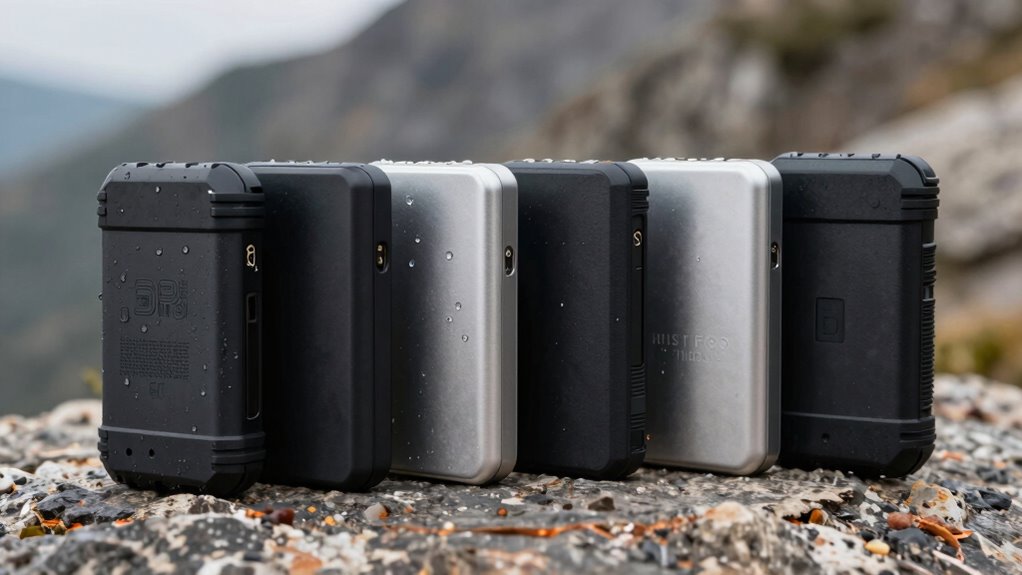

If you want a rugged external SSD with 4TB of space, my best overall pick is the Samsung T7 Shield for its practical balance of portable protection, capacity, and broad USB compatibility. The SanDisk Professional PRO-G40 stands out for buyers who need a more demanding professional connection, while the Lexar Armor 700 is a strong alternative for those who put extra emphasis on a rugged enclosure. The main tradeoffs are speed versus device compatibility, and tougher protection versus size and cost. This roundup also includes several closely related SanDisk and Samsung options, so model details matter. Read on for the full breakdown and help matching a drive to your work.

Get the latest gadgets delivered free with Prime
- Fast, free delivery on millions of items
- Prime Video, Amazon Music and more included
- Member-only deals all year
Complete the kit



Key Takeaways
- The Samsung T7 Shield is the most balanced choice: it pairs 4TB capacity and a rugged design with a common USB 3.2 Gen 2 connection, making it easier to use across varied devices than specialist high-speed models.
- The PRO-G40 and SABRENT Rocket XTRM 5 target high-performance workflows: their more specialized interfaces can suit compatible editing or transfer setups, but buyers should check their host ports before choosing them.
- Several entries are close relatives, not wholly different classes: the three SanDisk Extreme listings and two PRO-G40 listings call for checking the exact model and connection details rather than choosing by product name alone.
- A rugged shell does not make every drive equally field-ready: protection claims, included accessories, and the need for a separate case vary, so the bundle listing may appeal to a beginner even when the drive itself matches another option.
- Fast advertised transfer rates depend on the whole setup: the computer, port, cable, and workload all affect real transfers, so a compatible, durable drive may serve more buyers than the highest-spec model.
| Glyph Atom EV 4TB Portable NVMe SSD |  | Best for Rugged Everyday Workflows | Storage capacity: 4 TB | Drive type: Solid-state NVMe | Interface: USB-C 3.2 Gen 2 | VIEW ON AMAZON | See Our Full Breakdown |
| SanDisk Extreme PRO Portable SSD, 4TB |  | Best for Fast, Protected Field Work | Storage capacity: 4 TB | Read speed: Up to 4,000 MB/s | Write speed: Up to 3,800 MB/s | VIEW ON AMAZON | See Our Full Breakdown |
| SanDisk Professional PRO-G40 4TB Portable SSD |  | Best for Harsh Environments | Storage capacity: 4 TB | Read speed: Up to 3,000 MB/s over Thunderbolt 3 | Write speed: Up to 2,500 MB/s over Thunderbolt 3 | VIEW ON AMAZON | See Our Full Breakdown |
| SanDisk Extreme Portable SSD, 4TB |  | Best Compact Rugged Pick | Storage capacity: 4 TB | Interface: USB-C | Read speed: Up to 2,000 MB/s | VIEW ON AMAZON | See Our Full Breakdown |
| SABRENT Rocket XTRM 5 4TB Thunderbolt 5 Portable SSD |  | Best for Thunderbolt 5 Performance | Storage capacity: 4 TB | Connectivity: Thunderbolt 3, Thunderbolt 4, Thunderbolt 5, USB-C, USB4 | Connection speed: Up to 80 Gbps | VIEW ON AMAZON | See Our Full Breakdown |
| Samsung T7 Shield 4TB Portable SSD, USB 3.2 Gen 2 |  | Best Overall Rugged Pick | Storage capacity: 4 TB | Interface: USB 3.2 Gen 2 | Read speed: Up to 1,050 MB/s | VIEW ON AMAZON | See Our Full Breakdown |
| SanDisk Professional PRO-G40 4TB Portable SSD |  | Best for Thunderbolt Workflows | Storage capacity: 4 TB | Read speed: Up to 3,000 MB/s | Connectivity: Thunderbolt 3 (40 Gbps), USB-C (10 Gbps) | VIEW ON AMAZON | See Our Full Breakdown |
| Samsung T9 Portable SSD, 4TB, USB 3.2 Gen 2×2 |  | Best for Fast USB Transfers | Storage capacity: 4 TB | Interface: USB 3.2 Gen 2×2 | Read/write speed: Up to 2,000 MB/s | VIEW ON AMAZON | See Our Full Breakdown |
| Samsung T7 Shield 4TB Portable SSD Bundle with Hard Shell Case and USB-C to USB-A Adapter |  | Best Ready-to-Pack Bundle | Storage capacity: 4 TB | Interface: USB 3.2 Gen 2 | Read speed: Up to 1,050 MB/s | VIEW ON AMAZON | See Our Full Breakdown |
| Lexar Armor 700 4TB Portable External SSD |  | Best for Fast, Weather-Exposed Field Work | Storage capacity: 4 TB | Interface: USB-C | USB standard: USB 3.2 Gen 2×2 | VIEW ON AMAZON | See Our Full Breakdown |
| SanDisk Extreme Portable SSD 4TB, USB-C, Up to 1050MB/s |  | Best for Everyday Rugged Portability | Storage capacity: 4 TB | Read speed: Up to 1050 MB/s | Write speed: Up to 1000 MB/s | VIEW ON AMAZON | See Our Full Breakdown |
| rugged external ssd 4tb | Storage capacity | Read speed | Interface | Write speed |
|---|---|---|---|---|
| Glyph Atom EV 4TB Portable NVM | 4 TB | — | USB-C 3.2 Gen 2 | — |
| SanDisk Extreme PRO Portable S | 4 TB | Up to 4,000 MB/s | — | Up to 3,800 MB/s |
| SanDisk Professional PRO-G40 4 | 4 TB | Up to 3,000 MB/s over Thunderbolt 3 | — | Up to 2,500 MB/s over Thunderbolt 3 |
| SanDisk Extreme Portable SSD | 4 TB | Up to 2,000 MB/s | USB-C | — |
| SABRENT Rocket XTRM 5 4TB Thun | 4 TB | Up to 8,000 megabytes per second | — | — |
| Samsung T7 Shield 4TB Portable | 4 TB | Up to 1,050 MB/s | USB 3.2 Gen 2 | Up to 1,000 MB/s |
| SanDisk Professional PRO-G40 4 | 4 TB | Up to 3,000 MB/s | — | — |
| Samsung T9 Portable SSD | 4 TB | — | USB 3.2 Gen 2×2 | — |
| Samsung T7 Shield 4TB Portable | 4 TB | Up to 1,050 MB/s | USB 3.2 Gen 2 | Up to 1,000 MB/s |
| Lexar Armor 700 4TB Portable E | 4 TB | Up to 2,000 MB/s | USB-C | Up to 2,000 MB/s |
| SanDisk Extreme Portable SSD 4 | 4 TB | Up to 1050 MB/s | USB 3.2 Gen 2, USB-C | Up to 1000 MB/s |
More Details on Our Top Picks
Glyph Atom EV 4TB Portable NVMe SSD
The Glyph Atom EV pairs 4TB of capacity with a rugged aluminum enclosure that sheds heat passively, making it a sensible fit for mobile work where a metal body matters more than a formal water-resistance rating. Its USB-C 3.2 Gen 2 connection reaches up to 1,050 MB/s, which suits project transfers and backups but falls well below the speeds offered by the SanDisk Extreme PRO Portable SSD or Thunderbolt-focused PRO-G40. The included USB-C and USB-A cables make it easier to connect across newer and older computers. The tradeoff is that the product data gives no IP or drop-protection rating, so I would not treat its sturdy chassis as proof of protection from water or hard falls. Windows users may also need to reformat the drive.
Pros:- 4TB capacity accommodates large project folders and backups
- Rugged aluminum chassis supports passive heat dissipation
- Up to 1,050 MB/s transfers suit routine file-moving work
- Includes USB-C-to-USB-C and USB-C-to-USB-A cables
Cons:- No stated IP rating or drop-resistance specification
- Windows may require reformatting
- Maximum speed depends on the connected device and interface
Best for: Mac and Windows creators who want 4TB, a metal enclosure, and cables for both USB-C and USB-A devices
Not ideal for: Field crews working in rain or around dust, since no formal environmental-resistance rating is listed, or users who need Thunderbolt-class transfer speeds
- Storage capacity:4 TB
- Drive type:Solid-state NVMe
- Interface:USB-C 3.2 Gen 2
- Maximum speed:Up to 1,050 MB/s
- Compatibility:Mac, Windows (reformat may be required), Thunderbolt 3
- Included cables:USB-C to USB-C and USB-C to USB-A
- Enclosure:Rugged aluminum
- Warranty:3-year hardware; 2-year Level-1 data recovery; 1-year advance replacement
Our verdict“Choose the Atom EV for a 4TB metal-bodied everyday drive with broad cable options, but pick a rated SanDisk rugged model for documented water and drop protection.”
SanDisk Extreme PRO Portable SSD, 4TB
For demanding photo and video workflows, the SanDisk Extreme PRO combines unusually high stated throughput with protection against common field hazards. Read speeds reach up to 4,000 MB/s, with average sustained writes listed at 3,100 MB/s, giving large transfers more headroom than the USB 3.2 Gen 2 Glyph Atom EV. Its IP65 rating and protection from drops up to 3 meters add concrete safeguards that the Atom EV’s aluminum chassis alone does not specify. Password protection with 256-bit AES encryption is useful when a drive carries client material, though the software must be downloaded. Performance depends on the host device and conditions, so those headline speeds need a compatible setup. Compared with the PRO-G40, this model lists faster peak reads, while the PRO-G40 provides IP68 protection and a stated crush-resistance rating.
Pros:- Up to 4,000 MB/s read speed and 3,100 MB/s average sustained write speed
- IP65 water and dust resistance
- Drop protection specified up to 3 meters
- 256-bit AES password protection
Cons:- Actual performance varies with the host device and usage conditions
- Password protection requires a software download
- PRO-G40 lists IP68 protection and crush resistance, which this model does not specify
Best for: Video editors and photographers moving large files in the field who want high throughput, IP-rated protection, and encrypted password access
Not ideal for: Buyers without a compatible high-speed host who would not benefit from its performance, or anyone wanting password protection without a software download
- Storage capacity:4 TB
- Read speed:Up to 4,000 MB/s
- Write speed:Up to 3,800 MB/s
- Average sustained write speed:3,100 MB/s
- Connectivity:USB Type-C
- Water and dust resistance:IP65
- Drop protection:Up to 3 m
- Encryption:256-bit AES
- Weight:2.24 oz
Our verdict“Pick the Extreme PRO for high-throughput field editing with IP65 and drop protection, provided your computer can make use of its speed.”
SanDisk Professional PRO-G40 4TB Portable SSD
The SanDisk Professional PRO-G40 is the durability-focused choice here: its enclosure carries an IP68 rating, supports drops up to 3 meters under the stated carpeted-concrete condition, and is rated for up to 4,000 pounds of crush resistance. That makes its protection claims more extensive than the IP65 rating on the SanDisk Extreme PRO Portable SSD. It also offers both Thunderbolt 3 and USB-C, so Thunderbolt-equipped Mac workflows can reach up to 3,000 MB/s reads and 2,500 MB/s writes, while a USB-C connection runs at a lower interface speed. Unlike the Extreme PRO, its listed drive format is APFS and described as Mac ready, which may mean extra setup for some PC users. I would choose it for environments where enclosure protection matters more than the highest listed peak speed.
Pros:- IP68 dust and water resistance
- Rated for drops up to 3 meters and crushing up to 4,000 pounds
- Thunderbolt 3 and USB-C connectivity
- Up to 3,000 MB/s reads and 2,500 MB/s writes over Thunderbolt 3
Cons:- Maximum performance depends on a Thunderbolt 3 connection
- Drop-resistance condition is specified for a carpeted concrete floor
- APFS Mac-ready format may require setup for PC use
Best for: Mac-based production teams and field professionals who need 4TB, Thunderbolt 3 performance, and specified resistance to water, dust, drops, and crushing
Not ideal for: PC-first buyers who want a ready-to-use cross-platform format, or users who cannot connect over Thunderbolt and expect the listed maximum speeds
- Storage capacity:4 TB
- Read speed:Up to 3,000 MB/s over Thunderbolt 3
- Write speed:Up to 2,500 MB/s over Thunderbolt 3
- Connectivity:Thunderbolt 3 (40 Gbps), USB-C (10 Gbps)
- Dust and water resistance:IP68
- Drop resistance:Up to 3 m
- Crush resistance:Up to 4,000 lb
- Drive format:APFS (Mac ready)
- Compatible devices:Mac, PC
Our verdict“Choose the PRO-G40 when documented environmental and crush protection matter more than the Extreme PRO’s higher peak read speed.”
SanDisk Extreme Portable SSD, 4TB
The SanDisk Extreme Portable SSD makes a strong case for buyers who want a compact 4TB drive with meaningful protection, rather than the highest speed in the group. It offers up to 2,000 MB/s read speed, an IP65 rating, and drop protection up to 3 meters, giving it a more clearly specified outdoor-use profile than the Glyph Atom EV. Its listed compatibility spans desktops, laptops, smartphones, and tablets, which suits people moving files between several device types. The speed and protection combination is less ambitious than the Extreme PRO, whose stated read speed reaches 4,000 MB/s and whose sustained write figure is also provided. Here, no write-speed figure is supplied, so buyers focused on long write-heavy sessions have less performance detail to work with. Password protection also requires a software download.
Pros:- 4TB capacity in a compact portable form
- Read speeds up to 2,000 MB/s
- IP65 water and dust resistance
- Drop protection up to 3 meters
Cons:- Write speed is not specified in the supplied product data
- Password protection requires a software download
- Lower stated read speed than the SanDisk Extreme PRO Portable SSD
Best for: Traveling photographers and multi-device users who need a pocket-sized 4TB drive with IP65 protection and a stated 3-meter drop rating
Not ideal for: Editors who prioritize sustained write performance or need the Extreme PRO’s higher stated speed figures for frequent large media transfers
- Storage capacity:4 TB
- Interface:USB-C
- Read speed:Up to 2,000 MB/s
- Form factor:2.5-inch
- Water and dust resistance:IP65
- Drop protection:Up to 3 m
- Encryption:256-bit AES
- Compatible devices:Desktop, laptop, smartphone, tablet
- Color:Black
Our verdict“Choose this Extreme Portable model for compact, IP65-rated 4TB storage; step up to the Extreme PRO if faster stated throughput is your priority.”
SABRENT Rocket XTRM 5 4TB Thunderbolt 5 Portable SSD
The SABRENT Rocket XTRM 5 is the performance-forward pick for buyers building around Thunderbolt 5. Its connection supports up to 80 Gbps, with a listed transfer speed of up to 64 Gbps and read performance of 8,000 MB/s. That puts it well ahead of the SanDisk Professional PRO-G40 on stated read speed, though realizing the difference depends on a compatible high-bandwidth port. Backward compatibility with Thunderbolt 3, Thunderbolt 4, USB4, and USB 3.2 broadens its use, while bus power and the included Thunderbolt cable suit a mobile workstation. Its aluminum body and silicone sleeve add physical protection, but unlike the PRO-G40 or SanDisk Extreme models, the supplied data gives no formal IP or drop rating. I would not treat the sleeve as a substitute for certified environmental protection.
Pros:- Thunderbolt 5 support with connection speeds up to 80 Gbps
- Listed read and data transfer rates up to 8,000 MB/s
- Backward compatible with Thunderbolt 3, Thunderbolt 4, USB4, and USB 3.2
- Aluminum body, silicone sleeve, and bus-powered operation
Cons:- Maximum speed depends on the connected device and port
- No formal drop, water, or dust-resistance rating is specified
- Its performance advantage over the PRO-G40 depends on access to a compatible high-speed host
Best for: Thunderbolt 5 workstation owners who transfer large media or project files and want a bus-powered 4TB drive with backward-compatible connections
Not ideal for: People working in wet, dusty, or high-impact locations who need a stated IP or drop rating, or buyers whose devices cannot use high-speed Thunderbolt connections
- Storage capacity:4 TB
- Connectivity:Thunderbolt 3, Thunderbolt 4, Thunderbolt 5, USB-C, USB4
- Connection speed:Up to 80 Gbps
- Transfer speed:Up to 64 Gbps
- Read speed:Up to 8,000 megabytes per second
- Materials:Aluminum body with silicone sleeve
- Power:Bus-powered; no external power required
- Included accessories:Thunderbolt cable
- Weight:3.35 ounces
Our verdict“Pick the Rocket XTRM 5 for a Thunderbolt 5 workstation and headline speed, but choose an IP-rated alternative for harsh outdoor exposure.”
Samsung T7 Shield 4TB Portable SSD, USB 3.2 Gen 2
The Samsung T7 Shield is a strong all-round choice when everyday speed and physical protection matter more than peak transfer rates. Its IP65 water and dust resistance and tested 9.8-foot drop protection suit field work, travel, and frequent handling, while 4TB gives room for large photo or video libraries. Speeds reach 1,050 MB/s read and 1,000 MB/s write on a compatible USB 3.2 Gen 2 setup, enough for many portable workflows but below the Samsung T9 and Lexar Armor 700 when their faster USB 3.2 Gen 2×2 connection is available. The broad device compatibility and hardware encryption add flexibility. The tradeoff is that the advertised speed depends on the host, cable, and UASP support, and its resistance ratings do not make it immune to damage in every condition.
Pros:- IP65-rated resistance to water and dust
- Drop-tested up to 9.8 feet
- Useful read and write speeds on compatible USB 3.2 Gen 2 systems
- AES 256-bit hardware encryption and wide device compatibility
Cons:- Maximum speeds require a compatible host, cable, and UASP mode
- Slower peak transfer speeds than the Samsung T9 and Lexar Armor 700 on suitable hosts
- Protection performance can vary with conditions
Best for: Traveling photographers and mobile professionals who want a 4TB drive with balanced speed, drop protection, and broad device support.
Not ideal for: Creators moving very large files who have a USB 3.2 Gen 2×2 host and want speeds closer to the Samsung T9 or Lexar Armor 700.
- Storage capacity:4 TB
- Interface:USB 3.2 Gen 2
- Read speed:Up to 1,050 MB/s
- Write speed:Up to 1,000 MB/s
- Water and dust resistance:IP65
- Drop resistance:Tested up to 9.8 feet (3 meters)
- Encryption:AES 256-bit hardware encryption
- Technology:PCIe NVMe
- Compatible devices:Gaming consoles, Mac, PC, tablet, iPhone 15/16
Our verdict“Choose the T7 Shield for a dependable balance of 4TB capacity, practical ruggedness, and everyday transfer speed.”
SanDisk Professional PRO-G40 4TB Portable SSD
The SanDisk Professional PRO-G40 is the specialist pick here: it pairs Thunderbolt 3 at up to 40 Gbps with IP68 protection, a 4,000 lb crush-resistance rating, and drop protection up to 3 meters. That combination suits demanding production environments where a drive may face rough transport and where a fast Thunderbolt connection can shorten transfers. It is more ruggedly specified than the Samsung T7 Shield, and its Thunderbolt interface can deliver higher read speeds than the USB-only alternatives in this group. The tradeoff is that the stated 3,000 MB/s read speed relies on a suitable Thunderbolt host; over USB-C, this drive supports up to 10 Gbps instead. Its aluminum enclosure also makes it less of a simple plug-in speed upgrade for buyers whose computers lack Thunderbolt.
Pros:- Up to 3,000 MB/s read speed over Thunderbolt 3
- IP68 dust and water resistance
- Rated for 4,000 lb crush resistance and drops up to 3 meters
- Also supports USB-C connections up to 10 Gbps
Cons:- Peak speed depends on a compatible Thunderbolt host and usage conditions
- USB-C operation is limited to up to 10 Gbps
- Its specialized performance is less useful on systems without Thunderbolt 3
Best for: Video editors and production teams with Thunderbolt 3 systems who need high transfer speeds alongside strong water, dust, crush, and drop protection.
Not ideal for: Buyers using only standard USB-C ports or seeking a straightforward rugged drive without a Thunderbolt-capable workflow.
- Storage capacity:4 TB
- Read speed:Up to 3,000 MB/s
- Connectivity:Thunderbolt 3 (40 Gbps), USB-C (10 Gbps)
- Dust and water resistance:IP68
- Crush resistance:4,000 lb
- Drop protection:Up to 3 m
- Enclosure material:Aluminum
- Format:exFAT
- Form factor:2.5 inches
Our verdict“Pick the PRO-G40 if your Thunderbolt workflow can use its higher throughput and its tougher crush-resistance rating.”
Samsung T9 Portable SSD, 4TB, USB 3.2 Gen 2×2
For buyers who want a speed step up from the Samsung T7 Shield but do not need the PRO-G40’s Thunderbolt connection, the Samsung T9 offers a compelling middle ground. It reaches up to 2,000 MB/s read and write over USB 3.2 Gen 2×2, and Dynamic Thermal Guard helps manage heat during demanding transfers. AES 256-bit hardware encryption and compatibility with computers, consoles, tablets, and compatible iPhones make it versatile beyond a single editing setup. Its stated drop durability is up to 9.8 feet, but the supplied details do not give it the T7 Shield’s IP65 water and dust rating or the PRO-G40’s crush-resistance rating. The key compromise is host dependence: without a compatible Gen 2×2 port and cable, buyers may not see the headline speeds.
Pros:- Up to 2,000 MB/s read and write speeds on a compatible connection
- Dynamic Thermal Guard helps manage heat
- AES 256-bit hardware encryption
- Works with computers, gaming consoles, tablets, and compatible iPhones
Cons:- Full speed requires a compatible host, cable, and UASP mode
- Host-device compatibility may vary
- No water, dust, or crush-resistance rating is specified in the supplied product data
Best for: Creators with USB 3.2 Gen 2×2 systems who regularly transfer large media files and want hardware encryption.
Not ideal for: Field users who prioritize a stated water-and-dust rating or crush resistance over transfer speed.
- Storage capacity:4 TB
- Interface:USB 3.2 Gen 2×2
- Read/write speed:Up to 2,000 MB/s
- Encryption:AES 256-bit hardware encryption
- Thermal management:Dynamic Thermal Guard
- Drop durability:Up to 9.8 ft
- Compatibility:PC, Mac, gaming consoles, tablets, iPhone 15/16
Our verdict“Choose the T9 for faster transfers than the T7 Shield when your system supports USB 3.2 Gen 2×2 and water resistance is not your main priority.”
Samsung T7 Shield 4TB Portable SSD Bundle with Hard Shell Case and USB-C to USB-A Adapter
This T7 Shield bundle makes the most sense for buyers who want the drive and useful travel accessories together. The SSD retains the familiar IP65 rating, 9.8-foot drop resistance, AES 256-bit hardware encryption, and speeds up to 1,050 MB/s read and 1,000 MB/s write. Compared with the standard Samsung T7 Shield, the main distinction is the included hard shell case, extra cable options, and USB-C-to-USB-A adapter—not higher performance or stronger drive protection. That can simplify packing and help connect to older USB-A devices, though the adapter’s USB 2.0 limitation may sharply reduce transfer speeds when used. The bundle is a practical convenience choice rather than a performance upgrade, and buyers who already own suitable cables and a case may prefer the simpler T7 Shield option.
Pros:- Includes a hard shell case, USB-C and USB-A cables, and an adapter
- IP65-rated dust and water resistance
- Drop resistance up to 9.8 feet
- AES 256-bit hardware encryption
Cons:- The included USB 2.0 adapter can limit transfer speeds
- Same stated peak speeds as the standard T7 Shield rather than a faster performance tier
- Water, dust, and drop protection can vary with conditions
Best for: Traveling users who want a protective carry case and connection accessories included with a rugged 4TB drive.
Not ideal for: Buyers who already have a case and cables, or who need full transfer speed while connected through a USB 2.0 adapter.
- Storage capacity:4 TB
- Interface:USB 3.2 Gen 2
- Read speed:Up to 1,050 MB/s
- Write speed:Up to 1,000 MB/s
- Dust and water resistance:IP65
- Encryption:AES 256-bit hardware encryption
- Drop resistance:Up to 9.8 ft
- Dimensions:3.46 x 2.32 x 0.51 in
- Included accessories:USB Type-C cable, USB Type-C to Type-A cable, hard shell case, USB-C female to USB-A male adapter
Our verdict“Choose this bundle over the standard T7 Shield when the included case and connection accessories suit your travel setup.”
Lexar Armor 700 4TB Portable External SSD
The Lexar Armor 700 combines the faster transfer class of the Samsung T9 with a stated IP66 water and dust rating and drop protection up to 3 meters. That makes it a better fit than the T9 for buyers who expect exposure to dust or water while still wanting up to 2,000 MB/s read and write speeds. Its compact 2.82-ounce body and compatibility with PCs, Macs, smartphones, cameras, and consoles support a varied field kit. The key limitation is shared with the T9: full performance requires a compatible USB 3.2 Gen 2×2 connection, so older or more common ports may not reach the advertised ceiling. Compared with the T7 Shield, it offers higher potential throughput and a higher IP rating, but the T7 Shield’s stated device compatibility and familiar USB 3.2 Gen 2 setup may suit simpler everyday use.
Pros:- Up to 2,000 MB/s read and write speeds
- IP66-rated water and dust resistance
- Drop protection up to 3 meters
- Compact 2.82-ounce design with broad device compatibility
Cons:- Full speed depends on a compatible USB 3.2 Gen 2×2 connection
- Supplied product data does not specify hardware encryption
- Peak performance may be unavailable on older USB-C hosts
Best for: Field photographers and mobile creators who need 4TB capacity, stronger stated water and dust protection, and fast transfers on Gen 2×2 equipment.
Not ideal for: Buyers whose computers lack USB 3.2 Gen 2×2 or who want a rugged SSD with stated hardware encryption.
- Storage capacity:4 TB
- Interface:USB-C
- USB standard:USB 3.2 Gen 2×2
- Read speed:Up to 2,000 MB/s
- Write speed:Up to 2,000 MB/s
- Water and dust resistance:IP66
- Drop protection:Up to 3 m (9.8 ft)
- Dimensions:3.39 × 2.14 × 0.52 in
- Weight:2.82 oz
Our verdict“Pick the Armor 700 for fast, rugged field storage if your devices support USB 3.2 Gen 2×2.”
SanDisk Extreme Portable SSD 4TB, USB-C, Up to 1050MB/s
The SanDisk Extreme Portable SSD 4TB balances high capacity, portable protection, and broadly useful USB-C connectivity. Its rated read and write speeds suit large photo libraries, video files, and regular backups, though actual transfer rates depend on the host device. A carabiner loop gives it a practical advantage for people who want to attach the drive to a bag, while 256-bit AES hardware encryption adds a layer of protection for stored data.
Compared with the SanDisk Extreme PRO Portable SSD 4TB, this model is the more straightforward everyday carry option rather than a performance-first pick. The main caveat is that its product details disagree on both the resistance ratings and drop height: they list IP65 and IP55, and 3 meters and 2 meters. Buyers who need a clearly stated protection standard should check the exact listing before relying on those claims.
Pros:- 4TB capacity in a portable form factor
- Rated read speeds up to 1050 MB/s and write speeds up to 1000 MB/s
- 256-bit AES hardware encryption with password protection
- Carabiner loop makes it easier to secure to a bag or belt
Cons:- Product details give conflicting IP65 and IP55 resistance ratings
- Drop protection is listed as both 2 meters and 3 meters
- Real-world transfer rates depend on the host device and other factors
Best for: Photographers, travelers, and field workers who want 4TB of portable storage, a bag-attachment loop, and hardware encryption for routine backups.
Not ideal for: Buyers who need unambiguous water, dust, and drop specifications or who want the highest performance available from a premium rugged SSD.
- Storage capacity:4 TB
- Read speed:Up to 1050 MB/s
- Write speed:Up to 1000 MB/s
- Interface:USB 3.2 Gen 2, USB-C
- Water and dust resistance:IP65 listed in current features; IP55 listed in product description
- Drop protection:Up to 3 meters listed in current features; up to 2 meters in product description
- Encryption:256-bit AES hardware encryption
- Form factor and color:Portable; black
- Model:SDSSDE61-4T00-G25
Our verdict“Choose this SanDisk for high-capacity everyday carry with encryption and a useful attachment loop, but verify the protection specifications if your work depends on a specific rating.”

How We Picked
I compared the 11 listings around the needs behind this search: 4TB portable capacity, physical protection, connection compatibility, and practical performance. I gave more weight to drives that combine a useful level of ruggedness with a connection many buyers can use, since a fast SSD is less useful when it cannot reach its advertised performance on the available computer. I also considered whether the listing suggests a clear use case, such as demanding professional transfers, travel, or a simple first purchase.
The ranking favors balanced choices ahead of specialist speed, while premium and niche picks remain relevant for buyers with matching hardware or workflow demands. Closely related listings are treated as distinct buying options only where the listed model, interface, or bundle can change the decision; duplicate product names should prompt a check of the exact listing specifications. I did not treat advertised speed as a guarantee of real-world results, and I weighed tradeoffs such as host-port dependence, added accessories, and whether extra protection or performance is likely to matter to the buyer.
| rugged external ssd 4tb | Interface | Write speed |
|---|---|---|
| Glyph Atom EV 4TB Portable NVM | USB-C 3.2 Gen 2 | — |
| SanDisk Extreme PRO Portable S | — | Up to 3,800 MB/s |
| SanDisk Professional PRO-G40 4 | — | Up to 2,500 MB/s over Thunderbolt 3 |
| SanDisk Extreme Portable SSD | USB-C | — |
| SABRENT Rocket XTRM 5 4TB Thun | — | — |
| Samsung T7 Shield 4TB Portable | USB 3.2 Gen 2 | Up to 1,000 MB/s |
| SanDisk Professional PRO-G40 4 | — | — |
| Samsung T9 Portable SSD | USB 3.2 Gen 2×2 | — |
| Samsung T7 Shield 4TB Portable | USB 3.2 Gen 2 | Up to 1,000 MB/s |
| Lexar Armor 700 4TB Portable E | USB-C | Up to 2,000 MB/s |
| SanDisk Extreme Portable SSD 4 | USB 3.2 Gen 2, USB-C | Up to 1000 MB/s |
Factors to Consider When Choosing Rugged External Ssd 4tb
Before choosing among these 4TB drives, I would match the SSD to the conditions and equipment it will actually face. Ruggedness, connection speed, and capacity are separate decisions; paying more for one does not automatically improve the others.
Match Protection to the Real Risk
Start with the hazards the drive will face: frequent travel, dusty work sites, accidental drops, or simply life in a packed bag. A rugged enclosure can add useful protection, but it does not make the SSD indestructible or safe from every form of water exposure. Check the manufacturer’s specific protection claims for the exact model, since similar product names can cover different generations or configurations. A shell or bundle case may help with scratches and everyday knocks without replacing the drive’s own protection. One common mistake is buying the most rugged-looking option while overlooking whether it fits the job or stays portable. Choose protection for your likely mishaps, not for a worst-case scenario you will never encounter.
Check the Host Port Before Paying for Speed
Advertised transfer rates depend on the drive and the computer working together. A Thunderbolt or higher-bandwidth model may be a poor match for a laptop that only offers a slower USB connection, while a standard USB SSD may be more convenient across several devices. Check the port capabilities on the computer, dock, or camera you plan to use, and confirm that the supplied cable supports the connection you need. USB-C describes a connector shape, not a guaranteed data speed. Buyers often compare headline numbers without checking this distinction. If you move large projects every day, compatible high-speed hardware can save time; for backups and occasional transfers, broad compatibility may matter more.
Decide Whether 4TB Fits the Workload
Four terabytes can hold a substantial photo, video, or project library, but the space you need depends on file size, retention habits, and whether you keep working copies locally. Estimate the space your current files use, then allow room for new work and temporary exports. A nearly full SSD can become harder to manage, especially when you need space for large video renders or backups. Avoid treating a single portable drive as the only copy of irreplaceable files: ruggedness does not protect against loss, theft, or electronic failure. For important work, plan a second copy in another location or on a separate storage device. Paying for capacity is most useful when it reduces the need to juggle active projects across drives.
Treat Speed Claims as Workload-Dependent
Maximum sequential speeds describe a particular kind of transfer under suitable conditions; they do not predict every task. Moving one large video file can behave differently from opening a project made of thousands of small files. Drive temperature, available host bandwidth, cable quality, and sustained workload can also affect results. If your routine involves long transfers, look for independent sustained-performance information for the exact model rather than relying only on the peak figure. For occasional file copies, the difference between headline speeds may not justify choosing a less compatible or more specialized drive. Match performance to how often speed will affect your workday.
Compare Exact Models, Not Just Product Families
This roundup includes repeated SanDisk product names and a repeated PRO-G40 listing, plus a Samsung bundle that pairs a T7 Shield with accessories. Similar branding does not guarantee identical connectors, performance, or included items. Check the full model name, generation, connection specification, capacity, and package contents before placing an order. Bundles can simplify a first purchase if the case or adapter solves a real need, but accessories do not necessarily improve the SSD’s speed or built-in protection. A frequent buying mistake is selecting a familiar family name and assuming every version has the same features. Compare the exact listing against the computer and accessories you already own.
Pay for Premium Features Only When They Change the Job
A premium interface or tougher enclosure makes sense when it removes a real bottleneck or protects a drive exposed to harsher handling. If your computer lacks the matching port, the extra interface capability may go unused. Likewise, a rugged build has less value when the SSD stays at a desk and travels inside a padded bag. Think about the cost of slower transfers, lost work time, and replacing damaged gear, then compare that with the added feature you are buying. For a beginner, reliable plug-and-play compatibility may be more useful than an advanced specification that requires extra setup. Spend on the feature that changes your own workflow, not the one that looks strongest on a spec sheet.
Frequently Asked Questions
Will a Thunderbolt 5 SSD work with a USB-C laptop?
The connector may fit, but connector shape alone does not confirm that the laptop supports the drive’s full interface or speed. Check the SSD’s backward-compatibility details and the laptop’s port specifications before buying. If the connection falls back to a slower mode, the drive may still work but deliver less performance than expected. A standard USB model can be the simpler choice when the drive will move among computers with different ports. For a Thunderbolt-focused purchase, confirm compatibility across every device you plan to use.
Is one rugged 4TB SSD enough for my only copy of work files?
No portable SSD should be treated as the only copy of important files, even when it has a rugged enclosure. Physical protection can reduce some risks, but it cannot prevent loss, theft, electronic failure, or accidental deletion. Keep a second copy on another drive or a separate backup system, and store it apart from the working SSD when possible. This matters especially for travel, field production, and client projects that cannot be recreated. Treat the rugged drive as a durable working or transport copy, not a complete backup plan.
Should I choose the Samsung T7 Shield or a SanDisk Extreme model?
Compare the exact listings rather than relying on the family names: this roundup contains multiple SanDisk Extreme versions, including a listing that specifies USB-C and up to 1050MB/s. The T7 Shield is a straightforward choice when you want a rugged portable drive with a common USB connection, while the right SanDisk option depends on its exact generation and specifications. Check the protection claims, included cable, and compatibility with your devices. If the drives appear similar on paper, prioritize the model with the clearer fit for your computer and the better-defined package. Do not assume that every product under one family name has identical features.
Does a bundle with a case and adapter make a better first SSD?
A bundle can reduce setup friction if you need the included case for carrying or the adapter for an older computer. It does not automatically mean the drive itself is more rugged or faster than the same SSD sold alone. Check whether the adapter supports the transfer speed you expect, since an adapter can affect the connection available to the drive. If you already have suitable cables and a protective carrying solution, the added items may not improve your setup. For a first purchase, choose the bundle when its contents solve a specific compatibility or handling need.
When is a faster premium SSD worth choosing over a standard USB model?
A faster model is most useful when your computer supports its interface and you regularly move large files or work directly from the drive. Video editing, high-resolution media handling, and frequent project transfers can make shorter transfer times valuable. If your host port is slower, the drive may not deliver its full capability, leaving you with little practical gain. Also compare sustained performance and workload fit rather than relying on peak advertised rates alone. For general backups and occasional file transfers, a compatible standard USB SSD is often the more sensible match.
Conclusion
For most buyers, I recommend the Samsung T7 Shield as the best overall because its rugged portable design and broadly useful USB connection make it a balanced 4TB choice. The best value direction is a standard SanDisk Extreme or Samsung T7 Shield listing that matches your ports and needs; compare the exact model and package rather than assuming repeated names mean identical specifications. For best premium performance, look at the SanDisk Professional PRO-G40 or SABRENT Rocket XTRM 5 only if your setup supports their faster connection. The T7 Shield bundle is my best option for beginners who need its included case or adapter, while the Lexar Armor 700 suits buyers who put a rugged enclosure high on their list. Choose based on your host ports, working conditions, and backup plan—not the largest speed claim alone.
Fall Picks
fall essentials
As an affiliate, we earn on qualifying purchases.