
For most camera-top setups, I’d start with the NEEWER F700U: its 7-inch 1080p OLED touchscreen combines a useful working size with a sharp image. The NEEWER F700 is a stronger fit for direct-sun shooting thanks to its 2000-nit rating, while the Atomos Shinobi GO suits crews prioritizing a compact, dedicated HDMI monitor. The main tradeoffs are screen size versus portability, brightness versus power needs, and simple camera monitoring versus the connections required for multi-camera work. This roundup compares those priorities across camera-top and larger production displays. Read on for the full breakdown and help matching a monitor to your rig.

Get the latest gadgets delivered free with Prime
- Fast, free delivery on millions of items
- Prime Video, Amazon Music and more included
- Member-only deals all year
Complete the kit



Key Takeaways
- The F700U and F700 serve different priorities: the F700U pairs OLED with 1080p resolution, while the F700 emphasizes its higher 2000-nit brightness for difficult ambient light.
- A 5- to 7-inch screen is the practical camera-top range: the FEELWORLD F5 PROX and VILTROX DC-550 favor compact rigs, while 7-inch options offer more room for judging focus and framing.
- Brightness alone does not determine outdoor usability: sunlight readability also depends on shade, screen placement, power availability, and whether the monitor remains manageable on the camera.
- The 15- and 21.5-inch models are production displays, not ordinary run-and-gun accessories: their larger screens and connection options make more sense for carts, director stations, or video village.
- Similar product names do not guarantee identical setups: the list includes two FEELWORLD P6XL entries and two NEEWER F100 entries, so buyers should check the exact version and included power accessories before choosing.
| NEEWER F700U 7″ Camera Field Monitor – 1200 nits OLED Touchscreen (1920×1080) | 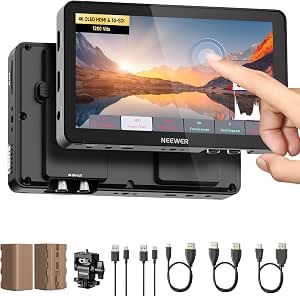 | Best Overall for Mixed HDMI and SDI Rigs | Screen: 7-inch OLED touchscreen | Resolution: 1920 × 1080 (Full HD) | Brightness: 1200 nits | VIEW ON AMAZON | See Our Full Breakdown |
| FEELWORLD P6XL 6-Inch 1200-Nit Touchscreen Camera Field Monitor |  | Best for Cable-Light Mirrorless Setups | Display: 6-inch Full HD IPS touchscreen | Brightness: 1200 nits | Battery: Built-in 3300 mAh rechargeable battery | VIEW ON AMAZON | See Our Full Breakdown |
| Portkeys HD7H 7-Inch Camera Field Monitor, 1000 Nits, 1280 × 720 |  | Best Lightweight Monitor with Flexible Mounting | Screen: 7-inch IPS | Native resolution: 1280 × 720 | Brightness: 1000 nits | VIEW ON AMAZON | See Our Full Breakdown |
| FEELWORLD F5 PROX 5.5-Inch 1600-Nit Touchscreen Camera Monitor |  | Best Compact Screen for Bright Locations | Display: 5.5-inch touchscreen | Brightness: 1600 nits | Video connections: 4K HDMI input and output | VIEW ON AMAZON | See Our Full Breakdown |
| SEETEC WPC215 21.5-Inch 1000-Nit Broadcast Monitor |  | Best for a Portable Video Village | Screen: 21.5-inch LCD | Resolution: 1920 × 1080 (Full HD) | Brightness: 1000 nits | VIEW ON AMAZON | See Our Full Breakdown |
| FEELWORLD P6XL 6-Inch Camera Monitor with Touchscreen and Built-In Battery |  | Best for Cable-Free Compact Shoots | Screen: 6-inch IPS LCD | Resolution: 1920 × 1080 | Brightness: 1200 nits | VIEW ON AMAZON | See Our Full Breakdown |
| FEELWORLD S55 V3 6-Inch Full HD Camera Field Monitor |  | Best for Flexible Power Setups | Screen: 6-inch IPS | Resolution: 1920 × 1080 | Brightness: 450 nits | VIEW ON AMAZON | See Our Full Breakdown |
| Osee Mega 15S 15.4″ 1500 Nits 3G-SDI 4K HDMI HDR Production Monitor |  | Best for Professional On-Set Viewing | Screen: 15.4 inches | Resolution: 3840 × 2160 | Panel: 10-bit IPS | VIEW ON AMAZON | See Our Full Breakdown |
| NEEWER F100 7-Inch Camera Field Monitor |  | Best for a Larger Screen on a Simple Rig | Screen: 7-inch IPS LCD | Resolution: 1280 × 800 | Brightness: 450 nits | VIEW ON AMAZON | See Our Full Breakdown |
| VILTROX DC-550 5.5″ Touchscreen DSLR Camera Field Monitor – 1200 Nits, 4K HDMI In/Out, Sunshade Hood & Battery |  | Best Compact Bright Monitor | Screen: 5.5-inch IPS touchscreen | Resolution: 1920 × 1080 native; supports up to 3840 × 2160 at 30 Hz | Brightness: 1200 nits | VIEW ON AMAZON | See Our Full Breakdown |
| SEETEC ATEM156 15.6-Inch Broadcast Monitor with Quad HDMI Input and Output |  | Best for Multi-Camera Monitoring | Screen: 15.6-inch IPS LCD | Resolution: 1920 × 1080 | Brightness: 250 cd/m² | VIEW ON AMAZON | See Our Full Breakdown |
| SEETEC P215 PRO-CO 21.5-Inch Broadcast Monitor |  | Best for Bright Production Setups | Screen: 21.5-inch LCD | Resolution: 1920 × 1080 | Brightness: 1000 nits | VIEW ON AMAZON | See Our Full Breakdown |
| Atomos Shinobi GO 5-Inch HDMI Camera Monitor |  | Best Compact Monitor | Screen: 5-inch IPS LCD | Resolution: 1920 × 1080 | Maximum input resolution: 3840 × 2160 | VIEW ON AMAZON | See Our Full Breakdown |
| NEEWER F100 7-Inch Camera Field Monitor |  | Best Ready-to-Shoot Starter Kit | Screen: 7-inch IPS | Resolution: 1280 × 800 | Brightness: 450 nits | VIEW ON AMAZON | See Our Full Breakdown |
| NEEWER F700 7-Inch Camera Field Monitor, 2000-Nit 1080p IPS Touchscreen |  | Best High-Brightness 7-Inch Monitor | Screen: 7-inch IPS touchscreen | Resolution: 1920 × 1080 | Brightness: 2000 nits | VIEW ON AMAZON | See Our Full Breakdown |
| portable field monitors for video production | Brightness | Screen | Resolution | Weight |
|---|---|---|---|---|
| NEEWER F700U 7" Camera Field M | 1200 nits | 7-inch OLED touchscreen | 1920 × 1080 (Full HD) | — |
| FEELWORLD P6XL 6-Inch 1200-Nit | 1200 nits | — | — | 332 g |
| Portkeys HD7H 7-Inch Camera Fi | 1000 nits | 7-inch IPS | — | — |
| FEELWORLD F5 PROX 5.5-Inch 160 | 1600 nits | — | — | — |
| SEETEC WPC215 21.5-Inch 1000-N | 1000 nits | 21.5-inch LCD | 1920 × 1080 (Full HD) | — |
| FEELWORLD P6XL 6-Inch Camera M | 1200 nits | 6-inch IPS LCD | 1920 × 1080 | 332 g |
| FEELWORLD S55 V3 6-Inch Full H | 450 nits | 6-inch IPS | 1920 × 1080 | 0.03 kg (as listed) |
| Osee Mega 15S 15.4" 1500 Nits | 1500 nits peak | 15.4 inches | 3840 × 2160 | — |
| NEEWER F100 7-Inch Camera Fiel | 450 nits | 7-inch IPS LCD | 1280 × 800 | 1.9 pounds |
| VILTROX DC-550 5.5" Touchscree | 1200 nits | 5.5-inch IPS touchscreen | 1920 × 1080 native; supports up to 3840 × 2160 at 30 Hz | 1.1 pounds |
| SEETEC ATEM156 15.6-Inch Broad | 250 cd/m² | 15.6-inch IPS LCD | 1920 × 1080 | 3.18 kg |
| SEETEC P215 PRO-CO 21.5-Inch B | 1000 nits | 21.5-inch LCD | 1920 × 1080 | — |
| Atomos Shinobi GO 5-Inch HDMI | 1500 nits | 5-inch IPS LCD | 1920 × 1080 | 210 g |
| NEEWER F100 7-Inch Camera Fiel | 450 nits | 7-inch IPS | 1280 × 800 | 1.91 pounds |
| NEEWER F700 7-Inch Camera Fiel | 2000 nits | 7-inch IPS touchscreen | 1920 × 1080 | 1.6 pounds |
More Details on Our Top Picks
NEEWER F700U 7″ Camera Field Monitor – 1200 nits OLED Touchscreen (1920×1080)
The NEEWER F700U is the most adaptable choice here for crews switching between mirrorless cameras and SDI-equipped cinema gear. Its Full HD OLED panel combines 1200-nit brightness with high contrast, while HDMI loop-out and 3G-SDI input/output give it a broader connection range than the HDMI-only FEELWORLD P6XL. Focus peaking, waveform, false color, zebra, vectorscope, and HDR LUT support also make it useful for checking exposure and focus on set rather than relying on the camera screen. Two included NP-F750 batteries offer a ready-to-go power option. The tradeoff is a larger, more involved setup than a compact 5.5-inch monitor: custom LUTs need an external SD card, and the optional DC adapter and SDI cable add items to source. Choose it over the Portkeys HD7H when native Full HD and OLED contrast matter more than the Portkeys’ lighter body.
Pros:- Full HD OLED display with 1200-nit brightness and high contrast
- HDMI input and loop-out plus 3G-SDI input and output
- Broad exposure and focus tools, including waveform, vectorscope, false color, and zebra
- Two NP-F750 batteries are included, with DC and USB-C power options
Cons:- Custom LUTs require an external SD card
- DC adapter and SDI cable are not included
- Larger and heavier than compact 5.5- and 6-inch camera monitors
Best for: Small production teams using both HDMI and SDI cameras who want a bright Full HD monitor with detailed exposure tools and included batteries.
Not ideal for: Solo shooters prioritizing the lightest camera-mounted setup or anyone who needs custom LUT storage without carrying an external SD card.
- Screen:7-inch OLED touchscreen
- Resolution:1920 × 1080 (Full HD)
- Brightness:1200 nits
- Contrast ratio:100,000:1
- Video connections:Two HDMI ports (4K input and loop-out); 3G-SDI input and output
- Monitoring tools:Focus peaking, false color, zebra, waveform, vectorscope, and HDR LUT support
- Power:Two NP-F750 4400 mAh batteries included; DC 12 V adapter optional; USB-C fast charging
- Dimensions and weight:7.1 × 4.2 × 1.1 inches; 15.1 ounces
Our verdict“Choose the F700U if your video work spans HDMI and SDI cameras and you want a bright, feature-rich Full HD monitor with batteries included.”
FEELWORLD P6XL 6-Inch 1200-Nit Touchscreen Camera Field Monitor
The FEELWORLD P6XL suits mirrorless operators who want a bright monitor without building a separate battery setup. Its built-in 3300 mAh battery keeps the rig tidy, and the 1200-nit touchscreen is suited to outdoor framing. Waveform, vectorscope, histogram, focus assist, and 3D LUT uploads provide more control than a basic framing display. Compared with the NEEWER F700U, the P6XL trades SDI support and a larger OLED screen for a self-contained, smaller HDMI monitor; that makes it simpler for lightweight camera kits, but less flexible on productions using SDI. Runtime is the main compromise: the listed battery life is 2.2 hours at full brightness, so longer shoots call for a charging plan. Its HDMI connections also limit its appeal to cameras with compatible outputs.
Pros:- Built-in rechargeable battery avoids a separate monitor battery pack
- 1200-nit touchscreen is suited to outdoor camera monitoring
- Waveform, vectorscope, histogram, focus assist, and 3D LUT uploads
- Aluminum housing and 1/4-20 mounting threads suit camera-rig use
Cons:- Battery runtime is listed at 2.2 hours at full brightness
- HDMI-only connectivity excludes SDI camera workflows
- Best suited to cameras with compatible HDMI connections
Best for: Mirrorless and DSLR shooters who want a bright, touchscreen HDMI monitor with a built-in battery and exposure tools for short location shoots.
Not ideal for: Cinema crews needing SDI connectivity, or operators who need a full day of monitoring without recharging or adding power support.
- Display:6-inch Full HD IPS touchscreen
- Brightness:1200 nits
- Battery:Built-in 3300 mAh rechargeable battery
- Battery runtime:2.2 hours at 100% brightness; 2.5 hours at 80%; 3 hours at 60%
- Video connections:4K HDMI input and output
- Monitoring tools:Waveform, vectorscope, histogram, focus assist, and 3D LUT uploads
- Housing and mounting:Aluminum housing; 1/4-20 screw threads
- Weight:332 g
Our verdict“Pick the P6XL for a compact HDMI camera rig where a built-in battery matters more than SDI support or extended runtime.”
Portkeys HD7H 7-Inch Camera Field Monitor, 1000 Nits, 1280 × 720
At 278 g, the Portkeys HD7H is the easiest of these 7-inch options to justify on a rig where added weight matters. Its 1000-nit IPS screen, three-sided mounting threads, and NP-F or DC power support give operators flexibility when placing it on a cage, tripod, or other setup. The included focus peaking, false color, histogram, zoom, and anamorphic de-squeeze tools add practical set checks, and a headphone jack supports audio monitoring. Compared with the NEEWER F700U, this model is lighter and adds anamorphic viewing tools, but its native 1280 × 720 resolution gives up image detail. It also lacks the F700U’s SDI connections and included batteries, so the HD7H makes more sense when low weight and mounting choices outrank Full HD clarity and an out-of-box power kit.
Pros:- Lightweight 278 g body for a 7-inch monitor
- Mounting threads on three sides allow more placement options
- Focus peaking, false color, histogram, zoom, and anamorphic de-squeeze
- Accepts NP-F batteries or 7.4–24 V DC power
Cons:- Native 1280 × 720 resolution is lower than the Full HD NEEWER F700U
- Battery is not included
- HDMI input supports video up to 4K30p, with no SDI connection listed
Best for: Camera operators who need a lightweight 7-inch monitor with flexible mounting, anamorphic de-squeeze, and NP-F or DC power options.
Not ideal for: Focus-critical Full HD workflows, or buyers who need included batteries or SDI connections for their camera setup.
- Screen:7-inch IPS
- Native resolution:1280 × 720
- Brightness:1000 nits
- HDMI input:Supports video up to 4K30p
- Monitoring tools:Luma histogram, false color, focus peaking, zoom, and anamorphic de-squeeze
- Audio and additional input:3.5 mm headphone jack and AV input
- Power:NP-F batteries or 7.4–24 V DC input; battery not included
- Weight and mounting:278 g (9.8 oz); 1/4-20 threads on three sides
Our verdict“Choose the HD7H when low weight and adaptable mounting matter more than Full HD detail or included batteries.”
FEELWORLD F5 PROX 5.5-Inch 1600-Nit Touchscreen Camera Monitor
The FEELWORLD F5 PROX prioritizes visibility in a compact 5.5-inch format: its 1600-nit touchscreen is the brightest specified screen in this group. That makes it a strong fit for outdoor camera operators who need to check focus and exposure without moving up to a larger monitor like the 21.5-inch SEETEC WPC215. Its 4K HDMI input and output, 3D LUT and HDR support, waveform, histogram, and false color tools keep it useful beyond basic framing. The small display gives up viewing area compared with the FEELWORLD P6XL and the 7-inch NEEWER F700U, so it is less suited to sharing a view with a crew. The listed 2.82-pound item weight is also a serious drawback for a camera-mounted monitor, and the supplied information does not specify battery runtime.
Pros:- 1600-nit touchscreen offers the highest listed brightness among these five monitors
- 4K HDMI input and output support camera-rig signal routing
- Waveform, histogram, focus peaking, false color, 3D LUT, and HDR tools
- Mounting options suit rigs, cages, gimbals, and tripods
Cons:- 5.5-inch screen gives less viewing area than the 6- and 7-inch models
- Listed item weight of 2.82 pounds is substantial for a camera-mounted monitor
- Battery runtime is not specified in the supplied product information
Best for: Solo outdoor shooters who need a very bright touchscreen for focus and exposure checks on a DSLR, mirrorless, or cinema camera.
Not ideal for: Operators seeking a large shared viewing surface or a light camera-mounted monitor; the listed item weight is 2.82 pounds.
- Display:5.5-inch touchscreen
- Brightness:1600 nits
- Video connections:4K HDMI input and output
- Monitoring tools:3D LUT, HDR, waveform, focus peaking, histogram, and false color
- Camera compatibility:DSLR, mirrorless, and cinema cameras
- Mounting:Supports camera rigs, cages, gimbals, and tripods
- Battery:One lithium-ion battery included
- Listed item weight:2.82 pounds
Our verdict“Choose the F5 PROX if outdoor brightness is your priority and you can accept a small screen and a comparatively heavy listed item weight.”
SEETEC WPC215 21.5-Inch 1000-Nit Broadcast Monitor
The SEETEC WPC215 serves a different job from the camera-mounted monitors above: its 21.5-inch Full HD screen is built for a larger on-set view, making it the natural pick for a small video village or crew station. HDMI and SDI input and output support a wider range of production connections than the HDMI-only FEELWORLD P6XL, while waveform, focus assist, false color, and support for 32 custom LUTs help with monitoring beyond composition. The included protective suitcase, power adapter, SDI cable, and V-mount battery plates make transport and setup more practical. But portable does not mean small: compared with the 7-inch NEEWER F700U, this monitor is far less suited to mounting on a camera. Its glossy finish can also reflect light, and Full HD resolution across a large panel offers less pixel density than a smaller display.
Pros:- 21.5-inch Full HD screen provides a larger shared view than camera-top monitors
- HDMI and SDI inputs and outputs support varied production connections
- Waveform, focus assist, false color, and support for 32 custom LUTs
- Protective suitcase, power adapter, SDI cable, and two V-mount battery plates are included
Cons:- Large screen is poorly suited to mounting directly on a camera
- Glossy finish may reflect surrounding light
- Full HD resolution gives less pixel density across the 21.5-inch panel than on smaller monitors
Best for: Small crews and camera teams who need a transportable, larger viewing station with both HDMI and SDI connectivity.
Not ideal for: Solo operators seeking a camera-top monitor or crews who regularly work in conditions where reflections on a glossy screen are a problem.
- Screen:21.5-inch LCD
- Resolution:1920 × 1080 (Full HD)
- Brightness:1000 nits
- Contrast and viewing angle:1000:1 contrast ratio; 178-degree viewing angle
- Video connections:HDMI and SDI input and output
- Monitoring and LUT support:Waveform, focus assist, false color, and 32 custom LUTs
- Screen finish:Glossy
- Included accessories:Protective suitcase, power adapter, SDI cable, Mini HDMI cable, and two V-mount battery plates
Our verdict“Pick the WPC215 for a transportable crew-side viewing station, not for a compact camera-mounted field monitor.”
FEELWORLD P6XL 6-Inch Camera Monitor with Touchscreen and Built-In Battery
The FEELWORLD P6XL suits camera operators who want a bright, compact monitor without adding a separate battery pack. Its 1200-nit Full HD touchscreen is better suited to outdoor framing than the FEELWORLD S55 V3’s 450-nit display, while tools such as waveform, HDR monitoring, and custom 3D LUT support offer more than simple image enlargement. The built-in battery keeps the rig tidy, but its roughly two-hour runtime at full brightness may not cover a long shooting day; the VILTROX DC-550 offers more external power choices. LUT loading also requires a USB flash drive, which adds a step to setup. I’d choose this for short, mobile shoots where bright viewing and fewer cables matter more than all-day power.
Pros:- 1200-nit Full HD IPS touchscreen supports clearer viewing outdoors than the FEELWORLD S55 V3
- Built-in 22.2 Wh rechargeable battery avoids a separate battery pack
- Waveform, HDR, custom 3D LUT, and screenshot tools support exposure and image checks
- Compact 332 g body suits lightweight camera rigs
Cons:- About two hours of runtime at full brightness can be limiting on longer shoots
- Custom LUT loading requires a USB flash drive
- A 6-inch screen gives less room for judging fine detail than larger monitors such as the NEEWER F100
Best for: Solo camera operators and run-and-gun shooters who want a bright touchscreen with a built-in battery for short field sessions.
Not ideal for: Crews filming long days without battery swaps or charging access, since full-brightness runtime is about two hours.
- Screen:6-inch IPS LCD
- Resolution:1920 × 1080
- Brightness:1200 nits
- Touchscreen:Yes
- Battery:Built-in rechargeable, 22.2 Wh / 7.4 V
- Battery runtime:About 2 hours at 100% brightness
- Connectivity:HDMI, USB Type-C
- Weight:332 g
Our verdict“Choose the P6XL for bright, compact monitoring with fewer cables on short shoots, but plan another power source for a full day.”
FEELWORLD S55 V3 6-Inch Full HD Camera Field Monitor
The FEELWORLD S55 V3 is a practical pick for crews who already carry camera batteries and want a monitor that can share their power system. Its support for Type-C, DC, NP-F, and LP-E6 power gives it more ways to stay running than the P6XL, whose battery is built in. It also passes 4K HDMI input and output up to 30 Hz while displaying a Full HD image, and offers waveform, vectorscope, false color, and focus tools for exposure and focus checks. The tradeoff is its 450-nit brightness: the VILTROX DC-550 is a stronger choice in bright outdoor conditions. I’d pick the S55 V3 for controlled-light shoots and adaptable rigs, not direct-sun monitoring.
Pros:- Full HD IPS screen provides a clear camera-monitoring image
- Waveform, vectorscope, RGB histogram, focus assist, and false color support on-set checks
- Accepts Type-C, DC, NP-F, and LP-E6 power
- 4K HDMI input and output up to 4K at 30 Hz
Cons:- 450-nit brightness can make the screen difficult to see in strong daylight
- Not water resistant, so it needs protection in wet conditions
- Power flexibility comes without a stated built-in battery runtime
Best for: Independent filmmakers and small crews who want multiple battery and power options for a compact camera-rig monitor.
Not ideal for: Outdoor shooters who need dependable screen visibility in direct sunlight; its 450-nit panel is dimmer than the P6XL and VILTROX DC-550.
- Screen:6-inch IPS
- Resolution:1920 × 1080
- Brightness:450 nits
- HDMI:4K input/output, up to 4K at 30 Hz
- Monitoring tools:Waveform, vectorscope, RGB histogram, focus assist, false color, 3D LUT
- Power options:Type-C, DC, NP-F, LP-E6
- Mounting:1/4-inch thread or hot shoe tilt arm
- Weight:0.03 kg (as listed)
Our verdict“Pick the S55 V3 if adaptable external power matters more than high-brightness outdoor viewing.”
Osee Mega 15S 15.4″ 1500 Nits 3G-SDI 4K HDMI HDR Production Monitor
The Osee Mega 15S is the production-focused choice here: its 15.4-inch 4K, 10-bit screen gives a director or focus puller a much larger, higher-detail image than the portable FEELWORLD P6XL or VILTROX DC-550. At 1500 nits with a reflection-reducing coating, it is also better equipped for bright locations, while hardware auto color calibration, HDR preview, and analysis tools support more demanding image review. Dual 3G-SDI and 4K HDMI connections make it a better fit for a multi-camera or video-village setup than a simple camera-top monitor. That scale and connectivity come with a real portability cost: the V-Mount plate and stand-mount options suit a cart or stand better than a lightweight handheld rig. I’d skip it for solo operators who need to move quickly.
Pros:- 15.4-inch 4K 10-bit panel provides more viewing area and detail than the smaller camera-top monitors
- 1500-nit peak brightness and reflection-reducing coating suit bright locations
- Dual 3G-SDI and 4K HDMI support flexible production connections
- Hardware auto color calibration, HDR preview, waveform, vectorscope, and false color aid image evaluation
Cons:- Large panel and V-Mount setup are bulky for handheld or compact camera rigs
- Stand and power options make it more suited to a production station than quick solo setup
- Professional monitoring features may be unnecessary for casual or basic camera monitoring
Best for: Production crews, directors, and focus pullers who need a large, bright reference display with SDI connectivity on set.
Not ideal for: Solo run-and-gun filmmakers or camera operators building a lightweight handheld rig; its 15.4-inch format and stand-oriented mounting are less portable than the P6XL or DC-550.
- Screen:15.4 inches
- Resolution:3840 × 2160
- Panel:10-bit IPS
- Brightness:1500 nits peak
- Contrast ratio:1650:1
- Inputs and outputs:Dual 3G-SDI in/out, 4K HDMI input
- Calibration:Hardware auto color calibration, 3D LUT support
- Mounting and power:V-Mount battery plate; XLR/AC power; C-stand/light stand adapter; 1/4″-20 and 3/8″-16 threads
Our verdict“Choose the Mega 15S for a bright, detailed on-set reference display and SDI workflow, not for camera-top portability.”
NEEWER F100 7-Inch Camera Field Monitor
The NEEWER F100 prioritizes screen size and included field accessories over resolution or outdoor brightness. Its 7-inch display is easier to share or inspect at a glance than the 5.5-inch VILTROX DC-550, and the included sunshade, ball head, and rechargeable battery help make a basic setup ready to mount. Up to 3.5 hours of runtime also exceeds the P6XL’s stated two hours at full brightness, though the F100’s 450-nit panel is less suited to harsh daylight than the brighter FEELWORLD P6XL. Its 1280 × 800 resolution is the main compromise: it offers less detail than the Full HD monitors in this roundup. I’d choose it for larger framing and straightforward monitoring, not critical focus or fine image review.
Pros:- 7-inch screen gives a larger viewing area than compact 5.5- and 6-inch options
- Rechargeable 4400mAh battery offers up to 3.5 hours of runtime
- Includes a sunshade hood and mini ball head for field setup
- Focus assist and histogram support basic focus and exposure checks
Cons:- 1280 × 800 resolution provides less detail than the Full HD P6XL and DC-550
- 450-nit brightness may be hard to view in bright outdoor conditions
- At 1.9 pounds, it is heavier than compact camera-top monitors
Best for: New filmmakers and small crews who want a 7-inch screen, included mounting accessories, and a rechargeable battery for basic field monitoring.
Not ideal for: Shooters who need Full HD detail or strong direct-sun visibility; the F100 is 1280 × 800 and 450 nits.
- Screen:7-inch IPS LCD
- Resolution:1280 × 800
- Brightness:450 nits
- Contrast ratio:1200:1
- Battery:4400mAh rechargeable battery
- Battery runtime:Up to 3.5 hours
- Connectivity:HDMI
- Weight:1.9 pounds
Our verdict“Choose the F100 for a larger, accessory-ready screen and longer stated runtime, but not for high-resolution image checking.”
VILTROX DC-550 5.5″ Touchscreen DSLR Camera Field Monitor – 1200 Nits, 4K HDMI In/Out, Sunshade Hood & Battery
The VILTROX DC-550 makes the most sense when camera-top space is tight but outdoor visibility still matters. Its 1200-nit Full HD touchscreen is far brighter than the FEELWORLD S55 V3’s 450-nit panel, and its 4K HDMI input and output allow it to fit into a 4K signal chain. Waveform, false color, focus assist, and custom 3D LUTs add useful production checks without requiring the larger Osee Mega 15S. The tradeoff is size: at 5.5 inches, it offers less room for judging details than the NEEWER F100’s 7-inch display. It also supports 4K only up to 30 Hz, so it is not the right fit for monitoring higher-frame-rate 4K footage. I’d pick it for compact rigs working outdoors, with external power options for longer days.
Pros:- 1200-nit touchscreen is better suited to outdoor viewing than the FEELWORLD S55 V3
- Full HD native resolution with 4K HDMI input and output up to 30 Hz
- Waveform, false color, focus assist, and custom 3D LUT support
- Can run from NP-F batteries, 12–18V DC, or a USB-C 5V 3A power bank
Cons:- 5.5-inch screen gives less room for detail checks than the NEEWER F100
- 4K signal support is limited to 30 Hz
- Listed weight of 1.1 pounds is relatively substantial for a compact camera-top monitor
Best for: Documentary shooters and camera operators who need a bright, compact Full HD touchscreen with flexible field power.
Not ideal for: Crews that need a larger shared viewing screen or 4K monitoring above 30 Hz; its 5.5-inch panel and stated 4K limit are restrictive.
- Screen:5.5-inch IPS touchscreen
- Resolution:1920 × 1080 native; supports up to 3840 × 2160 at 30 Hz
- Brightness:1200 nits
- Contrast ratio:1200:1
- HDMI:Input up to 4K at 30 Hz; HDMI output
- Power options:NP-F battery, 12–18V DC input, USB-C 5V 3A power bank
- Power consumption:12 watts
- Weight:1.1 pounds
Our verdict“Choose the DC-550 when bright viewing and flexible power matter more than screen size or high-frame-rate 4K monitoring.”
SEETEC ATEM156 15.6-Inch Broadcast Monitor with Quad HDMI Input and Output
For a compact production setup that needs to watch several HDMI sources at once, the ATEM156’s four HDMI inputs and outputs are its defining advantage. Its 15.6-inch Full HD IPS screen gives a crew more room to inspect a multiview image than the 5-inch Atomos Shinobi GO, while focus peaking, false color, and pixel-to-pixel viewing help with image checks. Power it from 12V DC or a V-mount battery plate, so it can move between a studio cart and a field rig; the battery itself is not included. At 250 cd/m², it is dimmer than the SEETEC P215 PRO-CO and the bright, camera-mounted options, so I’d choose it for shaded or controlled locations rather than sunlit work. HDCP-protected sources may also need an HDMI splitter.
Pros:- Four HDMI inputs and outputs support multiview setups with multiple sources.
- Focus peaking, false color, and pixel-to-pixel tools aid focus and exposure checks.
- Wide 170-degree viewing angle helps several crew members see the display.
- Runs from 12V DC or a V-mount battery plate.
Cons:- 250 cd/m² brightness is limited for outdoor viewing.
- V-mount battery is not included.
- HDCP-protected signals may require an HDMI splitter.
Best for: Small crews and event-video operators who need a portable multiview display for several HDMI cameras in a shaded or controlled production area.
Not ideal for: Solo shooters who need a lightweight on-camera screen or crews working in strong daylight; its 3.18 kg body and 250 cd/m² brightness make it less suited to either job.
- Screen:15.6-inch IPS LCD
- Resolution:1920 × 1080
- Brightness:250 cd/m²
- Contrast ratio:800:1
- Viewing angle:170 degrees
- HDMI ports:4 inputs and 4 outputs
- Power:12V DC or V-mount battery plate
- Weight:3.18 kg
Our verdict“Choose the ATEM156 for HDMI multiview work with a small crew, but pick the brighter P215 PRO-CO for daylight-heavy production.”
SEETEC P215 PRO-CO 21.5-Inch Broadcast Monitor
The P215 PRO-CO is the more capable choice when a production needs a large, bright viewing surface and professional signal connections. Its 21.5-inch Full HD display reaches 1000 nits, and waveform, focus-assist tools, and support for 32 custom LUTs help crews check exposure, focus, and preview looks. Compared with the SEETEC ATEM156, it adds SDI connections and much higher brightness, though it is a larger display to position and transport. The aluminum frame and reinforced corners add practical protection, but the glossy finish can catch reflections, and the 89-degree listed viewing angle is narrower than the ATEM156’s 170 degrees. I’d favor it for a production cart or a protected outdoor station, not as a monitor mounted on a moving camera.
Pros:- 1000-nit brightness supports viewing in brighter locations.
- Two SDI and two HDMI inputs suit mixed-camera production setups.
- Waveform, focus assist, and 32 custom LUT slots support production checks.
- Aluminum frame and reinforced corners add protection during transport.
Cons:- Full HD panel does not display a 4K image at native resolution.
- Glossy finish can reflect lights and bright surroundings.
- Large 21.5-inch format is less practical for camera mounting than the Shinobi GO or NEEWER F700.
Best for: Video crews who need a bright, large-format monitor with SDI connectivity, waveform tools, and LUT previews for a cart-based or stationary field setup.
Not ideal for: Solo operators seeking a camera-mounted monitor or crews who need a high-resolution 4K display; this is a sizable Full HD monitor, and its glossy screen can reflect ambient light.
- Screen:21.5-inch LCD
- Resolution:1920 × 1080
- Brightness:1000 nits
- Contrast ratio:1000:1
- Video inputs:2 SDI, 2 HDMI
- Video outputs:2 SDI, 1 HDMI
- HDMI input support:Up to 4K at 60 Hz
- LUT support:32 custom LUTs
Our verdict“Pick the P215 PRO-CO for bright, cart-based production with SDI sources, and skip it if your priority is a small camera-top monitor.”
Atomos Shinobi GO 5-Inch HDMI Camera Monitor
When keeping a camera rig light matters more than having a large viewing area, the Shinobi GO’s 210 g weight and 5-inch Full HD screen make a strong case. Its 1500-nit matte display is better suited to bright locations than the NEEWER F100’s 450-nit panel, while waveform, histogram, false color, and RGB parade give operators several ways to check an image without relying only on the camera display. It accepts 4K HDMI and supports 1D and 3D LUTs, including custom .cube files. Power flexibility is another advantage: use an NP-F battery, USB-C PD, or AC power. The tradeoff is screen real estate: compared with the NEEWER F700’s 7-inch display, the Shinobi GO offers less room for judging framing and focus. Its HDMI locking setup also depends on the included cable bracket.
Pros:- 1500-nit matte screen is suited to bright field conditions.
- Waveform, histogram, false color, and RGB parade support image checks.
- Accepts 4K HDMI and supports custom 1D and 3D LUTs.
- Lightweight body and NP-F, USB-C PD, and AC power options suit mobile rigs.
Cons:- Five-inch screen provides less viewing space than the NEEWER F700 or SEETEC P215 PRO-CO.
- AC battery eliminator is sold separately.
- HDMI locking setup requires the included cable bracket.
Best for: Solo filmmakers and camera operators who want a lightweight, bright monitor with exposure tools and flexible battery or USB-C power.
Not ideal for: Crews needing a larger shared viewing surface or frequent multiview monitoring; its 5-inch screen and single HDMI port are less suitable than the SEETEC ATEM156.
- Screen:5-inch IPS LCD
- Resolution:1920 × 1080
- Maximum input resolution:3840 × 2160
- Brightness:1500 nits
- Weight:210 g
- HDMI ports:1
- Power options:NP-F battery, USB-C PD, or AC power
- LUT support:1D and 3D LUTs; custom .cube files via SD card
Our verdict“Choose the Shinobi GO when a bright, lightweight on-camera display matters more than a larger screen or multiple inputs.”
NEEWER F100 7-Inch Camera Field Monitor
The NEEWER F100 makes a practical entry point for camera operators who want a larger screen and basic field accessories in one package. Its 7-inch IPS panel is easier to share and frame from than the 5-inch Atomos Shinobi GO, and the included F750 battery, sunshade, and mini ball head reduce the number of separate rig pieces to source. Focus assist, histogram, and safe-frame tools cover common on-set checks. The compromise is its 1280 × 800 resolution, which is less detailed than the Full HD NEEWER F700; fine focus judgments may be harder on the F100. Brightness is rated at 450 nits, so the bundled hood helps, but this is not the strongest pick for direct sun. The stated battery runtime of up to 3.5 hours also calls for spare power on longer shoots.
Pros:- Seven-inch IPS screen provides more framing room than a compact 5-inch monitor.
- Includes an F750 battery, sunshade, and mini ball head.
- Focus assist, histogram, and safe-frame tools support basic production checks.
- Slim 17 mm body is easier to pack than a large broadcast monitor.
Cons:- 1280 × 800 resolution is lower than the Full HD NEEWER F700.
- 450-nit brightness is limited for direct-sun viewing.
- Battery runtime is rated for up to 3.5 hours.
Best for: Beginner filmmakers and small crews who want a 7-inch monitor with a battery, sunshade, and mounting head included for short field shoots.
Not ideal for: Operators who need Full HD detail, long untethered sessions, or reliable viewing in direct sunlight; the F700 offers a sharper and brighter 7-inch alternative.
- Screen:7-inch IPS
- Resolution:1280 × 800
- Brightness:450 nits
- Contrast ratio:1200:1
- Input:HDMI
- Battery:4400 mAh F750 battery included
- Battery runtime:Up to 3.5 hours
- Weight:1.91 pounds
Our verdict“Choose the F100 for an accessible, bundled 7-inch setup on shorter or shaded shoots, but choose the F700 for greater detail and brightness.”
NEEWER F700 7-Inch Camera Field Monitor, 2000-Nit 1080p IPS Touchscreen
For operators who want a camera-top display that stays legible in bright conditions, the F700’s 2000-nit touchscreen is its clearest advantage. Automatic backlight adjustment can reduce the need to change brightness as shooting conditions shift, while its 7-inch Full HD screen provides more detail than the lower-resolution NEEWER F100. Waveform, false color, custom 3D LUT support, and a headphone jack broaden its use beyond simple framing. 4K HDMI loop-through lets a signal continue to another device, giving it more connection flexibility than the Shinobi GO’s single HDMI port. This capability comes with practical limits: it weighs 1.6 pounds, the battery is not included, and DC cable, headphones, and an SD card for LUT uploads are also separate. Its brightness and tools make the most sense for a well-equipped field rig.
Pros:- 2000-nit screen with automatic backlight adjustment supports bright-location work.
- Full HD touchscreen offers more detail than the NEEWER F100.
- Waveform, false color, and custom 3D LUT support aid image evaluation.
- 4K HDMI loop input and output plus a headphone jack add monitoring flexibility.
Cons:- Battery is not included.
- DC cable, headphones, and SD card for LUT uploads are not included.
- At 1.6 pounds, it is heavier than the 210 g Atomos Shinobi GO.
Best for: Camera operators filming in bright outdoor conditions who want a 7-inch Full HD touchscreen, monitoring tools, and HDMI loop-through.
Not ideal for: Travel-light filmmakers or buyers who need a complete, battery-ready kit; the F100 includes a battery, while the F700 requires additional power and accessories.
- Screen:7-inch IPS touchscreen
- Resolution:1920 × 1080
- Brightness:2000 nits
- Viewing angle:160 degrees
- HDMI:4K loop input and output
- Audio monitoring:3.5 mm headphone jack
- Power options:NP-F batteries, DC input, USB-C charging
- Weight:1.6 pounds
Our verdict“Pick the F700 for a bright, feature-rich 7-inch camera monitor if you can supply its battery and supporting accessories.”

How We Picked
I ranked these monitors by how well their size, display characteristics, brightness, and connections suit real video-production setups. For camera-top use, I gave more weight to a readable image, useful screen area, and a form factor that will not overwhelm a compact rig. For larger displays, I considered whether the screen size and input options solve a production-monitoring need rather than simply adding bulk.
The order reflects distinct jobs, not a claim that one format beats every other format. The F700U leads as a balanced camera-top choice; the F700 earns a separate place for its higher stated brightness. Compact HDMI monitors rank well for lightweight rigs, while the SEETEC and Osee displays make more sense when a crew can support a larger screen. I also treated duplicate product names and model variants cautiously: buyers should confirm exact specifications, connectivity, and included accessories for the listing they intend to purchase.
Factors to Consider When Choosing Portable Field Monitors For Video Production
Before choosing a field monitor, I’d match it to the job it must do: help a camera operator frame a shot, give a focus puller a clearer view, or let a director monitor several sources. Those jobs call for different screen sizes, connections, mounting arrangements, and power plans. A specification that looks impressive on its own may be a poor fit once the monitor is attached to a camera or production cart.
Choose Screen Size Around the Crew’s Viewing Distance
A camera operator working close to the camera can usually make better use of a compact 5- to 7-inch monitor than a large panel. Bigger displays help when several people need to watch at once, but they are harder to mount on a handheld rig and can turn a portable setup into a cart-based one. Think about who needs to see the image and from how far away before choosing a diagonal size. A larger screen can also make focus and composition easier to inspect, but only if the monitor can be positioned securely. Don’t buy a production-sized monitor for a camera-top job simply because its image is easier to view. Match the display to the viewing station, not just the camera output.
Read Brightness as Part of a Sunlight Plan
A high brightness rating can help outdoors, but it does not make every monitor equally readable in direct sun. Screen angle, reflections, a sun hood, and the operator’s position all affect what is visible. More brightness may also increase power demand, so consider battery capacity and runtime alongside the stated nit figure. On a compact rig, a smaller bright display can be easier to shade and place than a large panel. For a fixed outdoor station, a brighter monitor may be worth the extra power planning. Avoid treating brightness as a substitute for a workable mounting and shading setup.
Check Resolution Against How You’ll Judge the Image
Resolution matters most when the operator needs to inspect fine detail, judge focus, or review a high-resolution camera feed at close range. A lower-resolution panel can still be useful for basic framing, especially when portability and a simple setup take priority. Compare the monitor’s native resolution with the camera output and the distance from which it will be viewed. Also check whether the product’s advertised input support means the monitor can display the signal you use; it does not automatically mean the panel shows every detail at that signal’s full resolution. Don’t pay for a sharper display if your main task is broad framing from several feet away. For critical focus work, prioritize image clarity and monitoring tools together.
Match Connections to the Whole Signal Chain
HDMI is common in camera-to-monitor setups, while productions using SDI or several simultaneous sources may need a different class of display. Count the outputs as well as the inputs: a monitor that can pass a signal onward may simplify a rig, while a multi-input panel can support switching or monitoring at a production station. Check connector types, supported signal formats, and whether the camera, wireless receiver, or switcher can connect without extra adapters. Each added adapter creates another point to secure and troubleshoot. A camera-top monitor usually needs a clean, reliable path more than a long list of ports. Choose extra connections only when your workflow will use them.
Plan Power, Mounting, and Added Rig Weight
Portability depends on the complete setup, not the monitor by itself. Check how the monitor is powered, what batteries or cables are required, and whether those items are included in the specific product version. A built-in battery can reduce cable clutter, but it may not match the runtime or replaceable-power flexibility your shoot needs. Confirm mounting points and allow room for a sun hood, cable bends, and camera controls. A heavier screen can shift a handheld rig’s balance and make long takes tiring. Before choosing, sketch the monitor’s position on your camera and consider how its weight affects the operator.
Buy Monitoring Tools for the Decisions You Need to Make
A monitor is useful only if its viewing tools help the crew make decisions on set. Focus aids, exposure checks, framing guides, and image controls can matter more than an extra inch of screen for particular jobs. Decide which tools the operator needs to check focus, exposure, and composition without leaving the camera position. If the monitor will serve several crew members, assess whether its controls are easy to reach and its display can be viewed from their positions. A beginner may benefit more from clear menus and a straightforward setup than from advanced features that add complexity. Check the listed tools and supported formats against your camera workflow rather than assuming every model provides the same monitoring functions.
Frequently Asked Questions
Is a 5.5-inch monitor too small for checking focus?
Not necessarily: a 5.5-inch monitor can suit a compact camera rig, especially when the operator is close to the screen and the image is clear. The smaller view gives less room to inspect detail than a 7-inch display, so it may feel limiting for critical focus work or when another crew member needs to watch. Tools such as focus aids can help, but they do not make screen size irrelevant. If focus judgment is a frequent priority, compare a compact option like the FEELWORLD F5 PROX with the larger F700U or F700. Also account for how far the monitor will sit from the operator.
Should I choose the brightest monitor for outdoor shoots?
Choose based on the full outdoor setup, not the brightness number alone. A brighter display can help in ambient light, but reflections, viewing angle, screen shading, and available power still affect readability. A sun hood and a well-positioned monitor may improve a setup without requiring the highest brightness option. The NEEWER F700’s stated 2000 nits gives it a clear brightness distinction in this lineup, while the F700U offers a different balance with an OLED 1080p display. Consider whether your battery plan can support the monitor during the length of your shoot.
Do I need a 15- or 21.5-inch monitor for a one-camera shoot?
Usually not for a handheld or camera-top setup. The 15- and 21.5-inch options are more useful when a director, client, or several crew members need a larger shared view at a fixed station. Their size and connection features can suit a cart or production area, but they add bulk and require a plan for placement and power. For a single operator who needs framing and focus feedback beside the camera, a 5- to 7-inch monitor is generally easier to carry and mount. Pick a large display when shared viewing or multi-source work justifies the change in setup.
When should I pay extra attention to SDI or multiple HDMI inputs?
Pay attention to connection options when your camera and production workflow use them. SDI can fit setups built around SDI gear, while several HDMI inputs may help at a station receiving more than one source. For a simple camera-to-monitor connection, additional ports may add little practical value and can make the choice harder without improving the image you need to see. Map every device in the signal chain before buying, including any wireless receiver, switcher, or downstream display. Then confirm the monitor supports the connector and signal formats those devices provide.
Why are there two FEELWORLD P6XL listings and two NEEWER F100 listings?
The roundup contains repeated product names, including a P6XL listing that specifies a built-in battery and an F100 listing that appears again separately. A repeated name does not establish that the listings have identical contents, revisions, or specifications. Compare the exact model designation, included accessories, power details, and connection claims on the listing you plan to buy. This matters especially if a battery or cable is central to your portable setup. If the listings provide no clear distinction, avoid assuming that one version has an advantage based on its name alone.
Conclusion
For most camera-top video production, I’d choose the NEEWER F700U as the best overall for its 7-inch 1080p OLED touchscreen balance. The NEEWER F100 is my best value-style pick for buyers who want a straightforward 7-inch field monitor, though I’d verify the exact listing and included accessories. For a premium brightness-focused camera-top choice, the NEEWER F700 stands out with its stated 2000-nit display; buyers who put more weight on image panel type and resolution may prefer the F700U. Beginners should favor a compact monitor with a manageable setup, such as the FEELWORLD S55 V3, and confirm that its connections and monitoring tools match their camera. For lightweight rigs, compare the FEELWORLD F5 PROX, VILTROX DC-550, and Atomos Shinobi GO; for a shared viewing station or multiple inputs, look instead at the SEETEC ATEM156, SEETEC WPC215, SEETEC P215 PRO-CO, or Osee Mega 15S. Choose by workflow first: a bright screen cannot replace the right size, connections, mounting, and power plan.