An LTE router for backup internet can keep a home or small office connected when its main broadband service fails, but the right choice depends on how automatically you need failover to work. I rank the GL.iNet GL-X2000 Spitz Plus as the best overall for its dual-SIM design, Wi-Fi 6, and router-focused feature set; the Cudy LT500 stands out as a simpler home option, while the Ubiquiti U-LTE-Backup Pro targets compatible network setups. The main tradeoffs are between a fixed router with stronger network controls, a portable hotspot that is easy to move, and a premium cellular model that may offer more capability than a basic backup needs. Carrier compatibility, SIM requirements, and whether failover is automatic matter as much as wireless speed. Read on for the full comparison and guidance on matching a device to your backup plan.

Get the latest gadgets delivered free with Prime
- Fast, free delivery on millions of items
- Prime Video, Amazon Music and more included
- Member-only deals all year
Complete the kit



Key Takeaways
- Router-style failover and portable connectivity are different jobs: The GL-X2000, Cudy routers, and Ubiquiti backup unit are aimed at network integration, while the RoamWiFi, NETGEAR hotspots, and compact unlocked devices suit travel or temporary connections.
- Dual SIM is most useful when it supports a real fallback plan: The LINOVISION, GL-X2000, GL-X3000, and GL-X750V2 offer dual-SIM positioning, but buyers still need to verify carrier bands, SIM activation, and how switching works.
- Wi-Fi generation alone does not predict backup quality: The GL-X2000 and GL-X3000 bring Wi-Fi 6, while Cudy LT500 and TUOSHI LT16S use Wi-Fi 5; cellular reception and the home network handoff can matter more during an outage.
- Industrial features bring setup overhead: LINOVISION’s RS485 and industrial design suit specialized installations better than a typical household, where a conventional router may be easier to configure.
- Plan and carrier terms can outweigh hardware differences: The RoamWiFi bundle includes stated US and global data allowances, while unlocked routers and hotspots require buyers to source and confirm their own compatible service.
| LINOVISION Industrial 4G LTE Wi-Fi Router with Dual SIM and RS485 |  | Best for Industrial Backup | Cellular standard: 4G LTE Cat 4 | Maximum download speed: 150 Mbps | Maximum upload speed: 50 Mbps | VIEW ON AMAZON | See Our Full Breakdown |
| RoamWiFi 4G LTE Mobile Hotspot with 10GB US Data and 1GB Global Data |  | Best for Short Trips | Cellular connectivity: 4G LTE | Maximum connected devices: 10 | Included data: 10GB local and 1GB global | VIEW ON AMAZON | See Our Full Breakdown |
| Cudy LT500 4G LTE AC1200 Dual-Band Wi-Fi 5 Router | 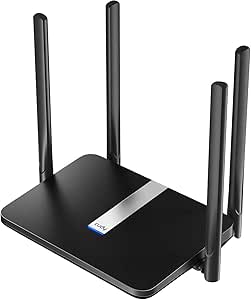 | Best Value for Home Backup | Cellular connectivity: 4G LTE Cat 4, 3G | Maximum LTE download speed: 150 Mbps | Maximum upload speed: 50 Mbps | VIEW ON AMAZON | See Our Full Breakdown |
| GL.iNet GL-X3000 Spitz AX 5G Cellular Router with Wi-Fi 6 and Dual SIM |  | Best Premium Backup Router | Cellular connectivity: 5G NR, LTE, UMTS, WCDMA | Wi-Fi: Wi-Fi 6, dual-band | Wi-Fi data rate: Up to 574 Mbps (2.4 GHz) + 2402 Mbps (5 GHz) | VIEW ON AMAZON | See Our Full Breakdown |
| Unlocked 4G LTE Portable Wi-Fi Router with Micro SIM Slot |  | Best Compact Backup for Compatible Regions | Model: MF800-2 | SIM card size: Micro SIM | Battery: 2,100 mAh lithium battery | VIEW ON AMAZON | See Our Full Breakdown |
| BIHAIZG Global 4G LTE Portable Wi-Fi Hotspot with SIM Card Slot, Black |  | Best for Simple, USB-Powered Backup | Cellular network: 4G LTE | Maximum connected devices: 10 | Maximum data transfer rate: 150 Mbps | VIEW ON AMAZON | See Our Full Breakdown |
| GL.iNet GL-X2000 Spitz Plus 4G LTE Cat 12 Wi-Fi 6 Dual-SIM Router |  | Best for Managed Home-Network Failover | Cellular connectivity: 4G LTE Cat 12 | Wi-Fi: Wi-Fi 6, dual-band 2.4 GHz and 5 GHz | Maximum Wi-Fi data rate: 3000 Mbps (574 Mbps at 2.4 GHz + 2402 Mbps at 5 GHz) | VIEW ON AMAZON | See Our Full Breakdown |
| Cudy LT400 N300 4G LTE Wi-Fi Router |  | Best for Wired Devices on a Simple LTE Backup | LTE category: Cat 4 | Maximum LTE download speed: 150 Mbps | Maximum upstream data transfer rate: 50 Mbps | VIEW ON AMAZON | See Our Full Breakdown |
| GOWENIC 4G LTE Mobile Wi-Fi Router, 300 Mbps, 10-Device Support |  | Best Battery-Powered Budget-Style Hotspot | Connectivity: 4G LTE and 3G WCDMA | Wi-Fi standard: 802.11b/g/n | Maximum data transfer rate: 300 Mbps | VIEW ON AMAZON | See Our Full Breakdown |
| NETGEAR Nighthawk M1 4G LTE Mobile Hotspot (MR1100-100NAS) | 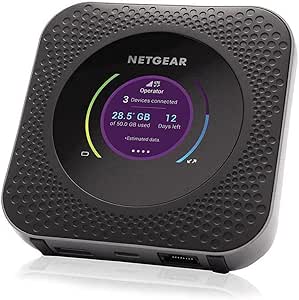 | Best for Portable Backup with Ethernet | Network: 4G LTE, LTE Category 16 | Maximum download speed: Up to 1 Gbps | Maximum upload speed: Up to 150 Mbps | VIEW ON AMAZON | See Our Full Breakdown |
| TUOSHI LT16S AC1200 Wi-Fi 5 Unlocked 4G LTE Router |  | Best for Automatic Home Failover | Cellular standard: 4G LTE Cat 4 | Maximum LTE download speed: 150 Mbps | Wi-Fi: Wi-Fi 5 (802.11ac), AC1200 up to 1167 Mbps | VIEW ON AMAZON | See Our Full Breakdown |
| GL.iNet Spitz GL-X750V2 4G LTE VPN Router | 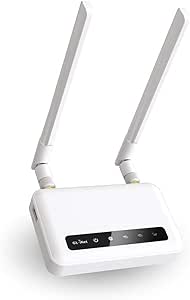 | Best for VPN-Focused Backup | Cellular module: Quectel EC25-AFFA CAT4 | Carrier compatibility: AT&T and T-Mobile | Listed average 4G speed: 15–20 Mbps | VIEW ON AMAZON | See Our Full Breakdown |
| NETGEAR AC797-100NAS 4G LTE Mobile WiFi Hotspot |  | Best Battery-Powered Backup | Network: 4G LTE | Maximum download speed: Up to 400 Mbps | Wi-Fi: Dual-band 802.11ac (Wi-Fi 5) | VIEW ON AMAZON | See Our Full Breakdown |
| Ubiquiti U-LTE-Backup Pro LTE Backup |  | Best for UniFi Networks | Connectivity: AT&T LTE and Ethernet | SIM: Removable AT&T data-only nano-SIM | Ethernet ports: 1 GbE RJ45 PoE+ input and 1 GbE RJ45 PoE output | VIEW ON AMAZON | See Our Full Breakdown |
| Unlocked 4G/5G Portable Wi-Fi Router with SIM Card Slot |  | Best Compact Travel Backup | Connectivity: 4G/5G, LTE, and Wi-Fi | Maximum data transfer rate: 300 Mbps | Wi-Fi details: Listed as Wi-Fi 6 and dual-band; standards listed as 802.11b/g/n | VIEW ON AMAZON | See Our Full Breakdown |
| lte router for backup internet | Wi-Fi |
|---|---|
| LINOVISION Industrial 4G LTE W | 2.4 GHz 802.11b/g/n; access point and client modes |
| RoamWiFi 4G LTE Mobile Hotspot | — |
| Cudy LT500 4G LTE AC1200 Dual- | Wi-Fi 5 (802.11ac), dual-band |
| GL.iNet GL-X3000 Spitz AX 5G C | Wi-Fi 6, dual-band |
| Unlocked 4G LTE Portable Wi-Fi | — |
| BIHAIZG Global 4G LTE Portable | — |
| GL.iNet GL-X2000 Spitz Plus 4G | Wi-Fi 6, dual-band 2.4 GHz and 5 GHz |
| Cudy LT400 N300 4G LTE Wi-Fi R | — |
| GOWENIC 4G LTE Mobile Wi-Fi Ro | — |
| NETGEAR Nighthawk M1 4G LTE Mo | Dual-band 802.11 a/b/g/n/ac |
| TUOSHI LT16S AC1200 Wi-Fi 5 Un | Wi-Fi 5 (802.11ac), AC1200 up to 1167 Mbps |
| GL.iNet Spitz GL-X750V2 4G LTE | Dual-band 802.11ac; 300 Mbps at 2.4 GHz and 433 Mbps at 5 GHz |
| NETGEAR AC797-100NAS 4G LTE Mo | Dual-band 802.11ac (Wi-Fi 5) |
| Ubiquiti U-LTE-Backup Pro LTE | — |
| Unlocked 4G/5G Portable Wi-Fi | — |
More Details on Our Top Picks
LINOVISION Industrial 4G LTE Wi-Fi Router with Dual SIM and RS485
For backup internet at a remote site, I’d choose the LINOVISION when keeping equipment online matters as much as keeping people connected. Dual SIM support and automatic failover give it more resilience than the single-SIM Cudy LT500, while its RS485 and digital I/O can carry device data alongside the internet connection. Its wide 9–48V DC input and stated operating range suit installations where a standard home router may be a poor fit. The tradeoff is a worksite-oriented setup: SIM cards and data plans are separate, and its 2.4 GHz-only Wi-Fi is less capable for everyday home use than the dual-band Cudy. Product details also conflict on antenna quantity, so I would confirm what is included before planning coverage.
Pros:- Dual SIM and automatic failover support multiple connection paths.
- RS485 and digital I/O support industrial devices.
- 9–48V DC input suits varied power setups.
- Stated operating range of -40°F to 158°F supports harsh installations.
Cons:- SIM cards and cellular data plans are sold separately.
- Wi-Fi is limited to 2.4 GHz 802.11b/g/n.
- Product details disagree about whether one or three antennas are included.
Best for: Remote facilities and industrial operators who need cellular failover plus RS485 or digital I/O connectivity.
Not ideal for: Households seeking fast dual-band Wi-Fi or a simple, ready-to-run backup connection; it needs a separate SIM and data plan, and its Wi-Fi is 2.4 GHz only.
- Cellular standard:4G LTE Cat 4
- Maximum download speed:150 Mbps
- Maximum upload speed:50 Mbps
- SIM slots:2
- Wi-Fi:2.4 GHz 802.11b/g/n; access point and client modes
- Interfaces:RS485, digital input, digital output, LAN
- Power input:9–48V DC
- Operating temperature:-40°F to 158°F
Our verdict“Choose the LINOVISION for rugged, equipment-focused backup connectivity, not as a general-purpose home Wi-Fi upgrade.”
RoamWiFi 4G LTE Mobile Hotspot with 10GB US Data and 1GB Global Data
The RoamWiFi is the easiest fit here for travelers who need a temporary connection rather than a permanent home backup. No SIM card or contract is required, and the included 10GB local and 1GB global allowances can get up to 10 devices online across more than 170 countries. That makes it more convenient on a trip than the Cudy LT500, which is a fixed router that depends on a user-provided nano SIM. For backup internet at home, though, the 30-day data validity limits its usefulness: the allowance is finite, and it is not a durable substitute for an ongoing cellular plan. The global allowance is especially small, so I’d reserve it for essential browsing and messaging rather than sustained work or media use.
Pros:- Works in more than 170 countries without a separate SIM.
- Includes local and global data for initial connectivity.
- Supports up to 10 connected devices.
- Dual-band 802.11ac Wi-Fi and WPA3 are specified.
Cons:- Included data is valid for only 30 days.
- Global allowance is limited to 1GB.
- A finite travel data bundle is less suited to continuous home backup.
Best for: Travelers who want a SIM-free hotspot for several devices and can use the included data within 30 days.
Not ideal for: Households needing an always-ready home internet backup or travelers who expect heavy data use abroad; the included allowance expires after 30 days and global data is limited.
- Cellular connectivity:4G LTE
- Maximum connected devices:10
- Included data:10GB local and 1GB global
- Data validity:30 days
- Coverage:More than 170 countries
- Wi-Fi standard:802.11ac, dual-band
- Security protocol:WPA3
- SIM card required:No
Our verdict“Pick the RoamWiFi for short trips and simple multi-device access, but choose a router with an ongoing cellular plan for dependable home backup.”
Cudy LT500 4G LTE AC1200 Dual-Band Wi-Fi 5 Router
For a straightforward home backup connection, the Cudy LT500 offers a practical middle ground: it takes a nano SIM, supports automatic WAN failover, and provides four Ethernet ports for wired devices. Compared with the LINOVISION, it gives up dual SIM and industrial I/O, but its dual-band Wi-Fi 5 is a better match for a household network. VPN options including WireGuard, OpenVPN, and IPsec add flexibility for remote access. Its limits are clear: LTE Cat 4 tops out at 150 Mbps down, and the Ethernet ports are only 10/100 Mbps, so it is not the choice for a fast wired network. I’d favor it over the RoamWiFi for ongoing home use, provided the buyer supplies a compatible SIM and data plan.
Pros:- Automatic WAN failover can switch to cellular when the primary connection drops.
- Dual-band Wi-Fi 5 suits mixed household devices better than 2.4 GHz-only options.
- Four Ethernet ports connect wired devices.
- Supports WireGuard, OpenVPN, and IPsec.
Cons:- LTE Cat 4 download speed is limited to 150 Mbps.
- Ethernet ports are limited to 10/100 Mbps.
- Requires a compatible nano SIM and cellular data plan.
Best for: Households that want a fixed LTE failover router with dual-band Wi-Fi, wired connections, and VPN options.
Not ideal for: Buyers needing dual-SIM redundancy, gigabit Ethernet, or industrial interfaces; this model has one nano-SIM slot and 10/100 Mbps ports.
- Cellular connectivity:4G LTE Cat 4, 3G
- Maximum LTE download speed:150 Mbps
- Maximum upload speed:50 Mbps
- SIM slot:Nano SIM
- Wi-Fi:Wi-Fi 5 (802.11ac), dual-band
- Wi-Fi data rate:867 + 300 Mbps
- Ethernet ports:4, 10/100 Mbps
- VPN protocols:WireGuard, OpenVPN, IPsec
Our verdict“Choose the Cudy LT500 for everyday home backup with useful wired and VPN support, unless you need the LINOVISION’s dual SIM or industrial connections.”
GL.iNet GL-X3000 Spitz AX 5G Cellular Router with Wi-Fi 6 and Dual SIM
If backup internet needs to keep pace with a demanding home, office, or RV network, the GL-X3000 is the most capable pick in this group. 5G support, Wi-Fi 6, and gigabit LAN give it a higher ceiling than the LTE-only Cudy LT500, while dual SIM, multi-WAN, and load balancing offer more ways to manage connections. OpenWrt-based firmware and OpenVPN or WireGuard suit buyers who want detailed network controls, not a plug-and-forget hotspot. Its single-standby dual-SIM design is not simultaneous service, and regional restrictions may limit cellular use. The physical eSIM card is also sold separately. I’d choose it for a feature-rich backup network, but not for someone who only needs an inexpensive secondary link.
Pros:- 5G and dual SIM provide more cellular flexibility than LTE-only routers.
- Wi-Fi 6 and gigabit LAN support a capable local network.
- Multi-WAN, load balancing, and failover allow more connection-management options.
- OpenVPN and WireGuard support secure remote access.
Cons:- Dual SIM is single standby rather than simultaneous active service.
- Physical eSIM card must be purchased separately.
- Cellular functionality is restricted in some regions.
Best for: Power users, small offices, and RV owners who want 5G-capable backup, Wi-Fi 6, and flexible multi-WAN controls.
Not ideal for: Buyers seeking a simple LTE-only backup router or those in regions where cellular features are restricted; the physical eSIM card is separate.
- Cellular connectivity:5G NR, LTE, UMTS, WCDMA
- Wi-Fi:Wi-Fi 6, dual-band
- Wi-Fi data rate:Up to 574 Mbps (2.4 GHz) + 2402 Mbps (5 GHz)
- SIM:Dual SIM, single standby
- Antennas:6 detachable
- VPN:OpenVPN and WireGuard
- VPN speeds:Up to 150 Mbps OpenVPN; 300 Mbps WireGuard
- LAN port bandwidth:1000 Mbps
- Operating system:OpenWrt v21.02-based firmware
Our verdict“Choose the GL-X3000 when you want advanced 5G backup and network control; the Cudy LT500 is a simpler fit for basic LTE failover.”
Unlocked 4G LTE Portable Wi-Fi Router with Micro SIM Slot
This pocket-sized router makes sense when backup internet needs to travel with one person rather than cover a whole home. Its 2,100 mAh battery and support for up to 10 connected devices offer a portable alternative to the fixed Cudy LT500, while a micro SIM slot lets the owner use a compatible carrier plan. The main limitation is geographic: the listed bands and product details state it is not compatible with countries in the Americas. That rules it out for many North American buyers before speed or battery life enters the discussion. Its 2.4 GHz 802.11b/g/n Wi-Fi is also basic compared with the RoamWiFi’s 802.11ac, and the micro SIM is not included. I’d only shortlist it after confirming local bands and carrier support.
Pros:- Compact, battery-powered design suits portable backup use.
- Supports up to 10 connected devices.
- Includes a 2,100 mAh battery.
- Works with Windows 7/8/10 and Linux.
Cons:- Not compatible with countries in the Americas.
- Micro SIM card is not included.
- 2.4 GHz 802.11b/g/n Wi-Fi is more limited than the RoamWiFi’s 802.11ac.
Best for: Travelers outside the Americas who need a compact battery-powered router and have confirmed their carrier supports its LTE bands.
Not ideal for: Buyers in the Americas or anyone who needs a fixed, unattended home backup connection; regional compatibility is limited and the battery requires charging.
- Model:MF800-2
- SIM card size:Micro SIM
- Battery:2,100 mAh lithium battery
- Battery standby time:Up to 10 hours
- 4G LTE bands:B1, B3, B5, B40
- Wi-Fi standard:802.11b/g/n
- Maximum connected users:10
- Regional compatibility:Not compatible with countries in the Americas
Our verdict“Consider this router only for portable use in a confirmed compatible region; for home backup, the Cudy LT500 is a better fit.”
BIHAIZG Global 4G LTE Portable Wi-Fi Hotspot with SIM Card Slot, Black
For a backup connection that needs to be small and straightforward, the BIHAIZG U6-G offers a lighter setup than the NETGEAR Nighthawk M1: it weighs 35 g and draws power from a USB source rather than relying on a built-in battery. That makes it a practical match for a power bank or an always-on USB adapter, though it is less self-contained when power is unavailable. It can share a cellular connection with up to 10 devices, enough for a small household’s basic outage needs, and WPA/WPA2 security helps protect the local Wi-Fi network. Its listed LTE bands span several regions, but carrier compatibility still needs checking before purchase. Unlike the GL.iNet GL-X2000 Spitz Plus, it has no stated Ethernet WAN, failover controls, or VPN features. Choose it for a low-complexity backup hotspot, not for managing a more involved home network.
Pros:- Very light at 35 g, making it easy to keep with emergency networking supplies.
- USB 5 V power can come from a compatible adapter or power bank.
- Supports up to 10 connected devices.
- WPA/WPA2 security and a broad listed set of FDD and TDD LTE bands.
Cons:- Requires a compatible SIM card and active mobile data service.
- No built-in battery is listed, so it needs a USB power source to operate.
- Lacks stated Ethernet, VPN, and automatic failover features found on the GL.iNet GL-X2000.
Best for: People who want a very light LTE hotspot to keep powered from a USB adapter or power bank for a small household’s basic backup access.
Not ideal for: Buyers who need battery-powered operation, Ethernet integration, or configurable WAN failover; the device requires external USB power and has no stated router-management features.
- Cellular network:4G LTE
- Maximum connected devices:10
- Maximum data transfer rate:150 Mbps
- Maximum upstream data transfer rate:50 Mbps
- Supported FDD-LTE bands:B1/2/3/4/5/7/8/20/28/66
- Supported TDD-LTE bands:B38/40/41
- Wi-Fi security:WPA/WPA2
- Power:USB, 5 V
- Weight:35 g
Our verdict“Pick the BIHAIZG U6-G for lightweight, USB-powered backup Wi-Fi for a small group, but skip it if you need a battery or home-router failover controls.”
GL.iNet GL-X2000 Spitz Plus 4G LTE Cat 12 Wi-Fi 6 Dual-SIM Router
The GL.iNet GL-X2000 Spitz Plus is the most capable choice here for a home that needs more than a cellular hotspot during outages. It can use cellular, Ethernet, repeater, or tethered WAN connections, with failover and load balancing to give the network more ways to stay online. That flexibility sets it apart from the simpler NETGEAR Nighthawk M1, which offers a portable connection and Ethernet but not the same listed multi-WAN controls. Wi-Fi 6, gigabit LAN, and four SMA antenna connectors suit a permanent router location where wired devices or external antennas matter. The tradeoffs are real: its dual SIMs operate in single-standby mode, and listed VPN speeds top out at 30 Mbps on OpenVPN or 190 Mbps on WireGuard. I’d choose it for control, not simplicity.
Pros:- Failover and load balancing across cellular, Ethernet, repeater, and tethering connections.
- Four SMA connectors allow external antennas to be added for a suitable installation.
- Wi-Fi 6 dual-band networking and gigabit LAN support modern wireless and wired devices.
- Includes OpenVPN and WireGuard, with dual-SIM carrier selection.
Cons:- Dual-SIM operation is single-standby, not simultaneous service from both SIMs.
- VPN throughput is limited to a listed maximum of 30 Mbps with OpenVPN and 190 Mbps with WireGuard.
- Cellular use is restricted in some listed regions, and actual performance depends on coverage and configuration.
Best for: Households or small offices that want LTE as one of several WAN options, with configurable failover, VPN support, and external antenna connections.
Not ideal for: Buyers seeking a pocketable, battery-powered hotspot or a plug-and-play setup; this router is a more involved fixed-network option, and its dual SIMs are single-standby.
- Cellular connectivity:4G LTE Cat 12
- Wi-Fi:Wi-Fi 6, dual-band 2.4 GHz and 5 GHz
- Maximum Wi-Fi data rate:3000 Mbps (574 Mbps at 2.4 GHz + 2402 Mbps at 5 GHz)
- SIM:Dual-SIM, single standby
- WAN connections:Ethernet, repeater, cellular, and tethering
- VPN protocols:OpenVPN and WireGuard
- Maximum VPN speed:30 Mbps (OpenVPN); 190 Mbps (WireGuard)
- Antenna connectors:4 SMA connectors
- LAN port bandwidth:1000 Mbps
Our verdict“Choose the GL-X2000 if you want configurable, multi-WAN home backup; choose the Nighthawk M1 instead if portability and a built-in battery matter more.”
Cudy LT400 N300 4G LTE Wi-Fi Router
The Cudy LT400 makes sense when backup internet needs to reach wired equipment as well as Wi-Fi devices. Its four ports and four external 5 dBi antennas give it a more fixed-router role than the portable BIHAIZG U6-G, which is USB-powered and has no listed Ethernet networking. The LT400 also includes VPN clients and DNS encryption, useful for buyers who want more control over how devices connect. Its limits are just as clear: Wi-Fi is 2.4 GHz only, and the listed LAN bandwidth is 100 Mbps, so it is a poor match for a home expecting faster wired local connections or modern dual-band Wi-Fi. Compared with the Wi-Fi 6 GL.iNet GL-X2000, this is a simpler, less capable network hub. Its stated coverage is North and South America, so verify regional and carrier fit first.
Pros:- Shares LTE over both Wi-Fi and Ethernet, with four listed ports.
- Four 5 dBi antennas support a fixed-router setup.
- Includes PPTP, L2TP, OpenVPN, and WireGuard clients.
- DNS encryption options and DDNS support suit some privacy and remote-camera setups.
Cons:- Single-band 2.4 GHz Wi-Fi lacks the additional 5 GHz band offered by the GL.iNet GL-X2000.
- Listed LAN port bandwidth is 100 Mbps, limiting wired throughput.
- Coverage is specified for North and South America, so it is not a universal regional option.
Best for: North or South American households that need a stationary LTE router for a few wired devices, with basic VPN and DNS options.
Not ideal for: Buyers who need dual-band Wi-Fi, gigabit LAN, or cellular compatibility outside the stated North and South American coverage.
- LTE category:Cat 4
- Maximum LTE download speed:150 Mbps
- Maximum upstream data transfer rate:50 Mbps
- Wi-Fi standard:Wi-Fi 4 (802.11n), 2.4 GHz
- Maximum Wi-Fi speed:300 Mbps
- LAN port bandwidth:100 Mbps
- Ports:4
- Antennas:4 × 5 dBi
- Coverage:North America and South America
Our verdict“Choose the LT400 for regional LTE backup with wired ports and VPN options, but look elsewhere if you need gigabit Ethernet or dual-band Wi-Fi.”
GOWENIC 4G LTE Mobile Wi-Fi Router, 300 Mbps, 10-Device Support
For outages that may also cut power to the router, the GOWENIC mobile Wi-Fi router has an advantage over the USB-powered BIHAIZG U6-G: its built-in 3000 mAh battery gives it a self-contained power source. It can share a SIM-based connection with up to 10 devices and lists both 4G LTE and 3G WCDMA, which may help where a compatible 3G network remains available. The product data does not state a battery runtime, however, and its listed bands should be checked carefully against the intended carrier. The claimed 300 Mbps maximum transfer rate also should not be read as a guaranteed cellular speed. Compared with the NETGEAR Nighthawk M1, it supports fewer devices and has no listed Ethernet port or display. I’d treat it as a portable, basic backup—not a router for integrating a whole home network.
Pros:- Built-in 3000 mAh battery allows operation without a USB power source.
- Supports up to 10 connected devices.
- Lists both 4G LTE and 3G WCDMA connectivity.
- WPA/WPA2 encryption is specified for the Wi-Fi connection.
Cons:- Battery runtime is not provided, so outage endurance is difficult to estimate.
- LTE and WCDMA band support should be checked against the chosen carrier.
- No Ethernet port or device display is listed, unlike the NETGEAR Nighthawk M1.
Best for: Individuals or small households who want a SIM-based backup hotspot with its own battery and support for up to 10 devices.
Not ideal for: Buyers who need a documented battery runtime, Ethernet connection to a home router, or capacity for more than 10 devices.
- Connectivity:4G LTE and 3G WCDMA
- Wi-Fi standard:802.11b/g/n
- Maximum data transfer rate:300 Mbps
- Maximum connected devices:10
- Battery capacity:3000 mAh
- LTE bands:FDD B1/B3/B5/B8; TDD B38/B39/B40/B41
- WCDMA bands:B1/B8
- Security:WPA/WPA2 encryption
- Weight:5 ounces
Our verdict“Pick the GOWENIC if you want a small battery-powered hotspot for up to 10 devices, but choose the Nighthawk M1 for Ethernet integration and greater listed capacity.”
NETGEAR Nighthawk M1 4G LTE Mobile Hotspot (MR1100-100NAS)
The NETGEAR Nighthawk M1 is the strongest fit here for buyers who want a portable hotspot that can also feed a home router or wired device. Its Gigabit Ethernet port gives it a connection option the GOWENIC and BIHAIZG hotspots do not list, while support for up to 20 devices makes it better suited to a busy household. A 5040 mAh battery and LCD add convenience when it is used away from a fixed setup. The listed LTE Category 16 speeds are high, but actual results depend on carrier coverage, plan, and network conditions; I would not choose it on the maximum speed claim alone. It is less configurable for network failover than the GL.iNet GL-X2000, and it requires a compatible micro-SIM and data plan. Check carrier fit, especially since the supplied data names AT&T and T-Mobile as its best matches.
Pros:- Gigabit Ethernet can connect the hotspot to a home router or wired device.
- Supports up to 20 connected devices, twice the listed capacity of the GOWENIC and BIHAIZG hotspots.
- 5040 mAh battery supports portable use without a permanent USB power connection.
- Dual-band Wi-Fi, a 2.4-inch LCD, USB-C, and dual TS-9 antenna connectors offer flexible setup options.
Cons:- Requires a compatible micro-SIM and an active data plan.
- Carrier compatibility and speeds depend on service, coverage, and plan; the supplied data says it works best with AT&T and T-Mobile.
- Lacks the multi-WAN failover and load-balancing features listed for the GL.iNet GL-X2000.
Best for: Households that want a portable LTE connection with enough device capacity for several users and Ethernet to connect a router or wired equipment.
Not ideal for: Buyers who need multi-WAN failover controls, dual-SIM flexibility, or service on an unsupported carrier; it depends on a compatible micro-SIM and plan.
- Network:4G LTE, LTE Category 16
- Maximum download speed:Up to 1 Gbps
- Maximum upload speed:Up to 150 Mbps
- Wi-Fi:Dual-band 802.11 a/b/g/n/ac
- Connected devices:Up to 20
- Battery capacity:5040 mAh
- Ports:Gigabit Ethernet and USB-C
- SIM:Micro-SIM
- Antenna connectors:Dual TS-9
Our verdict“Choose the Nighthawk M1 for portable LTE backup that can also connect to a router over Ethernet, but choose the GL-X2000 if managed WAN failover is your priority.”
TUOSHI LT16S AC1200 Wi-Fi 5 Unlocked 4G LTE Router
For a home that already has wired broadband, the TUOSHI LT16S is the clearest fit here: it can switch to LTE automatically when the main connection drops, rather than asking someone to set up a hotspot. Its dual-band Wi-Fi, four LAN ports, and stated coverage of up to 300 square meters suit a household with several devices and wired equipment. Compared with the GL.iNet Spitz GL-X750V2, it offers more LAN ports and a simpler home-router role, while the Spitz brings stronger VPN customization through OpenWrt and WireGuard. The tradeoff is that LTE tops out at 150 Mbps, and its 100 Mbps LAN ports can bottleneck wired devices. I’d also check carrier and SIM compatibility before relying on it as an outage lifeline.
Pros:- Automatic failover between wired broadband and LTE
- Four LAN ports support multiple wired devices
- Dual-band Wi-Fi and listed coverage up to 300 square meters
- VPN support and mesh capability add flexibility
Cons:- LTE download speed is capped at 150 Mbps
- 100 Mbps LAN ports limit wired throughput
- Uses a standard SIM and lists compatibility with AT&T and T-Mobile
Best for: Households with wired broadband that want automatic AT&T or T-Mobile LTE backup and several Ethernet connections.
Not ideal for: Buyers needing faster-than-100-Mbps wired transfers, higher LTE throughput, or broad carrier compatibility beyond the listed networks.
- Cellular standard:4G LTE Cat 4
- Maximum LTE download speed:150 Mbps
- Wi-Fi:Wi-Fi 5 (802.11ac), AC1200 up to 1167 Mbps
- Wi-Fi bands:2.4 GHz and 5 GHz
- Ports:1 WAN and 4 LAN; LAN bandwidth up to 100 Mbps
- VPN protocols:L2TP, PPTP, OpenVPN
- SIM and listed networks:Standard SIM; AT&T and T-Mobile
- Antennas and coverage:6 antennas; coverage listed up to 300 square meters
Our verdict“Choose the TUOSHI if you want a home router that can automatically fall back to LTE, but skip it if gigabit-speed wired networking matters.”
GL.iNet Spitz GL-X750V2 4G LTE VPN Router
The GL.iNet Spitz GL-X750V2 suits buyers who want their backup connection to run through configurable network tools, not just restore basic Wi-Fi. Its OpenWrt-based system supports both OpenVPN and WireGuard, making it a more flexible choice for remote access or routing policies than the TUOSHI LT16S, which lists VPN support but offers fewer configuration details. Two Ethernet ports, USB, and microSD expansion also make the Spitz adaptable for a small remote setup or RV. That flexibility comes with limits: the listed average 4G speed is 15–20 Mbps, Ethernet is only 10/100 Mbps, and cellular service is restricted by region. For a straightforward home failover setup, the TUOSHI has more LAN ports; I’d pick this one for VPN control and portability instead.
Pros:- OpenWrt/LEDE supports flexible network configuration
- Includes both OpenVPN and WireGuard
- MicroSD expansion up to 128 GB and USB 2.0
- Designed for rural, RV, and backup connectivity
Cons:- Listed average 4G speeds are 15–20 Mbps and vary by location
- Both Ethernet ports are limited to 10/100 Mbps
- Cellular service is restricted in some regions
Best for: Remote workers, RV owners, and rural users in North America who want LTE backup with OpenWrt and WireGuard or OpenVPN.
Not ideal for: Households seeking high cellular speeds, more than two Ethernet connections, or cellular use outside the listed supported regions.
- Cellular module:Quectel EC25-AFFA CAT4
- Carrier compatibility:AT&T and T-Mobile
- Listed average 4G speed:15–20 Mbps
- Wi-Fi:Dual-band 802.11ac; 300 Mbps at 2.4 GHz and 433 Mbps at 5 GHz
- Operating system:OpenWrt/LEDE
- VPN protocols:OpenVPN and WireGuard
- Ports:2 Ethernet ports (10/100 Mbps) and USB 2.0
- Storage and memory:128 MB RAM, 16 MB NOR flash, microSD/TF slot up to 128 GB
- Antennas:Two SMA antennas
Our verdict“Pick the Spitz GL-X750V2 when VPN flexibility matters more than speed or port count, and confirm regional service support before buying.”
NETGEAR AC797-100NAS 4G LTE Mobile WiFi Hotspot
The NETGEAR AC797-100NAS is a battery-powered hotspot rather than a fixed router that automatically takes over when home broadband fails. That distinction makes it useful for a laptop, a small work group, or temporary outages where portability matters more than unattended failover. It supports up to 15 devices and lists up to 11 hours of battery life, while its stated maximum download speed of 400 Mbps exceeds the LTE limits listed for the TUOSHI LT16S and GL.iNet Spitz GL-X750V2. Those figures depend on the network and signal, though, and this renewed AT&T device is limited to AT&T and compatible GSM carriers. Unlike the TUOSHI, it has no described wired-broadband failover or Ethernet ports, so it’s better treated as a portable emergency connection than as a permanent home backup router.
Pros:- Supports up to 15 connected devices
- Battery life listed up to 11 hours
- Advertised LTE download speed up to 400 Mbps
- Removable battery, charger, and USB cable are included
Cons:- Does not provide the described wired-broadband automatic failover of the TUOSHI
- Carrier compatibility is limited to AT&T and compatible GSM carriers
- Renewed unit includes a 90-day limited warranty
Best for: People who need a portable LTE connection for a work trip, power outage, or small group of up to 15 devices.
Not ideal for: Buyers who need automatic home failover, wired LAN connections, or carrier flexibility beyond AT&T and compatible GSM networks.
- Network:4G LTE
- Maximum download speed:Up to 400 Mbps
- Wi-Fi:Dual-band 802.11ac (Wi-Fi 5)
- Maximum connected devices:15
- Battery:2,930 mAh; up to 11 hours
- Carrier compatibility:AT&T and compatible GSM carriers
- Security:WPA2
- Included items:Removable lithium-ion battery, AC charger, and USB cable
- Warranty:90-day limited warranty
Our verdict“Choose this NETGEAR hotspot for portable, battery-powered backup, not for automatic failover at a fixed home or office.”
Ubiquiti U-LTE-Backup Pro LTE Backup
If your network already runs on a compatible UniFi gateway, the Ubiquiti U-LTE-Backup Pro is the most purpose-built failover pick in this group. It supplies an LTE path for an existing gateway instead of asking you to replace your main router, and PoE input and output can simplify placement and power in a UniFi setup. That makes it a more integrated choice for a managed network than the battery-powered NETGEAR AC797, which provides its own Wi-Fi but is not described as a gateway failover device. The tradeoff is a narrow fit: this unit requires a compatible UniFi gateway, an AT&T data-only nano-SIM, and LTE service. Its internal antenna keeps the unit compact, with an optional external antenna connection available if placement or reception calls for one.
Pros:- Designed to provide LTE failover for compatible UniFi gateways
- PoE input and output can simplify network installation
- Internal LTE antenna with an optional external antenna connector
- Compact form factor with a status display
Cons:- Requires a compatible UniFi gateway
- Requires AT&T LTE service and a data-only nano-SIM
- Not presented as a standalone Wi-Fi router
Best for: Small businesses and home network administrators already using a compatible UniFi gateway who want dedicated AT&T LTE failover.
Not ideal for: People with non-UniFi routers, users seeking a standalone Wi-Fi router, or buyers who need a choice of cellular carriers.
- Connectivity:AT&T LTE and Ethernet
- SIM:Removable AT&T data-only nano-SIM
- Ethernet ports:1 GbE RJ45 PoE+ input and 1 GbE RJ45 PoE output
- Antenna:Internal LTE antenna; RP-SMA connector for optional external antenna
- Maximum upstream data transfer rate:150 Mbps
- Status display:1.54 inches
- Dimensions:2.6 × 8 × 1.3 inches
- Weight:7.84 ounces
Our verdict“Choose the U-LTE-Backup Pro if you already manage a compatible UniFi network and want dedicated AT&T failover; otherwise, the standalone TUOSHI is a better fit.”
Unlocked 4G/5G Portable Wi-Fi Router with SIM Card Slot
This compact 4G/5G portable router is the lineup’s pick for someone who needs a battery-powered connection away from home, rather than a router that automatically switches a household from wired broadband to LTE. Its 2,100 mAh battery is listed for up to 12 hours, and the LED screen shows signal, battery, and connected-device information—useful when there’s no fixed installation to check. It supports up to 10 devices, fewer than the NETGEAR AC797’s 15, but offers USB-C charging and is described as supporting 4G/5G. The product data lists Wi-Fi 6 while also listing 802.11b/g/n standards, so I would verify the wireless capabilities and cellular-band compatibility before relying on it. A SIM and service are not included, and the stated 300 Mbps ceiling is not a guarantee of real-world speed.
Pros:- Portable design with battery life listed up to 12 hours
- LED screen displays battery, signal, and connected-device information
- USB-C charging
- Supports up to 10 connected devices
Cons:- SIM card and mobile service are not included
- No automatic wired-broadband failover is described
- Listed Wi-Fi generation and standards may need clarification before purchase
Best for: Travelers and remote workers who want a small, rechargeable backup connection for up to 10 devices and can confirm SIM compatibility.
Not ideal for: Households needing automatic wired-internet failover, buyers who require verified carrier-band support, or groups needing more than 10 connections.
- Connectivity:4G/5G, LTE, and Wi-Fi
- Maximum data transfer rate:300 Mbps
- Wi-Fi details:Listed as Wi-Fi 6 and dual-band; standards listed as 802.11b/g/n
- Battery:2,100 mAh; up to 12 hours
- Maximum connected devices:10
- Antennas:4; 4×4 MIMO
- Security:WPA2-PSK
- Charging port:USB-C
- SIM:Required; not included
Our verdict“Choose this portable router for rechargeable travel backup after verifying network compatibility, but use a dedicated failover router such as the TUOSHI for home broadband protection.”

How We Picked
I ranked these devices for their usefulness as backup internet, not simply by headline wireless speed or the number of features listed. The main criteria were whether a model is designed to connect a home or office network, its cellular and SIM flexibility, its practical fit for fixed or portable use, and how much setup a buyer may face. I also weighed the consequences of choosing the wrong category: a pocket hotspot may keep a few devices online but not provide the handoff a whole-home network needs, while an industrial or advanced router can add configuration work.
The order favors options that appear most suited to a dependable backup role, with flexibility and network integration ahead of travel convenience. Dual-SIM and newer Wi-Fi features count as advantages only when they serve a clear use case; they do not replace carrier-band checks, data-plan review, or a test of failover behavior. Portable hotspots rank for mobility and simplicity, while specialized devices such as the Ubiquiti unit and LINOVISION router are placed for buyers whose existing network or installation needs match their designs. Because carrier support and service plans vary, I treat compatibility as something buyers must confirm rather than assume.
Factors to Consider When Choosing Lte Router For Backup Internet
Choosing an LTE backup is less about finding the fastest-sounding device and more about deciding what must stay online, how the cellular link joins your existing network, and what happens when service drops. These broader checks can prevent a capable router from becoming an expensive spare that is difficult to activate or does not cover the devices you need.
Decide Whether You Need Automatic Failover
Start by listing what should happen during an outage: keep one laptop connected, preserve Wi-Fi for the household, or maintain access to a business network. A hotspot can provide internet access, but it may require someone to connect devices or change network settings when the primary service fails. A dedicated backup router or compatible gateway may support a more integrated handoff, though the exact behavior depends on the rest of your network. Do not assume that a SIM slot means automatic failover; check the router’s documentation and the main router’s WAN or backup support. If outages are frequent and unattended recovery matters, prioritize a setup that can detect a failed connection and restore the primary link afterward. For occasional disruptions, a manually activated hotspot may be enough.
Confirm Carrier, Bands, and SIM Activation
Unlocked hardware does not mean every carrier or plan will work with it. Check that the router supports the LTE bands used by your carrier in your location, then confirm whether the carrier permits the SIM and plan type in a router or hotspot. Some services restrict tethering, require a dedicated data plan, or apply limits that make routine backup use impractical. A dual-SIM device only helps if both SIMs are active on usable networks and the router can switch in the way you expect. Before buying, ask the carrier about device registration and any activation requirements. This check can matter more than choosing a model with a newer Wi-Fi standard.
Estimate Data Needs and Outage Length
Backup data use can rise quickly when video calls, cloud backups, software updates, and streaming continue as usual. Estimate which activities must remain available and which you can pause during an outage; a few essential work applications need far less data than normal household use. Review plan allowances, throttling rules, and whether unused data carries forward rather than judging a plan by its advertised monthly amount alone. Bundled data, such as the stated allowance with the RoamWiFi hotspot, may suit occasional travel or short disruptions, but it should not be mistaken for unlimited home backup. Consider setting device or router limits where available. A low-data backup policy can stretch a plan and reduce surprises.
Match Coverage to Your Home or Office
A router’s Wi-Fi coverage and its ability to receive a cellular signal are separate issues. Placement near a window may improve cellular reception, but that location may not cover the rest of a building well. Before choosing a compact hotspot for a whole-home role, check whether it can connect to your existing router or whether devices would need to join its own wireless network. For larger spaces, a wired handoff to a mesh or access-point system may be more useful than relying on the cellular unit’s built-in Wi-Fi. External antenna support can matter in weak-signal locations, but only when the router and antenna arrangement are compatible. Think through where the device will sit and how its connection reaches your existing network.
Balance Simplicity Against Control
Extra features only help when you can configure and maintain them. Advanced routers may offer dual-SIM management, VPN functions, or network controls that suit a technically confident household or small office, while a simpler hotspot can be easier to start and move. Industrial connections such as RS485 address specialized equipment needs and may add complexity that ordinary home users do not need. Check how the device is managed, what information you need from the carrier, and whether updates or configuration changes will be practical for the person responsible. A feature-rich model is worth paying more attention to when it solves a real network requirement. For a basic emergency connection, fewer settings may be an advantage.
Plan for Power and Recovery
Cellular backup cannot help if the router or modem loses power during the same event. Decide whether your backup plan includes a battery, an uninterruptible power supply, or a portable hotspot that can run independently for a limited time. Check the device’s power method and whether it can remain ready without overheating or requiring frequent manual attention. A mobile unit is convenient to move, but it may need charging and may not restore a fixed network automatically. For a home or office gateway, confirm that the cellular router, primary router, and any required access points can all stay powered. Test the complete chain occasionally, including what happens when the main broadband connection returns.
Frequently Asked Questions
Will any LTE router automatically take over when my home broadband fails?
No. Some devices provide a cellular connection without managing a handoff from your existing broadband, and a hotspot may require manual reconnection. Automatic failover depends on the router, its configuration, and how it connects to your main network. Check whether the primary router supports a cellular WAN or backup connection and whether the LTE device can work with that setup. A short outage test can confirm whether devices reconnect and whether they return to the primary service afterward.
Can I use my phone’s SIM card in an unlocked LTE router?
Sometimes, but compatibility involves more than the SIM fitting the slot. The router must support your carrier’s LTE bands, and the carrier must allow that SIM and plan to be used in a router. Some phone plans restrict hotspot use or may not provision data devices in the same way. Ask the carrier about router activation, device registration, and tethering rules before relying on the SIM. If you plan to use dual SIMs, confirm that both services can operate in the intended device.
Is a portable hotspot enough to back up a whole home network?
It can provide a useful emergency connection, but it may not replace a network-integrated backup router. A hotspot typically serves devices through its own Wi-Fi, so you may need to reconnect them or arrange a wired link to your existing network. That can be fine for a few phones and laptops, but less convenient for smart devices, workstations, or systems that expect the usual home network to stay available. Check whether your current router can accept the hotspot’s connection as a WAN source. If not, plan for a separate network during the outage.
Does dual SIM guarantee that my backup connection will stay online?
No. Dual SIM provides the option to use two SIMs, but continuous service depends on the router’s switching behavior, both carriers’ coverage, and active plans with usable data. Some devices may require manual selection or configuration, so do not assume they move instantly to the second network. Check how the model handles SIM priority, failure detection, and recovery to the first carrier. A second SIM on the same network may also offer little benefit if the outage affects that carrier’s local service.
Should I prioritize Wi-Fi 6 or stronger LTE reception for backup?
For most backup setups, the cellular link and network handoff deserve attention before the Wi-Fi generation. Wi-Fi 6 can help serve compatible devices efficiently, but it cannot compensate for weak LTE coverage, an incompatible carrier, or a restrictive data plan. If your existing router already handles local Wi-Fi well, a reliable wired connection from the LTE device may matter more than replacing your wireless network. Check cellular bands, signal conditions, and antenna options for your location first. Then decide whether newer Wi-Fi features address a real capacity or coverage need.
Conclusion
For most buyers building a fixed backup connection, I recommend the GL.iNet GL-X2000 Spitz Plus as the best overall: its dual-SIM approach and Wi-Fi 6 make it a flexible router-centered choice, provided its carrier support fits your area. The Cudy LT500 is my best value-style pick for buyers seeking a more straightforward home LTE router, while the GL.iNet GL-X3000 Spitz AX is the premium choice for those who specifically want a 5G-capable, Wi-Fi 6 setup. For beginners who value a portable, direct connection over whole-network failover, I would start with a hotspot such as the NETGEAR Nighthawk M1 or RoamWiFi, after checking plan terms. Choose Ubiquiti U-LTE-Backup Pro when your network is already built around compatible Ubiquiti equipment, and consider LINOVISION for specialized industrial installations rather than ordinary home use. Before committing, verify carrier compatibility and data rules, then choose the device that matches how much of your network must stay online.
Evergreen bestsellers Picks

TCL QM64L 85-Inch QD-Mini LED 4K Smart Fire TV

Dyson Car+Boat Cordless Handheld Vacuum

Ninja Foodi 10-Qt DualZone Smart XL Air Fryer, 6-in-1, DZ550
As an affiliate, we earn on qualifying purchases.