When searching for ergonomic split keyboards, the goal is to find a setup that balances comfort with versatility. The Logitech Ergo K860 stands out as the best overall for its premium build and adjustable tenting. For those prioritizing portability, the Nulea RT07B Wireless Split Keyboard offers seamless Bluetooth connectivity and a comfortable wrist rest. Conversely, budget buyers might lean toward wired options like the Perixx PERIBOARD-512B, which provides solid features at a lower price point. These choices highlight the key tradeoffs between wireless convenience, build quality, and affordability. Continue reading for a detailed breakdown of each option and how they compare based on real-world needs.

Get the latest gadgets delivered free with Prime
- Fast, free delivery on millions of items
- Prime Video, Amazon Music and more included
- Member-only deals all year
Complete the kit



Key Takeaways
- Wireless models like the Nulea RT07B excel in portability and cable-free use, but often come at a higher price.
- Wired keyboards such as the Perixx PERIBOARD-512B offer reliable connection and durability, ideal for fixed setups.
- Adjustable tenting and split angles are critical for reducing wrist strain, but not all models offer customizable options.
- Build quality varies significantly; premium picks like Logitech Ergo K860 feature sturdy materials with better long-term comfort.
- Connectivity options, including Bluetooth and USB-C charging, are key considerations for seamless integration with modern devices.





| ergonomic split keyboard | Compatibility | Connectivity |
|---|---|---|
| X9 Wired Ergonomic Keyboard wi | Laptop, PC, Chrome | — |
| Nulea RT07B Wireless Ergonomic | Windows and Mac | Bluetooth and USB-C |
| Nulea RT05 Wireless Ergonomic | — | Bluetooth and 2.4 GHz USB |
| ProtoArc EK01 Plus Backlit Blu | Windows 8/10+, Mac OS X 10.12+, Android 4.3+ | Bluetooth and 2.4G USB |
| MEETION Wireless Ergonomic Spl | — | — |
| Nulea Wireless Ergonomic Keybo | Windows and Mac | Bluetooth and 2.4G USB |
| Nulea RT05C Wired Ergonomic Sp | Windows, Mac, Linux | — |
| Perixx PERIBOARD-512B Wired Er | — | Wired USB |
| Logitech Ergo K860 Wireless Er | Windows and Mac | Bluetooth and USB |
| Kinesis Freestyle2 USB-A Ergon | — | USB-A |
| Arteck Ergonomic USB Wired Key | Windows | — |
| Arteck Split Ergonomic Wireles | Windows | 2.4G USB wireless |
| Kinesis Freestyle2 Ergonomic K | Windows 7-10, Linux, Chrome | Wired USB |
| Adesso Ergonomic USB Keyboard | — | — |
| Backlit Bluetooth Ergonomic Ke | Windows, Mac, Android | Bluetooth and USB |
More Details on Our Top Picks
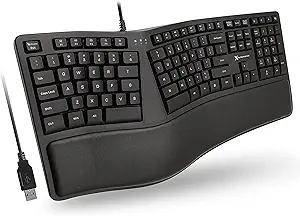
X9 Wired Ergonomic Keyboard with Cushioned Wrist Rest, 110 Keys, 5ft Cable for Laptop, PC & Chrome
The X9 Wired Ergonomic Keyboard stands out for its straightforward plug-and-play design and full-sized layout, making it ideal for users who prioritize simplicity and reliability. Its split ergonomic design and cushioned wrist rest help promote natural hand positioning, reducing fatigue during long typing sessions, unlike some wireless models that may introduce latency or connection issues. While lacking backlit keys, which could hinder use in dim environments, its wired connection ensures consistent performance without the need for charging or pairing. Compared to more feature-rich options like the ProtoArc EK01 Plus, the X9 offers a more minimalist, distraction-free experience, though it sacrifices wireless convenience and customizable lighting. This pick is perfect for those who prefer a dependable, no-fuss ergonomic keyboard that integrates seamlessly with desktop setups.Pros:- Promotes natural hand positioning to reduce wrist fatigue
- Includes a cushioned wrist rest for extended comfort
- Plug-and-play setup with no driver installation needed
- Full-sized layout with numeric keypad and shortcuts
Cons:- No backlit keys, limiting use in low light
- Wired connection restricts mobility
Best for: Desk users who need a reliable, full-sized wired ergonomic keyboard for productivity without wireless hassles.
Not ideal for: Users seeking portability or a clutter-free workspace might find the wired design restrictive.
- Design:Split ergonomic
- Wrist Rest:Cushioned
- Number of Keys:110
- Cable Length:5ft
- Compatibility:Laptop, PC, Chrome
- Backlit Keys:No
- Additional Features:LED indicators, adjustable kickstand, plug and play
Our verdict“This wired option is best suited for users who value dependability and a traditional full-size layout for daily work.”
Nulea RT07B Wireless Ergonomic Split Keyboard with Wrist Rest, Bluetooth & USB Connectivity, USB-C Rechargeable, Compatible with Windows & Mac
The Nulea RT07B delivers a compelling balance of comfort and versatility, making it a strong choice for those seeking a wireless ergonomic keyboard at an accessible price point. Its split ergonomic layout and soft palm rest help reduce wrist strain, comparable to pricier models like the ProtoArc EK01 Plus, but at a more affordable cost. The long battery life of up to 200 hours and dual Bluetooth plus USB-C connectivity provide flexibility for multi-device setups, though the absence of backlit keys limits usability in darker environments. Compared with the more feature-rich RT05 with backlighting, the RT07B emphasizes straightforward comfort and reliable wireless operation, sacrificing some customization options. This option makes sense for users who want a budget-friendly, wireless ergonomic keyboard that doesn’t compromise on core comfort features.Pros:- Ergonomic split design reduces wrist strain
- Long-lasting battery with up to 200 hours of use
- Dual connectivity via Bluetooth and USB-C
- Soft palm rest adds extra comfort
Cons:- Limited color options (Silver or Black only)
- Lack of backlit keys may hinder use in low light
Best for: Home office workers or students who need a wireless ergonomic keyboard with good battery life and multi-device support.
Not ideal for: Gamers or night owls who require backlit keys and quick customization might find it lacking.
- Design:Ergonomic split layout
- Connectivity:Bluetooth and USB-C
- Battery Life:Up to 200 hours
- Compatibility:Windows and Mac
- Additional Features:Rechargeable, soft palm rest
Our verdict“This model suits budget-conscious users prioritizing wireless convenience and ergonomic comfort for everyday work.”
Nulea RT05 Wireless Ergonomic Split Keyboard with Wrist Rest and 7-Color Backlight, Pink
The Nulea RT05 combines ergonomic design with customizable aesthetics, making it ideal for users who want a fun, colorful workspace without sacrificing comfort. Its curved, splayed layout and wrist rest aim to reduce typing discomfort, similar to the RT07B but with additional flair through seven backlight colors. The adjustable tilt and multiple device connectivity expand its versatility, though the ergonomic layout may take time to adapt to and the automatic backlight shutoff below 10% battery reduces visibility at low charge. Compared with more neutral models like the ProtoArc EK01 Plus, the RT05 prioritizes customization and style over long-term battery life, which is longer on the ProtoArc. This keyboard makes the most sense for style-conscious users or those who enjoy a vibrant workspace with ergonomic benefits.Pros:- Ergonomic split and curved layout may reduce discomfort
- Seven-color backlighting with adjustable brightness
- Connects to up to three devices via Bluetooth or USB
- Rechargeable 2000 mAh battery supports extended use
Cons:- Backlight turns off automatically below 10% battery
- Requires adjustment period for ergonomic layout
Best for: Creative professionals or students who want a colorful, customizable ergonomic keyboard for casual or creative use.
Not ideal for: Power users or gamers needing continuous backlighting or a highly responsive keyboard may find it less suitable.
- Model:RT05
- Color:Pink
- Design:Split, splayed, curved
- Connectivity:Bluetooth and 2.4 GHz USB
- Connected Devices:Up to 3
- Backlight Colors:Blue, green, red, cyan, purple, yellow, white
- Battery Capacity:2000 mAh
Our verdict“This keyboard is best for those seeking a vibrant, customizable ergonomic option with multi-device flexibility.”
ProtoArc EK01 Plus Backlit Bluetooth Ergonomic Keyboard
The ProtoArc EK01 Plus exemplifies high-end ergonomic design with its adjustable tilt, white LED backlighting, and long-lasting battery, making it suitable for power users who need a premium, customizable experience. Its full-size split layout and adjustable angles help minimize wrist and forearm strain, outperforming basic models like the X9 in ergonomic flexibility. The white LED backlight with three brightness levels enhances usability in darker environments, although the absence of programmable keys limits customization. Compared to the simpler Nulea models, the EK01 Plus offers more personal adjustments and multi-device switching, but at a higher cost. This keyboard appeals most to professionals or enthusiasts willing to invest in long-term ergonomic comfort and multi-platform versatility.Pros:- Adjustable tilt and ergonomic split design reduce strain
- White LED backlighting with three brightness levels
- Long-lasting 2000mAh rechargeable battery
- Seamless multi-device switching via Bluetooth and USB
Cons:- Keys are not programmable, limiting customization
- Learning curve due to ergonomic layout
Best for: Professionals or ergonomic enthusiasts seeking a premium, multi-device ergonomic keyboard with customizable tilt and backlighting.
Not ideal for: Casual users or those on a tight budget who do not need adjustable angles or extensive features might prefer simpler options.
- Connectivity:Bluetooth and 2.4G USB
- Battery Capacity:2000mAh
- Backlight:White LED with 3 brightness levels
- Battery Life:Up to 100 days with backlight off
- Compatibility:Windows 8/10+, Mac OS X 10.12+, Android 4.3+
- Dimensions:Check before ordering
Our verdict“This premium option is ideal for users who prioritize ergonomic flexibility, long battery life, and multi-device support in a sophisticated package.”
MEETION Wireless Ergonomic Split Keyboard and Vertical Mouse Combo
The MEETION combo offers a full ergonomic solution with both a split keyboard and vertical mouse, making it an excellent choice for users aiming to optimize both wrist and arm positioning. The curved, split layout and cushioned wrist rest on the keyboard, along with the vertical mouse, work together to significantly reduce strain during extended use, outperforming standalone keyboards like the Nulea RT07B when considering overall ergonomic setup. Its shared USB-A receiver and rechargeable batteries simplify connectivity and maintenance, though the large size demands ample desk space and the USB-C adapter is necessary for charging via modern ports. Compared with individual ergonomic keyboards, this bundle targets users seeking a comprehensive ergonomic workspace rather than a single device. It’s suited for those prioritizing ergonomic health in a full desktop setup.Pros:- Split keyboard and vertical mouse promote natural hand and arm positions
- Cushioned wrist rest enhances comfort
- Rechargeable batteries last 1-2 months per charge
- Wireless range up to 33 feet for flexible setup
Cons:- Large overall size takes up significant desk space
- Requires USB-A receiver and cannot operate solely via Bluetooth
Best for: Individuals with prolonged computer use who want a coordinated ergonomic keyboard and mouse for maximum comfort.
Not ideal for: Users with limited desk space or those who prefer a more portable or minimalist solution might find the set bulky.
- Keyboard Dimensions:19.09 x 10.04 x 1.83 inches
- Mouse Dimensions:2.87 x 4.09 x 2.28 inches
- Keyboard Layout:Full-size split curved
- Mouse DPI:800/1200/1600/2400
- Wireless Range:Up to 33 feet
- Keyboard Battery:500mAh rechargeable
- Mouse Battery:500mAh rechargeable
- Battery Life:Up to 1-2 months per charge
Our verdict“This combo is best for users seeking a full ergonomic desktop setup to reduce strain during long hours of work.”
Nulea Wireless Ergonomic Keyboard, Split Keyboard with Cushioned Wrist Rest, Bluetooth and USB Connectivity, USB-C Rechargeable, Compatible with Windows and Mac
This wireless option stands out for its combination of flexibility and comfort, featuring a split design that promotes natural hand alignment, similar to the Logitech Ergo K860 but with added wireless convenience. While the Nulea’s dual Bluetooth and USB connectivity offer versatile device pairing, its limited tilt adjustments may not suit users seeking highly customizable angles. The long 206-hour battery life surpasses many wired or shorter-lived wireless options, making it ideal for those who prioritize minimal setup disruptions. Its oversized cushioned wrist rest enhances comfort during extended sessions, although the need for initial adjustment to a split layout can be a hurdle for newcomers. Compared to the wired Nulea RT05C, it offers greater mobility at the expense of potential connectivity issues in certain environments.
Pros:- Reduces hand and wrist strain with ergonomic split design
- Wireless connectivity offers flexibility and reduces clutter
- Long-lasting battery minimizes charging interruptions
- Cushioned wrist rest enhances comfort
Cons:- Requires adjustment to the split layout, which may slow initial adaptation
- Limited tilt angle options restrict fine-tuning of ergonomic positioning
- No backlit keys may reduce visibility in low light
Best for: Professionals who need a wireless ergonomic keyboard for long hours at a desk or on the go
Not ideal for: Users who prefer wired reliability or have limited desk space for larger layouts
- Connectivity:Bluetooth and 2.4G USB
- Rechargeable Battery Life:206 hours
- Wrist Rest:Cushioned, leatherette
- Tilt Adjustment:Three angles
- Compatibility:Windows and Mac
Our verdict“Best suited for users seeking a wireless ergonomic solution that combines comfort with mobility, accepting some initial adjustment time.”
Nulea RT05C Wired Ergonomic Split Keyboard with Cushioned Wrist Rest
This wired model is ideal for users who prioritize a stable connection and straightforward setup, offering a split ergonomic design similar to the Kinesis Freestyle2 but with a more traditional wired approach. The braided cable ensures durability, making it well-suited for intensive daily use or gaming. Its adjustable tilt with three angles offers a customizable ergonomic stance, though lacking wireless flexibility limits portability and convenience. Compared to the wireless Nulea, the RT05C provides a plug-and-play experience that is less susceptible to connectivity issues, though at the expense of desk clutter and cable management. Its leatherette wrist rest provides comfort, but some users might find the wired connection restrictive in dynamic work environments.
Pros:- Stable wired connection eliminates latency and interference
- Adjustable tilt angles for ergonomic comfort
- Durable braided cable enhances longevity
- Comfortable cushioned wrist rest
Cons:- Less portable due to wired design and cable length
- Limited to basic hotkeys, lacking advanced programmable keys
- No wireless option for flexible positioning
Best for: Desk-bound users who need reliable, consistent connectivity for extended typing or gaming sessions
Not ideal for: Mobile professionals or those who prefer wireless freedom and less cable clutter
- Design:Split ergonomic
- Wrist Rest:Oversized, leatherette
- Adjustable Tilt:Yes, three angles
- Connection:Wired, braided nylon cable
- Compatibility:Windows, Mac, Linux
Our verdict“A strong choice for users who need a reliable wired ergonomic keyboard with adjustable comfort features and minimal fuss.”
Perixx PERIBOARD-512B Wired Ergonomic Keyboard
The Perixx PERIBOARD-512B emphasizes tactile feedback and durability, making it a practical choice for those who prefer a membrane switch with a long keystroke and curved keycaps for comfort. Its split design offers ergonomic benefits comparable to the Kinesis Freestyle2, but with a more straightforward membrane switch that may appeal to users seeking a familiar typing feel. The long key travel enhances responsiveness, yet it might slow down fast typists or gamers used to mechanical switches. While the keyboard’s durability and high keystroke limit make it appealing for heavy daily use, the lack of wireless capability and a more modern aesthetic could be downsides for some.
Pros:- Reduces wrist strain with ergonomic split design
- Responsive tactile feedback with long key travel
- Durable construction with high keystroke lifespan
- Curved keycaps improve comfort during extended use
Cons:- Requires adjustment for new users unaccustomed to membrane switches
- Lacks wireless connectivity, limiting mobility
- Older design may seem less modern or sleek
Best for: Office workers or typists who value tactile feedback and durability in a wired form factor
Not ideal for: Gaming enthusiasts or users seeking wireless flexibility or a mechanical switch experience
- Design:Split-key ergonomic layout
- Connectivity:Wired USB
- Key Travel:4.2 mm
- Switch Type:Membrane
- Durability:Up to 20 million keystrokes
Our verdict“Ideal for those who prioritize tactile feel and durability over wireless convenience or mechanical switch preferences.”
Logitech Ergo K860 Wireless Ergonomic Keyboard
The Logitech Ergo K860 elevates ergonomic design with its curved, split keyboard layout and memory foam wrist rest, making it suitable for users who spend many hours typing. Compared with the Nulea Wireless, it offers a more refined ergonomic curve and adjustable tilt angles (-4 and -7 degrees), but at a higher price point. The full-size layout includes a number pad, which can be a benefit or drawback depending on desk space and workflow needs. Its wireless connectivity via Bluetooth and USB is versatile, yet the bulkier form factor and premium price tag might deter budget-conscious buyers. The need for software to customize key functions adds complexity, but its build quality and comfort often justify the cost for dedicated ergonomic users.
Pros:- Reduces wrist and muscle strain with ergonomic, curved design
- Memory foam wrist rest enhances comfort
- Adjustable tilt angles for personalized ergonomics
- Wireless connectivity offers freedom of movement
Cons:- Higher price point may be prohibitive for some users
- Bulkier than standard keyboards, occupying more desk space
- Requires software for full customization, adding setup complexity
Best for: High-end users who value advanced ergonomic features and premium build quality for long work sessions
Not ideal for: Budget-conscious buyers or those needing a compact or minimalistic keyboard
- Connectivity:Bluetooth and USB
- Compatibility:Windows and Mac
- Wrist Rest:Memory foam, curved
- Key Layout:Full-size
- Tilt Angles:0, -4, -7 degrees
Our verdict“Best suited for users seeking a premium ergonomic keyboard with advanced comfort features and wireless convenience, accepting the higher cost and size.”
Kinesis Freestyle2 USB-A Ergonomic Keyboard with VIP3 Lifters for PC
The Kinesis Freestyle2 is a standout for users who want full control over their ergonomic setup, offering up to 9 inches of separation and adjustable tenting angles up to 15 degrees. Its modular design allows for a tailored fit, similar to the flexibility of the Nulea Wireless but with direct customization that appeals to advanced users. The low-force membrane keys reduce finger fatigue, and the included VIP3 tenting accessories enable a more natural hand position. However, the wired connection limits mobility, and the pre-assembled tenting options can restrict some personal preferences. This model is ideal for those who prioritize a precise ergonomic layout and are comfortable with a more complex setup, unlike the simpler, more integrated designs of the Nulea models.
Pros:- Highly customizable separation and tenting options
- Standard Windows layout with dedicated hotkeys
- Low-force membrane keys reduce fatigue
- Includes adjustable VIP3 tenting accessories
Cons:- Requires wired connection, limiting flexibility
- Pre-assembled tenting may not suit all preferences
- Design can be bulky and take up more desk space
Best for: Ergonomic enthusiasts and professionals who want maximum customization and are okay with a wired setup
Not ideal for: Casual users or those seeking a plug-and-play wireless solution
- Separation:up to 9 inches
- Tenting angles:5, 10, or 15 degrees
- Layout:Standard Windows
- Connectivity:USB-A
- Included accessories:VIP3 tenting, palm supports, adhesive pads, pivot tether
Our verdict“Ideal for users seeking a highly adaptable ergonomic keyboard with extensive customization, willing to accept the wired connection and bulkier form.”
Arteck Ergonomic USB Wired Keyboard with Cushioned Wrist & Palm Rest, Backlit 7 Colors & Adjustable Brightness
This wired option stands out for its vibrant backlit customization and straightforward setup, making it ideal for users who prioritize visual flexibility and simplicity. Compared to the Backlit Bluetooth Ergonomic Keyboard, it lacks wireless convenience but offers a reliable wired connection that minimizes latency. The cushioned wrist rest adds comfort, but since it’s limited to Windows, Mac users might need to look elsewhere. Its 6-foot USB cable ensures ample reach, though portability is reduced by the wired design. Overall, this pick is perfect for budget-conscious users who want ergonomic benefits without extra features.
Pros:- Ergonomic split design reduces wrist strain
- Customizable backlit colors improve visibility
- Cushioned wrist rest enhances long-term comfort
Cons:- Limited to Windows compatibility
- Wired connection reduces portability
Best for: Windows users seeking an affordable, plug-and-play ergonomic keyboard with backlit features
Not ideal for: Users needing wireless connectivity or Mac compatibility, as it is Windows-only and wired
- Connection:USB wired
- Backlight Colors:7
- Brightness Levels:3
- Wrist Rest:Cushioned
- Cable Length:6 feet
- Compatibility:Windows
Our verdict“A solid choice for those wanting an affordable, backlit wired ergonomic keyboard for Windows use.”
Arteck Split Ergonomic Wireless Keyboard with Cushioned Wrist Rest for Windows
This wireless model offers a clean, cable-free workspace with a comfortable cushioned wrist rest, making it suitable for those who prefer mobility. Compared with the Kinesis Freestyle2, it’s less customizable in separation but easier to set up for casual users. Its 6-month rechargeable battery is a significant advantage over shorter-lived options, though it’s limited to Windows and requires a USB receiver. The wireless convenience is perfect for flexible setups, yet the necessity of a USB dongle may be a minor inconvenience for minimal desk clutter. This makes it ideal for users who prioritize simplicity and comfort over extensive adjustability.
Pros:- Ergonomic split design reduces wrist strain
- Cushioned wrist rest boosts comfort
- Rechargeable battery lasts up to 6 months
Cons:- Limited to Windows compatibility
- Requires USB receiver, which can be misplaced
Best for: Windows users seeking a cable-free ergonomic keyboard with long battery life
Not ideal for: Users who need extensive separation adjustment or multi-OS compatibility, as it’s Windows-only and fixed in separation
- Design:Split ergonomic
- Wrist Rest:Cushioned
- Connectivity:2.4G USB wireless
- Battery Life:6 months
- Compatibility:Windows
Our verdict“A reliable wireless choice for Windows users who value comfort and long battery life in a split design.”
Kinesis Freestyle2 Ergonomic Keyboard for PC
The Kinesis Freestyle2 is distinguished by its highly adjustable separation, allowing users to tailor the distance up to 9 inches for optimal ergonomic alignment. Unlike the fixed separation of the Arteck Wired or wireless models, it adapts to diverse body types and preferences. Its standard Windows layout with hotkeys and a numeric keypad appeals to productivity-focused users, but the wired connection limits portability. The low-force tactile switches help reduce finger fatigue, yet adjusting to the split may require a learning curve. This makes it a top choice for those who need customizable ergonomics and don’t mind a wired setup.
Pros:- Highly adjustable separation for ergonomic comfort
- Standard Windows layout with hotkeys and numeric keypad
- Plug-and-play with multiple operating systems
Cons:- Requires wired connection, limiting portability
- No wireless option available
- Adjustment period needed for new users
Best for: Users seeking maximum separation adjustment and customizable ergonomics in a wired setup
Not ideal for: Those prioritizing wireless convenience or extremely portable solutions, as it’s wired and takes time to adapt
- Separation Adjustment:up to 9 inches
- Layout:Standard Windows
- Connectivity:Wired USB
- Compatibility:Windows 7-10, Linux, Chrome
- Switch Type:Low-force membrane
Our verdict“Ideal for users who want a highly customizable, wired ergonomic keyboard with broad OS compatibility.”
Adesso Ergonomic USB Keyboard with Integrated Palm Rest – Split Key Design, Multimedia & Internet Hotkeys, 105-Key US Layout AKB-150UB
The Adesso AKB-150UB offers a familiar, full-size layout with an integrated palm rest, making it suitable for users who want a straightforward ergonomic solution without extra bells and whistles. Its split key design is beneficial for reducing wrist strain, but lacking advanced features like backlit keys or wireless connectivity. It’s a solid choice for those who need durability and basic ergonomic benefits in a Windows environment, though the membrane switches may not satisfy users seeking a premium typing feel. Compared to the ProtoArc EK01 Plus, it’s less feature-rich but more durable and straightforward, appealing to users who prefer simplicity.
Pros:- Split key layout reduces hand and wrist strain
- Integrated palm rest enhances comfort
- Includes multimedia and hotkeys for quick access
Cons:- No water resistance, caution needed around liquids
- Basic membrane switches may feel less premium
- Limited to Windows operating systems
Best for: Office workers needing a durable, basic ergonomic keyboard with hotkeys for Windows
Not ideal for: Gamers or tech enthusiasts looking for backlit or wireless options, as it’s basic and wired
- Compatible Devices:PC
- Connectivity Technology:USB
- Additional Features:Ergonomic, hotkeys
- Power Source:Corded Electric
- Number of Keys:105
- Hand Orientation:Ambidextrous
Our verdict“A dependable, no-frills ergonomic keyboard suited for office environments that value durability and comfort.”
Backlit Bluetooth Ergonomic Keyboard, ProtoArc EK01 Plus Full Size Wireless Split Keyboard with Dual Bluetooth and USB, Cushioned Wrist Rest, Rechargeable for Windows/Mac/Android
The ProtoArc EK01 Plus excels in supporting multiple devices with its dual Bluetooth and USB connectivity, making it versatile for multi-platform users. Its full-size, curved split design promotes proper wrist posture, and the adjustable white LED backlighting adds visibility in various lighting conditions. Compared to the Arteck Wired, it offers wireless convenience and multi-device support, but at the cost of not having a wired option, which some users may prefer for reliability. The rechargeable 2000mAh battery ensures extended use, yet its size might demand more desk space. This model is ideal for users who want ergonomic comfort combined with multi-device flexibility.
Pros:- Ergonomic split, curved design reduces wrist strain
- Supports multiple devices via Bluetooth and USB
- Adjustable white LED backlighting improves visibility
Cons:- Requires measurement for desk space due to full size
- Backlight turns off after inactivity, which can be inconvenient
- No wired connection option
Best for: Multi-device users needing a wireless, ergonomic, full-size keyboard for Windows, Mac, or Android
Not ideal for: Desk-bound users needing wired or extremely compact solutions, or those less comfortable with larger keyboards
- Design:Full-size split, curved
- Backlighting:Adjustable white LED
- Connectivity:Bluetooth and USB
- Battery:2000mAh rechargeable
- Compatibility:Windows, Mac, Android
Our verdict“A flexible, multi-platform wireless ergonomic keyboard suited for users managing multiple devices at once.”

How We Picked
To determine the best ergonomic split keyboards, I evaluated each model based on several critical factors. Performance was assessed through feature set and ergonomic design, ensuring that each keyboard genuinely reduces wrist and shoulder strain. Usability considerations included ease of setup, connectivity options, and adjustability. Build quality and durability played a significant role, especially for long-term use. Value was also a factor, weighing features against price. This process resulted in a ranking that prioritizes comfort, flexibility, and reliability, ensuring that each selected keyboard serves distinct user needs effectively.Factors to Consider When Choosing Ergonomic Split Keyboards
Choosing an ergonomic split keyboard requires weighing several important factors. Comfort features like adjustable tenting and split angles help reduce strain, but not all models offer the same level of customization. Connectivity options, whether wired or wireless, influence setup flexibility and portability. Build quality ensures durability over time, especially for daily use. Additionally, consider compatibility with your devices and operating systems, as some models are optimized for Windows, Mac, or Android. Being aware of these broader considerations helps avoid common pitfalls like sacrificing comfort for features that don’t suit your workflow.Adjustability and Ergonomics
Look for keyboards that offer adjustable tenting and split angles, which help align your wrists and shoulders naturally. Not all split keyboards have adjustable components, so if you have specific comfort needs or existing issues, prioritize models with customizable features. However, more adjustable options often come with increased complexity or higher prices, so balance your needs with your budget. Remember, a poorly adjustable keyboard can negate ergonomic benefits and lead to discomfort over time.
Connectivity Options
Wireless keyboards provide greater flexibility and reduce clutter, but they might introduce latency or battery concerns. Wired models typically offer a more stable connection and often cost less, but limit placement options. Consider your workspace and device compatibility: Bluetooth connectivity works well with laptops and tablets, while USB-C or USB-A connections are reliable for desktops. Some models also feature dual connectivity, which can be useful if you switch between devices frequently.
Build Quality and Durability
Opt for keyboards with sturdy construction, especially if you plan to use them daily. Premium materials like metal or high-quality plastics tend to last longer and maintain comfort. Cheaper models might use softer plastics that wear out faster or lack key features like cushioned wrist rests. Keep in mind that a well-built ergonomic keyboard not only improves comfort but also offers better noise reduction and key stability over time.
Compatibility and Software
Ensure the keyboard is compatible with your operating system, whether Windows, Mac, or Android. Some models come with customizable hotkeys or firmware that enhances usability, especially for productivity tasks. Check if the keyboard supports key remapping or macro functions, which can be valuable for advanced users. Compatibility issues can diminish the ergonomic benefits if the device isn’t properly integrated into your setup.
Price and Value
Balance your budget with the features you need. High-end models often include advanced adjustability, premium materials, and wireless connectivity, but can be costly. Budget options may lack some ergonomic refinements but still provide essential split design benefits. Consider long-term durability and comfort as investments that can prevent discomfort or health issues, which might justify spending more upfront. Always compare features against price to find the best value for your specific needs.
Frequently Asked Questions
Are ergonomic split keyboards suitable for gaming?
While ergonomic split keyboards can be used for gaming, they are primarily designed for comfort during extended typing sessions. Some models may have features that benefit gaming, such as customizable keys or backlit layouts, but their split design can feel unfamiliar or less intuitive for fast-paced gameplay. If gaming is a priority, look for models that balance ergonomic features with gaming-specific functionalities, or consider a separate gaming keyboard for competitive play.
Can I use an ergonomic split keyboard on a standing desk?
Yes, ergonomic split keyboards are well-suited for standing desks, especially if they offer adjustable tenting and angles. These features help maintain natural wrist and arm positions, reducing strain during long periods of standing or working at a desk. Ensure the keyboard’s height and tilt are adjustable to fit your ergonomic setup, and consider models with sturdy stands or risers to keep the keyboard stable at your preferred angle.
How important is wireless connectivity for ergonomic split keyboards?
Wireless connectivity is a significant convenience, reducing cable clutter and allowing flexible placement. However, it can introduce concerns like battery life, latency, and connectivity stability. For most users, Bluetooth or proprietary wireless options provide enough reliability, but if low latency and stable connection are critical—such as for professional typing or editing—wired models might be preferable. Weigh these factors based on your workspace and workflow needs.
Do all ergonomic split keyboards include wrist rests?
Not all models come with integrated wrist rests, but many include them as standard features because they enhance comfort and support. Wrist rests help keep your wrists in a neutral position, preventing strain over long typing sessions. When choosing a model without a wrist rest, consider adding an external one, but ensure it complements the keyboard’s height and tilt for maximum ergonomic benefit. Prioritize models with built-in rests if wrist comfort is a primary concern.
Is it better to choose a wired or wireless ergonomic split keyboard?
Choosing between wired and wireless depends on your setup and preferences. Wireless keyboards offer greater freedom of movement and a cleaner workspace, making them ideal for flexible or minimalist setups. Wired options, on the other hand, often provide more reliable connections with no latency, which can be advantageous for intensive typing tasks. Consider your workspace, device compatibility, and whether convenience or stability is more important when making your choice.
Conclusion
For most users, the Logitech Ergo K860 offers the best combination of comfort, build quality, and flexibility, making it ideal as an overall choice. Budget-conscious buyers should consider wired options like the Perixx PERIBOARD-512B for reliable performance at a lower cost. Those seeking premium features and adjustable ergonomics will find value in the Nulea RT07B Wireless Split Keyboard or the ProtoArc EK01 Plus. Beginners or casual users might prioritize straightforward, wired designs, while professionals or heavy typists should look for models with customizable features and durable builds. Tailoring your choice to your specific ergonomic needs and workspace setup will ensure better comfort and productivity over time.