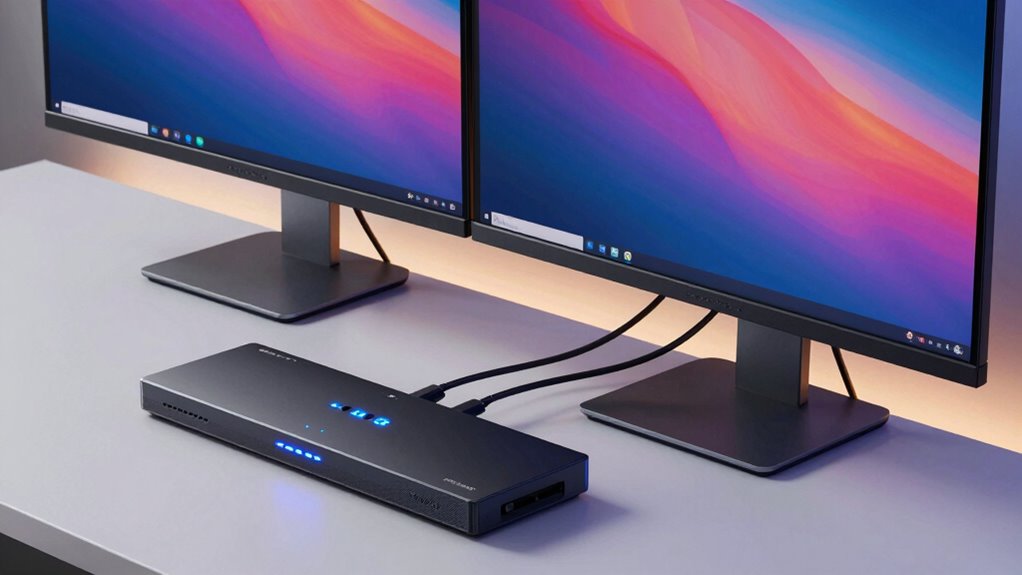

For users seeking seamless control over two 4K monitors with a single keyboard and mouse, a dual monitor KVM switch is essential. The best models balance high resolution support, smooth switching, and reliable build quality. The UGREEN HDMI KVM Switch stands out as the overall top pick due to its stable 4K@60Hz performance and versatile USB ports. For those prioritizing high refresh rates, the DisplayPort KVM Switch for 2 Monitors offers 4K@144Hz, ideal for gaming or fast-paced workflows. Tradeoffs often involve balancing resolution, refresh rate, and price—higher specs typically come with increased cost or complexity. Keep reading for a detailed breakdown of all top contenders and what makes each unique.

Get the latest gadgets delivered free with Prime
- Fast, free delivery on millions of items
- Prime Video, Amazon Music and more included
- Member-only deals all year
Complete the kit



Key Takeaways
- Higher refresh rates like 144Hz are rare in dual 4K KVM switches, making 60Hz models more common for general use.
- USB hub capabilities vary; some switches include multiple USB 3.0 ports, which is essential for peripherals.
- Compatibility with both HDMI and DisplayPort depends on your setup, with some models supporting both for greater flexibility.
- Build quality and ease of switching differ significantly; more premium models often feature hotkeys and remote controls.
- Price ranges widely, but investing in a more robust switch can improve reliability and future-proof your setup.
| UGREEN HDMI KVM Switch 2 Monitors 2 Computers 4K@60Hz with 4 USB 3.0 Ports |  | Best Overall for Versatile Dual HDMI Control | Number of Monitors: 2 | Number of Computers: 2 | Resolution Support: 4K@60Hz | VIEW ON AMAZON | See Our Full Breakdown |
| DisplayPort KVM Switch for 2 Monitors and 2 Computers, 4K@144Hz, USB 3.0, Dual Display Support |  | Best for High-Performance Gaming and Creative Work | Max Resolution: 3840×2160@144Hz | Ports: 2 DisplayPort, 4 USB 3.0 | Supported Modes: Extended and Copy | VIEW ON AMAZON | See Our Full Breakdown |
| 4K@120Hz HDMI KVM Switch for Dual Monitors and Dual Computers |  | Best for High-Quality Visuals at Slightly Lower Refresh Rate | Resolution: 4K@120Hz | HDMI Ports: 2 | USB Ports: 4 USB 3.0 | VIEW ON AMAZON | See Our Full Breakdown |
| AV Access KVM Switch Dock for 2 Monitors and 2 Laptops, 4K Dual Monitor |  | Best for Versatile Docking and Seamless Switching | Number of Monitors: 2 | Maximum Resolution: 4K | USB Ports: 2x USB 3.0, 4x USB 2.0, 1x USB-C | VIEW ON AMAZON | See Our Full Breakdown |
| HDMI KVM Switch 2 Monitors 4 Computers, 4K Dual Monitor KVM Switches |  | Best for Multi-Computer Home and Office Use | Number of Monitors: 2 | Number of Computers: 4 | Resolution Support: 3840×2160@60Hz | VIEW ON AMAZON | See Our Full Breakdown |
| Heravo USB 3.0 HDMI KVM Switch 2 Monitors 2 Computers, 4K@60Hz Dual Monitor |  | Best Overall Dual 4K KVM Switch | Number of Monitors: 2 | Number of Computers: 2 | Resolution Support: 4K@60Hz | VIEW ON AMAZON | See Our Full Breakdown |
| Greathek 4K@60Hz HDMI KVM Switch 2 Monitors 2 Computers Dual Monitor |  | Best for Multi-Platform Compatibility | Number of Monitors: 2 | Number of Computers: 2 | Resolution Support: Up to 3840 × 2160 at 60Hz | VIEW ON AMAZON | See Our Full Breakdown |
| 4K@144Hz Dual Monitor KVM Switch for 2 Computers with USB 3.0 |  | Best for High-Refresh-Rate Gaming and Graphics | Resolution Support: 4K@144Hz, 8K@60Hz | Monitor Connections: 2 DisplayPort | USB Ports: 4 USB 3.0 | VIEW ON AMAZON | See Our Full Breakdown |
| StarTech 2-Port Dual HDMI KVM Switch with 4K 60Hz UHD HDR and USB 3.0 Hub |  | Best for Professional Video and CAD Work | Number of Ports: 2 | Video Resolution: 3840 x 2160 at 60Hz | HDR Support: Yes | VIEW ON AMAZON | See Our Full Breakdown |
| 10 Port 8 Port 2 Monitors HDMI KVM Switch 4K@60Hz EDID Simulation USB 3.0 RS232 Remote |  | Best for Large-Scale Multi-Device Management | Number of Computers: 10 | Number of Monitors: 2 | Resolution Support: 4K@60Hz | VIEW ON AMAZON | See Our Full Breakdown |
| TESmart USB 3.0 HDMI KVM Switch for Dual Monitors, 2 Computers, 4K@60Hz, Audio & Microphone, EDID Emulators, Hotkey & Button Switch |  | Best Overall | Number of Monitors: 2 | Number of Computers: 2 | Resolution: 4K@60Hz | VIEW ON AMAZON | See Our Full Breakdown |
| 8K HDMI KVM Switch for Dual Monitors and Computers | 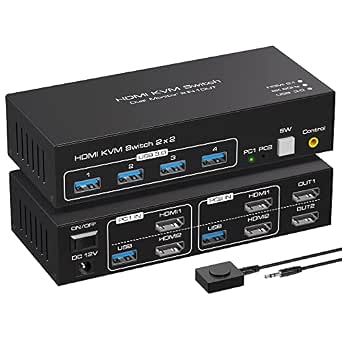 | Best for Ultra-High-Resolution Enthusiasts | Resolution Support: 8K@60Hz, 4K@120Hz | Monitor Count: 2 | Computer Count: 2 | VIEW ON AMAZON | See Our Full Breakdown |
| HDMI DisplayPort KVM Switch for Dual Monitors and Computers, 4K@60Hz |  | Best for Versatile Connectivity | Video Resolution: 4K@60Hz | Ports: 2 HDMI, 2 DisplayPort | USB Ports: 4 USB 3.0 | VIEW ON AMAZON | See Our Full Breakdown |
| Hearvo 8K@60Hz HDMI KVM Switch for 2 Monitors and 2 Computers, USB 3.0, Wired Remote |  | Best for High-Resolution, Remote Control Simplicity | Number of Monitors: 2 | Number of Computers: 2 | HDMI Ports: 2 | VIEW ON AMAZON | See Our Full Breakdown |
| TESmart 4 Port Dual Monitor DisplayPort KVM Switch Support 4K@60Hz with USB 3.0 and EDID Emulators |  | Best for Multi-Computer, Multi-Monitor Setups | Number of Ports: 4 | Monitor Support: 2 monitors | Resolution: 4K@60Hz | VIEW ON AMAZON | See Our Full Breakdown |
| dual monitor kvm switch 4k | USB Ports | Number of Monitors | Number of Computers | Resolution Support |
|---|---|---|---|---|
| UGREEN HDMI KVM Switch 2 Monit | 4 (3 USB-A + 1 USB-C) | 2 | 2 | 4K@60Hz |
| DisplayPort KVM Switch for 2 M | — | 2 | — | — |
| 4K@120Hz HDMI KVM Switch for D | 4 USB 3.0 | — | — | — |
| AV Access KVM Switch Dock for | 2x USB 3.0, 4x USB 2.0, 1x USB-C | 2 | — | — |
| HDMI KVM Switch 2 Monitors 4 C | 3 USB 3.0 | 2 | 4 | 3840×2160@60Hz |
| Heravo USB 3.0 HDMI KVM Switch | 4 (3×USB-A + 1×USB-C) | 2 | 2 | 4K@60Hz |
| Greathek 4K@60Hz HDMI KVM Swit | 3 USB 3.0 | 2 | 2 | Up to 3840 × 2160 at 60Hz |
| 4K@144Hz Dual Monitor KVM Swit | 4 USB 3.0 | — | 2 | 4K@144Hz, 8K@60Hz |
| StarTech 2-Port Dual HDMI KVM | 2 USB 3.0 | — | — | — |
| 10 Port 8 Port 2 Monitors HDMI | 4 USB 3.0 | 2 | 10 | 4K@60Hz |
| TESmart USB 3.0 HDMI KVM Switc | 2 USB 3.0 | 2 | 2 | — |
| 8K HDMI KVM Switch for Dual Mo | 4 USB 3.0 | — | — | 8K@60Hz, 4K@120Hz |
| HDMI DisplayPort KVM Switch fo | 4 USB 3.0 | — | — | — |
| Hearvo 8K@60Hz HDMI KVM Switch | 3 USB 3.0 | 2 | 2 | 8K@60Hz, 4K@240Hz |
| TESmart 4 Port Dual Monitor Di | 4 USB 3.0 | — | — | — |
More Details on Our Top Picks
UGREEN HDMI KVM Switch 2 Monitors 2 Computers 4K@60Hz with 4 USB 3.0 Ports
This UGREEN HDMI KVM switch stands out for its ability to handle dual 4K@60Hz displays while offering four USB 3.0 ports, making it a strong choice for professional setups. Compared with the StarTech 2-Port Dual HDMI KVM Switch, it provides more USB connectivity and flexible switching options via both buttons and a desktop controller. However, unlike the DisplayPort KVM Switch for 2 Monitors and 2 Computers, it relies solely on HDMI, which might limit compatibility with certain high-end graphics hardware. Its main tradeoff is the need for an external power supply for USB device operation, which could add clutter. This pick makes the most sense for users who want reliable dual-monitor support with high-speed data transfer and flexible control without complex graphics requirements.
Pros:- Supports dual monitors at 4K@60Hz for crisp, clear visuals
- Includes four USB 3.0 ports for fast peripheral transfer
- Flexible switching with both button and desktop controller
Cons:- Requires external power supply for USB device functionality
- Limited to HDMI cables within 3 meters for optimal performance
Best for: Professionals or home office users needing seamless dual 4K display management with multiple USB peripherals.
Not ideal for: Gamers or users with high-end graphics cards requiring HDR or G-Sync support, due to limited to HDMI 2.0 and HDR10+.
- Number of Monitors:2
- Number of Computers:2
- Resolution Support:4K@60Hz
- USB Ports:4 (3 USB-A + 1 USB-C)
- HDMI Version:HDMI 2.0
- HDR Support:HDR10+
- Switching Modes:Button and desktop controller
Our verdict“This is an excellent choice for users who prioritize high-quality dual HDMI display support with flexible control options.”
DisplayPort KVM Switch for 2 Monitors and 2 Computers, 4K@144Hz, USB 3.0, Dual Display Support
This DisplayPort KVM switch excels in delivering ultra-smooth visuals at 4K@144Hz, appealing to gamers and creative professionals who demand high refresh rates. Compared with the UGREEN HDMI KVM Switch, it supports a much higher refresh rate, but it requires dual DisplayPort outputs per computer, making setup more complex and cable-intensive. The external power supply ensures stable operation, unlike some HDMI-based options that may struggle with high-bandwidth setups. However, its reliance on specific DisplayPort versions and the need for compatible cables can introduce compatibility issues. It’s best suited for users with powerful graphics cards and dual DisplayPort outputs, especially those focused on fast-paced gaming or high-fidelity video editing.
Pros:- Supports 4K@144Hz for ultra-smooth visuals
- Dual monitor control for two computers
- Stable operation with external 12V DC power supply
Cons:- Requires dual DisplayPort cables and USB cables per computer
- Setup complexity is higher due to cable and compatibility needs
Best for: Power users with high-end graphics hardware needing ultra-high refresh rate dual monitor management.
Not ideal for: Casual users or those with only HDMI outputs, as this switch requires dual DisplayPort connections and specific cables.
- Max Resolution:3840×2160@144Hz
- Ports:2 DisplayPort, 4 USB 3.0
- Supported Modes:Extended and Copy
- Power Supply:12V DC adapter
- Compatibility:DP 1.4, backward compatible with DP 1.2
- Number of Monitors:2
Our verdict“This is best suited for high-performance setups where ultra-high refresh rates and dual monitor control are priorities.”
4K@120Hz HDMI KVM Switch for Dual Monitors and Dual Computers
This HDMI KVM switch provides reliable 4K@120Hz performance, striking a balance between high resolution and refresh rate. Compared to the DisplayPort Switch, it simplifies setup with only HDMI connections, but it doesn’t support the ultra-high 144Hz rate. Its plug-and-play design suits users who want straightforward operation without sacrificing much visual fidelity. The external power supply ensures performance stability, but the need for compatible HDMI cables and hardware can limit usability in some configurations. It’s ideal for professionals or enthusiasts who want high-resolution, smooth visuals without the complexity of DisplayPort configurations.
Pros:- Supports 4K@120Hz for crisp, fast visuals
- Simple plug-and-play operation
- Dual monitor support with easy switching
Cons:- Requires compatible HDMI cables supporting 4K@120Hz
- No support for higher refresh rates or G-Sync
Best for: Content creators or professionals needing high-resolution dual monitors with fast refresh rates, but who prefer HDMI for compatibility reasons.
Not ideal for: High-end gamers or users requiring refresh rates above 120Hz, as it doesn’t support higher than 120Hz or G-Sync/Freesync features.
- Resolution:4K@120Hz
- HDMI Ports:2
- USB Ports:4 USB 3.0
- Power Supply:12V/1A DC adapter
- Supported Systems:Windows, Mac OS, Linux, Unix
- Switching:Panel button or wired controller
Our verdict“This switch is a solid pick for users prioritizing high-resolution visuals at 120Hz with HDMI convenience.”
AV Access KVM Switch Dock for 2 Monitors and 2 Laptops, 4K Dual Monitor
This KVM dock combines dual 4K monitor support with docking station features, offering extensive connectivity for two laptops. It’s particularly useful for users needing an all-in-one solution, with multiple USB ports, Ethernet, SD card, and HDMI outputs. Compared with standalone switches like the HDMI 2 Monitors 4 Computers, it adds charging capability and expanded peripherals, but its reliance on macOS restrictions can limit Mac users. The 2-3 second switching time is fast enough for most workflows, though it’s less suited for setups requiring G-Sync or Freesync, and compatibility depends on laptops supporting DP Alt Mode and MST. This is ideal for professionals seeking a comprehensive docking and KVM experience.
Pros:- Supports dual 4K monitors with seamless switching
- Extensive connectivity including Ethernet and SD card slots
- Charges laptops up to 60W simultaneously
Cons:- Limited Mac compatibility due to macOS restrictions
- Not suitable for 5K or G-Sync/Freesync displays
Best for: Laptop users who need a versatile docking station with dual 4K monitor support and quick seamless switching.
Not ideal for: Mac users with limited macOS support or those needing G-Sync or Freesync compatibility.
- Number of Monitors:2
- Maximum Resolution:4K
- USB Ports:2x USB 3.0, 4x USB 2.0, 1x USB-C
- Ethernet:1G LAN
- Power Delivery:Up to 60W
- Switching Time:2-3 seconds
Our verdict“This is the best option for mobile professionals wanting a docking station with integrated KVM for dual 4K displays.”
HDMI KVM Switch 2 Monitors 4 Computers, 4K Dual Monitor KVM Switches
This HDMI KVM switch supports four computers sharing two monitors at 4K@60Hz, making it suitable for multi-PC environments like offices or gaming setups. Compared with the UGREEN HDMI Switch, it offers broader multi-computer support but relies on each PC having dual HDMI outputs, which can complicate setup. Its support for remote switching via wired remote and compatibility with multiple operating systems adds convenience, though high-resolution stability depends on quality cables and hardware. The 5V USB power adapter helps maintain consistent performance, but the need for multiple HDMI ports per PC limits flexibility for users with fewer outputs. It’s ideal for users managing several PCs with a focus on straightforward switching and broad OS compatibility.
Pros:- Supports 4K@60Hz resolution across four computers
- Easy switching via button or remote control
- Broad OS and device compatibility
Cons:- Requires dual HDMI outputs per PC for dual monitor setup
- High-resolution performance depends on compatible hardware and cables
Best for: Users with multiple computers needing a simple, reliable dual monitor setup and easy switching at 4K@60Hz.
Not ideal for: Users with limited HDMI outputs or those seeking higher refresh rates beyond 60Hz, especially gamers needing G-Sync or Freesync.
- Number of Monitors:2
- Number of Computers:4
- Resolution Support:3840×2160@60Hz
- HDMI Version:HDMI 2.0
- Data Rate:18Gbps
- USB Ports:3 USB 3.0
- Switching Modes:Button or wired remote
Our verdict“This switch is well-suited for multi-PC environments where broad compatibility and simple operation are priorities.”
Heravo USB 3.0 HDMI KVM Switch 2 Monitors 2 Computers, 4K@60Hz Dual Monitor
This Heravo model stands out for its support of dual 4K monitors at 60Hz, matching the core capability of the Greathek switch but with added convenience through a wired remote control. Its plug-and-play setup makes it accessible for most users, and the four USB 3.0 ports facilitate fast peripheral sharing. Compared to the StarTech unit, it offers a more straightforward control interface, though it requires multiple HDMI cables, which could complicate setup. The remote control enhances usability, but might be less responsive from a distance. Its limitation to two computers and monitors makes it less suited for expanding multi-device environments. This pick makes the most sense for professionals or home users prioritizing seamless dual 4K display switching with straightforward operation.
Pros:- Supports dual 4K monitors at 60Hz for high-quality visuals
- Easy switching via button or wired remote for convenience
- Fast USB 3.0 ports enable quick peripheral sharing
Cons:- Requires multiple HDMI cables for full setup
- Remote control may be less responsive if placed far from the switch
Best for: Professional or home office users needing reliable dual 4K support with quick switching
Not ideal for: Users who require multi-device management beyond two computers or prefer remote control responsiveness from afar
- Number of Monitors:2
- Number of Computers:2
- Resolution Support:4K@60Hz
- USB Ports:4 (3×USB-A + 1×USB-C)
- HDMI Version:HDMI 2.0
- Remote Control:Wired remote included
Our verdict“This model is ideal for users seeking a straightforward, reliable dual 4K display solution with minimal fuss.”
Greathek 4K@60Hz HDMI KVM Switch 2 Monitors 2 Computers Dual Monitor
Compared with the Heravo switch, the Greathek model offers similar 4K@60Hz support but emphasizes cross-platform compatibility with Windows, macOS, and Linux systems. Its EDID emulation provides smoother switching and display stability, making it well-suited to environments where multiple OS are in use. However, it lacks remote control functionality, which can be a drawback for users who prefer quick access from a distance. The power adapter is not included, requiring an additional purchase, which adds complexity for some setups. While it handles dual 4K displays effectively, it’s less suitable for users wanting remote switching or those who prefer a more plug-and-play experience. This choice is best for users who prioritize broad OS compatibility and display stability over remote control features.
Pros:- Supports 4K resolution at 60Hz for high-quality visuals
- Includes EDID emulation for seamless switching
- Compatible with Windows, macOS, and Linux
Cons:- Power adapter not included, additional purchase required
- No remote control support for distant operation
Best for: Multi-platform users needing stable dual 4K display switching across diverse operating systems
Not ideal for: Users who want remote control switching or plug-and-play simplicity without additional accessories
- Number of Monitors:2
- Number of Computers:2
- Resolution Support:Up to 3840 × 2160 at 60Hz
- HDMI Version:HDMI 2.0
- USB Ports:3 USB 3.0
- Power:5V power input (adapter not included)
Our verdict“Best suited for multi-OS environments where display stability and compatibility matter most.”
4K@144Hz Dual Monitor KVM Switch for 2 Computers with USB 3.0
This switch pushes beyond the typical 4K@60Hz limit, supporting 4K@144Hz and 8K@60Hz, making it ideal for gamers or creative professionals who require ultra-smooth visuals. It shares two DisplayPort monitors and four USB 3.0 ports, comparable to the StarTech model but with the added benefit of very high refresh rate support. The need for two DisplayPort cables per computer could complicate setup, especially if adapters are needed. Unlike the Heravo and Greathek models, hotkey switching isn’t supported, which might be inconvenient during intense workflows. It is less suited for general office tasks but excels in high-performance display environments requiring maximum refresh rates.
Pros:- Supports 4K@144Hz and 8K@60Hz resolutions for ultra-smooth display
- Enables sharing two high-performance monitors and four USB devices
- Button and remote control switching options
Cons:- Requires two DisplayPort cables per PC, potentially needing adapters
- No hotkey switching support
Best for: High-end gamers or professionals demanding ultra-smooth 4K or 8K visuals with multiple monitors
Not ideal for: Casual users or those with limited DisplayPort cables or adapters, due to setup complexity
- Resolution Support:4K@144Hz, 8K@60Hz
- Monitor Connections:2 DisplayPort
- USB Ports:4 USB 3.0
- Number of Computers:2
- Switching Methods:Button, Remote control
- Power Supply:12V DC adapter
Our verdict“Best for users needing the highest refresh rates and resolutions for gaming or professional visuals.”
StarTech 2-Port Dual HDMI KVM Switch with 4K 60Hz UHD HDR and USB 3.0 Hub
The StarTech switch emphasizes professional-grade visuals with support for 4K@60Hz and HDR, making it a solid choice for creative workflows like video editing and CAD. Its fast switching via EDID and HDCP emulation minimizes workflow disruptions, similar to the Heravo and Greathek options but with a more durable steel housing that appeals to demanding environments. However, it’s limited to two computers, which restricts scaling for larger setups. While it includes a USB 3.0 hub, it lacks remote control, unlike some competitors. Its focus on high-quality visuals and durability makes it ideal for professional settings where display fidelity and stability are critical.
Pros:- Supports 4K resolution at 60Hz with HDR for vivid visuals
- Fast switching with EDID and HDCP emulation ensures workflow consistency
- Includes a built-in USB 3.0 hub for peripherals
Cons:- Limited to two computers, less flexible for larger setups
- No remote switching capability
Best for: Creative professionals and engineers needing reliable 4K visuals and durable hardware
Not ideal for: Users wanting multi-device management beyond two computers or remote switching features
- Number of Ports:2
- Video Resolution:3840 x 2160 at 60Hz
- HDR Support:Yes
- HDCP Version:2.2
- USB Ports:2 USB 3.0
- Housing Material:Steel
Our verdict“Ideal for professional workflows where display quality and durability are prioritized over multi-device scalability.”
10 Port 8 Port 2 Monitors HDMI KVM Switch 4K@60Hz EDID Simulation USB 3.0 RS232 Remote
Compared to all other options, this expansive switch stands out for managing up to 10 computers across 2 monitors, making it suitable for data centers or command rooms. Its support for 4K@60Hz and EDID simulation ensures display consistency even with multiple connections. The multiple switching methods, including remote and RS232, provide flexible control, unlike the more limited options of the smaller switches like Heravo or Greathek. The setup requires an external power supply, which adds complexity, and the extensive cabling might be daunting for non-technical users. This product suits environments where managing many devices efficiently takes precedence over compactness or simplicity. It’s best for large offices or control rooms needing extensive device connectivity.
Pros:- Supports up to 10 computers with dual monitors
- High-resolution 4K@60Hz support with EDID emulation
- Multiple switching methods including remote and RS232
Cons:- Requires external power supply, increasing setup complexity
- Cabling and setup can be complicated for non-technical users
Best for: Large-scale offices or control centers with high-volume device management needs
Not ideal for: Small or home office users who only need to connect two computers
- Number of Computers:10
- Number of Monitors:2
- Resolution Support:4K@60Hz
- USB Ports:4 USB 3.0
- Remote Control:Wired remote included
- Switching Methods:Panel buttons, wired remote, RS232
Our verdict“Best suited for large-scale or enterprise environments needing extensive device control and high-resolution display support.”
This model stands out for its reliable support of 4K@60Hz resolution combined with USB 3.0 peripheral sharing, making it highly versatile for multi-device setups. Compared with the 8K HDMI switch, its resolution ceiling is lower, but it offers better compatibility with common hardware and operating systems, and its EDID emulators ensure smooth display switching. The hotkey and button controls enhance user convenience, especially for those managing multiple peripherals. However, the setup can appear complex for users unfamiliar with advanced configurations, and wireless Bluetooth peripherals are unsupported, which could limit flexibility. This pick makes the most sense for users needing high-quality, multi-platform support without the ultra-high resolutions of the 8K switch.
Pros:- Supports 4K resolution at 60Hz for crisp, detailed visuals
- USB 3.0 ports facilitate fast data transfer and peripheral sharing
- Hotkey and button controls for quick switching
- Compatible with multiple operating systems without extra software
Cons:- Limited to wired peripherals; no Bluetooth support
- Setup might be daunting for non-technical users
Best for: professional users and content creators who need reliable 4K performance and easy peripheral sharing across two computers.
Not ideal for: those seeking simple plug-and-play solutions or wireless peripheral support, as setup complexity and hardware requirements might be a barrier.
- Number of Monitors:2
- Number of Computers:2
- Resolution:4K@60Hz
- USB Ports:2 USB 3.0
- Supported Resolutions:3840×2160@60Hz, 3440×1440@100Hz
- HDR Support:Yes
Our verdict“This switch is ideal for users prioritizing high-quality video and reliable multi-platform peripheral management with a moderate setup learning curve.”
8K HDMI KVM Switch for Dual Monitors and Computers
This switch excels in delivering 8K@60Hz resolution, perfect for users needing the highest possible display clarity, such as professional video editors or high-end gamers. In contrast to the TESmart, it offers support for 4K@120Hz, which benefits gamers seeking smoother visuals, but it sacrifices some compatibility and ease of use for the sake of ultra-high resolution. The four USB 3.0 ports enable fast data flow, yet it requires compatible hardware with HDMI 2.1 and dual HDMI outputs, making it less flexible for typical setups. This switch is best suited for power users with high-end hardware who prioritize maximum resolution over straightforward plug-and-play operation.
Pros:- Supports stunning 8K@60Hz resolution for ultra-detailed visuals
- Allows control of two computers with a single set of peripherals
- Four USB 3.0 ports for fast data sharing
- Supports flexible display modes (duplicate or extended)
Cons:- Requires compatible high-end HDMI outputs and inputs
- No hotkeys for quick switching, only physical buttons
- Setup complexity may deter non-technical users
Best for: tech-savvy creatives and gamers who demand top-tier resolution without compromise.
Not ideal for: average users or those with standard HDMI ports, as hardware compatibility and complexity might be prohibitive.
- Resolution Support:8K@60Hz, 4K@120Hz
- Monitor Count:2
- Computer Count:2
- USB Ports:4 USB 3.0
- Power Supply:12V external
- Dimensions:3.6cm high
Our verdict“This switch is suited for users with high-end hardware seeking the ultimate display resolution, accepting a steeper learning curve.”
HDMI DisplayPort KVM Switch for Dual Monitors and Computers, 4K@60Hz
This switch offers flexible connection options with both HDMI and DisplayPort inputs, making it ideal for mixed hardware environments. Its support for 4K@60Hz aligns with most professional and multimedia uses, similar to the TESmart but with added port versatility. The remote control feature simplifies switching, especially in multi-setup environments, unlike the manual hotkeys of the TESmart. However, it requires each computer to have specific ports—either HDMI or DisplayPort—and may not be compatible with some macOS laptops lacking DisplayPort. Compared to the 8K switch, it offers slightly lower resolution support but excels in flexible connectivity, making it suitable for users with varied hardware.
Pros:- Supports sharp 4K@60Hz resolution with flexible port options
- Includes remote control for effortless switching
- Allows sharing multiple USB peripherals
- Supports various operating systems
Cons:- Requires specific port types on each computer
- Not compatible with many macOS laptops lacking DisplayPort
- Limited to 4K resolution, lower than 8K options
Best for: office workers and multimedia professionals with both HDMI and DisplayPort outputs seeking an adaptable dual-monitor solution.
Not ideal for: users with only macOS laptops or those lacking the specific port types, due to compatibility constraints.
- Video Resolution:4K@60Hz
- Ports:2 HDMI, 2 DisplayPort
- USB Ports:4 USB 3.0
- Max Data Transfer Speed:5Gbps
- Supported OS:Windows, Linux, Chrome OS
- Cable Length:up to 9.8ft
Our verdict“This switch is perfect for diverse hardware setups needing flexible connectivity with easy switching via remote.”
Hearvo 8K@60Hz HDMI KVM Switch for 2 Monitors and 2 Computers, USB 3.0, Wired Remote
This switch delivers 8K@60Hz resolution and offers both button and remote control options, making it user-friendly for multi-device setups. Its support for a wide range of resolutions, including 4K@240Hz and 1080P, provides versatility similar to the 8K HDMI switch but with added convenience. Unlike the TESmart, it emphasizes remote control for switching, ideal for users who prefer minimal physical interaction. The easy Plug and Play setup suits less technical users, though it’s limited to two monitors and two computers, which might not suit larger setups. Overall, this switch fits users who prioritize ease of use combined with ultra-high resolution.
Pros:- Supports ultra-detailed 8K@60Hz resolution
- Remote control simplifies switching
- Plug and Play with no drivers needed
- Supports multiple high resolutions including 4K@240Hz
Cons:- Limited to two computers and monitors
- No mention of power supply, potential setup ambiguity
- Less suitable for multi-device environments
Best for: high-end users who want maximum resolution and remote switching for a clean, simple operation.
Not ideal for: users with more than two computers or those requiring complex multi-monitor configurations, as it supports only two devices.
- Number of Monitors:2
- Number of Computers:2
- HDMI Ports:2
- USB Ports:3 USB 3.0
- Resolution Support:8K@60Hz, 4K@240Hz
- HDCP Version:2.3
Our verdict“This switch is best for users seeking high-resolution visuals combined with effortless remote control switching in a simple setup.”
TESmart 4 Port Dual Monitor DisplayPort KVM Switch Support 4K@60Hz with USB 3.0 and EDID Emulators
This 4-port switch expands the typical dual-monitor KVM capabilities, allowing control of four computers with two displays, ideal for busy home offices or streamers. It supports 4K@60Hz resolution across all connected devices, similar to the TESmart dual monitor model, but with the added ability to manage more systems simultaneously. Its EDID emulators help prevent display flickering or resolution drops during switching, a feature not available on some competitors like the 8K switch. The setup complexity increases, as each PC needs dual DisplayPort outputs, which could be limiting for less advanced hardware. This switch is best suited for power users managing multiple systems and monitors.
Pros:- Supports 4K@60Hz across four systems
- Rack-mountable, durable metal enclosure
- EDID emulators for seamless resolution performance
- Supports multiple computers and dual monitors
Cons:- Requires each PC to output dual DisplayPort signals
- Setup may be complex for non-technical users
- Limited to DisplayPort 1.4, may not be compatible with older hardware
Best for: IT professionals or power users needing to connect multiple computers to two monitors with seamless switching.
Not ideal for: casual users or those with limited DisplayPort outputs, as configuration can be complex and hardware-specific.
- Number of Ports:4
- Monitor Support:2 monitors
- Resolution:4K@60Hz
- USB Ports:4 USB 3.0
- Compatibility:DisplayPort 1.4
- Rack Mountable:Yes
Our verdict“This switch is ideal for advanced users with multiple systems seeking robust multi-monitor management and high-resolution output.”

How We Picked
I evaluated these dual monitor 4K KVM switches based on key factors that matter most to users: performance at 4K resolution, refresh rate support, build quality, ease of switching, and additional features like USB ports and compatibility. Devices were compared for their ability to handle stable 4K@60Hz or higher, with particular attention to how smoothly they switch between computers without signal loss. Value was also a consideration, balancing affordability with essential features. The ranking reflects combinations of performance, usability, and long-term reliability, ensuring each pick serves a distinct user need.Factors to Consider When Choosing Dual Monitor Kvm Switch 4k
Choosing the right dual monitor KVM switch for 4K displays involves more than just checking resolution specs. It’s vital to consider compatibility with your hardware, desired refresh rates, and additional features like USB ports or audio support. Understanding these factors helps avoid common pitfalls such as buying a switch that cannot handle your monitor’s refresh rate or lacks enough USB ports for peripherals. This guide highlights key considerations to help you make a well-informed decision that balances performance and value.Resolution and Refresh Rate Support
Ensure the switch explicitly supports 4K resolution at your preferred refresh rate, whether 60Hz or higher. Many affordable options max out at 60Hz, which is sufficient for most productivity tasks but may fall short for gaming or high-frame-rate applications. Higher refresh rates like 144Hz are less common but provide smoother visuals, especially for fast-paced content. Confirm your monitors and graphics cards are compatible with the switch’s output to avoid issues like flickering or lag.
Connectivity and Compatibility
Check whether the switch supports HDMI, DisplayPort, or both, matching your monitors’ inputs. Dual monitor setups often require specific port types, and some switches include both for added flexibility. Compatibility with your operating system and peripherals is equally important; look for switches with USB 3.0 ports to connect keyboards, mice, and other devices without slowing down data transfer. Also, verify the switch’s compatibility with your graphics card’s outputs to prevent connection issues.
Ease of Use and Switching Methods
Consider how you’ll switch between computers—hotkeys, physical buttons, or remote controls. Premium models often feature more intuitive and faster switching methods, which can be vital during busy work sessions or gaming. Reliability of the switching mechanism is also critical; cheap switches may introduce signal delays or flickering. A well-designed switch minimizes downtime and frustration, especially when managing multiple devices daily.
Additional Features and Build Quality
Look for switches with enough USB ports for your peripherals, along with features like audio support or EDID emulation, which helps maintain display settings across switches. A sturdy build and quality components can extend the lifespan of your investment, reducing the risk of signal loss or hardware failure. Remote controls or hotkey support are bonuses for convenience but may come at a higher price. Balance these extras with your actual needs and budget.
Price and Future-Proofing
While budget options may suffice for basic tasks, investing a bit more can provide better long-term reliability and performance. Consider your future upgrade plans—if you anticipate moving to higher refresh rates or more complex setups, choosing a switch with higher specs now may save money later. Always check the warranty and customer support reputation to ensure your investment remains protected over time.
Frequently Asked Questions
Will a 4K@60Hz KVM switch work for gaming or high-refresh-rate tasks?
Most 4K@60Hz KVM switches are suitable for productivity and casual use, including streaming and general work. However, for gaming or tasks requiring higher refresh rates, you need a switch that supports 4K at 144Hz or higher. Such options are less common but do exist. Be aware that higher refresh rate switches tend to be more expensive and may have additional compatibility considerations. Always verify the supported refresh rate before purchasing if gaming performance is a priority.
Can I connect my USB peripherals through a dual monitor KVM switch without lag?
Yes, many modern dual monitor KVM switches include dedicated USB 3.0 ports designed for peripherals like keyboards, mice, and webcams. The key is to choose a switch with USB 3.0 support and good internal bandwidth, which prevents lag or delays. Lower-quality switches or those with older USB standards may introduce latency, especially when transferring large files or using high-bandwidth devices. Reading user reviews can help identify models that handle peripherals smoothly.
Are DisplayPort switches better than HDMI for 4K dual monitor setups?
DisplayPort often supports higher bandwidths and higher refresh rates at 4K, making it preferable for demanding applications like gaming or professional editing. However, HDMI is more common and widely compatible with consumer devices. If your monitors and graphics cards support DisplayPort 1.4 or higher, opting for a DisplayPort switch can provide better performance at higher refresh rates and color depths. Otherwise, HDMI remains a practical choice for most standard needs.
What should I consider if I want to upgrade to 8K in the future?
If you plan to upgrade to 8K, look for switches explicitly supporting 8K at 60Hz with HDMI 2.1 or DisplayPort 1.4/2.0. These switches are less common and tend to be pricier, but they ensure compatibility with future high-resolution displays. Also, verify that your graphics card can output 8K signals reliably. Investing in a switch with future-proof specs now can save you from needing an upgrade soon after your hardware does.
How important is build quality and brand reputation for a dual monitor KVM switch?
Build quality and brand reputation directly influence the longevity and reliability of your switch. Well-made switches from reputable brands tend to have better signal stability, more durable components, and responsive customer support. Cheaper, lesser-known brands might save money upfront but often come with reliability issues, shorter lifespans, or limited after-sales support. Investing in a quality product can prevent frustration and hardware failures over time.
Conclusion
For users seeking the best overall experience with reliable performance and ease of use, the UGREEN HDMI KVM Switch stands out as the top choice. Those needing higher refresh rates for gaming or professional work may prefer the DisplayPort KVM Switch for 2 Monitors. Budget-conscious buyers should focus on models that support 4K@60Hz without extra bells and whistles, while professionals or enthusiasts aiming for future-proofing might consider premium options with 8K support. Beginners or those upgrading existing setups will benefit from straightforward interfaces and solid reliability, making the right pick easier based on their specific needs.
Fall Picks
fall essentials
As an affiliate, we earn on qualifying purchases.