Among these Alexa-compatible smart plugs, I rank the Amazon Smart Plug with Alexa best overall for a straightforward Alexa-first setup. The Kasa Smart Wi-Fi Plug Mini EP10P4 is a strong multi-room choice, while the EIGHTREE 15A 4-pack suits buyers who want a higher stated amperage rating. The main tradeoffs are single-plug simplicity versus multi-pack value, compactness, and how much you want to rely on Alexa rather than another app. A four-pack can simplify outfitting several rooms, but it is less useful if you only need one outlet or have limited socket space. Read on for how the seven options differ and which one fits your setup.

Get the latest gadgets delivered free with Prime
- Fast, free delivery on millions of items
- Prime Video, Amazon Music and more included
- Member-only deals all year
Complete the kit



Key Takeaways
- Amazon’s single-plug model ranks first for buyers who want the most direct Alexa-focused choice rather than a multipack or broader app ecosystem.
- Kasa EP10P4 and HS103P4 serve different priorities: the EP10P4 is the mini-style pick, while the HS103P4 is another established four-plug option to compare for a multi-outlet setup.
- EIGHTREE stands out for its stated 15A rating, but buyers should check the appliance’s electrical requirements instead of treating amperage as a general measure of quality.
- The Amazon Basics and Govee four-packs emphasize outfitting multiple outlets; their value depends on needing several plugs and being comfortable with their companion-app setup.
- Pack size is a major dividing line in this lineup: the two Amazon single-plug formats suit limited needs, while the four-packs make more sense when several lamps or small devices need scheduling.
| Amazon Smart Plug with Alexa |  | Best Overall for Alexa-Only Homes | Dimensions: 3.2 × 1.5 × 2.2 in (80 × 38 × 57 mm) | Weight: 3.1 oz (87 g) | Input: 120 VAC, 60 Hz, 15 A max | VIEW ON AMAZON | See Our Full Breakdown |
| EIGHTREE Wi-Fi Smart Plugs, 15A, 4-Pack | 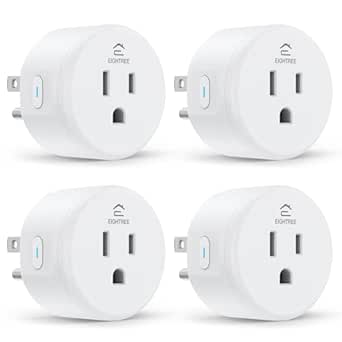 | Best for Multi-Assistant Homes | Pack size: 4 plugs | Operating voltage: 120 V | Maximum wattage: 1800 W | VIEW ON AMAZON | See Our Full Breakdown |
| Amazon Basics Smart Plug, Alexa-Compatible, 4-Pack | 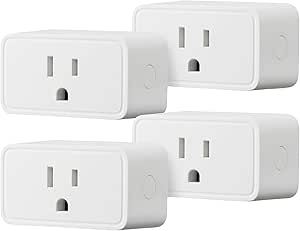 | Best for Alexa Routine Setups | Pack size: 4 plugs | Compatibility: Amazon Alexa only | Connectivity: 2.4 GHz Wi-Fi | VIEW ON AMAZON | See Our Full Breakdown |
| Govee Smart Plug, WiFi Outlet, 4-Pack |  | Best for Bluetooth Setup and Group Control | Quantity: 4 plugs | Connectivity: Bluetooth and 2.4 GHz Wi-Fi | Voice assistants: Amazon Alexa, Google Assistant | VIEW ON AMAZON | See Our Full Breakdown |
| Amazon Smart Plug, Alexa Compatible, 2-Pack | | Best Two-Pack for Alexa Households | Pack size: 2 plugs | Dimensions: 3.2 × 1.5 × 2.2 in (80 × 38 × 57 mm) per plug | Weight: 3.1 oz (87 g) per plug | VIEW ON AMAZON | See Our Full Breakdown |
| Kasa Smart Wi-Fi Plug Mini EP10P4, 4-Pack | 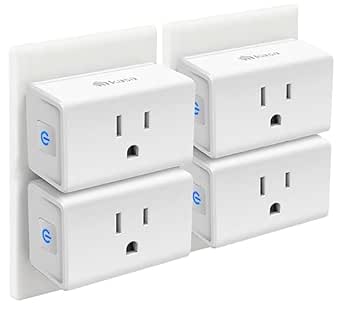 | Best for Compact Multi-Room Setup | Model: EP10P4 | Pack size: 4 plugs | Operating voltage: 120 V | VIEW ON AMAZON | See Our Full Breakdown |
| Kasa Smart Wi-Fi Plug HS103P4, 4-Pack |  | Best for Straightforward Kasa Scheduling | Model: HS103P4 | Pack size: 4 plugs | Operating voltage: 120 V AC | VIEW ON AMAZON | See Our Full Breakdown |
| alexa compatible smart plug | Dimensions | Pack size | Connectivity |
|---|---|---|---|
| Amazon Smart Plug with Alexa | 3.2 × 1.5 × 2.2 in (80 × 38 × 57 mm) | — | — |
| EIGHTREE Wi-Fi Smart Plugs | 1.96 × 1.96 × 2.03 in | 4 plugs | 2.4 GHz Wi-Fi |
| Amazon Basics Smart Plug | 2.7 × 2.1 × 1.5 in | 4 plugs | 2.4 GHz Wi-Fi |
| Govee Smart Plug | — | — | Bluetooth and 2.4 GHz Wi-Fi |
| Amazon Smart Plug | 3.2 × 1.5 × 2.2 in (80 × 38 × 57 mm) per plug | 2 plugs | — |
| Kasa Smart Wi-Fi Plug Mini EP1 | 2.36 × 2.03 × 1.5 inches | 4 plugs | 2.4 GHz Wi-Fi |
| Kasa Smart Wi-Fi Plug HS103P4 | 1.57 × 1.5 × 2.62 inches | 4 plugs | 2.4 GHz Wi-Fi |
More Details on Our Top Picks
Amazon Smart Plug with Alexa
Alexa-first simplicity is the main reason I rank this Amazon Smart Plug above the broader-platform options here. It connects through the Alexa app, needs no hub or separate setup app, and supports voice commands, routines, timers, and schedules. Its compact body is designed to leave the neighboring outlet available, while automatic reconnection after power or Wi-Fi interruptions can reduce hands-on recovery.
Compared with the EIGHTREE 4-pack, this is a more direct choice for someone who wants to stay inside Alexa rather than add Smart Life to setup; EIGHTREE, however, also supports Google Assistant and SmartThings. The tradeoff is clear: this plug works only with Alexa and only on 2.4 GHz Wi-Fi. It is also indoor-only, so I would skip it for outdoor lighting or a mixed-assistant household.
Pros:- Works with Alexa without a separate smart-home hub
- Supports voice control, routines, timers, and schedules
- Compact design leaves the neighboring outlet available
- Automatically reconnects to Alexa after power or Wi-Fi outages
Cons:- Does not support Google Assistant, SmartThings, or other voice assistants
- Connects only to 2.4 GHz Wi-Fi
- For indoor use only
Best for: Alexa households that want a straightforward single plug for lamps or other compatible indoor devices, with routines managed in the Alexa app.
Not ideal for: Homes using Google Assistant or SmartThings, people with only 5 GHz Wi-Fi, or anyone seeking an outdoor-rated plug.
- Dimensions:3.2 × 1.5 × 2.2 in (80 × 38 × 57 mm)
- Weight:3.1 oz (87 g)
- Input:120 VAC, 60 Hz, 15 A max
- Maximum output:15 A
- Wi-Fi:2.4 GHz, 802.11 b/g/n
- Use:Indoor only
- Compatibility:Alexa; no other voice assistants or smart hubs
- Warranty:1-year limited warranty
Our verdict“Choose this for uncomplicated Alexa control of one indoor device, but pick EIGHTREE if you need compatibility beyond Alexa.”
EIGHTREE Wi-Fi Smart Plugs, 15A, 4-Pack
Platform flexibility sets this four-pack apart from both Amazon plugs in this roundup: it supports Alexa, Google Assistant, and SmartThings, rather than locking control to Alexa. The plugs also offer remote operation, timers, and schedules without a hub, which suits households adding several lamps or appliances at once. ETL and FCC certifications are listed, and the stated two-year warranty is longer than the one-year coverage listed for the Amazon models.
The tradeoff is a less direct setup path. You need the Smart Life app before linking voice control, while the Amazon Smart Plug is managed through the Alexa app without a third-party app. EIGHTREE also requires 2.4 GHz Wi-Fi, so it is not a fit for a 5 GHz-only network. I rank it ahead of the Alexa-only four-packs for households that value assistant choice, but skip it if you want setup confined to Amazon’s ecosystem.
Pros:- Supports Alexa, Google Assistant, and SmartThings
- Four-plug pack suits controlling several devices
- Timers, schedules, and remote control available without a hub
- ETL and FCC certifications are listed, with a two-year warranty
Cons:- Requires the Smart Life app for setup and assistant linking
- Supports 2.4 GHz Wi-Fi only
Best for: Households with Alexa plus Google Assistant or SmartThings that want several plugs for indoor devices and are comfortable using Smart Life.
Not ideal for: Alexa-only buyers who want setup and routines kept entirely in the Alexa app, or households without 2.4 GHz Wi-Fi.
- Pack size:4 plugs
- Operating voltage:120 V
- Maximum wattage:1800 W
- Connectivity:2.4 GHz Wi-Fi
- Compatible platforms:Alexa, Google Assistant, SmartThings
- App:Smart Life
- Dimensions:1.96 × 1.96 × 2.03 in
- Certifications and warranty:ETL, FCC; 2 years
Our verdict“Pick EIGHTREE when assistant compatibility across platforms matters more than Amazon-only setup simplicity.”
Amazon Basics Smart Plug, Alexa-Compatible, 4-Pack
Alexa-app scheduling is the defining advantage of this four-pack. You can manage plugs through the Alexa app, including routines tied to voice commands or sunrise and sunset, without adding a hub or third-party app. Its compact design is intended to leave the neighboring outlet free, a useful fit when two sockets share a wall plate. For someone equipping multiple rooms and already using Alexa, the setup stays within one ecosystem.
Compared with the EIGHTREE 4-pack, Amazon Basics gives up Google Assistant and SmartThings support but avoids Smart Life setup. It also shares the Amazon Smart Plug’s Alexa-only limitation, while offering four plugs rather than one. The tradeoff is less platform choice: it works only with Alexa and uses 2.4 GHz Wi-Fi. I would choose it over Govee when Alexa routines matter more than Google Assistant or Bluetooth connectivity.
Pros:- Four plugs can extend Alexa control across multiple rooms
- Alexa app supports remote control and scheduling
- Routines can use voice commands or sunrise and sunset
- No hub or third-party app required; compact body leaves the neighboring outlet free
Cons:- Works with Amazon Alexa only
- Requires 2.4 GHz Wi-Fi
Best for: Alexa users who want a four-plug set managed in one app, especially those planning voice- or sunrise/sunset-based routines.
Not ideal for: People who use Google Assistant or SmartThings, or who need a plug that connects to 5 GHz Wi-Fi.
- Pack size:4 plugs
- Compatibility:Amazon Alexa only
- Connectivity:2.4 GHz Wi-Fi
- Hub required:No
- Plug type:Type B
- Amperage:15 A
- Dimensions:2.7 × 2.1 × 1.5 in
- Warranty:1-year limited
Our verdict“Choose Amazon Basics for four Alexa-managed plugs and routine-based control, but choose EIGHTREE for broader assistant compatibility.”
Govee Smart Plug, WiFi Outlet, 4-Pack
Bluetooth plus Wi-Fi connectivity gives this Govee four-pack a different angle from the Alexa-focused Amazon Basics set. It supports Alexa and Google Assistant, and the Govee Home app adds scheduling, remote control, and group control for managing multiple plugs together. That combination suits buyers who want to coordinate several devices without a hub and prefer not to be limited to Amazon’s assistant.
There are tradeoffs that matter more here than with the EIGHTREE 4-pack: Govee’s listed maximum is 1200 W, below EIGHTREE’s 1800 W, and its product data conflicts on both amperage and model number. I would verify the exact model and load limits before buying. It also supports 2.4 GHz Wi-Fi, not 5 GHz. Choose Govee for group control and Bluetooth connectivity, but consider Amazon Basics for a more straightforward Alexa-only setup.
Pros:- Compatible with Amazon Alexa and Google Assistant
- Bluetooth and 2.4 GHz Wi-Fi connectivity
- Govee Home app supports scheduling, remote control, and group control
- Four-plug set requires no hub
Cons:- Listing conflicts on amperage and model number
- Listed maximum power is 1200 W, lower than EIGHTREE’s stated 1800 W
- Does not support 5 GHz Wi-Fi
Best for: Buyers who want four plugs with Alexa and Google Assistant support, app-based group control, and Bluetooth connectivity alongside Wi-Fi.
Not ideal for: People who need clear, consistent electrical specifications, 5 GHz connectivity, or a higher stated maximum wattage.
- Quantity:4 plugs
- Connectivity:Bluetooth and 2.4 GHz Wi-Fi
- Voice assistants:Amazon Alexa, Google Assistant
- Voltage:120 V
- Amperage:Listed as 11 A; description also states 10 A
- Maximum power:1200 W
- Certifications:ETL, FCC
- Model:B5081; description also references H5083
Our verdict“Pick Govee for multi-plug group control and two-assistant support, provided its conflicting specifications suit your planned devices.”
Amazon Smart Plug, Alexa Compatible, 2-Pack
Two-plug convenience makes this Amazon Smart Plug a practical middle ground between the single Amazon Smart Plug and the four-plug sets. It brings the same Alexa-centered control to two indoor devices, with voice commands, routines, timers, and schedules managed through the Alexa app. No hub is needed, and the compact shape is designed to leave the second outlet available. Automatic reconnection after power or Wi-Fi outages is also listed, which can reduce the need to reconnect manually.
Compared with the Amazon Basics 4-pack, this set includes fewer plugs but retains the Amazon Smart Plug’s stated reconnection behavior. It is less flexible than the EIGHTREE 4-pack, which works with Google Assistant and SmartThings. The limits are firm: Alexa only, 2.4 GHz Wi-Fi, and indoor use. I would choose this for two Alexa-controlled devices, not for a multi-assistant home or a larger room-by-room rollout.
Pros:- Two-plug set adds Alexa control to a pair of devices
- No smart-home hub required
- Supports Alexa voice control, routines, timers, and schedules
- Compact design leaves the neighboring outlet available and reconnects after outages
Cons:- Does not support voice assistants other than Alexa
- Supports 2.4 GHz Wi-Fi only, not 5 GHz
- For indoor use only
Best for: Alexa users who need two compact indoor plugs for a pair of lamps or compatible household devices, without adding a hub.
Not ideal for: Homes that use Google Assistant or SmartThings, need outdoor use, or want four plugs in one set.
- Pack size:2 plugs
- Dimensions:3.2 × 1.5 × 2.2 in (80 × 38 × 57 mm) per plug
- Weight:3.1 oz (87 g) per plug
- Input:120 VAC, 60 Hz, 15 A max
- Output:15 A max
- Wi-Fi:2.4 GHz, 802.11 b/g/n
- Use:Indoor
- Compatibility and warranty:Alexa only; 1-year limited warranty
Our verdict“Choose this two-pack for a small Alexa-only setup; Amazon Basics is a better fit if you need four plugs.”
Kasa Smart Wi-Fi Plug Mini EP10P4, 4-Pack
I’d choose the Kasa EP10P4 when fitting smart plugs into crowded outlets matters as much as Alexa control. Its compact body is designed to leave the neighboring wall outlet available, a practical advantage over bulkier plugs such as the Kasa HS103P4. Four plugs, app-based scheduling, timers, remote access, and Away Mode make it easy to automate lamps or other suitable appliances around the home without adding a hub. Each plug supports up to 15 A and carries UL certification. The tradeoff is that setup depends on a 2.4 GHz Wi-Fi network and the Kasa app on a compatible phone; shoppers seeking a more direct Alexa-only setup may prefer the Amazon Smart Plug. Its compact format and broader listed assistant support give this Kasa set a distinct edge for multi-room use.
Pros:- Compact design leaves the adjacent wall outlet unobstructed.
- Four-plug set supports automation in multiple rooms.
- Offers schedules, timers, Away Mode, and remote app control.
- Works without a hub and is UL certified.
Cons:- Requires a 2.4 GHz Wi-Fi connection.
- Setup and app features require the Kasa app and a compatible Android or iOS device.
Best for: Households setting up several lamps or appliances across rooms, especially where keeping the second wall outlet free is useful.
Not ideal for: Buyers whose Wi-Fi network does not support 2.4 GHz, or people who want to avoid installing the Kasa app and using a compatible phone.
- Model:EP10P4
- Pack size:4 plugs
- Operating voltage:120 V
- Maximum wattage:1800 W
- Connectivity:2.4 GHz Wi-Fi
- Voice assistants:Amazon Alexa, Google Assistant, Samsung SmartThings
- Hub required:No
- Dimensions:2.36 × 2.03 × 1.5 inches
- Certifications:UL, RoHS, FCC, IC
Our verdict“Choose the EP10P4 for compact, hub-free Alexa control across several rooms; skip it if you cannot use 2.4 GHz Wi-Fi or the Kasa app.”
Kasa Smart Wi-Fi Plug HS103P4, 4-Pack
The Kasa HS103P4 is a straightforward four-plug choice for Alexa households that want schedules, timers, and remote switching without a hub. Its 15 A rating and 1800 W capacity match the EP10P4, while the Kasa app provides a familiar route to controlling appliances at home or away. I’d give the EP10P4 the advantage when preserving the neighboring outlet is a priority: this model’s listed dimensions are larger, and compactness is the clearer selling point of its sibling. In return, the HS103P4 keeps the feature set simple and supports Alexa and Google Assistant. It lacks the EP10P4’s listed SmartThings compatibility and Away Mode, so buyers wanting those options should choose that model instead. Both depend on 2.4 GHz Wi-Fi and a compatible phone for setup.
Pros:- Four plugs provide coverage for several appliances or rooms.
- Supports Alexa and Google Assistant voice control.
- Kasa app offers remote control, schedules, and timers.
- No hub required; UL certified and rated up to 15 A.
Cons:- Requires a 2.4 GHz Wi-Fi connection.
- Setup requires the Kasa app on a compatible Android or iOS device.
- Lacks the EP10P4’s listed SmartThings compatibility and Away Mode.
Best for: Alexa or Google Assistant users who want four hub-free plugs for scheduled lamps and appliances, with remote control through the Kasa app.
Not ideal for: Shoppers who need a compact plug to preserve the adjacent outlet, want SmartThings support, or specifically need Away Mode.
- Model:HS103P4
- Pack size:4 plugs
- Operating voltage:120 V AC
- Wattage:1800 W
- Connectivity:2.4 GHz Wi-Fi
- Voice assistants:Amazon Alexa, Google Assistant
- Hub required:No
- Dimensions:1.57 × 1.5 × 2.62 inches
- Certification:UL certified
Our verdict“Pick the HS103P4 for basic four-outlet Alexa scheduling through Kasa, but choose the EP10P4 if compact sizing or Away Mode matters more.”

How We Picked
I ranked these plugs around the needs behind an Alexa-specific search: reliable voice-control fit, setup clarity, outlet practicality, and useful everyday control. Pack size and form factor matter because a plug that works with Alexa can still be a poor match if it blocks a neighboring socket or leaves you with more units than you need. I also weighed stated electrical ratings and the role of each companion app, while avoiding assumptions about performance beyond the listed product details.
The ranking favors options with a clear use case rather than treating every multipack as interchangeable. Amazon’s Alexa-focused plug leads for buyers who want a simple starting point; Kasa’s mini and four-pack models rank well for buyers outfitting more outlets; and EIGHTREE earns a distinct place for its stated 15A rating. Amazon Basics and Govee remain relevant for multi-plug needs, but buyers should compare app preferences, outlet layout, and exact electrical requirements before choosing between them.
Factors to Consider When Choosing Alexa Compatible Smart Plugs
Choosing among Alexa-compatible plugs is less about adding the most features and more about matching the plug to the device, outlet, and number of rooms you want to control. I would settle these broader questions before deciding which product to buy.
Match the Plug to the Device’s Electrical Load
Start with the device label or manual and check its current and wattage requirements against the smart plug’s specifications. A stated 15A rating, such as the one listed for EIGHTREE, is relevant only when the connected device and circuit fall within the plug’s limits. Do not assume that every smart plug is appropriate for heaters, kitchen appliances, or other high-load equipment. Many plugs are best reserved for lamps and small household devices. If the product listing does not clearly cover your intended appliance, choose a different control method or contact the manufacturer. Matching the ratings prevents a voice-control convenience from becoming an electrical mismatch.
Check Whether the Plug Will Block Nearby Outlets
Outlet fit can matter more than the number of app features, especially where a wall plate has two sockets close together. A compact design such as a mini-style plug may leave more room for a second plug, but the shape of the outlet and neighboring adapter still affects clearance. Look at the product’s dimensions and compare them with your wall plate before buying a multipack. A plug that blocks an adjacent socket can reduce the value of having several units. Also check whether the outlet sits behind furniture, where a bulky body may make the button or reset control hard to reach. If space is tight, prioritize dimensions over pack size.
Choose Pack Size Around Your Actual Rooms
A four-pack can make sense when you already know which lamps or small devices you want to automate in several rooms. Buying a multipack before making that list can leave unused plugs in a drawer, even if the per-outlet economics seem attractive. For one bedside lamp or a single seasonal device, a one- or two-plug option may be a better fit. Count the outlets you can use without rearranging furniture, and account for any sockets reserved for chargers or appliances. If you expect to expand later, check that the plug model remains available in a compatible pack or format. The right quantity is the one you can put to work now, not the largest bundle.
Decide How Much You Want to Use a Companion App
Alexa compatibility does not always mean the full setup and control experience happens only in the Alexa app. Some buyers may need a manufacturer’s app for initial configuration or for features such as schedules and device management. If you prefer a single control point, check the setup instructions and supported functions before buying. A separate app is not automatically a drawback, but it can add another account and another place to manage routines. Households with several people should also think about who will be able to access the app and change schedules. Pick the ecosystem you are willing to maintain, not just the plug with the shortest feature list.
Plan for Wi-Fi Coverage and Network Setup
Smart plugs rely on a usable wireless connection where the outlet is located, so a dependable signal matters more than adding units to a weak-coverage room. Before ordering a multipack, check whether the product’s setup requirements match your home network, including any band or router requirements stated by its manufacturer. A plug may pair successfully near the router but be unreliable behind furniture or at the far end of the house. If a device repeatedly drops offline, voice commands and schedules may fail even when the plug itself is functioning. Set up one plug in the intended location before configuring several, when the return window and pack setup allow it. This small check can prevent a whole set from being a poor fit.
Frequently Asked Questions
Do I need an Amazon Echo to use an Alexa-compatible smart plug?
Not always: many plugs can be controlled through a phone app, while an Echo or another Alexa-enabled device makes hands-free voice commands possible. Check the individual product’s setup requirements, since Alexa support and app-based control can differ by model. If you plan to use voice control, confirm that the plug appears in Alexa after setup and can be assigned to the right room. You can still use schedules or app controls if you do not own an Echo, where the product supports them. Choose based on how you expect to control the outlet day to day, not on the compatibility label alone.
Can I use these smart plugs with heaters or other high-power appliances?
Do not assume so. Compare the appliance’s electrical requirements with the specific plug’s stated rating and follow the manufacturer’s restrictions for both products. EIGHTREE lists a 15A rating, but that alone does not prove that every heater or high-load device is suitable. Some appliances also have operating or safety requirements that make switching them through a smart plug inappropriate. If the documentation is unclear, use a control method approved for that appliance or ask its manufacturer before connecting it.
Should I buy a four-pack or start with a single smart plug?
Choose a four-pack when you have several known uses and enough accessible outlets in the rooms you want to automate. A single plug is the safer starting point if you are still checking Wi-Fi coverage, app setup, or whether the plug’s body fits beside other adapters. The Amazon single-plug option is a natural fit for an Alexa-first trial, while the multipacks in this lineup suit buyers ready to outfit several outlets. Avoid buying extra units just because a bundle seems convenient. A short list of target devices will make the pack-size decision clearer.
Will a smart plug make a device Alexa-controlled if it has a physical switch?
Only if the device resumes operating when power returns. A smart plug can cut or restore electricity, but it cannot press a physical button or change a device’s own settings. Many simple lamps with an always-on switch work well, while appliances that require a button press after power loss may not. Check the device manual or try its behavior after unplugging and reconnecting it before relying on a schedule. This distinction matters more than Alexa compatibility when deciding which item to automate.
What should I check if a plug pairs with its app but does not respond to Alexa?
First confirm that the plug’s manufacturer app shows it online, then check the product’s instructions for linking its service with Alexa. Look for the plug under the correct device name and room, and try a clear device-discovery step if the manufacturer recommends one. A duplicate or confusing name can also send voice commands to the wrong device, so use short, distinct names. If app control works but Alexa control does not, the issue may be account linking or device discovery rather than Wi-Fi at the outlet. Consult the model’s support steps before resetting several plugs in a multipack.
Conclusion
For most Alexa-first buyers, I recommend the Amazon Smart Plug with Alexa as the best overall because its role is clear: a straightforward starting point without committing to a four-pack. For best value across several outlets, compare the Amazon Basics, Govee, and Kasa four-packs against your app preferences and outlet layout rather than choosing by bundle size alone. The Kasa EP10P4 is my compact pick for buyers who want a mini-style four-pack, while the EIGHTREE 15A model suits specific needs where its stated rating matches the connected device. For beginners, start with one Amazon plug and confirm setup and outlet fit before expanding. If you already know you need several plugs, the Kasa HS103P4 or another four-pack can better match that plan; if you only need one controlled lamp, skip the multipack.