Portable Wi-Fi routers can share a hotel or wired connection, create a private network, or connect to mobile data, depending on the model. I’d put the TP-Link Roam 6 AX3000 in the best overall spot for travelers who want capable Wi-Fi 6 without stepping up to Wi-Fi 7 hardware. The GL.iNet Slate 7 stands out for newer Wi-Fi 7 features and dual 2.5G Ethernet, while the GL.iNet Opal is a simpler pick for basic travel networking. The main choice is between a router that needs an existing internet connection and a hotspot that uses a SIM or built-in mobile data; size, setup, and network compatibility also matter. Read on for the full breakdown and guidance on matching a router to your trip.

Get the latest gadgets delivered free with Prime
- Fast, free delivery on millions of items
- Prime Video, Amazon Music and more included
- Member-only deals all year
Complete the kit



Key Takeaways
- The TP-Link Roam 6 AX3000 is the balanced pick: it offers a stronger Wi-Fi 6 tier than the AX1500 Roam 6 models without moving into the Wi-Fi 7 group.
- The Slate 7 is the feature-forward choice: Wi-Fi 7 and dual 2.5G Ethernet set it apart, but those capabilities matter most when the rest of your network equipment can use them.
- Mobile hotspots solve a different problem: the RoamWiFi and Ryoko products provide mobile data options, while most travel routers need an existing wired or wireless internet source.
- Compactness brings limits: small options such as the Mango and AC750 are easier to pack, but they offer fewer modern wireless capabilities than the newer Wi-Fi 6 and Wi-Fi 7 picks.
- SIM compatibility deserves close attention: the unlocked LTE model is marked not for the Americas, so buyers should check regional bands and data arrangements before relying on it abroad.
| TP-Link Roam 7 BE3600 Wi-Fi 7 Portable Travel Router |  | Best for Fast Hotel Networks | Wi-Fi standard: Wi-Fi 7 | Bands: Dual-band 2.4 GHz and 5 GHz; no 6 GHz | Maximum wireless speed: Up to 2882 Mbps on 5 GHz and 688 Mbps on 2.4 GHz | VIEW LATEST PRICE | See Our Full Breakdown |
| TP-Link Roam 6 AX1500 Portable Wi-Fi 6 Travel Router (TL-WR1502X) |  | Best Compact Wi-Fi 6 Pick | Wi-Fi generation: Wi-Fi 6 (802.11ax) | Frequency bands: Dual-band | Maximum wireless speed: Up to 1500 Mbps data transfer rate; up to 1.2 Gbps on 5 GHz per product description | VIEW LATEST PRICE | See Our Full Breakdown |
| Unlocked 4G LTE Mobile WiFi Router with SIM Card Slot for Global Travel (Not for Americas) – 150Mbps Portable Hotspot Device |  | Best for SIM-Based Travel Data | Model: MF800-2 | Cellular slot: Micro SIM | 4G LTE bands: B1, B3, B5, B40 | VIEW LATEST PRICE | See Our Full Breakdown |
| TP-Link Roam 6 AX3000 Dual-Band Wi-Fi 6 Travel Router (TL-WR3002X) |  | Best for Ports and File Sharing | Model: TL-WR3002X | Wi-Fi standard: Wi-Fi 6 | Bands and maximum speeds: Dual-band; up to 2402 Mbps on 5 GHz and 574 Mbps on 2.4 GHz | VIEW LATEST PRICE | See Our Full Breakdown |
| GL.iNet GL-BE3600 Slate 7 Wi-Fi 7 Travel Router with Touchscreen and Dual 2.5G Ethernet |  | Best for OpenWrt Customization | Wi-Fi generation: Wi-Fi 7 | Frequency bands and rates: Dual-band 2.4 GHz and 5 GHz; up to 688 Mbps + 2882 Mbps | Ethernet: 2 dual 2.5G ports, configured as 1 WAN and 1 LAN | VIEW LATEST PRICE | See Our Full Breakdown |
| GL.iNet GL-SFT1200 Opal AC1200 Dual-Band Travel Router | 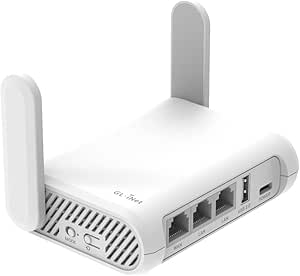 | Best for VPN-Focused Travelers | Wi-Fi standard: Wi-Fi 5 (802.11a/b/g/n/ac) | Wireless bands: Dual-band, 2.4 GHz and 5 GHz | Maximum wireless data rate: 1200 Mbps | VIEW LATEST PRICE | See Our Full Breakdown |
| Ryoko Pro Portable WiFi Travel Router with 15GB Free Data |  | Best for Included Global Data | Included data: 15 GB | Coverage: 150+ countries | Supported devices: Up to 10 | VIEW LATEST PRICE | See Our Full Breakdown |
| RoamWiFi Mobile Hotspot Pocket WiFi, Portable 4G LTE MiFi – No SIM Card Needed |  | Best for Broad LTE Coverage | Network technology: LTE, UMTS | Coverage: Over 170 countries | Included data: 10 GB US/Canada/Mexico plus 1 GB worldwide for 30 days | VIEW LATEST PRICE | See Our Full Breakdown |
| TP-Link Roam 6 AX1500 Portable Dual-Band Wi-Fi 6 Travel Router |  | Best for Many Connected Devices | Wi-Fi standard: Wi-Fi 6 | Bands: Dual-band, 2.4 GHz and 5 GHz | Maximum speed: 1,201 Mbps (5 GHz); 300 Mbps (2.4 GHz) | VIEW LATEST PRICE | See Our Full Breakdown |
| GL.iNet GL-MT300N-V2 Mango Portable Travel Wi-Fi Router |  | Best Ultra-Lightweight Pick | Wireless standard: 802.11b/g/n (Wi-Fi 4) | Frequency band: 2.4 GHz, single-band | Maximum data transfer rate: Up to 300 Mbps | VIEW LATEST PRICE | See Our Full Breakdown |
| GL.iNet GL-MT3000 Beryl AX Wi-Fi 6 Travel Router | 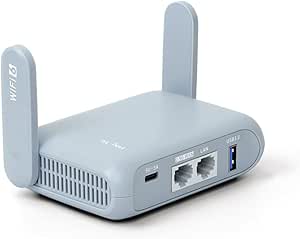 | Best for VPN Flexibility | Wi-Fi: Wi-Fi 6, dual-band 2.4 GHz and 5 GHz | Wireless speed: 574 Mbps (2.4 GHz) + 2402 Mbps (5 GHz) | WAN / LAN: 2.5G WAN / 1 Gbps LAN | VIEW LATEST PRICE | See Our Full Breakdown |
| Zyyini Portable 4G Wi-Fi Hotspot Router with SIM Card Slot |  | Best for SIM-Based Travel Connectivity | Network: 4G | SIM slot: Yes | Wi-Fi: Wi-Fi 4, 2400 MHz | VIEW LATEST PRICE | See Our Full Breakdown |
| RoamWiFi Mobile Hotspot, 4G LTE Pocket Wi-Fi |  | Best for International Data Convenience | Cellular connectivity: 4G LTE | SIM required: No | Coverage: More than 170 countries | VIEW LATEST PRICE | See Our Full Breakdown |
| GL.iNet Slate AX GL-AXT1800 Wi-Fi 6 Travel Router with VPN |  | Best for Larger Travel Groups | Wi-Fi: Wi-Fi 6 (802.11ax), dual-band | Combined data rate: Up to 1800 Mbps | Frequency speeds: Up to 600 Mbps (2.4 GHz) and 1200 Mbps (5 GHz) | VIEW LATEST PRICE | See Our Full Breakdown |
| TP-Link AC750 Dual-Band Wi-Fi 5 Travel Router | 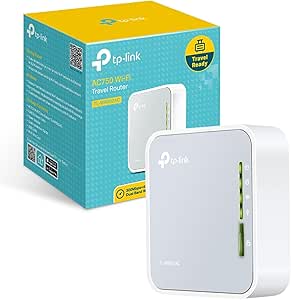 | Best for Flexible Basic Setups | Wi-Fi: Wi-Fi 5 (802.11ac), dual-band | Maximum data transfer rate: Up to 733 Mbps | Ethernet: 1 × 10/100 Mbps WAN/LAN | VIEW LATEST PRICE | See Our Full Breakdown |
More Details on Our Top Picks
TP-Link Roam 7 BE3600 Wi-Fi 7 Portable Travel Router
The Roam 7 is a strong fit for travelers who want to turn hotel or public Wi-Fi into a private network for many devices. Its Wi-Fi 7 radios support up to 90 devices, while the 2.5 Gbps WAN port gives it more headroom for a fast wired connection than the Roam 6 AX1500. Hotspot mode and captive portal support help with networks that require a sign-in, and OpenVPN and WireGuard add flexible VPN options.
That extra network capacity comes with a firm limitation: the Roam 7 needs an external internet source. Unlike the SIM-based MF800-2, it cannot provide cellular data on its own. It also lacks 6 GHz Wi-Fi and OpenWrt, so buyers seeking those features should look at other options. I’d choose it for shared trips with fast hotel internet, not for off-grid connectivity.
Pros:- Supports up to 90 connected devices for shared travel use.
- 2.5 Gbps WAN port can accommodate a fast wired internet source.
- Hotspot mode and captive portal support help with public Wi-Fi sign-ins.
- Offers OpenVPN and WireGuard client and server connections.
Cons:- Requires an external internet source and has no SIM or eSIM support.
- No 6 GHz band, despite its Wi-Fi 7 branding.
- Does not support OpenWrt.
Best for: Travel groups or remote workers who need to share hotel Wi-Fi across many devices and want multi-gigabit wired connectivity.
Not ideal for: Travelers who need built-in cellular data, 6 GHz Wi-Fi, or OpenWrt customization.
- Wi-Fi standard:Wi-Fi 7
- Bands:Dual-band 2.4 GHz and 5 GHz; no 6 GHz
- Maximum wireless speed:Up to 2882 Mbps on 5 GHz and 688 Mbps on 2.4 GHz
- Supported devices:Up to 90
- Ports:1 × 2.5 Gbps WAN, 1 × 1 Gbps LAN, USB 3.0, USB-C power
- Operating modes:Router, Hotspot, Access Point, Range Extender, Client
- VPN protocols:OpenVPN, WireGuard, PPTP, L2TP
- Power:USB-C; included adapter or 5V PD power source
- SIM and OpenWrt support:No SIM or eSIM support; OpenWrt not supported
Our verdict“Choose the Roam 7 to share fast hotel or wired internet with a large group, provided you do not need cellular service or 6 GHz Wi-Fi.”
TP-Link Roam 6 AX1500 Portable Wi-Fi 6 Travel Router (TL-WR1502X)
The Roam 6 AX1500 suits travelers who want a pocket-sized private network for hotel, café, or airport Wi-Fi without paying for the higher wireless capacity of the Roam 6 AX3000. It supports Wi-Fi 6 and several modes, including router, access point, repeater, and client, so one small device can adapt to different internet sources. USB-C power also makes it easier to pack alongside a phone or laptop charger.
Its compact focus means fewer extras than the AX3000: the supplied data lists USB 2.0 and gigabit Ethernet rather than USB 3.0 and a 2.5 Gbps port. Like the Roam 7, it needs an external connection and has no cellular modem. I’d pick it for basic travel networking and WPA3 support, but not for buyers who need SIM-based service or higher wired throughput.
Pros:- Compact design with USB-C power input.
- Wi-Fi 6 dual-band connectivity with up to 1.2 Gbps on 5 GHz.
- Multiple router, access point, repeater, and client modes.
- Supports WPA3 along with other listed security protocols.
Cons:- Requires an external internet source and has no cellular modem.
- USB 2.0 and gigabit Ethernet offer less wired headroom than the Roam 6 AX3000.
- Does not support OpenWrt or other custom firmware.
Best for: Light packers who mainly need a compact router to share hotel or café internet with phones and laptops.
Not ideal for: Travelers who need built-in cellular data, multi-gigabit Ethernet, or faster USB file sharing.
- Wi-Fi generation:Wi-Fi 6 (802.11ax)
- Frequency bands:Dual-band
- Maximum wireless speed:Up to 1500 Mbps data transfer rate; up to 1.2 Gbps on 5 GHz per product description
- Ethernet:2 Gigabit Ethernet ports
- USB:1 × USB 2.0
- Security:WPA-PSK, WPA2-Enterprise, WPA3
- Operating modes:Router, Hotspot, Access Point, Repeater, Client
- Power:USB-C power input; listed voltage 12 V
- Coverage:Personal use or small spaces
Our verdict“Choose the Roam 6 AX1500 for a small, flexible Wi-Fi 6 router for existing travel internet, and skip it if you need cellular data or faster ports.”
Unlocked 4G LTE Mobile WiFi Router with SIM Card Slot for Global Travel (Not for Americas) – 150Mbps Portable Hotspot Device
Unlike the TP-Link Roam 7, the MF800-2 can create internet access from a micro-SIM card, so travelers are not limited to hotel Wi-Fi or wired connections. Its battery-powered design and support for up to ten devices make it a straightforward option for a small group using a compatible local network. For a trip where cellular coverage matters more than a configurable router, this is the clearest fit among these five.
The tradeoff is compatibility: the listing says it is not for the Americas, and its LTE band list is limited to B1, B3, B5, and B40. Its Wi-Fi 4 standard and ten-device ceiling also make it less suited to busy groups than the Roam 7 or Roam 6 AX3000. I’d check carrier bands before travel and skip it if broad regional compatibility or newer Wi-Fi is a priority.
Pros:- Micro-SIM slot provides cellular connectivity without relying on hotel Wi-Fi.
- Supports up to ten connected devices.
- Includes a 2100 mAh battery and lists up to 10 hours of standby.
- Compact design is suited to carrying during travel.
Cons:- Not compatible with carriers in the Americas, according to the listing.
- Listed LTE bands are limited and require carrier compatibility checks.
- Wi-Fi 4 and a ten-device limit are less suited to demanding group use than the Roam 7.
Best for: Solo travelers or small groups visiting supported regions who have a compatible micro-SIM and want battery-powered internet.
Not ideal for: Travelers visiting the Americas or anyone needing newer Wi-Fi, broad LTE band coverage, or more than ten connections.
- Model:MF800-2
- Cellular slot:Micro SIM
- 4G LTE bands:B1, B3, B5, B40
- 3G band:UMTS/WCDMA B1
- Peak cellular rates:Up to 300 Mbps download and 50 Mbps upload
- Wi-Fi standard:802.11 b/g/n (Wi-Fi 4)
- Supported users:Up to 10
- Battery:2100 mAh Li-ion
- Regional limitation:Not for the Americas
Our verdict“Choose the MF800-2 for SIM-based travel internet in a supported region, after confirming that its LTE bands match your carrier.”
TP-Link Roam 6 AX3000 Dual-Band Wi-Fi 6 Travel Router (TL-WR3002X)
The Roam 6 AX3000 is the most versatile wired companion here for travelers who want to share hotel Wi-Fi, Ethernet, or USB tethering. Its 2.5 Gbps WAN/LAN port, second gigabit LAN port, USB 3.0, and microSD support offer more ways to connect devices and files than the smaller Roam 6 AX1500. Wi-Fi 6 speeds up to 2402 Mbps on 5 GHz also give it more wireless capacity than that compact alternative.
Those extras make sense for a work trip with wired gear or local file sharing, but they do not turn it into an independent hotspot: it still needs an external internet source and has no SIM or eSIM. Its 4.1 × 3.5 × 1.1-inch body is portable, though less pocket-focused than the AX1500. I’d choose it for its connection options, while travelers seeking cellular access should consider the MF800-2.
Pros:- Can use public Wi-Fi, Ethernet, or USB tethering as an internet source.
- Includes a 2.5 Gbps WAN/LAN port and a separate gigabit LAN port.
- USB 3.0 and microSD support enable network file sharing.
- Supports OpenVPN and WireGuard client and server modes.
Cons:- Requires an external internet source and has no SIM or eSIM support.
- Larger than the Roam 6 AX1500 compact option.
- Does not support OpenWrt.
Best for: Remote workers who travel with wired equipment and want USB tethering, microSD file sharing, and VPN features in one router.
Not ideal for: Travelers who want a self-contained cellular hotspot or the smallest possible pocket router.
- Model:TL-WR3002X
- Wi-Fi standard:Wi-Fi 6
- Bands and maximum speeds:Dual-band; up to 2402 Mbps on 5 GHz and 574 Mbps on 2.4 GHz
- Ethernet ports:1 × 2.5 Gbps WAN/LAN; 1 × 1 Gbps LAN
- USB and memory card:USB 3.0; microSD up to 512 GB
- VPN support:OpenVPN, WireGuard, PPTP, L2TP
- Dimensions:4.1 × 3.5 × 1.1 inches
- Power:USB-C; included adapter or 5V PD power source
- Internet source limitation:Requires an external source; no SIM or eSIM support
Our verdict“Choose the Roam 6 AX3000 if your travel setup benefits from its wired ports, tethering, and file sharing, and skip it if you need built-in cellular service.”
GL.iNet GL-BE3600 Slate 7 Wi-Fi 7 Travel Router with Touchscreen and Dual 2.5G Ethernet
The Slate 7 is the pick for travelers who want to shape their network rather than just share a connection. Its OpenWrt 23.05 base, touchscreen controls, and dual 2.5G Ethernet ports offer a more configurable setup than the TP-Link Roam 7, which lacks OpenWrt. The display can help manage modes and VPN features on the device, while support for 120 or more devices gives it room for a larger connected setup.
That control comes with tradeoffs: the supplied VPN limits are 100 Mbps for OpenVPN and 540 Mbps for WireGuard, and the touchscreen toggle needs configuration before it has a function. Like the Roam 7, this is a dual-band Wi-Fi 7 router without 6 GHz. I’d choose it for customization and wired flexibility, but it is a poor fit for buyers who want a simple cellular hotspot.
Pros:- Runs OpenWrt 23.05 for network customization and plugin installation.
- Touchscreen supports network monitoring and VPN controls.
- Dual 2.5G Ethernet ports and USB 3.0 provide flexible wired connections.
- Supports OpenVPN and WireGuard client and server use.
Cons:- VPN speed is limited to 100 Mbps with OpenVPN and 540 Mbps with WireGuard.
- The touchscreen toggle button has no assigned function by default.
- No 6 GHz band or built-in cellular modem is listed.
Best for: Technically confident travelers who want OpenWrt customization, on-device VPN controls, and dual 2.5G Ethernet.
Not ideal for: Buyers who want plug-and-play cellular internet or expect high VPN throughput with OpenVPN.
- Wi-Fi generation:Wi-Fi 7
- Frequency bands and rates:Dual-band 2.4 GHz and 5 GHz; up to 688 Mbps + 2882 Mbps
- Ethernet:2 dual 2.5G ports, configured as 1 WAN and 1 LAN
- USB:USB 3.0
- Operating system:OpenWrt 23.05, Kernel 5.4.213
- Memory and storage:2 GB RAM; 512 MB storage
- VPN support and maximum speeds:OpenVPN and WireGuard; up to 100 Mbps OpenVPN and 540 Mbps WireGuard
- Device capacity:Up to 120+ devices
- Security protocols:WPA3, DNS over HTTPS, DNS over TLS
Our verdict“Choose the Slate 7 if you want an OpenWrt-based travel router with touchscreen controls and fast wired ports, and can accept its VPN speed limits.”
GL.iNet GL-SFT1200 Opal AC1200 Dual-Band Travel Router
The Opal suits travelers who want a lightweight way to turn hotel or public Wi-Fi into a more private network. Its dual-band Wi-Fi 5 and three Gigabit ports give it more flexibility for mixed wireless and wired setups than the single-band GL.iNet GL-MT300N-V2 Mango. OpenVPN and WireGuard support add a useful privacy option, while the physical toggle can control a configured VPN client without digging through menus.
That toggle takes setup first, and the 145 g body is heavier than the Mango. The Opal also lacks the newer Wi-Fi 6 standard and large device capacity of the TP-Link Roam 6 AX1500. I’d choose it for compact travel networking with wired ports and configurable VPN control, but skip it if plug-and-play cellular data or the newest wireless standard is the priority.
Pros:- 145 g travel-friendly design with retractable antennas
- Dual-band Wi-Fi 5 supports both 2.4 GHz and 5 GHz connections
- Two Gigabit LAN ports and one Gigabit WAN port support wired devices and connections
- OpenVPN and WireGuard support with a configurable physical VPN toggle
Cons:- VPN toggle has no function until configured in the admin panel
- Wi-Fi 5 and its stated speeds trail the newer TP-Link Roam 6 AX1500
- Does not support easytethering
Best for: Travelers who regularly use hotel or public Wi-Fi and want dual-band wireless, wired ports, and configurable VPN control in a compact router.
Not ideal for: Buyers who need built-in cellular data, Wi-Fi 6, or a VPN toggle that works without admin setup.
- Wi-Fi standard:Wi-Fi 5 (802.11a/b/g/n/ac)
- Wireless bands:Dual-band, 2.4 GHz and 5 GHz
- Maximum wireless data rate:1200 Mbps
- Ports:2 Gigabit LAN, 1 Gigabit WAN
- Antennas:2 retractable antennas
- Weight:145 g
- VPN protocols:OpenVPN, WireGuard
- Operating system:OpenWrt
Our verdict“Choose the Opal for configurable VPN control and wired flexibility on trips; pass if you need cellular data or Wi-Fi 6.”
Ryoko Pro Portable WiFi Travel Router with 15GB Free Data
The Ryoko Pro is the data-included choice in this lineup: its 15 GB plan across 150+ countries gives travelers a way to get online without arranging a separate SIM for each destination. It can connect up to 10 devices and runs for up to eight hours on a charge, making it a better fit for day trips and shared access than the GL.iNet GL-SFT1200 Opal, which turns an existing connection into Wi-Fi but does not include cellular data.
The tradeoff is a single-band 802.11n connection, which offers less wireless flexibility than the dual-band Opal or TP-Link Roam 6 AX1500. The included allowance is finite, too, so video calls and heavy streaming can use it quickly. I’d pick Ryoko Pro when simple, bundled connectivity matters more than advanced router modes or high wireless throughput.
Pros:- Includes 15 GB of data with stated coverage in over 150 countries
- Supports up to 10 connected devices
- Up to eight hours of battery life for use away from outlets
- Built-in ad blocker can reduce page clutter and data use
Cons:- Single-band 802.11n Wi-Fi lacks the flexibility of dual-band options such as the GL.iNet GL-SFT1200 Opal
- The included 15 GB allowance may be restrictive for heavy streaming or frequent remote work
- The supplied specifications do not state cellular network speed
Best for: International travelers who want a bundled data allowance for a small group of up to 10 devices during workdays or day trips.
Not ideal for: Frequent streamers or travelers who need dual-band Wi-Fi, a large data allowance, or advanced router modes.
- Included data:15 GB
- Coverage:150+ countries
- Supported devices:Up to 10
- Battery life:Up to 8 hours
- Wi-Fi band:Single-band
- Wi-Fi compatibility:802.11n
- Color:White
- Warranty:2 years
Our verdict“Choose the Ryoko Pro for a bundled global data allowance and battery-powered hotspot; skip it if you need dual-band Wi-Fi or heavy data use.”
RoamWiFi Mobile Hotspot Pocket WiFi, Portable 4G LTE MiFi – No SIM Card Needed
The RoamWiFi hotspot combines 4G LTE access without a physical SIM card with a built-in 10 GB US, Canada, and Mexico allowance plus 1 GB worldwide for 30 days. Its stated coverage exceeds 170 countries, so it can suit travelers who value broad reach and a ready-to-use connection over configuring a router around hotel Wi-Fi. Compared with the Ryoko Pro, it has less included data overall, but its plan splits the allowance between regional and worldwide use.
Up to 10 devices can share the connection, and the listing describes an all-day battery. The allowance may run short for heavy use, while the supplied data-transfer-rate figure is unusual and should not be treated as a reliable measure of real-world LTE performance. The GL.iNet GL-SFT1200 Opal is a stronger fit when you already have internet and want router modes or wired Ethernet; RoamWiFi is for travelers seeking built-in cellular access.
Pros:- Provides LTE connectivity without a physical SIM card
- Coverage is stated for over 170 countries
- Supports up to 10 connected devices
- Includes 10 GB for the US, Canada, and Mexico plus 1 GB worldwide for 30 days
Cons:- The included data totals 11 GB and may run out quickly for heavy use
- The allowance is time-limited to 30 days
- Listed data-transfer-rate information is unclear and does not establish real-world LTE speed
Best for: Travelers crossing multiple countries who want a pocket LTE hotspot with a built-in, time-limited data plan and no SIM handling.
Not ideal for: Heavy data users or buyers who need a large included allowance, dependable stated speed figures, or a travel router for existing Wi-Fi.
- Network technology:LTE, UMTS
- Coverage:Over 170 countries
- Included data:10 GB US/Canada/Mexico plus 1 GB worldwide for 30 days
- Supported devices:Up to 10
- Wi-Fi standard:802.11ac
- Wi-Fi bands:Dual-band, including 5 GHz
- Maximum upstream transfer rate:50 Mbps
- Ports:1 LAN port
Our verdict“Choose RoamWiFi for SIM-free LTE across a wide range of countries, provided its 11 GB, 30-day allowance fits your trip.”
TP-Link Roam 6 AX1500 Portable Dual-Band Wi-Fi 6 Travel Router
The Roam 6 AX1500 stands out for travelers who need one private network to serve a crowd: it supports up to 60 devices, far more than the 10-device limits listed for the Ryoko Pro and RoamWiFi hotspots. Wi-Fi 6 and dual-band operation help it handle a busier mix of phones, laptops, and tablets, while router, access point, repeater, and client modes let it adapt to different source connections. OpenVPN and WireGuard add configuration options, and two Gigabit Ethernet ports cover wired gear.
This is a travel router that depends on an internet source; it does not come with cellular data like the RoamWiFi. Power comes through USB-C at 5V/3A, so travelers need a suitable source. It also lacks OpenWrt support, unlike the GL.iNet GL-SFT1200 Opal. I’d choose the Roam 6 for device capacity and Wi-Fi 6, but not for cellular independence or OpenWrt customization.
Pros:- Supports up to 60 connected devices
- Dual-band Wi-Fi 6 with stated speeds up to 1,201 Mbps on 5 GHz and 300 Mbps on 2.4 GHz
- Router, access point, repeater, and client operating modes
- Two Gigabit Ethernet ports and OpenVPN and WireGuard support
Cons:- Requires an existing internet connection; no cellular data plan is listed
- Does not support OpenWrt, unlike the GL.iNet GL-SFT1200 Opal
- Requires a 5V/3A USB-C power source
Best for: Families, small teams, or event travelers who need to share an existing connection with many devices and want Wi-Fi 6 plus wired ports.
Not ideal for: Travelers who need built-in cellular service, OpenWrt support, or a router that operates without a 5V/3A USB-C power source.
- Wi-Fi standard:Wi-Fi 6
- Bands:Dual-band, 2.4 GHz and 5 GHz
- Maximum speed:1,201 Mbps (5 GHz); 300 Mbps (2.4 GHz)
- Maximum devices:Up to 60
- Ethernet ports:1 × 1 Gbps WAN/LAN; 1 × 1 Gbps LAN
- Operating modes:Router, access point, repeater, client
- VPN support:OpenVPN, WireGuard
- Power:USB-C; 5V/3A power source
Our verdict“Choose the Roam 6 AX1500 when sharing existing internet with many devices matters more than built-in cellular service or OpenWrt.”
GL.iNet GL-MT300N-V2 Mango Portable Travel Wi-Fi Router
At 39 g, the Mango is the smallest, lightest-minded option in this five-product group for turning wired or public Wi-Fi into a personal network. OpenWrt and a pre-installed OpenVPN client give it more configuration potential than the data-focused Ryoko Pro, while app and web administration offer two setup routes. Its two Ethernet ports can help connect a wired source or device, though their bandwidth is limited to 100 Mbps.
The compromises are clear: this is single-band Wi-Fi 4, with a stated maximum rate of 300 Mbps, and its 16 MB flash storage constrains available space. Compared with the GL.iNet GL-SFT1200 Opal, it is lighter but gives up dual-band Wi-Fi and Gigabit ports. The Mango makes sense for a minimalist kit and modest connection needs; it is a poor match for busy networks or faster wired equipment.
Pros:- Very light 39 g design
- Converts wired or public Wi-Fi into a private network
- OpenWrt and an OpenVPN client are pre-installed
- Can be configured through a mobile app or web admin panel
Cons:- Single-band 2.4 GHz Wi-Fi 4 lacks the flexibility of the dual-band GL.iNet GL-SFT1200 Opal
- Ethernet ports are limited to 100 Mbps
- Limited 16 MB flash storage and a separately sold power adapter may constrain setup
Best for: Light packers who want a 39 g router for personal use on wired or public Wi-Fi and can work within 2.4 GHz and 100 Mbps Ethernet limits.
Not ideal for: Travelers with several high-bandwidth devices, a need for 5 GHz Wi-Fi, or a preference for Gigabit wired connections.
- Wireless standard:802.11b/g/n (Wi-Fi 4)
- Frequency band:2.4 GHz, single-band
- Maximum data transfer rate:Up to 300 Mbps
- Ethernet ports:2; up to 100 Mbps
- Operating system:OpenWrt
- VPN client:OpenVPN
- RAM:128 MB
- Weight:39 g (1.41 oz)
Our verdict“Choose the Mango for a very light, configurable personal router; choose the Opal if you need dual-band Wi-Fi or Gigabit ports.”
GL.iNet GL-MT3000 Beryl AX Wi-Fi 6 Travel Router
The Beryl AX suits travelers who want a configurable private network and modern wired connections in a compact router. Its 2.5G WAN port can make better use of a fast hotel or office connection than the Slate AX’s gigabit WAN, while its USB 3.0 port adds room for peripheral or storage use. OpenVPN and WireGuard work as client or server, with encrypted DNS and WPA3 adding security options. The tradeoff is VPN throughput: the listed ceiling is 150 Mbps for OpenVPN and 300 Mbps for WireGuard, below the Slate AX’s stated VPN speeds. The physical toggle also needs setup in the admin panel before it does anything. I’d choose this for flexible networking, but not for VPN users chasing the highest throughput.
Pros:- 2.5G WAN and gigabit LAN support fast wired connections.
- OpenVPN and WireGuard can run as client or server.
- USB 3.0 adds a useful connection for travel setups.
- WPA3 and encrypted DNS provide stronger privacy options.
Cons:- VPN speeds are listed at up to 150 Mbps for OpenVPN and 300 Mbps for WireGuard.
- The physical toggle must be configured in the admin panel.
- Using a compatible VPN service may require a separate subscription.
Best for: Frequent travelers who want configurable VPN client and server options plus a 2.5G wired uplink.
Not ideal for: VPN users who need throughput beyond the listed 150 Mbps OpenVPN or 300 Mbps WireGuard limits, or anyone who wants a ready-to-use physical toggle.
- Wi-Fi:Wi-Fi 6, dual-band 2.4 GHz and 5 GHz
- Wireless speed:574 Mbps (2.4 GHz) + 2402 Mbps (5 GHz)
- WAN / LAN:2.5G WAN / 1 Gbps LAN
- USB:USB 3.0
- VPN:OpenVPN and WireGuard; up to 150 Mbps and 300 Mbps respectively
- Firmware:OpenWrt 21.02
- Security:WPA2-PSK, WPA3, DNS over HTTPS, DNS over TLS
- Power:5 V
Our verdict“Choose the Beryl AX if you want a compact travel router with a 2.5G WAN port and flexible VPN controls, and can accept its listed VPN speed limits.”
Zyyini Portable 4G Wi-Fi Hotspot Router with SIM Card Slot
The Zyyini hotspot is for buyers who need internet from a SIM card when there’s no wired connection to share. That makes it a different kind of travel option from the TP-Link TL-WR902AC, which depends on an existing network or wired uplink rather than providing 4G service itself. Zyyini lists support for 8 to 10 users and includes a 2100 mAh battery, giving a small group a way to connect on the move. Its listed 150 Mbps maximum transfer rate is modest, and its Wi-Fi 4 specification is older than the Wi-Fi 5 RoamWiFi hotspot. The provided data does not identify carrier compatibility or battery runtime, so buyers should check that the SIM works with their network and plan around charging needs.
Pros:- SIM slot provides 4G access without a wired internet connection.
- Built-in 2100 mAh battery supports portable use.
- Listed capacity of 8 to 10 connected users suits small groups.
- Includes a charging cord.
Cons:- Wi-Fi 4 is older than the Wi-Fi 5 standard listed for the RoamWiFi hotspot.
- Maximum listed data transfer rate is 150 Mbps.
- Battery runtime and carrier compatibility are not specified.
Best for: Travelers with a compatible SIM plan who need a battery-powered 4G connection for a small group.
Not ideal for: Buyers who need newer Wi-Fi standards, a specified long battery runtime, or confirmed compatibility with a particular carrier.
- Network:4G
- SIM slot:Yes
- Wi-Fi:Wi-Fi 4, 2400 MHz
- Maximum transfer rate:150 Mbps
- Maximum upstream rate:50 Mbps
- Connected users:8 to 10
- Battery:2100 mAh
- Antennas:2 internal antennas
Our verdict“Pick the Zyyini if you have a compatible SIM and need a simple battery-powered 4G hotspot for several people.”
RoamWiFi Mobile Hotspot, 4G LTE Pocket Wi-Fi
RoamWiFi’s SIM-free LTE hotspot is aimed at travelers who want a pocketable connection without sourcing a local SIM for every destination. It lists coverage in more than 170 countries and automatic network selection, while the Zyyini relies on a user-provided SIM and a 4G connection. The included 1 GB of data covers the United States, Canada, and Mexico for 30 days, which is useful for light initial use but not a complete plan for a data-heavy trip; additional plans are available. Both hotspots list up to 10 connected devices and a 150 Mbps data rate, but RoamWiFi adds Wi-Fi 5 and WPA3. Its main unknown is battery life: capacity and runtime are not specified, so I can’t judge how well it suits long days away from a charger.
Pros:- SIM-free LTE service with listed coverage in more than 170 countries.
- Automatic network selection can simplify connecting while traveling.
- Supports up to 10 devices and uses Wi-Fi 5.
- Includes 1 GB of local data for the US, Canada, and Mexico for 30 days.
Cons:- The included 1 GB is limited, with additional data plans available.
- Battery capacity and runtime are not specified.
- Listed data transfer rate is 150 Mbps.
Best for: International travelers who value SIM-free setup and want to connect several devices across multiple countries.
Not ideal for: Heavy data users who need substantial included data or travelers who require a documented battery capacity and runtime.
- Cellular connectivity:4G LTE
- SIM required:No
- Coverage:More than 170 countries
- Wi-Fi:Wi-Fi 5 (802.11ac, 802.11b/g/n)
- Maximum connected devices:10
- Data transfer rate:150 Mbps
- Included data:1 GB in the US, Canada, and Mexico; valid for 30 days
- Security:WPA3
Our verdict“Choose RoamWiFi for SIM-free international convenience if the included data is enough to get started and you can confirm the available plans and battery details.”
GL.iNet Slate AX GL-AXT1800 Wi-Fi 6 Travel Router with VPN
The Slate AX makes the most sense when one travel router needs to serve a crowded group or device-heavy setup. Its listed capacity of up to 120 connected devices far exceeds the Beryl AX’s compact travel positioning, and its stated VPN speeds of up to 500 Mbps for OpenVPN and 550 Mbps for WireGuard are higher than the Beryl AX’s limits. It can also turn hotel or public Wi-Fi into a private network, though captive portals and time limits may mean reconnecting when a session expires. USB storage sharing through SAMBA or WebDAV gives it an extra role for group file access. The physical toggle requires configuration before use, and the Slate AX’s fixed antennas and three listed ports make it a more feature-focused choice than a minimal pocket hotspot.
Pros:- Supports up to 120 connected devices.
- Wi-Fi 6 includes MU-MIMO, OFDMA, and BSS coloring.
- Listed VPN speeds reach 500 Mbps for OpenVPN and 550 Mbps for WireGuard.
- USB storage can be shared over the network using SAMBA or WebDAV.
Cons:- The physical toggle must be configured in the admin panel.
- Public Wi-Fi time limits may require reconnecting after a session expires.
- Three ports and fixed antennas may be more hardware than a solo traveler needs.
Best for: Traveling teams, families, or device-heavy users who want Wi-Fi 6, VPN support, and shared USB storage.
Not ideal for: Solo travelers seeking the simplest pocket hotspot, or anyone who needs a physical toggle to work without setup.
- Wi-Fi:Wi-Fi 6 (802.11ax), dual-band
- Combined data rate:Up to 1800 Mbps
- Frequency speeds:Up to 600 Mbps (2.4 GHz) and 1200 Mbps (5 GHz)
- Maximum connected devices:120
- VPN:OpenVPN up to 500 Mbps; WireGuard up to 550 Mbps
- Firmware:OpenWrt 21.02
- LAN:1000 Mbps
- File sharing:SAMBA and WebDAV
Our verdict“Choose the Slate AX when a large group needs a shared Wi-Fi 6 network with faster listed VPN throughput and USB file sharing.”
TP-Link AC750 Dual-Band Wi-Fi 5 Travel Router
The TP-Link TL-WR902AC is a practical pick for travelers who need a small router that can adapt to different network arrangements. Its five operating modes include router, hotspot, range extender, client, and access point, so it can handle more setup types than the RoamWiFi LTE hotspot, which supplies cellular data directly. That distinction matters: the TP-Link needs an existing network or wired connection, while RoamWiFi is built around LTE service. Dual-band Wi-Fi 5 supports common travel needs, and Micro USB power can be convenient when packing compatible chargers. The tradeoff is its 10/100 Mbps Ethernet port, which caps wired throughput below the gigabit LAN on the Slate AX and Beryl AX. Its older security options also lack the WPA3 listed on those GL.iNet routers.
Pros:- Five modes cover router, hotspot, range extender, client, and access point use.
- Dual-band Wi-Fi 5 supports both 2.4 GHz and 5 GHz.
- Micro USB power is useful for travelers with compatible chargers.
- USB 2.0 can share files or provide power to mobile devices.
Cons:- 10/100 Mbps Ethernet is slower than the gigabit LAN on the Slate AX and Beryl AX.
- Security options listed do not include WPA3.
- It does not provide cellular data through a SIM slot like the Zyyini hotspot.
Best for: Travelers who want one compact device for several basic network roles and already have an internet connection to share.
Not ideal for: Buyers who need gigabit wired speeds, WPA3, or a hotspot that provides its own cellular internet connection.
- Wi-Fi:Wi-Fi 5 (802.11ac), dual-band
- Maximum data transfer rate:Up to 733 Mbps
- Ethernet:1 × 10/100 Mbps WAN/LAN
- USB:1 × USB 2.0
- Operating modes:Router, hotspot, range extender, client, access point
- Power input:Micro USB
- USB output:Up to 5 V/2 A
- Security:WEP, WPA, WPA-PSK, WPA2, WPA2-PSK
Our verdict“Pick the TL-WR902AC if you want an adaptable, compact router for existing networks and can work within its 100 Mbps Ethernet limit.”

How We Picked
I ranked these portable Wi-Fi routers by how clearly each fits a travel use case, weighing wireless generation, stated connection features, portability, setup needs, and whether mobile data is built in, SIM-based, or requires another internet source. I also considered the practical value of features such as dual-band Wi-Fi, Ethernet ports, and a touchscreen: they can make a trip easier, but only when they match the buyer’s devices and network setup.
The order favors versatile travel routers that balance current connectivity with a clear role, followed by specialized premium, compact, and mobile-data options. Older Wi-Fi 5 and basic AC models rank lower for buyers who want current wireless capabilities, though their simpler feature sets may suit light use. Hotspots are judged on their distinct mobile-data approach rather than treated as direct substitutes for routers that share hotel or wired internet. Where a listing gives a specific regional limitation or data offer, I treat that as a factor to verify rather than a guarantee of service everywhere.
Factors to Consider When Choosing Portable Wi-Fi Routers
Before choosing a model, I’d start with the connection you expect to have on the trip. A travel router, a cellular hotspot, and a small repeater can look similar in a listing while solving different problems. These factors help narrow the field before you compare individual features.
Decide Where the Internet Will Come From
A travel router generally shares an internet connection it can already reach, such as a hotel Ethernet jack or an available Wi-Fi network. A cellular hotspot instead connects through mobile service, using a SIM card or a data arrangement tied to the device. This distinction affects your whole trip: a router cannot provide internet where there is no usable upstream connection. Before buying, identify whether your accommodation, vehicle, or destination has reliable Wi-Fi or wired access. If you need independence from local Wi-Fi, check the hotspot’s network compatibility and data terms. Carrying both types can add flexibility, but also adds charging and setup tasks.
Check Mobile Network Compatibility Before You Travel
Unlocked does not mean compatible with every carrier or country. Cellular devices rely on supported frequency bands, and a mismatch can leave you with weak coverage or no service. Check the exact destinations and the carrier or SIM you plan to use against the device’s supported bands. Pay attention to region-specific wording in a product listing; a stated exclusion such as “not for the Americas” is a real constraint. Also confirm whether the device needs a separate SIM, a data plan, or an account activation step. Buying this detail wrong can matter more than choosing between wireless generations.
Match Wi-Fi Generation to Your Devices and Internet Source
Newer Wi-Fi standards can help when your devices support them and the connection feeding the router is fast enough to benefit. If you mostly browse, message, and stream on older phones, paying extra for Wi-Fi 7 may not change your day. A strong wireless router also cannot make a slow hotel connection faster than the service allows. Think about how many devices will connect at once and whether you transfer large files or rely on video calls. For mixed device collections, dual-band support can help distribute connections across bands. Prioritize the entire connection path, from internet source to router to device, instead of focusing on one headline specification.
Choose Ports and Controls for Your Setup
Ethernet ports can be useful when a hotel provides a wired connection, or when you want a wired link to a laptop or other equipment. Multiple high-speed ports are most relevant to travelers carrying compatible gear or managing a small work setup. A touchscreen may make some common controls easier to reach, though it adds little for someone who configures a router once and leaves it packed. Check whether the model’s ports serve the role you need, since port count and speed affect different workflows. If you rarely use cables, compactness may matter more than extra interfaces. Avoid paying for controls or ports that your travel routine will not use.
Weigh Setup, Power, and Data Management
A router that asks you to sign into a captive portal or reconfigure when you change hotels can add friction to frequent trips. Hotspots bring a different routine: keeping the device charged and tracking data use. Confirm what power connection the device needs and whether you can charge it conveniently alongside your phone and laptop. Treat any included data offer as a limited plan whose coverage, duration, and renewal terms need checking. If several people will share the connection, estimate their combined use rather than planning around one person’s browsing. The easiest device to manage is often the one whose setup matches habits you already have.
Frequently Asked Questions
Should I buy a travel router or a mobile hotspot for international trips?
I’d choose based on whether you need to bring the internet connection with you. A travel router can share hotel Wi-Fi or wired internet among your devices, while a hotspot connects through mobile service and can work away from accommodation Wi-Fi. For a hotspot, verify destination coverage, supported bands, SIM requirements, and data terms before departure. A listing’s claim of international use does not guarantee service in every country. If you expect to use both hotel networks and mobile data, compare the added convenience against carrying and charging a second device.
Is Wi-Fi 7 worth choosing over Wi-Fi 6 for travel?
It depends on your devices, internet source, and reason for upgrading. The Slate 7’s Wi-Fi 7 and dual 2.5G Ethernet make it the more capable option on paper, while the Roam 6 AX3000 is a more balanced Wi-Fi 6 choice in this lineup. Wi-Fi 7 is less likely to matter if your devices do not support it or your hotel connection is the bottleneck. Ethernet speed matters most when your wired source and connected equipment can use it. I’d pay for the newer standard when those features support a real travel or work setup, not just as a future-proofing label.
Can a portable travel router give me internet without hotel Wi-Fi?
Most travel routers need an upstream internet connection, such as hotel Wi-Fi or Ethernet, so the router alone does not create internet access. A cellular hotspot can provide a mobile connection when it has compatible service and an active data arrangement. Some products in this roundup use a SIM slot, while others advertise a no-SIM approach or included data; those details should be checked carefully. Coverage depends on local networks, the device’s bands, and the plan’s terms. If connectivity away from lodging is essential, choose based on verified mobile service rather than the word “portable.”
What should I verify before buying an unlocked LTE hotspot?
Check the supported LTE bands against both your destination and intended carrier, then confirm whether the device accepts the SIM and plan you expect to use. Look for regional restrictions in the listing; the unlocked LTE model here explicitly excludes the Americas. Ask whether activation, APN settings, or a specific network is required, since these details can affect setup abroad. Confirm the data plan separately, including any limits or expiration terms. I would not rely on a generic “global” claim without matching those specifics to the trip.
When is a basic compact router a better choice than a newer model?
A basic model can make sense when your priority is a small, straightforward way to share a connection for light browsing and a few devices. The Mango and AC750 offer a more compact, simpler direction than the Wi-Fi 6 and Wi-Fi 7 options in this roundup. Their older wireless generations may be a poor fit for demanding workloads or buyers who want newer capabilities. Think about the internet speed you actually use and the devices you carry before deciding that the newest standard is necessary. If work calls, multiple users, or larger file transfers are common, a newer model may justify its extra features.
Conclusion
For most travelers who want a capable router to share an existing connection, I’d start with the TP-Link Roam 6 AX3000 as the best overall balance in this lineup. The GL.iNet Opal is my value-minded pick for simpler travel networking, while the GL.iNet Slate 7 suits buyers who can use Wi-Fi 7 and dual 2.5G Ethernet. Beginners who want a straightforward, compact router can compare the Opal with the TP-Link AC750, keeping the older Wi-Fi generation in mind. For mobile data, look at the RoamWiFi or Ryoko options, and verify their coverage and data arrangements; choose the SIM-based LTE model only after checking regional compatibility. That leaves a clear choice: start with your internet source, then select the features your trip can actually use.