
The best OLED MacBook Pro alternative overall in this roundup is the ASUS Zenbook Duo, whose two OLED displays offer a distinctive workspace for multitasking. The Samsung Galaxy Book5 Pro 360 stands out for pen input and a flexible touchscreen, while the Lenovo IdeaPad Pro 5 pairs an OLED screen with dedicated NVIDIA graphics for creative workloads. The main tradeoffs are screen size and format, graphics capability, portability, and battery-life expectations; an OLED panel alone does not make every laptop a MacBook Pro substitute. I compared all 12 options by how well their features fit different buyer needs, not by treating them as interchangeable premium laptops. Read on for the full breakdown and guidance on which strengths matter most for your work.

Get the latest gadgets delivered free with Prime
- Fast, free delivery on millions of items
- Prime Video, Amazon Music and more included
- Member-only deals all year
Complete the kit



Key Takeaways
- The ASUS Zenbook Duo is the most distinctive productivity pick: its two 14-inch OLED touch displays create more workspace, but the dual-screen design is less straightforward than a conventional laptop.
- The Lenovo IdeaPad Pro 5 is the clearest graphics-oriented option: its listed NVIDIA GeForce RTX 5050 sets it apart from the integrated-graphics emphasis of most models here.
- The Galaxy Book5 Pro 360 prioritizes flexibility: its 16-inch AMOLED touchscreen and included S Pen suit drawing and handwritten notes better than a standard clamshell.
- Screen resolution and size vary substantially: 2.8K and 3K panels appear alongside WUXGA and 2K displays, so the OLED label alone does not tell you how much detail or workspace you get.
- Portability comes with different compromises: the 2.2-pound GEEKOM GeekBook X14 Pro favors low carry weight, while 16-inch models offer more room but take up more space in a bag.
| Asus Zenbook 14X OLED Business Laptop, 14.5-inch 2.8K Touchscreen, 13th Gen Intel i7, 16GB RAM, 512GB SSD, Windows 11 |  | Best for a Sharp, Fast OLED Display | Processor: 13th Gen Intel Core i7-13700H, 14-core | Memory: 16GB DDR SDRAM | Storage: 512GB SSD | VIEW LATEST PRICE | See Our Full Breakdown |
| ASUS Zenbook 14 Creator Laptop with OLED Touchscreen and Intel 16-core Processor |  | Best for Portable Creative Work | Processor: Intel Core Ultra 7 255H, 16-core | Memory: 16GB | Storage: 1TB SSD | VIEW LATEST PRICE | See Our Full Breakdown |
| Samsung Galaxy Book5 Pro 360 16” Laptop with S Pen, AI Processor, 3K AMOLED Touchscreen, 120Hz, Dolby Atmos, Lightweight, Long Battery Life |  | Best 2-in-1 for Pen-Based Work | Processor: Intel Core Ultra 7 Series | Memory: 8GB | Storage: 1TB SSD | VIEW LATEST PRICE | See Our Full Breakdown |
| Samsung Galaxy Book3 Pro 16″ Laptop, Intel Core i7, 16GB RAM, 1TB SSD, 3K AMOLED Screen, 120Hz, Fingerprint Reader, Windows 11, Graphite |  | Best Traditional Large-Screen Alternative | Processor: 13th Gen Intel Core i7-1360P | Memory: 16GB | Storage: 1TB SSD; expandable up to 3TB with microSD | VIEW LATEST PRICE | See Our Full Breakdown |
| ASUS Zenbook Duo Laptop with Dual 14” OLED Touch Displays, Intel Core Ultra 9 285H, 32GB RAM, 1TB SSD, Windows 11 | 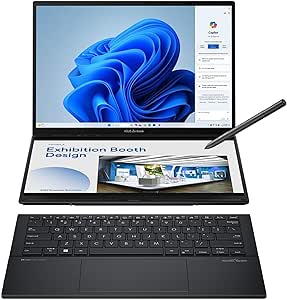 | Best for Dual-Screen Multitasking | Processor: Intel Core Ultra 9 285H | Memory: 32GB LPDDR5x | Storage: 1TB SSD | VIEW LATEST PRICE | See Our Full Breakdown |
| Lenovo IdeaPad Pro 5 16″ OLED Laptop with Ryzen AI and NVIDIA GeForce RTX 5050 |  | Best for GPU-Heavy Creative Work | Display: 16-inch 2880 x 1800 OLED, 120Hz | Processor: AMD Ryzen AI Series | Graphics: NVIDIA GeForce RTX 5050, 4GB GDDR6 | VIEW LATEST PRICE | See Our Full Breakdown |
| ASUS Zenbook 14 OLED Touch Laptop, 14″ WUXGA, 16GB RAM, 2TB SSD, Intel 16-core Ultra 7 255H, Windows 11 |  | Best for Portable Storage-Heavy Workflows | Display: 14-inch WUXGA OLED touchscreen, 1920 x 1200, HDR, 500 nits, 100% DCI-P3 | Processor: Intel Core Ultra 7 255H, 16-core | Graphics: Intel Arc 140T | VIEW LATEST PRICE | See Our Full Breakdown |
| ASUS Zenbook 14 OLED Laptop with 14″ WUXGA Touch Display |  | Best for Business-Class Windows Features | Display: 14-inch WUXGA OLED touchscreen, 1920 x 1200, HDR, 500 nits, 100% DCI-P3 | Processor: Intel Core Ultra 7 255H, 16-core | Graphics: Intel Arc 140T | VIEW LATEST PRICE | See Our Full Breakdown |
| Acer Swift 16 AI Laptop, 16″ 2K OLED Touchscreen, Intel 6-core Ultra 5, 16GB RAM, 1TB SSD, Windows 11 Pro |  | Best Large-Screen Lightweight Pick | Display: 16-inch OLED touchscreen, 1920 x 1200, 100% DCI-P3 | Processor: Intel Core Ultra 5 322, 6-core, up to 4.4GHz | Graphics: Integrated Intel Graphics | VIEW LATEST PRICE | See Our Full Breakdown |
| GEEKOM GeekBook X14 Pro Laptop, 14-inch 2.8K OLED, Ultra Thin, 2.2 lbs |  | Best for Frequent Travelers | Display: 14-inch 2.8K OLED, 120Hz, 450 nits | Processor: Intel Core Ultra 5 125U, 12 cores, up to 4.3GHz | Graphics: Intel Arc with XeSS, ray tracing, and AV1 encoding | VIEW LATEST PRICE | See Our Full Breakdown |
| ASUS Vivobook 16″ OLED Touchscreen Flip PC – Intel EVO Core Ultra 7 258V, 32GB RAM, 1TB SSD, Windows 11 Pro |  | Best for Flexible Big-Screen Work | Processor: Intel Core Ultra 7 258V | Memory: 32GB LPDDR5X | Storage: 1TB PCIe Gen 4 SSD | VIEW LATEST PRICE | See Our Full Breakdown |
| ASUS Zenbook A14 Laptop 14″ WUXGA OLED with Snapdragon 8-core, 16GB RAM, 512GB SSD, Windows 11 |  | Best Lightweight OLED Alternative | Processor: Qualcomm Snapdragon X Plus, 8-core | Memory: 16GB DDR5 | Storage: 512GB SSD | VIEW LATEST PRICE | See Our Full Breakdown |
| OLED MacBook Pro alternatife | Processor | Graphics | Memory | Storage |
|---|---|---|---|---|
| Asus Zenbook 14X OLED Business | 13th Gen Intel Core i7-13700H, 14-core | Intel Iris Xe | 16GB DDR SDRAM | 512GB SSD |
| ASUS Zenbook 14 Creator Laptop | Intel Core Ultra 7 255H, 16-core | Intel Arc 140T | 16GB | 1TB SSD |
| Samsung Galaxy Book5 Pro 360 1 | Intel Core Ultra 7 Series | Intel Arc 140V | 8GB | 1TB SSD |
| Samsung Galaxy Book3 Pro 16" L | 13th Gen Intel Core i7-1360P | Integrated Intel graphics | 16GB | 1TB SSD; expandable up to 3TB with microSD |
| ASUS Zenbook Duo Laptop with D | Intel Core Ultra 9 285H | Intel Arc Graphics | 32GB LPDDR5x | 1TB SSD |
| Lenovo IdeaPad Pro 5 16" OLED | AMD Ryzen AI Series | NVIDIA GeForce RTX 5050, 4GB GDDR6 | 16GB LPDDR5x | 1TB NVMe SSD |
| ASUS Zenbook 14 OLED Touch Lap | Intel Core Ultra 7 255H, 16-core | Intel Arc 140T | 16GB DDR5 | 2TB SSD |
| ASUS Zenbook 14 OLED Laptop wi | Intel Core Ultra 7 255H, 16-core | Intel Arc 140T | 16GB DDR5 | 512GB SSD |
| Acer Swift 16 AI Laptop | Intel Core Ultra 5 322, 6-core, up to 4.4GHz | Integrated Intel Graphics | 16GB DDR SDRAM | 1TB SSD |
| GEEKOM GeekBook X14 Pro Laptop | Intel Core Ultra 5 125U, 12 cores, up to 4.3GHz | Intel Arc with XeSS, ray tracing, and AV1 encoding | — | — |
| ASUS Vivobook 16" OLED Touchsc | Intel Core Ultra 7 258V | Intel Arc integrated graphics | 32GB LPDDR5X | 1TB PCIe Gen 4 SSD |
| ASUS Zenbook A14 Laptop 14" WU | Qualcomm Snapdragon X Plus, 8-core | Integrated Qualcomm Adreno GPU | 16GB DDR5 | 512GB SSD |
More Details on Our Top Picks
Asus Zenbook 14X OLED Business Laptop, 14.5-inch 2.8K Touchscreen, 13th Gen Intel i7, 16GB RAM, 512GB SSD, Windows 11
The Zenbook 14X is a strong pick for buyers who want a compact Windows laptop with a display that feels closer to a MacBook Pro’s premium screen than a standard office panel. Its 14.5-inch 2.8K OLED combines 120Hz motion with up to 550 nits of brightness, making text, video, and scrolling look crisp and fluid. The Core i7-13700H and 16GB RAM suit demanding everyday work, while Thunderbolt 4 and HDMI 2.1 make connecting external displays straightforward. Compared with the lighter ASUS Zenbook 14 Creator, this model gives you more screen resolution and a faster refresh rate, but it weighs more and has half the listed storage. Integrated Iris Xe graphics also make it a weaker fit than a laptop with a dedicated GPU for graphics-heavy workloads. Its stated battery life is up to 10 hours, with heavy use likely to reduce that.
Pros:- 14.5-inch 2.8K OLED display with 120Hz refresh and up to 550 nits brightness
- 14-core Intel Core i7-13700H and 16GB RAM for demanding multitasking
- Thunderbolt 4, USB-A, and HDMI 2.1 provide flexible connections
- Harman/kardon speakers with Dolby Atmos
Cons:- Integrated Intel Iris Xe graphics are less suited to intensive graphics work than a dedicated GPU
- 512GB SSD offers less storage than the 1TB options in the Zenbook 14 Creator and Galaxy Book3 Pro
- Listed battery life is up to 10 hours, and heavy workloads can shorten it
Best for: Office professionals and frequent travelers who prioritize a sharp, high-refresh OLED screen, a strong Intel processor, and a useful mix of ports.
Not ideal for: People who need long unplugged workdays, dedicated graphics for demanding creative work, or more than 512GB of built-in storage.
- Processor:13th Gen Intel Core i7-13700H, 14-core
- Memory:16GB DDR SDRAM
- Storage:512GB SSD
- Display:14.5-inch OLED touchscreen, 2880 x 1800, 120Hz
- Brightness:Up to 550 nits
- Graphics:Intel Iris Xe
- Battery:70Wh; up to 10 hours
- Weight:3.44 lbs
- Ports:2 Thunderbolt 4, 1 USB-A 3.2, 1 HDMI 2.1
Our verdict“Choose the Zenbook 14X if a high-resolution, 120Hz OLED and strong everyday processing matter more than dedicated graphics or longer battery life.”
ASUS Zenbook 14 Creator Laptop with OLED Touchscreen and Intel 16-core Processor
The Zenbook 14 Creator is the most travel-friendly choice here for buyers who want OLED color and a capable processor without carrying a larger machine. At 2.65 pounds, it is lighter than the Zenbook 14X and the 16-inch Galaxy Book3 Pro, while its 1TB SSD doubles the 14X’s listed capacity. The 100% DCI-P3 OLED touchscreen and HDR support suit color-focused editing and media, though its 1920 x 1200 resolution is less detailed than the 14X’s 2.8K panel or the Galaxy Book5 Pro 360’s 3K screen. Intel Arc 140T graphics offer more capability than basic integrated graphics, but this is not a substitute for a dedicated GPU on demanding 3D or rendering work. Battery capacity is listed at 75Wh, but no runtime estimate is provided, so buyers who need predictable all-day unplugged use have less guidance.
Pros:- Light 2.65-pound design is the easiest to carry among these single-screen Zenbooks
- OLED touchscreen covers 100% DCI-P3 and supports HDR
- 1TB SSD provides twice the listed capacity of the Zenbook 14X
- Intel Core Ultra 7 255H and Intel Arc 140T graphics support creative multitasking
Cons:- 1920 x 1200 resolution is less detailed than the Zenbook 14X and Samsung 3K displays
- Battery runtime is not specified despite the 75Wh capacity
- Integrated Intel Arc graphics are not equivalent to a dedicated GPU for demanding graphics workloads
Best for: Mobile creators and consultants who want accurate OLED color, 1TB of storage, and a particularly light 14-inch laptop.
Not ideal for: Buyers who need a high-resolution screen for detailed visual work, confirmed battery-runtime figures, or dedicated graphics for intensive rendering.
- Processor:Intel Core Ultra 7 255H, 16-core
- Memory:16GB
- Storage:1TB SSD
- Display:14-inch WUXGA OLED touchscreen, 1920 x 1200, HDR, 100% DCI-P3
- Brightness:Up to 500 nits
- Graphics:Intel Arc 140T
- Battery:75Wh; runtime not specified
- Weight:2.65 lbs
- Ports:2 Thunderbolt 4, 1 USB-A 3.2, 1 HDMI 2.1
Our verdict“Pick the Zenbook 14 Creator if low carry weight, color-focused OLED, and 1TB storage matter more than a higher-resolution screen or confirmed battery runtime.”
Samsung Galaxy Book5 Pro 360 16” Laptop with S Pen, AI Processor, 3K AMOLED Touchscreen, 120Hz, Dolby Atmos, Lightweight, Long Battery Life
The Galaxy Book5 Pro 360 is the clearest choice for people who want an OLED MacBook Pro alternative that can also work as a tablet. Its 16-inch 3K AMOLED touchscreen folds around for drawing, handwriting, or presenting, and the included S Pen gives it a creative use the clamshell Zenbook 14X and Galaxy Book3 Pro do not offer. The 120Hz refresh rate keeps pen movement and scrolling smooth, while the listed battery life of up to 25 hours gives it a longer stated runtime than the Zenbook 14X. That figure will vary with settings and workload. The main compromise is memory: its listed 8GB RAM is less than the 16GB in the Galaxy Book3 Pro and Zenbook 14X, limiting headroom for heavy multitasking. Choose it for flexible input, not maximum memory capacity.
Pros:- 16-inch 3K AMOLED touchscreen folds into a tablet-style form
- Included S Pen supports handwriting, sketching, and precise screen input
- 120Hz refresh rate makes scrolling and pen movement feel fluid
- Listed battery life is up to 25 hours
Cons:- Listed 8GB RAM is less than the 16GB in the Galaxy Book3 Pro and Zenbook 14X
- A 16-inch convertible is larger than the compact Zenbook Creator
- Actual battery life varies with settings and usage
Best for: Students, illustrators, and mobile professionals who want a large OLED display, an included stylus, and a laptop that converts into a tablet.
Not ideal for: People who keep many demanding applications open at once or need at least 16GB of listed memory for sustained professional workloads.
- Processor:Intel Core Ultra 7 Series
- Memory:8GB
- Storage:1TB SSD
- Display:16-inch AMOLED touchscreen, 2880 x 1800, 120Hz
- Graphics:Intel Arc 140V
- Battery life:Up to 25 hours
- Weight:3.7 lbs
- Ports:HDMI, USB-A, 2 Thunderbolt 4, headphone jack, microSD slot
- Additional features:Included S Pen support, anti-glare coating, Dolby Atmos
Our verdict“Choose the Galaxy Book5 Pro 360 if pen input and a convertible design are priorities, but favor the Galaxy Book3 Pro for more listed memory.”
Samsung Galaxy Book3 Pro 16″ Laptop, Intel Core i7, 16GB RAM, 1TB SSD, 3K AMOLED Screen, 120Hz, Fingerprint Reader, Windows 11, Graphite
For buyers who want a roomy OLED laptop but do not need the Book5 Pro 360’s tablet conversion or S Pen, the Galaxy Book3 Pro is the more straightforward fit. Its 16-inch 3K AMOLED display gives spreadsheets, timelines, and side-by-side windows more space than either 14-inch Zenbook, while the 120Hz refresh rate keeps motion smooth. The 16GB RAM and 1TB SSD also give it twice the listed memory and storage of the Book5 Pro 360’s 8GB configuration, a practical advantage for multitasking and local files. A fingerprint reader adds convenient sign-in, and the 3.4-pound weight is relatively restrained for a 16-inch model. The tradeoff is uncertainty: the supplied details do not give a specific battery runtime, and integrated graphics make it less suited to graphics-heavy work than a laptop with a dedicated GPU.
Pros:- 16-inch 3K AMOLED display with a 120Hz refresh rate
- 16GB RAM and 1TB SSD offer more listed memory than the Galaxy Book5 Pro 360
- Fingerprint reader supports convenient sign-in
- 3.4-pound weight is relatively light for a 16-inch laptop
Cons:- Specific battery-life duration is not provided
- Integrated Intel graphics are a weaker fit for graphics-intensive work than dedicated graphics
- Unlike the Galaxy Book5 Pro 360, it does not include convertible tablet use or S Pen support
Best for: Professionals who want a large, high-resolution AMOLED screen, 16GB of memory, 1TB storage, and a conventional laptop design.
Not ideal for: Buyers who need a convertible touchscreen with pen support, a stated battery-runtime estimate, or dedicated graphics for demanding creative applications.
- Processor:13th Gen Intel Core i7-1360P
- Memory:16GB
- Storage:1TB SSD; expandable up to 3TB with microSD
- Display:16-inch AMOLED, 2880 x 1800, 120Hz
- Graphics:Integrated Intel graphics
- Weight:3.4 lbs
- Security:Fingerprint reader
- Webcam:Full HD
- Ports:Thunderbolt 4, USB-C, microSD slot, HDMI
Our verdict“Choose the Galaxy Book3 Pro for a spacious 16-inch AMOLED work screen and more listed memory than the Book5 Pro 360, provided you do not need pen input.”
ASUS Zenbook Duo Laptop with Dual 14” OLED Touch Displays, Intel Core Ultra 9 285H, 32GB RAM, 1TB SSD, Windows 11
The Zenbook Duo is the specialist pick in this group: its second OLED screen changes how the laptop handles research, editing, and reference-heavy work. Two 14-inch 2.8K touch displays let you keep a document, timeline, or chat visible while working on the main screen, and the detachable keyboard and built-in kickstand support several layouts. With a Core Ultra 9 285H, 32GB RAM, and 1TB SSD, it also has the strongest listed memory configuration here. Compared with the Galaxy Book3 Pro, it offers far more screen flexibility but is slightly heavier and more dependent on workspace setup. Dual displays can use more battery than a single-screen Zenbook Creator, whose stated specs are simpler and lighter. Its two-screen workflow is most useful for people who will regularly use both panels; otherwise, that hardware adds complexity without much payoff.
Pros:- Two 14-inch 2880 x 1800 OLED touchscreens support flexible multitasking
- 32GB LPDDR5x RAM is more than the other listed models in this batch
- Core Ultra 9 285H and 1TB SSD suit demanding multi-application workflows
- Detachable keyboard, built-in kickstand, and multiple display modes add setup flexibility
Cons:- At 3.6 pounds, it is heavier than the 2.65-pound Zenbook 14 Creator
- Battery life can vary considerably when both displays are in use
- Dual-screen workflows may add setup and software complexity for single-screen users
Best for: Researchers, developers, and creators who regularly work across multiple documents or applications and will make practical use of two OLED screens.
Not ideal for: Travelers seeking the lightest, simplest single-screen laptop or buyers whose work rarely benefits from keeping a second display open.
- Processor:Intel Core Ultra 9 285H
- Memory:32GB LPDDR5x
- Storage:1TB SSD
- Displays:Two 14-inch OLED touchscreens, 2880 x 1800 each, 120Hz
- Brightness:Up to 500 nits
- Graphics:Intel Arc Graphics
- Battery:75Wh; up to 16 hours of video playback
- Weight:3.6 lbs
- Ports:2 Thunderbolt 4, USB 3.2 Gen 1 Type-A, HDMI 2.1, combo audio jack
Our verdict“Pick the Zenbook Duo if you will use its second OLED screen often; for a lighter, simpler laptop, the Zenbook 14 Creator is a better fit.”
Lenovo IdeaPad Pro 5 16″ OLED Laptop with Ryzen AI and NVIDIA GeForce RTX 5050
The IdeaPad Pro 5 is the strongest fit here for buyers who need more than an attractive OLED screen: its dedicated RTX 5050 gives it a graphics advantage over the integrated-GPU Zenbook and Swift models. The 16-inch 2.8K OLED at 120Hz also offers a sharper, smoother workspace than the WUXGA panels on the two ASUS Zenbook 14 configurations. Its SD card reader, HDMI 2.1, and USB4 ports make connecting cameras and external displays less dependent on dongles. The tradeoff is a heavier, larger system with just 16GB of memory; buyers doing sustained demanding work should also account for possible heat under load. Choose this over the Acer Swift 16 AI when graphics acceleration matters more than a simpler, lighter setup.
Pros:- 2.8K OLED display combines a spacious workspace with a 120Hz refresh rate
- Dedicated RTX 5050 graphics can accelerate compatible creative and graphics workloads
- SD card reader, HDMI 2.1, USB4, and USB-A ports offer flexible connections
- 1TB NVMe SSD provides substantial local storage
Cons:- 16-inch size and 0.7-inch thickness make it less portable than the 14-inch alternatives
- 16GB LPDDR5x memory may limit heavier multitasking and large creative projects
- High-performance components may run hot under sustained demanding workloads
Best for: Photo and video creators who want a large OLED screen, an SD card reader, and dedicated graphics for accelerated workloads.
Not ideal for: Frequent travelers who prioritize a compact, light laptop, or users who need more than 16GB of memory for demanding projects.
- Display:16-inch 2880 x 1800 OLED, 120Hz
- Processor:AMD Ryzen AI Series
- Graphics:NVIDIA GeForce RTX 5050, 4GB GDDR6
- Memory:16GB LPDDR5x
- Storage:1TB NVMe SSD
- Ports:2 USB-C (USB4, DisplayPort, Power Delivery), 2 USB-A, HDMI 2.1, SD card reader, 3.5mm audio
- Operating system:Windows 11 Home
- Dimensions:14.05 x 9.88 x 0.7 inches
Our verdict“Pick the IdeaPad Pro 5 if dedicated graphics and a sharp, spacious OLED matter more than compact size.”
ASUS Zenbook 14 OLED Touch Laptop, 14″ WUXGA, 16GB RAM, 2TB SSD, Intel 16-core Ultra 7 255H, Windows 11
This Zenbook 14 makes a compelling alternative for people who want a compact laptop without skimping on local storage. Its 2TB SSD doubles the listed capacity of the Windows 11 Pro Zenbook 14 while keeping a similar 2.66-pound, 14-inch format. The 16-core Intel processor and OLED touchscreen suit mobile productivity and color-focused work, though the 1920 x 1200 resolution is less detailed than the IdeaPad Pro 5’s 2.8K panel. The Intel Arc 140T is integrated graphics, not a match for the Lenovo’s dedicated RTX 5050 in GPU-heavy work. Two Thunderbolt 4 ports and HDMI 2.1 help at a desk, but the supplied configuration runs Windows 11 Home, which may not fit buyers who need Pro features.
Pros:- 2TB SSD offers ample space for files and applications without relying on external storage
- Light 2.66-pound design is easier to carry than the 16-inch options
- OLED touchscreen supports HDR and 100% DCI-P3 color coverage
- Two Thunderbolt 4 ports and HDMI 2.1 support flexible desk setups
Cons:- WUXGA resolution is less sharp than the 2.8K screens on the IdeaPad Pro 5 and GeekBook X14 Pro
- Integrated Intel Arc graphics lack the dedicated GPU advantage of the IdeaPad Pro 5
- Windows 11 Home may not meet business users’ operating-system requirements
Best for: Mobile professionals and designers who want a light 14-inch OLED touchscreen and room for a large offline project library.
Not ideal for: GPU-intensive creators, or business buyers who require Windows 11 Pro rather than Windows 11 Home.
- Display:14-inch WUXGA OLED touchscreen, 1920 x 1200, HDR, 500 nits, 100% DCI-P3
- Processor:Intel Core Ultra 7 255H, 16-core
- Graphics:Intel Arc 140T
- Memory:16GB DDR5
- Storage:2TB SSD
- Battery:75Wh
- Weight:2.66 pounds
- Ports:2 Thunderbolt 4, 1 USB-A 3.2, HDMI 2.1 TMDS
- Operating system:Windows 11 Home
Our verdict“Choose this Zenbook if portability and a 2TB internal drive matter more than dedicated graphics or a higher-resolution screen.”
ASUS Zenbook 14 OLED Laptop with 14″ WUXGA Touch Display
This Zenbook is the more business-oriented of the two similar 14-inch ASUS configurations: its defining difference is Windows 11 Pro, while the other listed Zenbook 14 OLED pairs the same 16-core processor and display class with Windows 11 Home and a 2TB SSD. Here, storage is 512GB, so buyers gain the Pro edition but give up substantial room for local files. The 500-nit OLED touchscreen and 100% DCI-P3 coverage suit color-rich work, while the 2.66-pound body and Thunderbolt 4 ports keep a mobile desk setup practical. Compared with the IdeaPad Pro 5, this is far easier to carry but lacks its dedicated RTX graphics and higher-resolution 120Hz screen. It is a better productivity pick than a GPU-workstation substitute.
Pros:- Windows 11 Pro suits business users who need its added management and security features
- 500-nit OLED touchscreen offers HDR and 100% DCI-P3 color coverage
- 16-core Intel processor and 16GB RAM support demanding multitasking
- Thunderbolt 4, USB-A, and HDMI 2.1 provide useful connectivity in a compact design
Cons:- 512GB SSD is much smaller than the 2TB drive in the comparable Windows 11 Home Zenbook
- Integrated Intel Arc graphics are less suited to GPU-heavy work than the IdeaPad Pro 5’s RTX 5050
- WUXGA resolution is less detailed than the higher-resolution OLED alternatives
Best for: Business users who need Windows 11 Pro, a portable OLED touchscreen, and fast connections for office peripherals.
Not ideal for: Creators with large local media libraries or GPU-heavy workloads who would benefit from more storage or dedicated graphics.
- Display:14-inch WUXGA OLED touchscreen, 1920 x 1200, HDR, 500 nits, 100% DCI-P3
- Processor:Intel Core Ultra 7 255H, 16-core
- Graphics:Intel Arc 140T
- Memory:16GB DDR5
- Storage:512GB SSD
- Battery:75Wh
- Weight:2.66 pounds
- Ports:2 Thunderbolt 4, 1 USB-A 3.2, HDMI 2.1 TMDS
- Operating system:Windows 11 Pro
Our verdict“Buy this Zenbook for Windows 11 Pro and portable productivity, but choose its 2TB sibling if storage matters more.”
Acer Swift 16 AI Laptop, 16″ 2K OLED Touchscreen, Intel 6-core Ultra 5, 16GB RAM, 1TB SSD, Windows 11 Pro
The Swift 16 AI offers the largest working area among the lightweight choices here: a 16-inch OLED touchscreen in a listed three-pound body. Its 1TB SSD and Windows 11 Pro make it a practical fit for students and professionals who want one big screen for documents, browsing, and color-rich media. Compared with the Lenovo IdeaPad Pro 5, it is lighter and uses integrated graphics instead of a dedicated RTX 5050; that makes the Acer less suited to demanding GPU work but a simpler option for everyday productivity. The tradeoff is its 1920 x 1200 resolution, which is less sharp than the Lenovo’s 2.8K screen despite the similar size. Integrated graphics also set a clear limit for gaming and heavy visual effects.
Pros:- 16-inch OLED touchscreen provides a generous workspace with 100% DCI-P3 color coverage
- Three-pound weight is relatively manageable for a 16-inch laptop
- 1TB SSD and Windows 11 Pro suit work and study setups
- Thunderbolt 4, Wi-Fi 7, USB-A, and HDMI support modern and legacy connections
Cons:- Integrated Intel graphics cannot match the IdeaPad Pro 5’s dedicated RTX 5050 for demanding graphics work
- 1920 x 1200 resolution is less detailed than the Lenovo’s 2880 x 1800 panel
- Battery life is not specified, making unplugged endurance harder to judge
Best for: Students and mobile professionals who want a large OLED touchscreen, Windows 11 Pro, and a relatively light 16-inch laptop.
Not ideal for: Video editors, 3D creators, or gamers who need dedicated graphics or a higher-resolution large display.
- Display:16-inch OLED touchscreen, 1920 x 1200, 100% DCI-P3
- Processor:Intel Core Ultra 5 322, 6-core, up to 4.4GHz
- Graphics:Integrated Intel Graphics
- Memory:16GB DDR SDRAM
- Storage:1TB SSD
- Battery:71Wh
- Weight:3 pounds
- Connectivity:Thunderbolt 4, USB-A 3.2, HDMI, Wi-Fi 7
- Operating system:Windows 11 Pro
Our verdict“Choose the Swift 16 AI for a light-for-its-size OLED work screen, not for dedicated-graphics performance.”
GEEKOM GeekBook X14 Pro Laptop, 14-inch 2.8K OLED, Ultra Thin, 2.2 lbs
At a listed 2.2 pounds, the GeekBook X14 Pro is the easiest model in this group to justify for frequent travel. Its 14-inch 2.8K OLED with a 120Hz refresh rate also packs more detail into a smaller screen than the WUXGA Zenbook 14 and Acer Swift 16 AI. The 72Wh battery is listed for up to 16 hours, though actual runtime will vary with workload. Compared with the Zenbook, the GEEKOM is lighter and claims longer battery life, while the ASUS has a specified 16-core processor and well-documented Thunderbolt 4 ports. The GeekBook’s Core Ultra 5 125U and integrated Intel Arc graphics suit everyday work and lighter creative tasks, but there is no dedicated GPU option listed. Keyboard and trackpad details are also missing.
Pros:- Listed 2.2-pound weight is the lightest in this five-product group
- 2.8K OLED panel combines high resolution with a 120Hz refresh rate
- 72Wh battery is listed for up to 16 hours of use
- Two USB4 ports, HDMI 2.1, and USB-A provide useful connectivity
Cons:- No dedicated GPU configuration is listed, limiting its appeal for GPU-heavy creative work
- Keyboard and trackpad specifications are not provided
- The battery-life figure is an estimate and may vary with workload
Best for: Frequent travelers who want a very light 14-inch OLED laptop with a high-resolution screen and a stated long battery-life estimate.
Not ideal for: Creators who rely on dedicated graphics, or buyers who need detailed keyboard, trackpad, or processor-performance information before choosing.
- Display:14-inch 2.8K OLED, 120Hz, 450 nits
- Processor:Intel Core Ultra 5 125U, 12 cores, up to 4.3GHz
- Graphics:Intel Arc with XeSS, ray tracing, and AV1 encoding
- Battery:72Wh, listed for up to 16 hours
- Weight:2.2 pounds
- Thickness:0.23 inches
- Ports:2 USB4 40Gbps with Power Delivery and DisplayPort 2.1, HDMI 2.1, USB 3.2 Type-A, 3.5mm audio
- Material:Aerospace-grade magnesium alloy
- Charger:65W GaN fast charger
Our verdict“Pick the GeekBook X14 Pro when low carry weight and a sharp OLED screen take priority over dedicated graphics and fuller product details.”
ASUS Vivobook 16″ OLED Touchscreen Flip PC – Intel EVO Core Ultra 7 258V, 32GB RAM, 1TB SSD, Windows 11 Pro
The Vivobook 16 Flip is a strong match for buyers who want an OLED MacBook Pro alternative that can also become a tablet or presentation screen. Its 16-inch, 120Hz OLED touchscreen gives creative work and scrolling plenty of space, while the 360-degree hinge adds modes the conventional Acer Swift 16 AI does not offer. A Core Ultra 7 258V, 32GB of memory, and a 1TB SSD make it better equipped for demanding multitasking than a lighter, more basic convertible. The tradeoff is portability: at 3.92 pounds, it is noticeably less appealing for frequent travel than the 2.4-pound Zenbook A14. Battery runtime is not specified, either, so mobile workers have less information to plan around. Choose it for screen size and flexibility, not the lightest carry.
Pros:- 16-inch OLED touchscreen combines a roomy workspace with a 120Hz refresh rate.
- 360-degree hinge supports laptop, tent, and tablet-style use.
- 32GB LPDDR5X memory and a 1TB SSD suit heavier multitasking and large project files.
- Thunderbolt 4, HDMI 2.1, USB-A, and a microSD reader provide varied connection options.
Cons:- At 3.92 pounds, it is heavier to carry than compact alternatives such as the Zenbook A14.
- Battery life details are not specified, making travel endurance hard to judge.
- Integrated Intel Arc graphics are less suited to graphics-heavy gaming than a laptop with a discrete GPU.
Best for: Windows users who want a large OLED workspace, 360-degree convertible modes, and 32GB of memory for multitasking.
Not ideal for: Frequent travelers prioritizing a light laptop or buyers who need documented battery-runtime figures before choosing.
- Processor:Intel Core Ultra 7 258V
- Memory:32GB LPDDR5X
- Storage:1TB PCIe Gen 4 SSD
- Display:16-inch OLED touchscreen, 2880 × 1800, 120Hz
- Graphics:Intel Arc integrated graphics
- Battery:75Wh Li-ion
- Operating system:Windows 11 Pro
- Weight:3.92 lb
- Ports:USB-A, USB-C, Thunderbolt 4, HDMI 2.1, 3.5mm audio, microSD
Our verdict“Choose the Vivobook 16 Flip if a large, fast OLED touchscreen and convertible flexibility matter more than carrying weight.”
ASUS Zenbook A14 Laptop 14″ WUXGA OLED with Snapdragon 8-core, 16GB RAM, 512GB SSD, Windows 11
For buyers who want OLED without hauling a large workstation, the Zenbook A14 stands out at just 2.4 pounds. Its 14-inch screen is smaller and less sharp than the Vivobook 16 Flip’s 2880 × 1800 panel, but HDR support, 600-nit brightness, and 100% DCI-P3 coverage make it a capable fit for color-focused work and video on the move. The Snapdragon X Plus and 16GB of memory suit everyday productivity and moderate creative tasks; integrated Adreno graphics are not a substitute for a discrete GPU. Compared with the Vivobook, this is the clearer travel pick, while the Vivobook offers more memory, storage, screen area, and convertible modes. Battery capacity is listed at 70Wh, but runtime figures are not provided.
Pros:- 2.4-pound weight makes it much easier to carry than the 16-inch Vivobook Flip.
- OLED panel supports HDR, 600-nit brightness, and 100% DCI-P3 color coverage.
- Two Thunderbolt 4 ports and HDMI 2.1 support flexible desk and display setups.
- Snapdragon X Plus processor and 16GB memory are suited to everyday productivity.
Cons:- 1920 × 1200 resolution offers less workspace and detail than the Vivobook 16 Flip’s 2880 × 1800 display.
- Integrated Adreno graphics are a limitation for high-end gaming and demanding GPU workloads.
- Battery runtime is not specified, despite the listed 70Wh capacity.
Best for: Frequent travelers and mobile professionals who want a lightweight OLED laptop for office work, media, and moderate creative tasks.
Not ideal for: Buyers who need a large, high-resolution canvas, discrete graphics for demanding 3D or gaming workloads, or more than 16GB of memory.
- Processor:Qualcomm Snapdragon X Plus, 8-core
- Memory:16GB DDR5
- Storage:512GB SSD
- Display:14-inch WUXGA OLED, 1920 × 1200, HDR, up to 600 nits, 100% DCI-P3
- Graphics:Integrated Qualcomm Adreno GPU
- Battery:70Wh
- Operating system:Windows 11 Home
- Weight:2.4 lb
- Ports:2 × Thunderbolt 4, USB-A 3.2, HDMI 2.1
Our verdict“Pick the Zenbook A14 if low carry weight and a bright, color-rich OLED matter more than a larger screen or discrete graphics.”

How We Picked
I compared the 12 laptops by their fit as OLED alternatives to a MacBook Pro, weighing screen clarity and size, processor and graphics capability, memory and storage, portability, and useful formats such as 2-in-1 hinges or dual displays. I also looked for details that change how a machine serves a buyer: a discrete GPU for graphics-heavy work, pen support for drawing, or a lightweight chassis for frequent travel. A strong OLED panel matters, but it cannot compensate for a mismatch between the laptop’s performance, workflow, and form factor.
The ranking favors models with a clear advantage for a defined buyer and enough listed specifications to judge that advantage. The Zenbook Duo leads for its unusual two-screen setup and high-spec configuration; the Galaxy Book5 Pro 360 and IdeaPad Pro 5 rise for different specialist needs. Conventional Zenbooks and Galaxy Book models offer more familiar designs, while lighter or lower-resolution options rank better for portability and everyday use than for demanding creative work. Where listings omit details such as graphics, display resolution, or battery capacity, I avoid assuming performance that is not specified.
| OLED MacBook Pro alternatife | Operating system |
|---|---|
| Asus Zenbook 14X OLED Business | — |
| ASUS Zenbook 14 Creator Laptop | — |
| Samsung Galaxy Book5 Pro 360 1 | — |
| Samsung Galaxy Book3 Pro 16" L | — |
| ASUS Zenbook Duo Laptop with D | — |
| Lenovo IdeaPad Pro 5 16" OLED | Windows 11 Home |
| ASUS Zenbook 14 OLED Touch Lap | Windows 11 Home |
| ASUS Zenbook 14 OLED Laptop wi | Windows 11 Pro |
| Acer Swift 16 AI Laptop | Windows 11 Pro |
| GEEKOM GeekBook X14 Pro Laptop | — |
| ASUS Vivobook 16" OLED Touchsc | Windows 11 Pro |
| ASUS Zenbook A14 Laptop 14" WU | Windows 11 Home |
Factors to Consider When Choosing Best OLED MacBook Pro Alternatives
Choosing an OLED MacBook Pro alternative is less about finding a Windows laptop with the same screen technology and more about matching its strengths to your work. These models range from dual-screen productivity machines to convertible note-taking laptops and light everyday clamshells. Use the factors below to decide which compromises will matter in your routine.
Match Display Resolution to Your Work
OLED describes the panel technology, not its resolution, size, refresh rate, or usefulness for fine detail. This roundup includes 2.8K and 3K displays as well as WUXGA and 2K screens, so two OLED laptops can deliver noticeably different workspace and image detail. If you edit high-resolution images, work with dense timelines, or keep several windows visible, check the exact resolution and screen size rather than relying on the OLED label. For documents, browsing, and streaming, a lower-resolution panel may be a sensible trade for a lighter or less demanding setup. Touch support is another separate feature: it helps with direct interaction, but it is not a substitute for checking whether the panel suits your visual workload.
Choose Graphics for Your Actual Applications
A fast processor and a vivid display do not automatically make a laptop suited to 3D work, GPU-accelerated editing, or demanding games. The IdeaPad Pro 5 is the only model in this list explicitly identified with an NVIDIA GeForce RTX 5050, making it the clearest candidate when dedicated graphics matter. Many other listings emphasize Intel or Snapdragon processors without specifying a discrete GPU, so check the exact configuration and the software requirements before buying. Integrated graphics can be a better fit for office work, everyday creative tasks, and lighter workloads, particularly when portability is a priority. Do not pay for graphics capability you will rarely use, but do not assume an OLED creator laptop can replace a workstation without checking its GPU.
Treat Convertible and Dual-Screen Designs as Workflow Choices
A 2-in-1 laptop and a dual-screen laptop change how you interact with work, not just how the screen looks. The Galaxy Book5 Pro 360 and Vivobook Flip suit buyers who want touch input and, in the Samsung’s case, a pen for sketching or handwritten notes. The Zenbook Duo instead adds a second display to keep reference material, communication tools, or timelines in view. These formats can be useful when your routine already benefits from pen input or multiple open windows, but they can add complexity compared with a conventional clamshell. If most of your time is spent typing on one screen, a standard Zenbook may be the simpler fit.
Balance Screen Size Against Carry Weight
A larger panel gives you more room for side-by-side windows, but it also makes the laptop less compact to carry and use in tight spaces. The 16-inch Samsung and Lenovo models favor a spacious work area, while the GEEKOM GeekBook X14 Pro is listed at 2.2 pounds for buyers who put low weight first. Fourteen-inch models offer a middle ground, though their screen resolution and processor configuration still differ. Think about the full daily setup, including charger, accessories, and whether you often work away from a desk. A laptop that is easy to carry can be more useful than a larger screen that stays at home.
Read Battery Claims as Configuration-Dependent
Battery life depends on more than the processor name: display brightness, refresh rate, workload, wireless use, and power settings all affect how long a laptop lasts away from an outlet. The Galaxy Book5 Pro 360 listing highlights long battery life, but the products here do not provide a uniform set of test results that supports a direct runtime ranking. OLED-heavy creative work can also draw more power than light browsing or document editing. If unplugged use is central to your day, seek measured battery results for the exact configuration and the applications you use. Avoid choosing by a general battery claim alone, especially when comparing different screen sizes and processor platforms.
Check the Exact Configuration Before You Buy
Product names can cover configurations that differ in processor, memory, storage, resolution, and operating system. This matters especially for broadly named entries such as the Zenbook 14 OLED and creator laptop, where the listing does not provide every detail needed for a close comparison. Check the precise model number and confirm that the advertised display, memory, and storage match the product you intend to order. Also verify software compatibility if you rely on specialist apps, peripherals, or a particular Windows workflow; processor platform can affect that experience. Comparing complete configurations prevents a familiar product name from hiding a meaningful spec gap.
Frequently Asked Questions
Which laptop here is the closest fit for demanding creative work?
The Lenovo IdeaPad Pro 5 is the clearest graphics-focused choice because its listing specifies an NVIDIA GeForce RTX 5050, a feature no other laptop in this lineup explicitly shares. The ASUS Zenbook Duo has a high-spec processor and two displays that can help with multitasking, but its listing does not identify a discrete GPU. For photo editing, video work, or 3D applications, compare the exact software requirements with the laptop’s GPU, memory, and display resolution before choosing. A screen with OLED contrast is useful, but it does not replace graphics performance or app compatibility.
Should I choose the Zenbook Duo or a conventional 16-inch laptop?
Choose the Zenbook Duo if you regularly work across several windows and can put a second display to use for references, messaging, or tool panels. A conventional 16-inch laptop is a more familiar choice when you want one large workspace without adapting to a dual-screen layout. The Galaxy Book5 Pro 360 adds a different benefit: its convertible design and S Pen make direct input more central to the experience. Before selecting a special format, consider whether your apps and desk setup will use its extra flexibility every day.
Is a WUXGA OLED laptop a good choice for creative work?
It can suit everyday photo work, illustration, and general creative tasks, but WUXGA offers less pixel detail than the 2.8K and 3K displays listed among these options. That difference may matter when you need fine detail, more room for editing controls, or crisp text across a large workspace. If color-critical work is part of your job, check the exact model’s color coverage and calibration information rather than inferring accuracy from OLED technology. A sharper panel may be worth prioritizing when your work depends on detail; a WUXGA screen may be a reasonable fit for lighter workloads and general use.
Is the Snapdragon Zenbook A14 a safe choice for Windows software?
The Zenbook A14’s Snapdragon processor makes it a distinct option from the Intel- and AMD-based laptops in this roundup, so buyers should check application compatibility rather than assume every program behaves identically. Confirm support for any specialist creative software, work tools, drivers, or peripherals you depend on. If your routine is centered on common Windows applications and portability, it may fit well; if you rely on older or specialized software, verify compatibility with the publisher first. This check is more useful than comparing processor-core counts across different architectures alone.
What should I prioritize if I want an OLED laptop mainly for travel?
Start with the laptop’s carry weight and dimensions, then check whether its screen size and configuration remain comfortable for your work. The GEEKOM GeekBook X14 Pro is specifically listed at 2.2 pounds, while the 16-inch models trade some portability for more screen space. A compact model is not automatically the best travel choice if its ports, battery performance, or software compatibility do not fit your routine. Look for reliable battery measurements for the exact configuration, and include the charger and any accessories in your portability decision. If most travel work involves documents and browsing, a lighter 14-inch option may be a better fit than a larger creator-focused machine.
Conclusion
For the best overall mix of standout capability and multitasking potential, I recommend the ASUS Zenbook Duo, provided you will use both screens. The best graphics-oriented pick is the Lenovo IdeaPad Pro 5 for buyers who need its listed NVIDIA GPU; the Galaxy Book5 Pro 360 is the best premium-style fit for pen input and convertible use. For a more approachable everyday starting point, choose a conventional ASUS Zenbook 14 OLED after confirming the exact configuration; the best value depends on the features you actually need, not on OLED alone. Travelers who prioritize minimal carry weight should look closely at the GEEKOM GeekBook X14 Pro, while buyers who want a large touch display and flexible hinge should consider the ASUS Vivobook Flip. Match the laptop to your workflow first, then use panel resolution, graphics, and portability to settle the final choice.
Halloween Picks
halloween
As an affiliate, we earn on qualifying purchases.