

Create a low-stress family charging area by designating a specific spot near common gathering places, using multi-port USB hubs or dedicated stations to keep devices organized. Incorporate labeled compartments, cable clips, or baskets to prevent tangling and clutter. Establish routines like charging during dinner or bedtime, and encourage family members to return devices to their spots after use. Keep safety in mind with proper cable management, and discover more tips for a seamless setup ahead.

Get the latest gadgets delivered free with Prime
- Fast, free delivery on millions of items
- Prime Video, Amazon Music and more included
- Member-only deals all year
Key Takeaways
- Designate a specific, easily accessible spot near common areas for all family charging needs.
- Use multi-port USB hubs and labeled organizers to keep cords tidy and devices easy to find.
- Incorporate cable management solutions like clips and Velcro straps to prevent tangling.
- Establish daily routines for plugging in and storing devices to promote consistency and order.
- Hide chargers and accessories in drawers or cabinets to maintain a clutter-free, calming space.
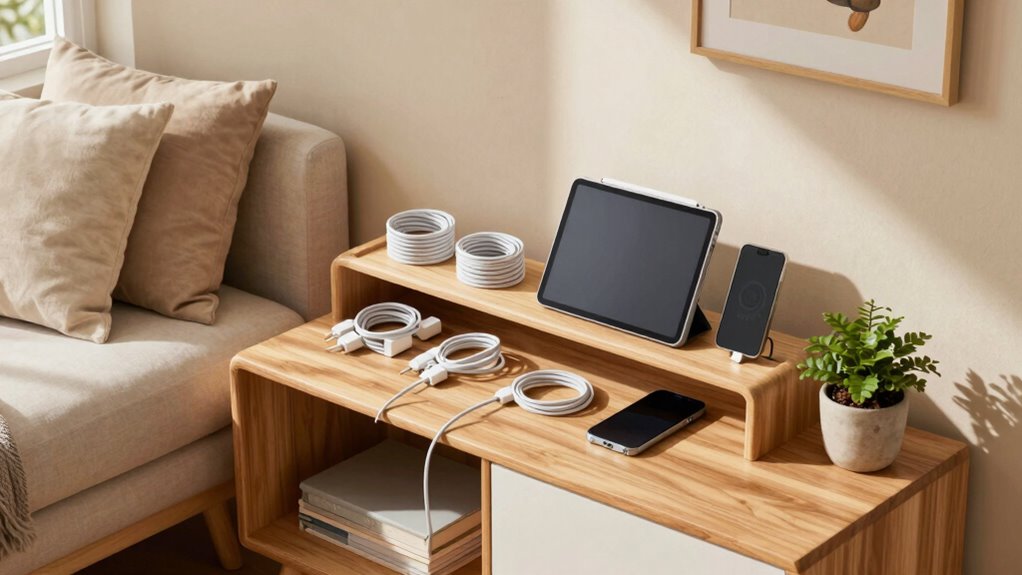
Creating a low-stress family charging area begins with understanding your household’s needs and habits. You want a space that keeps everyone’s devices powered up without creating clutter or chaos. To do that, start by evaluating how many gadgets your family uses daily—smartphones, tablets, smartwatches, or even portable speakers. Knowing what needs to be charged and how often helps you design a space that’s both functional and convenient. Think about the flow of daily routines—where do people naturally gather? This will guide you in placing your charging station where it’s most accessible and least disruptive.
Assess your family’s gadgets and routines to create an accessible, clutter-free charging station that fits seamlessly into daily life.
Next, focus on tech organization and gadget storage. A well-organized area prevents cords from tangling and devices from cluttering countertops. Invest in a dedicated charging station or a multi-port USB hub that can handle several devices at once. This not only keeps cords neatly contained but also reduces the frustration of searching for the right charger or untangling a mess of cables. Use cable clips, Velcro straps, or decorative cord organizers to keep wires tidy and prevent tripping hazards. Consider adding labeled compartments or small baskets for devices that aren’t charging but still need to be stored, such as headphones or styluses. This keeps everything in one place and minimizes the risk of losing small items. Incorporating cable management strategies can further enhance safety and efficiency. Additionally, choosing safety-conscious materials for your setup can help prevent electrical hazards and protect your family’s devices. Using ergonomically designed accessories can also improve ease of use and reduce strain when connecting or disconnecting devices. Incorporating smart home technology, like device timers or charging alerts, can also help manage charging routines more effectively.
Designate a specific spot for your charging station, ideally near a power outlet that’s easily accessible but out of the way of daily traffic. You might install a wall-mounted shelf or a small table with a built-in cord management system. If space allows, incorporate a drawer or cabinet to hide away chargers and accessories when they’re not in use, maintaining a sleek, clutter-free look. When setting up, make sure cords aren’t stretched too tight or hanging where they could be pulled accidentally, which might damage devices or outlets. Incorporating environmentally conscious materials in your setup can also reduce your household’s ecological footprint.
Finally, establish some simple routines. Encourage family members to plug in their devices at designated times—perhaps during dinner or before bedtime—to keep the area organized and prevent devices from piling up. Teach kids to return their gadgets to the storage spot when not in use. This creates a habit that keeps the space orderly and stress-free. With thoughtful tech organization, smart gadget storage, and a practical setup, you’ll create a family charging area that’s both efficient and calming—making device management effortless and stress minimal.
Frequently Asked Questions
What Safety Precautions Should I Consider for Charging Areas?
You should prioritize childproof measures like outlet covers and securing cords out of children’s reach. Proper cable management is essential to prevent tripping hazards and accidental unplugging. Always unplug devices when not in use and avoid overloading outlets. Keep charging stations in a dry, cool area away from water, and make sure cords are in good condition. These precautions help create a safe, low-stress environment for your family’s charging needs.
How Can I Hide Charging Cables Effectively?
You can hide charging cables effectively by using cable management solutions like cable clips, sleeves, or under-desk trays to keep cords organized and out of sight. Opt for concealed wiring by installing power strips inside furniture or along baseboards, and run cables through wall-mounted conduits or raceways. This approach minimizes clutter, reduces tripping hazards, and creates a clean, stress-free environment for your family.
What Is the Ideal Location for a Family Charging Station?
You should place your family charging station in a central, accessible spot like the kitchen or mudroom, where device organization is easy and everyone passes through. Focus on a charging station design that keeps cords hidden and devices within reach, minimizing clutter. This setup encourages quick, stress-free device charging, helps maintain order, and guarantees family members can easily find and plug in their devices without frustration.
How Do I Prevent Device Overuse in the Charging Area?
A stitch in time saves nine, so set clear boundaries. To prevent device overuse, you can use device timers and establish usage limits. Encourage your family to stick to designated charging times and create tech-free zones or periods. This helps everyone balance screen time and enjoy quality moments together. Consistency is key; over time, these habits will become part of your family’s routine, reducing stress and promoting healthier device habits.
Are There Eco-Friendly Charging Options for Families?
Yes, you can choose eco-friendly charging options like solar chargers and biodegradable cables. Solar chargers harness renewable energy, reducing your carbon footprint and providing a sustainable way to power devices outdoors or during power outages. Biodegradable cables are made from eco-friendly materials, breaking down naturally and minimizing environmental impact. By integrating these options, you support environmental health while keeping your family’s devices charged efficiently and responsibly.
Conclusion
By transforming your charging area into a calm, organized space, you turn a daily chaos into a peaceful retreat. Think of it as your family’s sanctuary amid the digital storm—where clutter is tamed and stress dissolves. When you create this haven, you’re not just managing devices—you’re nurturing harmony and connection. So, take charge today; after all, a serene family life begins with a single, well-designed charging station.
Fall Picks
fall essentials
As an affiliate, we earn on qualifying purchases.