
Among these cinewhoop FPV drones, I’d put the CADDXFPV Gofilm 20 first for buyers focused on compact, smooth 4K/60 footage, while the DJI Avata 2 is the more approachable ready-to-fly choice. The DJI Avata 360 models stand apart for immersive 360-degree capture, and the CADDXFPV Protos kit bundles Walksnail video gear for pilots who want an FPV setup in one package. The main tradeoffs are between conventional forward-facing footage and reframing flexibility, bundled equipment and room to choose your own, and ease of use versus a more hands-on FPV path. Each option serves a different kind of cinewhoop buyer. Read on for the full breakdown and help matching a drone to your flying and filming plans.

Get the latest gadgets delivered free with Prime
- Fast, free delivery on millions of items
- Prime Video, Amazon Music and more included
- Member-only deals all year
Complete the kit



Key Takeaways
- Gofilm 20 is the footage-first pick: Its listed 4K/60FPS Starlight camera gives it a distinct role for compact cinematic capture, though buyers should check what flight gear the package includes.
- Avata 2 is the easier entry point: Its integrated camera and DJI FPV ecosystem suit pilots who want a ready-made route into cinewhoop flying; the several bundle variants differ mainly in included batteries and gear.
- Avata 360 prioritizes reframing: The 360 models can capture a wider scene for later viewpoint changes, trading the direct, conventional framing approach of Avata 2 for a specialized workflow.
- Protos is a gear-bundle choice: Walksnail Ascent video equipment and goggles are part of the RTF kit, which may appeal to buyers who prefer a coordinated setup over piecing one together.
- Bundle names matter less than the actual contents: The Avata 2 and Avata 360 listings overlap, so compare battery count, controller, goggles, and included accessories before choosing.
| CADDXFPV Protos FPV Drone RTF Kit with Walksnail Ascent VTX and FPV Goggles | 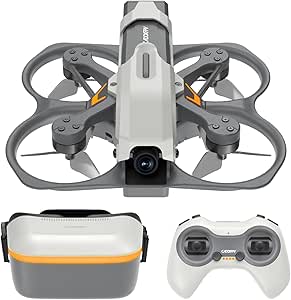 | Best Micro Cinewhoop Starter Kit | Weight: 100g (3.2 oz) | Dimensions: 4.33 × 4.05 × 1.61 inches | Camera sensor: 1/3-inch Starvis II | VIEW ON AMAZON | See Our Full Breakdown |
| DJI Avata 2 FPV Drone Fly Smart Combo with Three Batteries and 4K Camera |  | Best Overall Cinewhoop | Camera: 4K | Image sensor: 1/1.3-inch | Maximum video: 4K/60fps | VIEW ON AMAZON | See Our Full Breakdown |
| DJI Avata 2 FPV Drone with Camera, Fly Smart Combo |  | Best for Aerial Acrobatics | Camera: 4K/60fps | Image sensor: 1/1.3-inch | Field of view: 155° | VIEW ON AMAZON | See Our Full Breakdown |
| DJI Avata 360 FPV Drone with RC 2 Controller (2-Battery Bundle) |  | Best for 360-Degree Reframing | Sensors: 1-inch-equivalent | 360 video: 8K/60fps HDR | Single-lens video: 4K/60fps | VIEW ON AMAZON | See Our Full Breakdown |
| DJI Avata 2 FPV Drone Fly More Combo with 3 Batteries |  | Best for Pilots with DJI Goggles 3 | Camera: 4K video up to 60fps | Image sensor: 1/1.3-inch | Field of view: 155° | VIEW ON AMAZON | See Our Full Breakdown |
| DJI Avata 360 Motion Fly More Combo |  | Best for Reframing Aerial Footage | Camera: 1-inch-equivalent sensors | 360° video: 8K/60fps HDR | Single-lens video: 4K/60fps | VIEW ON AMAZON | See Our Full Breakdown |
| DJI Avata 360 Motion Fly More Combo 8K 360° Camera Drone |  | Best for High-Resolution 360° Capture | 360° video: 8K/60fps HDR | Single-lens video: 4K/60fps | Effective still resolution: 120 MP | VIEW ON AMAZON | See Our Full Breakdown |
| CADDXFPV Gofilm 20 FPV Drone – 4K/60FPS Starlight Cinewhoop |  | Best Compact Cinewhoop | Weight: 115 g | Dimensions: 5.25 × 4.84 × 1.54 in | Video resolution: 720p, 1080p, 2.7K, or 4K at 60fps | VIEW ON AMAZON | See Our Full Breakdown |
| fpv drones cinewhoop | Camera |
|---|---|
| CADDXFPV Protos FPV Drone RTF | — |
| DJI Avata 2 FPV Drone Fly Smar | 4K |
| DJI Avata 2 FPV Drone with Cam | 4K/60fps |
| DJI Avata 360 FPV Drone with R | — |
| DJI Avata 2 FPV Drone Fly More | 4K video up to 60fps |
| DJI Avata 360 Motion Fly More | 1-inch-equivalent sensors |
| DJI Avata 360 Motion Fly More | — |
| CADDXFPV Gofilm 20 FPV Drone | — |
More Details on Our Top Picks
CADDXFPV Protos FPV Drone RTF Kit with Walksnail Ascent VTX and FPV Goggles
Compact size and a complete flight kit make the Protos the most approachable pick here for learning close-range cinewhoop flying. At 100g, it is much smaller than the DJI Avata 2, and its Position Hold and Self-Stabilizing modes offer a gentler starting point before trying Manual mode. The included 1080P goggles, controller, and three batteries mean the core setup is ready to fly, while the 2MP camera and 30ms video latency suit practice and casual clips better than polished 4K production. Its key tradeoff is scale: 10 minutes per battery and an approximately 150-meter RC control range limit longer sessions and larger locations. I’d choose it for learning in small spaces; buyers focused on cinematic image quality should look at the Avata 2 instead.
Pros:- 100g frame is highly portable and falls below the stated 250g FAA registration threshold
- Includes goggles, controller, and three batteries for a complete starter setup
- Position Hold and Self-Stabilizing modes provide a gradual route into Manual flying
- Three-battery Type-C charging system is specified to charge the set in 20 minutes
Cons:- 2MP camera and 1080p video are less suited to detailed cinematic footage than the DJI Avata 2’s 4K camera
- Approximately 150-meter RC control range restricts where it can be flown
- Each battery provides up to 10 minutes, and the charging kit has no wall adapter
Best for: New FPV pilots who want a lightweight, ready-to-fly kit for learning cinewhoop control in small, open areas
Not ideal for: Cinewhoop filmmakers who need detailed 4K footage, long control range, or extended flights between battery changes
- Weight:100g (3.2 oz)
- Dimensions:4.33 × 4.05 × 1.61 inches
- Camera sensor:1/3-inch Starvis II
- Video resolution:1080p / 720p
- Still resolution:2 MP
- Video latency:30ms
- Flight time:Up to 10 minutes per battery
- RC control range:Approximately 150 meters
- Battery:2S Lithium Ion, 840mAh
Our verdict“Choose the Protos if you want a compact, ready-to-fly kit for learning cinewhoop skills, and choose the Avata 2 if image detail matters more.”
DJI Avata 2 FPV Drone Fly Smart Combo with Three Batteries and 4K Camera
Wide 4K footage, guarded propellers, and motion control give the Avata 2 the broadest appeal in this group for immersive cinewhoop-style flying. Its 1/1.3-inch sensor and 155° field of view capture substantially more detail than the CADDXFPV Protos, making it a stronger fit for footage you want to crop or share. The included goggles, RC Motion 3, and three batteries also make this combo more complete for longer outings than the single-battery Avata 2 listing. Built-in propeller guards add a useful layer of protection around people and indoor obstacles, though they do not remove the need for careful flying. DJI’s compatible-controller ecosystem and Android app download process are added setup steps, and the wide view can make nearby objects appear stretched.
Pros:- 1/1.3-inch sensor records video up to 4K/60fps
- 155° field of view captures an expansive perspective
- Integrated propeller guards add protection during close flying
- Three batteries, goggles, and motion controller are included
Cons:- Some features depend on compatible DJI goggles or motion controllers
- The wide field of view can distort the appearance of nearby subjects
- Android users must download the DJI Fly app from DJI’s website
Best for: Pilots who want an immersive, guarded FPV drone with 4K capture and enough included batteries for longer outings
Not ideal for: Buyers who want an open, modular FPV platform or a small micro drone for tight indoor spaces
- Camera:4K
- Image sensor:1/1.3-inch
- Maximum video:4K/60fps
- Field of view:155°
- Batteries included:3 Intelligent Batteries
- Motion controller:DJI RC Motion 3
- Goggles:DJI Goggles N3
- Safety feature:Built-in propeller guards
Our verdict“Pick this Avata 2 combo for a balanced mix of 4K footage, approachable motion control, and three-battery flying.”
DJI Avata 2 FPV Drone with Camera, Fly Smart Combo
Acrobatic flight modes set this Avata 2 apart for pilots who want to add flips, rolls, and 180-degree drifts to close-range footage. It shares the 1/1.3-inch sensor and wide 4K/60fps view of the three-battery Fly Smart Combo, but this listing specifies a single battery, so it is less suited to a full day of flying without extra power. Motion control and integrated propeller guards keep the experience more approachable than a conventional manual FPV setup, while still offering room to experiment. That combination makes it a better match for stunt-oriented sessions than the CADDXFPV Protos, which emphasizes lightweight learning modes. The tradeoff is that battery capacity in the box is limited, and some features rely on compatible DJI gear.
Pros:- Records wide-angle footage at up to 4K/60fps
- Supports flips, rolls, and 180-degree drifts
- Motion controller is designed for approachable flying
- Integrated propeller guards suit close-range flight
Cons:- Listing specifies a single battery, limiting flight time before recharging
- Some functions require compatible DJI goggles or motion controllers
- Android users must download DJI Fly from DJI’s website
Best for: FPV pilots who want to practice aerial acrobatics and capture wide 4K footage with DJI motion controls
Not ideal for: Buyers planning long sessions who need multiple batteries included or pilots seeking a lightweight micro quad
- Camera:4K/60fps
- Image sensor:1/1.3-inch
- Field of view:155°
- Battery configuration:Single battery
- Controller:DJI RC Motion 3
- Goggles:DJI Goggles N3
- Flight features:Flips, rolls, and 180-degree drifts
- Safety feature:Integrated propeller guards
Our verdict“Choose this Avata 2 listing if acrobatics matter more than having multiple batteries included.”
DJI Avata 360 FPV Drone with RC 2 Controller (2-Battery Bundle)
8K/60fps HDR 360 capture gives the Avata 360 a distinct job in this lineup: recording a full scene that can be reframed after the flight. Its 1-inch-equivalent sensors and separate 4K/60fps single-lens mode offer more capture flexibility than the DJI Avata 2, whose 155° view is wide but fixed. Omnidirectional obstacle sensing, propeller guards, and the screen-equipped RC 2 controller make this bundle suited to controlled filming with a direct view of the aircraft feed. The cost of that flexibility is a heavier editing workflow: 8K 360 files need substantial storage and processing, and only two batteries are included. Buyers who want straightforward FPV footage will likely find the Avata 2 simpler to manage.
Pros:- 8K/60fps HDR 360 capture allows reframing after the flight
- Also offers a 4K/60fps single-lens mode
- Omnidirectional obstacle sensing and an integrated propeller guard support close filming
- Bundle includes an RC 2 controller with a 5.5-inch screen and a 128GB MicroSD card
Cons:- 8K 360 footage requires substantial storage and editing resources
- Two batteries provide fewer included flight sessions than the three-battery Avata 2 combos
- The 360 capture workflow is more involved than recording a fixed wide-angle view
Best for: Aerial creators who want to capture 360-degree scenes and choose the framing later in editing
Not ideal for: Pilots who want a simple, lightweight cinewhoop setup or lack storage and editing capacity for large 8K files
- Sensors:1-inch-equivalent
- 360 video:8K/60fps HDR
- Single-lens video:4K/60fps
- Transmission:O4+, 1080p/60fps, up to 20 km
- Obstacle sensing:Omnidirectional
- Controller:DJI RC 2 with 5.5-inch 1080p display
- Batteries included:2 Intelligent Flight Batteries
- Storage included:128GB MicroSD card
Our verdict“Choose the Avata 360 if post-flight reframing is central to your footage; the Avata 2 is a simpler pick for fixed-view 4K FPV.”
DJI Avata 2 FPV Drone Fly More Combo with 3 Batteries
Three batteries, DJI Goggles 3, and RC Motion 3 make this Avata 2 Fly More Combo a practical choice for pilots who want a ready-made DJI FPV setup with multiple flight sessions. It shares the 1/1.3-inch sensor, 155° field of view, and 4K/60fps capture of the Fly Smart Combo, but this listing specifies Goggles 3 rather than Goggles N3. That distinction matters most to buyers building around a particular DJI headset; otherwise, the core camera and guarded flight experience are similar. Integrated propeller guards and motion control help with close, immersive flying, while flips and rolls add room for more playful shots. The tradeoff is that the feature set remains tied to compatible DJI equipment, and Android activation requires downloading DJI Fly from DJI’s website.
Pros:- Captures up to 4K/60fps with a 1/1.3-inch sensor
- Three intelligent batteries support longer outings
- Includes DJI Goggles 3 and DJI RC Motion 3
- Propeller guards and acrobatic flight modes support varied close-range flying
Cons:- Some features depend on compatible DJI goggles or motion controllers
- Android activation requires downloading the DJI Fly app from DJI’s website
- The 155° view can make nearby subjects appear distorted
Best for: DJI pilots who specifically want Goggles 3 and three batteries for extended FPV sessions
Not ideal for: Buyers who already own compatible goggles and want to avoid paying for another headset, or who need an open FPV system
- Camera:4K video up to 60fps
- Image sensor:1/1.3-inch
- Field of view:155°
- Batteries included:3 Intelligent Batteries
- Motion controller:DJI RC Motion 3
- Goggles:DJI Goggles 3
- Propeller guards:Integrated
- Activation app:DJI Fly
Our verdict“Choose this Fly More Combo if Goggles 3 and three included batteries fit the DJI setup you want.”
DJI Avata 360 Motion Fly More Combo
For cinewhoop buyers who want to choose the camera angle after flying, the Avata 360’s 8K/60fps HDR capture is its defining advantage: one flight can yield several reframed views. Compared with the CADDXFPV Gofilm 20, it trades that model’s 115 g compact build and conventional 4K cinewhoop approach for a more immersive, camera-led kit. Integrated guards, omnidirectional obstacle sensing, and the RC Motion 3 make it more approachable for guided shots, while the three included batteries support longer outings. The tradeoff is size and complexity: this is a heavier 360° platform, not the nimblest choice for tight indoor passes. Its stated 20 km transmission range depends on clear, optimal conditions, and Android users must install DJI Fly from DJI’s website.
Pros:- 8K/60fps HDR 360° footage allows flexible reframing after capture
- Includes goggles, motion controller, charging hub, bag, and three batteries
- Integrated propeller guards and omnidirectional obstacle sensing
- 4K/60fps single-lens mode offers a conventional filming option
Cons:- Larger, more camera-focused platform than the 115 g CADDXFPV Gofilm 20
- 20 km transmission claim depends on optimal, unobstructed conditions
- DJI Fly requires manual download on Android because it is unavailable on Google Play
Best for: FPV creators who want to reframe a single flight into multiple 360° shots and value an included goggles-and-motion-control kit.
Not ideal for: Pilots focused on lightweight indoor cinewhoop work, or Android buyers who prefer installing apps only through Google Play.
- Camera:1-inch-equivalent sensors
- 360° video:8K/60fps HDR
- Single-lens video:4K/60fps
- Video transmission:O4+, 1080p/60fps, up to 20 km
- Safety features:Integrated propeller guard and omnidirectional obstacle sensing
- Controller:DJI RC Motion 3
- Included accessories:DJI Goggles N3, charging hub, sling bag, and three batteries
Our verdict“Choose this combo if reframable 360° footage and an all-in-one motion-control kit matter more than a lightweight cinewhoop build.”
DJI Avata 360 Motion Fly More Combo 8K 360° Camera Drone
This Avata 360 listing suits buyers who want its 8K/60fps HDR 360° video alongside a full motion-control kit. The 120 MP still resolution and 4K/60fps single-lens mode add options when a project calls for stills or a familiar forward-facing frame. Like the other DJI Avata 360 Motion Fly More Combo in this roundup, it pairs Goggles N3 and the RC Motion 3 with three batteries; compared with the CADDXFPV Gofilm 20, its appeal is flexible 360° reframing rather than a 115 g frame made for compact cinewhoop flying. Guards and obstacle sensing help with confidence, but the listed 455 g weight makes it less suited to delicate indoor routes. Some advertised features carry conditions, and DJI Fly is not on Google Play.
Pros:- 8K/60fps HDR 360° video supports post-flight reframing
- 120 MP still resolution and 4K/60fps single-lens recording
- Goggles, motion controller, charging hub, bag, and three batteries included
- Propeller guard and omnidirectional obstacle sensing
Cons:- Listed weight of 455 g is substantially above the 115 g CADDXFPV Gofilm 20
- Some advertised capabilities depend on footnoted conditions
- DJI Fly is unavailable on Google Play
Best for: Video makers who prioritize 360° reframing, high-resolution stills, and a bundled immersive control setup.
Not ideal for: Pilots seeking an ultralight cinewhoop for close indoor filming or buyers who need every advertised feature to work without conditions.
- 360° video:8K/60fps HDR
- Single-lens video:4K/60fps
- Effective still resolution:120 MP
- Maximum transmission range:20 km
- Battery:2700 mAh lithium-ion
- Weight:455 g
- Dimensions:9.69 × 7.83 × 2.19 in
- Included accessories:DJI Goggles N3, DJI RC Motion 3, charging hub, sling bag, and three batteries
Our verdict“Pick this version for a bundled 360° camera workflow and high-resolution stills, provided compact cinewhoop agility is not your priority.”
CADDXFPV Gofilm 20 FPV Drone – 4K/60FPS Starlight Cinewhoop
The Gofilm 20 is the clearest fit here for pilots who mean cinewhoop literally: its 115 g frame and 360° guards favor close indoor lines and compact outdoor shots. It records true 4K/60fps with a 160° lens, while built-in EIS and Gyroflow support help smooth footage from a small airframe. That makes it a more nimble, conventional cinewhoop pick than either DJI Avata 360 Motion Fly More Combo, whose draw is 360° reframing and bundled goggles. The tradeoff is a shorter, more hands-on setup: flight time is about 5.5 minutes, and full 4K mode must be enabled through Avatar goggles or VTX. You’ll also need a high-speed microSD card, which is not included. This is a specialist micro-drone, not an all-in-one camera kit.
Pros:- 115 g weight and 360° guards suit compact, close-quarters flying
- True 4K/60fps video with a 160° ultra-wide lens
- Built-in EIS and Gyroflow support for smoother footage
- 2–4S LiPo compatibility and ELRS 2.4 GHz control
Cons:- About 5.5 minutes of hover time limits each filming session
- High-speed microSD card is required for full 4K and is not included
- Full 4K mode must be enabled through Avatar goggles or VTX
Best for: Experienced FPV pilots and compact-film creators who want a light, guarded cinewhoop for tight indoor or outdoor routes.
Not ideal for: Beginners seeking a complete goggles-and-batteries bundle, or filmmakers who need long flight sessions and turnkey 4K recording.
- Weight:115 g
- Dimensions:5.25 × 4.84 × 1.54 in
- Video resolution:720p, 1080p, 2.7K, or 4K at 60fps
- Lens:160° ultra-wide
- Control:Remote control, ELRS 2.4 GHz
- Battery compatibility:2–4S LiPo
- Motor:1303 6000 kv brushless
- Frame material:Carbon fiber and nylon
Our verdict“Choose the Gofilm 20 for lightweight, guarded cinewhoop flying and 4K/60fps capture if you can manage its short sessions and setup requirements.”
How We Picked
I compared these eight listings as cinewhoop choices, giving the most weight to the intended footage, camera system, flight readiness, and the equipment included in each bundle. A model with a clear filming advantage or a coherent ready-to-fly setup ranks ahead of a near-duplicate listing when it better answers a distinct buyer need. I also considered the likely learning curve and how much work a buyer may need to do before flying.
That logic puts the Gofilm 20 first for its specific 4K/60 cinewhoop camera focus, with the Avata 2 close behind as the more approachable general-purpose option. The Avata 360 versions rank for pilots who value 360 capture and reframing, while the Protos RTF kit serves buyers drawn to its Walksnail bundle. The Avata 2 and Avata 360 bundle variants are grouped by their stated contents and use case; the product names alone do not establish differences in flight performance. I judge each option by its fit and tradeoffs rather than treating every bundle as a separate drone design.
Factors to Consider When Choosing Fpv Drones Cinewhoop
Choosing a cinewhoop is partly a camera decision and partly a decision about the whole flying setup. I’d start with the footage you want and the equipment you already own, then check the practical details that affect every flight.
Choose the footage workflow before the drone
Decide whether you want a forward-facing cinematic view or the freedom to reframe a 360-degree scene later. A conventional camera workflow can make framing decisions more direct during capture, while 360 footage shifts some of that work to editing. That flexibility can help when the subject moves unpredictably, but it also means more post-production and a different editing process. Think about the software and storage you already use before choosing a camera format. A common mistake is to select the camera with the most novel capture mode without asking how much editing time it will add. I’d choose based on the finished clip you want to produce, not just the camera headline.
Check whether the kit is truly ready to fly
“RTF” and “combo” labels can hide meaningful differences in what arrives in the box. Check for the controller, goggles, batteries, charger, and any required video system before assuming the kit is complete. Existing DJI or Walksnail equipment may change which bundle makes sense, since duplicated gear adds little value. Also confirm whether the listing names a compatible control system and what accessories are needed to start flying. Buyers new to FPV can underestimate the setup effort when goggles or a controller are missing. Make a checklist against what you already own, then compare the remaining gaps between bundles.
Plan around battery count and flight sessions
Battery quantity affects how long a field session feels, but it is only one part of the equation. Charging time, access to power, and how many batteries you can carry all shape the practical flying window. A multi-battery bundle can reduce interruptions for a full day out, while a lighter kit may suit occasional short sessions. Confirm the exact battery count in the listing because similar bundle names can refer to different packages. Also check battery availability and compatibility before committing to a system. I’d prioritize a convenient charging and replacement path over simply choosing the largest bundle.
Match the learning curve to where you fly
FPV flying involves more than pointing a camera, and a cinewhoop’s guards do not remove the need for careful practice. New pilots should look for a setup with clear controls, useful beginner aids, and an accessible practice mode if offered. Consider where you can learn safely, including open spaces away from people and obstacles. Compact indoor flying can sound appealing, but tight spaces demand precise control and leave little room for mistakes. A ready-to-fly ecosystem may reduce setup friction, though it does not replace learning the controls. Give yourself time to practice before planning a complex close-pass shot.
Account for editing, upkeep, and replacement parts
A camera drone’s usefulness depends on what happens after a flight and after a minor bump. Check which camera files your editing setup can handle, how footage transfers, and whether you need extra storage. For upkeep, look into replacement propellers, guards, batteries, and other parts likely to wear or get damaged. A model with a specialized camera can bring a more distinctive workflow, but the supporting accessories and editing tools may take more planning. Before buying, verify that replacement parts and service information are available where you live. This practical check can matter more over time than a small difference in listed camera specifications.
Frequently Asked Questions
Should I choose a DJI Avata 2 or an Avata 360 for cinematic clips?
I’d choose the Avata 2 if you want a conventional forward-facing FPV camera workflow and a ready-to-fly DJI setup. The Avata 360 makes more sense when capturing the full scene and choosing the view later is central to your plans. That flexibility can help with fast-moving subjects, but it adds editing steps and may affect storage needs. Think about whether you regularly edit footage after flying or prefer clips that need less reframing. The right choice depends on your finished video workflow as much as the flight itself.
Is a three-battery bundle worth choosing for a first cinewhoop?
A multi-battery bundle can make practice sessions less interrupted, especially when you do not have a convenient way to recharge at the flying location. It does not make the drone easier to control, and you may want to learn the basics before carrying several batteries into the field. Compare the bundle contents carefully: a controller or goggles you need may matter more than an extra battery. Check battery charging time and replacement availability as well. I’d select the bundle that covers your missing essentials and suits the length of your typical sessions.
Can a beginner start with a cinewhoop FPV drone?
Yes, provided you treat the first flights as practice rather than expecting polished footage right away. A ready-to-fly package can simplify equipment matching, but learning the controls still takes time. Start in a spacious, permitted area and become comfortable with basic movement before attempting close passes or indoor shots. Read the manufacturer’s guidance on beginner modes and setup, and check what safety gear or accessories are required. If you want a simple camera drone experience with little piloting practice, a conventional camera drone may be a better fit.
What should I verify before buying a Walksnail or DJI bundle?
First, check whether the package includes goggles, controller, batteries, and charger, then confirm that those items work with the drone’s video and control system. Walksnail and DJI gear belong to different ecosystems, so existing equipment may not carry over between them. Confirm the precise model and included components on the seller’s listing, especially when several bundle names look similar. Also check which replacement parts and batteries are available in your region. These steps help prevent a seemingly complete kit from leaving you with extra purchases before your first flight.
Is 360-degree capture useful if I mainly want short social videos?
It can be useful when you want to choose the camera direction after a flight or keep several framing options from one pass. For short clips with a predictable subject and clear camera direction, a conventional camera may take less editing. Consider the time needed to reframe and export 360 footage, along with your preferred editing software and file storage. If you rarely revisit footage after a flight, the extra flexibility may not help much. I’d pick 360 capture when post-flight framing is part of the creative plan, rather than treating it as an automatic upgrade.
Conclusion
For most footage-first cinewhoop buyers, I’d start with the CADDXFPV Gofilm 20 because its listed 4K/60FPS Starlight camera gives it a focused filming role. The best approachable option is the DJI Avata 2, especially for buyers who want a ready-made DJI flight setup; choose among its bundles by the gear and battery count you actually need. For a bundled Walksnail path, the Protos RTF kit is the specific pick, while the Avata 360 suits creators who expect to reframe footage after flying. I’d treat the Avata 360 bundles as premium workflow choices for that specialized capture style, not as automatic upgrades for every pilot. Beginners should favor the clearest complete kit and a manageable practice plan; experienced creators should choose the camera workflow that matches their edits.
Columbus Day / Indigenous Peoples' Day Picks
long weekend sales
As an affiliate, we earn on qualifying purchases.