When it comes to a webcam lighting setup, the goal is to achieve clear, flattering illumination without complicated equipment or excessive expense. The Desk Ring Light with Stand for Computer stands out as the best overall pick, offering versatile brightness modes and straightforward mounting. For streamers and professionals, the HumanCentric HighBeam Pro offers powerful, adjustable lighting tailored for high-quality video. The main tradeoffs in this category revolve around ease of use versus lighting power and customization—more affordable options often lack fine control, while premium setups can be more complex and costly. Keep reading for a detailed breakdown of each option to find your perfect fit.

Get the latest gadgets delivered free — and shop member deals
- Fast, free delivery on millions of items
- Access to Prime Big Deal Days deals on October 6–7
- Prime Video, Amazon Music and more included
Complete the kit



Key Takeaways
- The best webcam lighting setups balance ease of use with adjustable brightness and color temperature controls.
- Ring lights with stands generally provide more versatility and better positioning options compared to clip-on models.
- Premium options like the Logitech Litra Glow deliver superior color accuracy and build quality but come at a higher price point.
- Simpler, budget-friendly choices often lack advanced features but still significantly improve video quality over built-in webcams.
- Choosing the right setup depends heavily on your specific use case—streaming, professional calls, or casual video chats.
| Desk Ring Light with Stand for Computer, 30 Modes Video Conference Lighting |  | Best Overall for Versatile Desk Setup | Color Temperatures: 3000K-6500K | Brightness Levels: 10 | Height Range: 20.5″ to 32″ | VIEW ON AMAZON | See Our Full Breakdown |
| HumanCentric HighBeam Pro Video Conference Lighting Kit for Zoom and Streaming |  | Best for Professional-Quality Indoor Lighting | LED Brightness: up to 1000 Lumens | CRI: over 94 | Number of Lights: 2 | VIEW ON AMAZON | See Our Full Breakdown |
| HumanCentric Video Conference Lighting – Webcam Light for Streaming LED Double Kit | 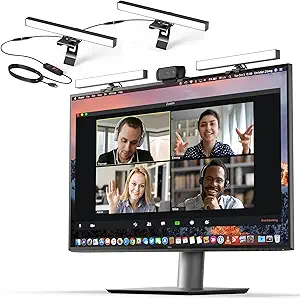 | Best Expandable Lighting for Versatile Setups | Number of Lights: 2 (expandable to 4) | Power: USB-C or USB-A (adapter not included) | Maximum Distance Between Lights: 30 inches | VIEW ON AMAZON | See Our Full Breakdown |
| yAyusi Dual-lamp Video Conference Lighting with Remote and Touch Control |  | Best for Flexible, Dual-Lamp Adjustable Lighting | Number of Lights: 2 | Control Modes: Touch and remote control | Color Modes: 3 | VIEW ON AMAZON | See Our Full Breakdown |
| Zoom Lighting for Computer, Adjustable Desk Ring Light with Stand for Video Calls and Streaming |  | Best for High-CRI, Space-Saving Desk Lighting | Light Modes: 30 | Color Temperature: 3000K-6500K | Brightness Levels: 10 | VIEW ON AMAZON | See Our Full Breakdown |
| Cyezcor Video Conference Lighting Kit, Ring Light for Monitor Clip-On |  | Best Portable Clip-On Lighting for Flexible Setup | Color Temperatures: 3200K-6800K | Brightness Levels: 5 | LED Beads: 48 | VIEW ON AMAZON | See Our Full Breakdown |
| Logitech for Creators Litra Glow Premium LED Streaming Light – Graphite | 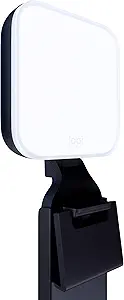 | Best Full-Spectrum, Adjustable Streaming Light | Technology: TrueSoft | Light Type: LED | Color Accuracy: Cinematic | VIEW ON AMAZON | See Our Full Breakdown |
| webcam lighting setup | Power | Brightness Levels |
|---|---|---|
| Desk Ring Light with Stand for | 5V 2A USB | 10 |
| HumanCentric HighBeam Pro Vide | — | — |
| HumanCentric Video Conference | USB-C or USB-A (adapter not included) | — |
| yAyusi Dual-lamp Video Confere | — | 10 |
| Zoom Lighting for Computer | 10W USB (5V/2A) | 10 |
| Cyezcor Video Conference Light | 10W | 5 |
| Logitech for Creators Litra Gl | USB | — |
More Details on Our Top Picks
Desk Ring Light with Stand for Computer, 30 Modes Video Conference Lighting
This adjustable desk ring light stands out for its customizable height, color temperature, and rotation, making it highly adaptable for various recording and streaming scenarios. Compared with the Zoom Lighting for Computer, it offers more flexible positioning and a built-in phone holder, ideal for users needing hands-free operation. However, its reliance on USB power limits mobility and setup options. The sturdy base and adjustable angles ensure consistent lighting, but it requires an external power source, which might be inconvenient for some users. This pick makes the most sense for content creators or professionals who want a personalized, space-efficient lighting solution without complex installation.
Pros:- Adjustable height and rotation for versatile lighting angles
- Customizable brightness and color temperature for different scenarios
- Sturdy anti-scratch base ensures stability and furniture protection
- Built-in phone holder for hands-free use
Cons:- Power source requires a USB port or power bank, limiting portability
- No included power adapter, requiring additional accessories
Best for: Home content creators and remote workers seeking flexible, desktop-friendly lighting
Not ideal for: On-the-go users needing battery-powered, portable lighting solutions
- Color Temperatures:3000K-6500K
- Brightness Levels:10
- Height Range:20.5″ to 32″
- Power:5V 2A USB
- Phone Holder Compatibility:2.24″ to 3.5″
- Rotation:360°
Our verdict“This ring light is best suited for users who want adaptable, stable lighting directly on their desk for content creation or video calls.”
HumanCentric HighBeam Pro Video Conference Lighting Kit for Zoom and Streaming
The HighBeam Pro kit excels in delivering professional, balanced illumination with adjustable brightness and color temperature, making it a strong contender for serious streamers and remote workers. Unlike the yAyusi Dual-lamp Lighting, it offers wireless control via a puck dial, which simplifies adjustments during live sessions. Its high CRI over 94 ensures vibrant, true-to-life colors, but it requires a USB-C power source, which may limit compatibility with older devices. The included accessories allow versatile mounting options, making it ideal for those who want a polished, studio-grade appearance. However, it’s primarily designed for indoor use and may fall short in larger or outdoor environments.
Pros:- Professional-quality, adjustable lighting for video calls and streaming
- Wireless control for ease of use during live sessions
- Includes multiple accessories for versatile setup
- High CRI for vibrant, accurate colors
Cons:- Requires USB-C power, limiting device compatibility
- Limited to indoor use
- Brightness may be insufficient for very large or bright spaces
Best for: Remote professionals and streamers who prioritize high-quality, adjustable lighting with minimal fuss
Not ideal for: Outdoor content creators or users without USB-C ports, due to power limitations
- LED Brightness:up to 1000 Lumens
- CRI:over 94
- Number of Lights:2
- Power Source:USB-C
- Control:Wireless puck dial
- Included Accessories:Monitor mounts, laptop mount, USB-C cables, wall plug
Our verdict“This kit suits users seeking a sleek, professional lighting solution that offers easy control and high color fidelity indoors.”
HumanCentric Video Conference Lighting – Webcam Light for Streaming LED Double Kit
This double light kit offers soft, adjustable lighting that enhances your appearance during video calls or streaming, with easy monitor mounting that doesn’t damage surfaces. Compared with the Desk Ring Light with Stand, it provides a more even, natural look thanks to its adjustable brightness and temperature. Its expandability up to four lights makes it suitable for more immersive scenes, but it requires an additional power adapter, which may be an extra purchase. Its stationary design limits mobility, making it ideal for fixed setups where consistent lighting is desired. The absence of a battery option means it’s best for indoor, stable environments.
Pros:- Soft, natural-looking lighting for professional video quality
- Easy to install on monitors without damage
- Adjustable brightness and temperature for personalized lighting
- Expandable up to four lights for broader coverage
Cons:- Power adapter not included, may require additional purchase
- Limited to stationary monitor-mounted use
- Maximum of two lights recommended for USB-A power
Best for: Streamers and remote workers wanting customizable, expandable lighting that clips onto monitors
Not ideal for: Mobile users or outdoor content creators needing portable lighting solutions
- Number of Lights:2 (expandable to 4)
- Power:USB-C or USB-A (adapter not included)
- Maximum Distance Between Lights:30 inches
- Adjustable Brightness:Yes
- Adjustable Temperature:Yes
- Includes:Cable clips, Velcro straps, USB-C to USB-A adapter
Our verdict“This kit is perfect for users who want a flexible, expandable lighting setup that mounts directly on their monitor for stable, professional results.”
yAyusi Dual-lamp Video Conference Lighting with Remote and Touch Control
The yAyusi dual-lamp set shines in providing bright, even lighting with adjustable color modes and brightness, suitable for professional streaming or recording. Its rotatable design and remote control allow precise positioning and easy adjustments, but setting up multiple components may be cumbersome for some users. Compatible with devices within specified sizes, it offers a versatile, quick-install solution, yet lacks a battery-powered option, which could limit use in mobile or outdoor settings. Compared with simpler ring lights, this set offers more control but at the cost of a slightly more complex setup process.
Pros:- Bright, even lighting suitable for professional video calls
- Adjustable color modes and brightness for customization
- Rotatable design offers flexible positioning
- Easy installation with remote and touch controls
Cons:- Requires multiple components for setup
- Limited to devices within specific size ranges
- No battery-powered option for portability
Best for: Content creators and professionals seeking adjustable, multi-directional lighting for various device sizes
Not ideal for: Users seeking a quick, battery-powered portable solution for on-the-go use
- Number of Lights:2
- Control Modes:Touch and remote control
- Color Modes:3
- Brightness Levels:10
- Rotation:360° horizontal, 180° vertical
- Compatibility:Devices 5.5-8.3 inches in height, 1.55-2.35 inches in width
Our verdict“This dual-lamp lighting set is ideal for users who need adaptable, controllable lighting for varied device setups and professional results.”
Zoom Lighting for Computer, Adjustable Desk Ring Light with Stand for Video Calls and Streaming
This ring light excels with its exceptionally high CRI of 97.8, producing vibrant, true-to-life colors, and offers adjustable height and 360° rotation for maximum flexibility. Compared to the Desk Ring Light with Stand, it provides slightly more refined color rendering, which is beneficial for professional video or photography. Its sturdy metal base and space-saving design make it suitable for small desks, but the need for USB power can be a limiting factor for portability. The slightly higher price reflects its premium color accuracy, but some users may find setup a bit more involved due to multiple adjustment features.
Pros:- High CRI of 97.8 for vibrant, true-to-life colors
- Adjustable height and 360° rotation for flexible lighting angles
- Multiple color temperature and brightness options for various scenarios
- Sturdy, non-slip metal base for stability
Cons:- Requires USB power, limiting portability without a power bank
- More expensive than basic ring lights
- Setup can be complex with multiple adjustment features
Best for: Professionals and streamers prioritizing color accuracy and stable, adjustable lighting in a compact form
Not ideal for: On-the-go users needing battery-powered, portable lighting
- Light Modes:30
- Color Temperature:3000K-6500K
- Brightness Levels:10
- Power:10W USB (5V/2A)
- Height Adjustment:22 to 32 inches
- Base Material:Metal
- Base Features:Non-slip pad, scratch resistant
Our verdict“This high-CRI desk ring light suits professionals who want precise, adjustable lighting with excellent color fidelity in a compact setup.”
Cyezcor Video Conference Lighting Kit, Ring Light for Monitor Clip-On
This clip-on ring light stands out for its ease of use and portability, making it a strong choice for those who need quick setup without clutter. Compared with the Logitech Litra Glow, it offers more adjustable color temperature and brightness levels, but it lacks the full-spectrum, natural skin tone rendering that the Logitech provides. Its clip-on design is ideal for users who switch between devices or workspaces, yet it’s limited to monitor attachment, which may not suit all monitor sizes or thicker bezels. The USB power source is versatile, but the absence of cordless operation means it’s less convenient for mobile setups or locations without easy USB access. This pick makes the most sense for remote workers or streamers who want a lightweight, customizable light that can be easily moved around.
Pros:- Adjustable color temperature (3200K-6800K) for customized lighting
- Soft, even light reduces glare and shadows
- Portable clip-on design for quick setup and removal
- USB powered for compatibility with most devices
Cons:- Limited to monitor clip-on use, which may not fit all monitor types
- No battery option for cordless use, reducing flexibility
Best for: Remote workers and streamers seeking portable, adjustable lighting that easily clips onto monitors
Not ideal for: Users with irregular monitor sizes or those wanting cordless operation for enhanced mobility
- Color Temperatures:3200K-6800K
- Brightness Levels:5
- LED Beads:48
- Power:10W
- Power Source:USB
Our verdict“This clip-on ring light is perfect for users who prioritize portability and simple adjustments over full-spectrum skin tone accuracy.”
Logitech for Creators Litra Glow Premium LED Streaming Light – Graphite
This model excels for its full-spectrum, natural skin tone rendering, which surpasses the more basic lighting of the Cyezcor clip-on. Its TrueSoft technology ensures even, wide, soft light that minimizes shadows, making it well-suited for professional streaming and video calls where appearance matters. The flexible mounting options, including a 3-way monitor mount with adjustable tilt and height, allow precise positioning—something the clip-on lacks. Its reliance on USB power and integration with the G HUB app for preset controls could be a drawback for those wanting quick manual adjustments without software dependency. Compared with the Cyezcor, it’s less portable but offers superior light quality and customization, making it ideal for creators prioritizing natural, flattering illumination.
Pros:- Provides natural, full-spectrum lighting with minimal shadows
- Adjustable brightness and color temperature for tailored look
- Flexible mounting options for precise positioning
- Portable and easy to set up
Cons:- Requires USB connection, which may limit placement options
- Dependent on G HUB software for presets, adding complexity
Best for: Content creators and professionals who need high-quality, customizable lighting with flexible mounting options
Not ideal for: Users who prefer simple, plug-and-play solutions without software or who need ultra-portable, clip-on lights
- Technology:TrueSoft
- Light Type:LED
- Color Accuracy:Cinematic
- Mounting:3-way monitor mount
- Power:USB
- Control:G HUB app
Our verdict“This premium LED light is best suited for creators who want high-quality, customizable lighting with flexible mounting rather than portability.”

How We Picked
We evaluated these webcam lighting setups based on key performance factors such as brightness levels, color temperature adjustment, ease of setup, build quality, and overall value. Usability was prioritized, ensuring that each product could be operated comfortably by users of varying technical skills. We also considered design versatility—whether the light could be easily positioned or mounted—and how well each option suited different scenarios like streaming or professional conferencing. The ranking reflects a balance between affordability and feature set, highlighting options that offer the best performance for their price.Factors to Consider When Choosing Webcam Lighting Setup
Choosing the right webcam lighting setup involves considering several factors beyond basic brightness. First, think about the type of lighting—ring lights are popular for even, flattering illumination, while panel lights can offer broader or more directional lighting. Next, adjustable features like color temperature and dimming controls provide flexibility to match your environment and mood. Ease of setup and portability matter if you frequently move your gear or work in different locations. Lastly, budget constraints often influence your choice, but investing in quality lighting can drastically improve your video appearance, especially for professional use.Lighting Type and Design
Understanding the differences between ring lights, panel lights, and clip-on options helps you select a setup that fits your workspace. Ring lights with stands offer more versatility and are easier to position for even coverage, making them ideal for streaming or professional calls. Clip-on models are compact and space-saving but might limit positioning options. Consider your space and how much control you want over the light direction and spread when choosing the design.
Adjustability and Controls
Look for lights that offer adjustable brightness and color temperature. This flexibility allows you to fine-tune your appearance and adapt to different environments or times of day. Mechanical dials are simple but may lack precision, whereas digital controls or remote apps provide more granular adjustments. Avoid overly complicated setups if you prioritize quick, easy operation, but don’t sacrifice essential control features if your content quality matters.
Ease of Setup and Use
A straightforward setup process saves time and frustration, especially if you’re not technically inclined. Lights with adjustable stands, simple mounting options, and clear instructions are preferable. Portable, lightweight models are ideal for users who need to move their setup frequently. Be aware that some premium lights might require additional accessories or power sources, impacting convenience.
Build Quality and Durability
Investing in a well-made light ensures longevity and consistent performance. Metal stands and sturdy mounts prevent wobbling or damage over time. Cheaper plastic models may be more fragile, leading to potential issues during use. Consider the warranty and customer support as part of your purchase decision, especially for higher-priced options.
Budget and Value
While affordability is important, cheap lighting often falls short in brightness, adjustability, or durability. Spending a bit more can yield a setup that lasts longer and offers better control, making it a worthwhile investment for serious streamers or professionals. Balance your budget with the features you need most—sometimes, a mid-range model provides the best return on investment.
Frequently Asked Questions
Can I use a regular desk lamp for webcam lighting?
While a regular desk lamp can improve lighting temporarily, it usually lacks the adjustable features and focused design of dedicated webcam lights. These specialized lights offer better control over brightness and color temperature, ensuring more flattering and consistent results. For regular video calls or streaming, investing in a purpose-built setup provides a noticeable improvement in image quality and ease of use.
What is the best type of light for small, cluttered spaces?
In tight spaces, compact clip-on or ring lights with adjustable stands are ideal because they take up less room and can be positioned closely to your face. Look for models with flexible mounts or portable designs to maximize space without sacrificing lighting quality. Avoid bulky panel lights that may clutter your workspace or require extensive setup.
How important is color temperature adjustment in webcam lighting?
Adjustable color temperature is vital for matching your environment and ensuring natural-looking skin tones. Cooler temperatures (around 5000K) mimic daylight, while warmer tones (around 3200K) create a cozy feel. Lights lacking this feature may require additional modifications or compromise your visual quality, especially if your workspace has variable lighting conditions or you produce professional content.
Is it better to buy a standalone light or an all-in-one kit?
Choosing between a standalone light and an all-in-one kit depends on your needs and budget. Kits often include multiple components like stands, mounts, and controls, providing a complete solution. Standalone options may offer higher quality or more customization but require additional purchases. For beginners, an all-in-one kit simplifies setup, while advanced users may prefer modular components for tailored setups.
How much should I expect to spend for good webcam lighting?
Quality webcam lighting setups range from around $30 to over $150. Budget options under $50 can significantly improve your video but might lack advanced features. Mid-range models ($50–$100) typically offer better adjustability and durability, making them suitable for regular use. Premium options above $100 often include superior color accuracy, build quality, and extra controls, ideal for professional streamers or content creators.
Conclusion
For casual users or those on a tight budget, a simple clip-on or small ring light provides noticeable improvement without complexity. Content creators and streamers should consider a versatile stand-mounted ring light with adjustable features for the best overall experience. Professionals needing high color accuracy and durability will find premium options like the Logitech Litra Glow worth the investment. Beginners benefit from straightforward, easy-to-use kits, while advanced users may prioritize customizability and power in premium models. Your choice depends on how you plan to use your webcam lighting setup and your specific needs.
Fall Picks
fall essentials
As an affiliate, we earn on qualifying purchases.