
The ChargerLAB POWER-Z KM003C is my best overall pick for buyers who want a capable USB-C tester, while the Plugable 240W meter suits straightforward monitoring and the Klein Tools ET920 is a practical choice for checking both USB-A and USB-C. The lineup ranges from compact meters for basic voltage and current readings to higher-capacity testers aimed at newer USB-C charging setups. The main tradeoffs are how much power a meter can handle, whether it shows the measurements and protocol details you need, and how simple it is to read during a test. A higher wattage limit alone does not make a meter the right fit if you need cable testing or more detailed charging information. Read on for the full breakdown and guidance on choosing among these 15 USB-C power meters.

Get the latest gadgets delivered free with Prime
- Fast, free delivery on millions of items
- Prime Video, Amazon Music and more included
- Member-only deals all year
Complete the kit



Key Takeaways
The KM003C is my best overall choice for buyers prioritizing a more capable USB-C charging tester over a basic voltage and current readout.
Two Plugable models serve simpler monitoring needs; check each listing’s stated power limit so the meter matches your charger and device.
The Klein Tools ET920 is the clear pick for mixed-port setups because it measures USB-A as well as USB-C.
Several YOJOCK and YEREADW options overlap, so compare the exact model and its stated limits instead of relying on brand name alone.
Screen and measurement features vary across the budget-style meters; decide whether capacity, temperature, or working-time readings matter before choosing a basic tester.
| DuHeSin 240W USB-C Power Meter Tester, 2-Pack |  | Best Compact Two-Pack | Connector: USB Type-C male to female | Maximum power: 240W | Maximum data transfer speed: 40 Gbps | VIEW ON AMAZON | See Our Full Breakdown |
| YEREADW USB-C Power Meter and PD Tester (KWS-2303C) |  | Best for Protocol Checks | Voltage range: 4–30 V | Current range: 0–12 A | Measurement accuracy: ±(1% + 5) | VIEW ON AMAZON | See Our Full Breakdown |
| YOJOCK 360W USB-C Power Meter and Tester (KWS-2303C) |  | Best for Charging Session Tracking | Measurement range: 4–30 V, 0–12 A | Maximum power: 360 W | Measurement type: Multimeter | VIEW ON AMAZON | See Our Full Breakdown |
| YOJOCK USB-C Power Meter and Tester |  | Best for USB-A and USB-C Setups | Voltage range: 3.6–32 V | Current range: 0–8.0 A | Maximum direct current: 5.1 A | VIEW ON AMAZON | See Our Full Breakdown |
| ChargerLAB POWER-Z KM003C USB-C Charging Tester | 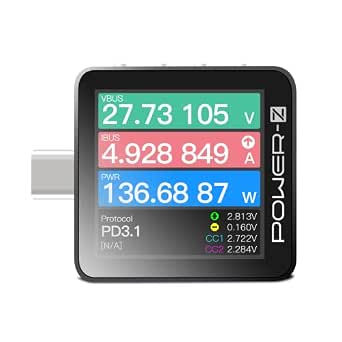 | Best for Technical Analysis | Model: KM003C | Display: 1.54-inch LCD with gravity rotation | Maximum voltage: 50 V | VIEW ON AMAZON | See Our Full Breakdown |
| YEREADW USB-C Power Meter and Tester |  | Best for Protocol Coverage | Voltage range: 3.6–32 V | Current range: 0–8.0 A | Display: IPS color display with eight interface views | VIEW ON AMAZON | See Our Full Breakdown |
| Plugable USB C Power Meter Tester for Monitoring USB-C Connections |  | Best for Simple USB-C Checks | Measurement type: Voltmeter and ammeter | Power source: USB-powered | Minimum operating voltage: 4 V | VIEW ON AMAZON | See Our Full Breakdown |
| ChargerLAB Power-Z C240 Portable USB-C Power Meter |  | Best for High-Power USB-C | Maximum power: 240 W | Display: 1.14-inch color display | Ports: USB-C input and output | VIEW ON AMAZON | See Our Full Breakdown |
| Eversame USB-C Digital Multimeter and Power Tester, 3.6–30 V, 0–5.1 A |  | Best for Detailed Everyday Readings | Voltage range: 3.6–30 V DC | Current range: 0–5.1 A | Display: Color LCD with eight display modes | VIEW ON AMAZON | See Our Full Breakdown |
| Klein Tools ET920 USB-A and USB-C Power Meter |  | Best for Rugged Portability | Model: ET920 | Measurement range: 3–20 V DC | Current range, USB-A: 0.05–3 A | VIEW ON AMAZON | See Our Full Breakdown |
| diymore USB-C Power Meter and Tester with LED Display |  | Best for Keeping Test Records | Voltage range: 4–30 V | Maximum current: 6.5 A | Accuracy: ±1% | VIEW ON AMAZON | See Our Full Breakdown |
| YOJOCK USB-C Tester Power Meter, 4–30 V, 0–6.5 A |  | Best for Fast-Charging Protocol Support | Model: YJ-TC01 | Voltage range: 4–30 V | Current range: 0–6.5 A | VIEW ON AMAZON | See Our Full Breakdown |
| Plugable USB C Power Meter Tester for Monitoring Connections up to 240W |  | Best for High-Power USB-C Connections | Maximum monitored power: 240 W | Minimum operating voltage: 5 V | Display: OLED | VIEW ON AMAZON | See Our Full Breakdown |
| diymore USB C Power Meter Testers, USB-C Tester Color Screen |  | Best for High-Current Testing | Voltage range: 4–30 V | Current range: 0–12 A | Maximum power: 240 W | VIEW ON AMAZON | See Our Full Breakdown |
| USB C Power Meter and Tester 4-30V 0-6.5A |  | Best for Basic Protocol Checks | Minimum operating voltage: 4 V | Voltage range: 4–30 V | Current range: 0–6.5 A | VIEW ON AMAZON | See Our Full Breakdown |
| usbc power meter | Display | Voltage range | Supported protocols | Weight |
|---|---|---|---|---|
| DuHeSin 240W USB-C Power Meter | — | — | — | — |
| YEREADW USB-C Power Meter and | 1.06-inch ISP color display | 4–30 V | PD 2.0/3.0, QC 2.0/3.0, FCP, SCP, AFC, PE, DASH VOOC, Super VOOC | — |
| YOJOCK 360W USB-C Power Meter | — | — | PD 2.0/3.0, QC 2.0/3.0, FCP, SCP, AFC, PE, DASH, VOOC, Super VOOC | 0.04 kg |
| YOJOCK USB-C Power Meter and T | IPS color screen with 8 interfaces | 3.6–32 V | PD 3.0/2.0, QC 3.0/2.0, BC 1.2 | — |
| ChargerLAB POWER-Z KM003C USB- | 1.54-inch LCD with gravity rotation | — | — | — |
| YEREADW USB-C Power Meter and | IPS color display with eight interface views | 3.6–32 V | PD 3.0/2.0, QC 3.0/2.0, BC1.2 | 0.05 kg |
| Plugable USB C Power Meter Tes | — | — | — | 0.04 lb |
| ChargerLAB Power-Z C240 Portab | 1.14-inch color display | — | — | — |
| Eversame USB-C Digital Multime | Color LCD with eight display modes | 3.6–30 V DC | QC2.0, QC3.0, BC1.2, PD | 1.1 oz |
| Klein Tools ET920 USB-A and US | High-resolution LCD | — | — | — |
| diymore USB-C Power Meter and | LED | 4–30 V | — | 0.02 kg |
| YOJOCK USB-C Tester Power Mete | — | 4–30 V | QC 2.0/3.0/4.0, Super VOOC | 40 g |
| Plugable USB C Power Meter Tes | OLED | — | — | 18.14 g |
| diymore USB C Power Meter Test | Color screen | 4–30 V | PD 2.0/3.0, PPS, QC 2.0/3.0, FCP, SCP, AFC, PE, DASH, VOOC, Super VOOC | — |
| USB C Power Meter and Tester 4 | High-definition LED | 4–30 V | PD, QC, FCP, SCP, AFC, PE, DASH, VOOC, Super VOOC | 0.06 kg |
More Details on Our Top Picks
DuHeSin 240W USB-C Power Meter Tester, 2-Pack
The DuHeSin pair suits buyers who want a simple inline readout for checking charging power, voltage, and current across more than one USB-C setup. Its plug-and-play format avoids software, while the listed support for up to 240W and 40 Gbps makes it a straightforward fit for compatible high-power and fast-data connections. Compared with the YEREADW KWS-2303C, it gives up protocol support, capacity tracking, and a color display in favor of a simpler adapter and two units in the box. That simplicity also limits what I’d use it to diagnose: the product data lists a 2.4 A current rating, and it offers no stated logging or protocol analysis. Choose it for quick spot checks; skip it if you need detailed charging records or broad protocol testing.
Pros:- Displays wattage, voltage, and amperage for quick charging checks
- Two adapters allow monitoring more than one setup
- Plug-and-play design requires no software or drivers
- Listed support for up to 240W and 40 Gbps data transfer
Cons:- Listed current rating is 2.4 A, limiting its usefulness for higher-current analysis
- No stated protocol testing, capacity tracking, or measurement logging
Best for: USB-C laptop and phone owners who want a basic live power readout at two charging points
Not ideal for: Buyers diagnosing fast-charge protocols or tracking capacity and energy over time
- Connector:USB Type-C male to female
- Maximum power:240W
- Maximum data transfer speed:40 Gbps
- Input voltage:20 V
- Quantity:2 adapters
- Color:Transparent black
Our verdict“Pick the DuHeSin pair for uncomplicated USB-C spot checks at multiple setups, but choose the YEREADW if you need protocol and capacity data.”
YEREADW USB-C Power Meter and PD Tester (KWS-2303C)
The YEREADW is a better fit than the DuHeSin two-pack when the question is not just “how much power?” but also “which charging behavior is this connection using?” Its support for PD, QC, FCP, SCP, AFC, and other listed protocols pairs with readings for voltage, current, power, capacity, energy, and elapsed time. The color display and selectable curve intervals make changes over a charging session easier to follow, while the included case helps keep the tester together with its manual. Compared with the YOJOCK 360W tester, its stated measurement ceiling is the same 30 V and 12 A range, but the YOJOCK adds temperature, maximum-value recording, and stored data after power-off. YEREADW’s stated accuracy of ±(1% + 5) is a limitation for precision work.
Pros:- Supports a broad list of fast-charging protocols
- Displays power, capacity, energy, and elapsed time
- Selectable voltage and current curve intervals
- Includes a storage case
Cons:- Specified accuracy of ±(1% + 5) may not suit precision comparisons
- Compatibility depends on USB-C ports and supported charging protocols
Best for: Phone and power-bank owners who want to check supported fast-charge protocols and follow charging over time
Not ideal for: Users who need temperature readings, power-off data retention, or precision-grade measurement
- Voltage range:4–30 V
- Current range:0–12 A
- Measurement accuracy:±(1% + 5)
- Display:1.06-inch ISP color display
- Supported protocols:PD 2.0/3.0, QC 2.0/3.0, FCP, SCP, AFC, PE, DASH VOOC, Super VOOC
- Curve monitoring intervals:5 min, 15 min, 60 min, 2 hr
- Included components:USB-C tester, user manual, storage case
Our verdict“Choose the YEREADW for protocol-aware charging checks and session trends; the YOJOCK 360W offers more recorded metrics.”
YOJOCK 360W USB-C Power Meter and Tester (KWS-2303C)
For buyers who want to understand how a charge changes over time, the YOJOCK 360W puts more emphasis on recorded measurements than the DuHeSin’s basic live readout. It tracks voltage, current, capacity, energy, temperature, and charging time, can record maximum voltage, current, and wattage, and retains capacity and energy data when powered off. Those features make comparisons between chargers or sessions more practical. Its curve function also offers selectable recording intervals, and the 360W maximum power rating gives it a higher stated ceiling than the YEREADW KWS-2303C, though both list a measurement range of 4–30 V and 0–12 A. The tradeoff is that the listing requires a Type-C port and supported charging protocol, and does not provide a stated accuracy figure.
Pros:- Measures temperature, charging time, capacity, energy, voltage, and current
- Records maximum voltage, current, and wattage
- Retains capacity and energy data when powered off
- Offers selectable curve recording intervals and a 360W maximum power rating
Cons:- Measurement range is limited to 4–30 V and 0–12 A
- Requires a Type-C port and a supported charging protocol
- No measurement accuracy figure is listed
Best for: USB-C device owners comparing charger behavior across sessions and wanting retained capacity and energy readings
Not ideal for: People who need a stated accuracy specification or compatibility beyond supported USB-C charging setups
- Measurement range:4–30 V, 0–12 A
- Maximum power:360 W
- Measurement type:Multimeter
- Supported protocols:PD 2.0/3.0, QC 2.0/3.0, FCP, SCP, AFC, PE, DASH, VOOC, Super VOOC
- Curve recording intervals:5 min, 15 min, 60 min, 2 hr
- Power source:USB, Type-C
- Weight:0.04 kg
Our verdict“Pick the YOJOCK 360W if retained session data and broad charging metrics matter more than a published accuracy figure.”
YOJOCK USB-C Power Meter and Tester
Unlike the USB-C-only DuHeSin and ChargerLAB KM003C, this YOJOCK tester lists support for both USB-A and USB-C, which makes it a more flexible choice for mixed charging gear. Its IPS screen has eight interface options and it measures voltage, current, capacity, power, temperature, resistance, and charging time. That combination suits users who want to inspect several aspects of a connection without moving to a PC-based workflow. The built-in over-voltage, over-current, under-voltage, and low-energy protections are another distinction in the lineup. There are limits: the stated 0–8 A current range sits alongside a lower 5.1 A maximum direct current, so buyers should not treat the larger figure as a guaranteed operating current. Its protocol list is also narrower than the YEREADW’s.
Pros:- Supports both USB-A and USB-C ports
- Measures capacity, power, temperature, resistance, and charging time
- IPS color display offers eight interface options
- Lists over-voltage, over-current, under-voltage, and low-energy protections
Cons:- Maximum direct current is listed as 5.1 A despite a stated 0–8 A range
- Supported protocol list is narrower than the YEREADW KWS-2303C
- USB-A support may not help buyers with USB-C-only charging gear
Best for: People checking a mix of older USB-A chargers and USB-C devices who want several live measurement views
Not ideal for: Users seeking high-current USB-C testing or a wide set of fast-charge protocol checks
- Voltage range:3.6–32 V
- Current range:0–8.0 A
- Maximum direct current:5.1 A
- Display:IPS color screen with 8 interfaces
- Supported protocols:PD 3.0/2.0, QC 3.0/2.0, BC 1.2
- Compatible ports:USB-A and USB-C
- Dimensions:2.8 × 1.26 × 0.47 in
Our verdict“Choose this YOJOCK for mixed USB-A and USB-C benches, while USB-C protocol testing favors the YEREADW.”
ChargerLAB POWER-Z KM003C USB-C Charging Tester
The KM003C is the most analysis-focused option here: beyond standard voltage, current, capacity, and energy readings, it supports E-marker, PDO, and protocol tests. That makes it more useful than the DuHeSin pair when the job is checking cable identity or charger capabilities, rather than simply watching a live wattage figure. Its 50 V ceiling and 240 W PD rating suit high-power USB-C checks, while PC software provides a route to data analysis that the standalone YEREADW does not list. The rotating 1.54-inch LCD and compact 16.47 g body help with on-device viewing and portability. This is a specialist pick: it is USB-C only, has a 6 A maximum current, and software and the manual must be obtained from the manufacturer’s website.
Pros:- Performs E-marker, PDO, and protocol tests
- Measures up to 50 V and supports up to 240 W PD
- Rotating 1.54-inch LCD aids viewing in different orientations
- PC software supports data analysis
Cons:- USB-C-only design excludes USB-A connections
- Maximum current is 6 A
- PC software and manual are obtained from the manufacturer’s website
Best for: USB-C technicians and enthusiasts who need cable E-marker, PDO, and protocol analysis alongside power readings
Not ideal for: Buyers who want a simple readout, USB-A compatibility, or a complete offline software and manual package
- Model:KM003C
- Display:1.54-inch LCD with gravity rotation
- Maximum voltage:50 V
- Maximum current:6 A
- Maximum PD power:240 W
- Processor:ARM Cortex-M4
- Ports:Two USB-C input/output ports; one USB-C HID port
Our verdict“Choose the KM003C for deeper USB-C cable and protocol analysis; the YOJOCK 360W is better suited to tracking charging sessions.”
YEREADW USB-C Power Meter and Tester
The YEREADW USB-C Power Meter and Tester is a flexible pick for checking both USB-A and USB-C charging setups. Its support for PD, QC, and BC1.2 gives it broader protocol coverage than the USB-C-only ChargerLAB Power-Z C240, while the eight-view color display lets you choose how to read the measurements. Voltage, current, capacity, power, and load impedance readings can help compare chargers or check a power bank, and built-in electrical protections add a layer of monitoring during tests. The tradeoff is that the supplied data gives no measurement accuracy figures, so it is harder to judge its suitability for precise diagnostics. Capacity checks may also depend on a direct load test or calculation. Choose it for broad everyday checks; skip it if measurement accuracy is your main criterion.
Pros:- Works with USB-A and USB-C devices
- Supports PD, QC, and BC1.2 protocols
- Measures voltage, current, capacity, power, and load impedance
- Includes over-voltage, over-current, under-voltage, and low-energy protections
Cons:- Measurement accuracy is not specified
- Capacity testing may require a direct load test or calculation
Best for: Buyers who want one meter for mixed USB-A and USB-C chargers, common fast-charging protocols, and basic power bank checks.
Not ideal for: People who need documented measurement accuracy or a clearly specified procedure for capacity testing.
- Voltage range:3.6–32 V
- Current range:0–8.0 A
- Display:IPS color display with eight interface views
- Supported protocols:PD 3.0/2.0, QC 3.0/2.0, BC1.2
- Compatible devices:USB-A and USB-C devices
- Power source:USB, USB-C
- Weight:0.05 kg
- Certifications:CE, RoHS
Our verdict“Choose the YEREADW for broad protocol and port coverage, but look elsewhere if you need published accuracy data.”
Plugable USB C Power Meter Tester for Monitoring USB-C Connections
The Plugable USB C Power Meter Tester suits buyers who want a straightforward readout of a USB-C connection without setup software: it is described as driverless and measures voltage and current. That narrow scope makes it easier to use for a quick check than the feature-heavy Eversame meter, which adds capacity, energy, impedance, and multiple display modes. The tradeoff is that the provided product data does not list measurement ranges, protocol support, or a display specification, so buyers have less information to match it to demanding tests. Its USB-powered design and compact listed weight favor a small, simple tool, but this is not the pick for tracking energy use or testing power bank capacity. Choose it when basic monitoring is enough; compare the specs carefully if you need more than voltage and current.
Pros:- Driverless operation
- Measures voltage and current
- USB-powered, so no separate power source is listed
- CE and RoHS compliance is specified
Cons:- Product data does not specify measurement ranges
- No capacity or energy measurement is listed
- Protocol support and display details are not provided
Best for: Buyers who want a simple, driverless voltage and current check for USB-C chargers, cables, phones, or tablets.
Not ideal for: People who need capacity or energy tracking, broad protocol details, or specified measurement ranges before buying.
- Measurement type:Voltmeter and ammeter
- Power source:USB-powered
- Minimum operating voltage:4 V
- Compatible devices:Tablets
- Dimensions:3.5 × 0.75 × 3.5 in
- Weight:0.04 lb
- Certifications:CE, RoHS
- Spare part availability duration:2 years
Our verdict“Pick the Plugable for basic USB-C voltage and current checks, and choose a more fully specified meter for deeper diagnostics.”
ChargerLAB Power-Z C240 Portable USB-C Power Meter
The ChargerLAB Power-Z C240 is the clearest fit here for monitoring high-power USB-C connections: its stated ceiling is 240W, and bidirectional current measurement can show whether power is flowing into or out of a connected device. Its compact metal body and 1.14-inch color screen also make it more portable than the larger, more feature-oriented Eversame meter. The narrower fit is the tradeoff: this is a USB-C input-and-output tester, and USB-A checks require a separate adapter. The product description also points buyers with professional or higher accuracy needs toward another model, which limits its appeal for precision work. Choose the C240 for a compact view of powerful USB-C charging and discharge; skip it if USB-A testing or documented accuracy is central to your setup.
Pros:- Supports power measurements up to 240W
- Bidirectional current measurement shows charging and discharge
- Color display reports voltage, current, energy, timer, and connection data
- Compact metal-shell design weighs 11.61 g
Cons:- USB-A testing requires a separate USB-C to USB-A adapter
- Product information recommends another model for professional use or higher accuracy requirements
Best for: USB-C laptop and charger owners who want to monitor high-power charging or power bank discharge in a compact meter.
Not ideal for: Buyers who need built-in USB-A testing or a meter positioned for professional accuracy requirements.
- Maximum power:240 W
- Display:1.14-inch color display
- Ports:USB-C input and output
- Current measurement:Bidirectional
- Measured data:Voltage, current, power, current direction, energy, timer, D+, D−, CC
- USB-A compatibility:Requires a USB-C to USB-A adapter, not included
- Dimensions:1.44 × 0.93 × 0.31 in
- Shell material:Metal
Our verdict“Choose the C240 for portable, high-power USB-C monitoring, provided you do not need built-in USB-A support.”
Eversame USB-C Digital Multimeter and Power Tester, 3.6–30 V, 0–5.1 A
The Eversame USB-C Digital Multimeter provides a broad set of everyday readings: voltage, current, capacity, energy, power, load impedance, and D+/D− voltage. Its eight color display modes and electrical protections make it more informative than the basic Plugable meter, whose listed measurements are limited to voltage and current. Eversame also specifies a 0–5.1 A current range, giving buyers a concrete boundary for matching it to their setup. That limit is lower than the YEREADW’s stated 0–8.0 A range, so higher-current users may prefer that model. A small adapter may be needed to trigger PD measurements, adding a step to some tests. Choose Eversame for varied measurements and an audible cutoff alarm; skip it if your tests exceed its listed current range.
Pros:- Measures voltage, current, capacity, energy, power, load impedance, and D+/D− voltage
- Eight color display modes
- Supports QC2.0, QC3.0, BC1.2, and PD measurements
- Over-voltage, over-current, and under-voltage protection with audible alarm and automatic cutoff
Cons:- Current range is limited to 0–5.1 A
- A small adapter may be needed to trigger PD charging measurements
Best for: USB-C device owners who want capacity, energy, power, and connection readings alongside voltage and current.
Not ideal for: Buyers testing setups that require more than 5.1 A or who want PD measurements without a possible adapter step.
- Voltage range:3.6–30 V DC
- Current range:0–5.1 A
- Display:Color LCD with eight display modes
- Supported protocols:QC2.0, QC3.0, BC1.2, PD
- Measurements:Voltage, current, capacity, energy, power, load impedance, D+/D− voltage
- Dimensions:2.36 × 2.36 × 0.43 in
- Weight:1.1 oz
- Included item:USB tester
Our verdict“Choose Eversame for varied charging and capacity readings, unless your setup needs more than its 5.1 A ceiling.”
Klein Tools ET920 USB-A and USB-C Power Meter
The Klein Tools ET920 stands apart for buyers who need a portable meter that can handle regular field use. It works with USB-A and most USB-C devices, stores up to 10 readings, and draws power from the port being checked, so there are no batteries to manage. Its stated 6.6-foot drop protection adds practical reassurance that the compact ChargerLAB Power-Z C240 does not claim. The tradeoff is its measurement envelope: USB-A current tops out at 3 A and USB-C at 5 A, while the C240 lists support up to 240W for USB-C. The ET920 also describes compatibility as covering most USB-C ports, not all. Choose Klein for durability and stored readings; choose a higher-power USB-C-focused meter for demanding charging setups.
Pros:- Works with USB-A and most USB-C devices, including Qualcomm Quick Charge
- Stores up to 10 readings and detects overloads
- Draws power from the tested port, with no batteries required
- Specified 6.6-foot drop protection
Cons:- USB-A current measurement is limited to 3 A
- USB-C current measurement is limited to 5 A
- Compatibility is specified for most USB-C devices rather than all
Best for: Technicians and hands-on users who want a battery-free USB-A and USB-C meter with stored readings and drop protection.
Not ideal for: People monitoring high-power USB-C charging beyond 5 A or who need confirmed compatibility with every USB-C port.
- Model:ET920
- Measurement range:3–20 V DC
- Current range, USB-A:0.05–3 A
- Current range, USB-C:0.05–5 A
- Measurements:Voltage, current, capacity, energy, calculated resistance
- Reading storage:Up to 10 readings
- Maximum monitoring duration:Up to 1000 hours
- Drop protection:6.6 ft (2 m)
- Display:High-resolution LCD
Our verdict“Choose the ET920 for rugged, battery-free checks across USB-A and USB-C, but use the C240 for higher-power USB-C monitoring.”
diymore USB-C Power Meter and Tester with LED Display
The diymore tester suits buyers who want more than a live voltage and current check: it also tracks capacity, power, temperature, resistance, and charging time. Its stored readings survive power loss, which helps when a cable disconnects or a test needs to be reviewed later. Compared with the YOJOCK YJ-TC01, it offers resistance measurement and includes a 14 cm extension cable, while both support up to 6.5 A. That current ceiling makes it a poor match for higher-current setups, and its USB-C-only design narrows its use to that connector. Choose it for a compact bench or travel kit where retaining several measurements matters more than protocol identification or very high power capacity.
Pros:- Measures voltage, current, capacity, power, temperature, resistance, and charging time
- Retains stored test data after power loss
- Includes a 14 cm USB-C extension cable
- Compact body weighs 20 g
Cons:- Maximum current is 6.5 A
- Designed for USB-C devices only
Best for: USB-C hobbyists who want to record several charging measurements and revisit them after disconnecting the tester
Not ideal for: People testing connections that exceed 6.5 A or devices that do not use USB-C
- Voltage range:4–30 V
- Maximum current:6.5 A
- Accuracy:±1%
- Display:LED
- Measurement type:Ammeter
- Compatible devices:USB Type-C devices
- Dimensions:5.68 × 2.58 cm (2.24 × 1.02 in)
- Extension cable:14 cm
- Weight:0.02 kg
Our verdict“Pick the diymore if you want broad measurement coverage and saved readings in a small USB-C tester, and skip it for higher-current testing.”
YOJOCK USB-C Tester Power Meter, 4–30 V, 0–6.5 A
The YOJOCK YJ-TC01 is a practical pick for checking USB-C chargers that use several common fast-charging standards. It supports QC 2.0/3.0/4.0 and Super VOOC and measures capacity, energy, power, temperature, resistance, and charging time. That protocol support gives it a different use from the diymore USB-C Power Meter, which adds an extension cable and lists resistance measurement but does not specify fast-charge protocols. One limitation matters for troubleshooting: the YOJOCK does not show the name of the detected protocol, so it cannot tell you at a glance which mode is active. Its 6.5 A ceiling is also shared with the diymore, making both less suited to high-current testing.
Pros:- Supports QC 2.0, 3.0, and 4.0 plus Super VOOC
- Measures voltage, current, capacity, energy, power, temperature, resistance, and charging time
- Capacity and energy readings remain after power-off
- Compact 40 g design
Cons:- Does not display the detected protocol name
- Holding the button for three seconds clears capacity, energy, and time data
- Maximum current is 6.5 A
Best for: USB-C device owners comparing QC or Super VOOC charging behavior and tracking capacity or energy
Not ideal for: Technicians who need the tester to identify and display the active fast-charging protocol
- Model:YJ-TC01
- Voltage range:4–30 V
- Current range:0–6.5 A
- Measurement types:Ammeter, voltmeter
- Supported protocols:QC 2.0/3.0/4.0, Super VOOC
- Power-off data storage:Capacity and energy
- Compatible devices:USB-C devices
- Weight:40 g
- Power source:USB
Our verdict“Choose the YOJOCK for broad measurement coverage and support for several fast-charging standards if protocol name display is not a requirement.”
Plugable USB C Power Meter Tester for Monitoring Connections up to 240W
For buyers checking a high-wattage USB-C connection, the Plugable USBC-VAMETER3 has a clear advantage over the 6.5 A diymore and YOJOCK testers: it monitors power up to 240 W. Its OLED display, bidirectional connections, and screen-rotation button make readings easier to view across different setups, while data pass-through and Alt Mode video support help it fit into a working device connection. It focuses on voltage, current, and power rather than the broader charging-session records offered by the diymore. There are compatibility limits too: Plugable excludes Thunderbolt 3, and this is a wired meter without wireless monitoring. It is a stronger fit for laptop and charger checks than for tracking detailed charging history.
Pros:- Monitors USB-C power up to 240 W
- OLED display with a screen-rotation button
- Bidirectional connections
- Supports data pass-through and Alt Mode video
Cons:- Not compatible with Thunderbolt 3 devices
- Measures voltage, current, and power rather than a wider set of charging-session metrics
- Requires a wired connection
Best for: Laptop and charger owners who need to monitor USB-C connections up to 240 W while keeping data or video pass-through
Not ideal for: Thunderbolt 3 users or buyers who need capacity, temperature, or charging-time tracking
- Maximum monitored power:240 W
- Minimum operating voltage:5 V
- Display:OLED
- Measurement type:Multimeter
- Compatible devices:USB-C devices, excluding Thunderbolt 3
- Style name:USBC-VAMETER3
- Weight:18.14 g
- Dimensions:3 × 3 × 1 in
- Certifications:CE, ETL, NIST
Our verdict“Choose the Plugable for high-power USB-C monitoring and pass-through, provided your connection is not Thunderbolt 3.”
diymore USB C Power Meter Testers, USB-C Tester Color Screen
This diymore color-screen tester stands apart from the 6.5 A diymore and YOJOCK models by supporting up to 12 A, making it the stronger choice when a test setup may draw more current. It also tracks live voltage, current, power, and temperature, plus elapsed time, consumed energy, and peak voltage, current, and power. That combination gives a buyer more context about a charging session than the Plugable meter’s listed voltage, current, and power readings. Its stated protocol range is broad, covering PD, PPS, QC, and several other fast-charge families. The description does not provide accuracy, dimensions, or weight, so buyers have fewer details for judging measurement precision and portability before choosing it.
Pros:- Supports current measurement up to 12 A
- Tracks instantaneous readings, elapsed time, consumed energy, and peak values
- Lists support for PD, PPS, QC, and multiple additional charging protocols
- Can restore previous test data after an accidental disconnection
Cons:- Product data does not state measurement accuracy
- Product data does not provide dimensions or weight
- Reading details and operation may take more effort than a simpler voltage, current, and power meter
Best for: USB-C repair and electronics hobbyists who need up to 12 A support and want peak and session measurements
Not ideal for: Buyers who need published accuracy, size, or weight details before choosing a tester
- Voltage range:4–30 V
- Current range:0–12 A
- Maximum power:240 W
- Measurement parameters:Voltage, current, power, temperature, working time, consumed energy, maximum voltage, maximum current, maximum power
- Supported protocols:PD 2.0/3.0, PPS, QC 2.0/3.0, FCP, SCP, AFC, PE, DASH, VOOC, Super VOOC
- Data retention:Restores previous test data after reconnection
- Display:Color screen
- Compatible testing:USB-C chargers, cables, and power banks
Our verdict“Choose this diymore when 12 A support and session peaks matter more than having published accuracy and portability specifications.”
USB C Power Meter and Tester 4-30V 0-6.5A
This USB-C tester covers the measurements many everyday troubleshooting tasks need: voltage, current, capacity, temperature, and working time. Its listed protocol support spans PD, QC, FCP, SCP, AFC, PE, DASH, and VOOC, so it can suit buyers checking whether a charger and device are using a compatible fast-charge family. Unlike the YOJOCK YJ-TC01, though, the supplied description does not specify retained capacity or energy readings after power-off. It also tops out at 6.5 A, well below the 12 A diymore color-screen model. The LED display and multiple button functions provide direct readings, but mode switching is manual and there is no stated data storage or connectivity feature.
Pros:- Measures voltage, current, capacity, temperature, and working time
- Lists support for multiple fast-charging protocol families
- High-definition LED display
- Compact, lightweight design
Cons:- Maximum current is 6.5 A
- Mode switching requires manual operation
- No built-in data storage or connectivity features are listed
Best for: USB-C phone and power-bank owners who want straightforward charging measurements and broad listed protocol support
Not ideal for: People who need saved test history, automatic mode switching, or current measurements above 6.5 A
- Minimum operating voltage:4 V
- Voltage range:4–30 V
- Current range:0–6.5 A
- Measurement type:Multimeter
- Compatible devices:USB-C chargers, phones, tablets, and power banks
- Supported protocols:PD, QC, FCP, SCP, AFC, PE, DASH, VOOC, Super VOOC
- Display:High-definition LED
- Power source:USB, Type-C
- Weight:0.06 kg
Our verdict“Pick this model for everyday USB-C charging checks if manual controls and a 6.5 A limit meet your needs.”

How We Picked
I ranked these meters by how well their stated features serve common USB-C troubleshooting jobs: checking voltage and current, monitoring charging power, evaluating newer high-power setups, and getting useful readings without a complicated workflow. I gave more weight to clear product positioning, useful measurement range, readable displays, and breadth of supported connections than to wattage claims on their own. A high stated ceiling only helps when it fits the charger and device being measured.
The ranking favors versatility first, which puts the ChargerLAB POWER-Z KM003C at the top, followed by options with straightforward monitoring or support for different connector types. Products with similar names and overlapping claims are separated by their listed limits and features, while basic meters remain useful for simple checks but rank lower for buyers who need broader diagnostics. I also considered the downside of each style: added capabilities can mean more to learn, while compact basic meters may leave out information needed to diagnose a charging problem.
Factors to Consider When Choosing Usbc Power Meters
Choosing a USB-C power meter starts with the test you want to perform. A quick charging check, a high-power charger measurement, and a cable or protocol investigation can call for different tools, even when the product titles sound similar.
Match the Power Limit to Your Setup
Start with the maximum voltage, current, and power rating, then compare those figures with the charger and device you plan to test. Leave room above the expected load so the meter is not operating at its stated ceiling during ordinary use. A 240W label can be relevant for newer high-power charging setups, but it does not tell you whether the meter reports the details you need. Check whether the listing specifies limits for the particular port and measurement mode. A meter rated for lower power may still be the sensible choice for phones and common accessories. Do not assume a larger wattage number means broader compatibility with every charging protocol.
Decide Which Readings Will Help You Troubleshoot
Voltage and current are enough to confirm that power is flowing, but they may not explain why a device charges slowly. Capacity and elapsed-time readings can help when comparing battery charging sessions, while temperature readings offer another clue during longer tests. Protocol information matters when you need to check which charging mode a source and device negotiate. These features are not interchangeable, so make a short list of the readings you will actually use. Extra data can make a meter more useful, but also more demanding to interpret. For a basic go-or-no-go check, a simpler display may be easier to use.
Check Port Direction and Compatibility
USB-C meters sit between a source and a device, so connector shape alone does not confirm that every connection will work as intended. Confirm that the meter supports the direction and configuration of your planned test, especially if you need to test cables, chargers, or devices with unusual port arrangements. If your workspace still includes USB-A chargers, a meter with both USB-A and USB-C support can reduce the need for a second tool. Also check whether the meter passes data as well as power if that matters for your setup. Do not treat a power reading as proof that a cable supports every data or charging feature. Use the product’s connection guidance before placing it in a valuable or high-power setup.
Choose a Display You Can Read During a Test
A meter can collect useful figures and still be frustrating if its screen is hard to read while attached to a charger or device. Consider where it will sit, whether the display orientation works in that position, and if color or a larger screen will make readings easier to scan. A bright, compact display can be handy in a crowded outlet, though a smaller screen may show fewer values at once. Simple LED readouts can suit quick checks without adding a menu to learn. Think about whether you need live readings at a glance or can cycle between measurement screens. The best display is the one that keeps the relevant value visible during your usual test.
Pay for Diagnostic Depth Only When You Need It
More capable meters make sense when you regularly compare chargers, inspect charging behavior, or need protocol details for troubleshooting. For occasional checks, a straightforward tester may answer whether a cable or adapter is delivering power without adding features you will rarely use. A low purchase cost can be appealing, but confirm the stated measurement range, build details, and the exact model designation before deciding. Products with similar names can differ in display, supported readings, or power ceiling. If a listing does not clearly identify those details, do not infer them from another model in the same brand family. Spend for a specific capability that solves a recurring problem.
Treat the Meter as Part of the Test Setup
Adding any meter between a charger and device introduces another connection, so the meter itself can affect the setup you are trying to inspect. For repeatable comparisons, keep the charger, cable, device, and test conditions consistent while changing one part at a time. Reseat connectors if readings appear unstable, and avoid drawing conclusions from a single moment during a changing charge cycle. A meter can show what is passing through its position; it cannot by itself explain every reason a device limits power. When checking a cable, use a test arrangement that isolates the cable from other variables. This approach makes readings more useful than simply looking for the highest number on screen.
Frequently Asked Questions
Is a 240W USB-C power meter necessary for checking a phone charger?
Usually, a phone owner can choose a meter whose voltage and current limits comfortably cover the charger in use. A 240W rating is more relevant to buyers testing high-power USB-C sources or planning to use the meter across different setups. The rating describes a ceiling, not the accuracy or diagnostic depth of the meter. Check the supported readings and port configuration as well as the maximum power. If your use is limited to basic charging checks, a simpler model may be easier to interpret.
Can a USB-C power meter tell me whether a cable is defective?
A meter can help reveal that a cable is delivering unexpectedly low power, but that result alone does not prove the cable is defective. The charger, device, battery state, and negotiated charging mode can all affect the reading. Compare the suspect cable with a known-good cable using the same charger and device. If the meter supports cable or protocol diagnostics, those features may narrow down the cause. For a fair comparison, change one part of the setup at a time.
Will any USB-C power meter work with a 240W charger?
No. Confirm the meter’s stated voltage, current, and power limits, plus any notes about port configuration or supported charging modes. A product title that mentions USB-C or a high wattage does not establish compatibility with every charger. The charger, meter, cable, and device all need to support the intended setup. If the listing is unclear about a limit you need, choose a model with explicit specifications. Avoid testing beyond the meter’s stated rating.
Should I choose a meter with protocol readings or just voltage and current?
Voltage and current readings suit quick checks, such as confirming that a charger is supplying power. Protocol information is more useful when you need to investigate charging negotiation or compare how different devices and chargers behave. It can add diagnostic value, but it may take more effort to interpret. Think about whether you troubleshoot charging issues regularly or just want a simple status check. Choose the simpler display if extra information would not change your decisions.
Is a USB-A and USB-C meter worth choosing if I mostly use USB-C?
It can be useful if you still test older chargers, power banks, or accessories with USB-A ports. The Klein Tools ET920 stands out in this roundup for covering both connector types, which makes it a practical option for mixed-port work. If every device you check is USB-C, a dedicated USB-C meter may offer a better match for your needs. Confirm whether the meter handles the specific connections and measurements you plan to use. Port coverage is useful only when it fits the equipment on your bench.
Conclusion
For the best overall balance, I recommend the ChargerLAB POWER-Z KM003C to buyers who want more than a basic power readout. The Plugable 240W meter is my straightforward value-oriented pick for monitoring compatible USB-C connections, while the Klein Tools ET920 is best for beginners who want a clear option for checking both USB-A and USB-C. Buyers who need a portable meter can compare the ChargerLAB Power-Z C240, and those who want broader measurements should check the exact capabilities of the color-screen diymore or feature-rich 4–30V models. For high-power charging, choose by verified limits and compatibility; for occasional phone checks, a simpler meter may be all you need.