This checklist is for gamers planning a 2026 setup upgrade who want to choose parts that fit their space, games, and existing devices. It covers a monitor, keyboard, mouse, headset, controller, and microphone advice.

Get the latest gadgets delivered free with Prime
- Fast, free delivery on millions of items
- Prime Video, Amazon Music and more included
- Member-only deals all year
Each section focuses on one upgrade slot, with practical checks for fit, compatibility, and common buying oversights. The listed products are the picks for their sections; the microphone section offers guidance without naming a product.
Use it as a step-by-step checklist: start with the item that addresses your biggest setup need, then confirm dimensions, connection options, and device compatibility before buying. Review the look-for points against your desk and play habits.
Gaming Monitor
A monitor shapes how your games appear and how comfortably the rest of your setup fits around the display. The pick is the LG 52G930B-B, described in its product name as a 52-inch curved gaming monitor with 5K2K resolution, 240Hz, and 1ms. Before choosing a display in this size class, measure your desk and viewing distance, and check that the screen can be positioned without crowding speakers or other equipment.
A common mistake is treating headline specifications as a complete compatibility check. Confirm that your computer and graphics hardware can connect to the monitor and support the modes you intend to use; check the available ports and cable requirements in the full product listing. Also consider whether the curve and large panel suit your seating position. A display that does not fit your room or viewing habits can be awkward even when its listed features look appealing. Measure first, then verify the specific connection and setup details before deciding.
What to look for:
- Measure desk width, depth, and available display height.
- Check viewing distance and whether a curved screen suits your seating position.
- Confirm your computer’s video output and the monitor’s input ports.
- Verify cable requirements and supported resolution and refresh-rate modes.
- Check stand dimensions and available mounting options in the full listing.
LG 52G930B-B 52-inch Ultragear evo G9 5K2K 240Hz 1ms Curved Gaming Monitor

The LG 52G930B-B is a massive 52-inch curved gaming monitor with 5K2K resolution, a 240Hz refresh rate, and a 1ms response time, delivering ultra-high-definition visuals and smooth motion. It features VESA DisplayHDR 600, 95% DCI-P3 color coverage, and versatile connectivity options including DisplayPort 2.1, HDMI 2.1, and USB Type-C, making it ideal for immersive gaming on PC and consoles.
Pros:
- Large 52-inch curved display provides an immersive gaming experience
- High 5K2K resolution with 240Hz refresh rate ensures sharp, fluid visuals
- Versatile connectivity options support PC and console gaming
- Vibrant colors with 95% DCI-P3 coverage and HDR support
Cons:
- Very large size may not fit in all gaming setups
- Premium price point likely high for most consumers
- Built-in speakers may not satisfy audiophiles
Best for: Gamers with room for a 52-inch curved display.
Not ideal for: Setups with limited desk space or close viewing distance.
Bottom line: Choose this pick only after measuring your setup and confirming your computer supports the connection and display modes you want.
Mechanical Gaming Keyboard
A keyboard is a frequent point of contact, so its layout and physical footprint matter every time you play or type. The pick is the SteelSeries Apex Pro Mini Gen 3 in black. Its Mini name signals that buyers should pay close attention to layout and dimensions in the product listing rather than assuming it has the same key arrangement as a full-size board.
A common buying mistake is choosing a compact keyboard without checking whether the layout includes the keys and controls you use regularly. Compare the listed layout with your game controls and everyday typing needs, and check how any missing or relocated keys are accessed. Confirm the connection type and platform compatibility against your computer or other device. For fit, compare the keyboard’s measurements with your desk and consider where your mouse will sit. Layout and reach matter more than appearance alone: a small board can free desk space, but only if its key arrangement works for you.
What to look for:
- Check the exact key layout and dimensions in the product listing.
- Identify how frequently used keys and functions are accessed.
- Confirm connection type and compatibility with your gaming device.
- Measure the space available beside your mouse and other desk items.
- Review the return and support details if the layout feels unfamiliar.
SteelSeries Apex Pro Mini Gen 3 Gaming Keyboard – Black

The SteelSeries Apex Pro Mini Gen 3 is a compact 61-key gaming keyboard featuring OmniPoint 3.0 Hall Effect magnetic switches with adjustable actuation from 0.1 mm to 4.0 mm. It offers advanced gaming features like Rapid Trigger, Protection Mode, and Rapid Tap, alongside durable Double Shot PBT keycaps and customizable RGB lighting.
Pros:
- Adjustable actuation points (0.1-4.0 mm) allow customization for both fast gaming and precise typing
- Compact 61-key Mini form factor saves desk space while maintaining essential functionality
- Advanced features like Rapid Trigger and Protection Mode reduce latency and prevent accidental inputs
- Durable construction with aluminum enclosure and Double Shot PBT keycaps
Cons:
- Limited to Windows 10 and later operating systems
- Wired-only connectivity via USB-C may limit placement flexibility
- Compact layout requires use of function layers for navigation keys
Best for: Players who want a compact layout and have checked its key arrangement.
Not ideal for: Anyone who relies on a full-size layout without alternate key access.
Bottom line: Compare the exact layout with your daily controls and typing habits before choosing this compact pick.
Wireless Gaming Mouse
A gaming mouse should feel manageable in your hand and suit the way you control games. The pick is the Logitech G604 Lightspeed wireless gaming mouse. Before buying, consider your grip, hand size, and the movements you make most often; the product name alone does not establish its dimensions, button layout, or connection details.
A common mistake is choosing a mouse based only on its wireless label or appearance. Read the current listing to confirm how it connects, what controls it includes, and what power or charging arrangements it uses. Check compatibility with your computer and any software or setup steps you expect to use. If possible, compare its shape and dimensions with a mouse you already find comfortable. Also plan where its receiver or charging cable will go, if applicable, so the desk arrangement is convenient. Comfort and control should guide the choice, with the listing used to verify the details that matter to your setup.
What to look for:
- Check mouse dimensions and shape against your hand and grip style.
- Review the button arrangement and confirm it suits your games.
- Verify the wireless connection method and included accessories.
- Confirm compatibility with your computer and any required software.
- Check the listed power or charging details and plan for desk placement.
Logitech G604 Lightspeed Wireless Gaming Mouse

The Logitech G604 Lightspeed is a wireless gaming mouse featuring 15 programmable controls, including six thumb buttons, ideal for battle royale, MMO, and MOBA games. It offers dual connectivity, toggling between Bluetooth and ultra-fast 1 ms LIGHTSPEED wireless technology.
Pros:
- 15 programmable controls including six thumb buttons
- Dual connectivity: Bluetooth and fast 1 ms LIGHTSPEED wireless
- High-precision HERO 25K sensor with 25,600 DPI and 1:1 tracking
- Excellent battery life — up to 240 hours on one AA battery
Cons:
- Uses a single AA battery rather than a rechargeable battery
- 15-button layout may feel overwhelming for casual users
Best for: Players whose grip and preferred controls suit the listed shape and layout.
Not ideal for: Anyone who cannot confirm the fit or connection details they need.
Bottom line: Review the dimensions, controls, and wireless setup in the listing before committing to this pick.
Gaming Headset
A headset affects comfort during long sessions and how easily it fits into your device setup. The pick is the Sony WH-1000XM6 wireless noise-canceling headphones in black. Since the product name identifies headphones, confirm in the listing that their features and connection options meet your gaming needs, including how you will handle voice chat if you use it.
A common mistake is assuming that wireless headphones will connect the way you expect to every console, computer, or controller. Check the supported connection methods and compatibility for each device you plan to use, and verify whether any microphone or chat features are suitable for your games. For fit, review the listed dimensions and design details, and consider whether you can wear them comfortably for your typical session length. Noise cancellation may suit some environments, but check that the controls and listening behavior fit your own use. Device compatibility and chat needs deserve a careful check before purchase.
What to look for:
- Confirm supported connections for each console, computer, or controller.
- Check whether the microphone and voice-chat features meet your needs.
- Review fit and comfort details for your expected session length.
- Check how noise cancellation is controlled and whether it suits your setting.
- Verify included cables or adapters if your devices require them.
Sony WH-1000XM6 Wireless Noise-Canceling Headphones, Black

Sony WH-1000XM6 over-ear headphones combine adaptive noise cancellation with high-resolution audio support, including LDAC. They feature AI-assisted call noise reduction, adjustable ambient sound, and a foldable design with a compact carrying case.
Pros:
- Adaptive noise cancellation adjusts to surroundings and wearing conditions.
- Supports High-Resolution Audio Wireless with LDAC.
- Up to 30 hours of battery life, with quick charging support.
- Foldable design and compact carrying case support portability.
Cons:
- The optional USB-PD compatible AC adapter is required for the stated quick-charge feature.
- The product description does not specify a weight.
Best for: Gamers whose devices and chat needs match the listed features.
Not ideal for: Players needing a specific headset microphone or connection not confirmed in the listing.
Bottom line: Verify device connections and voice-chat support before using these headphones as your gaming headset.
Gaming Controller
A controller upgrade only helps when its controls and connection work with the devices you actually play on. The pick is the GameSir G7 Pro, named for Xbox, PC, and Android. Treat those platform names as a starting point: review the full compatibility details for your exact device and operating setup, and confirm whether the connection method suits your play location.
A common mistake is assuming that every feature works identically across all listed platforms. Check the product listing for supported functions by device, the connection options, and any required cable or setup steps. Consider whether the controller’s shape and button arrangement fit your hands and preferred games. If you move between devices, plan how you will pair or reconnect it each time. Platform details and control layout are the key checks; confirm both before replacing a controller you already use comfortably.
What to look for:
- Confirm compatibility with your exact Xbox, PC, or Android device.
- Check connection options and whether they suit your play setup.
- Review controls and button layout for the games you play.
- Check setup or reconnection steps if switching between platforms.
- Compare the controller’s shape with a design you find comfortable.
GameSir G7 Pro Controller for Xbox, PC, and Android
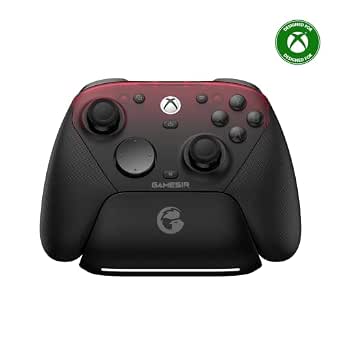
The G7 Pro supports wired Xbox play, wired or 2.4 GHz wireless PC connections, and Bluetooth for Android. It features TMR sticks, Hall Effect analog triggers, a 1000 Hz polling rate on PC, customizable controls, and a charging station with a built-in 1200 mAh battery.
Pros:
- Supports multiple connection modes across Xbox, PC, and Android.
- TMR sticks and Hall Effect triggers are designed for smooth, precise input.
- PC mode supports a 1000 Hz polling rate over wired or 2.4 GHz connections.
- Includes customizable extra buttons, a charging station, and a 1200 mAh battery.
Cons:
- Gyroscope aiming is available on PC only.
- The 1000 Hz polling rate is available on PC only.
Best for: Players using a listed platform whose exact device is supported.
Not ideal for: Anyone who has not confirmed platform-specific features or connection needs.
Bottom line: Check compatibility for each device and make sure the layout suits your games before choosing this controller.
USB Microphone
A USB microphone can be a useful setup addition when clear voice input is a priority, but the right choice depends on where and how you play. Start by deciding whether you need a standalone microphone, how much desk space it can occupy, and whether you need it to work alongside a headset. Room and placement matter: check that the mic can sit where you can speak naturally without blocking your monitor or controls.
A common mistake is buying a microphone before checking device support and connection needs. Confirm that your computer or console supports the microphone you are considering, whether any adapter or software is required, and how voice input is selected alongside your headphones. Check the included stand or mounting approach, cable reach, and the space available on your desk. If you play in a shared or noisy room, review the mic’s controls and pickup information in its product listing rather than assuming a USB connection guarantees a particular result. Compatibility and placement are the practical starting points; choose a specific model only after those needs are clear.
What to look for:
- Confirm your computer or console supports the microphone and its connection.
- Check whether adapters, software, or setup steps are required.
- Measure desk space and cable reach for the planned placement.
- Review the stand or mounting options and microphone controls.
- Verify how voice input works with your headset and chat applications.
If you are buying gradually, prioritize the part that solves your biggest day-to-day problem, then check fit and compatibility before adding another upgrade. Measure for the monitor and keyboard, verify device connections for the mouse, headset, and controller, and settle microphone placement before choosing a model.
A thoughtful setup comes together one compatible piece at a time. Use this checklist to confirm the details that matter to your space and play habits, and you can make each upgrade with more confidence.