
A wireless ergonomic mouse can change how your hand rests during long work sessions, but the right shape depends on your grip, desk space, and preferred controls. I’d make the Logitech Lift Vertical Ergonomic Wireless Mouse my best overall pick for its approachable vertical shape and practical everyday design. The Logitech MX Master 3S suits buyers who want more productivity controls, while the Logitech Ergo M575S is a standout for keeping mouse movement to a small area. The main tradeoffs are vertical comfort versus a familiar grip, extra features versus simplicity, and a conventional mouse versus a trackball. Read on for the full breakdown of all 15 options and guidance on choosing a shape that fits your routine.

Get the latest gadgets delivered free with Prime
- Fast, free delivery on millions of items
- Prime Video, Amazon Music and more included
- Member-only deals all year
Complete the kit



Key Takeaways
- The Logitech Lift is the most balanced starting point: its vertical design targets a more upright hand position without the more specialized controls or trackball operation found elsewhere in the lineup.
- The MX Master 3S and Lift serve different priorities: the MX Master 3S emphasizes productivity controls, while the Lift centers on a vertical grip; extra functions do not automatically make a mouse more comfortable.
- The Ergo M575S changes the movement equation: its trackball can suit a cramped desk or a user who wants to move the cursor without sweeping the mouse across the surface, but it requires a different control habit.
- Several entries are variations on a vertical shape rather than distinct categories: TECKNET, UGREEN, Anker, Lekvey, ProtoArc, and other vertical models call for close attention to grip size, connectivity, charging, and button layout.
- Connectivity and fit matter as much as the ergonomic label: Bluetooth, USB receiver support, multi-device pairing, and available size or color variants differ across the list, so buyers should match details to their own computer and hand.
| TECKNET Ergonomic Vertical Wireless Mouse |  | Best for Multi-Device Value | Connectivity: Bluetooth 5.0/3.0 and 2.4GHz USB receiver | DPI settings: 800, 1200, 1600, 2400, 3200, 4800 | Buttons: 6 | VIEW ON AMAZON | See Our Full Breakdown |
| Anker 2.4G Wireless Ergonomic Vertical Mouse with USB Receiver |  | Best for Simple, Receiver-Based Use | Connectivity: 2.4GHz USB receiver | Hand orientation: Right-handed | Buttons: 5 | VIEW ON AMAZON | See Our Full Breakdown |
| Logitech Lift Vertical Ergonomic Wireless Mouse – Graphite |  | Best for Smaller Right Hands | Connectivity: Bluetooth Low Energy or Logi Bolt USB receiver | Hand orientation: Right-handed | Maximum sensitivity: 4000 DPI, adjustable | VIEW ON AMAZON | See Our Full Breakdown |
| Logitech MX Master 3S Bluetooth Wireless Mouse (Graphite) |  | Best Premium Productivity Pick | Connectivity: Bluetooth | Sensor sensitivity: 8000 DPI | Buttons: 7 programmable buttons | VIEW ON AMAZON | See Our Full Breakdown |
| UGREEN Ergonomic Vertical Wireless Mouse |  | Best for Quiet Three-Device Switching | Connectivity: Bluetooth and 2.4G wireless | DPI settings: 1000, 1600, 2000, 4000 | Buttons: 5 | VIEW ON AMAZON | See Our Full Breakdown |
| TECKNET Wireless Mouse, 2.4G Ergonomic Computer Mouse, 2600 DPI, Black | 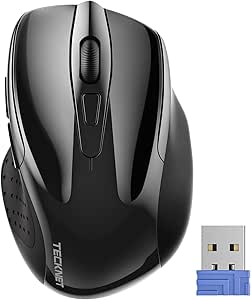 | Best for Travel | Connectivity: 2.4 GHz USB-A mini receiver | DPI settings: 800, 1200, 1600, 2000, 2600 | Battery: 2 AAA batteries, not included | VIEW ON AMAZON | See Our Full Breakdown |
| Logitech Ergo M575S Wireless Bluetooth Trackball Mouse – Graphite with Blue Ball |  | Best for Small Desks | Movement control: Thumb-operated trackball | Connectivity: Bluetooth or included Logi Bolt USB receiver | Sensitivity: 2000 DPI | VIEW ON AMAZON | See Our Full Breakdown |
| JYKEYMOUT Bluetooth and 2.4G (2-in-1) Rechargeable Wireless Mouse, Ergonomic Vertical Design, 1000/1200/1600 DPI, 6 Silent Buttons – Black |  | Best for Quiet Multi-Device Use | Connectivity: Bluetooth 5.2/3.0 and 2.4 GHz USB receiver | Device switching: Connects to two devices | DPI settings: 1000, 1200, 1600 | VIEW ON AMAZON | See Our Full Breakdown |
| ProtoArc EM11 NL Wireless Ergonomic Vertical Mouse, Rechargeable, Black |  | Best for Small-to-Medium Hands | Connectivity: Bluetooth and 2.4 GHz USB-A receiver | Device support: Up to 3 devices | DPI settings: 1000, 1600, 2400 | VIEW ON AMAZON | See Our Full Breakdown |
| TECKNET Wireless Mouse, 2.4G Ergonomic Computer Mouse, 2600 DPI, Purple | 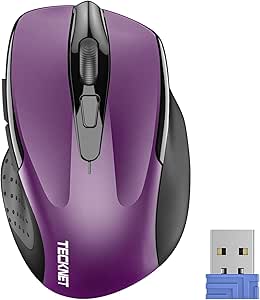 | Best for Colorful Everyday Use | Connectivity: 2.4 GHz wireless via USB-A receiver | DPI settings: 800, 1200, 1600, 2000, 2600 | Battery: 2 AAA batteries, not included | VIEW ON AMAZON | See Our Full Breakdown |
| Logitech MX Vertical Wireless Mouse – Graphite |  | Best for High-Precision Ergonomics | Sensor: 4000 DPI | Ergonomic angle: 57° vertical | Battery life: Up to 4 months per full charge | VIEW ON AMAZON | See Our Full Breakdown |
| Uineer Vertical Ergonomic Mouse – Wireless Bluetooth, 3-Device |  | Best for Multi-Device Switching | Connectivity: Bluetooth 5.0/4.0 and 2.4 GHz USB receiver | Device support: Up to 3 devices | DPI settings: 800, 1200, 1600, and 2400 | VIEW ON AMAZON | See Our Full Breakdown |
| Logitech Lift Vertical Ergonomic Wireless Mouse – Rose |  | Best for Small and Medium Hands | Hand orientation: Right-handed | Dimensions: 108 × 70 × 71 mm | Weight: 125 g | VIEW ON AMAZON | See Our Full Breakdown |
| TECKNET Ergonomic Wireless Bluetooth Vertical Mouse |  | Best for Quiet Shared Workspaces | DPI range: 800–4800 | DPI levels: 6 | Connectivity: Bluetooth 5.0/3.0 and built-in 2.4 GHz USB receiver | VIEW ON AMAZON | See Our Full Breakdown |
| Lekvey Ergonomic Mouse, Rechargeable Vertical Wireless Mouse, Comfort Grip |  | Best for Simple Rechargeable Use | Connectivity: 2.4 GHz radio frequency | Battery: Included lithium polymer battery | Battery life: Up to 150 hours | VIEW ON AMAZON | See Our Full Breakdown |
| wireless ergonomic mouse | Connectivity | Battery | Buttons | Compatibility |
|---|---|---|---|---|
| TECKNET Ergonomic Vertical Wir | Bluetooth 5.0/3.0 and 2.4GHz USB receiver | 2 AAA batteries, not included | 6 | Windows, Mac, Chrome, Linux |
| Anker 2.4G Wireless Ergonomic | 2.4GHz USB receiver | 2 AAA batteries, not included | 5 | — |
| Logitech Lift Vertical Ergonom | Bluetooth Low Energy or Logi Bolt USB receiver | 1 AA battery | — | Windows, macOS, iPadOS, Chrome OS, Linux, Android |
| Logitech MX Master 3S Bluetoot | Bluetooth | Rechargeable 500 mAh Li-Po | 7 programmable buttons | Windows, macOS, Linux, Chrome OS, iPadOS, Android |
| UGREEN Ergonomic Vertical Wire | Bluetooth and 2.4G wireless | 1 AA battery | 5 | Windows, macOS, Linux, ChromeOS, Android, iOS |
| TECKNET Wireless Mouse | 2.4 GHz USB-A mini receiver | 2 AAA batteries, not included | 6 | Windows, Mac, Chrome OS, Linux; side button not supported on Mac |
| Logitech Ergo M575S Wireless B | Bluetooth or included Logi Bolt USB receiver | 1 AA battery, included | 2 plus 3 customizable buttons | Windows, macOS, ChromeOS, Linux, Android, iPadOS, iOS |
| JYKEYMOUT Bluetooth and 2.4G | Bluetooth 5.2/3.0 and 2.4 GHz USB receiver | Built-in rechargeable lithium polymer | 6 silent buttons | Windows, macOS, Chrome OS, Linux, Android |
| ProtoArc EM11 NL Wireless Ergo | Bluetooth and 2.4 GHz USB-A receiver | Built-in 500 mAh lithium-ion, rechargeable via USB-C | 7 | Windows 8+, macOS 10.12+, Linux, Android 4.3+ |
| TECKNET Wireless Mouse | 2.4 GHz wireless via USB-A receiver | 2 AAA batteries, not included | 6 | Windows, Mac, Chrome OS, Linux |
| Logitech MX Vertical Wireless | USB receiver or Bluetooth Low Energy | — | — | — |
| Uineer Vertical Ergonomic Mous | Bluetooth 5.0/4.0 and 2.4 GHz USB receiver | 1 included C-cell; auto-sleep power saving | 6; side buttons do not function on macOS | Windows, macOS, Linux, Android, and iOS 13 or later |
| Logitech Lift Vertical Ergonom | Bluetooth Low Energy or Logi Bolt USB receiver | 1 AA battery | 6 | — |
| TECKNET Ergonomic Wireless Blu | Bluetooth 5.0/3.0 and built-in 2.4 GHz USB receiver | — | 6 | Windows, macOS, Chrome OS, and Linux |
| Lekvey Ergonomic Mouse | 2.4 GHz radio frequency | Included lithium polymer battery | — | Windows, Linux, and Mac OS; forward/back buttons not supported on Mac |
More Details on Our Top Picks
TECKNET Ergonomic Vertical Wireless Mouse
The TECKNET stands out for combining a right-handed vertical shape with three-device switching across Bluetooth and a 2.4GHz receiver. That flexibility suits someone moving between a laptop, desktop, and tablet without keeping separate mice on the desk. Its 800–4800 DPI range offers finer cursor adjustment than the Anker’s 800–1600 DPI settings, while silent main clicks make it a better fit for shared workspaces. The Logitech Lift feels more compact and adds a SmartWheel, but the TECKNET gives you more connection choices and a broader sensitivity range. The tradeoffs are two AAA batteries that are not supplied and right-hand-only shaping; its side buttons also do not work with macOS. I’d pick it for versatility, not for a left-handed setup or Mac users who rely on those extra buttons.
Pros:- Connects to up to three devices using Bluetooth and a 2.4GHz USB receiver
- Six DPI settings from 800 to 4800 allow broad cursor-speed adjustment
- Silent left and right clicks suit quiet offices and shared rooms
- Listed battery life is approximately 24 months
Cons:- Two AAA batteries are required and are not included
- Side buttons are not compatible with macOS
- Right-handed shape excludes left-handed users
Best for: Right-handed users who switch among several computers or tablets and want quiet clicks with both Bluetooth and receiver connectivity
Not ideal for: Left-handed buyers, or macOS users who depend on side-button navigation
- Connectivity:Bluetooth 5.0/3.0 and 2.4GHz USB receiver
- DPI settings:800, 1200, 1600, 2400, 3200, 4800
- Buttons:6
- Hand orientation:Right-handed
- Battery:2 AAA batteries, not included
- Listed battery life:Approximately 24 months
- Weight:4.32 oz
- Dimensions:4.74 × 2.49 in
- Compatibility:Windows, Mac, Chrome, Linux
Our verdict“Choose the TECKNET if you want a quiet vertical mouse that can switch among three devices and offers more DPI range than the Anker.”
Anker 2.4G Wireless Ergonomic Vertical Mouse with USB Receiver
The Anker is the straightforward pick here: its vertical grip, five-button layout, and single 2.4GHz USB receiver keep setup simple for a desktop or laptop user who does not need Bluetooth. Its three DPI settings top out at 1600, which is enough for ordinary office navigation but gives less tuning range than the TECKNET’s 4800 DPI ceiling or the Logitech Lift’s adjustable 4000 DPI. Forward and back buttons make browser navigation convenient, though the clicks are audible rather than silent. A sleep mode activates after eight minutes of inactivity to conserve battery power, but the provided data does not specify a total battery-life estimate. Compared with the UGREEN, the Anker lacks multi-device Bluetooth switching; in return, it keeps the connection method uncomplicated. I’d skip it if quiet clicks or using multiple devices without a receiver matters.
Pros:- Vertical shape encourages a more neutral wrist position
- 2.4GHz USB receiver offers a simple wireless connection
- Three DPI settings cover common office cursor speeds
- Sleep mode activates after eight minutes of inactivity
Cons:- No Bluetooth option for receiver-free pairing or multi-device switching
- Clicks are audible, which may distract in quiet work areas
- DPI range stops at 1600, below the TECKNET and Logitech Lift
Best for: Right-handed office users who want a basic vertical mouse for one computer and prefer a USB receiver connection
Not ideal for: People who need Bluetooth pairing, quiet clicks, or frequent switching between several devices
- Connectivity:2.4GHz USB receiver
- Hand orientation:Right-handed
- Buttons:5
- DPI settings:800, 1200, 1600
- Battery:2 AAA batteries, not included
- Wireless range:5 m
- Dimensions:120 × 62.8 × 74.8 mm
- Weight:3.4 oz
- Warranty:18 months
Our verdict“Choose the Anker for uncomplicated, single-computer use with a receiver, but pick the UGREEN or TECKNET if you need Bluetooth and device switching.”
Logitech Lift Vertical Ergonomic Wireless Mouse – Graphite
The Logitech Lift earns its place for buyers who want a vertical mouse shaped for small to medium right hands, rather than a larger, more desk-filling design. Its 57-degree angle supports a handshake-style grip, while the SmartWheel and customizable buttons add navigation control beyond the simpler Anker. Bluetooth and Logi Bolt provide two connection routes, and the listed battery life reaches up to two years from one AA battery. The TECKNET offers a higher maximum DPI and three-device switching, so it may suit users who prioritize cursor range and connection flexibility. The Lift instead makes a stronger case for a more compact fit and scrolling features. Expect an adjustment period if you are new to vertical mice, and this listing is right-handed only. I’d choose it for fit and daily navigation, not for left-hand use or a no-learning-curve switch.
Pros:- 57-degree vertical angle is designed for a handshake-style grip
- Sized for small to medium right hands
- SmartWheel and customizable buttons add navigation flexibility
- Uses one AA battery with listed battery life of up to 24 months
Cons:- Vertical shape may take time to feel familiar
- Right-handed configuration does not suit left-handed users
- Maximum 4000 DPI is lower than the TECKNET’s 4800 DPI ceiling
Best for: Right-handed users with small to medium hands seeking a compact vertical mouse with Bluetooth or Logi Bolt connectivity
Not ideal for: Left-handed users, people with larger hands seeking a roomier grip, or buyers who want to avoid adapting to a vertical shape
- Connectivity:Bluetooth Low Energy or Logi Bolt USB receiver
- Hand orientation:Right-handed
- Maximum sensitivity:4000 DPI, adjustable
- Weight:125 g
- Dimensions:108 × 70 × 71 mm
- Battery:1 AA battery
- Listed battery life:Up to 24 months
- Wireless range:10 m
- Compatibility:Windows, macOS, iPadOS, Chrome OS, Linux, Android
Our verdict“Choose the Lift if a compact fit for small to medium right hands and a scroll wheel with added control matter more than the TECKNET’s higher DPI ceiling.”
Logitech MX Master 3S Bluetooth Wireless Mouse (Graphite)
The MX Master 3S is the productivity-focused alternative to the vertical models in this list. Its contoured shape, 8000 DPI Darkfield sensor, and MagSpeed scroll wheel target precise work across varied surfaces, including glass, with quiet clicks for shared spaces. Bluetooth supports up to three devices, and Flow can link computers through Logi Options+ software. That makes it better suited to multi-computer workflows than the receiver-only Anker, while the Lift remains the clearer choice for a dedicated vertical handshake grip. The distinction matters: the MX Master 3S has an ergonomic, sculpted design, but it is not a vertical mouse. It is also heavier than the Lift at 141 g, and its Bluetooth-only connection may not suit devices that need a receiver. I’d choose it for navigation and workflow tools, not for a strict vertical-mouse preference.
Pros:- 8000 DPI Darkfield sensor is specified to track on glass
- MagSpeed wheel supports fast, precise scrolling
- Quiet Clicks reduce click noise
- Bluetooth supports up to three devices, with Flow available through Logi Options+
Cons:- Not a vertical mouse, unlike the TECKNET, Anker, and Lift
- Bluetooth-only connectivity may not work for devices that require a USB receiver
- Flow and full customization depend on Logi Options+ software
Best for: Power users who want a sculpted mouse for precise scrolling, glass-surface tracking, and Bluetooth control across multiple computers
Not ideal for: Buyers specifically seeking a vertical handshake grip, a USB receiver connection, or a lighter mouse
- Connectivity:Bluetooth
- Sensor sensitivity:8000 DPI
- Buttons:7 programmable buttons
- Battery:Rechargeable 500 mAh Li-Po
- Listed battery life:Up to 70 days
- Weight:4.97 oz (141 g)
- Dimensions:2 × 3.3 × 4.9 in
- Wireless range:10 m
- Compatibility:Windows, macOS, Linux, Chrome OS, iPadOS, Android
Our verdict“Choose the MX Master 3S for premium scrolling and multi-computer productivity, but choose the Lift or TECKNET if a true vertical shape is your priority.”
UGREEN Ergonomic Vertical Wireless Mouse
The UGREEN pairs a handshake-style vertical grip with Bluetooth and 2.4G wireless, so it can switch among up to three devices while keeping a receiver option available. Its quiet-click buttons give it an advantage over the Anker for a shared office, and its 1000–4000 DPI range offers more adjustment than the Anker’s three settings. The TECKNET reaches a higher maximum DPI and lists six settings, but the UGREEN keeps its setup to one AA battery and supports a wide range of operating systems, including mobile platforms. This is a practical middle ground rather than a feature-heavy premium choice: it has five buttons and no rechargeable battery. Its 170 g listed weight may also feel substantial beside the lighter Logitech Lift. I’d shortlist it for quiet, multi-device work, but not for left-handed use or buyers who want a built-in rechargeable cell.
Pros:- Bluetooth and 2.4G connectivity support switching among up to three devices
- Quiet-click buttons are suited to shared workspaces
- Four DPI settings range from 1000 to 4000
- Compatibility includes desktop and mobile operating systems
Cons:- Right-hand orientation only
- Uses a replaceable AA battery rather than a rechargeable battery
- Listed weight of 170 g is higher than the Logitech Lift’s 125 g
Best for: Right-handed users who work across several computers or mobile devices and want a quiet vertical mouse with both Bluetooth and receiver connectivity
Not ideal for: Left-handed buyers, users who prefer rechargeable mice, or anyone seeking a lighter mouse like the Logitech Lift
- Connectivity:Bluetooth and 2.4G wireless
- DPI settings:1000, 1600, 2000, 4000
- Buttons:5
- Hand orientation:Right-handed
- Battery:1 AA battery
- Weight:170 g
- Wireless range:10 m
- Compatibility:Windows, macOS, Linux, ChromeOS, Android, iOS
- Warranty:1 year
Our verdict“Choose the UGREEN if you want quiet clicks and three-device flexibility in a vertical mouse, and skip it if you need left-handed shaping or rechargeable power.”
TECKNET Wireless Mouse, 2.4G Ergonomic Computer Mouse, 2600 DPI, Black
I’d choose this compact, straightforward mouse for a laptop bag or a desk where a simple grip matters more than advanced ergonomics. Its contoured shape and rubber side grips offer more hand support than a basic flat travel mouse, while five DPI settings let me adjust cursor speed for different screens and tasks. Compared with the ProtoArc EM11 NL, it uses a conventional mouse shape rather than a vertical grip, so it asks less of a learning curve but offers less help changing wrist posture. The standout convenience is its claimed up-to-24-month battery life; the tradeoff is reliance on two AAA batteries, which are not included. It also needs a USB-A port and has no Bluetooth, limiting use with some newer laptops.
Pros:- Compact dimensions make it easy to carry with a laptop.
- Rubber side grips and a contoured shape provide more support than a flat travel mouse.
- Five DPI settings allow cursor-speed adjustment up to 2600 DPI.
- Claimed battery life of up to 24 months reduces battery changes.
Cons:- Two AAA batteries are required and are not included.
- USB-A receiver is the only connection option; Bluetooth is not available.
- The side button is not supported on Mac.
Best for: Laptop users who want a small, familiar-shaped wireless mouse with side grips and long battery life for commuting or occasional travel.
Not ideal for: People seeking a vertical grip to change wrist posture, Bluetooth pairing, or a mouse that works without a USB-A port.
- Connectivity:2.4 GHz USB-A mini receiver
- DPI settings:800, 1200, 1600, 2000, 2600
- Battery:2 AAA batteries, not included
- Claimed battery life:Up to 24 months
- Dimensions:4.09 x 2.68 x 1.49 inches
- Buttons:6
- Compatibility:Windows, Mac, Chrome OS, Linux; side button not supported on Mac
Our verdict“Choose this if you want a compact, familiar mouse with long battery life, but skip it if Bluetooth or a vertical posture is a priority.”
Logitech Ergo M575S Wireless Bluetooth Trackball Mouse – Graphite with Blue Ball
The Ergo M575S is the unusual pick here: its trackball moves the cursor with a thumb, so the mouse stays put while the forearm can stay still. That makes it a strong fit for a crowded desk or a setup where repeated arm movement is uncomfortable. Unlike the JYKEYMOUT vertical mouse, it does not ask me to reposition my hand into a vertical grip; instead, it trades conventional mouse movement for a trackball learning curve. The sculpted, right-handed body and quiet clicks suit focused work, and Bluetooth plus the Logi Bolt receiver offer more connection flexibility than the USB-A-only TECKNET. Its 18-month battery life is also appealing, though the trackball needs occasional cleaning and the customizable controls depend on Logi Options+.
Pros:- Trackball control moves the cursor without requiring the mouse or forearm to travel across the desk.
- Sculpted right-handed shape is designed to support a more relaxed hand posture.
- Bluetooth and included Logi Bolt receiver provide two wireless connection methods.
- Quiet clicks and an included AA battery support low-noise, low-maintenance work.
Cons:- Designed for right-handed use, with no left-handed option.
- Trackball needs cleaning to keep movement smooth and may take time to learn.
- Customization requires the Logi Options+ app.
Best for: Right-handed office workers with limited desk space who want to reduce arm movement and are willing to learn thumb-controlled cursor movement.
Not ideal for: Left-handed users, people who prefer moving a mouse normally, or buyers who do not want to maintain a trackball or install companion software.
- Movement control:Thumb-operated trackball
- Connectivity:Bluetooth or included Logi Bolt USB receiver
- Sensitivity:2000 DPI
- Hand orientation:Right-handed
- Battery:1 AA battery, included
- Claimed battery life:Up to 18 months
- Compatibility:Windows, macOS, ChromeOS, Linux, Android, iPadOS, iOS
- Buttons:2 plus 3 customizable buttons
Our verdict“Pick the M575S for a small desk and reduced arm movement, but choose a conventional or vertical mouse if you want familiar cursor control.”
JYKEYMOUT Bluetooth and 2.4G (2-in-1) Rechargeable Wireless Mouse, Ergonomic Vertical Design, 1000/1200/1600 DPI, 6 Silent Buttons – Black
For someone splitting time between a computer and a tablet, the JYKEYMOUT combines a vertical grip with Bluetooth and a 2.4 GHz receiver, and it can switch between two connected devices. Its silent buttons make it better suited to a shared office than the conventional-shaped TECKNET Wireless Mouse, while its rechargeable battery avoids buying AAA replacements. The vertical posture may feel more natural during extended use, but it does not offer the same cursor precision range as the ProtoArc EM11 NL, which reaches 2400 DPI versus this model’s 1600. The claimed one-to-three-month charge interval is convenient, though the mouse’s power-saving behavior can interrupt use after inactivity. Buyers should also note that its back and forward buttons do not work on macOS.
Pros:- Vertical shape encourages a different, more neutral hand position than conventional mice.
- Bluetooth and 2.4 GHz receiver support two-device connection and switching.
- Silent buttons suit shared offices and quiet work areas.
- Rechargeable battery is rated for one to three months per charge.
Cons:- Back and forward buttons are not compatible with macOS.
- Enters power-saving mode after 10 minutes of inactivity and must be woken before cursor movement resumes.
- Maximum 1600 DPI offers less sensitivity range than the ProtoArc EM11 NL.
Best for: Right-handed users who switch between two devices, work in a quiet room, and want a rechargeable vertical mouse with Bluetooth and receiver connectivity.
Not ideal for: Mac users who rely on back and forward buttons, people who need higher DPI settings, or buyers who want to avoid waking a mouse after inactivity.
- Connectivity:Bluetooth 5.2/3.0 and 2.4 GHz USB receiver
- Device switching:Connects to two devices
- DPI settings:1000, 1200, 1600
- Buttons:6 silent buttons
- Hand orientation:Right-handed
- Battery:Built-in rechargeable lithium polymer
- Claimed battery life:1–3 months per charge
- Dimensions:4.8 x 2.4 inches
- Compatibility:Windows, macOS, Chrome OS, Linux, Android
Our verdict“Choose it for quiet, two-device work and a rechargeable vertical grip, but look elsewhere if Mac shortcut buttons or higher sensitivity are important.”
ProtoArc EM11 NL Wireless Ergonomic Vertical Mouse, Rechargeable, Black
The ProtoArc EM11 NL pairs a vertical shape sized for small-to-medium hands with multi-device wireless support, making it a more targeted ergonomic choice than the larger-feeling appeal of a general-purpose mouse. Its USB-A receiver and Bluetooth connections can serve up to three devices, and the 1000, 1600, and 2400 DPI settings give it a wider sensitivity range than the JYKEYMOUT. Quiet left and right clicks are useful in shared spaces; however, not every button is quiet, and the back and forward controls are neither programmable nor compatible with macOS. Compared with the trackball-based Logitech Ergo M575S, the ProtoArc uses familiar mouse movement but still requires adapting to a vertical grip. Its rechargeable battery is convenient, though the listed battery life is about one month.
Pros:- Vertical shape is designed for small-to-medium hands and a more natural wrist position.
- Bluetooth and USB-A receiver support connections to up to three devices.
- Three DPI settings reach 2400 for a broader sensitivity range than the JYKEYMOUT.
- Rechargeable USB-C battery and quiet left and right clicks suit regular desk work.
Cons:- The vertical grip can feel awkward until the user adapts.
- Back and forward buttons are not silent, programmable, or compatible with macOS.
- Listed battery life is about one month, shorter than the TECKNET’s claimed battery interval.
Best for: Right-handed users with small or medium hands who want a vertical grip, quiet primary clicks, and the ability to connect up to three devices.
Not ideal for: Left-handed users, people who want a conventional grip with no adjustment period, or Mac users who depend on the back and forward buttons.
- Connectivity:Bluetooth and 2.4 GHz USB-A receiver
- Device support:Up to 3 devices
- DPI settings:1000, 1600, 2400
- Buttons:7
- Hand orientation:Right-handed
- Battery:Built-in 500 mAh lithium-ion, rechargeable via USB-C
- Listed battery life:About 1 month
- Dimensions:5.43 x 2.72 inches
- Compatibility:Windows 8+, macOS 10.12+, Linux, Android 4.3+
Our verdict“Pick the EM11 NL if a small-to-medium hand and three-device vertical setup are your priorities, but skip it if you want instant familiarity or Mac-compatible side buttons.”
TECKNET Wireless Mouse, 2.4G Ergonomic Computer Mouse, 2600 DPI, Purple
This purple TECKNET offers the same practical formula as the black TECKNET 2600 DPI: compact dimensions, rubber side grips, a USB-A receiver, and a familiar contoured shape. I’d place it here for buyers who want that simple everyday design with a more distinctive finish, rather than a different ergonomic approach. It is less posture-focused than the vertical ProtoArc EM11 NL and less flexible than the Bluetooth-capable JYKEYMOUT, but it avoids both a vertical-grip adjustment period and rechargeable-battery management. Five DPI settings give some control over cursor speed, and the claimed up-to-24-month battery life suits people who prefer infrequent battery changes. Its limits are clear: two AAA batteries are not included, Bluetooth is absent, and the side buttons do not work on Mac.
Pros:- Compact 85 g body is easy to carry and takes up little desk space.
- Contoured shape and rubber side grips add support during everyday use.
- Five DPI settings provide cursor-speed options up to 2600 DPI.
- Claimed battery life of up to 24 months reduces the need for frequent battery changes.
Cons:- Requires two AAA batteries, which are not included.
- Uses a USB-A receiver and has no Bluetooth connectivity.
- Side buttons are not compatible with Mac, and the mouse does not work on glass surfaces.
Best for: Right-handed laptop or desktop users who want a compact, familiar wireless mouse with rubber side grips and a purple finish.
Not ideal for: Buyers seeking vertical wrist positioning, Bluetooth pairing, glass-surface use, or fully working side buttons on Mac.
- Connectivity:2.4 GHz wireless via USB-A receiver
- DPI settings:800, 1200, 1600, 2000, 2600
- Battery:2 AAA batteries, not included
- Claimed battery life:Up to 24 months
- Dimensions:4.09 x 2.68 x 1.49 inches
- Weight:85 g
- Buttons:6
- Hand orientation:Right-handed
- Compatibility:Windows, Mac, Chrome OS, Linux
Our verdict“Choose the purple TECKNET for a portable, familiar mouse with long claimed battery life, but select a vertical or Bluetooth model if posture support or connection flexibility matters more.”
Logitech MX Vertical Wireless Mouse – Graphite
The MX Vertical pairs its 57° handshake angle with a 4000 DPI sensor, making it a strong fit for right-handed users who want a vertical shape without giving up fine cursor control. Compared with the Lekvey, it offers a much higher maximum sensitivity and a cursor-speed switch for quick adjustments; that can help when moving between detailed work and broader screen navigation. Its rechargeable battery lasts up to four months, and a one-minute quick charge adds up to three hours of use. The tradeoff is a pronounced shape that can take time to get used to, along with a higher-end feature set than a simpler plug-and-play model like the Lekvey. It also lacks the multi-device switching offered by the Uineer and TECKNET.
Pros:- 57° vertical angle supports a more natural handshake-style grip.
- 4000 DPI sensor and cursor-speed switch suit both detailed and fast cursor work.
- Rechargeable battery lasts up to four months.
- One-minute quick charge provides up to three hours of use.
Cons:- The vertical shape may take an adjustment period.
- Right-handed design excludes left-handed users.
- Does not offer the three-device switching available on the Uineer and TECKNET.
Best for: Right-handed office users who want a vertical grip, fine cursor control, and a rechargeable battery for long work sessions.
Not ideal for: Newcomers who want a conventional mouse shape, left-handed users, or people who need to switch between several devices.
- Sensor:4000 DPI
- Ergonomic angle:57° vertical
- Battery life:Up to 4 months per full charge
- Quick charge:1 minute provides up to 3 hours of use
- Connectivity:USB receiver or Bluetooth Low Energy
- Wireless range:10 meters
- Hand orientation:Right-handed
- Color:Graphite
Our verdict“Choose the MX Vertical if you want a high-sensitivity ergonomic mouse with a rechargeable battery and are comfortable adapting to a distinct shape.”
Uineer Vertical Ergonomic Mouse – Wireless Bluetooth, 3-Device
The Uineer is the lineup’s flexible pick for someone moving among a computer, tablet, and phone: Bluetooth and 2.4 GHz connections support up to three devices, with one-click switching. Its vertical handshake grip and four DPI settings cover everyday office work and casual gaming, though its 2400 DPI ceiling is lower than the Logitech MX Vertical and Lift, both of which reach 4000 DPI. A replaceable C-cell battery avoids charging interruptions, but it means keeping spare batteries on hand rather than topping up a built-in cell. The 7-color lighting adds a more decorative look than the restrained Logitech models, while the 120 g weight and broad dimensions may feel substantial to users with smaller hands. Mac users should also note that the side buttons do not work on macOS.
Pros:- Switches among up to three devices over Bluetooth or 2.4 GHz.
- Four DPI settings from 800 to 2400 support different cursor speeds.
- Auto-sleep power saving helps conserve the included battery.
- Compatible with Windows, macOS, Linux, Android, and iOS 13 or later.
Cons:- Uses a replaceable C-cell rather than a rechargeable battery.
- Side buttons do not function on macOS.
- Its 2400 DPI maximum is below the Logitech MX Vertical and Lift.
Best for: People who regularly switch between up to three computers or mobile devices and prefer a vertical mouse with replaceable batteries.
Not ideal for: Mac users who rely on side buttons, small-handed users seeking a compact mouse, or buyers who want a rechargeable battery.
- Connectivity:Bluetooth 5.0/4.0 and 2.4 GHz USB receiver
- Device support:Up to 3 devices
- DPI settings:800, 1200, 1600, and 2400
- Buttons:6; side buttons do not function on macOS
- Battery:1 included C-cell; auto-sleep power saving
- Weight:120 g
- Dimensions:4.8 × 3.03 inches
- Wireless range:33 ft
- Compatibility:Windows, macOS, Linux, Android, and iOS 13 or later
Our verdict“Pick the Uineer if easy switching across three devices matters more than rechargeable power or high-end sensor sensitivity.”
Logitech Lift Vertical Ergonomic Wireless Mouse – Rose
The Lift stands out for combining a 57° vertical posture with a more compact shape aimed at small-to-medium right hands. That fit makes it a more approachable alternative to the larger-feeling MX Vertical, while its quiet clicks and SmartWheel suit shared offices and frequent scrolling. The Lift also has six buttons, four of them customizable, and supports Bluetooth or a Logi Bolt receiver. Its AA battery is rated for up to 24 months, which means less charging upkeep than the Lekvey, though it is still a replaceable-battery design. The key limitation is fit: this listing is right-handed only, and users with larger hands may prefer the MX Vertical’s fuller form. It is also less suited to buyers who want a rechargeable mouse.
Pros:- Compact design is sized for small-to-medium right hands.
- 57° angle supports a natural handshake-style wrist position.
- SmartWheel and customizable buttons support efficient scrolling and shortcuts.
- AA battery provides up to 24 months of use.
Cons:- This version is right-handed only.
- Uses a replaceable AA battery rather than a rechargeable cell.
- May feel too small for users who prefer the larger MX Vertical.
Best for: Right-handed users with small-to-medium hands who want a quieter vertical mouse for office work and frequent scrolling.
Not ideal for: Left-handed users, people with larger hands who prefer a fuller grip, or buyers who want USB-C recharging.
- Hand orientation:Right-handed
- Dimensions:108 × 70 × 71 mm
- Weight:125 g
- Maximum DPI:4000 dpi, adjustable
- Battery:1 AA battery
- Battery life:Up to 24 months
- Connectivity:Bluetooth Low Energy or Logi Bolt USB receiver
- Wireless range:10 m
- Buttons:6
Our verdict“Choose the Lift if you have small-to-medium right hands and value quiet, compact ergonomics over rechargeable power.”
TECKNET Ergonomic Wireless Bluetooth Vertical Mouse
For people working near others, the TECKNET’s nearly silent left and right clicks are its clearest point of difference. It also offers six DPI settings up to 4800 and connects by Bluetooth or its built-in 2.4 GHz receiver, with support for switching among three devices. That gives it broader connection options and a higher stated sensitivity ceiling than the Uineer, but silence applies only to the primary clicks: its other function keys still make noise. The mouse uses batteries that are not included, with a stated 12-month battery life, so setup involves an extra purchase. Mac users should factor in limited side-button support. Compared with the Logitech Lift, this TECKNET prioritizes adjustable sensitivity and multi-device connections over features such as a SmartWheel and customizable buttons.
Pros:- Nearly silent left and right clicks suit shared work areas.
- Six DPI settings span 800 to 4800.
- Bluetooth and 2.4 GHz receiver support switching among up to three devices.
- 36-month warranty is specified.
Cons:- Only the primary click buttons are silent; other function keys make noise.
- Batteries are not included.
- Side-button functionality is limited on macOS.
Best for: Office workers, students, and shared-space users who want quiet primary clicks and easy switching between several devices.
Not ideal for: Mac users who depend on side buttons, buyers seeking every button to be quiet, or anyone wanting an included rechargeable battery.
- DPI range:800–4800
- DPI levels:6
- Connectivity:Bluetooth 5.0/3.0 and built-in 2.4 GHz USB receiver
- Device switching:Up to 3 devices
- Buttons:6
- Battery life:Up to 12 months
- Battery included:No
- Compatibility:Windows, macOS, Chrome OS, and Linux
- Warranty:36 months
Our verdict“Pick this TECKNET for quiet primary clicks and multi-device flexibility, provided you can accept audible function keys and supply your own batteries.”
Lekvey Ergonomic Mouse, Rechargeable Vertical Wireless Mouse, Comfort Grip
The Lekvey keeps the setup simple: its 2.4 GHz receiver works without Bluetooth pairing, and its rechargeable battery provides up to 150 hours of use per charge. Its handshake-style shape is aimed at a more neutral wrist position, while three DPI steps—800, 1200, and 1600—cover basic everyday navigation. Compared with the Logitech MX Vertical, the Lekvey trades a higher sensitivity ceiling and quick-charge feature for a straightforward wireless connection and a rechargeable battery. Its DPI range is also more limited than the Uineer and TECKNET, so it is less flexible for users who want faster cursor movement. The back and forward buttons are useful for browsing, but they do not work on Mac OS, and there is no programmable button customization.
Pros:- Rechargeable battery provides up to 150 hours of use.
- 2.4 GHz receiver avoids Bluetooth pairing.
- Three DPI settings offer basic cursor-speed adjustment.
- Back and forward buttons support browser navigation on compatible systems.
Cons:- Forward and back buttons are not supported on Mac OS.
- 1600 DPI maximum is below the Logitech MX Vertical and TECKNET.
- No programmable button customization.
Best for: Windows or Linux users who want an uncomplicated vertical mouse with a rechargeable battery and a plug-and-play receiver.
Not ideal for: Mac users who rely on forward and back buttons, people who need more than 1600 DPI, or buyers seeking customizable controls.
- Connectivity:2.4 GHz radio frequency
- Battery:Included lithium polymer battery
- Battery life:Up to 150 hours
- DPI settings:800, 1200, and 1600
- Maximum sensitivity:1600 DPI
- Wireless range:10 meters
- Dimensions:5 × 3 × 2.5 inches
- Weight:3.36 ounces
- Compatibility:Windows, Linux, and Mac OS; forward/back buttons not supported on Mac
Our verdict“Choose the Lekvey if you want a rechargeable, receiver-based vertical mouse for straightforward everyday use and do not need advanced controls.”

How We Picked
I ranked these wireless ergonomic mice by how well their design addresses everyday comfort without creating unnecessary setup or control compromises. The main criteria were grip style and likely learning curve, wireless connection options, button and scrolling usefulness, power approach, and suitability for common desk setups. I also separated models that share a broad vertical-mouse format by looking at practical distinctions such as device pairing, rechargeable design, and whether the mouse uses a trackball.
The ranking favors products with a clear role and a useful balance of comfort-focused design and everyday usability. A premium productivity mouse can rank highly for users who need its controls, but it is not automatically the best fit for someone who wants a straightforward vertical mouse. Likewise, similar-looking budget options are not treated as interchangeable: buyers should check their exact size, connection, and feature requirements rather than choose by shape or brand name alone.
Factors to Consider When Choosing Wireless Ergonomic Mouse
Before choosing by feature count, I’d start with the kind of movement and hand position that feels natural to you. A wireless ergonomic design can reduce awkward positioning for some users, but comfort depends on fit and habits, not the label alone. These broader checks can help narrow the field before comparing individual models.
Choose a grip style you can adapt to
Vertical mice rotate the hand toward a handshake-like position, while conventional ergonomic designs keep a more familiar palm-down grip. A trackball moves the cursor with a thumb or finger rather than by sliding the whole mouse. Those designs solve different problems, so do not assume that the most unusual shape will be the most comfortable for you. If you are new to vertical mice, expect a short adjustment period for pointer control and clicking. Buyers who need precise, fast cursor movement may prefer to test a shape before relying on it for demanding work. Choose based on the position you can sustain, not on a promise that one grip suits everyone.
Match the mouse size to your hand and grip
A mouse can have a well-designed contour and still feel awkward if its body is too large or small for your hand. Compare the product dimensions with a mouse you already find comfortable, and check whether your fingers can reach the main buttons without stretching. Palm, claw, and fingertip grips also place the hand differently, so a shape that supports one style may feel restrictive in another. Smaller hands may benefit from a more compact body, while larger hands may want room for the palm and thumb. Do not choose solely by a broad label such as ergonomic or vertical. Fit affects both comfort and how easily you can reach side buttons.
Check wireless compatibility before choosing a connection
Bluetooth can free a USB port and suit laptops or tablets, while a USB receiver may be convenient for a desktop or a computer with inconsistent Bluetooth performance. Some models offer both approaches, but a receiver-based connection depends on an available compatible port. Multi-device support is useful if you regularly switch between computers; it adds little value if you use one machine. Check operating-system support and any software requirements before buying, particularly if you need custom buttons or settings. A common mistake is to treat wireless as one standard rather than checking the specific connection included. Make sure your intended device can pair with the mouse in the way you plan to use it.
Decide whether extra buttons will earn their place
Additional buttons and scroll controls can speed up repeated tasks, but only when they match actions you use often. For browsing, spreadsheets, design work, and editing, programmable controls may reduce repetitive movement or clicks. If you mainly point, click, and scroll, a simpler layout can be easier to learn and less distracting. Also check whether button customization depends on software, since a useful shortcut may not be available on every computer you use. More controls can make a mouse larger or require a learning period. Prioritize one or two functions you will use daily instead of choosing by button count.
Think about power and upkeep beyond the first setup
Rechargeable mice avoid replacing disposable batteries, but they need charging and may require a cable at inconvenient times. Battery-powered models can be convenient when you prefer swapping a battery, though that adds an ongoing supply to your setup. Check what power method a specific variant uses rather than assuming models from the same family share it. A trackball also changes maintenance: the ball and its socket may need occasional cleaning to keep movement smooth. Dust, desk debris, and regular handling can affect any mouse, but moving parts and charging habits differ by design. Pick the routine you are most likely to maintain comfortably.
Pay for a clear use case, not just a premium label
A higher-feature mouse makes sense when its controls, connectivity, or construction solve a real problem in your workday. If you want a basic wireless vertical shape, a simpler model may cover your needs without adding functions to learn or configure. Conversely, frequent device switching or shortcut-heavy work can make more advanced controls worth prioritizing. Think about how many hours you use the mouse, what tasks repeat, and whether you need it to travel between workspaces. Compare the specific model variant and included features, since names and color versions do not always tell the full story. The best choice is the one whose advantages you will use often enough to justify its added complexity.
Frequently Asked Questions
Should I choose a vertical mouse or a trackball if my desk is small?
A trackball such as the Logitech Ergo M575S needs less surface movement because you steer the pointer with the ball instead of pushing the mouse around. A vertical mouse still needs space to move, though it may suit you better if you prefer controlling the cursor with a familiar mouse motion. Desk space is only one factor: trackball control can take practice, especially if you are accustomed to moving a conventional mouse. Check whether you have room for your hand and arm even when the pointer itself needs little space. Choose the trackball for minimal device movement, not simply because it is wireless.
Will a vertical mouse feel comfortable immediately?
Not always. A vertical grip changes the angle of your hand and can make pointer control feel unfamiliar at first, even if the shape is comfortable while resting. Start with routine tasks and give yourself time to adapt before judging precision or speed. If a change in grip creates discomfort, numbness, or pain, stop using the mouse and consider a different shape or professional advice. A vertical design is a fit choice, not a guaranteed remedy for hand or wrist problems. The Lift and the other vertical models in this roundup are options to compare, not substitutes for a medical assessment.
Is Bluetooth or a USB receiver better for a work computer?
Bluetooth is useful when you want to keep a USB port free or pair with a laptop or tablet that supports it. A USB receiver can be a straightforward choice for a desktop, or for a computer where Bluetooth is unavailable or unreliable. Some mice support both, but buyers should verify the connection options on the exact model and variant they are purchasing. Work computers may also limit Bluetooth pairing or the installation of configuration software. If you switch between devices, check multi-device support rather than assuming any Bluetooth mouse can manage quick switching.
Do I need a premium ergonomic mouse if I work at a computer all day?
Long hours make fit and control layout more consequential, but they do not automatically make a premium model the right choice. A basic vertical mouse may be enough if your main goal is trying a different grip, while a feature-rich option such as the MX Master 3S makes more sense when its controls support repeated work tasks. First identify the problem you want to solve: awkward hand position, limited desk space, device switching, or repetitive shortcuts. Then check whether a specific feature addresses it. Paying for functions you will not use can add complexity without improving your daily setup.
How can I tell whether an ergonomic mouse will fit my hand?
Check the manufacturer’s dimensions and compare them with a mouse that already feels comfortable, paying special attention to body length, width, and height. Look at where your thumb rests and whether your index and middle fingers can reach the main buttons without stretching. A model’s vertical angle and thumb support can change the feel even when its measurements seem close to another mouse. If possible, buy from a seller with a suitable return policy so you can judge the shape during normal use. Reviews and product labels can help narrow options, but they cannot replace checking the actual fit.
Conclusion
For most buyers seeking a balanced vertical shape, I’d start with the Logitech Lift as the best overall choice. The TECKNET and Anker vertical models are the best value direction for shoppers focused on a straightforward ergonomic design, though I’d compare the exact connection and feature details before choosing between them. For a premium productivity-focused setup, the Logitech MX Master 3S is the pick when extra controls matter more than a vertical grip. Beginners should consider the Logitech Lift for an approachable entry into vertical mice, while buyers who want to keep mouse movement confined should look at the Logitech Ergo M575S trackball. If you need multi-device pairing, compare the Uineer and other models by their stated connection support; if fit is your priority, narrow the list by dimensions and grip before settling on a brand or color.
Halloween Picks

Pumpkin Halloween Fog Machine with 12-Color LED Lights, Bluetooth Speaker, and Remote

10ft Halloween Inflatable Archway – Pumpkin Skeleton Yard Décor

Star Wars Yoda and R2-D2 Inflatable Halloween Decor, 6 ft with LEDs, Indoor/Outdoor
As an affiliate, we earn on qualifying purchases.