The ASUS RT-BE9700 is my best overall Wi-Fi 7 router pick for buyers who want tri-band flexibility, while the TP-Link Archer BE670 is a strong alternative for a feature-rich standalone setup. For simpler installation, the Amazon eero 7 favors approachable mesh-style management, and the TP-Link Deco BE25 3-pack suits homes where coverage matters more than a single router’s peak speed. The main tradeoffs are tri-band capacity versus dual-band value, and a standalone router’s simplicity versus mesh coverage across multiple rooms. Wired port needs, home layout, and your current devices also affect which Wi-Fi 7 features will make a difference. Continue reading for a ranked breakdown of all 13 options and a guide to choosing the right setup.

Get the latest gadgets delivered free with Prime
- Fast, free delivery on millions of items
- Prime Video, Amazon Music and more included
- Member-only deals all year
Complete the kit



Key Takeaways
- Tri-band routers lead for flexibility: The ASUS RT-BE9700, TP-Link Archer BE670, and NETGEAR Nighthawk tri-band model stand apart from dual-band picks when several devices compete for wireless capacity.
- Mesh can beat a single router in spread-out homes: The three-unit TP-Link Deco BE25 is the lineup’s dedicated whole-home coverage choice; a high-spec standalone model is not automatically better across distant rooms.
- Dual-band models serve different budgets and setups: The Archer BE230, Nighthawk RS90, ASUS RT-BE55, and eero 7 prioritize simpler or more accessible networking over tri-band capacity.
- Port selection changes the value calculation: Models such as the ASUS RT-BE88U may appeal to buyers with wired devices or faster broadband, while other picks may be a better fit for primarily wireless households.
- Wi-Fi 7 benefits depend on the whole network: Compatible client devices, broadband speed, router placement, and home construction determine whether advanced wireless capability translates into a noticeable improvement.
| ASUS RT-BE9700 Tri-Band WiFi 7 Router |  | Best for Built-In Network Tools | WiFi standard: WiFi 7 (802.11be) | Frequency bands: Tri-band: 2.4 GHz, 5 GHz, and 6 GHz | Maximum data rate: Up to 9.7 Gbps | VIEW ON AMAZON | See Our Full Breakdown |
| TP-Link Archer BE670 Tri-Band Wi-Fi 7 Router |  | Best for Multi-Gig Wired Connections | Wi-Fi standard: Wi-Fi 7 (802.11be) | Frequency bands: Tri-band: 6 GHz, 5 GHz, and 2.4 GHz | Maximum listed band speeds: 6 GHz: 5,765 Mbps; 5 GHz: 5,765 Mbps; 2.4 GHz: 688 Mbps | VIEW ON AMAZON | See Our Full Breakdown |
| NETGEAR Nighthawk Tri-Band WiFi 7 Router, 9.3 Gbps, Up to 2,500 sq. ft. | 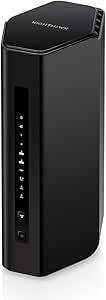 | Best for App-Based Management | WiFi standard: WiFi 7 | Frequency bands: Tri-band: 2.4 GHz, 5 GHz, and 6 GHz | Maximum speed: Up to 9.3 Gbps | VIEW ON AMAZON | See Our Full Breakdown |
| Amazon eero 7 Dual-Band Mesh Wi-Fi 7 Router, 1-Pack |  | Best for Existing eero Households | Wi-Fi standard: Wi-Fi 7 (IEEE 802.11a/b/g/n/ac/ax/be) | Bands: Dual-band: 2.4 GHz and 5 GHz | Wireless speed: Up to 1.8 Gbps | VIEW ON AMAZON | See Our Full Breakdown |
| TP-Link Archer BE230 Dual-Band Wi-Fi 7 Router |  | Best Value WiFi 7 Entry Point | Wi-Fi standard: Wi-Fi 7 (802.11be) | Frequency bands: Dual-band: 2.4 GHz and 5 GHz | Maximum wireless speed: Up to 3.6 Gbps | VIEW ON AMAZON | See Our Full Breakdown |
| NETGEAR Nighthawk RS140 Dual-Band WiFi 7 Router |  | Best Dual-Band Coverage and Capacity | WiFi generation: WiFi 7 | Frequency bands: Dual-band, 2.4 GHz and 5 GHz | Maximum data rate: Up to 5 Gbps | VIEW ON AMAZON | See Our Full Breakdown |
| NETGEAR Nighthawk RS90 WiFi 7 Dual-Band Router |  | Best for Wired Device Connections | WiFi generation: WiFi 7 | Frequency bands: Dual-band, 2.4 GHz and 5 GHz | Maximum data rate: Up to 3.6 Gbps | VIEW ON AMAZON | See Our Full Breakdown |
| TP-Link Deco BE25 Wi-Fi 7 Mesh System, Dual-Band BE5000, 3-Pack |  | Best for Whole-Home Mesh Coverage | WiFi standard: WiFi 7 (802.11be) | Frequency bands: Dual-band | Maximum combined speed: Up to 5 Gbps | VIEW ON AMAZON | See Our Full Breakdown |
| TP-Link Archer BE550 Tri-Band Wi-Fi 7 Router |  | Best Tri-Band Router for Multi-Gig Homes | WiFi generation: WiFi 7 | Frequency bands: Tri-band, 2.4 GHz, 5 GHz, and 6 GHz | Advertised data rate: Up to 9,300 Mbps | VIEW ON AMAZON | See Our Full Breakdown |
| ASUS RT-BE88U WiFi 7 Dual-Band Router |  | Best for High-Capacity Wired Networking | WiFi generation: WiFi 7 | Frequency bands: Dual-band | Wireless data rate: Up to 7,200 Mbps | VIEW ON AMAZON | See Our Full Breakdown |
| ASUS RT-BE55 Dual-Band WiFi 7 Router with Mesh and VPN Support |  | Best for ASUS Mesh Expansion | Wi-Fi generation: Wi-Fi 7 | Bands: Dual-band, 2.4 GHz and 5 GHz | Maximum data transfer rate: Up to 3,600 Mbps | VIEW ON AMAZON | See Our Full Breakdown |
| TP-Link Archer BE600 Tri-Band Wi-Fi 7 Router (BE9700) |  | Best for High-Capacity Tri-Band Networking | Wi-Fi standard: Wi-Fi 7 | Bands: Tri-band: 6 GHz, 5 GHz, and 2.4 GHz | Maximum total speed: Up to 9.7 Gbps | VIEW ON AMAZON | See Our Full Breakdown |
| TP-Link Archer BE400 BE6500 Dual-Band Wi-Fi 7 Router |  | Best Dual-Band Wired Upgrade | Wi-Fi standard: Wi-Fi 7 | Bands: Dual-band, 2.4 GHz and 5 GHz | Maximum combined bandwidth: Up to 6.5 Gbps | VIEW ON AMAZON | See Our Full Breakdown |
| wi fi 7 router | Coverage | Frequency bands | Ports | Device capacity |
|---|---|---|---|---|
| ASUS RT-BE9700 Tri-Band WiFi 7 | Listed as up to 2,500–2,750 sq. ft. | Tri-band: 2.4 GHz, 5 GHz, and 6 GHz | 6; maximum LAN port bandwidth listed as 1,000 Mbps | — |
| TP-Link Archer BE670 Tri-Band | Up to 3,000 sq. ft. | Tri-band: 6 GHz, 5 GHz, and 2.4 GHz | 1 × 10 Gbps WAN/LAN, 1 × 2.5 Gbps WAN/LAN, 3 × 1 Gbps LAN, 1 × USB 3.0 | Up to 128 devices |
| NETGEAR Nighthawk Tri-Band WiF | Up to 2,500 sq. ft. | Tri-band: 2.4 GHz, 5 GHz, and 6 GHz | — | Up to 100 devices |
| Amazon eero 7 Dual-Band Mesh W | Up to 2,000 sq. ft. | — | — | 120+ devices |
| TP-Link Archer BE230 Dual-Band | Up to 2,000 sq. ft. | Dual-band: 2.4 GHz and 5 GHz | 1 × 2.5 Gbps WAN/LAN, 1 × 2.5 Gbps LAN, 3 × 1 Gbps LAN | — |
| NETGEAR Nighthawk RS140 Dual-B | Up to 2,250 sq. ft. | Dual-band, 2.4 GHz and 5 GHz | — | Up to 80 devices |
| NETGEAR Nighthawk RS90 WiFi 7 | Up to 2,000 sq. ft. | Dual-band, 2.4 GHz and 5 GHz | — | Up to 50 devices |
| TP-Link Deco BE25 Wi-Fi 7 Mesh | Up to 6,600 sq. ft. | Dual-band | — | Over 150 devices |
| TP-Link Archer BE550 Tri-Band | Up to 2,000 sq. ft. | Tri-band, 2.4 GHz, 5 GHz, and 6 GHz | One 2.5 Gbps WAN and four 2.5 Gbps LAN | — |
| ASUS RT-BE88U WiFi 7 Dual-Band | Up to 3,000 sq. ft. | Dual-band | One 10G SFP+, one 10G WAN/LAN, four 2.5G, and four 1G | — |
| ASUS RT-BE55 Dual-Band WiFi 7 | — | — | 1 × 2.5G WAN; 4 × 1G LAN | — |
| TP-Link Archer BE600 Tri-Band | — | — | 1 × 10 Gbps WAN/LAN, 1 × 2.5 Gbps WAN/LAN, 3 × 2.5 Gbps LAN, USB 3.0 | Up to 120 devices |
| TP-Link Archer BE400 BE6500 Du | — | — | 1 × 2.5 Gbps WAN/LAN, 1 × 2.5 Gbps LAN, 3 × 1 Gbps LAN | Up to 90 devices |
More Details on Our Top Picks
ASUS RT-BE9700 Tri-Band WiFi 7 Router
The ASUS RT-BE9700 pairs tri-band WiFi 7 with a broad set of network controls, making it a strong fit for households that want more than basic wireless access. Its 6 GHz band, 320 MHz channels, and Multi-Link Operation can help compatible devices use newer WiFi 7 capabilities, while AiMesh and several operating modes leave room to adapt the setup later. Compared with the TP-Link Archer BE670, this ASUS emphasizes VPN options, parental controls, and subscription-free AiProtection rather than a 10 Gbps Ethernet port. That focus comes with a wired-speed ceiling: its listed LAN bandwidth is 1 Gbps. Coverage figures also conflict across the product information, ranging from 2,500 to 2,750 sq. ft., so I would not choose it based on a precise coverage estimate.
Pros:- Tri-band WiFi 7 includes a dedicated 6 GHz band and support for 320 MHz channels
- Multi-Link Operation supports compatible devices using multiple bands for connectivity
- AiMesh and multiple operating modes allow flexible network expansion or repurposing
- VPN features, parental controls, and AiProtection are included
Cons:- Listed maximum LAN port bandwidth is 1,000 Mbps, limiting multi-gig wired connections
- Coverage is stated as both 2,500 and 2,750 sq. ft. in the supplied product information
- The feature set may be more involved than needed for a buyer seeking simple setup
Best for: Households that want tri-band WiFi 7, configurable operating modes, AiMesh expansion, and built-in security and parental controls without a security subscription.
Not ideal for: Users with multi-gig wired internet or a need for a clearly stated coverage figure; the listed LAN bandwidth tops out at 1,000 Mbps and coverage data varies.
- WiFi standard:WiFi 7 (802.11be)
- Frequency bands:Tri-band: 2.4 GHz, 5 GHz, and 6 GHz
- Maximum data rate:Up to 9.7 Gbps
- Band data rates:2.4 GHz: up to 1,032 Mbps; 5 GHz: up to 2,882 Mbps; 6 GHz: up to 5,764 Mbps
- Ports:6; maximum LAN port bandwidth listed as 1,000 Mbps
- Coverage:Listed as up to 2,500–2,750 sq. ft.
- Operating modes:Wireless router, AiMesh node, access point, media bridge, repeater
- Security:AiProtection, VPN features, WPA/WPA2/WPA3 Personal and Enterprise, OWE
Our verdict“Choose the RT-BE9700 for flexible tri-band WiFi 7 and included network controls, but look elsewhere if multi-gig LAN speed is a priority.”
TP-Link Archer BE670 Tri-Band Wi-Fi 7 Router
The Archer BE670 is the wired-flexibility pick in this group: it combines tri-band WiFi 7 with a 10 Gbps WAN/LAN port, a 2.5 Gbps port, and three gigabit LAN ports. That mix gives buyers room for a fast internet connection and several wired devices, a more compelling arrangement for multi-gig setups than the ASUS RT-BE9700, whose listed LAN bandwidth is 1 Gbps. The BE670 also lists coverage up to 3,000 sq. ft. and support for up to 128 devices, though real coverage depends on the home and placement. Its EasyMesh compatibility is useful for expansion, but it does not work with TP-Link Deco mesh systems. A separate modem is required, so this is a router choice, not an all-in-one internet gateway.
Pros:- Tri-band WiFi 7 with Multi-Link Operation
- 10 Gbps and 2.5 Gbps WAN/LAN ports support multi-gig wired setups
- Three additional 1 Gbps LAN ports and USB 3.0 provide useful connection options
- Rated for up to 3,000 sq. ft. and 128 devices, with EasyMesh extender support
Cons:- A separate modem is required
- Not compatible with TP-Link Deco mesh systems
- Actual wireless coverage and speed vary with distance, obstacles, and interference
Best for: Homes with multi-gig internet or wired equipment that need tri-band WiFi 7, several Ethernet connections, and the option to add EasyMesh-compatible extenders.
Not ideal for: Buyers who need an included modem or plan to build around TP-Link Deco; this router requires a separate modem and is not Deco-compatible.
- Wi-Fi standard:Wi-Fi 7 (802.11be)
- Frequency bands:Tri-band: 6 GHz, 5 GHz, and 2.4 GHz
- Maximum listed band speeds:6 GHz: 5,765 Mbps; 5 GHz: 5,765 Mbps; 2.4 GHz: 688 Mbps
- Coverage:Up to 3,000 sq. ft.
- Device capacity:Up to 128 devices
- Ports:1 × 10 Gbps WAN/LAN, 1 × 2.5 Gbps WAN/LAN, 3 × 1 Gbps LAN, 1 × USB 3.0
- Mesh compatibility:EasyMesh-compatible extenders; not compatible with TP-Link Deco systems
- Modem requirement:Separate modem required
Our verdict“Pick the Archer BE670 if multi-gig Ethernet and tri-band WiFi 7 matter more than an all-in-one modem or Deco compatibility.”
NETGEAR Nighthawk Tri-Band WiFi 7 Router, 9.3 Gbps, Up to 2,500 sq. ft.
The NETGEAR Nighthawk suits buyers who want tri-band WiFi 7 alongside app-led setup and everyday controls. The app supports speed tests, device pausing, and guest networks, while automatic firmware updates reduce the need to manage updates manually. Its listed 9.3 Gbps maximum is a little below the ASUS RT-BE9700’s 9.7 Gbps, and its stated coverage is up to 2,500 sq. ft.; neither figure guarantees performance in every layout. Wired connections are a practical strength, with a 2.5 Gig WAN port and two 2.5 Gig LAN ports. The tradeoff is ongoing service dependence: it needs an existing modem or gateway, app features require active internet, and NETGEAR Armor moves to a paid subscription after its 30-day trial.
Pros:- Tri-band WiFi 7 supports 2.4 GHz, 5 GHz, and 6 GHz devices
- 2.5 Gig WAN and LAN ports support multi-gig wired connections
- Nighthawk app includes setup, speed tests, device pausing, and guest networks
- Automatic firmware updates and Advanced Router Protection are included
Cons:- Requires an existing modem or gateway
- NETGEAR Armor requires a subscription after the 30-day trial
- App features require active internet, and coverage can be reduced by walls and interference
Best for: Households that prefer managing WiFi, guest access, and connected devices through a phone app and want tri-band service with multi-gig Ethernet.
Not ideal for: Buyers seeking an included modem or security features with no continuing subscription; a modem or gateway is required, and NETGEAR Armor costs extra after its trial.
- WiFi standard:WiFi 7
- Frequency bands:Tri-band: 2.4 GHz, 5 GHz, and 6 GHz
- Maximum speed:Up to 9.3 Gbps
- Coverage:Up to 2,500 sq. ft.
- Device capacity:Up to 100 devices
- Ethernet ports:1 × 2.5 Gig WAN, 2 × 2.5 Gig LAN, 2 × 1 Gig LAN
- Management:NETGEAR Nighthawk app for iOS and Android
- Security:Advanced Router Protection, automatic firmware updates, and 30-day NETGEAR Armor trial
Our verdict“Choose this Nighthawk for app-centered control and multi-gig ports, provided you already have a modem and accept Armor’s subscription model.”
Amazon eero 7 Dual-Band Mesh Wi-Fi 7 Router, 1-Pack
The eero 7 is the straightforward choice for someone already using eero: this single unit can act as a gateway or extend an existing eero network, and its compact design makes placement less demanding than the larger tri-band TP-Link Archer BE670. It covers up to 2,000 sq. ft. and has two 2.5 GbE ports, but its dual-band radio omits 6 GHz and lists wireless speeds up to 1.8 Gbps. That makes it a weaker fit for buyers seeking the higher multiband capacity of the NETGEAR Nighthawk or Archer BE670. Its support for 120+ devices and Thread, Zigbee, Bluetooth LE, and Matter may suit connected homes. Setup requires a supported phone and internet service; some services may require separate subscriptions.
Pros:- Works as a standalone gateway or as part of an existing eero network
- Two auto-sensing 2.5 GbE ports
- Listed coverage up to 2,000 sq. ft. and support for 120+ devices
- Thread, Zigbee, Bluetooth LE 5.0, and Matter support
Cons:- Dual-band design has no 6 GHz band
- Maximum listed wireless speed is 1.8 Gbps, below the tri-band options here
- Setup requires a supported iOS or Android device and internet service; some features may require subscriptions
Best for: Current eero users who want a compact WiFi 7 gateway or an additional eero node, plus 2.5 GbE ports and smart-home protocol support.
Not ideal for: Buyers who want a dedicated 6 GHz band, higher listed wireless throughput, or setup without a supported mobile device and internet service.
- Wi-Fi standard:Wi-Fi 7 (IEEE 802.11a/b/g/n/ac/ax/be)
- Bands:Dual-band: 2.4 GHz and 5 GHz
- Wireless speed:Up to 1.8 Gbps
- Coverage:Up to 2,000 sq. ft.
- Internet plan support:Up to 2.5 Gbps
- Ethernet ports:2 auto-sensing 2.5 GbE ports
- Device capacity:120+ devices
- Smart-home support:Thread, Zigbee, Bluetooth LE 5.0, and Matter
Our verdict“This eero makes the most sense as an easy addition to an existing eero home, not as a high-throughput alternative to tri-band WiFi 7 routers.”
TP-Link Archer BE230 Dual-Band Wi-Fi 7 Router
The Archer BE230 brings WiFi 7 features to a simpler dual-band setup, making it a sensible entry point for buyers who do not need 6 GHz. Its listed combined wireless speed reaches 3.6 Gbps, and two 2.5 Gbps ports give it more multi-gig wired flexibility than the eero 7’s two 2.5 GbE ports only in layout, not port count; the eero instead has a lower 1.8 Gbps wireless-speed figure and smart-home integrations. Compared with the tri-band Archer BE670, the BE230 gives up 6 GHz and capacity for fewer devices, but retains EasyMesh compatibility and app-based management. Coverage is listed up to 2,000 sq. ft. A separate modem is required, so it will not replace a modem-router gateway.
Pros:- WiFi 7 features include Multi-Link Operation, Multi-RU, and 4K-QAM
- Two 2.5 Gbps ports plus three 1 Gbps LAN ports
- EasyMesh compatibility offers an expansion path
- Tether app, parental controls, and multiple security protocols are supported
Cons:- No 6 GHz band, unlike the tri-band Archer BE670 and NETGEAR Nighthawk
- Rated for up to 60 connected devices, fewer than the other listed options
- Requires a separate modem
Best for: Smaller households moving to WiFi 7 who have no need for 6 GHz, want 2.5 Gbps Ethernet, and may expand coverage with EasyMesh.
Not ideal for: Homes with many demanding devices, a need for 6 GHz, or no separate modem; this model supports up to 60 devices and is dual-band only.
- Wi-Fi standard:Wi-Fi 7 (802.11be)
- Frequency bands:Dual-band: 2.4 GHz and 5 GHz
- Maximum wireless speed:Up to 3.6 Gbps
- Band data rates:5 GHz: up to 2,882 Mbps; 2.4 GHz: up to 688 Mbps
- Ports:1 × 2.5 Gbps WAN/LAN, 1 × 2.5 Gbps LAN, 3 × 1 Gbps LAN
- Coverage:Up to 2,000 sq. ft.
- Maximum connected devices:Up to 60
- Mesh and modem:EasyMesh compatible; separate modem required
Our verdict“Choose the Archer BE230 for a modest WiFi 7 setup with useful multi-gig ports, but step up to tri-band if you need 6 GHz or higher device capacity.”
NETGEAR Nighthawk RS140 Dual-Band WiFi 7 Router
The Nighthawk RS140 is a strong fit for households that want more headroom than a basic dual-band WiFi 7 router without moving to a mesh kit. Its advertised 5 Gbps wireless speed, support for up to 80 devices, and coverage estimate of 2,250 square feet give it an advantage over the RS90, which is rated for 3.6 Gbps, 50 devices, and 2,000 square feet. The RS90 counters with an extra LAN port, so the RS140 is not the better pick for every wired setup. Its 2.5 Gig WAN can accommodate a faster internet plan, while three Gigabit LAN ports handle wired devices at standard gigabit speeds. I’d choose it over the Deco BE25 when I prefer one router rather than multiple mesh units, but skip it if broad, obstacle-heavy coverage calls for mesh.
Pros:- Rated for up to 80 connected devices and 2,250 square feet.
- Advertised wireless speeds reach up to 5 Gbps.
- 2.5 Gig WAN supports a faster incoming internet connection.
- App-based management, WPA3, built-in security features, and automatic firmware updates.
Cons:- Requires a separate modem or gateway with an RJ45 Ethernet port.
- All three LAN ports are Gigabit, limiting wired speeds to standard gigabit.
- NETGEAR Armor protection requires a subscription after the 30-day trial, and real coverage can fall with walls or interference.
Best for: Households with many connected devices and a separate modem that want a single WiFi 7 router for a medium-sized home.
Not ideal for: Homes with difficult dead zones or several floors, and buyers who need multiple multi-gig wired LAN connections.
- WiFi generation:WiFi 7
- Frequency bands:Dual-band, 2.4 GHz and 5 GHz
- Maximum data rate:Up to 5 Gbps
- Coverage:Up to 2,250 sq. ft.
- Device capacity:Up to 80 devices
- WAN port:One 2.5 Gig Ethernet port
- LAN ports:Three 1 Gig Ethernet ports
- Processor:Quad-core 2.0 GHz
- Security:WPA3
Our verdict“Choose the RS140 for a single-router setup with higher stated speed and device capacity than the RS90, but not for multi-gig wired networking or whole-home mesh coverage.”
NETGEAR Nighthawk RS90 WiFi 7 Dual-Band Router
The Nighthawk RS90 makes its clearest case through its port layout: it has four Gigabit LAN ports alongside a 2.5 Gig WAN, one more LAN connection than the RS140. That suits buyers who need Ethernet for a desktop, TV, console, and another device without adding a switch. The tradeoff is more modest wireless headroom: its stated 3.6 Gbps speed, 2,000-square-foot coverage, and 50-device capacity all sit below the RS140’s figures. Compared with the TP-Link Archer BE550, the RS90 is a simpler dual-band option, while the BE550 adds a 6 GHz band and five 2.5 Gbps ports. The RS90 is a sensible fit when those extra capabilities are unnecessary, but it needs a separate modem and its Armor subscription adds an ongoing cost after the trial.
Pros:- Four Gigabit LAN ports provide a wired connection for several devices.
- 2.5 Gig WAN supports internet plans above standard gigabit speeds.
- Supports WiFi 7 and up to 50 connected devices.
- App-based setup, WPA2/WPA3 support, and automatic firmware updates.
Cons:- Lower stated wireless speed, coverage, and device capacity than the NETGEAR Nighthawk RS140.
- Dual-band design lacks a 6 GHz band.
- Requires a separate modem or gateway; continued NETGEAR Armor protection requires a subscription after the 30-day trial.
Best for: Households with several wired devices, a separate modem, and moderate WiFi 7 needs rather than a large number of simultaneous connections.
Not ideal for: Buyers seeking a 6 GHz band, multi-gig LAN ports, coverage across a large or obstructed home, or the highest stated capacity in this NETGEAR pair.
- WiFi generation:WiFi 7
- Frequency bands:Dual-band, 2.4 GHz and 5 GHz
- Maximum data rate:Up to 3.6 Gbps
- Coverage:Up to 2,000 sq. ft.
- Device capacity:Up to 50 devices
- WAN port:One 2.5 Gig Ethernet port
- LAN ports:Four 1 Gig Ethernet ports
- Antennas:Four fixed
- Security protocols:WPA2 and WPA3
Our verdict“Pick the RS90 if four wired LAN connections matter more than the RS140’s higher stated speed and capacity.”
TP-Link Deco BE25 Wi-Fi 7 Mesh System, Dual-Band BE5000, 3-Pack
The Deco BE25 three-pack is the coverage-first option here: its stated reach of up to 6,600 square feet and support for more than 150 devices far exceed the single-router estimates for the RS140 or RS90. Rather than relying on one central access point, the three units can spread WiFi through a larger home, with AI-assisted roaming helping devices move between them. The system also gives each unit two 2.5 Gbps WAN/LAN ports, a useful advantage over the RS140’s Gigabit LAN connections. The tradeoff is that it is a dual-band mesh system, not a tri-band router like the Archer BE550, and mesh backhaul needs at least two Deco units. I’d pick it for broad coverage, not for a simple, single-box setup; a separate modem is required.
Pros:- Three-unit mesh system is rated for coverage up to 6,600 square feet.
- Supports more than 150 devices, according to the supplied product data.
- Two 2.5 Gbps WAN/LAN ports on each unit.
- Includes AI-assisted roaming, parental controls, and VPN client and server support.
Cons:- Requires a separate modem.
- Dual-band design does not include a 6 GHz band, unlike the tri-band Archer BE550.
- Mesh backhaul needs at least two Deco units, and actual coverage and speeds vary with obstacles and placement.
Best for: Families in larger or multi-floor homes who need mesh coverage, many device connections, and multi-gig Ethernet ports around the home.
Not ideal for: Small-home buyers who need only one router, or users prioritizing a tri-band system with a dedicated 6 GHz band.
- WiFi standard:WiFi 7 (802.11be)
- Frequency bands:Dual-band
- Maximum combined speed:Up to 5 Gbps
- Maximum 5 GHz speed:Up to 4,324 Mbps
- Maximum 2.4 GHz speed:Up to 688 Mbps
- Coverage:Up to 6,600 sq. ft.
- Device capacity:Over 150 devices
- System configuration:Three-pack
- Ethernet ports:Two 2.5 Gbps WAN/LAN ports per unit
Our verdict“Choose the Deco BE25 when coverage across a large home matters more than having a single tri-band router.”
TP-Link Archer BE550 Tri-Band Wi-Fi 7 Router
The Archer BE550 is the clearest choice in this group for buyers who want a standalone tri-band WiFi 7 router with multi-gig wired connections. Its 2.4 GHz, 5 GHz, and 6 GHz bands give compatible devices another band to use, unlike the dual-band RS140 and RS90. Five 2.5 Gbps ports—one WAN and four LAN—also make it better suited to a home with multi-gig internet and wired devices than those NETGEAR models. EasyMesh gives buyers a route to add coverage later, though it is not the same as starting with the Deco BE25’s three-unit mesh package. The BE550’s 2,000-square-foot range is more limited on paper than the Deco’s, and actual throughput depends on the internet connection, client devices, and home layout.
Pros:- Tri-band WiFi 7 includes 2.4 GHz, 5 GHz, and 6 GHz bands.
- Four 2.5 Gbps LAN ports plus a 2.5 Gbps WAN port support multi-gig wired connections.
- EasyMesh support allows coverage expansion with compatible devices.
- Includes HomeShield security, a separate IoT network, VPN support, and app-based management.
Cons:- Rated for up to 2,000 square feet, well below the Deco BE25’s stated mesh coverage.
- Requires a modem for most internet providers.
- Advertised wireless performance depends on the ISP connection, client hardware, network conditions, and configuration.
Best for: WiFi 7 households with compatible 6 GHz devices, multi-gig internet, and several wired devices that need faster-than-gigabit connections.
Not ideal for: Buyers who need mesh coverage across a very large home out of the box, or who prefer a simpler dual-band router.
- WiFi generation:WiFi 7
- Frequency bands:Tri-band, 2.4 GHz, 5 GHz, and 6 GHz
- Advertised data rate:Up to 9,300 Mbps
- Band speeds:5,760 Mbps (6 GHz), 2,880 Mbps (5 GHz), 574 Mbps (2.4 GHz)
- Ports:One 2.5 Gbps WAN and four 2.5 Gbps LAN
- Antennas:Six internal antennas
- Mesh compatibility:EasyMesh
- Coverage:Up to 2,000 sq. ft.
- Security:WPA2, WPA3, and HomeShield
Our verdict“Choose the Archer BE550 for tri-band WiFi 7 and multiple 2.5 Gbps wired connections, but choose the Deco BE25 if whole-home mesh coverage is the priority.”
ASUS RT-BE88U WiFi 7 Dual-Band Router
The ASUS RT-BE88U is aimed at a different buyer from the Archer BE550: its standout feature is not a third WiFi band, but an unusually capable wired setup. A 10G SFP+ port, 10G WAN/LAN port, and four 2.5G ports make it the strongest fit here for a home office, NAS, or wired network with demanding connections. ASUS also lists up to 34 Gbps of combined wired capacity and AiMesh support, so buyers can expand the network with compatible ASUS gear. The compromise is its dual-band WiFi 7 design. The Archer BE550 adds a 6 GHz band and advertises higher combined wireless speed, while the Deco BE25 is built for greater stated coverage. I’d choose the ASUS for wired flexibility, not as the default pick for maximum wireless reach.
Pros:- Includes a 10G SFP+ port and a 10G WAN/LAN port.
- Four 2.5G ports support several high-speed wired devices.
- AiMesh support allows expansion with compatible ASUS routers.
- Offers guest networking, parental controls, VPN support, and Trend Micro-powered security.
Cons:- Dual-band design lacks the 6 GHz band found on the Archer BE550.
- Its listed coverage of up to 3,000 square feet is below the Deco BE25’s mesh-system coverage.
- The extensive wired capacity may be unnecessary for buyers with a standard gigabit network.
Best for: Home-office users and enthusiasts with a NAS, multi-gig wired devices, or a 10G network who want WiFi 7 and AiMesh expansion.
Not ideal for: Buyers who prioritize tri-band WiFi 7, broad mesh coverage from the start, or a straightforward router with few wired networking needs.
- WiFi generation:WiFi 7
- Frequency bands:Dual-band
- Wireless data rate:Up to 7,200 Mbps
- Combined wired capacity:Up to 34 Gbps
- Ports:One 10G SFP+, one 10G WAN/LAN, four 2.5G, and four 1G
- Processor:Quad-core 2.6 GHz 64-bit
- Antennas:Four fixed
- Coverage:Up to 3,000 sq. ft.
- Mesh support:AiMesh
Our verdict“Pick the RT-BE88U when high-speed wired networking is the priority, but choose a tri-band alternative if wireless band flexibility matters more.”
ASUS RT-BE55 Dual-Band WiFi 7 Router with Mesh and VPN Support
The ASUS RT-BE55 suits buyers who want Wi-Fi 7 basics plus a clear path to broader coverage through AiMesh. Its dual-band design and stated 3,600 Mbps maximum are more modest than the tri-band TP-Link Archer BE600’s 9.7 Gbps headline bandwidth, but the ASUS may be a better fit when adding compatible ASUS mesh nodes matters more than a third band. A 2.5G WAN port can accommodate a multi-gigabit internet connection, while AiProtection, parental controls, and VPN support add useful network-management options. The tradeoff is its lack of a 6 GHz band, which limits access to that Wi-Fi 7 band, and its coverage estimate is lower than the BE600’s. I’d choose it for an ASUS-centered setup, not for the most demanding multi-device household.
Pros:- AiMesh support lets owners expand coverage with compatible ASUS routers.
- 2.5G WAN port supports a multi-gigabit internet connection.
- AiProtection, parental controls, and VPN support provide useful network-management tools.
- Compact four-internal-antenna design avoids a large external antenna array.
Cons:- Dual-band hardware has no 6 GHz band or dedicated third band.
- Listed coverage is lower than the TP-Link Archer BE600’s 2,600-square-foot rating.
- Real-world coverage and speeds vary with placement and network conditions.
Best for: Households planning to extend coverage with compatible ASUS AiMesh routers and wanting built-in security and parental controls.
Not ideal for: Buyers seeking tri-band 6 GHz Wi-Fi, the highest listed aggregate bandwidth, or coverage beyond the stated 2,000 square feet.
- Wi-Fi generation:Wi-Fi 7
- Bands:Dual-band, 2.4 GHz and 5 GHz
- Maximum data transfer rate:Up to 3,600 Mbps
- Antennas:4 internal antennas
- Ports:1 × 2.5G WAN; 4 × 1G LAN
- Mesh support:ASUS AiMesh
- Security and VPN:AiProtection, WPA/WPA2/WPA3, VPN support
- Warranty:3 years
Our verdict“Choose the RT-BE55 if AiMesh expansion and ASUS security features matter more to you than tri-band capacity.”
TP-Link Archer BE600 Tri-Band Wi-Fi 7 Router (BE9700)
The TP-Link Archer BE600 is the strongest fit here for busy homes that can make use of a 6 GHz band, broad device support, and fast wired connections. Its stated 9.7 Gbps total speed and capacity for up to 120 devices put it well ahead of the dual-band ASUS RT-BE55 on headline bandwidth and device count. Multiple multi-gigabit ports, including a 10 Gbps WAN/LAN port, give wired desktops, storage, or fast internet service more room than a basic router setup; USB 3.0 adds another connection option. Those capabilities are most useful with compatible Wi-Fi 7 clients and suitable broadband, rather than older devices alone. The tradeoffs are its larger footprint, the lack of guaranteed performance at the rated coverage edge, and the possibility that advanced HomeShield features require a subscription. It’s a better match for a demanding network than a simple upgrade.
Pros:- Tri-band Wi-Fi includes 6 GHz, alongside 5 GHz and 2.4 GHz.
- Multiple multi-gigabit ports, including a 10 Gbps WAN/LAN port.
- Rated for up to 120 devices and 2,600 square feet.
- USB 3.0, VPN support, and HomeShield security features add connection and management options.
Cons:- Full Wi-Fi 7 performance depends on compatible client devices.
- Advanced HomeShield features may require a subscription.
- Its larger set of capabilities may be unnecessary for smaller or lightly connected homes.
Best for: Large, device-heavy households with Wi-Fi 7 clients, multi-gigabit internet, and wired equipment that can use the router’s faster ports.
Not ideal for: Small homes with older Wi-Fi devices or buyers who want to avoid paying for advanced security features that may require a subscription.
- Wi-Fi standard:Wi-Fi 7
- Bands:Tri-band: 6 GHz, 5 GHz, and 2.4 GHz
- Maximum total speed:Up to 9.7 Gbps
- Band speeds:Up to 5,765 Mbps (6 GHz), 2,882 Mbps (5 GHz), and 1,032 Mbps (2.4 GHz)
- Device capacity:Up to 120 devices
- Ports:1 × 10 Gbps WAN/LAN, 1 × 2.5 Gbps WAN/LAN, 3 × 2.5 Gbps LAN, USB 3.0
- Processor:Quad-core CPU
- Management:TP-Link Tether app or web interface
Our verdict“Pick the Archer BE600 when you need tri-band capacity, many device connections, and multi-gigabit wired options in one router.”
TP-Link Archer BE400 BE6500 Dual-Band Wi-Fi 7 Router
The TP-Link Archer BE400 offers a step up in listed bandwidth and coverage from the ASUS RT-BE55 while keeping a dual-band layout. Its claimed 6.5 Gbps combined bandwidth, six antennas, and rating for up to 90 devices make it a fit for homes that want a capable Wi-Fi 7 router without moving to a tri-band model like the Archer BE600. Two 2.5 Gbps ports give a multi-gigabit modem or wired client more headroom than the RT-BE55’s single 2.5G WAN port, and EasyMesh can support expansion. The compromises are clear: there is no 6 GHz band, EasyMesh does not work with TP-Link Deco systems, and a separate modem is required. I’d favor this over the RT-BE55 for its faster wired options, but choose the BE600 for tri-band flexibility and greater stated capacity.
Pros:- Two 2.5 Gbps ports support faster internet service and wired devices.
- EasyMesh compatibility provides an expansion option outside the Deco system.
- Rated for up to 2,400 square feet and up to 90 devices.
- Wi-Fi 7 features include MLO, Multi-RUs, and 4K-QAM.
Cons:- A separate modem is required.
- Dual-band design lacks a 6 GHz band, unlike the tri-band Archer BE600.
- Not compatible with TP-Link Deco mesh systems.
Best for: Households with a separate modem, multi-gigabit wired devices, and a preference for a dual-band router that can expand through EasyMesh.
Not ideal for: Buyers who need a modem included, want 6 GHz Wi-Fi, or plan to build around TP-Link Deco mesh equipment.
- Wi-Fi standard:Wi-Fi 7
- Bands:Dual-band, 2.4 GHz and 5 GHz
- Maximum combined bandwidth:Up to 6.5 Gbps
- Device capacity:Up to 90 devices
- Antennas and streams:6 antennas; 6 streams
- Ports:1 × 2.5 Gbps WAN/LAN, 1 × 2.5 Gbps LAN, 3 × 1 Gbps LAN
- Mesh compatibility:EasyMesh; not compatible with Deco mesh systems
- Modem:Required separately
Our verdict“Choose the Archer BE400 for a dual-band Wi-Fi 7 upgrade with two 2.5 Gbps ports, provided you already have a modem and do not need Deco compatibility.”

How We Picked
I compared these 13 routers by the decisions that matter after installation: wireless band configuration, stated performance class, coverage approach, wired connectivity, setup and management style, and fit for different household sizes. A router’s headline speed alone does not tell me whether it can cover a difficult floor plan, support wired gear, or offer useful capacity for multiple active devices. I also separated standalone routers from mesh systems rather than treating their coverage claims as interchangeable.
The ranking favors products that offer a strong balance for a broad range of Wi-Fi 7 buyers, then gives distinct places to models built around value, ease of setup, wired connections, or wider coverage. Tri-band picks rank well for buyers seeking more wireless flexibility, while lower-tier dual-band models remain relevant when a simpler network is enough. I weigh practical fit and tradeoffs over feature counts, and I avoid assuming that every household has Wi-Fi 7 client devices or needs a premium router.
| wi fi 7 router | Frequency bands | Coverage |
|---|---|---|
| ASUS RT-BE9700 Tri-Band WiFi 7 | Tri-band: 2.4 GHz, 5 GHz, and 6 GHz | Listed as up to 2,500–2,750 sq. ft. |
| TP-Link Archer BE670 Tri-Band | Tri-band: 6 GHz, 5 GHz, and 2.4 GHz | Up to 3,000 sq. ft. |
| NETGEAR Nighthawk Tri-Band WiF | Tri-band: 2.4 GHz, 5 GHz, and 6 GHz | Up to 2,500 sq. ft. |
| Amazon eero 7 Dual-Band Mesh W | — | Up to 2,000 sq. ft. |
| TP-Link Archer BE230 Dual-Band | Dual-band: 2.4 GHz and 5 GHz | Up to 2,000 sq. ft. |
| NETGEAR Nighthawk RS140 Dual-B | Dual-band, 2.4 GHz and 5 GHz | Up to 2,250 sq. ft. |
| NETGEAR Nighthawk RS90 WiFi 7 | Dual-band, 2.4 GHz and 5 GHz | Up to 2,000 sq. ft. |
| TP-Link Deco BE25 Wi-Fi 7 Mesh | Dual-band | Up to 6,600 sq. ft. |
| TP-Link Archer BE550 Tri-Band | Tri-band, 2.4 GHz, 5 GHz, and 6 GHz | Up to 2,000 sq. ft. |
| ASUS RT-BE88U WiFi 7 Dual-Band | Dual-band | Up to 3,000 sq. ft. |
| ASUS RT-BE55 Dual-Band WiFi 7 | — | — |
| TP-Link Archer BE600 Tri-Band | — | — |
| TP-Link Archer BE400 BE6500 Du | — | — |
Factors to Consider When Choosing Wi Fi 7 Router
Choosing a Wi-Fi 7 router is less about chasing the biggest number and more about matching the hardware to the way your home connects. Before picking a model, I would map out coverage trouble spots, count wired devices, and check which devices can use newer Wi-Fi features. These broader checks can prevent paying for capacity you cannot use—or buying a powerful single router that still leaves dead zones.
Match Bands to Your Household, Not Just the Speed Class
Tri-band and dual-band routers solve different problems, even when both carry the Wi-Fi 7 label. A tri-band model gives a busy household more wireless flexibility, particularly when many devices are active at once or the network carries demanding traffic. Dual-band models can be a sensible match for smaller households, lighter use, or buyers who would rather spend less on capacity they may not need. A common mistake is to assume a tri-band router will make every device faster; client capability, signal conditions, and broadband limits still matter. Check the bands supported by your current phones, laptops, and smart-home devices before paying extra. If most of your gear is older or your internet plan is modest, a well-matched dual-band option may be the more practical choice.
Choose Standalone or Mesh Based on Your Floor Plan
A standalone router is usually the simpler choice when one well-placed unit can reach the rooms where you use the network. Mesh makes more sense when walls, multiple floors, or a long layout leave persistent weak spots that one router cannot cover reliably. Do not assume that a multi-unit system always delivers higher speeds: mesh nodes need a strong connection to one another, and wireless backhaul can use some of the available capacity. Before buying extra units, try to identify where the signal drops and whether you can place a node between the router and the problem area. The Deco BE25 in this lineup is the clearest mesh-oriented option, while the other picks are standalone routers. Pick coverage architecture first, then compare speed and features within that group.
Check Wired Ports and Your Broadband Ceiling
Wired connectivity matters if you have a desktop, game console, network storage device, or wired access point near the router. Count the ports you need and check their speeds, rather than relying on the Wi-Fi generation or overall performance class as a substitute. A fast internet plan can also expose a mismatch if the router’s available WAN connection cannot take full advantage of it. On the other hand, faster ports may add little value if your broadband service is slower and your home has few wired devices. Some buyers benefit more from port flexibility than from additional wireless capacity. Compare the router’s port layout with your actual equipment before deciding that a higher-tier model is automatically the better buy.
Check Device Compatibility Before Paying for Wi-Fi 7
A Wi-Fi 7 router can serve older Wi-Fi devices, but those clients will not gain every benefit associated with the new standard. The router may still be a useful upgrade for network capacity or future devices, yet the immediate improvement depends on the clients you connect and the rest of your setup. Check device specifications instead of assuming a recently purchased phone or laptop supports every Wi-Fi 7 feature. Also look at whether your devices support the relevant bands and channel capabilities. If most of your household’s devices are older, compare a balanced router with a premium model and put the savings toward a later client upgrade. For mixed-device homes, stable coverage and adequate capacity may matter more than chasing peak wireless figures.
Plan Router Placement Before Adding Hardware
Placement can have as much practical effect as the router model. A unit tucked into a cabinet, placed near dense building materials, or positioned at one end of the home may struggle to serve rooms that appear close on a floor plan. Put the router in an open, central location when possible, and keep it away from likely sources of interference. If a better location solves the weak-signal problem, adding mesh nodes may be unnecessary. If coverage remains uneven, use a mesh system or a compatible expansion approach rather than buying a more powerful standalone router on the assumption that it will reach through every obstacle. Think about where power outlets and wired connections are available before choosing node locations.
Compare Setup, Controls, and Ongoing Needs
Router management varies from a guided, app-led approach to a more configurable setup with additional network controls. Beginners may value a clear installation process and simple device management, while advanced users may care more about customization, VPN support, or network segmentation. Check which features are included on the model you are considering and whether any depend on an app or account. A long feature list is not useful if the controls are difficult to manage or require services you do not want. Think about who will maintain the network after installation, especially in a household where someone else may need to troubleshoot it. Choose the management style you are likely to use, not the one that sounds most advanced.
Frequently Asked Questions
Should I replace my current router if my internet plan is slower than the Wi-Fi 7 router’s advertised capacity?
Not necessarily. A Wi-Fi 7 router can improve local wireless performance, device handling, or coverage even when your broadband plan is slower than its wireless capacity, but the upgrade may not change your internet speed test. First identify what is limiting your current network: weak room coverage, too many active devices, an older router, or the broadband service itself. If coverage is the main issue, a mesh arrangement or better placement may matter more than a higher-performance standalone model. If your existing router already provides reliable coverage and your devices are older, waiting may make more sense. Match the upgrade to a problem you can actually name.
Is a tri-band Wi-Fi 7 router worth choosing over a dual-band model?
Tri-band is most useful when your household has many active wireless devices or regularly handles demanding traffic across several rooms. It gives the network more band flexibility, but it does not guarantee a faster connection for every client. Dual-band can be a better fit for a smaller home, a lighter workload, or a household whose devices cannot take advantage of the extra capacity. Compare the price difference against your device mix and your current network bottlenecks. If congestion is not a problem, a dual-band router with suitable coverage and ports may serve you just as well. Choose tri-band for a real capacity need, not simply because it sounds like the higher tier.
Should I choose a mesh system or a powerful standalone router for a multi-floor home?
Start with the layout and the location of your weak spots. A well-positioned standalone router may cover a compact home, but floors, thick walls, and long distances can make a mesh system the more reliable approach. Mesh adds placement flexibility through multiple units, though each node still needs a usable connection back to the network. If you can connect mesh nodes with Ethernet, that may help avoid relying entirely on a wireless link between them. The Deco BE25 is the lineup’s clear three-unit mesh option, while the other models are standalone choices. Pick mesh when coverage is the problem; pick a standalone router when one central location can serve the home.
Will my older phones, laptops, and smart-home devices work with a Wi-Fi 7 router?
Older Wi-Fi devices can generally connect to a newer router, but they will use the capabilities they support rather than receiving every Wi-Fi 7 benefit. That makes a Wi-Fi 7 router a possible foundation for a mixed-device household, not a guarantee of an immediate speed increase on older clients. Check the specifications for your main phones, computers, and streaming devices to see which wireless standards and bands they support. Smart-home devices often have simpler connectivity needs, so broad coverage and stable connections may matter more for them than peak speed. If most devices are older, avoid paying a large premium solely for features they cannot use. You can still choose a newer router for coverage, capacity, or planned upgrades.
What should I check before buying a Wi-Fi 7 router for a wired gaming or home-office setup?
Make a list of the devices you plan to connect by cable, then check the router’s WAN and LAN port count and speeds. A router’s wireless class does not tell you whether its wired connections match your broadband plan or provide enough ports for a desktop, console, and other equipment. If you use network storage or transfer large files locally, wired capability may matter more than extra wireless bands. Also check whether you need features such as VPN support or a particular management control, since those vary across models. The ASUS RT-BE88U is a distinct option in this group for buyers weighing wired connectivity, while the tri-band picks serve a different wireless-capacity need. Confirm the exact port layout for the model before purchase.
Conclusion
For the broadest balance in this lineup, I would start with the ASUS RT-BE9700 as best overall; buyers who want another tri-band standalone choice should compare it with the TP-Link Archer BE670. The TP-Link Archer BE230 is my best value direction for a simpler dual-band setup, while the Amazon eero 7 is the best fit for beginners who prefer approachable app-led management. For a premium tri-band alternative, consider the NETGEAR Nighthawk tri-band router or compare the upper-tier TP-Link options against your port and coverage needs. Choose the TP-Link Deco BE25 3-pack for spread-out homes where mesh coverage is the priority, and look at the ASUS RT-BE88U if wired connectivity is central to your setup. My final choice would come down to whether your main need is wireless capacity, easier management, wired flexibility, or reach across the whole home.