A 4K webcam can give video calls and streams a sharper image, but autofocus, framing, lighting, and connection quality shape the result just as much as resolution. My best overall pick is the OBSBOT Meet 2 for its AI framing, autofocus, and gesture controls; the Logitech MX Brio stands out for buyers seeking a more premium, established option, while the EMEET PIXY suits people who want AI-powered pan and tilt. The tradeoffs are clear: advanced framing adds convenience, while simpler plug-and-play models can be easier to set up and use. A 4K label alone does not promise better sound or a more flattering image in a dim room. Read on for the full comparison and guidance on choosing the right fit.

Get the latest gadgets delivered free with Prime
- Fast, free delivery on millions of items
- Prime Video, Amazon Music and more included
- Member-only deals all year
Complete the kit



Key Takeaways
- OBSBOT Meet 2 leads for hands-free framing: AI framing and gesture controls give it a distinct role among the fixed-view models.
- EMEET PIXY is the movement-oriented pick: its dual-camera AI PTZ design offers a different approach to keeping a subject in view.
- Autofocus is a key dividing line: models listing PDAF, including the EMEET NOVA, C960, C950, and S600, put focus speed near the center of their pitch.
- Not every buyer needs 4K: Logitech Brio 101 is a Full HD option for people who value straightforward meeting use over maximum resolution.
- Privacy and audio vary across the lineup: several models list a shutter or cover, while microphone configurations range from a single mic to dual microphones.
| OBSBOT Meet 2 4K Webcam for PC with AI Framing, Autofocus, Gesture Control, HDR, Dual Microphones, 60 FPS |  | Best Compact Pick | Resolution: 4K UHD | Sensor: 1/2-inch CMOS | Frame rate: 60 FPS | VIEW ON AMAZON | See Our Full Breakdown |
| Logitech MX Brio Ultra HD 4K Webcam, Graphite |  | Best for Image Control | Resolution and frame rate: 4K at 30 fps or 1080p at 60 fps | Sensor: CMOS | Connectivity: USB-C | VIEW ON AMAZON | See Our Full Breakdown |
| 4K Webcam for PC & Mac, USB Streaming Camera with Autofocus and Noise-Canceling Microphones |  | Best for Wide Desk Framing | Resolution and frame rate: 4K at 30 fps / 1080p at 60 fps | Sensor: 1/2.5-inch CMOS | Aperture: f/1.78 | VIEW ON AMAZON | See Our Full Breakdown |
| AOC 4K Ultra HD Webcam with Noise-Reducing Microphone |  | Best Plug-and-Play Pick | Model: AC310 | Resolution: 4K UHD | Field of view: Listed as 80° and 90° | VIEW ON AMAZON | See Our Full Breakdown |
| EMEET PIXY Dual-Camera AI PTZ 4K Webcam |  | Best for Active Presenters | Resolution: 4K | Sensor: 1/2.55-inch Sony sensor | Autofocus: PDAF and AI autofocus; 0.2-second focus time | VIEW ON AMAZON | See Our Full Breakdown |
| EMEET NOVA 4K Webcam with PDAF Autofocus and Dual Microphones |  | Best Adjustable Budget 4K Pick | Resolution: Up to 4K UHD at 30 fps | Autofocus: PDAF | Field of View: 73° | VIEW ON AMAZON | See Our Full Breakdown |
| Logitech Brio 101 Full HD 1080p Webcam for Meetings, Streaming, Desktop, Laptop, PC |  | Best for Simple Full HD Calls | Resolution: Full HD 1080p | Connection: USB-A | Microphone: Built-in | VIEW ON AMAZON | See Our Full Breakdown |
| EMEET C960 4K Webcam with PDAF Autofocus and Dual Microphones |  | Best 4K Pick for Linux Setups | Resolution: Up to 4K (2160p) at 30 fps; defaults to 1080p | Focus: PDAF autofocus | Field of View: 73° | VIEW ON AMAZON | See Our Full Breakdown |
| Logitech Brio Ultra HD 4K Webcam |  | Best for Flexible Framing | Resolution: Up to 4K at 30 fps | Digital Zoom: 5x | Field of View: 65°, 78°, or 90° diagonal | VIEW ON AMAZON | See Our Full Breakdown |
| 4K Webcam with Microphone & Privacy Cover for PC/Laptop, USB Plug & Play, Auto Light Correction | 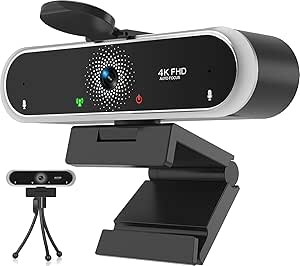 | Best for Broad Legacy OS Support | Resolution: Described as 4K FHD | Frame Rate: 30 fps | Microphone: Noise-canceling digital microphones | VIEW ON AMAZON | See Our Full Breakdown |
| EMEET S600 4K Webcam with Sony Sensor and PDAF Autofocus |  | Best for Flexible Framing | Sensor: Sony CMOS, 1/2.55 inch | Maximum resolution: 4K (3840 × 2160) at 30 FPS | 1080p frame rate: 60 FPS | VIEW ON AMAZON | See Our Full Breakdown |
| Philips 4K USB Webcam with Microphone and Privacy Shutter |  | Best for Simple Setup | Model: SPL6418 | Resolution: Up to 4K (3840 pixels) | Sensor: CMOS | VIEW ON AMAZON | See Our Full Breakdown |
| EMEET C950 4K Webcam with PDAF Autofocus and Microphone |  | Best Compact Pick | Sensor: 8 MP CMOS, 1/2.7 inch | Resolution: Up to 4K at 30 FPS; 1080p at 60 FPS | Autofocus: PDAF | VIEW ON AMAZON | See Our Full Breakdown |
| Acer 4K Webcam for PC/Mac with Sony Sensor, Unibody Design, PDAF Autofocus, Dual Mics, Privacy Cover, Lightweight, Streaming Camera |  | Best Premium Build | Resolution: 4K UHD | Sensor: Sony 1/2-inch | Autofocus: PDAF | VIEW ON AMAZON | See Our Full Breakdown |
| Logitech 4K Webcam |  | Best for Adjustable Views | Resolution: 4K HD | Zoom: 5x HD zoom | Field of view: 90°, 78°, 65° | VIEW ON AMAZON | See Our Full Breakdown |
| webcam4k | Resolution | Connectivity | Compatibility | Microphones |
|---|---|---|---|---|
| OBSBOT Meet 2 4K Webcam for PC | 4K UHD | USB-C | — | Dual omnidirectional noise-canceling |
| Logitech MX Brio Ultra HD 4K W | — | USB-C | Windows, macOS, Chrome OS, Linux | Dual noise-reducing |
| 4K Webcam for PC & Mac | — | — | Windows, macOS, Linux | Dual noise-canceling |
| AOC 4K Ultra HD Webcam with No | 4K UHD | USB-C with USB-A adapter | — | — |
| EMEET PIXY Dual-Camera AI PTZ | 4K | USB 2.0 Type-C cable with Type-C to Type-A adapter | Windows 10 or later (64-bit, not ARM); macOS 10.14 or later | Three-microphone array |
| EMEET NOVA 4K Webcam with PDAF | Up to 4K UHD at 30 fps | USB 2.0, Type-A | Windows 10/11, macOS 10.14+, Android TV 7.0+ | 2 built-in omnidirectional; stated range up to 8 feet |
| Logitech Brio 101 Full HD 1080 | Full HD 1080p | — | Zoom, Microsoft Teams, Google Meet, Nintendo Switch | — |
| EMEET C960 4K Webcam with PDAF | Up to 4K (2160p) at 30 fps; defaults to 1080p | USB-A | Windows 7/10/11, macOS 10.14+, Android TV 7.0+, Linux | Dual omnidirectional |
| Logitech Brio Ultra HD 4K Webc | Up to 4K at 30 fps | USB-A and USB-C | Windows, Mac, ChromeOS | Dual omnidirectional with noise cancellation; stated range up to 1.2 meters |
| 4K Webcam with Microphone & Pr | Described as 4K FHD | USB 2.0 | Windows 7/8/10, Linux 2.6.24, Mac OS 10.6, Android 5.1 | — |
| EMEET S600 4K Webcam with Sony | — | USB 2.0 and 3.0 | — | Dual noise-canceling |
| Philips 4K USB Webcam with Mic | Up to 4K (3840 pixels) | USB | Windows and macOS | — |
| EMEET C950 4K Webcam with PDAF | Up to 4K at 30 FPS; 1080p at 60 FPS | USB 2.0 | — | — |
| Acer 4K Webcam for PC/Mac with | 4K UHD | USB-A plug and play | Windows, Mac, ChromeOS | Dual high-sensitivity digital microphones |
| Logitech 4K Webcam | 4K HD | — | Windows, Mac, ChromeOS | Dual omni-directional noise-canceling |
More Details on Our Top Picks
OBSBOT Meet 2 4K Webcam for PC with AI Framing, Autofocus, Gesture Control, HDR, Dual Microphones, 60 FPS
The OBSBOT Meet 2 stands out for buyers who want a small 4K webcam that can also keep pace with motion: its listed 60 FPS capture gives it an edge over the Logitech MX Brio, which reaches 60 FPS at 1080p but limits 4K to 30 FPS. AI framing, autofocus, and gesture control can reduce the need to adjust the camera during calls or streams, while the 40.5-gram body is easier to carry between workspaces than the larger MX Brio. HDR and a 1/2-inch sensor add to its creator-focused feature set. The tradeoffs are that extended use may make it run hot and its software offers limited detailed customization. Choose it for portability and motion; choose the MX Brio for broader image controls and Show Mode.
Pros:- Listed 4K UHD capture at up to 60 FPS
- AI framing, autofocus, and gesture control support hands-free adjustments
- 40.5-gram design is easy to carry
- USB-C plug-and-play connection
Cons:- May get hot during extended use
- Limited detailed software customization
Best for: Mobile creators and streamers who want a lightweight 4K webcam with listed 60 FPS capture and automatic framing.
Not ideal for: Buyers who need detailed software controls or plan to run the webcam for long sessions where heat may be an issue.
- Resolution:4K UHD
- Sensor:1/2-inch CMOS
- Frame rate:60 FPS
- Microphones:Dual omnidirectional noise-canceling
- Connectivity:USB-C
- Weight:40.5 g
- Features:AI framing, autofocus, gesture control, HDR
Our verdict“Pick the OBSBOT Meet 2 if portability, automatic framing, and listed 4K at 60 FPS matter more than deep image controls.”
Logitech MX Brio Ultra HD 4K Webcam, Graphite
The Logitech MX Brio is the better fit when 4K image adjustment and meeting flexibility matter more than high frame rates at full resolution. It records 4K at 30 fps and switches to 1080p at 60 fps, while the OBSBOT Meet 2 lists 4K at 60 FPS. That makes the OBSBOT a stronger match for motion-focused streaming, but the MX Brio offers adjustable image controls, AI-enhanced adjustments for difficult lighting, and Show Mode for sharing a desk surface. Its privacy cover and compatibility with Windows, macOS, Chrome OS, and Linux add practical flexibility. The main compromise is that 4K tops out at 30 fps, and its listed 13.12-ounce weight makes it far less portable than the tiny Meet 2.
Pros:- Captures 4K at 30 fps or 1080p at 60 fps
- Adjustable image controls and AI-enhanced lighting adjustments
- Show Mode supports sharing work on a desk
- Privacy cover and support for four operating systems
Cons:- 4K capture is limited to 30 fps
- Much heavier than compact options such as the OBSBOT Meet 2
Best for: Remote workers and creators who want adjustable image settings, a privacy cover, and a way to show desk materials on calls.
Not ideal for: Streamers prioritizing 4K at 60 fps or travelers looking for a very lightweight camera.
- Resolution and frame rate:4K at 30 fps or 1080p at 60 fps
- Sensor:CMOS
- Connectivity:USB-C
- Microphones:Dual noise-reducing
- Focus:Autofocus
- Weight:13.12 oz
- Features:Privacy cover, Show Mode, adjustable image controls
- Compatibility:Windows, macOS, Chrome OS, Linux
Our verdict“Choose the MX Brio if adjustable picture controls and Show Mode matter more to your calls than 4K at 60 fps.”
4K Webcam for PC & Mac, USB Streaming Camera with Autofocus and Noise-Canceling Microphones
This 4K Webcam for PC & Mac takes a straightforward approach: a wide 80-degree view, autofocus, low-light correction, and flexible 360-degree swivel cover the basics for calls and streaming. Compared with the AOC AC310, it specifies dual noise-canceling microphones rather than a single built-in noise-reducing microphone, while the AOC adds USB-C connectivity with a USB-A adapter. The 1/2.5-inch sensor and f/1.78 aperture are listed details, though the product data does not state a frame rate beyond 4K at 30 fps and 1080p at 60 fps. The wide lens can help include a workspace or another person, but may distort faces when positioned close. Buyers also need a USB-A port, which can complicate setup on USB-C-only laptops.
Pros:- 4K at 30 fps and 1080p at 60 fps
- 80-degree field of view suits desk and small-group framing
- Autofocus and auto low-light correction
- Flexible mounting with 360-degree swivel and privacy cover
Cons:- Requires a USB-A port
- Wide-angle view may distort images at close distances
- 4K capture is limited to 30 fps
Best for: Laptop and desktop users with USB-A who want a wide view for desk demonstrations or group calls.
Not ideal for: People using USB-C-only computers or those who sit very close to the camera and want minimal wide-angle distortion.
- Resolution and frame rate:4K at 30 fps / 1080p at 60 fps
- Sensor:1/2.5-inch CMOS
- Aperture:f/1.78
- Field of view:80 degrees
- Microphones:Dual noise-canceling
- Mounting:Flexible mount with 360-degree swivel
- Compatibility:Windows, macOS, Linux
- Privacy:Privacy cover
Our verdict“Choose this model for a wide, adjustable desk view if your computer has USB-A and you can sit far enough back to avoid distortion.”
AOC 4K Ultra HD Webcam with Noise-Reducing Microphone
The AOC AC310 is a practical 4K choice for buyers who want flexible connections and simple privacy protection. Its USB-C connection with a USB-A adapter gives it an easier fit across newer and older computers than the USB-A-only 4K Webcam for PC & Mac. A physical sliding cover blocks the lens, while autofocus, automatic light correction, and adjustable tilt and swivel support everyday meetings without a complicated setup. The product data lists its field of view as both 80 and 90 degrees, so buyers who need precise framing should not assume a specific angle. Unlike the OBSBOT Meet 2, the supplied details do not list AI framing, gesture control, or a frame rate. Its single built-in microphone also offers less described audio flexibility than models with dual mics.
Pros:- 4K UHD resolution with autofocus
- USB-C connection includes a USB-A adapter
- Sliding lens cover provides physical privacy
- Automatic light correction and adjustable positioning
Cons:- Field of view is inconsistently listed as 80 or 90 degrees
- Only one built-in microphone is specified
- Frame rate is not provided in the product data
Best for: Office users who want a simple 4K webcam with a physical privacy cover and adapters for USB-C and USB-A devices.
Not ideal for: Streamers who need a stated high frame rate, AI tracking, or a clearly specified field of view.
- Model:AC310
- Resolution:4K UHD
- Field of view:Listed as 80° and 90°
- Adjustment:180° tilt and 360° swivel
- Focus:Autofocus
- Microphone:Built-in noise-reducing microphone
- Connectivity:USB-C with USB-A adapter
- Privacy:Physical sliding lens cover
Our verdict“Pick the AOC AC310 for flexible plug-and-play connections and a physical cover when advanced tracking is not a priority.”
EMEET PIXY Dual-Camera AI PTZ 4K Webcam
The EMEET PIXY suits presenters who move around while speaking: its 310-degree pan, 180-degree tilt, and AI-assisted tracking can follow a subject without the fixed framing of the Logitech MX Brio. PDAF and AI autofocus are listed with a 0.2-second focus time, and the three-microphone array offers Live, Noise Canceling, and Original Sound modes. That active framing setup gives the PIXY a distinct role in this lineup, though its data limits the field of view to 4K at 30 fps and 1080p at 60 fps. By comparison, the OBSBOT Meet 2 is far lighter and lists 4K at 60 FPS, but lacks the PIXY’s PTZ movement. The PIXY weighs 131.54 g, needs a separately purchased tripod, and lists Windows and macOS support without Chrome OS.
Pros:- AI-assisted tracking with 310-degree pan and 180-degree tilt
- PDAF and AI autofocus with a listed 0.2-second focus time
- Three microphones with three sound modes
- Includes gesture control and framing software
Cons:- Tripod is sold separately
- Listed capture modes top out at 4K 30 fps or 1080p 60 fps
- Chrome OS compatibility may vary
Best for: Presenters, instructors, and streamers who move within a room and want motorized tracking and multiple microphone modes.
Not ideal for: Travelers seeking a light fixed webcam, Chrome OS users, or buyers who need a tripod included.
- Resolution:4K
- Sensor:1/2.55-inch Sony sensor
- Autofocus:PDAF and AI autofocus; 0.2-second focus time
- Pan and tilt:310° pan; 180° tilt
- Microphones:Three-microphone array
- Sound modes:Live, Noise Canceling, Original Sound
- Connectivity:USB 2.0 Type-C cable with Type-C to Type-A adapter
- Compatibility:Windows 10 or later (64-bit, not ARM); macOS 10.14 or later
Our verdict“Choose the PIXY if you move while presenting and value motorized tracking more than compact size or 4K at 60 fps.”
EMEET NOVA 4K Webcam with PDAF Autofocus and Dual Microphones
The EMEET NOVA pairs 4K capture at 30 fps with PDAF autofocus and automatic light correction, giving home office callers a straightforward step up from the Logitech Brio 101’s 1080p ceiling. Its 73° view keeps framing relatively focused on one person, while the adjustable stand and tripod thread make it easier to position than a fixed laptop camera. The dual microphones can cover nearby speech, though their stated range and quiet-room caveat make a dedicated headset a better choice in noisy spaces. One setup wrinkle: video defaults to 1080p, so 4K needs to be selected in software. Autofocus cannot be turned off, and the fixed field of view offers less framing flexibility than the Logitech Brio 4K.
Pros:- Captures up to 4K at 30 fps with PDAF autofocus
- Automatic light correction helps adapt to changing room light
- Adjustable stand, 360° rotation, and tripod thread support flexible placement
- Privacy cover and dual built-in microphones are included
Cons:- Defaults to 1080p, requiring a software or app change for 4K
- Autofocus cannot be disabled and the 73° field of view is fixed
- Built-in microphones are best suited to close speech in quiet surroundings
Best for: Remote workers who want 4K detail, a privacy cover, and flexible mounting for a single-person desk setup
Not ideal for: Streamers who need manual focus or adjustable framing, or callers who rely on the webcam microphone in a noisy room
- Resolution:Up to 4K UHD at 30 fps
- Autofocus:PDAF
- Field of View:73°
- Microphones:2 built-in omnidirectional; stated range up to 8 feet
- Connectivity:USB 2.0, Type-A
- Mounting:360° horizontal rotation, 15° vertical adjustment, adjustable stand, 1/4-inch tripod thread
- Compatibility:Windows 10/11, macOS 10.14+, Android TV 7.0+
- Weight:4.64 oz
Our verdict“Choose the NOVA for adjustable, single-person 4K desk calls; skip it if you need manual focus or adaptable framing.”
Logitech Brio 101 Full HD 1080p Webcam for Meetings, Streaming, Desktop, Laptop, PC
The Logitech Brio 101 is the easygoing choice for buyers who want reliable 1080p meetings without paying for 4K features they may not use. Its auto-light balance, built-in microphone, and privacy shutter cover everyday video calls with little setup, while support for common meeting platforms makes it a simpler fit for mixed work and home use than the resolution-focused EMEET NOVA. That simplicity comes with a firm limit: this is a Full HD camera, so it cannot preserve the extra detail offered by the NOVA or Logitech Brio Ultra HD when cropping or presenting fine visual work. Framing adjustments are basic and app-based, and USB-A may call for an adapter on newer laptops. Choose it for uncomplicated calls, not a 4K setup.
Pros:- Full HD 1080p resolution suits routine video meetings
- Auto-light adjustment helps with uneven indoor lighting
- Privacy shutter and built-in microphone are ready for everyday calls
- 77% post-consumer recycled plastic and broad platform compatibility
Cons:- Limited to 1080p, unlike the EMEET NOVA and Logitech Brio Ultra HD
- Uses USB-A only, which may require an adapter for some newer laptops
- Advanced zoom and framing adjustments depend on the app
Best for: Students and office workers who need a simple plug-and-play camera for standard video meetings
Not ideal for: Creators, presenters, and remote professionals who need 4K detail, flexible framing, or a USB-C connection
- Resolution:Full HD 1080p
- Connection:USB-A
- Microphone:Built-in
- Privacy:Privacy shutter
- Compatibility:Zoom, Microsoft Teams, Google Meet, Nintendo Switch
- Recycled Material:77% post-consumer plastic
Our verdict“Pick the Brio 101 for uncomplicated Full HD meetings, but choose a 4K model if fine detail matters.”
EMEET C960 4K Webcam with PDAF Autofocus and Dual Microphones
The EMEET C960 earns a distinct place for buyers who need a 4K webcam that lists Linux compatibility alongside Windows, macOS, and Android TV. Its 4K-at-30-fps capture, PDAF autofocus, and light correction give it the core image features of the EMEET NOVA, with a similar fixed 73° view for focused desk calls. The C960 also includes dual microphones, a privacy cover, and a tripod thread, so its essentials are ready without extra mounting hardware. The Logitech Brio Ultra HD is a more flexible option for framing, with three field-of-view settings and 5x digital zoom; the C960 keeps things simpler but less adaptable. It defaults to 1080p, so buyers must enable 4K in compatible software.
Pros:- Up to 4K at 30 fps with PDAF autofocus
- Linux compatibility is explicitly listed alongside Windows and macOS
- Dual omnidirectional microphones and privacy cover are built in
- Tripod thread and horizontal rotation support flexible placement
Cons:- Defaults to 1080p and requires compatible software or an app to switch to 4K
- Fixed 73° field of view offers less framing choice than the Logitech Brio Ultra HD
- USB-A connection may need an adapter on laptops without that port
Best for: Linux users seeking a USB-A 4K webcam with autofocus, privacy cover, and tripod mounting
Not ideal for: People who need adjustable fields of view, digital zoom, or 4K enabled automatically
- Resolution:Up to 4K (2160p) at 30 fps; defaults to 1080p
- Focus:PDAF autofocus
- Field of View:73°
- Microphones:Dual omnidirectional
- Connectivity:USB-A
- Compatibility:Windows 7/10/11, macOS 10.14+, Android TV 7.0+, Linux
- Mounting:360° horizontal rotation, 15° vertical adjustment, 1/4-inch tripod thread
- Dimensions:3.9 × 2.3 × 2.2 in
Our verdict“Choose the C960 if Linux support and straightforward 4K capture matter more than flexible framing.”
Logitech Brio Ultra HD 4K Webcam
The Logitech Brio Ultra HD makes the strongest case for buyers who need to control what appears in frame. It offers three field-of-view settings plus 5x digital zoom, a useful advantage over the fixed 73° EMEET NOVA and C960 when switching between a close solo shot and a wider desk view. Up to 4K at 30 fps, autofocus, RightLight 3, and HDR round out a capable call setup; dual noise-canceling microphones have a stated range up to 1.2 meters. USB-A and USB-C add flexibility across computers, and Windows Hello support is a practical bonus for compatible PCs. The tradeoff is that 4K tops out at 30 fps, and its extra framing controls matter less to buyers who only need a fixed view.
Pros:- Up to 4K at 30 fps with autofocus
- Three field-of-view options and 5x digital zoom allow framing changes
- RightLight 3, HDR, and dual noise-canceling microphones support varied call conditions
- USB-A and USB-C connectivity plus Windows Hello support
Cons:- Maximum 4K frame rate is 30 fps
- Framing controls add little value if a fixed view is all you need
- The listed compatibility is limited to Windows, Mac, and ChromeOS
Best for: Presenters and hybrid workers who switch between close framing and wider room views, especially across USB-A and USB-C devices
Not ideal for: Buyers who want a fixed, basic webcam setup and will not use zoom, multiple fields of view, or Windows Hello
- Resolution:Up to 4K at 30 fps
- Digital Zoom:5x
- Field of View:65°, 78°, or 90° diagonal
- Focus:Autofocus
- Microphones:Dual omnidirectional with noise cancellation; stated range up to 1.2 meters
- Connectivity:USB-A and USB-C
- Compatibility:Windows, Mac, ChromeOS
- Special Features:RightLight 3, HDR, Windows Hello support, attachable privacy shutter
Our verdict“Choose the Brio Ultra HD if you will use its adjustable framing and cross-port flexibility for varied 4K calls.”
4K Webcam with Microphone & Privacy Cover for PC/Laptop, USB Plug & Play, Auto Light Correction
This 4K Webcam with Microphone & Privacy Cover is aimed at buyers whose setup includes older operating systems: its listed compatibility reaches Windows 7, Linux 2.6.24, Mac OS 10.6, and Android 5.1. Auto light correction, a privacy cover, and a folding clamp keep the basic call setup convenient, while 360° camera rotation helps reposition the view. Compared with the EMEET C960, it lists broader legacy OS support but provides less detail about its camera and microphone design. The Logitech Brio Ultra HD is a better-documented choice for adjustable framing and HDR, though it does not list the same older systems. The description calls the resolution “4K FHD,” so buyers should confirm their app and system expose the intended 4K mode.
Pros:- Lists compatibility with several older operating systems
- Auto light correction can help with uneven room lighting
- Privacy cover and folding clamp are included
- 360° camera rotation supports repositioning
Cons:- Resolution is described ambiguously as “4K FHD”
- Product data does not specify sensor, autofocus, or field of view
- USB 2.0 connection and unspecified software controls offer fewer stated capabilities than the Logitech Brio Ultra HD
Best for: Owners of older Windows, Mac, Linux, or Android devices seeking a basic USB webcam with a privacy cover
Not ideal for: Buyers who need clearly specified sensor and focus details, advanced controls, or confidence in a defined 4K mode
- Resolution:Described as 4K FHD
- Frame Rate:30 fps
- Microphone:Noise-canceling digital microphones
- Connectivity:USB 2.0
- Compatibility:Windows 7/8/10, Linux 2.6.24, Mac OS 10.6, Android 5.1
- Mounting:Folding clamp
- Camera Rotation:360°
Our verdict“Consider this model for a legacy device setup if its stated resolution and compatibility are confirmed for your system.”
EMEET S600 4K Webcam with Sony Sensor and PDAF Autofocus
The EMEET S600 gives a 4K buyer a useful choice of framing when recording at 1080p: its field of view adjusts from 40° to 73°, making it easier to keep a solo speaker prominent or include more of a desk setup. At 4K, though, the view is fixed at 73°, so it offers less framing flexibility at its highest resolution than the Logitech 4K Webcam, which lists three field-of-view presets. The S600 can also switch to 1080p at 60 FPS, a better fit for smoother motion than its 4K-at-30-FPS mode. PDAF autofocus, automatic light adjustment, and a built-in privacy cover round out a practical call setup. Its drawbacks are the fixed 4K view and possible Chrome OS compatibility limits; buyers who need dependable Chrome OS support should check their device before choosing it.
Pros:- Adjustable 40°–73° field of view at 1080p
- PDAF autofocus and automatic light adjustment
- Supports 4K at 30 FPS and 1080p at 60 FPS
- Built-in privacy cover and dual noise-canceling microphones
Cons:- Field of view is fixed at 73° in 4K
- Chrome OS compatibility may vary by device and version
Best for: Solo presenters who want adjustable framing for 1080p calls and occasional 4K recording
Not ideal for: Chrome OS users who need confirmed compatibility, or 4K users who want adjustable framing at full resolution
- Sensor:Sony CMOS, 1/2.55 inch
- Maximum resolution:4K (3840 × 2160) at 30 FPS
- 1080p frame rate:60 FPS
- Autofocus:PDAF
- Field of view:40°–73° at 1080p; fixed at 73° at 4K
- Microphones:Dual noise-canceling
- Connectivity:USB 2.0 and 3.0
- Privacy cover:Built-in
Our verdict“Choose the S600 if adjustable 1080p framing matters more to you than changing the view while recording in 4K.”
Philips 4K USB Webcam with Microphone and Privacy Shutter
The Philips SPL6418 is a straightforward choice for buyers who want a USB webcam with 4K capture, autofocus, and a physical privacy shutter without a long feature checklist to manage. Its built-in microphone covers the basics for calls and classes, while Windows and macOS compatibility keeps the stated setup focused on common computer systems. Compared with the EMEET C950, Philips provides less detail about its sensor, frame rates, microphone pickup, and field of view, so it is harder to judge how it will handle motion or a particular desk layout. The physical shutter is a clear privacy benefit, but the listed three-month warranty is a meaningful limitation for buyers weighing long-term support. This pick suits routine computer calls; creators who need more documented performance details may prefer a better-specified model.
Pros:- Captures video at up to 4K resolution
- Autofocus is listed
- Physical privacy shutter
- USB plug-and-play setup with a built-in microphone
Cons:- Three-month warranty is limited
- Frame rate and field of view are not specified
- Microphone performance details are not provided
Best for: Windows or Mac users who want a basic autofocus 4K webcam with a physical shutter for meetings and classes
Not ideal for: Streamers or detail-focused buyers who need listed frame rates, field of view, and microphone specifications
- Model:SPL6418
- Resolution:Up to 4K (3840 pixels)
- Sensor:CMOS
- Focus:Autofocus
- Microphone:Built-in
- Connectivity:USB
- Privacy shutter:Physical
- Compatibility:Windows and macOS
- Warranty:3 months
Our verdict“Pick the Philips for uncomplicated Windows or Mac calls if its short warranty and sparse performance details fit your needs.”
EMEET C950 4K Webcam with PDAF Autofocus and Microphone
At just 1.9 × 1.9 × 1.5 inches and 3.04 ounces, the EMEET C950 is the compact pick for a laptop user who wants 4K without a bulky camera perched over the screen. Its 70° field of view gives a defined view for a single speaker, while PDAF autofocus and a physical lens cover add useful everyday convenience. Compared with the EMEET S600, the C950 has a fixed field of view rather than an adjustable 1080p range, but its smaller listed dimensions make it easier to keep a travel setup light. The omnidirectional microphone is specified for pickup up to six feet, which should suit a nearby speaker better than a group spread around a room. It lacks tripod mounting, and video quality depends on lighting and compatible software, so this is best for a direct computer setup rather than flexible multi-angle streaming.
Pros:- Compact 3.04-ounce body
- 4K at 30 FPS and 1080p at 60 FPS
- PDAF autofocus and a physical lens cover
- Flexible mounting bracket and built-in omnidirectional microphone
Cons:- Tripod mounting is not supported
- Fixed 70° field of view
- Microphone pickup is specified up to six feet
Best for: Laptop users who want a small 4K webcam for solo calls and a built-in privacy cover
Not ideal for: Creators who need tripod mounting, variable framing, or microphone pickup across a larger room
- Sensor:8 MP CMOS, 1/2.7 inch
- Resolution:Up to 4K at 30 FPS; 1080p at 60 FPS
- Autofocus:PDAF
- Field of view:70°
- Microphone:Built-in omnidirectional, pickup up to 6 feet
- Connectivity:USB 2.0
- Privacy:Physical lens cover
- Weight:3.04 ounces
Our verdict“Choose the C950 for a compact solo-call setup if you can mount it directly and do not need adjustable framing.”
Acer 4K Webcam for PC/Mac with Sony Sensor, Unibody Design, PDAF Autofocus, Dual Mics, Privacy Cover, Lightweight, Streaming Camera
The Acer 4K Webcam is the build-focused option here: its aluminum unibody gives it a more substantial feel than the compact plastic-style setup described for the EMEET C950, while the Sony 1/2-inch sensor, HDR, and PDAF autofocus target clear, consistently focused video. Dual digital microphones and a magnetic privacy cover add practical touches for a desk that moves between calls and streaming. Its listed compatibility includes Windows, Mac, and ChromeOS, giving it a broader stated platform range than the Philips SPL6418. The tradeoff is a USB-A connection, which may require an adapter on newer USB-C-only computers. The supplied information does not state frame rates, field of view, or specific HDR behavior, so buyers comparing image controls closely have less to go on than with the Logitech 4K Webcam.
Pros:- Sony 1/2-inch sensor with HDR and low-light performance claimed in product data
- All-metal aluminum unibody
- PDAF autofocus
- Dual microphones and magnetic privacy cover
Cons:- USB-A connection may need an adapter for USB-C-only computers
- Frame rate and field of view are not specified
- Wired USB connection only
Best for: Desk-based streamers and professionals who value a durable metal camera and use a computer with USB-A
Not ideal for: USB-C-only laptop owners who want to avoid adapters, or buyers who need detailed frame-rate and field-of-view specifications
- Resolution:4K UHD
- Sensor:Sony 1/2-inch
- Autofocus:PDAF
- Microphones:Dual high-sensitivity digital microphones
- Connectivity:USB-A plug and play
- Material:All-metal unibody aluminum
- Weight:57 grams
- Compatibility:Windows, Mac, ChromeOS
Our verdict“Choose the Acer if durable construction and its stated platform compatibility matter more than detailed framing specifications.”
Logitech 4K Webcam
The Logitech 4K Webcam stands out for framing control: its three field-of-view presets—90°, 78°, and 65°—and 5x HD zoom give a presenter more ways to manage what appears behind them than the EMEET C950’s fixed 70° view. Automatic light adjustment with HDR and dual noise-canceling microphones also suit calls where room lighting or background sound varies. The listed frame rate reaches 90 FPS, though the product data does not specify which resolution supports that rate, so I would not treat it as a guaranteed 4K frame rate. Windows Hello integration adds a security feature for compatible Windows users. The drawbacks are its 10.88-ounce weight and discontinued status, which may make portability and ongoing support less appealing than the newer EMEET options.
Pros:- Three field-of-view presets and 5x HD zoom
- Automatic light adjustment with HDR
- Dual omni-directional noise-canceling microphones
- Windows Hello integration
Cons:- Discontinued product with limited support
- Heavier than the compact EMEET C950 at 10.88 ounces
- The resolution tied to the listed maximum 90 FPS is unspecified
Best for: Windows users who want multiple framing choices, zoom, and Windows Hello for a fixed desk setup
Not ideal for: Traveling users who want a lightweight camera, or buyers who prioritize current product support
- Resolution:4K HD
- Zoom:5x HD zoom
- Field of view:90°, 78°, 65°
- Frame rate:Up to 90 FPS
- Light adjustment:Automatic with HDR
- Microphones:Dual omni-directional noise-canceling
- Compatibility:Windows, Mac, ChromeOS
- Weight:10.88 ounces
Our verdict“Choose this Logitech for flexible framing and Windows Hello on a stationary setup if discontinued-product support is acceptable.”

How We Picked
I ranked these webcams by how well their listed features address real 4K webcam needs: clear detail, dependable focus, useful framing, practical audio, setup, and privacy. Models with features that can change how a call or stream works—such as AI framing, pan and tilt, or PDAF autofocus—earn distinct positions when those features match a clear buyer need. I also weighed the limits: a high-resolution camera may be less useful if it is awkward to position, lacks a privacy feature, or depends on room lighting that the buyer cannot control.
The order reflects the balance of versatility and ease of use across the stated specifications, then the strength of each model for a particular job. OBSBOT Meet 2 ranks first for combining automatic framing with autofocus and gesture control; Logitech MX Brio and EMEET PIXY follow as premium and PTZ alternatives. The lineup also includes simpler choices and a Full HD model, which helps show when a more feature-rich 4K camera may not fit a buyer’s actual needs. These rankings rely on the product details provided, not hands-on testing.
Factors to Consider When Choosing Webcam4k
Choosing a 4K webcam starts with how you appear on camera and how you use it, rather than resolution alone. I would match the camera’s framing, focus, audio, and privacy features to the room and the calls or streams I make most often.
Will Your Calls Benefit From 4K?
4K can preserve fine detail, which matters for close-up demonstrations, product work, and cropping a camera image during a stream. Many video meeting services compress video or limit the resolution they send, so a 4K sensor may not produce a 4K image for everyone on the call. Check whether your computer, connection, and conferencing software can handle the resolution you plan to use. A sharp image also makes lighting and focus problems more visible. If your camera mostly shows you in a small meeting tile, a capable Full HD webcam such as the Brio 101 may suit the job. Think about whether you need the extra detail before treating 4K as a requirement.
Fixed Framing, AI Tracking, or PTZ?
A fixed webcam works well when you sit in one place and frame the shot once. AI framing can keep you centered as you shift around, while pan-and-tilt movement can follow a wider range of motion. Those features help presenters and streamers who move, but they add controls and behavior to learn. Consider whether the camera will track only you or might also respond to people or movement in the background. For a shared room, a stable fixed view may be less distracting than automatic movement. Match the framing method to your habits instead of assuming more automation is always better.
Look Beyond the Autofocus Label
Autofocus helps when you move closer to the camera, change position, or hold an object up to show it. PDAF is called out on several EMEET models in this lineup, but the label alone does not tell you how the camera behaves in your room. A fixed desk setup may need fewer focus adjustments than a tabletop demonstration or a stream with frequent movement. Check how the camera mounts and whether you can place it at eye level; a well-positioned camera can matter more than a focus mode. Keep the lens clean and avoid placing it where it sees a bright window behind you. Prioritize focus behavior around your most common on-camera task.
Plan for Lighting Before Blaming the Camera
High resolution cannot restore detail that poor lighting removes. A window behind you can leave your face dark, while a bright lamp pointed directly at you can create harsh shadows. Place a light source in front of you or at a slight angle, and check the camera preview at the time of day you usually take calls. Features such as HDR or auto light correction may help with changing conditions, but they do not replace thoughtful placement. Buyers who cannot control a shared or changing room should favor easy adjustment and a forgiving setup. Good lighting can improve the image from any model in this roundup.
Treat Microphones as a Room-Specific Choice
Built-in microphones reduce desk clutter, but microphone count alone does not establish how clearly you will sound. Keyboard noise, room echo, fan noise, and distance from the webcam all shape voice pickup. Dual microphones may be convenient for calls, yet a headset or separate microphone can make more sense in a noisy room or for a polished stream. Check whether the webcam will sit close enough to capture your voice without picking up too much of the room. If callers often ask you to repeat yourself, audio placement is a better first fix than buying a higher-resolution camera. Choose based on your environment and how much audio gear you want to manage.
Check Mounting, Connections, and Privacy
Before choosing a camera, confirm that its connection works with your computer and that its clip fits your monitor or laptop. A camera that sits too low can make eye contact awkward, even if the image is sharp. Privacy shutters and covers offer a quick physical way to block the lens between calls; check how the mechanism works and whether it is easy to reach once mounted. Lightweight models may be easier to move between a laptop and desk, while a more involved camera setup may suit a permanent streaming station. Consider cable routing and available desk space as well as the camera itself. These practical details can decide whether a feature-rich model feels convenient day to day.
Frequently Asked Questions
Is a 4K webcam worthwhile if my meeting app sends video in a lower resolution?
It can still help when you crop the image, show small details, or use a camera for both meetings and recording. But if your meetings always display a small, compressed video tile, the added sensor resolution may make little visible difference to other callers. Your lighting, camera position, and focus are likely to matter more in that situation. A Full HD option such as the Logitech Brio 101 may cover routine calls. Choose 4K when you have a specific use for its extra detail.
Should I choose AI framing or a PTZ webcam?
AI framing is a fit when you want the camera to adjust the crop as you move while keeping a relatively consistent view. A PTZ model can physically pan and tilt, which may suit a presenter who moves across a larger area. Both can add setup choices and movement that may feel distracting in a quiet meeting. If you stay seated at a desk, a fixed camera could be simpler. Decide how far you move and how much visible camera motion you want before choosing between them.
Will a webcam with dual microphones replace my headset?
Not in every room or for every call. Built-in microphones can reduce clutter and work well when the camera is close and the room is quiet, but they may also pick up typing, fans, or echo. A headset places the microphone closer to your mouth, which can help in noisy spaces. The models in this roundup list different microphone setups, but specifications alone do not predict performance in your room. If clear voice pickup is essential, plan to compare the webcam mic with a headset or dedicated microphone.
Do I need PDAF autofocus for a webcam that stays on my desk?
Not necessarily. If you remain seated at a consistent distance, a fixed focus or less advanced autofocus setup may be adequate. PDAF is more relevant when you move often, change your distance from the lens, or bring objects into view. The EMEET NOVA, C960, C950, and S600 list PDAF, making them worth a look for those uses. For a stationary desk setup, prioritize framing, mounting height, and lighting too.
What should I check before buying a webcam for both a laptop and a monitor?
Check that the camera connects to both computers with the ports and cables you have, and confirm the mount can sit securely on each screen. A light camera with a straightforward clip is easier to move, while a heavier or more elaborate setup may be better left on a permanent desk. Also check whether the privacy shutter or cover remains accessible after mounting. If you change locations often, cable length and quick setup can save more hassle than advanced tracking. A camera that fits both positions is more useful than one whose headline features you rarely use.
Conclusion
For most buyers seeking a 4K webcam with useful automatic framing, I recommend the OBSBOT Meet 2 as the best overall. The Logitech MX Brio is my best premium pick for buyers drawn to a higher-end Logitech option, while EMEET NOVA is a strong value-minded choice among the listed PDAF autofocus models. New webcam users who want routine meeting video can start with the straightforward Logitech Brio 101, keeping in mind that it is Full HD rather than 4K. For a camera that can follow movement, consider the EMEET PIXY; for a simpler 4K setup, compare options such as the AOC or Philips models and check which privacy and microphone features you need. Choose by how you move, where you take calls, and whether 4K detail will show up in your work.