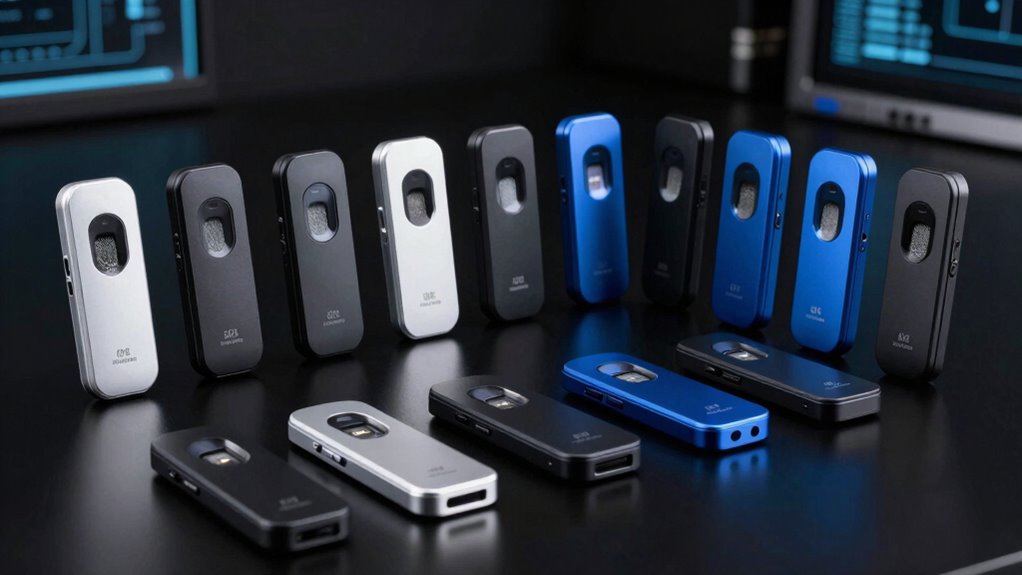

A biometric USB fingerprint reader can add quick fingerprint sign-in to a compatible Windows PC, but the right pick depends on more than the sensor: connection type, placement, enrollment support, and security standards all matter. I rank the Kensington VeriMark Desktop 2.0 as the best overall for its USB-C and USB-A flexibility and support for Windows Hello, ESS, and FIDO2. The ineo reader with a 5 ft cable suits setups where the computer sits out of reach, while the TEC TE-FPA2 Mini favors a compact installation. The tradeoff is between a more flexible, standards-focused device and simpler readers aimed at basic Windows sign-in. Read on for the full breakdown, buying criteria, and guidance on compatibility.

Get the latest gadgets delivered free with Prime
- Fast, free delivery on millions of items
- Prime Video, Amazon Music and more included
- Member-only deals all year
Complete the kit



Key Takeaways
- VeriMark Desktop 2.0 ranks first because its USB-C and USB-A connections cover more current and older PCs, and its stated security standards go beyond basic Windows Hello compatibility.
- Cable placement separates the ineo model from compact plug-in readers: its 5 ft cable can put the sensor within reach when the computer is mounted or tucked away.
- The TEC TE-FPA2 Mini is the compact pick for buyers who want a small reader and do not need a remote sensor position.
- Kensington’s Desktop 1.0 and 2.0 serve different priorities: the newer 2.0 listing names USB-C, USB-A, ESS, and FIDO2 support, while the Desktop 1.0 is a simpler alternative.
- The lineup includes several similarly named generic readers, so buyers should verify the exact model, Windows version, connector, and sensor security details before ordering.
| Yoidesu USB Fingerprint Reader for Windows Hello |  | Best Overall for Windows Hello | Compatibility: Windows 10/11, 32-bit and 64-bit | Connection: USB-A | Sensor type: Capacitive | VIEW ON AMAZON | See Our Full Breakdown |
| TEC TE-FPA2 Mini USB Fingerprint Reader | 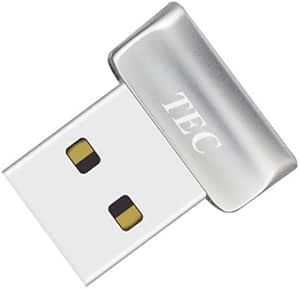 | Best for Document Encryption | Scanner type: Fingerprint | Connection: USB | Resolution: 600 dpi | VIEW ON AMAZON | See Our Full Breakdown |
| Kensington VeriMark Desktop 2.0 USB Fingerprint Reader (USB‑C & USB‑A) – Windows Hello, ESS, FIDO2, TAA Compliant |  | Best for Security-Focused Desktops | Model number: K64741WW | Connection: USB-C and USB-A | Authentication: Windows Hello and Microsoft Enhanced Sign-in Security | VIEW ON AMAZON | See Our Full Breakdown |
| JIAN BOLAND USB Fingerprint Reader for Windows |  | Best for Flexible Desk Placement | Connectivity: USB Type-A | Compatible operating systems: Windows 10 and 11, 32-bit and 64-bit | Fingerprint capacity: Up to 10 fingerprints | VIEW ON AMAZON | See Our Full Breakdown |
| USB Fingerprint Reader for Windows 10/11 – Windows Hello Fingerprint Scanner, Match-in-Sensor Security, Plug & Play (Black) |  | Best Compact Travel Pick | Supported OS: Windows 10/11, Windows Hello only | Connection type: USB | Fingerprint capacity: Up to 10 fingerprints | VIEW ON AMAZON | See Our Full Breakdown |
| Kensington VeriMark Desktop 1.0 USB Fingerprint Reader |  | Best for Security Standards | Model: K62330WW | Connectivity: USB | Cable length: 3.9 ft / 1.2 m | VIEW ON AMAZON | See Our Full Breakdown |
| Windows Hello Fingerprint Reader for Windows 10/11 |  | Best for Multi-Finger Household Use | Model: FP100-LK | Compatibility: Windows 10 and Windows 11 | Authentication: Windows Hello and Windows Biometric Framework | VIEW ON AMAZON | See Our Full Breakdown |
| HID DigitalPersona URU4500 USB Fingerprint Reader |  | Best for Cross-Platform Integration | Model: URU4500 | Scanner type: Optical | Resolution: 512 dpi | VIEW ON AMAZON | See Our Full Breakdown |
| Windows Hello Fingerprint Reader for Windows 10/11 |  | Best for Simple Desktop Login | Compatibility: Windows 10/11 | Connection: USB | Cable length: 4 ft | VIEW ON AMAZON | See Our Full Breakdown |
| ineo USB Fingerprint Reader for Windows 10/11 with Windows Hello, 5 ft Cable |  | Best for Flexible Desk Placement | Compatibility: Windows 10/11; not for Mac | Authentication: Fingerprint recognition; Windows Hello | Connection: USB | VIEW ON AMAZON | See Our Full Breakdown |
| USB Fingerprint Reader for Windows 10/11 |  | Best for Flexible Desktop Placement | Compatibility: Windows 10/11 only; not compatible with Mac or Linux | Interface: USB | Cable length: 4 ft | VIEW ON AMAZON | See Our Full Breakdown |
| biometric usb fingerprint reader | Compatibility | Connection | Cable length |
|---|---|---|---|
| Yoidesu USB Fingerprint Reader | Windows 10/11, 32-bit and 64-bit | USB-A | — |
| TEC TE-FPA2 Mini USB Fingerpri | — | USB | — |
| Kensington VeriMark Desktop 2. | — | USB-C and USB-A | — |
| JIAN BOLAND USB Fingerprint Re | — | — | 5 ft |
| USB Fingerprint Reader for Win | — | — | — |
| Kensington VeriMark Desktop 1. | Windows 11, Windows Hello, FIDO U2F, FIDO2 | — | 3.9 ft / 1.2 m |
| Windows Hello Fingerprint Read | Windows 10 and Windows 11 | — | 5 ft / 1.5 m |
| HID DigitalPersona URU4500 USB | Windows 10/11, macOS, Linux | USB 2.0 | — |
| Windows Hello Fingerprint Read | Windows 10/11 | USB | 4 ft |
| ineo USB Fingerprint Reader fo | Windows 10/11; not for Mac | USB | 5 ft |
| USB Fingerprint Reader for Win | Windows 10/11 only; not compatible with Mac or Linux | — | 4 ft |
More Details on Our Top Picks
Yoidesu USB Fingerprint Reader for Windows Hello
The Yoidesu USB Fingerprint Reader is a practical fit for Windows users who want quick sign-in without adding much bulk. Its 360° capacitive sensor recognizes a fingerprint in about 0.5 seconds, and support for multiple accounts with up to 10 fingerprints each suits a shared PC. Compared with the TEC TE-FPA2 Mini, Yoidesu lists a faster recognition time and Windows 11 support, while the TEC also offers folder and document encryption. Yoidesu typically needs no extra drivers, but its USB-A connector can be awkward on USB-C-only laptops because no adapter is included. Compatibility is narrow: it is for Windows Hello on Windows 10 or 11, and USB 3.0 hubs or docks may make recognition unstable. I would choose it for a direct connection to a compatible Windows PC.
Pros:- About 0.5-second recognition with 360° fingerprint placement
- Supports multiple Windows accounts and up to 10 fingerprints per account
- Typically works without extra drivers
- Small, lightweight USB-A design
Cons:- Works only with Windows Hello on Windows 10 and 11
- USB-C adapter is not included
- USB 3.0 hubs or docking stations may cause unstable recognition
Best for: Windows 10 or 11 users who want fast sign-in on a PC with a free USB-A port, including households using multiple accounts.
Not ideal for: Mac, Linux, or Chrome OS users, and owners of USB-C-only laptops who do not want to buy a separate adapter.
- Compatibility:Windows 10/11, 32-bit and 64-bit
- Connection:USB-A
- Sensor type:Capacitive
- Recognition time:About 0.5 seconds
- Fingerprint recognition:360°
- Fingerprints per account:Up to 10
- Dimensions:1.18 x 0.79 x 0.39 inches
- Weight:0.48 ounces
- Warranty:1 year
Our verdict“Choose Yoidesu for quick, straightforward Windows Hello sign-in when your PC has a direct USB-A port.”
TEC TE-FPA2 Mini USB Fingerprint Reader
The TEC TE-FPA2 Mini earns a distinct place for Windows 10 users who want fingerprint sign-in alongside folder and document encryption. Its 360° sensor stores up to 10 fingerprints per account, so a shared computer can accommodate several enrolled fingers. Recognition takes about 1–2 seconds, slower than the roughly 0.5-second claims for the Yoidesu USB Fingerprint Reader and JIAN BOLAND. That tradeoff may suit buyers who value the added encryption function more than the shortest listed login time. The compact 5 g body is easy to leave plugged in, though the stated minimum system requirement is Windows 10 and ARM-based chipsets are excluded. Driver installation may also need manual troubleshooting, so it is less friction-free than a reader that reliably installs automatically.
Pros:- Supports Windows Hello fingerprint sign-in
- 360° recognition with capacity for up to 10 fingerprints per account
- Can support folder and document encryption
- Compact 5 g design
Cons:- Not compatible with ARM-based chipsets
- Windows 10 is the listed minimum system requirement
- Driver installation may require manual troubleshooting
Best for: Windows 10 users on non-ARM PCs who want fingerprint login plus encryption for selected folders or documents.
Not ideal for: Windows 11 or ARM-based PC owners, or buyers who prioritize the quickest listed recognition and simplest setup.
- Scanner type:Fingerprint
- Connection:USB
- Resolution:600 dpi
- Light source:LED
- Dimensions:0.47 × 0.81 × 0.47 inches
- Weight:5 g
- Fingerprint capacity:Up to 10 per account
- Minimum system requirement:Windows 10
- Authentication time:About 1–2 seconds
Our verdict“Pick the TEC TE-FPA2 Mini if Windows 10 fingerprint sign-in and document encryption matter more than faster recognition.”
Kensington VeriMark Desktop 2.0 USB Fingerprint Reader (USB‑C & USB‑A) – Windows Hello, ESS, FIDO2, TAA Compliant
The Kensington VeriMark Desktop 2.0 is the most security-oriented desktop pick in this group. Its on-device biometric storage and Match-in-Sensor design keep fingerprint matching at the reader, while Microsoft Enhanced Sign-in Security and Windows Hello support target users who need a more controlled sign-in setup. Dual USB-C and USB-A connectors also make it easier to deploy across different desktop ports than the USB-A-only Yoidesu and JIAN BOLAND readers. This emphasis comes with a different form factor: the wired desktop key is less suited to carrying between locations than the tiny USB Fingerprint Reader for Windows 10/11. The supplied data does not give a recognition time or fingerprint capacity, making direct speed and enrollment comparisons difficult. It makes most sense where desktop compatibility and security features lead the decision.
Pros:- Dual USB-C and USB-A connectors simplify use across desktop ports
- On-device biometric storage keeps matching at the sensor
- Supports Windows Hello and Microsoft Enhanced Sign-in Security
- 360° fingerprint recognition with Match-in-Sensor technology
Cons:- Wired design offers no wireless or Bluetooth option
- Designed primarily for desktop use rather than laptop portability
- Provided product data does not state recognition time or fingerprint capacity
Best for: Desktop administrators and security-conscious Windows users who need both USB-C and USB-A connectivity with on-device biometric matching.
Not ideal for: Laptop travelers seeking a tiny reader, or buyers who need a stated recognition time and fingerprint capacity before choosing.
- Model number:K64741WW
- Connection:USB-C and USB-A
- Authentication:Windows Hello and Microsoft Enhanced Sign-in Security
- Biometric matching:Match-in-Sensor
- Fingerprint recognition:360°
- Weight:2.11 ounces
- Dimensions:0.59 x 1.14 x 1.14 inches
- Compliance:TAA compliant
Our verdict“Choose the Kensington VeriMark Desktop 2.0 for a security-focused desktop setup that needs USB-C and USB-A support.”
JIAN BOLAND USB Fingerprint Reader for Windows
The JIAN BOLAND USB Fingerprint Reader stands out for buyers who want to place a sensor within easy reach instead of plugging it directly into a laptop. Its included 5-foot braided extension cable helps with that, and the aluminum-alloy housing gives the reader a more substantial build than the ultra-small Yoidesu. The product claims authentication in under 0.5 seconds and supports up to 10 fingerprints, putting its listed speed in the same range as Yoidesu. The cost of this flexibility is a cable to manage and a USB Type-A connection, so it is less convenient for travelers or USB-C-only machines. It supports Windows 10 and 11, but not Mac or Linux; buyers should also treat the listed compatibility claim as limited to those supported systems.
Pros:- Includes a 5-foot braided extension cable for flexible sensor placement
- Aluminum-alloy sensor housing
- Supports up to 10 fingerprints
- Claims authentication in under 0.5 seconds
Cons:- Does not support Linux or Mac
- USB Type-A connection may need an adapter on USB-C-only computers
- The extension cable adds desk clutter compared with compact direct-plug readers
Best for: Windows 10 or 11 desktop users who want a fingerprint sensor positioned away from the computer’s USB port.
Not ideal for: Mac or Linux users, travelers who want a tiny direct-plug reader, and USB-C-only laptop owners without an adapter.
- Connectivity:USB Type-A
- Compatible operating systems:Windows 10 and 11, 32-bit and 64-bit
- Fingerprint capacity:Up to 10 fingerprints
- Authentication time:Under 0.5 seconds
- False acceptance rate:0.001%
- False rejection rate:0.1%
- Cable length:5 ft
- Sensor housing:Aluminum alloy
Our verdict“Choose JIAN BOLAND if you want fast Windows Hello sign-in with the freedom to position the reader on an extension cable.”
USB Fingerprint Reader for Windows 10/11 – Windows Hello Fingerprint Scanner, Match-in-Sensor Security, Plug & Play (Black)
This USB Fingerprint Reader for Windows 10/11 is the most travel-oriented option here: its listed item weight is just 0.317 ounces, and its dongle format is meant to stay unobtrusive in a laptop port. The Match-in-Sensor approach keeps biometric matching local, a useful distinction for buyers who care where fingerprint data is processed. Like the Yoidesu and TEC readers, it supports up to 10 fingerprints, but its supplied details do not specify recognition time or connector type. That makes it harder to judge speed or port fit before purchase. It is described as plug and play, though Windows Hello still needs initial setup on the PC. Its Windows-only support rules out Mac and Linux users, and the ultra-small body may be easier to leave behind than a cabled desktop reader such as JIAN BOLAND.
Pros:- Very light listed item weight of 0.317 ounces
- Plug-and-play design without drivers or software
- Match-in-Sensor keeps fingerprint matching local
- Supports up to 10 fingerprints
Cons:- Works only with Windows Hello on Windows 10 and 11
- May require initial Windows Hello setup
- Provided product data does not specify connector type or recognition time
Best for: Windows 10 or 11 laptop users who travel often and want a very lightweight reader with local fingerprint matching.
Not ideal for: Mac or Linux users, and buyers who need the connector type or recognition speed stated before choosing.
- Supported OS:Windows 10/11, Windows Hello only
- Connection type:USB
- Fingerprint capacity:Up to 10 fingerprints
- Biometric matching:Match-in-Sensor
- Setup:Plug and play; initial Windows Hello setup may be required
- Item weight:0.317 ounces
- Package dimensions:4.49 x 3.9 x 0.47 inches
Our verdict“Pick this reader for lightweight travel and local fingerprint matching on a Windows 10 or 11 laptop.”
Kensington VeriMark Desktop 1.0 USB Fingerprint Reader
The Kensington VeriMark Desktop 1.0 is the strongest fit here for buyers who want a desktop reader tied to recognized passwordless authentication standards. Its FIDO2 WebAuthn and FIDO U2F support extends its use beyond Windows Hello, while Match-in-Sensor verification and anti-spoofing add security at the sensor. Compared with the Windows Hello Fingerprint Reader FP100-LK, it offers clearer support for FIDO-based services and Microsoft sign-in, but the FP100-LK lists capacity for up to 10 fingerprints and a faster stated login time. The Kensington’s 3.9-foot cable helps position it on a desk, though it still needs a USB port and does not support Windows ARM-based computers. I’d choose it for a Windows desktop where standards support matters more than broad device compatibility.
Pros:- Supports FIDO2 WebAuthn and FIDO U2F alongside Windows Hello
- Match-in-Sensor technology includes anti-spoofing protection
- 3.9-foot cable allows flexible placement on a desktop
- Specified false acceptance rate is 0.001%
Cons:- Does not support Windows ARM-based computers
- Requires a physical USB port
- Specified false rejection rate is 2%
Best for: Windows desktop users who need Windows Hello plus FIDO2 or FIDO U2F authentication for compatible services
Not ideal for: Owners of Windows ARM computers or USB-port-limited laptops who need a reader that works across those setups
- Model:K62330WW
- Connectivity:USB
- Cable length:3.9 ft / 1.2 m
- Compatibility:Windows 11, Windows Hello, FIDO U2F, FIDO2
- Unsupported:Windows ARM-based computers
- False acceptance rate:0.001%
- False rejection rate:2%
Our verdict“Choose this Kensington for standards-based authentication at a Windows desktop, provided your computer is not ARM-based.”
Windows Hello Fingerprint Reader for Windows 10/11
The FP100-LK is a practical choice when several people need fingerprints enrolled on one Windows PC: it supports up to 10 fingerprints and uses Windows Hello and the Windows Biometric Framework without third-party software. Its stated under-0.5-second authentication and included 5-foot extension cable suit a desk where the reader needs a little reach. Compared with the Kensington VeriMark Desktop 1.0, it gives a specific enrollment capacity and supports Windows 10 as well as 11, while the Kensington adds FIDO2 and FIDO U2F support for compatible online services. The tradeoff is a narrower use case: this model is designed for Windows 10 and 11, and custom Windows builds may need a driver update. I’d pick it when shared access matters more than cross-service authentication standards.
Pros:- Stores up to 10 fingerprints
- Supports Windows Hello and Windows Biometric Framework
- Claimed authentication time is under 0.5 seconds
- Includes a 5-foot extension cable
Cons:- Designed specifically for Windows 10 and 11
- Custom Windows builds may require a driver update
Best for: Families or small teams sharing a Windows 10 or 11 PC who want multiple fingerprints enrolled
Not ideal for: Mac users, people on custom Windows builds unwilling to update drivers, or buyers seeking FIDO2 service authentication
- Model:FP100-LK
- Compatibility:Windows 10 and Windows 11
- Authentication:Windows Hello and Windows Biometric Framework
- Fingerprint capacity:Up to 10 fingerprints
- Authentication speed:Under 0.5 seconds
- Cable length:5 ft / 1.5 m
- False acceptance rate:0.001%
- False rejection rate:0.1%
Our verdict“Pick the FP100-LK for a shared Windows PC where enrolling several users matters more than FIDO standards support.”
HID DigitalPersona URU4500 USB Fingerprint Reader
The HID DigitalPersona URU4500 stands apart from the Windows Hello-focused readers with listed compatibility for Windows, macOS, and Linux. Its 512 dpi optical sensor, encrypted data transmission, and rugged metal casing make it better suited to buyers who are building a software-supported biometric setup than to someone who simply wants quick Windows sign-in. Compared with the Kensington VeriMark Desktop 1.0, the URU4500 offers broader operating system coverage and a durable casing, but the Kensington spells out direct Windows Hello and FIDO2 compatibility. The key tradeoff is integration: the HID reader needs specific software for full functionality, so OS compatibility alone does not guarantee a ready-to-use login workflow. Its support for dry, moist, or rough fingerprints may help in varied use, though buyers should check that their chosen software supports it.
Pros:- Listed compatibility includes Windows 10/11, macOS, and Linux
- 512 dpi optical sensor with 8-bit grayscale
- Rugged metal casing
- Encrypted data transmission and latent print rejection
Cons:- Requires specific software integration for full functionality
- USB 2.0 connection may not suit workflows that require newer connector hardware
- Listed warranty is one year
Best for: IT teams and developers choosing a durable optical reader for a software-integrated Windows, macOS, or Linux workflow
Not ideal for: Windows users who want a simple plug-in Windows Hello login without arranging compatible software
- Model:URU4500
- Scanner type:Optical
- Resolution:512 dpi
- Color depth:8-bit grayscale
- Connection:USB 2.0
- Compatibility:Windows 10/11, macOS, Linux
- Dimensions:2.55 × 1.42 × 0.65 in
- Warranty:1 year
Our verdict“Choose the URU4500 when cross-platform software integration and a rugged optical sensor matter more than direct Windows Hello setup.”
Windows Hello Fingerprint Reader for Windows 10/11
This compact, angled reader is the straightforward pick for someone who wants to add one-touch Windows Hello login without dealing with a stated setup beyond plug-and-play USB. Its in-sensor biometric processing keeps fingerprint verification local to the reader, and the 4-foot cable gives it some placement flexibility. Compared with the FP100-LK, it has less documented detail: no fingerprint capacity or authentication-speed figure is supplied, while that model specifies up to 10 fingerprints and a sub-half-second claim. The Kensington VeriMark Desktop 1.0 also offers explicit FIDO2 and FIDO U2F compatibility, which this option does not list. That makes this a narrower choice for everyday Windows access rather than broader authentication. Buyers should also be comfortable touching the sensor and using Windows only.
Pros:- Plug-and-play USB setup
- Works with Windows Hello for password-free login
- In-sensor processing keeps biometric verification at the reader
- Compact angled sensor and 4-foot cable
Cons:- Limited to Windows 10 and 11
- Requires physical contact for fingerprint recognition
- No fingerprint capacity or authentication-speed figure is provided
Best for: Windows 10 or 11 desktop users who want a compact reader for routine password-free sign-in
Not ideal for: Mac users or buyers who need published enrollment capacity, speed figures, or FIDO2 support
- Compatibility:Windows 10/11
- Connection:USB
- Cable length:4 ft
- Security:In-sensor biometric processing
- Design:Compact, angled sensor
- Authentication:Windows Hello
Our verdict“Choose this reader for simple Windows Hello sign-in if a compact angled sensor matters more than detailed performance specifications.”
ineo USB Fingerprint Reader for Windows 10/11 with Windows Hello, 5 ft Cable
The ineo reader’s clearest advantage is its 5-foot cable, which gives more reach than the 4-foot Windows Hello Fingerprint Reader B0H5QQW9F7 and can help when a desktop tower or USB port sits away from the usual hand position. It supports Windows Hello on Windows 10 and 11, with plug-and-play USB setup and a compact optical sensor. The one-touch computer-lock feature adds a useful shortcut beyond login, though the product data does not specify FIDO support, fingerprint capacity, or sensor accuracy. Compared with the Kensington VeriMark Desktop 1.0, it is simpler and explicitly compact, but lacks the Kensington’s listed FIDO2 and FIDO U2F standards. Its Windows-only compatibility also rules it out for Mac households. I’d choose it for cable reach and basic Windows access, not a broader biometric platform.
Pros:- 5-foot cable supports flexible placement
- Supports Windows Hello fingerprint login
- One-touch computer locking
- Plug-and-play USB connection and compact design
Cons:- Not compatible with Mac
- Limited to Windows 10 and 11
- Product data does not specify accuracy or fingerprint capacity
Best for: Windows 10 or 11 users whose desktop layout needs a longer cable for convenient sensor placement
Not ideal for: Mac users or buyers who need FIDO2, detailed accuracy figures, or multi-fingerprint capacity information
- Compatibility:Windows 10/11; not for Mac
- Authentication:Fingerprint recognition; Windows Hello
- Connection:USB
- Cable length:5 ft
- Sensor:Optical
- Package dimensions:4.45 × 3.62 × 1.22 in
- Item weight:3.2 oz
Our verdict“Pick the ineo reader if a longer cable and basic Windows Hello access are your main priorities.”
USB Fingerprint Reader for Windows 10/11
This reader earns a place for buyers who want Windows Hello login with minimal setup and need room to position the sensor away from a crowded USB port. Its included 4-foot extension cable makes desk placement more flexible than a compact option such as the TEC TE-FPA2 Mini USB Fingerprint Reader, which is better suited to a directly connected, low-profile setup. Match-in-sensor processing keeps fingerprint data local, while support for up to 10 fingerprints can accommodate several household or workplace users on one PC.
The tradeoff is narrow compatibility: it is limited to Windows 10 and 11, and Windows Hello must be configured before login works. It also lacks the broader authentication features listed for the Kensington VeriMark Desktop 2.0. Choose this model for straightforward desktop placement and multi-user enrollment; skip it if you need Mac or Linux support or a wider security protocol set.
Pros:- Plug-and-play operation requires no separate software installation
- Match-in-sensor security keeps biometric data stored locally
- Included 4-foot extension cable allows flexible desktop placement
- Supports up to 10 fingerprints
Cons:- Works only with Windows 10 and 11
- Requires Windows Hello to be enabled and configured
- Does not list the broader authentication features of the Kensington VeriMark Desktop 2.0
Best for: Windows 10 or 11 desktop users who want flexible sensor placement and fingerprint enrollment for several people
Not ideal for: Mac or Linux users, or buyers seeking broader authentication features such as those listed for the Kensington VeriMark Desktop 2.0
- Compatibility:Windows 10/11 only; not compatible with Mac or Linux
- Interface:USB
- Cable length:4 ft
- Fingerprint capacity:Up to 10 fingerprints
- Security feature:Match-in-sensor
- Item weight:2.08 ounces
- Package dimensions:4.49 x 3.62 x 1.14 inches
- Manufacturer:Dongguan Lijie Electronic Technology Co., Ltd.
Our verdict“Choose this reader for a Windows 10 or 11 desktop where cable placement flexibility and multi-user fingerprint enrollment matter most.”
How We Picked
I ranked these readers by how clearly their stated features address real buying needs: Windows Hello compatibility, connector options, sensor security, physical placement, and suitability for a simple desktop setup. I gave more weight to listings that specify useful distinctions—such as the VeriMark Desktop 2.0’s USB-C and USB-A connections and FIDO2 support, or ineo’s 5 ft cable—than to titles that offer few details beyond Windows 10/11 compatibility.
That puts the VeriMark Desktop 2.0 first for its broader connection and security feature set, with the TEC TE-FPA2 Mini and ineo reader ranked for distinct compactness and reach needs. The Desktop 1.0, HID DigitalPersona URU4500, and other readers may suit narrower requirements, but the supplied product descriptions do not establish enough comparable detail to rank them above options with clearer differentiators. Before buying, confirm the full model specifications and compatibility with your own PC; product titles alone do not establish performance or support.
| biometric usb fingerprint reader | Connection |
|---|---|
| Yoidesu USB Fingerprint Reader | USB-A |
| TEC TE-FPA2 Mini USB Fingerpri | USB |
| Kensington VeriMark Desktop 2. | USB-C and USB-A |
| JIAN BOLAND USB Fingerprint Re | — |
| USB Fingerprint Reader for Win | — |
| Kensington VeriMark Desktop 1. | — |
| Windows Hello Fingerprint Read | — |
| HID DigitalPersona URU4500 USB | USB 2.0 |
| Windows Hello Fingerprint Read | USB |
| ineo USB Fingerprint Reader fo | USB |
| USB Fingerprint Reader for Win | — |
Factors to Consider When Choosing Biometric Usb Fingerprint Reader
Before choosing a USB fingerprint reader, I would check how it will connect to your computer and what you need it to authenticate. The sensor is only one part of the decision: Windows Hello support, port access, security requirements, and enrollment behavior can affect whether the device fits your daily setup.
Check Windows Hello and PC compatibility
A reader advertised for Windows 10/11 still needs to match your PC’s setup and the sign-in method you plan to use. Check the exact Windows edition and version, available drivers, and whether the device supports Windows Hello enrollment on that machine. A product title alone may not confirm compatibility with every computer or configuration. If the PC is managed by an employer or school, an administrator may control which sign-in methods are allowed. I would verify these details before choosing a low-detail listing, since a compatible-looking connector does not guarantee a working enrollment flow.
Choose the connector for your computer
Look at the ports you can actually reach, not just the ports listed on the computer. A USB-C and USB-A option such as the VeriMark Desktop 2.0 can reduce connector friction when moving between machines or using different generations of hardware. A USB-A-only device may need an adapter on a USB-C-only laptop, adding another part that can be misplaced or interfere with nearby ports. Hubs and docks can introduce their own compatibility or placement constraints. I would check both the reader’s connector and the intended port path before ordering.
Decide where the sensor should sit
A tiny reader plugged directly into a computer keeps the setup compact, but the sensor may sit in an awkward spot on a desktop tower or dock. A cable lets you place the reader where your finger naturally rests, though it adds visible wiring and another item to manage. The ineo listing’s 5 ft cable makes reach its clearest stated advantage in this roundup. Measure the distance from the port to your usual hand position rather than assuming a short extension will suffice. For travel, a compact reader may be easier to carry; for a fixed workstation, a cable can make repeated sign-ins more convenient.
Match security features to the account
Windows Hello support covers a common PC sign-in need, while standards such as FIDO2 relate to authentication across supported services and systems. These capabilities are not interchangeable, so decide whether you want Windows sign-in, broader key-based authentication, or both. The VeriMark Desktop 2.0 listing names FIDO2 and ESS, giving it a more explicit security profile than titles that only mention Windows Hello. If a workplace or service requires a specific certification or protocol, check the exact model documentation and policy requirements. Do not assume every fingerprint reader can replace a security key or satisfy an organization’s authentication rules.
Look beyond the fingerprint match claim
Sensor quality matters, but buyers also need clear information about how fingerprints are stored, protected, and used. A listing that mentions match-in-sensor security makes a specific claim worth checking in its documentation; vague phrases such as plug and play do not answer storage questions. Review the manufacturer’s privacy and security details, especially for shared or managed computers. Consider how many users need enrollment and whether the intended sign-in account supports separate fingerprints. I would favor clearly documented handling over broad security wording without supporting details.
Plan for setup and recovery
Fingerprint sign-in should complement a password or another recovery method, since a sensor can be unavailable, disconnected, or fail to recognize a finger. Before relying on the reader, enroll a backup sign-in method and confirm you can use it without the device. Think about whether the PC will be shared, moved, or reimaged, because those situations can require renewed setup. For a beginner, a clearly documented Windows Hello setup path may matter more than a longer feature list. A reader that looks simple to plug in can still require configuration through Windows or manufacturer software.
Frequently Asked Questions
Will any USB fingerprint reader work with my Windows 11 PC?
No. A reader needs compatible hardware, software support, and a Windows Hello enrollment path for your specific setup. Check the exact product documentation for Windows 11 and your computer’s configuration rather than relying only on a broad title claim. A USB adapter or dock can also affect whether the PC recognizes the device. Keep another sign-in method available while setting it up.
Should I choose a compact reader or one with a cable?
Choose based on where the sensor needs to sit during sign-in. A compact model such as the TEC TE-FPA2 Mini keeps a laptop or desk setup small, while a cable can position the sensor closer to your hand when the PC or dock is tucked away. The ineo model’s stated 5 ft cable is useful when reach is the main concern. A cable takes up space and may be less convenient to carry, so measure your setup before deciding.
Does FIDO2 support matter if I only want to sign in to Windows?
If Windows Hello is your only intended use, FIDO2 may not change your day-to-day sign-in routine. It can matter if you also need authentication with services or systems that support FIDO2, or if an organization specifies that standard. The VeriMark Desktop 2.0 listing names both Windows Hello and FIDO2, while many other titles focus on Windows sign-in. Check the exact service or workplace requirement before paying attention to a protocol label.
Can a fingerprint reader replace my password or security key?
Do not assume it can replace either one. A Windows Hello reader can provide a fingerprint sign-in option on a compatible PC, but account recovery and service authentication depend on the software and policies involved. Even a reader listing FIDO2 support must match the service’s requirements and the manufacturer’s documentation. Keep a backup sign-in route available in case the sensor is disconnected or cannot read your finger. For managed accounts, confirm acceptable methods with the administrator.
What should I verify when two listings have nearly the same name?
Compare the exact model identifier, supported Windows versions, connector type, cable length, security features, and driver or setup information. Several products in this roundup use similar generic Windows Hello wording, which does not show that their sensors or support are equivalent. Look for manufacturer documentation that answers how fingerprints are handled and what warranty or support applies. Confirm that the product pictured and described is the specific model you intend to buy. This check helps avoid choosing on a broad title alone.
Conclusion
I recommend the Kensington VeriMark Desktop 2.0 as the best overall because its stated USB-C and USB-A connections, Windows Hello support, ESS, and FIDO2 give it the clearest range of uses in this lineup. For a compact setup, the TEC TE-FPA2 Mini is the best fit; for a sensor that needs to sit farther from the PC, choose the ineo reader with a 5 ft cable. Buyers who want an entry point for basic Windows sign-in can compare the simpler Windows Hello readers, but should verify model-specific compatibility and support before choosing. I would reserve the VeriMark Desktop 2.0 as the premium-feature pick for people who need its broader connection and authentication support, and consider the HID DigitalPersona URU4500 only when its exact specifications meet a defined deployment need. That leaves a clear choice: prioritize connection flexibility, compactness, cable reach, or a specific security requirement, then confirm the product documentation matches your PC.
Halloween Picks
halloween
As an affiliate, we earn on qualifying purchases.