For most creators, I’d start with the Logitech Litra Glow, which stands out as the best overall pick for adding dedicated, adjustable light to a webcam setup. The SmallRig Adjustable Desktop Camera Mount is a stronger choice when stable positioning matters most, while the Weilisi Desk Ring Light combines lighting and a clamp-mounted stand for creators who want both in one setup. The main tradeoff is between better light, more flexible camera positioning, and a compact mount that keeps your desk clear. Not every creator needs all three, and compatibility with your camera and monitor can narrow the field quickly. Read on for my full breakdown of all 11 webcam accessories and how to choose among them.

Get the latest gadgets delivered free with Prime
- Fast, free delivery on millions of items
- Prime Video, Amazon Music and more included
- Member-only deals all year
Complete the kit



Key Takeaways
- The Logitech Litra Glow is the clearest overall lighting pick; most other products focus on holding or positioning a camera rather than improving the light on your face.
- The SmallRig Adjustable Desktop Camera Mount prioritizes a more deliberate, stable desk setup, while flexible gooseneck stands trade some rigidity for easier angle changes.
- The Weilisi ring light and Logitech Litra Glow address different lighting needs: a ring-light-and-mount combination versus a dedicated streaming light.
- Clip mounts such as the ThtRht 2-Pack and the adjustable camera-and-light clip can keep equipment off the desk, but their fit depends on monitor shape and thickness.
- The ALTSON rechargeable light and compact tabletop tripods suit creators who value portability; a desk-clamped arm is a better match for a fixed streaming workspace.
| Urciwos 12.6-Inch Adjustable Webcam Stand for Desk |  | Best Compact Stand for Flexible Framing | Brand: Urciwos | Height: 12.6 inches | Mounting type: Tabletop | VIEW ON AMAZON | See Our Full Breakdown |
| Weilisi 10.2-Inch Desk Ring Light with C-Clamp and Adjustable Stand |  | Best Clamped Ring Light for Desk Creators | Brand and model: Weilisi M2-(1 Pack) | Light diameter: 10.2 inches | Stand extension: 11.42 inches | VIEW ON AMAZON | See Our Full Breakdown |
| ThtRht 2-Pack Adjustable Monitor and Camera Mount Clips |  | Best Budget Mounting Pair for Small Accessories | Brand: ThtRht | Quantity and colors: 2 clips: 1 black and 1 white | Material: ABS | VIEW ON AMAZON | See Our Full Breakdown |
| Logitech Litra Glow Premium LED Streaming Light, Graphite | 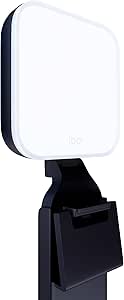 | Best Premium Monitor-Mounted Streaming Light | Brand and model: Logitech G Litra Glow | Color: Graphite | Light technology: TrueSoft full-spectrum LED | VIEW ON AMAZON | See Our Full Breakdown |
| JCWINY Adjustable Desktop Tripod Stand for Cameras, Phones, and Webcams |  | Best Adjustable-Height Tripod for Multi-Device Setups | Brand and model: JCWINY WCM02 | Height range: 11.5–18 inches | Maximum load: 1.5 kg (3.2 lb) | VIEW ON AMAZON | See Our Full Breakdown |
| ALTSON 60-LED Rechargeable Selfie Light with Clip and Camera Tripod Adapter |  | Best Compact Fill Light | LEDs: 60 | Color modes: White, natural, and warm | Color temperature: 2500K–6500K | VIEW ON AMAZON | See Our Full Breakdown |
| MOKOSE Flexible Webcam Stand with 1/4-Inch Thread |  | Best Lightweight Monitor Mount | Model: MOST01 | Mounting type: Monitor mount | Thread: 1/4 inch | VIEW ON AMAZON | See Our Full Breakdown |
| Adjustable Camera and Light Clip Mount for Monitors, Phones, and Tripods |  | Best Simple Accessory Clip | Brand: Xelsluthe | Model number: 5358RQYY1930 | Material: Plastic | VIEW ON AMAZON | See Our Full Breakdown |
| Smallrig 22″ Magic Arm Clamp – Overhead Phone Mount and Camera Arm |  | Best for Overhead Creator Setups | Length: 56 cm (22 in) | Stated load capacity: 600 g (21 oz) | Maximum recommended weight: 250 g | VIEW ON AMAZON | See Our Full Breakdown |
| SmallRig Adjustable Desktop Camera Mount with C-Clamp |  | Best Tall Desk Stand | Model: 3488-SS | Height range: 19–39 in (48.5–100 cm) | Maximum load capacity: 6.6 lb (3 kg) | VIEW ON AMAZON | See Our Full Breakdown |
| LenTok Flexible Gooseneck Webcam Stand with Desk Clamp |  | Best for Flexible Framing | Brand: LenTok | Model: 616361139350 | Compatible devices: Smartphones, webcams, action cameras, compact microphones | VIEW ON AMAZON | See Our Full Breakdown |
More Details on Our Top Picks
Urciwos 12.6-Inch Adjustable Webcam Stand for Desk
The Urciwos tabletop stand is a straightforward choice for creators who want to reposition a webcam, phone, or small ring light without attaching hardware to a desk. Its 360-degree rotation and portrait-or-landscape positioning make it easier to switch between a face-to-camera view and vertical phone content. The weighted, non-slip base also suits desks where a clamp would be awkward or unwelcome. Compared with the JCWINY desktop tripod, Urciwos is a simpler, compact tabletop option, while JCWINY offers a taller height range and a tilting ball head. The tradeoff is the plastic construction and a fixed 12.6-inch height, so it is less suited to heavier cameras or creators who need broad height adjustment. I’d choose it for a tidy, portable webcam setup rather than a complex rig.
Pros:- Supports webcams with 1/4-inch threads, smartphones, and ring lights
- 360-degree rotation and portrait or landscape positioning help adapt framing
- Weighted, non-slip base helps steady the stand without a desk clamp
- Compact design is easier to move or store than a larger mounting rig
Cons:- Plastic construction is less suited to demanding or heavy-duty setups
- Fixed 12.6-inch height offers less adjustment than the JCWINY tripod
- Only the stand is included, so compatible devices must be supplied separately
Best for: Creators who need a compact tabletop stand for a threaded webcam, phone, or small ring light and want to change orientation quickly.
Not ideal for: Creators using heavier camera gear or needing adjustable height beyond 12.6 inches; the plastic build and fixed height limit those setups.
- Brand:Urciwos
- Height:12.6 inches
- Mounting type:Tabletop
- Rotation:360 degrees
- Compatible devices:Webcams with 1/4-inch threads, smartphones, ring lights
- Material:Plastic
- Included components:Webcam stand
- Warranty:1 year
Our verdict“Choose the Urciwos if you want a portable, stable tabletop mount for a lightweight webcam or phone and do not need a variable-height rig.”
Weilisi 10.2-Inch Desk Ring Light with C-Clamp and Adjustable Stand
The Weilisi M2 combines a desk-mounted light and adjustable support, making it a practical pick for creators who need illumination without giving up much desktop space. Its 10 brightness levels and three color temperatures give you room to adjust the look for different rooms and camera settings, while the diffused ring light is designed to soften shadows. The metal C-clamp can secure the setup to desks up to 2.34 inches thick, and the head rotates and tilts for framing flexibility. Unlike the Logitech Litra Glow, Weilisi uses a ring-light format and clamps to the desk rather than mounting on a monitor; Litra Glow is the simpler fit for a USB-powered monitor setup. The tradeoffs are clamp compatibility and the need for a 5V/3A adapter. This is best for a fixed creator station, not a portable lighting kit.
Pros:- Diffused light is designed to reduce harsh shadows on camera
- Ten brightness levels and three color temperatures allow useful light adjustments
- Rotating light and tilting head make positioning more flexible
- Metal C-clamp with a non-slip silicone base saves desk surface space
Cons:- Clamp only fits desks up to 2.34 inches thick
- Requires a 5V/3A power adapter
- Desk-clamp installation is less portable than the USB-powered Logitech Litra Glow
Best for: Streamers and video-call creators with a permanent desk setup who want adjustable, softened light while keeping the desktop clear.
Not ideal for: Creators with desks thicker than 2.34 inches or those who need a portable light powered directly from a convenient USB source.
- Brand and model:Weilisi M2-(1 Pack)
- Light diameter:10.2 inches
- Stand extension:11.42 inches
- Light adjustment:360-degree rotation; 180-degree head tilt
- Maximum clamp width:2.34 inches
- Brightness and color:10 brightness levels; 3 color temperatures
- Power and connectivity:5V/3A adapter; USB
- Warranty:3 years
Our verdict“Pick the Weilisi if your creator desk can take its clamp and you want adjustable ring-light illumination in a space-saving mount.”
ThtRht 2-Pack Adjustable Monitor and Camera Mount Clips
The ThtRht two-clip set is for creators who already own small lights or other accessories with a standard 1/4-inch mounting point and want to attach them to a monitor or similar edge. The pair comes in black and white, and each clip opens up to 45 degrees with a rotating handle for more control over placement. That makes this a more accessory-focused, minimal option than the Weilisi ring light, which supplies its own illumination and stand; ThtRht provides mounting hardware, not a light. Compared with the Urciwos tabletop stand, the clips can use available edges instead of occupying desk surface, but they depend on a compatible clamping spot and accessory. The ABS construction and six-month warranty are modest, and no lights or other add-ons are included. I’d pick these for small, lightweight gear—not as a complete webcam setup.
Pros:- Two clips are included, one black and one white
- Standard 1/4-inch screw interface fits compatible cameras and accessories
- Adjustable opening and rotating handle allow positioning changes
- Compact clips can mount accessories without a tabletop stand
Cons:- No lights or other accessories are included
- ABS construction and a six-month warranty offer less reassurance for frequent rig changes
- Not water resistant
Best for: Creators who own 1/4-inch-threaded fill lights or accessories and want two compact clips for compatible monitor, tablet, or phone mounting positions.
Not ideal for: Buyers seeking an all-in-one webcam or lighting kit, or creators whose devices lack a suitable edge and compatible mounting point.
- Brand:ThtRht
- Quantity and colors:2 clips: 1 black and 1 white
- Material:ABS
- Dimensions:0.98 x 0.98 x 3.23 inches
- Screw interface:Standard 1/4 inch
- Maximum clip opening:45 degrees
- Handle rotation:120 degrees
- Warranty and water resistance:6 months; not water resistant
Our verdict“Choose the ThtRht pair if you already have compatible small accessories and need compact clips rather than a complete lighting or webcam solution.”
Logitech Litra Glow Premium LED Streaming Light, Graphite
The Logitech Litra Glow is the most polished lighting pick here for creators who want a soft, controllable light mounted directly above or around a monitor. Its TrueSoft full-spectrum LED and wide diffuser are designed to create balanced light and natural-looking skin tones, while adjustable brightness and color temperature let you tune the look to your room. The three-way mount adjusts for height, tilt, and rotation, giving it more monitor-specific flexibility than the Weilisi ring light, which clamps to the desk and uses a ring-shaped source. Litra Glow also keeps the setup portable with USB power, unlike Weilisi’s 5V/3A adapter requirement. The tradeoff is that it still needs a USB power source, and Logitech G HUB is needed for app controls. I’d favor it for a clean monitor setup, but not for creators who want a standalone desk lamp or ring light.
Pros:- Wide diffuser and TrueSoft LED are designed for soft, balanced on-camera light
- Adjustable brightness and color temperature support different rooms and looks
- Three-way monitor mount adjusts height, tilt, and rotation
- USB-powered design is portable and avoids a separate adapter requirement
Cons:- Requires access to a USB power source
- App controls require Logitech G HUB
- Monitor mounting is less suitable than the Weilisi clamp for creators who want a desk-mounted ring light
Best for: Streamers and remote creators who want soft, adjustable lighting attached to a monitor and value a compact USB-powered setup.
Not ideal for: Creators who need a light independent of a monitor, prefer a ring-light format, or do not want to use Logitech G HUB for app controls.
- Brand and model:Logitech G Litra Glow
- Color:Graphite
- Light technology:TrueSoft full-spectrum LED
- Mount:Three-way monitor mount with adjustable height, tilt, and rotation
- Controls:Adjustable brightness and color temperature; Logitech G HUB app
- Power:USB-powered
- Item weight:13.44 ounces
- Warranty:1-year limited hardware warranty
Our verdict“Choose the Litra Glow if you want a soft, adjustable light mounted to your monitor and are comfortable powering it over USB.”
JCWINY Adjustable Desktop Tripod Stand for Cameras, Phones, and Webcams
The JCWINY WCM02 suits creators who need one lightweight stand for a webcam, phone, or camera and want more height range than a fixed tabletop support. It adjusts from 11.5 to 18 inches, while its ball head rotates 360 degrees and tilts up to 90 degrees, making it easier to refine a camera angle without shifting the whole stand. The included phone holder also adds a ready-made option for compatible phones. Compared with the Urciwos 12.6-inch stand, JCWINY reaches higher and offers tilt, while Urciwos is the simpler compact stand with a weighted base. Its 1.5 kg load limit and lightweight construction make it a weaker choice for heavier camera rigs, and the phone holder only fits 4–6.5-inch smartphones. I’d choose it for flexible, portable desk framing—not for a demanding overhead setup.
Pros:- Height adjusts from 11.5 to 18 inches for varied desk framing
- Ball head provides 360-degree rotation and up to 90-degree tilt
- Standard 1/4-inch screw supports many compatible cameras and webcams
- Lightweight, foldable design includes a phone holder and rotation platform
Cons:- Maximum load of 1.5 kg may not suit heavier camera setups
- Included phone holder is limited to 4–6.5-inch smartphones
- Compared with the Urciwos, it is a taller adjustable tripod rather than a weighted-base tabletop stand
Best for: Creators who switch between a webcam, lightweight camera, and compatible smartphone and want adjustable height in a foldable desktop stand.
Not ideal for: Creators mounting heavy camera bodies or smartphones outside the 4–6.5-inch holder range, or anyone needing a heavy-duty fixed rig.
- Brand and model:JCWINY WCM02
- Height range:11.5–18 inches
- Maximum load:1.5 kg (3.2 lb)
- Weight:260 g (0.57 lb)
- Folded size:7 inches
- Mount:Standard 1/4-inch screw
- Head movement:360-degree rotation; up to 90-degree tilt
- Included accessories:Phone holder for 4–6.5-inch smartphones; rotation platform
Our verdict“Pick the JCWINY if you want a portable, height-adjustable stand for lightweight cameras, webcams, or a phone within the holder’s size range.”
ALTSON 60-LED Rechargeable Selfie Light with Clip and Camera Tripod Adapter
For creators whose webcam image needs a boost without a full desk-light setup, the ALTSON 60-LED light combines a rechargeable panel with a clip, tripod adapter, and hot shoe mount. Its three color modes and 10 brightness levels offer more control over skin tone and output than a basic fixed-brightness light. The 160° rotating panel also helps direct light toward your face when the camera or screen sits at an awkward angle. Compared with the Logitech Litra Glow, this model is smaller and easier to move between a laptop, camera, and tripod, but it lacks the listed product details of a dedicated streaming-light setup. The main tradeoff is battery endurance: the stated runtime falls from about 15 hours at low brightness to four hours at 50%, and no charging time is provided.
Pros:- Three color modes and 10 brightness levels give creators useful control over light tone and intensity.
- Clip, 1/4-inch adapter, and hot shoe mount support several common creator setups.
- Lightweight 95 g body is easy to pack or reposition.
- 160° panel rotation helps aim light without shifting the camera.
Cons:- Battery life varies substantially with brightness, reaching about four hours at 50% output.
- Charging time is not specified.
- Its compact panel may not suit creators who want a larger, dedicated desk light.
Best for: Creators who switch between laptop calls, phone videos, and camera setups and want portable, adjustable fill light.
Not ideal for: Streamers who need a fixed desk light for long sessions at higher brightness or want a clearly specified charging schedule.
- LEDs:60
- Color modes:White, natural, and warm
- Color temperature:2500K–6500K
- Brightness levels:10
- CRI:97+
- Battery:2200mAh; about 15 hours at 10% brightness or 4 hours at 50%
- Mounts:Clip, 1/4-inch adapter, and hot shoe mount
- Dimensions and weight:3.9 × 2.8 × 0.78 in; 95 g
Our verdict“Choose the ALTSON for portable fill light across several devices, but pick a dedicated desk light if your sessions demand sustained brighter output.”
MOKOSE Flexible Webcam Stand with 1/4-Inch Thread
The MOKOSE flexible stand is a simple way to position a lightweight webcam above or beside a laptop screen without adding a desk clamp or full-size arm. Its silicone exterior and aluminum-alloy interior bend through 360 degrees, while the standard 1/4-inch thread fits compatible webcams. At just 35 g, it is far easier to carry than the SmallRig 22-inch Magic Arm, though that longer arm offers more reach and a sturdier route for mounting other accessories. The MOKOSE’s defining limit is also its buying boundary: the maker recommends webcams weighing no more than 200 g, and a heavier device may leave the mount unstable or prone to falling. Creators with a small webcam and a suitable monitor or laptop edge get a compact positioning aid; those mounting lights, microphones, or heavier cameras should choose a more substantial support.
Pros:- 360-degree bendable design allows flexible webcam positioning.
- 35 g weight makes it easy to carry between workspaces.
- Standard 1/4-inch thread fits compatible webcams.
- Silicone and aluminum-alloy construction combines a soft exterior with an internal support structure.
Cons:- Recommended only for webcams weighing no more than 200 g.
- May become unstable or fall if used with an overweight device.
- Monitor-mount format offers less reach than the SmallRig 22-inch Magic Arm.
Best for: Laptop-based creators with a lightweight webcam who want flexible positioning in a portable, low-profile monitor mount.
Not ideal for: Creators using heavy webcams, cameras, lights, or microphones, or anyone who needs the extended reach of a desk arm.
- Model:MOST01
- Mounting type:Monitor mount
- Thread:1/4 inch
- Rotation:360 degrees
- Materials:Silicone and aluminum alloy
- Dimensions:104 × 37 mm
- Weight:35 g
- Recommended webcam weight:No more than 200 g
Our verdict“Pick the MOKOSE for a light webcam and a compact monitor-mounted setup; choose a stronger arm for heavier gear or greater reach.”
Adjustable Camera and Light Clip Mount for Monitors, Phones, and Tripods
This clip mount is a practical add-on for creators who already own a light or camera with a standard 1/4-inch connection and need another place to attach it. The rotatable head lets you adjust the device without twisting the clip itself, while the soft rubber pad helps protect the gripping surface from scratches. Unlike the MOKOSE flexible webcam stand, which is designed around lightweight webcams and a monitor mount, this clip is positioned for a broader mix of compatible devices and surfaces. That flexibility comes with less certainty: its product dimensions are listed two different ways, and compatibility depends on both the device and the surface being clipped. It is a small, portable mounting option rather than a complete webcam support system, so I would skip it if a firm load limit or detailed fit guidance is important to your setup.
Pros:- Rotatable 1/4-inch screw head allows device adjustment without turning the clip.
- Soft rubber pad helps grip surfaces and protect them from scratches.
- Compact, lightweight format is portable.
- Listed compatibility spans cameras, phones, laptops, and monitors.
Cons:- Product dimensions conflict between the listed details: 7.8 × 3 cm and 8.3 × 3.3 cm.
- Fit depends on the attached device and the surface being clipped.
- No load capacity is specified.
Best for: Creators who need a compact clip to attach a compatible camera or light to a laptop, monitor, or other suitable surface.
Not ideal for: Buyers who need a clearly documented fit range, load capacity, or a dedicated support for a heavier webcam.
- Brand:Xelsluthe
- Model number:5358RQYY1930
- Material:Plastic
- Mount:Standard 1/4-inch screw mount
- Mounting type:Clip
- Listed dimensions:7.8 × 3 cm; product description also states 8.3 × 3.3 cm
- Included component:1 selfie light clip
- Compatible devices:Cameras, headphones, laptops, monitors, and smartphones
Our verdict“Choose this clip for a portable mount for compatible lightweight accessories, but skip it if your setup needs clear fit and load specifications.”
Smallrig 22″ Magic Arm Clamp – Overhead Phone Mount and Camera Arm
For creators who need a camera, phone, or light positioned away from the desk edge, the Smallrig 22-inch Magic Arm offers more reach than the compact MOKOSE monitor stand or a basic clip mount. Its aluminum-alloy arm, double-ball clamps, and padded contact points give a flexible way to arrange an overhead or side-on view, while the included phone holder supports devices 5.5–8.5 cm wide. There is a notable load-spec caveat: the listed capacity is 600 g, but the maximum recommended weight is 250 g. I would use the lower figure when choosing gear, which rules out some heavier camera and light combinations. At 310 g, the arm also adds more bulk than a simple webcam mount. It makes the most sense when reach and repositioning matter more than keeping the setup minimal.
Pros:- 22-inch length provides more reach than compact monitor stands and clips.
- Double-ball clamps support flexible positioning.
- Silicone pads and rubber rings help grip equipment and protect contact points.
- Included crab clamp and phone holder support multiple mounting arrangements.
Cons:- Maximum recommended weight is 250 g despite a separately stated 600 g load capacity.
- At 310 g, it is bulkier than a simple webcam mount.
- Not water resistant.
Best for: Streamers and tutorial creators who need an adjustable overhead or extended desk mount for a phone, lightweight camera, webcam, or accessory.
Not ideal for: Creators mounting gear above 250 g or seeking the lightest, least bulky option for a basic webcam position.
- Length:56 cm (22 in)
- Stated load capacity:600 g (21 oz)
- Maximum recommended weight:250 g
- Material:Aluminum alloy
- Weight:310 g
- Clamp opening width:63.5 mm
- Included items:1/4-inch-20 to 3/8-inch-16 adapter, crab clamp, magic arm, and phone holder
- Phone holder compatibility:Phones 5.5–8.5 cm wide
Our verdict“Choose the Smallrig Magic Arm when overhead reach and flexible positioning matter, while keeping the attached setup within the 250 g recommended limit.”
SmallRig Adjustable Desktop Camera Mount with C-Clamp
The SmallRig Adjustable Desktop Camera Mount suits creators who want a camera or light raised above the desk without relying on a flexible arm that must hold its position at an angle. Its three-section pole extends from 19 to 39 inches, and the ball head rotates 360° and tilts from -90° to +45° for framing adjustments. The C-clamp attaches to table edges up to 1.85 inches thick, making this a more structured desk setup than the Smallrig 22-inch Magic Arm, which prioritizes reach and flexible overhead positioning. The listed 6.6 lb capacity gives it room for several types of creator gear, but the clamp requires a compatible table edge and cannot replace a free-standing tripod. It is also taller and less travel-friendly than compact monitor mounts such as the MOKOSE.
Pros:- Three-section pole adjusts from 19 to 39 inches for varied camera and light heights.
- Ball head rotates 360° and tilts from -90° to +45°.
- Supports listed gear up to 6.6 lb.
- Aluminum construction keeps the stand at 15 oz.
Cons:- Requires a compatible table edge and does not function as a free-standing stand.
- Clamp fits tables only up to 1.85 inches thick.
- Less compact for travel than monitor-mounted options such as the MOKOSE.
Best for: Creators who want a height-adjustable, desk-clamped support for a webcam, camera, smartphone, or ring light in a fixed workspace.
Not ideal for: Creators who cannot clamp to a table edge, need a portable monitor mount, or frequently move their setup between locations.
- Model:3488-SS
- Height range:19–39 in (48.5–100 cm)
- Maximum load capacity:6.6 lb (3 kg)
- Table thickness compatibility:Up to 1.85 in (4.7 cm)
- Weight:15 oz (430 g)
- Material:Aviation aluminum alloy
- Mount:1/4-inch ball head with ring light adapter
- Ball head movement:360° rotation; -90° to +45° tilt
Our verdict“Choose this SmallRig for a height-adjustable, clamped desk setup, but look elsewhere if your workspace has no suitable table edge.”
LenTok Flexible Gooseneck Webcam Stand with Desk Clamp
The LenTok is a practical pick for creators who need to move a webcam between eye-level calls, overhead views, and other desk angles without repositioning a fixed mount. Its flexible arm and 360-degree rotating joint offer more framing freedom than the ThtRht monitor clips, which attach directly to a screen. The padded clamp also accommodates desk edges up to 2.56 inches thick, while its folding design makes storage easier than leaving a permanent setup in place.
The tradeoff is that a clamp mount needs a suitable desk edge, so it is less adaptable across locations than the JCWINY desktop tripod. Its listed compatible devices include phones, webcams, action cameras, and compact microphones, but creators with heavier gear should check their equipment’s mounting needs before choosing a flexible arm. The LenTok suits adjustable desk setups, not buyers seeking a fixed monitor-mounted position.
Pros:- Flexible arm supports changes in height and angle for varied webcam framing.
- 360-degree joint makes it easier to fine-tune the camera’s direction.
- Padded clamp is designed to grip the desk while protecting its surface.
- Folds for storage, and the included phone clip adds device flexibility.
Cons:- The clamp only fits surfaces up to 2.56 inches thick.
- A desk-edge clamp is less convenient to relocate than a freestanding tripod.
- The flexible arm may be a less suitable choice for heavier gear than a rigid mount.
Best for: Creators who regularly adjust webcam height and angle at a desk and want a clamp mount that can also hold a phone or compact microphone.
Not ideal for: Creators with desks thicker than 2.56 inches, no usable desk edge, or heavier equipment that calls for a more rigid mount.
- Brand:LenTok
- Model:616361139350
- Compatible devices:Smartphones, webcams, action cameras, compact microphones
- Mounting type:Tabletop clamp
- Maximum surface thickness:2.56 inches
- Rotation:360 degrees
- Screw:1/4 inch
- Weight:0.43 kg
- Included components:Phone clip, webcam stand
Our verdict“Choose the LenTok if you want adjustable desk-edge framing for a webcam or phone, but skip it if your desk cannot accept its clamp or your gear needs a rigid support.”

How We Picked
I compared these accessories by the job they do in a creator’s webcam setup: lighting the face, holding a camera or webcam, positioning a phone, or clearing desk space. I gave more weight to useful adjustment, mounting stability, compatibility cues, and how directly each product solves a common webcam problem than to a long list of advertised features. I also looked at the setup tradeoffs: a clamp may free the desktop but needs a suitable edge, while a flexible arm makes repositioning easier but may not feel as steady as a more rigid mount.
The ranking reflects how broadly useful each option is for creators, then how well it fits a more specific need. The Litra Glow leads as a dedicated light that can improve the image without requiring a full rig; the SmallRig desktop mount and Weilisi ring light follow for creators prioritizing camera placement or a combined light-and-mount setup. Compact lights, clip mounts, tripods, and gooseneck arms earn their places for portability, monitor mounting, or flexible positioning, but their narrower use cases keep them below the more broadly useful picks. Before choosing any mount, I’d check the attachment method and the device’s mounting interface against my actual desk, monitor, and webcam.
Factors to Consider When Choosing Webcam Accessories For Creators
I’d choose a webcam accessory by starting with the weakness in the current setup, not by adding hardware at random. A light cannot fix an awkward camera angle, and a sturdy arm will not improve a dim room by itself. These factors can help narrow the choice before you commit to a mounting style or build a larger creator setup.
Fix the biggest image problem first
Decide whether your video looks poor because of lighting, framing, or camera stability before shopping. If your face is dim or unevenly lit, a dedicated light may make a more visible difference than replacing a basic mount. If the image is well lit but the camera sits too low, prioritize a stand or arm that gives you useful height and angle adjustment. A common mistake is buying a ring light and mount when the actual problem is a camera that cannot be positioned at eye level. I’d change one part of the setup at a time so it is easier to tell which upgrade helps. For a polished look, lighting and camera placement may both matter, but they do not have to be purchased together.
Match the mounting style to your desk
A desk clamp can reclaim desktop space, but it needs an accessible edge and enough clearance to attach securely. Monitor clips avoid a separate desk footprint, yet monitor bezels and shapes vary, so check the intended fit rather than assuming every screen is suitable. Tabletop tripods are easier to move between workspaces, though they occupy space and may limit how high the camera can sit. Think through nearby shelves, walls, and monitors too: an arm that has room to extend on paper may be awkward in a crowded corner. Before buying, measure the available edge and note where cables, screens, and other equipment sit. The most flexible mounting style is only helpful if it works with the actual layout.
Treat stability and flexibility as a tradeoff
Flexible arms and goosenecks make quick angle adjustments easy, which helps when a creator switches between face-on video and overhead demonstrations. A more rigid mount can be a better fit for a fixed webcam position, particularly if movement near the desk might shake the frame. Compact joints and multiple adjustment points can add convenience, but each extra point is also something to position and keep from drifting. Avoid choosing an arm solely because it reaches far; reach is useful only when the mount remains steady at the desired position. Consider how often the camera will move during a typical recording session. A fixed talking-head setup has different needs from a workspace used for product demos.
Check device compatibility before buying
Webcams, phones, and cameras do not all attach the same way, so confirm the mount interface and any required adapter before ordering. A product described for several device types may still need a compatible threaded connection or clip arrangement for a particular camera. Also check whether the accessory can hold the device in the orientation your content requires, especially for vertical phone video. Creators sometimes focus on the arm itself and miss the connection between the device and mount. I’d verify the device’s mounting options and the accessory’s stated support before planning a multi-device setup. If you switch cameras, a broadly compatible mount can be more useful than a specialized holder.
Choose lighting for your space and shooting routine
Small clip-on lights are convenient for travel or quick calls, while desk-mounted lights are better suited to a setup that stays in one place. A ring light and a dedicated streaming light also create different shapes and mounting arrangements, so consider where the light will sit relative to the webcam and your face. Lighting needs change with room brightness, window placement, and whether you record during the day or after dark. A common misstep is assuming a brighter light alone will produce a better image; placement and the room’s existing light also affect the result. If you regularly pack away your gear, portability may matter more than a permanent desk mount. For a fixed studio corner, easy positioning can be more useful than a light that is simply small.
Pay for the setup you will actually maintain
More adjustment points and multiple mounting uses can be worthwhile for creators who change formats or share a workspace. They can also add setup steps and take longer to reposition than a simple clip or compact tripod. A beginner with a single webcam may get more from a straightforward light or stand than from a large arm designed to hold different devices overhead. Consider how often you will move the accessory, whether it can stay installed, and whether you need to clear the desk after recording. The best upgrade is one you will use consistently, not the most elaborate rig you can assemble. Spend more attention on fit, stability, and routine than on features that do not support your content.
Frequently Asked Questions
Should I buy a webcam light or a camera mount first?
I’d buy the accessory that addresses the clearest problem in your current video. If your face looks dim but the framing is already comfortable, a light such as the Litra Glow or a ring-light setup is the more direct upgrade. If the image is bright enough but the webcam points up from a low desk position, a stand or clamp mount may help more. You do not need to build a complete rig in one purchase. Make one change, check whether it improves your calls or recordings, and then decide what is still missing.
Are monitor clip mounts a safe fit for every screen?
No. Monitor frames differ in thickness, shape, and available gripping surface, so a clip mount that works on one screen may not suit another. Check the product’s fit guidance and compare it with your monitor’s bezel and rear housing before attaching a camera. Also consider whether the clip could interfere with the display area, buttons, or cables. If the monitor’s shape is uncertain, a desk-clamped mount or tabletop tripod may be the more predictable choice, provided you have room for it.
When is a flexible gooseneck stand a better choice than a rigid camera arm?
A gooseneck is a practical option when you often make small framing changes or need to move the camera aside between sessions. A rigid arm tends to suit creators who want a more fixed position or need to place a camera over a work surface. The tradeoff is that a flexible neck may be less reassuring if the camera must stay perfectly still, while a rigid arm can take more effort to reposition. Think about whether your content involves changing angles during a session. If it does, flexibility may save time; if not, a steadier fixed arrangement may be preferable.
Can one accessory hold both a webcam and a phone?
Some mounts are designed for multiple device types, but that does not mean a webcam and phone attach in the same way. Check whether the product includes the needed holder or connection and whether your specific device can be secured in the intended orientation. A phone may also be heavier or wider than a small webcam, which can affect how comfortably a compact mount works. If you plan to switch devices often, favor a mount with clearly stated compatibility and a straightforward way to change attachments. For a single dedicated webcam, a simpler mount may be easier to set up.
Is a rechargeable clip light a good replacement for a desk streaming light?
It can work for portable calls or occasional recording, especially when carrying a larger light is inconvenient. A dedicated desk light is usually a better fit for a fixed creator station where lighting placement and repeatable framing matter every session. Clip lights also depend on having a suitable place to attach them, and their compact format may not provide the same setup flexibility as a separate desk-mounted light. Consider where you record most often and whether you need to pack the light away. If portability is the main need, a rechargeable option makes sense; for a permanent workspace, a dedicated light may be easier to position around your webcam.
Conclusion
For the best overall, I’d choose the Logitech Litra Glow if improving webcam lighting is the priority. The SmallRig Adjustable Desktop Camera Mount is my pick for creators who want a more deliberate desk-mounted camera position, while the Weilisi Desk Ring Light suits anyone who wants lighting and a clamp-mounted stand together. For best value, the ThtRht 2-Pack Monitor and Camera Mount Clips offer a practical route to keeping equipment off the desk, as long as the monitor fit works. For beginners, I’d start with a single-purpose light or simple stand rather than a complex arm; for portable setups, the ALTSON rechargeable light or JCWINY tabletop tripod better match gear that needs to move. Choose based on the problem you need to solve first, then add a second accessory only if your recordings still need it.