
USB-C power meters show how much voltage and current a charger delivers, helping you check charging behavior and compare cables or adapters. The ChargerLAB Power-Z C240 is my best overall pick for its high power capacity and tester-focused feature set, while the Plugable 240W USB-C Power Meter is a simpler choice for routine connection checks and the Klein Tools ET920 adds USB-A support. The main tradeoffs are maximum wattage, measurement and protocol features, screen readability, and how much setup you want. A basic meter may suit quick checks, while advanced charging analysis calls for broader compatibility and more detailed readings. Read on for my comparison of all 15 options and guidance on choosing the right one.

Get the latest gadgets delivered free with Prime
- Fast, free delivery on millions of items
- Prime Video, Amazon Music and more included
- Member-only deals all year
Complete the kit



Key Takeaways
- The ChargerLAB Power-Z C240 and KM003C stand apart for buyers who want more than a basic voltage and current display; their tester-oriented design makes them the specialist picks in this group.
- High power capacity is a distinct advantage of the 240W and 360W models, but a larger wattage ceiling matters only if your charger and device can use it.
- Plugable and Klein Tools prioritize approachable checks, with the Klein ET920 also covering USB-A connections for mixed-device setups.
- Several YOJOCK and KWS-2303C listings overlap in purpose; compare their stated limits and measurement functions carefully instead of assuming the model name alone identifies the right tester.
- Two-pack and basic display options favor simple comparisons or spare coverage, while specialist meters make more sense when detailed charging behavior is the goal.
| YOJOCK USB-C Power Meter and Tester |  | Best for USB-A and USB-C Flexibility | Voltage range: 3.6–32 V | Current range: 0–8.0 A | Display: IPS color screen with 8 display interfaces | VIEW ON AMAZON | See Our Full Breakdown |
| ChargerLAB Power-Z C240 240W USB-C Tester |  | Best for High-Power USB-C Testing | Maximum power: 240 W | Display: 1.14-inch color display | Current monitoring: Bidirectional | VIEW ON AMAZON | See Our Full Breakdown |
| YOJOCK USB C Tester Power Meter 4-30V 0-6.5A Digital Multimeter |  | Best for Simple USB-C Checks | Voltage range: 4–30 V | Current range: 0–6.5 A | Maximum operating voltage: 30 V | VIEW ON AMAZON | See Our Full Breakdown |
| YOJOCK 360W USB-C Power Meter and Tester (KWS-2303C) |  | Best for Detailed Charging Trends | Maximum power: 360 W | Voltage range: 4–30 V | Current range: 0–12 A | VIEW ON AMAZON | See Our Full Breakdown |
| diymore USB-C Tester Power Meter with LED Display |  | Best for Retaining Test Records | Voltage range: 4–30 V | Current range: 0–6.5 A | Display: LED | VIEW ON AMAZON | See Our Full Breakdown |
| Eversame 2 in 1 Type C USB Tester Color Screen LCD Digital Multimeter |  | Best for Straightforward USB-C Checks | Voltage range: 3.6–30 V DC | Current range: 0–5.1 A | Display: Color LCD with eight interface views | VIEW ON AMAZON | See Our Full Breakdown |
| YEREADW USB-C Power Meter and Tester |  | Best for Broader Current Range | Voltage range: 3.6–32 V | Current range: 0–8.0 A | Power source: USB or USB-C | VIEW ON AMAZON | See Our Full Breakdown |
| 240W USB-C Power Meter Tester Adapter, 2-Pack |  | Best Compact Pass-Through Pair | Included: 2 adapters | Connector: USB Type-C male to female | Maximum power: 240 W | VIEW ON AMAZON | See Our Full Breakdown |
| diymore USB C Power Meter Testers, Color Screen Digital Multimeter |  | Best for High-Current Protocol Testing | Voltage range: 4–30 V | Current range: 0–12 A | Maximum power: 240 W | VIEW ON AMAZON | See Our Full Breakdown |
| Klein Tools ET920 USB-A and USB-C Digital Power Meter |  | Best for Simple USB-A and USB-C Comparisons | Voltage range: 3–20 V DC | USB-A current range: 0.05–3 A | USB-C current range: 0.05–5 A | VIEW ON AMAZON | See Our Full Breakdown |
| Plugable USB-C Power Meter Tester up to 240W |  | Best for Video and Data Passthrough | Maximum power: 240W | Voltage range: 5–48V EPR (4.5–50V operating range) | Current range: 50mA–6.5A | VIEW ON AMAZON | See Our Full Breakdown |
| ChargerLAB Power-Z KM003C USB-C Charging Tester | 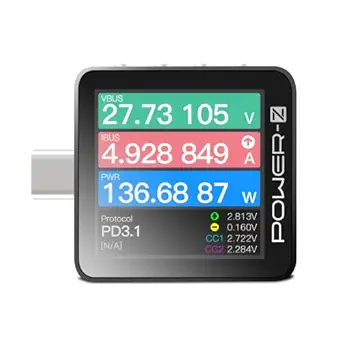 | Best for Protocol Diagnostics | Maximum PD power: 240W | Maximum voltage: 50V | Maximum current: 6A | VIEW ON AMAZON | See Our Full Breakdown |
| KWS-2303C USB-C Power Meter and Fast-Charging Tester |  | Best for High-Current Testing | Model: KWS-2303C | Voltage range: 4–30V | Current range: 0–12A | VIEW ON AMAZON | See Our Full Breakdown |
| USB C Power Meter and Tester 4-30V 0-6.5A, Voltage, Current, Capacity, Temperature, Working Time |  | Best for Basic On-Device Readouts | Minimum operating voltage: 4V | Maximum voltage: Not specified in supplied product data | Maximum current: Not specified in supplied product data | VIEW ON AMAZON | See Our Full Breakdown |
| Plugable USB C Power Meter Tester for Monitoring USB-C Connections – Digital Multimeter for USB Type C Cables, Laptops, Phones, Chargers – Driverless |  | Best for Simple Driverless Checks | Measurement type: Voltmeter and ammeter | Minimum operating voltage: 4V | Power source: USB-powered | VIEW ON AMAZON | See Our Full Breakdown |
| usbc power meter | Display | Voltage range | Current range | Weight |
|---|---|---|---|---|
| YOJOCK USB-C Power Meter and T | IPS color screen with 8 display interfaces | 3.6–32 V | 0–8.0 A | 40 g |
| ChargerLAB Power-Z C240 240W U | 1.14-inch color display | — | — | 0.41 ounces |
| YOJOCK USB C Tester Power Mete | — | 4–30 V | 0–6.5 A | — |
| YOJOCK 360W USB-C Power Meter | — | 4–30 V | 0–12 A | — |
| diymore USB-C Tester Power Met | LED | 4–30 V | 0–6.5 A | — |
| Eversame 2 in 1 Type C USB Tes | Color LCD with eight interface views | 3.6–30 V DC | 0–5.1 A | 1.1 ounces |
| YEREADW USB-C Power Meter and | IPS color display with eight interface views | 3.6–32 V | 0–8.0 A | 0.05 kg |
| 240W USB-C Power Meter Tester | LED | — | — | — |
| diymore USB C Power Meter Test | Color screen | 4–30 V | 0–12 A | — |
| Klein Tools ET920 USB-A and US | — | 3–20 V DC | — | — |
| Plugable USB-C Power Meter Tes | Rotatable OLED | 5–48V EPR (4.5–50V operating range) | 50mA–6.5A | 18.14 g |
| ChargerLAB Power-Z KM003C USB- | Rotating 1.54-inch LCD | — | — | 16.47 g |
| KWS-2303C USB-C Power Meter an | 1.06-inch ISP color display | 4–30V | 0–12A | — |
| USB C Power Meter and Tester 4 | High-definition LED | — | — | 0.06 kg |
| Plugable USB C Power Meter Tes | — | — | — | 0.04 lb |
More Details on Our Top Picks
YOJOCK USB-C Power Meter and Tester
I’d put this YOJOCK first for buyers who need one compact meter to check both USB-A and USB-C charging. Its 3.6–32 V and 0–8 A ranges cover a broad mix of everyday chargers, while the eight IPS display views make it easier to focus on readings such as power, temperature, or charging time. It also supports common PD and QC protocols, giving it more flexibility than the USB-C-only YOJOCK 4–30V tester. That broader fit comes with a caveat: the listing says power-bank capacity testing needs a continuous discharge setup, and the calculation depends on discharge voltage. The ChargerLAB C240 is the stronger pick for high-power USB-C testing, but this model is a better match for mixed-port troubleshooting.
Pros:- Works with both USB-A and USB-C devices
- Measures voltage, current, capacity, power, temperature, resistance, and charging time
- Eight IPS display views make different readings easier to access
- Supports PD 3.0/2.0, QC 3.0/2.0, and BC 1.2
Cons:- Power-bank capacity testing requires a continuous discharge setup
- Capacity calculation depends on the discharge voltage
Best for: People who diagnose both USB-A and USB-C chargers and want several measurements on a small color display
Not ideal for: USB-C-only users seeking high-wattage testing or reliable capacity figures without setting up a controlled discharge
- Voltage range:3.6–32 V
- Current range:0–8.0 A
- Display:IPS color screen with 8 display interfaces
- Measurement types:Ammeter, multimeter, and voltmeter
- Supported protocols:PD 3.0/2.0, QC 3.0/2.0, BC 1.2
- Compatible devices:USB-A and USB-C devices
- Weight:40 g
- Dimensions:2.8 × 1.26 × 0.47 inches
Our verdict“Choose this YOJOCK for flexible USB-A and USB-C checks; choose the ChargerLAB C240 when high-power USB-C testing matters more.”
ChargerLAB Power-Z C240 240W USB-C Tester
For checking current USB-C chargers and power banks at demanding loads, I’d rank the ChargerLAB Power-Z C240 ahead of the lower-range YOJOCK meters here. Its stated 240 W capacity and bidirectional monitoring let buyers observe power flowing into a device or out of a power bank, making it useful for comparing charging and discharge behavior. The 1.14-inch color screen presents voltage, current, power, and energy in a compact metal unit. The tradeoff is a narrower focus: its listed ports are USB-C, and testing USB-A gear requires a separate adapter. The listing also points professional accuracy users toward another model, so I would treat the C240 as a capable portable checker rather than a metrology instrument. Choose it for USB-C power headroom, not universal port coverage.
Pros:- Supports testing up to 240 W
- Bidirectional monitoring covers charging and discharge
- Displays voltage, current, power, and energy
- Lightweight metal construction
Cons:- USB-A testing needs a separate adapter that is not included
- Listing recommends a different model for professional accuracy needs
Best for: USB-C enthusiasts checking high-output chargers and power-bank discharge who value a small meter with bidirectional readings
Not ideal for: Buyers who need direct USB-A testing or professional-grade accuracy assurances from the product listing
- Maximum power:240 W
- Display:1.14-inch color display
- Current monitoring:Bidirectional
- Ports:USB-C input and output
- USB-A compatibility:Requires a USB-C to USB-A adapter (not included)
- USB support:USB 2.0
- Shell material:Metal
- Weight:0.41 ounces
Our verdict“Pick the C240 for high-power USB-C checks and discharge monitoring, provided you can work within its adapter and accuracy caveats.”
YOJOCK USB C Tester Power Meter 4-30V 0-6.5A Digital Multimeter
This YOJOCK is the straightforward choice for someone who wants to track basic USB-C charging measurements without paying attention to a long list of extra modes. It reads voltage, current, capacity, power, and temperature across a 4–30 V range, and its stored capacity and energy data remain after power is removed. That memory is useful when a charging run lasts longer than a quick glance. Compared with the broader YOJOCK B09T3KHBFL, this model is limited to USB-C devices and does not offer the same USB-A flexibility; the diymore LED tester also retains records but adds resistance and charging-time readings in its listed data set. Protocol support includes QC and VOOC variants, though the display may not identify protocol names. Manual screen switching adds friction during repeated checks.
Pros:- Measures voltage, current, capacity, power, and temperature
- Retains capacity and energy data after power-off
- Supports several listed fast-charging protocols
- Button controls allow switching screens and clearing data
Cons:- Works with USB-C devices only
- Display may not show fast-charging protocol names
- Manual screen switching and reset require extra steps
Best for: USB-C device owners who want stored capacity and energy readings for charger or cable checks
Not ideal for: Technicians moving between USB-A and USB-C gear or readers who need protocol names shown on screen
- Voltage range:4–30 V
- Current range:0–6.5 A
- Maximum operating voltage:30 V
- Minimum operating voltage:4 V
- Power source:USB
- Compatible devices:USB-C devices
- Color:Black/Silver
Our verdict“Choose this YOJOCK for uncomplicated USB-C measurements with retained data, but look to the B09T3KHBFL for mixed-port use.”
YOJOCK 360W USB-C Power Meter and Tester (KWS-2303C)
The KWS-2303C earns a distinct place for readers who want to follow how a USB-C connection behaves over time, not just check a single reading. Along with voltage, current, capacity, energy, power, temperature, and charging time, it records maximum readings and real-time voltage and current curves. Those curves can help spot changes during a long session, while saved capacity and energy data survive power loss. Its stated 360 W maximum and 0–12 A range exceed the ChargerLAB C240’s 240 W rating on paper, and its protocol list spans PD, QC, and several other charging families. The range still stops at 30 V and 12 A, so the headline wattage does not make it suitable for every electrical condition. Buyers seeking only a quick basic check may prefer the simpler USB-C YOJOCK meter.
Pros:- Records real-time voltage and current curves at selectable intervals
- Measures several charging and power-bank metrics
- Retains capacity and energy data after power-off
- Supports a broad list of fast-charging protocols
Cons:- Voltage range is limited to 4–30 V
- Current range is limited to 0–12 A
Best for: Electronics hobbyists who want to log changing USB-C voltage and current during longer charging sessions
Not ideal for: People who only need quick basic readings or whose testing needs exceed the listed 30 V and 12 A ranges
- Maximum power:360 W
- Voltage range:4–30 V
- Current range:0–12 A
- Supported protocols:PD 2.0/3.0, QC 2.0/3.0, FCP, SCP, AFC, PE, DASH VOOC, Super VOOC
- Curve monitoring intervals:5 minutes, 15 minutes, 60 minutes, 2 hours
- Model:KWS-2303C
- Recorded readings:Maximum readings and real-time voltage and current curves
- Data retention:Capacity and energy data saved when powered off
Our verdict“Choose the KWS-2303C for charging trend records and a higher stated power ceiling than the C240, within its specified voltage and current ranges.”
diymore USB-C Tester Power Meter with LED Display
I’d choose this diymore when keeping test records between sessions matters more than getting a color interface or a very high current ceiling. It measures voltage, current, capacity, electric quantity, power, temperature, resistance, and charging time, then retains multiple saved records after power loss. That gives it a wider listed measurement set than the USB-C-only YOJOCK B0B99Z2GJK, which focuses on fewer categories but supports named protocol families in its description. The diymore handles 4–30 V and up to 6.5 A, a useful span for many USB charging checks but well below the KWS-2303C’s stated 12 A ceiling. Its LED display and USB interface focus suit practical bench checks; the product data does not specify fast-charging protocol support, so protocol-specific diagnosis may call for another meter.
Pros:- Measures voltage, current, capacity, electric quantity, power, temperature, resistance, and charging time
- Retains multiple test records after power loss
- Covers 4–30 V and up to 6.5 A
- Includes a 14 cm extension cable
Cons:- Designed for USB-C and USB interface testing
- Product data does not specify fast-charging protocol support
- Current range is lower than the KWS-2303C’s listed 12 A
Best for: DIY repairers who compare saved USB charging readings across multiple test sessions
Not ideal for: Users who need a color screen, confirmed fast-charging protocol support, or current measurements above 6.5 A
- Voltage range:4–30 V
- Current range:0–6.5 A
- Display:LED
- Measured data:Voltage, current, capacity, electric quantity, power, temperature, resistance, charging time
- Data storage:Multiple test records retained after power loss
- Tester dimensions:5.68 × 2.58 cm (2.24 × 1.02 in)
- Extension cable length:14 cm
- Interfaces:USB-C and USB
Our verdict“Pick this diymore for retained records and a broad set of basic measurements; choose the KWS-2303C for higher stated current capacity and trend curves.”
Eversame 2 in 1 Type C USB Tester Color Screen LCD Digital Multimeter
The Eversame USB-C tester suits buyers who want charging readings and protocol checks in a small inline meter. Its eight screen views cover voltage, current, power, capacity, and other values, while support for QC 2.0/3.0 and BC1.2 helps when checking common charging setups. Compared with the Klein Tools ET920, it offers a broader voltage ceiling and color display, but Klein provides stated drop protection and saved readings. Eversame’s protections and audible alarm may appeal to people monitoring a device during a charge, though the listing does not specify measurement accuracy. Its stated current ceiling is 5.1 A, so buyers working with higher-current USB-C equipment should look at the YEREADW meter or diymore’s 12 A model instead.
Pros:- Eight display views show several charging and electrical readings
- Supports QC 2.0, QC 3.0, and BC1.2
- Lists over-voltage, over-current, and under-voltage protections with an alarm
- Compact body weighs 1.1 ounces
Cons:- Current measurement is limited to 5.1 A
- Measurement accuracy is not specified
- Some PD charging setups may require the included side-hole adapter to trigger charging
Best for: USB-C owners who want a compact color-screen meter for checking common charger and cable behavior up to 5.1 A.
Not ideal for: People measuring higher-current USB-C gear or requiring published accuracy figures, since the stated limit is 5.1 A and no accuracy is listed.
- Voltage range:3.6–30 V DC
- Current range:0–5.1 A
- Display:Color LCD with eight interface views
- Supported protocols:QC 2.0, QC 3.0, BC1.2
- Measurement functions:Voltage, current, capacity, energy, power, load impedance, and D+/D− voltage
- Protection features:Over-voltage, over-current, under-voltage, and low-energy protection with alarm
- Dimensions:2.36 × 2.36 × 0.43 inches
- Weight:1.1 ounces
Our verdict“Choose Eversame for compact, multi-view checks on common USB-C charging setups, but choose a higher-current meter for demanding loads.”
YEREADW USB-C Power Meter and Tester
With a stated ceiling of 8 A, the YEREADW gives buyers more current headroom than the Eversame and Klein Tools meters in this group. Its IPS color screen offers eight interface views, and its listed protocol support spans PD 3.0/2.0, QC 3.0/2.0, and BC1.2. That makes it a flexible choice for checking a mix of USB-A and USB-C charging equipment, while capacity readings can help track a power bank discharge. The tradeoff is that the product data gives no measurement accuracy, and capacity testing may depend on a direct load test or calculation. Compared with the diymore meter, YEREADW has a lower current limit but provides clearer listed voltage and protocol specifications.
Pros:- Measures current up to 8 A
- Supports PD, QC, and BC1.2 protocols
- Eight-view IPS color display presents several readings
- Lists electrical protections and power bank capacity testing
Cons:- Measurement accuracy is not specified
- Capacity results may require direct load testing or calculation
- No physical dimensions or durability rating are provided
Best for: DIY users checking USB-A and USB-C chargers or power banks who need more than 5 A of current range and multiple protocol readings.
Not ideal for: Buyers testing loads above 8 A or needing documented accuracy, since the listed range stops at 8 A and accuracy is unspecified.
- Voltage range:3.6–32 V
- Current range:0–8.0 A
- Power source:USB or USB-C
- Display:IPS color display with eight interface views
- Supported protocols:PD 3.0/2.0, QC 3.0/2.0, BC1.2
- Compatible devices:USB-A and USB-C devices
- Protection features:Over-voltage, over-current, under-voltage, and low-energy protection
- Weight:0.05 kg
Our verdict“Pick YEREADW when you want broad protocol coverage and an 8 A ceiling in a USB-A and USB-C meter.”
240W USB-C Power Meter Tester Adapter, 2-Pack
This two-adapter set is aimed at buyers who want a quick visual check of USB-C charging without a multimeter-style menu. Each adapter displays wattage, voltage, and amperage, and the listed 240 W ceiling gives it more stated power headroom than the Klein Tools ET920. The pair also claims data transfer up to 40 Gbps, so it is designed to stay in a USB-C data path as well as a charging setup. That compact pass-through format is simpler than the eight-view YEREADW or Eversame meters, but it reports fewer measurements and lists no protocol analysis, capacity tracking, or electrical protection features. The data does not specify display accuracy, so I would treat its readings as convenient monitoring rather than documented precision.
Pros:- Two adapters are included
- Displays wattage, voltage, and amperage
- Supports up to 240 W charging
- Listed data transfer rate reaches 40 Gbps
Cons:- Works only with USB-C connections
- Does not list capacity, energy, or protocol analysis
- Display accuracy is not specified
Best for: Laptop and tablet owners who want two compact USB-C pass-through adapters to check live charging wattage while retaining a high-speed data connection.
Not ideal for: Buyers who need USB-A testing, protocol identification, capacity logging, or published measurement accuracy.
- Included:2 adapters
- Connector:USB Type-C male to female
- Maximum power:240 W
- Maximum data transfer speed:40 Gbps
- Input voltage:20 V
- Display:LED
- Compatible devices:USB-C laptops, tablets, phones, and PCs
- Color:Transparent black
Our verdict“Choose this pair for simple USB-C power visibility and high-speed pass-through, not detailed charging diagnostics.”
diymore USB C Power Meter Testers, Color Screen Digital Multimeter
The diymore stands apart in this group with a stated 12 A current range and a long list of fast-charge protocols, including PPS, FCP, SCP, AFC, VOOC, and Super VOOC. That makes it the more relevant pick for buyers checking compatible high-current charging setups than the 8 A YEREADW or 5.1 A Eversame. Its tracking also goes beyond a live snapshot: it records working time, consumed energy, peak voltage, peak current, and peak power, then can restore readings after an interruption. The capacity procedure described in the listing requires a full power bank and continuous discharge through a connected phone, so it is a hands-on process. The product data does not state display type details beyond color screen or measurement accuracy, which limits confidence for precision comparisons.
Pros:- Stated current range reaches 12 A
- Supports a broad set of protocols, including PPS and VOOC variants
- Tracks elapsed time, consumed energy, and peak readings
- Stores prior test data after an accidental disconnection
Cons:- Capacity testing requires continuous discharge through a connected device
- Measurement accuracy is not specified
- Detailed physical dimensions and weight are not provided
Best for: Repair hobbyists and charging enthusiasts testing compatible high-current USB-C chargers, cables, and power banks across varied fast-charge protocols.
Not ideal for: Buyers seeking a simple plug-in reading or documented measurement accuracy, since its logging and power bank procedure take more effort and accuracy is not listed.
- Voltage range:4–30 V
- Current range:0–12 A
- Maximum power:240 W
- Display:Color screen
- Supported protocols:PD 2.0/3.0, PPS, QC 2.0/3.0, FCP, SCP, AFC, PE, DASH VOOC, Super VOOC
- Live readings:Voltage, current, power, and temperature
- Recorded data:Working time, consumed energy, and maximum voltage, current, and power
- Data retention:Restores previous test data after reconnection
Our verdict“Choose diymore for higher-current testing and extensive protocol coverage if you are comfortable with a more involved capacity test.”
Klein Tools ET920 USB-A and USB-C Digital Power Meter
The Klein Tools ET920 takes a more restrained approach than the color-screen Eversame and YEREADW: it measures voltage, current, capacity, energy, and calculated resistance, then stores up to 10 readings for later comparison. That saved-reading feature is useful when checking several chargers or ports without keeping notes by hand. Its USB-A support also makes it a better fit for mixed older and newer charging gear than the USB-C-only 240 W adapter pair. The tradeoff is a lower ceiling: USB-C current tops out at 5 A and voltage at 20 V, below the YEREADW and diymore ranges. Klein lists drop protection and long operating time, but compatibility covers most USB-C ports rather than every one.
Pros:- Tests USB-A and most USB-C ports
- Measures voltage, current, capacity, energy, and calculated resistance
- Stores up to 10 readings for comparison
- Lists 6.6 ft drop protection and up to 1000 hours of operating time
Cons:- USB-C current range tops out at 5 A
- USB-C compatibility is described as covering most ports, not all
- Resistance is calculated rather than directly measured
Best for: Technicians or home users comparing several USB-A and USB-C ports who value saved readings and a stated drop-protection rating.
Not ideal for: Owners of high-voltage or high-current USB-C charging gear, since its listed limits are 20 V and 5 A on USB-C.
- Voltage range:3–20 V DC
- USB-A current range:0.05–3 A
- USB-C current range:0.05–5 A
- Measurement functions:Voltage, current, capacity, energy, and calculated resistance
- Reading storage:Up to 10 readings
- Operating time:Up to 1000 hours
- Power source:Powered by tested USB source; no batteries required
- Drop protection:6.6 ft (2 m)
Our verdict“Pick the ET920 for organized comparisons across mixed USB-A and USB-C ports, but choose a higher-range meter for demanding USB-C power tests.”
Plugable USB-C Power Meter Tester up to 240W
The Plugable earns this role by combining 240W measurement with pass-through support for USB data and USB-C Alt Mode video. That makes it a better fit than a basic inline tester when you want to check a charging connection without giving up those functions. Its rotatable OLED also shows current direction, useful when checking bidirectional power flow. Compared with the ChargerLAB KM003C, it offers a simpler measurement-focused feature set; the KM003C adds protocol analysis, capacity tracking, and PC data capture for deeper troubleshooting. The tradeoff is compatibility: Plugable excludes Thunderbolt 3 devices, which limits its usefulness in some laptop setups. Choose it for USB-C connections where video or data passthrough matters; skip it if protocol diagnostics are your priority.
Pros:- Measures up to 240W across a 5–48V EPR range
- Supports bidirectional connections and displays current direction
- Passes USB data and USB-C Alt Mode video
- OLED rotates for easier viewing in different setups
Cons:- Not compatible with Thunderbolt 3 devices
- Lacks the KM003C’s listed protocol analysis and PC data capture
- Maximum current is 6.5A, below the 12A range listed for the KWS-2303C
Best for: USB-C users who need to monitor power while retaining USB data or Alt Mode video passthrough
Not ideal for: Thunderbolt 3 device owners or technicians who want detailed protocol analysis and PC data capture
- Maximum power:240W
- Voltage range:5–48V EPR (4.5–50V operating range)
- Current range:50mA–6.5A
- Display:Rotatable OLED
- Measurement type:Multimeter
- Pass-through:USB data and USB-C Alt Mode video
- Compatibility:USB-C devices; excludes Thunderbolt 3 devices
- Weight:18.14 g
Our verdict“Choose this Plugable for 240W USB-C monitoring with data or video passthrough, provided Thunderbolt 3 compatibility is not required.”
ChargerLAB Power-Z KM003C USB-C Charging Tester
For buyers who need to find out more than how much power is flowing, the KM003C brings protocol, PDO, and E-marker analysis together with voltage, current, capacity, and energy readings. Its 50V, 6A limits support testing up to 240W PD, while the rotating 1.54-inch display keeps readings visible in cramped inline setups. Compared with the Plugable 240W meter, this is the more diagnostic-oriented pick; Plugable’s USB data and video passthrough may suit everyday connected use better. The KM003C also connects to a PC for data capture, but that adds a setup step: its software and manual must be downloaded from the manufacturer. It is a strong choice for cable and charger troubleshooting, though its USB-C-only design rules out testing other connector types.
Pros:- Analyzes charging protocols, PDOs, and E-markers
- Measures voltage, current, capacity, and energy up to 240W PD
- PC connection supports detailed data capture and analysis
- Rotating 1.54-inch display and compact 16.47 g body
Cons:- Limited to USB-C connections
- PC software and manual must be obtained from the manufacturer’s website
- Has a 6A current limit, lower than the 12A listed for the KWS-2303C
Best for: Repair technicians and USB-C enthusiasts who need to inspect charging protocols, cable markers, and captured measurements
Not ideal for: Buyers who want a simple plug-in reading, need non-USB-C testing, or do not want to obtain PC software separately
- Maximum PD power:240W
- Maximum voltage:50V
- Maximum current:6A
- Display:Rotating 1.54-inch LCD
- Measurements:Voltage, current, capacity, and energy
- Protocol analysis:USB PD 3.2 and QC 5.0; analyzes PDOs and E-markers
- PC connection:USB-C HID port for data analysis
- Weight:16.47 g
Our verdict“Pick the KM003C when protocol and cable diagnostics matter more than a simple power reading or passthrough use.”
KWS-2303C USB-C Power Meter and Fast-Charging Tester
The KWS-2303C stands apart in this group with a listed 0–12A current range, which gives it more headroom for high-current USB-C testing than the Plugable 240W meter or KM003C, both listed up to 6–6.5A. Its color display reports a broad set of readings, and the curve recording feature can track voltage and current over intervals from five minutes to two hours. That makes it useful when a quick snapshot will not show how a charger behaves over time. Its 4–30V range is narrower than the KM003C’s 50V ceiling, however, and the supplied information describes inline testing rather than standalone measurement. It also lists many fast-charging protocols, but buyers should match those claims to the specific device and charging mode they need to examine.
Pros:- Listed current range reaches 12A
- Displays voltage, current, power, capacity, energy, and elapsed time
- Records voltage and current curves at several time intervals
- Supports a broad list of fast-charging protocols
Cons:- Voltage range ends at 30V, below the KM003C’s 50V maximum
- Designed for inline USB testing rather than standalone measurement
- No PC data analysis feature is listed
Best for: USB-C testers who need higher current headroom and want to record charging behavior over time
Not ideal for: Users measuring above 30V or looking for PC-connected protocol and E-marker diagnostics like the KM003C provides
- Model:KWS-2303C
- Voltage range:4–30V
- Current range:0–12A
- Measurement accuracy:±(1% + 5)
- Display:1.06-inch ISP color display
- Displayed measurements:Voltage, current, power, capacity, energy, time, maxima, current direction, and CPU temperature
- Curve intervals:5 min, 15 min, 60 min, and 2 hr
- Supported protocols:PD 2.0/3.0, QC 2.0/3.0, FCP, SCP, AFC, PE, DASH VOOC, and Super VOOC
Our verdict“Choose the KWS-2303C for inline USB-C tests that need up to 12A and time-based readings within its 30V range.”
USB C Power Meter and Tester 4-30V 0-6.5A, Voltage, Current, Capacity, Temperature, Working Time
This tester suits buyers who want several everyday charging measurements on a high-definition LED display without connecting a computer. It lists voltage, current, capacity, temperature, and working time, plus support for common fast-charging protocols. Compared with the KWS-2303C, it presents a similar general-purpose inline approach but does not list curve recording or the same detailed set of displayed maxima. The Plugable 240W meter is a stronger match when USB data or video passthrough matters; this listing focuses on readings and manual controls instead. Its stated operating floor is 4V, while the description gives no maximum voltage or current, so buyers cannot confirm its measurement ceiling from the supplied data. There is also no listed data storage or connectivity for reviewing results later.
Pros:- Lists voltage, current, capacity, temperature, and working time
- Supports several named fast-charging protocols
- High-definition LED display presents readings on the device
- USB and Type-C power source options are listed
Cons:- Supplied specifications do not state a maximum voltage or current
- No built-in data storage or connectivity is listed
- Mode switching requires manual button operation
Best for: Phone and power-bank owners who want basic USB-C charging readings directly on a display
Not ideal for: Technicians who need a confirmed high-power limit, saved measurements, or PC-based analysis such as the KM003C offers
- Minimum operating voltage:4V
- Maximum voltage:Not specified in supplied product data
- Maximum current:Not specified in supplied product data
- Measurements:Voltage, current, capacity, temperature, and working time
- Display:High-definition LED
- Supported protocols:PD, QC, FCP, SCP, AFC, PE, DASH, VOOC, and Super VOOC
- Power source:USB and Type-C
- Weight:0.06 kg
Our verdict“This is a straightforward option for viewing basic USB-C charging measurements, but the missing upper measurement limits make it a poor fit for specification-driven high-power testing.”
Plugable USB C Power Meter Tester for Monitoring USB-C Connections – Digital Multimeter for USB Type C Cables, Laptops, Phones, Chargers – Driverless
This older Plugable meter makes sense for buyers who want a driverless voltmeter and ammeter for basic USB-C connection checks. Its USB-powered design and 4V minimum operating voltage are all the supplied data confirms; no maximum voltage, current, or wattage is listed here. That leaves less room to judge high-power compatibility than with the newer Plugable model, which explicitly supports up to 240W and adds a rotating OLED, bidirectional connections, and data and video passthrough. It is also less diagnostic-focused than the ChargerLAB KM003C, which measures capacity and energy and analyzes protocols. The simpler feature set may suit quick checks of compatible connections, but buyers should verify that the intended device and power level fall within specifications not provided in this listing.
Pros:- Measures voltage and current as a voltmeter and ammeter
- USB-powered operation is listed
- Driverless design is stated in the product title
- CE and RoHS compliance are listed
Cons:- Maximum voltage, current, and power are not specified in the supplied data
- No protocol analysis or capacity and energy measurement is listed
- No display type or passthrough capability is specified
Best for: Users who want a basic, driverless USB-C voltage and current check and can confirm suitability for their setup
Not ideal for: Buyers who need a stated high-power rating, charging-protocol analysis, capacity logging, or an OLED display
- Measurement type:Voltmeter and ammeter
- Minimum operating voltage:4V
- Power source:USB-powered
- Compatible devices:Tablets
- Weight:0.04 lb
- Dimensions:3.5 × 0.75 × 3.5 inches
- Certifications:CE and RoHS
- Maximum power:Not specified in supplied product data
Our verdict“Consider this Plugable for basic driverless USB-C checks only after confirming its unlisted power limits suit your equipment.”
How We Picked
I compared these 15 USB-C meters by the job they help a buyer complete: checking everyday charging, handling higher-power USB-C connections, or examining charging behavior in more detail. I weighed stated voltage and current ranges, maximum power capacity, measurement features, display usability, connection format, and whether a product appears suited to quick checks or specialist analysis. I also considered how much flexibility each option offers across chargers, cables, phones, and laptops.
The ranking gives priority to useful measurement capability and clear fit over a headline wattage figure alone. The ChargerLAB Power-Z C240 leads for its combination of high power handling and tester-focused positioning; the KM003C follows as a specialist alternative. Plugable and Klein Tools rank well for simpler use and broader day-to-day fit, while basic meters and multi-packs serve narrower, more budget-conscious needs. Product listings vary in detail, so buyers should confirm connector orientation, supported protocols, and exact measurement limits before choosing.
Factors to Consider When Choosing Usbc Power Meters
Choosing a USB-C meter starts with the connection you want to inspect and the decision you need the readings to support. These factors can help you avoid paying for functions you will not use or choosing a meter that cannot handle your setup.
Match the power ceiling to your equipment
Start with the maximum output of your charger and the likely power draw of the device you want to check. A meter rated for 240W or 360W gives more headroom for higher-power USB-C equipment, but it does not make a lower-rated charger deliver more power. Check the meter’s voltage and current limits as well as its wattage claim, since the full operating range matters for unusual setups. Leave some margin if you expect to use newer chargers later. For phone charging or basic cable checks, a much lower ceiling may be perfectly adequate. Buying by the largest number alone can leave you with unused capacity and no benefit for your actual measurements.
Decide whether basic readings are enough
A simple meter can show voltage, current, and power, which often answers whether a connection is supplying power as expected. More advanced testers may expose charging protocols or additional measurements, which can help when you are diagnosing why two compatible devices charge differently. Before choosing, write down the specific question you want the device to answer. If you only need a quick check, a complex interface can add steps without helping. If you compare chargers, cables, or negotiation behavior, protocol support may matter more than a larger screen. Confirm that the advertised functions are supported for your device and connection type.
Check pass-through compatibility and connector layout
USB-C meters sit between a charger and a device, so their physical layout can affect whether your setup is practical. Consider port orientation, how much room the meter needs, and whether it will place strain on a cable or a device port. Some testers are designed around a specific connector arrangement, which may be awkward with bulky adapters or closely spaced ports. A meter that supports USB-A as well as USB-C can be useful in a mixed collection of chargers, but it does not replace checking each port’s limits. Confirm whether the meter supports the charging standards you rely on. A mismatch can make a capable charger appear limited or leave you without the measurement you expected.
Choose a display you can read during a real check
Screen size and presentation matter when readings change during charging or when the meter is placed between a charger and a device. A color display may make multiple readings easier to distinguish, while a simpler screen can keep routine checks straightforward. Think about whether you need to see capacity, temperature, or elapsed time alongside voltage and current. Extra fields are useful only if they are legible and relevant to your task. Small displays may be harder to read at an angle or in a crowded setup. If you plan to compare readings over time, check which measurements the product actually shows and how clearly it presents them.
Treat high-power measurement as a compatibility question
Advertised wattage is only one part of a high-power charging setup. The charger, cable, device, and meter all need compatible ratings and charging support for the connection to reach its intended behavior. A meter with a high maximum rating cannot correct an under-rated cable or trigger a charging mode the device does not support. Check the specifications for every link in the chain before diagnosing a low reading as a faulty charger. For valuable or demanding equipment, favor clear documentation about operating limits and supported standards. This approach helps distinguish a measurement issue from a genuine charging limitation.
Buy for the job, then decide whether a spare helps
A single meter is usually the most direct choice when you have one troubleshooting setup or want to keep a tester with a particular kit. A two-pack can be useful if you regularly compare two chargers or want one meter at home and another in a work bag. Multiple units do not add measurement capability by themselves, so consider whether you will use both. For occasional checks, favor a straightforward display and the measurement range you need. For repeated diagnosis, more protocol information or specialist features may save time. Prioritize clear specifications and a suitable connection layout over an accessory count.
Frequently Asked Questions
Will a USB-C power meter slow down or limit fast charging?
It can, depending on the meter’s power rating, supported charging standards, and connector design. The meter becomes part of the electrical path, so its limits and compatibility matter just as they do for a cable. Check that its rated voltage, current, and wattage cover the charger and device combination you plan to use. If the connection negotiates a lower charging mode with the meter inserted, compare the setup against a direct connection. A meter reading is useful only when the tester is suitable for that charging path.
Is a 240W meter useful if my current charger is below 100W?
It may be useful if you expect to check higher-power equipment later, but it will not increase the output of your current charger. For today’s setup, the charger, cable, and device determine the power available. A high-rated meter can provide headroom for future equipment, while a lower-rated model may be sufficient for routine checks. Check the tester’s supported voltage and current ranges along with its maximum wattage. If you have no plans to measure higher-power connections, protocol support or a clearer display may be more useful than extra capacity.
Should I choose a basic meter or a protocol-focused tester?
Choose a basic meter if your main question is whether a connection is delivering power and how much voltage or current it draws. A protocol-focused tester is a better fit when you need to investigate charging negotiation or compare how devices and chargers behave. More functions can make a tester less intuitive for occasional checks, so consider how often you will use them. Verify the specific protocols and measurements listed for your charger and device. If the product does not support the standard you need, its extra features may not answer your question.
Can one USB-C meter test both a cable and a charger?
A meter can help compare charging behavior through different cables and chargers, provided it fits the connection and supports the relevant power range. To isolate a cable issue, keep the charger and device the same while swapping only the cable. To compare chargers, keep the other parts of the setup consistent. Readings can change when a device requests a different charging mode, so a single result does not always identify the cause. For deeper diagnosis, protocol data may be more helpful than voltage and current alone.
What should I verify before connecting a meter to a laptop or high-power charger?
Check the meter’s maximum voltage, current, and wattage against the charger, cable, and device. Confirm that its connector arrangement fits without putting pressure on the laptop port, and review its supported charging standards. Do not assume a wattage label covers every voltage and current combination. If the listing leaves a measurement limit or protocol unclear, treat that as a reason to verify the manufacturer’s documentation before use. For routine laptop checks, a meter with clear specifications and adequate power headroom is easier to choose with confidence.
Conclusion
Best overall: I recommend the ChargerLAB Power-Z C240 for buyers who want high power handling and a tester-oriented feature set. Best premium or specialist choice: the Power-Z KM003C suits readers who care more about charging analysis than a simple pass-through check. For best value, compare the basic YOJOCK, diymore, and two-pack options by their exact measurement limits and display features; the right pick depends on whether you need one meter or two. Best for beginners: Plugable’s 240W meter offers a more direct route to everyday USB-C checks, while the Klein Tools ET920 makes sense if USB-A connections are part of your kit. For high-power setups, look at the 360W KWS-2303C option and confirm every part of the charging chain supports the intended load. Match the meter to your actual troubleshooting questions, and its readings will be much more useful.
Fall Picks
fall essentials
As an affiliate, we earn on qualifying purchases.