Choosing a 1TB USB flash drive requires balancing raw capacity with transfer speeds and physical durability, as not all terabyte-sized sticks perform equally under heavy loads. My top recommendation is the SanDisk Extreme PRO 1TB Dual Drive, which stands out for its near-SSD read and write speeds and versatile USB-C/USB-A connectivity. For those prioritizing compact size without sacrificing too much speed, the SanDisk Ultra Fit 1TB offers a sleek, low-profile design ideal for laptops with limited ports. The primary tradeoff in this category is between the bulkier, faster solid-state hybrid drives and the smaller, slower traditional NAND flash sticks. Continue reading to see how these twelve options compare in real-world usability and performance hierarchy.

Get the latest gadgets delivered free with Prime
- Fast, free delivery on millions of items
- Prime Video, Amazon Music and more included
- Member-only deals all year
Complete the kit



Key Takeaways
- True SSD-based flash drives (like the MOVE SPEED and SSK models) offer 5-10x faster write speeds than traditional NAND flash drives, making them better for large file transfers.
- Dual-port (USB-C and USB-A) drives have become the standard for versatility, but single-port drives often maintain a more compact form factor suitable for tight laptop spaces.
- Brand reliability matters significantly in the 1TB segment; lesser-known brands may use slower controller chips to cut costs, resulting in thermal throttling during sustained writes.
- Physical size correlates directly with thermal management; larger drives with metal housings dissipate heat better than plastic mini-drives, preventing performance drops during long sessions.
- Compatibility with mobile devices (iPhone/iPad) requires USB-C drives with specific MFi certification or direct USB-C connectors, whereas older USB-A drives require adapters for modern smartphones.
| SanDisk Extreme PRO 1TB Dual Drive USB Flash Drive | 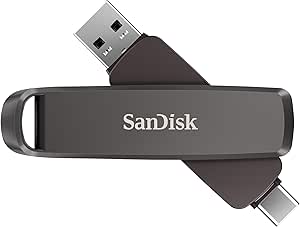 | Best Performance | Capacity: 1 TB | Interface: USB 3.2 Gen 2 | Connectors: USB Type-C and USB Type-A | VIEW ON AMAZON | See Our Full Breakdown |
| SanDisk Ultra 1TB USB-A Flash Drive |  | Best Value for Standard Use | Capacity: 1 TB | Interface: USB 3.2 Gen 1 | Connector: USB Type-A | VIEW ON AMAZON | See Our Full Breakdown |
| MOVE SPEED 1TB USB 3.2 Dual-Port Solid State Flash Drive |  | Best Durability | Capacity: 1 TB | Interface: USB 3.2 Gen 2 | Connectors: USB-A and USB-C | VIEW ON AMAZON | See Our Full Breakdown |
| SSK 1TB USB 3.2 Gen 2 Dual USB-C and USB-A Flash Drive |  | Best Mid-Range Performance | Capacity: 1 TB | Interface: USB 3.2 Gen 2 | Connectors: USB Type-A and USB Type-C | VIEW ON AMAZON | See Our Full Breakdown |
| SanDisk Ultra Fit 1TB USB Type-A Flash Drive |  | Best Compact Design | Capacity: 1 TB | Interface: USB 3.2 Gen 1 | Connector: USB Type-A | VIEW ON AMAZON | See Our Full Breakdown |
| MOVE SPEED 1TB External SSD with 1090MB/s Read/Write Speed, USB 3.2 Gen2 & Type-C Dual Port, Portable and Durable |  | Best High-Performance External SSD | Capacity: 1TB | Read Speed: 1090MB/s | Write Speed: 1090MB/s | VIEW ON AMAZON | See Our Full Breakdown |
| 1TB USB-C Flash Drive for MacBook, iPhone, and Other Devices |  | Best Compact Dual-Connector Stick | Storage capacity: 1 TB | Connections: USB Type-A and USB Type-C | USB standard: USB 3.1 | VIEW ON AMAZON | See Our Full Breakdown |
| SanDisk 512GB Ultra USB 3.0 Flash Drive |  | Best Budget Entry-Level Drive | Capacity: 512GB | Transfer Speed: up to 130MB/s | Interface: USB 3.0 | VIEW ON AMAZON | See Our Full Breakdown |
| TEAMGROUP C175 1TB USB 3.2 Gen 1 Flash Drive, Read 100MB/s, Matte Black |  | Best Capless Design | Memory Storage Capacity: 1 TB | Hardware Interface: USB 3.2 Gen 1 | Read Speed: 100 MB/s | VIEW ON AMAZON | See Our Full Breakdown |
| SanDisk 1TB Ultra Dual Drive Go USB-C & USB-A Flash Drive |  | Best Mobile Ecosystem Integration | Memory Storage Capacity: 1024 GB | Hardware Interface: USB 3.1 Type C | Write Speed: 50-350 MB/s | VIEW ON AMAZON | See Our Full Breakdown |
| SanDisk Ultra Flair 1TB USB-A Flash Drive |  | Best Compact USB-A Option | Storage Capacity: 1 TB | Interface: USB 3.2 Gen 1 | Connector: USB Type-A | VIEW ON AMAZON | See Our Full Breakdown |
| SSK 1TB USB Drive, External SSD with Dual USB Type-C and USB-A Ports |  | Best High-Speed Dual-Port Drive | Storage Capacity: 1 TB | Transfer Speed: Up to 550 MB/s | Ports: USB-C and USB-A 3.2 | VIEW ON AMAZON | See Our Full Breakdown |
| usb flash drive 1tb | Read Speed | Interface | Capacity | Write Speed |
|---|---|---|---|---|
| SanDisk Extreme PRO 1TB Dual D | Up to 1,000 MB/s | USB 3.2 Gen 2 | 1 TB | Up to 900 MB/s |
| SanDisk Ultra 1TB USB-A Flash | Up to 130 MB/s | USB 3.2 Gen 1 | 1 TB | — |
| MOVE SPEED 1TB USB 3.2 Dual-Po | Up to 570 MB/s | USB 3.2 Gen 2 | 1 TB | Up to 520 MB/s |
| SSK 1TB USB 3.2 Gen 2 Dual USB | Up to 1,000 MB/s | USB 3.2 Gen 2 | 1 TB | 500–900 MB/s |
| SanDisk Ultra Fit 1TB USB Type | Up to 400 MB/s | USB 3.2 Gen 1 | 1 TB | 10 MB/s |
| MOVE SPEED 1TB External SSD wi | 1090MB/s | USB 3.2 Gen2 & Type-C | 1TB | 1090MB/s |
| 1TB USB-C Flash Drive for MacB | Up to 120 MB/s | — | — | Up to 100 MB/s |
| SanDisk 512GB Ultra USB 3.0 Fl | — | USB 3.0 | 512GB | — |
| TEAMGROUP C175 1TB USB 3.2 Gen | 100 MB/s | — | — | — |
| SanDisk 1TB Ultra Dual Drive G | 400 MB/s | — | — | 50-350 MB/s |
| SanDisk Ultra Flair 1TB USB-A | Up to 150 MB/s | USB 3.2 Gen 1 | — | — |
| SSK 1TB USB Drive | — | — | — | — |
More Details on Our Top Picks
SanDisk Extreme PRO 1TB Dual Drive USB Flash Drive
This drive stands out for its raw speed, offering read and write rates that rival many external SSDs. Compared to the SanDisk Ultra 1TB, which tops out at 130 MB/s, the Extreme PRO’s 1,000 MB/s read speed cuts transfer times for large video files dramatically. The dual USB-C and USB-A connectors eliminate the need for dongles, making it versatile for modern laptops and older desktops alike. However, this performance comes with a premium build and price point. While the metal casing feels durable, the drive is bulkier than ultra-compact options. It is the clear choice for professionals who value time over portability, but casual users may find the speed advantage negligible for everyday document transfers.
Pros:- Extremely fast read and write speeds reduce transfer times for large files.
- Dual connectors allow seamless switching between USB-C and USB-A devices.
- Metal construction provides durability and better heat dissipation than plastic.
Cons:- Higher price point compared to standard flash drives with lower speeds.
- Slightly larger form factor makes it less discreet for pocket carry.
Best for: Video editors and photographers who frequently transfer large 4K files between devices and need speed to minimize workflow interruptions.
Not ideal for: Users who only move small documents or photos, as the high cost is not justified by the marginal speed gain over cheaper models.
- Capacity:1 TB
- Interface:USB 3.2 Gen 2
- Connectors:USB Type-C and USB Type-A
- Read Speed:Up to 1,000 MB/s
- Write Speed:Up to 900 MB/s
- Security:128-bit AES Encryption
- Dimensions:3.54 × 0.8 × 0.51 in
Our verdict“Choose this if you need SSD-like speeds in a flash drive form factor and have the budget to match.”
SanDisk Ultra 1TB USB-A Flash Drive
This model serves as the reliable workhorse for general storage needs. Unlike the SanDisk Extreme PRO, which commands a premium for dual connectors and higher speeds, the Ultra 1TB focuses on cost-effective capacity. Its 130 MB/s read speed is sufficient for moving photos and documents quickly enough for most home users, though it will feel slow when handling multi-gigabyte video files. The compact, lightweight design fits easily into a pocket or bag, avoiding the bulk of dual-drive options. While it lacks USB-C connectivity, requiring an adapter for newer laptops, its simplicity and five-year warranty make it a safe, low-risk choice for those who don’t need cutting-edge transfer rates.
Pros:- Affordable price point for 1TB of storage capacity.
- Compact and lightweight design ideal for everyday carry.
- Includes password protection and app-based backup management.
Cons:- Slow write speeds compared to dual-drive or SSD-based flash drives.
- Lacks USB-C connectivity, limiting compatibility with modern devices without adapters.
Best for: Students and home users who need affordable 1TB storage for documents, photos, and media playback on standard computers.
Not ideal for: Professionals using USB-C only laptops, as the USB-A connector requires a dongle for compatibility.
- Capacity:1 TB
- Interface:USB 3.2 Gen 1
- Connector:USB Type-A
- Read Speed:Up to 130 MB/s
- Warranty:Five Years
- Dimensions:2.72 × 0.87 × 0.39 in
- Software:SanDisk Memory Zone App
Our verdict“A solid, no-nonsense option for users who prioritize capacity and price over transfer speed.”
MOVE SPEED 1TB USB 3.2 Dual-Port Solid State Flash Drive
The zinc alloy casing of this drive sets it apart, offering physical resilience that plastic competitors lack. While the SSK 1TB also uses metal, the MOVE SPEED emphasizes heat dissipation holes and resistance to water, dust, and drops. This makes it a robust choice for field work or rough handling. Its dual USB-A and USB-C ports provide the same connectivity flexibility as higher-end models, but at a more accessible price. However, the advertised speeds of 570 MB/s are realistic but not record-breaking. It doesn’t offer the software encryption found in SanDisk options, relying instead on physical protection. For users who worry about breaking their drive, this is a practical, tough alternative.
Pros:- Rugged zinc alloy body resists drops, water, and dust.
- Dual USB-A and USB-C ports support wide device compatibility.
- Heat dissipation design helps maintain performance during long transfers.
Cons:- No built-in software encryption or password protection.
- Brand recognition and long-term support may be less established than major manufacturers.
Best for: Outdoor enthusiasts, field researchers, or clumsy users who need a drive that can survive drops, spills, and hot environments.
Not ideal for: Users requiring built-in software encryption for sensitive corporate data, as this model lacks native software security tools.
- Capacity:1 TB
- Interface:USB 3.2 Gen 2
- Connectors:USB-A and USB-C
- Read Speed:Up to 570 MB/s
- Write Speed:Up to 520 MB/s
- Material:Zinc Alloy
- Durability:Water, Dust, Drop, and Magnet Resistant
Our verdict“Select this for its physical toughness and reliable dual-port convenience in demanding environments.”
SSK 1TB USB 3.2 Gen 2 Dual USB-C and USB-A Flash Drive
Positioned between the budget SanDisk Ultra and the premium Extreme PRO, the SSK 1TB delivers 1,000 MB/s read speeds in a dual-drive format. It matches the top-tier read performance of the SanDisk Extreme PRO but often at a lower price. The zinc alloy body feels premium and aids in cooling, while the protective caps prevent connector damage. Write speeds are variable (500–900 MB/s), which is acceptable for most tasks but may lag behind the Extreme PRO’s consistent performance. It lacks Lightning compatibility, so iPhone users with older models are excluded. This drive is a strong contender for those wanting high speed without the highest brand markup.
Pros:- High read speeds up to 1,000 MB/s rival premium competitors.
- Dual USB-C and USB-A connectors offer versatile device support.
- Zinc alloy construction provides durability and shock resistance.
Cons:- Write speeds fluctuate significantly depending on usage conditions.
- No compatibility with Apple Lightning devices.
Best for: Tech-savvy users who want high-speed transfers and dual-port convenience without paying for the most expensive brand name.
Not ideal for: iPhone owners with Lightning ports, as this drive is incompatible with those devices.
- Capacity:1 TB
- Interface:USB 3.2 Gen 2
- Connectors:USB Type-A and USB Type-C
- Read Speed:Up to 1,000 MB/s
- Write Speed:500–900 MB/s
- Material:Zinc Alloy
- Compatibility:Windows, Linux, Mac OS, Android
Our verdict“A smart buy for speed-focused users who prioritize value over brand prestige.”
SanDisk Ultra Fit 1TB USB Type-A Flash Drive
This drive is designed to disappear. Measuring just over an inch long, it plugs into a laptop’s USB port and stays there, acting as permanent extra storage. Unlike the SanDisk Ultra 1TB, which is meant to be carried around and plugged in occasionally, the Ultra Fit is a plug-and-stay solution. Its 400 MB/s read speed is faster than the standard Ultra but slower than dual-drive SSDs. The 10 MB/s write speed is its significant weakness, making it poor for saving large files but fine for playing media. It’s ideal for expanding storage on devices with limited ports, such as cars, game consoles, or older laptops, rather than for frequent file transfers.
Pros:- Ultra-compact size allows it to remain plugged in without protruding.
- Read speeds up to 400 MB/s are sufficient for media playback.
- Compatible with a wide range of USB-A devices including consoles and TVs.
Cons:- Extremely slow write speeds (10 MB/s) hinder file backups.
- USB-A only connector requires adapters for modern USB-C devices.
Best for: Users who want to permanently expand storage on laptops, cars, or game consoles without a dangling device.
Not ideal for: People who need to transfer large files back and forth frequently, due to the very slow write speeds.
- Capacity:1 TB
- Interface:USB 3.2 Gen 1
- Connector:USB Type-A
- Read Speed:Up to 400 MB/s
- Write Speed:10 MB/s
- Dimensions:1.17 × 0.56 × 0.2 in
- Security:128-bit AES (via software)
Our verdict“Perfect for permanent storage expansion in tight spaces where portability is secondary to form factor.”
MOVE SPEED 1TB External SSD with 1090MB/s Read/Write Speed, USB 3.2 Gen2 & Type-C Dual Port, Portable and Durable
This drive stands out because it is technically an external SSD rather than a standard thumb drive, delivering 1090MB/s transfer speeds that dwarf the 100-400MB/s limits of typical flash drives like the TEAMGROUP C175. Its zinc alloy casing offers superior durability against drops and water, making it ideal for professionals moving large video files or backups. However, the lack of an included cable is a significant friction point, requiring users to source their own compatible USB-C to A or C to C cables. While larger than a traditional stick, the speed advantage justifies the bulk for anyone who frequently transfers gigabytes of data.
Pros:- Ultra-fast 1090MB/s read and write speeds
- Rugged zinc alloy case resistant to drops and water
- Dual USB-C and USB-A ports for broad compatibility
- True plug-and-play functionality without drivers
Cons:- No cable included in the package
- Bulky form factor compared to standard flash drives
- Capacity capped at 1TB for this specific model
Best for: Video editors and photographers who need to transfer massive files quickly and prioritize durability over pocket-sized portability.
Not ideal for: Users looking for a tiny, keychain-friendly drive for occasional document sharing, as this unit is bulkier and requires extra cables.
- Capacity:1TB
- Read Speed:1090MB/s
- Write Speed:1090MB/s
- Interface:USB 3.2 Gen2 & Type-C
- Material:Zinc alloy
- Compatibility:Android, iPhone 15/16/17, MacBook, PC, Smart TV
Our verdict“Choose this if you prioritize transfer speed and build quality over minimal size.”
1TB USB-C Flash Drive for MacBook, iPhone, and Other Devices
This model offers a classic thumb-drive form factor with dual USB-A and USB-C connectors, making it far more pocketable than the MOVE SPEED 1TB External SSD. At 2.6 inches long, it slides easily into tight laptop ports without protruding excessively. The metal construction feels robust, though the 120MB/s read speed is modest compared to the 400MB/s offered by the SanDisk Ultra Dual Drive Go. It is a reliable, no-nonsense option for general file transport, but users expecting rapid large-file backups may find the throughput limiting. The 12-month warranty provides basic peace of mind for casual users.
Pros:- Compact metal design fits easily in pockets
- Dual USB-A and USB-C connectors eliminate adapter needs
- Plug-and-play simplicity for immediate use
- Includes a 12-month manufacturer guarantee
Cons:- Modest 120MB/s read speed limits large file transfers
- Usable capacity is lower due to formatting overhead
- Performance depends heavily on host device port quality
Best for: Students and office workers who need a simple, compact way to move documents between desktops and modern laptops.
Not ideal for: Power users transferring multi-gigabyte media files, as the 120MB/s speed will create noticeable bottlenecks.
- Storage capacity:1 TB
- Connections:USB Type-A and USB Type-C
- USB standard:USB 3.1
- Read speed:Up to 120 MB/s
- Write speed:Up to 100 MB/s
- Material:Metal
- Dimensions:2.6 × 0.8 × 0.3 in
- Warranty:12-month guarantee
Our verdict“A solid, portable choice for everyday document transfer between mixed USB-A and USB-C environments.”
SanDisk 512GB Ultra USB 3.0 Flash Drive
While this drive only offers 512GB, it serves as a cost-effective entry point compared to the 1TB options like the TEAMGROUP C175. It includes secure encryption and password protection, a feature often missing in cheaper generic drives, making it suitable for carrying slightly sensitive work documents. The 130MB/s read speed is adequate for documents and small media files but falls short of the 400MB/s seen in the SanDisk Ultra Dual Drive Go. Its backward compatibility with USB 2.0 ensures it works on older machines, though speed will drop significantly. This is a pragmatic choice for those who don’t strictly need 1TB of space.
Pros:- Includes secure file encryption and password protection
- Backward compatible with legacy USB 2.0 ports
- Reliable brand reputation for durability
- Compact and lightweight for keychain attachment
Cons:- Half the capacity of other options in this roundup
- Requires USB 3.0 port to achieve advertised speeds
- Write speeds are not specified and likely lower
Best for: Users with limited storage needs who prioritize basic security features and broad compatibility with older computers.
Not ideal for: Buyers specifically seeking 1TB capacity or high-speed media editing workflows, as it lacks both the space and the speed.
- Capacity:512GB
- Transfer Speed:up to 130MB/s
- Interface:USB 3.0
- Compatibility:USB 2.0 and 3.0
- Encryption:Secure file encryption and password protection
Our verdict“A secure, reliable, and affordable option for users who do not require full 1TB storage.”
TEAMGROUP C175 1TB USB 3.2 Gen 1 Flash Drive, Read 100MB/s, Matte Black
The TEAMGROUP C175 solves the common annoyance of losing drive caps with its seamless, capless design, offering a clean aesthetic that rivals the SanDisk Ultra Dual Drive Go. It provides a full 1TB capacity with a 100MB/s read speed, which is functional but noticeably slower than the MOVE SPEED 1TB SSD. The matte black finish resists fingerprints, maintaining a professional look. However, the lack of specified write speeds is a concern for users moving large batches of files, as write performance is often the bottleneck in flash drives. It is a stylish, no-fuss option for general storage, provided you aren’t in a hurry.
Pros:- Capless design prevents lost parts
- Sleek matte black finish resists fingerprints
- Lifetime warranty and technical support included
- Full 1TB capacity in a compact form
Cons:- Write performance is not specified
- Limited to USB 3.2 Gen 1 speeds
- Actual usable space is less than 1TB after formatting
Best for: Professionals and students who want a sleek, modern-looking drive that won’t lose its cap during daily commutes.
Not ideal for: Data-intensive users who need to write large files quickly, as the unstated write speeds could be a hidden bottleneck.
- Memory Storage Capacity:1 TB
- Hardware Interface:USB 3.2 Gen 1
- Read Speed:100 MB/s
- Connectivity Technology:USB
- Color:Black
- Compatible Devices:Desktop, Laptop
Our verdict“A stylish, hassle-free 1TB drive for everyday storage, provided you don’t need blazing write speeds.”
SanDisk 1TB Ultra Dual Drive Go USB-C & USB-A Flash Drive
This drive excels in mobile ecosystems, offering 400MB/s read speeds that significantly outpace the TEAMGROUP C175 and standard USB-C sticks. The reversible USB-C and USB-A connectors make it incredibly versatile for switching between phones and laptops. A standout feature is the SanDisk Memory Zone app, which enables automatic photo backup from mobile devices, a convenience rarely found in competitors like the MOVE SPEED SSD. However, it relies on OTG support on phones, which can be finicky on some Android models. It is the best choice for users deeply integrated into the SanDisk mobile software environment.
Pros:- High 400MB/s read speed for quick transfers
- Automatic photo backup via SanDisk app
- Dual connectors for seamless phone-to-PC workflow
- Compact and portable design
Cons:- Requires OTG support on mobile devices
- Write speeds vary widely (50-350MB/s)
- Dependent on proprietary app for full feature set
Best for: Smartphone users who want to offload photos and videos directly to a drive and use dedicated backup apps.
Not ideal for: Users with older devices lacking OTG support or those who prefer not to install proprietary management software.
- Memory Storage Capacity:1024 GB
- Hardware Interface:USB 3.1 Type C
- Write Speed:50-350 MB/s
- Read Speed:400 MB/s
- Connectivity Technology:USB Flash Memory
- Compatible Phone Models:Any USB Type-C smartphone, tablet, or Mac with OTG support
- Compatible Devices:Desktops, Laptops, Smartphones, Tablets
- Color:Black
Our verdict“The ideal companion for smartphone users who want fast transfers and automated media backup.”
SanDisk Ultra Flair 1TB USB-A Flash Drive
This drive stands out for its minimalist metal design and reliability in a tiny footprint. Compared to the bulkier SSK 1TB External SSD, the SanDisk Ultra Flair is far easier to pocket, making it ideal for users who prioritize portability over raw speed. While its 150 MB/s read speed is slower than external SSDs, it remains sufficient for document transfers and media playback on older systems. The password protection software adds a layer of security that many budget drives lack. However, the USB-A connector limits compatibility with modern laptops lacking these ports, requiring an adapter for many users. If you need a drive that stays hidden inside a port without snagging, this is a strong contender, though you sacrifice the dual-connector flexibility seen in drives like the SanDisk 1TB Ultra Dual Drive Go.
Pros:- Compact metal casing resists physical damage
- Includes password protection for file security
- Low-profile design prevents port blockage
Cons:- USB-A only connector lacks modern compatibility
- Read speeds lag behind SSD-based alternatives
- No dual-connector support for cross-device use
Best for: Students and office workers who need a durable, low-profile drive for legacy computers and USB-A ports.
Not ideal for: Video editors or users with modern USB-C-only laptops, as the slower speeds and lack of a USB-C connector will hinder workflow.
- Storage Capacity:1 TB
- Interface:USB 3.2 Gen 1
- Connector:USB Type-A
- Read Speed:Up to 150 MB/s
- Dimensions:1.69 × 0.51 × 0.28 in
- Security:Password protection software
- Material:Metal casing
Our verdict“Choose this for a secure, durable, and tiny drive that fits perfectly into older USB-A ports.”
SSK 1TB USB Drive, External SSD with Dual USB Type-C and USB-A Ports
The SSK 1TB External SSD bridges the gap between traditional flash drives and portable SSDs. With 550 MB/s transfer speeds, it significantly outpaces the SanDisk Ultra Flair and even the TEAMGROUP C175, making it suitable for handling large video files or game libraries. Its dual USB-C and USB-A ports eliminate the need for dongles when switching between an iPhone and a desktop PC. The zinc alloy shell offers superior shock resistance compared to plastic-cased competitors like the SanDisk Ultra Fit. The main trade-off is its larger size; it is not as discreet as smaller sticks. Additionally, the default EXFAT format may require reformatting for specific Mac or Windows-only workflows, adding a small setup step for some users.
Pros:- 550 MB/s speeds approach SSD performance
- Dual USB-C and USB-A connectors ensure wide compatibility
- Durable zinc alloy construction withstands drops
Cons:- Larger physical size compared to compact flash drives
- Default EXFAT format may require reformatting
- Performance varies depending on the host device’s USB controller
Best for: Content creators and professionals who need fast transfer speeds and seamless connectivity between Mac, Windows, and mobile devices.
Not ideal for: Users with limited port space on laptops, as the drive’s bulkier form factor may obstruct adjacent ports.
- Storage Capacity:1 TB
- Transfer Speed:Up to 550 MB/s
- Ports:USB-C and USB-A 3.2
- Compatibility:Windows, Mac, Android, iPhone, iPad
- Material:Zinc alloy shell
- File System:EXFAT
- Durability:Shock-resistant
Our verdict“This drive is the best choice for those who need SSD-level speeds with the convenience of dual connectors.”

How We Picked
I evaluated these twelve 1TB USB flash drives by analyzing their internal architecture, distinguishing between traditional NAND flash sticks and hybrid SSD-based drives. This distinction was critical because it dictates sustained write performance, a factor often overlooked in standard spec sheets. I prioritized drives that maintain high transfer speeds over large file batches rather than just peak burst speeds, as this reflects real-world usage for video editors and data archivists.
Ranking logic favored versatility and build quality. Drives with dual USB-C and USB-A connectors received a boost for their future-proof compatibility, while compact designs were weighed against their thermal limitations. I also examined brand reputation for firmware stability and long-term data integrity, ensuring that the recommended picks are not just fast on day one but reliable over years of use.
| usb flash drive 1tb | Interface | Material |
|---|---|---|
| SanDisk Extreme PRO 1TB Dual D | USB 3.2 Gen 2 | — |
| SanDisk Ultra 1TB USB-A Flash | USB 3.2 Gen 1 | — |
| MOVE SPEED 1TB USB 3.2 Dual-Po | USB 3.2 Gen 2 | Zinc Alloy |
| SSK 1TB USB 3.2 Gen 2 Dual USB | USB 3.2 Gen 2 | Zinc Alloy |
| SanDisk Ultra Fit 1TB USB Type | USB 3.2 Gen 1 | — |
| MOVE SPEED 1TB External SSD wi | USB 3.2 Gen2 & Type-C | Zinc alloy |
| 1TB USB-C Flash Drive for MacB | — | Metal |
| SanDisk 512GB Ultra USB 3.0 Fl | USB 3.0 | — |
| TEAMGROUP C175 1TB USB 3.2 Gen | — | — |
| SanDisk 1TB Ultra Dual Drive G | — | — |
| SanDisk Ultra Flair 1TB USB-A | USB 3.2 Gen 1 | Metal casing |
| SSK 1TB USB Drive | — | Zinc alloy shell |
Factors to Consider When Choosing Usb Flash Drive 1tb
Selecting a 1TB drive is not just about storage space; it is about how that space is accessed and managed. The following factors help you navigate the technical nuances that separate a mediocre drive from a high-performance tool.
NAND Flash vs. SSD Architecture
Most traditional USB flash drives use NAND flash memory with a simple controller, which is cost-effective but slower. In contrast, drives like the MOVE SPEED or SSK models utilize SSD controllers and sometimes DRAM caches, mimicking the architecture of an external solid-state drive. This difference is profound: SSD-based drives maintain high write speeds throughout a 1TB transfer, whereas NAND drives often slow down drastically once their SLC cache fills up. If you frequently move large video files or software installations, an SSD-based drive is worth the premium.
Thermal Management and Sustained Speed
Heat is the enemy of sustained performance. Smaller, plastic-bodied drives like the SanDisk Ultra Fit may throttle their speed after a few minutes of heavy writing to protect the components. Larger drives with metal housings, such as the SanDisk Extreme PRO, act as heat sinks, allowing them to maintain peak speeds for longer durations. When comparing specs, look for reviews mentioning sustained write speeds rather than just the maximum burst speed, as the latter is rarely achieved in daily use.
Connector Versatility and Physical Fit
The shift to USB-C has created a dilemma for buyers. A drive with dual connectors (USB-A and USB-C) offers the best compatibility across older desktops and newer laptops. However, some dual drives are bulky and may block adjacent ports. Single-connector drives are more compact but require an adapter for cross-platform use. Assess your typical workflow: if you move data between a MacBook and a Windows desktop, a dual-drive is the most efficient choice. If you only use one type of port, a dedicated single-connector drive offers a cleaner, less obtrusive profile.
Data Integrity and Brand Reliability
In the 1TB category, the risk of data corruption increases with the complexity of the controller and the density of the memory chips. Established brands like SanDisk and TEAMGROUP invest in rigorous quality control and firmware updates that mitigate these risks. Generic or unbranded drives may offer lower prices but often use recycled or lower-grade NAND chips, leading to higher failure rates. For critical backups, prioritize manufacturers with strong warranty support and a track record of consistent performance.
Price Per Gigabyte and Long-Term Value
While the initial cost per gigabyte is lower for traditional NAND drives, the total cost of ownership can be higher if you factor in time lost to slow transfers. An SSD-based 1TB drive might cost more upfront but saves hours of waiting during large file operations. Consider your time value: if you transfer data daily, the faster drive pays for itself through efficiency. For occasional archival storage where speed is irrelevant, a standard NAND drive remains a cost-effective solution.
Frequently Asked Questions
Why do 1TB USB flash drives often have slower write speeds than read speeds?
This disparity exists because most flash drives use SLC (Single-Level Cell) caching for writes. The drive writes data quickly to a small, fast cache until it fills up, after which it writes directly to slower QLC or TLC NAND cells. Read speeds remain high because the controller can access data from anywhere on the drive without the overhead of rewriting and verifying blocks. To avoid this bottleneck, choose an SSD-based drive like the MOVE SPEED model, which uses a more sophisticated controller to manage data placement more efficiently.
Can I use a USB-C 1TB flash drive directly with my iPhone 15 or newer?
Yes, if your iPhone has a USB-C port (iPhone 15 series and newer). These devices natively support external storage via the Files app, allowing you to import photos, videos, and documents directly from the drive. You do not need a special MFi certification for standard USB-C flash drives, unlike the older Lightning connector era. Ensure the drive is formatted in exFAT or APFS for compatibility, as NTFS is not supported by iOS out of the box.
Is a 1TB SSD-based flash drive better than a 1TB external portable SSD?
It depends on your need for portability versus protection. SSD-based flash drives (like the SSK or MOVE SPEED models) are smaller and plug directly into a port, reducing the risk of losing cables and making them ideal for quick transfers. However, dedicated portable SSDs often have better shock resistance, more robust casing, and sometimes higher sustained speeds due to better cooling. If you need a drive that lives in a pocket and connects to various devices instantly, a flash drive is superior; for rugged travel backups, a dedicated SSD case is often safer.
Do I need to format a new 1TB USB drive before using it?
Most 1TB drives come pre-formatted in exFAT, which is compatible with Windows, macOS, and many modern devices. You typically do not need to reformat unless you are using the drive exclusively with one operating system and want specific features (like NTFS permissions for Windows or APFS encryption for Mac). Reformatting will erase all data, so always back up existing files first. If you encounter compatibility issues with older devices, you may need to format to FAT32, though this limits individual file sizes to 4GB.
How can I prevent my 1TB flash drive from overheating?
Overheating is common in compact drives during large transfers. To mitigate this, remove any protective rubber caps during use to allow heat dissipation, and avoid transferring massive files in direct sunlight or hot environments. If you are performing a multi-hundred-gigabyte transfer, consider using a drive with a metal housing like the SanDisk Extreme PRO, which conducts heat away from the controller more effectively than plastic alternatives. Pausing transfers periodically can also help the drive cool down and resume at full speed.
Conclusion
Choosing the right 1TB USB flash drive depends on your specific workflow and device ecosystem. For the best overall balance of speed, capacity, and connectivity, the SanDisk Extreme PRO 1TB Dual Drive is the standout choice, offering SSD-like performance in a portable form factor. If you need a budget-friendly option for occasional large file storage and already have a fast computer, the SanDisk Ultra 1TB USB-A provides reliable capacity at a lower cost. For users who prioritize extreme portability and need to plug directly into modern laptops or phones, the SanDisk Ultra Fit 1TB is the most discreet option, though you must accept slower sustained write speeds. Finally, for those who demand maximum transfer rates for video editing or large database backups, the MOVE SPEED 1TB Solid State Flash Drive offers the highest performance tier, bridging the gap between flash drives and external SSDs. Match the drive’s architecture to your transfer habits, and you will find the perfect match for your storage needs.