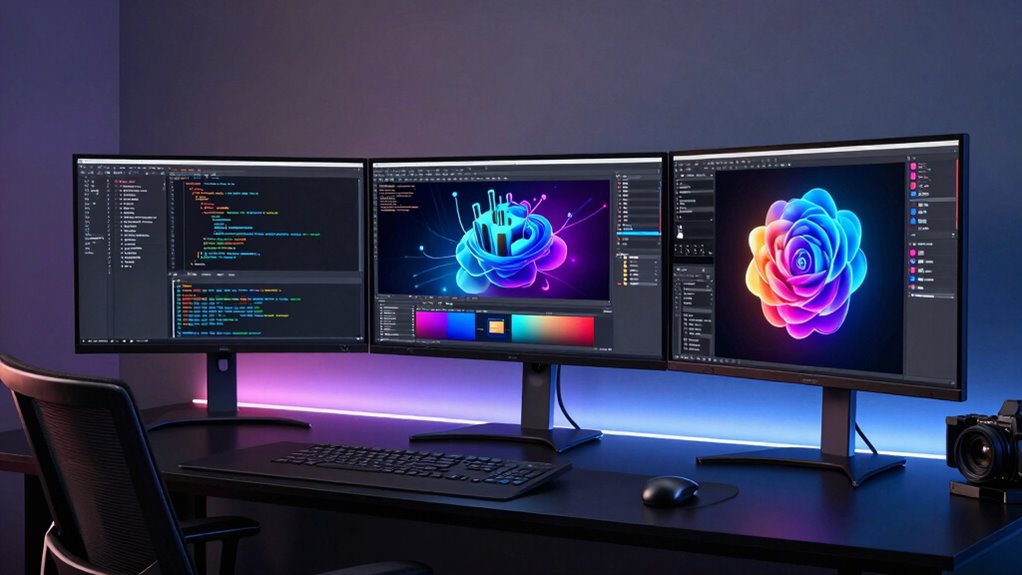

Setting up three monitors can dramatically boost productivity and create an immersive workspace, but choosing the right triple monitor setup kit isn’t straightforward. The MountUp Triple Monitor Mount stands out as the best overall for its versatile full-motion capabilities and sturdy build. For those needing maximum size support, the Triple Monitor Mount for Up to 49 Inches offers exceptional adjustability and heavy-duty design. Meanwhile, portable options like the Upgraded Detachable Laptop Screen Extender provide flexibility for mobile work setups. Common tradeoffs include balancing affordability against durability and adjusting complexity versus ease of installation. Keep reading for a full breakdown to find the best fit for your needs.

Get the latest gadgets delivered free with Prime
- Fast, free delivery on millions of items
- Prime Video, Amazon Music and more included
- Member-only deals all year
Complete the kit



Key Takeaways
- The top mounts excel in adjustability and load capacity, making them suitable for diverse screen sizes.
- Portable triple monitor extenders are ideal for mobile setups but typically lack the stability of desk-mounted options.
- Heavy-duty models with gas springs offer superior flexibility but tend to be more expensive and complex to install.
- Compatibility with different monitor sizes and mounting options (clamp vs. grommet) is a key decision factor.
- Budget-friendly options often sacrifice some adjustability and build quality, but still serve basic multi-monitor needs.
| MOUNTUP Triple Monitor Mount for 17-32 inch Screens, Full Motion Desk Stand, Holds 4.4-19.8 lbs per Monitor, Clamp & Grommet Mount, Black |  | Best Overall | Monitor Size Compatibility: 17-32 inches | VESA Compatibility: 75x75mm, 100x100mm | Weight Capacity: 4.4-19.8 lbs per monitor | VIEW ON AMAZON | See Our Full Breakdown |
| Triple Monitor Mount for Up to 49 Inches, Fully Adjustable Heavy Duty 3 Monitor Arm with Gas Spring, Desk Mount, Black |  | Best Premium | Monitor Size Support: Up to 49 inches (center), 35 inches (side arms) | Weight Capacity: 44 lbs (center), 26.4 lbs (side arms) | VESA Compatibility: 75x75mm and 100x100mm | VIEW ON AMAZON | See Our Full Breakdown |
| VIVO Triple Pneumatic Monitor Mount for 3 Screens up to 32 inches, Fully Adjustable, Heavy Duty Desk Stand with C-Clamp, Black, STAND-V300G |  | Best for Ergonomics | Supported Screen Size: 17-32 inches | Maximum Weight per Monitor: 17.6 lbs | Mounting Surface Thickness: up to 3.25 inches | VIEW ON AMAZON | See Our Full Breakdown |
| Upgraded Detachable 15.6″ Laptop Screen Extender FHD 1080P IPS Triple Portable Monitor for 13″-17.3″ Laptops |  | Best Portable | Screen Size: 15.6 inches | Resolution: 1920×1080 | Connectivity: USB-C, USB-A, HDMI | VIEW ON AMAZON | See Our Full Breakdown |
| WALI Triple Monitor Stand for 13-27 inch Screens, Supports up to 22 lbs per arm |  | Best Budget | Compatibility: Monitors up to 27 inches | Weight Capacity: 22 lbs per arm | Mounting Options: Free-standing, grommet-base | VIEW ON AMAZON | See Our Full Breakdown |
| 14-inch Laptop Screen Extender, FHD IPS Triple Monitor |  | Best Portable Triple Monitor for Remote Work | Screen Size: 14 inches | Resolution: 1920×1200 Full HD | Aspect Ratio: 16:10 | VIEW ON AMAZON | See Our Full Breakdown |
| 15.6″ Laptop Screen Extender, FHD IPS Triple Screen Portable Monitor |  | Best for Wide-Screen Multitasking on the Go | Screen Size: 15.6 inches | Resolution: Full HD (FHD) | Contrast Ratio: 1200:1 | VIEW ON AMAZON | See Our Full Breakdown |
| HUANUO Triple Monitor Mount for 17 to 32 inch Screens with Swivel, Tilt, Rotation, Clamp & Grommet Kit |  | Best Space-Saving Mount for Larger Monitors | Maximum monitor size: 32 inches | VESA compatibility: 75x75mm or 100x100mm | Weight range: 4.4 lbs to 17.6 lbs | VIEW ON AMAZON | See Our Full Breakdown |
| Synnov 15.6” Laptop Screen Extender, 1080P FHD Portable Triple Monitor for Laptops |  | Best Lightweight Portable Triple Monitor for Travel | Screen Size: 15.6 inches | Resolution: 1080P FHD | Viewing Angle: 178° | VIEW ON AMAZON | See Our Full Breakdown |
| Triple Monitor Desk Mount for 13-32 inch Screens |  | Best Fully Adjustable Multi-Monitor Mount | Supported Screen Size: 13-32 inches | Max Load: 19.8 lbs | VESA Compatibility: 75x75mm, 100x100mm | VIEW ON AMAZON | See Our Full Breakdown |
| triple monitor setup kit | Mounting Options |
|---|---|
| MOUNTUP Triple Monitor Mount f | Clamp, Grommet |
| Triple Monitor Mount for Up to | C-clamp, Grommet base |
| VIVO Triple Pneumatic Monitor | C-Clamp |
| Upgraded Detachable 15.6" Lapt | — |
| WALI Triple Monitor Stand for | Free-standing, grommet-base |
| 14-inch Laptop Screen Extender | — |
| 15.6" Laptop Screen Extender | — |
| HUANUO Triple Monitor Mount fo | — |
| Synnov 15.6” Laptop Screen Ext | — |
| Triple Monitor Desk Mount for | C-Clamp, Grommet |
More Details on Our Top Picks
MOUNTUP Triple Monitor Mount for 17-32 inch Screens, Full Motion Desk Stand, Holds 4.4-19.8 lbs per Monitor, Clamp & Grommet Mount, Black
This mount stands out for its versatility in supporting a wide range of monitor sizes from 17 to 32 inches, with full motion adjustments that help optimize ergonomic comfort. Compared to the WALI stand, it offers more flexible positioning, but this comes at the expense of potentially requiring reinforcement on very thin desks. Its easy-to-install clamp and grommet options make it suitable for most setups, though the heavy-gauge steel construction may be overkill for lighter monitors. The broad size compatibility and adjustable features make it ideal for users seeking a customizable, space-saving solution, but it may be less ideal for those with limited desk thickness or very lightweight monitors.
Pros:- Supports multiple monitor sizes with full motion adjustments
- Space-saving design reduces desktop clutter
- Easy to assemble with clear instructions and hardware
Cons:- May require reinforcement plate for thin desks
- Grommet mounting may be challenging on some desks
Best for: Professionals or gamers needing a highly adjustable mount for multiple monitors across a broad size spectrum.
Not ideal for: Users with very thin or delicate desks, or those looking for a lightweight, minimalist setup.
- Monitor Size Compatibility:17-32 inches
- VESA Compatibility:75x75mm, 100x100mm
- Weight Capacity:4.4-19.8 lbs per monitor
- Mounting Options:Clamp, Grommet
- Material:Heavy-gauge steel
- Desk Thickness:Clamp: 0.39”-3.15”, Grommet: 0.39”-1.97”
Our verdict“This mount is best suited for users who want maximum flexibility and size support for their triple monitor setup.”
Triple Monitor Mount for Up to 49 Inches, Fully Adjustable Heavy Duty 3 Monitor Arm with Gas Spring, Desk Mount, Black
This model excels in supporting ultrawide monitors up to 49 inches, making it ideal for power users or creative professionals who demand expansive screens. Its gas spring arms provide smooth, effortless adjustments far superior to the manual flexibility of the WALI stand, but the heavier construction and complex installation process may be daunting for beginners. The durable cast aluminum ensures stability even with large, heavy monitors, yet the size and weight capacity could be overkill for typical office setups. This pick makes the most sense for those needing maximum screen real estate and precise control, though it’s less suitable for lighter, smaller monitors or users seeking quick, simple setup.
Pros:- Supports large ultrawide monitors up to 49 inches
- Fully adjustable with smooth gas spring arms
- Durable cast aluminum construction ensures stability
- Includes cable management for a tidy workspace
Cons:- May be complex to install for beginners
- Heavy monitors require secure mounting to prevent sagging
Best for: Power users who require large ultrawide screens and precise ergonomic adjustments for demanding tasks.
Not ideal for: Casual users or those with limited space or lighter monitors, due to its weight and complexity.
- Monitor Size Support:Up to 49 inches (center), 35 inches (side arms)
- Weight Capacity:44 lbs (center), 26.4 lbs (side arms)
- VESA Compatibility:75x75mm and 100x100mm
- Material:Cast aluminum
- Desk Thickness Compatibility:0.4” to 1.8”
- Mounting Options:C-clamp, Grommet base
Our verdict“This premium mount is ideal for users needing maximum screen size and precise positioning with a robust build.”
VIVO Triple Pneumatic Monitor Mount for 3 Screens up to 32 inches, Fully Adjustable, Heavy Duty Desk Stand with C-Clamp, Black, STAND-V300G
This stand offers full articulation for screens up to 32 inches and 17.6 lbs, with pneumatic arms that provide smooth, effortless adjustment, making it ideal for ergonomic optimization. Compared to the WALI stand, it offers a more stable, heavy-duty construction, but its limited monitor size support may be a drawback for those with larger screens. The easy-to-assemble, drill-free design suits a variety of desk surfaces, though it’s less flexible in supporting larger monitors or ultrawide setups. This choice makes sense for users prioritizing ergonomic comfort and stability over size flexibility, but it’s less suitable for very large or heavy monitors.
Pros:- Supports multiple monitors up to 32 inches and 17.6 lbs
- Pneumatic arms allow effortless adjustments
- Heavy-duty build adds stability
- Easy, drill-free installation
Cons:- Limited to 32-inch monitors
- No cable management features
Best for: Office workers or gamers seeking ergonomic, adjustable support for standard-sized monitors.
Not ideal for: Users with ultrawide or very large monitors, or those needing extensive tilt and rotation for bigger screens.
- Supported Screen Size:17-32 inches
- Maximum Weight per Monitor:17.6 lbs
- Mounting Surface Thickness:up to 3.25 inches
- Material:Steel and Aluminum
- Mounting Options:C-Clamp
- Adjustment Type:Pneumatic
Our verdict“This pneumatic mount is perfect for ergonomic comfort and stability with standard-sized monitors in office or gaming setups.”
Upgraded Detachable 15.6″ Laptop Screen Extender FHD 1080P IPS Triple Portable Monitor for 13″-17.3″ Laptops
This portable triple monitor extender stands out for its detachable screens, offering flexible multi-monitor setups for travel or remote work. Its 15.6-inch FHD IPS displays provide crisp visuals, but it isn’t suitable for users with M1/M2/M3 Mac chips, limiting compatibility for some. Compared to stationary mounts like the WALI or Mountup, this device prioritizes portability over stability, making it ideal for frequent movers but less so for permanent setups. The plug-and-play design and adjustable rotation angles make it highly versatile, yet the added weight and lack of detailed specs on weight capacity might concern those planning to use heavier laptops or extended use.
Pros:- Detachable screens for flexible multi-monitor configurations
- High-quality FHD IPS display with eye protection features
- Plug & Play compatibility with various OS
- Foldable and portable design
Cons:- Does not support M1/M2/M3 Mac chips
- Requires additional USB-A to USB-C cable for HDMI use
Best for: Remote workers, digital nomads, or students needing portable multi-monitor support.
Not ideal for: Users with high-performance workstations or those with Apple M1/M2/M3 chips, due to compatibility issues.
- Screen Size:15.6 inches
- Resolution:1920×1080
- Connectivity:USB-C, USB-A, HDMI
- Color Gamut:72% NTSC
- Rotation Angles:90°, 235°, 360°
- Material:Aluminum alloy and PC
Our verdict“This portable monitor extender is ideal for mobility-focused users who need flexible multi-screen options on the go.”
WALI Triple Monitor Stand for 13-27 inch Screens, Supports up to 22 lbs per arm
This stand delivers a reliable, budget-friendly option for holding three monitors from 13 to 27 inches, each supporting up to 22 pounds. Its full adjustability—including tilt, swivel, and rotation—makes it a versatile choice for ergonomic positioning. Compared with the Mountup or VIVO options, it offers similar flexibility but may require modifications for grommet installation on some desks. Its support for monitors up to 27 inches aligns well with typical office setups, yet it isn’t suitable for larger or ultrawide screens. The stand’s affordability makes it an attractive choice for budget-conscious users who want a decent level of flexibility without breaking the bank.
Pros:- Supports monitors up to 27 inches and 22 lbs
- Full tilt, swivel, and rotation adjustments
- Multiple mounting options including free-standing and grommet-base
Cons:- May require desk modification for grommet setup
- Assembly can be complex for some users
Best for: Home office users or students with standard-sized monitors seeking a cost-effective setup.
Not ideal for: Professionals with larger or ultrawide monitors, or those needing ultra-sturdy support for heavy displays.
- Compatibility:Monitors up to 27 inches
- Weight Capacity:22 lbs per arm
- Mounting Options:Free-standing, grommet-base
- Desk Thickness Compatibility:0.3 to 2.4 inches
- Tilt:Center +/-15°, side +/-90°
- Rotation:360°
Our verdict“This stand offers a practical, affordable solution for flexible monitor placement in standard-sized setups.”
14-inch Laptop Screen Extender, FHD IPS Triple Monitor
This compact 14-inch setup stands out for its portability and flexible rotation, making it ideal for remote workers needing a versatile, lightweight solution. Unlike larger options like the 15.6-inch portable monitor, its smaller size may limit multitasking space but offers easier transport. The support for 360° flip and rotation enhances adaptability, while the vivid IPS display ensures clear visuals. However, the need for multiple cables and a potential learning curve for setup can be cumbersome for some users. Its compact size means it’s less suitable for those requiring extensive screen real estate or a more straightforward plug-and-play experience. Overall, this option is perfect for those prioritizing portability but willing to manage a more complex setup.
Pros:- Supports flexible rotation and 360° flip for versatile use
- Boosts productivity by up to 300% with triple screens
- Vivid visuals with IPS technology and full HD resolution
- Lightweight and portable with included carrying bag
Cons:- Requires multiple cables for connection
- May have a learning curve for setup
- Limited to 14-inch size, not suitable for larger screens
Best for: Travelers and remote workers who need a portable, multi-angle monitor to extend their laptop workspace.
Not ideal for: Users seeking a larger, plug-and-play setup or minimal cable management, as its multiple connections can be inconvenient.
- Screen Size:14 inches
- Resolution:1920×1200 Full HD
- Aspect Ratio:16:10
- Contrast Ratio:1000:1
- Viewing Angle:178°
- Weight:3.52 lbs
Our verdict“This pick is best suited for portable, on-the-go users who need flexible multitasking in a compact form factor.”
15.6″ Laptop Screen Extender, FHD IPS Triple Screen Portable Monitor
This 15.6-inch portable monitor extender excels for users wanting larger screens with crisp visuals, making it a step up from the 14-inch option in terms of workspace. Compared with the 14-inch FHD IPS model, it offers a wider viewing area and better multitasking capacity, especially for productivity tasks or casual gaming. The 360° flip and swivel design enhance collaboration, but the need for external power and limited compatibility with some Mac M1/M2 chips introduces setup complexity. Its size and weight make it less suitable for ultra-light travel but perfect for those who prioritize larger displays without sacrificing portability. This model makes the most sense for professionals who need a bigger screen while working remotely or traveling frequently.
Pros:- High-quality IPS display with Full HD resolution for crisp images
- Supports multiple devices with plug-and-play USB-C and HDMI
- 360° flip and swivel design aids sharing and multitasking
- Portable with included carrying case
Cons:- Limited compatibility with some Mac M1/M2/M3 base chips
- Requires manual brightness adjustment
- No built-in battery, needs external power
Best for: Remote workers and students who want a larger portable monitor with versatile sharing features.
Not ideal for: Mac users with M1/M2/M3 chips who require seamless compatibility, as some may face connectivity issues.
- Screen Size:15.6 inches
- Resolution:Full HD (FHD)
- Contrast Ratio:1200:1
- Refresh Rate:60Hz
- Blue Light Technology:Yes
- Compatibility:Windows, MacOS, Android, Chromebook, Surface, Linux, Switch, Xbox, PS4
Our verdict“Ideal for users needing a larger portable display with flexible sharing capabilities, especially on the move.”
HUANUO Triple Monitor Mount for 17 to 32 inch Screens with Swivel, Tilt, Rotation, Clamp & Grommet Kit
The HUANUO triple mount is a sturdy, space-efficient solution for users with monitors between 17 and 32 inches, offering extensive adjustability for ergonomic setup. This makes it suitable for those who want a permanent, organized workspace, unlike portable options like the Synnov portable extender. The mount’s support for tilt, swivel, and rotation allows for precise positioning, but it’s limited to monitors with VESA mounting holes and up to 32 inches in size. Installation can be a challenge for beginners, particularly when aligning multiple monitors. It’s a strong choice for office setups or gaming stations where a fixed, multi-monitor arrangement is preferred over portable solutions. Its space-saving design and flexibility make it ideal for dedicated workspaces, not for on-the-go use.
Pros:- Supports multiple monitors with adjustable swivel, tilt, and rotation
- Space-saving design improves workspace organization
- Two installation options for different desk setups
- Supports monitors up to 32 inches and 17.6 lbs
Cons:- Limited to monitors with VESA mounting holes
- Installation may be challenging for some users
- Not suitable for monitors exceeding 32 inches or heavier than 17.6 lbs
Best for: Professionals or gamers seeking a durable, adjustable mount for a multi-monitor desk setup.
Not ideal for: Users with non-VESA compatible monitors or those who prefer portable, lightweight arrangements, as installation can be complex.
- Maximum monitor size:32 inches
- VESA compatibility:75x75mm or 100x100mm
- Weight range:4.4 lbs to 17.6 lbs
- Installation options:C-clamp, Grommet
- Desk thickness:0.39-3.15 inches (C-clamp), 0.39-2.36 inches (Grommet)
Our verdict“Best suited for fixed, ergonomic multi-monitor setups in professional or gaming environments.”
Synnov 15.6” Laptop Screen Extender, 1080P FHD Portable Triple Monitor for Laptops
Compared to the 15.6-inch portable monitor from Horizon Tech, the Synnov version emphasizes ultra-lightweight design and ease of use. Its slim profile and included carry bag make it highly portable, perfect for travelers or remote workers on the move. The 1080P IPS display provides crisp visuals, supporting extend, mirror, and portrait modes for flexible multitasking. However, its reliance on a full-featured USB-C port limits compatibility with some MacBooks, and it requires an external power source, unlike built-in battery models. This makes it less suitable for users needing a truly wireless setup but excellent for those who prioritize portability and simple plug-and-play operation. It’s a solid choice for professionals who want a portable, multi-screen workspace without sacrificing too much in size or weight.
Pros:- Boosts productivity by up to 300% with triple monitor setup
- Lightweight and slim for portability
- Easy plug-and-play setup with multiple device compatibility
- Vivid 1080P IPS display
Cons:- Requires a full-featured USB-C port on the laptop
- Limited to laptops with compatible ports, excluding some MacBooks
- No built-in battery, dependent on external power source
Best for: Traveling professionals and remote workers who need a portable, easy-to-setup triple monitor extension.
Not ideal for: Users with MacBooks lacking full USB-C ports or those requiring wireless operation, since it depends on external power and cables.
- Screen Size:15.6 inches
- Resolution:1080P FHD
- Viewing Angle:178°
- Weight:4 lbs
- Thickness:0.19 inches
- Compatibility:USB-C and HDMI
Our verdict“Best for on-the-go professionals needing a lightweight, portable multi-monitor setup compatible with a range of devices.”
Triple Monitor Desk Mount for 13-32 inch Screens
This desk mount offers a flexible, space-efficient solution for screens up to 32 inches, making it ideal for users who want a permanent, ergonomic setup. Unlike portable monitors, it provides a sturdy, adjustable arm system with 360° rotation, 180° swivel, and tilt, allowing for precise positioning. Its cable management features help maintain a clean workspace. While installation may take some time and VESA compatibility is required, this mount excels at creating a clutter-free, customizable environment for work or gaming. It’s not suitable for those seeking a portable or lightweight solution, but it is perfect for dedicated setups where stability and adjustability are priorities. This mount transforms a cluttered desk into an organized, ergonomic station.
Pros:- Fully adjustable for optimal ergonomic positioning
- Supports multiple monitors with tilt, swivel, and rotation
- Space-saving with cable management features
- Supports monitors up to 32 inches and 19.8 lbs
Cons:- Requires monitors with VESA mounting holes
- Assembly can be time-consuming
- Limited to monitors under 32 inches and 19.8 lbs
Best for: Professionals or gamers seeking a durable, fully adjustable mount for a multi-monitor workspace.
Not ideal for: Users with monitors lacking VESA mounts or those who need a portable, lightweight solution, as installation is more involved.
- Supported Screen Size:13-32 inches
- Max Load:19.8 lbs
- VESA Compatibility:75x75mm, 100x100mm
- Mounting Options:C-Clamp, Grommet
- Tilt Range:Up to 90° up/down
Our verdict“Ideal for fixed, ergonomic multi-monitor setups in offices or gaming stations where stability and adjustability are key.”
How We Picked
These products were evaluated based on key criteria such as load capacity, adjustability, build quality, compatibility with different monitor sizes, and ease of installation. Durability and stability under extended use were prioritized, especially for heavier displays. We also considered versatility in mounting options—clamp or grommet—and whether the setup was suited for both desktop and portable use. The ranking reflects a balance between performance, value, and user convenience, ensuring options cater to a range of needs from professional to casual setups.| triple monitor setup kit | Mounting Options |
|---|---|
| MOUNTUP Triple Monitor Mount f | Clamp, Grommet |
| Triple Monitor Mount for Up to | C-clamp, Grommet base |
| VIVO Triple Pneumatic Monitor | C-Clamp |
| Upgraded Detachable 15.6" Lapt | — |
| WALI Triple Monitor Stand for | Free-standing, grommet-base |
| 14-inch Laptop Screen Extender | — |
| 15.6" Laptop Screen Extender | — |
| HUANUO Triple Monitor Mount fo | — |
| Synnov 15.6” Laptop Screen Ext | — |
| Triple Monitor Desk Mount for | C-Clamp, Grommet |
Factors to Consider When Choosing Triple Monitor Setup Kit
Choosing the right triple monitor setup kit involves more than just picking the most adjustable or the cheapest option. Buyers should consider several factors that influence performance, compatibility, and stability. Understanding these considerations helps avoid common pitfalls, like overpaying for unnecessary features or selecting incompatible mounts that compromise safety and usability.Monitor Size and Weight Compatibility
Not all mounts support the same range of monitor sizes and weights. It’s essential to verify that your monitors fall within the specified capacity for each mount. Failing to do so can lead to instability or even damage. Larger, heavier screens require sturdy mounts with higher load capacities, often with grommet options for added stability, whereas lighter setups can prioritize ease of installation and adjustability.
Adjustability and Range of Motion
Look for mounts with multiple points of articulation—tilt, swivel, and rotation—to customize your viewing angles. Excessively rigid mounts can limit ergonomic adjustments, causing discomfort over long periods. Conversely, highly flexible mounts tend to be more expensive but significantly improve comfort and reduce neck strain. Think about your workspace and how much movement you need for optimal ergonomics.
Mounting Options: Clamp vs. Grommet
The choice between clamp and grommet mounts affects installation and stability. Clamp mounts are easier to install on most desks and are less invasive, but grommet mounts provide a more secure fit, especially for heavier monitors. Consider your desk thickness and whether you prefer a clean look or maximum stability when selecting a mounting method.
Portability and Flexibility
If you frequently move your workspace or need a setup that’s easy to transport, portable or detachable monitor extenders can be valuable. However, these are often less stable than fixed mounts and may lack the same range of adjustment. Balance your need for mobility against the stability and ergonomic benefits of a fixed setup.
Budget and Long-Term Value
While cheaper options might seem tempting, they often come with compromises in build quality, adjustability, or durability. Investing in a higher-quality mount can pay off over time through improved stability, less maintenance, and better ergonomic support. Determine your priorities—whether cost, performance, or longevity—and choose accordingly to avoid frequent replacements.
Frequently Asked Questions
Can I use different sizes of monitors with a triple monitor setup kit?
Yes, many triple monitor mounts are designed to accommodate a range of sizes, from small 13-inch screens to larger 49-inch displays. However, it’s important to verify the maximum supported size and weight for each mount. Using incompatible sizes or weights can reduce stability and increase the risk of damage, so always check the specifications before purchasing.
Is a grommet mount better than a clamp mount for stability?
Grommet mounts generally provide a more secure and stable connection, especially for heavier monitors, because they anchor directly into a desk hole. Clamp mounts are easier to install and less invasive but may not hold as securely under heavy load or frequent adjustments. Your choice should depend on your desk setup and the weight of your monitors.
How do I know if a triple monitor setup kit is easy to install?
Ease of installation varies among models, with many mounts providing step-by-step instructions and tool-free options. Look for features like quick-release mechanisms, minimal hardware, and clear assembly guides. Reading user reviews can also reveal whether a particular setup tends to be straightforward or complicated, helping you choose a kit that matches your comfort level with assembly.
Are portable triple monitor extenders reliable for long-term use?
Portable extenders are designed for flexibility and quick setup, but they often lack the stability of fixed mounts. While suitable for temporary or mobile work, they may not withstand prolonged daily use or heavy workloads. For consistent, long-term setups, a dedicated desk-mounted solution typically offers better durability and ergonomic stability.
What’s the most important feature to consider for ergonomic comfort?
The most critical feature is adjustability—specifically tilt, swivel, and rotation—allowing you to position screens at eye level and reduce neck strain. A mount that offers a wide range of motion helps tailor your workspace, which can prevent discomfort during extended work sessions. Investing in a highly adjustable mount often results in better long-term ergonomic benefits.
Conclusion
For users seeking a robust, versatile setup with maximum stability, the Triple Monitor Mount for Up to 49 Inches makes the most sense. Those on a tighter budget or with lighter monitors will find the WALI Triple Monitor Stand a solid value, offering decent adjustability without breaking the bank. Beginners or those unsure about installation might prefer models with straightforward setup instructions and portable options like the Upgraded Detachable Laptop Screen Extender. If you need a premium, highly customizable solution, the HUANUO Triple Monitor Mount with gas springs offers premium flexibility, though at a higher price point. Overall, selecting the right kit depends on your monitor sizes, workspace, and long-term needs—these options cover a broad spectrum to help you make an informed choice.
Halloween Picks
halloween
As an affiliate, we earn on qualifying purchases.