
For a Thunderbolt 5 cable that balances speed, charging, and a useful one-meter length, I’d start with the Cable Matters Intel Certified Thunderbolt 5 Cable. The CalDigit Thunderbolt 5 Pro is a strong fit when its stated 120Gbps display capability and braided build matter, while the OWC 0.3M suits a tidy, close-range desk setup. The main tradeoffs are certified Thunderbolt support versus USB4 alternatives, cable length versus desk clutter, and premium construction versus a simpler cable that meets your needs. Check your device’s port capabilities before assuming a cable alone will enable every advertised display mode. Read on for the full comparison and picks by use case.

Get the latest gadgets delivered free with Prime
- Fast, free delivery on millions of items
- Prime Video, Amazon Music and more included
- Member-only deals all year
Complete the kit



Key Takeaways
- The Cable Matters Intel Certified cable is the lead pick for buyers who want a one-meter Thunderbolt 5 option with explicit Intel certification.
- CalDigit highlights 120Gbps display bandwidth, while many other listings center on 80Gbps; that distinction matters for display workloads, but host, dock, and monitor support still set the limits.
- Length changes the shortlist: OWC’s 0.3M cable is suited to nearby devices, while Silkland’s 5 ft USB4 Version 2.0 cable offers more reach.
- USB4-labeled options are not interchangeable with every certified Thunderbolt 5 cable. UGREEN and Silkland advertise 80Gbps USB4 capabilities, so check protocol and device compatibility rather than relying on connector shape.
- There are useful niche choices: Msaose offers a two-pack, Anker Prime has both 3.3 ft and 1.7 ft versions, and Apple and OWC provide clear alternatives for buyers prioritizing brand ecosystem or cable length.
| Silkland USB4 Version 2.0 USB-C Cable, 5 ft, 80 Gbps, 240 W | 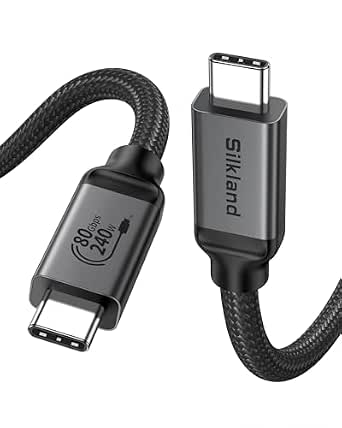 | Best for Longer Setups | Length: 5 ft | Data transfer rate: Up to 80 Gbps | Display bandwidth: Up to 120 Gbps | VIEW ON AMAZON | See Our Full Breakdown |
| 3.3FT Thunderbolt 5 Cable – High Speed 80Gbps, 240W Power Delivery, 8K@165Hz, Supports Dual 6K/8K Displays |  | Best for Compact Desk Setups | Length: 3.3 ft | Data transfer speed: Up to 80 Gbps | Video bandwidth: Up to 120 Gbps | VIEW ON AMAZON | See Our Full Breakdown |
| OWC 1 m Thunderbolt 5 USB-C Cable |  | Best for Broad Compatibility | Length: 1 m (39.4 in) | Connector: Thunderbolt 5 / USB-C, male-to-male | Data transfer rate: Up to 80 Gbps | VIEW ON AMAZON | See Our Full Breakdown |
| Apple Thunderbolt 5 Pro Cable (USB-C, 1 m) |  | Best for Maximum Thunderbolt 5 Bandwidth | Length: 1 meter | Thunderbolt 5 data transfer: Up to 120 Gbps | Thunderbolt 3, Thunderbolt 4, and USB4 data transfer: Up to 40 Gbps | VIEW ON AMAZON | See Our Full Breakdown |
| Silkland 4 ft USB-C Thunderbolt 5 Cable, 80 Gbps Data Transfer, 240 W Charging | 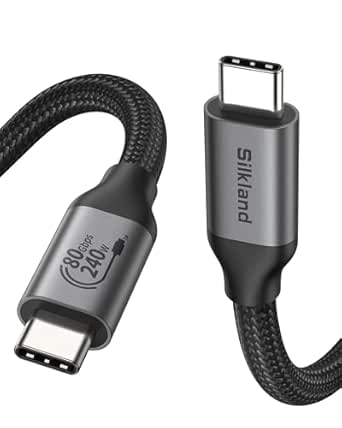 | Best for Certified Mid-Length Connections | Length: 4 ft | Connector: USB Type-C, male-to-male | Data transfer rate: Up to 80 Gbps | VIEW ON AMAZON | See Our Full Breakdown |
| Cable Matters Intel Certified Thunderbolt 5 Cable, 3.3 ft (1 m) |  | Best Certified Pick | Connector type: Thunderbolt 5 | Length: 3.3 ft (1 m) | Data transfer rate: Up to 80 Gbps | VIEW ON AMAZON | See Our Full Breakdown |
| Cable Matters Thunderbolt 5 Cable 80Gbps, 1m / 3.3ft, White |  | Best for a Light-Colored Desk Setup | Connector type: Thunderbolt 5 | Length: 1.0 m (3.3 ft) | Data transfer rate: Up to 80 Gbps | VIEW ON AMAZON | See Our Full Breakdown |
| UGREEN 240W USB-C to USB-C Cable, 3.3 ft, USB4 Gen 4 80Gbps |  | Best for Braided Durability | Connector type: USB Type-C, male-to-male | Length: 3.3 ft | Data transfer rate: Up to 80 Gbps | VIEW ON AMAZON | See Our Full Breakdown |
| Fitee 80Gbps USB4 Thunderbolt 5 Cable, 5 ft |  | Best for Extra Reach | Length: 5 ft | Connector: USB-C male-to-male | Data transfer rate: Up to 80 Gbps | VIEW ON AMAZON | See Our Full Breakdown |
| OWC 0.3M Thunderbolt 5 (USB-C) Cable |  | Best for Compact Setups | Length: 0.3 m (11.8 inches) | Cable type: Thunderbolt 5 (USB-C) | Connector type: USB Type-C | VIEW ON AMAZON | See Our Full Breakdown |
| Msaose Braided Thunderbolt 5 Cable, 3.3 ft, 2-Pack | 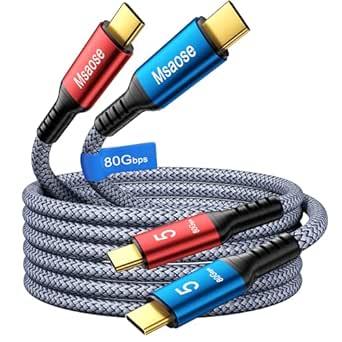 | Best Two-Pack | Cable length: 3.3 ft each | Quantity: 2 | Colors: Red and blue | VIEW ON AMAZON | See Our Full Breakdown |
| CalDigit Thunderbolt 5 Pro Braided Cable – 120Gbps, 240W Power Delivery, Compatible with Thunderbolt 3, 4, USB4 Type C, MacBook Pro, iMac, iPhone 17 Max, Black (1m/3.28ft) |  | Best for Maximum Data Bandwidth | Cable length: 1 m / 3.28 ft | Data transfer rate: Up to 120 Gbps | Maximum power: 240 W | VIEW ON AMAZON | See Our Full Breakdown |
| Anker Prime Thunderbolt 5 USB-C Cable, 3.3 ft, 240W |  | Best for Dual 8K Displays | Model: A84N1 | Cable length: 3.3 ft | Connector type: USB Type-C to USB Type-C | VIEW ON AMAZON | See Our Full Breakdown |
| Anker Prime Thunderbolt 5 Cable, 1.7ft USB-C to USB-C, 240W Charging |  | Best Compact Cable | Cable length: 1.7 ft | Connector: USB Type-C to USB-C | Data transfer rate: Up to 80 Gbps (product description) | VIEW ON AMAZON | See Our Full Breakdown |
| thunderbolt5 cable | Data transfer rate | Length | Compatibility |
|---|---|---|---|
| Silkland USB4 Version 2.0 USB- | Up to 80 Gbps | 5 ft | Thunderbolt 5/4/3, USB4, USB 3.2 |
| 3.3FT Thunderbolt 5 Cable | — | 3.3 ft | Thunderbolt 5, Thunderbolt 4, USB4 |
| OWC 1 m Thunderbolt 5 USB-C Ca | Up to 80 Gbps | 1 m (39.4 in) | — |
| Apple Thunderbolt 5 Pro Cable | — | 1 meter | — |
| Silkland 4 ft USB-C Thunderbol | Up to 80 Gbps | 4 ft | Thunderbolt 5, Thunderbolt 4/3, USB4, USB 3.2 |
| Cable Matters Intel Certified | Up to 80 Gbps | 3.3 ft (1 m) | Thunderbolt 3, Thunderbolt 4, USB4, USB-C |
| Cable Matters Thunderbolt 5 Ca | Up to 80 Gbps | 1.0 m (3.3 ft) | Thunderbolt 3, Thunderbolt 4, USB4, USB-C |
| UGREEN 240W USB-C to USB-C Cab | Up to 80 Gbps | 3.3 ft | Thunderbolt 5/4/3, USB4, USB 3.2/3.1/3.0 |
| Fitee 80Gbps USB4 Thunderbolt | Up to 80 Gbps | 5 ft | Thunderbolt 5/4/3, USB4, USB 3.2 |
| OWC 0.3M Thunderbolt 5 | 40 Gbps listed in specs; description states up to 80 Gbps | 0.3 m (11.8 inches) | Thunderbolt 4, Thunderbolt 5, USB4, USB-C devices |
| Msaose Braided Thunderbolt 5 C | Up to 80 Gbps | — | Thunderbolt 3/4/5, USB4 2.0, USB 3.2, DisplayPort 2.1 |
| CalDigit Thunderbolt 5 Pro Bra | Up to 120 Gbps | — | Thunderbolt 3/4, USB4 Type-C, and USB-C devices |
| Anker Prime Thunderbolt 5 USB- | Up to 80 Gbps | — | — |
| Anker Prime Thunderbolt 5 Cabl | Up to 80 Gbps (product description) | — | — |
More Details on Our Top Picks
Silkland USB4 Version 2.0 USB-C Cable, 5 ft, 80 Gbps, 240 W
The 5-foot length gives this Silkland more reach than the 1-meter OWC Thunderbolt 5 USB-C Cable, which can help when a dock or fast external drive sits farther from a laptop. It supports up to 80 Gbps data, 120 Gbps display bandwidth, and 240 W charging, so it can serve as a high-capacity Thunderbolt cable across compatible devices. USB-IF certification and the braided nylon jacket with an aluminum shell add reassurance for a cable likely to be moved between devices. Its tradeoff is that the Apple Thunderbolt 5 Pro Cable lists up to 120 Gbps Thunderbolt 5 data transfer, while this Silkland lists 80 Gbps. The full speed and display modes also depend on the connected hardware.
Pros:- Five-foot reach suits setups where a 1-meter cable falls short
- Supports up to 80 Gbps data and 120 Gbps display bandwidth
- Delivers up to 240 W with PD 3.1
- USB-IF certified with braided nylon and an aluminum shell
Cons:- Its listed data rate is lower than the Apple Thunderbolt 5 Pro Cable’s 120 Gbps
- Actual speeds depend on the connected devices
- Some display modes require compatible hardware
Best for: Laptop and dock users who need a certified, longer USB-C cable for compatible Thunderbolt 5 or USB4 data, displays, and high-power charging.
Not ideal for: Buyers seeking the listed 120 Gbps Thunderbolt 5 data rate or guaranteed maximum display modes across their devices.
- Length:5 ft
- Data transfer rate:Up to 80 Gbps
- Display bandwidth:Up to 120 Gbps
- Maximum charging output:240 W
- Maximum current:5 A
- Compatibility:Thunderbolt 5/4/3, USB4, USB 3.2
- Certification:USB-IF certified
- Construction:Braided nylon, aluminum shell
Our verdict“Choose this Silkland if you need extra reach for a compatible Thunderbolt or USB4 setup and can work within its listed 80 Gbps data rate.”
3.3FT Thunderbolt 5 Cable – High Speed 80Gbps, 240W Power Delivery, 8K@165Hz, Supports Dual 6K/8K Displays
At 3.3 feet, this cable is aimed at short, tidy connections between a Thunderbolt 5 laptop, dock, SSD, or display. Its listed support for 80 Gbps data, 120 Gbps video bandwidth, and 240 W power covers the same headline capacities as the longer Silkland 5 ft cable, but gives up reach in exchange for less slack on a desk. The advertised 8K at 165Hz and multi-display modes may suit demanding display setups, provided the host and screens support them. A braided jacket and aluminum connectors are practical build details, though the product data does not list USB-IF certification as the Silkland does. Skip it if your devices sit farther apart or your hardware cannot use its advertised bandwidth.
Pros:- Compact 3.3-foot length keeps nearby connections tidy
- Lists up to 80 Gbps data and 120 Gbps video bandwidth
- Supports up to 240 W power delivery
- Braided jacket and aluminum connectors
Cons:- Shorter reach than the Silkland 5 ft USB4 Version 2.0 cable
- Full data and display capabilities require compatible devices
- USB-IF certification is not specified in the product data
Best for: Owners of compatible Thunderbolt 5 laptops and displays who want a short cable for a close-range desk connection.
Not ideal for: People routing a cable across a room or desk, or buyers who need stated USB-IF certification.
- Length:3.3 ft
- Data transfer speed:Up to 80 Gbps
- Video bandwidth:Up to 120 Gbps
- Power delivery:Up to 240 W
- Supported display modes:8K at 165Hz, dual 6K/8K, triple 4K at 144Hz
- Connector:USB-C with aluminum connectors
- Material:Braided jacket
- Compatibility:Thunderbolt 5, Thunderbolt 4, USB4
Our verdict“Pick this cable for a close-range Thunderbolt 5 desk setup that can use its listed bandwidth and display modes.”
OWC 1 m Thunderbolt 5 USB-C Cable
The OWC is a straightforward pick for buyers connecting newer Thunderbolt 5 gear alongside older Thunderbolt or USB-C devices. Its 1-meter length and male-to-male USB-C connectors make it a conventional desk cable, while support for Thunderbolt 5, 4, and 3 plus USB4 and USB-C gives it broader stated backward compatibility than the 3.3-foot cable in this list. It supplies up to 80 Gbps data, 120 Gbps display bandwidth, and 240 W of power. Compared with the Apple Thunderbolt 5 Pro Cable, OWC lists a lower data ceiling, but it includes a three-year limited warranty. The product data does not describe the cable’s construction, so buyers focused on braiding or shielding have less to go on.
Pros:- Supports Thunderbolt 5, 4, and 3, USB4, and USB-C
- Lists up to 80 Gbps data and 120 Gbps display bandwidth
- Provides up to 240 W of power
- Includes a three-year limited warranty
Cons:- Listed data rate is below the Apple Thunderbolt 5 Pro Cable’s 120 Gbps
- Product data does not specify jacket material or shielding
- One-meter length may not suit setups needing more reach
Best for: People connecting a mix of Thunderbolt generations and USB-C devices who want a 1-meter cable with a stated three-year limited warranty.
Not ideal for: Buyers who need a listed 120 Gbps Thunderbolt 5 data rate or detailed information about cable materials and shielding.
- Length:1 m (39.4 in)
- Connector:Thunderbolt 5 / USB-C, male-to-male
- Data transfer rate:Up to 80 Gbps
- Display bandwidth:Up to 120 Gbps
- Maximum power:240 W
- Compatible standards:Thunderbolt 5, Thunderbolt 4, Thunderbolt 3, USB4, USB-C
- Warranty:3-year limited warranty
- Certifications:FCC, RoHS, UL
Our verdict“Choose the OWC if you need a 1-meter cable for a mix of Thunderbolt generations and value its stated warranty.”
Apple Thunderbolt 5 Pro Cable (USB-C, 1 m)
Apple’s cable is the bandwidth-focused choice here: its listed Thunderbolt 5 data rate reaches 120 Gbps, higher than the 80 Gbps listed for the OWC and Silkland options. It also supports DisplayPort 2.1 video and charging up to 240 W, giving compatible Macs, docks, displays, and drives one cable for high-throughput connections and power. The braided design is described as coiling without tangling, a useful detail for a cable that may move between a desk and a bag. The tradeoff is that its 1-meter length offers less reach than Silkland’s 5-foot model, and the listing does not detail compatibility beyond USB-C devices and ports. Its 120 Gbps figure applies to Thunderbolt 5; older standards have lower listed rates.
Pros:- Lists up to 120 Gbps Thunderbolt 5 data transfer
- Supports DisplayPort 2.1 video output
- Provides up to 240 W charging
- Braided cable is designed to coil without tangling
Cons:- One-meter length is shorter than the Silkland 5 ft cable
- Listed compatibility details are limited to USB-C devices and ports
- Data rates fall to 40 Gbps for Thunderbolt 3, Thunderbolt 4, and USB4
Best for: Thunderbolt 5 Mac and display users whose priority is the listed 120 Gbps data rate, DisplayPort 2.1 video, and 240 W charging.
Not ideal for: Buyers needing more than 1 meter of reach or a detailed compatibility list for non-Apple USB-C hardware.
- Length:1 meter
- Thunderbolt 5 data transfer:Up to 120 Gbps
- Thunderbolt 3, Thunderbolt 4, and USB4 data transfer:Up to 40 Gbps
- USB 3 data transfer:Up to 10 Gbps
- Video output:DisplayPort 2.1
- Charging:Up to 240 W
- Design:Black braided cable; coils without tangling
- Model number:MDW94AM/A
Our verdict“Choose Apple’s cable when your compatible Thunderbolt 5 setup can use its listed 120 Gbps rate and 1-meter reach is sufficient.”
Silkland 4 ft USB-C Thunderbolt 5 Cable, 80 Gbps Data Transfer, 240 W Charging
This 4-foot Silkland lands between the 3.3-foot Thunderbolt 5 cable and the longer 5-foot Silkland USB4 Version 2.0 model, making it a practical middle ground for desk setups with some routing slack. It lists 80 Gbps data, 120 Gbps display bandwidth, and 240 W charging, with USB-IF certification and compatibility across Thunderbolt 5, 4, and 3, USB4, and USB 3.2. Triple shielding and a braided nylon exterior are intended to support durability and signal integrity. Against the Apple Thunderbolt 5 Pro Cable, though, its listed data rate is lower at 80 Gbps rather than 120 Gbps. Buyers should also treat maximum speed and display support as device-dependent, since the product data does not guarantee every compatible device can reach those figures.
Pros:- Four-foot length provides more slack than the 1-meter OWC cable
- USB-IF certified with Thunderbolt 5/4/3, USB4, and USB 3.2 compatibility
- Lists up to 80 Gbps data, 120 Gbps display bandwidth, and 240 W charging
- Braided nylon and triple shielding are designed for durability and signal integrity
Cons:- Listed data rate is lower than Apple’s 120 Gbps Thunderbolt 5 rate
- Maximum speeds and display modes depend on connected devices
- Product data does not establish that all compatible devices support its maximum figures
Best for: Users who want a USB-IF-certified, 4-foot cable for compatible Thunderbolt and USB devices and need more slack than a 1-meter cable provides.
Not ideal for: Thunderbolt 5 users prioritizing the listed 120 Gbps data rate or buyers who need guaranteed maximum performance with every compatible device.
- Length:4 ft
- Connector:USB Type-C, male-to-male
- Data transfer rate:Up to 80 Gbps
- Display bandwidth:Up to 120 Gbps
- Maximum charging power:240 W
- Compatibility:Thunderbolt 5, Thunderbolt 4/3, USB4, USB 3.2
- Certification:USB-IF certified
- Cable construction:Braided nylon, triple shielding
Our verdict“Pick this Silkland for a certified 4-foot Thunderbolt or USB-C connection when extra slack matters more than a listed 120 Gbps data rate.”
Cable Matters Intel Certified Thunderbolt 5 Cable, 3.3 ft (1 m)
Intel certification gives this Cable Matters cable a clear role for buyers who want a Thunderbolt 5 connection with stated support across older Thunderbolt generations. It carries up to 80 Gbps data and up to 240 W power, so one short cable can link fast storage or a dock while charging a compatible laptop. Its 1 m length is more flexible than the OWC 0.3M Thunderbolt 5 Cable for desk setups, though less suited to devices spaced farther apart than the Fitee 5 ft cable. Display bandwidth reaches 120 Gbps, but actual display arrangements depend on the host and connected displays or dock. Skip it if you need an unusually long run or want a braided construction specified in the product data.
Pros:- Intel-certified Thunderbolt 5 connection
- Supports data transfer up to 80 Gbps
- Delivers up to 240 W power
- Compatible with Thunderbolt 3, Thunderbolt 4, USB4, and USB-C
Cons:- Display performance depends on the connected host and display or dock
- At 1 m, it offers less reach than the Fitee 5 ft cable
Best for: Thunderbolt users who want an Intel-certified 1 m cable for a laptop, dock, or fast external storage setup.
Not ideal for: Buyers routing a cable across a large desk or relying on a particular multi-display arrangement without checking host and display support.
- Connector type:Thunderbolt 5
- Length:3.3 ft (1 m)
- Data transfer rate:Up to 80 Gbps
- Video bandwidth:Up to 120 Gbps
- Power delivery:Up to 240 W
- Compatibility:Thunderbolt 3, Thunderbolt 4, USB4, USB-C
- Connector gender:Male-to-male
- Color:Black
Our verdict“Choose this 1 m cable if Intel certification and broad Thunderbolt compatibility matter more than extra reach.”
Cable Matters Thunderbolt 5 Cable 80Gbps, 1m / 3.3ft, White
This white Cable Matters cable brings the same headline 80 Gbps data, 120 Gbps video bandwidth, and 240 W charging figures as the black Cable Matters Intel Certified model, while giving a visible cable a better fit on a pale desk. That finish is its clearest distinction; the product data does not claim Intel certification, so buyers prioritizing that credential may prefer its black counterpart. It supports Thunderbolt 3 and 4, USB4, and USB-C devices, though full Thunderbolt 5 capability requires compatible ports. At 1 m, it suits close laptop-to-dock connections better than the longer Fitee 5 ft cable. The listing mentions professional workflows, but its performance still depends on the connected host and devices.
Pros:- Supports up to 80 Gbps data transfer
- Provides up to 120 Gbps video bandwidth
- Delivers up to 240 W power
- White finish can blend into light-colored setups
Cons:- Full Thunderbolt 5 performance requires compatible ports
- The 1 m length may not reach across larger desk setups
- Display and data performance depend on host capabilities
Best for: Laptop and MacBook owners with a light-colored desk who want a short, high-bandwidth cable for compatible ports.
Not ideal for: Buyers who need a longer cable run or specifically want the Intel certification stated for the black Cable Matters model.
- Connector type:Thunderbolt 5
- Length:1.0 m (3.3 ft)
- Data transfer rate:Up to 80 Gbps
- Video bandwidth:Up to 120 Gbps
- Power delivery:Up to 240 W
- Compatibility:Thunderbolt 3, Thunderbolt 4, USB4, USB-C
- Connector shape:Round
- Color:White
Our verdict“Pick this Cable Matters model for a short white cable with high data, video, and charging capacity, provided your devices support it.”
UGREEN 240W USB-C to USB-C Cable, 3.3 ft, USB4 Gen 4 80Gbps
UGREEN stands out for pairing 80 Gbps data and 240 W charging with a nylon braid rated for up to 10,000 bends. That construction offers a useful durability detail absent from the Cable Matters listings, while compatibility with Thunderbolt 5, 4, and 3 plus earlier USB standards makes it a versatile USB-C cable for mixed-device households. The stated DisplayPort 2.1 output and up to 16K at 60 Hz are useful when the connected equipment supports them; they do not guarantee that resolution from every setup. At 3.3 ft, it has the same short reach as the Cable Matters 1 m cables and falls well short of the Fitee 5 ft cable. Choose it for a tough, compact connection, not for routing across a room.
Pros:- Nylon-braided construction rated for up to 10,000 bends
- Supports up to 80 Gbps data transfer
- Delivers up to 240 W charging
- Compatible with Thunderbolt 5/4/3 and multiple USB standards
Cons:- The 3.3 ft length may be restrictive for some desks
- Maximum video output depends on connected equipment
Best for: People who frequently plug and unplug a Thunderbolt 5 or USB4 cable and want braided construction for a compact setup.
Not ideal for: Users who need extra cable reach or expect the listed maximum display output without checking device and display support.
- Connector type:USB Type-C, male-to-male
- Length:3.3 ft
- Data transfer rate:Up to 80 Gbps
- Charging power:Up to 240 W
- Video output:DisplayPort 2.1; up to 16K at 60 Hz
- Compatibility:Thunderbolt 5/4/3, USB4, USB 3.2/3.1/3.0
- Cable material:Nylon braided
- Bend durability:Up to 10,000 bends
Our verdict“Choose UGREEN if braided durability matters more than extra reach in a short Thunderbolt 5 compatible cable.”
Fitee 80Gbps USB4 Thunderbolt 5 Cable, 5 ft
At 5 ft, Fitee is the reach-focused choice in this group: it gives more room between a laptop, dock, and peripherals than the 3.3 ft UGREEN or 1 m Cable Matters cables. Its listed 80 Gbps data, 120 Gbps video bandwidth, and 240 W power delivery cover the same demanding connection needs, assuming the host and peripherals support those capabilities. That makes it a practical pick when cable placement matters more than a compact, tightly managed desk. Compared with the UGREEN braided cable, Fitee’s supplied data does not state a bend-durability rating or braided jacket, so frequent rough handling is a less supported use case. The longer length also will not solve compatibility limits in the connected devices.
Pros:- 5 ft length offers more placement flexibility than the 1 m options
- Supports data transfer up to 80 Gbps
- Supports video bandwidth up to 120 Gbps
- Delivers up to 240 W power
Cons:- Full performance depends on compatible devices and displays
- Product data does not specify a bend-durability rating
Best for: Laptop users who need a 5 ft USB-C cable to connect a compatible Thunderbolt dock or display from farther across a desk.
Not ideal for: Buyers seeking a specified braided or bend-tested cable, or whose devices cannot use the listed high-bandwidth features.
- Length:5 ft
- Connector:USB-C male-to-male
- Data transfer rate:Up to 80 Gbps
- Video bandwidth:Up to 120 Gbps
- Power delivery:Up to 240 W
- Compatibility:Thunderbolt 5/4/3, USB4, USB 3.2
- Maximum current:5 A
- Weight:0.07 kg
Our verdict“Choose Fitee if you need more reach than the short Cable Matters or UGREEN cables while keeping high-speed Thunderbolt 5 capability.”
OWC 0.3M Thunderbolt 5 (USB-C) Cable
OWC’s 0.3 m length is the defining choice here: it keeps a close laptop-to-dock or laptop-to-drive connection tidy and reduces excess cable on a portable workstation. It lists up to 240 W power and compatibility with Thunderbolt 4, Thunderbolt 5, USB4, and USB-C devices. The product information is inconsistent on data speed: its description says up to 80 Gbps, while the specs list 40 Gbps. I would treat 40 Gbps as the stated spec until the seller clarifies, which makes the longer Cable Matters Thunderbolt 5 cable easier to recommend when maximum listed data bandwidth is the priority. OWC’s short length is also far less flexible than Fitee’s 5 ft option, so measure the gap between devices first.
Pros:- Compact 0.3 m length helps limit cable clutter
- Supports up to 240 W power delivery
- Compatible with Thunderbolt 4, Thunderbolt 5, USB4, and USB-C
- USB-C connectors suit a range of modern peripherals
Cons:- At 11.8 inches, it fits only closely spaced devices
- Data rate is inconsistent: the description states up to 80 Gbps, while specs list 40 Gbps
- Less suited to flexible desk layouts than the Fitee 5 ft cable
Best for: Portable workstation owners connecting nearby Thunderbolt or USB-C devices who value a short, uncluttered cable.
Not ideal for: Buyers who need more than 11.8 inches of reach or require a clearly specified 80 Gbps data rate.
- Length:0.3 m (11.8 inches)
- Cable type:Thunderbolt 5 (USB-C)
- Connector type:USB Type-C
- Data transfer rate:40 Gbps listed in specs; description states up to 80 Gbps
- Display bandwidth:Up to 120 Gbps
- Power delivery:Up to 240 W
- Compatibility:Thunderbolt 4, Thunderbolt 5, USB4, USB-C devices
- Maximum current:5 A
Our verdict“Choose OWC for a very short connection between nearby devices, but look elsewhere if you need assured 80 Gbps data or longer reach.”
Msaose Braided Thunderbolt 5 Cable, 3.3 ft, 2-Pack
The Msaose set is the practical pick when one Thunderbolt 5 cable needs to become two: you get separate red and blue 3.3-foot cables for a laptop and dock, or for keeping a spare in another workspace. Each supports up to 80 Gbps data and 240 W charging, with up to 120 Gbps video bandwidth for supported display setups. The braided nylon and different colors also help distinguish cables and manage everyday handling. Compared with the Anker Prime 3.3-foot cable, Msaose gives you a second cable, while Anker’s listing specifically describes dual 8K at 60Hz support. The tradeoff is that the Msaose set’s display configurations depend on the connected devices, and maximum speeds require compatible Thunderbolt 5 equipment. Choose it for quantity and flexibility; skip it if you need one cable with more clearly specified display support.
Pros:- Includes two 3.3-foot USB-C cables in distinct colors
- Supports up to 80 Gbps data transfer and 240 W power delivery
- Braided nylon construction is designed to resist tangling and wear
- Lists compatibility with Thunderbolt 3, 4, and 5 and USB4 2.0
Cons:- Maximum data speeds require compatible Thunderbolt 5 devices and storage
- Display configurations depend on the connected devices
- The short length may constrain desk layouts
Best for: People setting up two nearby Thunderbolt or USB-C devices who want matching short cables that are easy to tell apart
Not ideal for: Buyers who need a single cable with a specifically stated dual 8K display configuration or a longer reach
- Cable length:3.3 ft each
- Quantity:2
- Colors:Red and blue
- Connector:USB-C male-to-male
- Data transfer rate:Up to 80 Gbps
- Video bandwidth:Up to 120 Gbps
- Power delivery:Up to 240 W (48 V/5 A)
- Compatibility:Thunderbolt 3/4/5, USB4 2.0, USB 3.2, DisplayPort 2.1
- Cable material:Braided nylon
Our verdict“Choose Msaose if you want two color-coded, braided Thunderbolt 5 cables for nearby devices; choose the Anker Prime 3.3-foot cable if its stated dual 8K support matters more than getting a pair.”
CalDigit Thunderbolt 5 Pro Braided Cable – 120Gbps, 240W Power Delivery, Compatible with Thunderbolt 3, 4, USB4 Type C, MacBook Pro, iMac, iPhone 17 Max, Black (1m/3.28ft)
CalDigit is the bandwidth-focused option in this group: its listing specifies up to 120 Gbps data transfer, above the 80 Gbps maximum stated for the Msaose and Anker Prime cables. That distinction may matter for compatible Thunderbolt 5 workflows involving demanding storage or external graphics; it does not make older hosts or peripherals faster. The 1 m braided cable also supplies up to 240 W power and lists Thunderbolt 3, 4, and USB4 compatibility, giving it broad stated reach across generations. Compared with the Anker Prime 3.3-foot cable, CalDigit makes the higher data-rate claim, while Anker spells out dual 8K at 60Hz support. CalDigit’s listing requires a Thunderbolt 5 host for maximum performance, and its broad device list does not guarantee every display setup. Pick it for the stated bandwidth; skip it if your setup needs a longer cable or clearly specified display modes.
Pros:- Lists data transfer up to 120 Gbps
- Supports up to 240 W power delivery
- Braided construction is described as durable and flexible
- Lists compatibility with Thunderbolt 3, 4, and USB4 Type-C devices
Cons:- Maximum performance requires a Thunderbolt 5 host
- The 1 m length may be restrictive for equipment farther apart
- The product data does not specify display configurations as clearly as the Anker Prime listing
Best for: Thunderbolt 5 workstation owners connecting high-throughput storage or external graphics over a short desk run
Not ideal for: People with older hosts who expect the listed maximum data rate, or buyers who need a longer cable or explicit display-mode details
- Cable length:1 m / 3.28 ft
- Data transfer rate:Up to 120 Gbps
- Maximum power:240 W
- Maximum voltage:48 V
- Maximum current:5 A
- Connector type:Thunderbolt 5
- Cable design:Braided
- Compatibility:Thunderbolt 3/4, USB4 Type-C, and USB-C devices
Our verdict“Choose CalDigit for its listed 120 Gbps data capability in a Thunderbolt 5 setup, while the Anker Prime 3.3-foot cable is a clearer fit if explicit dual 8K display support is your priority.”
Anker Prime Thunderbolt 5 USB-C Cable, 3.3 ft, 240W
Anker’s 3.3-foot Prime cable is the easiest choice here for buyers whose display requirement is specific: the listing states support for dual 8K displays at 60Hz, alongside up to 80 Gbps data and 240 W charging. That gives the display claim more detail than the Msaose two-pack listing, where configurations depend on the connected devices. Its length suits a laptop-to-dock or laptop-to-monitor connection close to the desk, though it limits routing options. Compared with the 1.7-foot Anker Prime, this version offers more reach while keeping the same stated charging and dual-display capabilities. Its main compromise is that it is a single cable and its maximum performance still depends on compatible equipment. Buyers wanting a spare in the box may prefer Msaose; those prioritizing stated display support and a little more cable length should look here.
Pros:- Specifies support for dual 8K displays at 60Hz
- Supports up to 80 Gbps data transfer
- Provides up to 240 W charging
- At 3.3 feet, offers more reach than the 1.7-foot Anker Prime cable
Cons:- The short length can limit routing and device placement
- Maximum performance depends on compatible devices
- Includes one cable, unlike the Msaose two-pack
Best for: Laptop users connecting to a compatible dock or setup that calls for two 8K displays at 60Hz
Not ideal for: People who need a two-cable set, a longer run, or performance beyond the listed 80 Gbps data rate
- Model:A84N1
- Cable length:3.3 ft
- Connector type:USB Type-C to USB Type-C
- Data transfer rate:Up to 80 Gbps
- Charging power:240 W
- Display support:Dual 8K displays at 60Hz
- Maximum bandwidth:120 Gbps
- Color:Black
Our verdict“Choose this Anker Prime when its stated dual 8K at 60Hz support and 3.3-foot reach fit your setup; choose Msaose if two cables matter more.”
Anker Prime Thunderbolt 5 Cable, 1.7ft USB-C to USB-C, 240W Charging
At 1.7 feet, this Anker Prime is the compact pick for a laptop, dock, or monitor placed close together. The short run can reduce desk slack and is easy to pack, while the listing states up to 80 Gbps data, 240 W charging, and dual 8K displays at 60Hz. Those capabilities resemble the 3.3-foot Anker Prime, but the shorter cable gives up routing flexibility for a tighter connection. It also shares the Msaose two-pack’s stated 80 Gbps data and 240 W charging, though Msaose includes a second cable and offers more reach. One listed specification reports 480 Gbps data, which conflicts with the 80 Gbps description and is not a dependable basis for comparison. Choose this model for a short, tidy link; skip it if devices are spaced apart or you need to route around furniture.
Pros:- Compact 1.7-foot length suits close device placement
- Description states up to 80 Gbps data transfer
- Supports up to 240 W charging
- Description lists dual 8K display support
Cons:- Short reach limits device placement and routing
- The 480 Gbps data figure in the specs conflicts with the 80 Gbps product description
- Unlike Msaose, it is sold as a single cable rather than a two-pack
Best for: People connecting a laptop directly to a nearby dock or display and who want minimal cable slack
Not ideal for: Desk setups with separated devices, cable routing around obstacles, or buyers who need a longer cable run
- Cable length:1.7 ft
- Connector:USB Type-C to USB-C
- Data transfer rate:Up to 80 Gbps (product description)
- Charging power:240 W
- Maximum voltage:20 V
- Supported displays:Dual 8K at 60Hz
- Compatible devices:Laptops, phones, tablets, hubs, docks, eGPU, external drives, VR headsets
Our verdict“Choose the 1.7-foot Anker Prime for a close laptop-to-dock connection with little slack; pick the 3.3-foot Anker Prime if you need more routing room.”

How We Picked
I compared the listed cables on the details that affect real setups: stated data bandwidth, Thunderbolt certification or USB4 labeling, power delivery, length, and build cues such as braiding. I gave more weight to clearly identified Thunderbolt 5 support for buyers seeking a Thunderbolt cable, while treating USB4 models as alternatives whose protocol compatibility should be checked. Wattage and bandwidth claims describe cable capabilities; the connected laptop, dock, display, and host port must also support the requested mode.
The ranking reflects how broadly useful and clearly specified each cable appears for common laptop and dock setups. The Cable Matters Intel Certified model leads on explicit certification and standard one-meter reach; CalDigit stands out for its stated 120Gbps display capability and braided construction. Short cables rank higher for compact desk runs, while longer, USB4-labeled, or multi-pack options serve narrower needs. Product names and supplied specifications do not establish independent performance results, so I avoid treating headline claims as proof of compatibility with every system.
Factors to Consider When Choosing Thunderbolt5 Cables
I’d make the choice by matching the cable to the whole connection: host, dock or display, power needs, and the route the cable must take. These checks help avoid buying for a headline number that your setup cannot use.
Check the port and protocol on both ends
A USB-C connector describes the shape, not the connection’s full capabilities. Check whether the laptop port and the dock or display support Thunderbolt 5, an earlier Thunderbolt version, or USB4, and confirm the cable’s stated protocol matches your goal. A cable labeled USB4 may work well in compatible setups, but its label alone does not make it a certified Thunderbolt 5 cable. This is especially relevant when comparing the UGREEN and Silkland USB4 listings with explicitly Thunderbolt 5 models. For a purchase centered on Thunderbolt features, favor clear Thunderbolt 5 identification and certification details. If the cable will connect ordinary USB-C accessories, broader protocol compatibility may matter more than the Thunderbolt label.
Match bandwidth to the task and the entire setup
Data bandwidth and display bandwidth are related but not identical buyer concerns. The CalDigit listing calls out 120Gbps, while many other products describe 80Gbps; the CalDigit listing also frames its figure around display use. A high cable bandwidth does not make a host port, dock, or monitor support a mode it lacks. Before paying for a higher headline figure, check the display resolution and refresh rate you need, the number of screens, and the capabilities of every device in the chain. For storage or general connectivity, an 80Gbps cable may be a better fit if the rest of the setup cannot use more. Avoid treating a cable’s maximum claim as a guaranteed result in every configuration.
Choose length for the route, not just the desk
A short cable can reduce slack between a laptop and a dock, but it can become awkward if ports sit on opposite sides of a monitor stand or the laptop moves during the day. The OWC 0.3M option is aimed at close connections; one-meter models suit many fixed desk arrangements, and the five-foot Silkland listing gives more routing room. Measure the path with a little slack for bends and device movement rather than estimating from straight-line distance. Longer cables can create a cleaner route around furniture, but they add excess cable to a compact setup. Think about where the dock will live and whether you need to unplug or reposition the laptop often.
Treat charging wattage as one part of charging compatibility
Several listings state 240W power delivery, which describes a cable’s advertised power capacity. The laptop, charger, and any dock in the path also affect the charging rate and supported power profile. Check the laptop’s required wattage and the charger’s output before choosing a cable based on 240W alone. A cable with ample capacity cannot make an underpowered charger deliver more power. If the cable will mainly connect a display or storage device, charging capacity may be less important than protocol, reach, and certification. For a single cable that handles both dock data and laptop charging, verify the dock’s own power delivery specifications too.
Decide whether construction or bundle format solves a real problem
Braiding can add a different feel and may appeal when a cable is frequently handled, but it does not establish bandwidth or certification. The CalDigit and Msaose listings emphasize braided construction, while Msaose also supplies a two-pack for buyers outfitting more than one location. A two-pack is useful only if both cables fit the intended setups and carry the protocol capability you need. Apple, OWC, and Anker Prime offer alternatives for buyers who prefer those brands or a particular listed length, but brand familiarity does not replace checking the specification. Avoid paying attention to appearance or bundle count before confirming the cable’s role in your setup. Keep any spare cable labeled by protocol so it is not mistaken for a higher-capability one later.
Frequently Asked Questions
Will a USB4 80Gbps cable work as a Thunderbolt 5 cable?
It may work with devices that support the relevant USB4 capabilities, but a USB4 label does not by itself confirm Thunderbolt 5 certification. The UGREEN and Silkland USB4 listings are therefore better treated as protocol-specific alternatives than automatic equivalents to the Intel Certified Cable Matters pick. Check the host and connected device documentation for supported protocols and features. If your use depends on Thunderbolt 5 behavior, choose a cable explicitly identified for Thunderbolt 5 and verify its certification details. Connector shape alone cannot answer this question.
Should I choose the CalDigit cable’s 120Gbps claim over an 80Gbps model?
Choose based on the workload and the equipment that will use the cable. CalDigit calls out 120Gbps for display capability, while many of the other listings state 80Gbps; these claims do not mean every task or device will run at those rates. Your computer, dock, display, and connection mode determine the available performance. For a display-heavy setup, check the complete chain’s supported resolution, refresh rate, and bandwidth requirements. For everyday data transfer, the higher headline figure may not offer a practical benefit.
How long should a Thunderbolt 5 cable be for a laptop dock?
Measure the actual route from the laptop port to the dock, including the space needed for bends and movement. The OWC 0.3M cable suits a close, fixed placement, while the one-meter options give more flexibility for a typical desk. A five-foot cable can help when the dock sits farther away or you want to route around a monitor stand. Too short a cable can pull at a connector; too much slack can clutter a small workspace. Pick the shortest length that comfortably reaches your devices during normal use.
Does a 240W cable charge every laptop at 240W?
No. The 240W figure is the cable’s stated power delivery capacity, not a promise that every connected laptop will draw that amount. The charger must provide a compatible power profile, and the laptop must support it; a dock between them can add another limit. Check the laptop’s charging requirements and the charger or dock output before choosing. A cable rated above your laptop’s needs can still be useful for another device, but it will not raise the power available from a lower-capacity charger.
Is a short cable or a two-pack a better choice for a multi-device desk?
Choose the short cable when you have one close connection and want to limit slack; the OWC 0.3M listing is designed for that kind of placement. A two-pack such as Msaose’s can suit a desk and travel kit or two workstations, provided both cables match the required protocol and length. Count the actual devices and measure each route before deciding. A bundle can leave you with spare cables that are too short or lack the certification your main setup needs. For mixed devices, label cables by protocol and intended use.
Conclusion
Best overall: I’d choose the Cable Matters Intel Certified Thunderbolt 5 Cable for a clear Thunderbolt 5 focus and one-meter reach. Best value: UGREEN’s 80Gbps USB4 cable is the practical alternative when your devices support its protocol and you do not need an explicitly certified Thunderbolt 5 cable. Best premium: CalDigit is the standout for buyers who want a braided cable with a stated 120Gbps display capability. Best for beginners: Apple’s Thunderbolt 5 Pro Cable is a straightforward named Thunderbolt option, though I’d still check device compatibility and the one-meter length. Best for specific needs: pick OWC’s 0.3M for a short desk run, Silkland’s five-foot USB4 cable for extra reach, or Msaose’s two-pack for multiple setups. Match the protocol and length to your equipment first; those choices will narrow this lineup more reliably than wattage alone.
Halloween Picks

Kalolary 12ft Halloween Witch Haunted House Inflatable Archway

Jenaai 5.3-Foot Motion-Activated Halloween Animatronic Skeleton

Star Wars Yoda and R2-D2 Inflatable Halloween Decor, 6 ft with LEDs, Indoor/Outdoor
As an affiliate, we earn on qualifying purchases.