
Choosing a tablet for productivity is less about finding one universal winner and more about matching the device to your work habits. The Apple iPad 11-inch leads for buyers who value a responsive chip and a broad accessory ecosystem, while the Lenovo Idea Tab Plus gives note-takers a larger, sharp screen with a pen and folio included. For handwriting and expandable storage, the Samsung Galaxy Tab S10 Lite has a strong practical case.

Get the latest gadgets delivered free with Prime
- Fast, free delivery on millions of items
- Prime Video, Amazon Music and more included
- Member-only deals all year
Those strengths come with different tradeoffs. The iPad’s keyboard and Pencil are separate purchases; the Lenovo tablets include useful accessories but use mid-range processors; and the TABWEE T90 bundles a keyboard, mouse, and stylus while leaving more uncertainty around its virtual-memory claim. I ranked these picks by how directly their hardware, included tools, and stated capabilities support everyday work, study, and multitasking—not by headline features alone.
Complete the kit



Key Takeaways
- Best performance-oriented general pick: The Apple iPad pairs the A16 chip with a light 11-inch build, but its main productivity accessories are sold separately.
- Best for a larger writing and reading canvas: The Lenovo Idea Tab Plus has a 12.1-inch 2.5K, 90Hz display and includes both a pen and folio.
- Best for handwriting with storage flexibility: Samsung includes an S Pen and supports microSD expansion up to 2TB; its wall charger is separate.
- Best ready-to-use accessory bundle: TABWEE supplies a keyboard, mouse, and stylus, though its advertised 24GB memory figure includes 16GB of virtual expansion.
- Best for student-focused bundled tools: The 11-inch Lenovo Idea Tab includes a pen and case, but its mid-range processor is a less convincing fit for demanding creative workloads.
| Apple iPad 11-inch with A16 chip, 128GB, Wi-Fi 6, and Liquid Retina Display – Silver |  | Best Overall for Responsive Everyday Work | Display: 11-inch Liquid Retina with True Tone | Processor: Apple A16 chip | Storage: 128GB | VIEW ON AMAZON | See Our Full Breakdown |
| Lenovo Idea Tab Plus 12.1-Inch 2.5K Tablet with Tab Pen and Folio Case |  | Best for a Larger Note-Taking Workspace | Display: 12.1-inch 2.5K IPS touchscreen | Refresh rate: 90Hz | Processor: MediaTek Dimensity 6400 | VIEW ON AMAZON | See Our Full Breakdown |
| Samsung Galaxy Tab S10 Lite, 10.9-Inch LCD, 6GB RAM, 128GB Storage, Gray |  | Best for Handwriting and Expandable Storage | Display: 10.9-inch LCD | Processor: Exynos 1380 | Memory: 6GB | VIEW ON AMAZON | See Our Full Breakdown |
| Lenovo Idea Tab 11″ Tablet with Tab Pen and Folio Case | 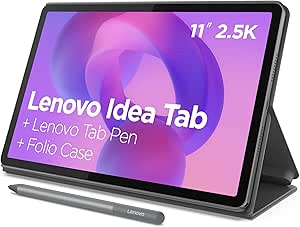 | Best for Students Who Want a Ready-to-Study Bundle | Display: 11-inch 2.5K IPS | Refresh rate: 90Hz | Processor: MediaTek Dimensity 6300 | VIEW ON AMAZON | See Our Full Breakdown |
| TABWEE T90 11-Inch Android 16 Tablet with Keyboard, Mouse, and Stylus, 128GB |  | Best for a Full Accessory Bundle | Operating system: Android 16 | Display: 11-inch FHD IPS, 1920 × 1200 | Processor: Unisoc T615 octa-core | VIEW ON AMAZON | See Our Full Breakdown |
| tablet for productivity | Display | Processor | Storage | Battery life |
|---|---|---|---|---|
| Apple iPad 11-inch with A16 ch | 11-inch Liquid Retina with True Tone | Apple A16 chip | 128GB | — |
| Lenovo Idea Tab Plus 12.1-Inch | 12.1-inch 2.5K IPS touchscreen | MediaTek Dimensity 6400 | 128GB | Up to 13 hours of video playback |
| Samsung Galaxy Tab S10 Lite | 10.9-inch LCD | Exynos 1380 | 128GB | Up to 16 hours under specified video-playback conditions |
| Lenovo Idea Tab 11" Tablet wit | 11-inch 2.5K IPS | MediaTek Dimensity 6300 | 256GB | Up to 12 hours |
| TABWEE T90 11-Inch Android 16 | 11-inch FHD IPS, 1920 × 1200 | Unisoc T615 octa-core | 128GB, expandable by up to 2TB via TF card | — |
More Details on Our Top Picks
Apple iPad 11-inch with A16 chip, 128GB, Wi-Fi 6, and Liquid Retina Display – Silver
The 11-inch iPad with the A16 chip is my strongest all-round choice for people who want a tablet to handle varied work, study, and creative tasks. Its appeal rests on the combination of a responsive processor, a manageable 1.05-pound body, Wi-Fi 6, and a sharp Liquid Retina display with True Tone. That gives it a more performance-led profile than the Lenovo Idea Tab models, whose stated Dimensity processors are mid-range options, and a more compact footprint than the 12.1-inch Idea Tab Plus.
For meetings and document work, the 12MP Center Stage front camera is a useful distinction: it is specified to keep the user centered during video calls. The 12MP rear camera supports document capture and 4K video, while Touch ID and USB-C round out a flexible everyday setup. The iPad’s wider appeal also comes from its compatibility with Apple Pencil and Magic Keyboard Folio, though buyers must account for the fact that these are separate accessories, unlike the pens and folios bundled with both Lenovo tablets.
That accessory cost is the clearest reason not to put this first for every buyer. The 128GB capacity is fixed in the supplied specifications, and there is no stated microSD option to match Samsung’s expandability or TABWEE’s TF-card support. Buyers wanting a complete typing-and-writing package in the box may find the T90 or Idea Tab easier to set up. Still, for a buyer prioritizing a capable chip, a light body, and strong cameras, I rank the iPad first.
Pros:- A16 chip is the most performance-focused processor listed in this roundup.
- Light 1.05-pound design with an 11-inch Liquid Retina display and True Tone.
- 12MP Center Stage front camera suits video calls; rear camera supports 4K video.
- Works with Apple Pencil and Magic Keyboard Folio accessories.
Cons:- Apple Pencil and Magic Keyboard Folio are sold separately.
- The listed 128GB storage has no stated expansion option.
Best for: People who want a lightweight, responsive tablet for mixed work and study, and are willing to choose and buy compatible keyboard or Pencil accessories separately.
Not ideal for: Buyers who need a keyboard and stylus included, want expandable storage, or prefer an Android setup with bundled accessories.
- Display:11-inch Liquid Retina with True Tone
- Processor:Apple A16 chip
- Storage:128GB
- Connectivity:Wi-Fi 6
- Front camera:12MP Center Stage
- Rear camera:12MP Wide with True Tone flash; supports 4K video
- Security and connector:Touch ID; USB-C
- Weight:1.05 pounds
Our verdict“Choose the iPad for a capable, portable all-purpose work tablet if you are comfortable buying its keyboard and Pencil separately.”
Lenovo Idea Tab Plus 12.1-Inch 2.5K Tablet with Tab Pen and Folio Case
The Lenovo Idea Tab Plus earns its place near the top by giving productivity work more screen room without making buyers source a pen and cover separately. Its 12.1-inch, 2.5K IPS display runs at 90Hz, and the Tab Pen and folio case are included. The extra diagonal space compared with the 11-inch Lenovo Idea Tab and iPad can make split-screen reading, handwritten annotation, and reviewing documents feel less cramped.
It also has a coherent study-and-media setup: quad Dolby Atmos-tuned speakers and a stated video-playback estimate of up to 13 hours suit lessons, calls, and recorded content. The Dimensity 6400 processor and 8GB of memory are specified, but this is not the performance-first pick; the iPad’s A16 is the stronger paper proposition for demanding apps. Compared with the smaller Idea Tab, the Plus offers more display area and a more capable-sounding processor designation, but storage drops to 128GB rather than 256GB.
That storage difference deserves attention for buyers who keep large offline libraries or install many apps. The provided specifications do not state an expansion option, so the Idea Tab’s larger capacity may suit some long-term users better. The Plus’s size can also be less convenient to carry than Samsung’s 10.9-inch S10 Lite. I would choose it for a desk, classroom, or study setup where the bigger canvas and bundled writing tools are more valuable than compactness or maximum listed storage.
Pros:- 12.1-inch 2.5K display provides more room than the other listed screens.
- 90Hz refresh rate and included Tab Pen support smooth scrolling and handwriting.
- Folio case is included, reducing the need to find basic protection separately.
- Quad Dolby Atmos-tuned speakers and up to 13 hours of stated video playback.
Cons:- 128GB storage may be restrictive for large app or media collections.
- The Dimensity 6400 is less performance-focused on paper than the iPad’s A16.
- Larger dimensions are less convenient for frequent one-handed carrying.
Best for: Students and document-focused workers who want a larger screen for handwriting, reading, and split-screen use, with a pen and folio ready in the box.
Not ideal for: Buyers who prioritize compact portability, need more than 128GB without a stated expansion route, or run demanding creative applications.
- Display:12.1-inch 2.5K IPS touchscreen
- Refresh rate:90Hz
- Processor:MediaTek Dimensity 6400
- Memory:8GB
- Storage:128GB
- Battery life:Up to 13 hours of video playback
- Charging:45W fast charging
- Included accessories:Lenovo Tab Pen and folio case
Our verdict“Pick the Idea Tab Plus when screen space and bundled note-taking gear matter more than a compact body or larger storage capacity.”
Samsung Galaxy Tab S10 Lite, 10.9-Inch LCD, 6GB RAM, 128GB Storage, Gray
For buyers whose productivity starts with handwriting, the Samsung Galaxy Tab S10 Lite is a practical alternative to the Lenovo bundles and the iPad. It includes an S Pen for notes, drawing, and annotation, plus a 10.9-inch LCD that keeps the device near the compact end of this group. Samsung also lists Circle to Search, note assistance, and SmartThings control, features that can support research and connected-home tasks without changing the tablet’s central role as a portable work surface.
Its clearest advantage over the iPad and Lenovo Idea Tab Plus is storage flexibility: the stated 128GB can be expanded with a microSD card up to 2TB. That is useful for reference files, downloaded media, and documents kept offline. Samsung also claims up to 16 hours under specified video-playback conditions, more than the listed estimates for the Lenovo Idea Tab models, though actual battery time depends on settings and workload. Its Exynos 1380 processor and 6GB RAM make it a mid-range choice rather than the best fit for heavy multitasking or demanding creative software.
There is a practical setup caveat: the 45W wall charger is sold separately, and battery performance varies with use. The iPad offers a more performance-oriented chip on paper, while Lenovo’s two Idea Tabs include folio cases; the S10 Lite counters with an S Pen and expandable storage. I rank it below the first two because its screen and memory specifications are less ambitious, but it is a compelling pick when note-taking, storage headroom, and a compact size matter more than raw speed.
Pros:- S Pen is included for handwriting, drawing, and document annotation.
- Supports microSD expansion up to 2TB from its listed 128GB storage.
- Includes Circle to Search, note assistance, and SmartThings features.
- Up to 16 hours of battery life is claimed for specified video-playback conditions.
Cons:- The 45W wall charger is sold separately.
- 6GB RAM and the Exynos 1380 are less suited to demanding multitasking than the iPad’s A16 proposition.
- Battery life varies with settings and usage.
Best for: Students and mobile note-takers who want an included stylus, microSD expansion, and a smaller screen for handwritten work and document review.
Not ideal for: People who need the strongest listed processor, a folio included, or a wall charger bundled with the tablet.
- Display:10.9-inch LCD
- Processor:Exynos 1380
- Memory:6GB
- Storage:128GB
- Expandable storage:Up to 2TB with microSD card
- Battery life:Up to 16 hours under specified video-playback conditions
- Included accessory:S Pen
- Warranty:2 years
Our verdict“Choose the S10 Lite if an included S Pen and expandable storage matter more than premium performance or an included folio.”
Lenovo Idea Tab 11″ Tablet with Tab Pen and Folio Case
The 11-inch Lenovo Idea Tab makes sense for students who want the basic tools for digital notes and reading in one box. Its included Tab Pen and folio case give it an easier out-of-the-box productivity setup than the iPad, which needs separate accessories for comparable typing or handwriting. The 2.5K IPS screen runs at 90Hz, and 256GB of listed storage gives this model an advantage over the Idea Tab Plus’s 128GB if a student keeps more coursework and apps locally.
Lenovo also points to Circle to Search and AI Note tools, alongside a stated battery life of up to 12 hours. Those features suit study tasks such as looking up material and organizing notes, while the included pen is more immediately useful for annotation than a generic tablet alone. Compared with the larger Idea Tab Plus, this model is easier to favor when carrying size and storage capacity matter more than screen area. Compared with Samsung’s S10 Lite, it supplies a folio and higher listed storage but does not specify expandable storage here.
The Dimensity 6300 processor is the main limit: the product information describes it as mid-range, so demanding creative software and heavy workloads are not its strongest match. The description also does not mention cellular connectivity, making it a Wi-Fi-oriented choice when away from a network. For school notes, reading, and everyday multitasking, the bundle and 256GB capacity make the Idea Tab a balanced pick; for resource-heavy work, I would move up to the iPad instead.
Pros:- Tab Pen and folio case are included for note-taking and everyday protection.
- 2.5K, 90Hz display supports clear reading and smooth scrolling.
- 256GB storage is more than the listed capacity on the Idea Tab Plus and several competitors.
- AI Note and Circle to Search offer study-oriented tools.
Cons:- The Dimensity 6300 is a mid-range processor, not the strongest match for intensive software.
- Cellular connectivity is not listed.
- The stated battery estimate is up to 12 hours, below the claims for the Plus and Samsung models.
Best for: Students who want a pen, protective folio, high-resolution screen, and 256GB of listed storage for coursework and everyday study.
Not ideal for: Users who need cellular connectivity, run intensive creative workloads, or want the largest screen in the lineup.
- Display:11-inch 2.5K IPS
- Refresh rate:90Hz
- Processor:MediaTek Dimensity 6300
- RAM:8GB
- Storage:256GB
- Battery life:Up to 12 hours
- Included accessories:Lenovo Tab Pen and folio case
- Model year:2025
Our verdict“The Idea Tab is a sensible student bundle when included writing tools and 256GB storage outweigh processor speed and cellular access.”
TABWEE T90 11-Inch Android 16 Tablet with Keyboard, Mouse, and Stylus, 128GB
The TABWEE T90 takes a different route from the rest of the lineup: instead of leading on processing power or display resolution, it puts a keyboard, mouse, and stylus in the box. That bundle makes it the most immediately equipped option for buyers who want to try a laptop-style workflow without separately sourcing basic input devices. Its 11-inch 1920 × 1200 IPS display is a practical work size, and Widevine L1 support is specified for buyers who also use the tablet for streaming between tasks.
Storage flexibility is another real strength. The T90 starts with 128GB and supports TF-card expansion up to 2TB, matching Samsung’s maximum stated expansion capacity and exceeding the iPad’s listed fixed storage options. It also includes dual-band Wi-Fi, Bluetooth 5.0, GPS, and several satellite navigation systems. Yet its Unisoc T615 processor is a more modest proposition than the iPad’s A16, and its advertised “up to 24GB” memory figure needs careful reading: only 8GB is built-in RAM, with 16GB described as virtual expansion.
That distinction matters for buyers expecting the same multitasking headroom as 24GB of physical memory. The product description gives an 8000mAh battery but no charging details, while Lenovo and Samsung offer more clearly stated battery-life claims. The T90 is therefore best for people who value a keyboard, mouse, stylus, and expandable storage in one package, not users seeking the strongest processor or the most clearly documented endurance. I rank it fifth because its bundle is attractive but its performance and memory claims require more qualification.
Pros:- Keyboard, mouse, and stylus are all included.
- 128GB storage can be expanded by up to 2TB via TF card.
- 11-inch FHD IPS display supports Widevine L1.
- Dual-band Wi-Fi and multiple navigation systems are specified.
Cons:- Only 8GB is built-in RAM; the additional 16GB is virtual memory.
- Unisoc T615 is a more modest processor than the iPad’s A16.
- The description lists battery capacity but not charging details.
Best for: Buyers who want an Android tablet with keyboard, mouse, stylus, and expandable storage included for basic typing, notes, and everyday tasks.
Not ideal for: People who need a high-performance processor, 24GB of physical RAM, or clearly specified charging and battery-life details.
- Operating system:Android 16
- Display:11-inch FHD IPS, 1920 × 1200
- Processor:Unisoc T615 octa-core
- Built-in RAM:8GB, with 16GB virtual memory expansion
- Storage:128GB, expandable by up to 2TB via TF card
- Battery:8000mAh
- Included accessories:Keyboard, mouse, and stylus
- Connectivity:Dual-band Wi-Fi and Bluetooth 5.0
Our verdict“Pick the T90 for its generous in-box accessories and expandable storage, but not if you expect high-end performance or 24GB of physical RAM.”

How We Picked
I ranked these tablets around the tasks people usually mean when they search for a productivity tablet: writing notes, reading and annotating documents, attending video calls, handling multiple apps, and typing short-to-medium assignments. I compared each model’s screen, processor and memory information, storage options, battery claims, and the accessories included in the box. Those details affect whether a tablet can serve as a practical work surface or needs extra purchases before it is ready.
I gave added weight to useful productivity tools included with the tablet, such as a pen, keyboard, or folio, while separating those from accessories that are only compatible. That distinction matters: Apple supports a Magic Keyboard Folio and Apple Pencil, but neither is listed as included here. I also treated manufacturer battery-life estimates as stated claims rather than guarantees, since display brightness, apps, and connection use can change real-world endurance.
Finally, I considered the compromises that product descriptions can obscure. Virtual memory is not the same as built-in RAM, larger screens may be easier to work on but less compact, and expandable storage does not make a processor faster. The order favors models with the clearest balance of capability and practical setup, while each recommendation keeps a distinct role. I have not treated these specifications as proof of hands-on performance.
| tablet for productivity | Processor | Battery life | Included accessories |
|---|---|---|---|
| Apple iPad 11-inch with A16 ch | Apple A16 chip | — | — |
| Lenovo Idea Tab Plus 12.1-Inch | MediaTek Dimensity 6400 | Up to 13 hours of video playback | Lenovo Tab Pen and folio case |
| Samsung Galaxy Tab S10 Lite | Exynos 1380 | Up to 16 hours under specified video-playback conditions | — |
| Lenovo Idea Tab 11" Tablet wit | MediaTek Dimensity 6300 | Up to 12 hours | Lenovo Tab Pen and folio case |
| TABWEE T90 11-Inch Android 16 | Unisoc T615 octa-core | — | Keyboard, mouse, and stylus |
Factors to Consider When Choosing Tablet For Productivity
A productivity tablet should fit the work you actually do, not just promise a long list of features. I would compare the following factors before deciding between these five models.Decide whether you need a keyboard or a writing tablet
For long assignments, email, and spreadsheet entries, a physical keyboard can matter more than a slightly sharper display. The TABWEE T90 includes a keyboard and mouse, making its bundle the most desktop-like out of the box. The iPad works with a Magic Keyboard Folio, but it is not included. If your work is mostly handwritten notes and document markup, compare the included pens instead: Samsung and both Lenovo models supply a stylus, while the iPad’s Apple Pencil is a separate accessory.
A folio is useful beyond protection because it can prop up a screen for reading, calls, or typing with an external keyboard. Both Lenovo models include one; the supplied information for Samsung and TABWEE does not list a folio. Before buying, check whether the included keyboard has the layout and connection style you want, and whether you plan to carry a mouse. A bundle is convenient, but it does not automatically mean the accessories will match every desk or travel setup.
Match screen size and sharpness to your work
The 12.1-inch Idea Tab Plus provides the largest canvas here, useful for reading a document beside a notes app or writing with more room around your hand. The 11-inch iPad and Lenovo Idea Tab are more compact while still offering a substantial workspace. Samsung’s 10.9-inch screen is slightly smaller, and the TABWEE’s 11-inch FHD panel is specified at 1920 × 1200 rather than the Lenovo models’ 2.5K resolution.
Refresh rate is another part of the comparison: the Lenovo screens list 90Hz, which can make scrolling and pen movement appear smoother. A higher resolution can make small text and detailed diagrams easier to view, but it does not make apps run faster. If your days involve mostly email and reading, portability may matter more than maximum screen area. For split-screen work or frequent annotation, I would lean toward the Idea Tab Plus.
Treat processor and memory claims carefully
Processor and memory affect how well a tablet handles app switching and demanding workloads. The Apple A16 is the most performance-focused chip listed in this group, while the Lenovo devices use Dimensity 6300 and 6400 processors, Samsung lists an Exynos 1380, and TABWEE lists a Unisoc T615. These specifications help show each model’s intended position, but they do not replace a task-specific compatibility check: confirm that your essential work apps run well on the operating system you plan to use.
Pay special attention to TABWEE’s memory description. It lists 8GB built-in RAM plus 16GB of virtual memory, not 24GB of physical RAM. Virtual expansion uses storage resources differently and should not be treated as equivalent to additional built-in memory. Lenovo lists 8GB RAM and Samsung lists 6GB. If your routine involves intensive creative apps or many active tasks, favor the stronger processor proposition and verify software requirements rather than choosing by a combined memory headline.
Choose storage for files you keep offline
The Lenovo Idea Tab lists 256GB of storage, the largest built-in capacity in this lineup. The iPad, Idea Tab Plus, Samsung, and TABWEE each list 128GB. That can be ample for cloud-based notes and documents, but downloaded classes, large projects, and media collections can consume space quickly. Think about whether you need offline access and how often you move files between devices.
Samsung and TABWEE both specify expansion up to 2TB—Samsung through microSD and TABWEE through a TF card. Expansion is a practical way to keep more files without choosing a model with larger built-in storage, but it does not increase processor speed or built-in RAM. The iPad’s supplied specification does not list expandable storage, so buyers choosing it should plan around the stated capacity and their file-management habits.
Read battery estimates as use-case claims
Manufacturers provide different battery details, which makes direct comparisons imperfect. The Idea Tab lists up to 12 hours, the Idea Tab Plus up to 13 hours of video playback, and the S10 Lite up to 16 hours under specified playback conditions. Those are stated estimates, not a promise that every workday will last that long: video playback is different from continuous video calls, bright-screen document work, or using several apps at once.
The TABWEE T90 lists an 8000mAh capacity but no charging details in the supplied description. The Idea Tab Plus specifies 45W fast charging, while Samsung notes that a 45W wall charger is sold separately. If you work away from an outlet, compare both the stated endurance and how you will recharge the tablet. For a mobile workday, a convenient charger and a realistic screen-on workload may matter more than the largest quoted battery figure.
Check connectivity, cameras, and accessory costs
All five product descriptions focus on Wi-Fi use; cellular connectivity is not listed for the Lenovo Idea Tab, and the Apple model is identified as Wi-Fi 6. If you regularly work away from dependable Wi-Fi, confirm the exact model’s network options before purchasing or plan to connect through a phone hotspot. Bluetooth can support accessories, but a tablet’s usefulness for calls also depends on your preferred meeting apps and setup.
For video meetings, the iPad lists a 12MP Center Stage front camera; TABWEE lists a 5MP front camera, while the other supplied descriptions do not give front-camera details. Also total the accessories you will need: the Lenovo models include a pen and folio, TABWEE includes a keyboard, mouse, and stylus, Samsung includes an S Pen, and Apple’s Pencil and keyboard folio are separate. That can change which package makes sense for your work.
Frequently Asked Questions
Which tablet in this roundup is best for general productivity?
I rank the 11-inch iPad with the A16 chip first for general productivity because it combines the most performance-focused processor listed here with a light build, Wi-Fi 6, and useful cameras. It is not the best ready-made bundle: its Apple Pencil and Magic Keyboard Folio are separate purchases. If included accessories matter more than chip performance, the Lenovo Idea Tab or TABWEE T90 may suit you better.
Which tablet comes with the most accessories for work?
The TABWEE T90 includes a keyboard, mouse, and stylus, giving it the broadest stated accessory bundle for a laptop-style setup. It also has expandable storage, but its 8GB of built-in RAM should not be confused with the additional 16GB of virtual memory. The Lenovo tablets include a pen and folio, while Samsung includes an S Pen.
Which option is best for taking handwritten notes?
Samsung’s Galaxy Tab S10 Lite and both Lenovo Idea Tabs include a stylus, so each is ready for handwriting without a separate pen purchase. Choose the Idea Tab Plus if you want the largest display for notes and document markup; choose the smaller Idea Tab or Samsung if a more compact screen better fits your bag and routine. The iPad supports Apple Pencil, but that accessory is not included in the listed package.
Can these tablets replace a laptop?
They can handle many portable tasks—notes, reading, web-based work, video calls, and shorter typing sessions—but whether one replaces a laptop depends on your applications and workflow. TABWEE includes a keyboard and mouse, while Apple supports a separately purchased keyboard folio. I would check that your required desktop software, file-handling tools, and multitasking habits work on the tablet’s operating system before relying on it as your only computer.
Which models support storage expansion?
The Samsung Galaxy Tab S10 Lite supports microSD expansion up to 2TB, and the TABWEE T90 supports TF-card expansion up to 2TB. The supplied specifications for the iPad and both Lenovo models list built-in storage but do not state an expansion option. Buyers who keep large offline files should compare that distinction with the Lenovo Idea Tab’s 256GB built-in capacity.
Conclusion
My pick for most buyers is the Apple iPad 11-inch if responsive everyday performance, portability, and strong camera specifications lead your list—and you can buy a keyboard or Pencil separately. For students and note-takers who want more workspace with writing tools included, I would choose the Lenovo Idea Tab Plus; the standard Idea Tab is a better match when its 256GB storage and smaller screen suit your course routine. Choose the Samsung Galaxy Tab S10 Lite for an included S Pen and expandable storage. If you want a keyboard, mouse, and stylus bundled from the start, the TABWEE T90 has a distinct case, provided its modest processor and virtual-memory wording fit your expectations.
Fall Picks
fall essentials
As an affiliate, we earn on qualifying purchases.