
For a USB-C surge protector that combines fast charging with useful outlets, I’d start with the Anker 9-in-1 Desktop Charger: its 100W USB-C output suits demanding devices, and it adds 300J surge protection. The Mifaso 10-foot power strip is a better fit when you need cord reach and two USB-C ports, while the Anker Nano 67W favors a more compact charging station. The main tradeoffs are charging speed, outlet count, cable length, and how much surge protection the product specifies. A larger strip may handle more plugs, but it can take up more space and may not deliver the fastest USB-C charging. Read on for how all six options compare and which one fits your setup.

Get the latest gadgets delivered free with Prime
- Fast, free delivery on millions of items
- Prime Video, Amazon Music and more included
- Member-only deals all year
Complete the kit



Key Takeaways
- Anker’s 9-in-1 desktop model leads for USB-C charging performance: its 100W output is the standout for powering a laptop, while its 300J surge rating is a concrete protection specification to compare.
- Mifaso pairs two USB-C ports with a 10-foot cord: that combination favors shared spaces and distant wall outlets, though buyers should check whether its charging output suits their devices.
- Anker Nano 67W puts portability ahead of outlet capacity: it offers a smaller charging-station approach than the larger strips, with less headroom than the 100W Anker for demanding laptops.
- LeZone and the 12-outlet strip prioritize plug capacity: they suit setups with many devices, but a high outlet count alone does not indicate USB-C charging speed or surge-protection strength.
- Addtam is the outlet-extender choice: its six AC outlets and four USB ports offer a wall-mounted alternative, but it lacks the long-cord flexibility of Mifaso and LeZone.




| surge protectors usbc | AC outlets | Surge protection | USB ports | USB-A output |
|---|---|---|---|---|
| Addtam Surge Protector Outlet | 6 | 1,800 joules | 4 (2 USB-C) | 5V/2.4A max |
| Mifaso Surge Protector Power S | 6 | 1,080 joules | 4 (2 USB-A, 2 USB-C) | 5V/2.4A max per port |
| LeZone 16-in-1 Surge Protector | 12 | 4,800 joules | 4 (2 USB, 2 USB-C) | — |
| Anker 9-in-1 Desktop Charger a | 3 | 300 joules | — | — |
| Anker Nano 67W 6-in-1 USB-C Ch | 2 | None | — | Up to 12W |
| 6 ft Surge Protector Power Str | 12 | 2400 joules | 6 (3 USB-A, 3 USB-C) | 5 V/3.1 A total |
More Details on Our Top Picks
Addtam Surge Protector Outlet Extender with 6 AC Outlets and 4 USB Ports
The Addtam suits buyers who want surge protection without a floor-level power strip. Its six spaced AC outlets and four USB ports, including two USB-C connections, turn a duplex wall outlet into a compact charging hub; a mounting screw and rear prong help keep the extender secure. Its 1,800-joule rating is higher than the Mifaso strip’s 1,080 joules, though the Mifaso adds a 10-foot cord for reaching a desk or bedside table. Addtam’s USB-C output tops out at 5V/3A and does not support 9–22V devices or Quick Charge 3.0, so it is better for phones and small accessories than laptops or higher-voltage charging needs. Choose it for direct-to-outlet convenience, not USB-C charging versatility.
Pros:- Six widely spaced AC outlets accommodate larger plugs.
- Four USB ports include two USB-C ports for everyday device charging.
- 1,800-joule surge protection offers a higher stated rating than the Mifaso strip.
- Mounting screw and rear prong help secure the extender to a duplex outlet.
Cons:- USB-C is limited to 5V/3A and does not support devices requiring 9–22V.
- USB-C ports do not support Quick Charge 3.0.
- Direct wall mounting offers less placement flexibility than a corded strip.
Best for: People who want a secure wall-mounted charger for phones, tablets, and several AC-powered devices near a duplex outlet.
Not ideal for: Laptop users who need higher-voltage USB-C charging, or anyone who needs a long cord to position outlets away from the wall.
- AC outlets:6
- USB ports:4 (2 USB-C)
- USB-C output:5V/3A max
- USB-A output:5V/2.4A max
- Surge protection:1,800 joules
- Maximum current:15 A
- Certification:ETL listed
- Material:Fire-resistant ABS
Our verdict“Choose the Addtam for a secured, cord-free outlet hub with a comparatively high surge rating, provided basic USB-C charging meets your needs.”
Mifaso Surge Protector Power Strip 10FT, Flat Plug, 6 AC & 4 USB (2 USB‑C)
The Mifaso is the practical pick when the outlet is awkwardly placed: its 10-foot braided cord lets the strip sit near a desk or bed, while a 45-degree flat plug can fit behind some furniture more easily than a standard plug. It has six AC outlets and four USB ports, including two USB-C ports rated at 5V/3A each. That makes it a more flexible placement choice than the wall-mounted Addtam, but Addtam has a higher stated surge rating at 1,800 joules versus Mifaso’s 1,080 joules. Mifaso also provides overload and other listed safeguards, plus keyhole mounts. Its six AC outlets may be limiting for a crowded workstation, and its USB-C output is not a laptop-class high-voltage option.
Pros:- 10-foot braided cord supports flexible placement away from the wall.
- 45-degree ultra-flat plug is designed to fit behind furniture.
- Two USB-C ports and two USB-A ports handle common small-device charging.
- Overload switch, wall mounts, and listed electrical safeguards add practical utility.
Cons:- Its 1,080-joule surge rating is lower than the Addtam’s 1,800 joules.
- Six AC outlets may not cover a larger workstation or entertainment setup.
- USB-C output is limited to 5V/3A per port, rather than higher-voltage laptop charging.
Best for: Renters and home-office users who need to bring protected outlets from a distant or furniture-blocked wall outlet to a nearby work area.
Not ideal for: Buyers who need more than six AC connections, a higher stated joule rating, or USB-C charging for laptops.
- AC outlets:6
- USB ports:4 (2 USB-A, 2 USB-C)
- USB-C output:5V/3A max per port
- USB-A output:5V/2.4A max per port
- Surge protection:1,080 joules
- Cord length:10 ft
- Plug design:45-degree right-angled ultra-flat plug
- Maximum current:15 A
Our verdict“Pick the Mifaso when cord reach and a low-profile plug matter more than maximizing AC capacity or surge joule rating.”
LeZone 16-in-1 Surge Protector Power Strip with 10 ft Extension Cord
For a setup with many plugs, the LeZone stands out with 12 AC outlets and four USB ports, including two USB-C. Its 10-foot cord and 0.31-inch flat plug help place that capacity where it is useful, and wall mounting offers another way to keep the strip accessible. The stated 4,800-joule surge rating is the highest among the corded options here, including the Mifaso and Anker 9-in-1. The tradeoff is USB-C speed: LeZone specifies 15W, far below the Anker 9-in-1’s individual 100W USB-C capability. That difference matters if a laptop is part of the charging plan, but less so for phones and small accessories. Pick LeZone for numerous AC-powered devices, not fast USB-C laptop charging.
Pros:- Twelve AC outlets provide more plug capacity than the other corded options in this group.
- The stated 4,800-joule surge rating is higher than the other compared corded strips.
- 10-foot cord and slim flat plug support placement in tight spaces.
- Wall-mountable design can keep a high-capacity strip off the floor.
Cons:- USB-C charging is limited to 15W, well below the Anker 9-in-1’s individual 100W ports.
- The large outlet count may be unnecessary for smaller setups.
- USB-port output details beyond the stated USB-C power are not provided.
Best for: Home offices, media areas, and shared rooms that need many AC outlets plus basic USB-C charging from one strip.
Not ideal for: People who want fast USB-C laptop charging or a compact strip with only a few connections.
- AC outlets:12
- USB ports:4 (2 USB, 2 USB-C)
- USB-C power:15 W
- Surge protection:4,800 joules
- Cord length:10 ft
- Plug thickness:0.31 in
- Voltage:125 V
- Maximum current:15 A
Our verdict“Choose the LeZone if your priority is many AC connections and a high stated surge rating, not high-output USB-C charging.”
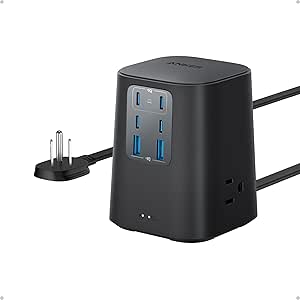
Anker 9-in-1 Desktop Charger and Power Strip, 100W USB-C, 300J Surge Protection
The Anker 9-in-1 puts charging speed ahead of outlet count: its USB-C1 and USB-C2 ports can each supply up to 100W when used individually, a clear step up from the LeZone’s 15W USB-C output and the 5V/3A ports on the Addtam. That makes it the strongest fit here for a laptop-focused desk with phones and accessories alongside it. It also includes four more USB ports and three AC outlets, but its 300-joule surge rating is much lower than LeZone’s 4,800 joules. The 100W claim also applies to either specified port used individually, so buyers should not assume both can deliver that output at once. This is a desktop charging hub, not the lineup’s best choice for maximum surge rating or AC capacity.
Pros:- USB-C1 and USB-C2 each support up to 100W when used individually.
- Four USB-C ports and two USB-A ports provide multiple charging connections.
- Three AC outlets add room for desk equipment.
- Five-foot cord supports desktop placement away from the wall outlet.
Cons:- The 300-joule surge rating is much lower than the LeZone’s 4,800 joules.
- The 100W specification applies to USB-C1 or USB-C2 when used individually.
- Only three AC outlets, fewer than the Addtam, Mifaso, and LeZone.
Best for: Laptop users building a desk setup who want high-output USB-C charging alongside a few AC outlets and accessory ports.
Not ideal for: Buyers prioritizing a high stated surge rating, many AC outlets, or simultaneous 100W output from both USB-C1 and USB-C2.
- AC outlets:3
- USB-C ports:4
- USB-A ports:2
- USB-C1 and USB-C2 output:Up to 100W each when used individually
- Surge protection:300 joules
- Cord length:5 ft
- Voltage:125 volts
- Weight:19.75 oz (560 g)
Our verdict“Choose the Anker 9-in-1 for a laptop-centered desk where high-output USB-C matters more than surge joules or numerous AC outlets.”
Anker Nano 67W 6-in-1 USB-C Charging Station
The Anker Nano is the compact choice for a bag-ready or small-desk charging setup, with two USB-C ports, two USB-A ports, and two AC outlets in a body measuring 3.94 × 3.66 × 0.75 inches. Its USB-C output reaches 67W, making it more capable for compatible laptops than the LeZone’s 15W USB-C ports, though it falls short of the Anker 9-in-1’s up-to-100W individual USB-C ports. There is a key distinction for this roundup: the Nano has no surge protection. It is a charging station, not a substitute for the surge-protective Addtam, Mifaso, LeZone, or Anker 9-in-1. The fixed five-foot cord also limits replacement options, but the flat plug and recycled-plastic content make it a tidy choice where portability matters more than surge coverage.
Pros:- 67W USB-C output can charge compatible laptops and other devices.
- Six connections combine two USB-C, two USB-A, and two AC outlets.
- Compact body and flat plug suit small desks and travel bags.
- Made with 75% post-consumer recycled plastic.
Cons:- Provides no surge protection, unlike the other surge-protective options in this lineup.
- USB-C output is below the Anker 9-in-1’s up-to-100W individual ports.
- The five-foot power cord is not detachable.
Best for: Travelers and small-desk users who need a compact mix of USB-C, USB-A, and AC charging and do not require surge protection.
Not ideal for: Anyone specifically shopping for a surge protector, or laptop users who need more than 67W USB-C output.
- USB-C ports:2
- Maximum USB-C output:67W
- USB-A ports:2
- USB-A output:Up to 12W
- AC outlets:2
- Surge protection:None
- Cord:5 ft, undetachable
- Recycled plastic content:75% post-consumer recycled plastic
Our verdict“Choose the Nano for compact 67W USB-C charging only if you do not need surge protection.”
6 ft Surge Protector Power Strip with 12 Outlets and 6 USB Ports
For a desk, dorm room, or shared workspace with many plugs competing for space, this strip’s 12 AC outlets and six USB ports make it the capacity pick in this group. Its 1.7-inch spacing helps larger adapters fit without blocking neighboring sockets, while the 2400-joule surge protection and resettable overload breaker add protection beyond basic USB charging. Compared with the LeZone 16-in-1, this model has fewer total connections but a shorter, 6-foot cord that may suit setups close to a wall outlet better. The tradeoff is USB output: each port type shares a stated 5 V/3.1 A total, so several devices charging together divide that capacity. There are also no specified individual outlet controls, and its 1875 W maximum calls for care with high-draw appliances.
Pros:- 12 AC outlets plus three USB-A and three USB-C ports cover a broad mix of devices
- 2400-joule surge protection and a resettable overload breaker
- 1.7-inch outlet spacing accommodates many bulky adapters
- 45-degree flat plug sits close to the wall
Cons:- USB-A and USB-C ports each share a 5 V/3.1 A total output rather than providing that output to every port
- Six-foot cord offers less reach than longer options such as the Mifaso 10FT strip
- No individual outlet controls are specified
Best for: Dorm residents, home-office users, and shared-desk setups that need many AC sockets plus USB-A and USB-C charging in one strip.
Not ideal for: People who need fast USB-C charging for laptops or several devices at once, or users who need a longer cord to reach a distant outlet.
- AC outlets:12
- USB ports:6 (3 USB-A, 3 USB-C)
- USB-C output:5 V/3.1 A total
- USB-A output:5 V/3.1 A total
- Surge protection:2400 joules
- Cord length:6 ft
- Maximum power and current:1875 W; 15 A
- Voltage:125 V
- Plug:Type B, 3-pin, 45° flat plug
Our verdict“Choose this strip when outlet count and broad USB-port coverage matter more than fast shared USB charging or extra cord reach.”

How We Picked
I compared these six products by how well they match the core job: powering everyday devices while adding USB-C charging and surge protection. The main criteria were USB-C wattage and port count where specified, surge-protection information, AC outlet capacity, cord length, placement, and how easily each format fits a desk, wall outlet, or shared charging area. I gave more weight to clearly stated USB-C performance and protection details than to a large port count on its own.
That logic puts the Anker 9-in-1 first for its stated 100W USB-C output and 300J surge rating. Mifaso ranks next for its two USB-C ports and long cord, while the Anker Nano 67W serves buyers who value a compact charging station. LeZone and the 12-outlet strip make more sense when AC capacity takes priority; Addtam rounds out the list as a convenient outlet extender. Where the supplied product details do not state USB-C wattage or a surge rating, I treat that as a comparison gap rather than assume performance.
Factors to Consider When Choosing Surge Protectors Usbc
Choosing among USB-C surge protectors means balancing charging needs, outlet layout, and protection information—not simply counting ports. I’d start by listing the devices that will be connected at the same time, then match the product’s stated output and physical design to the space. These checks can prevent common mismatches, such as expecting a basic USB-C port to charge a laptop quickly or buying a high-capacity strip that cannot fit behind furniture.
Match USB-C Wattage to the Device You Charge
A USB-C connector describes the plug shape, not the charging speed. Check the charger’s stated wattage and compare it with the needs of the device you plan to charge, especially if that device is a laptop. A 100W output gives more headroom for demanding laptops than a 67W option, while phones and smaller accessories may need far less. If the product listing does not clearly state USB-C output, do not assume that multiple ports can deliver laptop-level power. Shared charging can also divide available power across ports, so check how output changes when several devices connect. Paying for higher wattage makes sense when it replaces a separate laptop charger; it may not help a setup used mostly for phones.
Read the Surge Rating Separately from the Port Count
Outlet quantity and surge protection answer different questions: one tells you how many plugs fit, while the other describes protection against voltage spikes. Look for a clearly stated joule rating and any other protection details in the product specifications. A product with many AC outlets is not automatically a stronger protector, and USB charging ports do not prove that the AC outlets are protected to a particular level. If a listing leaves the surge rating unclear, treat that missing detail as a reason to verify the manufacturer’s documentation before buying. For valuable electronics, compare documented protection information rather than relying on appearance or marketing language. Also check whether the product has an indicator that shows protection status and what the manufacturer says to do if protection expires.
Choose Cord Length and Format for the Actual Location
A wall extender and a corded power strip solve different placement problems. An outlet extender keeps the unit close to the wall, which can suit a compact setup, but its size may block a nearby outlet or sit awkwardly behind furniture. A longer cord, such as the 10-foot options in this lineup, lets you place charging access where devices are used rather than where the wall outlet happens to be. Measure the route before choosing a cord length, and avoid running cords where they can be pinched, tripped over, or covered. Flat plugs can help furniture sit closer to a wall, but check plug orientation and clearance. For a crowded desk, prioritize spacing and access over the biggest possible outlet count.
Count the Devices That Need AC Power and USB Charging
Start with a realistic device list: lamps, monitors, routers, phones, tablets, and laptops do not all need the same kind of connection. A strip with many AC outlets is useful when several devices use standard plugs, while a model with several USB ports can reduce the number of separate wall chargers. Check the shape and spacing of larger adapters, since closely grouped outlets may not accept bulky plugs side by side. USB port totals can also be misleading if the total output is shared or if there are no USB-C ports at all. Keep high-draw appliances off a desk strip unless the manufacturer specifically rates it for that use. A little planning helps avoid buying capacity that is awkward to use.
Decide When a Compact Charging Station Is Worth It
A desktop charging station can tidy a work area and make USB-C ports easier to reach, while a long strip offers more freedom to position outlets. Compact units suit a laptop-and-phone setup where desk space matters more than maximum AC capacity. Larger strips fit shared desks or entertainment areas with several permanently connected devices. Before paying for a compact premium model, check whether it has enough AC outlets for the equipment you cannot charge over USB. Conversely, avoid a bulky multi-outlet strip if your main need is simply charging a laptop and phone. The right format should keep cables accessible without crowding the workspace.
Check Electrical Limits and Replaceability
Before connecting a collection of devices, check the strip’s maximum load and follow the manufacturer’s guidance for what can be plugged in. A high outlet count does not raise the total electrical capacity, and several connected devices can still exceed the strip’s limit. Do not connect one surge protector to another unless the manufacturer explicitly permits it. Surge protection can wear out after large events or over time, so look for clear status indicators, warranty terms, and replacement guidance. If a cord, plug, or housing becomes damaged, stop using the unit rather than trying to extend its life. These checks matter as much as USB-C speed when a product will stay plugged in every day.
Frequently Asked Questions
Can a USB-C surge protector charge my laptop as fast as its original charger?
Only if the USB-C port’s supported output meets your laptop’s charging requirements. In this lineup, the Anker 9-in-1 states 100W USB-C output, while the Anker Nano states 67W, so the 100W model offers more headroom for higher-demand laptops. Check your laptop’s charger specifications and the product’s output for the port you plan to use. If the power strip shares output among ports, simultaneous charging may reduce the power available to each device. When the listing does not state wattage, do not assume it will replace your laptop’s original charger.
Is a power strip with more outlets a better choice for a desk?
Not necessarily: outlet count helps only if the plugs fit and the product suits the space. The 12-outlet strip and LeZone focus on connecting more AC devices, while the Anker desktop model puts more emphasis on USB-C charging. Bulky adapters can block neighboring sockets, so look for outlet spacing or consider which plugs you need to use at once. Also check cord reach and placement before buying, since a high-capacity strip may be inconvenient if it cannot sit where your devices are. Choose by your actual device list rather than the largest number printed in the product name.
Should I choose a wall extender or a corded USB-C surge protector?
Choose a wall extender when you want a compact unit directly at the outlet and do not need to move charging access far from the wall. Addtam fits that general format, with six AC outlets and four USB ports. A corded model is more flexible when the outlet is behind furniture or across a room; Mifaso and LeZone each list a 10-foot cord. Measure the route and check whether the unit blocks nearby outlets or interferes with furniture. If you need to keep cables off a walkway, a long cord may create a new placement problem rather than solve one.
What should I do if a product does not state its surge-protection rating?
Look up the manufacturer’s specification sheet or contact the manufacturer before relying on that unit to protect valuable electronics. A large outlet count, USB-C port, or surge-protector label does not tell you the joule rating. The Anker 9-in-1 stands apart in this roundup by specifying 300J, which gives buyers a concrete figure to compare. If you cannot find clear protection details, treat the gap as a limitation and compare another model with documented specifications. Do not infer protection strength from the product’s size or number of ports.
Will USB-C charging stay at full speed when several ports are in use?
Not always: some products share a fixed power budget among connected ports, so the output available to each device can change. Check the manufacturer’s power table for single-port and multi-port charging rather than relying only on the highest advertised wattage. This matters most if you plan to charge a laptop and phone at the same time. If that setup is routine, choose a model with clearly documented shared output and enough total capacity for both devices. For occasional simultaneous charging, a lower-output port may be fine for a phone while the laptop uses the higher-power connection.
Conclusion
For the best overall, I’d choose the Anker 9-in-1 Desktop Charger: its stated 100W USB-C output and 300J surge rating make it the clearest all-round pick for a desk with a laptop. The best value in practical features is Mifaso for buyers who need two USB-C ports and a 10-foot cord, though I’d verify its charging output before choosing it for a laptop. For a best premium-style compact option, the Anker Nano 67W suits a tidy setup with moderate charging demands. Beginners who want a simple wall-mounted layout can start with Addtam, while buyers with many standard plugs should compare LeZone and the 12-outlet strip. If surge protection is your main priority, give documented protection specifications more weight than port totals.