For most dual-monitor setups, I’d start with the ErGear 48 x 24 Inch Electric Standing Desk: its full desktop gives two displays and their accessories more room than a typical converter. The Veken 55-Inch Electric Standing Desk is a strong fit if you want extra surface space, while the FLEXISPOT 36-Inch Converter stands out for a dedicated dual-monitor riser on an existing desk. The main tradeoff is between a full desk’s workspace and a converter’s smaller footprint and use of your current desk. Screen mounts, keyboard space, and the weight of your equipment can change which option fits best. Read on for the full comparison and guidance by setup.

Get the latest gadgets delivered free with Prime
- Fast, free delivery on millions of items
- Prime Video, Amazon Music and more included
- Member-only deals all year
Complete the kit


Key Takeaways
- Full desks offer the clearest path to more room. The ErGear 48 x 24 and Veken 55-inch models provide a larger work surface than converters, which can matter when two monitors share space with a laptop or paperwork.
- Converters suit buyers keeping an existing desk. VIVO, VariDesk, VERSADESK, and Mount-It! models raise a workstation on top of a desk, but their risers take up some of that original surface.
- The FLEXISPOT’s dual-monitor riser gives it a distinct role. Its layout is designed around two screens, making it a more targeted converter choice than models with a general-purpose top.
- Width alone doesn’t tell the whole story. Monitor stands, feet, keyboard trays, and desk depth affect whether two displays fit comfortably; check the full setup, not just the listed width.
- The lineup splits between manual and electric adjustments. Electric converters and full desks reduce the effort of changing height, while manual converters can make sense when a simpler mechanism matters more.
| VIVO 32-Inch Height-Adjustable Standing Desk Converter with Keyboard Tray, Black |  | Best Compact Converter for Dual Monitors | Work surface: 31.5 x 15.7 inches | Keyboard tray: 31.3 x 11.8 inches | Height adjustment: 4.2–19.7 inches | VIEW ON AMAZON | See Our Full Breakdown |
| VIVO 42-Inch Height-Adjustable Standing Desk Converter |  | Best Value for a Wider Dual-Monitor Setup | Work surface: 42 x 15.7 inches | Keyboard tray: 42 x 11.8 inches; 10.2 inches at center | Height adjustment: 4.5–20 inches | VIEW ON AMAZON | See Our Full Breakdown |
| ErGear 48 x 24 Inch Height-Adjustable Electric Standing Desk – Black |  | Best Full-Size Desk for Dual Monitors | Tabletop size: 48 x 24 inches | Height range: 28.35–46.46 inches | Weight capacity: 176 pounds | VIEW ON AMAZON | See Our Full Breakdown |
| VIVO Black 48-Inch Standing Desk Converter |  | Best Wide Converter for Two Monitors | Top surface: 47.6 x 15.7 inches | Keyboard tray: 47.6 x 11.8 inches; 10.2-inch center opening | Height adjustment: 4.5–20 inches | VIEW ON AMAZON | See Our Full Breakdown |
| VERSADESK PowerPro 36-Inch Electric Standing Desk Converter |  | Best Electric Converter for Frequent Height Changes | Width: 36 inches | Adjustment: Electric, push-button | Weight capacity: 80 pounds | VIEW ON AMAZON | See Our Full Breakdown |
| FLEXISPOT 36-Inch Standing Desk Converter with Dual Monitor Riser, Walnut | 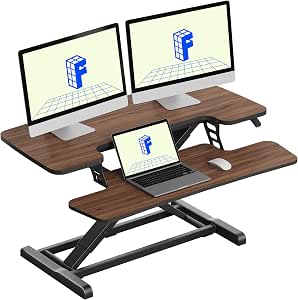 | Best Compact Manual Converter | Brand: FLEXISPOT | Model: MN | Color: Walnut | VIEW ON AMAZON | See Our Full Breakdown |
| Veken 55-Inch Electric Standing Desk, White |  | Best Spacious Electric Desk | Desktop dimensions: 55.12 x 23.64 inches | Height range: 28.3–46.5 inches | Desktop thickness: 0.6 inches | VIEW ON AMAZON | See Our Full Breakdown |
| HUANUO 48 x 24 in Electric Standing Desk with Drawers, Black | 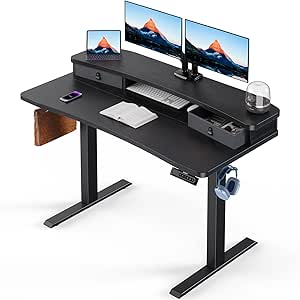 | Best for Storage and Monitor Mounting | Dimensions: 48 x 24 inches | Height range: 27.5–46.4 inches | Height presets: 4 | VIEW ON AMAZON | See Our Full Breakdown |
| Mount-It! Dual Monitor Electric Standing Desk Converter |  | Best for Large Monitors on a Small Desk | Monitor capacity: Two monitors up to 32 inches each | VESA compatibility: 75 x 75 mm and 100 x 100 mm | Height range: 1.4–21.1 inches | VIEW ON AMAZON | See Our Full Breakdown |
| VariDesk Pro Plus 48 Adjustable Desk Converter, Black |  | Best Ready-to-Use Wide Converter | Model: Pro Plus 48 | Upper tier dimensions: 48 x 13.25 inches | Height settings: 11 | VIEW ON AMAZON | See Our Full Breakdown |
| VIVO 36-Inch Standing Desk Converter, Black (DESK-V036KB) |  | Best Adjustable Height Range | Work surface: 36 × 15.7 inches | Keyboard tray: 36 × 11.8 inches; 10.2 inches at center | Height adjustment: 4.5–20 inches | VIEW ON AMAZON | See Our Full Breakdown |
| VariDesk Pro Plus 36 Adjustable Standing Desk Converter |  | Best Ready-to-Use Two-Tier Pick | Upper surface: 36 × 12.25 inches | Height settings: 11 | Listed minimum height: 17.5 inches | VIEW ON AMAZON | See Our Full Breakdown |
| standing desk for dual monitor | Warranty | Item weight |
|---|---|---|
| VIVO 32-Inch Height-Adjustable | 3 years | 26 pounds |
| VIVO 42-Inch Height-Adjustable | 3 years | — |
| ErGear 48 x 24 Inch Height-Adj | — | 43.8 pounds |
| VIVO Black 48-Inch Standing De | — | — |
| VERSADESK PowerPro 36-Inch Ele | — | — |
| FLEXISPOT 36-Inch Standing Des | — | 34.5 pounds |
| Veken 55-Inch Electric Standin | 2 years | — |
| HUANUO 48 x 24 in Electric Sta | — | — |
| Mount-It! Dual Monitor Electri | Limited lifetime | 63 pounds |
| VariDesk Pro Plus 48 Adjustabl | Limited lifetime warranty when sold by Vari | 57 pounds |
| VIVO 36-Inch Standing Desk Con | 3 years | 28.3 pounds |
| VariDesk Pro Plus 36 Adjustabl | 5 years | — |
More Details on Our Top Picks
VIVO 32-Inch Height-Adjustable Standing Desk Converter with Keyboard Tray, Black
The 32-inch VIVO is the most compact converter here that still lists a work surface sized for two monitors. Its keyboard tray rises with the desktop, keeping typing position aligned as you change height; compared with the 42-inch VIVO, it takes up less desk space but gives you less room to spread out monitors, speakers, and accessories. The lift-assist range of 4.2 to 19.7 inches supports seated and standing work, and minimal assembly makes it a straightforward way to convert an existing desk rather than replace it. The tradeoff is its 33-pound capacity and shallow 15.7-inch surface, which leave little margin for heavy displays or a deep monitor stand. I’d skip it if your dual-monitor setup uses bulky mounts or needs generous front-to-back space.
Pros:- Compact 31.5-inch surface is a smaller footprint than the 42-inch VIVO converter.
- Keyboard tray moves with the desktop to keep the typing area aligned.
- Height adjusts from 4.2 to 19.7 inches for sitting and standing.
- Minimal assembly and a three-year manufacturer warranty.
Cons:- The 33-pound desktop capacity limits heavier monitor and accessory combinations.
- The 15.7-inch depth gives less front-to-back room than the ErGear 48 x 24-inch desk.
- A 31.5-inch width leaves limited space for peripherals beside two monitors.
Best for: People with limited desk space who want a basic converter for two lightweight monitors and a keyboard.
Not ideal for: Users with heavy monitor arms, large accessories, or a need for deeper work space; its desktop capacity is 33 pounds and depth is 15.7 inches.
- Work surface:31.5 x 15.7 inches
- Keyboard tray:31.3 x 11.8 inches
- Height adjustment:4.2–19.7 inches
- Maximum capacity:33 pounds
- Item weight:26 pounds
- Frame and top:Alloy steel frame; engineered wood top
- Warranty:3 years
Our verdict“Choose this compact VIVO if your two monitors are lightweight and you want to keep your existing desk, but pick a wider or deeper option for a more involved setup.”
VIVO 42-Inch Height-Adjustable Standing Desk Converter
The 42-inch VIVO gives dual monitors more side-to-side room than the 32-inch VIVO without requiring a full desk replacement. Its synchronized keyboard tray keeps the typing area moving with the work surface, while the 4.5-to-20-inch manual lift handles a broad range of sitting and standing positions. Compared with the 47.6-inch VIVO converter, this model is narrower, making it easier to fit on an existing desk, though the desktop still shares the same 15.7-inch depth and 33-pound limit. That capacity can be restrictive once two displays, a stand, and accessories are added. The tray’s 4.4-pound limit also rules out treating it as a storage shelf. I’d choose this for a modest dual-monitor arrangement, not a heavy or especially deep workstation.
Pros:- 42-inch width provides more room for two displays than the 32-inch VIVO.
- Synchronized keyboard tray maintains its position relative to the desktop.
- Adjusts from 4.5 to 20 inches and fits an existing desk.
- Steel frame and three-year warranty.
Cons:- Manual height adjustment takes more effort than the electric VERSADESK PowerPro.
- The 33-pound desktop capacity can be limiting for dual monitors and accessories.
- The keyboard tray capacity is only 4.4 pounds, and its center narrows to 10.2 inches.
Best for: Remote workers adding two compact monitors to an existing desk who want a wider surface without moving to a full standing desk.
Not ideal for: People using heavy monitor arms or a keyboard setup with substantial accessories; the desktop holds up to 33 pounds and the tray 4.4 pounds.
- Work surface:42 x 15.7 inches
- Keyboard tray:42 x 11.8 inches; 10.2 inches at center
- Height adjustment:4.5–20 inches
- Desktop capacity:33 pounds
- Keyboard tray capacity:4.4 pounds
- Frame and top:Alloy steel frame; engineered wood top
- Warranty:3 years
- Assembly:Required; instructions included
Our verdict“Pick the 42-inch VIVO for a roomier but still desk-mounted dual-monitor station, provided your equipment stays within its modest weight limits.”
ErGear 48 x 24 Inch Height-Adjustable Electric Standing Desk – Black
Unlike the VIVO converters, the ErGear 48 x 24-inch desk replaces the desk rather than sitting on top of one. That distinction matters for dual monitors: its 24-inch depth gives displays and a keyboard more room than the converters’ 15.7-inch surfaces, and its 176-pound capacity leaves far more headroom than their 33-pound limits. Electric adjustment and four memory presets make repeated sit-stand changes easier than the manual VIVO models. This is the strongest fit in the group for a permanent workstation with heavier equipment, but it needs its own floor space and assembly, unlike a converter that can be placed on an existing desk. The 28.35-to-46.46-inch range may also fall short for some taller users. I’d favor it for a dedicated office, not a temporary or space-saving upgrade.
Pros:- 24-inch depth provides more working room than the VIVO converters’ 15.7-inch surfaces.
- 176-pound capacity offers substantial headroom for monitors and accessories.
- Electric lift with four memory presets simplifies regular height changes.
- Steel frame, quiet motor, and low-VOC materials.
Cons:- Requires a separate desk footprint rather than sitting on an existing desk.
- At 43.8 pounds, it is less convenient to relocate than a lightweight converter.
- The maximum height of 46.46 inches may not suit taller users.
Best for: People building a dedicated dual-monitor workstation who need a deeper desktop, high equipment capacity, and electric presets.
Not ideal for: Users who need a portable add-on for an existing desk or who require a standing height above 46.46 inches.
- Tabletop size:48 x 24 inches
- Height range:28.35–46.46 inches
- Weight capacity:176 pounds
- Adjustment:Electric lifting mechanism
- Memory presets:4
- Item weight:43.8 pounds
- Frame and top:Alloy steel/carbon steel frame; engineered wood top
- Tabletop thickness:0.67 inches
Our verdict“Choose the ErGear if you want a full-size, deeper desk for a heavier dual-monitor setup and do not need a converter’s smaller footprint.”
VIVO Black 48-Inch Standing Desk Converter
With a 47.6-inch-wide surface, this VIVO converter gives two monitors more side-by-side breathing room than the 42-inch VIVO, while keeping the convenience of an add-on for an existing desk. Its touch-lock adjustment moves from 4.5 to 20 inches, and the keyboard tray rises in sync, so the whole workstation changes height together. It suits users who value width but do not need the deeper, freestanding setup of the ErGear 48 x 24-inch desk. The key compromise is capacity: the desktop is limited to 33 pounds and the tray to 4 pounds, despite the generous width. Its 15.7-inch depth also remains shallow, and the bulky unit may be awkward to move once placed. I’d pass if your displays rely on heavy stands or your desk has little spare depth.
Pros:- 47.6-inch width offers more monitor spacing than the 42-inch VIVO.
- Touch-lock height adjustment covers 4.5 to 20 inches.
- Synchronized keyboard tray moves with the desktop.
- Steel frame and minimal assembly.
Cons:- Desktop capacity is limited to 33 pounds despite the wide surface.
- Keyboard tray capacity is only 4 pounds.
- The 15.7-inch depth is much shallower than the ErGear desk, and the unit is bulky to relocate.
Best for: Dual-monitor users with a wide existing desk who want a broad converter surface and a synchronized keyboard tray.
Not ideal for: People with heavy screens or monitor arms, limited desk depth, or a need to move the converter often.
- Top surface:47.6 x 15.7 inches
- Keyboard tray:47.6 x 11.8 inches; 10.2-inch center opening
- Height adjustment:4.5–20 inches
- Desktop capacity:33 pounds
- Keyboard tray capacity:4 pounds
- Materials:Steel frame; laminated top
- Color:Black
Our verdict“Pick this VIVO when width for two monitors matters more than depth or high load capacity on your existing desk.”
VERSADESK PowerPro 36-Inch Electric Standing Desk Converter
The VERSADESK PowerPro is the electric converter in this lineup for buyers who want push-button height changes without replacing their desk. Its 80-pound capacity is well above the VIVO converters’ 33-pound desktop limit, giving a dual-monitor setup more room for heavier displays and accessories. The two-tier layout separates monitors from the keyboard, while three cable grommets and a built-in USB port help keep a compact station organized. Compared with the ErGear full-size desk, it preserves an existing desk and arrives fully assembled, but its 36-inch width and converter format provide less overall workspace than a 48 x 24-inch tabletop. The product data does not provide an adjustment range, so I would check that fit against your seated and standing heights before buying. Monitors and monitor arms are not included.
Pros:- Electric push-button adjustment avoids the manual lifting of the VIVO converters.
- 80-pound capacity exceeds the 33-pound limits of the VIVO converter models.
- Two-tier design, three cable grommets, and built-in USB charging support a tidy workstation.
- Ships fully assembled and includes a child safety lock.
Cons:- At 36 inches wide, it offers less side-to-side room than the 42- and 48-inch VIVO converters.
- The product data does not specify an adjustment range.
- Monitors and monitor arms must be purchased separately.
Best for: People who change height often and want a motorized converter with higher stated capacity and built-in cable routing.
Not ideal for: Users who need a full-depth desk, want included monitors or arms, or cannot confirm that the unspecified height range fits their posture.
- Width:36 inches
- Adjustment:Electric, push-button
- Weight capacity:80 pounds
- Design:Two-tier workspace with keyboard tray
- Charging:Built-in USB port
- Cable management:Three grommet holes
- Safety:Child safety lock
- Assembly and warranty:Fully assembled; lifetime warranty
Our verdict“Choose the PowerPro if you want an assembled, electric converter for frequent height changes and need more load capacity than the manual VIVO models provide.”
FLEXISPOT 36-Inch Standing Desk Converter with Dual Monitor Riser, Walnut
The FLEXISPOT 36-Inch converter is a compact way to raise a dual-monitor setup without replacing your existing desk. Its spring lift system adjusts the work surface, while the reinforced steel frame is designed to support daily use. Compared with the wider VariDesk Pro Plus 48, this model takes up less desk width and weighs less, though it provides less room to spread out monitors and accessories. The included keyboard tray keeps typing below the screens, but its 4.4-pound capacity limits what you can place on it. Nearly assembled arrival also reduces setup work; the tradeoff is a 34.5-pound unit that may be awkward to reposition once placed. Choose it for a modest dual-screen workstation, not a heavily accessorized one.
Pros:- 36-inch surface is sized for a dual-monitor arrangement
- Spring lift system allows height adjustment without an electric desk base
- Reinforced steel frame is designed for stable daily use
- Arrives nearly assembled for a quicker setup
Cons:- Keyboard tray supports only 4.4 pounds
- At 34.5 pounds, it can be cumbersome to move
- Offers less width than larger converters such as the VariDesk Pro Plus 48
Best for: People with an existing desk and two modest-sized monitors who want a compact, manually adjustable riser with a separate keyboard tray.
Not ideal for: Buyers with heavy keyboards, many desk accessories, or a need to move the converter often; its tray capacity is limited and the unit weighs 34.5 pounds.
- Brand:FLEXISPOT
- Model:MN
- Color:Walnut
- Dimensions:24.9 x 36 x 19.6 inches
- Desktop load capacity:33 pounds
- Keyboard tray capacity:4.4 pounds
- Item weight:34.5 pounds
- Height adjustable:Yes
Our verdict“Choose the FLEXISPOT if you want a relatively compact manual riser for two monitors and can work within its light-duty keyboard tray.”
Veken 55-Inch Electric Standing Desk, White
The Veken 55-inch desk suits buyers who want the monitors and the entire workstation to move together, rather than raising a converter on a fixed desk. Its broad top gives two screens room alongside a keyboard and accessories, and memory presets make changing between sitting and standing heights straightforward. Compared with the HUANUO 48 x 24-inch desk, Veken offers more desktop width but lacks its drawers and open storage cubicle. The electric range runs from 28.3 to 46.5 inches, with motor noise specified under 52 dB. There are tradeoffs: the top is made from two boards, and stability can vary with the floor and load. This is a better fit for a spacious, adaptable workstation than for someone who prioritizes a one-piece desktop or built-in storage.
Pros:- 55-inch desktop gives a dual-monitor setup useful side-to-side room
- Electric height adjustment with memory presets simplifies repeat changes
- Cable management helps control cords around the workstation
- Includes two headphone hooks and a cable clip
Cons:- Desktop consists of two boards rather than one continuous panel
- Stability may vary by floor type and load
- Does not include the drawers and cubby found on the HUANUO desk
Best for: Remote workers or students who need a wide electric sit-stand surface for two monitors, peripherals, and daily work materials.
Not ideal for: Buyers who require a one-piece desktop, built-in drawers, or maximum confidence in stability on uneven flooring.
- Desktop dimensions:55.12 x 23.64 inches
- Height range:28.3–46.5 inches
- Desktop thickness:0.6 inches
- Maximum weight recommendation:154 pounds
- Top material:Engineered wood
- Frame material:Steel
- Motor noise:Under 52 dB
- Features:Electric height adjustment, memory presets, cable management
- Warranty:2 years
Our verdict“Pick the Veken if desktop width and electric sit-stand adjustment matter more than integrated storage or a single-piece top.”
HUANUO 48 x 24 in Electric Standing Desk with Drawers, Black
The HUANUO 48 x 24-inch desk is the storage-minded choice for a dual-monitor setup. Its 24-inch depth and rear edge designed for a C-clamp monitor mount help keep screens positioned without giving up the full desktop to monitor stands. Two drawers and an open cubicle also give small accessories a place to go. Compared with the wider Veken 55-inch desk, HUANUO offers less side-to-side room but adds built-in storage and four height presets. Its electric adjustment spans 27.5 to 46.4 inches, and the stated maximum weight recommendation is 176 pounds. The main compromise is setup: assembly is required and is recommended for two people. If a clean, spacious surface matters more than storage, the Veken is the stronger fit; choose HUANUO when organization and clamp mounting take priority.
Pros:- Rear edge accommodates a C-clamp monitor mount
- Two drawers and an open cubicle keep accessories off the main work surface
- Four presets provide one-touch height changes
- 176-pound maximum weight recommendation
Cons:- Assembly is required and is recommended for two people
- 48-inch width provides less side-to-side room than the Veken 55-inch desk
- Engineered-wood top has a black laminate finish
Best for: Dual-monitor users who plan to use a C-clamp monitor arm and want drawers and an open cubby for accessories.
Not ideal for: Buyers who need a very wide desktop or want a desk that requires little assembly.
- Dimensions:48 x 24 inches
- Height range:27.5–46.4 inches
- Height presets:4
- Drawers:2
- Shelves:2
- Maximum weight recommendation:176 pounds
- Base and leg material:Carbon steel
- Top material and finish:Engineered wood with black laminate finish
Our verdict“Choose the HUANUO if your two monitors will use a clamp mount and you value built-in storage over a wider desktop.”
Mount-It! Dual Monitor Electric Standing Desk Converter
The Mount-It! electric converter stands apart because it supports two monitors up to 32 inches each on included adjustable VESA arms. That makes it a targeted choice for buyers who need to lift the screens and keyboard together while keeping the converter’s 28.3 x 18.9-inch base on an existing desk. The arms offer tilt, swivel, and rotation adjustments, while electric controls raise the work surface from 1.4 to 21.1 inches. Compared with the manual FLEXISPOT 36-Inch converter, Mount-It! offers more monitor-positioning flexibility and powered height changes, but it is far heavier at 63 pounds and needs partial assembly. Its 55-pound total capacity also has a per-monitor limit of 17.6 pounds, so large screens must meet both limits. This is a specialist pick, not the easiest option to move or install.
Pros:- Included VESA arms support two monitors up to 32 inches each
- Electric height adjustment raises the screens and work surface together
- Adjustable arms provide tilt, swivel, and rotation
- Compact base and built-in cable management suit smaller desks
Cons:- Weighs 63 pounds, making repositioning difficult
- Each monitor is limited to 17.6 pounds within the 55-pound total capacity
- Partial assembly is required
Best for: People with two VESA-compatible monitors up to 32 inches each who need an electric converter for a compact existing desk.
Not ideal for: Buyers with monitors above 17.6 pounds each, non-VESA screens, or a frequent need to relocate their workstation.
- Monitor capacity:Two monitors up to 32 inches each
- VESA compatibility:75 x 75 mm and 100 x 100 mm
- Height range:1.4–21.1 inches
- Base dimensions:28.3 x 18.9 inches
- Maximum weight capacity:55 pounds total; up to 17.6 pounds per monitor
- Monitor adjustment:Tilt ±45°, swivel ±30°, rotate 360°
- Material:Steel base and engineered-wood top
- Item weight:63 pounds
- Warranty:Limited lifetime
Our verdict“Choose Mount-It! for two compatible large monitors on a compact desk, provided their weight fits the per-screen limit.”
VariDesk Pro Plus 48 Adjustable Desk Converter, Black
The VariDesk Pro Plus 48 is the no-assembly pick for buyers who want a wide converter that separates monitor placement from keyboard and mouse space. Its 48 x 13.25-inch upper tier accommodates two monitors, while the lower deck keeps input devices within reach as the unit rises. Eleven spring-assisted height settings and dual stability bars make this a more substantial manual option than the smaller FLEXISPOT 36-Inch converter, but the VariDesk weighs 57 pounds and has a 45-pound maximum recommended load. That combination favors a desk where the converter can stay put, rather than a setup that needs frequent rearranging. Unlike the electric Mount-It!, it avoids a motor and VESA arms; buyers give up powered adjustment and dedicated screen positioning in return for a fully assembled, two-tier design.
Pros:- 48-inch upper tier accommodates a dual-monitor arrangement
- Lower deck separates keyboard and mouse from the monitor tier
- Spring-assisted lift offers 11 height settings
- Arrives fully assembled with dual stability bars and a heavy steel base
Cons:- 57-pound weight makes it difficult to reposition
- 45-pound maximum recommended load limits heavier monitor setups
- Manual lift lacks the powered adjustment of the Mount-It! converter
Best for: People who want a wide, ready-to-use manual converter with separate tiers for two monitors and keyboard input.
Not ideal for: Buyers who need powered height changes, adjustable monitor arms, or a converter that is easy to move.
- Model:Pro Plus 48
- Upper tier dimensions:48 x 13.25 inches
- Height settings:11
- Height range:11–44.5 cm
- Maximum weight recommendation:45 pounds
- Item weight:57 pounds
- Frame material:Alloy steel
- Assembly:Fully assembled
- Warranty:Limited lifetime warranty when sold by Vari
Our verdict“Pick the VariDesk Pro Plus 48 if you want a broad, fully assembled two-tier converter and do not need electric lifting.”
VIVO 36-Inch Standing Desk Converter, Black (DESK-V036KB)
For a dual-monitor setup that also needs laptop space, the 36 × 15.7-inch surface gives this VIVO more front-to-back room than the VariDesk Pro Plus 36’s 12.25-inch upper surface. Its 4.5–20-inch adjustment range also provides more flexibility in seated and standing positions than a converter with a fixed minimum height. The keyboard tray rises with the desktop, keeping the keyboard and mouse at hand as the work surface moves. The tradeoff is weight management: the desktop supports up to 33 pounds, while the tray is limited to 4.4 pounds, so it is best kept to lightweight input devices. Partial assembly is required, unlike the fully assembled VariDesk. I’d choose this for adaptable positioning and usable surface depth, not for a heavy keyboard tray or a setup that must be ready immediately.
Pros:- 36 × 15.7-inch work surface leaves room for two monitors and a laptop
- Height adjusts from 4.5 to 20 inches for varied seated and standing positions
- Keyboard tray moves with the desktop
- Steel frame and 3-year warranty
Cons:- Keyboard tray supports only 4.4 pounds
- Partial assembly is required
- The desktop’s 33-pound capacity can limit heavier monitor setups
Best for: Dual-monitor users who also need space for a laptop and want a wide height range for seated and standing work.
Not ideal for: Buyers with a heavy keyboard or accessories on the tray, or anyone who needs a converter that arrives fully assembled.
- Work surface:36 × 15.7 inches
- Keyboard tray:36 × 11.8 inches; 10.2 inches at center
- Height adjustment:4.5–20 inches
- Desktop capacity:33 pounds
- Keyboard tray capacity:4.4 pounds
- Frame material:Alloy steel
- Item weight:28.3 pounds
- Assembly:Partial assembly required
- Warranty:3 years
Our verdict“Choose this VIVO for a roomy dual-monitor surface and flexible height adjustment, provided your keyboard tray load is light.”
VariDesk Pro Plus 36 Adjustable Standing Desk Converter
The VariDesk Pro Plus 36 suits buyers who want a dedicated upper shelf for two monitors and a separate lower tray for a keyboard and mouse. Compared with the VIVO 36-Inch converter, its two-tier layout gives the work area clearer separation, and it arrives fully assembled. The spring-assisted lift has 11 height settings and dual handles, making adjustments straightforward, though the listed minimum and maximum are both 17.5 inches, so the supplied specifications do not establish a usable height range. Its 36 × 12.25-inch upper surface is also shallower than the VIVO’s, leaving less front-to-back room for monitors or other gear. At 52.5 pounds, this is a heavy unit to reposition, and the 35-pound recommended load calls for checking the combined weight of monitors and accessories before choosing it.
Pros:- Two-tier layout separates monitors from the keyboard and mouse
- 36-inch upper surface accommodates a dual-monitor arrangement
- Spring-assisted lift offers 11 height settings and dual handles
- Fully assembled with a 5-year warranty
Cons:- Weighs 52.5 pounds, making it difficult to reposition
- 35-pound maximum recommended load may constrain heavier monitor setups
- Listed minimum and maximum heights are both 17.5 inches
Best for: Dual-monitor users who prefer a separate keyboard tray and want a converter that arrives assembled.
Not ideal for: Buyers who need a lightweight unit to move often, extra-deep monitor space, or clearly specified minimum and maximum working heights.
- Upper surface:36 × 12.25 inches
- Height settings:11
- Listed minimum height:17.5 inches
- Listed maximum height:17.5 inches
- Maximum recommended load:35 pounds
- Weight:52.5 pounds
- Frame material:Alloy steel
- Assembly:Fully assembled
- Warranty:5 years
Our verdict“Pick the VariDesk for an assembled two-tier dual-monitor station, but verify its listed height and load limits against your setup.”

How We Picked
I ranked these options for the demands of a two-monitor workstation, weighing usable surface area, room for a keyboard and mouse, height adjustment, and how each product fits into an existing office. I gave full desks credit for offering a dedicated work surface, while converters were judged on how much useful space they add without replacing a desk. A product’s advertised width matters, but depth and monitor support matter too: two displays can crowd a shallow platform or leave little room for input devices.
The order reflects the balance of fit, flexibility, and ease of use rather than a single specification. The ErGear ranks first as a full desk with a practical footprint for a dual-monitor setup; the wider Veken follows for buyers who need more surface space. Converter models are ordered by how directly their layout addresses two screens, their adjustment method, and the compromises of placing them on another desk. I also considered who should skip each style: a converter may not suit a crowded or shallow existing desk, while a full desk requires replacing the current surface and planning for its footprint.
Factors to Consider When Choosing Standing Desk For Dual Monitors
Choosing a desk for two monitors starts with the whole workstation, not the screen count alone. I’d map the displays, stands or arms, keyboard, mouse, and any laptop before deciding between a full desk and a converter. These checks can help prevent a setup that technically fits but feels cramped once you work at it.
Measure the Full Monitor Footprint
Measure the width across both monitors, including the edges that sit closest together, then add space for stands or mount clamps. Check the platform’s depth as well as its width; a pair of large screens can fit side to side yet leave no comfortable space for a keyboard. Monitor arms may free platform space, but their clamps need a compatible edge and enough clearance behind the desk. A common mistake is measuring only the display panels and forgetting the feet, cables, and gap needed to position screens. If your monitors have wide stands, prioritize a broad, deep surface over a dedicated riser label. If you plan to add a laptop or documents, leave that space in your measurement rather than treating it as optional.
Choose a Converter or a Full Desk
A converter makes sense when your current desk is sturdy, has enough depth, and you want to keep it in place. It also avoids replacing the whole work surface, though the converter’s base occupies room even at its lowest position. A full standing desk gives you a single surface designed to move, which can make cable routing and workspace planning simpler. It also calls for more floor space and a change to your existing furniture setup. Before choosing a converter, check whether its footprint leaves room for notebooks, speakers, or other items already on your desk. Buyers with an overcrowded or shallow desk may get more usable space from a full desk, even if a converter seems like the smaller purchase.
Match the Adjustment Method to Your Routine
Electric adjustment can make changes easier when you expect to alternate between seated and standing positions throughout the day. Manual converters may suit someone who makes fewer changes or prefers a less complex setup. The control method matters less if you rarely move the workstation, so avoid paying for convenience you will not use. Check the stated adjustment range against the seated and standing heights that work for you, including the height added by your monitor stands. Two people sharing a desk may need a broader usable range than one person with a fixed setup. Also consider where the controls sit and whether your keyboard, displays, and accessories can remain stable during height changes.
Account for Equipment Weight and Mounting
Two monitors can place meaningful weight on a platform, especially when paired with a laptop, speakers, and accessories. Add up the weight of everything that will move with the desk or converter and compare it with the manufacturer’s stated capacity. Do not assume a monitor riser or arm can support displays just because it has space for them; check the product’s mounting and weight guidance. Arms can help reclaim surface area, but they can also concentrate force at a clamp point. If you cannot confirm compatibility for a particular mount, use the supplied stands or ask the manufacturer before buying. Keeping heavy items near the center of the work surface can also help avoid an awkward, uneven arrangement.
Plan for Cable Slack and Desk Depth
Height adjustment changes the distance between your monitors, computer, and power outlets, so cables need enough slack to move without pulling. Before setup, trace where each cable will run at both the lowest and highest positions. A power strip attached to a moving surface can simplify routing, but its cord must still reach the wall outlet across the full range. Desk depth also affects viewing distance and leaves room for the keyboard; a wide but shallow surface may not solve a dual-monitor comfort problem. Avoid securing cables tightly to both a moving desk and a fixed wall point. A little planning here can prevent a screen from shifting or a connector from being strained whenever you adjust height.
Decide Which Tradeoffs Matter Most
Spend more attention on surface area and layout if your two displays are large or share space with other equipment. If you already own a suitable desk, a converter can preserve that furniture and reduce the scope of the change, but it cannot create unlimited room. A model with a dual-monitor riser may organize displays neatly while leaving less flexible space for other items. A broad full desk offers more freedom to rearrange but takes over more floor area. Write down the items that must remain on the workstation and the minimum space each needs before comparing models. That list helps distinguish a genuine fit from a desk that only accommodates the monitors on paper.
Frequently Asked Questions
Should I choose a full standing desk or a converter for two monitors?
I’d choose a full desk if your existing surface is too shallow, crowded, or unsuitable for height adjustment. It gives the workstation a dedicated moving surface, which can make room for screens and accessories easier to plan. A converter is a better match when your current desk is sturdy and spacious enough to support its footprint. Remember that a converter’s base uses space on the desk even when lowered. Measure the whole setup before deciding, including the converter base, monitor stands, keyboard, and mouse.
Can a 36-inch converter fit two monitors?
It can, but the display width and stand design determine whether the fit will feel usable. Measure both monitors together with their stands, then compare that measurement with the actual work surface rather than relying only on the product name. A dedicated dual-monitor riser, such as the FLEXISPOT in this roundup, is designed with two screens in mind, but it still needs to suit your equipment. Check whether the keyboard tray or lower platform leaves enough room for your hands and pointing device. If the screens are wide or have large feet, a larger converter or full desk may be a better fit.
Are monitor arms a good idea on a standing desk converter?
Monitor arms can free up surface area and make it easier to arrange two displays, but compatibility matters. Check whether the converter allows a clamp mount and whether its edge and platform can support the arm and monitor weight. A converter may move or flex differently from a fixed desk, so confirm the manufacturer’s guidance before attaching an arm. Also check that the arm’s reach works at both sitting and standing heights. If mount compatibility is unclear, using the supplied monitor stands is the safer planning assumption.
What should I check before putting two monitors on an electric desk?
Start with the combined weight of the monitors, stands or arms, computer, and other items that will move with the surface. Compare that total with the desk’s stated capacity, and check any separate guidance for monitor mounts. Next, confirm that the surface has enough width and depth for the displays plus your keyboard and mouse. Plan cable slack for the full height range so power and display connections are not pulled tight. If the desk is shared, check that its adjustment range works for each user’s preferred seated and standing positions.
Is a wider desk always better for a dual-monitor setup?
Not always: width helps separate screens, but depth affects how far back they can sit and how much space remains for input devices. A wide, shallow surface can still feel crowded, especially when both monitors use large stands. A converter’s riser layout may use width efficiently, but it can reduce flexible space for other equipment. Consider the dimensions of the full setup and the room around the desk, not just the largest width figure. If you also use a laptop, paperwork, or speakers, include those items in the layout before choosing.
Conclusion
For most buyers replacing their work surface, I recommend the ErGear 48 x 24 Inch Electric Standing Desk as the best overall: it balances a full desk layout with room for two displays. The Veken 55-Inch Electric Standing Desk is my pick for buyers who need extra surface space, while the FLEXISPOT 36-Inch Converter is the best targeted choice for a dual-monitor riser on an existing desk. For a simpler starting point, a converter such as the VIVO 32-Inch makes sense if your monitors are compact and your current desk has enough space; buyers should measure carefully before choosing this smaller footprint. For a more feature-focused electric converter, consider the VERSADESK PowerPro or Mount-It! Dual Monitor Converter, after confirming fit and equipment support. If you want a no-regrets decision, match the product to your actual monitor footprint, desk depth, and adjustment habits—not the number of screens alone.