
Finding the right rackmount KVM switch means balancing performance, compatibility, and ease of installation. The best overall pick offers reliable performance and extensive port options, suitable for most professional setups. For those prioritizing high resolution, the TESmart 16 Port HDMI KVM Switch 8K@60Hz stands out, while the MT-VIKI 8 Port Rack Mount KVM with integrated console appeals to users needing an all-in-one solution. Most options in this category face tradeoffs like higher cost for advanced features, or simpler models with limited scalability. Continue reading for a detailed breakdown of these choices and what to consider before buying.

Get the latest gadgets delivered free with Prime
- Fast, free delivery on millions of items
- Prime Video, Amazon Music and more included
- Member-only deals all year
Complete the kit



Key Takeaways
- Top-ranked products combine high resolution support with robust build quality and ease of management.
- Many high-end switches include remote or IP control, but often at a premium price and increased complexity.
- Compatibility varies: HDMI, VGA, USB, and PS2 options require careful matching to existing hardware.
- Port count and module expandability are key for larger setups, but can increase costs significantly.
- User interface features like OSD menus and integrated consoles improve usability but may add to the size and cost.
| MT-VIKI 8 Port HDMI KVM Switch with 4K@30Hz, Rack Mount, IR Remote, and Cables |  | Best Overall for Basic 4K Control in Rackmount Form | Number of Ports: 8 | Resolution: 4K@30Hz | Mounting Type: Rack Mount 1U | VIEW ON AMAZON | See Our Full Breakdown |
| TESmart USB 3.0 HDMI KVM Switch 8 Port 4K@60Hz Rackmount with 8 Cables |  | Best for High-Frame-Rate 4K at 60Hz with USB 3.0 Support | Number of Ports: 8 HDMI input ports | Resolution Support: 4K@60Hz | USB Ports: 2 USB 3.0 | VIEW ON AMAZON | See Our Full Breakdown |
| MT-Viki 17” Rack Mount KVM Switch VGA 8 Port with Keyboard, Touchpad, Drawer, and Included Cables |  | Best for Space-Saving Professional Server Environments | Display Size: 17 inches | Number of Ports: 8 | Mounting Type: Rackmount 1U | VIEW ON AMAZON | See Our Full Breakdown |
| TESmart 16 Port HDMI KVM Switch 8K@60Hz, USB 3.0, Rackmount, EDID Emulator, Remote & IP Control |  | Best for Ultra-High-Resolution Control with Enterprise Features | Number of Ports: 16 HDMI inputs | Resolution Support: 8K@60Hz, 4K@120Hz/144Hz | USB Ports: 2 USB 3.0 | VIEW ON AMAZON | See Our Full Breakdown |
| TESmart 16 Ports HDMI KVM Switch 4K@30Hz, 16×1 Rack Mount with 8 Cables, USB2.0, EDID Emulator, RS232 & LAN |  | Best for Large-Scale 4K Control at 30Hz with Versatile Connectivity | Number of Ports: 16 | Resolution Support: 3840×2160@30Hz | USB Ports: 2 | VIEW ON AMAZON | See Our Full Breakdown |
| TESmart USB 3.0 HDMI KVM Switch 8 Port 4K@60Hz Rackmount with 8 Cables |  | Best Overall for High-Resolution Multi-Device Control | Number of Ports: 8 HDMI input, 1 HDMI output | Resolution Support: 4K@60Hz | USB Ports: 2 USB 3.0 ports | VIEW ON AMAZON | See Our Full Breakdown |
| MT-VIKI Rack Mount KVM with 15.6″ LCD Monitor, 8-Port VGA Switch, 1080p@60Hz, 1U Rackmount Console with Keyboard and Cables |  | Best for Data Centers Needing a Compact, All-in-One Rackmount Console | Display: 15.6″ LCD, 1920×1080@60Hz | Number of Ports: 8 | Supported Resolutions: 1080p@60Hz | VIEW ON AMAZON | See Our Full Breakdown |
| MT-VIKI 8 Port Rack Mount KVM Console with 19” LCD Monitor, Keyboard, Touchpad, and 8 KVM Cables |  | Best for Standard Server Management with High Compatibility | Display: 19 inches, 1280×1024 | Number of Ports: 8 | Supported Resolutions: 1280×1024 | VIEW ON AMAZON | See Our Full Breakdown |
| MT-VIKI 8-Port KVM Switch, Rackmount VGA with 8 Cables & Power Adapter |  | Best Basic VGA KVM for Budget-Conscious Small Setups | Ports: 8 | Connection Type: VGA, USB 2.0 | Form Factor: Rackmount 1U | VIEW ON AMAZON | See Our Full Breakdown |
| TESmart 8×1 HDMI KVM Switch 4K@30Hz with 8 Cables, Remote, and EDID Emulator |  | Best for Reliable 4K@30Hz Video with Flexible Switching Options | Number of Ports: 8 HDMI input, 1 HDMI output | Resolution Support: 4K@30Hz | USB Ports: 2 USB 2.0 hub ports | VIEW ON AMAZON | See Our Full Breakdown |
| StarTech 8-Port HDMI 2.0 KVM Switch, 4K 60Hz, 1U Rackmount, Audio, TAA |  | Best Overall for High-Resolution HDMI Control | Number of Ports: 8 | Resolution: 4K 60Hz | Rackmountable: Yes | VIEW ON AMAZON | See Our Full Breakdown |
| TRENDnet 8-Port USB/PS2 Rack Mount KVM Switch, TK-803R, VGA & USB Connection |  | Best for Legacy VGA and Multi-OS Compatibility | Number of Ports: 8 | Video Resolution: 2048 x 1536 VGA | Interface: USB and PS/2 on console, USB on PC | VIEW ON AMAZON | See Our Full Breakdown |
| MT-VIKI 16 Port KVM Switch, Rackmount VGA, Includes 16 Cables & Remote |  | Best for High-Capacity VGA Control with Complete Accessories | Number of Ports: 16 | Resolutions: 1920×1440 | Switching Options: Panel Button, Remote | VIEW ON AMAZON | See Our Full Breakdown |
| StarTech 8-Port 1U Rackmount USB VGA KVM Switch Kit with Cables and OSD |  | Best for Secure, Expandable VGA Control with On-Screen Display | Number of Ports: 8 | Form Factor: 1U Rackmount | Connection Type: USB, VGA | VIEW ON AMAZON | See Our Full Breakdown |
| MT-VIKI Rack Mount KVM Console with 15.6″ LCD Monitor, 8-Port HDMI Switch, 1920×1080@60Hz, 1U Rackmount, Includes 8 Cables | 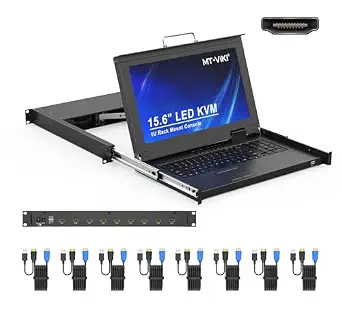 | Best for Integrated Console with High-Resolution Display | Monitor Size: 15.6 inches | Resolution: 1920×1080@60Hz | Number of Ports: 8 | VIEW ON AMAZON | See Our Full Breakdown |
| rackmount kvm switch | Number of Ports |
|---|---|
| MT-VIKI 8 Port HDMI KVM Switch | 8 |
| TESmart USB 3.0 HDMI KVM Switc | 8 HDMI input ports |
| MT-Viki 17” Rack Mount KVM Sw | 8 |
| TESmart 16 Port HDMI KVM Switc | 16 HDMI inputs |
| TESmart 16 Ports HDMI KVM Swit | 16 |
| TESmart USB 3.0 HDMI KVM Switc | 8 HDMI input, 1 HDMI output |
| MT-VIKI Rack Mount KVM with 15 | 8 |
| MT-VIKI 8 Port Rack Mount KVM | 8 |
| MT-VIKI 8-Port KVM Switch | — |
| TESmart 8×1 HDMI KVM Switch 4K | 8 HDMI input, 1 HDMI output |
| StarTech 8-Port HDMI 2.0 KVM S | 8 |
| TRENDnet 8-Port USB/PS2 Rack M | 8 |
| MT-VIKI 16 Port KVM Switch | 16 |
| StarTech 8-Port 1U Rackmount U | 8 |
| MT-VIKI Rack Mount KVM Console | 8 |
More Details on Our Top Picks
MT-VIKI 8 Port HDMI KVM Switch with 4K@30Hz, Rack Mount, IR Remote, and Cables
This MT-VIKI model makes a strong case for users who need reliable 4K video at 30Hz combined with straightforward switching options. Compared with the TESmart 16 Port HDMI KVM Switch, it lacks the ultra-high 8K support but offers a more budget-friendly, simpler solution for those who don’t require the highest resolution. Its support for multiple control methods, including IR remote, panel buttons, and desktop control, enhances versatility. However, the 30Hz refresh rate at 4K may not satisfy fast-paced gaming or high-frame-rate video editing needs, which is where the TESmart 8K switch excels. This option is ideal for typical server room or professional office setups that need crisp visuals without demanding ultra-high refresh rates.
Pros:- Supports 4K resolution at 30Hz for clear, high-quality video
- Includes multiple switching methods for flexibility
- Comes with all necessary cables and rack hardware
Cons:- Limited to 30Hz at 4K, which may be insufficient for high-frame-rate tasks
- Cabling setup can be cumbersome for some users
Best for: Small to medium enterprise setups needing 4K display control with multiple switching options
Not ideal for: Gamers or video editors who require 60Hz or higher refresh rates at 4K for smooth visuals
- Number of Ports:8
- Resolution:4K@30Hz
- Mounting Type:Rack Mount 1U
- Connectivity:HDMI, USB 2.0
- Control Methods:Panel button, IR remote, desktop controller
- Power:10 watts
Our verdict“A practical choice for users needing dependable 4K control at 30Hz in a rackmount format without complex features.”
TESmart USB 3.0 HDMI KVM Switch 8 Port 4K@60Hz Rackmount with 8 Cables
This TESmart model stands out for demanding users who prioritize smooth, high-fidelity visuals at 4K@60Hz, surpassing the MT-VIKI 8 Port with a faster refresh rate. Its USB 3.0 ports support data transfer for peripherals, making it suitable for multimedia workflows. The inclusion of 8 cables simplifies setup and reduces additional costs. However, the remote control requires AAA batteries, which are not included, and the system is limited to HDMI connectivity, unlike some enterprise models supporting DVI or VGA. Compared to the 16 Port TESmart, this model offers less ports but delivers a higher refresh rate, making it ideal for professional or multimedia environments that demand sharper motion clarity.
Pros:- Supports 4K resolution at 60Hz for smooth visuals
- Includes 8 cables for immediate setup
- Multiple switching methods, including remote and hotkeys
Cons:- Remote control batteries are not included
- Higher price point due to advanced features
Best for: Media professionals or high-end office environments needing 4K@60Hz and fast switching
Not ideal for: Budget-conscious users or those with legacy VGA equipment, since it’s HDMI-only and more expensive
- Number of Ports:8 HDMI input ports
- Resolution Support:4K@60Hz
- USB Ports:2 USB 3.0
- Cable Length:5ft each
- Control Methods:IR remote, front panel, hotkeys, mouse wheel, RS232, IP control
- Additional Features:EDID emulator, auto switching
Our verdict“Ideal for users requiring high-refresh-rate 4K support with versatile control options in a rackmount design.”
MT-Viki 17” Rack Mount KVM Switch VGA 8 Port with Keyboard, Touchpad, Drawer, and Included Cables
This 17-inch rack mount KVM switch offers a unique solution for environments where space efficiency is critical, combining monitor, keyboard, and touchpad into a compact drawer. Its VGA-only support makes it suitable for legacy systems or specific enterprise applications. The integrated keyboard and touchpad reduce clutter, and the secure password feature enhances protection. Compared to HDMI-based options like TESmart or MT-VIKI’s smaller models, this unit sacrifices modern high-resolution video for simplicity and a consolidated form factor. Its requirement for compatible rack space and the absence of newer digital video standards limit its appeal for modern high-res setups but make it perfect for older infrastructure needing centralized control.
Pros:- Space-saving 17-inch integrated monitor, keyboard, and touchpad
- Supports up to 8 computers with multiple switching options
- Includes cables and features password protection
Cons:- Limited to VGA connections, not suitable for high-res digital displays
- Requires specific rack space and setup complexity
Best for: Data centers or server rooms with VGA-based equipment prioritizing space efficiency
Not ideal for: Modern multimedia setups or users requiring HDMI/DisplayPort support or high resolutions
- Display Size:17 inches
- Number of Ports:8
- Mounting Type:Rackmount 1U
- Display Resolution:VGA
- Included Cables:8 VGA KVM cables
- Compatibility:Windows, DOS, Linux, Mac OS
Our verdict“A tailored solution for legacy VGA environments where space-efficient control is more important than digital video quality.”
TESmart 16 Port HDMI KVM Switch 8K@60Hz, USB 3.0, Rackmount, EDID Emulator, Remote & IP Control
The TESmart 16 Port HDMI KVM switch pushes the envelope with support for 8K@60Hz, making it suitable for future-proof high-end installations. Its extensive control options, including IP command and remote, make it a standout for large-scale or remote management. Compared with the 8-port models, it offers more ports for extensive setups but comes with increased complexity and higher costs. Its true strength lies in ultra-high resolution and multiple control pathways, but setup can be daunting for less experienced users, and it’s limited to HDMI connections. This switch is best suited for advanced environments where top-tier video quality and remote management are required, such as broadcast or high-end server farms.
Pros:- Supports up to 8K@60Hz resolution for exceptional clarity
- Multiple control options including IP and remote control
- Supports a large number of computers with hot-swappable devices
Cons:- Complex setup and configuration process
- High price point due to premium features
Best for: Large enterprise or professional environments demanding 8K support and remote operation
Not ideal for: Small offices or users with limited budgets who only need basic 4K functionality
- Number of Ports:16 HDMI inputs
- Resolution Support:8K@60Hz, 4K@120Hz/144Hz
- USB Ports:2 USB 3.0
- Control Methods:IR remote, front panel, hotkeys, mouse wheel, RS232, IP control
- Included Cables:8 x 5ft KVM cables
- Compatibility:Windows, Mac OS X, Linux, Raspberry Pi, Unix
Our verdict“Designed for high-end installations where ultra-high resolution and remote control capabilities justify the investment.”
TESmart 16 Ports HDMI KVM Switch 4K@30Hz, 16×1 Rack Mount with 8 Cables, USB2.0, EDID Emulator, RS232 & LAN
This TESmart 16-port HDMI KVM switch offers a practical solution for controlling numerous computers with 4K resolution at 30Hz, suitable for standard professional environments. Its support for multiple control methods, including LAN and RS232, enhances flexibility in complex setups. Compared with the 8-port 4K switches, it provides more connections for larger server rooms or control centers, though it doesn’t match the higher refresh rates of models supporting 60Hz or 8K. Its inclusion of cables and rack hardware simplifies deployment, but the 30Hz refresh rate limits high-motion applications. This choice fits users who want broad device support without the need for cutting-edge high-speed video performance.
Pros:- Supports 4K resolution at 30Hz for reliable video quality
- Includes cables and rack hardware for convenience
- Multiple control methods, including LAN and RS232
Cons:- Limited to 30Hz at 4K, not suitable for high-motion content
- Basic refresh rate compared to higher-end models
Best for: Large server rooms or control centers needing multiple 4K connections with flexible control options
Not ideal for: High-performance gaming or video editing workflows demanding 60Hz or higher refresh rates
- Number of Ports:16
- Resolution Support:3840×2160@30Hz
- USB Ports:2
- Rack Mount:Yes
- Control Methods:IR remote, front panel, hotkeys, mouse wheel, RS232, LAN
- Warranty:3 years
Our verdict“A dependable choice for large-scale control where high resolution matters more than refresh rate.”
TESmart USB 3.0 HDMI KVM Switch 8 Port 4K@60Hz Rackmount with 8 Cables
This TESmart model stands out for supporting 4K at 60Hz, making it ideal for high-quality video workflows that demand crisp visuals, unlike the TESmart 8×1 HDMI switch which maxes out at 30Hz. Its multiple control methods, including IP and IR remote, provide flexibility in managing multiple servers or workstations remotely or locally. The included cables simplify setup, but the remote control’s batteries are not included, which could delay immediate use. Its HDMI-only connection limits compatibility for users with DisplayPort or VGA setups, making it less versatile in mixed environments. Overall, this switch suits professionals needing high-resolution access across many HDMI devices without sacrificing performance, but it sacrifices compatibility with non-HDMI systems.
Pros:- Supports 4K resolution at 60Hz for sharp, detailed display
- Multiple control options including remote, hotkeys, and IP commands
- Includes dedicated KVM cables for quick setup
Cons:- Remote control requires AAA batteries, not included
- Limited to HDMI connections only, reducing compatibility with other systems
Best for: IT professionals managing multiple HDMI-based workstations requiring 4K clarity and remote operation
Not ideal for: Users with non-HDMI devices or those on tight budgets, since its high resolution may come with added cost and limited connection types
- Number of Ports:8 HDMI input, 1 HDMI output
- Resolution Support:4K@60Hz
- USB Ports:2 USB 3.0 ports
- Cable Length:8 x 5ft KVM cables
- Switching Methods:IR remote, front panel, hotkeys, mouse wheel, RS232, IP control, auto detect
- Power:Requires AAA batteries for remote (not included)
Our verdict“Ideal for high-end setups needing robust remote control and 4K video, but less suited for mixed connection environments.”
MT-VIKI Rack Mount KVM with 15.6″ LCD Monitor, 8-Port VGA Switch, 1080p@60Hz, 1U Rackmount Console with Keyboard and Cables
This MT-VIKI 8-port VGA console excels in space efficiency, combining a 15.6-inch LCD with keyboard and mouse in a single 1U rackmount unit. Compared to the MT-VIKI 8 Port VGA KVM, it offers a built-in monitor, reducing the need for separate displays and cables, though it is limited to 1080p resolution. Its support for up to 64 daisy-chained units makes it highly scalable, ideal for large server rooms, but the VGA-only support restricts modern multimedia capabilities. Its secure multi-level password protection adds an extra layer of management security, yet the fixed resolution and the need for rack depth measurement make installation less flexible. It’s best suited for environments where space is tight and VGA remains standard, but less so where high resolution or newer video interfaces are required.
Pros:- All-in-one design with integrated 15.6-inch monitor
- Supports up to 64 daisy-chained units for large setups
- Secure multi-level password protection
Cons:- Limited to 1080p resolution, less suitable for high-definition needs
- VGA-only support reduces compatibility with newer devices
Best for: Data centers or server rooms needing a compact, secure KVM with integrated monitor and VGA support
Not ideal for: Environments requiring high-resolution displays or modern connection types like HDMI or DisplayPort
- Display:15.6″ LCD, 1920×1080@60Hz
- Number of Ports:8
- Supported Resolutions:1080p@60Hz
- Rack Compatibility:Fits 18.9″ to 31.5″ deep racks
- Dimensions:18.9″ x 23.6″ x 1.77″
- Power:12V 2A adapter
Our verdict“Best for space-constrained server rooms that rely on VGA, but not suitable for high-resolution or modern multimedia applications.”
MT-VIKI 8 Port Rack Mount KVM Console with 19” LCD Monitor, Keyboard, Touchpad, and 8 KVM Cables
This MT-VIKI 8-port KVM console offers a 19-inch screen with 1280×1024 resolution, making it a straightforward choice for managing multiple servers or older systems. Compared to the 15.6-inch model, its larger display provides better visibility, especially for detailed tasks, but at the cost of increased space and potentially more power consumption. Its support for multiple OS types and secure password protections make it versatile, yet it’s limited to a resolution that may feel outdated for modern high-definition workflows. External cables mean more setup time, but the plug-and-play design simplifies initial installation. This pick is ideal for environments where compatibility and ease of use outweigh the need for ultra-high resolution.
Pros:- Large 19-inch display for comfortable viewing
- Supports multiple operating systems including Linux and Mac OS
- Secure password protection for multi-user access
Cons:- Limited to 1280×1024 resolution, less sharp for modern graphics
- Requires external cables, increasing setup complexity
Best for: Servers or workstations requiring broad OS support with a larger display, in space-efficient rack units
Not ideal for: High-resolution multimedia editing or setups needing 4K displays, since it maxes out at 1280×1024
- Display:19 inches, 1280×1024
- Number of Ports:8
- Supported Resolutions:1280×1024
- Dimensions:18.9×23.6×1.77 inches
- Mounting Type:1U Rackmount
- Security:Password protected, multi-user
Our verdict“Suitable for traditional server environments where broad OS support and a larger display are priorities, but not for high-res media tasks.”
MT-VIKI 8-Port KVM Switch, Rackmount VGA with 8 Cables & Power Adapter
This MT-VIKI 8-port VGA switch offers straightforward control of multiple computers via VGA and USB, making it suitable for simple setups where high resolution isn’t critical. Compared to the HDMI-based TESmart 8×1, it’s more affordable and easier to integrate into legacy systems, though it sacrifices modern visual quality. Its plug-and-play design simplifies installation, but the lack of remote switching limits convenience for remote management. The absence of a power supply, relying on USB power, can be a drawback in some configurations. This model fits well in small offices or labs with older hardware, but it’s less suited for environments demanding higher resolutions or newer interfaces.
Pros:- Supports multiple operating systems including Windows and Linux
- Easy to install with plug-and-play design
- Includes 8 KVM cables for immediate deployment
Cons:- Limited to VGA connection, no HDMI or DisplayPort support
- No remote switching, only local button or desktop control
- Powered via USB, might not be compatible with all setups
Best for: Small offices or labs with legacy VGA systems needing a basic, cost-effective multi-PC control
Not ideal for: Modern video workflows or users needing HDMI or 4K support, as it only offers VGA and USB
- Ports:8
- Connection Type:VGA, USB 2.0
- Form Factor:Rackmount 1U
- Included Cables:8 KVM cables (4x 5ft, 4x 6ft)
- Power Supply:None (powered via USB)
Our verdict“A practical choice for basic VGA environments on a budget, but not suitable for high-res or modern multimedia needs.”
TESmart 8×1 HDMI KVM Switch 4K@30Hz with 8 Cables, Remote, and EDID Emulator
This TESmart 8×1 HDMI switch provides solid 4K support at 30Hz, making it a good fit for applications where high refresh rates are less critical, unlike the 4K@60Hz model that offers sharper motion. Its extensive switching methods—including remote, hotkeys, LAN, and auto scan—offer versatility for different operational contexts, surpassing simpler manual switches like the MT-VIKI VGA model. The inclusion of EDID emulators helps maintain display settings across multiple devices, especially useful in complex setups. However, the remote control’s batteries are not included, and the 30Hz refresh rate at 4K may be limiting for gaming or fast-motion video. This switch makes sense for professional environments where stability and flexibility matter more than ultra-high refresh rates.
Pros:- Supports 4K resolution at 30Hz with EDID emulation for stable display output
- Multiple switching methods including LAN and remote control
- Includes 8 KVM cables and remote for quick setup
Cons:- Remote control requires batteries, not included
- Limited to 30Hz at 4K, less smooth for fast-motion visuals
Best for: Content creators or professionals needing reliable 4K video switching with multiple control options
Not ideal for: Gamers or video editors requiring higher refresh rates at 4K, or users with non-HDMI devices
- Number of Ports:8 HDMI input, 1 HDMI output
- Resolution Support:4K@30Hz
- USB Ports:2 USB 2.0 hub ports
- Switching Methods:IR remote, front panel key, hotkeys, mouse wheel, RS232, LAN, auto scan
- Included Cables:8 x 5ft KVM cables
- EDID Emulator:Yes
Our verdict“Suitable for professional applications demanding flexible control and reliable 4K display, but not ideal for fast-motion content or non-HDMI systems.”
StarTech 8-Port HDMI 2.0 KVM Switch, 4K 60Hz, 1U Rackmount, Audio, TAA
This StarTech model stands out for delivering crisp 4K 60Hz video, making it ideal for professionals who need sharp visuals and high refresh rates, especially compared to the MT-VIKI 8-Port VGA switch which maxes at 1080p. Its plug-and-play nature and multiple switching options add to its convenience, but the reliance on HDMI 2.0 limits future-proofing—higher resolutions or refresh rates aren’t supported. Its rackmount design keeps it tidy in a professional setup, though it does require dedicated rack space and isn’t suited for portable or small-scale environments.
Pros:- Supports stunning 4K 60Hz resolution for detailed visuals
- No driver installation needed, compatible across OS platforms
- Rackmountable for professional data center or server environments
Cons:- Limited to HDMI 2.0, no support for higher resolutions or faster refresh rates
- Requires rack space, not suitable for portable setups
Best for: IT professionals managing multiple high-resolution displays in server rooms or media editing studios.
Not ideal for: Home users or small offices needing basic VGA or lower-resolution control without rackmount requirements.
- Number of Ports:8
- Resolution:4K 60Hz
- Rackmountable:Yes
- Audio Support:Yes
- USB Hub:Yes
- Compatibility:Windows, macOS, ChromeOS, Linux
- Standard:ANSI/EIA RS-310-D
- Mounting Depth:6.5 inches
Our verdict“This switch is best suited for users who prioritize high-resolution HDMI control in a rackmount environment and can accommodate its space needs.”
TRENDnet 8-Port USB/PS2 Rack Mount KVM Switch, TK-803R, VGA & USB Connection
Compared with HDMI-focused options like the StarTech, the TRENDnet TK-803R specializes in VGA, supporting resolutions up to 2048 x 1536, making it suitable for older equipment or environments where legacy video is still active. Its flexible USB and PS/2 interfaces cater to a range of systems, but the absence of HDMI or DisplayPort limits its use with modern high-res displays. The need to purchase cables separately can add to overall costs, and its VGA-only output might not satisfy users requiring crisp, high-definition visuals for demanding applications.
Pros:- Supports high-resolution VGA up to 2048 x 1536 for legacy compatibility
- Flexible control via hot-key or push button for convenience
- Rack mountable for organized server rooms
Cons:- Cables sold separately, increasing setup cost
- Limited to VGA and USB/PS2, no HDMI or DisplayPort support
Best for: Organizations with legacy hardware or those maintaining older server infrastructure that still relies on VGA output.
Not ideal for: Modern setups requiring 4K video or HDMI connectivity, where higher resolutions and newer interfaces are needed.
- Number of Ports:8
- Video Resolution:2048 x 1536 VGA
- Interface:USB and PS/2 on console, USB on PC
- Rack Mount:Yes, 19″ (1U)
- Supported OS:Windows, Linux, Unix, Mac OS
- Cables Included:None
Our verdict“This switch is ideal for users managing older equipment with VGA outputs who need reliable multi-system control without high-res demands.”
MT-VIKI 16 Port KVM Switch, Rackmount VGA, Includes 16 Cables & Remote
This 16-port model offers a robust solution for controlling many computers via VGA, including a remote for easy switching, which makes it stand out over smaller setups like the TRENDnet. Its inclusion of 16 cables and remote simplifies installation and operation, but its maximum resolution of 1920×1440 may fall short for graphics-intensive tasks. The VGA-only connectivity limits its use for modern high-resolution displays, and the remote control’s batteries are not included, adding a minor inconvenience.
Pros:- Controls up to 16 computers with a single set of peripherals
- Includes all necessary cables and remote for quick setup
- Rackmount design maximizes space efficiency
Cons:- Remote control lacks batteries, may require extra purchase
- Limited to VGA resolution, not suitable for high-end graphics
Best for: Data centers or server rooms requiring control of many VGA-based systems with minimal setup hassle.
Not ideal for: Workstations or environments where high-res displays or HDMI are standard, or where remote control batteries are inconvenient.
- Number of Ports:16
- Resolutions:1920×1440
- Switching Options:Panel Button, Remote
- Compatibility:Windows, Mac, Linux, DOS, Unix
- Cable Length:15ft
- Included Accessories:16 KVM cables, remote, power adapter
Our verdict“This switch fits environments needing high port density for VGA systems with all-in-one accessories, but isn’t ideal for graphics-intensive applications.”
StarTech 8-Port 1U Rackmount USB VGA KVM Switch Kit with Cables and OSD
This StarTech model emphasizes security and expandability, making it suitable for sensitive environments that require password protection and cascading systems. Its USB and VGA support are standard, but it doesn’t support high resolutions like 4K, limiting its appeal for demanding multimedia use. The included cables and OSD make setup straightforward, but it’s restricted to VGA and USB, lacking modern digital interfaces. Its security features are a clear advantage over more basic models like the MT-VIKI, but the absence of HDMI limits future compatibility.
Pros:- Supports multiple computers with secure password-protected ports
- Includes all necessary cables for immediate setup
- Cascade expansion capability for larger systems
Cons:- Limited to VGA and USB connections, no high-resolution digital support
- Requires rackmount space, not suitable for portable use
Best for: Secure data centers or government facilities needing controlled access and scalable multi-system management.
Not ideal for: High-resolution multimedia editing or gaming setups requiring 4K or HDMI support, as these features are missing.
- Number of Ports:8
- Form Factor:1U Rackmount
- Connection Type:USB, VGA
- Included Cables:8x 6ft USB VGA
- Security:Password-protected ports
- Features:Auto-scan, cascade expansion
Our verdict“This switch is perfect for environments prioritizing security and scalability over high-definition digital video features.”
MT-VIKI Rack Mount KVM Console with 15.6″ LCD Monitor, 8-Port HDMI Switch, 1920×1080@60Hz, 1U Rackmount, Includes 8 Cables
This MT-VIKI console combines an 8-port HDMI switch with a built-in 15.6-inch LCD, making it ideal for compact server rooms or data centers where space is tight. Its 1920×1080 resolution at 60Hz ensures clear visuals for routine management tasks. Compared to the separate monitor and switch options like the StarTech HDMI switch, this integrated unit simplifies deployment and saves space, but it is limited to 1080p, which may not meet needs for high-res graphics or multimedia tasks. Compatibility with rack depths from 18.9″ to 31.5″ adds flexibility, though its overall weight and size require careful measurement.
Pros:- Space-saving 1U design with integrated 15.6″ LCD monitor
- Supports multiple switching methods including OSD, hot-key, and push button
- Secure access with dual password levels and lockable drawer
Cons:- Requires precise measurement of rack depth for compatibility
- Cable lengths may need customization for specific setups
Best for: Data centers or server rooms requiring space-efficient, all-in-one KVM control with a built-in display.
Not ideal for: Users needing ultra-high resolution or HDMI support beyond 1080p, or those with racks outside compatible depth ranges.
- Monitor Size:15.6 inches
- Resolution:1920×1080@60Hz
- Number of Ports:8
- Rack Depth Compatibility:18.9″ to 31.5″
- Dimensions:18.9″ x 23.6″ x 1.77″
- Included Cables:8 KVM cables
Our verdict“This console is best for space-constrained environments that value integrated display and secure, multi-method control for standard resolution tasks.”

How We Picked
The products in this roundup were evaluated based on their performance, build quality, compatibility, ease of installation, and value for money. Priority was given to switches supporting high resolutions like 4K and 8K, as well as those offering reliable switching and management features suitable for professional environments. We also considered user interface options such as remote control, OSD menus, and integrated consoles, which impact daily usability. The ranking reflects a balance between advanced features and practical reliability, aiming to help different buyer types—from enterprise setups to small offices—find the best fit.Factors to Consider When Choosing Rackmount Kvm Switch
Choosing a rackmount KVM switch involves considering several key factors that impact long-term usability and compatibility. Understanding these will help you avoid common pitfalls, such as overspending on features you don’t need or choosing a model incompatible with your hardware. The right switch should balance performance, expandability, and ease of use according to your specific setup and future plans.Port Count and Expandability
Determine your current needs and future growth potential. More ports mean greater flexibility, especially for larger server racks or data centers. Some switches support modular expansion, which can be more cost-effective long-term but may involve higher initial costs. Be cautious about overestimating your needs; buying a larger switch than necessary can lead to unnecessary expense and complexity.
Resolution and Video Support
High-resolution support, like 4K or 8K, is essential for modern high-definition displays. Choosing a switch with the right video standards ensures image quality remains crisp and clear, especially for graphic-intensive tasks or diagnostics. Keep in mind that higher resolutions often demand more bandwidth, which can affect performance if the hardware isn’t designed to handle it.
Connectivity and Compatibility
Check the types of connections your hardware uses—HDMI, VGA, USB, PS2—and ensure the switch supports these. Compatibility issues are common, especially when mixing legacy and modern equipment. Some models include multiple port types or adapters, adding versatility but also complexity, so match the switch’s features with your existing setup to prevent connectivity headaches.
Management Features and Usability
Features like remote control, OSD menus, and IP-based management improve daily operation, especially in multi-user environments. However, these features can also increase the device’s size and cost. Consider your workflow: if you need quick, hardware-level switching, a simple button interface might suffice, whereas remote or network management suits larger or remotely accessed setups.
Build Quality and Reliability
Look for switches built with durable materials and solid connectors, especially if your environment involves frequent switching or heavy use. Reliable hardware reduces downtime and maintenance costs. Cheaper models may save money upfront but can suffer from poor build quality, leading to connection issues or failure over time.
Frequently Asked Questions
Can I use a rackmount KVM switch with both HDMI and VGA monitors?
Yes, but you need to select a switch that supports multiple connection types or has dedicated ports for HDMI and VGA. Many switches now support both, but not all do, so verify compatibility before purchasing. Using adapters can work, but they may introduce latency or compatibility issues, so it’s better to choose a switch designed for your specific monitor types whenever possible.
Is a higher port count always better for a rackmount KVM switch?
Not necessarily. While more ports provide greater scalability, they also tend to increase complexity and cost. If you only need support for a few servers now, a smaller switch can be more manageable and cost-effective. Larger setups should consider modular or expandable switches to avoid future upgrades, but plan carefully to avoid paying for unused ports.
What’s the difference between HDMI and DisplayPort support in these switches?
HDMI is more common in consumer and enterprise environments, offering broad compatibility with most monitors and devices. DisplayPort may provide higher resolutions and refresh rates, and is often preferred in high-end graphics or gaming setups. When choosing, consider your current hardware and future needs; HDMI is generally more versatile for mixed environments, while DisplayPort excels in high-performance scenarios.
How important are remote management features in a rackmount KVM switch?
Remote management features like IP control or remote switching are crucial in large or remotely located setups, allowing administrators to access and control servers without physical access. These features add convenience and reduce downtime but come at a higher cost and complexity. For small or local setups, manual switching might be sufficient, making remote features less relevant.
Should I prioritize resolution support over port count?
It depends on your primary needs. If high-resolution displays are critical for your work, prioritize switches with 4K or 8K support. However, if managing multiple servers or workstations is the main goal, port count should take precedence. Many switches now offer a good balance, supporting high resolutions across multiple ports, so evaluate your setup holistically.
Conclusion
The best choice depends on your specific needs: the Rex overall pick offers a reliable, high-performance option suitable for most professional environments. If you’re seeking the best value, models like the TESmart 8 Port HDMI KVM Switch 4K@60Hz balance features and cost effectively. For those with high-end requirements, the TESmart 16 Port HDMI KVM Switch 8K@60Hz delivers top-tier resolution and expandability. Beginners or smaller setups should consider simpler, all-in-one solutions like some of the MT-VIKI models, which combine consoles with switches in a compact form. Large data centers or enterprise environments will benefit from modular, high-port switches with remote management features. Carefully match your current hardware, future plans, and budget to find the perfect fit.
As an affiliate, we earn on qualifying purchases.Halloween Picks

Halloween Inflatable Haunted House Maze – 20×20 ft with Removable Roof and Blower

Gemmy 5.4 ft The Nun Animatronic Halloween Decoration

Pumpkin Halloween Fog Machine with 12-Color LED Lights, Bluetooth Speaker, and Remote