For most households seeking a portable power station for home backup, I’d start with the Jackery Explorer 1000 v2 for a useful balance of capacity and portability; the Anker SOLIX S2000 offers more stored energy for longer outages, while the Jackery HomePower 3600 Plus is the high-capacity choice for heavier backup needs. Smaller models such as the BLUETTI Elite 30 V2 and ALLWEI 300W make more sense for phones, routers, lights, and other modest loads than for running major appliances. The main tradeoff is between runtime and output on one side, and size, weight, and ease of storage on the other. I also weigh battery chemistry, charging options, and whether a station can handle the appliances you actually depend on. Read on for the full breakdown and a guide to choosing a capacity that fits your outage plan.

Get the latest gadgets delivered free with Prime
- Fast, free delivery on millions of items
- Prime Video, Amazon Music and more included
- Member-only deals all year
Complete the kit


Key Takeaways
- The Jackery Explorer 1000 v2 is the most balanced pick in this lineup: it offers a more practical home-backup starting point than the sub-300Wh options without moving into the much larger capacity class.
- The Anker SOLIX S2000 and Jackery HomePower 3600 Plus serve different backup scales: the Anker provides 2,010Wh and 1,500W output, while the Jackery’s 3,584Wh and 3,600W output suit heavier loads and longer runtime needs.
- Small capacity changes the job, not just the runtime: the MARBERO 88Wh and ZeroKor 120W are better suited to phones and small electronics than broad household backup.
- Battery chemistry and stated capacity separate compact contenders: the ALLWEI 300W pairs 256Wh with LiFePO4, while the Jackery Explorer 300 offers 292Wh; buyers should weigh battery type, output, and expected use rather than capacity alone.
- A bundled solar panel is useful only if it fits the outage plan: the ZeroKor 300W includes a 60W panel, but modest solar input may not replenish a station quickly during sustained use.
| Jackery Explorer 1000 v2 Portable Power Station |  | Best Overall for Longer Outages | Battery capacity: 1,070Wh | Battery type: LFP | Output: 1,500W | VIEW ON AMAZON | See Our Full Breakdown |
| BLUETTI Elite 30 V2 Portable Power Station, 288Wh, 600W |  | Best for UPS-Style Device Backup | Capacity: 288Wh | Continuous output: 600W | Maximum output: 1,500W in Power Lifting Mode | VIEW ON AMAZON | See Our Full Breakdown |
| MARBERO Portable Power Station, 88Wh, 120W Surge, 24,000mAh |  | Best Compact Emergency Light and Charger | Capacity: 88Wh | Surge wattage: 120W | Listed output: 80W | VIEW ON AMAZON | See Our Full Breakdown |
| ALLWEI 300W Portable Power Station with 256Wh LiFePO4 Battery |  | Best Value for Modest Backup Loads | Battery capacity: 256Wh | Battery chemistry: LiFePO4 | Continuous output: 300W | VIEW ON AMAZON | See Our Full Breakdown |
| Jackery Explorer 300 Portable Power Station, 292Wh |  | Best Compact All-Rounder | Capacity: 292Wh | Battery chemistry: LiFePO4 | Peak surge: 600W | VIEW ON AMAZON | See Our Full Breakdown |
| ZeroKor 300W Portable Power Station with 60W Solar Panel | 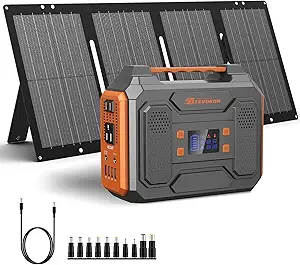 | Best Entry-Level Solar Bundle | Maximum power station output: 300W | Included solar panel: 60W monocrystalline | Solar panel conversion efficiency: 20.5% | VIEW ON AMAZON | See Our Full Breakdown |
| Anker SOLIX S2000 Portable Power Station, 2,010Wh, 1,500W |  | Best Mid-Size Home Backup | Battery capacity: 2,010Wh | Battery type: LiFePO4 | Continuous output: 1,500W | VIEW ON AMAZON | See Our Full Breakdown |
| Jackery HomePower 3600 Plus Power Station – 3584 Wh, 3600 W AC Output |  | Best for High-Power, Longer Outages | Capacity: 3,584Wh; expandable to 21kWh per unit | Continuous AC output: 3,600W | Parallel output: Up to 7,200W; dual 120V and 240V operation | VIEW ON AMAZON | See Our Full Breakdown |
| ZeroKor 120W Portable Power Station, 97.6Wh |  | Best Compact Emergency Companion | Battery capacity: 97.6Wh / 26,400mAh | Maximum output: 120W | AC outlets: 2 | VIEW ON AMAZON | See Our Full Breakdown |
| portable power station for home backup | Weight |
|---|---|
| Jackery Explorer 1000 v2 Porta | 23.8 lbs |
| BLUETTI Elite 30 V2 Portable P | About 9.5 lbs |
| MARBERO Portable Power Station | 3.2 lbs |
| ALLWEI 300W Portable Power Sta | 6.4 lbs |
| Jackery Explorer 300 Portable | 7.1–7.5 lbs (listed values differ) |
| ZeroKor 300W Portable Power St | — |
| Anker SOLIX S2000 Portable Pow | 35.7 lb |
| Jackery HomePower 3600 Plus Po | — |
| ZeroKor 120W Portable Power St | — |
More Details on Our Top Picks
Jackery Explorer 1000 v2 Portable Power Station
For buyers who want one portable unit to cover more than phones and lights, the Jackery Explorer 1000 v2 offers the strongest balance in this group. Its 1,070Wh LFP battery and 1,500W output give it far more room for household essentials than the BLUETTI Elite 30 V2 or the smaller Jackery Explorer 300. Three AC outlets and USB ports let you run or recharge several devices at once, while the 23.8-pound weight and foldable handle keep it movable around the house.
The tradeoff is that it remains a portable station, not a whole-home backup system, and its solar input works only with Jackery panels, which are not included. The one-hour charge mode also requires activation in the app; standard charging is listed at 1.7 hours. I’d rank it first for outage coverage among these five, but buyers needing longer runtimes should compare it with the much larger Anker SOLIX S2000 or Jackery HomePower 3600 Plus.
Pros:- 1,070Wh capacity and 1,500W output suit more household essentials than the compact options
- LFP battery is rated to retain over 70% capacity after 4,000 charge cycles
- Three pure-sine-wave AC outlets plus USB and car-port outputs support several devices
- App offers quiet overnight and energy-efficiency modes
Cons:- At 23.8 pounds, it is heavier than the small BLUETTI Elite 30 V2 and Jackery Explorer 300
- Solar panels are sold separately, and solar charging is limited to Jackery panels
- One-hour charging requires enabling emergency charging in the app
Best for: Households wanting a movable station for several essential devices and longer runtime than compact models provide
Not ideal for: Buyers seeking whole-home backup, included solar panels, or freedom to use solar panels from other brands
- Battery capacity:1,070Wh
- Battery type:LFP
- Output:1,500W
- Surge peak:3,000W
- Weight:23.8 lbs
- AC outlets:3 pure sine wave
- USB-C ports:2, up to 100W charging
- Charging time:1 hour with emergency charging enabled; 1.7 hours default
- Battery lifespan:Over 70% capacity after 4,000 charge cycles
Our verdict“Choose the Explorer 1000 v2 if you want the most capable portable balance here for household essentials, but not a substitute for a whole-home battery system.”
BLUETTI Elite 30 V2 Portable Power Station, 288Wh, 600W
The BLUETTI Elite 30 V2 is the most focused pick here for keeping a small device setup running through a brief interruption. Its UPS function switches in up to 10 ms, giving it a practical role for sensitive electronics that need a quick handoff. At about 9.5 pounds, it is easier to place beside a router or workstation than the Jackery Explorer 1000 v2, and wall charging reaches 80% in 45 minutes.
That convenience comes with limited stored energy: 288Wh is better suited to short backup windows than extended outages, and its 1,500W figure applies only in Power Lifting Mode rather than continuous operation. The Jackery Explorer 300 offers similar capacity with a higher stated continuous output, while the ALLWEI 300W provides LiFePO4 chemistry and solar-plus-AC charging. I’d pick the BLUETTI for fast UPS response and charging flexibility, not for running demanding appliances for long.
Pros:- UPS switch time of up to 10 ms suits short interruptions for critical electronics
- Reaches 80% charge in 45 minutes from wall power
- About 9.5 pounds, with a compact footprint for a desk or utility shelf
- Accepts solar, AC, car, lead-acid, and generator charging
Cons:- 288Wh capacity limits how long it can run devices during an outage
- Power Lifting Mode’s 1,500W maximum is not its continuous output
- Its 600W continuous rating is below the Jackery Explorer 1000 v2’s 1,500W
Best for: People who want a lightweight station to provide short backup for a router, computer accessories, and other small electronics
Not ideal for: Households expecting long outage runtimes or sustained operation of appliances near or above 600W
- Capacity:288Wh
- Continuous output:600W
- Maximum output:1,500W in Power Lifting Mode
- Weight:About 9.5 lbs
- Dimensions:9.8 x 7 x 6.6 in
- UPS switch time:Up to 10 ms
- Wall charging:380W or 200W adjustable
- Charging time:0–80% in 45 minutes; 0–100% in 70 minutes
- Power sources:Solar, AC, car, lead-acid, and generator
Our verdict“Choose the Elite 30 V2 for quick, compact UPS-style backup for electronics, rather than extended household power.”
MARBERO Portable Power Station, 88Wh, 120W Surge, 24,000mAh
The MARBERO 88Wh makes the most sense as a small emergency kit companion, not as a primary home-backup battery. At 3.2 pounds, it is the easiest option here to stash in a drawer or move between rooms, and its eight ports can support small electronics while the three-level LED light adds a useful illumination option during an outage. The SOS mode and built-in battery protections give it a more emergency-oriented role than the Jackery Explorer 300, which offers substantially more capacity for device charging.
The limitation is fundamental: 88Wh and an 80W listed output leave little headroom for household appliances, and the 120W surge rating does not turn it into a high-output station. Its listed runtime of up to 90 hours should not be read as a promise for every device; actual runtime depends on the load. Solar charging also needs a compatible panel, sold separately. I’d choose it for lights and small electronics, while the ALLWEI 300W is a more capable option for modest backup loads.
Pros:- Light 3.2-pound design is easy to store and move
- Eight output ports support multiple small devices
- Built-in LED offers three brightness levels and an SOS mode
- Battery management includes temperature, overload, and short-circuit protection
Cons:- 88Wh capacity provides limited runtime compared with the 256Wh ALLWEI 300W
- 80W listed output restricts the appliances it can power
- Compatible solar panel is required for solar charging and is not included
Best for: People assembling a lightweight outage kit for phone charging, small electronics, and emergency lighting
Not ideal for: Households that need to run appliances, keep several devices powered for long periods, or rely on it as their main backup battery
- Capacity:88Wh
- Surge wattage:120W
- Listed output:80W
- Weight:3.2 lbs
- Dimensions:6.5 x 4.6 x 3.1 in
- Output ports:8
- AC output:2 AC ports
- Charging methods:AC, battery, or compatible 30W or 60W solar panel
- LED light:3 brightness levels and SOS mode
Our verdict“Choose the MARBERO as a compact charger and emergency light, not as the station you depend on for meaningful household backup.”
ALLWEI 300W Portable Power Station with 256Wh LiFePO4 Battery
The ALLWEI 300W is a sensible middle ground for buyers who need more than a pocket-sized charger but do not need the Jackery Explorer 1000 v2’s capacity or weight. Its 256Wh LiFePO4 battery and 300W continuous output can cover modest loads, while the 6.4-pound body is easier to carry between rooms than the larger Jackery. Six output ports make it practical for charging several devices at once, and AC-plus-solar charging can help replenish it when both sources are available.
Its ceiling is still low for home backup: 300W continuous rules out many higher-draw appliances, and the single AC outlet offers less flexibility than the Jackery Explorer 300’s two. Solar panels are not included, though the five-year warranty and stated 3,000-cycle rating give it a useful durability case. I’d choose this over the MARBERO for higher-capacity, more capable backup, but step up to the Explorer 1000 v2 if you need substantially longer runtimes or more AC power.
Pros:- 256Wh LiFePO4 battery is rated for 3,000 charge-discharge cycles
- 300W continuous and 600W peak output exceed the MARBERO’s listed output
- Six output ports can charge up to six devices simultaneously
- Supports AC-plus-solar charging and includes an SOS LED light
Cons:- 300W continuous output limits use with higher-powered appliances
- Only one AC outlet, compared with two on the Jackery Explorer 300
- Solar panel is sold separately
Best for: Buyers wanting a lightweight LiFePO4 station for modest outage loads, device charging, and occasional solar recharging
Not ideal for: Households that need to run high-wattage appliances, depend on multiple AC outlets, or need long runtimes
- Battery capacity:256Wh
- Battery chemistry:LiFePO4
- Continuous output:300W
- Peak output:600W
- Weight:6.4 lbs
- AC outlet:1
- Other ports:2 DC5521, 1 car outlet, 1 USB-A, and 1 USB-C PD
- USB charging:USB-A 18W; USB-C PD 60W
- Warranty:5 years
Our verdict“Choose the ALLWEI 300W for portable, modest-load backup with LiFePO4 durability, but not for appliances that need substantial continuous power.”
Jackery Explorer 300 Portable Power Station, 292Wh
The Jackery Explorer 300 is a more versatile small-format choice than the MARBERO 88Wh: its 292Wh capacity and 300W rated output give it more room for charging devices and supporting modest loads, while two AC outlets let you connect more than one plug-in device. A 100W USB-C port is also useful for compatible devices, and the LFP battery is rated for over 4,000 cycles to 70% capacity. At roughly 7.1–7.5 pounds, it remains manageable to carry.
It is not a substitute for the Explorer 1000 v2 during a long outage; the smaller battery means less runtime and the 300W rating limits appliance choices. Solar charging works with compatible Jackery panels, sold separately. The supplied product data also lists conflicting weights and dimensions, so I would verify the exact unit measurements before planning a tight storage spot. I’d pick it over the BLUETTI Elite 30 V2 for greater capacity and rated output, but favor the BLUETTI if fast UPS switching is the priority.
Pros:- 292Wh capacity is more than three times the MARBERO’s 88Wh
- 300W rated output and 600W peak suit a wider range of modest loads than the BLUETTI’s 288Wh, 600W model offers in continuous use
- Two AC outlets plus USB-C, USB-A, and car-port connections support varied devices
- LFP battery is rated for over 4,000 cycles to 70% capacity
Cons:- 300W rated output and 292Wh capacity are limited for demanding or prolonged home backup
- Solar panel is not included and solar charging is limited to compatible Jackery panels
- Provided product data gives conflicting weight and dimensions
Best for: People who want a carryable station for charging several devices and supporting modest loads during shorter outages
Not ideal for: Households seeking long backup runtimes, sustained high-wattage appliance power, or cross-brand solar compatibility
- Capacity:292Wh
- Battery chemistry:LiFePO4
- Peak surge:600W
- Weight:7.1–7.5 lbs (listed values differ)
- Ports:2 AC, 1 USB-C PD, 2 USB-A, and 1 car port
- USB-C output:100W
- Charge cycles:Over 4,000 cycles to 70% capacity
- Solar charging:About 80% in 2.8 hours with a 100W panel
Our verdict“Choose the Explorer 300 for a compact, well-connected station for modest loads, but move up to the Explorer 1000 v2 for longer outage coverage.”
ZeroKor 300W Portable Power Station with 60W Solar Panel
I’d choose this bundle for small electronics and modest backup needs, not for keeping major home appliances running. Its 300W output can support devices within that limit, while the included 60W monocrystalline panel gives buyers a way to recharge off-grid without sourcing a panel separately. Multiple AC, USB, and DC connections add flexibility for phones, lights, and other small loads. Compared with the ALLWEI 300W Portable Power Station, this ZeroKor’s clearest distinction is that the solar panel is included; the ALLWEI’s stated advantage is its 256Wh LiFePO4 battery. The tradeoff is a firm power ceiling: appliances above 300W are out, and the panel’s junction box is not waterproof. I’d treat solar input as a supplemental option, not a promise of dependable household backup.
Pros:- Includes a foldable 60W monocrystalline solar panel
- Two AC outlets plus USB and DC connections support several small devices
- AC, solar, and 12V car-port charging options
- Built-in electrical protections and flashlight with reading and SOS modes
Cons:- 300W maximum output excludes many household appliances
- The 60W panel provides limited solar input for replenishing the station
- Solar panel junction box is not waterproof
Best for: Buyers seeking a starter backup kit for phones, lights, and other devices rated under 300W, with a solar panel included.
Not ideal for: Households needing to run refrigerators, cooking appliances, or other loads above 300W, or anyone who needs a waterproof solar-panel junction box.
- Maximum power station output:300W
- Included solar panel:60W monocrystalline
- Solar panel conversion efficiency:20.5%
- AC outlets:2; 300W maximum
- USB ports:3 standard USB ports and 1 quick-charge USB port
- Solar input:DC5521, 13V–23V; built-in MPPT
- Recharge methods:AC outlet, solar panel, or 12V car port
- Safety protections:Short-circuit, over-current, over-voltage, overload, and overheating
Our verdict“I’d pick this as an entry-level solar kit for small electronics, but not as the main backup source for appliances.”
Anker SOLIX S2000 Portable Power Station, 2,010Wh, 1,500W
The 2,010Wh LiFePO4 battery and 1,500W continuous output give this Anker a more practical home-backup role than the compact ZeroKor models: it can support a wider range of devices and has eight outlets for sharing power. Solar input up to 400W and several other recharge routes help when grid power is unavailable. I’d rank it below the Jackery HomePower 3600 Plus for larger or longer outages, since that model offers 3,584Wh and 3,600W output, but the Anker is smaller and weighs 35.7 pounds rather than 77.2. One useful distinction is what it leaves out: there is no 12V DC port, which limits direct connection to some 12V equipment. Runtime also depends on the connected load, so the stated figure is not a guarantee for every household setup.
Pros:- 2,010Wh LiFePO4 battery capacity
- 1,500W continuous output with 3,000W peak output
- Eight outlets for powering multiple devices
- Supports up to 400W solar input and several charging methods
Cons:- No 12V DC port
- 35.7-pound weight may be cumbersome for frequent carrying
- Actual runtime varies with appliance, usage, and ambient temperature
Best for: Households wanting a substantial but still carryable battery for essential devices and moderate loads during shorter outages.
Not ideal for: Buyers who need 12V DC output, want to run higher-power appliances, or need the longer reserve and greater output of a large-format station.
- Battery capacity:2,010Wh
- Battery type:LiFePO4
- Continuous output:1,500W
- Peak output:3,000W
- Total outlets:8
- Maximum solar input:400W
- Weight:35.7 lb
- 12V DC port:None
- Warranty:5 years
Our verdict“I’d choose the S2000 for a balance of meaningful outage capacity and manageable size, provided its missing 12V port is not a dealbreaker.”
Jackery HomePower 3600 Plus Power Station – 3584 Wh, 3600 W AC Output
For buyers who need more than phone-and-light backup, the 3,584Wh capacity and 3,600W continuous output make the HomePower 3600 Plus the strongest choice in this group for supporting larger loads. Its capacity can expand to 21kWh per unit, and the listing gives a two-hour AC/DC hybrid charge time, useful when there is a short window to replenish it. Compared with the Anker SOLIX S2000, this Jackery offers substantially more capacity and output, but it is also more than twice as heavy at 77.2 pounds. Wheels and a telescopic handle make moving it across a floor easier than lifting it, though its size still calls for dedicated storage space. I’d favor it for a planned home-backup setup, not for frequent hand-carrying; it has only two outlets, and parallel operation is needed for 240V output.
Pros:- 3,584Wh capacity with expansion listed up to 21kWh per unit
- 3,600W continuous output for larger loads
- Hybrid AC/DC charging listed at two hours
- Wheels and telescopic handle aid movement despite its weight
Cons:- Weighs 77.2 pounds and has a substantial footprint
- Only two outlets are listed
- 240V output requires parallel operation
Best for: Households preparing for longer outages or higher-wattage loads who have room to store a large wheeled station.
Not ideal for: People who need a lightweight grab-and-go battery, have limited storage space, or require many independent outlets without extra equipment.
- Capacity:3,584Wh; expandable to 21kWh per unit
- Continuous AC output:3,600W
- Parallel output:Up to 7,200W; dual 120V and 240V operation
- Battery type:LFP ceramic membrane cells
- Outlets:2
- Charging options:AC, DC/hybrid AC+DC, solar, or gas generator
- Listed charging times:AC: 2.5 hours; hybrid AC+DC: 2 hours; solar: 4 hours; gas generator: 2.5 hours
- Weight and dimensions:77.2 lb; 15.2 × 12.2 × 19.3 in
- Warranty:5 years
Our verdict“I’d select the HomePower 3600 Plus for higher-load, longer-duration backup when capacity matters more than compactness.”
ZeroKor 120W Portable Power Station, 97.6Wh
At 2.2 pounds and 97.6Wh, this ZeroKor is easy to keep nearby for phones, lights, and other small electronics when the power goes out. Its two AC outlets, USB-A, USB-C, and DC output offer more connection types than its small size suggests, but the 120W limit rules out many appliances and separates it from the 300W ZeroKor bundle. The included flashlight, with reading and SOS modes, adds a practical emergency feature; solar recharging is possible, but the panel is sold separately. For home backup, I’d treat it as a personal-device reserve rather than a household power source. Compared with the MARBERO 88Wh model in this roundup, it has slightly more stated capacity, while both remain in the small-device category and neither is suited to powering high-draw equipment.
Pros:- Compact 2.2-pound design is easy to store or carry
- 97.6Wh battery with AC, DC, USB-A, and USB-C outputs
- LED flashlight includes reading and SOS modes
- Can recharge by USB-C adapter, car USB port, or a separately sold solar panel
Cons:- 120W output limit excludes many household appliances
- Solar panel is not included
- 97.6Wh capacity is suited to small-device backup rather than extended outages
Best for: People who want a lightweight bedside or go-bag backup for phones, small lights, and other devices below 120W.
Not ideal for: Households seeking meaningful appliance backup, or buyers expecting solar charging without purchasing a separate panel.
- Battery capacity:97.6Wh / 26,400mAh
- Maximum output:120W
- AC outlets:2
- USB ports:2 USB-A and 1 USB-C
- DC output:12–16.8V, 6A maximum
- Recharge methods:USB-C adapter, car USB port, or solar panel (not included)
- Weight and dimensions:2.2 lb; 5.7 × 4.4 × 4.1 in
- Protection features:Overload, short-circuit, over-current, over-voltage, and overheating protection
- Warranty support:12 months
Our verdict“I’d keep this as a compact reserve for personal electronics, not rely on it to power household appliances.”

How We Picked
I ranked these stations for home backup usefulness, not for camping convenience or the largest headline number alone. The main criteria were usable capacity for essential loads, AC output for appliances, portability and storage demands, battery chemistry where specified, charging options, and how clearly each model fits a particular household task. I also considered whether a product’s capabilities match its likely role: an 88Wh unit can be handy for small electronics, but it cannot stand in for a several-thousand-watt-hour backup system.
The order favors balanced capability and practical household fit first, then higher-capacity choices for buyers with larger loads, followed by compact options suited to limited backup duties. The Jackery Explorer 1000 v2 leads as the middle ground; the Anker SOLIX S2000 and Jackery HomePower 3600 Plus rank highly for greater energy and output, but their scale may not suit every home. Lower-capacity products rank below them because they support fewer devices or shorter runtimes, even when their smaller size or included solar panel may appeal to a specific buyer.
Factors to Consider When Choosing Portable Power Station For Home Backup
Choosing a station for outages starts with your backup plan, not the product’s headline watt-hour figure. I’d list the devices you need, estimate how long they must run, and check the power limits and charging arrangements that could shape real use. These factors help prevent buying a compact unit for appliance backup—or paying for a large system when your priority is simply keeping communications working.
Match Capacity to the Outage Plan
Start by separating must-run devices from comforts you can do without. A phone, router, and LED light need far less stored energy than a refrigerator or several devices running through the night. Capacity in watt-hours gives a useful starting point, but actual runtime also depends on the load and conversion losses, so treat simple runtime calculations as estimates rather than promises. A common mistake is adding up appliance wattage without accounting for how many hours each one will run. I’d plan for staggered use where possible, then choose enough capacity for the longest essential stretch between recharges. If you need broad household coverage, the smallest units in this roundup are not substitutes for a higher-capacity station.
Check Starting Loads and Continuous Output
Capacity answers how much energy is stored; output rating answers what the station can power at once. Some appliances draw a brief surge when starting, so a station’s surge rating and continuous AC output both matter. Compare those figures with the appliance label or manufacturer guidance, especially for devices with motors or compressors. Avoid assuming that a large battery can run any appliance: a high-capacity station can still have an output limit that rules out a particular load. For mixed use, write down which devices might run simultaneously and add their power demands. If the numbers are close to the unit’s limit, choose a station with more headroom or plan to run devices one at a time.
Decide How Much Portability You Really Need
A power station may need to move between a storage spot and the room where backup power is needed, so size and handling are part of the backup plan. Larger capacity usually means a larger, heavier unit; that can be a fair trade for longer runtime, but only if the station can be positioned and connected safely. Think about stairs, available floor space, cable reach, and whether one person needs to move it. Buyers sometimes focus on capacity and discover later that the unit is awkward to store or place near essential devices. Compact stations are easier to keep close at hand, though their limited energy makes them better for a narrow set of loads. Choose the largest system your space and handling needs can support, not simply the largest listed capacity.
Treat Solar as a Recharging Plan, Not a Guarantee
Solar input can extend backup use when grid power is unavailable, but panel wattage alone does not predict how quickly a station will recharge. Sun exposure, weather, season, panel positioning, and the station’s input limits all affect results. Check compatible charging specifications before buying a separate panel, and confirm what comes in the box if a solar panel is advertised with the station. A bundled panel may help keep small devices topped up, but a modest panel can take a long time to refill a depleted battery. For multi-day outages, consider how much energy your essential devices use each day and whether your available panel area can realistically replace it. Keep a grid-charging option ready when possible, since solar production is variable.
Weigh Battery Chemistry, Service Life, and Storage
Battery chemistry can affect expected cycle life, weight, and how a station fits into years of occasional emergency use. The ALLWEI’s stated LiFePO4 chemistry is a useful distinction in this lineup, but chemistry is only one part of the decision; warranty terms and the maker’s care instructions also matter. Review storage guidance and check whether the station should be kept at a particular charge level between outages. Leaving a unit unused for long periods without following its maintenance instructions can undermine readiness. Buyers should also check whether the manufacturer provides clear support and replacement or repair information. A station that is easy to maintain is more likely to be ready when an outage arrives.
Plan the Connection Before an Outage
Portable stations are not automatically whole-home backup systems. Outlet count, cable placement, and safe connection methods determine which devices can be powered conveniently, while a home’s hardwired circuits may require approved transfer equipment and a qualified electrician. Never connect a station to household wiring through an improvised method such as a backfeed cable. For basic backup, many buyers can power selected appliances directly from the station, but they should confirm device plugs, cord lengths, and indoor-use guidance first. If you want to support fixed circuits, ask an electrician whether the station and any transfer equipment are compatible. This planning can matter as much as battery size because it defines what “home backup” means in practice.
Frequently Asked Questions
Can a portable power station run a refrigerator during an outage?
It can, if the station’s continuous output and surge capability match the refrigerator’s requirements and its stored energy can cover the planned runtime. Check the appliance label or manufacturer specifications, including startup demand, rather than relying on the refrigerator’s average consumption alone. A fridge cycles on and off, so actual energy use varies with temperature, settings, and how often the door is opened. The compact 88Wh and 97.6Wh options in this roundup are not sensible choices for sustained refrigerator backup. For any model, test the intended setup before an outage and keep other loads off when preserving cold food is the priority.
How do I estimate how long a station will power my essential devices?
Add the watt-hours each device is expected to use over the backup period, then compare that total with the station’s stated capacity while allowing for conversion losses. A device’s wattage multiplied by hours of use gives a rough energy estimate, but real draw may vary or cycle on and off. Avoid planning around every device running continuously if you can schedule use—for example, charge phones at intervals or switch off lights when rooms are empty. The small-capacity models here suit shorter, lighter loads, while larger units provide more room for multiple needs. Treat the result as a planning estimate and leave a reserve rather than using every watt-hour on paper.
Is a 300W power station enough for home backup?
A 300W-class station can support selected low-power needs, such as charging phones or running some lights and networking equipment, if their combined draw stays within its output limit. It is not a general-purpose answer for a household, and a 300W rating does not tell you how long the battery will last. Check both output in watts and capacity in watt-hours, plus any startup surge required by the device. In this roundup, the 256Wh ALLWEI and 292Wh Jackery Explorer 300 are more suited to limited backup than extended appliance use. If your plan includes a refrigerator or several devices at once, look at higher output and capacity classes.
Should I choose the Anker SOLIX S2000 or the Jackery HomePower 3600 Plus?
The choice depends on how much energy and output your backup plan calls for, along with how much space and handling you can accept. The Anker’s 2,010Wh capacity and 1,500W output fit buyers seeking a substantial step beyond compact stations without moving to the largest option here. The Jackery HomePower 3600 Plus lists 3,584Wh and 3,600W output, making it the better match for heavier loads or a longer runtime target when its size suits the home. Neither figure guarantees a specific runtime; appliance draw and setup determine that. Compare your actual loads first, then choose the smaller system if it covers them with enough reserve.
Can I connect a portable power station to my home’s electrical panel?
Do not connect a portable station to household wiring with an improvised cord or by feeding power through a wall outlet. Panel connection requires compatible equipment and a safe installation, which may involve a transfer switch or another approved setup installed by a qualified electrician. Many portable stations are intended to power devices directly from their own outlets instead. Before purchasing for circuit backup, ask the manufacturer about compatibility and consult an electrician about your panel and local requirements. This check helps prevent dangerous backfeeding and clarifies whether a portable unit meets your definition of home backup.
Conclusion
For the best overall balance, I’d choose the Jackery Explorer 1000 v2 as a practical starting point between pocket-size backup and large-system capacity. The best premium, higher-output choice is the Jackery HomePower 3600 Plus for households that need more stored energy and can accommodate a larger station; the Anker SOLIX S2000 is a strong alternative when its lower capacity and output fit the plan. For best value in a compact, limited-use role, compare the ALLWEI 300W and Jackery Explorer 300 by battery chemistry, output needs, and intended devices rather than capacity alone. Beginners with a short list of small electronics can start with a compact unit such as the BLUETTI Elite 30 V2, while the MARBERO 88Wh and ZeroKor 120W are best reserved for very modest loads. If solar recharging is a specific priority, consider the ZeroKor 300W bundle, but weigh its included 60W panel against your expected energy use. Match the station to your essential loads and connection plan before choosing a capacity.